
A drawing tool inside a video-conferencing client does not normally look like a remote-code-execution boundary.
CVE-2026-53413 shows why that assumption is dangerous.
The vulnerability affects Zoom’s annotation functionality—the collaboration feature used to draw, type, highlight, stamp, and place shapes over shared content. Zoom describes CVE-2026-53413 as a missing bounds check in the annotator function that allows a buffer overwrite and may let one meeting participant achieve remote code execution on another participant’s system over the network. Zoom published the vulnerability as ZSB-26015 on August 11, 2026, and assigned it a CVSS 3.1 score of 8.3, High. (Zoom)
The security researchers who discovered the issue demonstrated something more alarming than the short vendor description suggests: once an attacker has access to the same Zoom meeting, specially constructed annotation protocol messages can reach vulnerable parsing code automatically. The victim does not need to click a malicious link, download a file, accept a prompt, or interact with the annotation interface. A Security therefore describes the vulnerability as a zero-click RCE within the meeting trust boundary. (A Security)
That qualification matters.
CVE-2026-53413 is not an Internet-wide unauthenticated RCE where an attacker can simply scan arbitrary Zoom users and compromise them. The attacker needs a path into the relevant meeting. But once attacker and victim occupy the required meeting context, the vulnerable client can process malicious collaboration data without another action by the target. (Zoom)
For enterprises that routinely invite customers, contractors, candidates, vendors, partners, support personnel, or other external participants into meetings, that still represents a significant security boundary failure.
CVE-2026-53413 at a Glance
| שדה | פרטים |
|---|---|
| CVE | CVE-2026-53413 |
| Vendor | Zoom Communications |
| סוג הפגיעות | Buffer overwrite caused by missing bounds checking |
| Affected component | Zoom annotation functionality |
| Attack surface | Collaboration/annotation messages processed during meetings |
| Vendor severity | גבוה |
| Zoom CVSS 3.1 | 8.3 |
| Zoom vector | CVSS:3.1/AV:N/AC:H/PR:N/UI:R/S:C/C:H/I:H/A:H |
| Potential impact | Remote code execution |
| Attacker position | Meeting participant |
| Victim click required after meeting access | No, according to the researchers’ demonstrated attack model |
| Public disclosure | August 11, 2026 |
| Known exploitation in the wild | No public reports identified at disclosure |
| Primary fix | Upgrade affected Zoom clients to patched versions |
Zoom’s bulletin specifically describes CVE-2026-53413 as a buffer overwrite in the annotator function and states that it may allow a meeting participant to achieve RCE against another participant via network access. (Zoom)
Why CVE-2026-53413 Is Described as Zero-Click
The phrase zero-click can easily become misleading if its threat model is not defined.
CVE-2026-53413 does not mean an arbitrary attacker who knows your email address can execute code on your laptop.
The practical boundary begins with the Zoom meeting.
A Security’s research found that an attacker could either participate in or control a meeting context and send crafted annotation protocol data toward another client. According to the researchers, the receiving Zoom client automatically processes that protocol data; the victim does not have to select the annotation feature, open a malicious attachment, approve a dialog, or click a URL. (A Security)
A simplified security model therefore looks like this:
Attacker obtains meeting access
          ↓
Attacker sends malformed annotation protocol object
          ↓
Zoom infrastructure transports collaboration data
          ↓
Victim Zoom client receives annotation PDU
          ↓
Annotation object is automatically deserialized
          ↓
Attacker-controlled length reaches fixed-size buffer
          ↓
Out-of-bounds memory write
          ↓
Memory corruption
          ↓
Potential control-flow hijacking
          ↓
Remote code execution
The important word is באופן אוטומטי.
The vulnerability sits in parsing logic executed because the Zoom client needs to reconstruct collaboration objects received through the meeting. The victim’s security decision is effectively made earlier: joining a meeting causes the client to accept a class of structured data from other authorized meeting participants.
That is why collaboration software can create unusually dangerous attack surfaces. A participant who is legitimate at the application layer is not necessarily trustworthy at the parser layer.
Why Zoom’s Annotation Feature Became a Remote Attack Surface
Annotations look visual to the user.
Internally, they are data structures.
When someone draws on a shared screen, Zoom does not simply transmit a final bitmap representing the drawing. According to A Security’s reverse engineering, the client represents annotations as typed objects. A freehand stroke, text box, shape, highlight, or other annotation can have its own object representation. These objects are serialized into protocol data before transmission and reconstructed by the receiver. (A Security)
The researchers traced this functionality into an annotation component referred to in their analysis as libannotate.so. Their dynamic analysis showed that using meeting annotation functionality caused serialization and deserialization routines inside this component to become active. (A Security)
Conceptually, the workflow is:
User creates annotation
        ↓
Zoom builds structured annotation object
        ↓
Object fields are serialized
        ↓
Protocol Data Unit is transmitted
        ↓
Receiving Zoom client parses PDU
        ↓
Object fields are deserialized
        ↓
Object is reconstructed
        ↓
Annotation is rendered
Every serialization format is also an input-validation boundary.
The sender decides some of the data values.
The receiver must assume those values could be malicious.
CVE-2026-53413 exists because one part of that assumption failed.
Inside the CVE-2026-53413 Buffer Overwrite
A Security traced CVE-2026-53413 into text annotation processing.
Their research describes several nested structures involved in reconstructing a text annotation, including a text frame, text ranges, and formatting information. The formatting object contains several fixed-size buffers used for data such as UTF-16 strings. (A Security)
The critical condition is straightforward:
the destination has a fixed size, while the amount copied into it is controlled by a length received from the network.
According to the researchers, CAnnoFormatBlock::Deserialize contains four fixed 128-byte buffers. For each field, the parser obtains a 32-bit character count from the incoming protocol data and uses that count when determining how many bytes should be copied. The vulnerable implementation did not adequately compare the supplied count with the capacity of the destination buffer. (A Security)
In abstract form, the dangerous logic resembles this pattern:
uint32_t count = read_from_network();

fixed_buffer[128];

read_data(
    network_stream,
    fixed_buffer,
    count * sizeof(uint16_t)
);
The example is deliberately simplified and is not Zoom source code.
The security problem is the relationship:
attacker-controlled count
        ↓
calculated copy length
        ↓
fixed-size destination
        ↓
missing destination-size validation
        ↓
out-of-bounds write
If the count represents more data than the 128-byte destination can contain, the copy crosses the object’s intended memory boundary.
That is a memory corruption vulnerability.
From Buffer Overflow to Remote Code Execution
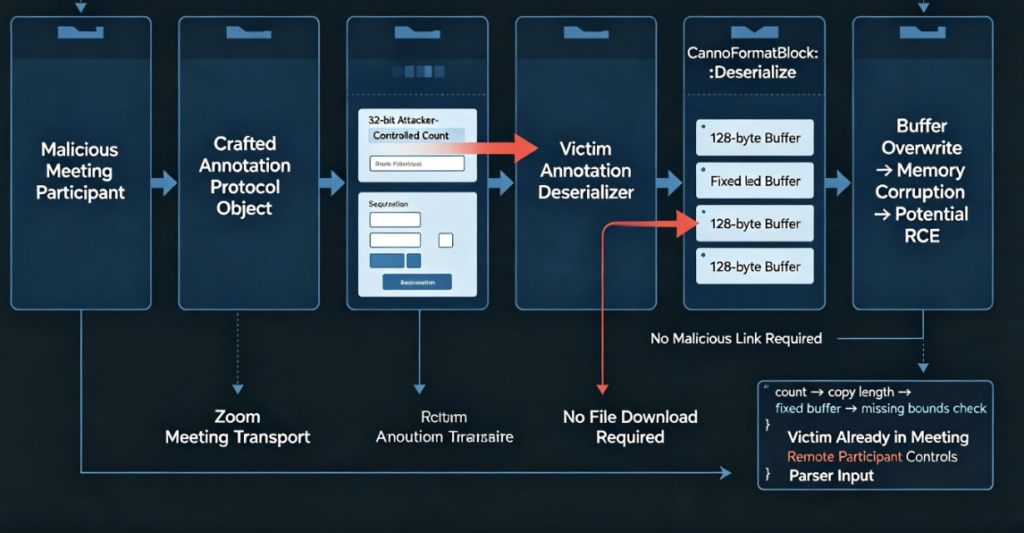
A buffer overwrite does not automatically equal reliable RCE.
Modern operating systems deploy multiple exploit mitigations designed to make memory corruption difficult to turn into arbitrary execution. Depending on the platform and process, those defenses can include address-space randomization, non-executable memory, stack protection, control-flow protections, pointer authentication, sandboxing, and other mechanisms.
The significance of CVE-2026-53413 is that the discovering researchers reported going beyond a simple crash.
Their analysis found both stack- and heap-related manifestations depending on how the relevant annotation object was instantiated. In the stack path described by A Security, the vulnerable formatting object could reside inside a larger local object associated with text deserialization. An oversized copy could therefore continue beyond the intended object into adjacent stack state. (A Security)
A Security reported demonstrating code execution on real Zoom clients and described exploitation approaches for multiple platforms. Its macOS work, for example, showed control over execution after corrupting stack state, while its Android research investigated heap shaping and corruption of C++ object metadata. (A Security)
The important defensive conclusion is not the specific exploit technique.
It is that the bug should not be treated as merely:
malformed annotation → Zoom crashes.
Zoom itself explicitly classifies the potential consequence as הפעלת קוד מרחוק. (Zoom)
The Protocol Design Issue Made the Memory Bug More Reachable
The missing bounds check explains the memory corruption.
It does not by itself explain why one meeting participant can reach another participant’s vulnerable parser.
A second piece of the research is therefore important.
A Security says Zoom’s annotation system uses different protocol messages for annotation objects and acknowledgements. During its reverse engineering, the team found that the receiving dispatch logic on the analyzed paths selected deserializers according to message type without sufficiently constraining which message types were appropriate for the sender’s meeting role. (A Security)
This matters because meeting collaboration is asymmetric.
A presenter sends shared content downstream.
Participants send certain collaboration data upstream.
Acknowledgement traffic also moves between those roles.
The researcher’s claim is that the parser boundary was too willing to interpret a received message according to its declared object type rather than strongly enforcing what that particular channel and sender role should have been permitted to deliver. (A Security)
That converted what might otherwise have been a locally constrained parser weakness into an attack surface reachable through normal meeting communication.
This distinction is useful for security engineers:
Memory-safety bug
+
Network-reachable parser
+
Insufficient semantic validation
=
Remote exploitation path
Removing any one of those conditions can materially change exploitability.
Why the Victim Does Not Need to Use Annotations
One of the most consequential findings from the research is that the vulnerable parser does not become safe merely because an individual participant never clicks the annotation toolbar.
According to A Security, the relevant annotation processing remained reachable through normal meeting protocol handling, even when the targeted user was not actively using the feature. (A Security)
This is a common misunderstanding in feature-rich desktop software.
From a UI perspective, a feature can appear disabled or unused.
From a protocol perspective, the receiving code may still exist and process messages because the client has to remain compatible with other participants.
The attack surface is therefore determined by what the application will parse, not only by what buttons the victim presses.
Presenter-to-Participant and Participant-to-Presenter Risk
The research also identified an interesting asymmetry.
A Security describes the screen-sharing participant as having communication paths toward the participants receiving the shared content, while an ordinary viewer has a corresponding path back toward the sharer. (A Security)
That means the security implications depend somewhat on meeting position.
A malicious participant may be able to target the presenter.
A malicious presenter may have reach toward multiple viewers.
This is one reason a collaboration vulnerability can become especially dangerous in larger meetings. Instead of compromising an exposed network service and moving inward, the malicious party can potentially abuse an application-level trust relationship that has already been established among meeting attendees.
MS-ISAC similarly warned that exploitation could target meeting participants and noted the potential impact of malicious meeting traffic reaching multiple participants. (CIS)
CVE-2026-53413 vs. CVE-2026-53414 and CVE-2026-53415
CVE-2026-53413 was disclosed alongside related Zoom annotation vulnerabilities, and separating them is important.
CVE-2026-53413
This is the vulnerability covered by this article.
Zoom classifies it as a buffer overwrite caused by a missing bounds check in the annotator function. Potential impact is remote code execution. Zoom assigns CVSS 3.1 8.3 High. (Zoom)
CVE-2026-53414
CVE-2026-53414 concerns a separate buffer over-read in Zoom’s annotation processing.
A Security says the issue could expose data from receiver memory and potentially contribute information useful for bypassing memory-address randomization. Zoom’s own severity and impact assessment is more conservative than the researcher’s interpretation. (A Security)
CVE-2026-53415
CVE-2026-53415 is a separate use-after-free issue in the same broader annotation subsystem.
A Security described it as providing another potential path toward code execution. The research also notes that Zoom already knew about this issue when the researchers reported it, and Zoom credits its internal Offensive Security team for the CVE. (A Security)
These distinctions matter for patch guidance because the version that fixes CVE-2026-53413 is not necessarily the same threshold security teams should choose when eliminating the entire annotation vulnerability cluster.
CVSS 8.3 or 9.0?
Another source of confusion around CVE-2026-53413 is its severity score.
The authoritative Zoom advisory gives:
CVSS 3.1: 8.3 High
with the vector:
CVSS:3.1/AV:N/AC:H/PR:N/UI:R/S:C/C:H/I:H/A:H
(Zoom)
A Security assessed the vulnerabilities differently under CVSS 4.0 and presented a 9.0 severity assessment. Some secondary reporting consequently describes the Zoom vulnerabilities as 9.0-rated issues. (Orca Security)
The safest way to report the number is therefore:
Zoom’s official score for CVE-2026-53413 is CVSS 3.1 8.3 High. The discovering researchers separately assessed the broader exploitability at 9.0 under CVSS 4.0.
Calling CVE-2026-53413 an “official CVSS 9.0 Critical vulnerability” would be inaccurate.
Why Does Zoom Mark User Interaction Required?
There is another apparent contradiction.
If the exploit is zero-click, why does Zoom’s CVSS vector contain:
UI:R
for User Interaction Required? (Zoom)
The most reasonable interpretation is that the two descriptions are measuring different stages of the attack.
The victim must participate in the relevant meeting context.
That participation can be treated as user interaction for CVSS scoring.
But once the victim is already in the meeting, the researchers’ demonstrated attack does not require another click, file open, confirmation, or annotation action. (A Security)
So both statements can coexist:
CVE-2026-53413 is not zero-interaction from an Internet-wide perspective.
But:
It can be zero-click after the target and attacker share the necessary Zoom meeting context.
That is the more precise way to describe the vulnerability.
Affected Zoom Products
Zoom’s revised ZSB-26015 bulletin lists the following affected product boundaries specifically for CVE-2026-53413:
| מוצר | Affected versions according to Zoom |
|---|---|
| Zoom Workplace | All supported platforms before 7.1.0 and 7.0.6 in their respective branches |
| Zoom Workplace VDI Client for Windows | Before 7.0.11 and 6.6.16 in their respective branches |
| Zoom Rooms | All supported platforms before 7.1.0 |
| Zoom Meeting SDK | All supported platforms before 7.1.0 |
| Zoom Video SDK | All supported platforms before 2.6.0 |
Zoom added the Video SDK to the affected-products list and corrected the Workplace version in an August 14 revision of ZSB-26015. (Zoom)
That revision is important because several early articles published immediately after disclosure contain slightly different version tables.
עבור CVE-2026-53413 itself, Zoom’s latest ZSB-26015 should be treated as the authoritative source.
Should Enterprises Stop at Zoom Workplace 7.1.0?
Not necessarily.
Zoom’s bulletin indicates that 7.1.0 closes CVE-2026-53413 on the main Workplace branch. (Zoom)
However, CVE-2026-53415—the second RCE-relevant annotation issue discussed by A Security—was addressed later. The researchers state that Zoom closed that issue client-side in version 7.1.5. (A Security)
That creates two different remediation questions:
Question 1:
"What version fixes CVE-2026-53413?"

Answer:
Follow ZSB-26015; for the main Workplace branch,
the boundary is 7.1.0.

Question 2:
"What version should I deploy to address
the complete recently disclosed annotation attack cluster?"

Answer:
Use the latest vendor-supported Zoom version rather
than deliberately stopping at the minimum version
for only CVE-2026-53413.
Zoom itself recommends updating to the latest version to receive current fixes and security improvements. (Zoom)
For production security operations, “patched for this single CVE” and “fully current” should not be treated as synonymous.
The E2EE Paradox
One of the most interesting aspects of the Zoom annotation vulnerabilities concerns end-to-end encryption.
Normally, E2EE is considered a stronger confidentiality property because intermediary servers cannot inspect meeting content.
But that can create an unusual defensive tradeoff when the security control itself depends on server-side inspection.
A Security says Zoom deployed a server-side mitigation capable of filtering malicious annotation messages for older clients. According to the researchers, that protection cannot operate in the same way when the server cannot inspect E2EE-protected content. (A Security)
This does לא mean encryption caused CVE-2026-53413.
The vulnerable client parser is the root problem.
And it certainly does not mean E2EE is generally unsafe.
Instead, it demonstrates a more subtle principle:
Encryption protects data from intermediaries, but it also prevents those intermediaries from applying content-aware security inspection.
In this attack model, the attacker is already a legitimate cryptographic endpoint inside the meeting.
Encryption therefore does not make the malicious annotation object trustworthy.
A simplified model looks like this:
Normal encrypted meeting
Attacker
   ↓
Encrypted transport
   ↓
Zoom service
   ↓
Possible protocol filtering
   ↓
Victim

E2EE meeting
Attacker
   ↓
End-to-end encrypted malicious object
   ↓
Zoom service cannot inspect plaintext
   ↓
Victim decrypts object
   ↓
Vulnerable parser processes it
The permanent solution is still client-side memory safety and input validation—not relying on the transport intermediary to sanitize hostile protocol objects.
Was CVE-2026-53413 Exploited in the Wild?
At the time of the public disclosure, there were no public reports of CVE-2026-53413 exploitation in the wild, according to the MS-ISAC advisory. (CIS)
The Hacker News likewise reported at publication that the disclosed Zoom annotation CVEs were not present in CISA’s Known Exploited Vulnerabilities catalog. (חדשות ההאקרים)
That should not be interpreted as evidence that delaying remediation is safe.
Public disclosure provides defenders with technical knowledge—but it also gives exploit developers a significantly narrower search space. In this case, the vulnerability class, affected component, version boundaries, and substantial technical research have already been published.
For a network-reachable memory corruption vulnerability with demonstrated RCE potential, patch prioritization should therefore be based primarily on exposure and impact, not on waiting for confirmed mass exploitation.
Why Meeting Access Is Now a Security Boundary
Historically, organizations have often treated meeting access as a privacy and disruption problem.
Waiting Rooms prevent unwanted guests.
Passcodes reduce “Zoom bombing.”
Authenticated-user requirements make meeting links harder to abuse.
CVE-2026-53413 changes the consequences of getting that boundary wrong.
If a meeting participant can potentially supply data to a memory-unsafe parser running on other endpoints, then deciding who can enter the meeting becomes part of endpoint security.
The trust model changes from:
Unknown attendee
→ might disrupt meeting
אל:
Unknown attendee
→ controls protocol input
→ input reaches native parser
→ parser vulnerability
→ potential endpoint compromise
This is why organizations should view meeting invitations, external-participant policies, leaked links, recurring meeting IDs, and waiting-room configuration as part of the attack surface.
They remain secondary controls, however.
They reduce נגישות.
They do not repair CVE-2026-53413.
Enterprise Mitigation Priority
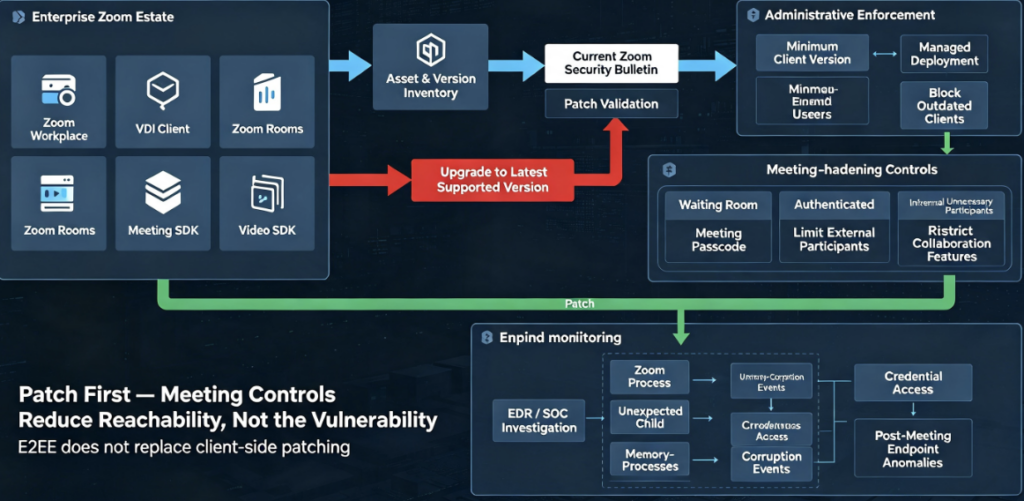
The first action is straightforward:
patch the Zoom software.
Zoom explicitly recommends installing current updates, and MS-ISAC likewise recommends applying the relevant vendor updates promptly. (Zoom)
For managed environments, remediation should include more than sending an email asking employees to upgrade.
Organizations should determine:
- which Zoom products exist,
- which versions are running,
- which unmanaged or external devices can still enter sensitive meetings,
- whether VDI, Rooms, SDK deployments, or embedded applications are being overlooked,
- and whether policy actually blocks vulnerable versions after the remediation window.
Zoom provides administrative functionality for requiring minimum client versions and can apply minimum-version requirements to internal users or, depending on configuration, external meeting participants. Administrators can also use Zoom’s dashboard to understand client-version distribution. (Zoom)
That is particularly valuable for CVE-2026-53413 because simply patching corporate laptops does not necessarily address every endpoint interacting with an organization’s meetings.
A Practical CVE-2026-53413 Remediation Workflow
Security teams can structure the response around four phases.
1. Inventory
Identify:
Zoom Workplace
Zoom Workplace VDI Client
Zoom Rooms
Zoom Meeting SDK deployments
Zoom Video SDK deployments
Do not assume your normal endpoint-management inventory captures SDK-based Zoom integrations.
The official ZSB-26015 scope includes all of these product classes. (Zoom)
2. Version Validation
Compare discovered installations against the latest ZSB-26015 boundaries.
For CVE-2026-53413 specifically, the August 14 revision is preferable to version tables copied from early disclosure articles because Zoom changed the Workplace information and added Zoom Video SDK to the affected-products list. (Zoom)
3. Upgrade
Deploy the latest approved Zoom release instead of deliberately targeting the oldest version that fixes only CVE-2026-53413.
This reduces exposure to the adjacent annotation vulnerabilities disclosed at the same time and to other security fixes incorporated into newer releases.
4. Enforce
After the deployment window, prevent vulnerable client versions from continuing to participate where administrative Zoom controls allow it.
Zoom provides account and group settings for requiring specified minimum client versions. (Zoom)
This final enforcement step is often what separates a patch campaign from an actual vulnerability closure.
Should You Disable Meeting Annotations?
Temporarily reducing annotation functionality can shrink attack surface while a fleet is being patched.
A Security recommends considering restrictions on annotations and other optional high-interaction collaboration capabilities while vulnerable endpoints remain. (A Security)
However, disabling a visible UI control should not be treated as a substitute for deploying the fixed software unless Zoom explicitly documents the configuration as eliminating the vulnerable parsing path for your environment.
This distinction is important because the researchers specifically reported that the vulnerable annotation functionality could remain relevant even when the victim was not actively using the annotation tool. (A Security)
Patch first. Reduce attack surface second.
Meeting Hardening After CVE-2026-53413
Once patching is underway, organizations should reconsider who can reach sensitive collaboration sessions.
Useful controls include:
- waiting rooms,
- passcodes,
- authenticated-user requirements,
- avoiding publicly exposed persistent meeting links,
- limiting unnecessary screen-sharing privileges,
- reducing optional collaboration features that the organization does not use.
A Security explicitly recommends stronger join controls and limiting unnecessary collaboration features as defense-in-depth measures. (A Security)
These mitigations are valuable because CVE-2026-53413 requires meeting-level reachability.
But they are not perfect.
A legitimate contractor can become malicious.
A trusted participant’s account can be compromised.
A meeting link can be forwarded.
A vendor endpoint can be taken over.
An attacker can socially engineer their way into a call.
Security engineering therefore should not assume:
participant authenticated
=
participant protocol data trusted
Those are different trust domains.
Detection Is Harder Than Patching
CVE-2026-53413 also illustrates why endpoint detection cannot replace preventive remediation.
At the beginning of exploitation, the network traffic may resemble normal Zoom meeting communication.
The application is legitimate.
The connection is legitimate.
The attacker may be a legitimate meeting participant.
The feature being exercised is legitimate collaboration functionality.
The malicious property exists inside structured application protocol data that eventually reaches a vulnerable memory operation.
That makes traditional network indicators much less useful than they would be for an exploit delivered through a suspicious executable or obviously malicious URL.
Organizations should therefore prioritize version-based exposure identification.
For retrospective hunting, useful endpoint evidence could include unexpected Zoom process crashes, memory-corruption events, anomalous child-process behavior, unusual execution originating from a Zoom process, unexpected credential access, suspicious persistence immediately following meeting sessions, or other post-exploitation activity.
Those signals indicate possible exploitation behavior rather than providing a unique CVE-2026-53413 signature.
A clean endpoint after an apparently normal meeting should therefore not be interpreted as proof that an unpatched Zoom client was safe.
Why Native Collaboration Parsers Deserve More Security Attention
CVE-2026-53413 belongs to a broader class of vulnerabilities that security teams repeatedly underestimate.
Modern collaboration applications process enormous amounts of attacker-influenced structured content:
video
audio
images
documents
chat
emoji
reactions
screen sharing
annotations
whiteboards
remote-control messages
meeting metadata
captions
file transfers
extension data
Many of these formats eventually cross into performance-sensitive native code.
From an attacker’s perspective, each parser is an input surface.
From a developer’s perspective, it may look like an implementation detail.
That difference in perspective is precisely why parser bugs remain so valuable.
The lesson from CVE-2026-53413 is not simply “Zoom had a buffer overflow.”
It is:
Every automatic parser reachable from another participant should be treated almost like a network service.
The fact that the bytes arrive through an authenticated collaboration session does not make them safe.
Length Fields Are Security Boundaries
At the implementation level, CVE-2026-53413 demonstrates one of the oldest principles in software security.
Never trust a length supplied by an untrusted peer.
Whenever a parser processes something conceptually similar to:
[length][data]
security depends on validating at least:
length <= available_input
length <= destination_capacity
length does not overflow arithmetic
length matches encoding assumptions
length remains valid across type conversion
The researcher’s description indicates that the vulnerable annotation parser failed the destination-capacity condition for the affected formatting buffers. (A Security)
Memory-safe languages can eliminate large classes of these failures, but native parsers still require systematic validation, fuzzing, sanitizers, protocol-state testing, and careful ownership rules.
Semantic Validation Matters Too
CVE-2026-53413 also demonstrates that memory safety is only one layer.
Suppose the buffer had been perfectly bounds checked.
A participant may still have been able to send message types across a channel that should semantically have been restricted.
Conversely, suppose sender-role validation had been perfect.
The vulnerable deserializer might have become significantly harder or impossible for the wrong participant to reach.
Secure protocol implementation therefore requires two different questions:
Is this message memory-safe to parse?
and:
Should this sender be allowed to send this
message in this protocol state at all?
Both matter.
This principle is particularly relevant to collaboration platforms because their protocols are inherently stateful and role-sensitive.
Hosts, presenters, viewers, moderators, bots, guests, and applications may legitimately have different communication capabilities.
The parser should enforce those differences rather than merely trusting the opcode embedded in the incoming message.
Why This Vulnerability Matters Beyond Zoom
CVE-2026-53413 should be understood as a collaboration-software security problem, not just a Zoom problem.
Enterprise users increasingly run applications that automatically accept complex data from semi-trusted remote parties:
video conferencing clients
team collaboration applications
document editors
browser-based workspaces
remote-support tools
code collaboration platforms
AI agents
email clients
design tools
whiteboards
The trust model is often:
“The remote person is allowed into the workspace, therefore their application data can be processed.”
That assumption is unsafe.
Authentication answers:
Who is this participant?
Authorization answers:
What is this participant allowed to do?
Memory safety answers:
Can malicious data from that participant corrupt the application itself?
These are separate security properties.
CVE-2026-53413 failed primarily at the third boundary, with protocol-state behavior making the vulnerable parser especially reachable.
AI-Assisted Vulnerability Research and the Zoomsday Disclosure
The disclosure also attracted attention because A Security says AI played a major role in the research process.
According to the company’s published account, the researchers started with a large native-code attack surface, built automated prioritization around functions potentially connected to risky operations, discovered that their first approach was too focused on locally reachable JNI paths, and then changed strategy toward tracing what another meeting participant could actually reach through live protocol behavior. (A Security)
A Security claims the overall process from identifying the relevant vulnerability to developing a working exploit took less than 24 hours and fewer than 20 prompts using publicly accessible AI models. (A Security)
That claim comes from the research organization itself and should be attributed as such rather than presented as independently benchmarked evidence.
The technical takeaway, however, is valuable.
AI did not simply ask:
"Find buffer overflows."
The useful process reportedly involved:
Attack-surface mapping
        ↓
Reachability analysis
        ↓
Dynamic tracing
        ↓
Protocol reconstruction
        ↓
Deserializer auditing
        ↓
Memory-corruption analysis
        ↓
Exploitability validation
This is increasingly what effective security automation looks like: not replacing security reasoning with one model prompt, but using models, reverse-engineering tools, dynamic instrumentation, and specialized analysis in an iterative workflow.
Disclosure Timeline
A Security published the following coordinated disclosure timeline:
| Date | Event |
|---|---|
| June 8, 2026 | Researchers identify the annotation memory-corruption vulnerability |
| June 9, 2026 | Researchers report confirming RCE against Zoom client 7.0.5 |
| June 10, 2026 | Vulnerability reported to Zoom |
| June 11, 2026 | Zoom acknowledges the report |
| June 22, 2026 | Client-side fixes for CVE-2026-53413 and CVE-2026-53414 shipped in 7.1.0 |
| July 15, 2026 | Zoom deploys server-side mitigation for earlier clients |
| July 20, 2026 | Client-side fix associated with CVE-2026-53415 shipped in 7.1.5 |
| August 11, 2026 | Public disclosure |
| August 14, 2026 | Zoom revises ZSB-26015, correcting product information and adding Video SDK |
The June-to-August timeline is documented by the discovering researchers, while Zoom’s bulletin confirms the August 11 publication and August 14 revision dates for CVE-2026-53413. (A Security)
CVE-2026-53413 FAQ
Is CVE-2026-53413 really a Zoom zero-click vulnerability?
Within the demonstrated meeting attack model, yes: the victim reportedly does not need to click a link, download a file, accept a prompt, or interact with annotation content after the attacker has the required meeting access. However, the attacker must first reach the same relevant meeting context, so “zero-click” should not be interpreted as arbitrary Internet-wide exploitation. (A Security)
What causes CVE-2026-53413?
Zoom describes the vulnerability as a missing bounds check in the annotator function resulting in a buffer overwrite. A Security’s technical analysis attributes the underlying issue to attacker-controlled length values being used while copying data into fixed-size formatting buffers during annotation-object deserialization. (Zoom)
Can CVE-2026-53413 lead to remote code execution?
Yes. Zoom’s security bulletin explicitly states that the buffer overwrite may allow a meeting participant to achieve remote code execution against another participant through network access. (Zoom)
Does the victim need to enable annotation?
The researchers report that the vulnerable processing could be reached without the victim actively using the annotation tool. The issue is therefore better understood as an annotation-protocol parsing vulnerability rather than a vulnerability that only exists when the victim manually creates an annotation. (A Security)
What is the CVSS score?
Zoom’s official CVSS 3.1 score is 8.3 High. A Security separately assessed the issue at 9.0 using CVSS 4.0. Those two numbers should not be presented as the same vendor score. (zoom.com)
Is CVE-2026-53413 unauthenticated?
Zoom’s bulletin uses PR:N, but practical exploitation described by the researchers requires the attacker to become a participant in the relevant meeting. That meeting access requirement is an important practical prerequisite even though the vulnerable parser does not require a separate privileged Zoom role. (Zoom)
Which Zoom Workplace version fixes CVE-2026-53413?
According to Zoom’s revised ZSB-26015, Zoom Workplace versions before 7.1.0 and 7.0.6 in their respective branches are affected. Administrators should still prefer the latest supported Zoom release rather than intentionally stopping at the minimum CVE-specific fixed build. (Zoom)
Why do some articles say Zoom 7.1.5?
Because CVE-2026-53413 was disclosed as part of a larger annotation vulnerability cluster. A Security states that the later CVE-2026-53415 issue was fully closed client-side in version 7.1.5. The latest Zoom ZSB-26015, however, lists 7.1.0 as the relevant main-branch boundary specifically for CVE-2026-53413. (Zoom)
Is CVE-2026-53413 being exploited?
No confirmed in-the-wild exploitation had been publicly reported when MS-ISAC issued its August 12 advisory. (CIS)
Does E2EE protect against this attack?
Not inherently. The attacker in this scenario is already a meeting endpoint and therefore participates in the encrypted session. A Security further reports that Zoom’s server-side filtering mitigation could not inspect malicious annotation content in the same way when E2EE prevented server visibility, making client-side patching essential. (A Security)
Final Assessment
CVE-2026-53413 is a strong example of how a seemingly ordinary collaboration feature can become a high-impact remote attack surface.
The vulnerability is fundamentally a memory-safety failure: network-controlled length information reaches a fixed-size destination without sufficient bounds checking. But its real severity comes from the surrounding architecture.
Zoom annotation objects are structured data.
Remote participants can influence that data.
Receiving clients automatically deserialize it.
The vulnerable implementation crosses a memory boundary.
And researchers demonstrated that this condition could be developed beyond a crash into remote code execution. (Zoom)
For defenders, the remediation hierarchy is clear:
Update vulnerable Zoom clients first.
Then verify the upgrade rather than assuming auto-update succeeded.
Enforce appropriate minimum client versions where possible.
Inventory Zoom Rooms, VDI, Meeting SDK, and Video SDK deployments in addition to ordinary employee clients.
Harden meeting admission and external-participant controls.
Reduce unnecessary collaboration features where they are not required.
And treat meeting participants as authenticated but potentially hostile protocol peers.
That final principle extends far beyond CVE-2026-53413.
Modern collaboration software is effectively a network service running on every employee endpoint. Every annotation, document, media frame, remote-control request, whiteboard object, and collaboration message represents bytes that another party can influence.
Security architecture should treat those parsers accordingly. (Zoom)


 Hebrew
  English
  German
  French
  Spanish
  Portuguese
  Japanese
  Korean
  Hindi
Hindi  Arabic
  Turkish