
CVE-2026-58644 is a critical remote code execution vulnerability in on-premises Microsoft SharePoint Server. Microsoft describes the flaw as deserialization of untrusted data that can permit code execution over a network. The Microsoft-assigned CVSS 3.1 vector is AV:N/AC:L/PR:N/UI:N/S:U/C:H/I:H/A:H, producing a score of 9.8. Microsoft has marked the vulnerability as exploited, and CISA added it to the Known Exploited Vulnerabilities Catalog on July 16, 2026, with a remediation due date of July 19, 2026 for organizations subject to the applicable federal directive. (NVD)
The immediate defensive conclusion is straightforward: every organization operating SharePoint Server 2016, SharePoint Server 2019, or SharePoint Server Subscription Edition should identify every farm member, install the latest applicable July 2026 security updates, complete the SharePoint configuration upgrade, verify every node and database, and investigate systems that were reachable before remediation.
Installing a package on one server is not enough. A SharePoint farm can remain exposed or operationally inconsistent when another application server, web front end, language pack, database, disaster-recovery node, or server outside the normal load-balancing pool has not been updated. The response must therefore produce evidence at the farm, node, database, web application, and security-monitoring layers.
There is also an important inconsistency in the public vulnerability information. The Microsoft CNA record says an unauthorized attacker can exploit the flaw, and its CVSS vector specifies no privileges required. Some Microsoft-linked explanatory text and security-vendor summaries, however, describe exploitation by an authenticated user with at least Site Owner permissions. Defenders should not invent a technical explanation for this discrepancy, and they should not lower the priority of remediation while the records remain inconsistent. The vulnerability is actively exploited, remotely reachable, critical according to the current CNA score, and included in CISA’s KEV Catalog. Those facts are sufficient to justify emergency action. (NVD)
The operational decision in one page
The public record supports the following conclusions.
| Question | Current defensible answer |
|---|---|
| What is the weakness? | Deserialization of untrusted data, classified as CWE-502 |
| What can successful exploitation do? | Permit code execution on an affected SharePoint server |
| Is the attack network-based? | כן |
| Is user interaction required? | No according to the current Microsoft CVSS vector |
| Are privileges required? | The CNA vector says no, while other Microsoft-linked prose says an authenticated Site Owner may be required |
| Has exploitation been observed? | Yes, Microsoft marks the vulnerability as exploited |
| Is it in CISA KEV? | Yes, added July 16, 2026 |
| Which products are listed? | SharePoint Enterprise Server 2016, SharePoint Server 2019, and SharePoint Server Subscription Edition |
| Is SharePoint Online listed as affected? | לא |
| Are fixes available? | כן |
| Is installing the binary update alone sufficient? | No, SharePoint’s build-to-build configuration upgrade and farm-wide validation must also be completed |
| Is a public exploit required before responding? | לא |
| Should previously exposed systems be hunted for compromise? | כן |
CVE-2026-58644 was published on July 14, 2026. The NVD record lists affected versions below 16.0.5556.1005 for SharePoint Enterprise Server 2016, below 16.0.10417.20153 for SharePoint Server 2019, and below 16.0.19725.20384 for SharePoint Server Subscription Edition. Microsoft’s July 2026 update set provides newer farm baselines, so organizations should ordinarily deploy the latest applicable July packages rather than stopping at the minimum versions associated with this individual CVE. (NVD)
CISA’s catalog entry instructs affected federal organizations to apply vendor mitigations in accordance with Microsoft’s guidance and the requirements of BOD 26-04, including applicable forensic triage. It also states that use should be discontinued if mitigations are unavailable. Although the binding deadline does not apply to most private companies, inclusion in KEV is a strong evidence-based prioritization signal because the catalog is reserved for vulnerabilities known to have been exploited. (NVD)
What is confirmed, disputed, and not publicly known
Responsible analysis of a newly exploited vulnerability requires a clear boundary between confirmed facts, reasonable defensive inference, and unsupported speculation.
Confirmed facts
The following points are supported by the Microsoft CNA record, NVD, CISA, or Microsoft’s update documentation:
- The weakness is deserialization of untrusted data.
- The affected software is on-premises Microsoft SharePoint Server.
- Successful exploitation can lead to code execution over a network.
- Microsoft assigned CVSS 3.1 score 9.8.
- Microsoft has marked the vulnerability as exploited.
- CISA added it to KEV on July 16, 2026.
- Microsoft has released fixes for SharePoint Server 2016, 2019, and Subscription Edition.
- The current affected-product list does not name SharePoint Online.
- The July SharePoint updates must be deployed across the farm and followed by the required SharePoint upgrade process. (NVD)
The privilege discrepancy
The current CVE description says:
Deserialization of untrusted data in Microsoft Office SharePoint allows an unauthorized attacker to execute code over a network.
The Microsoft CNA CVSS vector includes PR:N, meaning no privileges are required under that scoring assessment. NVD also makes clear that it has not yet supplied an independent enrichment assessment; the displayed 9.8 score comes from Microsoft as the CNA. (NVD)
Tenable’s July 16 analysis, in contrast, says exploitation can be performed by an authenticated attacker with at least Site Owner permissions. Other security reporting has repeated similar Microsoft-supplied prose while also noting the 9.8 no-privileges vector. (Tenable®)
Several explanations are theoretically possible. A textual description may be stale. A CVSS vector may have been generated from a different attack path. Authentication may be bypassable through another vulnerability. “Unauthorized” may refer to an authenticated user acting beyond intended authorization rather than a user with no account. The flaw may have multiple reachable paths with different prerequisites.
None of those possibilities should be presented as fact without evidence.
The correct operational treatment is therefore:
- Preserve the discrepancy in internal risk documentation.
- Do not describe CVE-2026-58644 as a proven standalone pre-authentication exploit chain unless Microsoft publishes that detail.
- Do not assume Site Owner access is always required.
- Patch all affected systems regardless of their current authentication posture.
- Include both unauthenticated and authenticated request paths in defensive review.
- Investigate whether other exploited SharePoint vulnerabilities could have supplied the access needed to reach this flaw.
What is not publicly established
As of the current public reporting, Microsoft has not released enough technical detail to responsibly identify:
- The vulnerable SharePoint endpoint.
- The serialized data format.
- The exact vulnerable class or component.
- A working gadget chain.
- The request structure used in attacks.
- A reliable CVE-specific log signature.
- The initial threat actor or actors.
- The number of compromised organizations.
- Whether all observed exploitation used the same path.
- Whether exploitation always required a SharePoint account.
- Whether a particular post-exploitation payload is unique to this CVE.
Tenable reported on July 16 that no public proof of concept was available for the five SharePoint vulnerabilities covered in its advisory. That is a date-specific observation, not a guarantee that exploit code will remain unavailable. Private exploit development and real-world exploitation often precede public publication. (Tenable®)
This uncertainty should narrow technical claims, not delay remediation.
Timeline and KEV response
The short timeline is one reason CVE-2026-58644 requires immediate attention.
| Date | Development | Defensive meaning |
|---|---|---|
| July 14, 2026 | Microsoft published the vulnerability and released the July SharePoint updates | Patches became available |
| July 15, 2026 | Microsoft updated the advisory to indicate exploitation | Routine patching became incident-driven emergency remediation |
| July 16, 2026 | CISA added CVE-2026-58644 to KEV | Federal remediation and forensic-triage requirements were triggered |
| July 19, 2026 | KEV remediation due date | Extremely short response window reflects active risk |
Microsoft’s exploitation-status update came shortly after Patch Tuesday. That sequence means organizations cannot safely assume that installing the update during the next maintenance weekend is sufficient. A system that was reachable before patching may have been exposed during an unknown exploitation window.
A patch closes a vulnerability going forward. It does not answer whether a server was compromised before the patch.
Those are separate questions:
- Remediation question: Is vulnerable code still reachable?
- Incident-response question: Was the vulnerable system accessed or modified before remediation?
- Recovery question: Can the organization trust the current operating system, SharePoint binaries, configuration, identities, secrets, and connected systems?
A complete response should assign owners to all three.
Affected SharePoint versions and recommended baselines
The affected-version thresholds in the CVE record are:
| מוצר | Versions listed as affected | Minimum version listed outside the affected range |
|---|---|---|
| SharePoint Enterprise Server 2016 | Earlier than 16.0.5556.1005 | 16.0.5556.1005 |
| SharePoint Server 2019 | Earlier than 16.0.10417.20153 | 16.0.10417.20153 |
| SharePoint Server Subscription Edition | Earlier than 16.0.19725.20384 | 16.0.19725.20384 |
Those values answer a narrow vulnerability-record question: where does the affected version range end?
They do not necessarily describe the best production target on July 18, 2026.
Microsoft’s July 14 SharePoint release includes the following packages:
| מוצר | July 2026 package set | July update build | פעולה מומלצת |
|---|---|---|---|
| SharePoint Server 2016 | KB5002891 and applicable KB5002892 language-pack update | 16.0.5561.1001 | Install the complete applicable July update set across all farm members |
| SharePoint Server 2019 | KB5002883 and applicable KB5002885 language-pack update | 16.0.10417.20175 | Install the complete applicable July update set across all farm members |
| SharePoint Server Subscription Edition | KB5002882 | 16.0.19725.20434 | Install the current July security update after checking documented prerequisites |
Microsoft’s Office update index identifies the applicable SharePoint packages for Subscription Edition, Server 2019, and Server 2016. Microsoft documents build 16.0.19725.20434 for Subscription Edition, while the July 2016 and 2019 packages move those products beyond the minimum CVE-specific thresholds. (Microsoft Support)
The distinction matters because July’s packages address multiple SharePoint vulnerabilities. An organization that installs only enough updates to cross the CVE-2026-58644 minimum threshold could remain exposed to another flaw fixed by a later package.
Check prerequisites before installation
SharePoint updates can contain prerequisites and product-specific notes. For example, Microsoft states that Subscription Edition farms using SharePoint Workflow Manager must install the applicable Workflow Manager update before KB5002882. Microsoft also documents additional instructions for environments still using Classic Workflow Manager. (Microsoft Support)
Before installation, verify:
- SharePoint edition and patch history.
- Installed language packs.
- Workflow Manager version and topology.
- Search topology.
- Office Online Server integrations.
- Custom web parts and controls.
- Third-party SharePoint solutions.
- Antivirus exclusions and AMSI integration.
- Available disk space.
- Database backups.
- Configuration database health.
- Whether any server is already in an upgrade-required state.
- Whether a previous cumulative update failed.
- Whether disaster-recovery or standby servers are part of the same operational service.
A failed emergency update can create pressure to restore an older vulnerable snapshot. That is why backups, rollback planning, and pre-update health checks remain necessary even under a compressed deadline.
SharePoint 2016 and 2019 have reached end of support
Microsoft lists July 14, 2026 as the end of extended support for both SharePoint Server 2016 and SharePoint Server 2019. That date is the same day as the July security release. Organizations remaining on those products should treat the current emergency as both a patching event and a platform-lifecycle decision. (Microsoft Learn)
End of support changes the long-term risk calculation:
- Future security fixes may not be available through normal servicing.
- Newly discovered vulnerabilities may leave organizations without a standard vendor-supported remediation path.
- Compensating controls cannot reliably correct flaws inside unsupported product code.
- Emergency migration becomes harder after an incident than during planned modernization.
- Security teams may be forced to isolate business-critical services with little notice.
Installing the July update is necessary. It is not a durable strategy for running SharePoint 2016 or 2019 indefinitely.
How deserialization becomes remote code execution
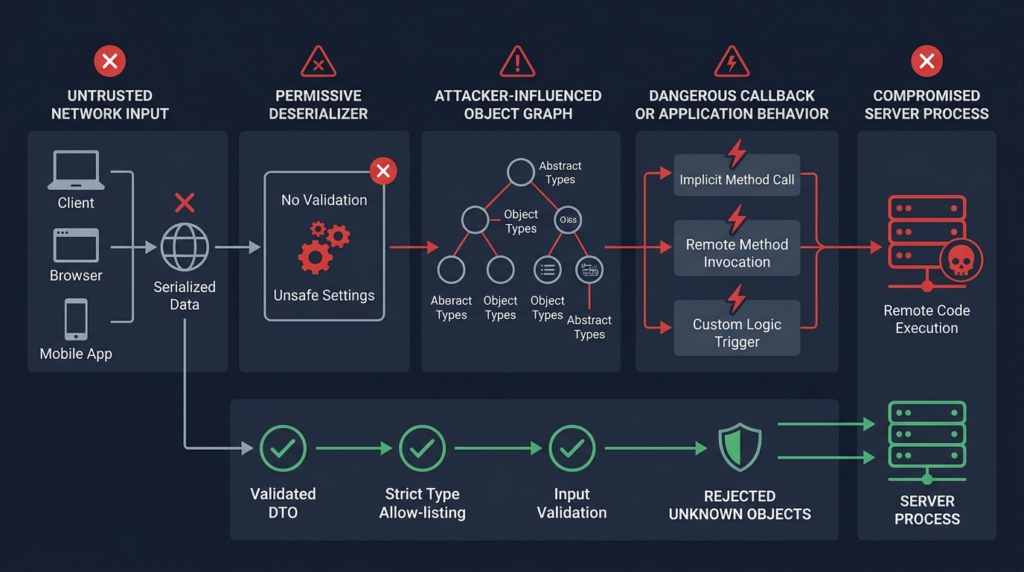
Serialization converts an in-memory object or structured state into a format that can be stored or transmitted. Deserialization reconstructs usable application data from that representation.
Legitimate use cases include:
- Passing data between application components.
- Storing session or workflow state.
- Caching application objects.
- Processing queued work.
- Exchanging structured messages.
- Persisting configuration or job parameters.
The security boundary becomes dangerous when data controlled by an untrusted party can influence more than plain values.
A safe parser might accept a fixed data model such as:
{
  "reportName": "quarterly-security-review",
  "format": "pdf"
}
The application expects two strings, validates them, and maps them to a predefined operation.
A dangerous design may permit the input to influence runtime types:
{
  "type": "Some.Runtime.Class",
  "properties": {
    "command": "attacker-controlled value"
  }
}
If the deserializer resolves arbitrary classes, invokes constructors, sets properties with side effects, executes callbacks, or traverses a dangerous object graph, data parsing can become behavior execution.
The critical trust-boundary failure
Deserialization vulnerabilities generally require some combination of the following conditions:
- Attacker influence over serialized inputThe attacker can directly submit data, modify a token, influence stored state, compromise an upstream service, or reach an endpoint that processes serialized content.
- A permissive deserializerThe application accepts unexpected types, polymorphic metadata, loosely constrained object graphs, or legacy formats that encode runtime type information.
- Reachable dangerous behaviorInstantiating or populating an object triggers file access, process creation, expression evaluation, network access, database operations, dynamic loading, or another security-sensitive action.
- A sufficiently privileged processThe application process can access valuable data or system resources. Even when the process is not a local administrator, its SharePoint and database permissions may provide significant impact.
- Insufficient integrity protectionSerialized state may lack a trustworthy signature, or the validation key may have been exposed.
- A reachable application pathThe attacker can cause the target component to deserialize the data under practical conditions.
CWE-502 describes the broad weakness as deserialization of untrusted data. Microsoft’s BinaryFormatter security guidance is even more direct for that specific .NET technology: unsafe deserialization can lead to denial of service, information disclosure, and remote code execution, and BinaryFormatter cannot be made secure for untrusted input. That guidance helps explain the class of risk, but it does not establish that CVE-2026-58644 specifically uses BinaryFormatter. Microsoft has not publicly disclosed that implementation detail. (CWE)
Object graphs and gadget chains
A gadget is a legitimate class or method sequence that performs an unintended security-sensitive action when reached through maliciously constructed object state. A gadget chain connects multiple behaviors so that deserialization produces an attacker-selected outcome.
The word “gadget” can make the exploit sound like hidden malware built into a library. That is usually the wrong mental model. The involved classes may be perfectly legitimate. The vulnerability arises because a deserializer gives untrusted data enough control to assemble and activate them in an unsafe context.
A simplified chain might involve:
- Input selects an unexpected object type.
- The deserializer creates the object.
- A property setter stores attacker-controlled state.
- A callback runs after deserialization.
- The callback invokes another component.
- The final component performs a sensitive action.
The actual CVE-2026-58644 chain has not been publicly documented in enough detail to reproduce responsibly. No endpoint, type, formatter, property, callback, or gadget should be asserted without an authoritative source.
Why signatures alone are fragile
A network signature may detect one known serialized representation while missing semantically equivalent forms. Attackers may alter:
- Whitespace.
- Field ordering.
- Encoding.
- Compression.
- Wrapper objects.
- Benign-looking properties.
- Transport methods.
- Authentication context.
- Type aliases.
- Serialization versions.
That does not make network detection useless. It means patching the vulnerable behavior is the primary control, while WAF and IDS rules provide supplementary visibility.
Why SharePoint code execution has a large blast radius
SharePoint is rarely an isolated web server. It often sits inside an enterprise trust fabric that includes:
- Active Directory identities.
- Service accounts.
- SQL Server databases.
- Document repositories.
- Search infrastructure.
- Workflow systems.
- Office integrations.
- Internal APIs.
- Business applications.
- Email and notification services.
- Backup systems.
- Reverse proxies and load balancers.
- Monitoring and management tools.
Code execution in a SharePoint worker process does not automatically grant unrestricted control of every connected system. Actual impact depends on the compromised process identity, server role, farm configuration, network segmentation, service-account permissions, application secrets, and post-exploitation controls.
Even so, the starting position can be valuable.
An attacker may be able to:
- Read data available to the compromised application pool.
- Access SharePoint configuration information.
- Interact with reachable databases under existing credentials.
- Modify web content or application files where permissions allow.
- Steal tokens or secrets exposed to the process.
- Use the server as a pivot into internal networks.
- Impersonate application behavior.
- Establish persistence.
- Disrupt collaboration and document workflows.
- Collect information for later identity attacks.
These are plausible consequences of server-side code execution. They should not be presented as confirmed CVE-2026-58644 post-exploitation behavior unless incident evidence supports that conclusion.
Internet-facing servers
A directly internet-accessible SharePoint farm deserves the highest immediate priority. Public exposure supplies the broadest attacker population, allows repeated testing, and reduces the defender’s ability to rely on upstream identity controls.
Public endpoints may include:
- Employee portals.
- Partner collaboration sites.
- Extranets.
- Federated authentication endpoints.
- Publishing sites.
- Legacy web applications.
- Reverse-proxied SharePoint paths.
- Alternate access mappings forgotten by the current operations team.
An organization should not classify a farm as internal solely because its primary URL is internal. External access may exist through a reverse proxy, application delivery controller, VPN portal, identity-aware proxy, legacy DNS record, or forgotten disaster-recovery address.
Authenticated internal reachability
If the Site Owner prerequisite described in some public sources is accurate for at least one path, authenticated attack scenarios remain serious.
Possible sources of authenticated access include:
- Compromised employee credentials.
- Malicious insiders.
- Partner accounts.
- Dormant accounts.
- Stolen browser sessions.
- Overprivileged service accounts.
- Existing access obtained through another SharePoint vulnerability.
- Accounts granted ownership of abandoned sites.
Site Owner is not the same as farm administrator, but site ownership is often delegated widely. A server-side deserialization flaw can transform an application-level role into code execution beyond the intended SharePoint authorization boundary.
Internal-only deployments
Internal-only systems are not exempt.
An attacker who has already compromised a workstation, VPN account, identity provider, partner network, or cloud-connected management service may use an internal SharePoint vulnerability for lateral movement. Internal application servers also tend to have fewer restrictive controls than public DMZ systems because administrators assume the surrounding network is trusted.
The correct priority is therefore based on reachability and attacker opportunity, not a binary internet-versus-internal label.
CVE-2026-58644 in the wider SharePoint exploitation wave
CVE-2026-58644 did not appear in an operational vacuum. CISA’s July 14 SharePoint alert addressed a group of vulnerabilities affecting supported on-premises SharePoint versions. Tenable summarized confirmed exploitation of CVE-2026-32201, CVE-2026-45659, and CVE-2026-56164, followed by Microsoft’s July 15 confirmation that CVE-2026-58644 was also exploited. (Tenable®)
According to the CISA activity summarized by Tenable, attackers combined several of the earlier flaws to gain unauthorized access, obtain code execution, steal IIS machine keys, use deserialization techniques for persistence, and deploy malware. Those observations concern the broader SharePoint campaign and must not automatically be attributed to CVE-2026-58644 alone. (Tenable®)
That distinction is important for incident analysis.
A defender who finds evidence of machine-key access cannot conclude:
CVE-2026-58644 was definitely the initial access vector.
The same evidence may be consistent with another SharePoint flaw, stolen credentials, a web shell, administrative abuse, or an older compromise.
Likewise, the absence of a known campaign-specific malware family does not rule out exploitation of CVE-2026-58644. An attacker may run only native commands, steal data without installing malware, or use a different payload.
Think in attack stages, not isolated CVE tickets
A realistic SharePoint attack may involve several stages:
| שלב | Example attacker objective | Relevant defensive question |
|---|---|---|
| Discovery | Identify SharePoint edition, build, and exposed services | Are all public and internal farm URLs inventoried? |
| Initial access | Reach a vulnerable function or obtain an account | Which network and identity paths could reach SharePoint? |
| Authorization bypass | Access functionality beyond intended privileges | Are other SharePoint authentication and elevation flaws patched? |
| Code execution | Run attacker-controlled behavior in a server process | Did w3wp.exe create unusual child processes or modify files? |
| Credential and key access | Obtain tokens, service credentials, or machine keys | Was sensitive configuration accessed or copied? |
| התמדה | Survive application-pool recycling or credential changes | Are there web shells, new assemblies, services, tasks, or altered configuration? |
| Lateral movement | Reach SQL, identity, file, or management systems | Which downstream systems trusted the SharePoint host or identity? |
| השפעה | Exfiltrate, encrypt, alter, or disrupt data | What data and business services were accessible? |
Patch programs organized around one CVE at a time can miss this chain. The July response should verify the complete current SharePoint update baseline, not merely search for one KB or one vulnerability identifier.
Asset discovery and exposure triage
A farm cannot be secured if the response team does not know every server that belongs to it.
Start with three inventories:
- Authoritative SharePoint inventoryEnumerate the farm through SharePoint itself, including web front ends, application servers, search nodes, distributed cache nodes, and servers with unusual or invalid roles.
- Infrastructure inventoryCompare SharePoint results with CMDB, virtualization, cloud, Active Directory, vulnerability-management, EDR, backup, and load-balancer records.
- Network exposure inventoryIdentify every address, hostname, proxy, NAT rule, alternate access mapping, VPN path, partner route, and management interface that can reach the farm.
Differences between these inventories are high-value findings.
Local SharePoint inventory commands
Run SharePoint Management Shell with appropriate administrative authorization:
Add-PSSnapin Microsoft.SharePoint.PowerShell -ErrorAction SilentlyContinue

$farm = Get-SPFarm

[pscustomobject]@{
    FarmBuild               = $farm.BuildVersion.ToString()
    FarmServers             = (Get-SPServer).Count
    ActiveFarmServers       = (
        Get-SPServer |
        Where-Object { $_.Role -ne "Invalid" }
    ).Count
    DatabasesNeedingUpgrade = (
        Get-SPDatabase |
        Where-Object { $_.NeedsUpgrade }
    ).Count
}

Get-SPServer |
    Select-Object Address, Role, Status |
    Sort-Object Address

Get-SPDatabase |
    Select-Object Name, TypeName, Server, NeedsUpgrade, Status |
    Sort-Object NeedsUpgrade -Descending, Name
These commands are inventory aids, not complete proof of remediation. In particular, (Get-SPFarm).BuildVersion does not independently prove that every server has every required package installed.
Collect web applications as well:
Get-SPWebApplication |
    Select-Object DisplayName, Url, ApplicationPool, Status |
    Sort-Object Url
For each URL, determine whether it is reachable from:
- The public internet.
- Partner networks.
- Employee VPNs.
- Wireless networks.
- Virtual desktop environments.
- Administrative networks.
- Cloud workloads.
- Development and test networks.
- Backup or disaster-recovery environments.
Exposure-based prioritization
| Exposure | Immediate priority | פעולה מומלצת |
|---|---|---|
| Direct internet access | Emergency | Restrict exposure if necessary, patch immediately, preserve logs, and hunt for compromise |
| Reverse proxy or WAF | Emergency | Patch immediately; do not assume the proxy blocks the unknown exploit path |
| Partner or extranet access | Emergency | Patch immediately and review partner identities and source networks |
| Broad VPN or employee access | גבוה מאוד | Patch immediately and include compromised-credential scenarios |
| Limited internal application access | גבוה | Patch rapidly and validate segmentation |
| Management-only access | גבוה | Patch rapidly and confirm that management identities and jump hosts are trustworthy |
| Offline standby or disaster recovery | גבוה | Update before activation and inspect whether it has been reachable |
| Decommissioned but powered-on server | Emergency if reachable | Isolate, collect evidence, and remove or patch it |
Look for the forgotten nodes
Commonly missed assets include:
- Servers removed from a load balancer but still reachable directly.
- Disaster-recovery nodes replicated from vulnerable production images.
- Test farms restored from old production backups.
- Search servers treated as backend infrastructure.
- Language-pack servers not included in the main update runbook.
- Old web front ends left online during migration.
- Cloned virtual machines with duplicate SharePoint configuration.
- Administrative URLs excluded from public DNS but reachable by IP.
- Farm members with a SharePoint role marked invalid.
- Servers excluded from vulnerability scans because of credential failures.
- Nodes not reporting to EDR.
A simple rule is useful: every host that can execute SharePoint binaries should either be validated as updated or isolated.
Patch deployment is a farm operation
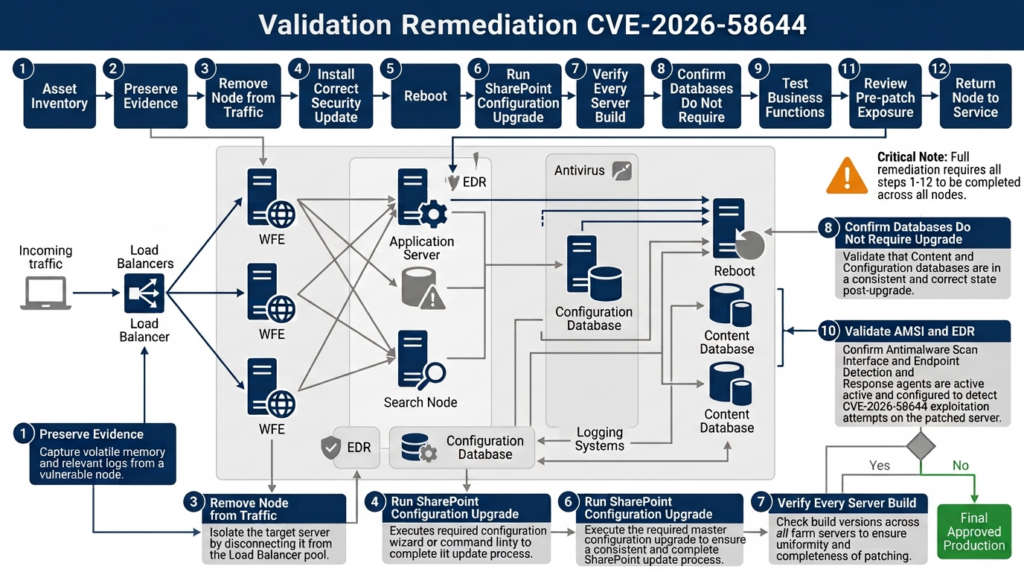
SharePoint patching has two broad phases:
- Installing updated binaries on the servers.
- Performing the SharePoint build-to-build upgrade so the farm, services, features, and databases are aligned with the new binaries.
Microsoft’s installation guidance instructs administrators to apply the software update to all application and web servers, then run the SharePoint Products Configuration Wizard or supported command-line process across the farm in the correct order. (Microsoft Learn)
A Windows update history entry proves only part of the work.
Step 1 — Preserve evidence before changing the environment
Before rebooting or modifying a potentially exposed server, preserve the logs needed to investigate the pre-patch window.
At minimum, retain:
- IIS logs.
- SharePoint ULS logs.
- Windows security, system, application, and PowerShell logs.
- Defender or third-party antivirus logs.
- EDR process, file, network, and identity telemetry.
- WAF and reverse-proxy logs.
- Load-balancer access records.
- Authentication-provider logs.
- Firewall and DNS records.
- Current process and network-connection data for suspicious hosts.
- File-system metadata for SharePoint web roots and relevant temporary directories.
- Current SharePoint build, patch, server, and database status.
Copy evidence to a protected system with documented timestamps. Avoid modifying suspicious files merely to inspect them.
Step 2 — Verify backup and recovery readiness
Confirm that the organization has:
- Recent configuration and content database backups.
- Tested database restoration procedures.
- Current encryption and service-account information.
- A rollback decision process.
- Access to installation media and update packages.
- A method to recover Central Administration.
- Contact paths for Microsoft support and third-party SharePoint vendors.
- A plan for rebuilding a server from trusted media if compromise is found.
A snapshot can assist recovery, but a snapshot of an already compromised system is not a trusted clean state.
Step 3 — Review update notes and dependencies
Read the Microsoft KB for the exact SharePoint edition.
For Subscription Edition, Microsoft’s KB5002882 documentation includes Workflow Manager prerequisites and notes the package build as 16.0.19725.20434. It also documents nonsecurity changes and known operational considerations. (Microsoft Support)
For SharePoint 2019, KB5002883 replaces the previous update KB5002874. Environments using language packs must also account for KB5002885 where applicable. (Microsoft Support)
For SharePoint 2016, review both the server and applicable language-pack packages listed in Microsoft’s July update index. (Microsoft Support)
Do not copy an update sequence from another edition without checking the official package documentation.
Step 4 — Patch every farm member
In a multi-server farm, use a controlled order that preserves service where possible while preventing mixed-version operation from continuing longer than necessary.
A typical process is:
- Remove a server from load balancing.
- Stop or drain relevant traffic according to the approved runbook.
- Install all required SharePoint packages.
- Reboot if required.
- Verify that the update package is present.
- Repeat for remaining application and web servers.
- Run the SharePoint configuration upgrade in the documented order.
- Validate the server before returning it to service.
The exact sequence depends on topology, search, distributed cache, high availability, Workflow Manager, and business continuity requirements.
Step 5 — Run the SharePoint configuration upgrade
Microsoft documents the following PSConfig pattern for SharePoint software-update completion:
Set-Location "$env:CommonProgramFiles\Microsoft Shared\Web Server Extensions\16\BIN"

.\PSConfig.exe `
  -cmd upgrade -inplace b2b -wait `
  -cmd applicationcontent -install `
  -cmd installfeatures `
  -cmd secureresources
Microsoft’s guidance describes running the SharePoint Products Configuration Wizard first on the server hosting Central Administration, then on other application and web servers according to the farm plan. Administrators should follow the current Microsoft procedure for their topology rather than treating the command as a universal one-line repair. (Microsoft Learn)
Before running PSConfig:
- Confirm backups.
- Confirm SQL connectivity.
- Confirm sufficient permissions.
- Verify that no previous upgrade is still pending.
- Record current database status.
- Coordinate application downtime.
- Ensure custom solutions are available.
- Confirm that all required binary updates have been installed.
After running it:
- Save the complete console output.
- Review the PSConfig log.
- Check SharePoint upgrade status.
- Verify service applications.
- Verify content databases.
- Test Central Administration.
- Test user-facing web applications.
- Confirm search and workflows.
- Compare farm members for consistency.
Step 6 — Do not return a node to service based on one green indicator
A server may show a successful package installation while:
- PSConfig failed.
- A content database still needs upgrade.
- A language-pack component remains old.
- A custom solution failed to deploy.
- Search topology is unhealthy.
- A timer service is stopped.
- The node cannot communicate with SQL.
- The server has not loaded the new assemblies.
- A load balancer is sending traffic to a different unpatched node.
- The farm build appears current but local files are inconsistent.
Return a node to production only after its evidence package is complete.
Patch validation that can survive an audit
Good validation answers several different questions.
| Validation layer | Question | Example evidence |
|---|---|---|
| Package layer | Was the applicable KB installed on this host? | Installed-package record, package log, file inventory |
| File layer | Are relevant SharePoint binaries at the expected version? | Signed file versions and hashes |
| Farm layer | Does the farm report the intended build? | Get-SPFarm output |
| Node layer | Does Central Administration show consistent patch status across servers? | Export or screenshot of patch-status page |
| Upgrade layer | Did PSConfig complete successfully? | PSConfig exit status and logs |
| Database layer | Do configuration, service, and content databases show no pending upgrade? | NeedsUpgrade results and upgrade-status output |
| Application layer | Do Central Administration and production web applications operate correctly? | Functional tests |
| שכבת אבטחה | Are AMSI, antivirus, EDR, and logging active? | Configuration and test results |
| Exposure layer | Are only approved interfaces reachable? | Firewall, proxy, DNS, and external-asset evidence |
| Incident layer | Was the pre-patch period reviewed for suspicious activity? | Hunt results and documented disposition |
Collect the farm state after remediation
Add-PSSnapin Microsoft.SharePoint.PowerShell -ErrorAction SilentlyContinue

$timestamp = Get-Date -Format "yyyyMMdd-HHmmss"
$outputDir = "C:\SecurityEvidence\SharePoint-$timestamp"
New-Item -Path $outputDir -ItemType Directory -Force | Out-Null

(Get-SPFarm).BuildVersion.ToString() |
    Out-File "$outputDir\farm-build.txt"

Get-SPServer |
    Select-Object Address, Role, Status |
    Export-Csv "$outputDir\farm-servers.csv" -NoTypeInformation

Get-SPDatabase |
    Select-Object Name, TypeName, Server, NeedsUpgrade, Status |
    Export-Csv "$outputDir\database-status.csv" -NoTypeInformation

Get-SPWebApplication |
    Select-Object DisplayName, Url, ApplicationPool, Status |
    Export-Csv "$outputDir\web-applications.csv" -NoTypeInformation

Get-SPPendingUpgradeActions -Recursive |
    Out-File "$outputDir\pending-upgrade-actions.txt" -Width 4096
Run this only in an authorized administrative context. Protect the output because it reveals internal topology and application details.
Review Central Administration
Use the Upgrade and Migration pages in Central Administration to review:
- Product and patch installation status.
- Upgrade status.
- Pending actions.
- Failed upgrade sessions.
- Database upgrade requirements.
The patch-status page helps identify a server whose installed products or packages differ from the rest of the farm. The upgrade-status page helps determine whether build-to-build upgrade actions completed. Microsoft documents these interfaces as primary SharePoint update-verification tools. (Microsoft Learn)
Review PSConfig and ULS logs
SharePoint diagnostic logs are normally stored below:
%COMMONPROGRAMFILES%\Microsoft Shared\Web Server Extensions\16\LOGS
Search the relevant update window for:
ERRExceptionשדרוגFailedMissingמאגר מידעSolutionתכונהAccess denied
A keyword match is not automatically a failed upgrade. Correlate entries by correlation ID, timestamp, server, and operation.
Verify every node independently
For each server, record:
- Hostname.
- SharePoint role.
- Operating-system status.
- Installed July KBs.
- Reboot time.
- Relevant file versions.
- PSConfig completion.
- Central Administration patch status.
- EDR status.
- Antivirus and AMSI status.
- Load-balancer state.
- Functional-test result.
- Investigator or administrator name.
- Timestamp.
A spreadsheet with one row per server is more defensible than a ticket saying “SharePoint patched.”
Validate business functionality
Security updates can expose pre-existing fragility in custom SharePoint deployments. Test:
- Authentication.
- Site browsing.
- Document upload and download.
- Search.
- Workflows.
- Forms.
- Custom web parts.
- Office Online integration.
- Notifications.
- Scheduled jobs.
- API consumers.
- Partner access.
- Backup jobs.
- Monitoring.
- Administrative functions.
Functional failure does not justify restoring a vulnerable package without compensating isolation and an approved risk decision.
AMSI integration and request-body scanning
Microsoft integrates the Windows Antimalware Scan Interface with SharePoint Server so an AMSI-capable antimalware engine can inspect HTTP and HTTPS requests handled by SharePoint. Microsoft states that the integration applies to SharePoint Server 2016, SharePoint Server 2019, and Subscription Edition, but not SharePoint Online. (Microsoft Learn)
AMSI can help block malicious request content before it reaches a vulnerable application path. It is especially useful when:
- A signature or behavioral rule becomes available before every server is patched.
- A new exploit variant targets a known request pattern.
- An attacker submits suspicious encoded or serialized content.
- The security team needs telemetry about blocked application-layer payloads.
AMSI does not remove the vulnerable code and must not be used as a reason to defer the update.
Prerequisites
Microsoft documents prerequisites that include:
- Windows Server 2016 or later.
- A compatible AMSI-capable antivirus engine.
- Supported minimum SharePoint builds.
- Microsoft Defender Antivirus engine version
1.1.18300.4or later when Defender is used.
Microsoft also states that, beginning with the September 2025 public update, SharePoint AMSI integration is mandatory and cannot be deactivated. Subscription Edition supports additional request-body scanning modes, while SharePoint 2016 and 2019 do not receive the same full body-scanning feature set. (Microsoft Learn)
Check and configure body scanning on Subscription Edition
On a supported Subscription Edition deployment, an authorized administrator can inspect the web application and set the body scan mode.
Add-PSSnapin Microsoft.SharePoint.PowerShell -ErrorAction SilentlyContinue

$webAppUrl = "https://sharepoint.example.test"
$webApp = Get-SPWebApplication -Identity $webAppUrl

$webApp.AMSIBodyScanMode = 2
$webApp.Update()
Microsoft documents these general values:
0— Off1— Balanced2— Full
Full scanning provides greater request-body inspection but can increase CPU use and request latency. Measure:
- CPU utilization.
- Request duration.
- Upload performance.
- Antivirus scan latency.
- Timeout rates.
- Application-pool recycling.
- WAF and proxy timeouts.
- Business workflow behavior.
Do not disable inspection merely because an application generates a false positive. First determine whether the request is safe, whether the application can be changed, and whether a narrowly scoped vendor-supported exception is available.
Use Microsoft’s harmless AMSI test only in an authorized environment
Microsoft provides a non-malicious test string for confirming that SharePoint AMSI inspection is active:
$testString = 'amsiscantest:x5opap4pzx54p7cc7$eicar-standard-antivirus-test-fileh+h*'

Invoke-WebRequest `
    -Uri "https://sharepoint.example.test/sites/security?$testString" `
    -Method GET
Use a test URL owned by the organization. Do not aim the request at a third-party server.
The string is designed to trigger a detection without containing executable malware. Microsoft documents the expected Defender detection as Exploit:Script/SharePointEicar.A. A successful block confirms that the test path reached AMSI, but it does not prove that every request body, every web application, or every exploit variation will be detected. (Microsoft Learn)
A useful AMSI validation record includes:
- Test date.
- Target web application.
- SharePoint build.
- AMSI mode.
- Antivirus engine and signature version.
- HTTP response.
- Defender alert identifier.
- Server that processed the request.
- Screenshot or exported alert.
- Confirmation that the test string was not added to a broad exclusion.
Safe local demonstration of the design error
The following demonstration does not exploit SharePoint and is not a CVE-2026-58644 proof of concept.
It:
- Runs locally.
- Makes no network connection.
- Contains no SharePoint endpoint.
- Contains no real gadget chain.
- Executes no operating-system command.
- Creates no file.
- Accesses no credential.
- Attempts no privilege escalation.
- Does not reproduce Microsoft’s implementation.
Its purpose is to show one conceptual danger: allowing untrusted input to select a runtime object can let data control application behavior.
Toy project
Create a local console project:
dotnet new console -n SafeDeserializationDemo
cd SafeDeserializationDemo
Replace Program.cs with the following intentionally unsafe toy design:
using System.Text.Json;

public interface IJob
{
    void Run();
}

public sealed class ReportJob : IJob
{
    public void Run()
    {
        Console.WriteLine("Generating a harmless patch validation report.");
    }
}

public sealed class SimulatedAdminJob : IJob
{
    public void Run()
    {
        Console.WriteLine(
            "SIMULATION ONLY: untrusted type selection reached a privileged branch."
        );
    }
}

var untrustedJson = """
{
  "type": "SimulatedAdminJob"
}
""";

using var document = JsonDocument.Parse(untrustedJson);

string? requestedType = document.RootElement
    .GetProperty("type")
    .GetString();

var objectFactories =
    new Dictionary<string, Func<IJob>>(StringComparer.OrdinalIgnoreCase)
    {
        ["ReportJob"] = () => new ReportJob(),
        ["SimulatedAdminJob"] = () => new SimulatedAdminJob()
    };

if (requestedType is null ||
    !objectFactories.TryGetValue(requestedType, out Func<IJob>? factory))
{
    throw new InvalidDataException("Unknown job type.");
}

IJob job = factory();
job.Run();
Run it:
dotnet run
The output is:
SIMULATION ONLY: untrusted type selection reached a privileged branch.
Nothing dangerous happened. The “privileged” action is only a console message.
The security lesson is that the input was supposed to describe data, yet its סוג value selected an application behavior. In a real vulnerable application, the corresponding object might perform a sensitive action during construction, property assignment, callback processing, or later execution.
The toy example still uses an explicit dictionary rather than unrestricted reflection. That makes it far safer than a real arbitrary-type deserializer, but the design remains wrong because an untrusted user can choose an internal operation that should not be externally selectable.
Safer design with a fixed data contract
Replace the program with a fixed request model:
using System.Text.Json;

public sealed record ReportRequest(string ReportName);

var untrustedJson = """
{
  "reportName": "patch-validation"
}
""";

var options = new JsonSerializerOptions
{
    PropertyNameCaseInsensitive = true
};

ReportRequest? request =
    JsonSerializer.Deserialize<ReportRequest>(untrustedJson, options);

if (request is null)
{
    throw new InvalidDataException("The request is empty.");
}

string[] allowedReports =
{
    "patch-validation",
    "amsi-status"
};

if (!allowedReports.Contains(
        request.ReportName,
        StringComparer.OrdinalIgnoreCase))
{
    throw new InvalidDataException("Unsupported report.");
}

Console.WriteLine($"Generating report: {request.ReportName}");
This design changes the trust relationship:
- The input supplies a plain value.
- The application uses a fixed DTO.
- The input cannot name a runtime type.
- The application validates the value against an allow-list.
- No constructor or callback is selected by the caller.
- Unknown operations fail closed.
A stronger request envelope
Real applications often need multiple operations. Use an explicit command vocabulary rather than arbitrary class names:
using System.Text.Json;
using System.Text.Json.Serialization;

[JsonConverter(typeof(JsonStringEnumConverter))]
public enum RequestedOperation
{
    PatchValidation,
    AmsiStatus
}

public sealed record SecurityRequest(
    RequestedOperation Operation,
    string TargetEnvironment
);

var json = """
{
  "operation": "PatchValidation",
  "targetEnvironment": "lab"
}
""";

var options = new JsonSerializerOptions
{
    PropertyNameCaseInsensitive = true,
    Converters =
    {
        new JsonStringEnumConverter()
    }
};

SecurityRequest? request =
    JsonSerializer.Deserialize<SecurityRequest>(json, options);

if (request is null)
{
    throw new InvalidDataException("Invalid request.");
}

if (!string.Equals(
        request.TargetEnvironment,
        "lab",
        StringComparison.OrdinalIgnoreCase))
{
    throw new InvalidDataException(
        "Only the isolated lab environment is accepted."
    );
}

switch (request.Operation)
{
    case RequestedOperation.PatchValidation:
        Console.WriteLine("Running a local patch-state check.");
        break;

    case RequestedOperation.AmsiStatus:
        Console.WriteLine("Reading local AMSI configuration.");
        break;

    default:
        throw new InvalidDataException("Operation is not permitted.");
}
The application retains control over:
- Which operations exist.
- Which parameters are accepted.
- Which environment can be targeted.
- Which code paths are reachable.
- How invalid input is handled.
Defensive lessons from the toy demonstration
For developers and reviewers:
- Do not deserialize untrusted input into arbitrary runtime types.
- Do not honor caller-supplied assembly-qualified type names.
- Avoid legacy formatters that can instantiate unrestricted object graphs.
- Use fixed DTOs with minimal fields.
- Validate every security-sensitive value.
- Prefer allow-lists over deny-lists.
- Avoid side effects in constructors and deserialization callbacks.
- Sign serialized state when integrity is required.
- Protect signing keys from the application process where possible.
- Treat a leaked validation key as a security incident.
- Add tests for unexpected types, duplicate fields, deep nesting, oversized input, and malformed encodings.
- Log rejected deserialization attempts without storing sensitive payloads indiscriminately.
For SharePoint defenders, the lesson is narrower: CVE-2026-58644 belongs to a vulnerability class in which a parser may cross from data handling into code execution. The toy program does not reveal the SharePoint endpoint or exploit. Its value is to explain why request filtering alone cannot reliably fix the underlying trust-boundary error.
Detection and threat hunting
Because public CVE-specific technical details remain limited, hunting should focus on behaviors consistent with SharePoint exploitation and post-exploitation.
The strongest findings usually come from correlating several data sources.
Data sources to preserve
- IIS access logs.
- HTTP error logs.
- SharePoint ULS logs.
- Windows event logs.
- PowerShell Script Block Logging.
- PowerShell module logging.
- Process-creation telemetry.
- File-creation and file-modification telemetry.
- Network connection telemetry.
- Defender Antivirus alerts.
- Defender for Endpoint or third-party EDR events.
- WAF and reverse-proxy logs.
- Identity-provider logs.
- SQL Server audit logs.
- DNS logs.
- Firewall and proxy records.
- Backup and configuration-change records.
Hunt for abnormal SharePoint worker-process behavior
SharePoint web applications commonly run under IIS worker processes. A w3wp.exe process starting a command interpreter, script host, downloader, or living-off-the-land binary deserves review.
The following Microsoft Defender XDR query is intentionally generic:
DeviceProcessEvents
| where Timestamp > ago(30d)
| where InitiatingProcessFileName =~ "w3wp.exe"
| where FileName in~ (
    "powershell.exe",
    "pwsh.exe",
    "cmd.exe",
    "rundll32.exe",
    "regsvr32.exe",
    "mshta.exe",
    "certutil.exe",
    "cscript.exe",
    "wscript.exe"
)
| project
    Timestamp,
    DeviceName,
    AccountName,
    InitiatingProcessFileName,
    InitiatingProcessCommandLine,
    FileName,
    ProcessCommandLine,
    SHA1,
    ReportId
| order by Timestamp desc
This is not a CVE-2026-58644 signature.
False positives may include:
- Approved administrative tools.
- Monitoring agents.
- Backup software.
- Custom SharePoint jobs.
- Deployment systems.
- Antivirus remediation.
- Troubleshooting scripts.
Investigate the parent process, application pool, account, command line, file hash, network connections, surrounding requests, and operator activity before declaring an incident.
Hunt for broader suspicious descendants
Attackers may use an intermediate process rather than launching a shell directly from w3wp.exe.
let SharePointParents =
    DeviceProcessEvents
    | where Timestamp > ago(30d)
    | where FileName =~ "w3wp.exe"
    | project
        DeviceId,
        SharePointProcessId = ProcessId,
        SharePointStart = Timestamp;

DeviceProcessEvents
| where Timestamp > ago(30d)
| join kind=inner SharePointParents on DeviceId
| where InitiatingProcessId == SharePointProcessId
| project
    Timestamp,
    DeviceName,
    FileName,
    ProcessCommandLine,
    InitiatingProcessCommandLine,
    AccountName,
    SHA1
| order by Timestamp desc
Use process-tree capabilities in the organization’s EDR to continue tracing grandchildren and later descendants.
Review IIS requests without assuming a specific endpoint
The following local PowerShell example extracts recent POST requests from IIS logs. It does not scan a network target.
$logRoot = "C:\inetpub\logs\LogFiles"
$since = (Get-Date).AddDays(-14)

Get-ChildItem -Path $logRoot -Filter "*.log" -Recurse |
    Where-Object { $_.LastWriteTime -ge $since } |
    ForEach-Object {
        Select-String -Path $_.FullName -Pattern " POST " |
            ForEach-Object {
                [pscustomobject]@{
                    LogFile = $_.Path
                    Line    = $_.Line
                }
            }
    } |
    Export-Csv "C:\SecurityEvidence\sharepoint-post-requests.csv" `
        -NoTypeInformation
Prioritize review of:
- Rare source addresses.
- Requests outside normal business hours.
- Sudden bursts from one client.
- Large POST bodies.
- Unexpected content types.
- High-entropy or heavily encoded parameters.
- Requests followed by 500 responses.
- Requests followed by process creation.
- Requests reaching administrative paths from unusual identities.
- User agents never seen in the baseline.
- Authentication followed by activity across unrelated site collections.
- Requests to servers normally excluded from user traffic.
A large body or encoded parameter is not inherently malicious. SharePoint legitimately processes complex requests, uploads, forms, and application data. Correlation is essential.
Compare status-code changes
An exploit attempt may produce errors while an attacker adjusts the payload. Aggregate requests by source, path, method, and status:
$records = Import-Csv "C:\SecurityEvidence\parsed-iis.csv"

$records |
    Where-Object {
        $_.'cs-method' -eq 'POST' -and
        $_.'sc-status' -in @('400', '401', '403', '404', '500', '503')
    } |
    Group-Object 'c-ip', 'cs-uri-stem', 'sc-status' |
    Sort-Object Count -Descending |
    Select-Object Count, Name |
    Export-Csv "C:\SecurityEvidence\iis-error-groups.csv" `
        -NoTypeInformation
This assumes the IIS logs have already been parsed into named fields. Verify the #Fields header because IIS logging layouts vary.
Hunt for new or altered files
Review write activity in:
- SharePoint web roots.
- IIS application directories.
LAYOUTSand related SharePoint paths.wwwroot.- Temporary ASP.NET directories.
- Windows temporary directories.
- Service-account profile directories.
- Startup locations.
- Scheduled-task definitions.
- PowerShell profile locations.
A Defender query can surface files created by SharePoint worker processes:
DeviceFileEvents
| where Timestamp > ago(30d)
| where InitiatingProcessFileName =~ "w3wp.exe"
| project
    Timestamp,
    DeviceName,
    ActionType,
    FolderPath,
    FileName,
    SHA1,
    InitiatingProcessAccountName,
    InitiatingProcessCommandLine
| order by Timestamp desc
Legitimate uploads may appear in temporary processing paths, so file creation alone is not enough. Higher-risk findings include:
- Executable or script files in web-accessible directories.
- Files with server-side extensions.
- New assemblies.
- Double extensions.
- Recently created files with old-looking timestamps.
- Files owned by the application-pool identity.
- Files followed by inbound HTTP access.
- Files absent from the known deployment baseline.
Review machine-key and secret access
CISA’s broader SharePoint campaign reporting included theft of IIS machine keys. That does not prove that CVE-2026-58644 specifically was used to obtain them, but it makes machine-key access relevant to hunting across exposed SharePoint servers. (Tenable®)
Investigate:
- Access to web application configuration containing cryptographic material.
- Unexpected reads by tools outside normal IIS or administration processes.
- Copies of configuration files in temporary or archive locations.
- Command lines that search for
machineKey,validationKey, אוdecryptionKey. - Access to secret stores and service-account credentials.
- Configuration exports initiated by unusual identities.
- Network transfers immediately after sensitive-file access.
Do not publish actual keys in tickets, chat systems, or detection results.
Review authentication and authorization
Because public sources disagree about the privilege prerequisite, include both anonymous and authenticated activity.
חפשו:
- New or unusual Site Owner assignments.
- Site-collection administrator changes.
- Dormant accounts becoming active.
- Authentication from new countries or networks.
- Multiple accounts used from one source.
- Session reuse after password changes.
- Unexpected service-account logons.
- High-value users accessing unfamiliar site collections.
- Permission changes shortly before suspicious server activity.
- Administrative actions performed outside approved windows.
If the organization uses claims authentication or federation, correlate SharePoint activity with identity-provider logs rather than relying only on IIS usernames.
Detection signals and interpretation
| אות | מדוע זה חשוב | Common benign explanation | Recommended response |
|---|---|---|---|
w3wp.exe starts PowerShell or CMD | Possible server-side code execution | Approved administration or monitoring | Validate command, operator, parent process, request, and network activity |
| New script in a web-accessible path | Possible web shell | Deployment or custom solution | Compare with deployment manifest and signature |
| Unusual large POST request | Possible serialized payload | Upload, form, or API request | Correlate with endpoint, user, status, and process activity |
| Repeated 500 responses before success | Possible exploit development | Application defect | Compare source and request variations |
| Machine-key file copied | Potential secret theft | Backup or authorized configuration export | Verify process, operator, destination, and subsequent token activity |
| New scheduled task | Possible persistence | Software maintenance | Check creator, binary, timestamp, and approval |
| SharePoint service account logs on interactively | Credential misuse | Troubleshooting | Confirm authorization and source system |
| EDR agent stops reporting | Defense impairment or outage | Network or agent failure | Treat as urgent until explained |
Unknown DLL loaded by w3wp.exe | Possible malicious assembly | Custom SharePoint solution | Validate signer, hash, deployment record, and origin |
| Rare external source reaches admin path | Reconnaissance or attack | Remote administrator | Confirm identity, device, and change ticket |
Campaign detections are not CVE-specific proof
Tenable lists Microsoft Defender detections associated with the broader SharePoint activity, including names related to suspicious sign-out request bodies, ToolPane authentication bypass activity, and malware. These can help identify compromise, but they should not be described as exclusive CVE-2026-58644 indicators. (Tenable®)
A detection name can answer:
Microsoft Defender observed content matching this detection logic.
It does not always answer:
CVE-2026-58644 was the exact initial vulnerability.
Keep those conclusions separate in incident records.
Incident response for systems exposed before patching
A server can be fully updated and still be compromised.
For every previously reachable affected system, determine:
- When did the vulnerable version become reachable?
- When was the security update installed?
- When did PSConfig complete?
- Did the system remain in service between those events?
- Which accounts could access it?
- Were logs complete for the exposure period?
- Did EDR cover the entire period?
- Was AMSI active?
- Did any security control alert?
- Were unusual files, processes, requests, or identities observed?
Preserve first, then investigate
Avoid immediately deleting suspicious files or restarting repeatedly. Those actions can destroy evidence.
Preserve:
- Memory where justified and operationally possible.
- Process trees.
- Active network connections.
- Logged-on users.
- Scheduled tasks.
- Services.
- Autoruns.
- Loaded modules.
- File metadata.
- Relevant logs.
- EDR timelines.
- Configuration files.
- Hashes of suspicious artifacts.
Use the organization’s forensic procedures and legal requirements. A production SharePoint server may hold regulated or privileged data, so evidence handling should be coordinated with incident response, legal, privacy, and business owners.
Isolate when confidence is low and impact is high
Isolation is appropriate when:
- The server launches unexplained command interpreters.
- A web shell or malicious assembly is found.
- EDR identifies credential theft or malware.
- Logs show suspicious requests followed by process creation.
- Machine keys or service credentials may have been copied.
- Integrity cannot be established.
- Required security telemetry is missing during the exposure window.
- The server cannot be patched promptly.
Isolation can mean:
- Removing the node from the load balancer.
- Blocking inbound internet access.
- Restricting outbound communication.
- Limiting access to an incident-response network.
- Preventing trust relationships from being used.
- Disabling compromised accounts.
- Maintaining power for evidence acquisition.
Do not reconnect a questionable node merely because the latest update is installed.
Rotate secrets based on evidence and exposure
The broader SharePoint attacks have included IIS machine-key theft. Secret rotation should therefore be considered when evidence shows or strongly suggests compromise. (Tenable®)
Potentially affected secrets include:
- IIS machine keys.
- SharePoint service-account credentials.
- Application-pool credentials.
- Database credentials.
- Certificates and private keys.
- API credentials.
- Backup credentials.
- Workflow and integration secrets.
- Tokens stored in configuration.
- Administrative credentials used on the host.
Rotation requires planning. Changing a machine key or service credential without accounting for dependent systems can invalidate sessions, break integrations, or cause an outage.
A sound process is:
- Identify the potentially exposed secret.
- Determine every system that uses it.
- Patch or isolate the compromised path.
- Generate new material securely.
- Deploy it through an approved process.
- Invalidate old sessions and credentials.
- Monitor for continued use of the old material.
- Document the change.
- Verify dependent services.
Do not rotate a secret while leaving the suspected attacker’s access path open.
Rebuild when integrity cannot be proven
A clean update does not remove every form of persistence.
Rebuilding from trusted media is often safer when:
- A web shell was present.
- System binaries were modified.
- Unknown privileged code ran.
- EDR was disabled.
- Root or kernel-level compromise is suspected.
- Administrative credentials were stolen.
- Logs are insufficient to establish scope.
- The organization cannot explain persistent anomalous behavior.
Restore content and configuration only after validating that they do not reintroduce malicious artifacts.
Related SharePoint vulnerabilities
CVE-2026-58644 should be understood alongside recent SharePoint flaws, but those vulnerabilities should not be collapsed into one fictional exploit chain.
| CVE | Weakness and access model | Why it is relevant | Defensive focus |
|---|---|---|---|
| CVE-2026-58644 | Deserialization RCE, with conflicting public privilege descriptions | Current critical exploited vulnerability | Apply July updates, complete farm upgrade, validate, and hunt |
| CVE-2026-45659 | Deserialization RCE requiring authenticated access according to the public record | Shows how a SharePoint account can become server-side code execution | Patch, review account compromise, and inspect post-exploitation behavior |
| CVE-2026-56164 | Missing authentication leading to elevation of privilege | Can change what functions an unauthenticated attacker can reach | Apply July baseline and review unauthorized access |
| CVE-2026-32201 | Improper input validation and spoofing | Part of the SharePoint activity described by CISA | Patch and review anomalous requests and identity behavior |
| CVE-2026-20963 | Earlier SharePoint deserialization RCE added to KEV | Demonstrates repeated exploitation pressure against this weakness class | Maintain cumulative patching and eliminate stale farm members |
| CVE-2025-53770 | Critical SharePoint deserialization RCE associated with ToolShell exploitation | Historical example of rapid exploitation and the need for post-patch investigation | Patch, hunt, rotate exposed secrets when indicated, and verify farm integrity |
Tenable’s historical KEV summary shows repeated exploitation of SharePoint vulnerabilities across 2025 and 2026, including several remote-code-execution and authentication-related flaws. (Tenable®)
CVE-2026-45659
CVE-2026-45659 is another SharePoint deserialization vulnerability, but its current record describes an authenticated attack. The operational lesson is that a SharePoint account should not be treated as a harmless prerequisite. Accounts can be stolen, delegated too broadly, or obtained through another vulnerability.
A detailed public analysis should avoid inventing a shared gadget chain between CVE-2026-45659 and CVE-2026-58644 merely because both involve deserialization. Two vulnerabilities in the same class can exist in different endpoints, components, formats, and trust boundaries.
CVE-2026-56164
CVE-2026-56164 concerns missing authentication for a critical function and has been observed in exploitation. It is relevant because attack chains often combine access-control failures with code-execution flaws. A system patched only for CVE-2026-58644 could remain exposed if the broader July SharePoint update set was not completed. (Tenable®)
CVE-2026-32201
CVE-2026-32201 is described as a spoofing vulnerability rooted in improper input validation. CISA’s reported activity included its use alongside other SharePoint vulnerabilities. It reinforces the need to examine request handling, authentication context, and the full farm patch baseline rather than treating every CVE as an independent maintenance item. (Tenable®)
CVE-2026-20963
CVE-2026-20963 was added to KEV earlier in 2026 and also involved SharePoint deserialization risk. Its relevance is strategic: deserialization weaknesses are not a one-time SharePoint anomaly. Organizations that repeatedly discover old farm nodes during emergency response have an asset-governance and lifecycle problem in addition to a patching problem.
CVE-2025-53770 and ToolShell
CVE-2025-53770 was a critical SharePoint deserialization RCE associated with the 2025 ToolShell crisis. That incident demonstrated why defenders must separate vulnerability remediation from compromise assessment. Attackers may establish persistence or steal cryptographic material before an update is installed.
CVE-2026-58644 should not be called “ToolShell” without authoritative evidence. Similar product, severity, and weakness class do not establish the same exploit.
For organizations using authorized automation, the response can be formalized into an evidence-backed workflow covering asset discovery, pre-update build capture, package validation, PSConfig completion, database status, log preservation, and exception tracking. Platforms such as Penligent can support authorized validation and evidence collection, but automation should not replace Microsoft’s update procedure or incident-response judgment. A related technical discussion is available in Penligent’s CVE-2026-45659 analysis, which addresses another SharePoint deserialization RCE without assuming details that are absent from the public record.
Common response failures
Checking only the farm build
A current farm build is useful but incomplete. Validate each server’s package and patch status, PSConfig result, databases, language components, and production traffic state.
Updating only public web front ends
Backend and out-of-pool servers still execute SharePoint code. An attacker with internal access may reach them directly, and a future load-balancer change may put them back into service.
Treating Windows Update success as completion
The binary package can install successfully while the SharePoint configuration upgrade remains pending or fails.
Targeting only the minimum fixed build
The minimum build in a CVE record describes the affected range for that CVE. The latest applicable July package addresses a broader security baseline.
Trusting the WAF as a substitute for patching
Public exploit details are incomplete, and network filters can miss alternative representations, authenticated paths, encoded content, or traffic that bypasses the WAF.
Waiting for a public PoC
The vulnerability is already marked exploited. A public repository is not required to establish operational risk.
Assuming authentication makes the issue low risk
The current CNA vector says no privileges are required, while other descriptions mention Site Owner access. Even under the more restrictive description, stolen accounts and delegated ownership remain realistic attack paths.
Attributing every suspicious event to CVE-2026-58644
Campaign-level indicators may identify compromise without revealing the initial vulnerability. Preserve uncertainty and report evidence precisely.
Patching before preserving logs
Emergency changes can overwrite or complicate evidence. Preserve the critical pre-patch window whenever operationally possible.
Returning unsupported products to normal operations indefinitely
SharePoint 2016 and 2019 reached end of extended support on July 14, 2026. The migration plan should have an accountable owner, funding, milestones, and a near-term exposure-reduction strategy. (Microsoft Learn)
A practical response checklist
First four hours
- Identify every on-premises SharePoint farm.
- Determine edition, build, nodes, databases, and external exposure.
- Preserve IIS, ULS, EDR, antivirus, WAF, proxy, identity, and Windows logs.
- Restrict unnecessary public or partner access.
- Confirm whether July packages are available for every edition and language pack.
- Review Microsoft KB prerequisites.
- Identify systems that cannot be patched immediately.
- Assign remediation and incident-response owners separately.
- Begin hunting for suspicious
w3wp.exedescendants and web-root changes.
Same business day
- Install the latest applicable July updates on every farm member.
- Complete the SharePoint configuration upgrade.
- Verify Central Administration patch status.
- Verify no database reports
NeedsUpgrade. - Confirm service applications and search.
- Confirm production web applications.
- Validate AMSI and antivirus operation.
- Restore only approved traffic.
- Export a post-update evidence package.
- Investigate every significant anomaly.
Within 24 hours
- Review the full exposure window.
- Correlate suspicious requests with process and file activity.
- Check administrative and Site Owner changes.
- Review sensitive configuration access.
- Determine whether keys, credentials, or certificates require rotation.
- Isolate or rebuild hosts whose integrity cannot be established.
- Confirm disaster-recovery and standby systems are updated.
- Confirm EDR coverage on every node.
- Document exceptions and their compensating controls.
Follow-up governance
- Migrate SharePoint 2016 and 2019 to a supported platform.
- Remove unused external publishing paths.
- Reduce delegated site ownership.
- Segment SharePoint from unnecessary internal services.
- Restrict service-account privileges.
- Maintain farm-wide monthly update evidence.
- Test PSConfig and database-upgrade procedures outside emergencies.
- Retain sufficient logs for vulnerability disclosure windows.
- Add SharePoint nodes to continuous asset reconciliation.
- Exercise machine-key and credential rotation procedures.
- Test restoration from trusted media.
- Review custom code for unsafe deserialization patterns.
Frequently asked questions
Is CVE-2026-58644 definitely unauthenticated?
- The Microsoft CNA description says an unauthorized attacker can execute code over a network.
- The Microsoft-assigned CVSS vector specifies
PR:N, meaning no privileges are required. - Some Microsoft-linked explanatory text and security-vendor summaries state that an authenticated attacker with at least Site Owner permissions is required.
- The public sources are therefore inconsistent.
- Do not claim a confirmed standalone pre-authentication exploit chain without further technical disclosure.
- Do not lower the remediation priority based on the Site Owner wording because the vulnerability is exploited and included in CISA KEV. (NVD)
Which SharePoint versions are affected?
- SharePoint Enterprise Server 2016 versions earlier than
16.0.5556.1005. - SharePoint Server 2019 versions earlier than
16.0.10417.20153. - SharePoint Server Subscription Edition versions earlier than
16.0.19725.20384. - Organizations should ordinarily install the latest applicable July 2026 package rather than stopping at those minimum thresholds.
- Check all servers, language packs, standby nodes, and disaster-recovery systems. (NVD)
Is SharePoint Online affected?
- SharePoint Online is not listed among the affected products in the current CVE record.
- The affected list names on-premises SharePoint Server 2016, 2019, and Subscription Edition.
- Microsoft’s SharePoint AMSI documentation also distinguishes the on-premises products from SharePoint Online.
- Hybrid organizations still need to check on-premises SharePoint servers, connectors, identity paths, and legacy publishing endpoints. (NVD)
Is installing the SharePoint KB enough?
- לא.
- Install the correct packages on every application and web server.
- Include applicable language-pack and dependency updates.
- Run the SharePoint Products Configuration Wizard or supported PSConfig process.
- Verify Central Administration patch status.
- Confirm that no database needs upgrade.
- Test service applications and user-facing sites.
- Save the update and validation evidence. (Microsoft Learn)
How can I prove that the whole farm is remediated?
- Record the applicable KB on every host.
- Check signed file versions.
- ייצוא
Get-SPServerresults. - Record
(Get-SPFarm).BuildVersion. - Review Central Administration product and patch installation status.
- Save successful PSConfig logs from every required node.
- Confirm
NeedsUpgradeis false for all databases. - Verify no old node remains reachable or in the load-balancer pool.
- Test SharePoint functions and security controls.
- Preserve timestamps and operator identity for each validation step.
Should we immediately rotate IIS machine keys?
- Consider rotation when the server was exposed and evidence indicates or cannot reasonably exclude compromise.
- The broader 2026 SharePoint campaign included IIS machine-key theft, but that activity has not been publicly proven as a CVE-2026-58644-specific outcome.
- Patch or isolate the access path before rotating.
- Identify every dependent system.
- Coordinate session invalidation and application impact.
- Monitor for attempted use of old material.
- Engage incident response when keys may have been copied. (Tenable®)
Is there a public CVE-2026-58644 proof of concept?
- Tenable reported that no public proof of concept for the five covered SharePoint vulnerabilities was available as of July 16, 2026.
- That statement is time-bound and can change quickly.
- Microsoft and CISA already classify CVE-2026-58644 as exploited.
- Public exploit code is not required to justify emergency patching.
- Do not test production systems with unverified payloads found online.
- Use build validation, safe AMSI tests, log review, and isolated laboratory methods instead. (Tenable®)
Final assessment
CVE-2026-58644 is not a vulnerability to leave for the next routine maintenance window. It is a critical SharePoint deserialization RCE, Microsoft has marked it exploited, and CISA has placed it in KEV with an unusually short remediation deadline.
The correct response is broader than installing one package:
- Find every SharePoint server.
- Apply the latest applicable July update set.
- Complete the farm configuration upgrade.
- Verify every node and database.
- Confirm AMSI, antivirus, EDR, and logging.
- Hunt systems that were reachable before remediation.
- Rotate exposed secrets when evidence or incident scope requires it.
- Rebuild servers whose integrity cannot be established.
- Move SharePoint 2016 and 2019 workloads away from unsupported platforms.
Most importantly, keep two conclusions separate. A successful patch proves that the known vulnerable code has been updated. It does not prove that the server was never compromised.

 Hebrew
  English
  German
  French
  Spanish
  Portuguese
  Japanese
  Korean
  Hindi
Hindi  Arabic
  Turkish