
CVE-2026-88778 has an easy-to-miss remediation requirement: a NetScaler firmware upgrade does not, by itself, establish that Enhanced ISN Generation is enabled. The operational question is whether the appliance is running the required software ו the required TCP setting. A ticket that records only the new build can leave that second question unanswered.
Citrix bulletin CTX697096 identifies this as a TCP Initial Sequence Number prediction vulnerability in NetScaler ADC and Gateway, rated CVSS v4.0 8.8. It directs affected deployments to a TCP configuration change. The NetScaler Console remediation guide makes the two parts explicit: upgrade affected instances, then apply the configuration job. This article follows that distinction, using official commands and a decision table rather than an unverified exploit.
What predictable sequence numbers change
TCP endpoints maintain sequence state to track a byte stream. The TCP specification in RFC 9293 explains the security requirement for initial sequence-number selection. An attacker who cannot observe a connection should not be able to infer its sequence state easily from other connections. This is a transport-layer issue; an HTTP response or a successful application login does not measure that property.
RFC 6528, the earlier sequence-number defense specification, describes why separate connection sequence spaces reduce off-path guessing opportunities. That is useful background, not evidence that NetScaler implements the RFC’s exact construction or that this CVE has a particular public exploit chain. The vendor’s bulletin supplies the vulnerability classification; the RFC explains the underlying class of risk.
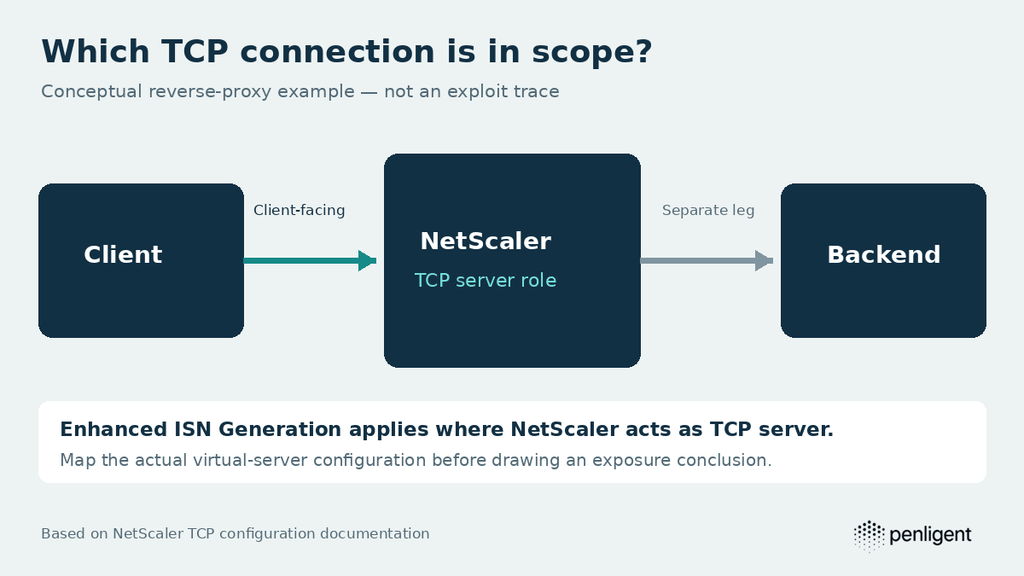
ה Enhanced ISN Generation documentation says the option increases variation in initial sequence numbers when NetScaler acts as the TCP server, and documents it as disabled by default. That server role matters when reviewing a deployment. In a connection-terminating reverse proxy, the client-facing connection and the backend connection are separate legs. Do not assume that a statement about the appliance’s server role describes every packet traversing it.
Check both vendor preconditions
The bulletin’s applicability check combines a relevant virtual-server protocol with Enhanced ISN Generation being disabled. Its protocol list includes HTTP, SSL, TCP and several other TCP-based types. Use the complete list in the bulletin for your deployment; the absence of a virtual server literally named or typed TCP is not enough to rule it out.
On an appliance you administer, start with the read-only setting query below, which the bulletin provides. Run it in the NetScaler CLI, not as a Linux package-management command. Keep the appliance identity with the result so an observation from a lab or a different cluster member is not mistaken for the production instance.
show ns tcpparam | grep "Enhanced ISN Generation"A disabled result, together with a listed virtual-server type, meets the configuration conditions described by Citrix. An empty filtered result is inconclusive: inspect the full show ns tcpparam output and the command result before classifying it. A parser that treats “no matching text” as “enabled” would turn a failed observation into a false pass.
| Observed state | What it establishes | Next action |
|---|---|---|
| Relevant virtual server; setting disabled | The vendor’s configuration conditions are present. | Follow the upgrade and configuration remediation. |
| Required build; setting not checked | Only the software portion has been documented. | Query the TCP setting before closing the finding. |
| Setting enabled; build not checked | Only the configuration portion has been documented. | Reconcile the build with the applicable vendor guidance. |
| No output or failed query | No reliable setting observation. | Resolve the query failure; do not record a pass. |
This table is a recommended review method, not captured appliance output. We did not operate a NetScaler appliance or reproduce exploitation for this article. Its contribution is to separate the decisions an operator must make, without presenting command documentation as a laboratory result.
Upgrade and enable the setting as separate steps
CERT-EU’s advisory corroborates the branch boundaries in CTX697096; the following table lists the bulletin’s updated release floors. They are branch-specific; do not compare a FIPS build number with the ordinary 13.1 numbering scheme. Consult the current bulletin and the supported upgrade path before selecting a bundle.
| Product branch | Updated release listed in the bulletin |
|---|---|
| ADC / Gateway 14.1 | 14.1-73.37 or later |
| ADC / Gateway 13.1 | 13.1-64.23 or later in 13.1 |
| ADC 14.1-FIPS | 14.1-73.37 FIPS or later |
| ADC 13.1-FIPS / 13.1-NDcPP | 13.1-37.279 or later in the corresponding branch |
The build table does not replace the setting check. The vendor’s TCP documentation gives this configuration command:
set ns tcpparam -enhancedISNgeneration ENABLEDThat command changes appliance configuration. Review it through the change process appropriate to your service, rather than pasting it into an unknown instance. In the GUI, the documented path is Configuration, System, Settings, then Change TCP Parameters; select Enhanced ISN Generation. After applying the change, query the setting again. An accepted command and the subsequent observed value are separate records.
For Console-managed fleets, use the CVE-specific remediation workflow. The vendor documents an upgrade workflow followed by a configuration-job workflow, including a review of the target instances and final generated configuration. Inspect that target list before executing the job. A successful job against three selected appliances cannot establish the state of a fourth appliance that was never included.
Avoid the reboot and failover blind spot
A useful acceptance record has two columns per managed instance: running build and observed setting. Include the observation time and the management identity. If your deployment uses high availability, verify the member coverage under its supported configuration-synchronization procedure. Do not infer the peer’s state solely from a browser request through the currently active member.
Also distinguish the applied configuration from the configuration your operational process preserves for the next restart. Review the platform’s normal save and synchronization requirements before closing the change. A reboot or failover test should be scheduled through your maintenance procedure, not introduced merely to produce a screenshot for a ticket. If persistence has not been verified, record that limitation explicitly.
Check representative application traffic after the change: for example, a permitted login and an ordinary request through the affected virtual service. This is a continuity check. It does not measure ISN unpredictability or demonstrate that an exploit was rejected. Keep those claims separate so a green application health check does not silently become a security-test result.
Do not borrow exploitation claims from neighboring CVEs
The bulletin explicitly reports observed exploitation for CVE-2026-88771 and CVE-2026-88772. That statement does not establish observed exploitation of CVE-2026-88778. These identifiers share a bulletin, but they do not share an interchangeable mechanism, prerequisite or incident history. Calling this ISN issue the same unauthenticated RCE would obscure the very configuration action the reader needs to take.
Likewise, this configuration change is not a general clean bill of health for a previously exposed appliance. If there is a separate reason to suspect compromise, keep that investigation open. Changing a TCP parameter cannot determine what happened before the maintenance window.
Close this finding on its own requirements
For CVE-2026-88778, the useful completion record is specific: the applicable branch and build, the relevant virtual-server configuration, the observed Enhanced ISN Generation value, and which instances were checked. Missing output should remain unresolved. Successful application traffic should remain a functionality result. Neither should be promoted into evidence it does not contain.
For teams using Penligent for authorized application testing behind an edge appliance, keep those application findings separate from this vendor configuration review. The appliance setting must be checked through the documented administrative workflow; this article does not claim that Penligent detects or remediates CVE-2026-88778.

 Hebrew
  English
  German
  French
  Spanish
  Portuguese
  Japanese
  Korean
  Hindi
Hindi  Arabic
  Turkish