
A modern SaaS breach does not need a stolen password, a public exploit, or a loud remote code execution bug. It can start with a trusted integration that already has permission to read CRM records, sync sales notes, pull call data, access email, or move files across cloud services. Once an attacker controls the OAuth token behind that integration, the target environment may treat the attacker like a legitimate app doing legitimate work.
That is the uncomfortable lesson behind the recent Klue incident and the earlier Salesloft Drift and Gainsight incidents. Klue said that on June 12, 2026, it identified unauthorized activity affecting part of its integration infrastructure. According to Klue, the attacker gained access through a compromised legacy credential associated with an integration service, obtained OAuth tokens used to connect Klue with third-party platforms including Salesforce, and then accessed data inside connected customer environments. Klue also stated that, based on its investigation at the time, it had no evidence that customer content stored within the Klue platform itself was affected. (חדשות ההאקרים)
The downstream disclosures made the pattern clearer. LastPass said Klue was used by its go-to-market teams and integrated with Salesforce and Gong; LastPass also said an unauthorized actor obtained OAuth tokens Klue held for many customers, including LastPass, and used those credentials to access LastPass customer data in Salesforce. LastPass narrowed the affected data to business contact and CRM-related data, and said its products, services, infrastructure, and customer vaults were not impacted. (The LastPass Blog) HackerOne similarly said that, through Klue’s OAuth integration with its Salesforce instance, an unauthorized party accessed and copied CRM data. (HackerOne) Huntress and Recorded Future also published customer-facing explanations that narrowed their own impact to Salesforce or business-data exposure rather than core product or platform compromise. (huntress.com)
The important point is not that every affected company had identical exposure. They did not. A CRM incident at one company is not the same as a password-vault compromise, a production infrastructure breach, or a source-code leak. The important point is that a SaaS integration became an access bridge. The attacker did not need to compromise every victim’s primary identity provider. The attacker did not need to exploit a vulnerability in Salesforce itself. The attacker abused delegated trust that already existed.
Salesloft Drift showed the same structure in 2025. Google Threat Intelligence Group reported that, beginning as early as August 8, 2025, through at least August 18, 2025, the actor tracked as UNC6395 targeted Salesforce customer instances through compromised OAuth tokens associated with the Salesloft Drift third-party application. GTIG said the actor systematically exported large volumes of data from corporate Salesforce instances and then searched the exfiltrated data for secrets such as AWS access keys, passwords, and Snowflake-related access tokens. (ענן גוגל)
Gainsight later described a related class of problem in Salesforce-connected applications. Salesforce contacted Gainsight in November 2025 about unusual activity involving Gainsight-published applications connected to Salesforce. Gainsight later said suspicious requests used OAuth tokens issued to the Gainsight-Salesforce connector but were not coming from Gainsight’s applications, infrastructure, or IP addresses. (Salesforce)
The same model also appears outside Salesforce. In May 2026, the FBI warned that Kali365, a phishing-as-a-service platform first seen in April 2026, could help cyber threat actors obtain Microsoft 365 access tokens and bypass MFA without intercepting the user’s credentials. (ic3.gov) Microsoft separately documented an AI-enabled device-code phishing campaign and described Defender detections for anomalous device-code authentication, token acquisition after successful device-code auth, and post-authentication token use from suspicious infrastructure. (microsoft.com)
These incidents point to a broader SaaS OAuth attack surface: connected apps, OAuth grants, refresh tokens, service principals, non-human identities, integration users, and third-party vendors that can act across enterprise systems after the original login is long over.
OAuth is not the vulnerability
OAuth is a delegation framework. It lets one application obtain permission to access a resource on behalf of a user, service, or organization without sharing the user’s password with that application. That design is why SaaS ecosystems work. Sales teams sync CRM data into revenue tools. Support teams connect ticketing systems to product telemetry. Security teams send logs into SIEMs. AI agents connect to tool servers, repositories, mailboxes, knowledge bases, calendars, and internal APIs. Without delegated authorization, every integration would become a brittle pile of passwords and custom secrets.
The problem begins when delegated authorization is treated as low risk because no password changed hands. In practice, an OAuth token can be as valuable as a password and sometimes more useful. A valid token may already include the right scopes, the right app identity, the right user delegation, and enough lifetime to call APIs at machine speed.
OAuth 2.0 security guidance has moved toward stricter controls precisely because bearer-token replay, weak redirect handling, poor state validation, long-lived refresh tokens, and overbroad privilege can turn normal authorization into an attack path. RFC 9700, the IETF Best Current Practice for OAuth 2.0 Security, says public clients must use PKCE for authorization-code flows, access tokens should be sender-constrained where possible, refresh tokens for public clients must be sender-constrained or use refresh-token rotation, and token privileges should be restricted to the minimum needed for the application or use case. (datatracker.ietf.org)
That language matters because many enterprise integrations still behave like long-lived trust pipes. They get approved once, then operate in the background for months or years. They are rarely reviewed with the same intensity as privileged human accounts. The vendor is trusted. The app is familiar. The OAuth grant looks like plumbing.
Attackers like plumbing.
The working model, from consent to API access
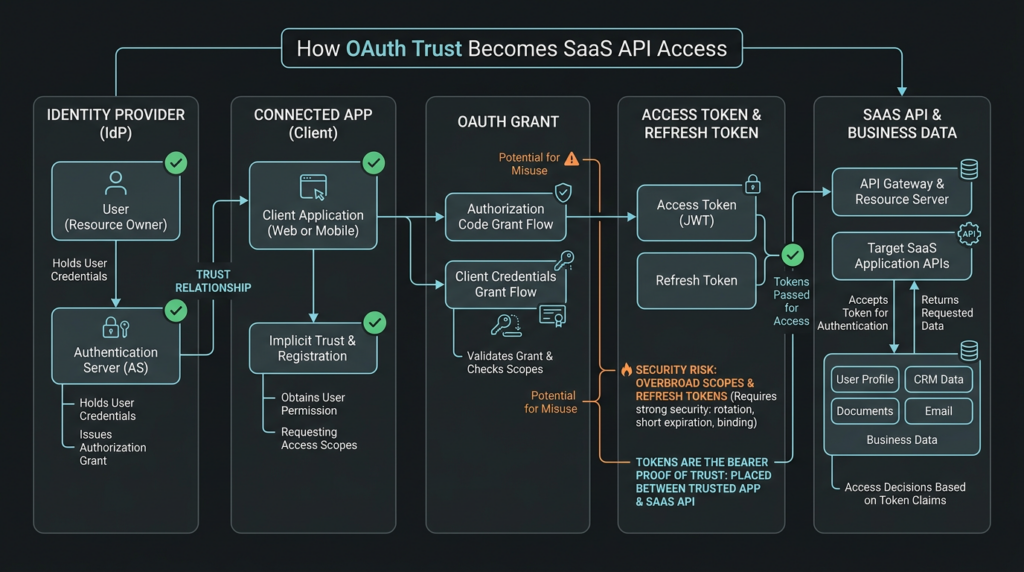
A SaaS OAuth attack surface usually has five layers.
The first layer is the identity provider or authorization server. This could be Microsoft Entra ID, Salesforce, Google, Okta, a custom OIDC provider, or a SaaS vendor’s own authorization service. It issues tokens after a user, admin, app, or service completes the required authorization flow.
The second layer is the client application. In Salesforce language, that may be a connected app. In Microsoft Entra language, it may be an enterprise application or service principal. In an AI agent environment, it may be a tool server, connector, MCP server, or agent runtime that stores tokens for downstream tools.
The third layer is the grant. A user, admin, or service has approved the app to access specific resources. A grant can be narrow, such as reading a user profile, or dangerous, such as reading all mail, all files, all CRM records, or all customer support cases. The grant may be user-delegated or application-level. The operational risk is very different.
The fourth layer is the token. Access tokens are usually short-lived and sent to APIs. Refresh tokens can be used to obtain new access tokens without forcing the user through another interactive login. Some platforms also issue offline access grants or long-lived app credentials that behave like persistent machine access. If the token is a bearer token, possession is enough unless the system adds sender constraints such as DPoP or mutual TLS.
The fifth layer is the resource API. This is where the data lives: Salesforce objects, Microsoft Graph, Gmail, Google Drive, Slack, GitHub, Jira, Zendesk, Snowflake, cloud APIs, internal APIs, and product backends.
A breach can occur at any layer. A malicious app can request consent. A user can authorize an app without understanding the scope. A vendor can store tokens poorly. A stale integration credential can survive offboarding. An attacker can steal a refresh token from an integration service. A developer can implement OAuth state incorrectly. A service principal can accumulate permissions that no one reviews. An agent tool can hold broad tokens and then follow hostile instructions.
The critical shift is that the perimeter is no longer the login screen. The perimeter is the authorization chain.
Why connected apps are high-value targets
Connected apps are attractive because they turn API access into business workflow. A Salesforce connected app can support a mobile app, data loader, marketing platform, customer success tool, competitive intelligence product, revenue operations workflow, BI connector, or custom internal integration. Microsoft Entra enterprise apps and service principals play a similar role across Microsoft 365 and Azure. Google Workspace, Slack, GitHub, Atlassian, and many other SaaS platforms have their own versions of the same pattern.
A connected app becomes dangerous when it has one or more of these properties.
| Risk property | Why attackers care | Defensive signal |
|---|---|---|
| Broad delegated scopes | The app can read or modify large data sets after a user or admin approves it. | Scope review, app consent review, unusual app activity. |
| Long-lived refresh token | The attacker can regain access without a new login prompt. | Refresh-token issuance, reuse, rotation failures, token age. |
| User self-authorization | Users can approve apps without admin review. | New consent grants, unknown publisher, low-prevalence app names. |
| Vendor-managed integration | A third party may hold tokens for many customers. | Vendor risk review, integration inventory, external app owner mapping. |
| High-value API access | CRM, mail, files, tickets, notes, and source code often contain secrets or customer data. | Bulk queries, exports, sensitive object access, Graph API volume. |
| Weak offboarding | Old apps, prototype credentials, and unused integrations stay live. | Last-used date, zero-owner apps, stale service principals. |
| Poor log coverage | Attackers can use APIs faster than humans can notice. | Event logs, API logs, non-interactive sign-ins, token events. |
That table explains why the Klue incident mattered. According to Klue’s public statement, the attacker used access to obtain OAuth tokens for third-party platforms and then accessed data in connected customer environments. (חדשות ההאקרים) According to Datadog Security Labs, by the time Klue alerted customers, the threat actor had already harvested OAuth tokens for Salesforce and Gong and had begun querying those environments through automated API calls. Datadog also described detection opportunities such as abnormal Salesforce query volume, OAuth-token logins from unseen networks, and suspicious object-query behavior. (securitylabs.datadoghq.com)
That is a clean SaaS supply-chain pattern. One compromised integration layer fans out across many customer environments.
MFA stops logins, not stolen authorization artifacts
MFA is still necessary. The mistake is treating MFA as a complete control for OAuth token abuse.
MFA protects the act of authentication. It makes it harder for attackers to prove they are the user during an interactive login. But OAuth tokens exist after authentication. A valid token may be accepted by the API without asking the user for a password, push approval, hardware key, or biometric challenge again. If a refresh token remains valid, the attacker may be able to keep obtaining fresh access tokens until revocation, expiry, conditional access enforcement, or token replay detection breaks the chain.
Device-code phishing makes this easy to understand. Microsoft’s device authorization grant is designed for input-constrained devices such as smart TVs, IoT devices, printers, or command-line tools. The user signs in on another device, and once sign-in completes, the original device can receive access and refresh tokens. In legitimate use, that is helpful. In phishing, the attacker initiates the device flow, tricks the victim into entering a code on a legitimate Microsoft page, and receives valid tokens when the victim completes authentication. (microsoft.com)
Microsoft’s own consent-phishing guidance makes a similar point. Consent phishing tricks users into granting permissions to malicious cloud applications; unlike ordinary credential theft, the attacker targets the permission grant. Microsoft also notes that when it disables a malicious OAuth application, new token and refresh-token requests are denied, but existing access tokens remain valid until expiration. (Microsoft Learn)
That is why SaaS OAuth defense cannot stop at “we require MFA.” Defenders need to know which apps have grants, which tokens exist, what scopes they carry, how refresh tokens behave, where API calls come from, and whether an app’s behavior matches the business purpose for which it was approved.
The breach path behind Salesforce OAuth incidents
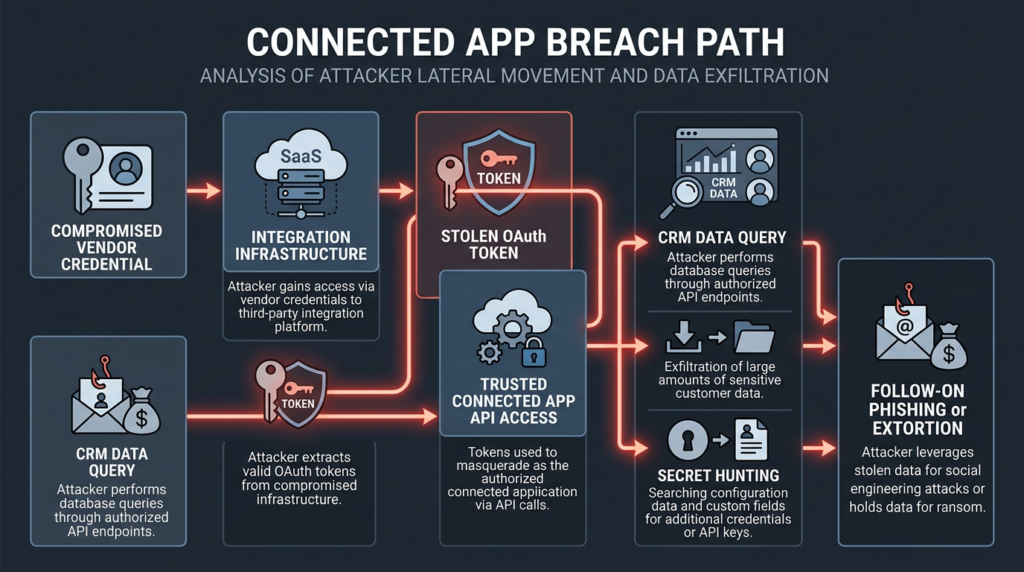
The Salesforce-centered incidents are useful because they show the practical value of CRM data. CRM is not just names and email addresses. It can contain account notes, renewal timing, support history, customer contacts, partner conversations, quotes, opportunity notes, pricing data, technical blockers, product usage context, contractual metadata, and occasionally sensitive information that employees should not have placed there.
In the Salesloft Drift case, GTIG said UNC6395 exported large volumes of Salesforce data and then searched for secrets such as AWS access keys, passwords, and Snowflake-related access tokens. (ענן גוגל) That detail is crucial. The first-stage target was Salesforce, but the second-stage target could be whatever secrets were buried in Salesforce fields, support cases, comments, attachments, or notes. Many companies use CRM and ticketing systems as informal memory. Attackers know this.
The Klue disclosures show the same category of exposure but with different victim-specific limits. LastPass described business contact information and CRM data, while saying customer vaults were secure. (The LastPass Blog) Huntress described Salesforce business and sales data, while saying product infrastructure, telemetry, passwords, and payment card data were not impacted based on current evidence. (huntress.com) Recorded Future described impact to elements of its Salesforce account while saying its core platform and internal infrastructure were not accessed. (recordedfuture.com)
Those distinctions should not be flattened. A CRM exposure is not automatically a password-manager vault breach. A third-party integration incident is not automatically a compromise of a company’s production infrastructure. But CRM exposure is still meaningful. It can enable targeted phishing, customer impersonation, vendor impersonation, extortion, competitor intelligence theft, and follow-on social engineering.
A realistic Salesforce OAuth attack chain looks like this.
| שלב | Attacker action | What the target sees | What defenders should verify |
|---|---|---|---|
| Initial access | Compromise vendor credential, integration server, token store, developer credential, or consent path. | No direct compromise of the customer’s core Salesforce login may be visible. | Vendor integration inventory, newly active apps, unusual token use. |
| Token acquisition | Obtain OAuth access tokens, refresh tokens, or app credentials. | API calls from an app that may already be trusted. | Token issuance, refresh, source IP, app name, user mapping. |
| API discovery | Query objects, metadata, fields, and accessible records. | Increased API usage or uncommon object access. | Event logs, query jobs, object-level access patterns. |
| Data extraction | Export contacts, accounts, cases, opportunities, notes, attachments, or reports. | Bulk API activity, SOQL volume, abnormal download behavior. | Large result sets, query timing, rare object access, export jobs. |
| Secondary secret hunting | Search CRM data for keys, passwords, tokens, customer credentials, or internal URLs. | Queries for support fields, case descriptions, notes, attachments. | Sensitive-string detection across exported SaaS data. |
| Follow-on action | Phishing, extortion, lateral movement, or resale. | Customer reports, leak-site activity, suspicious emails. | Phishing reports, dark-web monitoring, incident communications. |
The key defensive question is not “was Salesforce vulnerable?” Salesforce’s Klue-related status message said the issue did not arise from a vulnerability within the Salesforce platform and was limited to Klue’s app connection. (חדשות ההאקרים) The better question is: which connected apps can read valuable data, and what would happen if one of those apps became attacker-controlled?
Inventory first, then hunt
Defenders often want detections before inventory. That order is backward. Without an app inventory, a detection team cannot tell the difference between expected API automation and suspicious API automation. Without owner mapping, a security team cannot quickly decide whether a connected app is legitimate. Without scope review, a team cannot estimate blast radius.
A useful SaaS OAuth inventory includes at least these fields.
| שדה | מדוע זה חשוב |
|---|---|
| App name and publisher | Helps identify unknown, spoofed, abandoned, or vendor-owned apps. |
| Internal owner | Someone must be accountable for the business purpose and risk. |
| Authorization type | User-delegated grants and app-level permissions have different blast radius. |
| Scopes and API permissions | Shows what data the app can read, write, delete, or administer. |
| User count | A widely authorized app can expose many accounts. |
| Last used date | Stale grants and dormant apps are common breach paths. |
| Refresh-token behavior | Long-lived tokens create persistence. |
| Source networks | API calls from new geographies or hosting providers may be suspicious. |
| Data classes reached | CRM, mail, files, tickets, source code, logs, and cloud secrets require different response. |
| Vendor storage model | Some vendors store customer OAuth tokens; others use customer-hosted keys or short-lived exchange. |
| Revocation path | Teams need to know how to kill access quickly during an incident. |
For Salesforce, the OAuthToken object is a useful starting point for app usage review. Salesforce’s developer documentation describes OAuthToken as representing an OAuth access token for connected app authentication and as available for token-management use cases. (Developer) In practice, admins often combine Setup’s Connected Apps OAuth Usage view with SOQL queries and event logs.
Run queries only in environments you administer, and do not export token values or sensitive fields into unmanaged spreadsheets. The goal is app inventory and triage, not token harvesting.
SELECT
  Id,
  AppName,
  UserId,
  CreatedDate,
  LastUsedDate,
  UseCount,
  AppMenuItemId
FROM OAuthToken
ORDER BY LastUsedDate DESC
Useful triage questions after pulling this inventory:
1. Which apps are unknown to security, IT, revenue operations, or engineering?
2. Which apps have not been used in 30, 60, or 90 days?
3. Which apps are used by privileged users?
4. Which apps are user-authorized instead of admin-approved?
5. Which apps access CRM, support, contract, or security-sensitive fields?
6. Which apps are vendor-managed and hold tokens outside your tenant?
7. Which apps would break critical workflows if revoked today?
Salesforce event data can add behavioral context. A useful threat hunt should look beyond logins and include API usage, bulk operations, unusual query patterns, and source network anomalies. Datadog’s Klue detection write-up emphasizes abnormal Salesforce query volume, OAuth-token logins from unseen networks, and object-query behavior that does not match normal usage. (securitylabs.datadoghq.com)
A basic response workflow for a suspicious Salesforce connected app should look like this.
1. Identify the app, publisher, user count, and business owner.
2. Confirm whether the app is installed, user-authorized, or unmanaged.
3. Export a minimal inventory of users and last-used timestamps.
4. Review API and event activity for the affected window.
5. Identify objects and fields accessed by the app.
6. Search extracted or accessed records for embedded secrets.
7. Revoke tokens and block the app if risk is confirmed.
8. Rotate any secrets found in data that may have been accessed.
9. Reconnect only after app ownership, permissions, and vendor posture are verified.
Salesforce provides token revocation mechanisms for OAuth tokens. Salesforce documentation says access tokens can be revoked, and refresh-token revocation can also revoke associated access tokens. (Salesforce) A defensive revocation request may look like this, with placeholders retained intentionally.
curl -X POST "https://YOUR_DOMAIN.my.salesforce.com/services/oauth2/revoke" \
  -H "Content-Type: application/x-www-form-urlencoded" \
  --data-urlencode "token=REFRESH_OR_ACCESS_TOKEN_TO_REVOKE"
Do not treat revocation as the end of the incident. Treat it as containment. The incident is not closed until you know what the app accessed, whether any secrets were present in those records, whether users received phishing or extortion attempts, and whether the integration can be safely re-enabled with narrower scope.
Microsoft 365 and Entra, OAuth grants as identity infrastructure
Microsoft 365 has different vocabulary, but the underlying risk is similar. Enterprise applications, service principals, delegated permissions, application permissions, Graph API scopes, refresh tokens, and device-code flows all create an authorization fabric around the tenant.
Consent phishing is the obvious user-facing version. Microsoft defines consent phishing as an attack where users are tricked into granting permissions to malicious cloud applications, allowing those apps to access legitimate cloud services and user data. Microsoft recommends reviewing delegated and application permissions, Entra audit logs, sign-in activity for authorized users, consent settings, verified publishers, application governance policies, and suspicious app behavior. (Microsoft Learn)
Device-code phishing is the more subtle version because the sign-in page can be legitimate. Microsoft’s device authorization flow allows a device to obtain access and refresh tokens after the user signs in from another browser-capable device. Microsoft’s April 2026 write-up described detections for device-code phishing that include anomalous device-code authentication, suspicious sign-in patterns, token acquisition after successful device-code auth, and post-authentication use of valid tokens from malicious infrastructure. (microsoft.com)
A Microsoft 365 OAuth review should separate three questions.
Who can grant consent?
Which apps already have consent?
Which API actions are those apps performing now?
A defender can begin with Microsoft Graph PowerShell. The exact commands and available fields depend on the tenant, permissions, and module versions, but the pattern is straightforward: enumerate service principals, OAuth permission grants, app role assignments, and high-risk permissions.
Connect-MgGraph -Scopes `
  "Application.Read.All", `
  "Directory.Read.All", `
  "DelegatedPermissionGrant.Read.All", `
  "AppRoleAssignment.ReadWrite.All"

# List service principals with basic metadata.
Get-MgServicePrincipal -All |
  Select-Object Id, AppId, DisplayName, AccountEnabled, PublisherName

# List delegated OAuth permission grants.
Get-MgOauth2PermissionGrant -All |
  Select-Object ClientId, ConsentType, PrincipalId, ResourceId, Scope

# List application permissions assigned to service principals.
Get-MgServicePrincipal -All | ForEach-Object {
  $sp = $_
  Get-MgServicePrincipalAppRoleAssignment -ServicePrincipalId $sp.Id -ErrorAction SilentlyContinue |
    Select-Object @{Name="ServicePrincipal";Expression={$sp.DisplayName}},
                  ResourceDisplayName,
                  AppRoleId
}
High-risk Microsoft Graph permissions deserve special review. A single application with Mail.Read, Mail.ReadWrite, Files.Read.All, Sites.Read.All, Directory.Read.All, User.Read.All, Group.Read.All, או offline_access can have a far larger blast radius than its harmless display name suggests. The right question is not whether the app name looks familiar. The right question is whether the app needs that permission now, for that business purpose, with that user population.
Sentinel or Log Analytics hunts should be adapted to the tenant schema, licensing, and table availability. The following examples are defensive patterns, not drop-in universal detections.
// Rare or unexpected device-code authentication.
// Adjust field names to match the tenant's SigninLogs schema.
SigninLogs
| where TimeGenerated > ago(14d)
| where AuthenticationProtocol has_any ("deviceCode", "deviceCodeFlow")
   or ClientAppUsed has "Device"
| summarize
    signins=count(),
    users=dcount(UserPrincipalName),
    apps=make_set(AppDisplayName, 20),
    ips=make_set(IPAddress, 20)
  by bin(TimeGenerated, 1d), UserPrincipalName
| where signins > 0
| order by TimeGenerated desc
// New or rare OAuth consent activity.
// Tune OperationName values for the tenant's audit log format.
AuditLogs
| where TimeGenerated > ago(30d)
| where OperationName has_any ("Consent", "Add service principal", "Add app role assignment")
| project TimeGenerated,
          OperationName,
          InitiatedBy,
          TargetResources,
          Result,
          CorrelationId
| order by TimeGenerated desc
// Non-interactive sign-ins from new source networks for high-value apps.
// Join with your own known-good app and IP inventory before alerting.
AADServicePrincipalSignInLogs
| where TimeGenerated > ago(14d)
| summarize
    count(),
    firstSeen=min(TimeGenerated),
    lastSeen=max(TimeGenerated),
    ips=make_set(IPAddress, 50)
  by ServicePrincipalName, AppId, ResourceDisplayName
| order by count_ desc
The most common operational failure is that teams only review interactive human sign-ins. OAuth abuse often shows up after the user has already authenticated or after an app has already been granted permission. Non-interactive sign-ins, service-principal activity, Graph API calls, and consent grants matter as much as login failures.
The lifecycle problem, refresh tokens, stale grants, and vendor trust
OAuth risk is not only about the moment of consent. It is about lifecycle.
A low-risk app can become high risk if its scope grows. A useful integration can become stale after the business team stops using it. A vendor can change ownership, architecture, storage model, subcontractors, or security posture. A prototype credential can survive because no one owns the cleanup. A refresh token can continue working after everyone assumes the integration is dead. An app that once served five users can quietly serve five hundred.
Refresh tokens deserve special treatment because they are designed for continuity. They solve a real problem: users and services cannot reauthenticate every few minutes. But if a refresh token is stolen and not sender-constrained, rotated, detected, or revoked, the attacker may turn one theft into a persistent API session. RFC 9700 addresses this directly by requiring sender-constrained refresh tokens or refresh-token rotation for public clients, and by requiring refresh tokens to be bound to the scope and resource servers consented by the resource owner to reduce privilege escalation and the impact of leakage. (datatracker.ietf.org)
The Gainsight disclosure is a useful lifecycle warning. Gainsight said Salesforce observed requests that were not coming from Gainsight’s applications, infrastructure, or IP addresses but were using OAuth tokens issued to the Gainsight-Salesforce connector. (Gainsight Software) The details of each customer’s exposure depended on their environment, but the architectural lesson is simple: if a token is valid and trusted, the API may not know that the caller’s infrastructure is no longer the legitimate integration path.
For each high-risk integration, document these lifecycle controls.
| בקרה | Good state | Weak state |
|---|---|---|
| Ownership | Named business owner and technical owner. | No one knows who approved the app. |
| Consent model | Admin-approved, scoped, reviewed. | Any user can grant broad access. |
| Token lifetime | Short access tokens, rotated or constrained refresh tokens. | Long-lived bearer refresh tokens with little monitoring. |
| Source control | Expected IPs, ASN ranges, or workload identity constraints. | Calls accepted from any network. |
| Scope review | Scopes match the current workflow. | Historical scopes remain after product changes. |
| Offboarding | Vendor and app removal includes grant revocation. | Contract ends but OAuth grants remain. |
| ניטור | App-specific API baselines and alerts. | Only human login alerts. |
| Break-glass plan | Known revocation and rollback path. | Nobody knows what will break if access is cut. |
A connected app should be treated more like a privileged identity than a software feature.
OAuth CVEs that explain implementation risk
The Klue, Salesloft Drift, and Gainsight incidents are best understood as delegated-trust and token-governance failures, not classic CVE-driven exploitation. That distinction matters. Waiting for a CVE would miss the point. Many SaaS OAuth incidents involve valid tokens, approved apps, and legitimate APIs.
Still, OAuth implementations do produce real CVEs, and those CVEs help clarify what can go wrong when authorization flows are built or configured poorly.
| CVE | Why it is relevant | Practical lesson |
|---|---|---|
| CVE-2025-4144 | NVD describes a PKCE bypass issue in Cloudflare’s workers-oauth-provider. NVD notes that MCP requires OAuth 2.1 and that this bug bypasses PKCE protection. (NVD) | PKCE is not just a checkbox. If implementation logic skips it, an important protection in OAuth 2.1-style flows can disappear. |
| CVE-2024-42476 | NVD describes a Nim OAuth library issue where, under certain compile flags, the state parameter might not be checked, creating a CSRF risk in OAuth flows. (NVD) | State validation is not optional. Build settings and library behavior can change security properties. |
| CVE-2025-26620 | NVD describes a Duende.AccessTokenManagement race condition where concurrent client-credentials requests with differing protocol parameters could return tokens with the wrong scope, resource indicator, or other parameters. (datatracker.ietf.org) | Machine-to-machine OAuth is part of the attack surface. Token caches, concurrency, and resource binding matter. |
| CVE-2024-12056 | NVD describes an OAuth Password grant scenario where the client secret is not checked, allowing an attacker with valid credentials to connect through a client app not explicitly authorized as part of the deployment. | Legacy grant types and incomplete client checks can weaken client authorization even when user authentication still exists. |
| CVE-2025-27371 | NVD describes ambiguities in audience values for JWTs sent to authorization servers in certain OAuth 2.0-related JWT client authentication specifications. | Audience binding is critical. A token meant for one party should not be accepted by another because of ambiguous interpretation. |
These CVEs should not be used as scarecrow examples. They do not all have the same severity, exploitability, or blast radius. They do show that OAuth security is a stack: protocol guidance, library behavior, deployment configuration, app permissions, token storage, monitoring, and incident response all matter.
Detection logic that maps to the attack
A useful detection program starts from attacker behavior, not tool categories.
For Salesforce-heavy environments, prioritize these questions.
1. Which connected apps have queried sensitive objects recently?
2. Which apps showed sudden query volume changes?
3. Which apps used source networks not seen before?
4. Which apps queried high-value fields such as case descriptions, notes, contact details, pricing fields, contract metadata, and support text?
5. Which apps accessed data after the vendor relationship ended or after the app owner changed roles?
6. Which apps have refresh tokens that survived password resets or user offboarding?
7. Which apps are used by privileged users or integration users with broad object access?
For Microsoft 365 and Entra-heavy environments, prioritize these questions.
1. Which users or admins granted new OAuth consent recently?
2. Which apps have unverified publishers or suspicious names?
3. Which delegated Graph permissions do not match business purpose?
4. Which applications have tenant-wide application permissions?
5. Which users completed device-code authentication even though they do not use input-constrained devices?
6. Which tokens are being used from anonymizing infrastructure, hosting providers, or new geographies?
7. Which non-interactive sign-ins are inconsistent with historical app behavior?
8. Which mail, file, SharePoint, Teams, or OneDrive access bursts happened after a consent event?
For multi-SaaS environments, especially those using AI agents or automation platforms, add these questions.
1. Which tool servers or connectors store OAuth tokens?
2. Which agent workflows can access multiple apps through one runtime?
3. Which service accounts can reach CRM, ticketing, code, and cloud data at once?
4. Which OAuth grants are tied to departed employees or old automation projects?
5. Which vendor integrations can read both customer data and internal notes?
6. Which logs preserve the initiating human, app, task, and downstream API call together?
The last point is becoming more important. AI agents and automation platforms often turn a single user instruction into multiple tool calls across systems. If audit logs only show the downstream API call, defenders may not know which user, task, prompt, workflow, or app initiated the action. That makes post-authentication governance harder.
Penligent’s public analysis of AI agent cross-app permissions frames the issue as a chain problem across OAuth grants, MCP servers, skills, integrations, and runtime tool access. That framing is relevant because SaaS OAuth incidents and agent-permission incidents share the same failure mode: the dangerous unit is no longer a single app but a chain of authorized actions across apps. (Penligent) In authorized security testing, Penligent can be used as part of a repeatable validation workflow where testers define scope, exercise attack-surface assumptions, collect evidence, and turn findings into reports. Its homepage describes controlled agentic workflows, scope locking, customizable actions, evidence-first results, and one-click reports. (Penligent)
That kind of workflow should not replace SaaS admin controls, identity governance, or incident response. It can help teams repeatedly test whether their controls behave the way policy says they behave.
A practical validation workflow
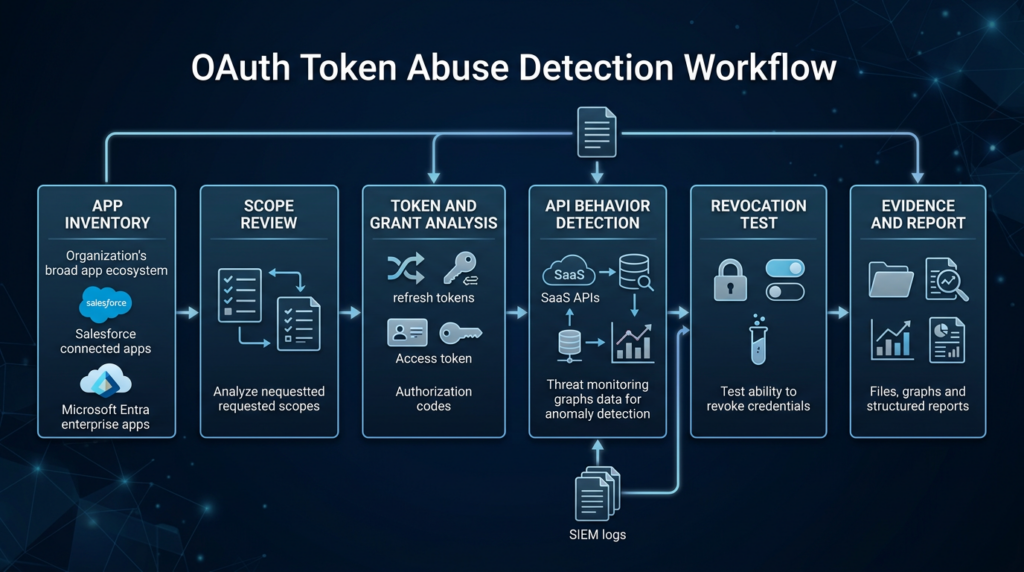
A defensible SaaS OAuth validation program has four phases: inventory, risk scoring, behavior review, and controlled validation.
Inventory answers what exists.
- All connected apps and enterprise apps.
- All OAuth grants and app-role assignments.
- All service principals and integration users.
- All apps with refresh tokens or offline access.
- All vendor-managed integrations.
- All business owners and technical owners.
Risk scoring answers what matters.
High risk:
- Reads customer data, mail, files, tickets, or CRM.
- Has application permissions or broad delegated scopes.
- Has offline_access or long-lived refresh tokens.
- Is vendor-managed and stores tokens outside your tenant.
- Is used by executives, admins, sales operations, support, finance, or security teams.
- Has not been reviewed in the last quarter.

Medium risk:
- Narrow delegated scopes but broad user population.
- Known vendor with unclear token handling.
- Used by business-critical workflow but weak owner mapping.
- Active but lacks source-network expectations.

Low risk:
- Narrow scope, admin-approved, known owner, recent review, clear logs, no sensitive data.
Behavior review answers what happened.
- API volume by app and user.
- Object or endpoint access by app.
- New source networks.
- New countries or ASNs.
- Failed token refresh attempts.
- New consent grants.
- App permission changes.
- Bulk export or report activity.
- Secret-like strings inside data that may have been accessed.
Controlled validation answers whether controls work.
- Revoke a test app token and confirm API access stops.
- Disable a test connected app and confirm existing sessions end as expected.
- Attempt a low-risk consent flow with a test user and confirm approval policy blocks it.
- Use a test service principal with overbroad permissions and confirm detection.
- Run a tabletop exercise for a vendor token compromise.
- Measure how long it takes to identify app owner, revoke access, pull logs, and notify impacted teams.
Validation should not be destructive. Use test apps, test users, low-risk tenants, and scoped exercises. The goal is to prove whether the organization can see, stop, and explain a token-abuse path before a real incident forces the question.
The secrets problem inside SaaS records
OAuth token abuse often becomes more damaging because SaaS records contain secrets they were never meant to store.
CRM and support platforms frequently contain:
- Temporary passwords pasted into case notes.
- API keys shared during troubleshooting.
- Cloud access keys included in logs.
- Private URLs for staging systems.
- Customer tokens in attachments.
- Snowflake, database, or warehouse credentials.
- VPN configuration snippets.
- Debug output with bearer tokens.
- Session cookies copied into support tickets.
- Screenshots containing secrets.
GTIG’s Salesloft Drift report is important because it states that, after exfiltrating Salesforce data, UNC6395 searched for secrets such as AWS access keys, passwords, and Snowflake-related access tokens. (ענן גוגל) This is the second-order risk many organizations underestimate. An attacker may not care about every CRM record. They care about the few records that contain credentials, internal context, or social-engineering leverage.
Defenders should run secret scanning against SaaS exports during incident response and as a preventive control. The scanning process needs guardrails because SaaS data can contain personal information and regulated records. Use approved tooling, restrict access to outputs, and treat matches as sensitive.
A minimal secret-scanning workflow for an incident response export:
# Example only. Run on approved incident-response workstations.
# Do not place SaaS exports in shared folders or unmanaged systems.

mkdir -p ir-work/salesforce-export
cd ir-work

# Run a secret scanner approved by your organization.
# Replace this with your internal tooling and policy.
gitleaks detect \
  --source ./salesforce-export \
  --report-path ./findings/gitleaks-salesforce.json \
  --redact
After that, triage matches by secret type, owner, environment, and rotation status. A leaked production AWS key is not the same as a fake example token in a training note. But do not dismiss matches just because they came from “business” systems. Business systems are often where operational secrets leak.
Hardening controls that reduce blast radius
No single control fixes SaaS OAuth risk. The goal is layered friction: reduce what apps can do, reduce how long stolen tokens work, make suspicious behavior visible, and make revocation fast.
| בקרה | What it prevents | Implementation note |
|---|---|---|
| Admin-approved consent | Random users approving risky apps. | Restrict user consent to verified, low-risk apps or route requests through admin workflow. |
| Least-privilege scopes | Apps reading more data than needed. | Remove broad read/write scopes and replace tenant-wide access with narrow grants where possible. |
| App allowlisting | Unknown connected apps entering production. | Useful for Salesforce, Entra, and other high-value SaaS systems. |
| Refresh-token rotation | Long-lived token reuse without detection. | Rotation must include reuse detection, not just new-token issuance. |
| Sender-constrained tokens | Bearer-token replay from attacker infrastructure. | DPoP or mTLS can limit use of stolen tokens when supported. |
| Short access-token lifetime | Long windows for stolen access tokens. | Must be balanced with app stability and refresh-token controls. |
| Source-network expectations | Token use from unexpected infrastructure. | Maintain expected IPs or workload identity conditions for critical integrations. |
| Device-code flow restriction | Device-code phishing in environments that do not need it. | Test emergency access exclusions before enforcement. |
| Publisher verification | Spoofed app names and fake publishers. | Helpful but not sufficient; verified apps can still be over-permissioned. |
| SaaS log retention | Delayed discovery without evidence. | Keep enough logs to investigate vendor incidents that are disclosed late. |
| Vendor token-handling review | Third-party token storage and lifecycle gaps. | Ask vendors where tokens live, how they are encrypted, how rotation works, and how compromise is detected. |
| Integration offboarding | Old apps and prototype credentials surviving. | Include OAuth grants in vendor termination and employee offboarding. |
Microsoft’s consent-phishing guidance recommends auditing applications and permissions routinely, validating app publishers instead of relying only on names and domains, using verified publishers where possible, configuring user consent settings, and applying app governance policies to monitor suspicious behavior. (Microsoft Learn) RFC 9700 adds protocol-level controls: PKCE, CSRF protection, sender-constrained tokens, refresh-token rotation, and restricted token privilege. (datatracker.ietf.org)
For Salesforce, response controls should include app review, token revocation, and log review. Salesforce documentation describes programmatic token revocation, including refresh-token revocation and associated access-token revocation. (Salesforce) For Klue-like or Drift-like incidents, revocation alone is not enough. You also need to identify what was accessed and rotate any secondary secrets found in the affected data.
Common mistakes that keep OAuth incidents alive
The first mistake is resetting passwords without revoking OAuth grants. Password resets may not kill all existing app access in every SaaS architecture. Always verify the platform’s token behavior and revoke suspicious app grants directly.
The second mistake is treating MFA as proof that token abuse cannot happen. MFA may have been completed legitimately before token theft or consent abuse. Device-code phishing can even route users through legitimate identity pages. (microsoft.com)
The third mistake is reviewing only installed apps. Some environments allow user-authorized apps that are not managed like formally installed enterprise applications. Those grants can still expose data.
The fourth mistake is trusting app display names. Attackers can choose names that resemble legitimate tools. Microsoft warns defenders not to rely only on application names and domain URLs as proof of authenticity, because attackers can spoof names and domains to drive consent. (Microsoft Learn)
The fifth mistake is assuming a vendor breach does not affect the customer because the customer’s own identity provider was not compromised. The Klue and Salesloft Drift incidents show why that assumption fails. A vendor-held token can be the access path. (חדשות ההאקרים)
The sixth mistake is ignoring business data because it is not “production data.” CRM and support records can contain secrets, customer context, pricing, internal notes, security issues, and details that make phishing far more convincing.
The seventh mistake is failing to test revocation. Many teams have a policy that says they can revoke app access. Fewer have measured how quickly they can identify the right app, assess user impact, revoke tokens, confirm access stopped, and restore a safe replacement.
The eighth mistake is not preserving enough logs. SaaS incidents are often discovered through vendor notifications after the initial access window. If logs roll off before the notification arrives, defenders lose the ability to scope exposure.
Incident response playbook for a suspected OAuth token compromise
A token compromise response should move quickly but avoid blind destruction. Cutting every integration can stop exposure but may break revenue, support, security, and finance operations. The better path is fast triage with clear decision points.
Start with containment.
1. Identify the affected app, vendor, integration, users, and SaaS tenants.
2. Disable or block the app if active abuse is suspected.
3. Revoke access and refresh tokens associated with the app.
4. Preserve logs before retention windows expire.
5. Notify system owners before reconnecting any integration.
Then scope exposure.
1. Determine the earliest suspicious token use.
2. Identify source IPs, ASNs, user agents, app IDs, and service principals.
3. List objects, endpoints, mailboxes, files, or records accessed.
4. Identify bulk exports, reports, query jobs, and API downloads.
5. Search exposed data for embedded credentials or sensitive notes.
6. Compare accessed data against regulatory, contractual, and customer obligations.
Then eradicate and recover.
1. Rotate secondary secrets discovered in affected SaaS records.
2. Reissue vendor integration credentials only after security review.
3. Reduce scopes before reconnecting.
4. Move from user self-consent to admin-approved access where possible.
5. Add detections for the observed behavior.
6. Document business owners and review cadence.
Then improve.
1. Add the app to the SaaS OAuth risk register.
2. Add incident scenarios to tabletop exercises.
3. Require vendor token-handling evidence for high-risk integrations.
4. Expand log retention for high-value SaaS systems.
5. Run repeatable validation on app blocking, token revocation, and consent policy.
A good response does not end when the vendor says remediation is complete. It ends when the customer can answer what was authorized, what was accessed, what was exposed, what was revoked, what was rotated, and what control will prevent the same path from surviving unnoticed again.
שאלות נפוצות
What is the SaaS OAuth attack surface?
- It is the set of OAuth grants, connected apps, enterprise applications, refresh tokens, service principals, integration users, and third-party SaaS connections that can access business data through APIs.
- It includes both human-approved delegated access and non-human application access.
- The risk is highest when apps have broad scopes, long-lived refresh tokens, weak owner mapping, or access to CRM, email, files, tickets, source code, or cloud systems.
- It is not limited to one platform. Salesforce, Microsoft 365, Google Workspace, Slack, GitHub, Atlassian, and AI agent tool chains all have versions of this problem.
Why do OAuth token attacks bypass MFA?
- MFA usually protects the interactive login event, not every later API call made with a valid token.
- If an attacker steals or captures a valid access token, the API may accept it until expiration.
- If an attacker gets a refresh token, they may be able to obtain new access tokens without prompting the user again.
- Device-code phishing can trick users into completing real authentication on a real Microsoft page while authorizing an attacker-controlled session.
Are Salesforce connected app incidents Salesforce vulnerabilities?
- Not necessarily.
- In the Klue-related case, Salesforce’s public messaging said the issue did not arise from a vulnerability within the Salesforce platform and was limited to Klue’s app connection. (חדשות ההאקרים)
- The security issue can still be serious because a connected app may have legitimate API access to valuable Salesforce data.
- Defenders should investigate app permissions, token use, object access, source networks, and whether any sensitive secrets were present in accessed records.
What logs should defenders check first after a suspected OAuth incident?
- For Salesforce, review Connected Apps OAuth Usage, OAuthToken inventory, API activity, bulk queries, object access, and unusual source networks.
- For Microsoft Entra and Microsoft 365, review AuditLogs, SigninLogs, service-principal sign-ins, OAuth permission grants, app-role assignments, consent events, and Graph API activity.
- For all SaaS systems, correlate app activity with vendor notifications, app owner records, user reports, and known malicious IP indicators.
- Preserve logs early. Many SaaS OAuth incidents are disclosed after the first suspicious activity window.
Should all refresh tokens be disabled?
- Usually no. Many legitimate integrations need continuity.
- The safer target is controlled refresh-token use: short access-token lifetime, refresh-token rotation, reuse detection, sender constraints where supported, narrow scopes, and fast revocation.
- RFC 9700 requires public-client refresh tokens to be sender-constrained or use refresh-token rotation, and it recommends restricting token privileges to the minimum needed. (datatracker.ietf.org)
- High-risk apps should have stricter rules than low-risk apps.
How are OAuth incidents different from API key leaks?
- An API key is usually a direct credential for an API or service.
- An OAuth grant often carries context: user delegation, app identity, scopes, resource audience, tenant relationship, and refresh behavior.
- OAuth abuse may look like a trusted app doing normal work, which can make it harder to detect than a random API key from an unknown script.
- Both can lead to data theft, and both require inventory, rotation, monitoring, and ownership.
How often should teams audit connected apps and SaaS integrations?
- High-value SaaS systems should be reviewed at least quarterly.
- High-risk integrations should also be reviewed after vendor changes, employee offboarding, scope changes, security incidents, new AI agent deployments, and major business workflow changes.
- Stale apps, unused grants, and ownerless service principals should be removed or disabled.
- Teams should also test whether revocation, blocking, logging, and alerting work before an incident.
Closing judgment
SaaS OAuth risk is not a niche identity problem. It is now one of the main ways trusted software becomes an access path into high-value business data. The incidents around Klue, Salesloft Drift, Gainsight, and Microsoft 365 device-code phishing all point to the same operational reality: the attacker does not always need to defeat the front door when a trusted integration already has a side door.
The practical priority is clear. Build an inventory of connected apps and OAuth grants. Reduce scopes. Control consent. Rotate or constrain refresh tokens. Watch non-interactive API behavior. Revoke stale access. Scan exposed SaaS records for secondary secrets. Test the response path before a vendor incident makes it urgent.
The strongest SaaS environments will not be the ones with the most integrations. They will be the ones that can prove which integrations exist, what they can do, when they last did it, who owns them, and how fast access can be killed when trust breaks.
 Hebrew
  English
  German
  French
  Spanish
  Portuguese
  Japanese
  Korean
  Hindi
Hindi  Arabic
  Turkish