
Gravity SMTP CVE-2026-4020 is not remote code execution. That does not make it low risk.
The vulnerable behavior was simple enough to miss and useful enough for attackers to automate. In affected versions of the Gravity SMTP WordPress plugin, a REST API route at /wp-json/gravitysmtp/v1/tests/mock-data used a permission_callback that unconditionally allowed access. When the endpoint was requested with ?page=gravitysmtp-settings, it could return a detailed system report containing WordPress configuration data, plugin and theme inventory, server metadata, database information, and email integration secrets such as API keys, OAuth tokens, and provider credentials. Wordfence lists Gravity SMTP versions up to and including 2.1.4 as affected and version 2.1.5 as patched. (Wordfence)
That kind of bug does not give an attacker a shell by itself. It gives them something else attackers value: context. A single unauthenticated request can reveal what software is running, which plugins are installed, which mail provider is configured, and which secrets may be available for reuse outside WordPress. Wordfence reported more than 17 million blocked exploit attempts against protected customers, while CrowdSec observed in-the-wild exploitation beginning on May 27, 2026 and saw 412 distinct attacking IPs by June 1. (Wordfence)
The lesson is larger than one SMTP plugin. WordPress plugin REST API bugs sit at the intersection of public web reachability, plugin trust, stored credentials, debug output, and weak authorization boundaries. A route created for testing, support, configuration, or dashboard JavaScript can become an internet-facing secret disclosure surface if the server-side permission check is wrong.
What happened in Gravity SMTP CVE-2026-4020
Gravity SMTP is a WordPress plugin from the Gravity Forms ecosystem that helps sites send email through external providers instead of relying only on WordPress’s default mail behavior. That makes the plugin operationally sensitive. Email delivery plugins often handle SMTP credentials, provider API keys, OAuth tokens, connection settings, mail logs, backup routes, and delivery metadata.
Gravity Forms published the Gravity SMTP 2.1.5 release post on March 25, 2026, describing the version as including important security enhancements and recommending that users update as soon as possible. (Gravity Forms) Wordfence later disclosed CVE-2026-4020 as a sensitive information exposure vulnerability in Gravity SMTP up to and including 2.1.4, with 2.1.5 as the patched version. (Wordfence) NVD describes the same root cause: a REST API endpoint registered at /wp-json/gravitysmtp/v1/tests/mock-data with a permission_callback that unconditionally returns true, allowing unauthenticated visitors to access it. (nvd.nist.gov)
The high-risk request pattern looked like this:
GET /wp-json/gravitysmtp/v1/tests/mock-data?page=gravitysmtp-settings HTTP/1.1
Host: example.com
That request is shown for defensive understanding and authorized validation only. Do not test systems you do not own or do not have explicit permission to assess.
The issue was not that the WordPress REST API exists. The issue was that a route capable of returning sensitive operational data was effectively public. The permission_callback is supposed to decide who can call the route. In this case, public advisories describe a callback that always allowed the request.
| פריט | Publicly reported detail |
|---|---|
| CVE | CVE-2026-4020 |
| מוצר | Gravity SMTP WordPress plugin |
| Vendor ecosystem | Gravity Forms, Rocketgenius |
| גרסאות מושפעות | Gravity SMTP up to and including 2.1.4 |
| Fixed version | Gravity SMTP 2.1.5 |
| Vulnerable endpoint | /wp-json/gravitysmtp/v1/tests/mock-data |
| High-risk query | ?page=gravitysmtp-settings |
| סוג הפגיעות | Sensitive information exposure |
| הגורם השורשי | REST API route with permission_callback that unconditionally returns true |
| Authentication required | לא |
| Reported exposed data | System report, plugin inventory, server metadata, database details, API keys, secrets, OAuth tokens |
| Exploitation status | Active exploitation reported by Wordfence and CrowdSec |
| Immediate response | Update, inspect logs, rotate email provider credentials |
This is the kind of vulnerability that gets underestimated because it is easy to describe as “just information disclosure.” The phrase is technically correct, but it hides the practical value of the information. If the response includes live provider credentials, the impact extends beyond WordPress into whatever external service trusts those credentials.
למה permission_callback is the security boundary
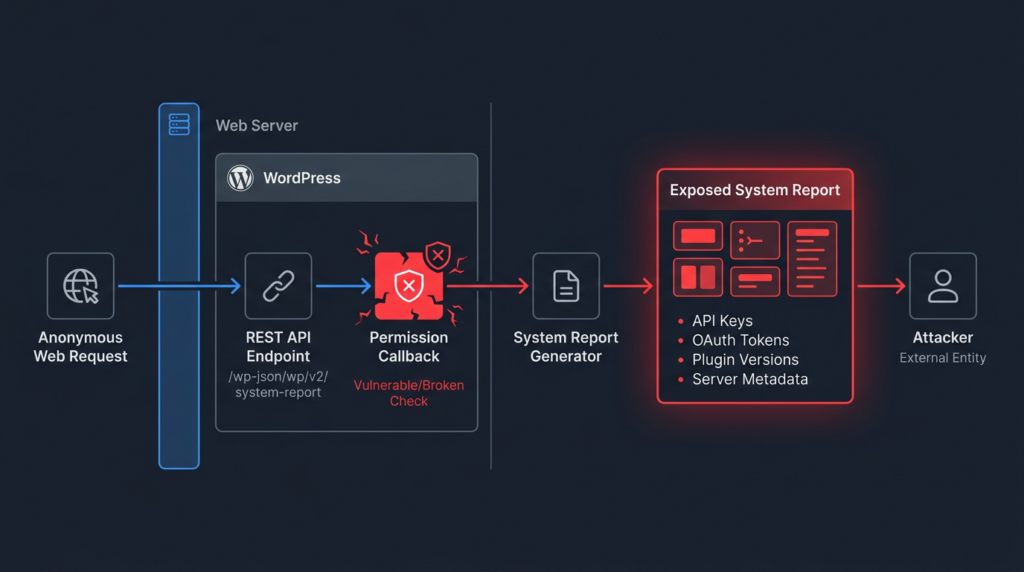
WordPress REST API routes are commonly registered with register_rest_route. A route definition usually includes a namespace, a route path, supported HTTP methods, a callback function, and a permission_callback. The handler callback decides what the route does. The permission_callback decides whether the current request is allowed to do it.
That second decision is the security boundary.
WordPress has warned developers about this exact area for years. In the WordPress 5.5 REST API changes, core contributors explained that a _doing_it_wrong notice was added when a route omits a permission callback. The same note says that for routes intended to be public, developers should set the permission callback to the built-in __return_true function. (Make WordPress) The WordPress REST API handbook also documents how custom endpoints are registered and treated as first-class routes. (WordPress Developer Resources)
The important phrase is “intended to be public.” __return_true is not a harmless boilerplate value. It means the endpoint is public.
A route that returns public posts, public taxonomy terms, or public site metadata may be safe with a public permission callback. A route that returns settings, logs, system reports, connector data, API keys, OAuth tokens, or other operational data should never rely on an unconditional allow callback.
An unsafe pattern looks like this:
register_rest_route(
    'vendor/v1',
    '/debug-config',
    array(
        'methods'             => 'GET',
        'callback'            => 'vendor_return_debug_config',
        'permission_callback' => '__return_true',
    )
);
אם vendor_return_debug_config returns public data, this may be acceptable. If it returns a debug report, plugin settings, provider connection state, or secrets, the route is now a public data leak.
A safer administrative route starts with an explicit capability check:
register_rest_route(
    'vendor/v1',
    '/system-report',
    array(
        'methods'             => WP_REST_Server::READABLE,
        'callback'            => 'vendor_return_redacted_system_report',
        'permission_callback' => function ( WP_REST_Request $request ) {
            return current_user_can( 'manage_options' );
        },
    )
);
That is only the first layer. Authorization answers who can call the endpoint. Response minimization answers what the endpoint should ever return. A secure plugin needs both.
The data exposed by a plugin REST API bug
Wordfence reported that the vulnerable Gravity SMTP endpoint could expose detailed system configuration data and, critically, API keys, secrets, and OAuth tokens configured for the plugin’s email integrations. It also identified Gravity SMTP as having an estimated 100,000 active installations. (Wordfence) CrowdSec described the exposed data as including WordPress version details, active plugins, server information, database metadata, and possible API keys or tokens configured in the plugin. (crowdsec.net)
That data has real attack value.
| Exposed item | Why attackers care |
|---|---|
| WordPress version | Helps determine whether known core issues or hardening gaps are relevant |
| Active plugins and versions | Lets attackers match the site against known plugin CVEs |
| Active theme | May reveal theme-specific vulnerabilities or paths |
| PHP version | Helps infer runtime behavior and compatibility with known exploit techniques |
| Web server version | Helps choose server-specific probes and misconfiguration checks |
| Document root path | Helps later exploitation if another bug gives file read or file write |
| Database type and version | Helps plan SQL injection impact or post-compromise access |
| Database table names | Reveals naming patterns and plugin data structures |
| WordPress configuration details | May expose debug posture, salts, environment assumptions, or plugin state |
| API keys | Can be used directly against external providers if still valid |
| OAuth tokens | May allow access to provider APIs without a WordPress account |
| SMTP credentials | Can enable unauthorized email sending or provider abuse |
| Email provider settings | Helps attackers identify which service to target next |
This is why the bug should be understood as more than a diagnostic endpoint mistake. It may expose a map of the environment and credentials that work outside the environment.
In practical terms, attackers can use the response in three ways.
First, they can use it for reconnaissance. A plugin inventory tells attackers which known vulnerabilities to try next. Server and database metadata help tailor probes. A document root path can become useful if another flaw later provides file read or write access.
Second, they can use it for credential abuse. If a mail provider API key or OAuth token is returned, the attacker may be able to authenticate directly to that provider. Patching WordPress does not revoke an already exposed token.
Third, they can use it for trusted email abuse. Email provider credentials can be used for spam, phishing, malicious password reset flows, or damage to domain reputation. Even if the WordPress site itself is not modified, the business impact can be significant.
Why this is not RCE and still matters
Remote code execution directly changes what a server runs. CVE-2026-4020 does not do that. Public advisories describe it as sensitive information exposure, not command execution, arbitrary file upload, arbitrary file write, or direct administrator account creation.
That distinction matters. Inflating an information disclosure bug into RCE would be inaccurate.
But the opposite mistake is also dangerous. Treating every non-RCE issue as low priority ignores how many real intrusions begin. Attackers rarely need every step in a chain to be spectacular. They need reliable primitives.
CVE-2026-4020 provides three useful primitives:
| Primitive | Attacker value |
|---|---|
| Unauthenticated reachability | No account, cookie, nonce, or administrator access is required |
| Environment disclosure | The attacker learns software versions, plugins, server state, and database context |
| Secret exposure | The attacker may obtain credentials for external email services |
That combination explains the exploitation pressure. A single GET request can produce enough data to decide whether a target is worth more effort.
The operational priority comes from the conditions around the bug, not only from the bug class.
| Prioritization factor | Why it increases urgency |
|---|---|
| Publicly reachable route | The endpoint is exposed through the web server |
| No authentication requirement | Attackers do not need a WordPress account |
| Easy automation | The request is simple and repeatable |
| Useful output | The response can include versions, inventory, metadata, and secrets |
| External credential risk | Exposed provider keys may work outside WordPress |
| Active exploitation | Wordfence and CrowdSec reported real-world targeting |
| Patch available | Delayed patching leaves a known exposure open |
| Broad install base | Popular plugins create attractive scanning targets |
A medium severity label does not mean a medium operational response. Wordfence’s post itself notes that the vulnerability’s initial severity assessment was below its usual threshold for generating a firewall rule, but active exploitation reports led the team to implement a rule to protect against attacks. (Wordfence)
The attack path defenders should expect
A realistic attack path is not complicated.
- The attacker finds WordPress sites running Gravity SMTP.
- The attacker sends a GET request to the vulnerable REST API endpoint.
- A vulnerable site returns a large system report.
- The attacker parses the JSON for provider credentials, tokens, plugin versions, server metadata, and database information.
- If credentials are present, the attacker tries them against the email provider.
- If plugin inventory is useful, the attacker chooses follow-on vulnerabilities.
- If email sending works, the attacker can send spam, phishing, or brand-abusive messages through a trusted provider account.
The important detail is that the attacker does not need to exploit WordPress further for damage to occur. If the mail provider credential is valid, the attacker may move to the provider side. That makes the WordPress access log only one part of the evidence.
This is why defenders should not stop after checking for new admin users or modified PHP files. A read-only secret exposure may leave no malware on the WordPress host.
Safe validation on your own site
Only test sites you own or are explicitly authorized to assess.
Start with a version check. If Gravity SMTP is active and the version is 2.1.4 or earlier, treat the site as vulnerable unless a compensating control clearly blocked the endpoint.
wp plugin list --fields=name,status,version | grep -i gravity
A vulnerable result might look like:
gravitysmtp active 2.1.4
Update immediately:
wp plugin update gravitysmtp
Confirm the installed version:
wp plugin get gravitysmtp --field=version
For a safe HTTP check on a site you control, avoid printing or saving the response body. It may contain secrets. Check only the status code and response size:
curl -sS \
  -o /dev/null \
  -w "status=%{http_code} size=%{size_download}\n" \
  "https://example.com/wp-json/gravitysmtp/v1/tests/mock-data?page=gravitysmtp-settings"
א 200 response with a large body on an affected version is a serious signal. After patching, a denied response or safely handled error is expected, depending on the site’s configuration and security controls.
Do not run this across random WordPress sites. Do not save the raw JSON response unless you are conducting an approved incident response investigation with secure evidence handling.
Web log detection
The vulnerable request is easy to search for in web server logs. Start with the endpoint path:
grep -F "/wp-json/gravitysmtp/v1/tests/mock-data" /var/log/nginx/access.log*
grep -F "/wp-json/gravitysmtp/v1/tests/mock-data" /var/log/apache2/access.log*
If logs are compressed:
zgrep -h "/wp-json/gravitysmtp/v1/tests/mock-data" /var/log/nginx/access.log* 2>/dev/null
zgrep -h "/wp-json/gravitysmtp/v1/tests/mock-data" /var/log/apache2/access.log* 2>/dev/null
To focus on the high-risk settings query:
grep -F "/wp-json/gravitysmtp/v1/tests/mock-data?page=gravitysmtp-settings" /var/log/nginx/access.log*
To count source IPs in a typical access log:
grep -F "/wp-json/gravitysmtp/v1/tests/mock-data" /var/log/nginx/access.log* \
  | awk '{print $1}' \
  | sort \
  | uniq -c \
  | sort -nr \
  | head -20
For JSON-formatted logs:
jq -r 'select(.request_uri | contains("/wp-json/gravitysmtp/v1/tests/mock-data"))
       | [.time, .remote_addr, .request_uri, .status, .http_user_agent]
       | @tsv' access.json
Search both current and archived logs. If your hosting provider rotates logs aggressively, request historical access logs as soon as possible.
Endpoint hits do not prove that a credential was abused. They prove that the vulnerable endpoint was requested. If the site was running a vulnerable version and had third-party email credentials configured during that window, treat exposure as plausible.
Do not rely only on known IP lists. Wordfence and CrowdSec published useful telemetry, but mass exploitation spreads quickly across hosting providers, proxies, botnets, and scanning infrastructure. The endpoint path is the durable signal.
Provider-side investigation
If email credentials were exposed, WordPress logs are not enough. The attacker may use the stolen credential directly against the external provider.
Review provider-side logs for:
| Provider-side signal | What to look for |
|---|---|
| API key usage | Calls from unfamiliar IPs, regions, or hosting networks |
| OAuth token activity | Refreshes, scope usage, or connected app activity outside normal patterns |
| Sending volume | Sudden spikes in outbound messages |
| New sender identities | Unexpected sender domains, email identities, templates, or verified senders |
| Bounce and complaint rates | Signs of spam or phishing campaigns |
| Provider warnings | Account review, throttling, suspension, quota changes, or abuse notices |
| Configuration changes | New webhooks, mail routes, suppression rules, or API users |
| Authentication events | New sessions or service account activity tied to the exposed credential |
If the site was vulnerable and had configured mail integrations, rotate credentials before spending too much time debating whether abuse is visible. Logs can be incomplete. Attackers may test lightly. Some provider events may not show the full source context.
The safer assumption is simple: if a secret may have been returned to an unauthenticated requester, it should no longer be trusted.
What to rotate
Credential rotation should match the provider and connector configuration. Do not rotate only the most obvious API key.
| Credential type | פעולה מומלצת |
|---|---|
| API keys | Revoke old keys, create new keys, update plugin configuration |
| OAuth tokens | Revoke the connected app authorization and reconnect with a fresh token |
| SMTP passwords | Replace the password or application-specific credential |
| Backup mailer credentials | Rotate secondary or fallback provider secrets |
| Shared staging keys | Replace if staging and production reused the same credential |
| Webhook secrets | Rotate if stored in the same plugin configuration or report output |
| IAM credentials | Replace and reduce permissions where possible |
| Provider subaccounts | Review access and remove unknown users or keys |
Gravity SMTP’s changelog also records later security-related hardening around Amazon SES setup instructions, including a recommendation for least-privilege IAM permissions instead of full access policies. (Gravity SMTP Documentation) That is the right design direction. A mail plugin should not hold a credential with more power than it needs.
The repair sequence that actually reduces risk
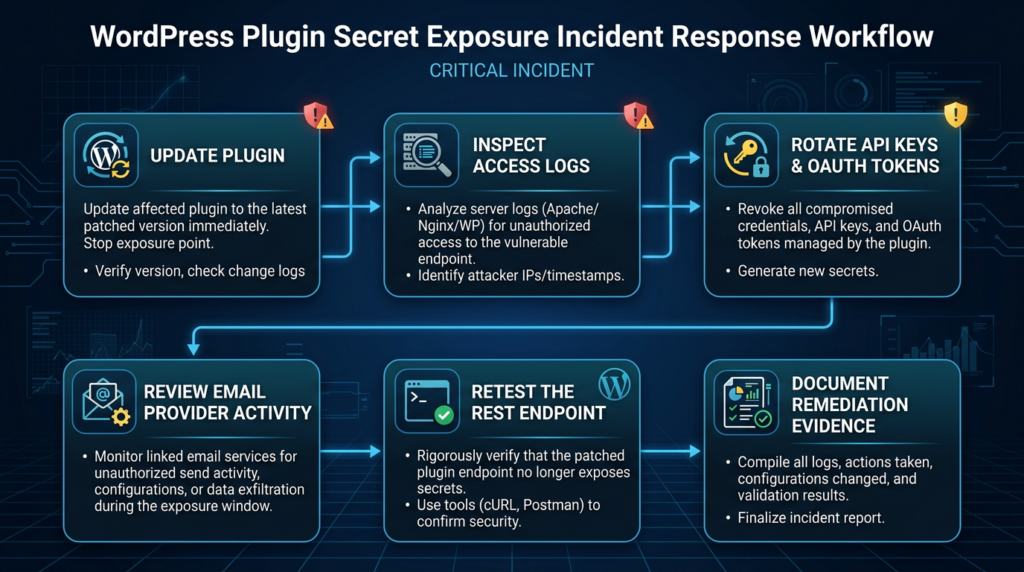
Updating the plugin prevents the known route exposure. It does not invalidate credentials that may already have been disclosed.
Use this sequence:
| עדיפות | פעולה | מדוע זה חשוב |
|---|---|---|
| 1 | Update Gravity SMTP to 2.1.5 or later | Removes the known vulnerable behavior |
| 2 | Confirm the installed version | Prevents false confidence after a failed or partial update |
| 3 | Search web logs for the vulnerable endpoint | Determines whether the site was targeted |
| 4 | Identify configured email providers | Defines which credentials may have been exposed |
| 5 | Rotate provider credentials | Removes attacker access even if secrets were copied |
| 6 | Review provider logs | Detects abuse outside WordPress |
| 7 | Review WordPress admin users | Finds unrelated or follow-on compromise |
| 8 | Audit other secret-bearing plugins | Reduces similar exposure elsewhere |
| 9 | Retest the endpoint safely | Confirms the leak is closed |
| 10 | Document evidence | Supports internal review, customer assurance, and compliance needs |
A clean remediation record should avoid raw secrets. It should preserve enough evidence to prove exposure and closure without spreading credentials into tickets, chat logs, screenshots, or reports.
A good record might look like this:
Asset: example.com
Plugin: Gravity SMTP
Previous version: 2.1.4
Current version: 2.1.5
Endpoint tested: /wp-json/gravitysmtp/v1/tests/mock-data?page=gravitysmtp-settings
Pre-remediation result: HTTP 200 with large JSON response
Post-remediation result: denied response
Credentials rotated: Google OAuth connection, Resend API key
Provider logs reviewed: no abnormal sending detected after rotation
Raw secrets stored in report: no
That is enough to support remediation without creating a second leak.
Temporary WAF and web server controls
A WAF or web server rule can reduce exposure while patching. It should not be treated as the final fix.
For Nginx, a temporary deny rule may look like this:
location = /wp-json/gravitysmtp/v1/tests/mock-data {
    return 403;
}
For Apache .htaccess, a temporary rewrite block may look like this:
<IfModule mod_rewrite.c>
RewriteEngine On
RewriteCond %{REQUEST_URI} ^/wp-json/gravitysmtp/v1/tests/mock-data [NC]
RewriteRule ^ - [F,L]
</IfModule>
These examples may need adjustment for reverse proxies, WordPress permalink behavior, managed hosting platforms, and WAF placement. Test carefully.
Do not stop at blocking. Update Gravity SMTP and rotate credentials. A rule that blocks the endpoint today does not revoke a key that was exposed yesterday.
Why plugin-held credentials are a structural WordPress risk
Gravity SMTP is a clear example because email delivery plugins naturally handle secrets. But the pattern extends across the WordPress ecosystem.
Many plugins connect WordPress to external services:
| Plugin category | Common secrets or sensitive data |
|---|---|
| SMTP and email delivery | SMTP passwords, API keys, OAuth tokens, mail logs |
| Form builders | Webhook secrets, CRM tokens, submitted data |
| Ecommerce | Payment provider keys, order data, customer data |
| Backup plugins | Cloud storage keys, database dumps, restore tokens |
| CRM integrations | OAuth refresh tokens, contact data, lead data |
| Marketing automation | API keys, tracking configuration, campaign data |
| Analytics plugins | Private tokens, account IDs, event data |
| Security plugins | Scan results, file paths, firewall configuration |
| AI plugins | Model provider API keys, prompts, logs, tool outputs |
A plugin does not need to be malicious to create risk. It only needs to store a valuable secret and expose one route, AJAX action, export function, diagnostic report, or settings endpoint incorrectly.
That is why secret inventory belongs in WordPress hardening. Site owners should be able to answer:
| Question | מדוע זה חשוב |
|---|---|
| Which plugins store API keys? | Identifies high-value plugins for urgent patching |
| Which plugins store OAuth refresh tokens? | Refresh tokens may remain useful after short-lived tokens expire |
| Which plugins can send email? | Email abuse can affect account recovery and customer trust |
| Which plugins can access customer data? | Plugin compromise may become data exposure |
| Which plugins expose REST API routes? | Routes are reachable and automatable |
| Which plugins generate system reports? | Diagnostic output often contains sensitive metadata |
| Which plugins load external scripts? | Runtime trust may extend beyond local plugin files |
A WordPress admin panel can become a secret manager by accident. Treat it accordingly.
How developers should prevent this class of bug
The first rule is direct:
Do not use __return_true on a route that returns sensitive data or performs a privileged action.
A safer admin-only route should check capability:
register_rest_route(
    'example/v1',
    '/settings',
    array(
        'methods'             => WP_REST_Server::READABLE,
        'callback'            => 'example_get_settings',
        'permission_callback' => function ( WP_REST_Request $request ) {
            return current_user_can( 'manage_options' );
        },
    )
);
For state-changing routes, deny by default and return explicit errors:
register_rest_route(
    'example/v1',
    '/settings',
    array(
        'methods'             => WP_REST_Server::EDITABLE,
        'callback'            => 'example_update_settings',
        'permission_callback' => function ( WP_REST_Request $request ) {
            if ( ! current_user_can( 'manage_options' ) ) {
                return new WP_Error(
                    'rest_forbidden',
                    __( 'Insufficient permissions.', 'example-plugin' ),
                    array( 'status' => 403 )
                );
            }

            return true;
        },
    )
);
Do not dump raw configuration objects into API responses:
return get_option( 'example_plugin_settings' );
That pattern is risky because configuration objects evolve. A harmless setting today may become a stored credential tomorrow.
Build an allowlisted response instead:
return array(
    'provider'        => get_option( 'example_mail_provider' ),
    'api_key_present' => ! empty( get_option( 'example_mail_api_key' ) ),
    'last_verified'   => get_option( 'example_mail_last_verified' ),
);
If a support report needs to show that a secret exists, redact it:
function example_redact_secret( $value ) {
    if ( empty( $value ) ) {
        return '';
    }

    $value = (string) $value;

    return 'redacted-' . substr( $value, -4 );
}
Most diagnostic reports do not need raw secrets. They need to show whether a provider is configured, which provider is active, whether a connection test passed, and when the credential was last updated.
Test the negative path
Security tests should not only verify that administrators can use a feature. They should verify that everyone else cannot.
A plugin test should check anonymous access:
public function test_anonymous_user_cannot_access_system_report() {
    wp_set_current_user( 0 );

    $request  = new WP_REST_Request( 'GET', '/example/v1/system-report' );
    $response = rest_do_request( $request );

    $this->assertTrue(
        in_array( $response->get_status(), array( 401, 403 ), true )
    );
}
It should check low-privilege access:
public function test_subscriber_cannot_access_system_report() {
    $subscriber_id = self::factory()->user->create(
        array( 'role' => 'subscriber' )
    );

    wp_set_current_user( $subscriber_id );

    $request  = new WP_REST_Request( 'GET', '/example/v1/system-report' );
    $response = rest_do_request( $request );

    $this->assertSame( 403, $response->get_status() );
}
It should also check that raw secrets are never returned, even to authorized administrators:
public function test_system_report_redacts_api_key_for_admin() {
    $admin_id = self::factory()->user->create(
        array( 'role' => 'administrator' )
    );

    wp_set_current_user( $admin_id );

    update_option( 'example_mail_api_key', 'sk_live_example_secret_value' );

    $request  = new WP_REST_Request( 'GET', '/example/v1/system-report' );
    $response = rest_do_request( $request );
    $data     = $response->get_data();

    $this->assertStringNotContainsString(
        'sk_live_example_secret_value',
        wp_json_encode( $data )
    );
}
These tests catch the mindset that causes exposure: assuming a route will only be called by the intended dashboard UI.
The dashboard is not a security boundary
A common developer mistake is assuming that a route used by WordPress admin JavaScript is protected because the UI is inside the dashboard.
That is not enough.
A REST route exists at a URL. If the route does not enforce permission on the server side, external callers can request it directly. Admin page visibility, menu placement, React component state, and JavaScript-only assumptions do not secure a backend endpoint.
Think in caller states:
| Caller | Expected behavior for sensitive routes |
|---|---|
| Anonymous visitor | Deny |
| Subscriber | Deny |
| Contributor or author | Deny unless explicitly needed |
| Editor | Deny unless the route is specifically editorial |
| Administrator | Allow only if the action is appropriate |
| External scanner | Deny |
| Search engine crawler | Deny |
| Authenticated attacker with low privilege | Deny |
The route should fail safely for every caller that does not need access.
If a route returns secrets, logs, connector data, system reports, debug output, export files, or plugin settings, public access is a vulnerability.
A practical REST route audit workflow
Security teams should add REST route inventory to WordPress plugin reviews. This is especially important for sites that run email, form, ecommerce, CRM, analytics, backup, AI, marketing, or security plugins.
A first pass can begin with the REST API index:
curl -sS https://example.com/wp-json/ \
  | jq -r '.routes | keys[]' \
  | sort
Some sites restrict the REST index. Some security plugins alter the response. That does not invalidate the workflow. It means route inventory should also include plugin code review, runtime testing, and server-side logging.
In plugin code, search for route registration:
grep -R "register_rest_route" wp-content/plugins/ -n
Then classify routes by sensitivity:
| Route type | Expected access |
|---|---|
| Public content route | Anonymous access may be acceptable |
| Search route | Anonymous access may be acceptable if only public data is returned |
| Plugin settings route | Administrator only |
| Connector route | Administrator only with secret redaction |
| System report route | Administrator only with strict minimization |
| Logs route | Administrator only or a narrow operational role |
| Export route | Strong authorization and audit logging |
| State-changing route | Capability check, nonce handling, correct HTTP method |
| Test or mock route | Treat as sensitive if it touches real configuration |
For each sensitive route, test at least three identities:
| Test identity | מטרה |
|---|---|
| Anonymous | Finds internet-facing exposure |
| Low-privilege user | Finds broken vertical authorization |
| Administrator | Confirms intended behavior and response minimization |
Do not treat route discovery as the finding. The finding is public or unauthorized access to sensitive behavior.
Safe evidence handling
Sensitive information disclosure testing can create a second exposure if evidence is handled carelessly.
A raw JSON response may contain provider keys, OAuth tokens, database metadata, customer data, logs, email addresses, or reset links. Copying that response into a ticket, chat thread, screenshot, GitHub issue, or customer report can spread the incident.
A safer evidence pattern is:
| Evidence item | Safer handling |
|---|---|
| Endpoint path | Record method and route |
| Status code | Record whether unauthorized access returned 200, 401, or 403 |
| Response size | Record approximate size without storing the full body |
| Sensitive field presence | Record field names with redacted values |
| API key evidence | Show last four characters or a hash only |
| Provider logs | Show timestamps and abnormal source indicators |
| Remediation proof | Show patched version and denied unauthorized request |
A useful finding summary can be short:
Unauthenticated request to /wp-json/example/v1/system-report returned HTTP 200 and a large JSON response. The response contained fields indicating that a third-party email provider API key was present. Raw secret values were not stored in this report. The affected credential was rotated after remediation.
That gives defenders enough information to act without turning the report into a credential dump.
For teams running recurring authorized validation across web and API targets, this is where workflow discipline matters. Penligent supports authorized AI-assisted web and API security testing workflows where teams need to move from exposed endpoint discovery to evidence-backed validation, remediation verification, and report generation without losing control of scope or sensitive data. (Penligent) The tool choice matters less than the standard: prove the issue, minimize secret exposure, verify the fix, and keep a defensible record.
How this changes bug bounty testing
For bug bounty hunters, the lesson is not to spray the internet for Gravity SMTP. The lesson is to test plugin, extension, and integration APIs inside authorized scopes.
Many programs include WordPress assets: marketing sites, WooCommerce stores, documentation portals, gated content sites, campaign microsites, support centers, and CRM-connected forms. These assets often hold more secrets than the main application team realizes.
Interesting authorized test areas include:
| Area | What to test |
|---|---|
| REST API index | Unexpected plugin namespaces and routes |
| Debug routes | System reports, environment data, configuration dumps |
| Email plugins | Mail logs, provider settings, OAuth tokens |
| Form plugins | Submissions, exports, webhook settings |
| CRM connectors | API keys, OAuth refresh tokens, lead data |
| Backup plugins | Backup lists, restore actions, cloud storage credentials |
| Membership plugins | Role changes, invitations, account recovery |
| Marketing plugins | External scripts, tracking keys, connected accounts |
| AI or automation plugins | Provider keys, prompts, logs, tool outputs |
A strong bug bounty report should prove unauthorized access, minimize exposure of real secrets, explain realistic impact, provide reproduction steps inside scope, recommend precise remediation, and show how the fix can be verified.
A weak report overclaims RCE, dumps raw secrets, or tests assets outside scope. Accuracy and restraint are part of the value.
Related WordPress plugin cases
Gravity SMTP CVE-2026-4020 is one case in a broader WordPress plugin trust pattern. Related issues should be compared carefully, not flattened into the same vulnerability.
| תיק | Why it is relevant | שיעור עיקרי |
|---|---|---|
| Gravity SMTP CVE-2026-4020 | Unauthenticated REST API route exposed system and email integration data | REST API authorization mistakes can expose secrets |
| Post SMTP CVE-2025-11833 | Public vulnerability records describe unauthorized access to logged emails, including password reset links | Email logs are security-sensitive data |
| Post SMTP CVE-2025-24000 | Public records describe an authentication bypass issue affecting another email-related plugin | Mail plugins often sit close to account recovery and identity flows |
| OptinMonster supply-chain incident | Trusted WordPress plugin ecosystem path exposed runtime trust in external scripts | Plugin trust extends beyond local PHP code into vendor-controlled assets |
These cases are technically different. Gravity SMTP CVE-2026-4020 is a local REST API authorization failure. Post SMTP cases relate to different access-control and email log risks. The OptinMonster incident involved trusted third-party JavaScript loaded by WordPress sites, not the same REST endpoint pattern.
The shared lesson is about trust boundaries. WordPress plugin risk is no longer only about whether a local PHP file contains a classic exploit. Plugins connect sites to mail providers, CRM systems, payment platforms, analytics services, marketing scripts, AI providers, and backup storage. When those trust paths are exposed, the impact can move beyond WordPress.
Penligent’s prior analysis of the OptinMonster incident made a related point from the supply-chain side: WordPress plugin trust can extend into upstream scripts and SaaS-controlled runtime behavior, not just files under wp-content/plugins. (Penligent) Gravity SMTP shows the same principle from a different angle: a local plugin REST API route can expose secrets used by external services.
What site owners should do now
If you run Gravity SMTP, do not stop at a version update.
Use this checklist:
| שלב | פעולה | Evidence to keep |
|---|---|---|
| 1 | Confirm installed Gravity SMTP version | WP-CLI output or admin screenshot |
| 2 | Update to 2.1.5 or later | Post-update version output |
| 3 | Search logs for the vulnerable endpoint | Redacted log lines with timestamps |
| 4 | Identify configured email integrations | Provider names, not raw secrets |
| 5 | Rotate API keys, OAuth tokens, and SMTP passwords | Provider confirmation or audit log |
| 6 | Review provider-side activity | Abnormal API use, sending spikes, sender changes |
| 7 | Check WordPress admin users | Unknown accounts or role changes |
| 8 | Review plugin inventory | Other outdated or secret-bearing plugins |
| 9 | Retest endpoint safely | Status code and response size only |
| 10 | Document closure | Summary of patching, rotation, and validation |
If logs are missing, make a conservative decision based on the vulnerable window, plugin version, configured providers, and provider activity. Missing logs do not prove no exposure.
If the site had no third-party mail credentials configured, the credential risk may be lower, but system and plugin inventory may still have been exposed. Patch and verify anyway.
What plugin developers should change
Plugin developers should review every register_rest_route call with three questions:
- Who should be allowed to call this route?
- What is the minimum data the route should return?
- What happens when an anonymous or low-privilege user calls it?
Use this checklist:
| Question | Safer answer |
|---|---|
Does every route define permission_callback? | כן |
Do sensitive routes avoid __return_true? | כן |
| Are capability checks explicit? | כן |
| Are state-changing routes protected with capability and nonce checks where appropriate? | כן |
| Are secrets excluded or redacted from every response? | כן |
| Are system reports minimized? | כן |
| Are configuration objects allowlisted before output? | כן |
| Are anonymous requests tested? | כן |
| Are low-privilege requests tested? | כן |
| Are logs and exports treated as sensitive? | כן |
| Are route methods restricted? | כן |
| Are support or debug routes disabled or restricted in production? | כן |
One practical rule catches many bugs:
Every route that returns more than public content should have a negative test for anonymous access.
Another practical rule catches credential exposure:
No API response should return a raw secret unless there is a narrow, documented, unavoidable reason.
Most WordPress plugins do not need to display raw secrets after save. They need to show whether a provider is configured, whether a connection test passed, which provider is active, and when the credential was last verified. That can be done without exposing the credential itself.
Common mistakes after a WordPress plugin secret leak
Do not assume the site is safe because no files changed. CVE-2026-4020 is read-oriented. It may leave no modified plugin files, no new admin users, and no obvious malware.
Do not assume the site is safe because the issue is not RCE. Attackers often use information disclosure to choose follow-on attacks.
Do not assume the site is safe because the route was “only for testing.” If a route is publicly reachable and returns real configuration data, intent does not matter.
Do not rely only on IP blocklists. Exploitation infrastructure changes quickly.
Do not paste raw JSON responses into tickets, Slack, GitHub issues, or customer emails. If the response contains secrets, your evidence handling can create another leak.
Do not rotate only one obvious credential. Check fallback mailers, OAuth connections, staging keys, provider subaccounts, and any related credential stored in the same configuration.
Do not treat __return_true as harmless boilerplate. On a sensitive route, it means public access.
שאלות נפוצות
What is Gravity SMTP CVE-2026-4020?
- CVE-2026-4020 is a sensitive information exposure vulnerability in the Gravity SMTP WordPress plugin.
- It affects Gravity SMTP versions up to and including 2.1.4.
- The issue was fixed in Gravity SMTP 2.1.5.
- The vulnerable route was
/wp-json/gravitysmtp/v1/tests/mock-data. - When requested with
?page=gravitysmtp-settings, the endpoint could expose system configuration and email integration secrets. - Wordfence and CrowdSec both reported active exploitation activity. (Wordfence)
Is CVE-2026-4020 remote code execution?
- לא.
- Public advisories describe it as sensitive information exposure, not RCE.
- It does not directly allow shell commands, arbitrary file upload, or code execution.
- It can still be valuable because it may expose API keys, OAuth tokens, plugin versions, server details, database metadata, and mail provider configuration.
- Those details can help attackers choose follow-on attacks or abuse external email services.
Why does permission_callback matter in WordPress REST API routes?
- It decides whether a request is allowed to call a REST API route.
- If it always returns
נכון, the route is public. - Public routes are safe only when they return public data.
- Routes that expose settings, logs, system reports, connector data, or secrets need explicit authorization.
- WordPress 5.5 added warnings for routes that omit a permission callback, and official guidance says
__return_trueis for routes intended to be public. (Make WordPress)
How do I check whether my site was targeted?
- Search web logs for
/wp-json/gravitysmtp/v1/tests/mock-data. - Look specifically for requests containing
?page=gravitysmtp-settings. - Check whether the site was running Gravity SMTP 2.1.4 or earlier when the request occurred.
- Review email provider logs for unusual API calls, sending spikes, new sender identities, or account warnings.
- If the site was vulnerable and credentials were configured, rotate them even if you do not see obvious abuse.
Should I rotate email provider credentials after patching?
- Yes, if the vulnerable version was installed with third-party mail integrations configured.
- Updating the plugin prevents future exposure through the known endpoint.
- It does not invalidate credentials that may already have been returned.
- Rotate API keys, OAuth tokens, SMTP passwords, fallback mailer credentials, and shared staging credentials.
- Review provider-side logs after rotation.
Why do sources rate the vulnerability differently?
- Sensitive information exposure bugs can be scored differently depending on how confidentiality impact is modeled.
- Wordfence reports CVSS 5.3 medium for CVE-2026-4020. (Wordfence)
- Other advisory databases may rate the same issue higher when they model confidentiality impact as high.
- Defenders should prioritize based on practical exposure, not only the label.
- Unauthenticated access, active exploitation, credential exposure, and broad deployment all increase urgency.
Are all WordPress REST API endpoints dangerous?
- לא.
- Many WordPress REST API endpoints are intentionally public and safe.
- The danger appears when routes expose sensitive data or privileged actions without proper authorization.
- Public route discovery is not the bug.
- Public access to settings, logs, system reports, secrets, or admin functions is the bug.
What should WordPress plugin developers change after this incident?
- Audit every
register_rest_routeשיחה. - Remove
__return_truefrom sensitive routes. - Add explicit capability checks.
- Redact or omit secrets from every API response.
- Avoid dumping raw configuration objects.
- Add tests for anonymous and low-privilege access.
- Treat debug output, system reports, connector data, and logs as sensitive.
סגירה
Gravity SMTP CVE-2026-4020 is important because it is simple, practical, and easy to repeat across the WordPress ecosystem. A REST API route crossed the wrong authorization boundary. The result was not remote code execution, but it exposed exactly the kind of data attackers use to move from scanning to targeted abuse.
For site owners, the next steps are clear: update Gravity SMTP, search logs, rotate email provider credentials, and verify that the endpoint no longer exposes sensitive data. For developers, the lesson is just as clear: permission_callback is not boilerplate. It is the authorization boundary for the route.
A WordPress plugin endpoint is not just plugin plumbing. It is an internet-facing API surface. If it can read secrets, logs, connector data, or system reports, it belongs in the security model.


 Hebrew
  English
  German
  French
  Spanish
  Portuguese
  Japanese
  Korean
  Hindi
Hindi  Arabic
  Turkish