
BlueHammer deserves attention for a simple reason: it forced defenders to look at Microsoft Defender not just as a scanner, but as a high-privilege actor inside the file system. In April 2026, Microsoft began tracking the issue as CVE-2026-33825, with NVD describing it as an elevation of privilege flaw in Microsoft Defender caused by insufficient granularity of access control. NVD lists a CVSS 3.1 score of 7.8 and maps the flaw to CWE-1220. Public technical analysis, however, paints a richer picture: a chain built from legitimate Windows features, including Volume Shadow Copy Service, opportunistic locks, Cloud Files API behavior, and path redirection. (एनवीडी.एनआईएसटी.जीओवी)
That difference in language matters. The official record is intentionally compact. The public research is operational. If you only read the CVE record, you learn that Defender can be abused for local privilege escalation. If you read the technical writeups, you learn something more valuable: modern Windows privilege escalation does not always need a kernel memory corruption bug, an exotic driver primitive, or arbitrary code execution inside the security product. In this case, the dangerous property seems to emerge from the interaction between trusted subsystems that each behave as documented on their own. (एनवीडी.एनआईएसटी.जीओवी)
BlueHammer is also no longer just a story about one patched bug. BleepingComputer, citing Huntress Labs, reported that BlueHammer, RedSun, and UnDefend were all observed in real intrusions in mid-April 2026, including activity on a Windows device compromised through an SSL VPN user account. Cyderes likewise says all three are active in the wild, while also noting that only BlueHammer has a CVE and a Microsoft patch as of April 20, 2026. That distinction is important: BlueHammer is the patched, named, officially tracked issue. RedSun and UnDefend are part of the same public conversation and apparently the same attack surface, but they do not yet have the same vendor treatment. (ब्लिपिंगकंप्यूटर)
There is a small but meaningful timeline discrepancy across public sources, and it is worth being precise about it. Cyderes dates the BlueHammer exploit release to April 3, 2026. Picus frames the broader public disclosure around April 7, 2026. BleepingComputer and other media describe the exploit as having emerged in the first week of April. The safest summary is that BlueHammer became public in early April 2026, before Microsoft shipped a fix, and Microsoft then patched the issue in the April 2026 Patch Tuesday cycle under CVE-2026-33825. (cyderes.com)
BlueHammer, RedSun, and UnDefend at a glance
Before diving into internals, it helps to place the three names side by side. BlueHammer is the public exploit chain that Microsoft now tracks as CVE-2026-33825. Public analysis describes it as a privileged file read chain that ends in SYSTEM by extracting credential material from shadow-copy-backed registry hives. RedSun is presented as the write-path sibling: instead of reading protected material and pivoting through credentials, it turns a Defender-triggered race into a write into C:\Windows\System32, then lets Windows execute the replaced binary as SYSTEM. UnDefend is a separate but related tool intended to interfere with Defender’s update behavior and degrade protection. (एनवीडी.एनआईएसटी.जीओवी)
| आइटम | BlueHammer | RedSun | UnDefend |
|---|---|---|---|
| Current tracking status | CVE-2026-33825 | No public CVE as of April 20, 2026 | No public CVE as of April 20, 2026 |
| Primary outcome | Local privilege escalation to SYSTEM | Local privilege escalation to SYSTEM | Defender degradation and update disruption |
| Core direction | Privileged read | Privileged write | Defense evasion and denial of protection |
| Patch status | Patched in April 2026 Patch Tuesday | No patch publicly documented | No patch publicly documented |
| Public exploitation claims | Reported by third parties | Reported by third parties | Reported by third parties |
The table above reflects the current public picture rather than a single vendor narrative. BlueHammer is the cleanest case because Microsoft, NVD, and the security media all align on its existence, its general impact, and its patch status. RedSun and UnDefend are more fluid: the strongest public details come from third-party research and reporting, not from an official Microsoft vulnerability bulletin. That is exactly why defenders should separate “officially assigned CVE status” from “practically useful attacker capability.” Those two things do not always move at the same speed. (एनवीडी.एनआईएसटी.जीओवी)
CVE-2026-33825 by the official record
The NVD entry for CVE-2026-33825 is intentionally terse. Its description says that insufficient granularity of access control in Microsoft Defender allows an authorized attacker to elevate privileges locally. NVD records the CVSS 3.1 vector as एवी:एल/एसी:एल/पीआर:एल/यूआई:एन/एस:यू/सी:एच/आई:एच/ए:एच, which corresponds to a local, low-complexity privilege escalation requiring prior access but no user interaction. NVD also maps the issue to CWE-1220 and references Microsoft’s Security Update Guide entry. (एनवीडी.एनआईएसटी.जीओवी)
Rapid7’s April 2026 Patch Tuesday analysis adds context that is useful for defenders even though it is still a secondary source. It notes that Microsoft Defender received a patch for CVE-2026-33825 in the April cycle, that successful exploitation leads to SYSTEM privileges, and that systems with Defender disabled are not in an exploitable state for this specific chain. The same analysis also notes that Microsoft considered the issue publicly disclosed and assessed exploitation as more likely. (रैपिड7)
SecurityWeek’s April Patch Tuesday coverage independently ties CVE-2026-33825 to the BlueHammer name and confirms that Microsoft treated the flaw as publicly disclosed before patches were available. That cross-source alignment is useful because it tells us where the strongest facts end. We can say with confidence that CVE-2026-33825 is the official tracking identifier for BlueHammer, that it is an elevation of privilege issue in Microsoft Defender, that it was publicly disclosed before patching, and that Microsoft addressed it in the April 2026 security updates. We cannot, based on the official record alone, reconstruct the full exploit path. For that, you have to move into public research. (SecurityWeek)
Why BlueHammer matters more than a normal local privilege escalation bug
A lot of Windows local privilege escalations are easy to dismiss in practice. Some are hard to trigger reliably. Some need strange environmental conditions. Some are only relevant to already-compromised hosts and therefore get mentally downgraded by teams under pressure. BlueHammer is different because it attacks something defenders habitually trust: the update and remediation logic of the built-in antivirus. (cyderes.com)
Cyderes’ writeup is especially useful here because it frames the issue in a way practitioners immediately understand. According to its analysis, BlueHammer does not require a kernel exploit, memory corruption, or arbitrary code execution inside Defender. It abuses Microsoft Defender’s update workflow together with Volume Shadow Copy Service, the Windows Cloud Files API, and opportunistic locks. Each building block is legitimate. The dangerous behavior appears only when the chain is assembled in the right order. That is a very different category of problem from a classic “bad pointer, get ring 0” story. (cyderes.com)
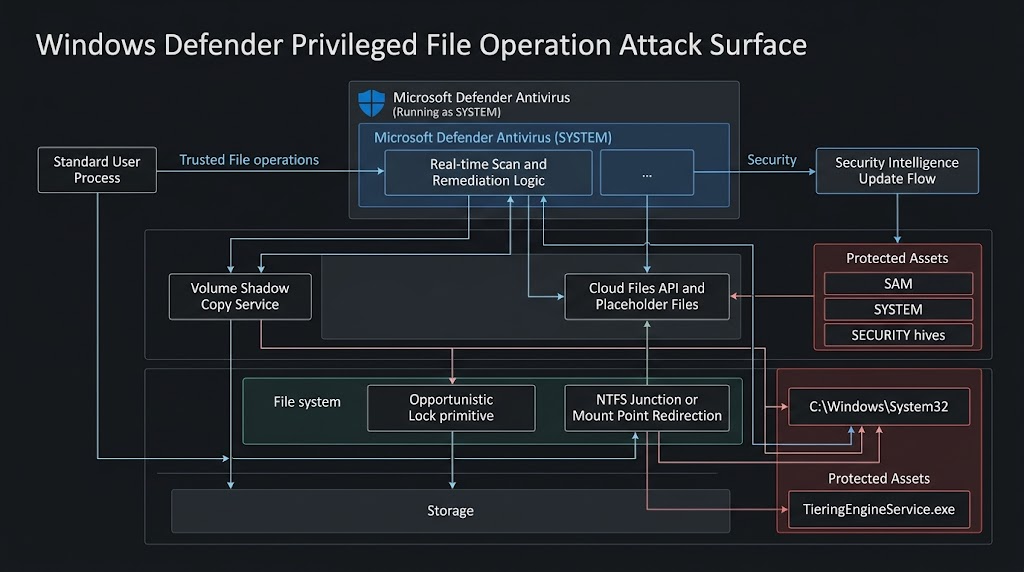
This is exactly the sort of issue that changes the defender’s threat model. If a security product running as SYSTEM can be nudged into reading from or writing to the wrong place at the wrong time, the attack surface is not just “the antivirus engine.” It is the entire set of file system and service interactions that happen around scanning, cleanup, restoration, updating, and retry logic. In other words, the attack surface is architectural, not merely component-local. That makes both detection and remediation harder. (learn.microsoft.com)
The Windows primitives behind BlueHammer and RedSun
Understanding the public BlueHammer and RedSun research does not require reading exploit code line by line. It does require understanding the Windows features these chains lean on. None of them is obscure. That is what makes this family of issues so instructive. (cyderes.com)
Microsoft Defender remediation and update behavior
Microsoft’s documentation is clear that when Microsoft Defender Antivirus detects a threat, it may remediate it by removing the file, quarantining it, or allowing it to remain, depending on policy and context. Microsoft’s update documentation also makes clear that Defender’s platform and engine updates are handled on a regular cadence, and that security intelligence updates are delivered multiple times a day. Those are normal, desirable properties for a modern antivirus platform. Frequent updates and active remediation are what defenders want. (learn.microsoft.com)
But high-frequency, high-privilege file activity is also precisely the kind of thing attackers want to study. If you can predict when Defender will touch a file, or how it will handle a remediation path, or which trusted system components it will interact with while running as SYSTEM, you may be able to turn routine protective behavior into a privilege boundary problem. That seems to be the lesson public researchers are drawing from BlueHammer and RedSun. (cyderes.com)
Volume Shadow Copy Service
Microsoft describes Volume Shadow Copy Service, or VSS, as a framework that allows backups to be performed while applications continue writing to the volume. It exists to create consistent snapshots without halting the whole system. In normal administrative use, that is a feature. In a privilege-escalation context, it is an opportunity. If a trusted component creates or interacts with a shadow copy at the right moment, files that are ordinarily locked or protected may become readable or writable through alternate paths for a short window. (learn.microsoft.com)
BlueHammer’s public analysis leans heavily on that property. Cyderes says the exploit’s goal is to force Defender to create a new shadow copy, pause Defender at the right moment, and then access sensitive registry hives from the snapshot before cleanup completes. That is why VSS appears repeatedly in public writeups: not because VSS is “bad,” but because it can become the storage-level backdrop for a privileged race. (cyderes.com)
Opportunistic locks
Microsoft’s file I/O documentation describes opportunistic locks, or oplocks, as a mechanism clients use to coordinate caching and improve apparent response time. That sounds harmless until you translate it into attacker language: oplocks can also provide precise timing control over file access. Public RedSun analysis says that a batch oplock is central to opening the race window at the exact moment Defender interacts with a target file. In practical terms, oplocks turn what might have been a fragile race into a reproducible one. (learn.microsoft.com)
That point is easy to miss if you are only used to thinking about memory races. File-system timing matters too. In BlueHammer and RedSun, the timing window does not appear to be about corrupting a heap. It is about nudging a trusted Windows component into touching the right path after the environment around that path has changed. That is a much more filesystem-centric view of privilege escalation. (cyderes.com)
Cloud Files API and placeholder files
Microsoft’s Cloud Files API documentation explains that Windows provides an API stack for cloud sync engines, including support for placeholder files and directories. The Cloud Filter API sits at the user-mode and file-system boundary, handling the creation and management of placeholders. Microsoft also notes that cloud files reparse points are normally hidden from most applications, except sync engines and processes whose main image resides under %systemroot%. (learn.microsoft.com)
That last detail is one of the most interesting architectural clues in this entire story. It does not mean the Cloud Files API is itself the vulnerability. It does mean that Windows intentionally treats trusted system components differently around placeholder and reparse-point handling. Public RedSun analysis says placeholder files are used to keep a filename valid after the original file is deleted, which allows the exploit to preserve a path long enough to swap the underlying directory logic. When you combine that with a trusted SYSTEM process participating in the workflow, the attack surface becomes very real. (learn.microsoft.com)
Storage Tiers Management and TieringEngineService
Microsoft documents the Storage Tiers Management service, TieringEngineService, as a Windows service that optimizes data placement in tiered storage spaces. It is always installed and normally starts manually. Public RedSun analysis says this service becomes the execution trigger: once the attacker manages to replace C:\Windows\System32\TieringEngineService.exe, the Storage Tiers Management COM object causes Windows to launch the replaced binary as SYSTEM. (learn.microsoft.com)
That is why RedSun is more than “an arbitrary write.” Arbitrary file writes into protected locations are bad enough. What gives RedSun its sharp edge is that the target is tied to a normal Windows execution path. The system helps complete the privilege transition after the attacker wins the file-write race. That is far more operationally useful than landing a write to a dead file. (cyderes.com)
BlueHammer, the privileged read path to SYSTEM
The public BlueHammer chain is easier to understand if you break it into phases rather than code blocks. Phase one is all about getting Defender to participate in a predictable update workflow. According to Cyderes, the public code first checks for a pending Defender signature update by enumerating Windows Update entries and looking for updates classified as Microsoft Defender Antivirus definition updates. If that precondition is not met, the chain stops. This is an important operational detail because it means BlueHammer is not simply “run binary, get SYSTEM.” It depends on alignment with Defender’s own update rhythm. (पेनलिजेंट)
That immediately gives defenders something useful to think about. Microsoft’s own documentation emphasizes that Defender security intelligence updates are delivered multiple times a day. Under normal circumstances, that is pure defensive value. Under BlueHammer’s logic, however, update cadence becomes part of exposure analysis because the exploit appears to depend on specific Defender update behavior taking place at all. That does not make rapid updates bad. It does mean that routine security maintenance can become an attacker’s synchronization primitive. (learn.microsoft.com)
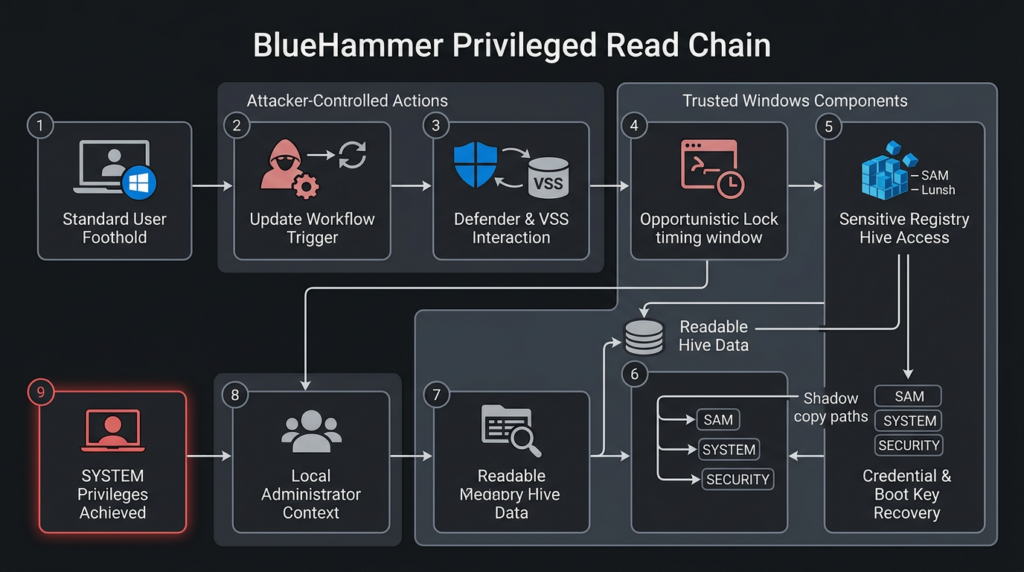
Phase two, according to public writeups, is where the exploit creates the privileged read condition. Cyderes describes the chain as forcing Defender to create a new shadow copy, pausing Defender at a precise moment, and then reading the normally inaccessible registry hives from the shadow-copy device path. The important files named in the public analysis are the familiar trio: SAM, प्रणाली, और SECURITY. That is already enough to tell an experienced Windows operator where the exploit is going. (cyderes.com)
Once those hives are available through the shadow copy, the rest of the chain starts to look more traditional. Cyderes says the exploit reconstructs the boot key from the प्रणाली hive, uses it to decrypt LSA-related material, extracts password-encryption information from the SAM hive, and recovers NTLM password hashes for local accounts. That is not novel by itself. The novelty is that the data source is not a stale backup the attacker already controlled. It is a live system snapshot created as part of Defender’s own workflow. (cyderes.com)
From there, public analysis says the chain pivots from credential material to execution context. Cyderes describes a sequence in which a local Administrator password is forcibly changed, the exploit logs in as that administrator, duplicates the resulting token, and creates a temporary Windows service to complete the move to SYSTEM. Even without reproducing those steps in detail, the logic is clear: BlueHammer is a privileged read primitive that becomes a credential access and local takeover chain. (cyderes.com)
That distinction is useful when comparing BlueHammer with RedSun. BlueHammer is not “just an arbitrary read.” It is a read against extremely sensitive files, and the output of that read is exactly the kind of material attackers need to turn a local foothold into a durable, high-privilege position. In ATT&CK language, it bridges privilege escalation and credential access. In operational language, it turns Defender into the system component that helped expose the secrets needed to own the box. (cyderes.com)
BlueHammer is not just another SAM story
There is a temptation to collapse BlueHammer into a familiar headline: “non-admin user reads SAM, escalates to SYSTEM.” That is directionally true but analytically lazy. The better comparison point is HiveNightmare, tracked as CVE-2021-36934. NVD described HiveNightmare as an elevation-of-privilege vulnerability caused by overly permissive ACLs on critical system files, including the SAM database, and explicitly warned that patching alone was not enough because administrators also had to delete existing shadow copies to fully mitigate the issue. (एनवीडी.एनआईएसटी.जीओवी)
BlueHammer lands in a similar outcome space. It also ends up around SAM, SYSTEM, SECURITY, and shadow copies. But the public research points to a very different root cause. HiveNightmare was a permissions failure. BlueHammer, based on public writeups, is a timing and path-management failure across multiple trusted components. One bug said, in effect, “these files are too open.” The other says, “the right chain of trusted activity can open the wrong view of these files at the wrong time.” Those are not the same lesson, even if the attacker’s next move looks familiar. (पेनलिजेंट)
That is why BlueHammer should concern defenders who think they already learned the SAM lesson in 2021. The problem is not merely that sensitive hives exist or that shadow copies exist. The problem is that high-privilege security workflows interacting with storage snapshots can create new exposure paths even when filesystem permissions look sane on paper. That is a different class of risk, and it requires a different detection mindset. (एनवीडी.एनआईएसटी.जीओवी)
RedSun, the privileged write path to SYSTEM
If BlueHammer is the read-path lesson, RedSun is the write-path escalation of the same broader idea. Cyderes says RedSun achieves local privilege escalation from a standard user account to SYSTEM on Windows 10, Windows 11, and Windows Server 2019 and later by abusing Defender’s real-time scanning path. Unlike BlueHammer, which pivots through credential material, RedSun is described as taking a SYSTEM-privileged file write and steering it into C:\Windows\System32, then letting Windows execute the replaced binary as SYSTEM. (cyderes.com)
As of April 20, 2026, RedSun does not have the same official status as BlueHammer. BleepingComputer reports that Microsoft patched BlueHammer as CVE-2026-33825, while RedSun and UnDefend remain unaddressed. Cyderes says RedSun has no CVE assigned and no patch available. Public reporting also says RedSun has already appeared in real-world activity alongside the other tools. Those exploitation claims come from third-party observation, not from a Microsoft exploitation bulletin, and that distinction should stay explicit in any serious analysis. (ब्लिपिंगकंप्यूटर)
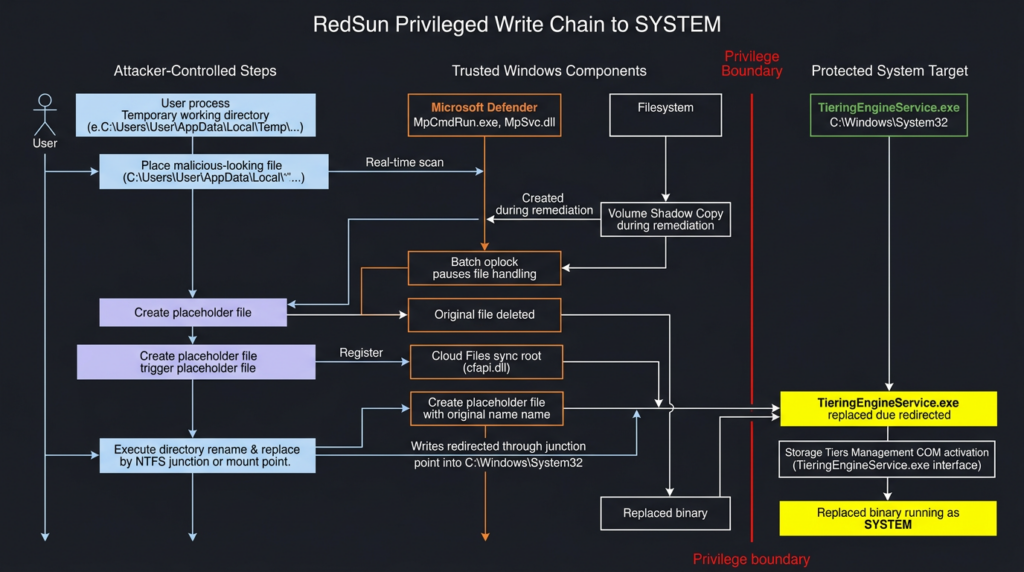
Public RedSun analysis breaks the chain into two stages. In phase one, the attacker plants a file designed to trigger Defender inspection. Cyderes says the PoC uses a file named TieringEngineService.exe containing the EICAR antivirus test string, with the string obfuscated until runtime. The exploit opens the file with FILE_EXECUTE access, which is enough to prompt Defender to inspect it. While Defender does that, a second thread waits for the shadow-copy object that appears as part of Defender’s remediation workflow. (cyderes.com)
At that point, the chain starts to look like a carefully staged filesystem illusion. According to Cyderes, the exploit places a batch oplock on the target file through the shadow copy path, creating a timing window. Inside that window, the original file is deleted, the working directory is registered as a Cloud Files sync root, and a placeholder file with the same name is created so the path remains valid. Then the directory is renamed and recreated as an NTFS mount point targeting C:\Windows\System32. From that moment on, writes through the original-looking temporary path are redirected into System32. (cyderes.com)
That is the crucial difference from BlueHammer. BlueHammer is about pulling sensitive data out of a privileged context. RedSun is about pushing attacker-controlled content into a privileged path. Cyderes says the exploit loops file-creation calls until one lands during the race window and succeeds in copying its own executable into C:\Windows\System32\TieringEngineService.exe. The attacker does not need to steal credentials because the write itself is the stepping stone to direct execution. (cyderes.com)
Phase two completes the privilege escalation. Cyderes says the exploit activates the Storage Tiers Management COM object using CoCreateInstance and a known CLSID, which triggers the normal Windows behavior of launching TieringEngineService.exe as SYSTEM. Because the attacker has replaced that binary, the system now runs attacker code in the SYSTEM context. Public analysis says the payload then recovers the original user session through a named pipe and spawns a visible process back into the interactive desktop. (cyderes.com)
The important operational point is not the named pipe or the visual shell. It is that RedSun never needs to touch credentials. It is a direct write-and-execute privilege escalation chain. That makes it qualitatively different from BlueHammer and potentially more attractive in environments where credential theft is noisy, monitored, or blocked. BlueHammer reaches SYSTEM through secrets. RedSun reaches SYSTEM through trusted file placement and trusted execution paths. (cyderes.com)
BlueHammer and RedSun side by side
BlueHammer and RedSun are easiest to compare in terms of what they win once the race is won.
| Property | BlueHammer | RedSun |
|---|---|---|
| Privileged effect | Read of protected hive data | Write into protected system path |
| Intermediate step | Recover credential material | Replace a trusted executable |
| Path to SYSTEM | Admin takeover and service-based escalation | Windows launches replaced binary as SYSTEM |
| Sensitivity focus | SAM, SYSTEM, SECURITY data | C:\Windows\System32\TieringEngineService.exe |
| Operational style | Credential-centric privilege escalation | Direct execution-centric privilege escalation |
This comparison also makes clear why defenders should not reduce the story to “Microsoft Defender bug gets you SYSTEM.” The mechanism matters because the mechanism determines what telemetry exists, what controls are useful, and what compensating steps remain available when a vendor patch does not yet exist. BlueHammer encourages defenders to look for suspicious access to shadow-copy-backed hive paths and post-read credential activity. RedSun pushes defenders toward path redirection, unusual System32 writes, COM-triggered service execution, and abnormal Cloud Files API usage. (cyderes.com)
UnDefend and the full attack surface picture
Public reporting around UnDefend makes this ecosystem more concerning even if BlueHammer remains the only officially assigned CVE. The UnDefend repository is described by its author as a Windows Defender denial-of-service tool that can operate as a standard user. Cyderes says passive mode blocks signature updates, aggressive mode can disable Defender during major platform updates, and the tool is intended to mislead the EDR console about Defender’s health state. BleepingComputer reports that Huntress saw UnDefend used alongside BlueHammer and RedSun in a real compromise. (गिटहब)
That makes the broader lesson harder to ignore. BlueHammer handles privileged read. RedSun handles privileged write. UnDefend handles protection degradation. Even if every claim in the public ecosystem does not carry equal official weight, the combined picture is serious enough for defenders to model as a practical toolkit against a single Windows trust boundary. This is not just a CVE story anymore. It is a design-surface story. (cyderes.com)
The deeper lesson, Defender is not just a detector
Security teams often talk about Defender as if it were mainly a sensor. That shorthand is wrong. Defender also updates files, quarantines files, restores files, handles exclusions, coordinates with storage and cloud-delivered protection features, and runs privileged remediation logic. Microsoft’s own documentation makes that obvious. The more capabilities a security product has, the more chances it has to become part of a file operation chain that matters to attackers. (learn.microsoft.com)
This is not a criticism unique to Microsoft. It is a general property of host security software. Anything that runs as SYSTEM and is empowered to alter files, react to detections, or integrate deeply with the storage stack is sitting on a dangerous trust boundary. BlueHammer and RedSun are just unusually clear examples because the public research shows how ordinary, documented Windows features can become the scaffolding for that boundary to fail. (cyderes.com)
It also explains why these issues are difficult to mitigate cleanly. If the exploit depended on one obviously unnecessary component, defenders could just disable it. But the chains described publicly touch VSS, update logic, placeholder behavior, oplocks, mount points, and legitimate service execution. Disabling any one of those globally may damage backups, cloud sync, storage behavior, or the antivirus itself. That is why behavioral detection and post-patch validation matter so much in this case. (learn.microsoft.com)
Related CVEs that make BlueHammer easier to understand
A good technical article should not throw in extra CVE numbers just to look complete. It should use related CVEs to sharpen the reader’s mental model. Two CVEs are genuinely useful here.
CVE-2021-36934, HiveNightmare
HiveNightmare is the most obvious comparison point because it also involved local privilege escalation through access to SAM-related material and volume shadow copies. NVD described CVE-2021-36934 as a permissions problem: overly permissive ACLs on multiple system files, including the SAM database, allowed an attacker to run arbitrary code with SYSTEM privileges. NVD also emphasized a critical remediation nuance: after patching, administrators still had to delete all existing shadow copies of system files, because simply installing the update did not fully eliminate the exposure. (एनवीडी.एनआईएसटी.जीओवी)
That history matters for BlueHammer in two ways. First, it reminds defenders that shadow-copy semantics can turn a “fixed” state into a “still exposed” state if existing snapshots remain available. Second, it shows how Windows privilege escalation problems can recur around the same sensitive artifacts while stemming from very different root causes. HiveNightmare was a permissions mistake. BlueHammer, as publicly analyzed, is a race-and-path problem in a Defender-driven workflow. The overlap is educational, not identical. (एनवीडी.एनआईएसटी.जीओवी)
CVE-2025-62221, Windows Cloud Files Mini Filter Driver
The second useful comparison is CVE-2025-62221, a Windows Cloud Files Mini Filter Driver elevation of privilege flaw that NVD describes as a use-after-free allowing a local authorized attacker to elevate privileges. Tenable noted in December 2025 that Microsoft considered the flaw exploited in the wild as a zero-day. This does not mean CVE-2025-62221 and RedSun are the same issue. They are not described that way in any authoritative source. It does mean that Cloud Files-related privileged behavior was already a live area of local privilege escalation risk before RedSun’s public writeup appeared. (एनवीडी.एनआईएसटी.जीओवी)
That makes the Cloud Files angle in RedSun more than a curiosity. Microsoft’s own Cloud Files API documentation describes a privileged stack that manages placeholder files and interacts with a minifilter driver, cldflt.sys. Public RedSun analysis says placeholder mechanics are part of the chain that keeps a filename alive while the underlying path is swapped. When you put those pieces together, the takeaway is not “Cloud Files is broken.” The takeaway is that Cloud Files belongs on the short list of Windows features defenders should threat-model whenever a new file-system privilege escalation appears. (learn.microsoft.com)
What defenders should monitor now
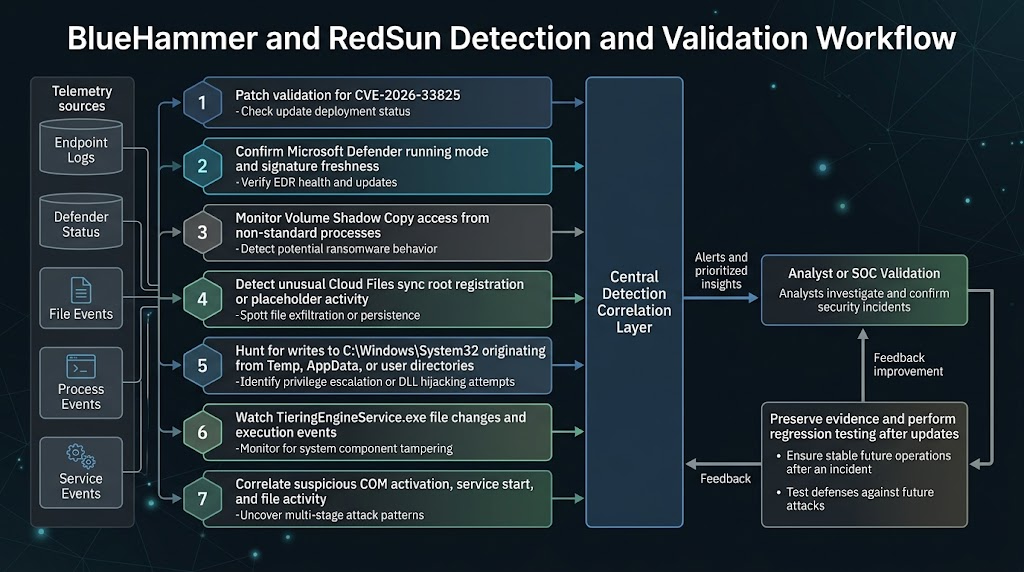
The best public RedSun writeup is unusually candid about what to hunt. Cyderes recommends watching for VSS enumeration from non-system processes, Cloud Files sync root registration by untrusted processes, writes to System32 that originate from %TEMP% or other user-writable paths, and unusual execution of TieringEngineService.exe, especially when preceded by file activity in temporary directories. It also calls out suspicious COM activation of the Storage Tiers Management object. Those are not marketing suggestions. They are behavioral choke points in the public chain. (cyderes.com)
The value of these signals is that they survive recompilation. A threat actor can rename a binary, change a string, or rebuild the PoC. It is much harder to make a BlueHammer-style chain work without touching shadow copies, or a RedSun-style chain work without unusual Cloud Files behavior, path redirection, and a protected file write. That is why behavior-focused hunting is the right frame here. Signature-only thinking will lag behind any actor willing to modify public code. (cyderes.com)
The following PowerShell examples are meant for verification and incident response, not exploitation. They give defenders a quick way to confirm Defender state, recent threat activity, relevant service metadata, and whether shadow copies are present on systems where they should not be.
# Check whether Defender is active and whether signatures are current
Get-MpComputerStatus |
    Select-Object AMRunningMode,
                  AntivirusEnabled,
                  RealTimeProtectionEnabled,
                  IsTamperProtected,
                  AntivirusSignatureVersion,
                  AntivirusSignatureLastUpdated
Microsoft documents Get-MpComputerStatus as the built-in way to retrieve the status of antimalware software on the computer, and Microsoft’s Defender guidance explicitly recommends using it to confirm whether protection is running and in which mode. For a BlueHammer/RedSun response workflow, the most useful fields are whether Defender is actually active, whether real-time protection is on, whether tamper protection is enabled, and how fresh the signatures are. (learn.microsoft.com)
# Review recent threat detections and remediation history
Get-MpThreatDetection |
    Sort-Object InitialDetectionTime -Descending |
    Select-Object -First 25 ThreatID,
                              ThreatStatusID,
                              InitialDetectionTime,
                              LastThreatStatusChangeTime,
                              Resources
Microsoft documents Get-MpThreatDetection as the cmdlet for retrieving active and historical threat detections from Windows Defender. That makes it a natural triage step after patching CVE-2026-33825 or when investigating possible RedSun-like activity. It will not prove exploitation on its own, but it can reveal whether Defender recently acted on suspicious files, whether remediation succeeded, and which resources were involved. (learn.microsoft.com)
# Check the current service configuration and file hash for the execution target
sc.exe qc TieringEngineService

Get-FileHash C:\Windows\System32\TieringEngineService.exe -Algorithm SHA256
The first command confirms the service metadata for Storage Tiers Management. The second gives defenders a baselineable hash of the executable RedSun is publicly described as targeting. Because Microsoft documents the service as always installed and manually started, large environments can maintain known-good hashes and investigate any drift aggressively, especially on workstations where storage tier activity is uncommon. (learn.microsoft.com)
# Enumerate local shadow copies
Get-CimInstance Win32_ShadowCopy |
    Select-Object ID, InstallDate, DeviceObject, VolumeName

# Alternate view
vssadmin list shadows
These commands are not BlueHammer detectors by themselves. They are context builders. HiveNightmare taught defenders that existing shadow copies can matter even after patching. BlueHammer’s public writeups make shadow-copy activity central to the chain. If a host with no clear backup role has surprising shadow-copy churn, especially around suspicious Defender behavior, that should trigger closer review. (एनवीडी.एनआईएसटी.जीओवी)
If your organization hunts through Microsoft Defender XDR or another endpoint telemetry lake, a query-led approach is more scalable than ad hoc CLI checks. The following examples are hunting ideas derived from the public chain mechanics, not official vendor detections.
// Look for writes into System32 that originated from Temp or other user-writable paths
DeviceFileEvents
| where FolderPath =~ @"C:\Windows\System32"
| where InitiatingProcessFolderPath has @"\Temp\"
    or InitiatingProcessFolderPath has @"\AppData\"
    or InitiatingProcessFolderPath has @"\Users\"
| project Timestamp, DeviceName, FileName, FolderPath,
          InitiatingProcessFileName, InitiatingProcessFolderPath,
          InitiatingProcessCommandLine, SHA256
| order by Timestamp desc
RedSun’s public logic says the effective write lands in C:\Windows\System32 even though the attacker-controlled workflow begins in a temporary working directory. That makes provenance more important than destination. Any System32 write whose initiating process lineage lives under Temp or a user profile deserves attention, especially if the target is TieringEngineService.exe or if it appears near Defender scan activity. (cyderes.com)
// Look for suspicious execution of TieringEngineService.exe
DeviceProcessEvents
| where FileName =~ "TieringEngineService.exe"
| project Timestamp, DeviceName, InitiatingProcessFileName,
          InitiatingProcessCommandLine, ProcessCommandLine,
          AccountName, SHA256
| order by Timestamp desc
This query is intentionally simple. It is meant to surface unexpected TieringEngineService.exe launches on endpoints where the service is rarely relevant, or launches whose lineage does not look like ordinary storage tier maintenance. Because Microsoft documents the service as manual and because public RedSun analysis turns it into the SYSTEM execution trigger, it is a sensible anchor for triage. (learn.microsoft.com)
// Hunt for shadow-copy access patterns plus nearby Defender-related execution
DeviceFileEvents
| where FolderPath has @"HarddiskVolumeShadowCopy"
| project Timestamp, DeviceName, FileName, FolderPath,
          InitiatingProcessFileName, InitiatingProcessCommandLine
| order by Timestamp desc
This last query is broad by design. Plenty of administrative and backup tooling can touch shadow copies legitimately. The point is not to alert on every hit. The point is to identify user-context or non-backup tooling that has no business reaching into shadow-copy namespaces, then pivot from there into Defender telemetry, service creation, temporary directory activity, or file changes under System32. BlueHammer and RedSun are chains, not single events. Your hunting should reflect that. (cyderes.com)
What to patch, what to validate, and what not to overreact to
The first action item is straightforward: patch CVE-2026-33825. Microsoft shipped a fix in April 2026, and Rapid7 notes that Defender’s platform update process is normally automatic by default. If your environment still has systems missing that update, the easy part of this story has not been done yet. (रैपिड7)
The second action item is less comfortable: do not treat BlueHammer patching as the end of the work. RedSun and UnDefend are still publicly discussed as unpatched. Public reporting says they have been observed in real intrusions. BlueHammer and RedSun also share much of the same architectural scaffolding. That means patching the assigned CVE is necessary, but it does not let defenders stop thinking about the broader Defender file-handling attack surface. (ब्लिपिंगकंप्यूटर)
The third action item is to validate Defender’s real operational state, not its intended state. Microsoft documents Get-MpComputerStatus precisely because organizations need to confirm whether Defender is active, passive, or effectively absent. Public UnDefend reporting adds another reason to care: if a tool is specifically trying to break update flow or misrepresent health, dashboards alone are not enough. Verify signature freshness, active mode, tamper protection, and recent update behavior on actual endpoints. (learn.microsoft.com)
The fourth action item is to be disciplined about what not to do. There is no strong public evidence that globally disabling VSS, Cloud Files functionality, or Storage Tiers Management is a clean answer. Microsoft documents all of those as legitimate system capabilities, and public exploit analysis relies on the interaction among them, not the simple presence of any single one. A rushed “turn off everything weird” response can easily damage backup workflows, storage behavior, sync tools, or endpoint stability without actually removing every relevant attack path. (learn.microsoft.com)
Least privilege still matters here, but it matters in a very specific way. Both BlueHammer and RedSun are described as local privilege escalation chains. They do not give the attacker initial access. They reward the attacker after some foothold already exists. That means stolen VPN credentials, commodity infostealers, low-privilege malware, or hands-on-keyboard access all become more dangerous when this kind of post-exploitation primitive is available. If you reduce the number of standard users who can execute untrusted binaries, constrain interactive access paths, and tighten lateral movement, you reduce the value of the public chain even before perfect detection exists. (ब्लिपिंगकंप्यूटर)
From patching to repeatable validation
One reason this family of issues stands out is that it punishes checkbox security. “Did we install the update?” is necessary for BlueHammer but insufficient for the full problem. Teams also need to ask whether Defender is active, whether signature updates are arriving, whether suspicious shadow-copy access is appearing, whether TieringEngineService.exe still matches a known-good baseline, and whether any Cloud Files behavior is occurring outside approved sync software. Those are operational questions, not just vulnerability-management questions. (learn.microsoft.com)
In authorized testing environments, this is exactly the kind of work that benefits from being turned into a repeatable workflow instead of a one-time scramble. Penligent’s public product overview describes an AI-driven penetration testing workflow that can automate reconnaissance, CVE validation, privilege-escalation testing, and reporting, while its own BlueHammer writeup frames the issue as something that should be monitored through concrete artifact checks such as shadow-copy enumeration, file-access timing, and service-related behavior. Used carefully in environments where you have permission to test, that kind of workflow can help teams run the same verification sequence after patching, after platform updates, and after policy changes, rather than assuming the problem stays solved. (पेनलिजेंट)
The key is to keep the use case narrow and technical. This is not about turning a live privilege-escalation chain loose in production. It is about building an evidence-driven validation routine: confirm Defender mode, confirm signature freshness, baseline the relevant executable, inspect service configuration, query for suspicious System32 writes, and preserve artifacts when something deviates. The reason to operationalize that workflow is not convenience. It is memory. Security teams forget edge-case Windows internals quickly. A repeatable validation path helps them not forget. (learn.microsoft.com)
Common mistakes defenders are likely to make
The first mistake is treating BlueHammer as “patched, therefore over.” That is a dangerous oversimplification because the public ecosystem around Defender’s attack surface did not stop at BlueHammer. RedSun and UnDefend are the reason this story stayed live after Patch Tuesday. Even if your estate is fully patched for CVE-2026-33825, you still need to care about suspicious Defender behavior and adjacent telemetry. (ब्लिपिंगकंप्यूटर)
The second mistake is collapsing all local privilege escalations into the same operational bucket. BlueHammer and RedSun are not interchangeable with a random kernel EoP. Their detection opportunities are different. Their preconditions are different. Their relationship to Defender’s update and remediation logic is different. If your internal playbook for every local privilege escalation is just “patch and look for service creation,” you will miss the filesystem and storage signals that matter here. (एनवीडी.एनआईएसटी.जीओवी)
The third mistake is trusting status dashboards without endpoint validation. Microsoft’s own documentation pushes administrators toward concrete status and update checks. Public UnDefend reporting raises the stakes further by describing a tool whose value is precisely that it interferes with Defender’s update and health picture. If you do not routinely compare control-plane assumptions with host-level reality, you are defending a diagram, not a system. (learn.microsoft.com)
The fourth mistake is writing detections that are too literal. Hunting only for “BlueHammer.exe” or the exact published repository name is not a strategy. Public research itself warns that the behaviors matter more than the sample. Look for shadow-copy interaction from unlikely processes, suspicious placeholder or sync-root activity, abnormal writes into System32 from user-writable paths, and execution of the service target under odd circumstances. Those are the parts of the chain that stay recognizable after simple source edits. (cyderes.com)
What a good defender takeaway sounds like
A good takeaway from BlueHammer is not “Windows Defender is broken.” That is too broad to be useful and too imprecise to be fair. A better takeaway is that Microsoft Defender, like any deeply integrated security product, participates in privileged file operations that deserve the same adversarial scrutiny defenders already apply to kernels, drivers, backup systems, and credential stores. Public research around BlueHammer and RedSun shows what can happen when that scrutiny arrives. (learn.microsoft.com)
Another good takeaway is that Windows local privilege escalation is continuing to diversify. CVE-2021-36934 taught defenders to think about shadow copies and sensitive hives. CVE-2025-62221 kept attention on Cloud Files-related privilege boundaries. CVE-2026-33825 now adds Microsoft Defender’s own update and remediation logic to the conversation. None of these issues is identical, but together they point to a broader pattern: privileged storage and security workflows are not passive infrastructure. They are active attack surfaces. (एनवीडी.एनआईएसटी.जीओवी)
The final takeaway is practical. If your team can only remember three things, remember these. Patch CVE-2026-33825 everywhere. Validate that Defender is actually active and updating. Hunt for the behavior chain, not just the public proof-of-concept artifacts. Everything else in this story flows from those three tasks. (एनवीडी.एनआईएसटी.जीओवी)
अधिक जानकारी के लिए
- NVD entry for CVE-2026-33825 (एनवीडी.एनआईएसटी.जीओवी)
- Microsoft Learn, Defender remediation behavior (learn.microsoft.com)
- Microsoft Learn, Defender update cadence and sources (learn.microsoft.com)
- Microsoft Learn, opportunistic locks (learn.microsoft.com)
- Microsoft Learn, Cloud Files API and placeholder architecture (learn.microsoft.com)
- Microsoft Learn, Volume Shadow Copy Service overview (learn.microsoft.com)
- Cyderes, BlueHammer technical analysis (cyderes.com)
- Cyderes, RedSun technical analysis (cyderes.com)
- BleepingComputer, exploitation observed in the wild (ब्लिपिंगकंप्यूटर)
- NVD entry for CVE-2021-36934, HiveNightmare (एनवीडी.एनआईएसटी.जीओवी)
- NVD entry for CVE-2025-62221, Cloud Files Mini Filter Driver (एनवीडी.एनआईएसटी.जीओवी)
- Penligent, BlueHammer and the Windows Defender Race to SYSTEM (पेनलिजेंट)
- Penligent, Overview of Penligent.ai’s Automated Penetration Testing Tool (पेनलिजेंट)
- Penligent homepage (पेनलिजेंट)


 Hindi
Hindi  English
  German
  French
  Spanish
  Portuguese
  Japanese
  Korean
  Arabic
  Turkish
  Hebrew