
AutoJack is a clean warning shot for AI agent security: a page does not need to “hack the model” to reach the host. If an agent can browse untrusted web content and the same host exposes a privileged local control plane, the browser, the agent runtime, local WebSocket services, MCP servers, and developer credentials can collapse into one execution boundary.
Microsoft’s security research team disclosed AutoJack on June 18, 2026, describing it as an exploit chain in AutoGen Studio where untrusted web content rendered by a browsing agent could reach a local MCP WebSocket and spawn arbitrary processes on the host. Microsoft also stated that the affected MCP WebSocket surface was hardened upstream and was not included in the ordinary PyPI release path for stable AutoGen Studio users. That distinction matters because AutoJack should not be misread as “every AutoGen Studio install was remotely exploitable.” The real lesson is broader: localhost was treated as an internal trust boundary, but AI agents make that assumption brittle. (माइक्रोसॉफ्ट)
The phrase that should stay with security teams is simple: localhost is no longer a trust boundary for AI agents. It may still be useful plumbing. It may still reduce network exposure. It is not authentication, it is not authorization, and it is not a policy boundary once an agent is allowed to render or process attacker-controlled content.
What AutoJack actually showed
AutoJack was disclosed in the context of AutoGen Studio, a UI built around AutoGen, Microsoft Research’s multi-agent framework. AutoGen Studio lets developers prototype multi-agent workflows and attach tools, including Model Context Protocol servers. The official AutoGen documentation describes Studio as a low-code interface for prototyping agents and warns that developers deploying agent applications need to implement the security controls required for production use. (Microsoft GitHub)
The AutoJack chain combined three design weaknesses:
| AutoJack step | Broken assumption | What the attacker influenced | Defensive lesson |
|---|---|---|---|
| A browsing agent opens a page | Web content stays outside local control channels | A page loaded by the agent could reach a local service | Do not rely on localhost as a security boundary |
| The page connects to a local WebSocket | Internal routes do not need the same authentication as external APIs | A local MCP WebSocket route became reachable from untrusted content | Authenticate every control plane endpoint |
| Setup parameters come from the client | Tool launch parameters are trusted setup state | Encoded server_params could shape MCP stdio launch behavior | Bind privileged parameters server-side |
| The agent host starts a process | Tool execution is only triggered by trusted developer action | Host process creation could follow from page-triggered control-plane access | Use allowlists, isolation, and explicit approval |
Microsoft’s breakdown is important because it avoids a common mistake in agent security discussions: blaming the language model for everything. AutoJack was not primarily a failure of model reasoning. It was a boundary failure between untrusted web content, local agent execution, an MCP WebSocket control plane, and process launch semantics. Microsoft described the issue as a chain in which untrusted web content rendered by an agent could reach a local MCP WebSocket and spawn arbitrary processes. (माइक्रोसॉफ्ट)
That is exactly why the case is useful for defenders. The same pattern can appear in other agent stacks even if the framework, route names, and tool adapters differ.
The old localhost assumption breaks under agent execution
For years, developers have used localhost services as private control channels. A local web UI might bind to 127.0.0.1. A debugging proxy might listen on a loopback port. A browser automation tool might expose a local debugging endpoint. A development framework might assume that anything reaching a localhost service is controlled by the local user.
That assumption was always incomplete, but AI agents make it much worse.
A normal user browsing the web is usually separated from local privileged services by browser security boundaries, authentication, user interaction, and the fact that most local developer tools are not intentionally connected to web content. An agent changes the shape of the system. A browsing agent may be a local process. It may use Playwright or another browser automation layer. It may fetch pages, parse content, follow links, call tools, use credentials, write files, or execute code as part of a workflow. Microsoft specifically called out that agents increasingly read files, browse pages, call APIs, and shell out to tools; when that same agent browses the open web and communicates with privileged local services, localhost stops being a trust boundary. (माइक्रोसॉफ्ट)
The key shift is that untrusted content is no longer just content. It can become input to an autonomous or semi-autonomous execution path.
| परत | Traditional developer assumption | What changes with AI agents | Security consequence |
|---|---|---|---|
| Localhost service | Only the developer can reach it | A local agent rendering remote content may reach it | Localhost becomes part of the attack surface |
| Browser automation | A helper for testing or browsing | A bridge between web content and local actions | Web pages can influence agent-side behavior |
| MCP server | A tool connector for trusted workflows | A command and data bridge reachable from agent context | Tool access needs explicit policy |
| Prompt or webpage text | Low-risk input to a model | Possible trigger for tool calls, file writes, or API actions | Prompt injection can become operational abuse |
| Developer workstation | Trusted human environment | Runtime for agent, tools, tokens, and browsers | Blast radius expands to the developer account |
AutoJack is therefore better understood as an execution-boundary bug than as a single application bug. The phrase “AI Agent RCE” is accurate, but it can be misleading if it makes readers imagine a magical model exploit. The dangerous part is more practical: a web page can touch something local that was never designed to be touched by attacker-controlled web content.
The AutoJack chain in plain technical terms
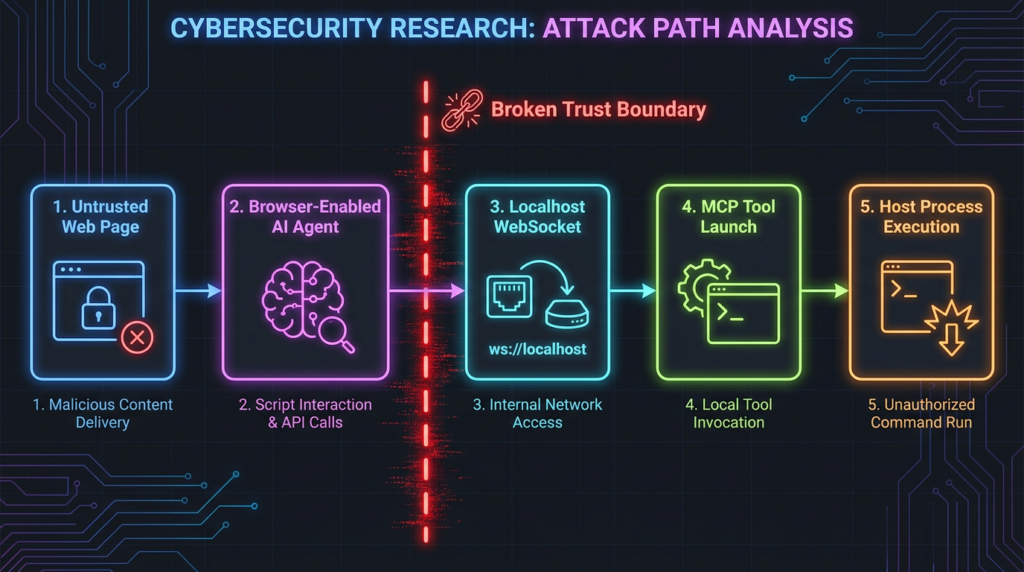
The AutoJack path can be understood as a sequence of trust transfers.
First, the agent browses a page. The page is untrusted. It may contain JavaScript. In a classic web model, that JavaScript is constrained by the browser. But if the page is rendered inside an agent workflow running on a developer machine, the page may be close to services that were only protected by loopback assumptions.
Second, the page targets a local WebSocket endpoint. Microsoft’s analysis described a local MCP WebSocket route under AutoGen Studio. The chain depended on an origin allowlist that accepted localhost and authentication middleware that skipped certain route patterns. In an ordinary developer-local workflow, that might look harmless. In an agent browsing workflow, it creates a route from untrusted web content to a local control plane. (माइक्रोसॉफ्ट)
Third, the WebSocket route accepted setup parameters from the client. Microsoft described a server_params value that was base64-decoded into JSON, turned into StdioServerParams, and passed to the MCP stdio client. The practical consequence is simple: a client-controlled URL parameter influenced what process could be started. Microsoft listed examples including calc.exe, powershell.exe -enc, और bash -c, which illustrates the class of impact without needing to romanticize the payload. (माइक्रोसॉफ्ट)
Fourth, the host process runs under the user context of the agent environment. That is the point where a local agent safety issue can become a workstation compromise issue. If the agent host has access to source code, SSH keys, cloud credentials, browser sessions, API tokens, internal repositories, or local files, the blast radius may be much larger than the initial page visit suggests.
A safe mental model is:
untrusted web page
        ↓
browser automation inside agent runtime
        ↓
localhost MCP WebSocket control plane
        ↓
client-controlled tool launch parameters
        ↓
host process execution under developer context
That model is not unique to AutoGen Studio. It is the pattern defenders should search for across agent frameworks, MCP tools, browser automation stacks, local development UIs, and AI coding environments.
What Microsoft changed
Microsoft’s fix moved privileged state out of the client-controlled WebSocket URL. Instead of reading server_params directly from the WebSocket query string, the hardened design stores parameters server-side and ties them to a session identifier. The WebSocket handler then looks up the server-side state and rejects unknown or expired session IDs. Microsoft also removed the MCP route from the authentication skip path. (माइक्रोसॉफ्ट)
The relevant GitHub commit is b047730, titled “harden MCP WebSocket endpoint” as part of a broader AutoGen Studio update. The code changes show the important design correction: client-controlled WebSocket query parameters are not a safe place for privileged process launch state. (गिटहब)
That fix embodies a broader rule: a local agent control plane should never let a web page supply the command, path, environment, or arguments used to start privileged tools.
The version nuance matters
AutoJack is a strong story, but it should not be exaggerated.
Microsoft stated that the affected MCP WebSocket attack surface was not included in the Python Package Index release, and that stable PyPI install users were not exposed to this specific chain. The Hacker News later added a useful packaging nuance: stable autogenstudio version 0.4.2.2 did not include the MCP route, while two pre-release builds, 0.4.3.dev1 और 0.4.3.dev2, reportedly contained the relevant handler. Normal पाइप इंस्टॉल does not install pre-release builds unless the user opts in with --pre or pins one explicitly. (माइक्रोसॉफ्ट)
For defenders, the practical conclusion is not “ignore it.” The conclusion is “verify the actual installation path.”
Development teams should check:
python -m pip show autogenstudio
python -m pip freeze | grep -Ei 'autogen|semantic-kernel|modelcontextprotocol|mcp'

grep -R "autogenstudio" -n \
  requirements*.txt pyproject.toml poetry.lock Pipfile.lock 2>/dev/null || true

grep -R "0.4.3.dev" -n \
  requirements*.txt pyproject.toml poetry.lock Pipfile.lock 2>/dev/null || true
Teams running directly from a GitHub checkout should also verify the commit:
git -C /path/to/autogen rev-parse HEAD
git -C /path/to/autogen log --oneline --decorate -5
The point is not just to find one version string. In agent environments, the attack surface often comes from a mixture of packages, development branches, example apps, local tools, browser automation scripts, and MCP servers that were never reviewed as a single system.
Why MCP makes the boundary problem more urgent
Model Context Protocol is valuable because it gives agents a standard way to connect to tools, data sources, and external systems. It also creates a security obligation: once a protocol can bridge model-driven workflows to local tools, command execution, file access, SaaS APIs, and internal systems, authorization and tool policy become first-order controls.
The official MCP security guidance is clear on several points that matter directly to AutoJack-style risk. It warns against token passthrough, saying MCP servers must not accept tokens that were not issued to the MCP server. It also calls out SSRF risks where MCP clients may access internal networks, cloud metadata, and localhost services. For console command execution, the guidance recommends showing the exact command and arguments, marking the operation as dangerous, requiring explicit user approval, and allowing cancellation. (मॉडल संदर्भ प्रोटोकॉल)
That is exactly the class of control AutoJack forces teams to take seriously. A local MCP server is not merely a developer convenience. It is a tool execution surface. If the agent can browse untrusted content and the MCP endpoint can start tools or processes, every assumption about who is allowed to call that endpoint must be explicit.
The MCP authorization specification also explains when authorization is needed: when a server accesses user data, grants access to APIs requiring consent, needs enterprise controls, supports auditability, or enforces usage limits. Local stdio servers may use environment-based credentials, but HTTP transports require real authorization design. (मॉडल संदर्भ प्रोटोकॉल)
AutoJack did not prove that MCP is inherently unsafe. It proved that MCP-style control planes must be treated as security-sensitive infrastructure.
Related CVEs that show the same class of failure
AutoJack itself was disclosed as a named research finding, not as a broad CVE-tracked advisory for stable AutoGen Studio users. But several CVEs around AI tooling, MCP, and agent frameworks show the same pattern: untrusted content or weak local controls reaching tool execution, file write, or command execution surfaces.
| सीवीई | अवयव | Why it matters for AI agent RCE | Main condition | Fix or mitigation |
|---|---|---|---|---|
| CVE-2025-49596 | MCP Inspector | Local MCP debugging surface could allow unauthenticated requests to launch MCP commands over stdio | Vulnerable MCP Inspector below 0.14.1 | Upgrade to 0.14.1 or later and avoid exposing unauthenticated local proxies |
| CVE-2026-33252 | modelcontextprotocol Go SDK | Cross-site requests to a Streamable HTTP MCP server could trigger tool execution in unauthenticated deployments | Missing Origin validation and JSON content-type enforcement | Upgrade to v1.4.1 and require authentication and Origin checks |
| CVE-2026-26030 | Microsoft Semantic Kernel Python SDK | Prompt injection could reach RCE through a vulnerable Search Plugin and in-memory vector store path | Vulnerable versions before 1.39.4 with risky configuration | Upgrade to 1.39.4 or later and avoid unsafe production use of the affected store |
| CVE-2026-25592 | Microsoft Semantic Kernel .NET SDK | AI-controlled file path could lead to arbitrary file write on the host | Vulnerable versions before 1.71.0 using SessionsPythonPlugin | Upgrade to 1.71.0 or later and enforce path allowlists through invocation filters |
CVE-2025-49596 is especially close to the AutoJack mental model. NVD describes MCP Inspector versions below 0.14.1 as vulnerable to remote code execution due to lack of authentication between the Inspector client and proxy, allowing unauthenticated requests to launch MCP commands over stdio. That is not the same bug as AutoJack, but it is the same category of failure: a local or development-focused tool exposes a command launch path without a strong enough trust boundary. (एनवीडी)
CVE-2026-33252 matters because it ties browser-origin behavior directly to MCP tool execution. The GitHub advisory for the Go SDK says the Streamable HTTP transport accepted cross-site POST requests without validating the उत्पत्ति header or requiring सामग्री-प्रकार: अनुप्रयोग/जॉनसन. In unauthenticated deployments, an arbitrary website could send MCP requests to a local server and potentially trigger tool execution. That is the localhost trust-boundary problem in another form. (गिटहब)
CVE-2026-26030 shows the prompt-injection-to-execution side of the same risk. Microsoft’s advisory described a Semantic Kernel Python SDK issue where exploitation required a prompt injection vector and an agent using the Search Plugin backed by the In-Memory Vector Store with default configuration. The fix was released in semantic-kernel 1.39.4. (माइक्रोसॉफ्ट)
CVE-2026-25592 shows why tool parameters need strict validation. The affected Semantic Kernel .NET SessionsPythonPlugin allowed arbitrary file write before version 1.71.0. Microsoft explained that an AI-controlled localFilePath could be used without sufficient path validation, creating a path from prompt influence to host file write. (एनवीडी)
The common thread is not “AI is unsafe.” The common thread is that agentic systems frequently connect untrusted input to privileged tool surfaces, and many of the old shortcuts around localhost, debug tools, and local developer trust no longer hold.
How to inventory AI agent RCE exposure
Teams should not only ask whether they used AutoGen Studio. They should inventory every place where an AI workflow can cross from untrusted input into local or privileged action.
Start with local listeners:
lsof -nP -iTCP -sTCP:LISTEN | grep -Ei 'python|node|mcp|autogen|agent|inspector|playwright|browser'
On Windows:
Get-NetTCPConnection -State Listen |
  Where-Object {
    $_.LocalAddress -in @("127.0.0.1", "::1", "0.0.0.0") -or
    $_.LocalPort -gt 1024
  } |
  Select-Object LocalAddress, LocalPort, OwningProcess

Get-Process |
  Where-Object {
    $_.ProcessName -match "python|node|mcp|autogen|agent|chrome|msedge|playwright"
  } |
  Select-Object Id, ProcessName, Path
Then inspect dependency files:
find . -maxdepth 5 \( \
  -name "requirements*.txt" -o \
  -name "pyproject.toml" -o \
  -name "poetry.lock" -o \
  -name "package.json" -o \
  -name "package-lock.json" -o \
  -name "go.mod" \
\) -print
Search for MCP servers, browser automation, and tool execution hooks:
grep -RInE "Mcp|MCP|stdio|server_params|WebSocket|Playwright|code_executor|shell|subprocess|exec" \
  . 2>/dev/null | head -200
This is not a substitute for code review, but it quickly identifies projects where the agent can reach local tools.
The next step is to map data flow:
| Question | Risk signal | What to verify |
|---|---|---|
| Can the agent browse arbitrary web pages | Untrusted content enters the runtime | Browser sandbox, network restrictions, prompt injection handling |
| Can the agent call MCP tools | Model output can become tool input | Tool allowlists, authorization, approval gates |
| Can MCP tools start local commands | Tool call can become process execution | Command allowlists, argument validation, OS isolation |
| Can the agent read or write local files | Prompt influence can affect host state | Path allowlists, sandboxed workspace, read-only mounts |
| Does the runtime have cloud or repo credentials | Local compromise becomes cloud compromise | Credential scoping, token isolation, secret scanning |
| Are local services unauthenticated | Localhost becomes an access-control substitute | Authentication, CSRF and Origin validation, session binding |
A serious review should produce a diagram of the agent execution boundary. That diagram should show the agent process, browser process, MCP servers, local files, credentials, outbound network paths, local listening ports, and approval gates.
Detection signals defenders should look for
AutoJack-style activity is hard to detect if an organization treats developer workstations as blind spots. The signals live in endpoint telemetry, local service logs, browser automation traces, command-line history, process trees, and network events.
| Signal | यह क्यों मायने रखती है | Data source | False positive risk |
|---|---|---|---|
| Browser automation process connects to localhost WebSocket | Possible path from untrusted page to local control plane | EDR network telemetry, local proxy logs | मध्यम |
| Local agent process spawns shell unexpectedly | Tool boundary may have crossed into host execution | EDR process tree | मध्यम |
| WebSocket URL contains encoded command-like setup data | Client-controlled tool launch state | Web logs, command-line telemetry, browser traces | Low to medium |
| MCP server starts from temp or user download directory | Unapproved local tool execution | EDR file and process telemetry | मध्यम |
| Agent runtime writes outside its workspace | Prompt or tool influence may affect host state | File telemetry | मध्यम |
| Agent environment holds broad cloud tokens | Local compromise has high blast radius | IAM inventory, endpoint secrets scan | Context dependent |
| Pre-release agent framework in developer workflow | Higher chance of unstable or unreviewed control surfaces | SBOM, lockfiles, package inventory | कम |
Microsoft published Defender hunting logic for WebSocket reach-outs to an AutoGen Studio MCP control plane with server_params, and for browser automation hosts visiting non-corporate domains. The exact query must be adapted to each environment, but the detection idea is valuable: correlate browser automation, localhost control-plane access, encoded setup parameters, and unexpected child processes. (माइक्रोसॉफ्ट)
A simplified detection pattern looks like this:
DeviceNetworkEvents
| where RemoteUrl has_any ("127.0.0.1", "localhost")
   or RemoteIP in ("127.0.0.1", "::1")
| where RemotePort in (8080, 8081, 6277)
| where InitiatingProcessFileName has_any ("chrome.exe", "msedge.exe", "python.exe", "node.exe")
| project Timestamp, DeviceName, InitiatingProcessFileName,
          InitiatingProcessCommandLine, RemoteUrl, RemotePort
And process-tree review should look for local agent runtimes starting shells or interpreters outside expected test harnesses:
DeviceProcessEvents
| where InitiatingProcessFileName has_any ("python.exe", "node.exe")
| where FileName has_any ("cmd.exe", "powershell.exe", "bash", "sh", "python.exe")
| project Timestamp, DeviceName, InitiatingProcessFileName,
          InitiatingProcessCommandLine, FileName, ProcessCommandLine
Those examples are intentionally defensive and environment-specific. They are not proof of compromise by themselves. A developer running a local test may produce similar events. The value comes from correlation: a browser automation process loads an external page, connects to a local MCP or agent endpoint, and the local agent process spawns an unexpected child process.
Hardening local agent control planes
The first rule is blunt: do not bind a sensitive agent control plane to localhost and call that security.
Localhost reduces exposure to remote network scanning, but it does not protect against malicious pages, compromised local processes, SSRF paths, browser automation bridges, or misconfigured developer tools. MCP’s own security guidance calls out SSRF risks where clients can access internal network resources, cloud metadata, and localhost services. (मॉडल संदर्भ प्रोटोकॉल)
Use controls at multiple layers.
| परत | Control | What it prevents |
|---|---|---|
| Endpoint authentication | Require a real session, token, mTLS, or OS-level access control for local control planes | Unauthenticated local calls |
| Origin and content-type validation | Reject cross-site browser requests and unexpected content types | Browser-to-local abuse |
| Server-side session binding | Store privileged setup state server-side, not in query strings | Client-controlled tool launch parameters |
| Tool allowlists | Permit only approved commands, paths, and arguments | Arbitrary process launch |
| User approval | Require explicit approval for dangerous actions | Silent command execution |
| Runtime isolation | Run browsing agents in containers, VMs, or low-privilege users | Workstation or credential compromise |
| Credential minimization | Remove production tokens from agent runtime | Blast-radius expansion |
| Logging and evidence | Record prompt, tool input, tool output, process tree, and network context | Undetected abuse and weak incident response |
A defensive validation function might look like this:
from pathlib import Path

APPROVED_COMMANDS = {
    "python3": "/usr/bin/python3",
    "node": "/usr/local/bin/node",
}

APPROVED_TOOL_ROOTS = [
    Path("/opt/approved-mcp-tools").resolve(),
]

def is_under_approved_root(path: str) -> bool:
    resolved = Path(path).resolve()
    return any(
        resolved == root or root in resolved.parents
        for root in APPROVED_TOOL_ROOTS
    )

def validate_mcp_launch_request(command: str, tool_path: str, args: list[str]) -> None:
    if command not in APPROVED_COMMANDS:
        raise ValueError("Command is not approved for MCP launch")

    if not is_under_approved_root(tool_path):
        raise ValueError("Tool path is outside approved MCP directories")

    dangerous_tokens = {"-c", "--eval", "eval", "exec"}
    if any(arg in dangerous_tokens for arg in args):
        raise ValueError("Dangerous argument pattern rejected")

    if len(args) > 20:
        raise ValueError("Unexpectedly large argument list")
This is not a complete security library. It illustrates the correct design direction: do not let client-controlled input freely choose commands, paths, and arguments. Treat tool launch as a privileged operation.
A policy-based version can be even clearer:
package agent.tool_policy

default allow = false

approved_commands := {"python3", "node"}
approved_tools := {
  "/opt/approved-mcp-tools/search_server.py",
  "/opt/approved-mcp-tools/repo_reader.js",
}

allow {
  input.action == "mcp.start_server"
  input.command in approved_commands
  input.tool_path in approved_tools
  input.user_approved == true
  input.risk_label != "dangerous"
}
Agent platforms should also separate the browsing identity from the developer identity. Microsoft’s hardening guidance after AutoJack includes separating the browsing agent from the developer account through an OS user, container, or VM, and allowlisting executables invoked as MCP servers. (माइक्रोसॉफ्ट)
That separation is not optional for serious deployments. If an agent can browse the public web and execute tools, it should not run as the same user that holds production cloud credentials, Git signing keys, SSH keys, package publishing tokens, and internal repository access.
Safer patterns for MCP and browser-enabled agents
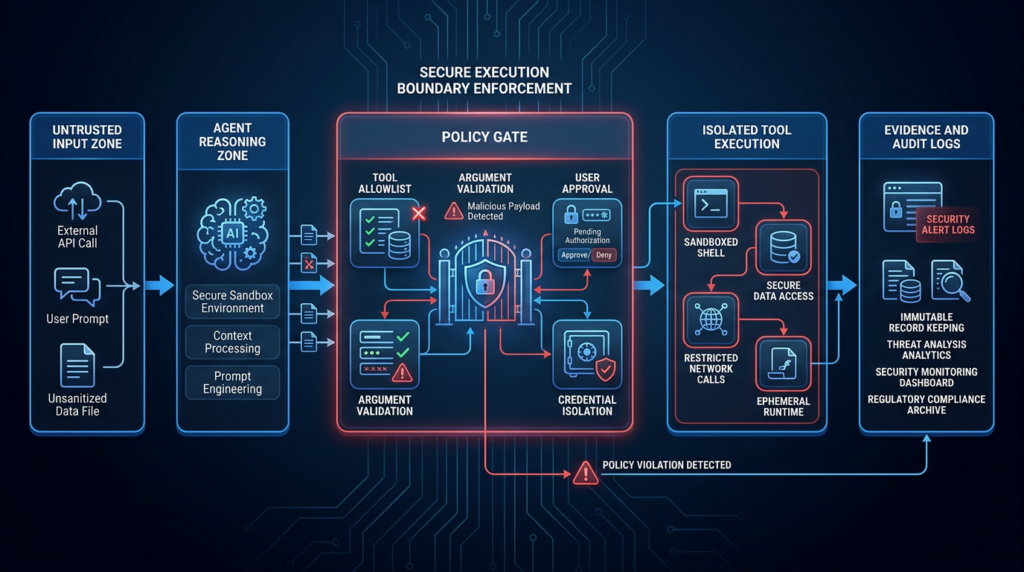
A safer AI agent architecture assumes compromise of at least one input channel. The agent may read a malicious webpage. It may ingest a poisoned issue comment. It may open an attacker-controlled markdown file. It may retrieve a search result containing indirect prompt injection. The architecture should make sure those inputs cannot directly cross into privileged action.
A practical model looks like this:
untrusted input zone
  web pages
  emails
  issues
  documents
  search results
        ↓
agent reasoning zone
  model context
  prompt filters
  untrusted data labels
        ↓
policy gate
  tool allowlist
  argument validation
  user approval
  rate limits
        ↓
tool execution zone
  container or VM
  low-privilege OS user
  restricted network
  scoped credentials
        ↓
evidence zone
  logs
  tool inputs and outputs
  process tree
  final report
The most important feature is not the diagram itself. It is the refusal to let any single zone silently inherit the privileges of another.
For browser-enabled agents, block or tightly control loopback access from the browser context. A browsing agent should not automatically be able to connect to local control-plane ports. If a local service must be reachable, it should require authentication and should not expose privileged operations through GET requests, query strings, or unauthenticated WebSocket upgrades.
For MCP tools, keep the server list small. Avoid “temporary” development servers with broad shell access. Document each tool’s permissions. Treat every new MCP server as a new integration with its own threat model.
For command execution, require explicit approval for high-risk actions. MCP’s security guidance recommends showing exact console commands and arguments, marking dangerous operations, requiring explicit user approval, and allowing cancellation. That advice should be implemented as a technical control, not as a UI suggestion buried in documentation. (मॉडल संदर्भ प्रोटोकॉल)
Prompt injection is no longer only a content problem
Indirect prompt injection is not the same thing as AutoJack, but it belongs in the same risk conversation.
Unit 42 describes indirect prompt injection as a pattern where adversaries embed hidden or manipulated instructions in content such as websites, documents, or messages later consumed by an LLM system. The impact depends on the privileges and tools connected to the system. If the model can only answer questions, the damage may be limited to bad output. If the model can call tools, access data, write files, or trigger workflows, the same input class can have operational consequences. (इकाई 42)
That is why AutoJack resonates with red teams and defenders. It sits at the intersection of web content, local services, tool execution, and agent autonomy. It shows a path where untrusted content does not merely influence a response. It influences a local execution path.
Microsoft’s Semantic Kernel advisories make the same point from another angle. CVE-2026-26030 involved a path where prompt injection could reach remote code execution in a specific vulnerable Semantic Kernel Python configuration. CVE-2026-25592 involved arbitrary file write through AI-controlled tool parameters in a vulnerable Semantic Kernel .NET component. Both issues were patched, but the pattern is enduring: model-controlled or attacker-influenced parameters must not be passed into powerful tools without validation and isolation. (माइक्रोसॉफ्ट)
Red-team validation for AutoJack-style risk
A safe validation plan should avoid weaponizing public exploit chains. It should instead test whether the organization has the class of exposure.
Start with a local surface review:
- Identify agent runtimes that browse external pages.
- Identify local HTTP and WebSocket services used by those runtimes.
- Identify MCP servers and tool adapters.
- Identify tools that can launch processes, write files, read secrets, or call cloud APIs.
- Identify whether the same runtime has access to developer credentials.
Then test security controls in a non-production lab.
| Validation question | Safe test |
|---|---|
| Can web content reach local agent endpoints | Load a benign test page and monitor attempted loopback connections |
| Are local endpoints authenticated | Attempt unauthenticated health and WebSocket connection checks |
| Are setup parameters client controlled | Review server code and logs for query-string or body-supplied command parameters |
| Are tool commands allowlisted | Submit disallowed benign commands in a lab and verify rejection |
| Are dangerous actions user approved | Test whether command execution requires explicit human approval |
| Is the runtime isolated | Confirm OS user, container, VM, filesystem, and network boundaries |
| Is evidence retained | Verify logs include tool inputs, outputs, approval decisions, and process lineage |
A useful local check for unauthenticated services is:
for port in 6277 8080 8081 3000 5173 8000 9000; do
  echo "Checking localhost:$port"
  curl -sS --max-time 2 "http://127.0.0.1:$port/" | head -3 || true
done
For WebSocket services, do not try to reproduce a public exploit against a real environment. In an authorized lab, use benign connection tests and code review to verify that WebSocket upgrades require authentication, session binding, and server-side state.
Teams already building automated security validation around agent workflows should focus on repeatability. When a new MCP server is added, a browser tool is enabled, a model changes, or a tool policy is widened, the same boundary tests should run again and preserve evidence. Platforms such as पेनलिजेंट are relevant in that operational context when used for authorized AI-assisted security testing, repeatable validation, and evidence collection rather than as a shortcut around secure architecture. Penligent’s own article on agentic AI security in production makes the same practical point: agent systems need continuous validation when MCP servers, memory behavior, tool permissions, or execution boundaries change.
That kind of testing should produce artifacts a security team can act on: what endpoint was reachable, what tool was callable, what policy blocked it, what command would have been dangerous, which identity the runtime used, and what credential exposure would have followed.
Common mistakes that make AI agent RCE more likely
The most common mistake is treating “developer-only” as a security control. Developer-only tools often become production-adjacent. They run on machines with real secrets. They are installed from branches, examples, and pre-release packages. They expose local ports. They are rarely covered by enterprise application security review.
The second mistake is treating MCP servers as harmless adapters. A read-only documentation search server is very different from a tool that can run shell commands, write files, control a browser, deploy infrastructure, or access internal tickets. The agent does not care whether the tool is called “helper,” “plugin,” or “server.” If it can change host state, it is a privileged interface.
The third mistake is logging only final answers. In an agent incident, the final answer may be useless. Investigators need prompt inputs, retrieved content, tool calls, tool arguments, approval events, process trees, network connections, file writes, and credential access context.
The fourth mistake is letting browser automation run with the same privileges as the developer. A browser-enabled agent touching untrusted content should be closer to a sandboxed malware-analysis browser than to a normal developer workstation session.
The fifth mistake is assuming model safety filters solve execution security. They do not. A model refusal may reduce some bad actions, but it cannot replace endpoint authentication, command allowlists, path validation, egress controls, runtime isolation, and least privilege.
Incident response for suspected agent control-plane abuse
If a team suspects AutoJack-style activity, the response should treat the environment as a potential developer-workstation compromise, not merely an application bug.
Start with containment:
1. Disconnect the affected host from untrusted networks if feasible.
2. Stop the agent runtime, local MCP servers, browser automation processes, and debug proxies.
3. Preserve process, network, and file telemetry before cleanup.
4. Snapshot relevant logs, shell history, package versions, lockfiles, and agent workspace state.
5. Rotate credentials exposed to the agent runtime.
Then reconstruct the timeline:
| Timeline item | Evidence source |
|---|---|
| Page or content loaded by the agent | Browser automation logs, agent traces, network history |
| Local service contacted | EDR network events, local service logs |
| WebSocket or HTTP request details | Reverse proxy logs, endpoint telemetry |
| Tool call or MCP launch | Agent logs, MCP server logs, process tree |
| Host command execution | EDR process events, shell logs |
| File writes | File telemetry, modified timestamps |
| Credential exposure | Secrets scan, cloud audit logs, repository audit logs |
Credential rotation deserves special attention. If the agent runtime had access to cloud credentials, package registry tokens, SSH keys, GitHub tokens, Slack tokens, or internal API keys, assume they may have been exposed unless telemetry proves otherwise. Microsoft’s own hunting guidance for suspicious AutoJack-style results recommends treating confirmed findings as potential development-environment compromise and rotating credentials. (माइक्रोसॉफ्ट)
Finally, fix the class, not only the instance. Disable or remove unauthenticated local endpoints. Update affected packages. Move privileged state server-side. Add tool allowlists. Separate browsing agents from developer identities. Require approval for dangerous actions. Add detection coverage for local control-plane access.
A stronger design standard for agent runtimes
The right standard is not “make the model safer.” It is “make the execution boundary explicit.”
A production-grade agent runtime should satisfy several requirements.
| Requirement | Practical implementation |
|---|---|
| Untrusted input labeling | Mark web pages, documents, emails, and retrieved content as untrusted in the agent context |
| Tool authorization | Require policy checks before every tool call |
| Argument validation | Validate paths, commands, URLs, and identifiers before passing them to tools |
| Explicit approval | Require human approval for dangerous actions with exact command or operation details |
| Least privilege | Use scoped credentials and low-privilege OS accounts |
| Runtime isolation | Put browsing and tool execution in containers, VMs, or separate users |
| Network control | Restrict egress and loopback access from browser contexts |
| Auditability | Log prompts, tool calls, arguments, outputs, approvals, and process lineage |
| Version discipline | Avoid unreviewed pre-release packages in sensitive environments |
| Security regression testing | Retest boundaries whenever tools, models, MCP servers, or policies change |
The NSA’s MCP security design considerations make the same general point in official language: MCP simplifies integration, but current specifications and implementations still require traditional authentication, authorization, input validation, and careful handling of risks such as dynamic tool invocation, implicit trust, and context sharing.
Agent security is not a new magic category. It is application security, endpoint security, identity security, browser security, and secure tool orchestration colliding inside one runtime.
अक्सर पूछे जाने वाले प्रश्न
Is AutoJack a vulnerability in the AI model itself?
- No. AutoJack is better understood as an agent runtime and local control-plane security issue.
- The dangerous path involved untrusted web content, a local MCP WebSocket, authentication gaps, client-controlled setup parameters, and host process execution.
- The model matters because it is part of an agent workflow, but the core failure was not that the model weights were compromised.
Does localhost protect an AI agent control plane?
- No. Localhost can reduce direct network exposure, but it is not authentication.
- A browser-enabled local agent may render untrusted content that can reach loopback services.
- Local control planes need real authorization, Origin checks where relevant, CSRF protections, server-side session binding, and tool execution policy.
- Treat every local HTTP, WebSocket, debug, and MCP endpoint as a security-sensitive interface.
Was every AutoGen Studio user affected by AutoJack?
- No. Microsoft stated that the affected MCP WebSocket surface was not included in the stable PyPI release path.
- The Hacker News reported that stable
0.4.2.2did not contain the MCP route, while two pre-release builds,0.4.3.dev1और0.4.3.dev2, had the relevant handler. - Teams should still check whether they ran from GitHub main, development branches, pre-release packages, or custom builds.
- The broader lesson applies beyond one AutoGen Studio version.
How do I check whether my environment has similar AI agent RCE risk?
- Inventory local listeners associated with agent frameworks, MCP servers, browser automation, and debugging tools.
- Review whether those endpoints require authentication and whether they accept client-controlled command, path, environment, or argument values.
- Check whether the agent can browse untrusted web pages and call tools in the same runtime.
- Confirm whether the runtime has developer credentials, cloud tokens, repository access, or write access to sensitive files.
- Run authorized lab tests to verify that disallowed tool calls are blocked and logged.
How is AutoJack different from ordinary CSRF or WebSocket abuse?
- It overlaps with those web security concepts, but the impact path is agent-specific.
- Traditional CSRF usually targets a web application action in a user session. AutoJack-style risk targets a local agent control plane that may bridge into tool execution.
- The presence of MCP servers, stdio tool launch, browser automation, and agent autonomy changes the blast radius.
- The fix is not only CSRF protection. It also requires tool allowlists, runtime isolation, approval gates, and credential minimization.
Which CVEs are most relevant to AutoJack-style risk?
- CVE-2025-49596 is relevant because MCP Inspector exposed a command launch path through insufficient authentication.
- CVE-2026-33252 is relevant because cross-site requests to MCP Streamable HTTP servers could trigger tool execution in unauthenticated deployments.
- CVE-2026-26030 is relevant because prompt injection could reach RCE in a vulnerable Semantic Kernel Python configuration.
- CVE-2026-25592 is relevant because AI-controlled tool parameters could lead to arbitrary host file write in a vulnerable Semantic Kernel .NET component.
- These CVEs are not the same bug as AutoJack, but they show the same security theme: untrusted input crossing into privileged agent tools.
What is the most important long-term fix for AI agent RCE?
- Build an explicit execution boundary around the agent.
- Separate untrusted content handling from privileged tool execution.
- Authenticate every local control plane.
- Allowlist tools, commands, paths, and network destinations.
- Require human approval for dangerous actions.
- Run browser-enabled agents in isolated, low-privilege environments.
- Keep evidence for every prompt, tool call, approval, process, and file action.
Closing judgment
AutoJack should not be remembered as a one-off “AI agent pops calc” story. Its durable lesson is that agent runtimes connect components that used to be separated: browsers, local services, MCP tools, files, shells, credentials, and developer workflows.
That connection creates power, but it also removes old assumptions. Localhost can still be useful for routing. It can still reduce exposure. It should no longer be treated as proof of trust.
For AI agent security, the new boundary is not the loopback interface. The new boundary is the policy-enforced line between untrusted input and privileged action.
 Hindi
Hindi  English
  German
  French
  Spanish
  Portuguese
  Japanese
  Korean
  Arabic
  Turkish
  Hebrew