
PixelSmash is the kind of vulnerability that makes a “media upload” stop looking harmless. Tracked as CVE-2026-8461, it is a heap out-of-bounds write in FFmpeg’s MagicYUV decoder, inside libavcodec. NVD describes the flaw as affecting FFmpeg before version 8.1.2 and says it can cause denial of service and, in some cases, remote code execution. JFrog Security Research, which discovered and named the bug, reported a CVSS 3.1 score of 8.8 High and demonstrated exploitation against real server-side media workflows. (एनवीडी)
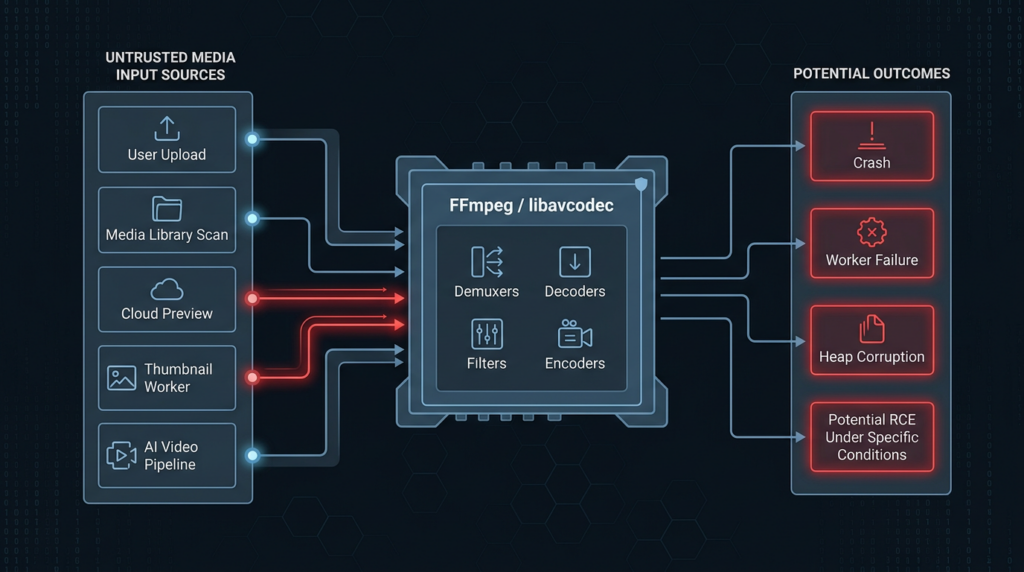
The practical risk is not limited to a person double-clicking a suspicious video. FFmpeg is commonly reached through thumbnail generation, preview generation, metadata extraction, transcoding, self-hosted media libraries, NAS indexing, machine-learning video preprocessing, and cloud media workers. JFrog reported that a crafted AVI, MKV, or MOV file can trigger the vulnerable MagicYUV decoder when an application routes the media stream through FFmpeg’s libavcodec; the same research demonstrated remote code execution on Jellyfin through an automatic media library scan and on Nextcloud when the Movie preview provider was active. (JFrog)
The fix is available. FFmpeg 8.1.2 “Hoare” was released on June 17, 2026, and is listed by the FFmpeg project as the latest stable release from the 8.1 branch. NVD records CVE-2026-8461 as affecting versions before 8.1.2, and Tenable’s Nessus plugin also recommends upgrading to 8.1.2 or later, while noting that its check relies on self-reported version information rather than exploit testing. (FFmpeg)
The right operational response is not panic, and it is not dismissal. PixelSmash is severe because FFmpeg often processes attacker-controlled media automatically. It is also easy to misstate because reliable RCE depends on environmental conditions such as heap layout, ASLR, execution context, and whether an additional information leak or other bypass is available. The safe conclusion is narrower and more useful: any system that accepts, indexes, previews, transcodes, or analyzes untrusted media with a vulnerable FFmpeg build deserves immediate inventory, patching, and reachability validation.
Quick risk summary
| क्षेत्र | Current fact | यह क्यों मायने रखती है |
|---|---|---|
| Vulnerability name | PixelSmash | The researcher-assigned name used in JFrog’s disclosure and subsequent reporting. |
| सीवीई | CVE-2026-8461 | The public identifier used for vulnerability management and scanner mapping. |
| अवयव | FFmpeg libavcodec, MagicYUV decoder | The bug is in a codec decoder, not in a single downstream app. |
| Weakness | Heap out-of-bounds write, CWE-787 | Memory corruption can cause crashes and may support code execution under specific conditions. |
| प्रभावित संस्करण | FFmpeg before 8.1.2, per NVD | Version inventory should include system packages, bundled binaries, containers, and statically linked copies. |
| Fixed upstream release | FFmpeg 8.1.2, released June 17, 2026 | Upgrading or applying a distro backport is the primary remediation. |
| Trigger | Crafted media file in AVI, MKV, or MOV container, when routed to MagicYUV | The trigger may be upload, preview, thumbnailing, scan, or playback. |
| Known demonstrated RCE paths | Jellyfin library scan and Nextcloud Movie preview provider in JFrog’s research | These are practical server-side paths, not only local playback scenarios. |
| Important caveat | JFrog’s deterministic Jellyfin RCE demo used ASLR disabled | Do not claim every vulnerable server is trivially RCE by default. |
| Immediate workaround | Disable the MagicYUV decoder at build time if it is not needed | Useful when full upgrade cannot happen quickly, but it requires control over the FFmpeg build. |
NVD’s CVSS entry for CVE-2026-8461 lists the CNA score from JFrog as 8.8 High with vector एवी:एन/एसी:एल/पीआर:एन/यूआई:आर/एस:यू/सी:एच/आई:एच/ए:एच. The same NVD page also records CISA ADP SSVC values showing “exploitation: none” at the time of its change history, so defenders should avoid claiming confirmed exploitation in the wild unless new evidence appears after publication. (एनवीडी)
Why FFmpeg makes a single decoder bug matter
FFmpeg is not just a command-line tool used by video editors. The project describes FFmpeg as a collection of libraries and tools for processing multimedia content such as audio, video, subtitles, and related metadata. Its README identifies libavcodec as the library that implements a wide range of codecs, libavformat as the library for containers and I/O, and ffprobe as the analysis tool used to inspect multimedia content. (गिटहब)
That architecture is exactly why PixelSmash has a wide blast radius. Many applications do not implement their own video decoders. They hand media parsing to FFmpeg directly, shell out to ffmpeg या ffprobe, link to FFmpeg libraries, use wrappers such as PyAV, or bundle a custom FFmpeg binary. When the vulnerable component is a decoder inside libavcodec, the affected surface is not limited to one vendor’s UI. It follows the dependency wherever untrusted media reaches that decoder.
Codec bugs are also different from ordinary business-logic bugs. A decoder consumes binary attacker-controlled input, walks complex metadata and compressed data structures, and writes decoded output into memory buffers. Small assumptions about dimensions, slices, strides, color planes, alignment, and per-plane sizes can become memory-safety violations. A safe-looking upload form can become a native-code parsing surface when the backend generates previews, extracts metadata, or transcodes content.
JFrog’s disclosure captures this dependency problem well: downstream projects such as Jellyfin, mpv, Nextcloud, Immich, OBS, vLLM, and many others did not introduce PixelSmash themselves; they inherited the risk by relying on FFmpeg. That is the key defensive point. You do not only need to know whether your application has a vulnerable route. You need to know where FFmpeg exists, how it is built, which decoders are enabled, and whether any untrusted file can reach it. (JFrog)
The root cause, a MagicYUV slice-height mismatch
MagicYUV is a lossless video codec. It is not as familiar to most defenders as H.264, VP9, or AV1, but unfamiliar does not mean unreachable. JFrog states that the MagicYUV decoder is compiled into default upstream FFmpeg builds and registered for AVI, MKV, and MOV containers, so an application that can open such media may route the stream to the decoder when the file declares the matching codec. (JFrog)
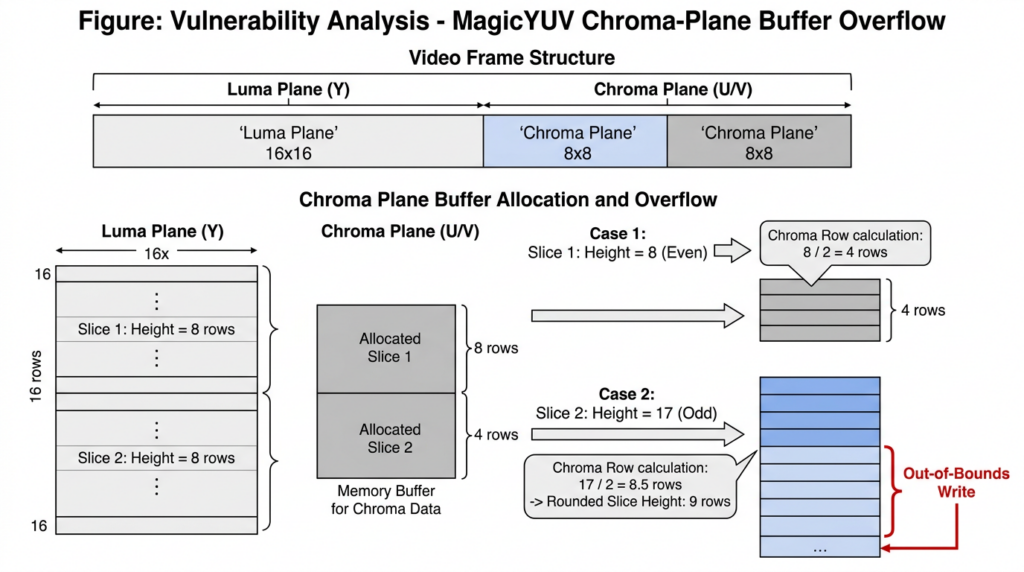
The bug sits in how the decoder handles slices and chroma-plane heights. Video frames are often represented in YUV rather than plain RGB. The Y plane carries luma, or brightness. The U and V planes carry chroma, or color information. In common subsampled formats such as YUV420P, the chroma planes have lower resolution than the luma plane. That means decoder code must convert luma dimensions into chroma dimensions carefully, including when a frame is split into horizontal slices. (JFrog)
JFrog’s root-cause analysis says PixelSmash is a one-row heap buffer overflow caused by inconsistent chroma-height calculations between FFmpeg’s frame allocator and the MagicYUV decoder. The attacker-controlled slice_height is read from the bitstream. When slice_height is odd, the decoder’s ceiling-rounded shift can add an extra chroma row per slice. Over more than one slice, those extra rows accumulate beyond the buffer allocated for the chroma plane. (JFrog)
A simplified, non-weaponized version of the bug looks like this:
Frame allocator view:
  coded_height = 32
  chroma plane height after alignment and subsampling = 16 rows
  allocated chroma rows = 0 through 15

Decoder slice view:
  attacker-controlled slice_height = 31
  number of slices = 2
  chroma rows per slice = ceil(31 / 2) = 16

Second slice destination:
  start row = 1 * 16
  row 16 is already outside a 16-row buffer
This is not exploit code. It is the invariant defenders need to understand: the allocator and decoder must agree on how much chroma data can be written. In the vulnerable path, they do not. The FFmpeg source currently contains additional validation around slice_height alignment and impossible slice heights in libavcodec/magicyuv.c, including checks that reject slice heights not aligned to chroma vertical subsampling. (गिटहब)
The patch is small, but the risk is not. Small bounds checks often guard large trust boundaries. In this case, the trust boundary is every upload, preview, scan, or decode path that lets an attacker-controlled MagicYUV stream reach the vulnerable decoder.
From crash to code execution, without overstating the exploit
An out-of-bounds write can produce different outcomes depending on the target process. It may crash immediately, corrupt heap metadata, silently corrupt adjacent structures, or become a code-execution primitive if the attacker can overwrite a useful target and predict the relevant addresses. PixelSmash falls into that dangerous middle ground: denial of service is straightforward in many environments, while RCE is possible under specific conditions.
JFrog’s exploitation chain focused on FFmpeg’s AVBuffer structure. In the demonstrated path, the out-of-bounds write could land on a buffer-management object and overwrite fields involved in a later indirect call. Their writeup describes hijacking AVBuffer.free to point at system() and placing an attacker-controlled command string where the overwritten structure would pass it as an argument. (JFrog)
That description is important, but so is the caveat. JFrog explicitly states that the deterministic Jellyfin exploit demonstration used ASLR disabled and hardcoded addresses for system() and the command string. In a default Linux configuration with ASLR enabled, those addresses are randomized, and the same exploit does not land deterministically. JFrog also identified a separate information-leak issue in FFmpeg’s FlashSV decoder that could theoretically help with address discovery in certain constrained invocation modes, but characterized that issue as informational because it required specific environment flags. (JFrog)
BleepingComputer’s coverage made the same point in more operational terms: RCE is possible if ASLR is disabled or if another vulnerability is chained to defeat the protection, and JFrog’s lead researcher noted that CVE-2026-8461 alone does not bypass ASLR. (ब्लिपिंगकंप्यूटर)
That nuance should guide triage. A vulnerable FFmpeg build exposed to untrusted media is not automatically equivalent to “internet-wide unauthenticated shell.” It is also not safe to dismiss as “just a crash.” In a media server, crashable workers can cause outages. In a multi-tenant preview service, repeated crashes can exhaust job queues. In a long-running process, silent heap corruption can hide active exploitation attempts. In an AI or data pipeline, a poisoned media file can break batch jobs, training runs, or inference workers.
Where PixelSmash is reachable
The most important question is not “Do we run FFmpeg?” Many organizations do. The better question is: “Can untrusted media reach a vulnerable MagicYUV decoder in our environment?”
| Entry point | Typical trigger | User interaction | Execution context | Main risk |
|---|---|---|---|---|
| Desktop video player | User opens a crafted media file | Yes | User session | Crash or code execution in user context if exploit conditions are met |
| Linux file manager | Folder thumbnail generation | Sometimes no click after file appears in folder | User session or thumbnail worker | Crash while browsing directories, possible silent processing |
| Jellyfin or similar media server | Automatic library scan and metadata extraction | No direct victim click after file lands in library | Media service account | Crash, silent heap corruption, possible RCE in constrained conditions |
| Nextcloud with Movie preview provider | Server-side preview generation | Low or near-zero interaction once file is visible | Web server user such as www-data | Crash or code execution in preview worker context |
| Photo and video managers | Thumbnail, poster, or transcode generation | Often automatic | App worker or container user | Worker crash, queue disruption, possible escalation depending on isolation |
| AI and ML video pipelines | Dataset load, OpenCV/PyAV decode, multimodal inference input | Often automatic | Training or inference worker | Batch failure, inference crash, possible impact on shared services |
| Cloud transcoding | Upload-triggered media processing | No direct click | Worker role or serverless function | DoS, retry storm, cost amplification |
JFrog tested crash behavior across several mainstream media-processing applications and reported crashes or silent heap corruption in tools such as mpv, Kodi, ffmpegthumbnailer, Jellyfin, Emby, Nextcloud, Immich, PhotoPrism, and OBS Studio. They also reported that the crafted file could work across AVI, MKV, and MOV containers, while MP4 was not applicable because MagicYUV is not in the MP4 registry. (JFrog)
Server-side paths deserve special attention because they remove the social-engineering step. A user does not necessarily have to be tricked into pressing play. In Jellyfin, a file placed in the media library can trigger automatic scanning. In Nextcloud, an enabled Movie preview provider can invoke ffmpeg when files are listed or previews are generated. In both cases, the attacker’s meaningful action is delivering media to a location that the server will process. (JFrog)
Jellyfin and Nextcloud show why upload paths are execution paths
JFrog’s Jellyfin demonstration matters because it turns a common self-hosted workflow into an exploitation story. The path is not exotic: a crafted MagicYUV AVI is added to a media library, Jellyfin automatically triggers metadata extraction through FFmpeg tooling, the out-of-bounds write fires, and the compromised processing path can execute commands as the Jellyfin service user in the demonstrated setup. JFrog specifically mentions Jellyfin 10.11.9 with bundled jellyfin-ffmpeg 7.1.3 in its exploit discussion. (JFrog)
The Nextcloud path shows a different variant of the same pattern. Nextcloud’s Movie preview provider is optional, but when active it can invoke the system ffmpeg binary for thumbnail generation. JFrog describes a scenario where a crafted AVI is uploaded, appears in the Files view, triggers FFmpeg preview extraction, and executes commands as the www-data user in the demonstrated chain. That context can be high-value because web server users often have access to application configuration, stored files, database credentials, and internal network paths. (JFrog)
There is a subtle policy lesson here. Downstream applications may reasonably argue that the vulnerable code is in FFmpeg, not in their application code. JFrog reported that the Nextcloud team considered it a non-issue because the vulnerability exists outside Nextcloud. (JFrog)
For an operator, that distinction is administratively relevant but operationally incomplete. If your application invokes FFmpeg on attacker-controlled files, your users experience the risk through your application. Vulnerability ownership and exploitability are different questions. A server owner should ask whether the deployed application can be used as a route to the vulnerable decoder, whether the FFmpeg version is fixed, whether the worker is sandboxed, and whether the resulting process identity has access to sensitive data.
How to check whether you are exposed
Start with the visible binary, but do not stop there. A simple version check is useful only when you know which binary your application actually calls.
ffmpeg -version
ffprobe -version
If your environment has a vulnerable upstream FFmpeg version before 8.1.2, upgrade or verify whether your distribution has backported the fix. Upstream version numbers are not always enough in Linux distributions, because maintainers may apply security patches without changing to the latest upstream release. Conversely, application-bundled FFmpeg binaries may remain old even after the system package is patched.
JFrog recommends checking whether the MagicYUV decoder is present with:
ffmpeg -decoders 2>/dev/null | grep magicyuv
If the output includes the MagicYUV decoder, the build can decode MagicYUV streams. JFrog’s disclosure says the decoder was enabled by default in every upstream FFmpeg build and distribution package they tested before version 9.0. (JFrog)
A practical inventory should find every ffmpeg और ffprobe binary that could be used by an application, container, worker, cron job, Python package, or vendor bundle:
#!/usr/bin/env bash
set -euo pipefail

echo "== FFmpeg binary inventory =="
command -v ffmpeg || true
command -v ffprobe || true

echo
echo "== Common filesystem locations =="
find /usr /usr/local /opt /srv /var/lib /app \
  -type f \( -name ffmpeg -o -name ffprobe \) \
  -perm -111 2>/dev/null | sort -u || true

echo
echo "== Version and MagicYUV decoder check =="
while IFS= read -r bin; do
  echo "--- $bin ---"
  "$bin" -version 2>/dev/null | head -n 1 || true
  "$bin" -decoders 2>/dev/null | grep -E '(^|[[:space:]])magicyuv($|[[:space:]])' || true
done < <(
  {
    command -v ffmpeg 2>/dev/null || true
    find /usr /usr/local /opt /srv /var/lib /app \
      -type f -name ffmpeg -perm -111 2>/dev/null || true
  } | sort -u
)
For dynamically linked applications, inspect which FFmpeg libraries are loaded:
ldd /path/to/application | grep -E 'libavcodec|libavformat|libavutil'
For containers, check both the base image and application layers:
docker run --rm your-image:tag sh -lc '
  command -v ffmpeg || true
  command -v ffprobe || true
  ffmpeg -version 2>/dev/null | head -n 1 || true
  ffmpeg -decoders 2>/dev/null | grep magicyuv || true
'
For Python and ML environments, do not assume apt list ffmpeg tells the whole story. OpenCV wheels, PyAV, media-processing libraries, and vendor images may bundle or link media libraries in ways that your OS package manager will not fully describe. If the application accepts video input, trace the actual decode path under controlled, non-production conditions.
Version detection is not exploitability validation
Scanner output is useful, but it must be interpreted correctly. Tenable’s Nessus plugin for CVE-2026-8461 says the remote host is affected if the installed FFmpeg version is prior to 8.1.2, but the plugin also notes that it has not tested for the issue and relies on the application’s self-reported version number. (उपयुक्त®)
That limitation is normal for many CVE checks. It does not make the check useless. It means the check answers “does this host appear to have a vulnerable FFmpeg version?” rather than “can an unauthenticated attacker reach MagicYUV through your upload path and achieve code execution?”
A good validation record should separate these layers:
| Question | Evidence source | सामान्य गलती |
|---|---|---|
| Is FFmpeg present? | Binary inventory, package database, container scan, SBOM | Missing bundled or statically linked copies |
| Is the version vulnerable? | Upstream version, distro changelog, vendor advisory | Treating all backported packages as vulnerable or all patched-looking versions as safe |
| Is MagicYUV enabled? | ffmpeg -decoders, build flags | Assuming obscure codecs are disabled by default |
| Can untrusted media reach it? | Upload route review, job queue tracing, preview generation test | Only checking direct playback |
| What user does it run as? | Process tree, systemd unit, container user, Kubernetes security context | Running FFmpeg as the main web app user with broad file access |
| Can exploitation become RCE? | Controlled lab testing, ASLR status, sandboxing, heap behavior, additional leaks | Equating crash with full RCE or dismissing crash as harmless |
| Did remediation work? | Post-patch retest and decoder inventory | Closing the ticket after package upgrade without checking the real worker |
For organizations with many web properties, media services, and containerized workers, manual validation becomes slow quickly. An authorized, evidence-driven AI-assisted security workflow can help connect inventory, route mapping, command output, impact notes, and retest artifacts into one reproducible record. Penligent’s public positioning emphasizes authorized security testing only, and its FFmpeg-focused writeup on AI agents finding zero-days is a useful companion read for teams thinking about how media-library discoveries translate into validation pressure across real environments. (पेनलिजेंट)
Safe verification workflow for defenders
Do not test PixelSmash by downloading or generating weaponized media in production. The objective is to prove exposure and remediation, not to detonate a memory-corruption payload where logs, user data, and service availability are at risk.
A safe workflow looks like this:
- Identify every system that accepts, stores, previews, transcodes, scans, or analyzes media.
- Find the actual
ffmpeg,ffprobe, library, wrapper, or container image used by each path. - Record the FFmpeg version and whether MagicYUV decoding is enabled.
- Confirm whether the system processes untrusted AVI, MKV, or MOV files automatically.
- Check the execution identity and sandbox around the media worker.
- Patch or disable the vulnerable decoder.
- Retest inventory and route reachability after remediation.
- Preserve evidence for engineering and compliance review.
A CI or container gate can enforce part of this:
#!/usr/bin/env bash
set -euo pipefail

required_major=8
required_minor=1
required_patch=2

version_line="$(ffmpeg -version 2>/dev/null | head -n 1 || true)"
echo "Detected: ${version_line:-no ffmpeg found}"

if [[ -z "$version_line" ]]; then
  echo "No ffmpeg binary found in this image."
  exit 0
fi

version="$(echo "$version_line" | awk '{print $3}' | sed 's/[^0-9.].*$//')"
IFS=. read -r major minor patch_extra <<< "$version"
patch="${patch_extra:-0}"

if (( major < required_major )) ||
   (( major == required_major && minor < required_minor )) ||
   (( major == required_major && minor == required_minor && patch < required_patch )); then
  echo "Potential CVE-2026-8461 exposure: FFmpeg appears older than 8.1.2."
  echo "Verify distro backports if this is a vendor-maintained package."
  exit 1
fi

if ffmpeg -decoders 2>/dev/null | grep -qE '(^|[[:space:]])magicyuv($|[[:space:]])'; then
  echo "MagicYUV decoder is enabled. Confirm that the version is patched and that untrusted media paths are sandboxed."
else
  echo "MagicYUV decoder not found in this build."
fi
This script is intentionally conservative. It does not prove exploitability, and it does not account for every distro backport format. It creates a forcing function: any image carrying FFmpeg older than upstream 8.1.2 needs human review or a vendor-specific exception with evidence.
Fixing PixelSmash in real environments
The primary fix is to update FFmpeg to a patched version. For upstream builds, that means FFmpeg 8.1.2 or later for the 8.1 branch. The official download page also lists newer maintenance releases for older branches, including 8.0.3, 7.1.5, 6.1.6, 5.1.10, and 4.4.8, but NVD’s CVE-2026-8461 entry specifically describes FFmpeg before 8.1.2 as affected, so teams should confirm the applicable vendor backport or branch advisory rather than assuming a branch number alone resolves every deployment. (FFmpeg)
If you build FFmpeg yourself and do not need MagicYUV, disable the decoder. JFrog lists rebuilding FFmpeg with --disable-decoder=magicyuv as a workaround when upgrading is not immediately possible. (JFrog)
./configure --disable-decoder=magicyuv [your existing flags]
make -j"$(nproc)"
make install
Decoder minimization is especially attractive for server workloads that only need a narrow set of accepted formats. Many media services accept far more decoders than their product requirements actually need. A video-thumbnail service for user uploads may only need a small allowlist. A compliance archive may need broader format support. A public upload endpoint should not inherit every decoder simply because upstream FFmpeg can compile it.
When you cannot rebuild immediately, reduce reachability:
| निवारण | Best fit | Residual risk |
|---|---|---|
| Upgrade FFmpeg or apply vendor backport | All affected deployments | Bundled copies may remain stale |
| Disable MagicYUV decoder | Custom FFmpeg builds, controlled appliances | Requires build control and regression testing |
| Restrict accepted containers and codecs | Upload services, public media APIs | Container extension checks alone are insufficient |
| Disable automatic previews temporarily | Cloud storage, Nextcloud-like systems | Reduces usability and may not stop other decode paths |
| Isolate media workers | Any server-side media processing | Does not remove the bug, but limits blast radius |
| Run FFmpeg under a low-privilege user | Media servers, transcoders, queue workers | Still exposes files readable by that user |
| Add CPU, memory, and retry limits | Batch pipelines and serverless jobs | Helps DoS and cost amplification, not memory corruption itself |
| Monitor crash and queue anomalies | High-volume services | Detection is reactive, not preventive |
A hardened media worker should look boring. It should run as a dedicated non-root user, with no access to application secrets, no write access outside its working directory, restricted network egress, strict CPU and memory limits, a read-only base filesystem where possible, and a narrow input contract.
A containerized worker can start with controls like these:
services:
  media-worker:
    image: your-media-worker:patched
    user: "10001:10001"
    read_only: true
    cap_drop:
      - ALL
    security_opt:
      - no-new-privileges:true
    pids_limit: 256
    mem_limit: 512m
    cpus: "1.0"
    tmpfs:
      - /tmp:size=256m,noexec,nosuid,nodev
    volumes:
      - media-inbox:/work/in:ro
      - media-output:/work/out:rw
    environment:
      - FFREPORT=file=/work/out/ffmpeg-report.log:level=32
That configuration does not magically prevent PixelSmash, but it changes the consequence of a parsing failure. A crash becomes a contained worker restart instead of a compromise of the main web application account. A malicious file has less room to pivot. Logs and artifacts become easier to correlate.
What to look for in logs
PixelSmash may not always create a clean alert. JFrog observed crashes in some applications and silent heap corruption in others. Jellyfin and Emby, in their tests, could process the malicious file with exit code 0 and no obvious error output even though ASAN-instrumented builds confirmed the out-of-bounds write. (JFrog)
That makes crash-only detection incomplete. Still, defenders should hunt for signals around media processing:
journalctl --since "2026-06-18" | \
  grep -Ei 'ffmpeg|ffprobe|magicyuv|SIGSEGV|SIGABRT|heap|munmap_chunk|invalid pointer|core dumped'
For systemd services:
systemctl status jellyfin --no-pager
journalctl -u jellyfin --since "24 hours ago" --no-pager | \
  grep -Ei 'ffmpeg|ffprobe|SIGSEGV|SIGABRT|core|thumbnail|metadata'
For Kubernetes workers:
kubectl get pods -A | grep -Ei 'media|ffmpeg|transcode|preview|worker'

kubectl logs -n your-namespace deploy/your-media-worker --since=24h | \
  grep -Ei 'ffmpeg|ffprobe|SIGSEGV|SIGABRT|invalid pointer|core dumped'
Also look at application-level behavior. A sudden rise in failed preview jobs, missing thumbnails, short video uploads followed by worker restarts, retry storms, or generic file icons after upload can all be useful leads. JFrog noted that in the Nextcloud demonstration, the web interface may only show a generic file icon while the meaningful crash or exploitation signal is buried server-side. (JFrog)
The most useful correlation is timeline-based: upload event, background media job, ffmpeg या ffprobe execution, crash or abnormal exit, retry, and file hash. Even when you cannot prove exploitation, that chain tells engineering what to fix and what to quarantine.
Why allowlists beat extension filters
A .mp4 blocklist will not protect a service that accepts .avi, .mkv, या .mov, and extension checks do not prove codec identity. Containers and codecs are separate layers. A file extension can lie. A Matroska container can carry many possible streams. A decoder is selected based on stream metadata and probing, not on what a user named the file.
A stronger policy defines accepted media in terms of both container and codec, then enforces it before handing the file to a broad decoder stack. In many production systems, this is easier said than done because probing itself may invoke parser code. The safest architecture isolates the probing step, uses a patched and minimized build, rejects unexpected formats early, and treats any untrusted media parse as native-code execution of attacker-controlled input.
For public upload services, consider this hierarchy:
- Store the raw upload in an isolated quarantine location.
- Run media identification in a patched, sandboxed worker.
- Reject codecs outside business requirements.
- Transcode accepted media into a controlled internal representation.
- Serve only sanitized outputs from a separate storage location.
- Keep the original inaccessible to user-facing render paths unless needed.
- Limit retries and processing budget per file and per account.
This approach is not specific to PixelSmash. It is the right pattern for media parsing in general.
Related CVEs show the same media-processing pattern
PixelSmash is not an isolated lesson. It is part of a broader pattern: media parsers sit at the junction of untrusted input, native code, and automated processing.
CVE-2026-40962 is another FFmpeg memory-safety issue. NVD describes it as an integer overflow and resultant out-of-bounds write in FFmpeg before 8.1, involving CENC Common Encryption subsample data in libavformat/mov.c. It is not the same bug and it does not share the same MagicYUV root cause, but it reinforces the same operational point: container and codec parsing paths can convert a media file into memory corruption inside widely deployed FFmpeg components. (एनवीडी)
CVE-2026-22778 shows how this risk reaches AI infrastructure. GitHub’s advisory for vLLM describes a video-processing RCE chain affecting vllm versions from 0.8.3 before 0.14.1. The chain combines a PIL error-message information leak with a heap overflow in the JPEG2000 decoder used through OpenCV/FFmpeg, allowing a malicious video URL to execute commands on a vulnerable server. Deployments not serving a video model are not affected, which is exactly the kind of route-specific detail defenders need to preserve when triaging media CVEs. (गिटहब)
Anthropic’s Mythos Preview materials add another signal. Anthropic reported that Mythos Preview identified a 16-year-old FFmpeg H.264 vulnerability involving slice ownership tracking and a sentinel collision. That case is separate from PixelSmash, but it is relevant because both issues involve subtle frame/slice invariants in mature codec code that had already seen years of testing and review. (Frontier Red Team)
Depthfirst’s June 2026 FFmpeg disclosure points in the same direction. The company reported that an autonomous security agent found 21 previously unknown FFmpeg vulnerabilities and produced reproducible proof-of-concept inputs, after scanning roughly 1.5 million lines of C code. Treat vendor claims about cost and coverage carefully, but the defensive pressure is real: more credible vulnerability candidates are being produced against mature media code, and security teams need faster ways to decide which findings are reachable in their environments. (Depthfirst)
The theme is not “AI found everything” or “every media bug is instant RCE.” The theme is that media parsing is a high-value attack surface, and modern software increasingly invokes it automatically.
A practical response plan for security teams
Start with systems that process untrusted files without a human in the loop. Public upload services, media servers, collaboration platforms, AI video endpoints, object-storage ingestion pipelines, and thumbnail workers should move ahead of ordinary desktop-only exposure.
A strong response plan has five tracks.
First, inventory. Find every FFmpeg copy, including distro packages, application bundles, Docker layers, static binaries, Python wheels, appliance firmware, and CI images. Do not assume a patched base OS fixes an application that carries its own ffmpeg.
Second, route analysis. Identify where AVI, MKV, MOV, or unknown media files are accepted. Then determine whether the route triggers thumbnailing, preview generation, metadata extraction, transcoding, or ML preprocessing.
Third, remediation. Upgrade to a fixed FFmpeg version or a vendor package that backports the fix. If you own the build and do not need MagicYUV, disable the decoder. If you cannot patch immediately, temporarily disable risky automatic processing paths.
Fourth, isolation. Treat media workers like potentially hostile native-code execution. Give them a dedicated user, minimal filesystem access, no secrets, limited network egress, resource caps, and crash monitoring.
Fifth, retest. Confirm that the actual worker path no longer uses a vulnerable FFmpeg build. Confirm that MagicYUV is disabled if that was your workaround. Confirm that public upload paths cannot route untrusted media into stale workers.
Penligent’s continuous AI pentesting materials define this kind of work as authorized, evidence-driven validation triggered by changes such as new CVEs, exposed assets, package updates, and completed fixes. That framing is useful here because PixelSmash response is not just a package-management task. It is a reachability, isolation, evidence, and retesting task across many places where FFmpeg may be hidden. (पेनलिजेंट)
Common mistakes to avoid
The first mistake is assuming that no playback means no risk. Server-side media systems routinely process files before anyone watches them. A preview generator, indexer, metadata extractor, or AI preprocessing job can be enough.
The second mistake is trusting one version check. A host may have /usr/bin/ffmpeg patched while an application uses /opt/app/bin/ffmpeg. A container may inherit a stale binary from a build stage. A Python dependency may route video through a different backend than expected.
The third mistake is treating ASLR as a complete fix. ASLR matters. It can prevent a hardcoded-address exploit from landing. It does not remove the out-of-bounds write, and it does not prevent denial of service, silent corruption, or exploit chains that pair memory corruption with an information leak.
The fourth mistake is leaving media workers overprivileged. If ffmpeg runs as the same user that can read application secrets, user files, and database configuration, any future media parser exploit inherits a valuable execution context.
The fifth mistake is unlimited retry logic. JFrog discussed theoretical cost amplification when failed media jobs retry repeatedly. Even when exact cost models vary by architecture, the defensive principle is simple: malformed files should not trigger unbounded retries. (JFrog)
The sixth mistake is closing the ticket after patching only one package. PixelSmash is a dependency-discovery problem. The last vulnerable FFmpeg copy is the one that will matter.
अक्सर पूछे जाने वाले प्रश्न
What is PixelSmash CVE-2026-8461?
- PixelSmash is the name JFrog gave to CVE-2026-8461, a heap out-of-bounds write in FFmpeg’s MagicYUV decoder.
- The vulnerable code is in
libavcodec/magicyuv.c, according to NVD’s CVE record. - The issue affects FFmpeg before version 8.1.2, based on NVD’s affected-version statement.
- The impact includes denial of service and, in some environments, remote code execution. (एनवीडी)
Is PixelSmash always remote code execution?
- No. RCE depends on exploitability conditions such as heap layout, memory protections, process context, ASLR, and whether another bug can help bypass address randomization.
- JFrog demonstrated RCE, but also stated that its deterministic Jellyfin demonstration used ASLR disabled.
- The bug is still high priority because crashes, silent heap corruption, and server-side automatic processing create serious operational risk. (JFrog)
Which FFmpeg versions are affected?
- NVD states that CVE-2026-8461 affects FFmpeg before 8.1.2.
- FFmpeg 8.1.2 was released on June 17, 2026, and is the fixed upstream 8.1-branch release.
- Distribution packages may backport fixes, so check vendor changelogs instead of relying only on upstream-style version comparisons.
- Application-bundled FFmpeg binaries must be checked separately from system packages. (एनवीडी)
How can I check whether MagicYUV is enabled?
- Run
ffmpeg -decoders 2>/dev/null | grep magicyuv. - If the decoder appears, your build can route MagicYUV streams to the relevant decoder.
- Decoder presence does not prove exploitability by itself; you still need to know whether untrusted AVI, MKV, or MOV files can reach that build.
- If MagicYUV is unnecessary, rebuilding FFmpeg with
--disable-decoder=magicyuvis a documented workaround. (JFrog)
Can a media server be exposed without a user opening the file?
- Yes. Media servers and collaboration platforms often generate metadata, thumbnails, and previews automatically.
- JFrog demonstrated a Jellyfin path through automatic library scanning.
- JFrog also demonstrated a Nextcloud path when the optional Movie preview provider invoked FFmpeg for preview generation.
- Any upload-to-processing workflow should be treated as a potential execution path. (JFrog)
Should I disable MagicYUV if I cannot upgrade immediately?
- Yes, if your workload does not require MagicYUV and you control the FFmpeg build.
- Disabling the decoder reduces reachability for this specific bug.
- It is a workaround, not a replacement for broader patching and media-worker isolation.
- Test business impact before deploying a minimized decoder set, especially in systems that handle archival or user-supplied formats. (JFrog)
Does a vulnerability scanner prove PixelSmash is exploitable?
- Usually no. Many checks identify vulnerable versions or package states.
- Tenable’s plugin for CVE-2026-8461 explicitly says it has not tested for the issue and relies on self-reported version information.
- Scanner findings should trigger validation: which FFmpeg binary is used, whether MagicYUV is enabled, and whether untrusted media reaches it.
- Treat scanner output as a starting signal, not as a complete exploitability assessment. (उपयुक्त®)
What should security teams prioritize first?
- Patch or replace FFmpeg builds that are before the fixed version or lack the vendor backport.
- Find hidden FFmpeg copies in containers, bundled application directories, ML environments, and appliances.
- Reduce automatic processing of untrusted media until patched.
- Run media processing in isolated, low-privilege workers.
- Retest the actual upload, preview, thumbnail, and transcode paths after remediation.
Closing judgment
PixelSmash is a serious FFmpeg vulnerability because it lives in a decoder that many applications inherit without thinking about it. The most exposed systems are not necessarily the ones with the most obvious video player UI. They are the systems that silently process media on behalf of users: library scanners, preview workers, thumbnailers, cloud transcoders, NAS indexers, and AI video pipelines.
The fix starts with FFmpeg 8.1.2 or a trusted vendor backport, but it should not end there. A mature response finds every FFmpeg copy, confirms whether MagicYUV is reachable, limits media-worker privilege, removes unnecessary decoders, monitors crashes and retries, and retests the real paths attackers can touch. PixelSmash is a reminder that media parsing is not a background feature. It is an execution surface.

 Hindi
Hindi  English
  German
  French
  Spanish
  Portuguese
  Japanese
  Korean
  Arabic
  Turkish
  Hebrew