
CVE-2026-45498 is a Microsoft Defender denial-of-service vulnerability affecting the Microsoft Defender Antimalware Platform. The short public description is almost too compact: “Microsoft Defender Denial of Service Vulnerability.” That wording is accurate, but it does not tell defenders the operational story. A denial-of-service bug in an endpoint protection component is not the same thing as a DoS bug in a noncritical desktop utility. If Defender is degraded, stalled, or made unavailable at the wrong point in an intrusion, the result can be a temporary blind spot in the very control that security teams expect to detect malware, block malicious scripts, quarantine files, and report endpoint health. NVD lists CVE-2026-45498 as a Defender DoS issue, shows it in CISA’s Known Exploited Vulnerabilities catalog, and records Microsoft Defender Antimalware Platform versions below 4.18.26040.7 as affected. (एनवीडी)
The first practical rule is simple: do not treat this as a theoretical CVE just because the public advisory is short. Microsoft’s Defender release notes list the April 2026 Windows Antivirus release as Platform 4.18.26040.7 and Engine 1.1.26040.8, and they identify CVE-2026-45498 as fixed in Platform 4.18.26040.7. The same release line also fixed CVE-2026-41091, a Defender elevation-of-privilege issue, and CVE-2026-45584, a Defender remote code execution issue. (माइक्रोसॉफ्ट लर्न)
For defenders, the job is not to reproduce a public exploit on production machines. The job is to prove that every relevant Windows endpoint has crossed the fixed platform boundary, that Defender updates are not silently failing, that endpoint health telemetry is intact, and that any exploitation window did not coincide with suspicious hands-on-keyboard activity.
What is confirmed about CVE-2026-45498
The confirmed public facts are narrow, but they are enough to act. CVE-2026-45498 affects Microsoft Defender Antimalware Platform. Microsoft is the CNA source. NVD lists the vulnerability as a denial-of-service issue and maps the weakness to CWE-400, uncontrolled resource consumption. Microsoft’s CNA score is 4.0 Medium with a local attack vector and low availability impact, while NVD’s own enrichment currently shows 7.5 High with a network attack vector and high availability impact. That score difference is not a footnote; it is one of the main reasons teams can misprioritize the bug. (एनवीडी)
| क्षेत्र | Confirmed public information | Defensive meaning |
|---|---|---|
| सीवीई | CVE-2026-45498 | Track it directly in vulnerability management, patch dashboards, exception records, and incident timelines. |
| प्रभावित घटक | Microsoft Defender Antimalware Platform | Validate Defender platform version, not only Windows cumulative update status. |
| Vulnerability type | Denial of service | Treat it as security-control degradation, not as ordinary application downtime. |
| Weakness | CWE-400, uncontrolled resource consumption | Watch for resource, service, scan, update, or health instability around Defender. |
| Microsoft CNA CVSS | 4.0 Medium, CVSS:3.1/AV:L/AC:L/PR:N/UI:N/S:U/C:N/I:N/A:L | Microsoft’s scoring indicates local vector, low complexity, no privileges, no user interaction, and low availability impact. |
| NVD CVSS | 7.5 High, CVSS:3.1/AV:N/AC:L/PR:N/UI:N/S:U/C:N/I:N/A:H | NVD’s current enrichment is materially more severe and uses a network vector with high availability impact. |
| Fixed version | Microsoft Defender Antimalware Platform 4.18.26040.7 | AMProductVersion or the Defender platform directory should show 4.18.26040.7 or later. |
| KEV status | Listed by CISA KEV with a June 3, 2026 due date for required action | Prioritize remediation as exploited-vulnerability work, not routine hygiene. |
| What not to claim | Public sources do not provide enough detail to publish a safe, exact trigger or exploit chain | Do not invent exploit steps, IoCs, actor attribution, or universal exploitability conditions. |
The most useful reading of the table is this: the vulnerability is real, patched, exploited enough to be in KEV, and still easy to mishandle operationally because the public description is sparse and the scoring is inconsistent across sources.
Why a Defender DoS can matter more than the word DoS suggests
A denial-of-service vulnerability usually means a target becomes unavailable. In many environments, DoS is triaged below remote code execution, privilege escalation, identity compromise, and exploitable edge-device flaws. That instinct is often reasonable. CVE-2026-45498 deserves more careful handling because the unavailable component is not a random user application. It is Microsoft Defender.
Endpoint protection is part of the defensive control plane. It scans files, reacts to suspicious behavior, updates signatures, contributes health state, reports detections, and participates in containment and investigation workflows. A temporary Defender failure can matter if it overlaps with payload staging, credential access, tunneling, script execution, lateral movement, or attempts to modify security settings.
That does not mean CVE-2026-45498 automatically gives an attacker code execution or administrator rights. Public records do not support that claim. The stronger and more defensible statement is that a Defender DoS can become an enabling condition inside a broader intrusion. If an attacker already has local execution, a security-product DoS can reduce resistance during the next step of the operation. That risk shape is why KEV status and component role matter alongside CVSS.
Security teams should frame CVE-2026-45498 as an endpoint-control integrity problem. The question is not only “Can the vulnerability crash something?” The better questions are:
| Defensive question | यह क्यों मायने रखती है |
|---|---|
| Is Defender Platform 4.18.26040.7 or later present on every relevant endpoint? | The fixed platform version is the clearest patch boundary. |
| Are any devices stuck on older platform builds despite current Windows patches? | Platform updates can lag behind OS patch reporting. |
| Are Defender health events still arriving? | Loss of health telemetry can hide degraded protection. |
| Did the exposure window overlap with suspicious local execution? | A DoS against Defender is more serious when paired with attacker activity. |
| Are update channels, WSUS approvals, UNC shares, and offline images current? | The root cause of exposure is often update delivery, not lack of awareness. |
| Are passive-mode or third-party AV systems still carrying vulnerable Defender components? | Defender may still be installed, present on disk, or partially active even when another AV is primary. |
The right outcome is not panic. It is disciplined proof.
The CVSS split, and why defenders should not average the scores
CVE-2026-45498 has a visible scoring split. NVD shows a NIST CVSS 3.1 base score of 7.5 High with vector AV:N/AC:L/PR:N/UI:N/S:U/C:N/I:N/A:H. The same NVD page shows the Microsoft CNA score as 4.0 Medium with vector AV:L/AC:L/PR:N/UI:N/S:U/C:N/I:N/A:L. (एनवीडी)
That is a big difference. The NVD vector reads like a network-reachable availability issue with high impact. The Microsoft CNA vector reads like a local availability issue with low impact. A vulnerability manager who only sees the NVD score may escalate it as a high-severity network DoS. A team that only sees Microsoft’s score may file it as a medium local issue and delay validation. Both reactions can be incomplete.
| मेट्रिक | NVD enrichment | Microsoft CNA | अंतर क्यों मायने रखता है |
|---|---|---|---|
| Base score | 7.5 High | 4.0 Medium | Dashboards may rank the same CVE differently depending on data source. |
| Attack vector | Network | Local | This changes assumptions about exposure and exploit path. |
| Attack complexity | कम | कम | Both agree that, once reachable under the modeled conditions, complexity is low. |
| Privileges required | None | None | Both indicate no privileges are required under their modeled attack condition. |
| User interaction | None | None | Both indicate no user interaction. |
| दायरा | Unchanged | Unchanged | Impact remains in the same security scope. |
| Confidentiality | None | None | The public CVSS does not describe data theft. |
| Integrity | None | None | The public CVSS does not describe data modification. |
| Availability | उच्च | कम | This is the major impact disagreement. |
The safest way to handle the split is not to pick the score that best supports a preexisting priority. Use the most conservative operational process that the evidence supports. Since CISA KEV and NVD both identify CVE-2026-45498 as known exploited, and Microsoft’s release notes provide a concrete fixed platform version, validation should be fast even if the CNA score is medium. The technical task is bounded: confirm platform version, confirm update health, and hunt the exposure window for suspicious Defender degradation and local activity.
A scoring split also affects reporting language. In executive or customer-facing reports, say that NVD currently scores the issue as High while Microsoft’s CNA score is Medium, then state which source your organization uses for remediation SLA. Do not silently normalize it to one score without explaining the discrepancy.
The fixed version is not just a Windows patch number
The biggest operational mistake is to treat CVE-2026-45498 as solved because a Windows patch dashboard looks green. Defender has several versioned components. Platform, engine, security intelligence, product, and service versions can differ. CVE-2026-45498 is tied to the Defender Antimalware Platform fixed in 4.18.26040.7. CVE-2026-41091 and CVE-2026-45584 in the same Windows Antivirus release line are tied to the Malware Protection Engine fixed in 1.1.26040.8. Microsoft’s release notes make that distinction explicit. (माइक्रोसॉफ्ट लर्न)
| अवयव | Example field | Why it matters for this remediation cycle |
|---|---|---|
| Defender platform | AMProductVersion | This is the key version for CVE-2026-45498. It should be 4.18.26040.7 or later. |
| Defender engine | AMEngineVersion | This is key for CVE-2026-41091 and CVE-2026-45584. It should be 1.1.26040.8 or later for that release line. |
| Service version | AMServiceVersion | Helps confirm what service build is running, but it should not replace platform and engine checks. |
| Security intelligence | AntivirusSignatureVersion और AntivirusSignatureLastUpdated | Stale intelligence can indicate broader update problems even after platform remediation. |
| Running mode | AMRunningMode | Helps identify active, passive, EDR block, or other operating states depending on configuration. |
| Real-time protection | RealTimeProtectionEnabled | A patched platform still needs protection features enabled and healthy. |
Microsoft’s Defender update documentation says Defender Antivirus should be kept current even when running in passive mode. It also explains that engine updates are included with security intelligence updates, while platform updates are monthly KB4052623 updates that can be distributed through Windows Update, WSUS, Configuration Manager, normal Windows update methods, or UNC file shares. (माइक्रोसॉफ्ट लर्न)
That matters because many real enterprises do not have a single Defender update path. Laptops may use Windows Update for Business. Servers may use WSUS. VDI images may be updated through a golden-image pipeline. Disconnected networks may use UNC shares. Some endpoints may be in passive mode behind a third-party AV. Some servers may delay platform updates because other protection features are monitoring running processes. Microsoft’s documentation specifically notes that platform updates can be temporarily postponed when other protection features, such as Endpoint DLP or Device Control, are actively monitoring running processes. (माइक्रोसॉफ्ट लर्न)
A green “Windows patched” status is useful, but it is not the evidence you need. The evidence you need is the Defender platform version on the endpoint.
How attackers can use a Defender DoS inside a larger intrusion
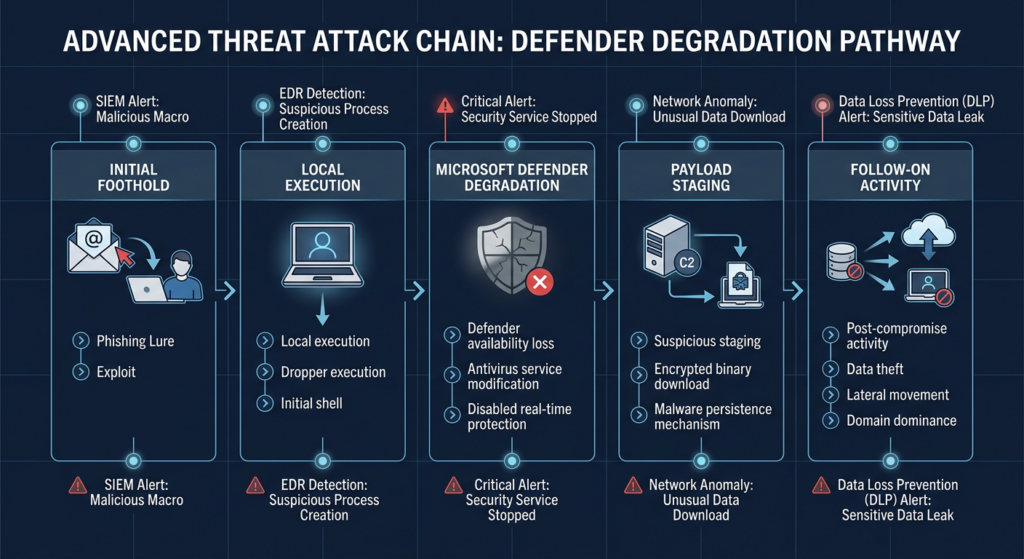
Public sources do not provide enough safe, complete detail to publish a reliable exploit procedure for CVE-2026-45498, and production teams should not be trying to prove exposure by crashing Defender anyway. The defensive model is still clear enough.
A plausible intrusion pattern looks like this:
| मंच | Attacker objective | Why CVE-2026-45498 matters defensively |
|---|---|---|
| Initial foothold | Get local execution through VPN compromise, phishing, stolen credentials, RMM abuse, malicious installer, or another vector | The Defender DoS is more relevant after local execution exists. |
| Security-control probing | Learn Defender version, mode, health, and update behavior | Attackers often test what security stack is present before staging tools. |
| Defender degradation | Interfere with scanning, updating, service health, or resource availability | A DoS against Defender can create room for follow-on actions. |
| Payload staging | Drop tools in user-writable paths such as Downloads, Temp, AppData, or Pictures | A degraded endpoint control is less likely to interrupt this stage. |
| टोही | Run commands such as privilege checks, credential listing, domain group enumeration, or network discovery | Huntress observed hands-on-keyboard reconnaissance such as whoami /priv, cmdkey /list, और net group in related Defender exploit activity. (Huntress) |
| Follow-on access | Establish tunneling, persistence, or lateral movement | Defender health gaps make it harder to distinguish failed exploit testing from real post-compromise activity. |
| Impact preparation | Disable controls, deploy malware, prepare ransomware, or exfiltrate data | A security-product DoS can be an enabling step even when it is not the final payload. |
Huntress reported real-world activity involving Nightmare-Eclipse tooling, including BlueHammer, RedSun, and UnDefend, during an intrusion investigation. The observed activity included suspicious binaries staged in user-writable directories, hands-on-keyboard reconnaissance, likely compromised FortiGate SSL VPN access, and follow-on tunneling behavior. Huntress also noted that the actor made mistakes and that the tools did not appear to succeed in that observed incident, which is an important caution against overstating every attempted use as successful exploitation. (Huntress)
That observation is useful because it keeps the risk grounded. CVE-2026-45498 should be hunted as part of a Defender-abuse pattern, not as an isolated string in a vulnerability dashboard. Look for local execution, Defender health changes, update failures, unusual user-writable staging paths, reconnaissance commands, and remote-access anomalies in the same time window.
Related Defender CVEs that change the remediation conversation
CVE-2026-45498 was not fixed in isolation. It sits in a wider 2026 Defender vulnerability cluster that includes local privilege escalation, denial of service, and remote code execution. That context matters because operational remediation overlaps: the same endpoint population, update channels, platform and engine version checks, and security-control health telemetry are involved.
| सीवीई | Vulnerability shape | Attack condition | Real risk | Fixed version or remediation anchor |
|---|---|---|---|---|
| CVE-2026-45498 | Microsoft Defender Antimalware Platform denial of service | Public scoring differs, but Microsoft CNA models it as local, low complexity, no privileges, no user interaction | Defender availability degradation can support follow-on activity | Platform 4.18.26040.7 or later |
| CVE-2026-41091 | Improper link resolution before file access in Microsoft Defender, allowing local privilege elevation | Authorized local attacker, low privileges required | Can turn a low-privileged foothold into elevated access | Engine 1.1.26040.8 or later |
| CVE-2026-45584 | Heap-based buffer overflow in Microsoft Defender, allowing an unauthorized attacker to execute code over a network | Network attack vector, high complexity, no privileges, no user interaction | Potential code execution against Defender engine attack surface | Engine 1.1.26040.8 or later |
| CVE-2026-33825 | Insufficient granularity of access control in Microsoft Defender, allowing local privilege elevation | Authorized local attacker, low privileges required | Shows Defender’s privileged file-handling and access-control paths can become attacker targets | Platform version below 4.18.26030.3011 listed as affected in NVD |
CVE-2026-41091 is especially relevant because it was fixed in the same Windows Antivirus April 2026 release line. NVD describes it as improper link resolution before file access in Microsoft Defender that allows an authorized attacker to elevate privileges locally, with a Microsoft CNA CVSS score of 7.8 High. NVD also lists it in CISA KEV with a June 3, 2026 due date. (एनवीडी)
CVE-2026-45584 is relevant for a different reason. It is not a DoS or local EoP issue. NVD describes it as a heap-based buffer overflow in Microsoft Defender that allows an unauthorized attacker to execute code over a network, with a Microsoft CNA CVSS score of 8.1 High. Microsoft’s release notes show it fixed in Engine 1.1.26040.8. (एनवीडी)
CVE-2026-33825 provides the historical warning. NVD describes it as an insufficient-granularity-of-access-control issue in Microsoft Defender that allows an authorized attacker to elevate privileges locally. It is also in CISA KEV, and NVD references Huntress reporting on related real-world activity. (एनवीडी)
The point is not that all four CVEs are the same bug. They are not. The point is that Defender itself is a high-privilege, high-trust security component. When it becomes an attack surface, defenders should verify more than one version number and look beyond a single CVE row.
How to verify a single endpoint safely
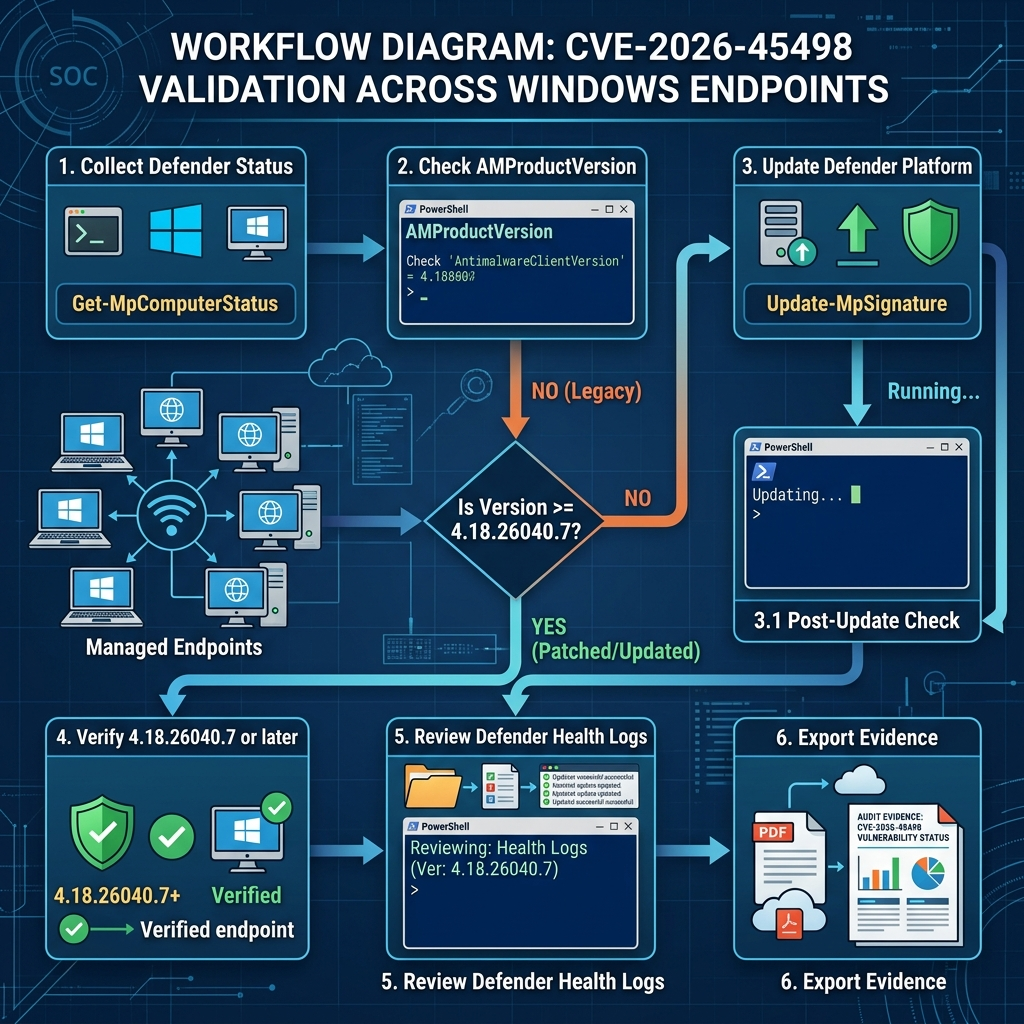
Do not run public exploit code on production systems. For CVE-2026-45498, version-based validation is the safest and most defensible method. Microsoft’s own PowerShell Defender module includes Get-MpComputerStatus, which returns antimalware status and version fields such as AMEngineVersion, AMProductVersion, AMRunningMode, AMServiceEnabled, AntivirusEnabled, and signature timestamps. (माइक्रोसॉफ्ट लर्न)
Run this in an elevated PowerShell session on a Windows endpoint:
$status = Get-MpComputerStatus

$status | Select-Object `
    AMProductVersion,
    AMEngineVersion,
    AMServiceVersion,
    AMRunningMode,
    AMServiceEnabled,
    AntivirusEnabled,
    RealTimeProtectionEnabled,
    AntivirusSignatureVersion,
    AntivirusSignatureLastUpdated,
    FullScanAge,
    QuickScanAge
Interpret the key fields this way:
| क्षेत्र | Safe interpretation |
|---|---|
AMProductVersion | Should be 4.18.26040.7 or later for CVE-2026-45498. |
AMEngineVersion | Should be 1.1.26040.8 or later for the related CVE-2026-41091 and CVE-2026-45584 fixes in the same release line. |
AMRunningMode | Helps identify whether Defender is active, passive, or in another mode, depending on endpoint configuration. |
AMServiceEnabled | Should be reviewed if Defender appears absent, disabled, or unhealthy. |
RealTimeProtectionEnabled | A patched platform is not enough if real-time protection is unexpectedly disabled. |
AntivirusSignatureLastUpdated | Stale signatures can indicate update-channel failure even after platform remediation. |
A slightly stricter local check can produce a clear pass or fail result:
$requiredPlatform = [version]"4.18.26040.7"
$requiredEngine   = [version]"1.1.26040.8"

$status = Get-MpComputerStatus

$currentPlatform = [version]$status.AMProductVersion
$currentEngine   = [version]$status.AMEngineVersion

[PSCustomObject]@{
    ComputerName                 = $env:COMPUTERNAME
    AMProductVersion             = $status.AMProductVersion
    PlatformFixedForCVE202645498 = ($currentPlatform -ge $requiredPlatform)
    AMEngineVersion              = $status.AMEngineVersion
    EngineFixedForRelatedCVEs    = ($currentEngine -ge $requiredEngine)
    AMRunningMode                = $status.AMRunningMode
    AMServiceEnabled             = $status.AMServiceEnabled
    RealTimeProtectionEnabled    = $status.RealTimeProtectionEnabled
    SignatureLastUpdated         = $status.AntivirusSignatureLastUpdated
}
This script does not prove that a host was never attacked. It proves whether the host currently meets the fixed version boundary. That is exactly the evidence most remediation teams need first.
Fleet-scale validation with PowerShell
For a small environment with approved PowerShell Remoting, you can collect the same fields across a host list. This is not a replacement for EDR, Intune, Configuration Manager, or vulnerability management, but it is useful for spot checks, emergency validation, and exception review.
$computers = Get-Content .\windows-endpoints.txt

$requiredPlatform = [version]"4.18.26040.7"
$requiredEngine   = [version]"1.1.26040.8"

Invoke-Command -ComputerName $computers -ScriptBlock {
    $status = Get-MpComputerStatus

    [PSCustomObject]@{
        ComputerName              = $env:COMPUTERNAME
        AMProductVersion          = $status.AMProductVersion
        AMEngineVersion           = $status.AMEngineVersion
        AMRunningMode             = $status.AMRunningMode
        AMServiceEnabled          = $status.AMServiceEnabled
        AntivirusEnabled          = $status.AntivirusEnabled
        RealTimeProtectionEnabled = $status.RealTimeProtectionEnabled
        SignatureVersion          = $status.AntivirusSignatureVersion
        SignatureLastUpdated      = $status.AntivirusSignatureLastUpdated
    }
} | ForEach-Object {
    $platformFixed = ([version]$_.AMProductVersion -ge $using:requiredPlatform)
    $engineFixed   = ([version]$_.AMEngineVersion -ge $using:requiredEngine)

    $_ | Add-Member -NotePropertyName PlatformFixedForCVE202645498 -NotePropertyValue $platformFixed -Force
    $_ | Add-Member -NotePropertyName EngineFixedForRelatedCVEs -NotePropertyValue $engineFixed -Force
    $_
} | Export-Csv .\defender-cve-2026-45498-validation.csv -NoTypeInformation
When you review the CSV, do not only filter for PlatformFixedForCVE202645498 = False. Also look for missing values, unreachable machines, stale signatures, disabled services, passive-mode surprises, and endpoints whose platform is fixed but engine is still behind the related CVE baseline.
| Result pattern | Likely meaning | Next action |
|---|---|---|
| Platform below 4.18.26040.7 | Direct exposure to the CVE-2026-45498 fixed-version boundary | Trigger Defender platform update and recheck. |
| Platform fixed, engine below 1.1.26040.8 | CVE-2026-45498 may be fixed, but related Defender engine issues may remain | Update security intelligence and engine, then recheck. |
| Signature timestamp stale | Security intelligence update path may be broken | Check Windows Update, WSUS, MMPC, proxy, or UNC update source. |
| Service disabled unexpectedly | Defender may not be protecting the endpoint | Investigate policy, third-party AV state, tampering, or migration status. |
| Host unreachable | Asset may be offline, unmanaged, or blocked | Track as exception until validated, not as remediated. |
| Passive mode | Another AV may be primary, but Defender components may still require updates | Confirm component presence and update state. |
The last row is important. Microsoft explicitly says to update Defender Antivirus protection even if Microsoft Defender Antivirus is running in passive mode. (माइक्रोसॉफ्ट लर्न)
Using Defender XDR Advanced Hunting
If Microsoft Defender for Endpoint and Defender Vulnerability Management are deployed, Advanced Hunting can help identify exposed devices and correlate vulnerability state with alerts. Microsoft documents DeviceTvmSoftwareVulnerabilities as the table containing Defender Vulnerability Management’s list of vulnerabilities in installed software products, including CVE IDs and severity information. It also notes that this table is populated from Defender for Endpoint and should be queried in Defender XDR Advanced Hunting when data is available. (माइक्रोसॉफ्ट लर्न)
A basic query for CVE-2026-45498 exposure might look like this:
DeviceTvmSoftwareVulnerabilities
| where CveId == "CVE-2026-45498"
| project DeviceName, SoftwareName, SoftwareVersion, CveId, VulnerabilitySeverityLevel, RecommendedSecurityUpdate
| order by DeviceName asc
A more useful triage query joins device context:
DeviceTvmSoftwareVulnerabilities
| where CveId == "CVE-2026-45498"
| join kind=leftouter (
    DeviceInfo
    | summarize arg_max(Timestamp, *) by DeviceId
    | project DeviceId, DeviceName, OSPlatform, OSVersion, MachineGroup, ExposureLevel, IsInternetFacing
) on DeviceId
| project DeviceName, OSPlatform, OSVersion, MachineGroup, ExposureLevel, IsInternetFacing,
          SoftwareName, SoftwareVersion, VulnerabilitySeverityLevel, RecommendedSecurityUpdate
| order by ExposureLevel desc, DeviceName asc
That query is not a full incident hunt. It is an exposure query. After patching, use hunting logic to ask whether exposed devices had suspicious activity during the vulnerability window.
A broad post-exposure hunt can start with suspicious reconnaissance commands:
let startTime = datetime(2026-05-20);
DeviceProcessEvents
| where Timestamp >= startTime
| where FileName in~ ("whoami.exe", "cmdkey.exe", "net.exe", "nltest.exe", "quser.exe", "qwinsta.exe")
| project Timestamp, DeviceName, InitiatingProcessAccountName, FileName, ProcessCommandLine,
          InitiatingProcessFileName, InitiatingProcessCommandLine
| order by Timestamp desc
Then add user-writable staging paths:
let startTime = datetime(2026-05-20);
DeviceFileEvents
| where Timestamp >= startTime
| where FolderPath has_any ("\\Downloads\\", "\\AppData\\Local\\Temp\\", "\\Pictures\\", "\\Desktop\\")
| where FileName endswith ".exe" or FileName endswith ".dll" or FileName endswith ".ps1"
| project Timestamp, DeviceName, InitiatingProcessAccountName, FolderPath, FileName,
          SHA256, InitiatingProcessFileName, InitiatingProcessCommandLine
| order by Timestamp desc
These queries are intentionally defensive. They do not exploit the vulnerability. They help identify whether hosts that were exposed to a Defender DoS issue also show behavior that belongs in an incident review.
Windows Defender event logs worth checking
Microsoft Defender Antivirus events are available under Applications and Services Logs, Microsoft, Windows, Windows Defender, Operational in Event Viewer. Microsoft’s event reference documents scan, detection, action, health, and configuration events in that channel. (माइक्रोसॉफ्ट लर्न)
For CVE-2026-45498 response, the most useful events are not a magic “this CVE was exploited” event. They are signals of Defender health, Defender actions, Defender failures, and unexpected configuration changes.
| Event ID | Microsoft description area | Why it matters during CVE-2026-45498 response |
|---|---|---|
| 1000 | Antimalware scan started | Establish normal scan activity. |
| 1001 | Antimalware scan finished | Compare against started scans to spot abnormal interruption patterns. |
| 1002 | Antimalware scan stopped before completion | Useful when scanning stops repeatedly or unexpectedly. |
| 1006 | Malware or potentially unwanted software detected | Correlate detections with Defender instability. |
| 1007 | Malware action taken | Shows Defender successfully acted. |
| 1008 | Malware action failed | Important if Defender tried to remediate but failed. |
| 1015 | Suspicious behavior detected | Useful for behavioral correlation around the exposure window. |
| 1116 | Malware or PUA detected | Another detection signal with file, process, signature, and engine fields. |
| 1117 | Malware action taken | Useful for confirming remediation activity. |
| 1119 | Critical error while taking action | High-value signal because Microsoft says the endpoint might not be protected. |
| 1120 | Threat hashes deduced | Useful if hash logging is enabled. |
| 1150 | Defender service healthy | Confirms healthy client state and reports platform, signature, and engine version. |
| 1151 | Endpoint Protection client health report | Includes platform version, engine version, real-time protection state, and signature age. |
| 5007 | Defender configuration changed | Microsoft notes unexpected changes should be reviewed because they might be malware-related. |
Event ID 1150 is valuable because Microsoft describes it as a healthy-state event and includes platform, signature, and engine versions. Event ID 1151 gives a broader client health report, including platform version, engine version, real-time protection state, and signature age. (माइक्रोसॉफ्ट लर्न)
A local PowerShell query for recent Defender health and configuration events can look like this:
$log = "Microsoft-Windows-Windows Defender/Operational"

Get-WinEvent -FilterHashtable @{
    LogName = $log
    Id      = 1002,1008,1119,1150,1151,5007
    StartTime = (Get-Date).AddDays(-14)
} | Select-Object TimeCreated, Id, ProviderName, Message |
    Sort-Object TimeCreated -Descending
For an incident timeline, export the data rather than taking screenshots only:
$log = "Microsoft-Windows-Windows Defender/Operational"

Get-WinEvent -FilterHashtable @{
    LogName = $log
    StartTime = (Get-Date).AddDays(-30)
} | Where-Object {
    $_.Id -in 1002,1008,1015,1116,1117,1119,1150,1151,5007
} | Select-Object TimeCreated, Id, MachineName, Message |
    Export-Csv .\defender-operational-events-last30days.csv -NoTypeInformation
The goal is to answer four questions:
| Question | Evidence source |
|---|---|
| Was Defender healthy after the update? | Event IDs 1150 and 1151, plus Get-MpComputerStatus. |
| Did Defender stop scans or fail actions? | Event IDs 1002, 1008, and 1119. |
| Did Defender configuration change unexpectedly? | Event ID 5007 and policy management history. |
| Did suspicious execution happen during the exposure window? | Defender detections, EDR process events, file events, VPN logs, and identity logs. |
How to update Defender when automatic updates are not enough
Microsoft says Defender Antivirus requires monthly platform updates under KB4052623. It also documents multiple update distribution methods, including Windows Update, WSUS, Software Update Point, Windows Security app, Microsoft Update Catalog, command-line update paths, and UNC file shares. (माइक्रोसॉफ्ट लर्न)
For CVE-2026-45498, the important part is platform update success. If an endpoint is below 4.18.26040.7, the remediation action is not “run a full malware scan and hope.” The remediation action is to update the Defender platform.
Common update failures look mundane:
| Failure pattern | Why it happens | Fix path |
|---|---|---|
| WSUS does not offer the platform update | Defender update classification or approvals are incomplete | Approve the correct Defender platform update and confirm client scan cycle. |
| ConfigMgr shows Windows compliant but Defender old | OS cumulative patch compliance is not the same as Defender component compliance | Add Defender platform and engine version checks to compliance reporting. |
| UNC share update path is stale | Offline update files were not refreshed | Refresh KB4052623 and security intelligence files in the correct architecture folders. |
| VDI image is old | Golden image contains outdated Defender platform | Patch image, seal it again, and validate new clones. |
| Air-gapped system has stale signatures | Manual update package process is broken | Rebuild offline update workflow and document transfer dates. |
| Third-party AV is primary | Defender may be disabled or passive, confusing update status | Verify component presence, WSC state, passive mode, and actual Defender versions. |
| Platform update temporarily postponed | Other protection features are monitoring running processes | Reboot or follow Microsoft’s platform update retry guidance. |
| Scanner reports vulnerable files on disk | Defender binaries may remain even when not active | Validate live service state and version, not only file presence. |
For UNC-share environments, Microsoft documents that platform updates can be enabled by downloading KB4052623 and copying it into architecture folders as updateplatform.exe, with x86, amd64, and arm64 folders in the expected structure. (माइक्रोसॉफ्ट लर्न)
A remediation workflow that works in real environments should look like this:
- Establish the baseline: export current
AMProductVersion,AMEngineVersion, running mode, signature version, and last update time. - Identify systems below Platform 4.18.26040.7.
- Identify systems below Engine 1.1.26040.8 because the same release line fixed related Defender CVEs.
- Trigger the right update mechanism for each device class.
- Reboot where platform update behavior or monitoring features require it.
- Re-run version collection.
- Preserve before-and-after evidence for audit, customer reporting, and incident review.
- Hunt the exposure window on hosts that were below baseline.
That last step matters. Remediation proves the door is now closed. Hunting asks whether anyone tried to walk through it before it closed.
A practical triage model
Not every vulnerable endpoint has the same urgency. A developer laptop, an internet-facing jump host, a domain controller, a kiosk, an offline manufacturing workstation, and a VDI template all need different handling.
| Priority | Asset condition | Why it is higher or lower risk | Action |
|---|---|---|---|
| P0 | Confirmed exposed host with suspicious local execution, Defender failures, or VPN compromise in the same window | Vulnerability may be part of an active intrusion | Isolate if appropriate, preserve evidence, run incident response, patch after evidence capture if policy allows. |
| P1 | Platform below 4.18.26040.7 on privileged admin workstation, server, jump host, or security tooling host | High-value endpoint plus security-control vulnerability | Patch immediately, verify Defender health, hunt local activity. |
| P1 | Platform below fixed version and engine below 1.1.26040.8 | Exposed to CVE-2026-45498 plus related Defender engine fixes missing | Patch platform and engine together. |
| P2 | Ordinary workstation below fixed platform version but no suspicious activity | Exposure exists, but no immediate incident signal | Patch quickly, validate, sample hunt. |
| P2 | Passive-mode Defender with vulnerable platform files present | Exploitability may depend on actual service state, but components should still be updated | Validate mode and update Defender components. |
| P3 | Offline or rarely connected asset with unknown state | Unknown should not be counted as safe | Track as exception, validate on next connection or through offline process. |
| P3 | Decommissioned or duplicate asset record | May be inventory noise | Confirm asset status and remove stale records. |
The fastest way to lose control of this remediation is to treat “not reporting” as “not vulnerable.” Unknown assets need their own queue.
What to hunt after patching
Post-patch hunting should focus on security-control degradation plus local operator behavior. For CVE-2026-45498, there is no single public indicator that reliably proves exploitation across all environments. That is normal for many platform and local-abuse vulnerabilities. Build a hunt around patterns.
| Signal group | उदाहरण | यह क्यों मायने रखती है |
|---|---|---|
| Defender health degradation | Event IDs 1002, 1008, 1119, missing 1150 health events, stale 1151 reports | Suggests Defender instability, failed actions, or missing health reporting. |
| Defender configuration changes | Event ID 5007, policy changes, unexpected exclusions, disabled real-time protection | Attackers often try to weaken endpoint controls after access. |
| Update failures | Stale signatures, failed platform updates, WSUS or UNC errors, version drift | CVE-2026-45498 is fixed through platform update, so update health is evidence. |
| Local reconnaissance | whoami /priv, cmdkey /list, net group, nltest, quser, net localgroup administrators | Often appears after a foothold and before escalation or lateral movement. |
| Suspicious user-writable staging | Executables, DLLs, scripts in Downloads, AppData, Temp, Pictures, Desktop | Huntress observed suspicious artifacts in user-writable paths in related activity. (Huntress) |
| Tunneling or remote access | Unknown agents, suspicious VPN source IPs, new outbound tunnels | Follow-on access can appear after local tool staging. |
| Privilege boundary anomalies | Low-privileged user activity followed by SYSTEM-level process creation | Relevant to the broader Defender EoP cluster, especially CVE-2026-41091 and CVE-2026-33825. |
A Windows event log hunt alone is not enough. It should be joined with EDR process telemetry, VPN logs, identity logs, file creation events, and asset management data.
Why version evidence beats exploit reproduction
Some teams are tempted to search for a proof of concept and run it on a test host. That is rarely necessary for production risk reduction, and it can be harmful. A public exploit can destabilize the host, damage evidence, trigger unrelated controls, violate rules of engagement, or create a misleading pass or fail result because exploit reliability depends on local timing, configuration, update state, and environmental details.
For CVE-2026-45498, the fixed platform version is the clean control. If a host is below 4.18.26040.7, treat it as exposed. If it is at or above 4.18.26040.7, preserve evidence and then evaluate whether suspicious activity occurred before remediation.
The same logic applies to related Defender vulnerabilities. CVE-2026-41091 and CVE-2026-45584 are fixed in Engine 1.1.26040.8 in the same release line. Microsoft’s release notes state those fixed versions clearly, which gives defenders a safer validation path than exploit testing. (माइक्रोसॉफ्ट लर्न)
A good remediation record should include:
| Evidence field | Example value | यह क्यों मायने रखती है |
|---|---|---|
| Asset ID | WIN-FIN-0421 | Ties evidence to inventory. |
| Owner or group | Finance laptop, privileged admin, kiosk, server | Supports risk prioritization. |
| Previous platform version | 4.18.26030.3011 | Shows exposure before remediation. |
| Current platform version | 4.18.26040.7 or later | Shows CVE-2026-45498 fixed baseline. |
| Previous engine version | 1.1.26030.3008 | Shows related Defender engine exposure. |
| Current engine version | 1.1.26040.8 or later | Shows related CVEs remediated. |
| Running mode | Normal, passive, EDR block mode, or other observed state | Explains protection posture. |
| Signature timestamp | Recent update time | Confirms update channel health. |
| Update source | Windows Update, WSUS, ConfigMgr, UNC share, manual package | Explains remediation path. |
| Post-patch Defender health | Event 1150 or equivalent health telemetry | Shows Defender is running and reporting. |
| Hunt result | No suspicious local execution in exposure window, or incident case ID | Connects vulnerability work to detection work. |
Penligent has a related Defender remediation write-up on CVE-2026-41091 that explicitly calls out CVE-2026-45498 as the platform-side DoS fix in the same Defender remediation cycle. That is useful as an operational companion when teams are validating both platform and engine baselines together, while the authoritative vulnerability facts should still come from Microsoft, NVD, and CISA-linked records. (पेनलिजेंट)
In authorized testing and remediation programs, teams also need a repeatable way to turn version checks, endpoint evidence, retest results, and reporting artifacts into a clean workflow. Penligent’s public site describes an agentic security testing workflow built around verified findings, evidence, and reporting for authorized security work; that kind of workflow is most useful here when it supports validation and documentation rather than exploit reproduction on production systems. (पेनलिजेंट)
Edge cases that create false confidence
CVE-2026-45498 is easy to mark “done” too early. These are the cases that usually cause trouble.
Passive mode does not mean ignore
If Microsoft Defender is in passive mode because another AV product is primary, do not assume the vulnerable component is irrelevant. Microsoft says Defender Antivirus protection should be updated even when Defender is running in passive mode. (माइक्रोसॉफ्ट लर्न)
The right question is: what Defender components are installed, what versions are present, what is the running mode, and what does your endpoint security architecture require?
Disabled Defender can confuse scanners
A scanner may flag Defender binaries on disk even when Defender is disabled or not primary. That does not automatically prove exploitability. It does prove that you need a better asset and component-state record. Validate the live state with Defender status, service state, WSC state, and your endpoint management platform.
Offline images matter
Microsoft documents update packages for Windows installation images and notes the need to keep OS installation images current with antivirus and anti-malware updates. (माइक्रोसॉफ्ट लर्न) If you patch live systems but keep deploying new machines from an old image, the vulnerability will reappear.
Update rings can delay platform fixes
Microsoft’s Defender gradual rollout documentation explains update channels for monthly updates, including Beta, Current Channel Preview, Current Channel Staged, Current Channel Broad, and Critical Time Delay. (माइक्रोसॉफ्ट लर्न) That is useful for stability, but during known-exploited remediation, teams should know which devices are intentionally delayed and whether the delay is still acceptable.
Signature updates are not the same as platform updates
Security intelligence updates and platform updates are related but distinct. Microsoft says engine updates are included with security intelligence updates, while platform updates are monthly KB4052623 updates. (माइक्रोसॉफ्ट लर्न) For CVE-2026-45498, focus on the platform.
No alert does not mean no exposure
A DoS against Defender may reduce telemetry rather than create a clean alert. Lack of an alert should be treated as absence of evidence, not evidence of absence. Pair vulnerability state with health events, process telemetry, and update history.
Reporting language that does not overclaim
A defensible report should avoid both understatement and hype. Use language like this:
“CVE-2026-45498 is a Microsoft Defender Antimalware Platform denial-of-service vulnerability fixed in Platform 4.18.26040.7. The vulnerability appears in CISA’s Known Exploited Vulnerabilities catalog. NVD currently shows a 7.5 High CVSS 3.1 score, while Microsoft’s CNA score is 4.0 Medium. Because the affected component is endpoint protection, the organization treated remediation as a security-control availability issue. We validated Defender platform versions across managed Windows assets, remediated hosts below the fixed baseline, reviewed Defender health and update telemetry, and hunted exposed hosts for suspicious local execution during the exposure window.”
That paragraph does four useful things. It names the CVE. It anchors the fixed version. It handles the scoring discrepancy honestly. It describes actions rather than fear.
Avoid language like:
| Bad wording | Why it is wrong |
|---|---|
| “CVE-2026-45498 gives attackers full control of Windows.” | Public records describe DoS, not direct full control. |
| “All Defender users are remotely exploitable.” | Microsoft CNA scoring uses a local attack vector; NVD differs, so state the discrepancy. |
| “Patch Tuesday fixed it everywhere automatically.” | Defender platform versions must be verified. |
| “No exploit was observed in our EDR, so we were safe.” | DoS can affect telemetry and health; absence of alerts is not enough. |
| “We ran a PoC on production and it failed, so no action needed.” | Exploit reliability is not a safe production validation method. |
| “Third-party AV means Defender CVEs do not matter.” | Defender components may still be present or passive and should be evaluated. |
अक्सर पूछे जाने वाले प्रश्न
What is CVE-2026-45498?
- CVE-2026-45498 is a Microsoft Defender denial-of-service vulnerability.
- The affected component is Microsoft Defender Antimalware Platform.
- Microsoft fixed it in Defender Antimalware Platform 4.18.26040.7.
- NVD lists the weakness as CWE-400, uncontrolled resource consumption.
- The operational risk is that an endpoint security control can become degraded or unavailable during an intrusion.
Is CVE-2026-45498 remote code execution?
- No public authoritative source describes CVE-2026-45498 itself as remote code execution.
- Public records describe it as a denial-of-service vulnerability.
- CVE-2026-45584, fixed in the same Defender release line, is the related Defender heap-based buffer overflow that NVD describes as allowing code execution over a network.
- Keep the CVEs separate in reporting, even if you remediate them in the same update cycle.
Which version fixes CVE-2026-45498?
- The key fixed version is Microsoft Defender Antimalware Platform 4.18.26040.7 or later.
- On a Windows endpoint, check
AMProductVersionसाथGet-MpComputerStatus. - For related Defender fixes in the same release line, check that
AMEngineVersionis 1.1.26040.8 or later. - Do not rely only on Windows cumulative update compliance.
Why do Microsoft and NVD show different CVSS scores?
- NVD shows a 7.5 High CVSS 3.1 score with a network attack vector and high availability impact.
- Microsoft’s CNA score is 4.0 Medium with a local attack vector and low availability impact.
- This difference can change prioritization in scanners and dashboards.
- Because the CVE is in CISA KEV and affects endpoint protection, teams should validate and remediate quickly regardless of which score their SLA system uses.
- Reports should explicitly state the source of the score.
How do I check if my endpoint is still exposed?
- Run
Get-MpComputerStatusin PowerShell. - Confirm
AMProductVersionis 4.18.26040.7 or later. - Confirm Defender service and real-time protection state are expected for your environment.
- जाँचें
AntivirusSignatureLastUpdatedfor stale security intelligence. - Review Defender Operational logs for health, failed actions, and configuration changes.
Does this matter if I use a third-party antivirus?
- It can still matter.
- Microsoft Defender components may remain installed, present on disk, passive, or partially active.
- Microsoft says Defender Antivirus protection should be updated even when Defender is running in passive mode.
- Validate actual component presence and version before closing the vulnerability.
- If your scanner reports vulnerable Defender files, confirm live service state and endpoint security architecture.
Should I run a public exploit to validate CVE-2026-45498?
- Not on production systems.
- Public exploit code can destabilize endpoints, trigger controls, damage evidence, or create misleading results.
- Version-based validation is safer and usually sufficient.
- Use isolated labs only when exploit reproduction is explicitly authorized and necessary.
- Production validation should focus on platform version, Defender health, update status, and exposure-window hunting.
What should I hunt for after patching?
- Defender health instability, including scan cancellations, failed actions, critical errors, stale signatures, and missing health reports.
- Unexpected Defender configuration changes, especially exclusions or real-time protection changes.
- Suspicious binaries or scripts in user-writable paths such as Downloads, AppData, Temp, Pictures, or Desktop.
- Reconnaissance commands such as
whoami /priv,cmdkey /list,net group,nltest, and local administrator enumeration. - VPN, RMM, identity, and tunneling activity around the same window.
- Low-privileged user activity followed by SYSTEM-level behavior, especially on hosts also missing related Defender engine fixes.
Closing judgment
CVE-2026-45498 is not scary because the public description is long. It is scary because the description is short, the affected component is trusted, and many organizations are bad at proving endpoint protection components are actually updated everywhere.
The fix target is clear: Microsoft Defender Antimalware Platform 4.18.26040.7 or later. The related release-line baseline is also clear: Defender Engine 1.1.26040.8 or later for CVE-2026-41091 and CVE-2026-45584. The hard part is not naming those versions. The hard part is proving them across laptops, servers, VDI pools, offline networks, passive-mode deployments, stale WSUS approvals, and images that keep reintroducing old Defender components.
Treat CVE-2026-45498 as a security-control availability issue. Verify the platform. Fix the update path. Review Defender health. Hunt the exposure window. Then preserve the evidence so the next audit, customer question, or incident review does not depend on memory.

 Hindi
Hindi  English
  German
  French
  Spanish
  Portuguese
  Japanese
  Korean
  Arabic
  Turkish
  Hebrew