
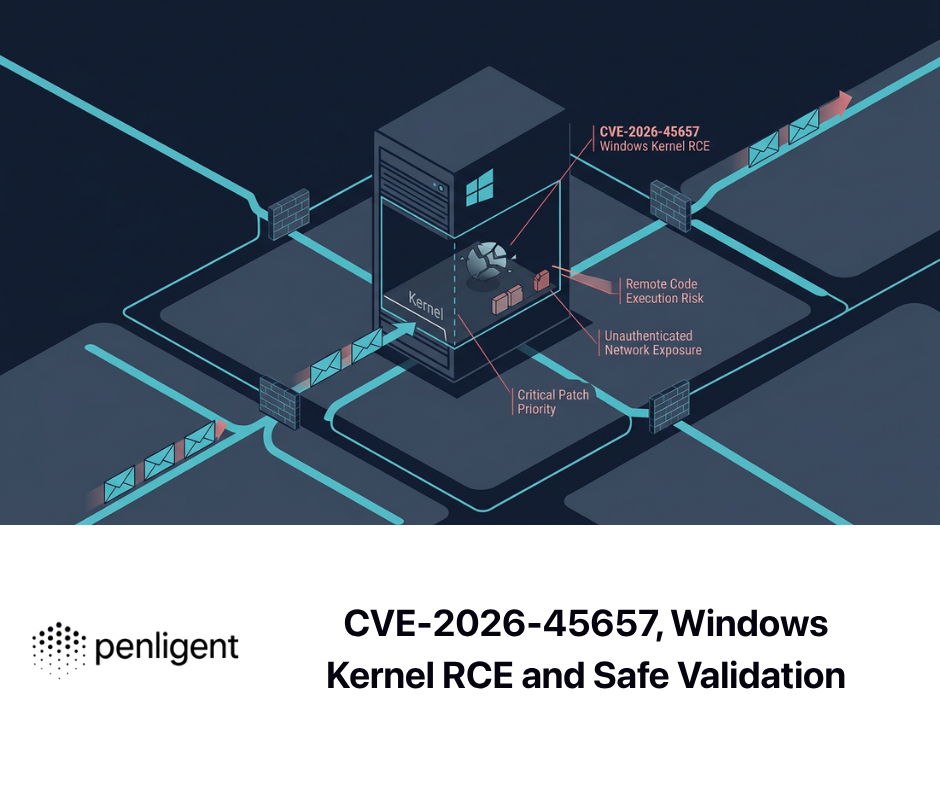
CVE-2026-45657 is a critical remote code execution vulnerability in the Windows Kernel. Microsoft’s public record describes it as a use-after-free that can allow an unauthorized attacker to execute code over a network. Its CVSS 3.1 score is 9.8, with network access, low attack complexity, no required privileges, and no user interaction. Microsoft released fixes on June 9, 2026. (एनवीडी)
Those facts justify urgent patching, but they do not justify inventing a packet format, vulnerable port, kernel function, or working exploit chain. Microsoft has not publicly documented those details. Some reputable Patch Tuesday analysis places the problem in Windows TCP/IP processing and describes the vulnerability as potentially wormable, but that language should be treated as third-party technical assessment rather than a complete, Microsoft-confirmed propagation model. (क्राउडस्ट्राइक)
For defenders, the most reliable response does not require a weaponized proof of concept. It requires accurate asset identification, build-number validation, network exposure analysis, staged deployment of the relevant cumulative updates, reboot verification, and preservation of evidence showing that each affected system reached a fixed build.
CVE-2026-45657 at a Glance
| क्षेत्र | Confirmed information |
|---|---|
| संवेदनशीलता | CVE-2026-45657 |
| अवयव | Windows Kernel |
| प्रभाव | Remote code execution |
| Primary weakness | Use after free, CWE-416 |
| Additional weakness mapping | Heap-based buffer overflow, CWE-122 |
| CVSS 3.1 score | 9.8 Critical |
| CVSS vector | एवी:नहीं/एसी:लंबा/पीआर:नहीं/यूआई:नहीं/एस:अनुपलब्ध/सी:ऊँचा/आई:ऊँचा/ए:ऊँचा |
| Authentication required | No privileges are required by the CVSS vector |
| User interaction required | नहीं |
| Initial fix date | June 9, 2026 |
| Microsoft release-time exploit assessment | Exploitation Less Likely |
| Publicly disclosed at release | No, according to Microsoft-oriented Patch Tuesday tracking |
| Confirmed exploited at release | नहीं |
| Specific protocol or port | Not identified in Microsoft’s public CVE description |
| Public weaponized exploit | No authoritative public exploit confirmation identified as of July 13, 2026 |
| Primary remediation | Install a cumulative update that brings the operating system to or beyond the applicable fixed build |
The distinction between confirmed facts and missing details matters. A vulnerability can be severe even when a public exploit is unavailable. Conversely, a high CVSS score does not prove that exploitation is currently reliable, widespread, or automated.
Microsoft’s public CVE data assigns both CWE-416 and CWE-122 to the issue. NVD records the fixed-build boundaries for affected Windows 11 and Windows Server releases, while Microsoft’s cumulative-update pages identify the June 2026 builds that first included the security fix. (एनवीडी)
At release, the Zero Day Initiative’s Patch Tuesday table marked CVE-2026-45657 as neither publicly disclosed nor known to be exploited, while its analysis noted Microsoft’s “Exploitation Less Likely” assessment. The absence of known exploitation on release day is useful context, but it is not a reason to leave a network-reachable kernel vulnerability unpatched. (zerodayinitiative.com)
As of July 13, 2026, CVE-2026-45657 was not displayed in the CISA Known Exploited Vulnerabilities catalog view checked for this analysis. KEV status should be monitored because it can change when reliable evidence of exploitation becomes available. Absence from KEV means CISA has not placed the vulnerability in that catalog at that time; it does not mean exploitation is impossible or that patching can safely be deferred. (सीआईएसए)
What Microsoft Has Confirmed
The most authoritative concise description is the one carried into NVD from Microsoft:
Use after free in Windows Kernel allows an unauthorized attacker to execute code over a network.
That statement establishes four important properties. The bug is in the Windows Kernel, the weakness involves use of memory after its lifetime has ended, the impact may include code execution, and the attack path is network-based. (एनवीडी)
The CVSS vector adds operational detail:
- एवी:एन means the vulnerable interface is reachable through a network path rather than requiring local execution or physical access.
- एसी:एल means Microsoft did not score exploitation as depending on a highly specialized or difficult-to-control condition.
- PR:N means the attacker does not need an existing account or authorization before attempting exploitation.
- UI:N means a victim does not have to open a file, click a link, or approve an action.
- S:U means the scored security authority remains within the same scope.
- C:H, I:H, and A:H indicate potentially high effects on confidentiality, integrity, and availability. (एनवीडी)
Microsoft also identified the weakness as both CWE-416 and CWE-122. CWE-416 covers access to memory after it has been freed. CWE-122 covers an overflow involving a buffer allocated in heap memory. These mappings describe classes of unsafe memory behavior, not a public recipe for exploiting the Windows flaw. (एनवीडी)
Microsoft later disclosed that CVE-2026-45657 was among a set of vulnerabilities found through codename MDASH, a multi-model agentic scanning system used across Windows, the kernel, Hyper-V, the networking stack, Azure, and identity components. Microsoft described a pipeline in which specialized agents support discovery, validation, proof, remediation, and integration with engineering workflows. The company stated that the listed vulnerabilities were identified before exploitation. (माइक्रोसॉफ्ट)
That history is significant for two reasons. First, the vulnerability was not announced because a widespread campaign had already forced disclosure. Second, an internally discovered vulnerability can still become a valuable target after the patch is released. Attackers and researchers can compare patched and unpatched binaries, inspect changed code paths, and attempt to reconstruct the original defect. Patch publication can therefore start a new race even when the vendor found the issue first.
What Remains Undisclosed
The public record does not identify the exact vulnerable function, object type, driver, structure, field, packet sequence, transport condition, or cleanup path. It does not provide a packet capture, proof-of-concept program, debugger trace, crash signature, or exploitability analysis from Microsoft.
CrowdStrike’s Patch Tuesday analysis states that specially crafted network traffic could trigger a flaw in the way the Windows Kernel processes TCP/IP data and potentially allow SYSTEM-level execution. ZDI similarly places the problem in kernel TCP/IP handling. These are credible secondary assessments, but the public Microsoft CVE description itself remains broader and says only that an attacker can execute code over a network. (क्राउडस्ट्राइक)
That difference affects defensive guidance. It would be irresponsible to claim, without evidence, that blocking a particular TCP or UDP port eliminates the risk. It would be equally irresponsible to publish an intrusion-detection signature based on an invented payload structure. Until Microsoft or a qualified researcher releases validated technical details, teams should not assume that the flaw depends on:
- A particular application-layer service
- A specific listening port
- IPv4 rather than IPv6
- IPv6 rather than IPv4
- A domain-joined system
- A logged-in user
- File sharing
- Remote Desktop
- HTTP.sys
- DHCP
- A particular network adapter
- An optional Windows feature
Some of those conditions may later turn out to be relevant, but they are not established by the available official record.
The same caution applies to crash behavior. A use-after-free may produce a bugcheck in one memory layout and apparently normal execution in another. A successful exploit could behave differently from an accidental crash. No public source currently identifies a unique stop code, faulting instruction, driver name, or stack trace that conclusively detects CVE-2026-45657.
A precise defensive report should therefore use language such as:
The system runs an affected Windows build and is reachable through an untrusted or broadly accessible network path. This confirms exposure to the documented vulnerable version. It does not prove that exploitation occurred.
It should not say:
Event 41 proves CVE-2026-45657 was exploited.
The first statement is evidence-based. The second converts a generic system event into unsupported attribution.
Why Use-After-Free Bugs Are Dangerous
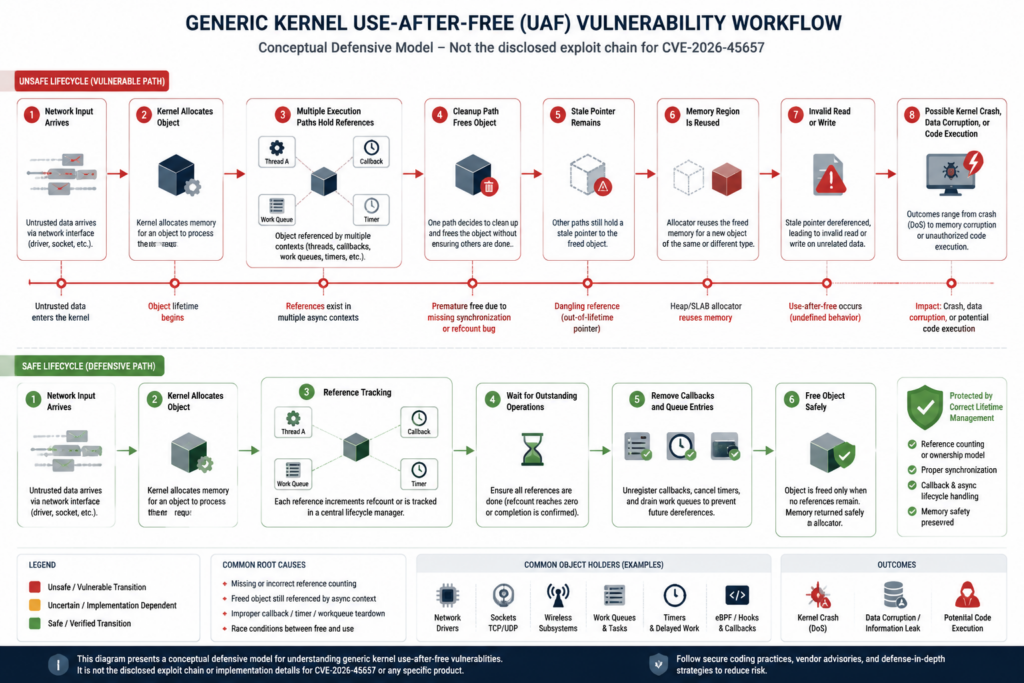
A use-after-free begins with an object-lifetime failure. Software allocates memory for an object and allows one or more execution paths to reference it. At some point, one path decides that the object is no longer needed and releases the memory. The vulnerability appears when another path still treats the old address as a valid object.
A simplified lifecycle looks like this:
- Code allocates an object.
- The object is referenced by a request, callback, timer, queue entry, worker, or connection.
- A cleanup path releases the object.
- A second path retains an alias to the same address.
- The allocator reuses or modifies the freed region.
- The second path reads from, writes to, or indirectly calls through the stale object.
MITRE notes that use of previously freed memory can corrupt valid data, cause a crash, or disclose information, depending on how the region is reused. MITRE’s examples also show that use-after-free conditions can arise when a connection closes while data is still being transmitted, when invalid input disrupts allocation logic, or when a race condition causes object lifetime to be handled incorrectly. (सामूहिक रूप से)
The stale address is often called a dangling pointer. The difficult part is not always the call to free. The difficult part is proving that no remaining owner, callback, asynchronous task, timer, interrupt-related path, or queue entry can access the object afterward.
Network code is especially exposed to complicated lifetimes because it processes asynchronous state:
- Packets may arrive while a connection is being closed.
- A timeout may run while another core is completing a request.
- A cancellation path may race with a completion callback.
- A network object may be referenced by several protocol layers.
- Error handling may free an object that a deferred worker still expects.
- Reference counts may be incremented too late or decremented twice.
- A malformed state transition may trigger cleanup before all users have released their references.
These are general patterns, not confirmed implementation details for CVE-2026-45657. They explain why a network-reachable kernel use-after-free is plausible without pretending to know the exact Microsoft code path.
What happens after memory is freed
Freeing memory does not necessarily erase every byte immediately. The allocator may mark the region as available and later reuse it for another allocation. The stale pointer still contains an address, but the meaning of the bytes at that address has changed.
Several outcomes are possible:
- The freed data remains temporarily unchanged, so the invalid access appears to work.
- Allocator metadata replaces part of the old object.
- Another kernel object is placed in the same region.
- An unrelated code path writes data into the reused region.
- A security mechanism detects corruption and stops the system.
- A stale function pointer, size, flag, or linked-list field influences later execution.
- A read reveals data belonging to a different allocation.
- A write corrupts another object.
- A controlled memory state enables code execution.
This variability is one reason memory-corruption exploit development can be difficult. Triggering a bug is not the same as turning it into reliable code execution. The attacker may need repeatable control over allocation size, object placement, timing, CPU scheduling, and the contents of replacement memory. Modern Windows mitigations can make those steps harder, but mitigations do not make an unpatched kernel memory-safety defect acceptable.
Why the kernel context raises the impact
A crash in a user-mode application usually terminates that application. A serious corruption in kernel mode can halt or destabilize the entire operating system. Kernel code also operates with privileges and trust unavailable to ordinary applications.
The CVE record scores confidentiality, integrity, and availability impact as high. That reflects the potential consequences of successful code execution in this security context. It does not mean every malformed packet will reliably produce all three effects, but it does mean the documented worst-case impact is system-wide rather than confined to a low-privilege process. (एनवीडी)
A kernel network path may also process input before an application performs its own authentication. Application controls such as login requirements, multifactor authentication, web authorization, or file permissions do not necessarily protect code that handles lower-level network state.
Understanding the Dual CWE Classification
NVD lists CWE-416, Use After Free, and CWE-122, Heap-based Buffer Overflow. That combination may describe related parts of the defect, the consequences of operating on a freed heap object, or Microsoft’s internal classification of the vulnerable behavior. It should not be interpreted as proof that two independent vulnerabilities exist.
CWE-122 describes a condition in which data can overwrite a buffer allocated in heap memory. CWE-416 describes use of memory after that memory has been returned to the allocator. A stale object may contain a length or pointer that no longer has a valid meaning. If later code trusts that corrupted state, an out-of-bounds heap operation may follow. Alternatively, the two classifications may reflect separate manifestations found during Microsoft’s analysis. Public sources do not provide enough detail to choose between those possibilities. (सामूहिक रूप से)
For defenders, the dual classification reinforces three practical conclusions:
First, a simple service restart is not a remediation. Restarting may change memory layout or temporarily remove a triggering state, but the vulnerable code remains.
Second, a network intrusion-prevention rule cannot be considered complete unless it is based on an authoritative description of the triggering input. That description is not currently public.
Third, crash-only testing is insufficient. A non-crashing probe does not prove that a machine is safe because memory corruption may be layout-dependent. Version verification is more dependable than trying to infer safety from the absence of a crash.
What the CVSS 9.8 Score Means
The score of 9.8 is a strong signal for patch priority. It is not a prediction that every attacker can immediately compromise every affected host.
| CVSS element | कार्यात्मक अर्थ | What it does not establish |
|---|---|---|
| एवी:एन | An attack can be attempted through a network path | The exact protocol, route, port, or service |
| एसी:एल | The score does not require a high-complexity condition | A public exploit is reliable |
| PR:N | No prior privileges are required | Every network location can reach the vulnerable path |
| UI:N | No victim action is required | The vulnerability automatically spreads |
| S:U | The security authority remains in the scored scope | The attack has limited business impact |
| C:H | Successful exploitation may seriously affect confidentiality | Data theft has been observed in the wild |
| I:H | Successful exploitation may seriously affect integrity | A known payload can modify every system |
| A:H | Successful exploitation may seriously affect availability | Every attempt causes a crash |
CVSS is designed to describe intrinsic technical severity. It does not include all environmental variables. A disconnected lab machine and an internet-reachable production server may share the same base score, but their operational risk is different.
The score also does not answer:
- Whether exploit code has been published
- Whether exploitation has been observed
- Whether a reliable exploit requires significant research
- Whether a network control blocks the relevant traffic
- Whether an affected asset contains sensitive data
- Whether the asset is part of a critical business process
- Whether a compensating control would detect post-exploitation activity
- Whether the update has compatibility concerns in a specific environment
A mature patch program uses CVSS as one input. It then adds exploit intelligence, exposure, asset criticality, control coverage, deployment feasibility, and evidence of abnormal activity.
For CVE-2026-45657, the combination of kernel impact, network attack vector, no required privileges, and no user interaction justifies an accelerated response even though Microsoft initially assessed exploitation as less likely.
Affected Windows Builds and Fixed Versions
NVD’s affected-product data lists Windows 11 23H2, 24H2, 25H2, and 26H1, together with Windows Server 2022 and Windows Server 2025. Both x64 and applicable ARM64 Windows 11 builds are included. Windows Server 2025 Server Core is explicitly listed. (एनवीडी)
| Operating system | Vulnerable when below | First June 2026 fix | Fixed build |
|---|---|---|---|
| Windows 11 23H2 | 22631.7219 | KB5093998 | 22631.7219 |
| Windows 11 24H2 | 26100.8655 | KB5094126 | 26100.8655 |
| Windows 11 25H2 | 26200.8655 | KB5094126 | 26200.8655 |
| Windows 11 26H1 | 28000.2269 | KB5095051 | 28000.2269 |
| Windows Server 2022 | 20348.5256 | KB5094128 | 20348.5256 |
| Windows Server 2025 | 26100.32995 | KB5094125 | 26100.32995 |
| Windows Server 2025 Server Core | 26100.32995 | KB5094125 | 26100.32995 |
Microsoft’s update pages confirm that KB5093998 brings Windows 11 23H2 to build 22631.7219, KB5094126 brings Windows 11 24H2 and 25H2 to builds 26100.8655 and 26200.8655, and KB5095051 brings Windows 11 26H1 to build 28000.2269. (माइक्रोसॉफ्ट सहायता)
For servers, KB5094128 brings Windows Server 2022 to build 20348.5256, while KB5094125 brings Windows Server 2025 to build 26100.32995. (माइक्रोसॉफ्ट सहायता)
Build numbers are stronger evidence than one KB number
Windows client and Windows Server use cumulative updates. Microsoft states that each cumulative update includes changes and fixes from previous cumulative updates. A machine may therefore be protected by a later update even if the original June KB is not returned by a simple hotfix query. (माइक्रोसॉफ्ट लर्न)
For example, a Windows 11 24H2 host running build 26100.8737 is beyond the first fixed build of 26100.8655. The host should not be marked vulnerable merely because an inventory tool does not display KB5094126 as a separate current package. The later cumulative update contains earlier security fixes unless Microsoft documents an exceptional regression or removal.
This is why the closure evidence for CVE-2026-45657 should include the installed operating-system build, not only a KB identifier.
The reverse problem also exists. An update may be staged but not fully active until reboot. A management console may report that deployment succeeded even though the system remains on the previous running kernel. Validation should occur after the required restart and should read the current running build.
Be careful with build 26100
Both Windows 11 24H2 and Windows Server 2025 use the 26100 build family, but their fixed revisions are different:
- Windows 11 24H2 requires at least 26100.8655.
- Windows Server 2025 requires at least 26100.32995.
A script that compares only the major build number can produce a serious error. It must first determine whether the machine is a client or server system.
Prioritizing Real-World Exposure
A vulnerability with AV:N does not mean every affected computer is directly reachable from every attacker. It means the vulnerable interface can be reached through a network under the conditions represented by the score. Network architecture determines who can deliver traffic to a particular host.
The first response step should therefore be an exposure map.
Highest-priority systems
Internet-reachable Windows systems should receive immediate attention. “Internet-reachable” includes more than a host with a public IP address. A system may be exposed through:
- A cloud load balancer
- Port forwarding
- Network address translation
- A reverse proxy
- A VPN address pool
- A remote-access gateway
- A partner network
- A software-defined perimeter
- A container or virtual-network bridge
- A misconfigured firewall rule
- An IPv6 address overlooked by IPv4-focused inventory
The public record does not identify a specific service or port, so an asset should not be declared safe merely because one well-known Windows service is blocked.
High-value internal systems
Internal servers may be equally important when ordinary workstations, guest devices, contractor systems, development networks, or acquired subsidiaries can reach them.
Prioritize:
- Domain controllers
- Certificate authorities
- Identity and access-management servers
- Backup infrastructure
- Hypervisor management systems
- Software deployment servers
- Security-management servers
- File and database servers
- Jump hosts
- Administrative workstations
- Systems holding secrets or signing material
- Shared services reachable from large endpoint populations
An unauthenticated network vulnerability can turn a single compromised endpoint into a path toward more valuable internal assets. Whether CVE-2026-45657 can support that chain in practice is not publicly established, but reducing reachable vulnerable systems is still the correct defensive move.
Dense endpoint networks
Workstations should not be ignored simply because they are not public servers. A large flat network creates many possible paths between endpoints. Guest wireless networks, conference-room devices, unmanaged lab systems, and remote endpoints connected through VPN can complicate the trust boundary.
Patch priority should rise when an affected endpoint:
- Accepts inbound traffic from peer devices
- Moves between trusted and untrusted networks
- Is used by an administrator
- Has access to production management interfaces
- Connects to multiple security zones
- Runs development or testing services
- Cannot be reliably isolated when off-premises
Legacy and vendor-controlled devices
Windows-based medical, industrial, laboratory, retail, and embedded systems often have delayed maintenance cycles. The operating system may be hidden behind an appliance interface, and administrators may not control the update process.
These systems require a separate workflow:
- Identify the underlying Windows version and build.
- Obtain the vendor’s security statement.
- Determine whether the vendor backported the fix.
- Record whether the appliance can accept Microsoft updates directly.
- Isolate the system if no supported fix is available.
- Require a time-bound exception with an owner.
- Monitor the network paths allowed to reach the device.
A vendor firmware version should not be assumed safe just because it was released after June 2026. The vendor must confirm that the relevant Windows fix is included or provide a verifiable component version.
Is CVE-2026-45657 Wormable
ZDI characterized CVE-2026-45657 as wormable because it is a remote, unauthenticated, no-user-interaction kernel RCE associated with TCP/IP handling. That assessment deserves attention, especially from defenders responsible for large Windows estates. It should still be attributed correctly. Microsoft’s public CVE description does not publish a working self-propagation chain or explicitly document a worm implementation. (zerodayinitiative.com)
“Wormable” generally means that successful compromise can be automated and followed by autonomous discovery and compromise of additional systems without a human victim performing an action. A practical worm needs more than a favorable CVSS vector.
It needs:
- A repeatable way to find reachable targets
- A reliable trigger across relevant builds and configurations
- Sufficient control over the vulnerability to execute propagation code
- A method of transferring or reconstructing that code
- Stability high enough to avoid crashing most targets
- Network paths to additional vulnerable systems
- Logic that handles patched, unavailable, or incompatible hosts
CVE-2026-45657 has several characteristics commonly associated with worm concern: network reachability, no required privileges, no user interaction, kernel impact, and low scored complexity. Those characteristics justify treating lateral exposure seriously. They do not independently demonstrate that all practical worm requirements have been met.
A useful internal statement is:
CVE-2026-45657 has properties that could support automated propagation if reliable exploitation is developed. Public sources do not yet establish a complete worm chain.
That wording preserves urgency without presenting speculation as fact.
A Conceptual Attack Path Without Invented Exploit Details
The following model is intended for threat modeling. It is not a working exploit sequence.
Step one, network reachability
An attacker must be able to deliver traffic to the affected Windows host. The route may be direct, internal, tunneled, proxied, or available only after an initial foothold.
Step two, kernel processing
The traffic reaches code that processes network state in the Windows Kernel. Third-party analysis associates the flaw with TCP/IP processing, but the exact protocol branch and object type are not public. (क्राउडस्ट्राइक)
Step three, invalid object lifetime
A specific state or input sequence causes an object to be released while another execution path can still reference it. This is the conceptual use-after-free boundary. The actual cleanup path, timing requirement, and reference relationship for CVE-2026-45657 have not been published.
Step four, stale access
Kernel code later accesses the freed region. Depending on allocator state, the result could be:
- A benign-looking read of old data
- An invalid value
- A heap overflow
- Corruption of another object
- A kernel exception
- A system bugcheck
- A more controlled memory primitive
Step five, exploitation attempt
For code execution, an attacker would need to convert the invalid access into meaningful control. That could theoretically involve influencing replacement memory, corrupted pointers, object fields, lengths, or indirect execution state. No authoritative source has disclosed how this is accomplished for CVE-2026-45657.
Step six, post-exploitation activity
If code execution occurs in a privileged kernel context, follow-on actions could affect the entire host. The CVSS vector reflects high potential impact to confidentiality, integrity, and availability. The specific post-exploitation behavior would depend on the attacker’s payload and objectives rather than the CVE alone. (एनवीडी)
This conceptual chain helps defenders identify control points:
- Prevent untrusted network reachability.
- Remove vulnerable builds.
- Monitor kernel crashes and unusual network events.
- Investigate suspicious activity surrounding affected hosts.
- Preserve memory and network evidence.
- Verify remediation with build data.
It does not authorize active exploitation against production systems.
Safe Use-After-Free PoC in an Isolated Lab
The following demonstration intentionally creates a generic use-after-free in a tiny local program. It does not use the Windows Kernel, does not open a network connection, does not generate a malicious packet, and cannot validate CVE-2026-45657.
Its only purpose is to show why reading through a stale pointer is unsafe.
Run it in a disposable local development environment with AddressSanitizer enabled. Linux, WSL, or a macOS system with Clang is sufficient. Do not remove the sanitizer and repurpose the example as a model for testing production systems.
#include <stdint.h>
#include <stdio.h>
#include <stdlib.h>
#include <string.h>

typedef struct PacketContext {
    uint32_t state;
    char label[32];
} PacketContext;

int main(void) {
    PacketContext *owner = calloc(1, sizeof(*owner));

    if (owner == NULL) {
        fprintf(stderr, "allocation failed\n");
        return 1;
    }

    owner->state = 7;
    snprintf(owner->label, sizeof(owner->label), "%s", "local-lab-object");

    /*
     * This second pointer refers to the same allocation.
     * It does not create a separate object.
     */
    PacketContext *stale_alias = owner;

    free(owner);
    owner = NULL;

    /*
     * Intentional bug for AddressSanitizer:
     * stale_alias still contains the address of freed memory.
     */
    printf("state: %u\n", stale_alias->state);
    printf("label: %s\n", stale_alias->label);

    return 0;
}
Compile and execute it with:
clang -O0 -g \
  -fsanitize=address \
  -fno-omit-frame-pointer \
  uaf_demo.c \
  -o uaf_demo

./uaf_demo
AddressSanitizer should terminate the program and report a heap-use-after-free. The report normally identifies:
- The instruction that performed the invalid read
- The allocation site
- The deallocation site
- The size and location of the freed region
- A shadow-memory summary
The exact text varies by compiler and platform. The security lesson is consistent: setting मालिक को NULL did not change stale_alias. The second pointer still referred to the released allocation.
A safer toy pattern
In this small example, the program can copy the data it genuinely needs before releasing the allocation and then avoid every later reference to the original object:
#include <stdint.h>
#include <stdio.h>
#include <stdlib.h>
#include <string.h>

typedef struct PacketContext {
    uint32_t state;
    char label[32];
} PacketContext;

int main(void) {
    PacketContext *context = calloc(1, sizeof(*context));

    if (context == NULL) {
        fprintf(stderr, "allocation failed\n");
        return 1;
    }

    context->state = 7;
    snprintf(context->label, sizeof(context->label), "%s", "local-lab-object");

    uint32_t state_snapshot = context->state;
    char label_snapshot[32];
    memcpy(label_snapshot, context->label, sizeof(label_snapshot));
    label_snapshot[sizeof(label_snapshot) - 1] = '\0';

    free(context);
    context = NULL;

    printf("state: %u\n", state_snapshot);
    printf("label: %s\n", label_snapshot);

    return 0;
}
This is not a universal fix for kernel code. Copying a complex object may be incorrect, expensive, or unsafe. A real fix may require:
- A documented ownership model
- Reference counting
- Locks or other synchronization
- Cancellation coordination
- Waiting for outstanding callbacks
- Removing queue entries before free
- Preventing new references during teardown
- Atomic state transitions
- Separate lifetime management for child objects
- Assertions and sanitizer-backed testing
The safe demonstration helps defenders and developers understand the bug class. It provides no information about the actual object, allocation size, packet condition, or exploitation mechanics of CVE-2026-45657.
How to Validate Exposure Without Exploitation
The safest reliable validation question is:
Is this machine running a Windows product and build that Microsoft identifies as affected?
That question can be answered without sending malformed traffic.
Manual verification
On a Windows machine, winver provides the version and operating-system build. PowerShell can provide structured output:
Get-ComputerInfo -Property `
    WindowsProductName, `
    WindowsVersion, `
    OsBuildNumber, `
    OsArchitecture
Microsoft documents Get-ComputerInfo as a Windows cmdlet that returns consolidated operating-system and system properties. (माइक्रोसॉफ्ट लर्न)
For the full revision, read CurrentBuildNumber और UBR from the registry:
$cv = Get-ItemProperty `
    'HKLM:\SOFTWARE\Microsoft\Windows NT\CurrentVersion'

[pscustomobject]@{
    ProductName        = $cv.ProductName
    DisplayVersion     = $cv.DisplayVersion
    CurrentBuildNumber = $cv.CurrentBuildNumber
    UBR                = $cv.UBR
    FullBuild          = "$($cv.CurrentBuildNumber).$($cv.UBR)"
    InstallationType   = $cv.InstallationType
}
Compare FullBuild with the appropriate fixed threshold. A Windows 11 23H2 system at 22631.7079 is below 22631.7219 and remains in the affected range. A system at 22631.7219 or a later cumulative build has crossed the first fixed threshold.
A safe build-assessment script
The following script is read-only. It does not scan a network, trigger the vulnerability, change configuration, or install software.
$ErrorActionPreference = 'Stop'

$cv = Get-ItemProperty `
    'HKLM:\SOFTWARE\Microsoft\Windows NT\CurrentVersion'

$os = Get-CimInstance Win32_OperatingSystem

$buildNumber = [int]$cv.CurrentBuildNumber
$ubr = [int]$cv.UBR
$installedBuild = [version]"$buildNumber.$ubr"
$isServer = [int]$os.ProductType -ne 1

$targetName = $null
$requiredBuild = $null
$initialKb = $null

switch ($buildNumber) {
    22631 {
        $targetName = 'Windows 11 version 23H2'
        $requiredBuild = [version]'22631.7219'
        $initialKb = 'KB5093998'
    }

    26100 {
        if ($isServer) {
            $targetName = 'Windows Server 2025'
            $requiredBuild = [version]'26100.32995'
            $initialKb = 'KB5094125'
        }
        else {
            $targetName = 'Windows 11 version 24H2'
            $requiredBuild = [version]'26100.8655'
            $initialKb = 'KB5094126'
        }
    }

    26200 {
        $targetName = 'Windows 11 version 25H2'
        $requiredBuild = [version]'26200.8655'
        $initialKb = 'KB5094126'
    }

    28000 {
        $targetName = 'Windows 11 version 26H1'
        $requiredBuild = [version]'28000.2269'
        $initialKb = 'KB5095051'
    }

    20348 {
        $targetName = 'Windows Server 2022'
        $requiredBuild = [version]'20348.5256'
        $initialKb = 'KB5094128'
    }
}

if ($null -eq $requiredBuild) {
    $assessment = 'Not in the public affected-build list'
}
elseif ($installedBuild -ge $requiredBuild) {
    $assessment = 'Fixed build threshold met'
}
else {
    $assessment = 'Below fixed build threshold'
}

[pscustomobject]@{
    ComputerName       = $env:COMPUTERNAME
    ProductName        = $os.Caption
    DisplayVersion     = $cv.DisplayVersion
    InstallationType   = $cv.InstallationType
    Architecture       = $os.OSArchitecture
    InstalledBuild     = $installedBuild.ToString()
    RequiredBuild      = if ($requiredBuild) {
                             $requiredBuild.ToString()
                         }
                         else {
                             'Not mapped'
                         }
    InitialJune2026KB  = if ($initialKb) {
                             $initialKb
                         }
                         else {
                             'Not mapped'
                         }
    Assessment         = $assessment
    CheckedAtUtc       = (Get-Date).ToUniversalTime().ToString('o')
}
Example fixed result:
ComputerName      : WS-042
ProductName       : Microsoft Windows 11 Enterprise
DisplayVersion    : 24H2
InstallationType  : Client
Architecture      : 64-bit
InstalledBuild    : 26100.8737
RequiredBuild     : 26100.8655
InitialJune2026KB : KB5094126
Assessment        : Fixed build threshold met
CheckedAtUtc      : 2026-07-13T20:15:31.2280000Z
Example vulnerable-version result:
ComputerName      : SRV-APP-12
ProductName       : Microsoft Windows Server 2022 Standard
DisplayVersion    : 21H2
InstallationType  : Server
Architecture      : 64-bit
InstalledBuild    : 20348.5139
RequiredBuild     : 20348.5256
InitialJune2026KB : KB5094128
Assessment        : Below fixed build threshold
CheckedAtUtc      : 2026-07-13T20:18:04.1190000Z
What an unmapped result means
“Not in the public affected-build list” does not automatically mean “secure.”
It means the script did not find that build family in the public affected data used to construct the mapping. The system may be:
- An older unsupported Windows release
- A specialized edition
- An appliance build
- A future Windows version
- A build with vendor backports
- Incorrectly inventoried
- Outside Microsoft’s listed scope
Review Microsoft’s current security guidance and the product lifecycle before closing the finding.
Checking the original KB
Get-HotFix can provide supporting evidence:
Get-HotFix -Id KB5094126
Microsoft documents that Get-HotFix queries the Win32_QuickFixEngineering WMI class. Its output is useful, but it should not be the sole long-term test because a later cumulative update can supersede the original package. (माइक्रोसॉफ्ट लर्न)
A sound evidence record includes:
- Product name
- Display version
- Architecture
- Installation type
- Full build number
- Relevant KB or later cumulative update
- Reboot status
- Collection timestamp
- Asset identifier
- Collection method
- Validation result
Scaling Validation Across an Enterprise
Large environments should separate discovery, assessment, remediation, and closure.
Discovery
Collect the operating-system identity and build from authoritative endpoint sources. Possible sources include:
- Microsoft Intune
- Microsoft Configuration Manager
- Endpoint detection and response platforms
- Configuration-management databases
- PowerShell Remoting
- Cloud instance inventory
- Vulnerability-management agents
- Server-management platforms
- Appliance vendor inventory
Do not merge devices solely by hostname. Hostnames can be reused, changed, or duplicated. Prefer a stable device identifier together with serial number, cloud instance ID, directory object ID, or EDR sensor ID.
Assessment states
Use more than a binary vulnerable or fixed label:
| State | Meaning |
|---|---|
| Confirmed vulnerable | Product is listed and the running build is below the fixed threshold |
| Fixed | Running build meets or exceeds the applicable threshold |
| Update staged | Update appears downloaded or installed, but the running build has not advanced |
| Unknown | Product or build could not be determined reliably |
| Unreachable | Inventory agent or management path could not contact the asset |
| Unsupported | System is outside a supported servicing path |
| Vendor controlled | Appliance or embedded system requires vendor confirmation |
| Exception approved | Remediation delay has a named owner, controls, and expiration date |
This classification prevents two common reporting failures. It stops unreachable systems from being counted as fixed, and it stops unknown systems from disappearing from the denominator.
Evidence should survive retesting
A closure record should allow another engineer to reproduce the decision. A screenshot stating “compliant” is weaker than structured build data tied to an asset and timestamp.
AI-assisted security workflows can help organize asset checks, normalize evidence, and flag contradictory results, but they should remain inside explicit authorization and human-reviewed boundaries. A platform such as पेनलिजेंट is most useful in this context when automation preserves the distinction between an observed fact, a hypothesis, and a verified result. For CVE-2026-45657, an agent should compare versions and collect evidence rather than inventing exploit traffic for a kernel trigger that has not been publicly documented.
Detection Has Important Limits
There is no authoritative public network signature, packet pattern, port, crash code, or post-exploitation indicator unique to CVE-2026-45657.
Detection should therefore combine preventive state and behavioral evidence.
| Signal | What it can establish | What it cannot establish | Common false-positive source |
|---|---|---|---|
| Build below fixed threshold | The machine runs a listed vulnerable version | That an attacker reached or exploited it | Stale inventory |
| Public or broad network reachability | An attacker may have a path to send traffic | That the undisclosed vulnerable path is exposed on every route | Incomplete routing context |
| Unexpected kernel bugcheck | The system experienced a serious kernel failure | That this CVE caused it | Faulty drivers, hardware, unrelated bugs |
| Crash dump near suspicious traffic | A useful incident lead | Automatic attribution | Coincidental traffic or unrelated corruption |
| Inbound traffic spike | Abnormal network activity | An exploit attempt | Backup, monitoring, software distribution |
| Repeated crashes across similar builds | A pattern worth investigation | A unique exploit campaign | Defective update or common driver |
| EDR alert after a network event | Possible post-compromise behavior | That initial access used this vulnerability | Phishing, credentials, another exploit |
| Patch installation failure | Exposure may persist | Successful exploitation | Disk, policy, servicing-stack, or compatibility problems |
| Asset stops reporting | Loss of visibility | Host compromise | Network outage, shutdown, agent failure |
Vulnerability state is currently the strongest signal
Until technical exploit details are public, the most deterministic detection is version-based:
- Is the system a listed product?
- Is its build below the fixed threshold?
- Is it reachable from an untrusted or broadly populated network?
- Has it shown suspicious crashes or follow-on activity?
A host below the threshold should be remediated even when no malicious events are present. Waiting for an exploit signature converts prevention into incident response.
Investigating bugchecks
Microsoft explains that Windows can create a crash dump when crash dumps are enabled. It recommends reviewing critical system events around the stop error and using debugging information to identify the responsible driver or component. (माइक्रोसॉफ्ट लर्न)
A basic event collection command is:
$start = (Get-Date).AddDays(-14)

Get-WinEvent -FilterHashtable @{
    LogName   = 'System'
    StartTime = $start
} |
Where-Object {
    $_.Id -in 41, 1001
} |
Select-Object `
    TimeCreated, `
    Id, `
    ProviderName, `
    LevelDisplayName, `
    Message
Event 41 commonly records an unexpected restart or loss of clean shutdown. Event 1001 can contain Windows Error Reporting or bugcheck information, depending on provider and context. Neither event is specific to CVE-2026-45657.
A useful triage process is:
- Confirm the host build at the time of the crash.
- Determine whether the system was below the fixed threshold.
- Retrieve the full event, not only its ID.
- Preserve the crash dump.
- Record inbound and outbound network activity around the timestamp.
- Review recent driver, hardware, and software changes.
- Examine EDR alerts and process creation.
- Check for new services, scheduled tasks, accounts, or administrative sessions.
- Compare similar crashes across the environment.
- Escalate for memory analysis when evidence remains suspicious.
Capturing approved network traces
Windows network tracing uses Event Tracing for Windows. Microsoft documents that Winsock, TCP/IP, NDIS, packet-capture components, and other providers can emit trace events and that netsh trace can control collection. (माइक्रोसॉफ्ट लर्न)
For a short, authorized diagnostic window:
New-Item `
    -ItemType Directory `
    -Path 'C:\ProgramData\KernelRceTriage' `
    -Force | Out-Null

netsh trace start `
    capture=yes `
    report=no `
    persistent=no `
    maxsize=512 `
    tracefile='C:\ProgramData\KernelRceTriage\network.etl'
Stop collection after the approved observation period:
netsh trace stop
An ETL trace may contain IP addresses, hostnames, connection metadata, and potentially sensitive traffic-related information. Restrict access, document the collection purpose, and follow retention requirements.
Because the exploit format is not public, the trace is useful for correlation rather than signature matching. Investigators can ask:
- Was there unusual inbound traffic immediately before a bugcheck?
- Did several hosts receive similar traffic?
- Did the source contact many Windows systems?
- Did traffic originate from an untrusted segment?
- Did the affected host initiate unusual outbound connections afterward?
- Did the behavior stop after patching?
Correlation can support an investigation. It does not replace reverse engineering or vendor confirmation.
A Defensive Crash-Triage Workflow
When an unpatched Windows host crashes after suspicious network activity, treat the case as an incident lead without prematurely naming the cause.
Preserve volatile context
Record:
- Current time and time zone
- Hostname and stable asset ID
- Windows product and build
- Logged-in users
- Network interfaces and addresses
- Active connections
- Running services
- EDR health
- Recent update history
- Uptime and last boot time
Avoid repeatedly rebooting the system before confirming that crash dumps and relevant logs have been preserved.
Protect the dump
A kernel or complete memory dump may contain:
- Credentials
- Cryptographic material
- Personal data
- Application content
- Network buffers
- Proprietary information
Treat the dump as sensitive evidence. Use access controls, integrity hashes, documented transfers, and an approved retention period.
Analyze without forcing the conclusion
WinDbg’s !analyze command can assist with bugcheck analysis, but a stack mentioning networking code is not automatically proof of CVE-2026-45657. Network drivers, filter drivers, endpoint-security products, VPN clients, hardware drivers, and unrelated Windows bugs may appear in similar contexts.
Investigators should look for consistency across:
- Faulting instruction
- Call stack
- Freed-object evidence
- Pool metadata
- Driver versions
- Repeated fault location
- Network timeline
- Patch status
- Similar hosts
- Known vendor reports
If a reproducible crash occurs only on vulnerable builds and disappears on the fixed build under the same benign workload, that is valuable engineering evidence. It still should not be published as a CVE-specific trigger without responsible coordination and adequate verification.
Compensating Controls While Patching
The patch is the primary fix. Compensating controls reduce opportunity or impact while updates are tested and deployed.
Reduce inbound reachability
Review Windows Firewall, cloud security groups, network access-control lists, segmentation policy, and edge devices. Allow only required traffic from required sources.
A default-deny inbound posture is more defensible than attempting to block an invented CVE-specific port.
Focus on:
- Publicly exposed Windows hosts
- Broad allow rules
- Any-to-any internal policies
- User-to-server access
- Guest-to-corporate access
- Development-to-production routes
- Partner connectivity
- VPN client reachability
- IPv6 policy parity
- Temporary troubleshooting rules
- Abandoned NAT mappings
Isolate systems that cannot be patched
For a high-value system below the fixed threshold:
- Move it to a restricted network segment.
- Permit only documented management and application flows.
- Restrict source addresses.
- Block direct internet access where possible.
- Use a controlled jump host.
- Increase logging.
- Prohibit ordinary workstation access.
- Establish an expiration date for the exception.
- Obtain vendor confirmation for appliances.
Isolation is especially important for systems that cannot be rebooted promptly.
Avoid speculative protocol changes
Do not disable IPv6, TCP/IP, network adapters, or unrelated Windows services solely because a secondary article mentioned TCP/IP handling. Such changes can break production without guaranteeing that the vulnerable path is unreachable.
A mitigation should have one of three foundations:
- Microsoft explicitly recommends it.
- A qualified researcher has demonstrated and documented it.
- Your own controlled engineering analysis proves that it removes the relevant reachability condition.
No public Microsoft workaround specific to CVE-2026-45657 has been established in the sources reviewed here. Patch deployment remains the dependable remediation.
Monitor the exception
A compensating control is not complete unless it is observable. Record:
- The affected asset
- Reason patching is delayed
- Network rules applied
- Rule owner
- Approval
- Implementation time
- Validation evidence
- Monitoring coverage
- Planned patch date
- Expiration date
Temporary controls without expiration tend to become permanent exposure.
A Practical Patch Deployment Plan
Urgency does not require uncontrolled deployment. It requires a fast, disciplined process.
Phase one, immediate inventory
Within the first response window:
- Query all Windows 11 and Windows Server assets.
- Identify the affected build families.
- Separate servers, endpoints, and appliances.
- Add network exposure and business criticality.
- Identify unreachable and unknown devices.
- Assign owners.
- Confirm update-management health.
The result should be a list of actual devices, not a count from a scanner that cannot be reconciled with the asset inventory.
Phase two, pilot deployment
Use representative pilot systems:
- Windows 11 23H2
- Windows 11 24H2
- Windows 11 25H2
- Windows 11 26H1
- Windows Server 2022
- Windows Server 2025
- Server Core
- Systems using VPN or endpoint network filters
- Systems with critical line-of-business applications
- High-I/O and latency-sensitive servers
Test:
- Boot and reboot
- Authentication
- Network connectivity
- VPN
- Storage
- Backup
- Endpoint security
- Monitoring agents
- Application health
- Clustering and failover
- Remote administration
The pilot should be short enough to preserve urgency but broad enough to catch environment-specific failures.
Phase three, high-risk production assets
Patch systems with the greatest combination of:
- Vulnerable build
- Untrusted network exposure
- High business value
- Broad internal reachability
- Weak segmentation
- Poor detection coverage
- Recent suspicious activity
Internet-facing or externally reachable assets should not wait for the slowest endpoint ring when a safe emergency maintenance process is available.
Phase four, broad deployment
Deploy across managed servers and endpoints. Track:
- Offered
- Downloaded
- Installed
- Reboot required
- Reboot completed
- Running fixed build
- Failed
- Deferred
- Unreachable
- Exception
“Installed” is not the final success state. “Running fixed build and healthy” is.
Phase five, independent verification
After reboot, rerun the build-assessment script from a second control plane when possible. For example:
- Deployment status from Intune
- Running build from EDR
- Build confirmation from PowerShell
- Vulnerability rescan
- Service-health monitoring
Independent evidence catches stale management data and partial failures.
Microsoft’s cumulative-update model means a later supported cumulative update can also satisfy remediation, provided the running build meets or exceeds the applicable threshold. (माइक्रोसॉफ्ट लर्न)
Recommended Response Timeline
| समय खिड़की | क्रियाएँ |
|---|---|
| First 24 hours | Confirm advisory facts, inventory affected builds, identify public and high-value internal systems, block unnecessary reachability, start pilot updates |
| Within 72 hours | Patch highest-risk servers and administrative endpoints, reboot, validate builds, investigate unexplained kernel crashes, isolate blocked assets |
| Within 7 days | Complete broad deployment, reconcile unreachable devices, obtain appliance-vendor responses, retest, close evidence-backed findings |
| चल रहे | Monitor threat intelligence, CISA KEV changes, Microsoft revisions, public research, crash patterns, and exception expiration |
Organizations with continuous operations may need different maintenance windows, but the risk decision should be explicit. A business owner should understand that delaying a patch leaves a network-reachable kernel RCE condition in place.
Common Validation and Remediation Mistakes
Treating Exploitation Less Likely as low severity
Microsoft’s exploitability assessment and the CVSS base score answer different questions. “Exploitation Less Likely” reflects Microsoft’s release-time judgment about practical exploitation. The 9.8 score describes severe technical conditions and impact. Neither cancels the other.
The correct interpretation is:
- Exploitation was not considered the most likely outcome at release.
- The vulnerability still has a network, no-privilege, no-interaction attack vector.
- Exploitability assessments can change as research progresses.
- Patching remains urgent.
Calling it confirmed wormable
ZDI’s wormable assessment is important third-party analysis. It is not the same as Microsoft publishing a tested propagation chain. Reports should attribute the claim and explain the uncertainty. (zerodayinitiative.com)
Looking only for the June KB
Later cumulative updates include earlier fixes. A tool that searches only for KB5094126 may mark a fully updated Windows 11 system as vulnerable after that KB has been superseded. Compare builds. (माइक्रोसॉफ्ट लर्न)
Assuming an installed update is active
A pending reboot can leave the old kernel running. Verify the post-reboot build.
Inventing a firewall port
No authoritative public source specifies the exact vulnerable port. Blocking an unrelated service can create downtime while leaving the true attack path open.
Running untrusted PoC code in production
A kernel exploit or crash reproducer can cause data loss, service interruption, forensic ambiguity, or unauthorized access. Version-based validation is sufficient for remediation decisions.
Treating a crash as proof
Kernel crashes have many causes. A bugcheck on an affected build is an investigative lead, not automatic attribution.
Ignoring Server Core
NVD explicitly includes Windows Server 2025 Server Core below 26100.32995. A reduced user interface does not remove kernel vulnerability exposure. (एनवीडी)
Ignoring internal systems
A host does not need a public IP to matter. Attackers frequently operate from an initial internal foothold. Broad east-west reachability can expose vulnerable servers and workstations.
Letting automation exceed evidence
A model may generate a confident-looking packet or exploit theory from incomplete public descriptions. Confidence is not validation. Automated systems should collect builds, exposure data, logs, and remediation evidence while keeping exploit attempts within authorized, controlled, technically justified boundaries.
Related Windows Network RCE Vulnerabilities
CVE-2026-45657 belongs to a broader defensive category: memory-safety defects in privileged Windows components that process network-originated data. Historical comparison helps with prioritization, but each vulnerability has distinct conditions.
| सीवीई | अवयव | मूल समस्या | Why it is relevant | Important difference |
|---|---|---|---|---|
| CVE-2026-45657 | Windows Kernel | Use after free and heap-related memory corruption | Network, no privileges, no interaction, kernel RCE | Exact public trigger and protocol details remain limited |
| CVE-2024-38063 | Windows TCP/IP | Integer underflow | Another 9.8 network RCE in Windows TCP/IP | Different weakness and patch set |
| CVE-2022-34718 | Windows TCP/IP | Public record identifies Windows TCP/IP RCE | Same 9.8 vector and network-centric risk | Historical affected products and exploit research differ |
| CVE-2017-0144 | Windows SMBv1 | Crafted-packet remote code execution | Demonstrates the operational effect of unpatched Windows network RCE | SMBv1-specific and technically unrelated to this UAF |
| CVE-2026-47291 | HTTP.sys | Integer and heap overflow behavior | Same June 2026 release and 9.8 score | Publicly documented HTTP.sys configuration condition |
| CVE-2026-44815 | Windows DHCP Client | Remote code execution | Same release cycle and client-side network attack surface | DHCP-specific prerequisites differ |
CVE-2024-38063
CVE-2024-38063 is a Windows TCP/IP remote code execution vulnerability. Microsoft assigned the same CVSS 3.1 vector as CVE-2026-45657: AV:N/AC:L/PR:N/UI:N/S:U/C:H/I:H/A:H. Its weakness mapping is CWE-191, Integer Underflow. (एनवीडी)
It is relevant because it shows that the Windows network stack has previously required urgent remediation for pre-authentication remote code execution. It is not evidence that CVE-2026-45657 uses the same protocol, packet structure, heap behavior, or mitigation.
CVE-2022-34718
CVE-2022-34718 is another Windows TCP/IP remote code execution vulnerability with a 9.8 CVSS 3.1 score and the same network, low-complexity, no-privilege, no-user-interaction vector. NVD’s CISA-derived data records proof-of-concept exploitation status while marking automation as no in its SSVC metadata. (एनवीडी)
That history illustrates why teams should not treat all 9.8 network RCEs as operationally identical. A vulnerability can have a severe base vector while practical automation, affected versions, traffic conditions, and exploit reliability vary.
CVE-2017-0144 and EternalBlue
CVE-2017-0144 affected SMBv1 server processing and allowed remote code execution through crafted packets. It was one of the vulnerabilities addressed by Microsoft’s MS17-010 bulletin. (एनवीडी)
Microsoft released MS17-010 on March 14, 2017. In May 2017, WannaCrypt spread as a worm by exploiting vulnerabilities that had already been patched, affecting systems where the update had not been applied. Microsoft and CISA both published guidance linking WannaCry risk to unpatched MS17-010 systems. (माइक्रोसॉफ्ट सहायता)
The lesson is not that CVE-2026-45657 is another EternalBlue. The protocols and root causes are not the same. The lesson is that a vendor patch can exist before attackers operationalize a vulnerability, and that incomplete deployment can preserve a large attack surface after public disclosure.
For a deeper explanation of build-based remediation evidence and the distinction between the MS17-010 bulletin and its individual CVEs, see Penligent’s EternalBlue analysis. Historical facts about the Microsoft vulnerability and WannaCry response should still be grounded in Microsoft and CISA guidance.
CVE-2026-47291
CVE-2026-47291 is a separate June 2026 HTTP.sys RCE with a 9.8 score. Public analysis identifies an important configuration condition involving MaxRequestBytes; systems using the documented default value were described as not affected. (क्राउडस्ट्राइक)
This contrast is useful. Two vulnerabilities can share a score while one has a documented registry-based exposure condition and the other does not have a public CVE-specific workaround. Administrators must not copy the HTTP.sys mitigation to CVE-2026-45657.
CVE-2026-44815
CVE-2026-44815 affects the Windows DHCP Client and was another critical network-oriented RCE in the same Patch Tuesday cycle. Its attack surface and environmental conditions differ from a generic Windows Kernel vulnerability. The comparison reinforces the need to read component-specific prerequisites instead of treating every network RCE as interchangeable.
What EternalBlue Still Teaches Defenders
The enduring lesson from MS17-010 is not merely “patch Windows.” It is that patch management must produce verifiable coverage.
Microsoft had released the security update before WannaCry appeared. The operational failure was not the absence of a vendor fix. It was the continued existence of reachable, unpatched systems. (माइक्रोसॉफ्ट)
The same governance problems remain familiar:
- Acquired networks contain unknown assets.
- Appliances hide old Windows installations.
- Business owners delay reboots.
- Vulnerability scanners cannot authenticate.
- Management agents stop reporting.
- Exceptions do not expire.
- Network segmentation exists on diagrams but not in firewall policy.
- Security teams track deployment percentages without reconciling the missing devices.
- Legacy systems remain reachable from ordinary user networks.
CVE-2026-45657 should prompt teams to test those controls now, before exploit intelligence changes.
A useful executive metric is not simply “95 percent patched.” It is:
All identified internet-reachable and critical internal affected systems are running fixed builds. The remaining exceptions are isolated, owned, monitored, and scheduled for remediation.
That statement communicates actual risk reduction.
AI-Assisted Discovery Changes the Defensive Race
Microsoft’s disclosure that MDASH helped identify CVE-2026-45657 is technically important. The system is described as orchestrating specialized AI agents across a structured pipeline rather than relying on a single model to produce vulnerability guesses. Findings are connected to validation, engineering ownership, remediation, and existing development workflows. (माइक्रोसॉफ्ट)
Kernel vulnerability research requires reasoning about object lifetimes, trust boundaries, calling conventions, concurrency, and error paths. AI systems may expand the amount of code that security teams can inspect, but the value depends on evidence and reproducibility.
The same principle applies after disclosure.
An AI-assisted defensive workflow can safely:
- Identify affected asset families
- Normalize operating-system versions
- Compare builds with fixed thresholds
- Detect contradictory inventory
- Prioritize exposed assets
- Draft change records
- Collect post-update evidence
- Flag failed or unreachable systems
- Correlate crashes with patch state
- Prepare retest reports
It should not autonomously:
- Guess the undocumented packet trigger
- Send malformed traffic to production
- Interpret every crash as exploitation
- Mark unknown assets as fixed
- Generate an exploit from unverified third-party claims
- Change network controls without approval
- Suppress uncertainty in the final report
The strongest automation shortens the path from signal to verified remediation. It does not remove the burden of proof.
Evidence Required to Close the Finding
A vulnerability ticket should not be closed because an administrator says the update was pushed.
For each asset, retain:
- Stable asset identifier
- Hostname
- Windows product
- Display version
- Architecture
- Installation type
- Full pre-remediation build
- Full post-remediation build
- Update or cumulative package information
- Reboot completion
- Collection timestamps
- Validation source
- Service-health result
- Network-control status if an exception remains
- Named owner
A strong closure statement looks like this:
Asset: SRV-FILE-27
Product: Windows Server 2022 Standard
Pre-update build: 20348.5139
Post-update build: 20348.5256
Required threshold: 20348.5256
Update: KB5094128
Reboot completed: Yes
Validation time: 2026-07-13T22:31:14Z
Validation sources: PowerShell and EDR inventory
Service health: Normal
Result: Fixed build threshold met
If a later cumulative update is installed:
Asset: WS-0184
Product: Windows 11 Enterprise 24H2
Installed build: 26100.8737
Required threshold: 26100.8655
Original security update: KB5094126
Current cumulative update: Later supported cumulative update
Reboot completed: Yes
Result: Fixed build threshold exceeded
If the asset cannot be patched:
Asset: LAB-DEVICE-04
Product: Vendor-managed Windows appliance
Build: 20348.5139
Required threshold: 20348.5256
Status: Confirmed vulnerable
Reason: Vendor qualification pending
Compensating control: Isolated VLAN with source allowlist
Owner: Laboratory Operations
Exception expires: 2026-07-20
Next action: Obtain vendor-fixed firmware or remove network access
Unknown and unreachable systems remain open findings.
अक्सर पूछे जाने वाले प्रश्न
Is CVE-2026-45657 being actively exploited
- Microsoft’s release-time information did not identify CVE-2026-45657 as publicly disclosed or exploited.
- Microsoft assessed exploitation as less likely at release.
- Microsoft said the vulnerability was identified before exploitation through its MDASH-assisted security work.
- As of July 13, 2026, it was not displayed in the CISA KEV catalog view checked here.
- None of those facts guarantees that exploitation will not emerge later.
- Teams should monitor Microsoft, CISA, EDR telemetry, and reputable threat research while patching now. (zerodayinitiative.com)
Which Windows versions are affected
- Windows 11 23H2 below build 22631.7219
- Windows 11 24H2 below build 26100.8655
- Windows 11 25H2 below build 26200.8655
- Windows 11 26H1 below build 28000.2269
- Windows Server 2022 below build 20348.5256
- Windows Server 2025 below build 26100.32995
- Windows Server 2025 Server Core below build 26100.32995
- Systems outside this list require separate lifecycle and vendor review rather than an automatic safe conclusion. (एनवीडी)
Is CVE-2026-45657 definitely wormable
- ZDI described it as wormable based on its remote, unauthenticated, no-user-interaction characteristics.
- Microsoft’s public CVE description does not document a complete self-propagating exploit.
- A real worm requires reliable triggering, code execution, target discovery, payload transfer, and propagation logic.
- The CVSS vector supports concern about automated spread but does not prove that a practical worm exists.
- Defenders should patch with worm-style urgency while describing the current evidence accurately. (zerodayinitiative.com)
How can I verify exposure without running an exploit
- Identify the Windows product, version, architecture, installation type, and complete build.
- Compare the build with the fixed threshold for that product.
- Confirm that the updated build is running after reboot.
- Use KB information as supporting evidence, not the only test.
- Evaluate network reachability separately.
- Preserve the result, timestamp, asset ID, and collection source.
- Do not send an undocumented kernel payload to a production host.
Why should I check the build instead of only the KB
- Windows updates are cumulative.
- A later cumulative update can include the June 2026 fix even when the original KB is no longer shown as the current package.
- KB inventory may be incomplete or represented differently by management tools.
- A staged update may still require reboot before the fixed kernel runs.
- The running build can be compared directly with Microsoft’s fixed threshold.
- Build 26100 must also be classified as Windows 11 24H2 or Windows Server 2025 because the required revisions differ. (माइक्रोसॉफ्ट लर्न)
Can a firewall completely mitigate CVE-2026-45657
- Reducing inbound reachability lowers attack opportunity.
- Segmentation can limit which systems can send traffic to vulnerable hosts.
- Host firewalls can enforce source and service allowlists.
- No public Microsoft description identifies a CVE-specific port or protocol rule that guarantees protection.
- A guessed block rule may miss the vulnerable path.
- Network controls are temporary risk reduction, not a substitute for the cumulative update.
What evidence is enough to close the vulnerability ticket
- The asset identity is known.
- The Windows product and build are recorded.
- The running build meets or exceeds the applicable fixed threshold.
- Any required reboot has completed.
- Critical applications and services are healthy.
- A timestamp and collection source are preserved.
- A second inventory or vulnerability check confirms the result when practical.
- Unknown, unreachable, unsupported, and vendor-controlled devices remain open until separately resolved.
Closing Assessment
CVE-2026-45657 combines a severe technical profile with limited public exploit detail. Defenders should avoid both extremes: treating the absence of a published exploit as safety, or presenting unconfirmed packet and worm mechanics as established fact.
The dependable response is straightforward. Identify affected Windows builds, rank systems by real network exposure and business importance, deploy the relevant cumulative updates, reboot, verify the running build, investigate suspicious kernel crashes without premature attribution, and retain evidence that can survive an independent retest.
Technical details may expand as researchers study the patch. The fixed-build thresholds are already available, and organizations do not need a weaponized PoC to remove the exposure.
 Hindi
Hindi  English
  German
  French
  Spanish
  Portuguese
  Japanese
  Korean
  Arabic
  Turkish
  Hebrew