
CVE-2026-57092 is a critical use-after-free vulnerability in Windows VMSwitch, the software switching component that connects Hyper-V virtual machines, the management operating system, and physical or virtual networks. Microsoft’s public description states that an authorized attacker can exploit the flaw over a network to elevate privileges. Microsoft assigned a CVSS 3.1 base score of 9.9 with the vector AV:N/AC:L/PR:L/UI:N/S:C/C:H/I:H/A:H, and classified the weakness as CWE-416, Use After Free. The CVE was published on July 14, 2026. (एनवीडी)
That combination deserves immediate attention from organizations running Hyper-V, especially where hosts execute untrusted, customer-controlled, developer-supplied, or previously compromised virtual machines. It does not, however, justify inventing an exploit chain that Microsoft has not disclosed. The public record does not currently identify the affected function, virtual switch extension, packet type, protocol field, kernel object, timing window, or memory-corruption primitive. It also does not provide enough detail to determine whether every Hyper-V switch configuration is equally reachable.
The right response is therefore neither complacency nor speculation. Administrators should treat CVE-2026-57092 as a high-priority virtualization-boundary vulnerability, verify the running build of every relevant Windows host, install the applicable security updates, reboot where required, and validate that the patched build is actually active. Detection teams should focus on vulnerable-version exposure, host instability, Hyper-V telemetry, and post-compromise evidence rather than claiming to recognize a specific exploit packet that has not been publicly documented.
What Is Confirmed and What Remains Unknown
The distinction between confirmed facts and reasonable inference is especially important for a virtualization vulnerability. A short vendor description can establish severity and remediation urgency without revealing enough implementation detail to reconstruct the vulnerability.
| Question | What the public record supports | What should not be assumed |
|---|---|---|
| What component is affected? | Windows VMSwitch | A specific driver routine, extension, port type, or packet-processing stage |
| What is the weakness class? | CWE-416, Use After Free | The exact object that is freed or the exact stale reference |
| What can an attacker achieve? | Elevation of privilege with high confidentiality, integrity, and availability impact | A publicly proven, reliable host takeover chain |
| What access is required? | Low privileges and a network attack path according to the CVSS vector | Anonymous access from the public internet |
| Is user interaction required? | नहीं | That exploitation is automatic or trivial |
| Does the impact cross a boundary? | Yes, the CVSS scope is changed | That Microsoft has publicly confirmed every guest-to-host exploitation step |
| Is exploitation currently recorded? | The NVD-displayed CISA SSVC assessment listed exploitation as none on July 15, 2026 | That no exploitation has occurred anywhere |
| Is the attack automatable? | The same SSVC entry listed automatable as no | That proof-of-concept development is impossible |
| Is a packet signature available? | No reliable public packet-level signature follows from the disclosed data | That generic malformed traffic rules can identify this CVE |
| Is patching required? | Affected systems should move to the fixed build for their product | That segmentation, a private switch, or EDR can replace the update |
The NVD record showed the CISA Stakeholder-Specific Vulnerability Categorization assessment as exploitation: none, automatable: no, और technical impact: total on July 15, 2026. Those fields are useful for prioritization, but “none” means no exploitation was reflected in that assessment at that time. It is not proof that exploitation has never occurred, that private research does not exist, or that exploitation will not emerge later. (एनवीडी)
Similarly, the 9.9 score should not be rewritten as “unauthenticated internet remote code execution.” Microsoft’s own vector says privileges are required. The attack path is network-based, but the relevant network may be a virtual network boundary between a guest and the host rather than a public TCP or UDP service exposed to the internet.
Why Windows VMSwitch Is a Security Boundary
The Hyper-V Virtual Switch is a software-based Layer 2 Ethernet switch. It connects virtual network adapters to other virtual machines, to the management operating system, and, depending on configuration, to physical networks. Microsoft documents the switch as part of the Hyper-V networking architecture and describes capabilities such as network isolation, traffic control, monitoring, filtering, forwarding, and extensibility. (माइक्रोसॉफ्ट लर्न)
The extensible switch runs in the management operating system of the Hyper-V parent partition. It is not merely a user-space utility that copies Ethernet frames between two processes. It participates in the privileged host networking path and integrates with the Windows networking stack through technologies such as the Network Driver Interface Specification and Windows Filtering Platform. Extensions may capture, filter, forward, redirect, drop, or inject traffic, depending on their role and configuration. (माइक्रोसॉफ्ट लर्न)
A simplified traffic path looks like this:
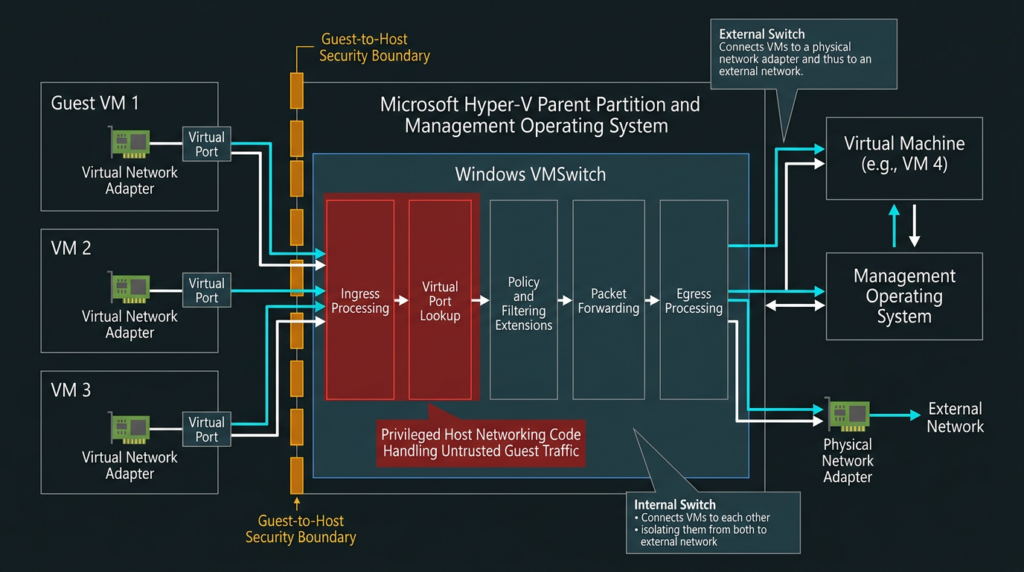
That placement matters. When a guest sends traffic, the host’s virtual switching infrastructure must process metadata and state associated with virtual ports, network adapters, queues, policies, extensions, and packet buffers. A memory-safety flaw in that privileged processing path may allow activity originating in a less-trusted guest context to affect a more-trusted host context.
The public description for CVE-2026-57092 does not explicitly provide the sentence “a guest escapes to the host.” Nevertheless, guest-to-host risk is a technically reasonable interpretation of the affected component, the network attack vector, the changed-scope score, and the role of VMSwitch in the parent partition. It should be presented as a risk model, not as a disclosed exploit transcript.
External, Internal, and Private Switches
Hyper-V exposes three principal switch types:
| Switch type | Typical connectivity | Common use |
|---|---|---|
| External | Connects virtual machines to a physical network and can connect the management OS | Production workloads, server networks, internet-connected services |
| Internal | Connects virtual machines to each other and to the management OS, without direct external physical-network attachment | Host-to-guest labs, local services, controlled test networks |
| Private | Connects virtual machines to each other without connecting them to the management OS or an external physical adapter | Isolated guest-only networks |
Microsoft’s architecture documentation describes these connection models, but the CVE record does not state that one switch type is affected while another is exempt. (माइक्रोसॉफ्ट लर्न)
A private switch can reduce exposure to external networks. It does not prove that the vulnerable code path is unreachable. The defect may involve port creation, deletion, forwarding state, packet metadata, extension interaction, or another operation common to multiple switch types. Without an explicit vendor statement, switch type should be treated as an exposure modifier, not as a substitute for patching.
The same caution applies to internal switches. An internal switch is not internet-facing by default, but it directly connects virtual machines with the management operating system. If the vulnerability can be reached from a guest virtual adapter, that relationship may be more relevant than whether the switch has a physical uplink.
Why Network Isolation Alone Is Insufficient
Network segmentation is still valuable. It can limit lateral movement before exploitation, constrain command-and-control traffic, and reduce the number of guests that share a virtual network. It cannot correct an invalid object lifecycle inside VMSwitch.
The distinction is straightforward:
- Segmentation controls which endpoints can communicate.
- Patching corrects the vulnerable implementation that processes permitted communication.
- Monitoring may reveal symptoms or follow-on activity.
- None of those controls should be treated as interchangeable.
A virtual machine may be fully isolated from the public internet and still generate traffic through its attached virtual network adapter. If the vulnerable path is inside host processing of that traffic, isolation from the internet does not eliminate the guest-to-host boundary.
Reading the CVSS 9.9 Vector Correctly
CVE-2026-57092 received the vector:
CVSS:3.1/AV:N/AC:L/PR:L/UI:N/S:C/C:H/I:H/A:H
Every element carries more information than the final number.
| मेट्रिक | मूल्य | Practical interpretation |
|---|---|---|
| Attack Vector | Network | The vulnerable component can be reached through a network path rather than requiring direct physical or purely local access |
| Attack Complexity | कम | Microsoft’s scoring does not require a special external condition beyond attacker-controlled inputs and the vulnerable state |
| Privileges Required | कम | The attacker begins with some limited authorization rather than no privileges |
| User Interaction | None | Exploitation does not depend on another user clicking, opening, or approving something |
| दायरा | Changed | Successful exploitation can affect a security authority beyond the attacker’s starting authority |
| Confidentiality | उच्च | Successful exploitation may expose highly sensitive data |
| Integrity | उच्च | Successful exploitation may permit severe modification of protected data or execution state |
| Availability | उच्च | Successful exploitation may seriously disrupt the affected host or workloads |
The most frequently misunderstood field is एवी:एन. In CVSS, “network” does not mean “directly reachable by anyone on the public internet.” A network attack path can exist inside a local network, a virtual network, an overlay, a container bridge, a guest-to-host channel, or another logically connected environment.
For VMSwitch, the attacker-controlled endpoint may be a virtual network adapter inside a guest. The guest can send data into a host-managed switching path even when the host has no public VMSwitch management service listening on an internet socket.
PR:L is equally important. The attacker is not described as completely unauthenticated. The starting privilege may exist in the context that supplies data to the vulnerable component. In a hosting environment, a customer may legitimately control a virtual machine while remaining completely unauthorized to access the Hyper-V host. In an enterprise, an attacker may first compromise an ordinary application or guest account and then attempt to cross into the host.
S:C, or scope changed, signals that the impact can extend beyond the original security authority. This is one reason the vulnerability deserves to be analyzed as a boundary issue rather than as a routine privilege escalation within a single Windows login session.
एसी:एल does not mean exploit development is easy. It describes the conditions required once the attacker has a working method. Reverse engineering a kernel use-after-free, obtaining a reliable memory-reuse primitive, surviving modern mitigations, and making an exploit stable across builds may remain difficult. CVSS measures exploit conditions, not the research effort needed to discover and engineer the exploit.
How a Use-After-Free Becomes Dangerous
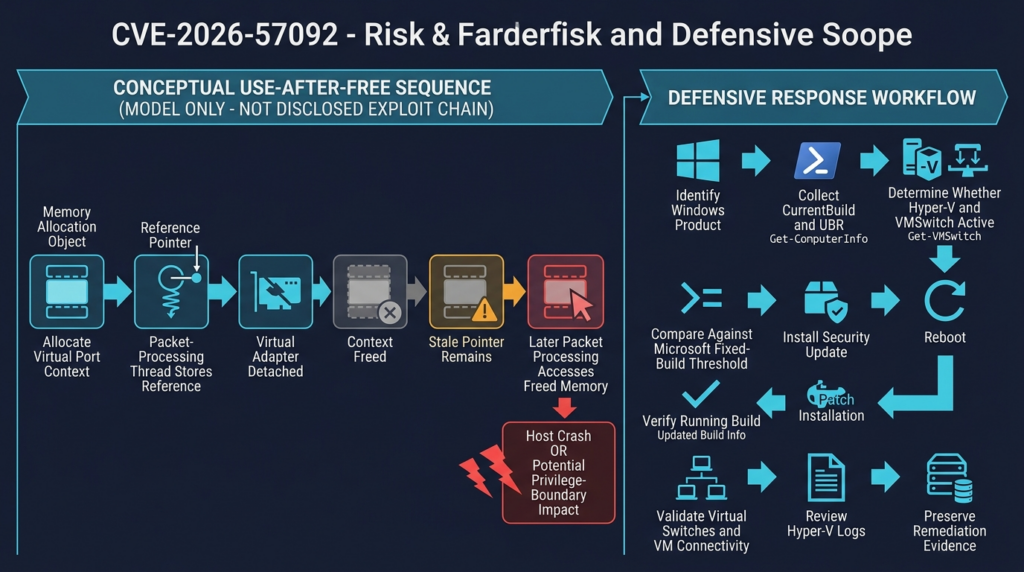
CWE-416 describes a condition in which software continues to use memory after the object occupying that memory has been freed. Once an allocator releases a block, the program must assume that the block no longer belongs to the original object. The allocator may return it for another allocation, overwrite bookkeeping data, fill it with debugging patterns, or leave stale contents in place temporarily. Any subsequent access through an old pointer is invalid. (सामूहिक रूप से)
A basic lifecycle looks like this:
1. Allocate object A
2. Store one or more references to A
3. Remove A from its owner
4. Free A
5. A stale reference remains
6. Another operation dereferences that stale reference
7. The memory now contains old data, allocator metadata, or object B
The outcome depends on what the stale code does.
A read from freed memory may disclose stale or reallocated data. A write may corrupt another object. A virtual call or function pointer access may redirect execution if an attacker can influence the replacement contents. A reference-count failure may produce repeated use after an object is logically dead. A race between a deletion path and a packet-processing path may make exploitation intermittent but still serious.
A Conceptual VMSwitch Lifecycle Failure
The following model is illustrative only. It is not a reconstruction of Microsoft’s implementation or a claim about the actual object affected by CVE-2026-57092.
Thread A                              Thread B
--------                              --------
Look up virtual port P
Acquire stale or incomplete reference
                                      Detach VM network adapter
                                      Remove port P from switch
                                      Free port context P
Continue packet processing
Read P->policy
Write P->statistics
Call P->extension_handler
A correct design must ensure that Thread B cannot free the object while Thread A is still using it. Common protections include locks, reference counts, read-copy-update patterns, deferred destruction, rundown protection, ownership transfer, and strict state transitions.
The defect may arise when:
- A reference count is not incremented before asynchronous work begins.
- A destructor frees an object before all callbacks complete.
- A lock protects a container but not the lifetime of an object removed from that container.
- A cancellation path and completion path both assume ownership.
- A virtual port is detached while queued packet work still references it.
- An extension retains metadata beyond the documented lifetime.
- Error handling frees an object that remains reachable through another list or queue.
Again, these are common UAF patterns, not disclosed facts about this CVE.
From Crash to Security Impact
Not every use-after-free is exploitable beyond denial of service. Some reliably terminate the process or crash the operating system before an attacker gains useful control. Others can be converted into powerful primitives.
An attacker generally looks for one or more of the following:
- Controlled replacement allocation
The freed memory is reallocated with data the attacker can influence. - Predictable object size
The vulnerable object belongs to a pool class that can be filled with another useful object. - Repeatable trigger
The attacker can create, free, and reuse related state often enough to shape memory. - Useful stale operation
The stale access reads or writes a sensitive field, follows a pointer, updates a reference count, or invokes a callback. - Mitigation bypass
The attacker can work around address randomization, control-flow protections, pool hardening, and other kernel defenses.
Microsoft’s high confidentiality, integrity, and availability scores indicate that the assessed worst-case impact is severe. The public advisory does not reveal which exploitation primitive supports that assessment.
A Realistic Guest-to-Host Threat Model
For many organizations, “low privileges required” sounds less urgent than “unauthenticated.” In virtualized infrastructure, that interpretation can be dangerous because controlling a guest may be an expected customer capability rather than a privileged host capability.
Consider a multi-tenant provider. A customer is authorized to administer its own virtual machine. The customer is not authorized to read another tenant’s memory, modify the host, access storage fabric credentials, control cluster nodes, or interfere with neighboring workloads. Guest administration is therefore low trust from the host’s perspective.
A vulnerability that starts in the guest’s network context and crosses into the management operating system can undermine the isolation on which the service depends.
Scenario One: Malicious Tenant
A hosting customer provisions a legitimate Windows or Linux guest, obtains normal administrative control inside that guest, and supplies crafted network activity through its virtual adapter.
The initial guest access is authorized. The attempt to compromise the host is not.
The potential impact extends beyond the individual VM:
- Access to host memory or credentials
- Modification of virtualization configuration
- Interference with neighboring tenants
- Access to virtual disks, snapshots, or backup channels
- Host crash and multi-tenant outage
- Movement toward cluster management services
The public record does not establish that all these outcomes are achievable with CVE-2026-57092. They represent the assets exposed when a virtualization host boundary fails.
Scenario Two: Compromised Enterprise Workload
An internet-facing application running in a Hyper-V guest is compromised through an unrelated web, identity, or application vulnerability. The attacker then gains low-privileged or administrative execution inside the guest.
The attacker’s next objective is to escape the workload boundary. Instead of attacking the host management interface, the attacker targets the network-processing path already available through the guest’s virtual adapter.
This chained model matters because many organizations correctly isolate Hyper-V management interfaces while allowing workloads to send substantial network traffic. A host-side packet-processing flaw can provide a different route across the boundary.
Scenario Three: Developer Workstation
A developer imports a third-party virtual appliance, malware-analysis image, demonstration environment, or customer-provided VM into Hyper-V on a Windows workstation. The guest is intentionally untrusted, but the developer assumes Hyper-V provides a strong isolation boundary.
If the host is vulnerable, ordinary guest network activity may expose privileged host code. The workstation may also contain source code, cloud tokens, SSH keys, browser sessions, package-publishing credentials, and access to internal development systems.
For this reason, Windows client systems in the affected product list should not be dismissed merely because they are not production servers.
Scenario Four: CI and Build Infrastructure
Some build systems use disposable virtual machines for untrusted or semi-trusted jobs. Ephemeral execution reduces persistence inside the guest but does not eliminate host risk.
A malicious dependency, build script, repository contribution, or test artifact may gain execution in a worker VM. If the worker shares a vulnerable Hyper-V host with other jobs or with a management plane, the virtual network boundary becomes part of the build system’s threat model.
Scenario Five: Internal Lab or Training Environment
Security labs often run intentionally vulnerable systems. Students, testers, and researchers may have full control of guests but should not control the instructor’s host.
A private switch can prevent those guests from reaching the external network. It cannot be assumed to make host packet processing safe. Labs should therefore receive the same host patch, even when their guest networks are isolated.
Attack Preconditions and Boundaries
The current public data supports a cautious precondition model.
| Condition | Likely relevance | Confidence |
|---|---|---|
| Attacker can submit traffic to an affected VMSwitch path | Central to the network attack vector | उच्च |
| Attacker has some authorized or low-privileged starting context | Required by PR:L | उच्च |
| Attacker controls a Hyper-V guest | Plausible and operationally important | Moderate, based on component architecture rather than a disclosed exploit chain |
| Attacker can reach an internet-facing host service | Not established | कम |
| Victim user must interact | Not required by UI:N | उच्च |
| A specific switch type is required | Not disclosed | Unknown |
| A specific guest operating system is required | Not disclosed | Unknown |
| A specific synthetic or emulated adapter is required | Not disclosed | Unknown |
| Third-party VMSwitch extensions are required | Not disclosed | Unknown |
| Reliable exploitation requires a race | Common for some UAFs but not disclosed here | Unknown |
| Successful exploitation can cross a security boundary | Supported by S:C | उच्च |
The table illustrates why administrators should patch without attempting to reverse-engineer exposure from assumptions. The vulnerable component and fixed builds are known. The exact reachability conditions are not.
Affected Windows Products and Fixed Build Thresholds
The NVD change record contains the Microsoft CNA product ranges associated with CVE-2026-57092. A product is listed as affected below the stated build threshold. Administrators should verify the latest Microsoft Security Response Center affected-software table before making production decisions because vendor records can be revised after initial publication. (एनवीडी)
| उत्पाद | Affected when the version is earlier than |
|---|---|
| Windows 10 Version 1607 | 10.0.14393.9339 |
| Windows 10 Version 1809 | 10.0.17763.9020 |
| Windows 10 Version 21H2 | 10.0.19044.7548 |
| Windows 10 Version 22H2 | 10.0.19045.7548 |
| Windows 11 Version 24H2 | 10.0.26100.8875 |
| Windows 11 Version 25H2 | Verify directly against the current Microsoft table |
| Windows 11 Version 26H1 | 10.0.28000.2525 |
| Windows Server 2012 | 6.2.9200.26226 |
| Windows Server 2012 Server Core | 6.2.9200.26226 |
| Windows Server 2012 R2 | 6.3.9600.23291 |
| Windows Server 2012 R2 Server Core | 6.3.9600.23291 |
| Windows Server 2016 | 10.0.14393.9339 |
| Windows Server 2016 Server Core | 10.0.14393.9339 |
| Windows Server 2019 | 10.0.17763.9020 |
| Windows Server 2019 Server Core | 10.0.17763.9020 |
| Windows Server 2022 | 10.0.20348.5386 |
| Windows Server 2025 | 10.0.26100.33158 |
| Windows Server 2025 Server Core | 10.0.26100.33158 |
The structured NVD change record appears to contain an inconsistency for Windows 11 Version 25H2: the listed starting version and the lessThan value do not form an internally coherent range. That is not a reason to invent a corrected threshold. Organizations running Windows 11 25H2 should consult the live Microsoft advisory and the update history for that release, then record the exact source used for their remediation decision. (एनवीडी)
Affected Product Does Not Always Mean Equal Exposure
A Windows version may appear in the affected-product list even when a particular machine is not actively serving as a Hyper-V host. Operational exposure depends on whether the relevant feature and path are present and used.
Useful questions include:
- Is the Hyper-V role or client feature installed?
- Does the system contain one or more VMSwitch instances?
- Are untrusted or lower-trust virtual machines running?
- Can those VMs generate traffic through the switch?
- Are third-party switching extensions installed?
- Does the management OS share an external switch?
- Is the host part of a cluster with many tenants?
- Does the host hold credentials or storage access that make compromise especially damaging?
A machine with Hyper-V disabled may present less immediate exploitability than a multi-tenant host. It should still receive the applicable cumulative security update. Roles can be enabled later, dormant components may still be present, and delaying platform updates creates unnecessary uncertainty.
Why Build Verification Matters More Than Update Intent
Patch status is not established by any one of the following:
- A change ticket says the update was scheduled.
- WSUS shows the update as approved.
- A package appears in update history.
- An administrator downloaded an installer.
- A management system says the deployment command succeeded.
- A node was patched but has not completed the required reboot.
The strongest practical evidence is the version of the operating-system code currently running, combined with installation and reboot records.
Microsoft documents several ways to inspect installed updates, including Get-HotFix, Get-ComputerInfo, systeminfo, and related Windows management commands. (माइक्रोसॉफ्ट लर्न)
Prioritizing Remediation
A 9.9 score establishes urgency but does not tell an organization which host should be patched first. Remediation order should combine vulnerability severity with guest trust, tenant density, host privilege, and operational blast radius.
| पर्यावरण | Suggested priority | Reason |
|---|---|---|
| Multi-tenant Hyper-V cluster accepting customer-controlled images | Emergency | Untrusted guests, shared host boundary, potentially broad tenant impact |
| Public cloud or hosting node with many virtual machines | Emergency | High workload density and severe cross-tenant consequences |
| Security lab running malware or intentionally hostile guests | Emergency | Guest behavior is explicitly untrusted |
| CI worker host running third-party code in VMs | Very high | Supply-chain content may gain guest execution |
| Developer workstation importing external VM appliances | Very high | Untrusted guest plus valuable developer credentials |
| Enterprise server hosting only tightly controlled internal VMs | उच्च | A guest compromise can still become a host compromise |
| VDI infrastructure | उच्च | Large number of user-controlled sessions and operational impact |
| Single-purpose Hyper-V host with no untrusted guest inputs | उच्च | Reduced likelihood does not eliminate boundary risk |
| Windows system with Hyper-V installed but no active switch or VM | Normal accelerated patch cycle | Lower immediate exposure, but affected code and future role changes remain concerns |
| Offline test host scheduled for rebuild | Risk-based | Isolate until patched or rebuilt; do not reconnect in a vulnerable state |
A host’s business role can increase urgency. Hyper-V nodes often have access to storage networks, backup systems, cluster credentials, live migration channels, virtual disk repositories, and administrative automation. Even when the vulnerable action begins in one VM, the host may be a high-value control point.
Safe Asset Inventory with PowerShell
Administrators do not need an exploit to identify vulnerable systems. Version and configuration inventory provide a safer and more reliable first assessment.
The following examples are intended for systems the reader is authorized to administer. They do not send traffic to third-party targets and do not attempt to trigger the vulnerability.
Capture the Full Windows Build
The CurrentBuild value alone is not enough because cumulative updates are commonly distinguished by the update build revision. The following code combines the build and UBR values.
$cv = Get-ItemProperty `
    'HKLM:\SOFTWARE\Microsoft\Windows NT\CurrentVersion'

[pscustomobject]@{
    ComputerName   = $env:COMPUTERNAME
    ProductName    = $cv.ProductName
    DisplayVersion = $cv.DisplayVersion
    EditionID      = $cv.EditionID
    CurrentBuild   = $cv.CurrentBuild
    UBR            = $cv.UBR
    FullBuild      = "$($cv.CurrentBuild).$($cv.UBR)"
}
Example output might look like:
ComputerName   : HVNODE01
ProductName    : Windows Server 2022 Datacenter
DisplayVersion : 21H2
EditionID      : ServerDatacenter
CurrentBuild   : 20348
UBR            : 5386
FullBuild      : 20348.5386
That example is illustrative. The actual value must be collected from the host.
Compare a Known Product to Its Threshold
Once the product is accurately identified, PowerShell’s version comparison can reduce manual mistakes.
$cv = Get-ItemProperty `
    'HKLM:\SOFTWARE\Microsoft\Windows NT\CurrentVersion'

$runningVersion = [version]"$($cv.CurrentBuild).$($cv.UBR)"

# Example only for Windows Server 2022
$minimumFixedVersion = [version]"20348.5386"

$result = [pscustomobject]@{
    ComputerName        = $env:COMPUTERNAME
    ProductName         = $cv.ProductName
    RunningVersion      = $runningVersion.ToString()
    MinimumFixedVersion = $minimumFixedVersion.ToString()
    MeetsThreshold      = $runningVersion -ge $minimumFixedVersion
}

$result
Do not copy 20348.5386 to Windows Server 2019, Windows 11, or another release. Each product line has its own build sequence.
A production script should map normalized product identifiers to thresholds, reject unknown products, flag the Windows 11 25H2 ambiguity for manual review, and preserve the source date of the threshold data.
Enumerate Hyper-V Hosts and Switches
Microsoft provides PowerShell cmdlets for retrieving Hyper-V hosts, switches, virtual machines, and virtual network adapters. (माइक्रोसॉफ्ट लर्न)
$hostInfo = Get-VMHost

$switches = Get-VMSwitch |
    Select-Object `
        Name,
        SwitchType,
        NetAdapterInterfaceDescription,
        AllowManagementOS,
        IovEnabled

$virtualMachines = Get-VM |
    Select-Object `
        Name,
        State,
        Generation,
        Version,
        ProcessorCount,
        MemoryAssigned

$virtualAdapters = Get-VMNetworkAdapter -All |
    Select-Object `
        VMName,
        Name,
        SwitchName,
        MacAddress,
        Status,
        IsLegacy

$hostInfo
$switches
$virtualMachines
$virtualAdapters
The exact properties available can vary with Windows and Hyper-V versions. Test scripts on a representative node before a fleet-wide run.
Create a Host Exposure Record
The following example produces an inventory record that can be exported without performing any exploit attempt.
$cv = Get-ItemProperty `
    'HKLM:\SOFTWARE\Microsoft\Windows NT\CurrentVersion'

$vmHost = Get-VMHost -ErrorAction SilentlyContinue
$switches = @(Get-VMSwitch -ErrorAction SilentlyContinue)
$vms = @(Get-VM -ErrorAction SilentlyContinue)
$adapters = @(Get-VMNetworkAdapter -All -ErrorAction SilentlyContinue)

$record = [pscustomobject]@{
    ComputerName       = $env:COMPUTERNAME
    ProductName        = $cv.ProductName
    DisplayVersion     = $cv.DisplayVersion
    FullBuild          = "$($cv.CurrentBuild).$($cv.UBR)"
    HyperVAvailable    = [bool]$vmHost
    SwitchCount        = $switches.Count
    ExternalSwitches   = ($switches |
        Where-Object SwitchType -eq 'External').Count
    InternalSwitches   = ($switches |
        Where-Object SwitchType -eq 'Internal').Count
    PrivateSwitches    = ($switches |
        Where-Object SwitchType -eq 'Private').Count
    VMCount            = $vms.Count
    RunningVMCount     = ($vms |
        Where-Object State -eq 'Running').Count
    VirtualNICCount    = $adapters.Count
    CollectionTimeUtc  = (Get-Date).ToUniversalTime()
}

$record | Format-List
Exporting results from authorized hosts makes prioritization easier:
$record |
    Export-Csv `
        -Path ".\CVE-2026-57092-$env:COMPUTERNAME.csv" `
        -NoTypeInformation `
        -Encoding UTF8
Review Installed Updates
Get-HotFix |
    Sort-Object InstalledOn -Descending |
    Select-Object -First 20 `
        HotFixID,
        Description,
        InstalledBy,
        InstalledOn
Microsoft notes that Get-HotFix retrieves quick-fix engineering information from Windows. It is useful evidence, but it should be combined with full build verification rather than treated as the only source of truth. (माइक्रोसॉफ्ट लर्न)
Inventory VLAN and Access-Control Configuration
A post-update regression review should confirm that virtual network isolation remains intact.
Get-VMNetworkAdapter -All |
    ForEach-Object {
        $adapter = $_

        $vlan = Get-VMNetworkAdapterVlan `
            -VMNetworkAdapter $adapter `
            -ErrorAction SilentlyContinue

        [pscustomobject]@{
            VMName     = $adapter.VMName
            Adapter    = $adapter.Name
            SwitchName = $adapter.SwitchName
            MacAddress = $adapter.MacAddress
            Status     = $adapter.Status
            VlanMode   = $vlan.OperationMode
            AccessVlan = $vlan.AccessVlanId
        }
    }
Administrators using extended ACLs or third-party switch extensions should preserve equivalent configuration baselines before patching. Microsoft provides Hyper-V cmdlets for virtual adapter VLAN and ACL inspection, but the exact commands needed depend on the deployed policy model. (माइक्रोसॉफ्ट लर्न)
A Defensible Validation Workflow
An effective response separates four questions:
- Is the operating system in an affected product family?
- Is the host running a build below the fixed threshold?
- Does the host operate Hyper-V and VMSwitch in a meaningful trust-boundary scenario?
- Has remediation changed the running build and preserved expected networking behavior?
The following workflow answers those questions without attempting to exploit the host.
Step One: Establish Product Identity
Record:
- Windows product name
- Edition
- Display version
- Full build and UBR
- Installation type
- Hyper-V role or feature state
- Cluster membership
- Reboot status
Do not infer the product only from a marketing name stored in an asset database. Query the running system.
Step Two: Map the Host’s Trust Relationships
Record:
- Number of virtual machines
- Which guests are customer-controlled
- Which guests process untrusted code or content
- Which switches each guest uses
- Whether the management OS shares an external switch
- Whether guests share switches across trust zones
- Whether third-party switch extensions are loaded
- Whether the host can access storage, backup, domain, or cluster-management systems
This mapping determines urgency and incident impact.
Step Three: Compare Against the Correct Threshold
The comparison must be product-specific. A Windows Server 2022 host and a Windows Server 2025 host can have similar feature roles while using entirely different build lines.
Unknown or conflicting data should produce a manual-review result, not an automatic “safe” result.
Step Four: Install the Applicable Microsoft Update
Use the organization’s normal trusted update channel, such as Windows Update, Windows Server Update Services, Microsoft Configuration Manager, or an approved manual package source. Microsoft documents supported update methods for Windows Server, including Server Core. (माइक्रोसॉफ्ट लर्न)
Step Five: Reboot When Required
A kernel or host-networking fix may not protect the running system until the updated binaries are loaded. An update history entry without the required restart is incomplete remediation.
Step Six: Recollect the Running Build
Run the same inventory after reboot. Preserve before-and-after results.
Step Seven: Validate Virtual Networking
Check:
- All expected VMSwitch instances exist
- External switches remain bound to the correct adapters
- Management OS access is unchanged
- VM adapters remain attached to the intended switches
- VLAN modes and IDs are correct
- ACLs and port policies remain in place
- Guests can reach only expected networks
- Live migration and cluster communication continue to work
- Monitoring and capture extensions are healthy
Step Eight: Review Host Telemetry
Inspect system, Hyper-V, networking, and clustering logs for errors introduced during the maintenance window.
Step Nine: Record Evidence
A useful remediation record includes:
Host identity
Product and edition
Pre-update full build
Applicable fixed-build threshold
Update source
Maintenance start and end
Reboot completion
Post-update full build
Switch inventory before and after
VM network validation result
Relevant warnings or errors
Operator and approval record
Organizations using automated security-validation platforms can turn this evidence into a repeatable control rather than a one-time spreadsheet. For example, पेनलिजेंट can be used in broader authorized validation workflows to organize asset evidence, remediation status, and retest results. For CVE-2026-57092, such automation should remain version- and configuration-driven unless Microsoft or another authoritative source publishes safe technical indicators. It should not invent malformed packets or attempt an unsupported VM-escape test against production hosts.
Patching a Hyper-V Cluster Safely
Patching a cluster introduces operational risk because a rushed reboot can interrupt workloads even when no security exploit occurs. The objective is to reduce security exposure without turning remediation into an outage.
Build a Pre-Maintenance Baseline
Before moving workloads, export:
- Host builds
- Cluster node status
- VM placement
- Switch names and types
- Physical adapter bindings
- Teaming or switch-embedded teaming configuration
- VLAN assignments
- Virtual adapter ACLs
- Live migration networks
- Storage networks
- Management OS virtual adapters
- Third-party extensions
- Current critical and warning events
A baseline makes it easier to distinguish a pre-existing network issue from a patch regression.
Confirm Capacity
A rolling update requires enough remaining capacity to run workloads while one node is drained. Check memory, CPU, storage, network throughput, affinity rules, anti-affinity rules, and licensing constraints.
A critical vulnerability does not make capacity limits disappear. If a cluster cannot tolerate one node being offline, the organization should document the tradeoff, arrange an outage, or add capacity rather than quietly leaving all nodes vulnerable.
Drain One Node
Move or stop virtual machines according to the organization’s workload policy. Confirm that cluster roles have left the node before installation.
Apply the Security Update and Reboot
Use the approved package source. Complete the reboot and wait for the node, management services, storage connections, and networking stack to stabilize.
Verify Before Returning Workloads
At minimum, confirm:
- Full running build meets the correct threshold
- Hyper-V services are available
- VMSwitch instances are present
- Physical uplinks are correct
- Management connectivity is stable
- Cluster communication is healthy
- Storage paths are healthy
- Test VM network connectivity is correct
- No new critical Hyper-V or network errors appear
Continue Node by Node
Do not patch the entire cluster simultaneously unless the maintenance design explicitly calls for a full outage. A staged rollout limits the blast radius of configuration drift or an unexpected compatibility issue.
Single-Host Environments
A standalone host cannot migrate workloads to another node. The safest response may require a scheduled outage.
Temporary measures can reduce, but not remove, risk:
- Stop untrusted guests.
- Prevent users from importing new images.
- Restrict access to VM administration.
- Isolate suspicious VMs.
- Remove unnecessary guest network connectivity.
- Preserve backups and recovery media.
- Schedule the earliest practical reboot.
None of these measures repairs the UAF.
Detection and Threat Hunting
The public CVE description is not sufficient to write a reliable exploit signature. A detection rule that claims to identify CVE-2026-57092 from a particular Ethernet frame, packet length, extension header, or protocol value would require technical evidence that is not present in the public record.
Detection should therefore focus on three layers:
- Exposure detection
- Symptom detection
- Post-exploitation detection
Exposure Detection
Exposure detection has the highest confidence.
A host is a remediation candidate when:
- Its Windows product appears in the affected list.
- Its full build is earlier than the applicable fixed threshold.
- It runs Hyper-V or has active VMSwitch instances.
- It hosts lower-trust virtual machines.
This does not prove exploitation, but it accurately identifies risk.
Symptom Detection
A kernel UAF may cause instability, but generic instability is not a CVE-specific indicator.
Potential investigation triggers include:
- Host bugchecks
- Unexpected restarts
- Hyper-V networking service failures
- Virtual switch errors
- Sudden loss of connectivity across multiple guests
- Virtual adapter detach or attach failures
- Repeated network-stack warnings
- Third-party switch extension crashes
- Cluster failover without an expected maintenance event
Each can have benign causes such as driver defects, hardware failure, misconfiguration, storage disruption, or maintenance.
Enumerate Relevant Event Logs
Administrators can identify available Hyper-V logs before assuming a particular log exists.
Get-WinEvent -ListLog 'Microsoft-Windows-Hyper-V-*' `
    -ErrorAction SilentlyContinue |
    Select-Object `
        LogName,
        IsEnabled,
        RecordCount,
        LastWriteTime
A broad system-log review can then identify a timeline for manual analysis.
$since = (Get-Date).AddDays(-14)

Get-WinEvent -FilterHashtable @{
    LogName   = 'System'
    StartTime = $since
    Level     = 1, 2, 3
} -ErrorAction SilentlyContinue |
    Where-Object {
        $_.ProviderName -match `
            'Hyper-V|VMSwitch|NDIS|BugCheck|Kernel-Power|FailoverClustering'
    } |
    Select-Object `
        TimeCreated,
        Id,
        LevelDisplayName,
        ProviderName,
        Message |
    Sort-Object TimeCreated
The provider names and event IDs available on a particular system can differ by release and configuration. Defenders should establish normal baselines and avoid treating a loose keyword match as proof of exploitation.
Review Recent Critical Events
$since = (Get-Date).AddHours(-24)

Get-WinEvent -FilterHashtable @{
    LogName   = 'System'
    StartTime = $since
    Level     = 1, 2
} -ErrorAction SilentlyContinue |
    Select-Object `
        TimeCreated,
        ProviderName,
        Id,
        Message |
    Format-List
A useful investigation asks whether the host event was preceded by unusual activity in a particular guest:
- New process execution
- Privilege escalation inside the guest
- Unexpected driver or kernel activity
- High-rate creation and deletion of network interfaces
- Unusual traffic bursts
- Repeated adapter resets
- Attempts to disable guest security tools
- New outbound command-and-control sessions
- Sudden packet-generation behavior inconsistent with the workload
These signals are contextual. None is a documented CVE-2026-57092 indicator.
Post-Exploitation Detection
If an attacker crosses into the host, defenders may observe activity unrelated to the original memory-corruption trigger:
- New host processes or services
- Suspicious PowerShell or command execution
- Access to VM configuration files
- Virtual disk or snapshot operations
- Credential dumping
- Security-tool tampering
- Changes to VMSwitch or adapter configuration
- New local administrators
- Remote-management changes
- Access to cluster, backup, or storage systems
- Movement from the host to management infrastructure
Those behaviors should be investigated under the organization’s normal host-compromise procedures.
Detection Confidence Table
| Signal | Relevance | Common false positives | Recommended action | Proof of exploitation by itself |
|---|---|---|---|---|
| Build below fixed threshold | Confirms exposure | Asset data may be stale | Recollect locally and patch | नहीं |
| Active VMSwitch with untrusted guests | Increases likelihood and impact | Trust classification may be incomplete | Prioritize host and map guest ownership | नहीं |
| Host bugcheck during guest traffic | Potentially consistent with memory corruption | Driver bugs, hardware faults, unrelated kernel defects | Preserve dump and correlate timelines | नहीं |
| Multiple guest network outages at once | May point to host switching failure | Uplink failure, switch misconfiguration, maintenance | Review host and physical network telemetry | नहीं |
| Repeated virtual adapter detach failures | May involve switch state | Automation errors, VM lifecycle operations | Examine Hyper-V logs and recent changes | नहीं |
| New privileged host process after guest anomaly | Strong post-compromise concern | Legitimate administration | Isolate and investigate immediately | No, but potentially serious evidence |
| Known vulnerable host plus suspicious dump analysis | Higher-confidence incident lead | Root cause may still be another flaw | Escalate to memory forensics and vendor support | Not without technical confirmation |
| A generic IDS “malformed packet” alert | Weak without a disclosed signature | Network noise, unrelated attacks | Correlate but do not label as this CVE | नहीं |
Incident Response After a Suspicious Host Crash
A Hyper-V host crash can destroy volatile evidence and interrupt many workloads. The recovery pressure is high, but immediately rebuilding or wiping the node may erase the data needed to understand whether the event was malicious.
Preserve the Host State
Collect, where available:
- Full and mini kernel dumps
- System event logs
- Hyper-V event logs
- Failover clustering logs
- Network adapter and switch configuration
- Installed driver and extension inventory
- Full running build
- Installed-update history
- Boot and reboot timeline
- EDR telemetry
- Authentication events
- PowerShell logs
- Remote-management logs
- VM configuration-change history
Preserve Guest Timelines
Identify which guests were active immediately before the failure. For each relevant VM, preserve:
- Process telemetry
- Authentication events
- Network connections
- Security alerts
- Package or application changes
- Kernel or driver events
- User activity
- Snapshot and checkpoint metadata
- VM start, stop, attach, and detach events
A guest may be both the source of malicious input and a victim of the host outage. Avoid assuming guilt based only on traffic volume.
Isolate Before Reintroducing the Node
If exploitation is reasonably suspected:
- Remove the host from normal workload rotation.
- Restrict management access.
- Avoid returning sensitive tenants to the node.
- Preserve copies of relevant disks and dumps.
- Patch or rebuild from a trusted baseline.
- Rotate credentials that the host could access.
- Review storage, backup, cluster, and domain activity.
- Hunt for persistence and lateral movement.
- Engage Microsoft or qualified incident-response support when evidence warrants it.
Do Not Overclaim Root Cause
Without a public crash signature or confirmed exploit artifact, a dump may show a VMSwitch-related failure without proving CVE-2026-57092. Root-cause analysis should consider:
- Other Windows networking defects
- Third-party NDIS filters
- VMSwitch extensions
- Physical network drivers
- Firmware
- Hardware faults
- Resource exhaustion
- Misconfiguration
- Another unpatched vulnerability
Precise attribution requires technical evidence, not only temporal proximity.
Safe Educational PoC for Understanding Use-After-Free
The following program demonstrates a generic use-after-free in a normal user-mode process. It does not call Hyper-V, interact with VMSwitch, create a malicious packet, load a driver, access kernel memory, scan a network, or attempt to escape a virtual machine.
Its only purpose is to show how a stale reference can survive after an object is freed.
Run it only in a disposable local development environment with AddressSanitizer enabled. It intentionally performs invalid memory access and should terminate with a sanitizer error.
Vulnerable Toy Program
/*
 * toy_vmswitch_uaf.c
 *
 * Safe educational demonstration of a generic use-after-free.
 *
 * This program:
 *   - runs entirely in user mode
 *   - does not use Hyper-V or VMSwitch APIs
 *   - does not send network traffic
 *   - does not access kernel memory
 *   - cannot test CVE-2026-57092
 *
 * Compile with AddressSanitizer:
 *   clang -g -O1 -fsanitize=address \
 *       -fno-omit-frame-pointer \
 *       toy_vmswitch_uaf.c \
 *       -o toy_vmswitch_uaf
 *
 * Run:
 *   ./toy_vmswitch_uaf
 */

#include <stdio.h>
#include <stdlib.h>
#include <string.h>

typedef struct PacketContext {
    unsigned int port_id;
    unsigned long packets_seen;
    char policy_name[32];
} PacketContext;

static PacketContext *create_context(
    unsigned int port_id,
    const char *policy_name
) {
    PacketContext *ctx = calloc(1, sizeof(*ctx));

    if (ctx == NULL) {
        fprintf(stderr, "Allocation failed\n");
        exit(EXIT_FAILURE);
    }

    ctx->port_id = port_id;
    ctx->packets_seen = 0;

    snprintf(
        ctx->policy_name,
        sizeof(ctx->policy_name),
        "%s",
        policy_name
    );

    return ctx;
}

static void destroy_context(PacketContext *ctx) {
    if (ctx == NULL) {
        return;
    }

    /*
     * The allocation is returned to the allocator.
     * Every pointer that referred to this object is now stale.
     */
    free(ctx);
}

static void process_packet(PacketContext *ctx) {
    /*
     * A real program must prove that ctx is still alive.
     * Checking only whether the pointer is non-NULL is not enough.
     */
    if (ctx == NULL) {
        fprintf(stderr, "No context available\n");
        return;
    }

    ctx->packets_seen++;

    printf(
        "Port %u used policy %s for packet %lu\n",
        ctx->port_id,
        ctx->policy_name,
        ctx->packets_seen
    );
}

int main(void) {
    PacketContext *owner =
        create_context(42, "isolated-lab-policy");

    /*
     * Simulate another path caching a reference.
     */
    PacketContext *queued_work = owner;

    printf("Context created at %p\n", (void *)owner);

    /*
     * Simulate a port-removal path destroying the object.
     */
    destroy_context(owner);
    owner = NULL;

    /*
     * queued_work still contains the old address.
     * It is non-NULL, but the object no longer exists.
     *
     * AddressSanitizer should report a heap-use-after-free here.
     */
    process_packet(queued_work);

    return 0;
}
On a supported Clang environment, compile it with:
clang -g -O1 \
  -fsanitize=address \
  -fno-omit-frame-pointer \
  toy_vmswitch_uaf.c \
  -o toy_vmswitch_uaf
Run the local program:
./toy_vmswitch_uaf
AddressSanitizer should produce a report containing wording similar to:
ERROR: AddressSanitizer: heap-use-after-free
Exact addresses and stack traces will differ.
What the Demonstration Teaches
The मालिक variable represents the code path responsible for the object. The queued_work variable represents another operation that cached a reference.
Setting मालिक को NULL के बाद free helps prevent the owner from reusing its own stale pointer. It does nothing to clear queued_work. The second reference remains non-NULL even though the allocation has been destroyed.
That is why this pattern is unsafe:
if (pointer != NULL) {
    use(pointer);
}
A non-NULL check proves only that the numeric pointer value is not zero. It does not prove that the referenced object remains allocated, belongs to the expected type, or is protected from concurrent destruction.
A Safer Reference-Counted Model
A simplified repair can hold a reference while queued work is active.
/*
 * toy_refcount.c
 *
 * Simplified educational reference-count example.
 * This is not production-quality kernel synchronization.
 */

#include <stdatomic.h>
#include <stdio.h>
#include <stdlib.h>
#include <string.h>

typedef struct PacketContext {
    atomic_uint references;
    atomic_bool shutting_down;
    unsigned int port_id;
    char policy_name[32];
} PacketContext;

static PacketContext *context_create(
    unsigned int port_id,
    const char *policy_name
) {
    PacketContext *ctx = calloc(1, sizeof(*ctx));

    if (ctx == NULL) {
        return NULL;
    }

    atomic_init(&ctx->references, 1);
    atomic_init(&ctx->shutting_down, 0);

    ctx->port_id = port_id;

    snprintf(
        ctx->policy_name,
        sizeof(ctx->policy_name),
        "%s",
        policy_name
    );

    return ctx;
}

static int context_try_acquire(PacketContext *ctx) {
    if (ctx == NULL) {
        return 0;
    }

    if (atomic_load(&ctx->shutting_down)) {
        return 0;
    }

    atomic_fetch_add(&ctx->references, 1);

    /*
     * Recheck after incrementing. A production design needs
     * carefully specified ordering and synchronization.
     */
    if (atomic_load(&ctx->shutting_down)) {
        atomic_fetch_sub(&ctx->references, 1);
        return 0;
    }

    return 1;
}

static void context_release(PacketContext *ctx) {
    if (ctx == NULL) {
        return;
    }

    if (atomic_fetch_sub(&ctx->references, 1) == 1) {
        free(ctx);
    }
}

static void context_begin_shutdown(PacketContext *ctx) {
    if (ctx == NULL) {
        return;
    }

    atomic_store(&ctx->shutting_down, 1);

    /*
     * Release the owner's original reference.
     * Destruction waits for other holders.
     */
    context_release(ctx);
}

static void process_packet(PacketContext *ctx) {
    if (!context_try_acquire(ctx)) {
        puts("Context is shutting down");
        return;
    }

    printf(
        "Safely using port %u with policy %s\n",
        ctx->port_id,
        ctx->policy_name
    );

    context_release(ctx);
}

int main(void) {
    PacketContext *ctx =
        context_create(42, "isolated-lab-policy");

    if (ctx == NULL) {
        fprintf(stderr, "Allocation failed\n");
        return EXIT_FAILURE;
    }

    process_packet(ctx);
    context_begin_shutdown(ctx);

    /*
     * Do not use ctx after shutdown in real code.
     */
    ctx = NULL;

    return EXIT_SUCCESS;
}
The example illustrates the intended principle: destruction must wait until all valid users have released their references.
It is not a drop-in design for a kernel packet path. Production code must address races between acquisition and shutdown, memory ordering, interrupt request levels, callback cancellation, asynchronous completion, and failure paths. Windows kernel components may use mechanisms different from C11 atomics, including locks, rundown protection, interlocked reference counting, deferred work, or framework-provided lifetime rules.
What This PoC Does Not Prove
The toy program does not establish:
- Which VMSwitch object is affected
- Whether the real flaw is reference-count related
- Whether a race is necessary
- Whether the real object can be predictably reallocated
- Whether the vulnerability produces code execution
- What guest packet or action reaches the flaw
- Which virtual adapter type is relevant
- Whether a particular switch extension is involved
- Whether a host is vulnerable beyond its build status
- Whether a security product detects exploitation
A safe demonstration should improve understanding without becoming an unsupported attack recipe. Until authoritative technical details are available, version verification is the appropriate validation method.
Why a Production Exploit Test Is the Wrong Validation Method
An exploit-based test would be unusually risky for this vulnerability class.
A failed attempt could:
- Crash the Hyper-V host
- Interrupt every VM on the node
- Corrupt host networking state
- Trigger cluster failover
- Damage unsaved guest workloads
- Produce inconsistent results across builds
- Leave the host in an unknown security state
- Resemble hostile tenant activity
- Violate cloud, hosting, or customer agreements
Even a successful proof of concept would prove only that one exploit works under one configuration. It would not establish that another build is safe, that all paths are patched, or that exploitation has left no persistence.
For production systems, the defensible test is:
Identify product
→ Collect complete running build
→ Compare against vendor threshold
→ Patch
→ Reboot
→ Recollect build
→ Validate VMSwitch and VM connectivity
→ Preserve evidence
This method is repeatable, auditable, and aligned with the information Microsoft has actually published.
Historical Hyper-V and VMSwitch Vulnerabilities
Previous Hyper-V vulnerabilities provide useful context, but they must not be treated as interchangeable exploit templates.
| सीवीई | Component or theme | Weakness and attack context | CVSS context | Relevance to CVE-2026-57092 |
|---|---|---|---|---|
| CVE-2026-57092 | Windows VMSwitch | Use after free; authorized attacker over a network; changed scope | 9.9 | Current issue |
| CVE-2024-43625 | Windows VMSwitch | Use after free leading to elevation of privilege | 8.1 | Same broad component and weakness class, but different attack metrics |
| CVE-2019-0720 | Hyper-V Network Switch | Authenticated guest user could run a crafted application affecting the host network-switch path | High severity | Clear historical example of guest-controlled activity reaching a host switch vulnerability |
| CVE-2017-0163 | Hyper-V Network Switch | Remote code execution involving an authenticated guest context | High severity | Earlier evidence that virtual switching has been a guest-to-host attack surface |
CVE-2024-43625
CVE-2024-43625 was another Windows VMSwitch elevation-of-privilege vulnerability classified as CWE-416. Its Microsoft CVSS vector was materially different: it used a local attack vector, high attack complexity, no required privileges, changed scope, and high impact. (एनवीडी)
The comparison is useful because it shows that “same component” and “same weakness class” do not imply identical reachability. CVE-2026-57092 is scored with network access, low complexity, and low required privileges. Administrators should not use exploit assumptions from the 2024 flaw to validate or dismiss the 2026 issue.
CVE-2019-0720
The public record for CVE-2019-0720 described a Hyper-V Network Switch remote-code-execution vulnerability in which an authenticated user on a guest system could run a specially crafted application, leading the host operating system to process guest network traffic incorrectly. (एनवीडी)
That history supports the broader threat model: a guest can legitimately submit network activity to a host-controlled virtual switch, and a flaw in that processing can cross the virtualization boundary.
It does not reveal the trigger for CVE-2026-57092. Different bugs can involve different packet metadata, adapter state, extensions, timing conditions, object lifetimes, and mitigations.
CVE-2017-0163
CVE-2017-0163 also involved the Hyper-V Network Switch and an authenticated guest context. Its existence reinforces the need to include virtual networking in hypervisor threat models rather than focusing only on hypercalls, device emulation, or virtual disk parsers. (एनवीडी)
Cross-Platform Context
Guest-to-host memory-safety failures are not unique to Hyper-V. KVM, device emulation, virtual I/O, and nested-virtualization paths have produced their own boundary vulnerabilities. A useful comparison is CVE-2026-53359 in Proxmox, What Januscape Means for KVM Hosts, which examines a different virtualization stack and emphasizes safe lab validation, patching, and reboot verification. The details are not transferable to VMSwitch, but the defensive lesson is similar: the host boundary must be validated through authoritative versions and controlled testing, not assumptions about guest isolation.
Hardening Beyond the Patch
Installing the fixed build is the primary remediation. Defense in depth reduces the likelihood that an attacker reaches the vulnerable path, limits damage after compromise, and improves detection.
Treat Hyper-V Hosts as a Separate Security Tier
A Hyper-V host should not be managed like an ordinary application server.
Recommended practices include:
- Restrict interactive logon.
- Use dedicated administrative accounts.
- Separate host administration from guest administration.
- Require phishing-resistant multifactor authentication where supported.
- Limit remote-management source networks.
- Protect PowerShell remoting and management endpoints.
- Avoid browsing, email, and general productivity work on hosts.
- Minimize installed software.
- Monitor changes to virtualization and networking configuration.
A tenant’s control over a VM must never imply access to host credentials.
Separate Management and Guest Data Networks
Physical or logical separation can reduce lateral movement and simplify investigation.
At minimum, distinguish:
- Host management
- Cluster communication
- Live migration
- Storage
- Backup
- Guest production traffic
- Guest development or test traffic
- Internet egress
Separation does not patch VMSwitch, but it can prevent a compromised host from immediately reaching every critical system.
Minimize Unnecessary VMSwitch Complexity
Every extension, filter, policy layer, and unusual topology increases the amount of privileged networking code involved.
Review:
- Unused virtual switches
- Orphaned virtual adapters
- Legacy adapters
- Obsolete capture extensions
- Third-party security filters
- Old NIC teaming configurations
- Duplicate management adapters
- Temporary lab switches that became permanent
- VMs attached to the wrong trust zone
Do not remove a component solely because of CVE-2026-57092 unless Microsoft or the component vendor identifies it as relevant. The objective is to reduce unnecessary attack surface and configuration ambiguity.
Control Guest Image Provenance
A VM image is executable infrastructure, not passive content.
For external images:
- Verify source and integrity.
- Scan before import.
- Use isolated staging hosts when possible.
- Remove unnecessary default credentials.
- Review virtual hardware configuration.
- Restrict initial network access.
- Record ownership and business purpose.
- Apply guest patches before production use.
- Delete abandoned images and snapshots.
This control is particularly important for developer workstations and security labs, where untrusted appliances are common.
Separate Tenant Trust Zones
Avoid attaching unrelated trust zones to the same switch simply for convenience. Segmentation cannot eliminate the underlying flaw, but it can constrain guest-to-guest attacks and clarify which tenant activity preceded a host event.
Useful divisions may include:
- Production
- Development
- Security testing
- Malware analysis
- Customer-controlled workloads
- Administrative infrastructure
- Backup and recovery
Protect Host-Reachable Secrets
Assume a host compromise could expose:
- VM configuration
- Virtual disks
- Checkpoints
- Backup credentials
- Storage credentials
- Domain credentials
- Cluster secrets
- Management certificates
- Automation tokens
- Monitoring credentials
Reduce stored credentials, use narrowly scoped identities, rotate secrets after suspected compromise, and separate backup administration from host administration.
Maintain Recovery Capacity
A critical host vulnerability is harder to remediate when the environment has no spare capacity.
Resilience planning should include:
- Enough cluster headroom to drain a node
- Tested VM migration
- Known-good host installation media
- Configuration exports
- Offline or protected backups
- Documented rebuild procedures
- Credential-rotation procedures
- Tested restoration of virtual networking policies
Recovery capability is a security control because it determines how quickly a vulnerable or suspicious node can be removed.
Operational Scenarios
Different environments should interpret the same CVE through different operational constraints.
Multi-Tenant Hosting
This is the highest-risk category because a guest administrator may be an untrusted customer by design.
Immediate actions should include:
- Identify every host below the fixed threshold.
- Stop scheduling new tenants to vulnerable nodes.
- Patch nodes through an accelerated rolling process.
- Review tenant activity around unexplained host crashes.
- Preserve evidence before rebuilding suspicious nodes.
- Communicate based on verified exposure, not speculative exploitation.
- Reassess whether tenant and management networks are sufficiently separated.
A provider should not wait for a public exploit before patching. Public exploit availability affects likelihood, not the value of the host boundary.
Enterprise Private Cloud
Guests may be owned by the same organization, but that does not make them equally trusted. Internet-facing workloads, developer VMs, acquired business units, and security labs can carry different risk.
Prioritize hosts running:
- Public applications
- Domain-connected but poorly managed legacy guests
- Third-party appliances
- Build workers
- Security research systems
- VDI sessions
- Highly privileged management workloads
Developer Endpoints
Windows 11 systems may run Hyper-V through developer tools, local Kubernetes environments, emulators, test appliances, and sandbox workflows.
Developers should:
- Install the applicable Windows update.
- Reboot promptly.
- Avoid running untrusted VMs while vulnerable.
- Review imported appliances.
- Separate sensitive credentials from risky test environments.
- Confirm that development networking still works after updating.
- Avoid copying a server build threshold to a client release.
Malware Analysis Labs
A malware-analysis guest should be assumed hostile.
Labs should:
- Patch the host before resuming analysis.
- Suspend new samples while hosts remain vulnerable.
- Use dedicated credentials and management networks.
- Prevent analysis hosts from accessing production secrets.
- Preserve host crashes as potential security incidents.
- Rebuild suspicious hosts from trusted media.
- Avoid using live production systems for exploit experimentation.
CI and Build Farms
Build workloads frequently execute code from package ecosystems, forks, pull requests, generated scripts, and third-party tools.
Operators should:
- Identify Hyper-V-backed workers.
- Patch the underlying hosts.
- Limit secrets exposed to each worker.
- Separate privileged release jobs from untrusted test jobs.
- Rotate tokens after suspected host compromise.
- Review whether ephemeral guests share long-lived hosts across trust levels.
Ephemeral VMs reduce persistence inside the guest. They do not make the host ephemeral.
Common Mistakes
Mistake One: Treating AV:N as Public-Internet Exposure
The attack vector describes how the vulnerable component is reached. It does not prove that a public service accepts the exploit input.
For VMSwitch, a virtual network path may satisfy the network requirement.
Mistake Two: Treating PR:L as Host Access
The low privilege may exist in the attacker’s starting context. A customer with access to its own guest still lacks host authorization.
Mistake Three: Assuming a Private Switch Is Safe
A private switch changes connectivity. It does not prove the vulnerable lifecycle code is absent.
Mistake Four: Looking Only for Hyper-V Server Systems
The affected list includes Windows client releases. Developer and security-research workstations can run high-value, untrusted guests.
Mistake Five: Checking Only a KB Installation Record
An installed package may not be active until reboot. Compare the full running build after maintenance.
Mistake Six: Using the Wrong Build Threshold
Build numbers are release-specific. Windows Server 2022 and Windows Server 2025 require different comparisons.
Mistake Seven: Inventing a Detection Signature
The public record does not disclose a packet format or crash fingerprint. Generic rules should not be labeled as CVE-specific.
Mistake Eight: Running a Destructive PoC in Production
A kernel UAF test may crash a host and every VM on it. Version-based validation is safer and more authoritative.
Mistake Nine: Assuming No Public Exploit Means Low Risk
Exploit disclosure is not required for a critical boundary flaw to deserve remediation. Private research and later weaponization remain possible.
Mistake Ten: Assuming Every VMSwitch Error Is Exploitation
Hyper-V networking can fail for many reasons. Attribution requires version, timeline, dump, guest, and host evidence.
Verification Limitations
Security teams should document what their assessment can and cannot establish.
Version Assessment Can Establish
- The Windows product and build
- Whether the build is below a published threshold
- Whether Hyper-V and VMSwitch are in use
- Which VMs and networks may be exposed
- Whether patching changed the running build
- Whether expected virtual networking survived remediation
Version Assessment Cannot Establish
- Whether exploitation previously occurred
- Whether an unpublished exploit exists
- Which packet reaches the flaw
- Whether one particular guest triggered a crash
- Whether a third-party extension changes reachability
- Whether a fully patched host is free from every unrelated Hyper-V flaw
Log Assessment Can Establish
- When errors, restarts, or configuration changes occurred
- Which guests were active
- Which administrative actions took place
- Whether suspicious follow-on behavior occurred
- Whether the event aligns with maintenance or unexpected activity
Log Assessment Usually Cannot Establish Alone
- The precise memory corruption primitive
- The CVE responsible for a generic bugcheck
- The source packet responsible for a host failure
- Whether a successful exploit left no visible persistence
Safe Lab Research Can Establish
When authoritative technical details become available, a properly isolated lab may help determine:
- Reachable configurations
- Crash behavior
- Relevant guest actions
- Telemetry generated by a known trigger
- Patch behavior under controlled conditions
Such research should use disposable hosts, isolated networks, no production credentials, and clear authorization. It should not begin by guessing malformed inputs against operational infrastructure.
अक्सर पूछे जाने वाले प्रश्न
What is CVE-2026-57092?
- It is a use-after-free vulnerability in Windows VMSwitch.
- Microsoft states that an authorized attacker can exploit it over a network to elevate privileges.
- It has a CVSS 3.1 base score of 9.9.
- Its weakness classification is CWE-416.
- The CVE was published on July 14, 2026. (एनवीडी)
Is CVE-2026-57092 a confirmed Hyper-V VM escape?
- The affected component is part of the privileged Hyper-V host networking path.
- The network attack vector and changed-scope score support serious guest-to-host concern.
- The public CVE record does not disclose a complete guest-to-host exploit chain.
- It is accurate to treat VM escape as a risk model, but not to claim that Microsoft has published every escape step.
Which Windows versions are affected?
- The NVD record lists multiple Windows 10, Windows 11, Windows Server 2012, Windows Server 2012 R2, Windows Server 2016, Windows Server 2019, Windows Server 2022, and Windows Server 2025 product lines.
- Server Core installations are included for several server releases.
- Each product has its own fixed-build threshold.
- The structured Windows 11 25H2 range appears inconsistent and should be checked against the current Microsoft advisory.
- Administrators should not rely on a threshold copied from another Windows release. (एनवीडी)
Does AV:N mean the vulnerability is exploitable from the public internet?
- नहीं।
एवी:एनmeans the vulnerable component can be reached through a network path.- In a virtualization environment, that path may be guest virtual-network traffic entering the host’s VMSwitch.
- Microsoft’s vector also specifies
PR:L, so the attacker requires some starting authorization. - Public-internet reachability has not been established by the disclosed CVE data.
How can administrators safely verify whether a host is patched?
- Identify the exact Windows product and release.
- Collect
CurrentBuildऔरUBR. - Combine them into the full running build.
- Compare that value with the product-specific fixed threshold.
- Install the applicable Microsoft security update.
- Complete the required reboot.
- Collect the full build again after reboot.
- Validate VMSwitch, VM adapter, VLAN, ACL, and network behavior.
Is there a public exploit or safe PoC?
- The public CVE record does not provide a weaponized exploit.
- A generic user-mode UAF demonstration can safely teach the memory-lifecycle concept.
- Such a demonstration does not test Hyper-V or prove host exposure.
- Administrators should not send guessed malformed packets to production hosts.
- Build verification is the appropriate safe validation method with the currently disclosed information.
What should multi-tenant Hyper-V operators do first?
- Stop placing new untrusted workloads on vulnerable nodes where operationally possible.
- Inventory every host’s full running build.
- Prioritize nodes that run customer-controlled guests.
- Drain, patch, reboot, and validate nodes through a rolling process.
- Preserve evidence from unexplained host crashes.
- Review access to storage, backup, cluster, and management systems.
- Do not wait for a public exploit before remediating a 9.9 boundary vulnerability.
What evidence should be preserved after a suspicious host crash?
- Kernel and mini crash dumps
- System and Hyper-V event logs
- VMSwitch and adapter configuration
- Full running build and update history
- EDR and process telemetry
- PowerShell and remote-administration logs
- Cluster and storage activity
- Guest process, authentication, and network timelines
- VM lifecycle, checkpoint, and configuration-change records
- Credentials and systems the host could access
Closing Assessment
CVE-2026-57092 should be treated as a critical virtualization-boundary issue, not as an ordinary Windows privilege escalation and not as a proven internet worm. The public evidence establishes a Windows VMSwitch use-after-free, a network attack path, low required privileges, no user interaction, changed scope, and severe potential impact. It does not establish the exact packet, object, race, or exploit chain.
The highest priority belongs to Hyper-V hosts running untrusted or customer-controlled guests. Administrators should identify the exact Windows release, compare the full running build against the correct threshold, install the applicable update, complete the reboot, and validate virtual networking after maintenance.
Until authoritative technical details become available, exploit-based testing adds risk without improving assurance. Accurate inventory, build-level verification, controlled patching, preserved evidence, and disciplined host isolation provide the strongest response to CVE-2026-57092.
 Hindi
Hindi  English
  German
  French
  Spanish
  Portuguese
  Japanese
  Korean
  Arabic
  Turkish
  Hebrew