
CVE-2026-70468 is a high-severity authentication weakness affecting specific releases of Fortinet FortiManager and FortiManager Cloud. The vulnerability is unusual because the attacker is not primarily impersonating a human administrator. Instead, under a particular configuration, an unauthenticated remote attacker with a valid certificate may be able to impersonate a FortiGate device that FortiManager believes it manages.
Fortinet describes the issue as an Authentication Bypass Using an Alternate Path or Channel, mapped to CWE-288, and has assigned it advisory FG-IR-26-160, “FGFM Authentication Weakening via CLI Configuration.” Fortinet states that exploitation requires a specific CLI option to be configured and the attacker to possess a valid certificate before crafted FGFM requests can be used to impersonate a managed FortiGate.
That qualification matters.
CVE-2026-70468 should not be described as a generic “send one packet and own every FortiManager” vulnerability. The affected authentication path depends on how FortiManager validates the certificate presented by a FortiGate over the FortiGate-to-FortiManager protocol, or FGFM.
The deeper security problem is therefore a failure of device identity binding.
FortiManager normally has to establish not merely that a connecting peer owns a valid certificate, but that the certificate belongs to the specific FortiGate identity that the peer claims to represent. A configuration option available in vulnerable versions can weaken that relationship. Once the identity-binding check is weakened, possession of a valid certificate can become significantly more dangerous.
For defenders operating Fortinet environments, this makes CVE-2026-70468 more than another authentication CVE. It is a useful example of how machine-to-machine authentication can fail even when certificates are technically present and cryptographically valid.
CVE-2026-70468 at a Glance
| क्षेत्र | विवरण |
|---|---|
| सीवीई | CVE-2026-70468 |
| Vendor | Fortinet |
| Products | FortiManager, FortiManager Cloud |
| Vulnerability type | Authentication bypass / improper access control |
| सामूहिक रूप से | CWE-288 |
| अवयव | FGFM authentication |
| Attack vector | Network |
| Existing FortiManager account required | नहीं |
| User interaction | नहीं |
| Important prerequisite | Specific CLI option enabled |
| Certificate requirement | Attacker must have a valid certificate |
| Potential result | Impersonation of a FortiGate managed by the FortiManager |
| Fortinet severity | उच्च |
| Fortinet advisory score | 7.3 |
| NVD-displayed CNA base score | 8.1 |
| Known exploited | Fortinet currently says No |
| Vendor advisory | FG-IR-26-160 |
Fortinet currently marks the vulnerability as Known Exploited: No. Its PSIRT advisory displays a CVSSv3 score of 7.3.
There is, however, an important scoring detail for researchers and vulnerability databases. The NVD entry currently shows Fortinet CNA base metrics of:
CVSS:3.1/AV:N/AC:H/PR:N/UI:N/S:U/C:H/I:H/A:H
and displays a base score of 8.1 High.
Therefore, readers may encounter both 7.3 और 8.1 associated with CVE-2026-70468. At the time of writing, Fortinet’s PSIRT page itself displays 7.3, while NVD presents the CNA base vector as 8.1. They should not be interpreted as two different vulnerabilities.
More important than the numeric difference is the structure of the vector: exploitation is network reachable, requires no pre-existing user privileges or user interaction, but is classified as high attack complexity.
That high-complexity classification makes sense in the context of Fortinet’s disclosed prerequisites: the vulnerable configuration must exist and the attacker needs an appropriate certificate before the FGFM identity weakness becomes relevant.
Which FortiManager Versions Are Affected?
The published CVE record identifies the following affected FortiManager releases.
| उत्पाद | प्रभावित संस्करण | Fixed version |
|---|---|---|
| FortiManager 7.6 | 7.6.1 | 7.6.2 or later |
| FortiManager 7.4 | 7.4.3 through 7.4.5 | 7.4.6 or later |
| FortiManager 7.2 | 7.2.5 through 7.2.9 | 7.2.10 or later |
| FortiManager Cloud 7.6 | 7.6.1 | 7.6.2 or later |
| FortiManager Cloud 7.4 | 7.4.3 through 7.4.5 | 7.4.6 or later |
| FortiManager Cloud 7.2 | 7.2.5 through 7.2.9 | 7.2.10 or later |
Not every historical FortiManager branch is listed as vulnerable. The CVE record uses a default status of unaffected and explicitly identifies the affected version ranges above.
This makes precise asset inventory important. Searching an environment merely for “FortiManager” will produce unnecessary noise. Defenders should determine the exact installed release and then evaluate the configuration prerequisite separately.
Understanding FGFM Before Understanding the Vulnerability
To understand CVE-2026-70468, it helps to stop thinking about browser authentication.
This is fundamentally a FortiGate-to-FortiManager trust problem.
Fortinet calls the management protocol used between FortiGate and FortiManager FGFM. Fortinet documentation identifies TCP port 541 as the default port used for FortiManager traffic, with TCP 542 also associated with IPv6 operation in documented deployments.
In a centrally managed environment, FortiManager needs a reliable way to determine which FortiGate is connecting.
A password alone would be an inadequate identity mechanism for this type of machine-to-machine relationship. Fortinet therefore incorporates certificate-based authentication into FGFM.
Fortinet’s FortiGate-to-FortiManager authentication documentation explains that a FortiGate presents a certificate as part of the initial connection process, which FortiManager uses to validate the device’s serial number.
The serial number matters because it connects two security assertions:
Certificate validity
और
Device identity
Those are not the same assertion.
A certificate may be valid in the cryptographic sense while still belonging to the wrong device for a particular claimed identity.
The safe authentication decision therefore looks conceptually like:
Certificate trusted?
        |
       Yes
        |
Does certificate identity match
the claimed FortiGate serial number?
        |
       Yes
        |
Accept peer as that FortiGate
CVE-2026-70468 becomes relevant when the second part of this relationship can be weakened.
The Configuration at the Center of CVE-2026-70468
The critical configuration is:
fgfm-peercert-withoutsn
Fortinet documentation for affected FortiManager releases states that when fgfm-peercert-withoutsn is disabled, which is the default behavior, a FortiGate certificate must contain the FortiGate serial number in its certificate identity information, including the subject CN or SAN.
In other words, the normal policy is not simply:
certificate is valid
It is closer to:
certificate is valid
AND
certificate identity corresponds to this FortiGate
Fortinet’s documentation explicitly states that enabling fgfm-peercert-withoutsn means FortiManager does not perform the serial-number verification in the certificate subject CN or SAN.
That change is the heart of the security problem.
A certificate remains part of the connection, but the strongest binding between the certificate and the claimed FortiGate identity has been relaxed.
Conceptually:
Secure behavior

Valid certificate
        +
Serial number in certificate
        +
Claimed FortiGate identity
        |
        v
All identities must agree


Weakened behavior

Valid certificate
        |
Serial-number binding disabled
        |
Claimed device identity becomes
less strongly bound to certificate
Fortinet’s CVE advisory then supplies the security consequence: when the affected configuration is present, a remote unauthenticated attacker with a valid certificate may use crafted FGFM requests to impersonate any FortiGate managed by the FortiManager.
How CVE-2026-70468 Works
Fortinet has not published a complete exploit implementation or packet-level reproduction sequence in its advisory, and defenders should be cautious about articles that invent one.
The disclosed attack model can nevertheless be understood accurately at the authentication-architecture level.
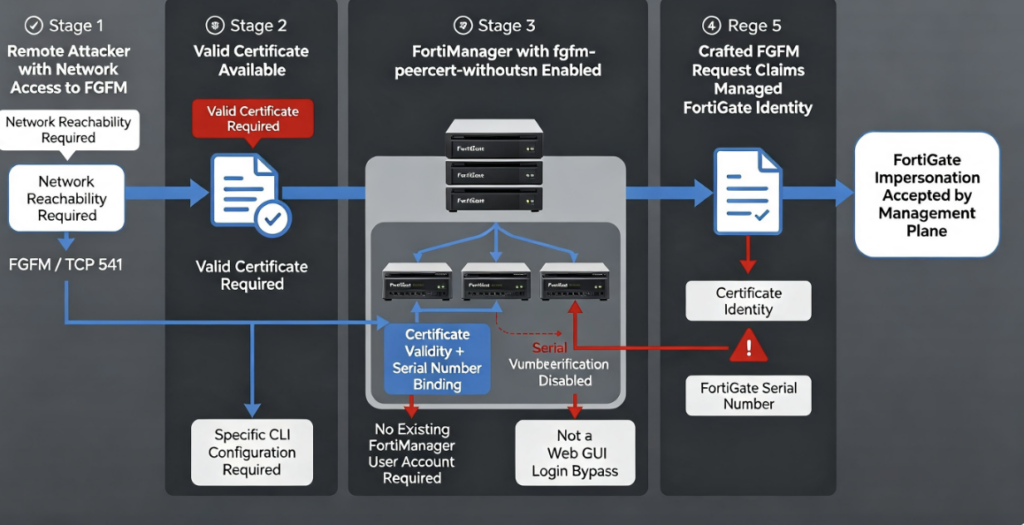
Stage 1: The Attacker Reaches the FGFM Service
The attacker first needs network access to the FortiManager’s relevant FGFM communication path.
FGFM normally uses TCP 541 for FortiGate-to-FortiManager management traffic.
This does not mean every FortiManager is automatically exploitable from the public Internet. Network reachability depends on how the organization has deployed and filtered its management infrastructure.
That distinction is operationally important.
A FortiManager accessible only across a tightly controlled management network has a materially different exposure profile from one whose FGFM service is reachable from broad or untrusted networks.
Stage 2: The Vulnerable Configuration Must Be Present
The attacker also needs the target FortiManager to have the relevant certificate-validation behavior weakened.
Fortinet specifically describes exploitation as dependent on a specific CLI option.
Fortinet’s documentation identifies the relevant option as fgfm-peercert-withoutsn, whose normal disabled state enforces serial-number validation against the certificate.
This is one of the most important facts for defenders.
The dangerous behavior is not the documented default configuration.
That substantially changes prioritization. An affected software version should still be upgraded, but a vulnerable version with the option enabled deserves especially urgent attention.
Stage 3: The Attacker Needs a Valid Certificate
Fortinet explicitly states that the attacker must have a valid certificate.
This requirement is another reason the vulnerability should not be portrayed as trivial unauthenticated exploitation.
But “requires a certificate” also should not be interpreted as equivalent to “secure.”
Certificate validation has multiple layers.
Consider two questions:
Question 1:
Is this certificate valid?

Question 2:
Does this certificate prove that the peer is FortiGate X?
CVE-2026-70468 is important because those questions can become separated.
If serial-number binding is not enforced, a certificate can potentially satisfy the first security check without strongly proving the second identity assertion.
That interpretation follows directly from Fortinet’s documentation describing what fgfm-peercert-withoutsn disables and the PSIRT advisory describing the resulting FortiGate impersonation risk.
Stage 4: Crafted FGFM Requests Claim Another Device Identity
Fortinet states that exploitation occurs via crafted FGFM requests.
Because the certificate-to-serial-number binding has been weakened, an attacker satisfying the other prerequisites may be able to present themselves through FGFM as a FortiGate identity already trusted by the manager.
The resulting trust failure can be summarized as:
Attacker
   |
   | Valid certificate
   | Crafted FGFM communication
   v
FortiManager
   |
   | Serial-number certificate
   | verification weakened
   v
Attacker accepted in the context
of another FortiGate identity
This is why FortiGate impersonation is a more technically useful description than simply saying “FortiManager authentication bypass.”
The bypass concerns a machine identity.
Valid Certificate Does Not Mean Valid Device Identity
CVE-2026-70468 illustrates a broader security principle that extends well beyond Fortinet.
Cryptographic authentication has at least two separate jobs:
- determining whether the credential itself is trustworthy;
- determining whether that credential belongs to the identity being claimed.
A system that verifies only the first can still suffer an authentication failure.
Imagine an enterprise access system that validates that an employee has a legitimate company badge but fails to check whether the badge belongs to the employee whose identity is being asserted.
The credential is authentic.
The identity is not.
That is approximately the class of trust problem defenders should keep in mind when analyzing CVE-2026-70468.
In FortiManager’s documented secure behavior, the FortiGate serial number provides an additional binding between the certificate and the device identity.
Weakening that relationship changes the meaning of successful certificate authentication.
Why FortiGate Impersonation Is a Serious Management-Plane Risk
FortiManager sits in a central management role for FortiGate infrastructure. FGFM is the protocol through which FortiGate devices maintain that management relationship. Fortinet’s documentation describes workflows in which FortiGate devices establish connections with FortiManager and may appear as unauthorized devices pending administrative handling.
That architecture makes device identity particularly sensitive.
A management platform must be able to distinguish between:
FortiGate-A
FortiGate-B
FortiGate-C
Unknown-Device
Attacker
If an attacker can collapse that distinction and convincingly appear to be FortiGate-A, the management plane’s assumptions about the peer become unreliable.
The CVSS vector currently recorded by NVD assigns high confidentiality, integrity and availability impacts.
However, it is important not to translate those metrics into unsupported claims.
Fortinet’s public CVE advisory describes FortiGate impersonation and improper access control but does not provide a detailed public description of every management operation available to an impersonated device after successful exploitation.
Therefore, claims such as:
“CVE-2026-70468 automatically gives the attacker full FortiManager administrator access”
या
“The vulnerability directly lets anyone rewrite every firewall policy”
go beyond what Fortinet’s public advisory currently establishes.
The confirmed security boundary failure is already significant without exaggeration: the attacker may become authenticated as a FortiGate identity they should not control.
CVE-2026-70468 Is Not a FortiManager GUI Login Bypass
This distinction is particularly important for SEO content because “authentication bypass” often leads readers to assume an administrative Web login vulnerability.
That is not what Fortinet describes here.
CVE-2026-70468 concerns FGFM peer authentication.
The attacker is not described as entering:
https://fortimanager/
and bypassing a username/password prompt.
Instead, the vulnerable trust path involves FortiGate-to-FortiManager communication and certificate-based machine authentication.
A more accurate conceptual model is:
                        FortiManager
                            ^
                            |
                         FGFM / 541
                            |
                +-----------+-----------+
                |                       |
          Legitimate FortiGate     Malicious Peer
                |                       |
        Correct certificate        Valid certificate
        + correct identity         + crafted identity
                |                       |
                +-----------+-----------+
                            |
               Identity-binding decision
The vulnerable configuration weakens the identity-binding decision.
What CVE-2026-70468 Does Not Mean
Several misconceptions are likely to emerge around this vulnerability.
It Does Not Mean Every FortiManager Is Vulnerable
Only specific software releases listed by Fortinet are affected.
It Does Not Mean Every Affected Version Is Equally Exposed
Fortinet specifically requires the relevant CLI option to be configured for the disclosed attack path.
It Does Not Eliminate the Certificate Requirement
The attacker still needs a valid certificate according to Fortinet’s advisory.
It Is Not a Standard Password Authentication Bypass
The vulnerable authentication relationship exists in FGFM machine-to-machine communication.
It Does Not Require an Existing FortiManager Account
The NVD CVSS vector lists privileges required as PR:N, and Fortinet describes the attacker as remote and unauthenticated.
It Is Not Currently Described by Fortinet as Exploited in the Wild
As of August 17, 2026, Fortinet’s advisory lists:
Known Exploited: No.
That status can change, so organizations should use the vendor advisory as the live source of truth rather than treating the initial exploitation status as permanent.
क्यों fgfm-peercert-withoutsn Exists Matters Less Than What It Does
It can be tempting to frame CVE-2026-70468 purely as an implementation bug.
The published documentation suggests a more interesting security lesson.
In affected versions, Fortinet intentionally exposed a configuration that could disable the FortiGate serial-number check in peer certificates. Fortinet documentation for older releases explicitly describes the effect of that setting.
The vulnerability arises because allowing that validation requirement to be weakened creates an unsafe authentication state.
The security boundary can therefore be represented as:
Normal:

Certificate trust
      +
Device serial-number binding
      =
Authenticated FortiGate identity


Weakened:

Certificate trust
      -
Reliable serial-number binding
      =
Potential device impersonation
The fix is especially revealing.
Fortinet did not merely document that administrators should leave the setting disabled.
In the fixed releases, Fortinet removed the setting entirely.
How Fortinet Fixed CVE-2026-70468
Fortinet’s documentation says that starting with the patched releases, fgfm-peercert-withoutsn has been removed so there is no longer a method to disable the certificate identity verification.
For example, the FortiManager 7.6 documentation states that beginning with 7.6.2, the setting is removed and the FortiGate certificate must meet the required identity verification.
The same security change is reflected in the fixed 7.2 branch beginning with 7.2.10.
This is an architecturally stronger remediation than changing the default from one value to another.
A configurable security check can drift.
It may be disabled temporarily during troubleshooting.
An old deployment guide may recommend disabling it.
Automation may reproduce an insecure configuration.
An upgrade may preserve historical configuration.
An operator may misunderstand its security significance.
Removing the unsafe state altogether eliminates those failure modes.
The resulting model becomes:
Before fix

Certificate SN verification
      |
      +-- enabled
      |
      +-- disabled  <-- unsafe state possible


After fix

Certificate SN verification
      |
      +-- enforced
That design choice is one of the most important details in CVE-2026-70468.
CVE-2026-70468 Workaround
Fortinet provides a configuration workaround for organizations that cannot immediately upgrade.
The advisory instructs administrators to disable fgfm-peercert-withoutsn:
config system global
    set fgfm-peercert-withoutsn disable
end
Because disabled is the documented secure/default behavior, organizations that discover the setting explicitly enabled should treat that finding as meaningful exposure evidence rather than simply confirming that the FortiManager version appears in a vulnerability scanner.
The workaround should nevertheless be considered temporary.
The preferred remediation is to install the relevant fixed FortiManager release.
Recommended Upgrade Paths
Fortinet’s CVE record lists the following solutions.
FortiManager 7.6.1
        ↓
FortiManager 7.6.2 or later


FortiManager 7.4.3–7.4.5
        ↓
FortiManager 7.4.6 or later


FortiManager 7.2.5–7.2.9
        ↓
FortiManager 7.2.10 or later
Equivalent fixed branches are identified for FortiManager Cloud.
Organizations should follow their normal Fortinet-supported upgrade path rather than treating these minimum fixed versions as a reason to downgrade a newer environment.
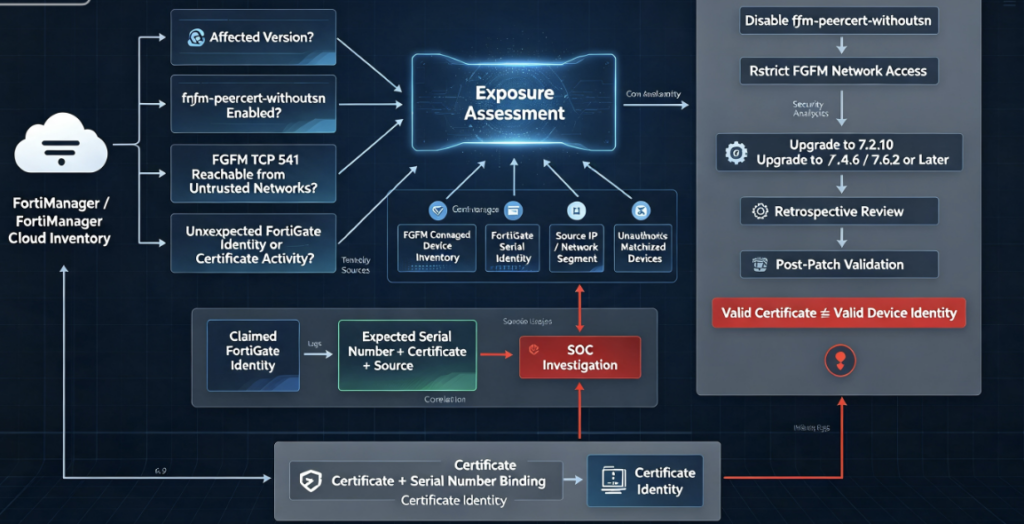
How to Determine Whether Your FortiManager Is Exposed
A useful CVE-2026-70468 assessment should answer more than:
“Is FortiManager installed?”
A stronger process evaluates four independent conditions.
1. Is the Software Version Vulnerable?
First establish the exact FortiManager or FortiManager Cloud release.
The vulnerable ranges are narrow enough that version accuracy matters.
2. Is the Dangerous Configuration Enabled?
Determine whether:
fgfm-peercert-withoutsn
has been enabled.
Fortinet documents the normal/default state as disabled.
If it is disabled, the specific authentication weakening described by Fortinet is not present in the same form.
If it is enabled on a vulnerable release, remediation should be prioritized.
3. Who Can Reach FGFM?
Map network access to the FortiManager FGFM listener.
Fortinet documents TCP 541 as the normal FortiManager management protocol port.
Do not limit this analysis to direct public Internet exposure.
Relevant attacker positions can include compromised internal systems, connected administrative networks, partner networks, VPN-connected segments, cloud networks, or other routes capable of reaching the management plane.
The practical question is:
Which systems can establish a connection
to the FortiManager FGFM service?
That is more useful than simply asking whether the appliance has a public IP address.
4. Are Unexpected FortiGate Identities Appearing?
FortiManager has explicit concepts for unauthorized devices and connection attempts from devices that have not yet been authorized. Fortinet documents an Unauthorized Devices view in Device Manager and configurable handling of unauthorized device connections.
Organizations investigating possible exposure should reconcile:
Expected FortiGate serial numbers
Expected FortiGate source addresses
Expected managed-device inventory
Observed FGFM connections
Unexpected or unauthorized devices
Certificate identities
Recent management-plane changes
The goal is not simply to find an unknown IP address.
It is to detect identity inconsistencies.
Detection Strategy for CVE-2026-70468
CVE-2026-70468 is fundamentally an authentication problem, so detection should focus on identity and management-plane behavior rather than searching for a conventional malware IOC.
Baseline Managed FortiGate Identities
Maintain an authoritative list of:
- FortiGate serial numbers
- expected FortiManager assignments
- expected management addresses
- device lifecycle status
- certificates associated with managed devices
This makes a claimed device identity observable in context.
Watch for Unexpected FGFM Sources
A FortiGate identity connecting from a network location that does not match its normal deployment deserves investigation.
Source addresses alone are not proof of exploitation, especially in NAT, HA, migration or cloud environments, but unexpected combinations of identity and source can provide useful signals.
Investigate Unauthorized Devices
Fortinet explicitly provides management workflows for connection attempts from unauthorized FortiGate devices.
Unexpected additions or unusual connection attempts during the exposure window should therefore be reviewed.
Correlate Serial Number and Certificate Identity
The vulnerability itself is about weakening the binding between those identities.
Detection should mirror the security property being attacked.
Instead of asking:
Was a certificate valid?
ask:
Did the certificate,
claimed serial number,
source system,
and expected FortiGate
all represent the same device?
That is a substantially stronger detection question.
Restrict FGFM Network Exposure
Patching removes the vulnerable configuration state, but management-plane segmentation remains important defense in depth.
Fortinet’s own FortiManager security best-practice documentation recommends denying unknown FGFM connections in relevant deployments and specifically discusses using fgfm-deny-unknown when FortiManager is on a public network.
The broader architectural goal should be:
Internet / Untrusted Networks
             |
             X
             |
      FGFM Management Plane
             |
    Approved FortiGate Sources
             |
        FortiManager
A management interface should not have unnecessary reachability simply because application-level authentication exists.
CVE-2026-70468 demonstrates why.
Authentication controls sometimes fail.
Network restrictions determine how many attackers get the opportunity to test that failure.
Why Vulnerability Scanners Can Misrepresent CVE-2026-70468 Risk
A traditional scanner may identify a FortiManager version and conclude:
CVE-2026-70468 detected
That is useful for inventory but incomplete for exploitability assessment.
The actual risk calculation is closer to:
Affected FortiManager version
          +
fgfm-peercert-withoutsn enabled
          +
Attacker can reach FGFM
          +
Attacker has valid certificate
          =
CVE-2026-70468 exploit conditions
This is a good example of why modern vulnerability validation increasingly requires configuration context rather than version matching alone.
Two systems running exactly the same vulnerable release can have very different real-world exposure.
System A
FortiManager 7.4.5
fgfm-peercert-withoutsn disabled
FGFM accessible only from management VLAN
System B
FortiManager 7.4.5
fgfm-peercert-withoutsn enabled
FGFM broadly reachable
A CVE-based inventory marks both as affected software.
A security engineer should not treat their attack surfaces as equivalent.
Authentication Bypass vs. Identity Binding Failure
The CWE designation for CVE-2026-70468 is CWE-288, Authentication Bypass Using an Alternate Path or Channel.
That classification is accurate, but defenders can learn more by thinking of the vulnerability as an identity-binding failure.
Modern systems frequently authenticate:
- servers
- workloads
- containers
- agents
- APIs
- IoT devices
- फ़ायरवॉल
- cloud services
- service accounts
Machine authentication often depends on certificates.
But certificate authentication is secure only when the certificate is bound correctly to the entity being authorized.
The general rule is:
Cryptographic validity
        ≠
Authorization identity
A certificate tells you something about possession of a private key and a trust chain.
The application still has to determine:
Who is this credential allowed to represent?
CVE-2026-70468 is a practical illustration of what happens when that second question becomes too permissive.
Why the Fortinet Fix Is the Right Security Pattern
The most interesting part of the remediation is that Fortinet removed the insecure option from fixed versions.
Security engineers sometimes describe this pattern as eliminating an unsafe configuration state.
Suppose a product offers:
strict_authentication = true | false
और false creates catastrophic identity ambiguity.
Changing the default to सच्चा helps.
But the product still allows this:
strict_authentication = false
That means configuration drift, legacy automation, compatibility troubleshooting or operator mistakes can reintroduce the dangerous state.
A stronger design is:
strict_authentication = always
That appears to be the direction Fortinet took with the patched FortiManager branches: the serial-number verification can no longer be disabled using the affected setting.
This is a meaningful security improvement beyond merely publishing a workaround.
Incident Response Considerations
Organizations that determine both that they ran a vulnerable release and that fgfm-peercert-withoutsn was enabled should treat remediation and historical investigation as separate tasks.
Disabling the option or installing the fixed release addresses future exploitation.
It does not answer whether suspicious FGFM activity occurred previously.
A reasonable retrospective investigation should reconstruct:
When was the option enabled?
        |
Which networks could reach FGFM?
        |
Which device identities connected?
        |
Were unexpected devices observed?
        |
Did known FortiGate identities connect
from unexpected locations?
        |
Were management relationships changed?
        |
Do inventory and observed identity agree?
The investigation should be proportional to exposure.
A FortiManager whose FGFM interface was reachable only from a tightly controlled network with no evidence of compromise presents a different incident-response scenario from one reachable from multiple semi-trusted or externally accessible network segments.
Prioritization Guidance
CVE-2026-70468 deserves high priority when several conditions overlap:
Highest concern
Affected version
+
fgfm-peercert-withoutsn enabled
+
FGFM reachable from untrusted networks
High concern
Affected version
+
fgfm-peercert-withoutsn enabled
+
FGFM reachable from broad internal networks
Lower immediate exploitability but still patch
Affected version
+
setting disabled
+
strict management-plane segmentation
This is not a replacement for vendor remediation guidance. All affected systems should ultimately move to fixed versions.
The purpose is to help security teams decide which FortiManager systems require the fastest intervention when patching a large estate.
Defender Checklist for CVE-2026-70468
| Action | यह क्यों मायने रखती है |
|---|---|
| Inventory FortiManager and FortiManager Cloud | Identify relevant management planes |
| Record exact versions | Only specific branches are affected |
जाँचें fgfm-peercert-withoutsn | Determines whether certificate SN validation was weakened |
| Disable the option where present | Fortinet’s documented workaround |
| Upgrade to a fixed release | Permanent vendor remediation |
| Map TCP 541 reachability | Establish who can reach FGFM |
| Restrict unnecessary FGFM access | Reduce attack surface |
| Review Unauthorized Devices | Find unexpected management relationships |
| Reconcile FortiGate serial numbers | Detect identity inconsistencies |
| Review abnormal FGFM sources | Identify suspicious peer behavior |
| Validate after patching | Confirm insecure configuration is no longer available |
| Perform retrospective review where exposed | Remediation does not prove previous non-exploitation |
The Broader Lesson: Machine Identities Are Privileged Identities
Enterprises increasingly focus identity security on people:
- administrators
- developers
- contractors
- service desk personnel
- privileged users
But modern infrastructure contains vastly more non-human identities.
Firewalls authenticate management systems.
Kubernetes workloads authenticate APIs.
Cloud instances authenticate control planes.
AI agents authenticate tools.
Services authenticate other services.
Certificates, API keys and tokens effectively become machine identities.
CVE-2026-70468 reinforces a principle that applies across all of them:
A trusted credential must be strongly bound to the exact identity and authorization scope it is allowed to represent.
Otherwise, authentication can succeed cryptographically while failing semantically.
That difference is the real security story behind this FortiManager vulnerability.
अक्सर पूछे जाने वाले प्रश्न
What is CVE-2026-70468?
CVE-2026-70468 is an authentication bypass vulnerability affecting specific versions of Fortinet FortiManager and FortiManager Cloud. Fortinet says a remote unauthenticated attacker may impersonate a FortiGate managed by FortiManager when a particular CLI configuration weakens certificate serial-number validation and the attacker possesses a valid certificate.
Is CVE-2026-70468 remotely exploitable?
The vulnerability has a network attack vector. However, actual exploitation requires access to the relevant FGFM communication path as well as the additional conditions disclosed by Fortinet.
Does CVE-2026-70468 require authentication?
Fortinet describes the attacker as remote and unauthenticated, and the CVSS vector specifies PR:N. It does, however, require the attacker to have a valid certificate.
That distinction is important: “unauthenticated” does not mean “no prerequisite credentials of any kind.”
Does the attacker need a valid certificate?
Yes. Fortinet explicitly identifies possession of a valid certificate as a requirement for the disclosed attack.
What configuration makes CVE-2026-70468 exploitable?
The relevant setting is:
fgfm-peercert-withoutsn
Fortinet documents that enabling this option prevents FortiManager from performing the normal FortiGate serial-number verification in the peer certificate’s CN or SAN.
Is fgfm-peercert-withoutsn enabled by default?
No. Fortinet documentation identifies disabled as the default, with the normal disabled state requiring the FortiGate certificate to include the device serial number in its subject CN or SAN.
Can CVE-2026-70468 let an attacker impersonate a FortiGate?
Yes. That is the specific security consequence described by Fortinet: a qualifying attacker may impersonate any FortiGate managed by the affected FortiManager.
Does CVE-2026-70468 let attackers log into the FortiManager Web GUI?
That is नहीं the attack described by Fortinet.
The vulnerability concerns FGFM authentication between FortiGate and FortiManager, rather than a conventional administrator username/password login bypass.
Is FortiManager Cloud affected?
Yes. Fortinet’s CVE record includes FortiManager Cloud 7.6.1, 7.4.3 through 7.4.5, and 7.2.5 through 7.2.9 among the affected releases.
What versions fix CVE-2026-70468?
Fortinet identifies the following minimum fixed versions:
- FortiManager 7.6.2
- FortiManager 7.4.6
- FortiManager 7.2.10
- FortiManager Cloud 7.6.2
- FortiManager Cloud 7.4.6
- FortiManager Cloud 7.2.10
What is the workaround?
Fortinet recommends disabling the affected option:
config system global
    set fgfm-peercert-withoutsn disable
end
Upgrading remains the preferred remediation because patched releases remove the vulnerable configuration capability altogether.
Is CVE-2026-70468 exploited in the wild?
Fortinet currently lists Known Exploited: No.
That reflects the public status as of August 17, 2026 and should be rechecked if incident-response decisions depend on current exploitation intelligence.
What is the CVSS score for CVE-2026-70468?
Fortinet’s PSIRT advisory currently displays 7.3 High.
The NVD page currently displays Fortinet CNA base metrics corresponding to 8.1 High:
CVSS:3.1/AV:N/AC:H/PR:N/UI:N/S:U/C:H/I:H/A:H
For vulnerability management, recording both the vendor advisory score and the NVD-presented base score avoids silently normalizing the discrepancy.
Final Assessment
CVE-2026-70468 is best understood not as a traditional FortiManager password bypass but as a failure in FortiGate machine-identity authentication.
FortiManager normally uses a FortiGate certificate together with device serial-number information to determine that an FGFM peer is the FortiGate it claims to be. Fortinet documentation shows that the affected fgfm-peercert-withoutsn configuration can remove that serial-number verification.
When that weakened configuration exists, Fortinet says a remote unauthenticated attacker who possesses a valid certificate can use crafted FGFM requests to impersonate a FortiGate managed by the FortiManager.
The exploit conditions prevent CVE-2026-70468 from being accurately characterized as an effortless, universal FortiManager takeover.
They do not make the vulnerability unimportant.
FortiManager operates at a highly trusted management boundary, and the identity of every FortiGate communicating with that control plane must be unambiguous.
The most important remediation step is therefore clear: upgrade affected FortiManager and FortiManager Cloud deployments to 7.2.10, 7.4.6, 7.6.2 or later as appropriate. Where immediate upgrades are impossible, Fortinet instructs administrators to disable fgfm-peercert-withoutsn.
The design of the patch is equally important. In fixed releases, Fortinet removes the ability to disable the relevant serial-number verification.
That turns the central security lesson of CVE-2026-70468 into a simple rule:
A valid credential is not enough. A secure management plane must also prove that the credential belongs to the exact device identity being trusted.

 Hindi
Hindi  English
  German
  French
  Spanish
  Portuguese
  Japanese
  Korean
  Arabic
  Turkish
  Hebrew