
PHP2Shell refers to the developing disclosure around CVE-2026-109618 and CVE-2026-109619. The PHP security team confirms an upcoming release for two critical vulnerabilities, both rated CVSS v4.0 9.2. The scheduled release is October 21, 2026 at 14:00 UTC, or 22:00 in Singapore and mainland China. The notice leaves affected versions, fixed builds and technical details for publication with the release.
Status checked October 21, 2026 at 04:27 UTC. CERT-EU names both CVEs and discusses reported potential remote code execution. This is a preparation guide while the release is pending, not a claim that every PHP site has a reachable exploit path.
For a site owner, the immediate job is to find who supplies the PHP interpreter serving each site. An update to WordPress, Laravel or another application is a separate change from updating that interpreter. A version printed by SSH may belong to a different installation from the one serving web requests.
What is confirmed, and which questions are still open
watchTowr publicly confirmed that the leaked vulnerabilities are real. Confirmation of a report and publication of a reproducible mechanism are different events. The public statement does not supply the conditions needed to judge a particular site, and a severity score alone cannot supply them.
Use the official announcement as the clock for maintenance planning. The planned 14:00 UTC release is 22:00 in Singapore and mainland China. A copied screenshot, cached summary, or social post can preserve an earlier schedule after coordination changes. Check the announcement again at the start of the maintenance window rather than treating a date in a secondary headline as the authority.
| Question | Current evidence | Operational consequence |
|---|---|---|
| Is a serious PHP release confirmed? | PHP confirms two critical issues, each scored 9.2. | Prepare owners and update channels now. |
| Which exact builds are affected or fixed? | The advance notice defers those details to release. | Do not mark an installed build patched yet. |
| Do all PHP-based applications have the same reachable attack path? | The reviewed notice does not establish that. | Map deployments; apply the eventual prerequisites to each. |
| Does the PHP2Shell label prove a public exploit or compromise? | A label is not such evidence. | Require a traceable technical source and observed results. |
There is a meaningful difference between preparing every PHP deployment and claiming every PHP deployment is exploitable. CERT-EU’s advisory carries broad reported scope while noting that technical details are unavailable. Keep that wording attached to the claim. A version inventory is useful immediately; a definitive affected-versus-unaffected matrix requires the vendor’s actual release information.
Also distinguish the release trigger from exploitation evidence. PHP’s statement that it may publish earlier if attacks appear describes a contingency, not an announcement that attacks have occurred. The reviewed watchTowr FAQ reports no exploitation but also contains a schedule that differs from PHP’s notice. Use its claims with attribution and let the vendor determine release timing. Absence of a report is not a forensic conclusion about an individual server.
Find the interpreter that actually serves the site
PHP’s Server API function documentation distinguishes execution contexts such as CLI and FPM/FastCGI. That distinction is exactly why a shell command is an incomplete website inventory. The interpreter selected by your interactive shell can be different from the service reached by the web server. Record the association between hostname, web-server configuration, backend socket or service, and owning deployment.
On a small VPS, draw that association for one website before expanding it to the rest. If the virtual host forwards requests to an FPM socket, identify the service behind that socket. If a hosting panel chooses a PHP version per site, record the panel’s choice and ask which vendor supplies its patches. If a container serves the site, identify the running container rather than the host’s unrelated PHP installation.
The PHP FPM manual documents separate worker pools with their own execution settings. Treat that flexibility as an inventory requirement. Several sites on one server may share a service, while one application may span web requests, scheduled tasks, and queue workers. Count the execution paths that can remain on an old runtime, not merely the machines that contain a package named PHP.
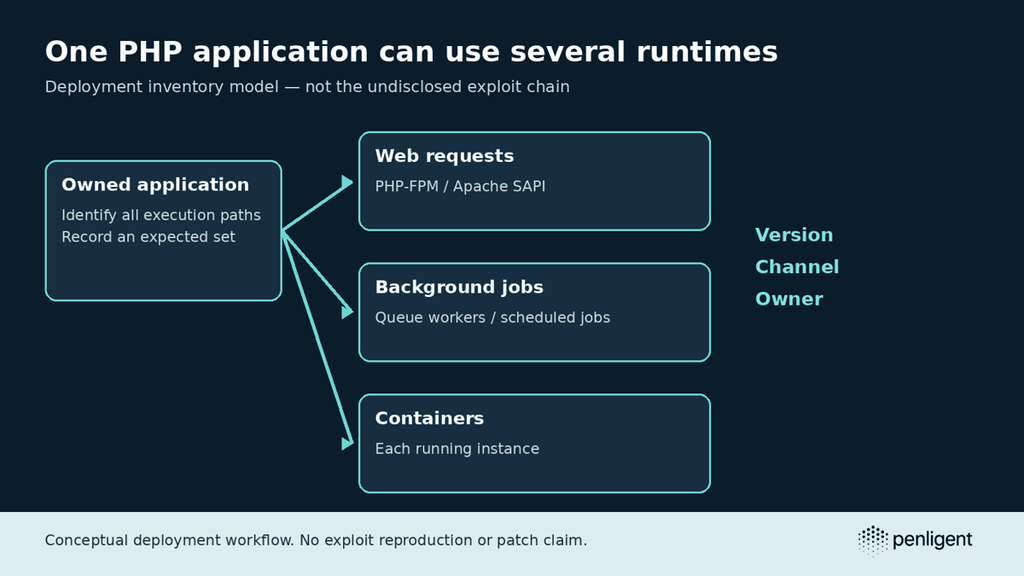
Consider a hypothetical store with three runtime identities: store/web, store/queue, और store/scheduler. Seeing the web node return a new version would not establish what the queue worker runs. Conversely, the existence of a background runtime does not establish that an undisclosed network flaw reaches it. Inventory first; map vulnerability prerequisites after disclosure. This avoids both missed deployments and invented exposure.
Collect a narrow local snapshot without publishing phpinfo
For a PHP binary you administer, these commands collect the CLI version, configuration-file selection, and a small set of runtime fields. PHP documents the switches in its command-line options reference. Run them in the intended host or container context. These examples are inventory commands, not exploit probes, and were not executed against a production PHP service for this analysis.
php -v
php --ini
php -r 'echo json_encode(array(
  "version" => PHP_VERSION,
  "sapi" => PHP_SAPI,
  "ini" => php_ini_loaded_file()
), JSON_PRETTY_PRINT), PHP_EOL;'
The php_ini_loaded_file documentation explains what the configuration-file value represents; a false result means no file was loaded by that invocation. Preserve that distinction rather than turning it into an empty cell with an assumed default. PHP’s version-reporting documentation supplies another way to read the current interpreter’s version. Neither function reaches into a different running process.
Do not upload a public phpinfo() page just to get a more convincing screenshot. Prefer an existing access-controlled operational view or a temporary diagnostic reachable only through a channel you administer, and remove temporary diagnostics afterward. Limit the fields collected. Full environment or configuration dumps can include operational details that a maintenance ticket does not need.
For containers, the following read-only example asks Docker for the selected container’s image identity and creation time. Docker’s inspect reference documents formatted object inspection. Replace the placeholder with your own container name. An image identity helps reconcile a deployment; it does not establish which fixes the image contains or which PHP process is serving requests.
docker inspect --type=container \
  --format '{{.Name}} {{.Image}} {{.Created}}' YOUR_PHP_CONTAINER
Keep the CLI snapshot, container identity, and service observation as separate records until you can connect them. A screenshot of a shell inside a newly created administrative container is poor evidence for a different application container that has run for months. The useful observation names the actual serving instance and the way its software was supplied.
Why a WordPress update does not settle the PHP question
A WordPress dashboard reports on the application and its environment, but the runtime is supplied by the host, package provider or container build. Ask your hosting provider a specific question: which PHP package revision serves this site, which advisory will establish that it contains the fixes for both CVEs, and will activation require a service change? “The server is updated” leaves all three questions unanswered.
On a VPS, follow the web-server configuration to its backend service or socket. Then identify the PHP branch and package source for that backend. On managed hosting, verify the version selected for the individual site rather than a server-wide default. With containers, distinguish the image prepared for the next deployment from the instances currently receiving requests. These are deployment checks, not claims about the still-undisclosed attack prerequisites.
An internet-facing PHP application belongs near the front of the preparation queue, but framework names do not establish exploitability. Do not turn reports mentioning WordPress, Magento or Laravel into a confirmed affected-product list. Once technical details arrive, map each CVE separately: component, affected branch, configuration or input prerequisites, vendor fixed revision, and the serving instances that received it.
Choose the update channel before the release arrives
An upstream build, distribution-maintained package, hosting-panel package, and container image are different delivery paths. Name the responsible provider before the deadline. For example, Ubuntu documents backported security patches, so an older-looking base version can have a security fix in its distribution revision. This explains why the package provider’s advisory matters; it does not establish that a PHP2Shell fix has already shipped. Do not reject or approve that package solely by comparing its visible base version with an upstream release number.
| Deployment | Prepare now | Verify after a fix is available |
|---|---|---|
| Managed hosting | Ask who owns the PHP runtime and how a patched revision will be reported. | Confirm the specific site’s selected runtime and provider notice. |
| Distribution package | Record installed package revisions, repositories, and service names. | Match the provider’s security revision and inspect the running service. |
| Container | Record image identity, deployment definition, and every running instance. | Confirm replacement instances and their actual runtime; a downloaded image is insufficient. |
| Source build | Record build recipe, extensions, owner, and rollback requirements. | Rebuild through the maintained process and verify the serving binary. |
A security update is not the right moment to improvise a second installation method. Copying upstream files over a panel-managed runtime can make future maintenance harder to reason about. Prefer the supported provider path, and escalate missing delivery information with the exact site, branch, and package identity. A useful provider answer names a revision and a scope; “we are aware” leaves the deployment question open.
Backups and rollback preparation should cover the application’s operational dependencies as well as the interpreter. Decide who can approve a service interruption, where the known-good deployment recipe lives, and how the team will test the update. Avoid a universal upgrade command in a shared runbook: the right command depends on the installation, and a broad package-manager action can change software outside this maintenance task.
What to do while the technical prerequisites are still unknown
CERT-EU recommends inventory and rapid patch preparation and says organizations should consider isolating internet-facing applications when immediate remediation is not feasible. Apply that recommendation to your environment through an accountable risk decision. Restricting access can reduce exposure, but it should not be described as a vendor-confirmed workaround for an undisclosed mechanism.
Start with unnecessary exposure: abandoned sites, temporary administration routes, and services with no present business need. For an essential public storefront, record why broad isolation would interrupt service and who will approve an alternative. Do not claim that a login page, a WAF subscription, or a disabled PHP function blocks the forthcoming flaws without a technical explanation that connects the control to the affected path.
A useful interim plan separates what can be completed now from what must wait. Now: locate runtimes, establish ownership, prepare rollback, and confirm provider channels. After release: match conditions and fixes, deploy through those channels, and collect running-state observations. Any final exploitability decision that depends on an undisclosed condition belongs in the second group.
Close the maintenance window on the running application
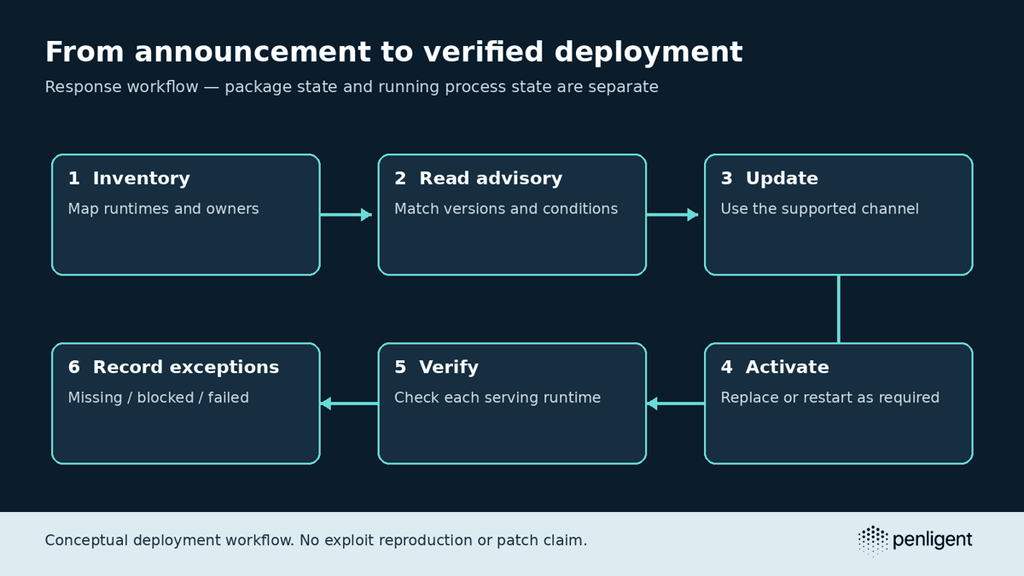
Once an applicable fix is available, installing a package is one step in the change. The runtime must also be activated through the service or deployment procedure appropriate to the environment. Reconcile the expected instance set with what actually serves the application after the change. Keep missing instances and failed restarts visible instead of closing the whole estate from one successful browser response.
Use a dedicated test account and a few ordinary operations that matter to the application: authentication, an expected page or API request, and a background job if that is part of the service. Record the pre-update behavior so an existing failure does not become a mysterious regression. A functional smoke test checks service continuity; it cannot establish rejection of an exploit you have not tested.
If a security regression test becomes available, review its provenance and success condition before running it in an isolated authorized environment. A scanner rule, an advisory match, a patched-source test, and a production compromise investigation answer different questions. Preserve that difference in the ticket: do not promote a version observation into a claim that an exploit was reproduced and blocked.
If the team rolls back to restore service, reopen the security decision at the same time. The operational recovery and the resulting security state need to stay together. If there were suspicious events before patching, preserve and investigate them separately; a fixed package cannot determine whether an attacker previously obtained access.
What the release must resolve
The next update to this page needs concrete release evidence: separate descriptions for CVE-2026-109618 and CVE-2026-109619, their affected conditions, upstream fixed versions, and any applicable provider revisions. Until those details are available, a fabricated payload or version range would make this guide less useful. The practical endpoint today is a site-by-site runtime and update plan that can be matched to the actual advisory.

 Hindi
Hindi  English
  German
  French
  Spanish
  Portuguese
  Japanese
  Korean
  Arabic
  Turkish
  Hebrew