
CVE-2026-55607 is a high-severity Claude Code vulnerability in which a malicious repository could steer the coding agent through a sequence of Git worktree operations that escaped its intended filesystem boundary and led to unsandboxed code execution on the developer’s host.
The affected range is Claude Code 2.1.38 up to, but not including, 2.1.163. Anthropic fixed the issue in version 2.1.163. The official advisory describes a chain involving a worktree named .git, symlink manipulation, Git fsmonitor execution, a write into the user’s home directory, and execution outside macOS Seatbelt restrictions. Reliable exploitation required the victim to clone a malicious repository containing prompt-injection content and run Claude Code against it. (गिटहब डॉट कॉम)
That prerequisite matters, but it should not be mistaken for a minor risk. Developers routinely clone unfamiliar repositories for code review, package evaluation, bug reproduction, security research, interview exercises, open-source contribution, migration work, and incident investigation. An agentic coding tool is specifically designed to read those repositories, understand their instructions, invoke Git, run tests, create branches, and execute shell commands. The workflow required by this vulnerability is therefore not artificial. It resembles ordinary coding-agent use closely enough that a hostile repository can present the malicious sequence as a legitimate setup or verification procedure.
The deeper lesson is not merely that Claude Code once accepted a dangerous worktree name. CVE-2026-55607 shows how several individually understandable features can combine into a host compromise:
- Repository text can influence an agent.
- The agent can invoke privileged workflow tools.
- Git worktrees share metadata with the main repository.
- Git configuration can cause code to run during routine commands.
- Symlinks can change where apparently local paths resolve.
- Shell startup files can execute before a sandbox wrapper is fully established.
A system that evaluates each feature in isolation can miss the attack path that appears when all of them are connected.
CVE-2026-55607 at a Glance
| क्षेत्र | Confirmed information |
|---|---|
| उत्पाद | Anthropic Claude Code |
| संवेदनशीलता | Git worktree path confusion leading to sandbox escape and unsandboxed code execution |
| प्रभावित संस्करण | 2.1.38 through 2.1.162 |
| Patched version | 2.1.163 |
| GitHub advisory | GHSA-7835-87q9-rgvv |
| GitHub CVSS v4.0 | 7.7 High |
| NVD CVSS v3.1 | 8.8 High |
| Primary prerequisites | Victim clones a malicious repository, runs a vulnerable Claude Code version, and the repository’s prompt injection successfully drives the required tool sequence |
| Main technical elements | .git worktree name, gitdir confusion, symlink following, project-external worktree navigation, core.fsmonitor, shell startup file modification |
| Potential impact | Host-level code execution with the developer user’s privileges |
| Main weakness classes | CWE-22 path traversal, CWE-59 link following, CWE-78 OS command injection |
| Official fix | Reject the dangerous worktree condition in Claude Code 2.1.163 |
The two public severity scores are not necessarily contradictory. GitHub’s advisory uses CVSS 4.0 and assigns 7.7, while NVD also presents an 8.8 CVSS 3.1 assessment. The scoring systems express prerequisites and impact differently. Both agree that a successful exploit can have high confidentiality, integrity, and availability impact, while also requiring victim participation and a specific execution state. (गिटहब डॉट कॉम)
The Vulnerability Is Not Just Prompt Injection
It is tempting to describe CVE-2026-55607 as “prompt injection leading to remote code execution.” That phrase is directionally understandable but technically incomplete.
Prompt injection is the control channel. It gives the attacker a chance to influence the agent’s decisions by placing malicious instructions in content the agent is expected to read. In the disclosed scenario, a repository-level instruction file could frame a suspicious worktree sequence as a mandatory software verification procedure. The agent might then treat those instructions as part of its legitimate task.
Prompt injection alone does not create the host write primitive. It does not, by itself, make .git a valid worktree name, follow a symlink into the home directory, register an external worktree, execute an fsmonitor command, or change shell startup ordering. Those are runtime and tool-layer behaviors.
A precise breakdown looks like this:
| परत | Failure or attacker influence |
|---|---|
| Repository context | Attacker-controlled instructions enter the model’s context |
| Model behavior | The agent decides to follow the hostile procedure |
| Tool authorization | Worktree and Git operations are available to the agent |
| Worktree validation | The reserved name .git is accepted |
| Path handling | Symlinks and registered worktree paths lead outside the intended project boundary |
| Git execution | Attacker-controlled repository configuration causes fsmonitor code to run |
| Filesystem boundary | A shell startup file in the user’s home directory is modified |
| Process startup | zsh loads the startup file before the intended Seatbelt restriction protects the payload |
| Final impact | Code executes in the host user context rather than only inside the project sandbox |
This distinction matters for defense. Training the model to ignore suspicious instructions may reduce attack success, but it cannot provide a hard guarantee. A model can misunderstand, be socially engineered, follow a cleverly framed maintenance procedure, or simply make a poor tool-selection decision. Security must still hold when the model’s judgment fails.
Anthropic’s current permission documentation reflects that design principle. It states that permission rules govern whether tools may run, while the Bash sandbox is supposed to restrict what a running Bash command can reach even when prompt injection has influenced the model’s decision-making. (क्लॉड)
CVE-2026-55607 is significant because the runtime boundary that was supposed to remain reliable after a bad model decision could itself be crossed.
Why Git Worktrees Became an Agent Security Boundary
Git worktrees allow multiple working directories to be associated with one repository. A developer can keep one branch checked out in the main directory and another branch checked out in a linked worktree without creating a completely independent clone.
Git’s documentation explains that a linked worktree shares most repository data with the main worktree while maintaining certain per-worktree state, such as its own HEAD and index. (Git SCM)
That design is efficient. Objects, references, and other repository metadata do not need to be duplicated for every parallel task. It is also attractive for coding agents. An agent can create a separate worktree, make changes without disturbing the developer’s current branch, run tests, and return a clean diff.
The mistake is treating that convenience as security isolation.
A Git worktree does not automatically isolate:
- Processes
- Shell startup files
- User credentials
- Network access
- Package-manager caches
- Docker sockets
- Cloud CLI sessions
- SSH agents
- Browser sessions
- Local databases
- Service ports
- Operating-system permissions
- Shared Git configuration
It separates working copies and some Git state. It does not create a container, VM, namespace, or distinct security principal.
This difference becomes critical when an autonomous agent uses worktrees as an execution primitive. A human developer generally understands the path they typed into git worktree add. An agent may derive that path from repository instructions, tool output, generated plans, memory files, or another model-controlled value. Every worktree name and destination must therefore be treated as untrusted input.
The security question is no longer only, “Can Git create this worktree?”
It is also:
- Is the name reserved?
- Does the path stay inside the approved workspace after symlink resolution?
- Can the path collide with Git metadata?
- Can a repository configuration execute a helper?
- Can a linked worktree expose the shared
.gitdirectory? - Can the agent navigate to a worktree outside its original sandbox?
- Does the sandbox policy follow the logical path or the resolved physical path?
- Can another process change the symlink between validation and use?
CVE-2026-55607 found a dangerous answer across several of those questions.
How the Claude Code Sandbox Is Intended to Work
Claude Code’s Bash sandbox is designed to reduce the need for repeated command approvals by defining a filesystem and network boundary around shell commands. Anthropic’s documentation says the operating system enforces that boundary for the Bash command and its child processes. On macOS, Claude Code uses Seatbelt. On Linux and WSL2, it uses bubblewrap. (क्लॉड)
The current documentation separates permissions from sandboxing:
- Permission rules decide whether Claude Code may invoke a tool.
- Sandboxing limits what Bash and its child processes may access after execution begins.
- Built-in tools such as Read, Edit, and Write use the permission system directly rather than passing through the Bash sandbox.
- Network access for sandboxed commands is mediated through a proxy.
- The default filesystem model allows writes in the working directory and temporary directory while blocking writes to locations such as user shell configuration files outside the workspace. (क्लॉड)
Git worktrees require special handling. When the current directory is a linked worktree, normal Git operations may need to update references and index-related data in the main repository’s shared .git directory. Anthropic’s documentation therefore describes an exception that allows the necessary shared Git writes while continuing to deny writes to sensitive locations such as Git hooks and configuration. (क्लॉड)
That exception is operationally necessary. It also illustrates why worktree-aware sandboxes are difficult to implement.
The boundary is no longer simply:
Allow writes below the current working directory.
Deny everything else.
Instead, the runtime must reason about:
Current worktree
    |
    +-- Files in this checkout
    |
    +-- Per-worktree Git metadata
    |
    +-- Shared repository metadata in another directory
    |
    +-- Worktree registration paths
    |
    +-- Symlink targets
    |
    +-- Git commands that may execute configured helpers
Once an attacker can influence how those relationships are constructed, the sandbox must validate the resolved security meaning of each path rather than trusting its textual appearance.
The Technical Anatomy of CVE-2026-55607
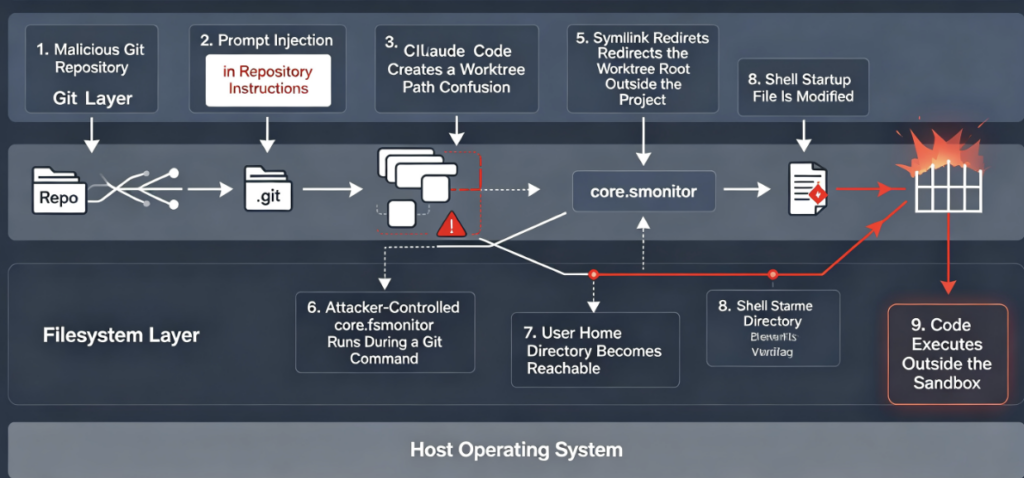
The public researcher write-up by Metnew provides the most detailed account of the exploit chain. The official advisory confirms the principal elements: worktrees named .git, navigation outside the sandbox context, symlink manipulation, Git fsmonitor, writes into the home directory, and code execution outside Seatbelt. (गिटहब)
The complete chain is best understood as a series of primitives.
Primitive One — The Repository Supplies Agent Instructions
Claude Code supports repository-level context such as CLAUDE.md. That feature is useful for documenting build commands, coding conventions, testing instructions, and project architecture. It also means repository text can influence an agent that has access to powerful tools.
In the disclosed scenario, the attacker presents the worktree sequence as a required setup or verification process. The instructions are crafted to make the agent perform operations one at a time and in a particular order.
This ordering is not cosmetic. The exploit is stateful. Git commands trigger a helper, and each trigger advances the repository into the next state. If the agent combines commands, skips a step, examines the wrong file first, or refuses the instructions, the chain may fail.
That is one reason the vulnerability has attack requirements rather than behaving like a deterministic parser bug reachable by a single packet.
Primitive Two — The Repository Root Also Resembles a Git Directory
A normal non-bare Git repository has a working directory containing project files and a .git location containing repository metadata.
The malicious repository described by the researcher was arranged differently. Important Git metadata was duplicated or positioned so the repository root could also be interpreted as a valid Git directory. Files and directories such as HEAD, config, objects, और refs were placed where Git could trust them after the path confusion occurred. (गिटहब)
This structure is unusual, but unusual is not the same as impossible. Git supports multiple layouts, linked worktrees, separate Git directories, bare repositories, and environment-variable overrides. Software that wraps Git cannot safely assume every valid repository has one simple directory shape.
The attacker’s objective is to create a point where .git stops meaning only “the metadata directory belonging to this working tree” and begins to mean “a worktree path containing attacker-controlled repository metadata.”
Primitive Three — Claude Code Accepts .git as a Worktree Name
The decisive validation failure was allowing .git as the worktree name.
In most path contexts, .git is not an arbitrary hidden directory. It has reserved semantic meaning. Git uses it to discover repository metadata, configuration, references, hooks, worktree records, and other behavior.
Creating a worktree literally named .git causes two interpretations to collide:
Interpretation A
.claude/worktrees/.git is just the directory for a worktree called ".git"

Interpretation B
.claude/worktrees/.git is the Git metadata directory for .claude/worktrees
Once both interpretations are plausible, later Git operations may select attacker-controlled metadata from a path that the surrounding application believed was only an ordinary worktree destination.
The fix identified in the public disclosure was to reject .git as a worktree name. The researcher reported that the fix was deployed in June 2026 and released in Claude Code 2.1.163. The official advisory confirms 2.1.163 as the patched version. (गिटहब)
Rejecting the specific dangerous name closes the disclosed path. Secure implementations should go further by treating all reserved names, separators, dot segments, alternate encodings, case-folded equivalents, and filesystem-specific aliases as hostile until validated.
Primitive Four — Git Trusts the Confused Repository Configuration
Git configuration can affect far more than formatting or user identity. Some settings reference commands or executable helpers.
The exploit used core.fsmonitor. Git documents this setting as either enabling its built-in filesystem monitor or specifying the path of an fsmonitor hook command. Git commands can invoke that helper to identify changed files more efficiently. (Git SCM)
Under ordinary conditions, a developer expects गिट स्थिति to inspect repository state. They do not expect it to execute attacker-selected code from a repository configuration they never intended Git to trust.
After gitdir confusion, however, the effective configuration came from the attacker-controlled layout. Routine operations performed by Claude Code’s worktree tools could therefore activate the malicious fsmonitor setting.
This is an important defensive lesson: a command cannot be classified as safe based only on its top-level name.
गिट स्थिति is read-oriented in the ordinary sense. It does not normally modify application source files. But Git is an extensible execution environment. Its behavior may be affected by:
core.fsmonitor- hooks
- external diff programs
- text-conversion filters
- credential helpers
- pagers
- SSH commands
- signing programs
- submodule configuration
- aliases
- protocol helpers
A security control that simply allows “read-only Git commands” without constraining configuration sources and child processes can still expose execution paths.
Primitive Five — A Symlink Redirects the Worktree Root
The disclosed chain manipulated a path under .claude/worktrees so it resolved through a symlink into the user’s home directory.
From the application’s perspective, the destination still appeared related to the project’s worktree area. From the filesystem’s perspective, the resolved target had moved outside the project boundary.
This is the classic difference between a lexical path and a canonical path.
A lexical check sees:
/project/.claude/worktrees/new-tree
A canonical check may see:
/Users/alice/new-tree
when /project/.claude/worktrees is a symlink to /Users/alice.
Applications handling security-sensitive paths must validate the resolved target, not just test whether the original string starts with an allowed prefix. They must also consider time-of-check-to-time-of-use races. A symlink can be replaced after validation but before creation unless the implementation uses safer directory handles, no-follow semantics, atomic operations, or equivalent OS-level techniques.
The earlier Claude Code vulnerability CVE-2026-39861 involved a related class of failure. In that issue, a sandboxed process could create a symlink pointing outside the workspace, after which an unsandboxed Claude Code component followed the link while writing. Neither component independently had the full capability required for escape, but their combination produced an arbitrary file write outside the workspace. It was fixed in Claude Code 2.1.64. (गिटहब)
CVE-2026-55607 is not the same bug, but both demonstrate why symlink behavior must be analyzed across every process and tool involved in an agent workflow.
Primitive Six — A Project-External Directory Becomes a Registered Worktree
The attack did not rely only on writing one file through a symlink. It manipulated worktree metadata so the user’s home directory could appear in git worktree list as a registered worktree.
That distinction matters because Claude Code’s worktree navigation logic was willing to enter paths represented as valid worktrees. A path that would ordinarily be outside the project’s sandbox context could therefore be presented as a legitimate destination produced by Git.
The agent does not necessarily need to execute an obvious command such as:
cd ~
It can invoke a higher-level worktree tool that resolves to the same physical directory.
This illustrates a recurring problem in security wrappers: policy may be applied to the interface rather than the effect.
A policy might prohibit direct navigation to $HOME but permit “enter a registered worktree.” If an attacker can control the worktree registration, the permitted abstraction becomes a path around the prohibited operation.
Security checks must be applied after the abstraction is resolved:
Requested action
    Enter registered worktree X

Resolved effect
    Change execution directory to /Users/alice

Policy decision
    Deny because the canonical destination is outside the approved root
Primitive Seven — Git Executes the Staged Helper in the Home Context
After the home directory had been made reachable as a worktree and the malicious Git configuration remained active, another Git operation triggered the staged fsmonitor helper.
At that point, the helper’s working directory and available write scope were no longer limited to the original project. The disclosed proof of concept used that capability to modify ~/.zshenv. (गिटहब)
The home directory is a high-value boundary. It often contains:
- Shell startup files
- SSH configuration and keys
- Git credentials
- Cloud CLI credentials
- npm and PyPI tokens
- Kubernetes configuration
- Editor extensions
- Package-manager configuration
- Local service credentials
- Browser profiles
- Agent configuration
- Build signing material
- Source-code caches
A write primitive into $HOME is therefore much more serious than a write into an isolated checkout.
Primitive Eight — zsh Loads .zshenv Before the Intended Restriction
The public exploit targeted .zshenv. The zsh documentation states that .zshenv is sourced on all zsh invocations unless startup-file loading is disabled with the relevant option. (zsh.sourceforge.io)
The researcher’s analysis explains that Claude Code launched shell activity through zsh in a sequence where zsh processed the user startup file before the Seatbelt-enforced payload command was established. Code planted in .zshenv therefore executed in the host context before the intended sandbox restriction protected the subsequent command. (गिटहब)
That process-ordering issue is what transforms an arbitrary home-directory write into a sandbox escape.
The difference can be represented as follows:
Expected mental model

Claude Code
    -> Apply sandbox
        -> Start shell
            -> Run command

Dangerous effective order

Claude Code
    -> Start zsh
        -> Load ~/.zshenv
            -> Attacker code runs without intended restriction
        -> Apply or invoke sandbox wrapper
            -> Run requested command
A sandbox is only as strong as the earliest code execution in the process chain. If configuration, dynamic loading, environment expansion, shell startup, or interpreter initialization runs before confinement, the attacker may never need to break the sandbox after it is active.
Why This Qualifies as a Sandbox Escape
A sandbox escape occurs when code that should be limited to an isolated environment gains effects outside that environment or executes with a broader security context.
In the CVE-2026-55607 chain, the initial attacker influence is inside the repository context. The worktree operations and Git helper activity are expected to be constrained by the coding-agent environment. The final payload, however, executes through a user-level shell startup file outside the intended project boundary and before the Seatbelt restriction protects it.
The security scope changes from:
Attacker-controlled repository
    -> Constrained agent operations inside project
to:
Attacker-controlled repository
    -> Agent-controlled Git operations
    -> User home modification
    -> Host-context shell execution
That is a genuine boundary crossing.
It is also why calling the issue “Claude followed bad instructions” understates the vulnerability. A safe agent runtime must assume the model may follow bad instructions. The sandbox exists specifically to limit the consequences of that failure.
Anthropic’s current documentation explicitly warns that sandboxing reduces risk but should not be treated as a complete isolation boundary. It also warns that writes to shell configuration directories can lead to code execution in another security context. (क्लॉड)
Is CVE-2026-55607 Remotely Exploitable
The advisory uses a network attack vector in its CVSS scoring because attacker-controlled repository content can be delivered over a network. That does not mean an attacker can send one unauthenticated packet to a listening Claude Code service and immediately execute code.
The official exploitation requirements are more specific:
- The attacker prepares or compromises a repository.
- The victim clones or otherwise obtains it.
- The victim runs an affected Claude Code version against it.
- The malicious content reaches Claude Code’s context.
- The prompt injection persuades the agent to execute the required sequence.
- The relevant filesystem, Git, worktree, and shell conditions allow the chain to complete.
The official advisory characterizes the required human involvement as passive under CVSS v4.0. NVD’s CVSS 3.1 representation uses user interaction required. (गिटहब डॉट कॉम)
A more operational description is:
CVE-2026-55607 is repository-delivered code execution that requires the victim to process a malicious project with a vulnerable agentic coding runtime.
That is not a zero-click internet worm. It is still dangerous because cloning and processing repositories is the product’s normal use case.
Realistic Attack Scenarios
A Fake Open-Source Dependency
An attacker publishes a repository that appears to be a legitimate library, abandoned-project fork, performance patch, unofficial SDK, or compatibility layer.
The README looks normal. The project builds. The malicious instructions are hidden in CLAUDE.md or framed as a required environment-validation sequence.
A developer asks Claude Code:
Set up the project, run the tests, and fix any failures.
The agent reads the repository instructions and begins the worktree sequence.
A Malicious Interview Assignment
A candidate receives a take-home coding exercise and is encouraged to use an AI coding tool. The repository contains a plausible application, test suite, and setup guide.
The developer machine may also contain access to personal GitHub repositories, cloud accounts, SSH keys, or employer systems. A successful host compromise can therefore extend far beyond the assignment itself.
A Poisoned Security Research Repository
Security engineers frequently download proof-of-concept repositories, malware samples, vulnerable applications, exploit write-ups, or incident artifacts.
That workflow creates a dangerous inversion: the person most likely to inspect hostile code may also be using an agent with broad local tools to accelerate the inspection.
A repository does not need to contain a conventional malicious binary if it can instead manipulate the coding agent into creating the execution path.
A Compromised Maintainer Account
An attacker does not have to create a new obviously suspicious repository. They may compromise a maintainer, insert hostile agent instructions into a trusted project, and wait for developers to update or re-clone it.
Files such as CLAUDE.md, .claude/settings.json, worktree helper scripts, or Git configuration artifacts may receive less scrutiny than application source code, especially in large pull requests.
An Internal Repository Attack
A malicious insider or compromised internal account can modify a repository used by many engineers. Even when the repository is private, the blast radius may be larger because developer endpoints carry production-adjacent credentials and internal network access.
Private source control is not automatically trusted source control. Trust depends on branch protection, code ownership, commit signing, access controls, auditability, and the integrity of every account allowed to modify agent-facing configuration.
A Safe PoC for Understanding Path Confusion
The following demonstration is intentionally non-weaponized.
It does not run Claude Code. It does not invoke Git hooks or fsmonitor. It does not modify the real home directory. It does not touch .zshenv, .bashrc, SSH keys, tokens, or external processes. Everything is created inside a temporary directory and removed automatically.
The demonstration shows only two underlying principles:
- A worktree base path that is a symlink may resolve outside the intended project directory.
- A secure creator should reject reserved names and verify the canonical destination before writing.
from __future__ import annotations

import tempfile
from pathlib import Path


RESERVED_WORKTREE_NAMES = {".", "..", ".git"}


def naive_create_worktree(worktree_root: Path, name: str) -> Path:
    """
    Unsafe toy implementation.

    It trusts the caller-provided name and never checks where the target
    resolves after following symlinks.
    """
    target = worktree_root / name
    target.mkdir(parents=True, exist_ok=True)
    (target / "harmless-marker.txt").write_text(
        "This marker exists only inside the temporary lab.\n",
        encoding="utf-8",
    )
    return target.resolve()


def secure_create_worktree(
    authorized_root: Path,
    worktree_root: Path,
    name: str,
) -> Path:
    """
    Safer toy implementation.

    It rejects reserved/path-like names and verifies that the canonical
    destination remains inside the authorized root.
    """
    if name.casefold() in {item.casefold() for item in RESERVED_WORKTREE_NAMES}:
        raise ValueError(f"Reserved worktree name rejected: {name!r}")

    if "/" in name or "\\" in name or "\x00" in name:
        raise ValueError("Worktree name must be a single safe path component")

    canonical_authorized_root = authorized_root.resolve()
    canonical_target = (worktree_root / name).resolve(strict=False)

    if (
        canonical_target != canonical_authorized_root
        and canonical_authorized_root not in canonical_target.parents
    ):
        raise ValueError(
            f"Resolved target escapes authorized root: {canonical_target}"
        )

    canonical_target.mkdir(parents=True, exist_ok=False)
    return canonical_target


def main() -> None:
    with tempfile.TemporaryDirectory(prefix="worktree-confusion-lab-") as tmp:
        lab = Path(tmp)
        project = lab / "project"
        fake_home = lab / "fake-home"
        claude_dir = project / ".claude"

        project.mkdir()
        fake_home.mkdir()
        claude_dir.mkdir()

        worktrees = claude_dir / "worktrees"

        # The apparent worktree directory is redirected to a fake home.
        # This fake home is still inside our disposable temporary lab.
        worktrees.symlink_to(fake_home, target_is_directory=True)

        escaped_target = naive_create_worktree(worktrees, ".git")

        print("Naive implementation wrote to:")
        print(f"  {escaped_target}")
        print()
        print("Expected project prefix:")
        print(f"  {project.resolve()}")
        print()
        print("Did the target remain inside the project?")
        print(f"  {project.resolve() in escaped_target.parents}")

        try:
            secure_create_worktree(
                authorized_root=project,
                worktree_root=worktrees,
                name=".git",
            )
        except ValueError as exc:
            print()
            print("Secure implementation blocked the request:")
            print(f"  {exc}")


if __name__ == "__main__":
    main()
A typical output is:
Naive implementation wrote to:
  /tmp/worktree-confusion-lab-.../fake-home/.git

Expected project prefix:
  /tmp/worktree-confusion-lab-.../project

Did the target remain inside the project?
  False

Secure implementation blocked the request:
  Reserved worktree name rejected: '.git'
This toy example is safe because the “escaped” destination is only a simulated home directory inside the temporary lab. It demonstrates no host execution and creates no persistence.
It also simplifies several hard engineering problems. A production implementation must handle more than Path.resolve:
- Symlink replacement between validation and creation
- Case-insensitive filesystems
- Unicode normalization
- Alternate path separators
- Mount points and bind mounts
- Junctions and reparse points on Windows
- Relative paths
- Filesystem aliases
- Concurrent worktree operations
- Existing destinations
- Git’s own path-resolution rules
- Directory file descriptors and no-follow behavior
The correct pattern is not merely “call realpath once.” The stronger pattern is to constrain operations using directory handles and OS primitives that prevent path traversal and link following throughout creation and use.
How to Check Whether Your Claude Code Version Is Affected
Start with the installed version:
claude --version
The vulnerable range is:
2.1.38 <= version < 2.1.163
The minimum fixed version is:
2.1.163
The official advisory says standard auto-update users received the fix, while manually managed installations should be updated. (गिटहब)
Do not assume one successful version check covers every installation. Developers may have:
- A global npm installation
- A native installation
- Multiple Node.js environments
- Different PATH entries in terminal and IDE sessions
- A pinned dev-container image
- A cached CI runner
- A workstation-management package
- An older binary in a project script
- Multiple user accounts on the same machine
Useful inventory commands include:
command -v claude
type -a claude
claude --version

npm list -g --depth=0 2>/dev/null | grep -i claude
find "$HOME" -type f -name claude -perm -111 2>/dev/null
In an enterprise environment, query endpoint-management records, shell telemetry, package inventories, dev-container manifests, CI images, and software bill-of-materials data.
Current version state answers only one question: whether the endpoint is vulnerable now.
Incident response requires a second question:
Did this endpoint run a vulnerable Claude Code version against an untrusted or compromised repository before the update?
A machine that is patched today may still contain a modified shell startup file, stolen credentials, unauthorized Git configuration, or malware created during the vulnerable period.
How to Inspect a Repository Without Executing It
Perform initial review in a disposable VM or a restricted analysis container. Do not launch Claude Code, run project setup scripts, install packages, execute Git hooks, or invoke build tooling before the repository has been examined.
Look for Repository-Root Git Metadata
A standard working repository usually keeps metadata under .git. A root directory that also contains multiple Git metadata components deserves investigation.
repo="/path/to/suspicious-repository"

find "$repo" -maxdepth 1 \
  \( -name HEAD -o -name config -o -name objects -o -name refs \
     -o -name description \) \
  -print
The presence of one file does not prove exploitation. A file named config may be part of an ordinary application. The combination is more important:
HEAD
config
objects/
refs/
description
CLAUDE.md
.claude/
.git/
A repository root shaped like both a working tree and a Git directory closely resembles the precondition described in the public research. (गिटहब)
Search for fsmonitor Configuration
Do not rely only on a text search inside .git/config. Ask Git where each effective value came from, but do so in an isolated environment and with hooks and external execution carefully controlled.
A basic static search is:
rg -n --hidden --no-ignore-vcs \
  'core\.fsmonitor|fsmonitor\s*=|hooksPath|core\.hooksPath' \
  "$repo"
To inspect a known-safe repository’s effective configuration:
git -C "$repo" config --show-origin --get-all core.fsmonitor
git -C "$repo" config --show-origin --get-all core.hooksPath
--show-origin is valuable because the dangerous setting may come from a local repository file, worktree-specific configuration, user configuration, system configuration, or command-line environment.
Treat any core.fsmonitor value that names a repository-local shell script or unexpected command as a high-priority signal. Git officially supports command-backed filesystem monitoring, so the setting is not automatically malicious. Context and provenance determine risk. (Git SCM)
Inspect .claude Symlinks
find "$repo/.claude" -type l -print -exec readlink {} \; 2>/dev/null
Resolve every symlink:
find "$repo/.claude" -type l -print0 2>/dev/null |
while IFS= read -r -d '' link; do
  printf '%s -> %s\n' "$link" "$(realpath "$link")"
done
Escalate investigation when a worktree, memory, cache, or helper directory resolves to:
$HOME/Users/home//tmp- Another repository
- A credential directory
- A path controlled by a different user
- A network mount
Symlinks are common in development, so their presence is not proof. The relevant question is whether they cross a security boundary used by the agent.
Review Agent-Facing Instructions
Search CLAUDE.md, .claude/rules, scripts, and other instruction files for suspicious sequencing language.
rg -n --hidden --no-ignore-vcs \
  'CreateWorktree|EnterWorktree|ExitWorktree|\.git|worktree|git status|mandatory|do not inspect|do not run|one command at a time|integrity validation' \
  "$repo"
Potential warning signs include instructions that:
- Require creating a worktree named
.git - Tell the agent not to inspect configuration
- Forbid normal diagnostic commands
- Demand a precise sequence of worktree transitions
- Claim security checks must be bypassed for setup
- Require disabling sandboxing
- Instruct the agent to ignore user approvals
- Use urgent language to prevent verification
- Refer to hidden state counters
- Repeatedly call
गिट स्थितिfor no clear project reason
None of these phrases independently proves maliciousness. Security review should examine their combined purpose.
Enumerate Registered Worktrees
For a repository already present on an endpoint:
git -C "$repo" worktree list --porcelain
Review each worktree path. Unexpected entries under the user home directory, /Users, /home, temporary locations, or unrelated projects should be investigated.
Also inspect administrative records:
git_dir="$(git -C "$repo" rev-parse --git-common-dir 2>/dev/null)"
printf 'Common Git directory: %s\n' "$git_dir"

find "$git_dir/worktrees" -maxdepth 3 -type f -print 2>/dev/null
Do not delete worktree records before collecting evidence. They may help establish the paths, branches, and state involved in the event.
Host-Level Indicators to Investigate
Unexpected Shell Startup Changes
On macOS and zsh-based environments, inspect:
ls -la "$HOME/.zshenv" "$HOME/.zprofile" "$HOME/.zshrc" 2>/dev/null
stat "$HOME/.zshenv" 2>/dev/null
shasum -a 256 "$HOME/.zshenv" 2>/dev/null
sed -n '1,240p' "$HOME/.zshenv" 2>/dev/null
On Linux or WSL2, also inspect:
ls -la \
  "$HOME/.bashrc" \
  "$HOME/.bash_profile" \
  "$HOME/.profile" \
  "$HOME/.config" 2>/dev/null
खोजें:
- Commands the user does not recognize
- Recently appended lines
- Obfuscated shell code
- Base64 decoding
- Hidden file execution
- Network clients
- Python, Perl, Ruby, Node.js, or shell one-liners
- Changes near the time an unfamiliar repository was opened
- Commands that launch applications or background processes
- Environment-variable exports pointing to unknown libraries or proxies
Do not execute suspicious lines during review.
A .git Directory in the User Home
A developer can legitimately keep a Git repository in their home directory, but ~/.git is unusual enough to investigate.
ls -lad "$HOME/.git" 2>/dev/null
find "$HOME/.git" -maxdepth 3 -type f -print 2>/dev/null
Check timestamps, ownership, worktree metadata, configuration, and the relationship to any recently processed repository.
Suspicious Git Child Processes
Endpoint telemetry should flag cases where a routine Git command launches an unexpected shell or script.
Useful process relationships include:
claude
  -> zsh
      -> git status
          -> bash
              -> repository-local script
or:
claude
  -> git
      -> fsmonitor helper
          -> shell
              -> write to ~/.zshenv
A process tree is often more informative than the top-level command. गिट स्थिति may look harmless in command logs while its child process performs the actual malicious action.
Writes From Claude Code Into Home Configuration
Alert on Claude Code or its descendants modifying:
~/.zshenv
~/.zprofile
~/.zshrc
~/.bashrc
~/.bash_profile
~/.profile
~/.ssh/
~/.aws/
~/.config/
~/.gitconfig
~/.npmrc
~/.pypirc
~/.kube/config
The exact list should match the organization’s development environment. The objective is not to block all legitimate changes forever, but to require explicit review when an agent modifies files that affect future process execution or credential use.
Incident Response Decision Table
| प्रमाण | यह क्यों मायने रखती है | Immediate action |
|---|---|---|
| Claude Code version between 2.1.38 and 2.1.162 | Endpoint was within the affected range | Update, preserve version evidence, identify repositories processed during the exposure window |
Suspicious CLAUDE.md और .git worktree instructions | Potential prompt-injection delivery mechanism | Quarantine repository and review it without executing code |
Root-level HEAD, config, objects, और refs | Repository may double as attacker-controlled gitdir | Collect full filesystem image or archive and inspect Git config provenance |
core.fsmonitor points to a repository script | Routine Git commands may execute attacker code | Preserve script, configuration, Git logs, and process telemetry |
.claude/worktrees resolves outside project | Worktree writes may cross the intended boundary | Stop agent activity and preserve symlink metadata |
Worktree list contains $HOME or unrelated paths | Project-external directory may have been registered | Capture worktree records and investigate affected directory |
Recent ~/.zshenv modification | Matches the disclosed macOS execution primitive | Isolate endpoint, inspect file safely, compare against baseline |
| Unexpected outbound traffic after opening repository | Possible payload retrieval or data exfiltration | Block destinations, collect proxy and DNS logs, rotate exposed credentials |
New ~/.git with unusual worktree metadata | May be part of the confusion chain | Preserve directory and correlate timestamps |
Shell child process launched by गिट स्थिति | Strong signal of executable Git configuration | Collect process tree, command line, script hashes, and parent session details |
What to Do Immediately
Upgrade Claude Code
Upgrade to 2.1.163 or later. Because Claude Code has continued receiving sandbox, credential-protection, and policy improvements, using the current maintained release is preferable to remaining indefinitely on the minimum patched build. The official fix boundary for CVE-2026-55607 remains 2.1.163. (गिटहब)
After updating:
claude --version
Verify that every execution environment uses the new binary, including IDE terminals, dev containers, CI runners, remote workspaces, and alternate user profiles.
Stop Processing the Suspect Repository
Do not continue asking the agent to explain or repair the suspicious project on the same host. That can trigger additional instructions, Git commands, package scripts, or network activity.
Archive the repository for analysis without running its code:
tar --xattrs --acls -czf suspicious-repo-evidence.tar.gz \
  /path/to/suspicious-repository
Preserve timestamps and extended attributes when possible.
Isolate the Endpoint When Host Execution Is Plausible
Isolation is warranted when there is evidence of:
- Shell startup modification
- Unknown child processes
- Unexpected worktree entries
- Credential access
- Unknown outbound connections
- New persistence
- Modified developer tooling
- Unauthorized source changes
Do not assume deleting .zshenv or removing one suspicious line restores trust. A host-level process could have modified other files, captured credentials, changed Git configuration, installed launch agents, altered package-manager settings, or tampered with source code.
Rotate Credentials Based on Exposure
Consider rotating:
- Anthropic API keys
- GitHub tokens
- GitLab tokens
- SSH keys
- npm tokens
- PyPI tokens
- Cloud access keys
- Kubernetes credentials
- Artifact registry credentials
- Signing keys
- Internal service tokens
Prioritize credentials that were present on the endpoint, readable by the affected user, exported in environment variables, available through local credential helpers, or used during the suspicious session.
Credential rotation should follow evidence, but incomplete logs justify a conservative response when the endpoint held high-value access.
Hardening Claude Code Beyond the Patch
Updating removes the known .git worktree path. It does not make every untrusted-repository workflow safe.
Anthropic’s current sandbox documentation provides controls for stronger filesystem, credential, network, and fallback policies. It also makes clear that the default read policy can expose files such as AWS credentials and SSH material unless users explicitly deny them or use the newer credential-protection settings. (क्लॉड)
A defensive baseline may resemble:
{
  "sandbox": {
    "enabled": true,
    "failIfUnavailable": true,
    "allowUnsandboxedCommands": false,
    "filesystem": {
      "denyRead": ["~/"],
      "allowRead": ["."]
    },
    "credentials": {
      "files": [
        {
          "path": "~/.aws/credentials",
          "mode": "deny"
        },
        {
          "path": "~/.ssh",
          "mode": "deny"
        },
        {
          "path": "~/.kube/config",
          "mode": "deny"
        }
      ],
      "envVars": [
        {
          "name": "GITHUB_TOKEN",
          "mode": "deny"
        },
        {
          "name": "NPM_TOKEN",
          "mode": "deny"
        },
        {
          "name": "AWS_SECRET_ACCESS_KEY",
          "mode": "deny"
        }
      ]
    },
    "network": {
      "allowedDomains": [
        "api.github.com",
        "registry.npmjs.org"
      ]
    }
  }
}
This is an illustrative starting point, not a universal drop-in policy. The allowed domains, paths, and credentials must match the task. A Python project may need PyPI. A Go project may need module proxies. An internal build may need a private artifact host.
Several current credential controls require versions newer than the CVE’s minimum fix. Anthropic documents the sandbox.credentials block for Claude Code 2.1.187 and later, while credential masking and TLS-terminating substitution require still newer releases. (क्लॉड)
That is another reason to use an actively maintained version rather than stopping at 2.1.163.
Use Managed Settings
Enterprise policy should not rely on every developer manually configuring the sandbox.
Managed settings should enforce:
- Sandboxing enabled
- Failure closed when sandbox dependencies are unavailable
- No unsandboxed retry path
- No project-controlled expansion of sensitive read paths
- Restricted network domains
- Protected credential files
- Scrubbed secret environment variables
- Controlled MCP servers
- Controlled hooks and plugins
- Logging of policy exceptions
Anthropic’s documentation describes managed options intended to prevent local or project settings from weakening administrator-defined controls. (क्लॉड)
Separate Trusted and Untrusted Repository Workflows
A repository from an established internal project is not equivalent to a repository downloaded from an unknown user.
Create separate execution tiers:
| Repository category | Recommended execution environment |
|---|---|
| Trusted internal repository with protected branches | Hardened developer workstation with managed Claude Code policy |
| New external open-source dependency | Disposable dev container or VM with minimal credentials |
| Security PoC or malware sample | Dedicated analysis VM with no production credentials |
| Interview assignment or unsolicited repository | Disposable VM with blocked access to host home and SSH agent |
| Incident-response evidence | Forensic environment with no automatic project execution |
| Repository requiring broad cloud access | Explicitly approved environment with short-lived scoped credentials |
Containers can help, but only when configured correctly. A container with the host Docker socket, broad home-directory mounts, host SSH agent, privileged mode, or unrestricted cloud credentials may provide little meaningful protection.
For a broader treatment of those isolation decisions, Penligent’s analysis of sandboxes for coding agents explains why repository separation, runtime separation, credential isolation, and egress control must be evaluated independently.
Protect Shell Startup Files
Use file integrity monitoring or EDR rules for:
.zshenv
.zprofile
.zshrc
.bashrc
.bash_profile
.profile
.gitconfig
npm and Python credential files
IDE startup configuration
launch agents and systemd user units
Require an explicit user or administrative workflow for automated modifications.
Shell startup files are particularly sensitive because they convert a one-time file write into future execution. They should be treated more like autorun locations than ordinary dotfiles.
Restrict Agent Access to the Home Directory
Anthropic’s documentation notes that the default sandbox read behavior can still allow access to files such as ~/.aws/credentials और ~/.ssh unless denied. (क्लॉड)
For untrusted repositories, a stronger baseline is:
Read project
Write project
Read selected dependency cache
Write selected temporary directories
No access to real home
No access to SSH agent
No access to cloud credentials
No access to browser profile
No access to production kubeconfig
No host Docker socket
When a task needs credentials, issue short-lived, scoped credentials inside the isolated environment rather than mounting the developer’s full home directory.
Defensive Requirements for Worktree Tool Implementers
CVE-2026-55607 is relevant beyond Claude Code. Any coding agent, IDE, CI orchestrator, test platform, or automation system that creates Git worktrees should apply deterministic validation.
Reject Reserved Names
At minimum, reject:
.
..
.git
Validation should account for:
- Case folding
- Unicode normalization
- Trailing spaces or dots
- Path separators
- Null bytes
- Encoded separators
- Filesystem-specific reserved names
- Alternate representations accepted by the operating system
A denylist alone is not enough, but reserved-name rejection is an important first layer.
Use an Allowlist for Worktree Name Syntax
A safe worktree identifier might be constrained to:
[a-zA-Z0-9][a-zA-Z0-9._-]{0,63}
Even then, explicitly reject .git, . और ...
Do not accept arbitrary model-generated paths as worktree names.
Canonicalize and Contain Destinations
Before creation, resolve the intended parent and confirm it is inside an administrator-approved root.
The policy should apply to the physical destination after resolving symlinks and mounts.
Conceptually:
authorized_root = canonicalize(configured_worktree_root)
candidate = canonicalize_join(authorized_root, untrusted_name)

if not is_descendant(candidate, authorized_root):
    deny()
Production code should use safer filesystem APIs that reduce race conditions rather than relying only on string comparisons.
Refuse Symlinked Worktree Roots
A straightforward policy for agent-created worktrees is to require that every parent component from the approved root to the destination be a real directory owned by the expected user and not a symlink.
That policy may be stricter than ordinary Git usage, but agentic execution justifies stronger defaults.
Revalidate on Every Transition
Validation is needed when:
- Creating a worktree
- Entering a worktree
- Exiting a worktree
- Restoring a prior worktree
- Reading
git worktree list - Following a path returned by Git
- Reusing worktree metadata from a prior session
- Cleaning up worktrees
A path that was safe when created may not be safe later.
Do Not Trust Registration as Authorization
A path appearing in git worktree list proves only that Git currently recognizes it. It does not prove that the path is inside the agent’s security boundary.
Apply policy to the canonical path after parsing Git’s output.
Constrain Git Configuration
For untrusted repositories, consider running Git with controlled configuration:
env \
  GIT_CONFIG_NOSYSTEM=1 \
  HOME="/isolated/home" \
  git -c core.hooksPath=/dev/null \
      -c core.fsmonitor=false \
      status
This example is not sufficient for every Git execution path, but it illustrates the principle: security-sensitive wrappers should control configuration sources and executable extensions.
A more complete design may need:
- A clean temporary home
- No user-level Git configuration
- No system-level Git configuration
- Disabled hooks
- Disabled or controlled
fsmonitor - Disabled external diff tools
- Controlled credential helpers
- Controlled SSH commands
- Safe protocol allowlists
- Environment-variable sanitization
- Child-process logging
Treat Git as an Execution-Capable Tool
Git is not merely a file parser. It can invoke helpers, hooks, filters, pagers, credential programs, SSH clients, signing tools, diff tools, and protocol handlers.
Every “safe Git command” policy should be tested against malicious configuration rather than evaluated only by the visible command verb.
Related Claude Code Vulnerabilities
CVE-2026-55607 belongs to a broader sequence of agent-runtime flaws in which repositories, configuration, command parsing, symlinks, and trust prompts interacted with execution authority.
| सीवीई | संवेदनशीलता वर्ग | प्रभावित संस्करण | Why it is related |
|---|---|---|---|
| CVE-2025-59536 | Project code execution before startup trust confirmation | Earlier than 1.0.111 | Shows that opening an untrusted project can become execution before meaningful consent |
| CVE-2025-66032 | Read-only command validation bypass | Earlier than 1.0.93 | Shows that shell syntax can invalidate assumptions about supposedly safe commands |
| CVE-2026-21852 | API-key leakage before trust confirmation | Earlier than 2.0.65 | Shows that repository configuration can redirect sensitive agent traffic before trust |
| CVE-2026-24887 | find command parsing bypass | Earlier than 2.0.72 | Shows how prompt-injected content can exploit an allowed command path |
| CVE-2026-25725 | Persistent configuration injection | Earlier than 2.1.2 | Shows how sandboxed code can create configuration that executes with host privileges later |
| CVE-2026-39861 | Symlink-following sandbox escape | Earlier than 2.1.64 | Shows how sandboxed and unsandboxed components can combine into an external file write |
| CVE-2026-55607 | Git worktree confusion and sandbox escape | 2.1.38 through 2.1.162 | Combines prompt injection, worktree validation, symlinks, Git execution, and shell startup behavior |
CVE-2025-59536 — Execution Before Trust
CVE-2025-59536 affected Claude Code versions before 1.0.111. A bug in the startup trust-dialog implementation allowed project code to execute before the user accepted the trust decision. Exploitation required starting Claude Code in an untrusted directory. (गिटहब)
Its relevance to CVE-2026-55607 is the repository trust model. A trust prompt is useful only if no attacker-controlled execution or sensitive network activity occurs before the decision.
CVE-2025-66032 — Read-Only Validation Was Not a Shell Boundary
CVE-2025-66032 affected versions before 1.0.93. Errors in parsing shell syntax, including cases involving $IFS and short command-line flags, allowed attackers to bypass read-only validation and trigger arbitrary code execution when untrusted content entered the context window. (गिटहब)
The relationship is conceptual: command classification based on surface syntax is weaker than process-level confinement. A command that looks harmless may behave differently after shell parsing, environment expansion, configuration loading, or helper execution.
CVE-2026-21852 — Repository Configuration Redirected Credentials
CVE-2026-21852 affected versions before 2.0.65. A malicious repository could set ANTHROPIC_BASE_URL to an attacker-controlled endpoint, causing Claude Code to issue API requests before the user confirmed trust and potentially disclose API keys. (गिटहब)
This issue demonstrates that a repository can influence more than model context. It can affect networking and credential handling.
CVE-2026-24887 — Allowed Command, Unsafe Interpretation
CVE-2026-24887 affected versions before 2.0.72. An error in command parsing allowed untrusted commands to be triggered through the find command without the expected user approval. Reliable exploitation required untrusted content in the Claude Code context. (गिटहब)
Like the गिट स्थिति element of CVE-2026-55607, it warns against treating a top-level command name as a complete security description.
CVE-2026-25725 — Persistence Across the Sandbox Boundary
CVE-2026-25725 affected versions before 2.1.2. The bubblewrap sandbox failed to protect .claude/settings.json when that file did not exist at startup. Sandboxed code could create it and add persistent hooks that executed with host privileges after Claude Code restarted. (गिटहब)
The key pattern is delayed execution. A sandboxed process does not have to escape immediately if it can write a file that a more privileged process will later trust.
CVE-2026-55607 used a shell startup file rather than Claude Code’s settings, but the security lesson is similar: persistent configuration is an execution boundary.
CVE-2026-39861 — Two Components Combine Into One Escape
CVE-2026-39861 affected versions before 2.1.64. A sandboxed process could create an external-pointing symlink, while an unsandboxed Claude Code component later followed it during a write. The combined behavior produced an arbitrary write outside the workspace. (गिटहब)
This is especially relevant because it shows why component-by-component reasoning fails. One process could create the link but not write externally. Another could write but was expected to use a safe path. Together they crossed the boundary.
CVE-2022-24765 — Git Directory Discovery as a Security Problem
CVE-2022-24765 affected Git for Windows in multi-user environments. An attacker could create C:\.git, and Git commands executed in other locations could discover that directory while searching upward, then trust its configuration. This could cause attacker-controlled Git behavior in contexts where users believed they were outside a repository. (एनवीडी)
CVE-2026-55607 uses a different mechanism, but the family resemblance is clear: Git’s selection of repository metadata determines which configuration and executable behavior it trusts.
Building a Safe Validation Workflow
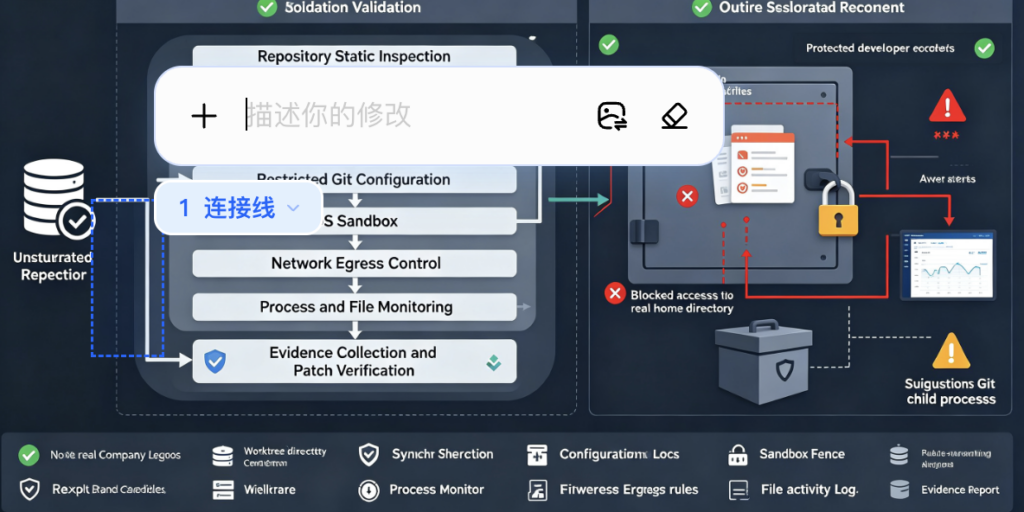
A professional validation process should confirm the patch without reproducing host compromise.
Step One — Define the Authorization Boundary
Document:
- The test host
- The isolated VM or container
- The allowed repository
- The allowed filesystem root
- The expected Claude Code versions
- The test credentials
- The network policy
- The cleanup procedure
- The evidence to retain
Do not test on an employee’s daily workstation.
Step Two — Build a Disposable Environment
Use a VM snapshot or isolated host with:
- No production credentials
- No personal SSH keys
- No cloud CLI session
- No browser profile
- No corporate VPN
- No host Docker socket
- No shared home-directory mount
- Restricted outbound network
- Full process and filesystem telemetry
Create a synthetic home directory that contains no real data.
Step Three — Verify Version Behavior
Test at least:
- One known affected version in an isolated lab
- Version 2.1.163
- The current approved enterprise version
Confirm that .git is rejected as an agent-created worktree name in fixed builds.
Do not needlessly run the researcher’s full payload. A negative validation can stop at worktree-name rejection.
Step Four — Test Reserved Names
The test set should include:
.git
.GIT
.
..
../outside
a/b
a\b
.git.
.git
Unicode-normalized equivalents
Expected behavior should be deterministic rejection before any filesystem or Git changes occur.
Step Five — Test Symlink Containment
Create a disposable authorized root and a simulated outside directory.
Test whether:
- Worktree creation follows a symlinked parent
- Worktree entry accepts a path outside the root
- Cleanup follows external symlinks
- Restoring a session trusts stale worktree metadata
- A symlink can be swapped between validation and creation
The validation objective is containment, not code execution.
Step Six — Test Git Configuration Isolation
Use harmless marker scripts in the disposable lab to determine whether supposedly read-only Git operations execute repository-controlled helpers.
For example, an fsmonitor test helper can write a timestamp into a temporary evidence directory rather than launching a shell payload or modifying user files.
The control passes only if the environment’s policy matches its intended threat model. Some trusted development environments may intentionally support fsmonitor; untrusted-repository environments should not silently execute repository-controlled helpers.
Step Seven — Test Shell Startup Ordering Safely
Do not modify the real .zshenv.
Set HOME या ZDOTDIR to a synthetic temporary directory and use a harmless marker file to observe which startup files are read and when. Confirm that sandbox establishment occurs before any untrusted startup content can execute, or launch the shell with startup-file loading disabled when appropriate.
Step Eight — Capture Evidence
Record:
- Claude Code version
- Git version
- Operating system
- Filesystem type
- Sandbox configuration
- Permission mode
- Worktree tool inputs
- Canonical path results
- Symlink state
- Git configuration origins
- Process tree
- Files written
- Network attempts
- Approval decisions
- Patch result
An agent security finding without execution evidence is easy to misinterpret. Conversely, a successful marker write without a clear security-boundary explanation may exaggerate impact.
For teams conducting authorized AI-assisted vulnerability validation, an AI pentest workflow from Penligent can be used to organize target scope, validation steps, tool evidence, and repeatable reporting. The important requirement is that the Agent itself remains inside a separately enforced lab boundary and that every conclusion is supported by captured commands, paths, and results.
Step Nine — Retest the Entire Chain of Assumptions
Do not stop after confirming that .git is blocked.
Regression tests should cover:
- Reserved-name validation
- Canonical path containment
- Symlink rejection
- External worktree navigation
- Git configuration execution
- Worktree cleanup
- Session restoration
- Shell startup behavior
- Project-level settings
- Credential reads
- Network egress
- Unsandboxed fallback
The disclosed exploit used one path through a larger design space. A patch that closes only one string without testing the surrounding invariants may leave adjacent routes.
Common Defensive Mistakes
Treating the Update as the Entire Incident Response
Updating removes current exposure but does not answer whether compromise already occurred.
Teams must review historical version use, suspicious repositories, shell startup changes, worktree metadata, credentials, and endpoint telemetry.
Calling the Vulnerability Low Risk Because Cloning Is Required
The user action is common and expected. The right risk question is not whether interaction exists, but how often users perform that interaction with untrusted content and what privileges their environment carries.
Blaming the Model Instead of the Runtime
A better model may refuse some malicious instructions. It cannot replace secure path handling, process isolation, credential scoping, and deterministic authorization.
Treating Read-Only Mode as a Hard Boundary
Read-only labels usually describe the intended effect of top-level tools. They do not automatically account for shell parsing, Git configuration, helper processes, filesystem side effects, caches, lock files, or startup behavior.
The related Claude Code command-validation CVEs show why read-only classification must be backed by OS-level controls. (गिटहब)
Treating Worktrees as Containers
Worktrees separate checkouts. They generally share a repository and operate under the same user account.
A worktree does not prevent an agent from reading home-directory credentials, reaching the network, using a Docker socket, or changing shared Git metadata unless separate controls enforce those boundaries.
Reviewing Source Code but Ignoring Agent Configuration
Security review must include:
CLAUDE.md
CLAUDE.local.md
.claude/settings.json
.claude/settings.local.json
.claude/rules/
.claude/agents/
.claude/skills/
.mcp.json
Git configuration
hooks
helper scripts
worktree metadata
In an agentic environment, these files can influence execution, permissions, memory, networking, and tool access.
Allowing Broad Home-Directory Reads
An agent cannot exfiltrate a credential it cannot read. Blocking access to the real home directory greatly reduces the value of many prompt-injection chains.
Using Broad Network Allowlists
A broad domain such as गिटहब डॉट कॉम may still support attacker-controlled repositories, issues, gists, release assets, or other content. Anthropic’s documentation warns that broad network allowances can create exfiltration paths and that the default proxy does not inspect encrypted content. (क्लॉड)
Use precise destinations and a separate egress control where stronger guarantees are required.
Logging Only the Final Chat Response
The final model response may look normal even after harmful tool activity.
Record:
- Tool name
- Full parameters
- Working directory
- Canonical path
- Parent process
- Child processes
- Filesystem operations
- Network destinations
- Approval source
- Policy decision
- Model-visible input provenance
Agent security investigations are execution investigations, not only conversation reviews.
Running Public Exploit Code on a Real Workstation
A public repository may include additional payloads, modified releases, or unsafe setup scripts. Reproduction belongs in a disposable environment with no valuable credentials.
Broader Lessons for Agentic Coding Security
Assume Prompt Injection Will Eventually Succeed
Prompt injection defenses can reduce risk, but the architecture should remain safe when hostile instructions influence the model.
The correct assumption is:
Untrusted content may control the next proposed tool call.
The system must then decide whether the effect is safe.
Separate Data From Authority
Repository content may explain how to build a project. It should not automatically grant authority to:
- Change sandbox settings
- Add MCP servers
- Modify hooks
- Expand filesystem access
- Read credentials
- Change network destinations
- Create external worktrees
- Disable approvals
- Execute startup configuration
Authority should come from user-controlled or administrator-controlled policy, not from the content being analyzed.
Validate Effects, Not Labels
“Enter worktree” is a label.
The effect may be:
Change cwd to /Users/alice
“Run git status” is a label.
The effect may be:
Execute an attacker-controlled fsmonitor command
“Read project configuration” is a label.
The effect may be:
Redirect authenticated API traffic to an attacker endpoint
Security controls must resolve each action into its concrete filesystem, process, credential, and network effects.
Use Multiple Independent Boundaries
A strong agent environment combines:
- Model-level prompt-injection resistance
- Tool allowlists
- User approvals
- Canonical path checks
- OS sandboxing
- Restricted filesystem mounts
- Credential isolation
- Environment scrubbing
- Egress filtering
- Process telemetry
- Disposable execution
- File integrity monitoring
No single layer should carry the entire security claim.
Make Privilege Temporary
Coding agents rarely need permanent access to all developer credentials.
Use:
- Short-lived cloud roles
- Repository-scoped tokens
- Read-only package credentials
- Ephemeral SSH certificates
- Dedicated test accounts
- Temporary artifact permissions
- Task-specific secrets
Destroy them after the session.
Treat Agent Tools as Security APIs
A tool such as CreateWorktree is not merely a convenience wrapper. It is a security-sensitive API accepting model-influenced input.
It needs:
- A strict schema
- Input normalization
- Reserved-value rejection
- Authorization
- Canonical path validation
- Race-resistant filesystem operations
- Auditable output
- Safe failure behavior
- Negative tests
- फ़ज़िंग
Natural-language instructions should never bypass those requirements.
अधिक जानकारी
- Anthropic’s GitHub security advisory for CVE-2026-55607 — The authoritative source for the affected range, patched version, severity, prerequisites, and high-level impact. (गिटहब)
- The NVD record for CVE-2026-55607 — Useful for CVSS comparison, CWE mapping, CPE data, publication dates, and vulnerability-management ingestion. (एनवीडी)
- Metnew’s technical write-up — The most detailed public explanation of the
.gitworktree collision, symlink pivot,fsmonitortrigger, home-directory registration, and.zshenvexecution sequence. (गिटहब) - Claude Code’s sandbox documentation — Explains current filesystem, network, credential, worktree, managed-policy, and platform behavior, including important limitations. (क्लॉड)
- Git’s worktree and configuration documentation — Essential for understanding shared worktree state and why settings such as
core.fsmonitorcan introduce executable behavior. (Git SCM)
अक्सर पूछे जाने वाले प्रश्न
What is CVE-2026-55607?
- It is a high-severity sandbox escape in Anthropic Claude Code.
- The vulnerability involved Git worktree path confusion, symlink manipulation, attacker-controlled Git configuration, and shell startup behavior.
- A malicious repository could use prompt injection to steer Claude Code through the required worktree operations.
- Successful exploitation could lead to code execution outside the intended project sandbox with the developer user’s host privileges. (गिटहब डॉट कॉम)
Which Claude Code versions are vulnerable?
- Versions 2.1.38 through 2.1.162 are affected.
- Version 2.1.163 contains the fix.
- Users should preferably install the current maintained release because later versions also include additional sandbox and credential-protection improvements.
- Check every installation path, including local terminals, IDE environments, containers, CI runners, and alternate Node.js environments. (गिटहब)
Can CVE-2026-55607 be exploited remotely without user interaction?
- It is not a conventional zero-click network service vulnerability.
- Reliable exploitation requires a user to obtain a malicious repository and run a vulnerable Claude Code version against it.
- The repository must contain content capable of influencing the agent.
- The worktree, Git, filesystem, and shell sequence must complete successfully.
- The attack is still operationally serious because cloning and processing unfamiliar repositories is a normal developer workflow. (गिटहब डॉट कॉम)
Does read-only mode prevent the attack?
- No absolute guarantee should be inferred from the phrase “read-only.”
- The disclosed research demonstrated the chain from a highly restricted Bash configuration.
- Git commands that appear read-oriented may still execute configured helpers such as
fsmonitor. - Worktree tools can change execution context even without an obvious arbitrary-write command.
- OS-level confinement, canonical path validation, Git configuration control, and credential isolation are still required. (गिटहब)
How can I tell whether a repository is suspicious?
- Review
CLAUDE.mdऔर.claudefiles before launching the agent. - Look for instructions involving
.gitworktree names, unusual worktree transitions, repeatedगिट स्थितिcommands, or demands to avoid inspection. - Check for root-level Git metadata such as
HEAD,config,objects, औरrefs. - Search for
core.fsmonitor, executable Git helpers, and unusual hooks. - Resolve symlinks under
.claude/worktrees. - Inspect
git worktree list --porcelainfor paths outside the project. - Treat these as investigation signals rather than standalone proof of compromise.
What should I do if I ran a vulnerable version against an untrusted repository?
- Stop using the repository on the affected host.
- Update Claude Code.
- Preserve the repository and relevant endpoint evidence.
- Inspect shell startup files, home-directory Git metadata, worktree records, Git configuration, process telemetry, and network logs.
- Isolate the endpoint when host-level execution is plausible.
- Rotate credentials that may have been readable or exported during the session.
- Rebuild the endpoint when the integrity of the developer environment cannot be established.
Is updating Claude Code enough?
- Updating is the essential first remediation step.
- It prevents future exploitation through the disclosed vulnerable version.
- It does not remove persistence or recover credentials already exposed before the update.
- Organizations should investigate historical use of affected versions.
- Longer-term controls should include isolated handling of untrusted repositories, managed sandbox policy, credential denial, restricted network access, shell-startup monitoring, and full tool-call telemetry.
Closing Judgment
CVE-2026-55607 was patched by rejecting the dangerous worktree condition, but its significance is larger than one reserved directory name.
The vulnerability connected a repository instruction, an agent decision, a worktree abstraction, a Git configuration feature, a symlink, a user home directory, and a shell startup rule. None of those components should be evaluated only in isolation. Together they created a path from untrusted text to host-level execution.
That is the defining security challenge of agentic coding systems. They turn text into actions and connect abstractions that traditional security controls often review separately.
The defensible architecture is not one that assumes the agent will always recognize a malicious repository. It is one in which the agent can be fully manipulated and still cannot convert a worktree name, Git helper, configuration file, network request, or shell command into authority outside the task’s explicitly defined boundary.
 Hindi
Hindi  English
  German
  French
  Spanish
  Portuguese
  Japanese
  Korean
  Arabic
  Turkish
  Hebrew