
Microsoft has patched an actively exploited Windows Shell zero-day vulnerability tracked as CVE-2026-96951, addressing a security feature bypass that can allow malicious files to evade one of Windows’ most important defenses against untrusted content. The vulnerability, disclosed during the October 2026 Patch Tuesday release, carries a CVSS 3.1 score of 8.8 and has already been added to the U.S. Cybersecurity and Infrastructure Security Agency’s Known Exploited Vulnerabilities (KEV) catalog.
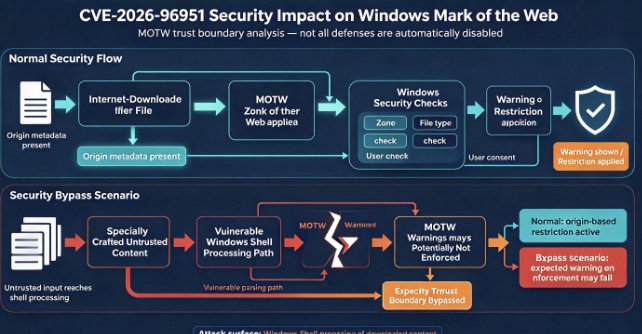
Unlike conventional remote code execution vulnerabilities that directly expose a network service, CVE-2026-96951 targets a trust boundary in the Windows user environment. An attacker can use a specially crafted file and social engineering to bypass Mark of the Web (MOTW), the security mechanism that identifies content originating from potentially untrusted locations. Successful exploitation can prevent Windows and associated applications from applying the security warnings and restrictions normally associated with downloaded files.
The vulnerability is particularly concerning because Windows Shell processes everyday user interactions with files, shortcuts, and applications. A security bypass in this environment can make malicious content appear less suspicious at precisely the moment when Windows should be warning the user about potential danger. According to Microsoft’s official CVE-2026-96951 advisory, the underlying weakness involves improper neutralization of special command elements, classified as CWE-77.
The urgency is not hypothetical. Tenable’s October 2026 Patch Tuesday analysis confirms that Microsoft identified exploitation in the wild before the vulnerability was publicly patched. Security teams should therefore approach CVE-2026-96951 as an active threat rather than a routine vulnerability-management item.
What Is CVE-2026-96951?
CVE-2026-96951 is a Windows Shell security feature bypass vulnerability that Microsoft addressed on October 13, 2026. The flaw is associated with improper neutralization of special elements used in commands, a weakness classified under CWE-77. In practical terms, this type of vulnerability arises when specially crafted input is not handled safely before being interpreted by a component responsible for executing or processing commands.
The vulnerability affects the security mechanisms Windows uses to distinguish potentially dangerous files from trusted local content. According to Microsoft’s CVE record, an unauthenticated remote attacker can exploit the weakness to bypass a security feature, although successful exploitation requires user interaction.
| Vulnerability attribute | विवरण |
|---|---|
| सीवीई आईडी | CVE-2026-96951 |
| Vulnerability name | Windows Shell Security Feature Bypass |
| प्रभावित घटक | Microsoft Windows Shell |
| गंभीरता | Important (Microsoft), High (CVSS) |
| CVSS v3.1 score | 8.8 |
| CWE classification | CWE-77, Command Injection |
| Attack vector | Network |
| Privileges required | None |
| User interaction | Required |
| Exploited in the wild | Yes |
| Public disclosure date | October 13, 2026 |
| CISA KEV status | Listed October 13, 2026 |
| उपचार | October 2026 Windows security updates |
The CVSS vector, CVSS:3.1/AV:N/AC:L/PR:N/UI:R/S:U/C:H/I:H/A:H, is particularly revealing. It indicates that the vulnerability can be reached through a network-delivered attack, requires no prior privileges, and has relatively low attack complexity, but cannot be exploited without some form of user interaction.
That distinction matters. CVE-2026-96951 is not a conventional unauthenticated network-service vulnerability that automatically compromises an exposed machine when a malicious packet arrives. The publicly described attack involves persuading a user to interact with specially crafted content, making phishing and other socially engineered delivery mechanisms especially relevant.
The vulnerability can still produce serious consequences. Once an attacker successfully bypasses the intended trust controls, additional malicious behavior may occur with fewer security prompts or restrictions. Depending on the delivered payload, the user’s permissions, and other security defenses, the attack could become an entry point for malware execution, credential theft, or broader endpoint compromise.
How CVE-2026-96951 Bypasses Mark of the Web
Understanding CVE-2026-96951 requires understanding Mark of the Web, commonly abbreviated as MOTW.
MOTW is a Windows security mechanism that identifies files obtained from potentially untrusted sources, including internet downloads and email attachments. It does not function as a malware scanner. Instead, it provides origin information that Windows and other applications can use when deciding whether to apply additional restrictions.
When a compatible application downloads a file onto an NTFS volume, Windows can associate that file with an alternate data stream named Zone.Identifier. This stream stores information identifying the security zone from which the file originated.
For example, a downloaded document may contain metadata resembling the following:
[ZoneTransfer]
ZoneId=3
A ZoneId value of 3 identifies content associated with the Internet zone. Other values identify local, intranet, trusted, or restricted security zones.
Although this metadata is not normally visible in Windows File Explorer, it is important to the operating system’s security decisions. Microsoft Office uses MOTW information when determining whether to open documents in Protected View or restrict macros from internet-originated files. Windows SmartScreen also uses origin information when evaluating potentially unsafe executable files.
Microsoft explains the security significance of this mechanism in its documentation on blocking Office macros from the internet. The documentation describes how the presence or absence of MOTW can influence whether Office applies additional protection to downloaded documents.
A successful MOTW bypass can interfere with this chain of protection.
If Windows fails to preserve or correctly interpret the information identifying a file’s untrusted origin, downstream security controls may not recognize the content as internet-sourced. In some situations, this can allow malicious content to avoid the warnings or restrictions that would otherwise apply.
For CVE-2026-96951, CrowdStrike’s October 2026 vulnerability analysis identifies the bypass of MOTW protections as the central security impact. The analysis explains why the flaw is especially attractive to attackers who depend on victims opening files delivered through email, messaging platforms, or web downloads.
This does not mean that every security product is automatically disabled or that every malicious file will execute successfully. Antivirus scanning, endpoint detection and response, application control, and behavioral monitoring can still prevent an attack. The important point is that one of Windows’ established trust signals may no longer provide its intended protection.
The Trust Boundary Behind the Vulnerability
The security issue can be understood as a failure at the boundary between untrusted content and trusted execution.
Under normal conditions, a file obtained from the internet is treated differently from a locally created file. Windows and supporting applications can use information about its origin to enforce additional checks before permitting sensitive operations.
The basic trust relationship looks like this:
File received from an untrusted source
                |
                v
    Origin information evaluated
                |
                v
       MOTW protections applied
                |
                v
 SmartScreen / Office security checks
                |
                v
     User interaction or blocking
CVE-2026-96951 creates an opportunity for an attacker to interfere with this expected behavior. The important security failure is not merely that a command or file is processed incorrectly, but that Windows can fail to enforce a boundary intended to protect users from external content.
For security engineers, this is a reminder that file-origin information should be regarded as one layer of protection rather than definitive evidence that a file is safe. If a security architecture depends entirely on MOTW being present and correctly interpreted, an attacker who bypasses that mechanism may encounter significantly fewer obstacles.
CVE-2026-96951 Exploit: How an Attack Could Work
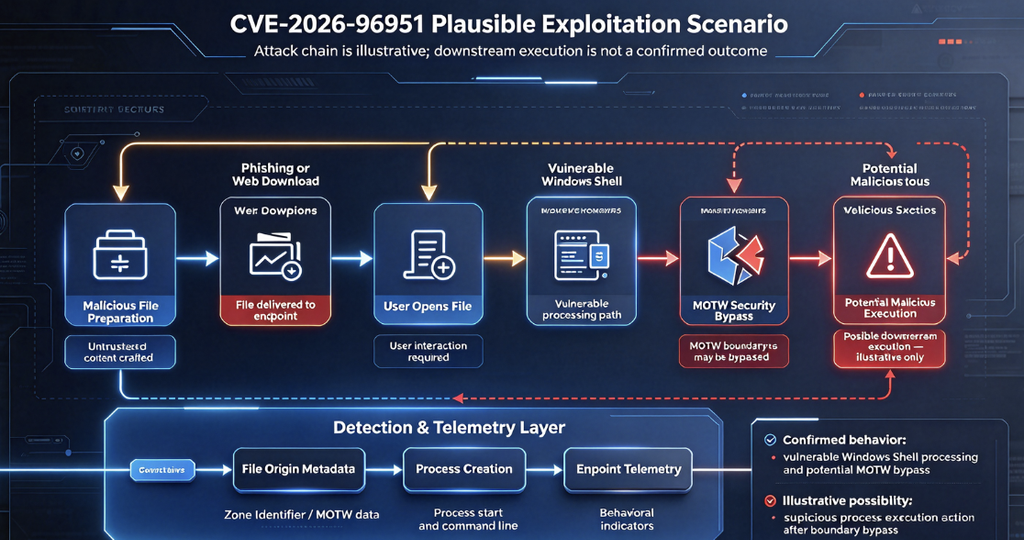
Microsoft has confirmed exploitation of CVE-2026-96951, but the complete technical details of the observed attacks have not been publicly established. In particular, the available official disclosure does not identify a specific threat actor, malware family, campaign infrastructure, or complete exploit chain.
Nevertheless, the confirmed vulnerability behavior and the known role of Windows Shell make it possible to describe the broad attack sequence without inventing details about the incidents.
An attacker first needs to deliver malicious content to a target using a channel that supports file-based interaction. This could involve an email attachment, an instant message, or a malicious download offered through a website. The attacker’s objective is to persuade the recipient to open or interact with the specially prepared content.
The malicious file must then reach a Windows Shell processing path affected by the vulnerability. The core issue described in the CVE involves unsafe handling of specially constructed command elements. Successful exploitation can cause the relevant security feature to be bypassed, weakening the protections normally associated with the file’s untrusted origin.
Once the expected security checks have been bypassed, the next stage depends on the content being delivered and the victim’s environment. The attacker may attempt to launch a malicious executable, initiate script execution, or perform other unauthorized activity.
A representative attack sequence would be:
Attacker prepares malicious content
                |
                v
  Phishing email or malicious download
                |
                v
       Victim opens the file
                |
                v
     Vulnerable Windows Shell
                |
                v
      MOTW security bypass
                |
                v
 Expected warnings may not appear
                |
                v
     Malicious payload execution
                |
                v
 Possible persistence or data theft
This sequence is an analytical model of the attack opportunity, not a reconstruction of a publicly documented CVE-2026-96951 intrusion.
The difference is important because a security feature bypass is not necessarily equivalent to full system compromise. The exploit may remove a particular barrier while additional operations are still necessary to execute malicious code or achieve the attacker’s final objective.
Technical Clues From Cisco Talos Detection Rules
One of the more useful technical indicators comes from Cisco Talos’ Snort detection coverage.
The Snort rule documentation for SID 67319 associates CVE-2026-96951 with Windows settings files that reference Windows Terminal. Its explanation describes a situation in which interaction with such files may fail to provide appropriate indications of their web origin and could result in arbitrary command execution.
Additional related rule documentation, including Snort SID 67320, describes detection of web traffic carrying suspicious Windows settings files containing Terminal references.
This provides a more specific investigative lead than the general vulnerability description alone. It suggests that defenders should pay particular attention to unusual settings-file delivery and interactions involving Windows Terminal, especially when those interactions originate from downloaded or externally supplied content.
However, a detection signature is not a substitute for a complete vendor-published root-cause analysis. The Talos rules should not be interpreted as proof that every exploitation attempt uses an identical file format, exact command sequence, or delivery mechanism.
The practical benefit is defensive: organizations using compatible Snort-based network inspection can review whether the relevant signature coverage is enabled and investigate any alerts in conjunction with endpoint telemetry.
Is CVE-2026-96951 Being Exploited in the Wild?
Yes. Active exploitation is confirmed.
Microsoft identified CVE-2026-96951 as exploited when releasing its October 13, 2026 security updates. Tenable independently highlighted it as an exploited Windows Shell zero-day in its Patch Tuesday analysis, and the Center for Internet Security’s October 13 security advisory likewise reported Microsoft’s exploitation confirmation.
CISA added CVE-2026-96951 to its Known Exploited Vulnerabilities catalog on October 13, 2026. The catalog identifies the vulnerability as Microsoft Windows Command Injection Vulnerability and sets a federal remediation due date of October 16, 2026, subject to the applicable directive requirements.
Readers can verify its status through the official CISA Known Exploited Vulnerabilities Catalog.
These confirmations make CVE-2026-96951 materially different from a vulnerability that has only been described theoretically. At least some real-world exploitation has already occurred, even though public reporting does not establish the scale of the activity.
As of October 14, 2026, there is insufficient verified public evidence to identify the responsible attackers, estimate the number of compromised organizations, or attribute the exploit to a particular ransomware operation.
That uncertainty should not delay patching. Exploitation status is already established, and the absence of public campaign details does not reduce the risk associated with vulnerable systems.
Which Windows Versions Are Affected by CVE-2026-96951?
CVE-2026-96951 affects multiple Windows client and server releases. Organizations should consult the Microsoft Security Update Guide for their exact operating system edition, servicing channel, and applicable cumulative update.
The following table summarizes relevant October 2026 Windows security updates.
| Windows version | October 2026 security update |
|---|---|
| Windows 11 24H2, 25H2, 26H2 | KB5127648 |
| Windows 11 23H2 | KB5126653 |
| Windows 11 26H1 | KB5127646 |
| Windows 10 21H2 / 22H2, eligible servicing channels | KB5126657 |
| Windows Server 2025 | KB5126646 |
| Windows Server 2022 | KB5126655 |
| Windows Server 2019 | KB5126651 |
| Windows Server 2016 | KB5126868 |
| Windows Server 2012 R2 | KB5126836, where applicable |
Microsoft’s official documentation confirms that KB5127648 covers Windows 11 versions 24H2, 25H2, and 26H2, while KB5126657 covers applicable Windows 10 servicing channels. Microsoft also documents the corresponding server updates, including KB5126646 for Windows Server 2025.
The listed updates should be treated as release-specific references, not as a universal patch list suitable for every machine. Some older Windows editions require enrollment in an Extended Security Updates program or another supported servicing arrangement to continue receiving security fixes.
Windows 11 users should also consider lifecycle status. Microsoft states that Windows 11 24H2 Home and Pro editions reached their end of updates with the October 2026 release. Installing the final update addresses vulnerabilities covered by that release, but it does not provide ongoing protection against future newly discovered vulnerabilities.
For enterprises, the appropriate remediation strategy must therefore include both patch installation and operating system lifecycle management.
How to Check Whether a Windows System Is Vulnerable
A reliable exposure assessment starts with identifying the operating system build and determining whether the applicable October 2026 cumulative update, or a later superseding update, has been installed.
On a Windows workstation or server, administrators can inspect operating system information through PowerShell:
Get-CimInstance Win32_OperatingSystem |
Select-Object Caption, Version, BuildNumber
This displays the installed Windows product, version, and build number. Administrators can compare those values with the fixed builds identified in Microsoft’s release documentation.
To review installed Windows updates, use:
Get-HotFix |
Sort-Object InstalledOn -Descending |
Select-Object HotFixID, InstalledOn, Description
This command retrieves installed hotfix information and sorts the results by installation date. It is useful for confirming recent servicing activity, although the returned records may not fully represent every package or cumulative-update relationship.
For example, a system running Windows 11 24H2 should be checked against Microsoft’s October 2026 update information for KB5127648 and the corresponding OS build. Windows Server 2022 deployments should similarly be checked against KB5126655 or a later cumulative update that includes the same security fixes.
The absence of a specific October KB number does not necessarily mean a system remains vulnerable, because later cumulative updates can supersede earlier packages. Administrators should verify the effective build and servicing state rather than relying exclusively on whether an individual KB appears in the update history.
For larger environments, this verification can be performed through Microsoft Intune, Windows Server Update Services, Microsoft Configuration Manager, or an enterprise vulnerability management platform.
How to Detect Possible CVE-2026-96951 Exploitation
Detecting exploitation is more difficult than verifying patch status.
Because CVE-2026-96951 involves a bypass of file-origin security controls, successful exploitation may not generate a unique Windows event explicitly identifying the CVE. Security teams must instead correlate evidence of suspicious file delivery, file handling, process execution, and subsequent behavior.
The most useful investigation begins with files that originated from external sources and were opened shortly before unusual endpoint activity.
Inspect Mark of the Web Metadata
Windows administrators can examine the alternate data streams associated with an individual file.
For example:
Get-Item -LiteralPath "C:\Users\Public\Downloads\sample.txt" `
-Stream *
To read the Mark of the Web information, when the stream exists:
Get-Content `
-LiteralPath "C:\Users\Public\Downloads\sample.txt" `
-Stream Zone.Identifier
These commands are read-only inspection techniques. The sample path should be replaced with the actual file being investigated.
A properly tagged internet-originated file may contain a ZoneId=3 value. Investigators can use this information to determine whether Windows retained an expected indication of the file’s origin.
However, a missing Zone.Identifier stream is not sufficient evidence of CVE-2026-96951 exploitation. Legitimate file operations can remove or fail to preserve alternate data streams, including transfers through file systems that do not support NTFS alternate data streams.
The key investigative question is whether a suspicious file unexpectedly lacks the origin metadata it should have retained, particularly when accompanied by unusual execution behavior.
Hunt for Suspicious Process Execution
Endpoint telemetry becomes more valuable when investigators can connect suspicious file operations to unexpected process creation.
Windows Shell normally participates in launching applications, opening files, and invoking registered handlers. These activities are legitimate, which means detecting malicious exploitation requires examining the context of individual events.
An investigator might search for downloaded content that was followed by unexpected execution of command interpreters, scripting engines, or unusual child processes.
For example, a malicious attachment opened from a user’s Downloads directory followed almost immediately by an unexpected PowerShell process could justify further analysis. Additional evidence might include network connections to unfamiliar infrastructure, execution of unsigned binaries, or persistence mechanisms created shortly after the original file was opened.
These behaviors are not specific proof of CVE-2026-96951. They are useful indicators for a broader investigation involving possible file-based initial access.
Microsoft’s Sysmon documentation identifies several event types that can help reconstruct this activity, including Process Create (Event ID 1), File Create (Event ID 11), and File Create Stream Hash (Event ID 15).
Event ID 15 is particularly relevant because it can record the creation of named alternate data streams, including Zone.Identifier, when the appropriate Sysmon configuration is enabled.
Correlate Network and Endpoint Evidence
Where network telemetry is available, investigators should correlate endpoint events with file-download activity, email attachments, web gateway logs, and intrusion detection alerts.
Cisco Talos’ CVE-specific Snort signatures provide one possible starting point. Alerts involving suspicious Windows settings files or Terminal references should be reviewed alongside records of downloaded files and process execution.
A high-confidence investigation would attempt to establish whether the suspicious file arrived from an untrusted location, whether the relevant Windows host was unpatched, and whether the user’s interaction was followed by unexpected code execution.
For enterprise incident responders, preserving the original files, file hashes, download metadata, process timelines, and relevant network events is preferable to immediately deleting artifacts without examination.
Why a Windows Shell Security Feature Bypass Matters
The practical danger of CVE-2026-96951 is that it weakens a security mechanism users rarely notice until it protects them.
Modern attacks frequently rely on legitimate applications performing dangerous operations after receiving malicious input. Attackers do not always need to exploit a complex memory corruption flaw when they can instead manipulate a trusted component into processing malicious content in an unsafe way.
Security feature bypass vulnerabilities are valuable because they reduce friction within an attack chain. A malicious file that would normally trigger a warning may become easier to launch. A document that should be restricted based on its origin may receive different treatment. An attacker may be able to move from social engineering to malicious execution without encountering the expected defensive checks.
This explains why MOTW bypasses have repeatedly appeared in threat intelligence reporting.
The MITRE ATT&CK framework tracks Mark-of-the-Web Bypass as technique T1553.005 under Subvert Trust Controls. It documents how adversaries abuse file formats and handling behaviors to avoid security decisions based on downloaded-file origins.
MITRE also describes broader historical abuse involving compressed files, archives, and disk images whose contents may not retain the same origin metadata as their original containers. These are established examples of the broader technique, not confirmed delivery mechanisms for CVE-2026-96951.
The distinction matters because multiple unrelated implementation weaknesses can produce similar security outcomes. Two vulnerabilities may both bypass MOTW while requiring different file formats, exploitation conditions, and vulnerable code paths.
For defenders, the common lesson is that downloaded-file origin controls should be supplemented with application restrictions, endpoint monitoring, and explicit policies governing untrusted content.
CVE-2026-96951 and Previous Windows Shell Zero-Days
CVE-2026-96951 is not the first Windows Shell vulnerability exploited during 2026.
Tenable’s October 2026 analysis identifies two earlier Windows Shell security feature bypass vulnerabilities that were also exploited in the wild: CVE-2026-21510, patched in February 2026, and CVE-2026-32202, patched in April 2026.
These cases reflect a recurring security challenge. Windows Shell sits at the intersection of file handling, user interaction, application launching, and the interpretation of externally supplied content.
An attacker who finds an implementation weakness at this boundary may be able to manipulate trusted Windows behavior without directly attacking a network-facing service.
The recurrence of Windows Shell security bypasses also highlights an important vulnerability-management issue. An organization that patched earlier Shell vulnerabilities should not assume those updates protect against CVE-2026-96951. Each CVE requires verification against the applicable security update.
Security teams should therefore maintain a distinct record of affected systems, patch coverage, and suspicious activity associated with each vulnerability, even when the vulnerabilities share similar names or security impacts.
How to Patch CVE-2026-96951
Microsoft released security updates addressing CVE-2026-96951 on October 13, 2026. Installing the applicable update is the primary remediation.
For individual Windows users, the simplest approach is to open Windows Settings, navigate to Windows Update, check for available security updates, install the applicable cumulative update, and restart the device when required.
Organizations should deploy the fixes through their established endpoint and server management systems.
Patch prioritization should take account of the vulnerability’s confirmed exploitation status, the affected system’s role, and its exposure to externally supplied files.
Employee workstations are an immediate concern because they routinely process downloaded files, browser content, email attachments, and instant messages. Security administrators should pay particular attention to systems used by staff who frequently receive external documents, including finance departments, recruiting teams, customer support personnel, and privileged users.
Administrative workstations also deserve priority. Even when the exploitation mechanism itself does not confer elevated privileges, compromise of a system used by a privileged employee can create opportunities for later abuse of credentials or administrative access.
Windows Server systems should be assessed according to how they handle untrusted files and whether interactive users or automated workflows process externally supplied content. Server Core installations must not automatically be excluded merely because they lack the same desktop experience as a typical workstation.
Most importantly, security teams should avoid treating a successful update deployment as proof that no compromise previously occurred.
If exploitation happened before the patch was installed, applying the update does not automatically remove malware, reverse unauthorized changes, or invalidate stolen credentials.
Mitigations Beyond Installing the Patch
Although patching is the correct response to CVE-2026-96951, additional defensive controls can reduce the likelihood that file-based attacks result in successful compromise.
Microsoft Defender Antivirus or another properly configured endpoint security product should remain enabled and updated. Real-time scanning and behavioral detection can still identify suspicious payloads even when a file-origin security feature has been bypassed.
Microsoft Defender SmartScreen should also remain enabled where applicable. A vulnerability affecting MOTW-related protection does not justify disabling SmartScreen or other endpoint safeguards. Maintaining those defenses preserves their effectiveness against unrelated threats and execution paths.
Organizations using Microsoft Defender for Endpoint should evaluate Attack Surface Reduction policies that restrict executable content delivered through email, suspicious script execution, and other unwanted behaviors. These controls should be deployed with appropriate testing, since application compatibility and business workflows vary across environments.
Application control mechanisms such as Windows Defender Application Control or App Control for Business can provide another layer of protection by limiting which executables and scripts are permitted to run.
The effectiveness of these controls depends on configuration. They should be considered defense-in-depth measures, not validated substitutes for the October 2026 security updates.
Email security gateways and secure web gateways can further reduce exposure by identifying suspicious attachments, scanning downloaded content, and blocking malicious files before they reach endpoints.
Finally, organizations should strengthen logging and incident response procedures. Preserving download metadata, recording process command lines, and maintaining visibility into suspicious parent-child process relationships can make the difference between detecting an attempted compromise and discovering it after an attacker has established persistence.
CISA KEV Listing Makes CVE-2026-96951 a High-Priority Vulnerability
CISA’s decision to include CVE-2026-96951 in the Known Exploited Vulnerabilities catalog provides an important prioritization signal.
CVSS scores describe technical vulnerability characteristics and potential impact, but they do not by themselves establish whether attackers are exploiting a vulnerability. KEV inclusion adds evidence that real exploitation has occurred.
For this CVE, that distinction is especially useful. A security feature bypass with a CVSS score of 8.8 might otherwise be placed below certain critical remote code execution vulnerabilities in a purely severity-based patch queue.
But risk-based prioritization should consider both exploitation evidence and the operational importance of the affected systems.
Under CISA’s applicable federal requirements, the October 16, 2026 remediation date gives affected federal civilian agencies a particularly short response window. Private organizations are not automatically subject to the same federal deadlines, but the catalog remains a useful source for prioritizing urgent remediation.
The appropriate response is to identify vulnerable assets, deploy applicable updates, verify remediation, and determine whether evidence of exploitation requires forensic investigation.
Frequently Asked Questions About CVE-2026-96951
Is CVE-2026-96951 a zero-day vulnerability?
Yes. CVE-2026-96951 was exploited in the wild before Microsoft publicly released the October 13, 2026 security fix. That makes it an exploited zero-day at the time of disclosure. Once patches became available, the vulnerability was no longer unpatched by the vendor, but systems that have not installed the relevant updates remain at risk.
Does CVE-2026-96951 allow remote code execution?
Microsoft formally classifies CVE-2026-96951 as a security feature bypass vulnerability rather than a standalone remote code execution vulnerability. However, bypassing MOTW-related protections can facilitate the execution of malicious content. Cisco Talos’ associated detection documentation also describes a potential outcome involving arbitrary command execution. Exploitation requires user interaction, and the publicly available information does not establish that simply sending network traffic to a Windows machine is sufficient to execute code.
Can CVE-2026-96951 be exploited without user interaction?
No, not according to the published CVSS vector. The vulnerability is classified as requiring user interaction, represented by UI:R. An attacker would typically need the target to interact with malicious content. This requirement does not make the vulnerability low-risk, because social engineering remains a common and effective method of reaching users.
Is there a public proof-of-concept exploit for CVE-2026-96951?
As of October 14, 2026, a complete, independently verified public proof-of-concept exploit has not been established in the sources reviewed for this article. The lack of a public exploit is separate from the confirmed exploitation status. Microsoft and CISA have already established that attackers exploited the vulnerability in real-world conditions.
Is CVE-2026-96951 associated with ransomware?
There is currently no verified public attribution connecting CVE-2026-96951 to a specific ransomware campaign. CISA’s KEV information identifies known ransomware campaign use as unknown. That status should not be interpreted as evidence that the vulnerability cannot be used in ransomware operations, only that such a connection has not been established in the available reporting.
How can administrators determine whether a machine is protected?
Administrators should identify the installed Windows release and operating system build, then compare that information against Microsoft’s applicable October 2026 security updates or later superseding cumulative updates. Patch inventories should be supplemented with endpoint telemetry if there is reason to suspect the machine processed malicious content before remediation.
Does disabling Windows SmartScreen fix CVE-2026-96951?
No. Disabling SmartScreen would remove a security control rather than address the underlying vulnerability. The appropriate remediation is to install the relevant Microsoft security update and maintain the remaining endpoint protection mechanisms.
Can antivirus software prevent attacks exploiting CVE-2026-96951?
Antivirus and endpoint detection products may detect or block malicious payloads used in attacks involving this vulnerability. However, no general guarantee can be made that antivirus alone will prevent exploitation. The most effective defense combines patching, endpoint protection, application control, and monitoring.
Final Assessment: Why CVE-2026-96951 Deserves Immediate Attention
CVE-2026-96951 demonstrates why security feature bypass vulnerabilities should not be dismissed simply because they are not classified as critical remote code execution flaws.
The vulnerability affects a widely used Windows component, undermines security decisions based on file origin, and was exploited before the public release of a patch. Its CVSS score of 8.8 reflects a serious technical weakness, while the confirmed exploitation and CISA KEV listing establish a concrete operational reason for urgent remediation.
The most important aspect of this vulnerability is the security boundary it targets. Mark of the Web is designed to help Windows and its applications distinguish downloaded content from trusted local files. When that distinction can be bypassed, attackers gain an opportunity to make malicious content move through normal user workflows with fewer protective restrictions.
Security teams should prioritize deployment of the October 2026 Windows cumulative updates, verify patch coverage across both workstations and servers, and investigate suspicious file-handling activity on systems that remained vulnerable.
The broader lesson extends beyond a single CVE: operating systems increasingly rely on metadata, origin tracking, and application-level trust decisions to control potentially dangerous content. Those controls are valuable, but they must be supported by independent layers of detection and prevention.
For organizations managing large Windows environments, CVE-2026-96951 is both an urgent patching priority and a reminder to evaluate how effectively their security architecture handles malicious content after an initial trust control fails.
Last updated: October 14, 2026. Exploitation intelligence, affected product information, and remediation guidance may change as Microsoft, CISA, and security researchers release additional findings.


 Hindi
Hindi  English
  German
  French
  Spanish
  Portuguese
  Japanese
  Korean
  Arabic
  Turkish
  Hebrew