
The most dangerous software supply chain attacks do not always begin with a malicious dependency, a vulnerable server, or an exploit against a widely deployed application. Sometimes, the attacker already possesses something far more useful: a legitimate developer’s credentials and the ability to modify the automation that builds, tests, and publishes software.
That is the central problem exposed by the GhostAction Attack, an ongoing credential-theft campaign targeting GitHub repositories through malicious GitHub Actions workflows. Instead of compromising GitHub’s infrastructure directly, attackers abuse existing repository permissions to introduce workflows that appear to perform routine security checks. Once executed, those workflows collect sensitive credentials and transmit them to attacker-controlled infrastructure.
The campaign was originally documented in September 2025, when GitGuardian identified malicious workflow injections affecting 817 public repositories associated with 327 GitHub users. Researchers attributed the theft of at least 3,325 secrets to that campaign, including credentials associated with package publishing, cloud infrastructure, and developer automation.
The threat reemerged prominently in 2026. On October 7, GitGuardian published evidence of another wave affecting 772 public repositories between August 31 and September 30. Two days later, security researchers at StepSecurity and Socket detailed an especially significant development: attackers had begun modifying the malicious workflows to search not only configured GitHub Actions secrets but also credentials embedded in repository files and historical Git commits.
The change is important because it expands the possible impact beyond current CI/CD configuration. A credential committed years earlier, subsequently deleted from the source tree, and still reachable through Git history may now be exposed by the same workflow.
For organizations relying on GitHub Actions to manage cloud infrastructure, publish packages, or deploy production applications, GhostAction demonstrates how one compromised maintainer identity can become an entry point into several otherwise unrelated systems.
The October 2026 findings also highlight a difficult security reality: an apparently legitimate GitHub commit can be malicious even when its author is a trusted maintainer and no software vulnerability has been exploited.
What Is the GhostAction Attack?
GhostAction is a GitHub Actions supply chain attack in which malicious actors use compromised repository access to insert credential-stealing automation into software projects. The campaign is characterized by unauthorized workflow changes, misleading security-related filenames, automated secret collection, and outbound connections to attacker-controlled servers.
The attack commonly introduces workflow files such as github_actions_security.yml, security-audit.yml, या security-check.yml beneath the .github/workflows/ directory. The filenames suggest that the additions improve repository security, but the code performs an entirely different function.
GitHub Actions is a legitimate automation platform. Developers use YAML files in this directory to define CI/CD processes, including builds, tests, deployments, container publishing, and software releases. Depending on the event that triggers a workflow, its repository permissions, and the secrets exposed to its jobs, an Actions runner may have access to credentials that ordinary repository visitors cannot read.
GhostAction turns that trusted automation capability against the project itself.
The attacker does not necessarily need to discover a flaw in GitHub Actions, bypass the platform’s secret-storage encryption, or exploit a vulnerable dependency. The crucial condition is obtaining sufficient authorization to modify a repository’s workflow definitions and cause the malicious workflow to execute in a context where valuable credentials are available.
This makes GhostAction fundamentally different from an ordinary source-code vulnerability. The primary security boundary being crossed is the boundary between a maintainer’s legitimate authority and an attacker’s unauthorized control of that authority.
A useful starting point is GitGuardian’s original GhostAction campaign investigation, which documents how legitimate GitHub identities were used to introduce credential-exfiltration workflows across hundreds of projects.
The campaign also has implications beyond the directly compromised repositories. Stolen PyPI, npm, container registry, or cloud deployment credentials can potentially enable attackers to compromise published software, upload unauthorized releases, or gain access to infrastructure outside GitHub. These are potential consequences of credential theft rather than evidence that every affected repository experienced downstream compromise.
GhostAction Attack Timeline: From September 2025 to October 2026
The October 2026 activity should not be interpreted as an entirely new attack with no historical connection. Researchers tracking GhostAction have identified related malicious workflows and infrastructure across multiple periods since its original discovery.
The distinction matters because reports discussing hundreds, thousands, or even tens of thousands of repositories do not necessarily describe the same observation window or use the same counting methodology.
| Period | Research findings | Reported scope |
|---|---|---|
| September 2025 | GitGuardian discovers GhostAction after investigating a malicious GitHub workflow associated with FastUUID. | 817 public repositories, 327 users, at least 3,325 stolen secrets |
| Late 2025 to early 2026 | Researchers later identify related payloads and changes in collection infrastructure. | Additional campaigns observed; counts vary by period |
| August 31 – September 30, 2026 | GitGuardian tracks another major wave involving credential-stealing workflows. | 772 repositories, 373 users and organizations, 2,577 targeted secret references |
| October 8, 2026 | Compromised maintainer accounts push more capable workflows into hundreds of repositories. | StepSecurity reports 345 repositories; Socket reports 346 |
| October 9, 2026 | Socket updates its investigation with evidence suggesting a substantially broader campaign. | More than 500 accounts and tens of thousands of repositories reported, with limited published counting detail |
Sources: GitGuardian’s October 2026 analysis, StepSecurity’s technical investigation, और Socket’s October incident report.
The 345-versus-346 discrepancy reflects the numbers published by the respective research teams. It should not be silently reconciled into a single confirmed count. Likewise, Socket’s much larger October 9 estimate should be treated as a broader research observation rather than added to GitGuardian’s September totals.
Importantly, 2,577 targeted secret references does not mean that 2,577 credentials were successfully stolen. GitGuardian reported that, among the September-wave workflow runs it analyzed, many never executed because they were awaiting approval. Its observed successful exfiltration count for that dataset was considerably smaller.
The October findings nevertheless confirm that GhostAction remained operational and that its credential-harvesting capabilities had expanded.
How the GhostAction Attack Works
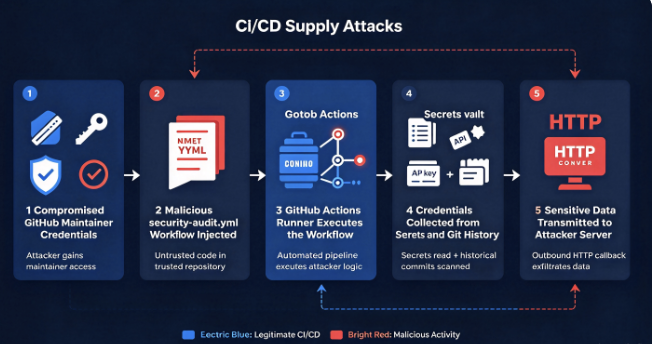
The GhostAction attack chain is relatively straightforward, but its simplicity is precisely what makes it effective. The attacker first acquires usable repository access, then introduces a malicious workflow disguised as security maintenance, triggers execution, and collects credentials from the CI/CD environment.
The October 2026 variant adds a second collection path: searching the repository’s working tree and historical commits for credentials that developers may have forgotten were ever committed.
Understanding the full sequence helps explain why conventional vulnerability scanning and dependency monitoring may fail to identify the initial compromise.
Stage 1: Compromising a GitHub Maintainer Account
The GhostAction attack begins with access to a GitHub account that has permission to modify repositories. In the investigated incidents, malicious commits appeared under legitimate developer identities rather than unfamiliar external contributors.
This distinction is central to the attack. Organizations frequently allow trusted maintainers to modify workflow configurations, and those maintainers may retain access to multiple repositories across personal projects, open-source organizations, and corporate development environments.
A single compromised credential can therefore provide access to more than one software project.
Researchers have suggested several plausible sources of compromised GitHub credentials, including previously leaked personal access tokens, infostealer logs, and credential dumps. However, these are possible initial access mechanisms, not a confirmed explanation for every account involved in GhostAction.
Socket explicitly noted that it did not observe how the attackers initially obtained the maintainer credentials used in the October 8 campaign. The available evidence establishes unauthorized use of those identities but does not conclusively establish the original credential-theft method.
This uncertainty matters because an accurate incident analysis must distinguish observable attacker behavior from hypotheses about initial access.
The available evidence also suggests that attackers enumerate repositories accessible through a compromised account rather than selecting targets exclusively according to project popularity. This explains why the October incident affected both prominent software projects and older, less active repositories.
An attacker possessing a maintainer credential does not need to compromise each repository independently. The attacker can operate within the permissions already granted to that identity.
Stage 2: Discovering Existing GitHub Actions Secrets
Before modifying a repository, the attacker can inspect existing GitHub Actions workflow definitions to identify secrets used by legitimate automation.
A normal publishing workflow might include a reference such as:
env:
  TWINE_USERNAME: __token__
  TWINE_PASSWORD: ${{ secrets.PYPI_API_TOKEN }}
This configuration does not reveal the actual value of PYPI_API_TOKEN. GitHub stores Actions secrets separately from workflow source code, and their values cannot simply be retrieved by reading the YAML file.
However, the reference reveals something important: the repository has a secret with a specific name, and that secret is used for publishing software.
In GhostAction, attackers used this information to construct malicious workflows referencing the same secret names. Once the injected workflow runs in an authorized context, GitHub Actions can resolve those references, subject to the repository’s secret-access rules and workflow execution policies.
The technique does not require discovering the plaintext value during reconnaissance. It relies on creating a new execution context in which the value may become available.
This is one of the most important differences between GhostAction and a conventional exposed-secret incident. The sensitive credential may never have appeared in a Git commit, but a malicious workflow with appropriate access can still expose it.
As documented in the StepSecurity investigation, the attacker tailored injected workflows to the specific secrets referenced by legitimate automation. In the October wave, that capability was retained alongside the newly added historical credential scanner.
Stage 3: Injecting a Fake Security Audit Workflow
Once the attacker has repository write access, the next step is to introduce a workflow that looks administrative rather than malicious.
Observed filenames include:
.github/workflows/security-audit.yml.github/workflows/github_actions_security.yml.github/workflows/security-check.yml
These are meaningful indicators in the GhostAction investigations, although a filename alone is not sufficient to prove malicious behavior.
The attacker also uses ordinary-looking commit messages, including Add security audit workflow, Add Github Actions Security workflow, और Trigger security scan.
Such messages blend into routine development activity. Repository administrators frequently see commits that add linting, dependency scanning, security checks, or CI improvements. The malicious changes deliberately adopt that vocabulary.
The following simplified example illustrates the structure of the October workflow without including its credential-exfiltration payload:
name: Security Audit

on:
  workflow_dispatch:
  push:

jobs:
  audit:
    runs-on: ubuntu-latest

    steps:
      - uses: actions/checkout@v4
        with:
          fetch-depth: 0

      - name: Audit
        run: |
          echo "Repository audit placeholder"
The example is benign by itself, but its structure highlights several characteristics of the observed malicious workflows.
The push event means the workflow can run when commits are pushed to the repository. Without additional branch or path restrictions, it may execute across multiple refs, depending on the event and GitHub’s execution rules.
The workflow_dispatch event allows an authorized user to start the workflow manually. In the October investigation, researchers observed malicious manual executions as well as runs triggered by pushed commits.
The use of actions/checkout@v4 साथ fetch-depth: 0 is especially relevant. Rather than using a shallow checkout, the workflow obtains the Git history needed for broader credential discovery.
An attacker can combine these ordinary GitHub Actions features with a shell script that performs malicious collection and transmission.
No individually suspicious feature is necessarily sufficient to identify the attack. Legitimate workflows can use manual triggers, full checkouts, and shell commands. The strongest evidence comes from the combination of unauthorized workflow creation, secret references, historical credential extraction, and communication with attacker infrastructure.
Stage 4: Stealing GitHub Actions Secrets
The original GhostAction payloads focused on secrets already configured for CI/CD operations.
When a workflow referenced a credential such as ${{ secrets.PYPI_API_TOKEN }}, the malicious job attempted to resolve that value at runtime and include it in an outbound HTTP request.
The same principle applies to other secrets accessible within the workflow’s execution context.
This access is not unlimited. GitHub Actions does not provide arbitrary workflows with a convenient API that lists every secret value stored in a repository or organization. Attackers must identify relevant names or otherwise cause credentials to become available to the job. Organization-level policies, environment approvals, repository permissions, and event restrictions can all affect what the workflow can access.
Nevertheless, a compromised maintainer who can define and execute workflows may be able to construct jobs that receive valuable credentials intended for legitimate automation.
This creates a particularly dangerous situation for publishing pipelines. A project may carefully protect the token used to publish new releases, yet still allow a trusted maintainer to create a workflow that references that token.
The trust assumption shifts from the secrecy of the credential to the integrity of every workflow capable of using it.
GitHub’s official documentation on Actions secrets explains how repository, organization, and environment secrets are made available and how environment approvals can restrict their use.
The defensive lesson is that securely storing a secret is necessary but insufficient when an attacker can control the automation authorized to consume it.
Stage 5: Searching the Entire Git History
The most significant technical change in the October 2026 GhostAction wave is the addition of credential hunting across repository files and historical Git commits.
The newer payloads retain GitHub Actions secret collection while adding searches for recognizable credential patterns in the working tree and Git history.
The history-related portion includes the command:
git log -p --allThis command displays commit history with patch content across refs available in the local repository. Combined with an appropriately fetched checkout, it allows the process to inspect changes that occurred on branches and tags beyond the current default branch.
For example, imagine a developer accidentally committed an AWS credential in 2022 and removed it in a subsequent commit. The secret may no longer appear in the latest source code, but the original commit can still be available through Git history.
A search of the current working directory might therefore return no results, while a search of historical commit patches could still find the credential.
The October GhostAction payload exploits exactly this distinction.
Socket’s technical analysis of the new workflow describes a combination of working-tree searches, git log -p --all, and additional context extraction around AWS credential identifiers.
There is an important technical qualification: the observed payload did not necessarily examine every Git object that had ever existed. Its search was constrained by the refs available to the checkout and by limits built into the collection commands, including truncation of the Git log output. Objects that are unreachable or absent from the fetched repository are not automatically recovered by git log -p --all.
Even with those limitations, the technique meaningfully expands the attack surface.
A team may have cleaned its current branch, removed old .env files, or deleted an exposed token from its latest source tree without removing the underlying credential from historical commits.
More importantly, removing a credential from Git history does not invalidate the credential. Once a secret has been exposed, revocation or rotation is still required.
This is why GhostAction’s October variant demands a broader incident-response process than the original 2025 campaign.
Stage 6: Identifying Cloud and AI Service Credentials
The history scanner does not search exclusively for one provider. It looks for several categories of recognizable credentials, including access keys associated with AWS, GitHub, GitLab, Google services, Slack, SendGrid, and AI model providers.
According to Socket’s analysis, the October workflow used thirteen credential-detection patterns. Some focused on distinctive token prefixes, while others attempted to recognize credential variables and surrounding values.
For AWS, the attacker searched for access key identifiers beginning with prefixes such as AKIA और ASIA. These identifiers alone are not sufficient for authentication. The corresponding secret access keys and, for temporary credentials, session tokens are also needed.
The malware therefore attempted to capture nearby lines of text around discovered identifiers. In a configuration file, the access key ID and secret key may appear close together, making contextual extraction more useful than collecting isolated matches.
The payload contained the markers:
AKIA_CTX_START
AKIA_CTX_END
These strings separated AWS-related context from other collected information. They are useful indicators for defenders searching workflow files, execution logs, or preserved request bodies.
The scanner also explicitly targeted AI API keys. This matters because modern development repositories increasingly contain integrations with model inference providers, evaluation frameworks, and AI-powered automation.
Credentials for OpenAI, Anthropic, or OpenRouter can provide access to billable APIs and whatever additional permissions or connected resources are associated with a particular account or project.
A leaked AI API key does not automatically grant access to every model, private conversation, or customer dataset. Its actual impact depends on provider-specific access controls and how the key is configured. However, unauthorized API usage, unexpected inference costs, and access to account-scoped resources are meaningful risks.
Another technical detail uncovered by StepSecurity is that some of the malware’s regular expressions were imperfect. Certain patterns used non-capturing group syntax that POSIX extended regular expressions do not interpret as intended. As a result, parts of the scanner could under-match even when relevant credentials were present.
That implementation flaw limits some collection paths, but it does not neutralize the attack. Other credential patterns remained operational, and the workflow could still transmit collected data.
Stage 7: Exfiltrating Credentials Through HTTP
After collecting available data, the malicious workflow sends the results to an external server.
The 2026 campaign used the IP address:
193.32.204[.]199
The address is deliberately defanged here. It is an indicator for investigation, not a destination administrators should visit.
Researchers observed requests using ordinary HTTP rather than encrypted HTTPS, with variants communicating through port 80 or port 3000.
The October workflow also used URL markers including ?c=monami और ?c=new. StepSecurity identified these as a way for the attacker to distinguish repositories where named Actions secrets had been inserted into the payload from those primarily using the broader credential scanner.
The transmission mechanism is not particularly sophisticated. It uses standard command-line tooling already available in GitHub-hosted runners.
That simplicity creates a practical detection opportunity. Security teams with runner network telemetry can identify unexpected outbound connections to the known collection address, especially when those connections originate from recently created security-themed workflows.
However, it also exposes a weakness in relying exclusively on domain-based threat detection. A direct connection to a raw IP address does not require resolving a suspicious domain name, so a DNS-only monitoring system may miss it.
The attacker also does not need to maintain a complicated persistence mechanism on the runner. The malicious workflow file provides persistence within the repository. As long as it remains active and relevant execution conditions are satisfied, subsequent workflow runs can provide further opportunities to transmit credentials.
Real-World GhostAction Attack Cases
The October 2026 investigations provide several concrete examples of why compromised maintainer identities can affect high-profile software projects and organizations.
The most significant findings involve the Pyxel project and a repository associated with Uber, while the earlier FastUUID incident helps establish how the campaign developed.
The Pyxel Repository Compromise
One of the most prominent affected repositories was kitao/pyxel, the source repository for Pyxel, a popular game-development engine.
According to StepSecurity, the attacker used the compromised GitHub identity of Takashi Kitao to introduce the malicious workflow into 27 repositories during a rapid sequence beginning at approximately 13:20 UTC on October 8, 2026.
The injected Pyxel workflow was particularly consequential because the repository’s existing automation referenced credentials associated with publishing packages to PyPI and crates.io.
The malicious workflow included references to publishing-related secrets such as CARGO_REGISTRY_TOKEN, PYPI_PASSWORD, PYPI_USERNAME, और PERSONAL_ACCESS_TOKEN.
These were not generic environment settings. They were credentials potentially useful for modifying or publishing software distributed to other developers.
StepSecurity also observed multiple executions of the malicious Pyxel workflow, including manual workflow_dispatch events shortly after workflow modifications. This matters because it demonstrates behavior beyond passively planting a malicious file and hoping that legitimate development activity would trigger it.
The attacker apparently attempted to execute the credential-collection workflow directly.
The broader risk becomes clear when considering the purpose of publishing tokens. If valid registry credentials are stolen and retain sufficient privileges, attackers may be able to distribute unauthorized software versions through legitimate project channels.
Such a development could transform an initial GitHub account compromise into an ecosystem-level software supply chain incident.
However, successful execution of a credential-harvesting workflow should not be confused with proof of malicious package publication.
At the time of the October 9 research reports, Socket and StepSecurity had not identified malicious PyPI or crates.io releases attributable to this attack against Pyxel.
That distinction is essential. The evidence supports serious credential exposure and successful execution of malicious automation, not a confirmed compromise of every downstream package consumer.
The details are documented in Socket’s GhostAction investigation और StepSecurity’s execution analysis.
The Uber Athenadriver Repository Compromise
Another notable incident involved uber/athenadriver, a repository belonging to the Uber organization.
The attacker used the compromised account of Henry Wu, identified by researchers as the project’s original author, to modify repositories accessible to that GitHub identity.
StepSecurity reported that 318 repositories were reached through this account during a sixteen-minute window on October 8, including numerous forks and the Uber-owned repository.
The important issue was not simply that the attacker modified a personal open-source project. The compromised identity also retained write access to an organizational repository.
The malicious workflow was introduced directly into the repository without following an ordinary external contribution and pull-request review process.
This shows how access retained by a trusted contributor can extend the consequences of an account compromise beyond the contributor’s own projects.
The incident also produced useful forensic evidence.
StepSecurity examined a GitHub Actions run associated with the injected workflow and found that its outbound HTTP request reached the attacker’s infrastructure. The collection server returned an OK response, visible in the workflow execution log.
That server acknowledgment was observed approximately four seconds after the malicious job started.
The corresponding investigation is significant because it establishes actual execution and successful delivery to the collection endpoint, rather than merely identifying malicious code sitting in a repository.
The researchers also observed that the workflow’s automatically provided GITHUB_TOKEN was limited to read access for repository contents.
This did not prevent the separate credential-collection behavior. The case illustrates why restricting GITHUB_TOKEN permissions is important but does not, by itself, protect independently configured secrets or credentials left in repository history.
The evidence does not establish that every credential pattern searched by the malware returned a valid secret. A successful HTTP request confirms communication with the collection server, not the validity of every possible credential category.
Nevertheless, the incident demonstrates the complete execution path from compromised maintainer access to unauthorized workflow execution and external data transmission.
The Original FastUUID Incident
GhostAction’s original discovery in September 2025 followed an alert involving FastUUID, a Python package distributed through PyPI.
GitGuardian discovered that a malicious GitHub Actions workflow had been added to a repository associated with the project. The workflow was designed to collect a PyPI publishing token and send it to an external server.
The legitimate publishing workflow already referenced the relevant token. This allowed the malicious workflow to use the same secret name and attempt to retrieve its value during execution.
GitGuardian determined that the malicious workflow had executed and transmitted the publishing credential.
The response was relatively rapid. The incident was reported to the package registry, the project was temporarily placed into a read-only state, and the malicious GitHub commit was subsequently reverted.
GitGuardian reported no evidence of unauthorized FastUUID package releases during the observed compromise window.
The FastUUID case established two characteristics that remained central to GhostAction’s later activity: attackers could abuse legitimate maintainer access to introduce workflows, and those workflows could access credentials that were otherwise properly stored as GitHub Actions secrets.
The 2026 variant preserved this technique while expanding its reach into historical repository content.
What Credentials Does GhostAction Target?
The practical impact of GhostAction depends heavily on which credentials the affected workflows can access or discover.
An AWS access key with administrative privileges presents a different risk from a restricted API key used for a development test. A PyPI publishing token presents a different risk from a database password or a Slack integration token.
Despite those differences, the attack’s collection approach treats multiple credential classes as potentially valuable.
| Credential category | Examples observed in research | Potential consequences |
|---|---|---|
| Package publishing | PyPI, npm, crates.io | Unauthorized package releases and downstream supply chain compromise |
| Container registries | Docker Hub, GHCR | Unauthorized image publication or modification |
| Cloud infrastructure | AWS, Azure, Google Cloud | Access to cloud services, data or deployment systems within credential permissions |
| Source control | GitHub and GitLab tokens | Repository access, unauthorized commits and additional workflow modification |
| AI services | OpenAI, Anthropic, OpenRouter | Unauthorized API usage, financial costs and exposure of accessible project resources |
| Deployment systems | SSH keys, server credentials | Unauthorized server or deployment access |
| Collaboration and messaging | Slack and other integration tokens | Access to permitted communications or automated operations |
| Email and application APIs | SendGrid and other service keys | Abuse of API permissions and trusted integrations |
GitGuardian’s October 2026 analysis identified deployment and SSH credentials, Azure credentials, container registries, databases, AWS, and other services among the secret references targeted in the August–September wave.
The October payload then expanded the discovery process to recognizable credentials committed into source code, including AI-provider keys.
The important distinction is between the presence of a recognizable secret reference, an actually available secret value, successful exfiltration, and subsequent unauthorized use.
Those are separate findings. An investigation should not automatically treat them as equivalent.
Why GhostAction Is a Software Supply Chain Attack
GhostAction is more than a GitHub account takeover because the compromised accounts control automation that can influence software distributed to downstream users.
Modern CI/CD platforms occupy a privileged position in the development lifecycle. They do not merely compile code. Depending on configuration, they may sign artifacts, upload packages, push container images, deploy infrastructure, and authenticate to production systems.
These functions require access to valuable credentials.
A compromised developer account with permission to modify CI/CD workflows can therefore create opportunities for unauthorized behavior that extend beyond normal source-code changes.
Consider a maintained Python library that publishes releases automatically through GitHub Actions. Its source repository may be public, its deployment credentials may be securely stored, and its dependencies may be regularly scanned for vulnerabilities.
If an attacker compromises an account authorized to modify its workflow files, however, those protections may not prevent the introduction of a malicious publishing or credential-collection job.
The attacker does not need a dependency vulnerability if the malicious code is placed directly into the automation responsible for handling sensitive operations.
This is why the integrity of workflow definitions deserves the same scrutiny as production deployment code.
The repository is not merely a collection of source files. It contains executable operational policies.
An unauthorized modification to .github/workflows/ can alter the effective behavior of a trusted build and deployment system.
GhostAction also illustrates the distinction between software supply chain exposure and confirmed downstream compromise. The theft of publishing credentials creates a path toward malicious releases, but it does not prove that such releases occurred.
Security reporting that ignores this distinction can exaggerate the known impact while obscuring the real reason the incident is dangerous.
A precise assessment should explain the accessible credentials, the observed workflow executions, and any confirmed downstream actions separately.
GhostAction Attack Indicators of Compromise
The published investigations provide several indicators that defenders can use when searching for GhostAction activity.
Indicators should be evaluated together rather than independently. A workflow named security-audit.yml could be legitimate. A GitHub repository referencing AWS credentials may also be entirely normal. The combination of an unexpected workflow, campaign-specific strings, suspicious commit timing, and outbound connections to known infrastructure is considerably more meaningful.
| Indicator type | Observed value | Investigation purpose |
|---|---|---|
| Primary 2026 exfiltration IP | 193.32.204[.]199 | Identify suspicious runner network connections |
| Primary workflow filename | security-audit.yml | Discover October 2026 workflow injections |
| Earlier workflow filename | github_actions_security.yml | Detect 2025 and 2026 campaign variants |
| Additional filename | security-check.yml | Identify a smaller September variant |
| Workflow name | Security Audit | Correlate suspicious Actions executions |
| Exfiltration query markers | c=monami, c=new | Identify October collection requests |
| Historical credential markers | AKIA_CTX_START, AKIA_CTX_END | Detect the Git-history credential scanner |
| Earlier infrastructure | 45.139.104[.]115, 170.39.218[.]2 | Support historical incident investigations |
| Suspicious commit messages | Add security audit workflow, Trigger security scan | Correlate workflow modifications and execution attempts |
These indicators are drawn from the October investigations by StepSecurity, Socket, और GitGuardian.
They are useful for identifying known campaign activity, but they are not guaranteed to detect every future variation. An attacker can rename a workflow, modify its collection code, or move to different infrastructure without changing the underlying technique.
For this reason, security teams should combine indicator-based detection with behavioral monitoring for unexpected workflow creation, abnormal credential access, and unauthorized network communication.
How to Detect GhostAction in GitHub Repositories
Effective GhostAction detection requires examining repository content, historical modifications, GitHub Actions execution records, and, where available, network telemetry.
Simply searching for malicious dependencies is insufficient because the payload can reside entirely in a workflow file rather than in application dependencies.
Search GitHub for Known Malicious Workflow Markers
The first investigation step is to search for campaign-specific strings in workflow files.
GitHub Code Search supports queries that can narrow the results to workflow directories. For example:
"193.32.204.199" path:.github/workflowsThis searches for the known 2026 collection address in indexed workflow content.
Another useful query looks for the distinctive AWS context marker:
"AKIA_CTX_START" path:.github/workflowsTo investigate an individual GitHub organization, the query can be restricted using the organization qualifier:
org:YOUR_ORG "193.32.204.199"
org:YOUR_ORG "AKIA_CTX_START"
org:YOUR_ORG "c=monami"
These queries are adapted from the hunting guidance published by StepSecurity.
A match should trigger investigation of the repository, the associated commit, and its Actions execution history.
However, an empty GitHub Code Search result does not conclusively establish that the organization was unaffected. Search indexing, permissions, deleted content, historical branches, and forks can all limit visibility.
The October campaign is particularly relevant to fork owners because some compromised maintainer accounts had access to large numbers of forked repositories.
A repository that appears unremarkable today may still contain a malicious workflow on another branch or in historical commits.
Audit Workflow Files Locally
Teams that maintain local repository clones can inspect workflow definitions without executing the files.
The following commands are intended for defensive inspection and do not contact the suspected attacker infrastructure.
From the root of a cloned repository, begin by listing the current workflow files:
find .github/workflows -type f \
  \( -name '*.yml' -o -name '*.yaml' \) \
  -print
Next, search the directory for campaign indicators:
rg -l \
  '193\.32\.204\.199|AKIA_CTX_START|AKIA_CTX_END|c=monami|c=new' \
  .github/workflows
This command lists filenames containing matching markers rather than printing entire lines, reducing the chance of accidentally exposing credentials embedded in suspicious workflow content.
If a match is found, examine the file in a controlled environment. Avoid executing the workflow or copying embedded commands into a terminal without understanding their behavior.
For repositories with unusual workflow filenames or no known campaign markers, review recently added or modified YAML files and compare them with approved CI/CD configurations.
It is also useful to inspect workflow changes that occurred near the known campaign periods, particularly late August through October 2026.
Investigate Historical Workflow Changes
Deleting a malicious workflow from the current branch does not necessarily erase evidence of its earlier presence.
Git history can reveal when a workflow was introduced, who committed it, and whether it was later removed.
For a local repository, the following read-only command displays workflow-related changes after the start of the known 2026 wave:
git log --all \
  --since="2026-08-30" \
  --date=iso \
  --format="%h %ad %an %s" \
  --name-status \
  -- .github/workflows/
The output can help investigators identify security-themed workflows introduced unexpectedly by accounts that already had legitimate repository access.
Campaign-specific changes can also be located with Git’s -G option:
git log --all \
  -G '193[.]32[.]204[.]199|AKIA_CTX_START' \
  --date=iso \
  --format="%h %ad %an %s" \
  --name-only \
  -- .github/workflows/
This searches commit patches for the selected patterns while displaying commit metadata and affected filenames instead of printing complete patches.
The command is intentionally scoped to workflow files. It is designed to identify possible malicious workflow modifications, not to dump credentials that might be stored elsewhere in repository history.
The results depend on the history available in the local clone. A shallow clone, incomplete fetch, missing branches, or inaccessible repository content can result in an incomplete investigation.
For incident response, teams should preserve an appropriate forensic copy and ensure that all relevant accessible refs are included before treating the review as complete.
Review GitHub Actions Execution Logs
A suspicious workflow file establishes an attempted or potential compromise, but execution records are necessary to understand whether the code ran.
Investigators should examine the repository’s Actions history for jobs associated with unexpected security-themed workflows. Particular attention should be paid to executions immediately after the workflow was introduced, manual workflow_dispatch events, and subsequent runs caused by ordinary development pushes.
The execution status matters.
A workflow blocked pending approval presents a different exposure from one that ran to completion. Likewise, a completed workflow containing an exfiltration command presents stronger evidence than a file that was committed but never executed.
The strongest available evidence combines malicious workflow content, execution logs, and confirmed outbound communication.
The uber/athenadriver case demonstrates the value of this correlation. StepSecurity identified the injected workflow, examined the relevant Actions run, and found an acknowledgment returned by the collection server.
An HTTP response from that server established that a request reached the endpoint. It did not independently validate every credential contained in the request.
Security teams should preserve the distinction between confirmed communication, confirmed collection of a particular secret, and evidence that the secret was subsequently abused.
Monitor Outbound Connections from CI/CD Runners
Network telemetry provides another way to detect GhostAction activity, particularly when the malicious workflow has already been deleted from the repository.
Defenders should look for outbound connections from CI/CD runners to the known exfiltration infrastructure, including TCP ports 80 and 3000 on 193.32.204[.]199.
Useful telemetry includes destination addresses, destination ports, timestamps, workflow identifiers, runner identities, and the process responsible for the network connection.
Where HTTP request metadata is available, query markers such as c=monami और c=new can provide additional context.
The broader detection objective should be behavioral: identify workflow steps that unexpectedly transmit secret-derived data or repository contents to destinations outside the approved build and deployment infrastructure.
This is particularly important because simple blocklists may become obsolete when an attacker changes hosting providers or collection endpoints.
A network egress allowlist can provide stronger protection when it restricts runners to the external services genuinely needed for legitimate builds and deployments.
However, this control requires careful engineering. Development workflows often retrieve dependencies, communicate with package registries, interact with cloud APIs, and download toolchains. Overly restrictive network policies can disrupt production development processes, while excessively broad policies leave room for malicious connections.
Security teams should establish per-workflow or per-runner egress requirements wherever practical rather than assuming that every workflow needs unrestricted internet access.
GhostAction Incident Response: What to Do if a Repository Is Compromised
When investigators discover a GhostAction workflow in a repository, the response should address two separate compromises: the unauthorized repository modification and the possible exposure of credentials.
Removing the workflow is necessary, but it is not sufficient.
The attacker may still possess the GitHub credential used to introduce the workflow, and any secrets already transmitted to external infrastructure remain compromised until they are invalidated.
Contain the Compromised Workflow
The immediate objective is to prevent additional malicious execution.
Depending on operational constraints, administrators may temporarily disable GitHub Actions for affected repositories, suspend sensitive publishing workflows, or apply execution restrictions while the investigation proceeds.
Before removing the malicious file, preserve relevant evidence, including workflow content, commit identifiers, execution logs, and repository audit events.
Preservation is important because later cleanup can otherwise make it harder to determine exactly which secrets were exposed and when the unauthorized changes occurred.
The malicious workflow should be removed from affected branches after evidence collection, and investigators should inspect other repositories to which the compromised identity had access.
In the October campaign, attackers used valid maintainer identities to push changes across numerous repositories in rapid succession. A team investigating only the first discovered repository risks overlooking additional malicious changes introduced through the same compromised account.
The correct investigation boundary is therefore the account’s effective repository access, not just the repository where the alert originated.
Revoke Compromised GitHub Credentials
The GitHub credential that enabled the unauthorized modification must be invalidated.
Depending on the compromise, this may involve revoking personal access tokens, replacing affected SSH keys, terminating suspicious sessions, reviewing OAuth authorizations, and evaluating GitHub App permissions.
Changing an account password alone may not be sufficient if the attacker already possesses another valid authentication credential.
GitHub provides official instructions for reviewing and revoking credentials और managing active sessions.
This step is essential because deleting the malicious workflow does nothing to prevent an attacker with valid repository write access from creating another one.
Organizations should also investigate why the credential was accessible to the attacker. Possible causes include endpoint malware, leaked tokens, compromised developer environments, or excessive credential exposure in automation systems.
The initial access vector should not be declared resolved simply because the visible malicious commit has been reverted.
Rotate Exposed GitHub Actions Secrets
Every secret that the malicious workflow could access should be evaluated for exposure.
For example, if the injected workflow included a configured PyPI publishing credential and execution logs confirm that the collection code ran, the safest response is to invalidate that credential and issue a replacement.
The same approach applies to affected container registry credentials, cloud access keys, deployment tokens, database passwords, and other sensitive values.
Secret rotation should be coordinated with the systems that depend on those credentials. Otherwise, teams may inadvertently interrupt production deployments, automated publishing, or infrastructure operations while responding to the incident.
It is also important to verify the permissions granted to each credential. A highly privileged cloud access key requires a different level of investigation from a narrowly scoped, short-lived token.
For publishing credentials, investigators should review registry activity during the exposure period and compare published artifacts with expected releases.
For cloud credentials, organizations should inspect identity and access-management changes, API activity, unexpected resource creation, unusual regions, and other signs of unauthorized use.
The objective is not merely to replace credentials but to determine whether those credentials were used after the attacker had an opportunity to obtain them.
Scan Historical Repository Content for Secrets
The October GhostAction variant creates a second remediation requirement that did not exist in the same form during the original campaign.
Organizations must assess credentials that appeared in historical Git content, even if those values are absent from the latest source tree.
This includes credentials that were accidentally committed and later removed, configuration files that existed only on old branches, and tokens exposed through development or deployment scripts.
An important operational distinction is that scanning the repository’s current files is not equivalent to scanning its history.
Security teams should use appropriate secret-detection tooling capable of analyzing historical commits and accessible refs. The resulting findings should be classified by credential type, validity, privileges, and potential exposure period.
When a historical secret remains active, it should be revoked or rotated. When a secret is already invalid, the organization should verify the revocation and document the finding.
If historical secrets must also be removed from Git, that process should be coordinated carefully. Rewriting shared Git history can disrupt collaborators and integrations, and historical removal alone does not replace credential revocation.
GitHub’s secret scanning and push protection documentation explains the mechanisms available for identifying and preventing supported credential leaks. Coverage varies across secret types and configurations, so organizations should not assume every sensitive value will be automatically detected.
Investigate Potential Downstream Supply Chain Impact
A final response area involves the systems that may have been reachable through stolen credentials.
For a library maintainer, that means reviewing package registry releases and artifact integrity. For an organization with cloud deployment credentials, it means checking infrastructure activity and authorization changes. For a project with compromised source-control tokens, it means examining unauthorized commits, new repository access, and modifications to other automation.
If a compromised publishing token could have been used to upload unauthorized packages, defenders should compare registry versions with trusted build outputs rather than relying solely on version numbers.
If a compromised GitHub token could modify repositories, administrators should examine all repositories within the token’s access scope.
The response should also account for the possibility that different attackers obtained access to the same compromised identity. GitGuardian’s broader 2026 research observed malicious activity associated with some of the same compromised accounts but did not conclude that every incident came from a single operator.
That uncertainty is relevant to containment. Fixing one visible payload does not necessarily remove every malicious change introduced through the same compromised identity.
How to Prevent GhostAction and Similar GitHub Actions Attacks
GhostAction demonstrates that CI/CD security must extend beyond dependency scanning and vulnerability management.
The threat originates from abuse of legitimate permissions, so prevention depends on controlling who can change workflows, which credentials those workflows can access, and what actions runners are allowed to perform.
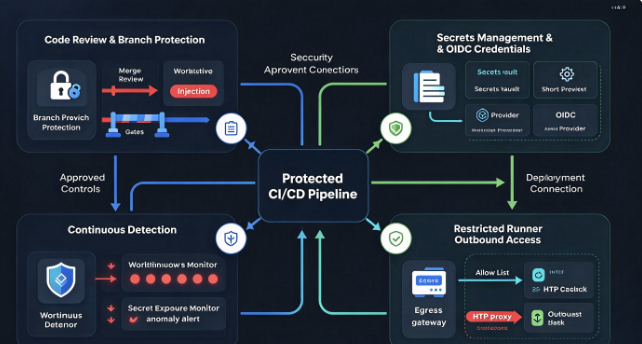
Protect Workflow Files With Mandatory Reviews
GitHub Actions workflows should be treated as security-sensitive infrastructure configuration rather than ordinary repository files.
Organizations can use CODEOWNERS to designate reviewers responsible for changes to .github/workflows/.
For example, a CODEOWNERS file can contain:
/.github/workflows/ @YOUR_ORG/security-team
/.github/CODEOWNERS @YOUR_ORG/security-team
This establishes code ownership for workflow definitions and the ownership configuration itself.
However, CODEOWNERS alone does not prevent unauthorized modifications. Its protective value depends on branch protection or repository rulesets that require pull requests and code-owner approval, while restricting who can bypass those requirements.
A compromised maintainer who can push directly to an unprotected default branch may still be able to introduce a malicious workflow without meaningful review.
GitHub documents these protections in its official guidance on CODEOWNERS और repository rulesets.
Teams should additionally review bypass permissions and administrative roles. A policy is ineffective against an attacker who compromises an identity authorized to override it.
Apply GitHub Actions Execution Policies
Workflow execution restrictions provide another layer of protection.
GitHub supports policies that can control which identities are permitted to trigger workflows and which events may cause execution.
This is particularly relevant to GhostAction because the malicious workflows rely on push और workflow_dispatch ट्रिगर.
The October investigation also demonstrated that approval requirements can interrupt the attack chain. StepSecurity documented a repository where malicious workflow executions remained pending approval rather than proceeding to exfiltration.
The distinction between review and execution is important.
Repository protections determine how workflow files are introduced. Execution policies determine whether a workflow can run under particular circumstances. These controls address different stages of the attack.
The official GitHub workflow execution protection documentation describes actor restrictions, event restrictions, and the management of these policies across repositories and organizations.
Organizations should apply these controls to sensitive workflows wherever supported, especially deployment and publishing jobs that can access valuable credentials.
Minimize the Permissions of GitHub Tokens
Every workflow should receive only the permissions necessary to perform its intended function.
GitHub allows developers to configure the permissions associated with the automatically generated GITHUB_TOKEN.
For example, a workflow that only needs to read repository contents can use:
permissions:
  contents: read
More restrictive workflows can disable default token permissions and grant specific permissions only where required.
This reduces the impact of malicious or compromised workflow steps that attempt to use the automatically issued token to modify repositories or perform other privileged operations.
However, GhostAction illustrates why token permissions cannot be treated as a complete defense.
A workflow with a read-only GITHUB_TOKEN may still expose separately configured secrets if the job is authorized to access them. It may also collect credentials accidentally stored in repository content.
The defensive objective is therefore broader than restricting one token. Every credential available to a workflow should have a justified purpose, limited scope, and appropriate lifetime.
Replace Long-Lived Cloud Credentials With OIDC Where Possible
OpenID Connect provides a way for supported cloud services to trust GitHub Actions workflows without requiring developers to store permanent cloud access keys as repository secrets.
Rather than placing a long-lived cloud credential in the repository’s secret store, a workflow can request a short-lived identity token and exchange it for appropriately scoped cloud credentials.
This can reduce the value of stealing old static keys.
GitHub explains the model in its official OpenID Connect documentation.
OIDC is not a complete solution to GhostAction, however. A malicious workflow with access to OIDC issuance may still attempt to obtain short-lived credentials. The cloud provider must therefore enforce strict trust conditions that limit which repositories, branches, environments, and workflow identities can assume a role.
The most important design principle is to bind sensitive cloud access to approved execution contexts, not simply to the broad identity of a repository.
When combined with protected environments, narrowly scoped permissions, and workflow review, short-lived credentials can substantially reduce the damage caused by stolen persistent secrets.
Restrict Runner Network Access
The GhostAction payloads depend on transmitting collected information from a GitHub Actions runner to an attacker-controlled destination.
That creates an opportunity to interrupt the attack after execution begins but before data leaves the environment.
Organizations can introduce runner egress controls that restrict outbound connections to approved destinations. Publishing workflows, for example, may need access to specific package registries and deployment APIs but should not require arbitrary outbound HTTP access.
Monitoring remains useful even when strict blocking is operationally difficult.
An unexpected outbound request to a raw IP address from a workflow that supposedly performs routine security checks should receive scrutiny.
Network controls are especially relevant for self-hosted runners, where organizations can design and enforce their own network policies. GitHub-hosted runners may require additional supported controls or specialized security tooling.
The October campaign demonstrates the value of combining workflow restrictions with runner-level network visibility. A malicious workflow that escapes code review may still be prevented from communicating with an unauthorized collection server.
Protect Maintainer Identities and Reduce Excessive Access
GhostAction’s initial impact is strongly influenced by the permissions associated with the compromised developer identity.
The October incident involving uber/athenadriver demonstrates how access retained by a project contributor can expand the consequences of an account compromise.
Organizations should periodically review repository access, especially for external contributors, former maintainers, dormant accounts, and identities with broad permissions across multiple organizations.
Phishing-resistant multi-factor authentication is an important account-protection measure, but it does not eliminate the risk of stolen bearer tokens or compromised developer environments.
Personal access tokens should be narrowly scoped, time-limited where possible, and removed when no longer needed.
Organizations should also monitor unexpected account activity, particularly a burst of workflow-file commits across multiple repositories from the same identity.
This pattern is more distinctive than a single apparently legitimate security-related commit.
A developer adding a security workflow to one project may be normal. An account adding nearly identical workflows across dozens of unrelated repositories within minutes is far more suspicious.
The broader objective is to prevent one stolen credential from providing unrestricted control over an organization’s software delivery infrastructure.
Why GhostAction Matters for AI Development Security
The inclusion of AI-provider API keys in GhostAction’s October payload represents an important change in the threat landscape.
AI development environments increasingly rely on external model APIs, orchestration frameworks, evaluation pipelines, and automated agents. These systems require credentials, and those credentials often become part of the same development and deployment workflows used by conventional software applications.
A repository may contain an application that calls OpenAI or Anthropic, tests model responses, evaluates agent behavior, or deploys AI services. The corresponding API credentials may be configured in GitHub Actions or accidentally committed during development.
GhostAction treats those credentials as another valuable collection target.
This does not make GhostAction an AI-specific attack in the sense of prompt injection, model jailbreaks, or adversarial machine learning. Its underlying mechanism is CI/CD compromise and credential theft.
What changes is the growing value of the infrastructure that can be reached through those stolen credentials.
An AI service credential may enable unauthorized inference calls, consume an organization’s API budget, or provide access to resources associated with the affected project. An attacker who also obtains deployment credentials or source-control access may be able to manipulate the application that uses those models.
The relationship between AI systems and software supply chain security therefore deserves closer attention.
Securing the model’s prompt handling or inference endpoint does not protect the application if its repository automation and cloud credentials have already been compromised.
Organizations developing agentic AI systems should evaluate the security of the complete operational environment: source control, model API credentials, CI/CD runners, deployment infrastructure, external integrations, and the permissions granted to automated workflows.
GhostAction provides a concrete example of why those components cannot be secured independently.
Frequently Asked Questions About the GhostAction Attack
Is GhostAction a GitHub vulnerability?
GhostAction is not primarily an exploit against a publicly disclosed vulnerability in GitHub’s infrastructure.
The attack uses legitimate GitHub account permissions and GitHub Actions functionality to introduce malicious workflows. The security failure occurs when an attacker gains control of a credential or identity with sufficient access to modify repository automation.
That distinction matters because patching GitHub Actions or updating an application dependency would not necessarily prevent this type of compromise.
Does GhostAction have a CVE identifier?
As of October 12, 2026, the primary public research reports do not associate GhostAction itself with a specific CVE identifier.
It is a named attack campaign rather than a single product vulnerability with a defined affected-version range.
Security teams should therefore track GhostAction through threat intelligence, workflow indicators, compromised-account investigations, and GitHub Actions security controls rather than waiting for a product-specific CVE patch.
Can GhostAction affect private GitHub repositories?
Yes. The attack technique can affect private repositories if the compromised identity has access to them and the malicious workflow can be introduced and executed.
The publicly reported repository counts largely reflect researchers’ visibility into public GitHub activity. They should not be interpreted as comprehensive measurements of all potentially affected private repositories.
Private repositories may also contain additional sensitive development credentials and historical configuration files.
Organizations should assess private and internal repositories within the compromised account’s permission scope rather than limiting investigation to public projects.
Can GhostAction steal secrets without knowing their values?
Yes, under the appropriate execution conditions.
The attacker can inspect existing workflow definitions to identify secret names and then introduce a malicious workflow referencing those secrets.
If the workflow executes in a context where GitHub makes the values available, the malicious job can attempt to transmit them.
The attacker does not need to know the plaintext values when creating the workflow. However, actual access depends on the relevant repository, organization, environment, and execution restrictions.
Does deleting the malicious workflow stop GhostAction?
Deleting the malicious workflow can prevent that particular workflow from executing again, provided the attacker no longer has a way to recreate it.
However, deletion does not revoke stolen credentials, invalidate the GitHub token used for the initial compromise, or reverse any unauthorized actions already taken.
A complete response must investigate the compromised identity, revoke exposed credentials, review workflow executions, and determine whether other repositories were modified.
Can GhostAction find API keys deleted from Git years ago?
The October 2026 variant can search historical commit patches available through the repository’s fetched Git history.
This means a credential removed from the current source tree may still be exposed if its earlier commit remains reachable through the refs examined by the malware.
The observed implementation has practical limits, including history-fetching scope and output truncation, so it should not be described as recovering every deleted Git object.
Nevertheless, credentials that were previously committed should be investigated even when they are absent from current files.
How can I tell whether GhostAction actually stole credentials?
The clearest evidence combines an injected malicious workflow with records showing that its collection and outbound transmission code executed.
Investigators should review the workflow file, relevant commits, GitHub Actions run logs, runner network telemetry, and secret-access context.
A request acknowledged by a known GhostAction collection endpoint provides strong evidence of successful transmission. It does not automatically prove that every possible secret was present or valid.
If a credential was potentially exposed but the available logs cannot establish the precise contents transmitted, organizations should make a risk-based decision about revocation rather than assuming that an absence of visible evidence guarantees safety.
Did GhostAction publish malicious versions of Pyxel or other packages?
The October 9 investigations by Socket and StepSecurity did not identify malicious package releases attributable to the observed compromise of Pyxel’s publishing credentials.
The researchers nevertheless confirmed malicious workflow execution and highlighted the risk associated with stolen publishing tokens.
This distinction should be preserved: confirmed credential exposure creates a credible downstream supply chain threat, but it is not equivalent to a confirmed malicious release.
Is GhostAction related to Shai-Hulud?
GitGuardian has noted that the malicious workflow-based credential-theft technique appeared in subsequent Shai-Hulud-related activity.
That establishes a relationship at the technique level, but it does not prove that every GhostAction wave and every Shai-Hulud campaign were conducted by the same operator.
Reusable attack methods, copied payloads, and shared credential sources can produce similarities between campaigns without establishing common attribution.
What is the most effective defense against GhostAction?
There is no single control that eliminates every stage of GhostAction.
The strongest defensive design combines restricted repository write access, mandatory reviews for workflow changes, sensitive-job execution controls, least-privilege credentials, runner network restrictions, and monitoring for abnormal workflow activity.
Organizations should also minimize long-lived secrets and regularly inspect repository history for exposed credentials.
The objective is to ensure that the compromise of one maintainer identity cannot automatically become a compromise of every credential and deployment process associated with that identity.
निष्कर्ष
The GhostAction Attack exposes a fundamental weakness in the way many development organizations trust their CI/CD environments.
The attackers did not need an unusually complex exploit. By abusing legitimate maintainer access, they introduced workflows that appeared to improve security while collecting credentials from the automation environment.
The October 2026 variant made that attack more consequential by expanding credential discovery beyond configured GitHub Actions secrets into repository files and historical commits.
The resulting exposure could include software publishing tokens, cloud credentials, source-control access, and AI service API keys, depending on what the affected repositories and workflows contained.
The investigations by GitGuardian, Socket, and StepSecurity provide evidence of real malicious workflow execution and credential-exfiltration activity. At the same time, the available reports distinguish confirmed compromise from potential downstream abuse, and those distinctions remain important when assessing the campaign’s impact.
GhostAction is ultimately a reminder that software delivery systems are privileged security infrastructure. A repository workflow is not merely a build script; it can be an authorized participant in the organization’s cloud, deployment, and publishing environments.
Protecting that automation requires stronger guarantees about who can modify it, when it can execute, which credentials it receives, and where it is allowed to communicate.
As software development becomes increasingly automated, including through AI-assisted development and autonomous tooling, those trust boundaries will become more important rather than less.
The central lesson of GhostAction is that protecting secrets is not enough when an attacker can control the automation trusted to use them.
 Hindi
Hindi  English
  German
  French
  Spanish
  Portuguese
  Japanese
  Korean
  Arabic
  Turkish
  Hebrew