
CVE-2026-50178 is not an Angular production app bug. It is a developer-workstation remote code execution issue in the Angular Language Service extension for Visual Studio Code. The vulnerable component is the VS Code extension published as Angular.ng-template, and the fixed version is 21.2.4. The attack path starts with crafted JSDoc content in a TypeScript or JavaScript file, passes through hover rendering, and can end with command execution on the developer’s machine after the developer clicks a malicious hover link. GitHub’s advisory rates the issue High with a CVSS v4.0 score of 8.7, while NVD currently lists the record as awaiting further enrichment and reflects the GitHub CNA scoring and description. (ギットハブ)
That distinction matters. A vulnerable Angular Language Service extension does not mean every Angular website is remotely exploitable from the internet. The exposed asset is the developer environment: the local IDE, extension host, source tree, checked-out dependencies, shell environment, tokens, SSH keys, npm credentials, cloud sessions, and CI/CD access that may be reachable from that workstation. For a red teamer, bug bounty hunter, security engineer, or developer who routinely opens untrusted repositories, proofs of concept, vendor code, and dependency sources, CVE-2026-50178 belongs in the same mental category as malicious development tooling and source-code supply-chain attacks, not ordinary browser XSS.
Confirmed facts
| 項目 | Confirmed detail | なぜそれが重要なのか |
|---|---|---|
| CVE | CVE-2026-50178 | The public record is tied to the Angular Language Service VS Code extension, not Angular runtime rendering. |
| Affected package | Angular.ng-template VS Code extension | This is the Angular Language Service extension distributed for Visual Studio Code. |
| 影響を受けるバージョン | Earlier than 21.2.4 | Teams should inventory extension versions, including local and remote VS Code extension hosts. |
| Fixed version | 21.2.4 | Upgrading to 21.2.4 or later is the primary remediation. |
| 脆弱性クラス | JSDoc hover command injection | Crafted source comments can influence IDE hover Markdown. |
| Weakness identifiers | CWE-79 and CWE-94 | The issue combines unsafe content rendering with code execution impact. |
| GitHub CNA severity | CVSS v4.0 8.7 High | The advisory describes high confidentiality, integrity, and availability impact on the vulnerable system. |
| User interaction | Hover target symbol and click malicious link | This is not zero-click, but the required action is realistic in code review and dependency exploration. |
| CISA ADP SSVC fields in NVD | Exploitation none, automatable no, technical impact total | NVD’s record reflects no known exploitation signal in that enrichment field at publication time, but high technical impact. |
| Core misconception | Not a production Angular app RCE | The risk lands on developer hosts and the software supply chain. |
GitHub’s advisory describes the root cause as trusted hover Markdown in the VS Code client combined with insufficient escaping or sanitization of JSDoc strings by the Angular Language Server before those strings are forwarded for rendering. The advisory specifically calls out isTrusted: true in the client and failure to escape or sanitize brackets, raw links, and control characters in hover text rendering. A malicious project file or dependency can contain crafted JSDoc that becomes an active command link in the IDE hover UI. (ギットハブ)
What the Angular Language Service does
The Angular Language Service exists to make Angular templates usable inside editors. It provides completions, errors, hints, quick info, and navigation across Angular templates. It works with both external HTML templates and inline templates, reads project configuration such as tsconfig.json, and gives the editor enough project context to understand components, directives, modules, and template expressions. Angular’s own documentation describes quick info as a hover feature that helps developers see where components, directives, and modules come from. (Angular)
In Visual Studio Code, this functionality is delivered through the Angular Language Service extension. The extension sits between the editor and a background language-service process. Angular documentation describes the editor integration as starting a separate language-service process and communicating with it through an RPC mechanism, while the extension tracks project state and sends the right context to the language service. That architecture is normal for modern IDE extensions, but it also creates a trust boundary: source files and project metadata are not just displayed as text; they are parsed, transformed, and rendered by privileged local tooling. (Angular)
The VS Code Marketplace page for Angular Language Service shows that the extension provides a rich editing experience for Angular templates, including completions, ahead-of-time diagnostics, quick info, and go-to-definition support. It also states that the extension depends on @angular/language-service and TypeScript, and that TypeScript may be loaded from configured paths or from the workspace under certain conditions. Those details become important when assessing Angular Language Service advisories as developer-tooling risk, because the extension operates on local project state and may interact with workspace-controlled files. (Visual Studio Marketplace)
The bug is in the hover path, not the web request path
CVE-2026-50178 is best understood as a data-flow bug inside a developer tool.
The attacker-controlled input is not an HTTP parameter sent to an Angular web application. It is source code or dependency code that a developer opens in VS Code. The relevant input is JSDoc text attached to a TypeScript or JavaScript symbol. The processing component is the Angular Language Server and VS Code extension client. The output is hover Markdown shown inside the IDE. The dangerous sink is trusted Markdown capable of activating a command link.
A simplified safe model looks like this:
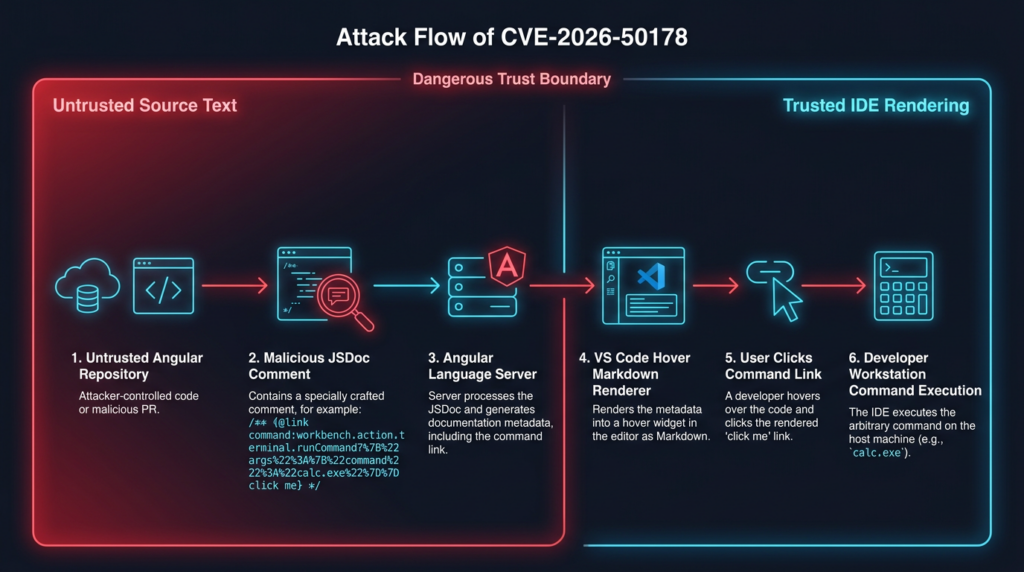
The official advisory says an attacker can craft a TypeScript or JavaScript file, or a third-party npm dependency, containing a malicious JSDoc tooltip with an embedded active command link. When a developer hovers over the target symbol and clicks the malicious link, the IDE executes a command sequence on the developer host. That is why this issue belongs in developer-workstation threat modeling, dependency review, and secure coding-environment management. (ギットハブ)
The bug also illustrates why IDE UX surfaces are security surfaces. Hover cards, documentation previews, markdown renderers, symbol definitions, inline links, and quick-fix actions are not passive text displays. They often run inside extension hosts with access to the workspace, editor commands, local files, terminals, and sometimes remote development sessions. When trusted rendering is applied to text that originated from untrusted source code, the editor can become an execution bridge.
Why a click requirement does not make the issue low risk
CVE-2026-50178 is not described as zero-click. The exploitation preconditions in GitHub’s advisory include an installed and active Angular Language Service extension, malicious JSDoc in source code or a dependency, and user interaction with the hover link. GitHub’s CVSS v4.0 vector marks user interaction as passive, and the NVD entry reflects the GitHub CNA vector. (ギットハブ)
That requirement should reduce panic, not urgency. Developers click documentation-like links in hovers all the time. They click links during code review, dependency debugging, library migration, bug reproduction, API exploration, and unfamiliar project onboarding. A malicious hover link can be made to look like a documentation reference, issue link, API note, type explanation, migration hint, or internal helper shortcut. The social-engineering surface is not a phishing email; it is the developer’s normal IDE workflow.
The user-interaction requirement also does not remove supply-chain risk. A single compromised developer host may expose:
| Asset on developer host | Why attackers care |
|---|---|
| GitHub, GitLab, or Bitbucket sessions | Source-code access, issue access, pull request manipulation, repository secrets discovery. |
| SSH keys | Lateral movement to servers, bastions, private repositories, and remote development hosts. |
| npm tokens | Package publishing, package deletion, malicious release insertion, dependency poisoning. |
| Cloud credentials | Access to logs, storage, build systems, deployment credentials, and internal services. |
| CI/CD secrets | Release pipeline compromise and persistence through build automation. |
| Internal source code | Vulnerability discovery, intellectual-property theft, targeted exploit development. |
Local 環境 ファイル | Database, API, SaaS, webhook, and signing secrets. |
| Browser sessions | Identity access beyond what a single terminal credential reveals. |
A click-based IDE RCE is still serious because the IDE is a high-trust environment. Developers routinely open hostile or semi-trusted code, and many development machines have more lateral movement value than a single production container.
What is affected
The affected component is the Angular Language Service extension for VS Code, published as Angular.ng-template. GitHub’s advisory lists versions earlier than 21.2.4 as affected and 21.2.4 as patched. NVD’s product configuration also identifies the affected extension version range as less than 21.2.4. (ギットハブ)
A developer is in the practical exposure zone when all of the following are true:
| Condition | Required for practical exposure | 備考 |
|---|---|---|
| VS Code or compatible VS Code extension host is used | はい | Include local VS Code, VS Code Insiders, Remote SSH, WSL, Dev Containers, and cloud workstations. |
| Angular Language Service extension is installed | はい | Extension identifier is Angular.ng-template. |
| Extension version is earlier than 21.2.4 | はい | Update or disable if version is vulnerable. |
| Developer opens code containing crafted JSDoc | はい | Source can be a repo, PR branch, dependency, reproduction project, or copied file. |
| Extension becomes active for the workspace | はい | Angular-related project context increases likelihood. |
| Developer hovers and clicks the malicious link | Yes for this CVE | The advisory describes click-based execution. |
The following are not direct exposure conditions by themselves:
| 状況 | Why it is not enough by itself |
|---|---|
| Running an Angular website in production | CVE-2026-50178 targets the VS Code extension, not the deployed Angular app. |
| A browser user visiting an Angular page | The vulnerable renderer is the IDE hover renderer, not the user’s browser. |
| A repository using Angular but no vulnerable extension installed | The vulnerable extension must be present and active. |
| A patched extension at 21.2.4 or later | The official fix version addresses the advisory. |
| A developer seeing a suspicious comment but not clicking the hover link | The described CVE requires clicking the active link, although the extension should still be updated. |
The safest wording is: CVE-2026-50178 is a remote code execution vulnerability in the Angular Language Service VS Code extension that can be triggered through malicious JSDoc hover content under user-interaction conditions. It is not accurate to describe it as “Angular app RCE” without the IDE context.
The trust boundary that failed
The core trust problem is not that JSDoc exists, or that hover cards exist, or that VS Code supports command links. Each of those features has legitimate uses. The problem is the combination.
JSDoc comments are often treated as harmless documentation. Markdown hover cards are often treated as harmless UI. Command URIs are often treated as internal editor plumbing. But when documentation from an untrusted file becomes trusted Markdown inside an IDE, the security model changes. A comment can become a clickable command surface.
A safe implementation needs to preserve a strict separation:
Untrusted source-code text:
  comments, JSDoc, type annotations, imported declarations

Editor display layer:
  escaped text, inert Markdown, safe links only

Command layer:
  trusted extension-owned commands, explicit allowlist, no untrusted link execution
CVE-2026-50178 shows what happens when that separation is weakened. GitHub’s advisory says the vulnerable extension used trusted Markdown with active command: URI handling, while the language server failed to sanitize JSDoc strings before forwarding them. The patch work publicly visible in Angular’s repository includes restricting JSDoc hover links to a custom openJSDocLink command and implementing document opening using safer workspace APIs. (ギットハブ)
That is an important design lesson for extension authors. When a renderer supports commands, arbitrary source-derived text must not be allowed to select commands freely. If commands are necessary, they should be narrow, allowlisted, parameter-validated, and designed around safe operations. A link that opens documentation is not the same thing as a link that can invoke any editor command with attacker-controlled arguments.
How the patch changed the risk surface
Angular’s public pull request for the JSDoc hover issue was merged on May 22, 2026. The pull request summary says it restricts JSDoc hover links to the custom openJSDocLink command and implements document opening using safe workspace APIs. That aligns with the advisory’s root-cause description: the vulnerable path allowed untrusted hover content to reach trusted command-capable Markdown. (ギットハブ)
A second Angular pull request merged the same day restricts untrusted workspace support to limited mode, skips launching the language client and registering commands in restricted mode, and starts the extension only once workspace trust is explicitly granted. That second change is especially relevant because the same fixed extension version, 21.2.4, also addresses a separate Angular Language Service vulnerability involving workspace configuration and dynamic TypeScript SDK loading. (ギットハブ)
For defenders, the practical conclusion is simple: do not cherry-pick one mitigation and assume the extension is safe. Move to 21.2.4 or later and verify that all local and remote extension hosts actually use the fixed version.
Workspace Trust helps, but it is not a substitute for patching
Visual Studio Code Workspace Trust is designed to let users decide whether code in a project folder can be executed by VS Code and extensions. Microsoft’s documentation says Restricted Mode is intended to prevent automatic code execution, and the extension API documentation explains how extensions declare their behavior in untrusted workspaces. (code.visualstudio.com)
That mechanism is valuable. It reduces the risk of opening an unknown folder and immediately running build scripts, tasks, debug configurations, or extension behavior that depends on trusted workspace execution. But Workspace Trust is not a magic sandbox. Microsoft’s documentation explicitly warns that Workspace Trust cannot prevent a malicious extension from executing code and ignoring Restricted Mode, and that users should install only trusted extensions. (code.visualstudio.com)
The CVE-2026-50178 advisory says exploitation can execute despite standard VS Code Restricted Mode limits and bypass core Workspace Trust guarantees under the described conditions. That does not mean Workspace Trust is useless. It means the vulnerable extension’s own behavior was part of the boundary, and patching the extension is mandatory. (ギットハブ)
A sound posture is layered:
| レイヤー | What it does | What it does not guarantee |
|---|---|---|
| Workspace Trust | Reduces automatic execution in untrusted folders | Does not fix vulnerable extension logic. |
| Extension updates | Removes known vulnerable code paths | Does not protect against future unknown extension bugs. |
| Extension allowlisting | Reduces unreviewed extension sprawl | Does not make allowed extensions flawless. |
| Isolated workspaces | Limits blast radius when opening hostile code | Does not remove need for credential hygiene. |
| Short-lived credentials | Reduces value of a compromised workstation | Does not prevent initial code execution. |
| Endpoint monitoring | Helps detect suspicious child processes and exfiltration | Does not replace prevention and patching. |
CVE-2026-50178 and CVE-2026-49241 should be handled together
CVE-2026-50178 is not the only 2026 Angular Language Service VS Code extension issue fixed in 21.2.4. CVE-2026-49241 is a separate vulnerability in the same extension. GitHub’s advisory for CVE-2026-49241 describes insecure workspace configuration and dynamic library loading: before 21.2.4, the extension read typescript.tsdk そして js/ts.tsdk.path from workspace .vscode/settings.json, passed the path as --tsdk, and the language server loaded tsserverlibrary.js from that location. A malicious repository could therefore point the extension at a malicious local TypeScript SDK and trigger code execution when the folder was opened. (ギットハブ)
The difference is user interaction. CVE-2026-50178 requires hover and click interaction with a malicious command link. CVE-2026-49241 is described as zero-click RCE on opening a crafted workspace under the right conditions. GitHub rates CVE-2026-49241 Critical with a CVSS v4.0 score of 9.3, while CVE-2026-50178 is rated High at 8.7. (ギットハブ)
| CVE | Same extension | トリガー | User interaction | で修正 | Practical lesson |
|---|---|---|---|---|---|
| CVE-2026-50178 | はい | Malicious JSDoc hover command link | Hover and click | 21.2.4 | Treat hover rendering as an execution boundary. |
| CVE-2026-49241 | はい | Workspace TypeScript SDK path to malicious tsserverlibrary.js | None in the advisory’s main scenario | 21.2.4 | Treat workspace settings as untrusted code-execution inputs. |
For patch management, these should not be tracked as unrelated tickets. They belong to the same remediation campaign: identify every installation of Angular Language Service, update it to 21.2.4 or later, check remote extension hosts, audit suspicious workspaces, and review how developers handle untrusted code.
Realistic attack scenarios
Malicious Angular starter repository
An attacker publishes an Angular starter kit, reproduction repo, UI component demo, or migration helper. The repository looks normal. It has components, services, a README, and maybe a passing build. The malicious payload is not in a postinstall script or obvious shell command. It sits in JSDoc for a symbol that a developer is likely to inspect.
The developer opens the project in VS Code, sees a component or helper function, hovers to read the quick info, and clicks a link that looks like documentation. On a vulnerable extension, that link can map to command execution.
This scenario is realistic because developers often inspect unknown repositories exactly this way. They hover before they run. They click documentation links before they install. The exploitation path abuses that caution.
Pull request review
A contributor submits a pull request to an Angular project. The diff includes a new utility, directive, service, or generated type declaration. A reviewer pulls the branch locally, opens it in VS Code, and inspects symbols through hover cards. If the reviewer uses a vulnerable Angular Language Service extension and clicks a crafted hover link, the attacker’s code execution path lands on a machine that may have repository write access.
The risk is higher in organizations where maintainers review external PRs locally, use long-lived GitHub sessions, keep package publishing tokens on development machines, or allow direct push rights from workstations.
Dependency source inspection
Security engineers and maintainers often inspect ノードモジュール, package source tarballs, generated declaration files, and third-party Angular libraries. A malicious package does not always need to execute during installation to influence tooling. Source text, declarations, comments, and workspace metadata can become IDE input.
CVE-2026-50178 does not mean every package with JSDoc is dangerous. It means dependency source should be treated as active input to editor extensions when vulnerable tooling is present.
Bug bounty and exploit reproduction
Bug bounty hunters, pentesters, and red teamers open more hostile code than typical product developers. They clone proof-of-concept repositories, vendor demos, suspected vulnerable apps, abandoned projects, and customer-provided reproduction cases. The workflow often includes hovering over unfamiliar APIs and clicking links inside editor UI.
For security practitioners, the right response is not “never open code.” It is to open untrusted code in disposable environments with minimal credentials, patched extensions, no persistent browser sessions, and no production cloud tokens. A vulnerable IDE extension turns normal research behavior into an execution path.
AI coding agents and autonomous code review
AI-assisted development adds a new angle. Coding agents can fetch repositories, index code, open workspaces, run language tools, and produce summaries. If a human developer then reviews the same workspace in a vulnerable IDE, or if the agent operates in a VS Code-compatible environment with extensions enabled, untrusted code can cross into a higher-trust automation environment.
The defensive principle is straightforward: do not combine untrusted code ingestion, privileged credentials, writable repositories, and broad IDE extension execution in the same environment. Agent workflows need the same isolation rules as human research workstations.
How to check whether you are exposed
Start with the extension version. On a local VS Code installation, run:
code --list-extensions --show-versions | grep -i '^angular\.ng-template@'
On Windows PowerShell:
code --list-extensions --show-versions | Select-String -Pattern '^Angular\.ng-template@'
If the output shows a version earlier than 21.2.4, treat the environment as vulnerable until updated or disabled.
Local extension directories can also be checked directly. On macOS or Linux:
find "$HOME/.vscode/extensions" -maxdepth 1 -type d -iname 'angular.ng-template-*' -print
もし jq is available, parse extension package metadata:
for pkg in "$HOME"/.vscode/extensions/angular.ng-template-*/package.json; do
  [ -f "$pkg" ] || continue
  jq -r '.publisher + "." + .name + " " + .version' "$pkg"
done
Do not stop after checking only the main local VS Code profile. VS Code extension hosts can exist in multiple places:
for dir in \
  "$HOME/.vscode/extensions" \
  "$HOME/.vscode-insiders/extensions" \
  "$HOME/.vscode-server/extensions" \
  "$HOME/.vscode-server-insiders/extensions"; do
  [ -d "$dir" ] || continue
  echo "== $dir =="
  find "$dir" -maxdepth 1 -type d -iname 'angular.ng-template-*' -print
done
For WSL, Remote SSH, Dev Containers, and cloud workstations, run the check inside the remote environment as well. The local VS Code UI and the remote extension host do not always share the same installed extension set.
A team-level inventory should record at least:
| Environment | What to check |
|---|---|
| Developer laptops | Local VS Code and VS Code Insiders extension versions. |
| Remote SSH hosts | ~/.vscode-server/extensions そして ~/.vscode-server-insiders/extensions. |
| WSL distributions | Extension state inside each distro if VS Code server is used. |
| Dev containers | Base images, devcontainer features, and preinstalled extension lists. |
| Codespaces or cloud workstations | Template images and per-user extension installation. |
| VDI images | Golden images and user-writable extension directories. |
| Build helper machines | Any environment where developers open source code interactively. |
Version inventory is the highest-signal check. Content scanning can help triage suspicious workspaces, but content scanning is not a substitute for patching.
Safe workspace triage without clicking hover links
If you have already identified a suspicious repository, do not inspect it with a vulnerable extension enabled. Use a terminal, a patched IDE, or a disposable environment.
The following ripgrep checks can identify obvious command-link patterns in TypeScript and JavaScript files:
rg -n --hidden \
  --glob '*.{ts,tsx,js,jsx,mjs,cjs}' \
  'command:[A-Za-z0-9_.-]+' .
Search for Markdown links that point at command::
rg -n --hidden \
  --glob '*.{ts,tsx,js,jsx,mjs,cjs}' \
  '\]\(command:' .
Search for common encoded forms that may hide the scheme:
rg -n --hidden \
  --glob '*.{ts,tsx,js,jsx,mjs,cjs}' \
  '(\\u0063\\u006f\\u006d\\u006d\\u0061\\u006e\\u0064|%63%6f%6d%6d%61%6e%64)' .
A compact triage script can combine these checks:
#!/usr/bin/env bash
set -euo pipefail

root="${1:-.}"

echo "[*] Searching for obvious VS Code command URI patterns"
rg -n --hidden \
  --glob '*.{ts,tsx,js,jsx,mjs,cjs,d.ts}' \
  '(command:|\]\(command:|\\u0063\\u006f\\u006d\\u006d\\u0061\\u006e\\u0064|%63%6f%6d%6d%61%6e%64)' \
  "$root" || true

echo "[*] Searching for workspace TypeScript SDK overrides"
if [ -f "$root/.vscode/settings.json" ]; then
  jq '.["typescript.tsdk"], .["js/ts.tsdk.path"]' "$root/.vscode/settings.json" 2>/dev/null || \
    cat "$root/.vscode/settings.json"
else
  echo "No .vscode/settings.json found"
fi
Interpret results carefully:
| 信号 | What it may mean | What it does not prove |
|---|---|---|
command: inside JSDoc or comments | Possible IDE command-link abuse attempt | Not proof that the exact extension path is exploitable. |
Markdown links to command: | Suspicious in source comments, especially in unfamiliar repos | Some internal tooling may use command links legitimately. |
Encoded command strings | Possible evasion or generated content | May be unrelated text or test fixture data. |
.vscode/settings.json と typescript.tsdk | Relevant to CVE-2026-49241 review | Not direct proof of CVE-2026-50178 exploitation. |
| Workspace-local TypeScript SDK path | Higher-risk if repo is untrusted | May be legitimate in controlled monorepos. |
The safest operational rule is simple: if the extension is vulnerable, update first. Do not spend time trying to decide whether a suspicious hover link is “really malicious” inside the vulnerable IDE.
Workspace settings deserve a separate audit
Because CVE-2026-49241 affects the same extension and the same fixed version, teams should audit workspace TypeScript SDK settings while responding to CVE-2026-50178. The related advisory describes use of typescript.tsdk そして js/ts.tsdk.path from .vscode/settings.json to load a workspace-controlled TypeScript server library, leading to arbitrary code execution before 21.2.4. (ギットハブ)
Check a workspace with:
if [ -f .vscode/settings.json ]; then
  jq '{
    typescript_tsdk: .["typescript.tsdk"],
    js_tsdk_path: .["js/ts.tsdk.path"]
  }' .vscode/settings.json
fi
Flag paths that point into the repository, temporary directories, generated package directories, or locations writable by untrusted contributors:
jq -r '
  .["typescript.tsdk"] // empty,
  .["js/ts.tsdk.path"] // empty
' .vscode/settings.json 2>/dev/null | while read -r path; do
  case "$path" in
    ./*|../*|node_modules/*|*/node_modules/*)
      echo "Review workspace-controlled TypeScript SDK path: $path"
      ;;
    *)
      echo "Found TypeScript SDK path: $path"
      ;;
  esac
done
This check is not because CVE-2026-50178 itself depends on typescript.tsdk. It is because both advisories affect the same extension lineage, both are fixed in 21.2.4, and both turn workspace-controlled input into developer-host execution risk.
Updating and verifying the fix
The primary fix is to update Angular Language Service to 21.2.4 or later. The GitHub advisory lists 21.2.4 as the patched version. (ギットハブ)
From the command line, installing or updating the Marketplace extension can be done with:
code --install-extension Angular.ng-template
Then verify:
code --list-extensions --show-versions | grep -i '^angular\.ng-template@'
For offline or controlled environments where extensions are distributed as VSIX files:
code --install-extension /path/to/angular-language-service-21.2.4-or-newer.vsix
Then verify the installed version again.
For remote development, update and verify in each remote context. A common mistake is updating the local VS Code extension while leaving the remote extension host vulnerable. Remote SSH and Dev Containers can install extensions into server-side directories, so inventory should include both local and remote extension paths.
If immediate update is not possible, disable the extension until the update can be deployed:
code --disable-extension Angular.ng-template
In a managed enterprise environment, administrators should prefer policy-based extension management, approved extension baselines, and prebuilt workstation images with known extension versions. Manual developer-by-developer updates are easy to miss, especially in organizations using VS Code Insiders, WSL, Remote SSH, and disposable cloud workspaces.
What defenders should log and hunt for
If exploitation is suspected, look for process execution patterns from VS Code, Electron, Node.js, or the VS Code extension host. The exact process names vary by platform and installation channel, but the logic is consistent: an IDE process should not unexpectedly spawn shells, network tools, credential utilities, package publishing commands, or persistence mechanisms after a hover interaction.
Useful telemetry includes:
| Data source | Suspicious patterns |
|---|---|
| Endpoint process logs | コード, Electron, node, or extension-host processes spawning バッシュ, sh, zsh, パワーシェル, cmd, osascript, カール, ウィジェット, パイソン, node, npm, git, ssh, or cloud CLIs. |
| Shell history | Commands not typed by the developer, especially token reads, environment dumps, archive creation, or outbound network calls. |
| VS Code logs | Extension activation, workspace trust state changes, errors, and unusual command execution timing. |
| File-system events | New startup files, modified shell profiles, new SSH config entries, unexpected scripts, archived source directories. |
| Network telemetry | Outbound connections from IDE-related processes to unfamiliar hosts. |
| Git hosting audit logs | New tokens, new SSH keys, unusual repository access, force pushes, unexpected workflow edits. |
| npm or package registry logs | Token use from unusual IPs, package publish events, dist-tag changes. |
| Cloud audit logs | New access keys, role assumption, secrets reads, storage enumeration. |
A practical endpoint query depends on the EDR platform, but the logic can be expressed generically:
parent_process_name IN ("Code", "Code Helper", "Electron", "node")
AND child_process_name IN (
  "bash", "sh", "zsh", "cmd.exe", "powershell.exe",
  "curl", "wget", "python", "python3", "node",
  "npm", "pnpm", "yarn", "git", "ssh",
  "aws", "gcloud", "az"
)
AND timestamp BETWEEN workspace_open_time AND workspace_close_time
For incident response, the high-value question is not only “did a command run?” It is “what secrets could that command read?” Treat the developer machine as an identity-rich host.
Response steps if a suspicious repo was opened
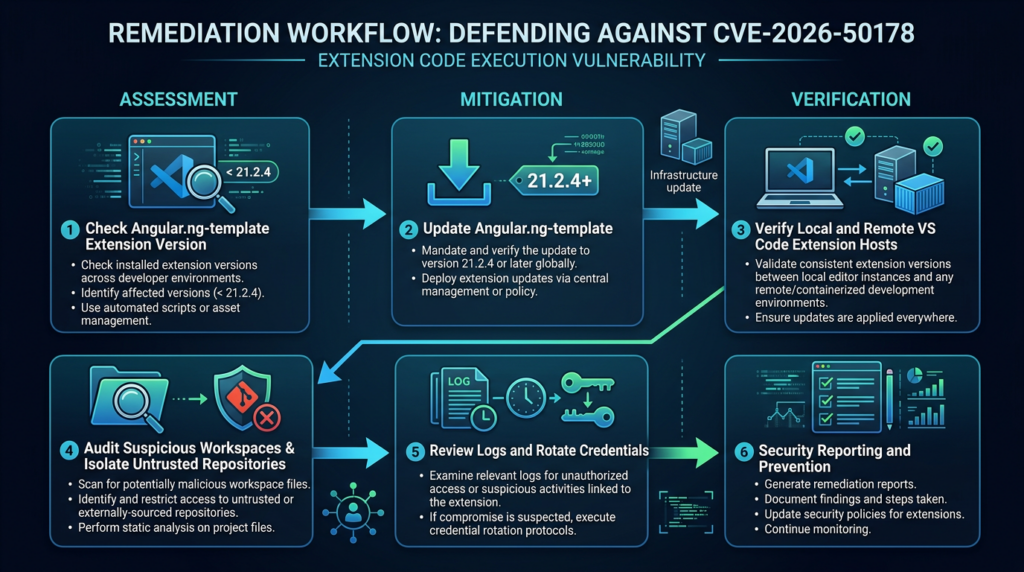
If a developer used a vulnerable extension and may have clicked a suspicious hover link, respond as a workstation compromise investigation, not just an IDE bug.
| ステップ | アクション | Reason |
|---|---|---|
| 1 | Stop using the workspace immediately | Prevent further interaction with malicious IDE content. |
| 2 | Preserve evidence | Capture the repository, VS Code logs, process telemetry, shell history, and relevant timestamps. |
| 3 | Disconnect or contain if active compromise is suspected | Limit outbound exfiltration and lateral movement. |
| 4 | Identify child processes from VS Code and extension hosts | Determine whether command execution occurred. |
| 5 | Review secrets accessible on the host | Include npm, GitHub, SSH, cloud, CI/CD, 環境, and browser-backed sessions. |
| 6 | Rotate exposed credentials | Assume tokens readable by the process may be compromised. |
| 7 | Check source-control and package-registry audit logs | Look for malicious commits, releases, workflow edits, or package publishes. |
| 8 | Rebuild high-risk hosts | If execution is confirmed and scope is uncertain, prefer clean rebuild over manual cleanup. |
| 9 | Patch all extension environments | Ensure no duplicate vulnerable extension remains locally or remotely. |
| 10 | Add isolation rules for future untrusted code review | Reduce the chance that the same class of bug becomes a major incident. |
Credential rotation should be prioritized by blast radius. Start with package publishing tokens, Git hosting tokens, deploy keys, SSH keys with broad access, cloud credentials, and CI/CD secrets. Then review lower-scope tokens and local development secrets. For repositories with release authority, check whether the developer’s account could have created tags, releases, package versions, GitHub Actions workflows, or deployment artifacts during the exposure window.
Hardening developer environments against IDE extension RCE
Patching CVE-2026-50178 is necessary, but the broader lesson is that developer workstations need security controls equal to their privilege.
Use disposable environments for hostile code
Unknown repositories, exploit proofs of concept, abandoned packages, and bug bounty target code should be opened in disposable environments. Good options include:
| Option | 強さ | 制限 |
|---|---|---|
| Local VM snapshot | Strong isolation from host credentials if configured carefully | Higher friction and storage cost. |
| Disposable cloud workstation | Clean rebuilds and centralized control | Must avoid mounting long-lived secrets. |
| Dev container with restricted mounts | Good for dependency installation and build isolation | Not a full security boundary if host socket or credentials are mounted. |
| Separate OS user profile | Easy to set up | Weak isolation compared with VM or cloud workspace. |
| Dedicated research laptop | Strong operational separation | Cost and workflow overhead. |
Do not mount your real SSH directory, cloud config directory, package registry token file, or browser profile into untrusted workspaces. Convenience is exactly what turns a developer-tool exploit into a supply-chain compromise.
Manage extension sprawl
Every VS Code extension is code that can run near your source tree. Treat extensions as software supply-chain dependencies.
A basic extension inventory can be collected with:
code --list-extensions --show-versions > vscode-extensions.txt
A simple baseline comparison:
comm -3 \
  <(sort approved-vscode-extensions.txt) \
  <(sort vscode-extensions.txt)
For managed teams, a better approach is to maintain an approved extension list, review extension publishers, pin or monitor critical extensions, and include extension updates in endpoint management. Teams that already track browser extensions should apply similar thinking to IDE extensions. Both live close to identity and sensitive work.
Reduce credential exposure
A patched extension reduces known exploitability, but it does not remove the value of a compromised workstation. Keep secrets away from general-purpose IDE environments where possible.
Practical controls include:
Use short-lived cloud credentials instead of long-lived static keys.
Use fine-grained GitHub tokens instead of broad personal access tokens.
Avoid storing npm publish tokens in default shell startup files.
Use hardware-backed SSH keys where feasible.
Avoid mounting production kubeconfig files into untrusted workspaces.
Keep customer data and production credentials out of research environments.
Use separate browser profiles for development, administration, and research.
The goal is not to make development painful. The goal is to prevent a single hover-click exploit from becoming repository takeover, package takeover, or cloud account compromise.
Why this matters to security teams, not just Angular developers
Security teams should track CVE-2026-50178 because it affects the way organizations consume code. Modern application security programs routinely ask engineers to open code from vendors, customers, open-source projects, bug bounty submissions, contractors, and AI-generated patches. If the security model assumes “reading code is safe,” IDE extension vulnerabilities break that assumption.
The issue is also relevant to red teams. A red team operation that targets developer trust may not need to exploit a production service. A malicious repository, dependency patch, internal tool update, or code-review lure can be enough if the developer environment is weakly isolated. CVE-2026-50178 is not a ready-made permission slip for offensive activity, but it is a clear reminder that IDE features are attack surface.
For defenders, the highest-return controls are boring and concrete: update the extension, inventory duplicate extension hosts, isolate untrusted code, reduce workstation secrets, and log suspicious child processes from IDEs.
Related Angular CVEs that help frame the risk
CVE-2026-50178 should be handled precisely, but it should not be viewed in isolation. Several Angular-related 2026 advisories illustrate different trust-boundary failures across the ecosystem. They are not the same bug, and they should not be merged into one vague “Angular is vulnerable” claim.
| CVE | コンポーネント | Why it is relevant | Exploitation condition | Defensive action |
|---|---|---|---|---|
| CVE-2026-50178 | Angular Language Service VS Code extension | IDE hover rendering can become developer-host command execution. | Vulnerable extension, malicious JSDoc, hover and click. | アップグレード Angular.ng-template to 21.2.4 or later and isolate untrusted workspaces. |
| CVE-2026-49241 | Angular Language Service VS Code extension | Same extension and same fixed version, but different path through workspace TypeScript SDK loading. | Malicious workspace settings pointing to a local tsserverlibrary.js; advisory describes zero-click execution on opening the folder. | Upgrade to 21.2.4 or later and audit workspace SDK overrides. |
| CVE-2026-50168 | @angular/platform-server | Shows a separate server-side Angular risk involving SSRF allowlist bypass in server-side rendering logic. | Server-side use of affected Angular platform-server versions and vulnerable URL allowlist handling. | Apply Angular platform-server fixed versions and review SSR network allowlist assumptions. |
| CVE-2026-50556 | @angular/platform-server | Shows a separate SSR XSS class involving unsafe serialization in <noscript> contexts. | User-controlled data inside affected server-rendered <noscript> handling. | Patch affected Angular versions and audit server-rendered raw-text contexts. |
| CVE-2026-50184 | Angular service worker | Shows a client-side caching and credential-boundary issue, separate from IDE extension RCE. | Affected service worker behavior around credentials and cache safety parameters. | Patch affected Angular versions and review service worker caching of dynamic sensitive responses. |
The related CVE most important for CVE-2026-50178 response is CVE-2026-49241, because both affect Angular Language Service for VS Code and both are fixed in 21.2.4. NVD records for other Angular advisories show different affected Angular packages and different vulnerability classes, so they should be used for ecosystem awareness rather than as proof of the IDE hover issue. (ギットハブ)
The CodeMender detail is notable but should not distract from patching
GitHub credits CodeMender from Google DeepMind for CVE-2026-50178. DeepMind describes CodeMender as an AI-powered agent for improving code security, with use of static analysis, dynamic analysis, differential testing, fuzzing, SMT solvers, and multi-agent systems, and says patches are reviewed by human security researchers before being upstreamed. (ギットハブ)
That is interesting because this vulnerability sits at the intersection of AI-assisted security work and developer tooling. AI can help find and repair complex trust-boundary bugs, but the operational defense is still human-owned: identify affected assets, update the extension, confirm the fixed version across environments, and reduce the blast radius of future developer-tooling failures.
Do not turn the CodeMender credit into an assumption about exploit activity. The public advisory and NVD enrichment should be used for exploit-status claims. NVD’s CISA ADP enrichment fields show exploitation as none and automatable as no for CVE-2026-50178 at the time captured in the record. (NVD)
Turning remediation into verifiable closure
For one developer, remediation can be as simple as updating the extension and checking the version. For a team, closure requires evidence.
A good closure record should include:
| エビデンス | 例 |
|---|---|
| Extension inventory | List of machines and remote extension hosts with Angular.ng-template version. |
| Patch confirmation | Screenshots or command output showing 21.2.4 or later. |
| Remote environment coverage | Confirmation for WSL, Remote SSH, Dev Containers, Codespaces, and VDI images. |
| Workspace settings audit | Review of suspicious .vscode/settings.json fields related to TypeScript SDK paths. |
| Untrusted repo policy | Updated rule for opening third-party or unknown Angular repos. |
| Credential review | Rotation decision for developers who opened suspicious workspaces while vulnerable. |
| Detection query | EDR or log query for suspicious child processes from VS Code extension hosts. |
| Exception handling | Documented temporary disablement where update is blocked. |
For teams already using AI-assisted validation workflows, the important control is evidence quality. A CVE ticket should not close because a scanner saw a string once. It should close because the team has asset evidence, affected-version evidence, patch evidence, and, where needed, safe behavioral validation. Tools such as 寡黙 can fit into that kind of workflow when teams need to preserve CVE verification steps, tool output, and reportable evidence instead of relying on ad hoc screenshots. Penligent’s own AI pentesting workflow guidance makes the same practical point in a broader context: version evidence alone is not enough; validation needs scope, controls, and false-positive handling.
The key is restraint. Do not run exploit-like tests on developer machines just to prove the issue. For CVE-2026-50178, version-based verification plus safe workspace triage is usually the right path. If you need to validate behavior, do it only in a disposable lab with no real credentials, no production access, and a patched comparison environment.
Common mistakes during response
Mistake 1, calling it Angular app RCE
The most common error is to describe CVE-2026-50178 as if remote attackers can directly execute code on Angular production servers or in every Angular user’s browser. That is not what the advisory says. The affected package is the Angular Language Service VS Code extension. The risk is developer-host code execution through IDE hover content. (ギットハブ)
Mistake 2, checking only the local VS Code extension
Remote development changes the inventory problem. A developer may update the local UI extension but still have a vulnerable extension on a Remote SSH host, WSL environment, Dev Container, cloud workstation, or VS Code server installation. Inventory needs to cover the place where the extension host runs.
Mistake 3, assuming Restricted Mode is enough
Workspace Trust and Restricted Mode are useful, but the advisory specifically discusses bypassing standard Restricted Mode expectations, and Microsoft’s own documentation warns that Workspace Trust cannot stop malicious extensions from ignoring Restricted Mode. Patch the extension. (ギットハブ)
Mistake 4, opening suspicious repos to investigate them
If the repo is suspicious, do not open it with the vulnerable extension enabled. Use a terminal, a patched IDE, a plain text viewer, or a disposable VM. Investigation should not reproduce the risky workflow.
Mistake 5, ignoring credentials
The impact of developer-host RCE depends heavily on what secrets the host can access. A developer machine with no production credentials, no publishing rights, and short-lived tokens has a smaller blast radius than one holding broad GitHub tokens, npm publish tokens, cloud credentials, and SSH keys.
よくあるご質問
Is CVE-2026-50178 an Angular application vulnerability?
- No. The affected component is the Angular Language Service extension for Visual Studio Code, not the Angular runtime in a deployed web application.
- The vulnerable package is
Angular.ng-template, and versions earlier than 21.2.4 are affected. - The practical target is the developer host running the vulnerable extension.
- A production Angular site is not automatically exploitable just because it was built with Angular.
- Security teams should still prioritize it because compromised developer machines can lead to source-code, package, and CI/CD compromise.
Do I need to click something for exploitation to happen?
- For CVE-2026-50178, the public advisory describes a hover-and-click path.
- The attacker needs malicious JSDoc content to be rendered in a hover tooltip, and the developer must click the malicious active link.
- That user interaction requirement lowers exploitability compared with zero-click bugs, but it does not make the issue harmless.
- Developers commonly click documentation-like links in IDE hover cards during code review and dependency inspection.
- The related CVE-2026-49241, fixed in the same extension version, is different and is described as zero-click under its workspace-configuration attack path.
Does VS Code Workspace Trust protect me from CVE-2026-50178?
- Do not rely on Workspace Trust as the only control.
- Workspace Trust is designed to reduce unintended code execution when opening workspaces.
- Microsoft’s documentation warns that Workspace Trust cannot prevent a malicious extension from executing code if that extension ignores Restricted Mode.
- The CVE-2026-50178 advisory says exploitation can execute despite standard Restricted Mode limits under the described vulnerable extension behavior.
- Updating Angular Language Service to 21.2.4 or later is the primary fix.
How do I check whether my Angular Language Service extension is vulnerable?
- 走る
code --list-extensions --show-versions | grep -i '^angular\.ng-template@'. - If the version is earlier than 21.2.4, update or disable the extension.
- Check VS Code Insiders separately if you use it.
- Check remote extension hosts such as WSL, Remote SSH, Dev Containers, Codespaces, and cloud workstations.
- In managed teams, collect extension inventory centrally rather than relying on manual developer confirmation.
Is updating to 21.2.4 enough?
- Updating to 21.2.4 or later is the required fix for the known CVE-2026-50178 vulnerability.
- You should still verify that every extension host has updated, including remote environments.
- You should also audit suspicious workspaces if a developer opened unknown code while vulnerable.
- If a suspicious hover link may have been clicked, treat the case as a possible workstation compromise and review credentials.
- Long term, add extension inventory, untrusted-code isolation, and credential minimization to developer security baselines.
What should I do if I opened a suspicious Angular repo with the vulnerable extension?
- Stop using the workspace immediately.
- Preserve the repository, VS Code logs, shell history, and endpoint telemetry.
- Look for suspicious child processes launched by VS Code, Electron, Node.js, or extension-host processes.
- Rotate high-value credentials that were accessible from the host, including npm tokens, Git hosting tokens, SSH keys, cloud credentials, and CI/CD secrets.
- Check repository, package registry, and cloud audit logs for unusual activity.
- Rebuild the workstation if code execution is confirmed and the scope cannot be bounded confidently.
How is CVE-2026-50178 different from CVE-2026-49241?
- Both affect the Angular Language Service VS Code extension.
- Both are fixed in version 21.2.4.
- CVE-2026-50178 involves malicious JSDoc hover content and requires hover-click interaction.
- CVE-2026-49241 involves workspace TypeScript SDK configuration and dynamic loading of
tsserverlibrary.js. - GitHub rates CVE-2026-49241 Critical with CVSS v4.0 9.3, while CVE-2026-50178 is rated High with CVSS v4.0 8.7.
- Defenders should handle them in the same patch campaign because the remediation target is the same extension version.
Closing judgment
CVE-2026-50178 is important because it breaks a quiet assumption: that reading code in an IDE is passive. In modern development environments, source comments can feed hover renderers, hover renderers can invoke editor commands, editor commands can reach local execution paths, and local execution paths can touch credentials that matter far beyond one laptop.
The right response is direct. Update Angular Language Service to 21.2.4 or later. Verify every local and remote extension host. Do not inspect suspicious repositories with vulnerable tooling. Audit workspace settings because the same extension version also fixes CVE-2026-49241. Reduce the secrets available to ordinary development workspaces. Add IDE extensions to software inventory. Treat developer-tooling vulnerabilities as supply-chain issues, because that is where their impact usually lands.
 Japanese
  English
  German
  French
  Spanish
  Portuguese
  Korean
  Hindi
Hindi  Arabic
  Turkish
  Hebrew