
CVE-2026-26128 is a Windows SMB Server elevation-of-privilege vulnerability. The confirmed public record is short but important: improper authentication in Windows SMB Server allows an authorized attacker to elevate privileges locally. Microsoft is the CNA source, NVD lists the weakness as CWE-287, and the CVSS 3.1 score is 7.8 High with the vector AV:L/AC:L/PR:L/UI:N/S:U/C:H/I:H/A:H. That means local attack vector, low attack complexity, low privileges required, no user interaction, unchanged scope, and high confidentiality, integrity, and availability impact. (NVD)
The most useful first move is to avoid turning one sentence into a fantasy exploit chain. CVE-2026-26128 should not be described as an unauthenticated internet-facing SMB worm, and it should not be casually compared to EternalBlue as if every SMB issue is the same class of bug. The official CVSS vector is local. CISA-ADP’s SSVC enrichment lists exploitation as none, automatable as no, and technical impact as total. Rapid7’s March 2026 Patch Tuesday table also lists CVE-2026-26128 as “Exploitation Less Likely,” while listing the neighboring Windows SMB Server issue CVE-2026-24294 as “Exploitation More Likely.” (ギットハブ)
That narrower framing does not make the bug harmless. Local privilege escalation is often the step that turns a weak foothold into a full host compromise. On Windows systems that serve files, host administrative workflows, run endpoint agents, support VDI users, or sit near domain infrastructure, a local elevation path to SYSTEM can change the blast radius of an otherwise contained intrusion. CVE-2026-26128 belongs in that category: not a confirmed remote entry point, but a serious post-compromise risk on systems where SMB is part of the operating system trust boundary.
What the public record confirms
The confirmed facts are enough to drive patching and verification, but not enough to justify publishing exploit mechanics that the vendor did not disclose. NVD’s record says the vulnerable component is Windows SMB Server and the weakness is improper authentication. The CISA vulnrichment record includes the affected Microsoft product and fixed build thresholds, and the CNA CVSS vector includes E:U, meaning exploit code maturity was listed as unproven in the CNA container at the time reflected in that record. (NVD)
| フィールド | Confirmed detail | Defender interpretation |
|---|---|---|
| CVE | CVE-2026-26128 | Track it separately from other SMB CVEs in the same month. |
| コンポーネント | Windows SMB Server | Affects the server-side SMB component in Windows, not a generic third-party SMB library. |
| 脆弱性タイプ | 特権の昇格 | Treat it as a post-foothold risk unless later authoritative evidence changes the attack vector. |
| 弱さ | CWE-287, Improper Authentication | The authentication boundary is central, but the exact internal bug path has not been publicly documented by Microsoft in detail. |
| CVSS 3.1 | 7.8 High | High severity because successful exploitation can affect confidentiality, integrity, and availability. |
| ベクトル | AV:L/AC:L/PR:L/UI:N/S:U/C:H/I:H/A:H | Local attack vector, low privileges required, no user interaction. |
| Public date | March 10, 2026 | Part of Microsoft’s March 2026 security update cycle. |
| CISA-ADP SSVC | Exploitation none, automatable no, technical impact total | Do not call it known exploited based on current authoritative enrichment, but do not ignore it. |
| Practical fix | Apply the applicable Microsoft security update or a later cumulative update | Configuration hardening helps reduce SMB risk, but patching is the vulnerability fix. |
One wrinkle deserves attention. Cisco Talos summarized CVE-2026-26128 as an important Windows SMB Server elevation-of-privilege vulnerability caused by improper authentication and wrote that an authorized attacker could elevate privileges “over a network” and gain SYSTEM privileges. That conflicts with the official CNA/NVD vector, which is local. When sources differ, defenders should prioritize the CNA/NVD vector and Microsoft Update Guide metadata over secondary wording. The reliable conclusion is: the impact can be severe, but the public record does not support labeling CVE-2026-26128 as a confirmed unauthenticated remote SMB exploit. (シスコ・タロス・ブログ)
Why SMB Server bugs create outsized concern
SMB is not just “file sharing.” In Windows environments, SMB often carries administrative file access, logon script retrieval, software distribution paths, home drives, departmental shares, backup workflows, inter-server operations, and domain-adjacent traffic. A workstation may use SMB occasionally; a file server or domain controller may be defined by it. That is why Windows SMB vulnerabilities generate anxiety even when the official attack vector is not remote code execution.
The SMB Server component listens for inbound SMB requests and participates in authentication, session setup, tree connection, file access, named pipe access, and other operations depending on server role and configuration. Windows also contains SMB client behavior, and many enterprise attacks abuse both directions: coercing outbound authentication, relaying credentials, exploiting exposed file-sharing surfaces, or using shares to move payloads and tools. CVE-2026-26128 is specifically described as a Windows SMB Server issue, so analysis should stay anchored to that component instead of drifting into every SMB-related technique.
The core weakness label, CWE-287, is broad. MITRE defines it as a situation where an actor claims an identity and the product does not prove, or insufficiently proves, that the claim is correct. MITRE lists possible consequences such as gaining privileges, assuming identity, reading application data, or executing unauthorized code or commands. That maps cleanly to why an SMB Server authentication flaw can be dangerous even when the public description does not expose the vulnerable function, packet field, or state transition. (Common Weakness Enumeration)
The difference between authentication and authorization matters here. Authentication asks, “Who are you?” Authorization asks, “What are you allowed to do?” In many real bugs, those boundaries blur. A service may authenticate one part of a request but trust another claim that should have been bound to the authenticated identity. A privileged local service may accept data from a low-privileged user and make a decision based on a token, handle, path, session, or context that was not properly validated. That is the kind of bug class a defender should think about when reading “improper authentication” in a privileged Windows service.
None of that proves the exact internal mechanism of CVE-2026-26128. It gives the right mental model. The safe interpretation is that a low-privileged local attacker may be able to cross a Windows SMB Server trust boundary and gain elevated privileges on an affected system. The wrong interpretation is that any host with TCP 445 open to the internet is automatically vulnerable to a working unauthenticated remote exploit for this CVE.
The local attack vector is not a reason to relax
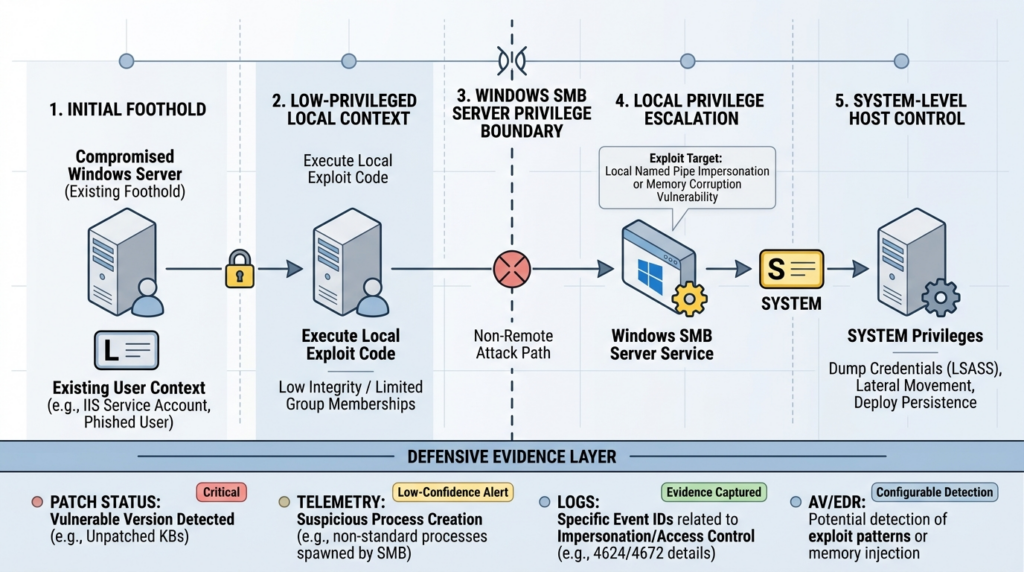
Security teams sometimes downgrade local privilege escalation because the attacker already needs access. That is a mistake in environments where initial access is cheap and administrative access is expensive. Phishing, stolen credentials, exposed VPNs, abused remote monitoring tools, malicious packages, browser compromise, and weak internal application access can all land an attacker in a low-privileged context. From there, local privilege escalation determines whether the attacker remains contained or becomes the operating system.
For CVE-2026-26128, the CVSS vector says low privileges are required and no user interaction is required. That combination matters. A successful attacker does not need to trick a second user into clicking something once they already have the required local foothold. If the vulnerable host is a file server, jump box, shared workstation, build machine, or server used by multiple operators, low-privileged access may be easier to obtain than defenders assume.
A local SMB Server elevation issue can matter in at least four common attack-chain positions. First, malware running as a standard user may try to become SYSTEM to disable tools, read protected files, or install services. Second, a low-privileged domain user on a shared Windows server may try to cross a local boundary and gain control of that server. Third, a compromised application or service account may use host-level privilege escalation to access secrets that were not visible from the original token. Fourth, a red team or attacker may combine the bug with credential access and lateral movement to expand from one machine to another.
The right priority question is not “Is this remote?” The better question is “Which affected Windows hosts would be dangerous if a low-privileged user or process became SYSTEM?” That usually points to domain controllers, file servers, VDI infrastructure, jump hosts, backup servers, developer machines with signing keys, management servers, and any Windows host that stores reusable credentials.
Affected Windows versions and fixed build thresholds
CISA’s raw vulnrichment record for CVE-2026-26128 includes a long list of affected Microsoft Windows products and fixed build thresholds. Microsoft’s security update model also means later cumulative updates normally supersede the March 2026 fixes, so defenders should verify the installed build, not only the presence of one KB. The table below condenses the main product branches from the public record. (ギットハブ)
| Product line | Affected range shown in CNA data | Fixed threshold shown in CNA data |
|---|---|---|
| Windows 10 Version 1607 | 10.0.14393.0 and later below fixed build | 10.0.14393.8957 |
| Windows 10 Version 1809 | 10.0.17763.0 and later below fixed build | 10.0.17763.8511 |
| Windows 10 Version 21H2 | 10.0.19044.0 and later below fixed build | 10.0.19044.7058 |
| Windows 10 Version 22H2 | 10.0.19045.0 and later below fixed build | 10.0.19045.7058 |
| Windows 11 Version 23H2 | 10.0.22631.0 and later below fixed build | 10.0.22631.6783 |
| Windows 11 Version 24H2 | 10.0.26100.0 and later below fixed build | 10.0.26100.8037 |
| Windows 11 Version 25H2 | 10.0.26200.0 and later below fixed build | 10.0.26200.8037 |
| Windows 11 Version 26H1 | 10.0.28000.0 and later below fixed build | 10.0.28000.1719 |
| Windows Server 2012 | 6.2.9200.0 and later below fixed build | 6.2.9200.25973 |
| Windows Server 2012 R2 | 6.3.9600.0 and later below fixed build | 6.3.9600.23074 |
| Windows Server 2016 | 10.0.14393.0 and later below fixed build | 10.0.14393.8957 |
| Windows Server 2019 | 10.0.17763.0 and later below fixed build | 10.0.17763.8511 |
| ウィンドウズ・サーバー2022 | 10.0.20348.0 and later below fixed build | 10.0.20348.4893 |
| Windows Server 2022, 23H2 Server Core | 10.0.25398.0 and later below fixed build | 10.0.25398.2207 |
| Windows Server 2025 | 10.0.26100.0 and later below fixed build | 10.0.26100.32522 |
Rapid7’s vulnerability database lists the March 2026 solution KBs associated with CVE-2026-26128, including KB5078938 for Windows 10 1607 and Windows Server 2016, KB5078752 for Windows 10 1809 and Windows Server 2019, KB5078885 for Windows 10 21H2 and 22H2, KB5079473 for Windows 11 24H2 and 25H2, KB5079466 for Windows 11 26H1, KB5078775 for Windows Server 2012, KB5078774 for Windows Server 2012 R2, KB5078766 for Windows Server 2022, KB5078734 for Windows Server 2022 23H2, and KB5078740 for Windows Server 2025. (ラピッド7)
Do not treat that KB list as the only acceptable proof of remediation months later. On Windows, the practical proof is usually the installed cumulative update level and OS build. A later cumulative update that raises the OS beyond the fixed threshold should remediate the issue, while a missing or failed update can leave a host vulnerable even if a ticket says the March patch cycle was completed.
Patch validation should produce evidence, not vibes
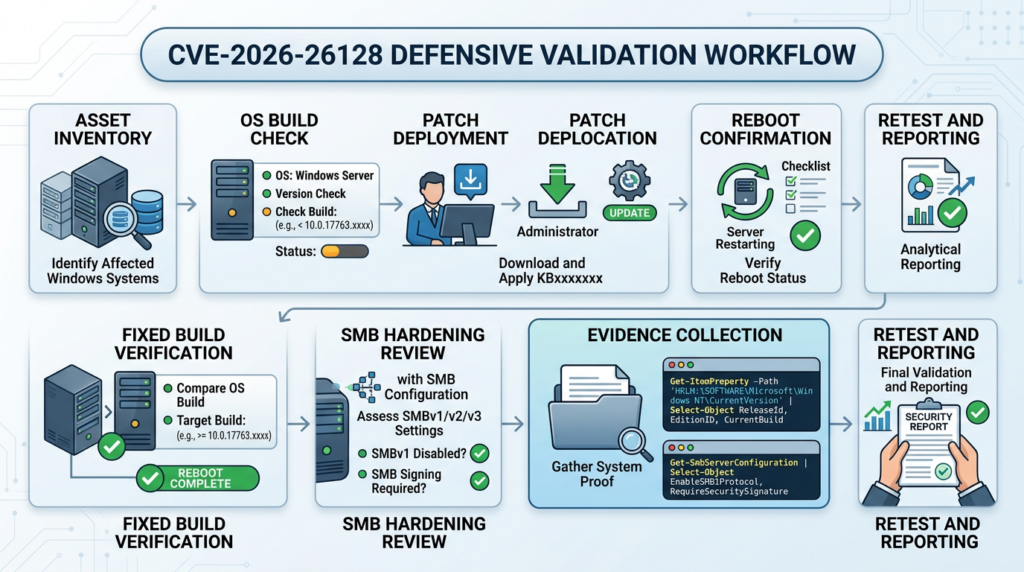
A useful CVE-2026-26128 validation record should answer five questions:
| Question | Good evidence | Weak evidence |
|---|---|---|
| Is the host in an affected product family | OS name, edition, architecture, build, install type | “It is Windows” |
| Is the installed build below the fixed threshold | Build number compared with CNA fixed threshold | A generic scanner severity without build details |
| Is the host operationally important | Role, share inventory, domain role, user density, credential exposure | Flat asset list with no business context |
| Was the patch actually applied | KB, build after reboot, update history, maintenance timestamp | Patch ticket marked “done” before reboot |
| Was SMB risk reduced beyond this one CVE | Signing, SMBv1 state, NTLM use, guest access, firewall exposure | “Patched” with no configuration review |
The following PowerShell commands are defensive checks for local inventory and evidence collection. They do not exploit the vulnerability, do not scan external targets, and do not prove exploitability. They help an administrator determine whether a Windows host appears to be below a fixed build threshold and whether SMB hardening settings deserve follow-up.
# Local evidence collection for CVE-2026-26128 remediation review.
# Run in an elevated PowerShell session on an authorized Windows host.

$computer = Get-ComputerInfo | Select-Object `
    CsName,
    OsName,
    OsVersion,
    OsBuildNumber,
    WindowsVersion,
    WindowsProductName,
    OsArchitecture

$hotfixes = Get-HotFix | Sort-Object InstalledOn -Descending | Select-Object -First 20 `
    HotFixID,
    Description,
    InstalledOn,
    InstalledBy

$smbServer = Get-SmbServerConfiguration | Select-Object `
    EnableSMB1Protocol,
    EnableSMB2Protocol,
    RequireSecuritySignature,
    EnableSecuritySignature,
    RejectUnencryptedAccess,
    EncryptData

$smbClient = Get-SmbClientConfiguration | Select-Object `
    RequireSecuritySignature,
    EnableSecuritySignature,
    EnableInsecureGuestLogons

$evidence = [ordered]@{
    timestamp_utc = (Get-Date).ToUniversalTime().ToString("o")
    computer      = $computer
    recent_hotfix = $hotfixes
    smb_server    = $smbServer
    smb_client    = $smbClient
}

$evidence | ConvertTo-Json -Depth 5
For fleet-level validation, collect the same evidence through your endpoint management platform, vulnerability management tooling, EDR inventory, or configuration management system. Avoid unauthenticated network guessing. A remote port scan that finds TCP 445 does not tell you whether CVE-2026-26128 is exploitable, patched, or relevant to that host’s role. It tells you that SMB exposure exists and deserves context.
A safe PoC for the bug class, not a weaponized SMB exploit
A real exploit PoC for a Windows SMB Server local privilege escalation could become harmful quickly. It could help attackers turn low-privileged access into SYSTEM on unpatched systems. The demonstration below is intentionally not an SMB exploit, not a Windows exploit, and not a reproduction of Microsoft’s undisclosed internal bug path. It is a toy local program that models the CWE-287 mistake: trusting an identity or privilege claim that the low-privileged caller can control.
The point is to show how improper authentication becomes a privilege boundary failure. It should be run only as a local educational example in a temporary folder. It does not connect to a network service, does not touch Windows internals, and does not elevate privileges on the machine.
#!/usr/bin/env python3
"""
Safe CWE-287 toy example.

This is NOT an exploit for CVE-2026-26128.
It demonstrates a generic improper-authentication pattern:
a privileged decision trusts a caller-controlled claim.
"""

import json
from dataclasses import dataclass


@dataclass
class Request:
    username: str
    claimed_role: str
    action: str


def vulnerable_authorize(request: Request) -> bool:
    """
    Vulnerable pattern:
    The program trusts 'claimed_role' from the caller.
    A low-privileged user can simply claim to be admin.
    """
    if request.claimed_role == "admin" and request.action == "restart_service":
        return True
    return False


TRUSTED_ROLE_DATABASE = {
    "alice": "user",
    "bob": "admin",
}


def fixed_authorize(request: Request) -> bool:
    """
    Safer pattern:
    The program ignores caller-controlled privilege claims
    and reads the user's role from a trusted server-side source.
    """
    trusted_role = TRUSTED_ROLE_DATABASE.get(request.username, "anonymous")
    if trusted_role == "admin" and request.action == "restart_service":
        return True
    return False


attacker_controlled_input = """
{
  "username": "alice",
  "claimed_role": "admin",
  "action": "restart_service"
}
"""

request = Request(**json.loads(attacker_controlled_input))

print("[vulnerable] allowed:", vulnerable_authorize(request))
print("[fixed] allowed:", fixed_authorize(request))
Expected output:
[vulnerable] allowed: True
[fixed] allowed: False
The vulnerable version accepts the caller’s claimed_role. The fixed version binds authorization to a trusted source. In a real operating system service, the trusted source might be an access token, kernel-validated identity, service control manager boundary, authenticated session context, signed message, local security authority decision, or another protected primitive. The rule is the same: do not let a low-privileged caller supply the fact that proves it is privileged.
This is the useful lesson for CVE-2026-26128. The public records identify improper authentication and local privilege escalation, but defenders should not infer a specific SMB packet sequence or bypass technique without authoritative disclosure. Use the bug class to reason about control points, and use patch evidence to decide remediation status.
How to triage affected assets
CVE severity alone is not enough. A 7.8 High local privilege escalation on a disposable kiosk is not the same operational risk as the same bug on a file server used by finance, a jump host used by administrators, or a build server with signing material. Prioritize by what the host can do after compromise.
| Asset type | Why CVE-2026-26128 matters | 推奨される措置 |
|---|---|---|
| Domain controllers | SMB and authentication-adjacent services are central to domain operations. SYSTEM on a DC is catastrophic. | Patch first, verify build, review SMB signing, audit privileged logons, preserve evidence. |
| File servers | Broad user access and sensitive shares increase the chance that low-privileged users can interact with the host. | Patch quickly, review share permissions, require signing where compatible, audit local administrators. |
| Jump hosts and admin workstations | They often hold high-value sessions, tools, cached credentials, or admin workflows. | Patch quickly, restrict local logon, monitor privilege changes, reduce standing admin access. |
| VDI and shared Windows hosts | Many low-privileged users may execute code on the same host class. | Patch fast, separate user groups, monitor unexpected service creation and token abuse. |
| Developer workstations | Source code, secrets, build credentials, and package publishing access increase impact. | Patch, enforce least privilege, monitor credential stores, isolate build secrets. |
| Backup and management servers | Compromise can affect recovery paths or endpoint administration at scale. | Treat as tier-zero or near-tier-zero depending on environment. |
| Ordinary single-user workstations | Still useful for attacker persistence and credential access, but usually lower priority than shared or privileged hosts. | Patch through normal high-severity endpoint SLA, verify coverage. |
A mature workflow should combine vulnerability data, asset role, exploit intelligence, and exposure context. Microsoft’s official record gives the technical severity. CISA-ADP gives exploitation and automatable signals. Rapid7’s Patch Tuesday analysis adds relative exploitability context among the same month’s Microsoft issues. Your asset inventory decides which patched systems matter most in your environment. (NVD)
In authorized testing and remediation programs, the hardest part is often not running another scanner. It is keeping proof attached to the finding: affected build, patch evidence, SMB role, business owner, retest result, and report-ready remediation notes. Penligent describes an agentic security workflow focused on finding, verifying, and reporting issues with evidence and authorized-use boundaries, which is the right style of workflow for CVE validation when teams need traceable proof rather than alert volume. (寡黙)
Detection signals and their limits
There is no public, authoritative, non-invasive network fingerprint that proves exploitation of CVE-2026-26128. That is normal for many local privilege escalation bugs. Patch state and build state are the primary validation signals. Host telemetry can help detect suspicious post-exploitation behavior, but it usually will not identify this CVE by name.
A practical detection program should watch for suspicious local privilege events on affected or recently affected Windows hosts. Relevant telemetry may include unexpected service creation, new local administrators, unusual token privilege use, suspicious child processes from service contexts, tampering with security tools, credential dumping behavior, scheduled task creation, unsigned binaries launched from user-writable paths, and anomalous SMB server process activity. Those signals are not specific to CVE-2026-26128. They are post-exploitation signals that become more important when a local elevation path exists.
Defenders should also review Windows event collection quality. If a file server becomes SYSTEM-compromised and the only available evidence is a vulnerability scanner’s previous port snapshot, incident response will be slow. At minimum, high-value Windows servers should preserve authentication events, service installation events, process creation telemetry where available, PowerShell logging where appropriate, EDR detections, and patch/reboot history. A clean patch record reduces exposure; a clean logging baseline reduces confusion when something goes wrong.
Be careful with “no exploit observed” language. CISA-ADP’s enrichment says exploitation none for CVE-2026-26128 in the public enrichment record, and SANS Internet Storm Center’s March 2026 Patch Tuesday note said Microsoft addressed no already exploited vulnerabilities in that update cycle. That does not mean exploitation is impossible. It means defenders should not claim confirmed exploitation without evidence. (ギットハブ)
Remediation is patch first, then SMB hardening
The direct remediation for CVE-2026-26128 is to apply the relevant Microsoft security update or a later cumulative update that brings the system to a fixed build. SMB hardening reduces the chance that future SMB and authentication weaknesses become easy attack paths, but it is not a replacement for the vendor patch.
The baseline patch workflow should be straightforward:
1. Identify all Windows assets in affected product families.
2. Rank them by role: domain controller, file server, jump host, VDI, management server, workstation.
3. Apply the applicable March 2026 or later cumulative update.
4. Reboot where required.
5. Verify OS build after reboot.
6. Preserve evidence: host, build, KB, timestamp, owner, validation method.
7. Review SMB hardening controls.
8. Retest any systems that failed update or reboot checks.
A common failure mode is stopping at step three. Windows updates are not complete just because an update was offered, downloaded, or staged. For this CVE, the useful evidence is post-reboot build verification. If the host remains below the fixed threshold, it should remain open in the remediation queue.
SMB signing, SMBv1, NTLM, and why configuration still matters
SMB configuration does not erase CVE-2026-26128, but it can reduce SMB attack surface and make related attack classes harder. Microsoft’s SMB hardening documentation says that starting with Windows 11 24H2 and Windows Server 2025, all outbound and inbound SMB connections are required to be signed by default. Microsoft also explains that SMB signing helps prevent data tampering and relay attacks, and that unsigned packets are rejected when signing is required. (マイクロソフト学習)
Use PowerShell to check and require SMB signing where compatibility allows:
# Check signing state
Get-SmbClientConfiguration | Format-List RequireSecuritySignature
Get-SmbServerConfiguration | Format-List RequireSecuritySignature

# Require signing for outbound SMB client connections
Set-SmbClientConfiguration -RequireSecuritySignature $true

# Require signing for inbound SMB server connections
Set-SmbServerConfiguration -RequireSecuritySignature $true
Microsoft’s SMBv1 guidance states that SMBv1 is deprecated and no longer installed by default in modern versions of Windows and Windows Server. It also notes that SMBv2 and later superseded SMBv1 starting in 2007 and that Microsoft publicly deprecated SMBv1 in 2014. That history matters because many organizations still discover old embedded devices, legacy NAS systems, scanners, medical devices, or manufacturing systems that keep SMBv1 alive long after the security team thought it was gone. (マイクロソフト学習)
Check SMBv1 state and remove it where possible:
# Check SMBv1 server status
Get-SmbServerConfiguration | Select-Object EnableSMB1Protocol

# Disable SMBv1 server support
Set-SmbServerConfiguration -EnableSMB1Protocol $false -Force

# Check optional SMB1 Windows feature state
Get-WindowsOptionalFeature -Online -FeatureName SMB1Protocol
Do not disable SMBv2 or SMBv3 as a normal hardening step. Modern Windows file sharing depends on SMB2 and SMB3. The usual security goal is to remove SMBv1, require signing where compatible, use encryption where appropriate, reduce NTLM dependency, restrict guest access, and limit who can reach SMB services.
Microsoft’s Windows Server 2025 SMB NTLM blocking documentation says the SMB client can block NTLM authentication for remote outbound connections, preventing attackers from tricking clients into sending NTLM requests to malicious servers and counteracting brute force, cracking, relay, and pass-the-hash attacks. It also notes that NTLM blocking is an SMB client capability and requires Windows Server 2025 or Windows 11 version 24H2 or later for that feature path. (マイクロソフト学習)
NTLM reduction should be handled carefully. A sudden NTLM block can break legacy workflows if the organization does not know which applications still depend on it. The better path is audit first, identify dependencies, fix or isolate them, then enforce exceptions narrowly. For high-value Windows servers, this process belongs next to patch management, not in a separate someday-hardening backlog.
Why CVE-2026-26128 is not EternalBlue
EternalBlue became the cultural shorthand for SMB disaster, but it is the wrong default comparison for CVE-2026-26128. CVE-2017-0144, the main EternalBlue-tracked vulnerability, affected SMBv1 and allowed remote attackers to execute arbitrary code through crafted packets. Microsoft’s MS17-010 bulletin described the most severe SMBv1 vulnerabilities as remote code execution issues triggered by specially crafted messages sent to an SMBv1 server. (NVD)
CVE-2026-26128 is different on the public facts. It is an SMB Server elevation-of-privilege vulnerability with a local attack vector and low privileges required. It has high impact if exploited, but the path starts from local authorized access in the official record. Calling it “the next EternalBlue” is technically lazy and operationally harmful. It can push teams toward the wrong detection logic while distracting from the work that actually matters: build verification, role-based patch priority, local post-exploitation monitoring, and SMB hardening.
A better comparison is not “old SMB worm versus new SMB worm.” It is “how do SMB and Windows authentication bugs behave when attackers already have some access?” That frame naturally includes CVE-2026-24294 and CVE-2025-33073.
CVE-2026-24294 was another March 2026 Windows SMB Server elevation-of-privilege vulnerability with the same broad public description style, the same CWE family, and the same 7.8 CVSS score. Rapid7 distinguished the two in its March Patch Tuesday table: CVE-2026-24294 was listed as Exploitation More Likely, while CVE-2026-26128 was listed as Exploitation Less Likely. That is a useful reminder that shared component and shared score do not automatically mean shared priority. (NVD)
Penligent’s separate analysis of CVE-2026-24294 goes deeper into that neighboring SMB Server LPE and the NTLM reflection discussion around it. It is useful background for teams trying to separate confirmed Microsoft facts from later public exploit research in the same SMB risk family, but it should not replace the official CVE-2026-26128 record for this specific issue. (寡黙)
CVE-2025-33073 is another useful contrast. NVD describes it as improper access control in Windows SMB allowing an authorized attacker to elevate privileges over a network, and CISA added it to the Known Exploited Vulnerabilities catalog in October 2025 based on evidence of active exploitation. That does not prove CVE-2026-26128 is exploited or remotely reachable. It proves the opposite lesson: SMB-related CVEs can differ sharply in vector, exploitability, and operational urgency, so defenders must read each record precisely. (CISA)
A practical response plan for security teams
Start with inventory. Pull all Windows hosts that match the affected product families. Include servers and workstations, and do not forget Server Core installations, older supported systems under extended update arrangements, golden images, VDI pools, lab systems, and disaster recovery machines. Many patch gaps survive in places that do not look like production until an attacker uses them.
Next, map host role. A flat list of 5,000 vulnerable Windows assets is less useful than a ranked list that identifies domain controllers, file servers, jump boxes, backup servers, build machines, management servers, and high-user-density VDI hosts. If two systems have the same CVSS score but one hosts SYSVOL-adjacent workflows and the other is a lightly used workstation, they should not compete equally for emergency maintenance windows.
Then validate patch status with build evidence. Compare the installed OS build against fixed thresholds and preserve the output. If your vulnerability management platform already does this well, export the evidence. If it does not, supplement with endpoint management or PowerShell inventory. Pay attention to systems that downloaded an update but did not reboot, systems that failed cumulative update installation, and systems pinned to old builds because of application compatibility.
After patching, review SMB configuration on high-value systems. Require SMB signing where possible. Remove SMBv1. Reduce NTLM dependency. Disable insecure guest logons. Restrict inbound SMB to trusted network segments. Review share permissions and local administrators. Monitor for unexpected service creation, local group changes, and suspicious process ancestry from privileged service contexts.
Finally, write the finding in a way that an infrastructure owner can act on. A good internal remediation note should say: “Host X is Windows Server 2019 build Y, below fixed threshold 10.0.17763.8511 for CVE-2026-26128. It is a file server with broad authenticated user access. Apply KB5078752 or a later cumulative update, reboot, confirm build above threshold, and verify SMB signing state.” That is much better than “High SMB vulnerability detected.”
Defensive verification script for fixed build thresholds
The script below demonstrates how a team might encode fixed build thresholds into local checks. It is deliberately conservative and should be adapted to your patch management source of truth. It does not determine exploitability. It only compares the local OS build against selected fixed thresholds from the public CNA data.
# Local build-threshold check for CVE-2026-26128.
# Defensive use only. Run on authorized systems.

$thresholds = @(
    @{ Match = "Windows 10"; Version = "1607"; Build = 14393; Ubr = 8957 },
    @{ Match = "Windows 10"; Version = "1809"; Build = 17763; Ubr = 8511 },
    @{ Match = "Windows 10"; Version = "21H2"; Build = 19044; Ubr = 7058 },
    @{ Match = "Windows 10"; Version = "22H2"; Build = 19045; Ubr = 7058 },
    @{ Match = "Windows 11"; Version = "23H2"; Build = 22631; Ubr = 6783 },
    @{ Match = "Windows 11"; Version = "24H2"; Build = 26100; Ubr = 8037 },
    @{ Match = "Windows 11"; Version = "25H2"; Build = 26200; Ubr = 8037 },
    @{ Match = "Windows Server 2016"; Version = ""; Build = 14393; Ubr = 8957 },
    @{ Match = "Windows Server 2019"; Version = ""; Build = 17763; Ubr = 8511 },
    @{ Match = "Windows Server 2022"; Version = ""; Build = 20348; Ubr = 4893 },
    @{ Match = "Windows Server 2025"; Version = ""; Build = 26100; Ubr = 32522 }
)

$os = Get-ComputerInfo
$build = [int]$os.OsBuildNumber

$ubrPath = "HKLM:\SOFTWARE\Microsoft\Windows NT\CurrentVersion"
$ubr = (Get-ItemProperty -Path $ubrPath).UBR

$matches = $thresholds | Where-Object {
    $os.OsName -like "*$($_.Match)*" -and
    ($_.Version -eq "" -or $os.WindowsVersion -eq $_.Version) -and
    $build -eq $_.Build
}

$result = foreach ($m in $matches) {
    [pscustomobject]@{
        Hostname           = $env:COMPUTERNAME
        OSName             = $os.OsName
        WindowsVersion     = $os.WindowsVersion
        Build              = $build
        UBR                = $ubr
        FixedBuild         = "$($m.Build).$($m.Ubr)"
        AppearsFixed       = ($ubr -ge $m.Ubr)
        CVE                = "CVE-2026-26128"
        CheckedAtUtc       = (Get-Date).ToUniversalTime().ToString("o")
    }
}

if ($result) {
    $result | Format-Table -AutoSize
} else {
    [pscustomobject]@{
        Hostname     = $env:COMPUTERNAME
        OSName       = $os.OsName
        Build        = $build
        UBR          = $ubr
        CVE          = "CVE-2026-26128"
        Status       = "No local threshold match in this sample script. Verify manually against Microsoft guidance."
        CheckedAtUtc = (Get-Date).ToUniversalTime().ToString("o")
    }
}
This kind of check is useful because it produces evidence that can be pasted into a ticket, attached to a report, or compared across a fleet. The main limitation is maintenance. Windows product names, enablement packages, Server Core variants, hotpatch configurations, later cumulative updates, and supersedence behavior can complicate simple scripts. Use the script as a validation aid, not as the only source of truth.
Common mistakes during CVE-2026-26128 handling
The first mistake is treating all SMB vulnerabilities as one story. EternalBlue, CVE-2025-33073, CVE-2026-24294, and CVE-2026-26128 all involve SMB or Windows authentication-adjacent behavior, but their vectors and exploit conditions differ. A mature team keeps them separate in tickets, reports, and executive summaries.
The second mistake is equating TCP 445 exposure with confirmed CVE-2026-26128 exploitability. Exposed SMB is a serious attack surface problem, especially on untrusted networks, but CVE-2026-26128’s official vector is local. A network scan can identify hosts that deserve SMB review; it cannot prove this specific local elevation path.
The third mistake is assuming local bugs can wait indefinitely. On hosts with many users, sensitive shares, privileged sessions, or management functions, local privilege escalation can be an attacker’s bridge from limited access to full control. Patch prioritization should consider host role, not only attack vector.
The fourth mistake is reporting “patched” before reboot and build verification. For Windows cumulative updates, the proof is not a calendar entry. It is the post-update OS build and operational confirmation that the relevant system actually moved beyond the fixed threshold.
The fifth mistake is overfitting detection to one CVE name. If exploitation details are not public and no reliable signature exists, build verification is the vulnerability control. Behavioral detection should focus on privilege escalation and post-exploitation patterns rather than pretending to identify CVE-2026-26128 from a single event.
よくあるご質問
What is CVE-2026-26128?
- CVE-2026-26128 is a Windows SMB Server elevation-of-privilege vulnerability.
- Microsoft and NVD describe it as improper authentication in Windows SMB Server.
- The official CVSS 3.1 score is 7.8 High.
- The CVSS vector is local, low complexity, low privileges required, and no user interaction.
- The weakness is mapped to CWE-287, Improper Authentication. (NVD)
Is CVE-2026-26128 a remote SMB RCE like EternalBlue?
- No, not based on the current official record.
- EternalBlue, tracked primarily as CVE-2017-0144, was an SMBv1 remote code execution vulnerability triggered by crafted packets.
- CVE-2026-26128 is publicly described as local privilege escalation in Windows SMB Server.
- It is still serious because local privilege escalation can turn a low-privileged foothold into SYSTEM-level control.
- Do not describe it as wormable or unauthenticated remote code execution unless a later authoritative source provides evidence. (NVD)
Which systems are affected by CVE-2026-26128?
- The public CNA data lists multiple Windows client and server branches, including Windows 10, Windows 11, Windows Server 2012, 2012 R2, 2016, 2019, 2022, Server 2022 23H2, and Server 2025.
- Exposure depends on product branch and installed build.
- Systems below the fixed build threshold for their branch should be treated as affected.
- Later cumulative updates may supersede the March 2026 KBs, so verify the installed OS build.
- High-value SMB hosts such as file servers, domain controllers, jump hosts, and shared Windows servers should be prioritized. (ギットハブ)
How do I verify whether CVE-2026-26128 is fixed?
- Check the Windows product name, version, build, and UBR.
- Compare the installed build against Microsoft’s fixed threshold for that product branch.
- Review recent hotfixes, but do not rely only on KB presence.
- Confirm the system rebooted successfully after update installation.
- Preserve evidence in a ticket or report: hostname, OS, build, KB, timestamp, and validation method.
Can SMB signing or disabling SMBv1 replace the patch?
- No. The direct fix is the applicable Microsoft security update or a later cumulative update.
- SMB signing, SMBv1 removal, NTLM reduction, and guest-access restrictions are hardening controls.
- These controls reduce SMB attack surface and related authentication risks.
- They should be done in addition to patching, not instead of patching.
- Compatibility testing is important before enforcing signing or NTLM restrictions across legacy environments. (マイクロソフト学習)
Does “no known exploitation” mean this can wait?
- Not necessarily.
- CISA-ADP’s public enrichment lists exploitation as none and automatable as no, which lowers urgency compared with a known-exploited bug.
- The technical impact is still total, and the CVSS score is High.
- Prioritize based on host role, user density, and whether SYSTEM compromise would be severe.
- Patch domain controllers, file servers, jump hosts, VDI, backup servers, and management servers before lower-risk endpoints. (ギットハブ)
How is CVE-2026-26128 different from CVE-2026-24294?
- Both are March 2026 Windows SMB Server elevation-of-privilege vulnerabilities.
- Both are described as improper authentication and have CVSS 3.1 score 7.8 in the public records.
- Rapid7 listed CVE-2026-24294 as Exploitation More Likely and CVE-2026-26128 as Exploitation Less Likely.
- Similar component and score do not mean identical exploitability.
- Track, patch, and report them as separate CVEs. (NVD)
What should a clean internal finding say?
- Name the CVE and component: CVE-2026-26128 in Windows SMB Server.
- State the verified host evidence: OS product, build, and whether it is below the fixed threshold.
- Explain the risk accurately: local low-privilege attacker may elevate privileges, potentially to full host impact.
- Avoid unsupported claims: do not call it unauthenticated remote SMB RCE.
- Give a concrete fix: apply the relevant Microsoft cumulative update or later, reboot, verify build, and review SMB hardening.
Closing judgment
CVE-2026-26128 is serious because it touches Windows SMB Server and can produce high-impact local privilege escalation. It is not serious for the same reason EternalBlue was serious, and treating it that way makes defenders less precise. The public record supports a disciplined response: patch affected Windows builds, verify the result with evidence, prioritize systems where SYSTEM compromise would matter most, and use the patch window to improve SMB signing, SMBv1 removal, NTLM reduction, guest-access controls, and network segmentation.
The right outcome is not a dramatic exploit story. It is a clean remediation trail: every important Windows SMB host identified, updated, rebooted, verified, and hardened where the environment allows it.
 Japanese
  English
  German
  French
  Spanish
  Portuguese
  Korean
  Hindi
Hindi  Arabic
  Turkish
  Hebrew