
A Node.js backend usually fails in predictable places: object access, token validation, request limits, dependency trust, and production configuration. The language runtime is not the whole risk. The real attack surface is the way API routes, identity claims, database queries, package installs, CI/CD secrets, reverse proxies, and third-party integrations meet each other.
That is why a serious Node.js backend security checklist should not start with “install Helmet” and stop there. Helmet is useful. So are npm audit, secure cookies, rate limiting, and TLS. But an attacker does not care whether the checklist looks complete. They care whether /api/orders/:id checks ownership, whether a JWT from the wrong audience is accepted, whether a テナントID from the request body can override the real tenant boundary, whether a large JSON body can pin the event loop, whether a forgotten package runs an install script in CI, and whether production logs leak stack traces or tokens.
OWASP’s API Security Top 10 2023 puts Broken Object Level Authorization, Broken Authentication, Broken Object Property Level Authorization, Unrestricted Resource Consumption, Broken Function Level Authorization, sensitive business flow abuse, SSRF, misconfiguration, improper inventory, and unsafe consumption of APIs into one API-specific risk model. Those categories map closely to how many Node.js APIs are built: object IDs in routes, JSON request bodies, middleware-driven authentication, token-based sessions, ORM query builders, outbound HTTP clients, and dependency-heavy service code. (OWASP財団)
A good checklist has to be testable. “Use authorization” is not testable. “Every endpoint that reads or modifies a tenant-owned object must bind the query to both the object ID and the authenticated tenant or user context” is testable. “Secure dependencies” is not enough. “CI must run from a committed lockfile, fail on high-severity production dependency advisories, review install scripts, and treat npm token exposure as a credential compromise” is much closer to reality.
Start with the backend attack surface, not the framework name
Node.js is used for REST APIs, GraphQL APIs, BFF layers, internal services, webhook receivers, auth gateways, server-side rendering backends, queue workers, CLI tools, and developer automation. A backend may use Express, Fastify, NestJS, Koa, Hapi, Apollo Server, Next.js API routes, or a custom HTTP layer. The framework changes syntax, but the security model stays similar.
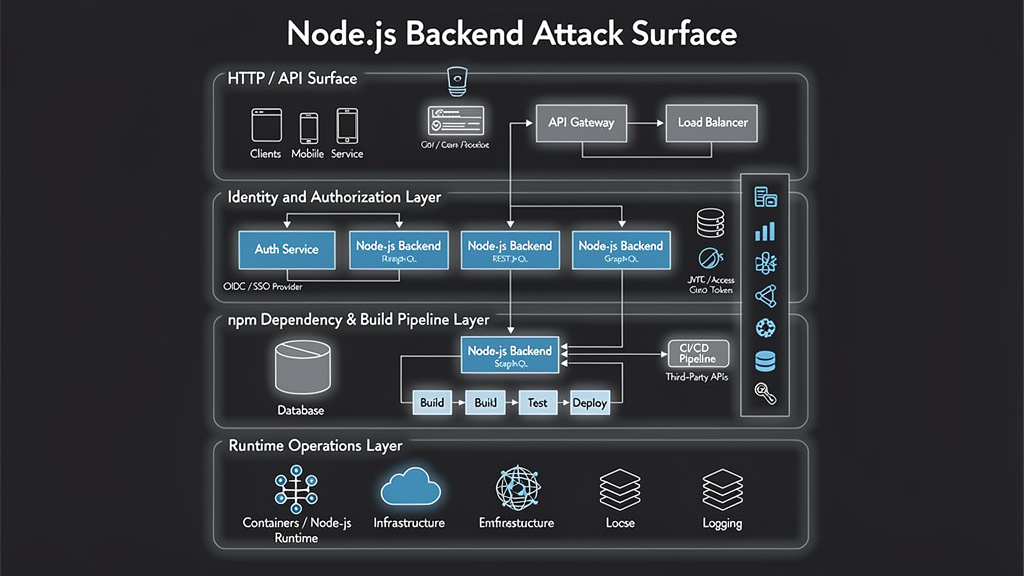
A Node.js backend usually has five overlapping attack surfaces.
The first is the HTTP and API surface. This includes routes, methods, path parameters, query parameters, request bodies, file uploads, CORS behavior, content types, pagination, sorting, filtering, and undocumented endpoints. API bugs often happen because the backend accepts more input than the developer intended.
The second is the identity surface. This includes login, registration, password reset, sessions, JWTs, API keys, OAuth or OIDC flows, refresh tokens, service tokens, machine-to-machine credentials, and admin impersonation features. Authentication proves who or what is calling. Authorization decides what that caller can do. Mixing those two concepts is one of the fastest ways to create exploitable backend bugs.
The third is the business logic surface. This is where BOLA, IDOR, BFLA, mass assignment, workflow abuse, coupon reuse, race conditions, excessive automation, and multi-tenant data exposure live. These flaws often pass unit tests because the API works correctly for honest users.
The fourth is the dependency and build surface. Node.js applications almost always depend on many direct and transitive npm packages. The official Node.js security guidance explicitly calls out supply chain attacks such as typosquatting, lockfile poisoning, compromised maintainers, malicious packages, and dependency confusion. It also warns that pinning direct dependency versions alone does not pin transitive dependencies. (Node.js)
The fifth is the runtime and operations surface. This includes Node.js release lines, TLS termination, reverse proxy headers, process privileges, container permissions, secrets injection, error handling, logging, monitoring, graceful shutdown, request backpressure, and incident response. Express’s own production security guidance distinguishes development from production and warns that verbose debugging behavior acceptable in development can become a production security concern. (Express.js)
The checklist below is organized around those surfaces.
The short checklist before the deep dive
| Area | Common failure | Real impact | How to verify | Stronger fix |
|---|---|---|---|---|
| API inventory | Shadow endpoints, old versions, undocumented routes | Forgotten attack surface | Compare OpenAPI spec, gateway logs, app routes, and observed traffic | Keep generated route inventory and retire stale endpoints |
| Object authorization | /orders/:id checks login but not ownership | IDOR, tenant data exposure | Test same role across different users and tenants | Bind every object query to authenticated user or tenant context |
| Function authorization | Hidden admin routes rely on UI controls | 特権の昇格 | Call admin methods with regular user token | Enforce server-side permission checks per route and action |
| Property authorization | req.body updates internal fields | Role escalation, account takeover, fraud | 注入 役割, isAdmin, テナントID, balance | Use allowlisted DTOs and output schemas |
| Auth | Weak password storage or token validation | アカウント買収 | Review hashing, reset flows, JWT validation | Argon2id/bcrypt/PBKDF2, MFA, strict token claims |
| Sessions | Insecure cookies, memory store, weak SameSite | Session theft, CSRF, fixation | Inspect Set-Cookie and session backend | HttpOnly, セキュア, SameSite, server-side store |
| Request limits | Large JSON body, nested JSON, costly endpoint | DoS, cost abuse | Send oversized body and high concurrency in test | Size limits per content type, pagination caps, rate limits |
| Dependencies | Blind trust in npm packages | RCE, credential theft, CI compromise | Review lockfile, audit output, install scripts | npm ci, lockfile review, audit gates, provenance, token minimization |
| Runtime | Unsupported Node.js or weak process isolation | Known CVE exposure, blast radius expansion | Check Node version and container privileges | Active or Maintenance LTS, least privilege, Permission Model where useful |
| 過去ログ | Stack traces, tokens, secrets in logs | Credential exposure, easier exploitation | Trigger errors and inspect logs | Redaction, structured logs, production error handler |
| モニタリング | No signal for auth abuse or enumeration | Late detection | Check 401/403/404/429 patterns | Alert on auth failures, object ID probing, unusual outbound calls |
This table is useful as a triage map. The rest of the article explains how to implement and test each control.
Use a supported Node.js runtime and track security releases
Production Node.js services should run on Active LTS or Maintenance LTS release lines. The Node.js project states that production applications should use Active LTS or Maintenance LTS releases, and its release schedule gives LTS release lines a predictable support window for critical fixes. (Node.js)
This matters because Node.js runtime vulnerabilities can affect backends even when the application code looks clean. In January 2026, Node.js disclosed CVE-2025-59465, where malformed HTTP/2 HEADERS frames with oversized invalid HPACK data could crash a Node.js server through an unhandled TLSSocket error, enabling remote denial of service for affected active release lines. The same security release also listed other runtime issues, including permission model bypasses and DoS-related flaws. (Node.js)
For backend teams, the lesson is not “panic about every runtime CVE.” The lesson is to keep Node.js version management inside the security program.
A practical policy looks like this:
node --version
npm --version

# In CI, fail builds if the runtime does not match the approved production line.
node -e "
const allowed = [/^v24\\./, /^v22\\./];
if (!allowed.some(r => r.test(process.version))) {
  console.error('Unsupported Node.js version:', process.version);
  process.exit(1);
}
console.log('Node.js runtime allowed:', process.version);
"
For containerized applications, the base image is part of the runtime. A safe process includes pinning image families, scanning images, rebuilding after runtime security releases, and avoiding stale Node.js images that keep an unsupported runtime alive inside a “working” container.
A production Node.js backend should also subscribe to Node.js security announcements. That is not busywork. It is how a team learns whether a runtime flaw affects HTTP/2, TLS, permission boundaries, crypto, DNS, buffer handling, or another surface that may sit below the application framework.
Build API inventory before testing authorization
You cannot secure routes you do not know exist. API inventory is the first defensive task for a Node.js backend.
Inventory should come from several sources because each source lies in a different way.
The OpenAPI spec tells you what the team intended to expose. The router tells you what the app actually registered. Gateway logs tell you what clients actually call. Access logs tell you what attackers or scanners are probing. CI artifacts tell you what changed between versions. Cloud load balancer logs tell you whether old domains, old stages, or old paths still receive traffic.
For Express, route extraction can be rough because middleware composition varies, but even a simple route map is better than nothing:
function listExpressRoutes(app) {
  const routes = [];

  app._router.stack.forEach((middleware) => {
    if (middleware.route) {
      const methods = Object.keys(middleware.route.methods)
        .map((m) => m.toUpperCase())
        .join(',');
      routes.push({ methods, path: middleware.route.path });
    } else if (middleware.name === 'router' && middleware.handle.stack) {
      middleware.handle.stack.forEach((handler) => {
        if (handler.route) {
          const methods = Object.keys(handler.route.methods)
            .map((m) => m.toUpperCase())
            .join(',');
          routes.push({ methods, path: handler.route.path });
        }
      });
    }
  });

  return routes;
}

console.table(listExpressRoutes(app));
Do not run fragile route introspection code as a production dependency unless you understand the framework internals. Use it in tests, development builds, or internal tooling. For larger systems, route inventory should be generated from code, API gateway configuration, OpenAPI files, and observed traffic.
A useful inventory record includes:
| フィールド | なぜそれが重要なのか |
|---|---|
| Path and method | Defines the callable surface |
| Authentication requirement | Separates public, user, service, and admin routes |
| Object type | Shows where BOLA or IDOR testing is needed |
| Tenant boundary | Shows whether multi-tenant isolation applies |
| Request body schema | Reveals mass assignment and validation risk |
| Response schema | Reveals sensitive property exposure risk |
| Rate limit class | Separates cheap reads from expensive or sensitive flows |
| Owner team | Prevents zombie APIs with no accountable maintainer |
| Last observed traffic | Helps retire unused endpoints safely |
OWASP lists Improper Inventory Management as API9:2023, but inventory is not just an API governance problem. It is the base layer for authorization testing, dependency exposure analysis, and incident response. (OWASP財団)
Treat object authorization as the default API risk
Broken Object Level Authorization is the first item in OWASP API Security Top 10 2023. OWASP describes the risk as APIs exposing endpoints that handle object identifiers, creating a wide attack surface where authorization checks should be considered in every function that accesses a data source using a user-supplied ID. (OWASP財団)
Node.js APIs are full of object identifiers:
GET    /api/users/:id
GET    /api/orders/:orderId
PATCH  /api/projects/:projectId
DELETE /api/files/:fileId
POST   /api/orgs/:orgId/invites
GET    /api/tickets/:ticketId/messages
The vulnerable pattern usually looks innocent:
app.get('/api/orders/:orderId', requireAuth, async (req, res) => {
  const order = await db.order.findUnique({
    where: { id: req.params.orderId }
  });

  if (!order) return res.status(404).json({ error: 'Not found' });
  res.json(order);
});
This route checks authentication, but not ownership. Any logged-in user who can guess or obtain another オーダーID may receive another user’s order.
A safer version binds the object lookup to the authenticated subject:
app.get('/api/orders/:orderId', requireAuth, async (req, res) => {
  const order = await db.order.findFirst({
    where: {
      id: req.params.orderId,
      userId: req.user.id
    },
    select: {
      id: true,
      status: true,
      total: true,
      createdAt: true,
      items: true
    }
  });

  if (!order) return res.status(404).json({ error: 'Not found' });
  res.json(order);
});
For multi-tenant systems, bind to tenant context as well:
app.get('/api/projects/:projectId', requireAuth, async (req, res) => {
  const project = await db.project.findFirst({
    where: {
      id: req.params.projectId,
      tenantId: req.user.tenantId
    }
  });

  if (!project) return res.status(404).json({ error: 'Not found' });
  res.json(project);
});
The important part is not the ORM. The important part is that the authorization boundary is part of the query, not a UI assumption and not a client-supplied field.
A safe BOLA test matrix uses at least two users in the same role and, for SaaS applications, two tenants:
| Test | Expected result |
|---|---|
| User A requests User A object | 200 |
| User A requests User B object in same tenant | 403 or 404 |
| User A requests object from another tenant | 403 or 404 |
| Tenant admin requests object in own tenant | 200 if policy allows |
| Tenant admin requests object in another tenant | 403 or 404 |
| Service token requests object outside scope | 403 or 404 |
Return code choice depends on product policy. Some teams prefer 404 to avoid confirming that an object exists. Others prefer 403 for clarity. The security requirement is that the data is not returned or modified.
Enforce function-level authorization on the server
Broken Function Level Authorization is different from BOLA. BOLA asks, “Can this user access this object?” BFLA asks, “Can this user perform this function at all?”
OWASP describes API5:2023 as a risk that appears when complex access control policies, hierarchies, groups, and admin/user separation become unclear, allowing attackers to access other users’ resources or administrative functions. (OWASP財団)
A common Node.js backend mistake is to treat route hiding as authorization. The frontend hides /管理者/ユーザー, but the backend route still trusts that only the admin UI will call it.
悪いパターンだ:
app.delete('/api/admin/users/:id', requireAuth, async (req, res) => {
  await db.user.delete({ where: { id: req.params.id } });
  res.status(204).send();
});
Better pattern:
function requirePermission(permission) {
  return (req, res, next) => {
    if (!req.user?.permissions?.includes(permission)) {
      return res.status(403).json({ error: 'Forbidden' });
    }
    next();
  };
}

app.delete(
  '/api/admin/users/:id',
  requireAuth,
  requirePermission('user:delete'),
  async (req, res) => {
    await db.user.delete({
      where: {
        id: req.params.id,
        tenantId: req.user.tenantId
      }
    });

    res.status(204).send();
  }
);
For serious systems, permission checks should be centralized enough to audit but close enough to the action to avoid drift. Route-level middleware is a good start. Domain-level policy functions are often better:
function canDeleteUser(actor, targetUser) {
  if (!actor.permissions.includes('user:delete')) return false;
  if (actor.tenantId !== targetUser.tenantId) return false;
  if (targetUser.role === 'owner') return false;
  return true;
}
The policy must run on the server. Client-side role checks are usability hints, not security controls.
Prevent mass assignment and property-level authorization bugs
Broken Object Property Level Authorization in OWASP API Security Top 10 2023 combines excessive data exposure and mass assignment into a property-level authorization problem: the backend either returns fields a caller should not see or accepts fields a caller should not be able to modify. (OWASP財団)
This bug class is common in JSON APIs because req.body feels convenient.
Dangerous update pattern:
app.patch('/api/profile', requireAuth, async (req, res) => {
  const updated = await db.user.update({
    where: { id: req.user.id },
    data: req.body
  });

  res.json(updated);
});
An attacker can try:
{
  "displayName": "Alice",
  "role": "admin",
  "tenantId": "other-tenant",
  "emailVerified": true,
  "plan": "enterprise"
}
The fix is not “sanitize input” in the abstract. The fix is explicit input shape control.
import { z } from 'zod';

const profileUpdateSchema = z.object({
  displayName: z.string().min(1).max(80).optional(),
  timezone: z.string().max(64).optional(),
  avatarUrl: z.string().url().optional()
}).strict();

app.patch('/api/profile', requireAuth, async (req, res) => {
  const parsed = profileUpdateSchema.safeParse(req.body);

  if (!parsed.success) {
    return res.status(400).json({ error: 'Invalid request body' });
  }

  const updated = await db.user.update({
    where: { id: req.user.id },
    data: parsed.data,
    select: {
      id: true,
      displayName: true,
      timezone: true,
      avatarUrl: true
    }
  });

  res.json(updated);
});
Use two allowlists: one for input and one for output. Input allowlisting prevents unauthorized writes. Output allowlisting prevents accidental sensitive field exposure.
Sensitive fields that should rarely be accepted from normal client requests include:
| Field pattern | リスク |
|---|---|
役割, roles, 許可 | 特権の昇格 |
isAdmin, isOwner, isStaff | 特権の昇格 |
テナントID, orgId, accountId | Tenant boundary bypass |
emailVerified, mfaEnabled | Account security bypass |
balance, credits, プラン, quota | Billing or fraud abuse |
passwordHash, resetToken, refreshToken | Account compromise |
createdAt, deletedAt, status | Workflow manipulation |
This is one of the areas where TypeScript helps but does not solve the problem by itself. Runtime validation is still required because attackers send runtime data, not TypeScript types.
Authentication is more than a login endpoint
OWASP defines authentication as verifying that an individual, entity, or website is who or what it claims to be. (OWASPチートシートシリーズ) In a Node.js backend, authentication risk appears in login, registration, password reset, email verification, MFA enrollment, API key creation, refresh token rotation, magic links, device trust, and service-to-service credentials.
A strong authentication checklist includes:
| コントロール | なぜそれが重要なのか |
|---|---|
| Slow password hashing | Reduces offline cracking speed after database exposure |
| Unique per-password salt | Prevents precomputed lookup attacks |
| No plaintext or reversible password storage | Prevents catastrophic credential exposure |
| Rate limiting on login and reset | Reduces brute-force and credential stuffing |
| Uniform error messages | Avoids username and email enumeration |
| MFA or step-up auth | Reduces impact of stolen passwords |
| Short-lived reset tokens | Limits replay window |
| One-time reset token use | Prevents token reuse |
| Session revocation after password reset | Stops old stolen sessions |
| Audit events for auth changes | Supports detection and investigation |
OWASP’s Password Storage Cheat Sheet says passwords should never be stored in plaintext and should be protected with strong, slow algorithms such as Argon2id, bcrypt, or PBKDF2, with a unique salt; it also notes that fast hashes such as SHA-256 are not suitable for password storage because attackers can test large numbers of guesses quickly. (OWASPチートシートシリーズ)
A reasonable Node.js example using Argon2 looks like this:
import argon2 from 'argon2';

export async function hashPassword(password) {
  return argon2.hash(password, {
    type: argon2.argon2id,
    memoryCost: 19456,
    timeCost: 2,
    parallelism: 1
  });
}

export async function verifyPassword(hash, password) {
  return argon2.verify(hash, password);
}
The exact parameters should be tested against your production hardware and latency budget. The goal is to make legitimate login fast enough and offline cracking expensive enough.
Do not silently truncate passwords. Do not set short maximum lengths that break passphrases. Do not require password composition rules that encourage predictable patterns. Do block known compromised passwords where possible. Do protect login and reset flows against automated abuse.
A basic Express login limiter might look like this:
import rateLimit from 'express-rate-limit';

export const loginLimiter = rateLimit({
  windowMs: 10 * 60 * 1000,
  limit: 20,
  standardHeaders: true,
  legacyHeaders: false,
  message: { error: 'Too many login attempts. Try again later.' }
});

app.post('/api/login', loginLimiter, async (req, res) => {
  // Authenticate without revealing whether username or password was wrong.
  res.status(401).json({ error: 'Invalid credentials' });
});
Rate limiting should not be IP-only for consumer applications because attackers use distributed infrastructure. Add account-level throttling, device signals, and alerting on high-risk patterns. For internal admin systems, add stronger controls such as SSO, MFA, hardware-backed authentication, network restrictions, and explicit admin audit logs.
Secure JWTs by validating claims, not just decoding tokens
JWTs are widely used in Node.js APIs because they fit stateless services and distributed architectures. OWASP’s REST Security Cheat Sheet notes that JWTs are JSON data structures containing claims that can be used for access control decisions and that a cryptographic signature or MAC can protect token integrity. (OWASPチートシートシリーズ)
The danger is that developers sometimes “decode” a JWT and treat decoded JSON as trusted identity. A decoded token is not necessarily a valid token. It is just parsed data until the signature and claims are verified.
RFC 8725, the JSON Web Token Best Current Practices document, specifically discusses weak signatures and insufficient signature validation, and says that if an issuer can issue JWTs for more than one relying party or application, the token must contain an audience claim that lets the application determine whether the token is being used by the intended party. (IETFデータトラッカー)
A safer Node.js JWT verification pattern pins expected algorithms and validates issuer and audience:
import jwt from 'jsonwebtoken';
import jwksClient from 'jwks-rsa';

const issuer = 'https://identity.example.com/';
const audience = 'api://billing-service';

const client = jwksClient({
  jwksUri: `${issuer}.well-known/jwks.json`,
  cache: true,
  rateLimit: true
});

function getKey(header, callback) {
  if (!['RS256'].includes(header.alg)) {
    return callback(new Error('Unexpected JWT algorithm'));
  }

  client.getSigningKey(header.kid, (err, key) => {
    if (err) return callback(err);
    callback(null, key.getPublicKey());
  });
}

export function requireJwt(req, res, next) {
  const auth = req.headers.authorization || '';
  const token = auth.startsWith('Bearer ') ? auth.slice(7) : null;

  if (!token) return res.status(401).json({ error: 'Missing token' });

  jwt.verify(
    token,
    getKey,
    {
      algorithms: ['RS256'],
      issuer,
      audience,
      clockTolerance: 30
    },
    (err, payload) => {
      if (err) return res.status(401).json({ error: 'Invalid token' });

      req.user = {
        id: payload.sub,
        tenantId: payload.tid,
        permissions: payload.permissions || []
      };

      next();
    }
  );
}
Key rules:
| JWT control | Bad pattern | Safer pattern |
|---|---|---|
| Algorithm | Trust whatever アルグ says | Hard-code allowed algorithms |
| 署名 | Decode without verify | Verify signature against trusted key |
| Issuer | Accept any issuer | 検証 iss |
| Audience | Reuse token across services | 検証 監査 per API |
| Expiration | Ignore 経験値 | 強制する 経験値 and short access-token lifetime |
| 認可 | Trust client role blindly | Map claims to server-side policy |
| Sensitive data | Put secrets in payload | Keep payload minimal, remember signed JWTs are readable unless encrypted |
| Revocation | Use long-lived access token | Use short-lived access tokens and rotate refresh tokens |
JWTs are not automatically better than server-side sessions. They reduce central session lookup needs, but they complicate revocation, audience isolation, claim freshness, and token leakage handling. Use JWTs when they fit the architecture. Use server-side sessions when revocation, fine-grained session control, and browser security are more important than statelessness.
Secure sessions and cookies for browser-backed APIs
For browser-based Node.js backends, secure cookie configuration is still one of the highest-value controls.
OWASP’s Session Management Cheat Sheet says the HttpOnly attribute prevents browser scripts from reading cookies through ドキュメントクッキー, which is mandatory for protecting session IDs from theft through XSS, while also noting that cookies still accompany requests during an XSS plus CSRF scenario. (OWASPチートシートシリーズ)
Express’s production security guidance says secure cookies should avoid default session cookie names and set cookie security options appropriately. It also warns that express-session stores only the session ID in the cookie but needs a scalable production session store because its default in-memory storage is not designed for production. (Express.js)
A safer Express session setup behind a trusted reverse proxy looks like this:
import session from 'express-session';
import RedisStore from 'connect-redis';
import { redisClient } from './redis.js';

app.set('trust proxy', 1);

app.use(session({
  name: '__Host-session',
  secret: process.env.SESSION_SECRET,
  store: new RedisStore({ client: redisClient }),
  resave: false,
  saveUninitialized: false,
  rolling: true,
  cookie: {
    httpOnly: true,
    secure: true,
    sameSite: 'lax',
    path: '/',
    maxAge: 30 * 60 * 1000
  }
}));
用途 SameSite=ラックス または 厳しい where product flows allow it. Use SameSite=None; Secure only when cross-site cookie use is truly required. OWASP’s CSRF guidance notes that SameSite can help for session cookies but warns against setting cookies for a broad domain because subdomains will share them, which can become dangerous when a subdomain is outside your control. (OWASPチートシートシリーズ)
For high-risk state-changing operations, use CSRF tokens, Origin or Referer checks, user interaction requirements, or step-up authentication. SameSite is useful, but it should not be the only defense for sensitive flows.
Harden Express and HTTP middleware without pretending headers solve everything
Express’s production security recommendations include using TLS, not trusting user input, preventing open redirects, using Helmet, reducing fingerprinting, using cookies securely, preventing brute-force attacks, and keeping dependencies secure. (Express.js)
A practical baseline looks like this:
import express from 'express';
import helmet from 'helmet';
import crypto from 'node:crypto';
import rateLimit from 'express-rate-limit';

const app = express();

app.disable('x-powered-by');
app.set('trust proxy', 1);

app.use((req, res, next) => {
  req.id = req.headers['x-request-id'] || crypto.randomUUID();
  res.setHeader('X-Request-Id', req.id);
  next();
});

app.use(helmet({
  contentSecurityPolicy: false
}));

app.use(express.json({
  limit: '100kb',
  strict: true
}));

app.use(express.urlencoded({
  extended: false,
  limit: '20kb'
}));

app.use(rateLimit({
  windowMs: 60 * 1000,
  limit: 300,
  standardHeaders: true,
  legacyHeaders: false
}));
Helmet sets useful security headers, but it does not fix BOLA, JWT mistakes, SQL injection, SSRF, unsafe dependencies, weak password hashing, or broken business logic. Treat it as a baseline, not a security program.
Request body limits deserve special attention. OWASP’s Node.js Security Cheat Sheet warns that buffering and parsing request bodies can be resource intensive, and that attackers can send large request bodies to exhaust memory or fill disk space; it also notes that JSON parsing is blocking and recommends content-type-specific request size limits. (OWASPチートシートシリーズ)
Set different limits for different routes. A profile update does not need a 10 MB body. A file upload route needs a file-specific pipeline with streaming, size caps, MIME validation, storage isolation, and malware scanning where relevant.
app.patch('/api/profile',
  express.json({ limit: '20kb' }),
  requireAuth,
  updateProfileHandler
);

app.post('/api/uploads',
  requireAuth,
  upload.single('file'),
  validateUploadHandler
);
Do not use one global large limit to make uploads work. That turns every JSON endpoint into a memory pressure endpoint.
Use safe error handling and log redaction
A production Node.js backend should never expose raw stack traces, SQL errors, token parsing internals, full environment variables, or upstream credentials to clients. Express explicitly notes that development and production environments differ and that verbose logging of errors may be useful in development but become a concern in production. (Express.js)
A production error handler should return a stable message and log structured details internally:
app.use((err, req, res, next) => {
  const status = err.statusCode && err.statusCode < 500 ? err.statusCode : 500;

  logger.error({
    requestId: req.id,
    status,
    err: {
      name: err.name,
      message: err.message,
      stack: process.env.NODE_ENV === 'production' ? undefined : err.stack
    },
    userId: req.user?.id,
    path: req.originalUrl,
    method: req.method
  }, 'request failed');

  res.status(status).json({
    error: status >= 500 ? 'Internal server error' : err.message,
    requestId: req.id
  });
});
The logging layer must redact secrets:
const REDACT_HEADERS = new Set([
  'authorization',
  'cookie',
  'set-cookie',
  'x-api-key'
]);

function safeHeaders(headers) {
  return Object.fromEntries(
    Object.entries(headers).map(([key, value]) => [
      key,
      REDACT_HEADERS.has(key.toLowerCase()) ? '[REDACTED]' : value
    ])
  );
}
Log the evidence defenders need: request ID, route, user ID, tenant ID, source IP after trusted proxy parsing, auth outcome, rate-limit decision, object authorization decision, status code, latency, response size, and outbound destination for integration calls.
Do not log passwords, reset tokens, access tokens, refresh tokens, API keys, session cookies, raw Authorization headers, private keys, database URLs, or environment dumps.
Design rate limits around abuse, not only traffic volume
Rate limiting is not only for login. OWASP API4:2023 describes Unrestricted Resource Consumption as a risk because API requests consume network bandwidth, CPU, memory, storage, and sometimes paid third-party resources; successful attacks can cause denial of service or increased operational costs. (OWASP財団)
Node.js backends need several limit classes:
| Limit class | Example endpoints | Limit dimension |
|---|---|---|
| 認証 | /login, /password-reset | IP, account, device, ASN, tenant |
| Expensive read | search, export, analytics | user, tenant, query cost |
| Write action | invite, payment, comment, ticket creation | user, tenant, business object |
| File upload | avatar, documents, import | file size, count, tenant quota |
| Third-party call | SMS, email, webhook, AI API, payment API | user, tenant, provider cost |
| Admin action | user deletion, role update, key creation | admin identity, approval state |
| Public API | unauthenticated endpoints | IP, token, route, WAF signal |
A basic rate limiter is helpful, but it should not be the only control. Add pagination caps, server-side timeouts, maximum JSON depth where possible, query cost limits, database timeouts, outbound HTTP timeouts, and circuit breakers.
Node.js’s event loop makes CPU-heavy synchronous work especially dangerous. OWASP’s Node.js Security Cheat Sheet recommends monitoring the event loop under heavy traffic and returning 503 Server Too Busy when the server cannot keep up. (OWASPチートシートシリーズ)
A simple event-loop delay monitor can help detect pressure:
import { monitorEventLoopDelay } from 'node:perf_hooks';

const histogram = monitorEventLoopDelay({ resolution: 20 });
histogram.enable();

setInterval(() => {
  const p95 = histogram.percentile(95) / 1e6;
  metrics.gauge('node.event_loop_delay.p95_ms', p95);
  histogram.reset();
}, 10_000);
If high event-loop delay correlates with a route, a request body pattern, or a user action, investigate it as a potential DoS vector.
Validate input by intent, not only by type
Input validation has two jobs. It rejects malformed data, and it narrows what the application means by “valid.” Type validation alone is not enough.
For example, this is too weak:
const schema = z.object({
  amount: z.number()
});
A payment amount is not merely a number. It may need to be positive, bounded, denominated in minor units, tied to a currency, checked against a user balance, and protected against replay.
Better:
const paymentSchema = z.object({
  amountCents: z.number().int().min(100).max(500_000),
  currency: z.enum(['USD']),
  idempotencyKey: z.string().uuid()
}).strict();
Validation should happen at the boundary, but authorization and business rules still need to happen in the service layer. A valid object ID may still belong to another user. A valid coupon code may still be expired. A valid webhook payload may still have an invalid signature.
A strong input validation checklist includes:
| Input type | Required control |
|---|---|
| Path IDs | Format validation plus server-side ownership check |
| Query filters | Allowlisted fields, max page size, max sort complexity |
| JSON body | Strict schema, unknown field rejection |
| File upload | Size limit, extension and MIME checks, storage isolation |
| URL input | Scheme allowlist, DNS/IP validation, SSRF protection |
| Email input | Normalize carefully, verify ownership before trust |
| Webhook body | Raw-body signature verification before parsing |
| HTML/Markdown | Sanitize output based on rendering context |
| Dates | Timezone-aware parsing and range limits |
| Numeric values | Integer checks, min/max, business invariant checks |
Do not validate only what makes the database happy. Validate what makes the operation safe.
Defend outbound requests and SSRF-prone integrations
Modern Node.js backends often make outbound calls: webhooks, OAuth discovery, URL previews, image fetchers, PDF generators, imports, package metadata lookups, S3-compatible storage calls, and internal service calls.
OWASP API7:2023 describes SSRF as a flaw that occurs when an API fetches a remote resource without validating a user-supplied URI, allowing an attacker to coerce the application into sending a crafted request to an unexpected destination even when protected by a firewall or VPN. (OWASP財団)
A minimal SSRF defense should include:
| コントロール | 目的 |
|---|---|
| URL scheme allowlist | Reject file:, gopher:, ftp:, and unexpected schemes |
| Host allowlist where possible | Prefer known integration domains |
| DNS resolution checks | Block private, loopback, link-local, multicast, and metadata IPs |
| Redirect validation | Re-check every redirect target |
| Response size limit | Prevent memory and disk abuse |
| Timeout | Prevent connection pinning |
| No credential forwarding | Never forward internal tokens to user-supplied URLs |
| Egress firewall | Enforce network-level destination restrictions |
| Metadata service protection | Block cloud metadata IP access |
Example URL guard:
import net from 'node:net';
import dns from 'node:dns/promises';
import ipaddr from 'ipaddr.js';

function isPrivateAddress(address) {
  const parsed = ipaddr.parse(address);
  const range = parsed.range();

  return [
    'private',
    'loopback',
    'linkLocal',
    'uniqueLocal',
    'multicast',
    'unspecified',
    'reserved'
  ].includes(range);
}

export async function validateOutboundUrl(rawUrl) {
  const url = new URL(rawUrl);

  if (!['https:'].includes(url.protocol)) {
    throw new Error('Only HTTPS URLs are allowed');
  }

  const records = await dns.lookup(url.hostname, { all: true });

  for (const record of records) {
    if (net.isIP(record.address) && isPrivateAddress(record.address)) {
      throw new Error('Private network destinations are blocked');
    }
  }

  return url;
}
This code is only part of the defense. DNS rebinding, proxies, redirects, IPv6 edge cases, and cloud-specific metadata services require careful testing. Network egress controls should backstop application checks.
Treat npm dependency risk as a production security issue
Node.js dependency risk is not theoretical. The official Node.js security guidance describes supply chain attacks as compromises of direct or transitive dependencies, including attacks caused by lax dependency specifications, typosquatting, compromised maintainers, malicious packages, lockfile poisoning, and dependency confusion. (Node.js)
npm’s own documentation describes npm audit as an assessment of package dependencies for vulnerabilities and says it checks direct dependencies, devDependencies, bundledDependencies, and optionalDependencies, but not peerDependencies. It also says npm audit requires package.json そして パッケージロック.json. (npm Docs)
用途 npm audit, but understand what it does and does not do.
npm ci
npm audit --omit=dev --audit-level=high
For CI, npm audit --audit-level=high can fail the build only for vulnerabilities at or above the chosen level. The npm CLI documentation notes that the --audit-level parameter changes the failure threshold and does not filter the report output. (npm Docs)
A safer CI dependency gate:
name: dependency-security

on:
  pull_request:
  push:
    branches: [main]
  schedule:
    - cron: '0 9 * * 1'

jobs:
  audit:
    runs-on: ubuntu-latest
    permissions:
      contents: read

    steps:
      - uses: actions/checkout@v4

      - uses: actions/setup-node@v4
        with:
          node-version: '24'
          cache: 'npm'

      - run: npm ci

      - name: Audit production dependencies
        run: npm audit --omit=dev --audit-level=high

      - name: Run tests
        run: npm test
Do not run npm audit fix --force blindly on the main branch. Major dependency upgrades can break security assumptions as well as application behavior. Use a branch, review the diff, run tests, and inspect changelogs.
Dependency review should include:
| Question | なぜそれが重要なのか |
|---|---|
| Is the package maintained? | Unmaintained packages may not receive security fixes |
| Does it run install scripts? | Install scripts execute during dependency installation |
| Does it include native addons? | Native code increases build and runtime risk |
| Does it access network, filesystem, child processes, or environment variables? | Those capabilities matter if the package is compromised |
| Is the published package consistent with the repository? | Source code and npm tarball may differ |
| Did maintainers or release paths change unexpectedly? | Maintainer compromise and release hijacking are real risks |
| Does the lockfile change only what the PR claims? | Lockfile diffs reveal unexpected transitive changes |
| Are secrets available during install or test? | Malicious packages often target CI credentials |
npm audit is necessary, but it is not a malicious package detector. A newly published malicious package may have no advisory yet. A compromised maintainer can publish a version that looks semver-valid. A package can steal secrets during installation before runtime tests begin.
Learn from npm supply chain attacks without overgeneralizing
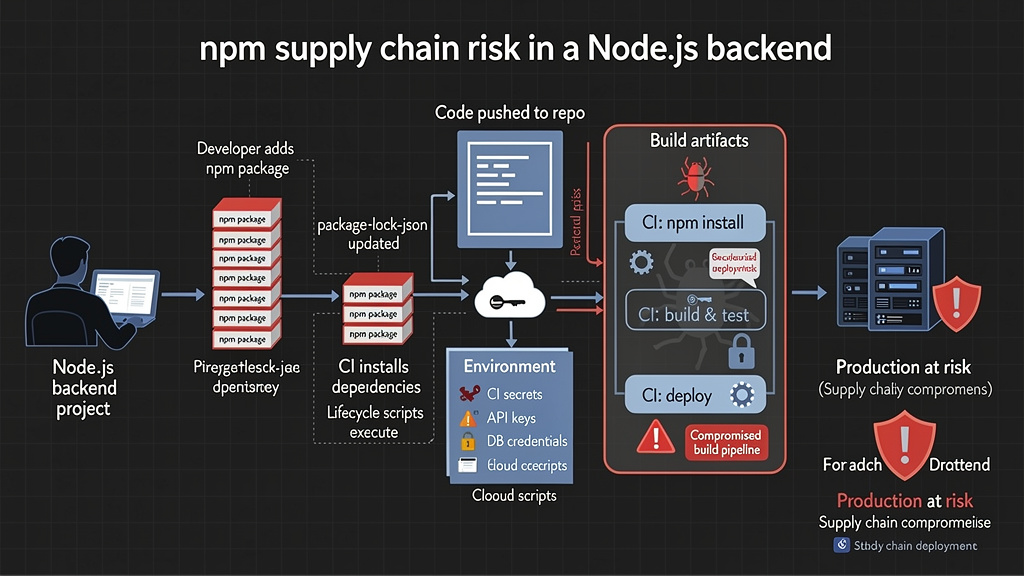
In September 2025, CISA warned about a widespread supply chain compromise affecting the npm ecosystem and described an automated process that authenticated to the npm registry as a compromised developer and injected code into other packages. (CISA) Unit 42’s analysis of Shai-Hulud described a worm that scanned compromised environments for sensitive credentials such as npm tokens, GitHub personal access tokens, and cloud API keys, then used stolen npm tokens to identify other packages maintained by the developer, inject malicious code, and publish compromised versions. (Unit 42)
That incident matters for Node.js backend teams because CI environments often have exactly what attackers want: npm tokens, GitHub tokens, cloud credentials, deployment credentials, database URLs, and access to private packages.
In May 2026, Snyk reported that TanStack npm packages were hit by a Mini Shai-Hulud supply chain attack where 84 malicious package artifacts were published across 42 @tanstack/* packages in a narrow time window, and the packages were published by the legitimate release pipeline after attacker-controlled code hijacked the runner mid-workflow. Snyk also reported CVE-2026-45321 and noted that this was a documented case of malicious npm packages carrying valid SLSA provenance because the legitimate build pipeline itself was hijacked. (Snyk)
The lesson is precise: provenance helps answer where and how a package was built, but it does not prove the source was safe at the moment of build. Build pipeline integrity, workflow hardening, secret minimization, dependency review, and runtime detection still matter.
npm Trusted Publishing helps reduce long-lived token risk. npm’s documentation says trusted publishing allows packages to be published directly from CI/CD workflows using OpenID Connect and eliminates the need for long-lived npm tokens; it also says the approach uses short-lived workflow-specific tokens that cannot be extracted or reused. (npm Docs)
For package publishers, prefer trusted publishing where supported:
name: publish

on:
  release:
    types: [published]

permissions:
  contents: read
  id-token: write

jobs:
  publish:
    runs-on: ubuntu-latest
    environment: npm-publish

    steps:
      - uses: actions/checkout@v4

      - uses: actions/setup-node@v4
        with:
          node-version: '24'
          registry-url: 'https://registry.npmjs.org'

      - run: npm ci
      - run: npm test
      - run: npm publish
Still harden the workflow. Use protected environments, require approval for releases, pin third-party actions, minimize permissions, isolate build jobs from secrets until needed, and never expose broad cloud credentials during package install.
For package consumers, add controls around dependency installation:
# Prefer reproducible installs from the lockfile.
npm ci

# Inspect lifecycle scripts before adding a dependency.
npm view some-package scripts
npm view some-package dist.tarball
npm view some-package maintainers
npm view some-package time

# Review the actual installed package contents when risk is high.
npm pack some-package
tar -tf some-package-*.tgz | head -100
For high-risk environments, consider disabling lifecycle scripts during install and allowing them only when required:
npm ci --ignore-scripts
This may break packages that legitimately need build scripts, so treat it as an engineering control, not a universal switch. Where scripts are required, review and isolate them.
Use lockfiles as security artifacts
A パッケージロック.json file is not noise. It is the exact dependency tree used by npm ci. If developers do not review lockfile changes, attackers can hide risk in transitive updates.
The npm audit documentation notes that audit requires a lockfile and that bypassing the package lock can produce different results because npm rebuilds the dependency tree each time. (npm Docs)
A secure workflow:
# Local development
npm install some-package
npm test
npm audit

# Commit both package.json and package-lock.json
git add package.json package-lock.json
git commit -m "Add some-package for PDF parsing"

# CI
npm ci
npm test
npm audit --omit=dev --audit-level=high
Review lockfile diffs for:
| 信号 | なぜそれが重要なのか |
|---|---|
| Unexpected package count spike | Dependency expansion |
| New install scripts | Build-time execution risk |
| New native addons | Native code risk |
| New network-facing packages | SSRF, request, parsing risk |
| New parser libraries | RCE, prototype pollution, DoS risk |
| New abandoned packages | Patch availability risk |
| New packages with names close to popular packages | Typosquatting risk |
| Registry URL changes | Dependency confusion or registry poisoning risk |
For sensitive services, consider adding lockfile linting and dependency review automation. Do not depend only on manual review.
Reduce secrets available to Node.js processes
Secrets should be available only to the process that needs them, only for the time it needs them, and only with the privileges required. That principle is easy to say and hard to maintain in Node.js deployments because environment variables are convenient.
OWASP’s Secrets Management Cheat Sheet emphasizes centralizing storage, provisioning, auditing, rotation, and management of secrets, and notes that shared secrets make it harder to identify the source of compromise or leakage. (OWASPチートシートシリーズ)
A Node.js backend secret checklist:
| コントロール | Bad pattern | Better pattern |
|---|---|---|
| Source code | Hardcoded keys | Secret manager or deployment-time injection |
環境 ファイル | Committed to git | Local-only, ignored, rotated if exposed |
| CI | Broad secrets available to all jobs | Job-specific secrets and least privilege |
| 過去ログ | Dump プロセス.env | Redaction and no environment dumps |
| ローテーション | Static keys for years | Rotation schedule and emergency rotation path |
| スコープ | One cloud key for all services | Per-service, least-privilege credentials |
| ストレージ | Shared wiki or chat | Managed secret store with audit trail |
| Incident response | Delete leaked key from repo only | Rotate key and purge history where appropriate |
Never assume removing a secret from the latest commit fixes the exposure. If a secret was committed, logged, or exposed in CI, treat it as compromised and rotate it.
Use the Node.js Permission Model where it reduces blast radius
The Node.js Permission Model can restrict access to resources such as filesystem, network, child processes, worker threads, native addons, WASI, FFI, and the inspector when Node starts with --permission. The documentation says the feature was added in v20.0.0 and is stable as of v23.5.0 and v22.13.0. (Node.js)
A worker that only needs to read a specific directory and call a specific API can be started with narrower permissions:
node \
  --permission \
  --allow-fs-read=/app/config,/app/templates \
  --allow-fs-write=/tmp/app-cache \
  --allow-net=api.example.com \
  worker.js
This is useful for reducing accidental access and limiting blast radius. But the Node.js documentation is explicit that the permission model is a “seat belt” approach and does not provide security guarantees in the presence of malicious code; malicious code can bypass it and execute arbitrary code without the restrictions imposed by the model. (Node.js)
That limitation matters. Do not describe the Permission Model as a sandbox for arbitrary attacker-controlled JavaScript. Do not use it to justify executing untrusted plugins in the main backend process. Use it as one layer alongside container isolation, non-root users, read-only filesystems, seccomp/AppArmor where appropriate, network egress controls, and dependency governance.
Avoid dangerous dynamic code execution
Node.js makes dynamic execution easy:
eval(userInput);
new Function(userInput)();
child_process.exec(userInput);
vm.runInNewContext(userInput);
These APIs are not automatically vulnerabilities, but they are dangerous sinks. If user-controlled data reaches them, the result can be code execution, command injection, data exfiltration, or sandbox escape depending on context.
Safer patterns:
| Dangerous goal | Safer approach |
|---|---|
| User-defined formula | Parse with a restricted expression parser |
| Dynamic filters | Map allowed operators to query builder functions |
| Template rendering | Use a maintained template engine with escaping |
| Shell command | 用途 execFile または スポーン with fixed binary and argument array |
| Plugin execution | Isolate in separate process, container, or VM boundary designed for untrusted code |
| JSON transformation | Use declarative allowlisted operations |
Example command execution pattern:
import { execFile } from 'node:child_process';

function resizeImage(inputPath, outputPath, width) {
  if (!Number.isInteger(width) || width < 1 || width > 3000) {
    throw new Error('Invalid width');
  }

  return new Promise((resolve, reject) => {
    execFile(
      'convert',
      [inputPath, '-resize', `${width}x`, outputPath],
      { timeout: 10_000 },
      (err, stdout, stderr) => {
        if (err) return reject(err);
        resolve({ stdout, stderr });
      }
    );
  });
}
The binary is fixed. Arguments are separated. Numeric input is bounded. Timeout is enforced. This is still not a complete image-processing security model, but it avoids shell interpolation.
Secure CORS by product requirement, not convenience
CORS is often misconfigured because developers use it to make the frontend work quickly.
悪いパターンだ:
app.use(cors({
  origin: '*',
  credentials: true
}));
Browsers will reject some invalid combinations, but the intent is still wrong. A credentialed browser API should not be broadly exposed to arbitrary origins.
Safer pattern:
const allowedOrigins = new Set([
  'https://app.example.com',
  'https://admin.example.com'
]);

app.use(cors({
  origin(origin, callback) {
    if (!origin) return callback(null, false);

    if (allowedOrigins.has(origin)) {
      return callback(null, true);
    }

    return callback(new Error('CORS origin not allowed'));
  },
  credentials: true,
  methods: ['GET', 'POST', 'PATCH', 'DELETE'],
  allowedHeaders: ['Content-Type', 'Authorization', 'X-Request-Id']
}));
Do not use CORS as an authorization control. CORS controls browser access from origins. It does not stop curl, scripts, mobile apps, server-side calls, or attackers with stolen tokens. Server-side authentication and authorization still decide whether the request is allowed.
Secure API keys and machine-to-machine credentials
Not every backend caller is a human. Node.js APIs often expose machine-to-machine access through API keys, service tokens, webhook secrets, or OAuth client credentials.
A safe API key design includes:
| コントロール | Reason |
|---|---|
| Prefix keys with public identifier | Allows lookup without storing plaintext |
| Store only hashed key material | Reduces impact of database exposure |
| Show full key only once | Prevents future disclosure |
| Scope keys | Limits what a stolen key can do |
| Expire or rotate keys | Limits long-term exposure |
| Bind to tenant and owner | Supports audit and revocation |
| Log key ID, not key value | Enables detection without leaking secrets |
| Rate limit by key | Prevents abuse |
| Provide last-used timestamp | Helps customers retire stale keys |
Example API key hashing:
import crypto from 'node:crypto';

function createApiKey() {
  const id = crypto.randomBytes(8).toString('hex');
  const secret = crypto.randomBytes(32).toString('base64url');
  const token = `sk_live_${id}_${secret}`;
  const hash = crypto.createHash('sha256').update(secret).digest('hex');

  return { token, id, hash };
}

function hashPresentedSecret(secret) {
  return crypto.createHash('sha256').update(secret).digest('hex');
}
For high-value APIs, consider HMAC-signed requests, mTLS, OAuth client credentials, or proof-of-possession tokens instead of static bearer keys. Bearer credentials are simple but dangerous: anyone who has the string can use it.
Protect webhooks with raw-body signature verification
Webhook endpoints are a common Node.js backend risk because they are public, unauthenticated in the normal user sense, and often update sensitive internal state.
Do not verify webhook signatures after JSON parsing if the provider signs the raw body. Parsing can change whitespace, ordering, or encoding assumptions.
Example raw-body verification pattern:
import crypto from 'node:crypto';
import express from 'express';

app.post('/webhooks/provider',
  express.raw({ type: 'application/json', limit: '100kb' }),
  (req, res) => {
    const signature = req.header('x-provider-signature');
    const expected = crypto
      .createHmac('sha256', process.env.WEBHOOK_SECRET)
      .update(req.body)
      .digest('hex');

    if (!signature || !crypto.timingSafeEqual(
      Buffer.from(signature, 'hex'),
      Buffer.from(expected, 'hex')
    )) {
      return res.status(401).send('invalid signature');
    }

    const event = JSON.parse(req.body.toString('utf8'));

    // Validate event type, idempotency, tenant mapping, and state transition.
    res.status(204).send();
  }
);
Webhook security should include replay protection, event ID idempotency, timestamp tolerance, event type allowlisting, and state transition validation. A valid webhook signature proves the provider sent the message. It does not prove your business state should change without further checks.
Add safe defaults for database access
Most Node.js backend vulnerabilities are not raw SQL injection anymore, but injection is not gone. Query builders and ORMs reduce some risks, yet unsafe raw queries, dynamic filters, NoSQL operators, and string-built SQL still create exploitable paths.
Bad SQL pattern:
const sql = `SELECT * FROM users WHERE email = '${req.query.email}'`;
const users = await db.query(sql);
Safer parameterized pattern:
const users = await db.query(
  'SELECT id, email, display_name FROM users WHERE email = $1',
[req.query.email]
);
Unsafe dynamic sorting:
const sql = `SELECT * FROM orders ORDER BY ${req.query.sort}`;
Safer allowlisted sorting:
const sortMap = {
  createdAt: 'created_at',
  total: 'total_cents',
  status: 'status'
};

const sortColumn = sortMap[req.query.sort] || 'created_at';

const rows = await db.query(
  `SELECT id, status, total_cents FROM orders WHERE user_id = $1 ORDER BY ${sortColumn} DESC LIMIT $2`,
[req.user.id, 50]
);
You cannot parameterize identifiers the same way you parameterize values. Use allowlists for columns, operators, and directions.
For MongoDB-like query objects, block operator injection:
const schema = z.object({
  email: z.string().email()
}).strict();

const { email } = schema.parse(req.query);

const user = await users.findOne({ email });
Reject unknown fields. Do not pass arbitrary request JSON into database query objects.
Design multi-tenant isolation as a database invariant
Multi-tenant Node.js systems should treat tenant isolation as a core invariant. The safest pattern is to make tenant context unavoidable.
Weak pattern:
await db.invoice.findMany({
  where: { status: req.query.status }
});
Safer pattern:
await db.invoice.findMany({
  where: {
    tenantId: req.user.tenantId,
    status: req.query.status
  }
});
For larger codebases, use repository functions that require tenant context:
async function findInvoiceForTenant({ tenantId, invoiceId }) {
  return db.invoice.findFirst({
    where: { tenantId, id: invoiceId }
  });
}
Avoid helper functions that accept only object IDs for tenant-owned resources. If the function signature lacks テナントID, it is easy for a future developer to forget the boundary.
Add tests that prove cross-tenant access fails:
test('user cannot read invoice from another tenant', async () => {
  const token = await loginAs(userFromTenantA);

  const res = await request(app)
    .get(`/api/invoices/${invoiceFromTenantB.id}`)
    .set('Authorization', `Bearer ${token}`);

  expect([403, 404]).toContain(res.status);
});
This is not only a unit test. It is a security invariant test.
Build a Node.js backend security middleware baseline
A reusable baseline can prevent common mistakes, but it should not hide route-specific security decisions.
export function applySecurityBaseline(app) {
  app.disable('x-powered-by');
  app.set('trust proxy', 1);

  app.use(helmet({
    contentSecurityPolicy: false
  }));

  app.use((req, res, next) => {
    req.id = req.headers['x-request-id'] || crypto.randomUUID();
    res.setHeader('X-Request-Id', req.id);
    next();
  });

  app.use(express.json({
    limit: '100kb',
    strict: true
  }));

  app.use(express.urlencoded({
    extended: false,
    limit: '20kb'
  }));
}
Then make route-specific choices explicit:
app.post(
  '/api/admin/users/:id/disable',
  requireAuth,
  requirePermission('user:disable'),
  validateParams(userIdSchema),
  disableUserHandler
);

app.post(
  '/api/import',
  requireAuth,
  requirePermission('data:import'),
  importUpload.single('file'),
  importHandler
);
Global middleware cannot know whether a route is admin-only, tenant-scoped, idempotent, expensive, file-backed, webhook-signed, or public. The checklist must include route-level policy.
Testing workflow for APIs, auth, and dependency risk
A realistic Node.js backend test workflow should combine static review, dynamic tests, dependency checks, and runtime validation.
Start with inventory:
# Examples of useful inventory sources
grep -R "app\\.\\(get\\|post\\|put\\|patch\\|delete\\)" -n src/
find . -name "openapi*.yml" -o -name "openapi*.json"
Then build an identity matrix:
| Identity | 目的 |
|---|---|
| Anonymous | Public endpoint and auth bypass testing |
| Regular user A | Baseline user access |
| Regular user B | Same-role BOLA testing |
| Tenant admin A | Tenant-scoped admin testing |
| User from tenant B | Cross-tenant isolation testing |
| Global admin | Administrative function testing |
| Service token | Machine-to-machine scope testing |
| Expired token | Token validation testing |
| Wrong-audience token | Audience validation testing |
Test object access:
# Authorized access
curl -i \
  -H "Authorization: Bearer $USER_A_TOKEN" \
  "$API/api/orders/$USER_A_ORDER"

# Cross-user access should fail
curl -i \
  -H "Authorization: Bearer $USER_A_TOKEN" \
  "$API/api/orders/$USER_B_ORDER"
Test function access:
curl -i \
  -X DELETE \
  -H "Authorization: Bearer $REGULAR_USER_TOKEN" \
  "$API/api/admin/users/$TARGET_USER"
Test mass assignment:
curl -i \
  -X PATCH \
  -H "Authorization: Bearer $USER_TOKEN" \
  -H "Content-Type: application/json" \
  -d '{"displayName":"alice","role":"admin","tenantId":"other"}' \
  "$API/api/profile"
Test request limits:
python3 - <<'PY'
import json
payload = {"x": "A" * 300000}
open("/tmp/large.json", "w").write(json.dumps(payload))
PY

curl -i \
  -X POST \
  -H "Content-Type: application/json" \
  --data-binary @/tmp/large.json \
  "$API/api/profile"
Test dependency risk:
npm ci
npm audit --omit=dev --audit-level=high
npm ls --depth=0
git diff -- package-lock.json
Test secrets exposure:
# Use a real secret scanner in CI; this is only a reminder pattern.
git grep -nE "(AKIA|BEGIN PRIVATE KEY|npm_[A-Za-z0-9]|xox[baprs]-)"
When teams need to repeat these tests across live staging targets, preserve scope and evidence. Penligent’s public product material describes controlled agentic workflows, scope control, and human-in-the-loop actions for authorized security testing, which makes it relevant to black-box API verification when used against systems the tester is allowed to assess. (寡黙) Penligent’s API security testing article also emphasizes testing beyond functional correctness, including authorization gaps, shadow assets, logic abuse, BOLA, BFLA, mass assignment, fuzzing, and evidence-oriented validation. (寡黙)
The tool is less important than the discipline: every finding should include the identity used, endpoint, request, response, expected policy, observed behavior, impact, reproduction steps, and fix guidance.
Detection signals for production Node.js APIs
Prevention fails. Good Node.js backend security includes detection.
| 信号 | Possible meaning | アクション |
|---|---|---|
| Many 401s on login | クレデンシャル・スタッフィング | Account and IP throttling, MFA challenge |
| Many 403s on object routes | BOLA probing | Alert by user, tenant, source IP |
Many 404s under /admin | Route discovery | Investigate source and WAF logs |
| Repeated object ID sequence | ID enumeration | Block or challenge, inspect account |
| 413 responses | Oversized body testing | Confirm limits and source |
| 429 responses | Rate-limit engagement | Tune thresholds and identify abuse |
| High event-loop delay | CPU or parsing pressure | Correlate with routes and payloads |
| Unexpected outbound private IP requests | SSRF attempt | Block egress and inspect request source |
| New dependency install script in CI | Supply chain risk | Review package and isolate secrets |
| npm token use outside release job | Credential compromise | Revoke token and investigate |
| Spike in password reset requests | Account enumeration or takeover attempt | Add rate limits and alerting |
| Token validation failures by audience | Token substitution attempt | Verify client configuration and abuse |
Structured logs should support these detections without exposing secrets.
Example security event:
logger.warn({
  event: 'authorization_denied',
  requestId: req.id,
  userId: req.user?.id,
  tenantId: req.user?.tenantId,
  route: req.route?.path,
  objectType: 'order',
  objectId: req.params.orderId,
  reason: 'object_not_owned'
}, 'authorization denied');
This log lets defenders distinguish ordinary errors from object probing.
CI/CD checklist for a Node.js backend
A secure backend pipeline should not only run tests. It should prevent risky builds from becoming deployments.
| ステージ | Security gate |
|---|---|
| Install | npm ci from committed lockfile |
| Dependency audit | Fail on high/critical production advisories |
| Lockfile review | Flag unexpected dependency expansion |
| Unit tests | Include auth and tenant isolation tests |
| Integration tests | Use multiple identities and tenants |
| Static checks | Detect dangerous sinks and secret patterns |
| Container build | Use supported Node.js base image |
| Image scan | Scan OS and application packages |
| 秘密 | Only inject deploy secrets into deploy jobs |
| Release | Use protected environments and least privilege |
| Publish packages | Prefer trusted publishing over long-lived npm tokens |
| 配備 | Record artifact digest and runtime version |
| Post-deploy | Run smoke tests and auth checks |
A GitHub Actions example:
name: backend-security

on:
  pull_request:
  push:
    branches: [main]

permissions:
  contents: read

jobs:
  test-and-audit:
    runs-on: ubuntu-latest

    steps:
      - uses: actions/checkout@v4

      - uses: actions/setup-node@v4
        with:
          node-version: '24'
          cache: 'npm'

      - name: Install from lockfile
        run: npm ci

      - name: Check runtime
        run: node scripts/check-node-version.js

      - name: Run tests
        run: npm test

      - name: Audit production dependencies
        run: npm audit --omit=dev --audit-level=high

      - name: Check for common secrets
        run: npm run secrets:scan
Keep CI permissions narrow. A test job should not need production cloud credentials. A dependency install step should not need npm publish rights. A pull request from a fork should not get secrets. Treat CI as part of the attack surface.
Deployment hardening checklist
At deployment time, focus on least privilege and predictable behavior.
| コントロール | 推薦 |
|---|---|
| User | Run as non-root |
| Filesystem | Use read-only root filesystem where possible |
| Temp directory | Provide bounded writable temp path |
| ネットワーク | Restrict egress to required destinations |
| 秘密 | Inject per-service secrets from managed store |
| Runtime | Use supported Node.js LTS or Maintenance LTS |
| Process manager | Restart on crash, but alert on crash loops |
| Health checks | Separate liveness and readiness |
| Graceful shutdown | Stop accepting traffic before closing resources |
| TLS | Terminate at trusted proxy and set secure headers |
| Proxy trust | 設定 trust proxy only for known proxy paths |
| 過去ログ | Redact credentials and include request IDs |
| Metrics | Track event-loop delay, latency, errors, auth failures |
Graceful shutdown example:
const server = app.listen(process.env.PORT || 3000);

async function shutdown(signal) {
  logger.info({ signal }, 'shutting down');

  server.close(async () => {
    await db.$disconnect();
    await redis.quit();
    process.exit(0);
  });

  setTimeout(() => {
    logger.error('forced shutdown after timeout');
    process.exit(1);
  }, 30_000).unref();
}

process.on('SIGTERM', shutdown);
process.on('SIGINT', shutdown);
Security and reliability overlap. A backend that drops in-flight requests, loses audit logs, or corrupts state during deployment creates security investigation gaps.
What to do when a dependency advisory appears
いつ npm audit, Dependabot, Snyk, OSV, or a vendor advisory flags a dependency, do not immediately merge a blind fix. Triage it.
Ask:
| Question | なぜ |
|---|---|
| Is the vulnerable package present in production dependencies? | Dev-only risk may still matter in CI but not runtime |
| Is the vulnerable version actually installed in the lockfile? | package.json ranges may mislead |
| Is the vulnerable code path reachable? | Reachability affects urgency, not whether to patch eventually |
| Is there a patched version? | Determines update path |
| Is the fix semver-compatible? | Determines testing effort |
| Does the advisory involve install-time behavior? | CI and developer machines may be exposed |
| Were secrets present during install or build? | Determines incident response |
| Is exploitation known in the wild? | Raises priority |
| Is the package abandoned? | May require replacement |
| Does the package parse untrusted input? | Raises risk for backend APIs |
Then fix:
git checkout -b security/update-vulnerable-package

npm audit
npm update vulnerable-package
npm test
npm audit --omit=dev --audit-level=high

git diff package.json package-lock.json
If a package is suspected malicious rather than merely vulnerable, treat the host as potentially compromised. Remove the package, rotate secrets available to the environment, inspect CI logs, invalidate tokens, check outbound network logs, and rebuild from a clean environment.
Common Node.js backend mistakes that survive shallow reviews
Several mistakes are common because the code appears normal.
First, checking only authentication. A route has requireAuth, so reviewers move on. But the object query does not bind to the user or tenant.
Second, trusting request body fields. The API accepts テナントID, 役割, statusあるいは プラン because it was convenient for an internal admin UI. Later, the same route becomes reachable by normal users.
Third, validating JWTs partially. The backend verifies a signature but does not validate audience. A token meant for one service works against another.
Fourth, using one global request body limit. Upload support leads to a large global JSON limit, exposing unrelated endpoints to memory pressure.
Fifth, treating CORS as security. CORS does not authorize API access. It only controls browser behavior.
Sixth, committing broad CI secrets. A dependency compromise then becomes a cloud compromise.
Seventh, ignoring lockfile diffs. A one-line package change brings dozens of new transitive packages.
Eighth, logging too much. Debug logs capture Authorization headers, cookies, reset tokens, or environment variables.
Ninth, assuming npm audit detects malicious packages. It detects known advisories, not every suspicious package.
Tenth, treating the Node.js Permission Model as a sandbox. It reduces blast radius for trusted code but is not a guarantee against malicious code. (Node.js)
A practical 30-day hardening plan
A mature Node.js backend security program takes time, but the first month can reduce meaningful risk.
Week one: inventory and runtime.
Create a route inventory. Identify public, authenticated, admin, webhook, and service-to-service endpoints. Confirm the production Node.js release line. Confirm Express or framework versions. Confirm npm ci is used in CI. Confirm production error handling does not expose stack traces.
Week two: authorization and auth tests.
Build a test identity matrix with at least two users and two tenants. Add BOLA tests for the top object routes. Add BFLA tests for admin routes. Review JWT verification for algorithm, issuer, audience, and expiration. Review password hashing and reset flows.
Week three: dependency and CI hardening.
Add npm audit --omit=dev --audit-level=high to CI. Review lockfile changes in pull requests. Remove unused dependencies. Identify install scripts. Reduce CI secret exposure. Review npm token usage. Prefer trusted publishing for packages where supported.
Week four: runtime limits and detection.
Set route-appropriate body limits. Add rate limits for auth and expensive flows. Add pagination caps. Add event-loop delay metrics. Add structured security logs for auth failures, authorization denials, rate limits, and unusual outbound requests. Add alerts for object probing and credential stuffing.
This plan will not make a backend perfect, but it creates evidence. Evidence changes security conversations from opinion to reproducible behavior.
よくあるご質問
Is Node.js secure enough for backend APIs?
- Yes, Node.js can be secure for backend APIs when the application uses supported runtime versions, server-side authorization, strict input validation, safe session or JWT handling, dependency governance, and production hardening.
- The largest risks usually come from application design and operations, not from Node.js alone.
- A Node.js backend should run on Active LTS or Maintenance LTS lines, because production applications need security fixes from maintained release lines. (Node.js)
- Treat npm dependencies and CI/CD secrets as part of the backend attack surface.
What is the most common security mistake in a Node.js backend?
- The most damaging mistake is often checking authentication but not authorization.
- A route that verifies “the caller is logged in” can still be vulnerable if it does not verify “this caller owns this object” or “this caller can perform this action.”
- BOLA and BFLA testing should use multiple users, roles, and tenants to prove that object and function boundaries hold.
- The fix is to bind database queries and actions to authenticated server-side context, not to client-supplied IDs or roles.
Should a Node.js backend use JWTs or server-side sessions?
- Use JWTs when stateless access tokens fit the architecture, especially for APIs called by multiple services or clients.
- Use server-side sessions when immediate revocation, browser session control, and centralized session state are more important.
- JWTs must be verified, not merely decoded. Validate signature, algorithm, issuer, audience, expiration, and required claims.
- Server-side sessions need secure cookies, a production session store, CSRF protection where relevant, and safe logout and rotation behavior.
Does npm audit protect against malicious packages?
npm audithelps find known vulnerabilities in dependencies, but it is not a complete malicious package detector.- npm documentation says audit checks dependency metadata against known vulnerability reports and requires package files such as
package.jsonそしてパッケージロック.json. (npm Docs) - A newly published malicious package, a typosquatted package, or a compromised maintainer release may not have an advisory yet.
- Combine audit with lockfile review, install script review, dependency minimization, trusted publishing where relevant, CI secret minimization, and monitoring.
How should I secure Express in production?
- Use maintained Express and Node.js versions.
- Enable TLS at the appropriate layer and configure proxy trust carefully.
- Disable
X-Powered-By, use Helmet, set route-appropriate body limits, and implement production error handlers. - Use secure cookies with
HttpOnly,セキュア, and appropriateSameSite. - Do not use the default in-memory session store in production.
- Add rate limits for login, sensitive actions, and expensive routes.
- Express’s official production security guidance includes TLS, Helmet, secure cookies, brute-force protection, dependency security, and avoiding deprecated or vulnerable Express versions. (Express.js)
How do I test BOLA or IDOR safely in a Node.js API?
- Test only systems where you have explicit authorization.
- Create two normal users and, for SaaS systems, two tenants.
- Capture a valid object ID owned by User A and try to access it with User B’s token.
- Repeat for read, update, delete, export, and nested routes.
- Expected behavior is 403 or 404, with no sensitive data returned.
- Record the request, response, identity, object owner, expected policy, and observed behavior.
Should I use the Node.js Permission Model in production?
- It can be useful when a process has a narrow job, such as reading a specific config path and calling a specific network destination.
- It can reduce accidental filesystem, network, child process, worker, addon, WASI, FFI, or inspector access.
- Do not treat it as a sandbox for malicious code. Node.js documentation describes it as a “seat belt” approach and says it does not provide security guarantees in the presence of malicious code. (Node.js)
- Use it with container isolation, least privilege, network egress controls, and dependency governance.
How often should Node.js backend dependencies be reviewed?
- Review dependency changes on every pull request.
- Run dependency audit checks in CI on every merge and on a scheduled basis.
- Reassess dependencies whenever a security advisory, npm supply chain incident, maintainer change, or suspicious lockfile change appears.
- Remove unused packages regularly.
- Treat dependency review as production risk management, not cleanup work.
Closing notes
A secure Node.js backend is not defined by one framework, one middleware package, or one scanner. It is defined by whether the system consistently enforces server-side authorization, validates identity claims, limits resource consumption, handles sessions safely, constrains outbound requests, treats dependencies as executable trust, protects CI/CD secrets, and produces enough evidence to verify fixes.
The highest-value improvements are usually boring: supported runtime versions, route inventory, object-level authorization tests, strict request schemas, safe password hashing, validated JWT claims, secure cookies, committed lockfiles, dependency audit gates, reduced CI secrets, production-safe errors, and logs that show when someone is probing the boundary. Those controls do not make Node.js special. They make a Node.js backend defensible.


 Japanese
  English
  German
  French
  Spanish
  Portuguese
  Korean
  Hindi
Hindi  Arabic
  Turkish
  Hebrew