
Plex has issued an important security warning for Plex Media Server users, urging administrators to upgrade systems running version 1.43.2 or earlier to Plex Media Server 1.43.3 or newer.
The advisory deserves more attention than an ordinary Plex release note.
On September 1, 2026, Plex said that it had released Plex Media Server 1.43.3 そして Plex Desktop 1.115.0 to address “a number of security issues” and recommended that server owners and desktop users install the latest versions as soon as possible. Plex also confirmed that CVE identifiers had been requested but had not yet been published.
That last detail is particularly important for anyone searching for a Plex CVE.
At the time of writing on September 2, 2026, there is no responsible basis for assigning an unknown CVE number, CVSS score, exploitability rating, or precise attack chain to the vulnerabilities referenced in the September advisory. Plex has patched the issues first and is withholding or awaiting additional public vulnerability information.
Administrators should therefore treat this as a patch-now situation rather than a wait-for-the-CVE situation.
There is also an important version nuance. Plex Media Server 1.43.3 has existed in several builds since July. The security-related release notes appeared in later 1.43.3 builds, including 1.43.3.10861 そして 1.43.3.10896. Administrators should therefore avoid assuming that simply seeing the string “1.43.3” means they are on the newest patched build.
For most installations, the safest immediate target is the latest public 1.43.3 build available for the platform — 1.43.3.10896 at the time of the advisory — or any newer stable version made available by Plex. Plex made 1.43.3.10896 generally available on August 18, 2026.
What Happened With the New Plex Security Update?
The security notice is unusually concise.
Plex stated:
“We recently released Plex Media Server 1.43.3 and Plex Desktop 1.115.0 to address a number of security issues.”
The company then advised users to update immediately and said CVEs had been requested.
That creates an unusual situation for vulnerability researchers and administrators.
Normally, someone searching for a Plex CVE might expect to find:
- a CVE identifier;
- affected versions;
- a CWE classification;
- a CVSS score;
- attack prerequisites;
- proof-of-concept information;
- references from NVD, CVE.org, or a researcher advisory;
- and a vendor remediation statement.
In this case, the vendor remediation arrived before the complete public vulnerability record.
That does ない mean there is no vulnerability.
It means vulnerability disclosure is still in progress.
As of September 2, the confirmed facts are:
| 項目 | Current status |
|---|---|
| 製品 | Plex Media Server |
| Vulnerable baseline | Plex says 1.43.2 and earlier should update |
| Recommended server version | 1.43.3 or newer |
| Latest public 1.43.3 build at advisory time | 1.43.3.10896 |
| Plex Desktop | Update to 1.115.0 or newer |
| Number of issues | Multiple |
| New CVE IDs | Requested, not yet publicly disclosed |
| Public CVSS scores | Not available |
| Public exploit | Not confirmed |
| Known exploitation | Not confirmed by Plex |
| 推奨される措置 | Update immediately |
Plex’s own wording is more useful here than speculation. The company explicitly recommends that all server owners and Desktop users update as soon as possible.
The Most Important Plex CVE Fact Right Now: There Is No Published New CVE Number Yet
This distinction matters enormously for SEO articles, vulnerability databases, threat-intelligence feeds, and security scanners.
A page titled “Plex CVE” will naturally attract administrators looking for the identifier behind the warning. But as of September 2, 2026, Plex says that CVEs have been requested and details will be provided after publication.
Therefore, claims such as these would currently be unsupported:
“The Plex 1.43.3 vulnerability is CVE-2026-XXXXX.”
Unsupported.
“The Plex vulnerability has a CVSS score of 9.8.”
Unsupported.
“The Plex CVE allows unauthenticated remote code execution.”
Unsupported.
“The vulnerability is being actively exploited.”
Also unsupported unless new evidence emerges.
Security teams should instead record the issue internally using the Plex product identifiers currently available in release notes.
Two particularly interesting identifiers are:
- PM-5763
- PM-5766
These appear in Plex’s 1.43.3 release notes and relate directly to security hardening.
What Security Issues Did Plex Media Server 1.43.3 Fix?
Although Plex has not yet mapped the September advisory to published CVEs, its 1.43.3 release history gives us useful information.
The August 3 beta release of Plex Media Server 1.43.3.10861 introduced two explicitly security-labelled fixes:
“Address potential vulnerability in the CompanionProxy. (PM-5763)”
そして
“The TranscoderH264Options and TranscoderH264OptionsOverride preferences can no longer be modified over the network. (PM-5766)”
Those fixes remained present in 1.43.3.10896, which became generally available on August 18.
These are currently the most visible technical clues associated with the broader Plex security update.
However, an important caveat remains:
Plex has not publicly confirmed that PM-5763 and PM-5766 correspond one-to-one with the CVEs referenced in the September 1 security notice.
The September statement says the release addressed “a number of security issues,” which may include those bugs, additional weaknesses, or a combination of fixes.
Until Plex publishes the CVE records, researchers should resist prematurely joining those identifiers together.
PM-5763: Potential Vulnerability in CompanionProxy
The first notable fix concerns something Plex calls CompanionProxy.
Plex’s release notes provide only a minimal description:
“Address potential vulnerability in the CompanionProxy.”
No attack vector, privilege requirement, affected endpoint, or exploitability details have been publicly provided in the release note.
That lack of detail is likely deliberate.
Proxy functionality is inherently security-sensitive because a proxy component often sits between a client and another resource, forwarding or transforming requests.
Depending on implementation, security failures in proxy systems can sometimes create vulnerability classes such as:
- Server-Side Request Forgery;
- authorization bypass;
- unintended internal network access;
- request smuggling;
- header manipulation;
- trust-boundary violations;
- credential or token forwarding;
- origin confusion;
- or access to functionality that should not be remotely reachable.
None of those should currently be attributed specifically to PM-5763.
They are simply examples of why a proxy component deserves close scrutiny.
Until Plex publishes the corresponding vulnerability advisory, PM-5763 should be treated as a security-sensitive proxy weakness with undisclosed exploitation semantics.
For defenders, that is already enough information to justify patching.
PM-5766: Transcoder Configuration Can No Longer Be Changed Over the Network
The second security change is more concrete.
Plex says:
“The TranscoderH264Options and TranscoderH264OptionsOverride preferences can no longer be modified over the network.”
This restriction was included in both the 1.43.3.10861 and 1.43.3.10896 release notes.
That wording suggests Plex changed the trust model surrounding certain transcoder preferences.
Before the fix, those configuration values could apparently be modified through network-accessible functionality under at least some circumstances. After the fix, Plex prevents such remote changes.
Why does that matter?
Transcoding is one of the most privileged and complex subsystems in a media server.
A Plex server may routinely:
- receive a media request;
- inspect codec information;
- calculate transcoding requirements;
- generate transcoder configuration;
- invoke media-processing components;
- read files from storage;
- write temporary output;
- stream results back over the network.
Any setting that influences transcoder execution should therefore be treated carefully.
Again, Plex has not publicly documented an exploit chain for PM-5766, so it would be irresponsible to claim that this configuration issue automatically results in command injection or remote code execution.
But reducing remote control over transcoding parameters is a meaningful security boundary.
Why Plex May Be Patching Before Publishing Full CVE Details
Some users find it suspicious when a vendor says “update immediately” without explaining exactly what can be exploited.
In vulnerability disclosure, however, that sequence can be intentional.
Suppose a vulnerability affects an internet-reachable service and the vendor publishes the following simultaneously:
Affected endpoint
Exact vulnerable parameter
Authentication requirement
Bug class
Payload structure
Vulnerable code path
Exploit conditions
Patched implementation difference
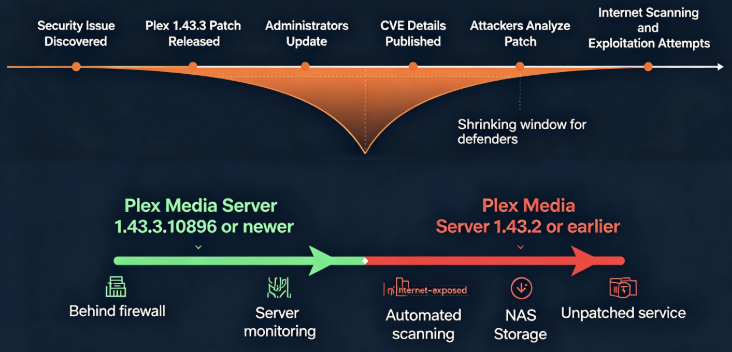
Attackers can immediately begin diffing the vulnerable and patched builds.
Even without a proof of concept, modern vulnerability researchers — and increasingly automated AI systems — can often reconstruct a vulnerability from a patch.
This process is generally called patch diffing.
A simplified attacker workflow looks like this:
Vendor security patch
        ↓
Download old binary
        ↓
Download patched binary
        ↓
Binary / behavior diff
        ↓
Identify changed validation
        ↓
Locate network-facing path
        ↓
Reconstruct vulnerability
        ↓
Develop exploit
        ↓
Scan exposed servers
The time between patch release and reliable exploitation can therefore become extremely short.
Publishing the patch first gives administrators at least some opportunity to reduce the vulnerable population before complete vulnerability details become widely available.
This is particularly relevant for software such as Plex because many installations intentionally support remote access.
Why Plex Media Server Is an Attractive Attack Surface
The words “media server” can make Plex sound like a relatively low-value target.
Technically, that assumption is dangerous.
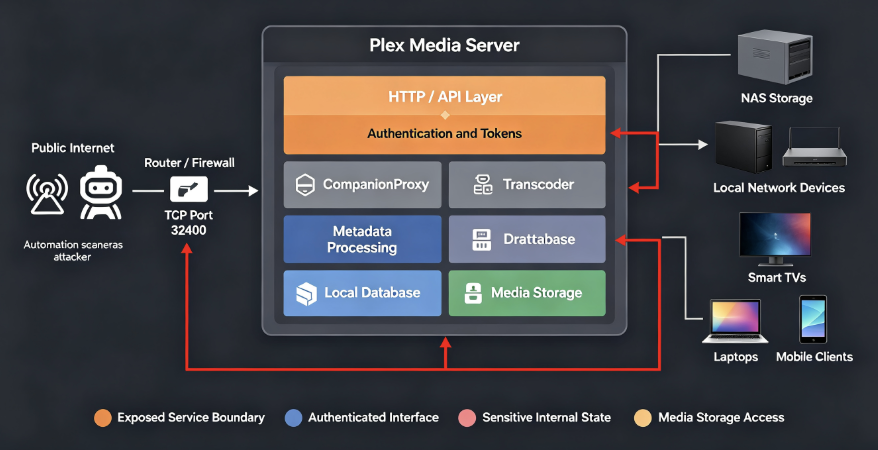
Plex Media Server is a long-running network service with access to local resources.
A typical deployment might look like this:
Internet
   |
   v
Router / NAT / Firewall
   |
 TCP 32400
   |
   v
Plex Media Server
   |
   +------ Plex Authentication
   |
   +------ HTTP/API Layer
   |
   +------ Remote Access
   |
   +------ Companion Features
   |
   +------ Transcoder
   |
   +------ Metadata Processing
   |
   +------ Local Database
   |
   +------ Media Storage
   |
   +------ NAS / SMB / NFS Storage
Depending on configuration, the Plex process may be able to reach:
- a large local media library;
- attached disks;
- network storage;
- temporary directories;
- metadata databases;
- Plex authentication tokens;
- local network services;
- transcoding hardware;
- and external Plex infrastructure.
This makes Plex far more interesting from an attacker perspective than a simple video player.
Remote Access Changes the Threat Model
Plex can be used entirely inside a local network, but one of its most popular capabilities is remote streaming.
Plex documentation describes Plex Media Server as supporting Windows, macOS, Linux, NVIDIA SHIELD and numerous NAS platforms, including QNAP and Synology.
A server administrator may expose Plex so that family members or users can watch content outside the home.
That transforms the security boundary.
A purely internal service primarily faces:
local attacker
compromised device
malicious household user
lateral movement
An internet-accessible service potentially faces:
Internet scanning
        ↓
Service identification
        ↓
Version fingerprinting
        ↓
Authentication testing
        ↓
Known-CVE matching
        ↓
Vulnerability probing
        ↓
Exploitation
The difference is significant.
A vulnerability does not have to be an unauthenticated RCE to be dangerous.
A bug that leaks an authentication token, bypasses authorization, reaches an internal resource, modifies privileged configuration, or exposes another trusted component may provide the first step in a larger attack chain.
Why the Plex CVE Keyword Has a Serious History
The current Plex CVE situation is not happening in isolation.
Plex Media Server has previously had vulnerabilities serious enough to become relevant in real-world attack investigations.
One particularly important example is CVE-2020-5741.
Plex disclosed CVE-2020-5741 in May 2020. The vulnerability allowed an attacker who already had access to the server administrator’s Plex account to abuse Camera Upload functionality and ultimately cause malicious code to execute on the server. Plex mitigated the issue in Plex Media Server 1.19.3.
The official CVE record describes it as a deserialization vulnerability affecting Plex Media Server on Windows before 1.19.3 and allowing a remote authenticated attacker to execute arbitrary Python code.
More importantly, CVE-2020-5741 eventually entered CISA’s Known Exploited Vulnerabilities Catalog.
CISA added the vulnerability on March 10, 2023 and instructed affected organizations to apply vendor updates.
That history provides an important security lesson:
Leaving an old Plex Media Server online is not merely a software-maintenance problem. Old Plex vulnerabilities have been exploited in real attacks.
CVE-2020-5741 Shows Why “Authenticated” Does Not Mean “Low Risk”
CVE-2020-5741 is also a useful example of a common misunderstanding.
The vulnerability required an attacker to obtain administrative Plex access first.
Some administrators might interpret that as:
“If authentication is required, the bug is not very serious.”
But attacks rarely depend on a single vulnerability.
A realistic compromise chain can look more like:
Credential theft
      ↓
Plex account compromise
      ↓
Authenticated access
      ↓
Plex vulnerability
      ↓
Code execution
      ↓
Host compromise
      ↓
Credential collection
      ↓
Lateral movement
The vulnerability becomes much more powerful when combined with another security failure.
This is why security engineers increasingly think in terms of attack paths rather than isolated CVSS numbers.
Another Recent Plex CVE: CVE-2026-42619
There is another Plex CVE that needs to be distinguished from the September 2026 security advisory.
CVE-2026-42619 appeared earlier in 2026.
Plex’s release notes for Plex Media Server 1.43.2.10687 state that the server was changed to:
“Enforce TLS certificate verification on all retries.”
Plex explicitly said that this addressed CVE-2026-42619.
The public CVE.org record has existed for CVE-2026-42619, although its record was still marked as reserved or awaiting fuller CNA information when checked.
The distinction is important:
CVE-2026-42619 is not the unidentified new CVE from the September 1 Plex 1.43.3 advisory.
It was already addressed in the earlier 1.43.2 release.
Anyone writing about the current Plex security update should not accidentally relabel the September vulnerabilities as CVE-2026-42619.
Plex Media Server 1.43.3 Has Multiple Builds
Another potential source of confusion is Plex’s release numbering.
Version 1.43.3 has gone through several builds.
According to Plex’s release history:
| Build | Availability | Important security notes |
|---|---|---|
| 1.43.3.10768 | June 22 beta | No PM-5763/5766 listed |
| 1.43.3.10793 | June 29 beta | No PM-5763/5766 listed |
| 1.43.3.10828 | July 14 public | No PM-5763/5766 listed |
| 1.43.3.10861 | August 4 public | PM-5763 and PM-5766 |
| 1.43.3.10896 | August 18 public | PM-5763 and PM-5766 |
Plex’s official release notes confirm that PM-5763 and PM-5766 first appear in the later 1.43.3 builds, rather than the original July public release.
That means administrators should verify the complete build number, not merely the major/minor/patch string.
For the September advisory, upgrading to the latest public build available for your platform is preferable to stopping at an older 1.43.3 package.
Recommended Version: 1.43.3.10896 or Newer Stable Release
As of the September 1 advisory, 1.43.3.10896 was the latest generally available 1.43.3 release.
Plex released it publicly on August 18.
A 1.43.4.10903 build was also available by August 24, but Plex described that version as a Plex Pass beta-channel release, not the general public release.
For most production Plex servers, that leads to the following practical policy:
1.43.2 or older
      ↓
UPGRADE IMMEDIATELY

Old 1.43.3 build
      ↓
UPDATE TO LATEST PUBLIC BUILD

1.43.3.10896
      ↓
MEETS CURRENT PUBLIC PATCH BASELINE

Newer stable/public Plex release
      ↓
PREFERRED WHEN AVAILABLE
Running beta software simply because its version number is higher is not automatically necessary.
Security patching and release-channel stability should be considered separately.
How to Check Your Plex Media Server Version
Plex exposes the server version through Plex Web App.
According to Plex support documentation, administrators can navigate to:
Settings → Server → General
The current Plex Media Server version is displayed there, and the page also checks whether an update is available.
Do not confuse three different version numbers:
Plex Media Server version
Plex Web App version
Plex Desktop version
They are not interchangeable.
The September security advisory concerns:
Plex Media Server: 1.43.3 or later
Plex Desktop:      1.115.0 or later
Seeing a Plex Web interface version such as 4.x does not prove that the underlying Plex Media Server is patched.
Windows Users
On Windows, check:
Settings → Server → General
If automatic server updates are enabled, Plex recommends confirming that the installed release is up to date.
Plex’s support documentation says Windows and macOS installations can be configured to automatically install available server updates during scheduled maintenance.
For a security-sensitive update, however, administrators should not simply assume the scheduled process completed successfully.
Verify the installed version afterward.
The verification process should be:
Open Plex Web App
       ↓
Settings
       ↓
Server
       ↓
General
       ↓
Check Server Version
       ↓
Confirm current patched release
macOS Users
The same general advice applies to macOS.
Plex supports update checking and scheduled automatic installation for normal macOS Plex Media Server deployments.
Administrators should confirm the actual server build after installation.
For security updates, verification is important because the distinction between “update downloaded” and “server successfully running the patched version” matters.
Linux Users
Linux Plex deployments require more attention.
Plex notes that Linux updates are handled manually or through repository updates rather than the Windows/macOS automatic scheduled-maintenance mechanism.
Plex also migrated its package repositories beginning with the Plex Media Server 1.43.0 generation. Linux administrators using DEB or RPM-based systems should ensure that their repository configuration points to Plex’s currently supported repository.
For Debian or Ubuntu environments, the operational process usually resembles:
sudo apt update
sudo apt upgrade
For supported RPM-based environments:
sudo dnf updateThe critical step is not the command itself.
It is confirming afterward that the running Plex service actually uses the patched package.
Examples of defensive verification include checking the installed package and restarting the Plex service when required.
NAS Users Need Extra Attention
NAS deployments are one of the most important groups affected by this warning.
Plex explicitly warns that the updated version may not immediately appear in a NAS vendor’s package manager.
The company recommends manually installing the Plex package when necessary rather than waiting indefinitely for the vendor app store.
This matters because the delivery chain can look like:
Plex releases patch
        ↓
NAS package created
        ↓
NAS vendor review
        ↓
App-store approval
        ↓
Package appears to users
A security patch could therefore exist upstream while a local NAS dashboard continues to claim there is no update.
That situation can produce a dangerous false sense of security.
If your NAS still reports Plex Media Server 1.43.2 or an older vulnerable build, check the official Plex package availability rather than assuming the device vendor’s repository is current.
Docker Plex Deployments
Containerized deployments introduce another common failure mode.
Administrators may recreate or restart a Plex container but still use an old image.
例えば、こうだ:
docker restart plexdoes not necessarily retrieve a newer Plex image.
The secure workflow should conceptually be:
Identify image source
      ↓
Pull current image
      ↓
Recreate container
      ↓
Preserve configuration/data
      ↓
Start container
      ↓
Verify Plex Server build
Users running third-party Plex container images should also distinguish between:
- the Plex package version inside the container;
- the container image tag;
- and the date the image maintainer rebuilt the image.
A container labelled 最新 does not prove the Plex application itself is current until the running server version is verified.
Should You Downgrade Because of Plex 1.43.3 Bugs?
There is a difficult operational issue here.
Some Plex users reported regressions after installing 1.43.3, including Samsung TV connectivity issues and various crash scenarios. For example, Plex forum users reported Samsung Tizen clients failing to connect after upgrading from 1.43.2 to some 1.43.3 builds.
There were also reports of crashes associated with certain requests, including a reproducible Plex Media Server crash involving /services/ultrablur/colors. A Plex representative later indicated that a fix was targeted for 1.43.4, and a forum user reported that the beta build resolved that particular crash.
Those compatibility problems are real operational concerns.
But after Plex’s September security advisory, rolling back to 1.43.2 purely to solve client compatibility is a poor long-term security strategy.
The better hierarchy is:
1. Fix client/configuration issue if possible
2. Install newer patched Plex build
3. Test latest stable release
4. Consider supported mitigations
5. Avoid remaining indefinitely on 1.43.2
A functional vulnerable server is not a good substitute for a patched server.
What Should Administrators Do Before the CVE Details Are Released?
Updating is the primary mitigation.
After patching, administrators can reduce their Plex attack surface further.
Minimize Internet Exposure
If remote Plex access is unnecessary, do not expose the service unnecessarily.
The typical Plex Web interface can be reached locally through TCP port 32400, and Plex’s documentation demonstrates local access using URLs such as:
http://192.168.1.5:32400/webInternet exposure should be treated as an intentional security decision.
Restrict Network Paths
If Plex is only needed from trusted networks, firewall policy can significantly reduce reachable attack surface.
Conceptually:
Internet
   X
Firewall
   |
Trusted LAN/VPN
   |
Plex Media Server
is safer than:
Internet
   |
Plex Media Server
provided remote Plex functionality is not required.
Protect the Plex Account
Some historical Plex vulnerabilities required authenticated privileges.
Account compromise can therefore turn a vulnerability with significant prerequisites into a practical exploitation path.
Use:
- a unique password;
- multi-factor authentication where available;
- secure email credentials;
- careful session management;
- and periodic account/device review.
Protect the Host, Not Just Plex
A Plex installation is only one component of the security boundary.
The underlying server should also receive:
- operating-system security updates;
- NAS firmware updates;
- Docker host updates;
- SSH hardening;
- firewall configuration;
- least-privilege permissions;
- logging;
- and backup protection.
Detection: How to Look for Suspicious Plex Activity
Because the new CVE details are not yet public, there is no vendor-provided indicator-of-compromise list specifically tied to the September vulnerabilities.
Defenders can still establish baseline monitoring.
Pay attention to:
Unexpected Plex authentication events
Unexpected remote IP addresses
Unusual configuration changes
Unexpected Plex restarts
Repeated server crashes
New outbound network destinations
Unknown local processes launched by Plex
Unexpected files written by the Plex user
Changes to startup configuration
Unexplained account tokens or devices
Linux administrators can also review service activity surrounding the Plex process.
At the network level, monitoring connections involving Plex can help establish whether the service is communicating with unexpected endpoints.
The important principle is baseline deviation.
A media server normally exhibits a relatively predictable pattern:
Client connects
      ↓
Media requested
      ↓
File accessed
      ↓
Optional transcoding
      ↓
Stream delivered
Activity significantly outside that pattern deserves investigation.
Security Teams Should Inventory Plex Now
Corporate security teams should not assume Plex exists only on home networks.
Personal applications frequently appear on:
- developer workstations;
- home-office systems;
- lab servers;
- unmanaged NAS devices;
- personal cloud servers;
- and machines that also contain business credentials.
That makes software inventory important.
An organization can begin with authorized asset inventory rather than invasive exploitation.
Useful detection targets include:
Installed Plex Media Server packages
Running Plex processes
Docker images containing Plex
Service definitions
Listening TCP/32400 services
NAS application inventories
Software-management databases
For authorized networks, this type of asset discovery can quickly identify forgotten servers.
Why Old Plex Servers Are Especially Dangerous
Media servers tend to have unusually long lifetimes.
A user may build a Plex server once and leave it running for years.
The hardware continues functioning.
The media continues playing.
The user therefore sees no obvious reason to touch it.
That creates the classic long-lived-service problem:
Install Plex
   ↓
Configure once
   ↓
Works correctly
   ↓
Ignore updates
   ↓
Years pass
   ↓
New vulnerabilities discovered
   ↓
Internet service remains reachable
Attackers benefit from exactly this behavior.
A vulnerability patched years ago can remain useful as long as vulnerable systems remain online.
CVE-2020-5741 illustrates this clearly: Plex patched it in 2020, but CISA later added it to the Known Exploited Vulnerabilities catalog in 2023.
The age of a CVE does not determine whether it is operationally relevant.
Exposure does.
Why CVE Publication May Increase Risk After the Patch
There is another reason administrators should update before waiting for more information.
Once the new Plex CVE identifiers are published, security databases and automated systems will rapidly begin correlating:
CVE
 ↓
Vendor
 ↓
Product
 ↓
Affected versions
 ↓
Network signatures
 ↓
Internet asset data
Researchers may then inspect patched versus vulnerable binaries.
Security vendors will build detection rules.
Attackers can do exactly the same thing.
This creates what defenders often call a patch gap.
The vulnerable population divides into two groups:
Patched systems
      vs.
Unpatched systems
Once exploitation knowledge becomes public, attackers increasingly focus on the second group.
For Plex administrators, the best time to leave that group is 以前 complete exploit information becomes widely available.
Plex CVE Exposure Is Not Limited to RCE
Administrators often ask one question:
“Is the new Plex CVE remote code execution?”
We do not yet know.
But that question is too narrow anyway.
Modern attack chains can begin with vulnerabilities involving:
- SSRF;
- authentication bypass;
- token leakage;
- arbitrary file access;
- configuration manipulation;
- local privilege escalation;
- request proxying;
- directory traversal;
- insecure deserialization;
- information disclosure;
- cross-origin trust failures;
- or denial of service.
An attacker does not necessarily need a single unauthenticated RCE.
Multiple weaker primitives can be chained.
例えば、こうだ:
Information disclosure
        ↓
Credential/token exposure
        ↓
Authenticated API access
        ↓
Configuration weakness
        ↓
Execution primitive
or:
Proxy weakness
      ↓
Internal resource access
      ↓
Credential service
      ↓
Token theft
      ↓
Privilege expansion
These examples are generic attack-chain models, not claims about PM-5763 or PM-5766.
The distinction is essential until Plex releases technical details.
How Security Researchers Should Approach the New Plex CVE
Responsible researchers should separate three categories of information.
Confirmed
Confirmed facts include:
- Plex published a security warning on September 1, 2026.
- Plex Media Server 1.43.3 addresses multiple security issues.
- Plex Desktop 1.115.0 also contains security fixes.
- Plex recommends immediate updating.
- CVEs have been requested.
- PM-5763 relates to a potential CompanionProxy vulnerability.
- PM-5766 prevents remote modification of two transcoder-related preferences.
Reasonable Inference
It is reasonable to infer that Plex is limiting details while patch deployment is taking place.
It is also reasonable to treat affected internet-facing installations as higher priority than isolated systems.
Unknown
Still unknown are:
- CVE IDs for the September issues;
- CVSS ratings;
- precise vulnerable endpoints;
- authentication requirements;
- exploit complexity;
- impact;
- whether arbitrary code execution is possible;
- whether the issues are remotely exploitable;
- whether public exploitation exists;
- whether PM-5763 and PM-5766 correspond exactly to the forthcoming CVEs.
Keeping these categories separate prevents technical reporting from becoming misinformation.
Previous Plex Vulnerabilities Show Several Important Bug Classes
Looking further back, Plex has experienced a diverse range of security problems.
For example, CVE-2020-5740 involved Plex’s Windows updater service. Plex said the vulnerability could allow a local non-administrator user to execute binaries as administrator. Plex changed its update infrastructure and recommended upgrading affected installations.
CVE-2020-5741 involved authenticated remote code execution through unsafe behavior associated with Camera Upload and server configuration.
Historical Plex vulnerability records also include directory traversal and proxy-related problems.
The lesson is not that Plex is uniquely insecure.
The lesson is that Plex is a sufficiently complex network application to exhibit the same kinds of security failures seen in other server software.
Treat it accordingly.
Plex Is Infrastructure Once It Runs as a Server
From a security perspective, Plex administrators should stop thinking:
“It’s just my movie software.”
and start thinking:
“This is a network service running continuously with access to my files and network.”
That mental shift changes how the system should be maintained.
A Plex Media Server deserves:
Asset inventory
Version management
Patch policy
Network segmentation
Authentication security
Logging
Backup strategy
Exposure review
Incident response planning
The more sensitive the host or surrounding network, the more important these controls become.
A Practical Plex Security Checklist
| コントロール | Recommended state |
|---|---|
| Plex Media Server | Latest stable patched build |
| Current baseline | 1.43.3.10896 or newer stable release |
| Plex Desktop | 1.115.0 or newer |
| Plex Web version | Do not use as proof server is patched |
| NAS package | Verify against Plex directly |
| Linux repository | Confirm current Plex repository |
| Docker image | Pull/recreate and verify server version |
| Remote Access | Enable only when required |
| Firewall | Restrict unnecessary exposure |
| Plex account | Strong unique credentials |
| MFA | Enable when available |
| OS/NAS firmware | Keep current |
| 過去ログ | Review suspicious remote activity |
| Backups | Protect Plex config/database and important data |
Frequently Asked Questions About the Plex CVE
What is the new Plex CVE?
As of September 2, 2026, Plex has not published the final CVE identifiers associated with its September 1 security advisory.
Plex says CVEs have been requested and that additional details will be posted after publication.
Is Plex Media Server 1.43.2 vulnerable?
Plex explicitly directs users of 1.43.2 and earlier to upgrade.
Those systems should therefore be considered below the recommended security baseline.
What Plex version should I install?
Install the latest stable/public Plex Media Server version available for your platform.
At the time of the advisory, 1.43.3.10896 was the latest generally available 1.43.3 build.
Is Plex Media Server 1.43.3 safe?
The answer depends on the build.
Earlier 1.43.3 releases existed before the security-labelled PM-5763 and PM-5766 fixes appeared.
The safest approach is therefore to install the latest 1.43.3 build or newer, rather than assuming every package beginning with 1.43.3 contains identical security changes.
What does PM-5763 fix?
Plex describes PM-5763 only as addressing a “potential vulnerability in the CompanionProxy.”
More technical information has not yet been published.
What does PM-5766 fix?
Plex says the TranscoderH264Options そして TranscoderH264OptionsOverride preferences can no longer be modified over the network.
Is the new Plex vulnerability remote code execution?
There is currently insufficient public evidence to make that claim.
Wait for the CVE advisory or Plex’s technical disclosure.
Is there a proof of concept for the new Plex vulnerability?
No confirmed public proof of concept has been tied by Plex to the September 1 issues at the time of writing.
Is the Plex CVE being actively exploited?
Plex has not publicly stated that the newly disclosed September issues are being exploited in the wild.
Do not confuse the current advisory with CVE-2020-5741, a historical Plex vulnerability that is listed by CISA as known exploited.
Is CVE-2026-42619 the vulnerability fixed in Plex 1.43.3?
No.
CVE-2026-42619 was already referenced in the release notes for Plex Media Server 1.43.2.10687 and concerned TLS certificate verification on retries.
The September 2026 security notice concerns additional security issues whose CVEs have not yet been published.
Should I expose Plex port 32400 to the Internet?
Only expose Plex remotely when remote access is actually required, and keep the server fully patched.
Internet exposure increases the number of potential attackers who can interact with a vulnerable network service.
My NAS has no Plex update. What should I do?
Plex specifically warns that NAS app stores may not receive the latest package immediately.
Check Plex’s official download options and the appropriate manual installation procedure for your NAS rather than waiting indefinitely for the NAS vendor’s package repository.
Final Assessment
The most important fact about the current Plex CVE situation is also the easiest one to overlook:
You do not need to know the CVE number before patching.
On September 1, 2026, Plex explicitly disclosed that multiple security issues had been addressed in Plex Media Server 1.43.3 and Plex Desktop 1.115.0 and urged users to update immediately. Plex said CVE identifiers had been requested and promised additional information after they are published.
Plex’s release history also reveals two concrete security changes in later 1.43.3 builds: a potential CompanionProxy vulnerability identified internally as PM-5763, and removal of network modification capability for TranscoderH264Options そして TranscoderH264OptionsOverride under PM-5766. Both are present in the public 1.43.3.10896 release.
What the public evidence does ない yet reveal is equally important. We do not have confirmed CVE identifiers for the new issues, official CVSS scores, a complete technical attack chain, confirmed exploitation prerequisites, or evidence from Plex that the new vulnerabilities are currently being exploited.
That uncertainty is not a reason to delay.
It is a reason to patch before more information becomes available.
Plex Media Server is a persistent network service with access to files, authentication state, media-processing components and, in many configurations, the wider local network. Historical vulnerabilities such as CVE-2020-5741, which eventually entered CISA’s Known Exploited Vulnerabilities Catalog, demonstrate why forgotten or outdated Plex servers should not be treated as harmless home appliances.
For administrators, the immediate recommendation is therefore straightforward:
If your Plex Media Server is running 1.43.2 or earlier, update now. If you are on an early 1.43.3 build, move to the latest public build. At the time of the advisory, that means Plex Media Server 1.43.3.10896 or a newer stable release. Plex Desktop users should update to 1.115.0 or later.
Do not wait for the Plex CVE number to appear before closing the vulnerability window.

 Japanese
  English
  German
  French
  Spanish
  Portuguese
  Korean
  Hindi
Hindi  Arabic
  Turkish
  Hebrew