
CISA added CVE-2026-20253 to the Known Exploited Vulnerabilities catalog on June 18, 2026, with a June 21, 2026 due date for affected federal systems.
Splunk CVE-2026-20253 is a critical vulnerability in Splunk Enterprise’s PostgreSQL sidecar service endpoint. The official Splunk advisory describes it as unauthenticated arbitrary file creation and truncation, but later public research showed how the primitive can be chained into pre-authenticated remote code execution under realistic conditions. Splunk rates the issue CVSS 9.8 Critical, maps it to CWE-306, and has confirmed that its PSIRT became aware of limited exploitation in June 2026. CISA also added the vulnerability to the Known Exploited Vulnerabilities catalog with a June 21, 2026 due date for affected federal systems. (Splunk Vulnerability Disclosure)
The immediate action is simple: upgrade Splunk Enterprise to 10.4.0, 10.2.4, 10.0.7, or later. If an emergency maintenance window is not available, Splunk documents a temporary workaround that disables the PostgreSQL sidecar service, but that workaround can break Edge Processor, OpAmp, and SPL2 data pipelines. Treat exposed or suspicious instances as possible incident response cases, not merely as patch-management tickets. (Splunk Vulnerability Disclosure)
What CVE-2026-20253 is
CVE-2026-20253 affects Splunk Enterprise 10.2 versions below 10.2.4 and Splunk Enterprise 10.0 versions below 10.0.7. Splunk Enterprise 9.4 and earlier are not affected according to the current official advisory and NVD record. The issue sits in a PostgreSQL sidecar service endpoint that performs file operations without application-level authentication, allowing any network-reachable user to invoke those operations without credentials. (Splunk Vulnerability Disclosure)
The short version for defenders is this: a service that should have been treated as privileged internal control-plane functionality could be reached through an unauthenticated path, and the service accepted attacker-influenced parameters that were eventually passed into PostgreSQL backup and restore tooling. That combination changes the risk from “someone can touch a file” to “someone may be able to shape code execution paths on the Splunk host,” depending on version, deployment, feature state, and accessible interfaces. Public research from watchTowr demonstrated a pre-auth RCE chain after Splunk’s advisory was released. (watchTowr Labs)
The vulnerability matters because Splunk is often not “just another server.” In many enterprises, Splunk acts as a log aggregation platform, observability backend, security investigation console, alerting system, and sometimes an operational source of truth. A compromise of a Splunk search head or management plane can give an attacker more than a shell on one host. It can create opportunities to tamper with detection visibility, inspect sensitive logs, harvest tokens or credentials stored in apps and configurations, and interfere with incident response.
Why some CVE-2026-20253 summaries are confusing
Some early summaries mixed CVE-2026-20253 with other June 2026 Splunk advisories. That can make the affected-version table look broader than it is for this specific CVE. For CVE-2026-20253 itself, the source of truth is Splunk SVD-2026-0603: affected Splunk Enterprise versions are 10.2.0 through 10.2.3 and 10.0.0 through 10.0.6; Splunk Enterprise 9.4 and earlier are not affected by this specific issue; Splunk Cloud Platform is not affected because Postgres sidecars are not used there.
Another source of confusion is timing. Some early write-ups stated that no exploitation had been observed or that no workaround existed. Splunk later updated the advisory to confirm limited exploitation and documented a temporary PostgreSQL sidecar workaround for environments that cannot immediately upgrade. Defenders should use the latest vendor advisory and KEV status, not only first-day summaries.
Current status as of June 21, 2026
| 項目 | Current status | なぜそれが重要なのか |
|---|---|---|
| Advisory | Splunk SVD-2026-0603, published June 10, 2026 and updated June 18, 2026 | The June 18 update added that Splunk PSIRT became aware of limited exploitation. (Splunk Vulnerability Disclosure) |
| CVE | CVE-2026-20253 | NVD lists the same core description and affected Enterprise version ranges. (nvd.nist.gov) |
| 重大性 | CVSS v3.1 9.8 Critical | The vector is network reachable, low complexity, no privileges, no user interaction, with high confidentiality, integrity, and availability impact. (nvd.nist.gov) |
| 弱さ | CWE-306, Missing Authentication for Critical Function | The affected function requires a trustworthy identity boundary, but the endpoint did not enforce one. (CWE) |
| 搾取 | Limited exploitation confirmed by Splunk, active exploitation reflected in CISA KEV metadata | NVD’s KEV section shows CISA added the vulnerability on June 18, 2026 with a June 21, 2026 due date. (nvd.nist.gov) |
| Primary fix | Upgrade to Splunk Enterprise 10.4.0, 10.2.4, 10.0.7, or later | Splunk’s official solution is to upgrade to a fixed release. (Splunk Vulnerability Disclosure) |
| Workaround | Disable the PostgreSQL sidecar service | Useful only when upgrade cannot happen immediately, and it can break dependent features. (Splunk Vulnerability Disclosure) |
| Splunk Cloud | Not affected by CVE-2026-20253 according to Splunk’s updated advisory | Splunk removed Splunk Cloud references and stated that Postgres sidecars are not used in Splunk Cloud. (Splunk Vulnerability Disclosure) |
One detail is easy to miss: some early third-party summaries bundled CVE-2026-20253 with other June 2026 Splunk advisories. That can make version tables look broader than they are for this specific CVE. For CVE-2026-20253 itself, use Splunk’s SVD-2026-0603 and the current NVD record as the baseline: affected Enterprise versions are 10.2.0 through 10.2.3 and 10.0.0 through 10.0.6; Enterprise 9.4 and earlier are not affected; Splunk Cloud Platform is not affected by this specific vulnerability. (Splunk Vulnerability Disclosure)
Affected and fixed versions
| 製品 | 影響を受けるバージョン | 修正版 | 備考 |
|---|---|---|---|
| Splunk Enterprise 10.4 | Not affected | 10.4.0 | Splunk lists 10.4.0 as not affected and fixed baseline. (Splunk Vulnerability Disclosure) |
| Splunk Enterprise 10.2 | 10.2.0 to 10.2.3 | 10.2.4 or later | Highest priority if reachable from untrusted networks. (Splunk Vulnerability Disclosure) |
| Splunk Enterprise 10.0 | 10.0.0 to 10.0.6 | 10.0.7 or later | Also highest priority if Splunk Web or management paths are exposed. (Splunk Vulnerability Disclosure) |
| Splunk Enterprise 9.4 | Not affected | Not applicable for this CVE | Do not confuse this with other June 2026 Splunk advisories that affect 9.4. (Splunk Vulnerability Disclosure) |
| Splunk Enterprise 9.3 | Not affected | Not applicable for this CVE | Still review adjacent Splunk advisories separately. (Splunk Vulnerability Disclosure) |
| Splunk Cloud Platform | Not affected by CVE-2026-20253 | Cloud maintenance handled through Splunk | Splunk’s changelog says Postgres sidecars are not used in Splunk Cloud. (Splunk Vulnerability Disclosure) |
For vulnerability-management teams, the version boundary is not enough. A 10.2.3 instance on an isolated lab network and a 10.2.3 search head reachable through a public load balancer are not the same risk. CISA’s KEV entry and SSVC data mark the issue as actively exploited, automatable, and total technical impact, so exposure and asset criticality should drive urgency. (nvd.nist.gov)
Why the PostgreSQL sidecar became the weak point
Splunk sidecars are long-running processes that run alongside splunkd to fulfill specific functions. Splunk’s documentation says sidecars are started and monitored by a supervisor process, can occupy network ports, and support capabilities such as enhanced data management in on-premises Splunk Enterprise environments. The Storage sidecar process is postgres, is available only on Linux, and uses PostgreSQL 17.6 in the documented 10.2 branch. (Splunk Docs)
Splunk’s sidecar configuration documentation states that the Storage postgres sidecar is activated on Splunk Enterprise with disabled = false under the [postgres] stanza in server.conf, while it is deactivated on Splunk Cloud Platform. The same documentation also shows that sidecars can be allocated ports and that administrators can deactivate a sidecar by changing configuration outside the default directory. (Splunk Docs)
That architecture is not inherently unsafe. The problem is the trust boundary. A sidecar that handles recovery operations is a privileged internal component. It should only accept requests from authenticated, authorized Splunk control-plane paths. CVE-2026-20253 shows what happens when internal service exposure, proxy routing, backup and restore tooling, and missing application-level authentication align in the wrong way.
The weakness maps cleanly to CWE-306. MITRE describes CWE-306 as a case where the product does not perform authentication for functionality that requires a provable user identity or consumes significant resources. MITRE also notes that this class of weakness often requires human review, threat modeling, and interactive testing because automated tools may miss custom authentication design failures. (CWE)
The vulnerable path in plain
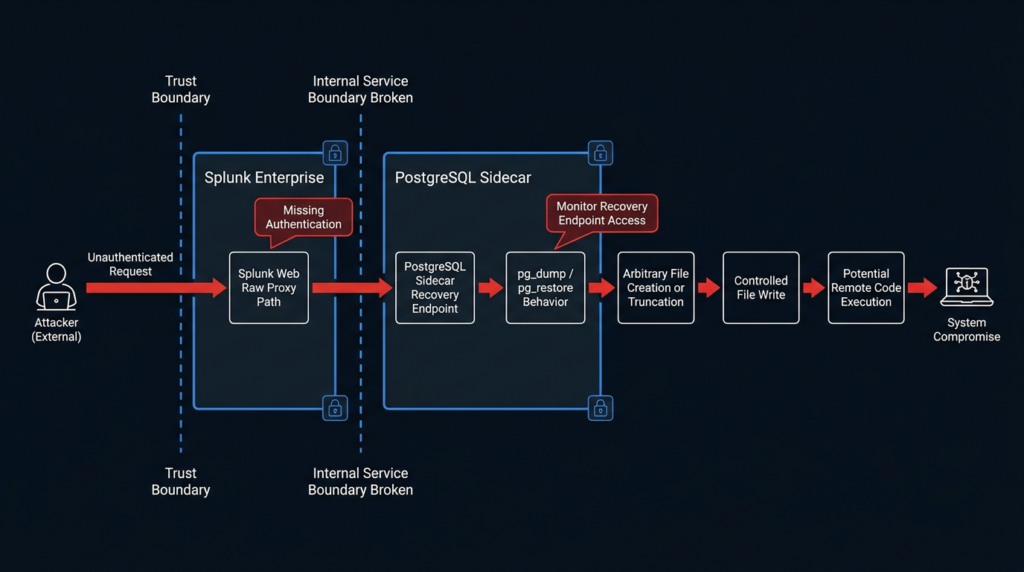
The vulnerable path starts with a PostgreSQL sidecar service endpoint. According to Splunk’s advisory, the endpoint could let an unauthenticated user create or truncate arbitrary files. According to watchTowr’s public analysis, the PostgreSQL sidecar listened on localhost, including port 5435 in their lab, but Splunk’s main web application could proxy requests to the sidecar through a path under /splunkd/__raw/. (Splunk Vulnerability Disclosure)
The most important endpoint in the public analysis was the recovery backup route. watchTowr identified sidecar paths including /v1/postgres/recovery/backup, /v1/postgres/recovery/restore, /v1/postgres/recovery/status/{id}, /v1/postgres/telemetry, /v1/postgres/healthそして /v1/postgres/status. The recovery endpoints accepted a JSON body containing a database value and a backup-file path. (watchTowr Labs)
The initial primitive was arbitrary file creation and truncation. watchTowr demonstrated that a backupFile value could place an empty file in the service directory and then, with traversal, create a file under /tmp. They summarized the primitive as the ability to create an empty file at an arbitrary location and clear the contents of an arbitrary file. (watchTowr Labs)
The chain did not stop there. The sidecar eventually invoked PostgreSQL tooling. watchTowr’s reverse-engineering notes show the backup operation reaching pg_dump with attacker-influenced values, including a user value derived from Basic auth and a backup-file path supplied through the request body. Their write-up also notes that pg_dump was executed with -w, meaning it would not prompt for a password. (watchTowr Labs)
PostgreSQL behavior then becomes relevant. The official PostgreSQL documentation states that pg_dump exports a PostgreSQL database, accepts a dbname argument, and can output in custom format for use with pg_restore. It also warns that restoring a dump can cause the destination to execute arbitrary code chosen by source superusers, which is a normal database-administration warning but a serious problem when an attacker can influence what gets restored. (PostgreSQL)
PostgreSQL connection strings also matter. PostgreSQL’s libpq documentation says that if a dbname value contains an equal sign or URI scheme, it is treated as a connection string, and repeated keyword handling can allow later non-empty values to override earlier ones depending on parameter order. That behavior is legitimate for database clients, but it becomes dangerous if an unauthenticated user can supply a field that is later interpreted as connection information by privileged tooling. (PostgreSQL)
Finally, password-file behavior matters. PostgreSQL documents that .pgpass can store connection passwords, and that a password file can also be specified through the passfile connection parameter or the PGPASSFILE environment variable. watchTowr reported finding a Splunk PostgreSQL .pgpass file in their lab and using a passfile connection parameter during the restore stage. (PostgreSQL)
Put together, the public chain looked like this at a high level:
| ステージ | What the attacker gains | Why it works | Defensive signal |
|---|---|---|---|
| Reach the sidecar path | Access to recovery endpoints from outside the local sidecar context | Splunk Web can proxy to the local PostgreSQL sidecar route in affected builds | Requests to /splunkd/__raw/v1/postgres/recovery/* |
| Trigger backup behavior | Empty arbitrary file creation or truncation | backupFile is used as an output path for pg_dump without a safe boundary | New or truncated files under $SPLUNK_HOME, /tmp, app directories, or sidecar run paths |
| Control database connection behavior | Force interaction with an attacker-controlled PostgreSQL service or crafted connection values | PostgreSQL accepts connection strings in database-name contexts under documented conditions | Unexpected egress from Splunk host to PostgreSQL ports, especially TCP 5432 |
| Trigger restore behavior | Execute attacker-influenced SQL restore logic | pg_restore replays database restore content, and PostgreSQL warns that restores can execute source-controlled code | pg_restore child process activity, unusual restore logs, unexpected local DB changes |
| Convert file write into code execution | Overwrite or create content later executed by Splunk-controlled workflows | Controlled file write as the Splunk user can target scripts or app-controlled execution points | File-integrity changes in Splunk app bin directories and executed scripted inputs |
That table is enough for defenders. It explains why the bug is severe without providing a copy-paste exploit. The important operational takeaway is that “arbitrary file creation and truncation” undersells the risk when the writable locations belong to an application platform that loads apps, scripts, modular inputs, alert actions, and configuration from disk.
Why “localhost only” was not enough
A common misread of this vulnerability is that the PostgreSQL sidecar was safe because it listened only on loopback. That assumption breaks when another exposed component can relay traffic into the loopback-only service. watchTowr’s analysis described exactly that pattern: the sidecar service listened locally, but the main Splunk web application could be used to reach the PostgreSQL recovery path. (watchTowr Labs)
This is a recurring pattern in modern application security. Internal HTTP services, sidecars, admin APIs, metrics endpoints, debug listeners, and service-mesh control planes are often assumed to be safe because they bind to localhost, a private interface, or an internal container network. That assumption only holds if every route into that private context is authenticated, authorized, and normalized. SSRF bugs, reverse-proxy bypasses, raw proxy endpoints, path-confusion issues, and framework-level routing shortcuts can all turn “internal only” into “reachable enough.”
For CVE-2026-20253, the failure was not that PostgreSQL has rich backup and restore features. The failure was allowing unauthenticated network-reachable users to trigger a sidecar endpoint that could drive those features. PostgreSQL’s documented behavior became a tool in the chain because Splunk’s boundary check was missing at the wrong layer.
Why this is a Splunk control-plane issue
Splunk’s own secure deployment guidance warns that Splunk Enterprise network ports, services, and APIs can become susceptible to network attacks under certain conditions and recommends shielding Splunk Enterprise configuration from the internet, installing it on isolated network segments, and limiting network port accessibility to necessary connections. (Splunk Docs)
That advice is especially relevant here. The vulnerable path is not a normal data-ingest path. It is a management and recovery path tied to internal service operations. Exposing Splunk Web or management-adjacent routes to broad networks increases the chance that a missing-authentication issue becomes exploitable by an unauthenticated attacker rather than a constrained insider.
Splunk hosts also tend to have valuable local context. Depending on deployment, a Splunk instance may contain app credentials, cloud integration tokens, deployment server artifacts, saved searches, alert action scripts, service accounts, scripted inputs, local app code, and operational logs. A controlled file write as the Splunk user is therefore not a narrow primitive. It can intersect with many execution and persistence surfaces.
Risk ranking for real environments
Not every affected version carries the same urgency, but every affected and reachable instance deserves immediate attention. Use the following priority model.
| 優先順位 | Condition | Why it is urgent | アクション |
|---|---|---|---|
| クリティカル | Splunk Enterprise 10.2.0 to 10.2.3 or 10.0.0 to 10.0.6 with Splunk Web reachable from the internet | CISA KEV status, public technical details, no authentication required, high-value target | Patch immediately, isolate before patching if needed, start compromise assessment |
| クリティカル | Affected Splunk Enterprise reachable from partner networks, VPN users, broad corporate networks, jump hosts, or shared admin networks | “Internal” does not mean trusted if many users or compromised endpoints can reach it | Patch, restrict access, review logs from June 10 onward |
| 高い | Affected Splunk Enterprise running on AWS or images where PostgreSQL sidecar is enabled and reachable through Splunk Web | watchTowr reported AWS Enterprise as vulnerable out of the box in their testing | Patch, verify sidecar state, restrict inbound and outbound |
| 高い | Affected search head that runs apps, modular inputs, alert actions, or scripted automation | Controlled file write can become execution through app and script paths | Patch, file-integrity hunt, review app directories |
| ミディアム | Affected instance isolated to a small admin subnet with strong network controls | Exploitability is reduced but not eliminated | Patch in next emergency window, verify controls |
| 低い | Version already fixed or Enterprise 9.4 and earlier for this specific CVE | Not affected by CVE-2026-20253, but may be affected by adjacent Splunk advisories | Confirm version, review other June 2026 advisories |
CISA’s KEV entry should shift this out of routine quarterly patching. The NVD page shows CISA’s SSVC options as active exploitation, automatable exploitation, and total technical impact. That is the exact class of vulnerability that security teams should prioritize above lower-impact findings with similar scanner severity labels. (nvd.nist.gov)
Safe validation without turning production into a test target
The safest validation path starts with inventory and version checks, not exploit traffic.
# Run locally on each Splunk Enterprise host
$SPLUNK_HOME/bin/splunk version

# Common Linux package checks, depending on installation method
rpm -qa | grep -i splunk
dpkg -l | grep -i splunk

# Confirm the Splunk home if it is not obvious
ps -ef | grep '[s]plunkd'
Then check whether the PostgreSQL sidecar is configured and active. Splunk’s workaround uses the [postgres] stanza in server.conf, so defenders should inspect local configuration layers rather than editing default files.
# Do not modify default files. Inspect local config first.
grep -R "^\[postgres\]" -n "$SPLUNK_HOME/etc/system/local" "$SPLUNK_HOME/etc/apps" 2>/dev/null
grep -R "disabled" -n "$SPLUNK_HOME/etc/system/local/server.conf" "$SPLUNK_HOME/etc/apps" 2>/dev/null

# Process and listener review
ps -ef | egrep 'splunk|postgres|supervisor' | grep -v grep
ss -ltnp | egrep 'splunk|postgres|5435|8000|8089'
A version-only scan is not enough after public exploitation. If an affected instance was reachable from an untrusted network, validate whether suspicious requests or file changes occurred before applying destructive cleanup. Patching first is correct for exposure reduction, but preserving evidence matters if there are signs of compromise.
watchTowr released a detection artifact generator that checks whether the backup endpoint is blocked or accessible, reporting a 400 response as probably vulnerable and a 401 response as probably not vulnerable. The repository states that it does not perform exploitation attempts and was tested against Splunk Enterprise 10.2.3 on Linux as vulnerable and 10.2.4 on Linux as not vulnerable. Use that type of tool only on systems you own or are explicitly authorized to test, and prefer a staging clone or emergency validation window over broad production probing. (ギットハブ)
A safer internal validation checklist looks like this:
| チェック | Safe method | Expected fixed result |
|---|---|---|
| Version | splunk version or package inventory | 10.4.0, 10.2.4, 10.0.7, or later |
| Splunk Cloud status | Confirm product type with Splunk admin or provider | Splunk Cloud not affected by this CVE |
| PostgreSQL sidecar state | Inspect server.conf, process list, and sidecar docs | Disabled if workaround is used, otherwise fixed version |
| Network exposure | Review load balancers, security groups, firewall rules, reverse proxies | Splunk Web and management paths restricted to trusted admin networks |
| Suspicious sidecar access | Search Splunk internal access logs and proxy logs | No unauthorized POSTs to recovery paths |
| File integrity | Compare app and config directories against known-good baselines | No unexpected modifications, truncations, or new executable files |
Detection logic for defenders
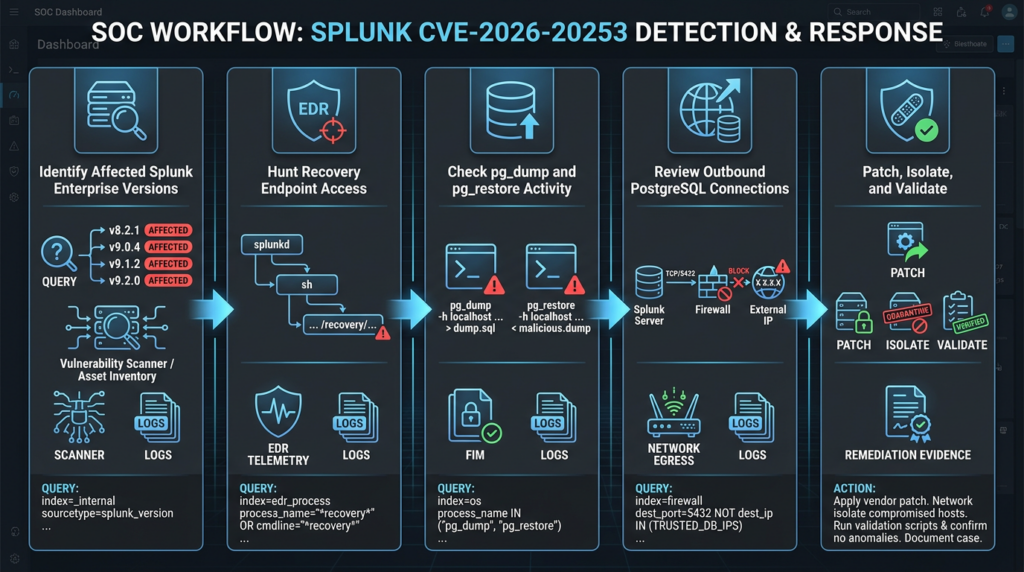
Splunk’s advisory lists “None” under detections, so defenders need to build practical hunts from the attack path. (Splunk Vulnerability Disclosure)
Start with web and internal access logs. The public chain uses recovery routes under the PostgreSQL sidecar path. Depending on logging configuration, look for raw splunkd proxy paths, POST requests, suspicious Basic auth, and recovery endpoint strings. The exact sourcetypes and fields vary by deployment, but a starting SPL hunt can look like this:
index=_internal earliest=-30d
(
  uri_path="*/splunkd/__raw/v1/postgres/recovery/*"
  OR uri="*/splunkd/__raw/v1/postgres/recovery/*"
  OR request="*/v1/postgres/recovery/backup*"
  OR request="*/v1/postgres/recovery/restore*"
)
| stats count earliest(_time) as first_seen latest(_time) as last_seen
  values(method) as methods
  values(status) as statuses
  values(clientip) as src_ips
  values(useragent) as user_agents
  by host uri_path uri
| convert ctime(first_seen) ctime(last_seen)
| sort -count
If proxy or load balancer logs are available outside Splunk, search there too. A compromised Splunk instance may not be a reliable source of truth for its own logs. Use web server logs, WAF logs, cloud load balancer logs, firewall logs, EDR telemetry, and packet metadata where possible.
Look for abnormal outbound PostgreSQL connections from Splunk hosts. The public research described forcing Splunk to connect to an attacker-controlled PostgreSQL server on port 5432 as part of the chain. That makes outbound network telemetry valuable. (watchTowr Labs)
index=network earliest=-30d
(dest_port=5432 OR dest_port=5435)
(src_host IN ("splunk-search-01","splunk-search-02","splunk-indexer-01"))
| stats count earliest(_time) as first_seen latest(_time) as last_seen
  values(dest_ip) as dest_ips values(dest_host) as dest_hosts
  by src_host dest_port action
| convert ctime(first_seen) ctime(last_seen)
On the host, hunt for pg_dump そして pg_restore child processes spawned by Splunk processes at unexpected times. Backup and restore actions may be legitimate, so this is not a standalone indicator. It becomes stronger when paired with suspicious web requests, unexpected outbound 5432 connections, or file modifications.
# Review shell history, audit logs, EDR process trees, or process accounting if available.
ausearch -x pg_dump 2>/dev/null
ausearch -x pg_restore 2>/dev/null

# If auditd is not available, search system logs and Splunk logs for process traces.
grep -R "pg_restore\|pg_dump\|/v1/postgres/recovery" \
  /var/log "$SPLUNK_HOME/var/log/splunk" 2>/dev/null
Hunt for unexpected files in sensitive Splunk directories. Focus on app bin directories, scripted inputs, modular inputs, alert actions, local configuration, deployment-app content, and web-exposed directories. A controlled write that lands in the wrong location can become persistence or delayed execution.
# Recent changes in common execution and configuration paths
find "$SPLUNK_HOME/etc/apps" \
  \( -path "*/bin/*" -o -path "*/local/*" -o -path "*/default/*" \) \
  -type f -mtime -14 -ls

find "$SPLUNK_HOME/etc/system/local" -type f -mtime -14 -ls
find "$SPLUNK_HOME/share/splunk/search_mrsparkle" -type f -mtime -14 -ls 2>/dev/null
find /tmp /var/tmp -maxdepth 2 -type f -mtime -14 -user splunk -ls 2>/dev/null
Add file-integrity checks if you have a known-good baseline.
# Example baseline comparison pattern
find "$SPLUNK_HOME/etc/apps" "$SPLUNK_HOME/etc/system/local" \
  -type f -print0 | sort -z | xargs -0 sha256sum > /tmp/splunk-current.sha256

# Compare /tmp/splunk-current.sha256 against a trusted pre-incident baseline.
Look for signs of truncation. Arbitrary truncation can destroy logs, app scripts, configs, or evidence. Zero-byte files in directories where scripts or configs should contain content deserve attention.
find "$SPLUNK_HOME/etc" "$SPLUNK_HOME/var" \
  -type f -size 0 -mtime -30 -ls 2>/dev/null
If EDR supports behavioral rules, model the chain as behavior rather than a single IOC:
title: Suspicious Splunk PostgreSQL Sidecar Recovery Abuse
status: experimental
description: Detects Splunk hosts invoking PostgreSQL backup or restore tooling after suspicious recovery endpoint access.
logsource:
  product: linux
  category: process_creation
detection:
  selection_process:
    Image|endswith:
      - '/pg_dump'
      - '/pg_restore'
    ParentImage|contains:
      - 'splunk'
      - 'supervisor'
  condition: selection_process
fields:
  - Image
  - ParentImage
  - CommandLine
  - User
  - Hostname
falsepositives:
  - Legitimate Splunk PostgreSQL maintenance
  - Authorized upgrade or recovery workflow
level: high
Do not treat that rule as sufficient. It should be correlated with web access, outbound database connections, file changes, and Splunk version state.
Mitigation and upgrade plan
The clean fix is to upgrade. Splunk says to upgrade Splunk Enterprise to 10.4.0, 10.2.4, 10.0.7, or higher. For an exposed affected system, isolate access before or during the upgrade window if you cannot patch immediately. (Splunk Vulnerability Disclosure)
A practical upgrade plan:
- Identify every Splunk Enterprise instance and classify it as search head, indexer, deployment server, heavy forwarder, monitoring console, or standalone.
- Record version, OS, exposure path, internet reachability, and business owner.
- Prioritize reachable 10.2.x and 10.0.x systems.
- Preserve volatile evidence if suspicious traffic exists.
- Apply fixed Splunk Enterprise versions.
- Restart and verify service health.
- Re-run version checks and sidecar access checks.
- Review app integrity, saved searches, alert actions, scripted inputs, and local configuration.
- Record evidence for change management and incident response.
If you cannot upgrade immediately, Splunk’s documented workaround is to disable the PostgreSQL sidecar service by adding the following stanza to $SPLUNK_HOME/etc/system/local/server.conf, then restarting Splunk Enterprise: (Splunk Vulnerability Disclosure)
[postgres]
disabled = true
Do not apply that workaround blindly. Splunk explicitly warns not to use it if the instance uses Edge Processor, OpAmp, or SPL2 data pipelines, because disabling PostgreSQL breaks those features and can cascade to dependent sidecar processes. Splunk says core search, indexing, and dashboard functionality are not affected by disabling the PostgreSQL sidecar, but that statement does not remove the need to test your own deployment. (Splunk Vulnerability Disclosure)
Use this decision table before applying the workaround:
| Question | If yes | If no |
|---|---|---|
| Is the instance internet-facing or broadly reachable? | Restrict network access immediately, then patch or disable sidecar | Continue risk-based triage |
| Can you upgrade to a fixed version now? | Upgrade instead of relying on workaround | Consider workaround with dependency review |
| Does the instance use Edge Processor, OpAmp, or SPL2 data pipelines? | Do not disable PostgreSQL without impact planning | Workaround is more viable |
| Are there signs of exploitation? | Preserve evidence and start incident response | Still patch, then run post-fix validation |
| Is this Splunk Cloud? | CVE-2026-20253 is not applicable per Splunk advisory | Continue with Enterprise workflow |
Hardening Splunk after the fix
Patching closes the known vulnerable code path, but it does not fix weak exposure architecture. Splunk’s own secure deployment documentation recommends shielding Splunk Enterprise from the internet, isolating it to trusted network segments, and limiting port accessibility to necessary connections. (Splunk Docs)
Good post-fix hardening actions include:
- Put Splunk Web and management interfaces behind VPN, SSO, device posture checks, or privileged access gateways.
- Restrict access to search heads and deployment servers to admin networks.
- Use security groups and host firewalls to prevent broad inbound access to Splunk management paths.
- Restrict outbound network access from Splunk hosts, especially arbitrary database egress to TCP 5432.
- Monitor unexpected child processes spawned by Splunk.
- Apply file-integrity monitoring to
$SPLUNK_HOME/etc/apps,$SPLUNK_HOME/etc/system/local, appbindirectories, scripted input paths, and alert action directories. - Review local apps and custom scripts after every emergency patch.
- Remove unused apps, unused alert actions, stale credentials, and old deployment artifacts.
- Separate Splunk administrative duties from ordinary users and enforce MFA on access paths.
Hardening also means treating sidecars and helper services as part of the attack surface. They may not look like user-facing web applications, but they process requests, manage data, expose APIs, and hold state. Internal services should have explicit authentication, authorization, input validation, safe path handling, and restrictive network routing. “It only listens locally” is not a control if a proxy path can reach it.
Incident response for exposed Splunk instances
If an affected Splunk Enterprise instance was reachable from the internet or a broad internal network before patching, assume the possibility of compromise until you have evidence otherwise. Splunk confirmed limited exploitation, CISA marked the vulnerability as actively exploited, and public exploit research is available. (Splunk Vulnerability Disclosure)
Start by preserving evidence. Avoid wiping temporary directories, reinstalling apps, or overwriting logs before you collect what you need.
# Example evidence collection starting points, adapt to your policy
mkdir -p /secure-evidence/splunk-cve-2026-20253

cp -a "$SPLUNK_HOME/var/log/splunk" /secure-evidence/splunk-cve-2026-20253/ 2>/dev/null
cp -a "$SPLUNK_HOME/etc/system/local" /secure-evidence/splunk-cve-2026-20253/ 2>/dev/null
cp -a "$SPLUNK_HOME/etc/apps" /secure-evidence/splunk-cve-2026-20253/apps-copy 2>/dev/null

ps -ef > /secure-evidence/splunk-cve-2026-20253/ps.txt
ss -tupan > /secure-evidence/splunk-cve-2026-20253/sockets.txt
find "$SPLUNK_HOME" -mtime -30 -ls > /secure-evidence/splunk-cve-2026-20253/recent-files.txt
Investigate the following areas:
| Area | What to inspect | なぜそれが重要なのか |
|---|---|---|
| Web access | POSTs to recovery paths, unknown source IPs, strange Basic auth, odd user agents | The public chain starts through web-reachable recovery routes |
| Process history | pg_dump, pg_restore, Python, shell, curl, wget, netcat, unusual children of Splunk | RCE conversion may involve process execution or staged payloads |
| File system | App bin directories, local configs, web-exposed paths, /tmp, /var/tmp, sidecar run directories | File creation, truncation, and controlled writes are central primitives |
| Splunk apps | New apps, changed scripts, modified modular inputs, alert actions | Splunk apps provide natural execution and persistence points |
| Credentials | .pgpass, app credentials, tokens, cloud integrations, deployment credentials | A compromised Splunk host may expose secrets |
| Splunk objects | Saved searches, alerts, dashboards, scripted inputs, indexes.conf, props.conf, transforms.conf | Attackers can manipulate visibility or create persistence |
| ネットワーク | Outbound connections to unexpected PostgreSQL servers or attacker infrastructure | Public research used attacker-controlled PostgreSQL infrastructure |
| External telemetry | EDR, firewall, WAF, load balancer, cloud flow logs | Local Splunk logs may be incomplete or tampered with |
Do not limit the investigation to the exact paths shown in public research. Once arbitrary file write is available, attackers can choose deployment-specific paths. Custom apps and local scripts are often more attractive than default files because they are less monitored and more likely to survive routine upgrades.
A practical containment sequence is:
- Restrict inbound access to Splunk Web and management interfaces.
- Restrict outbound egress from the Splunk host to only required destinations.
- Preserve evidence.
- Patch or disable the PostgreSQL sidecar according to the dependency decision.
- Rotate credentials that were stored on or accessible from the Splunk host.
- Validate app and configuration integrity.
- Hunt for persistence in Splunk apps, scripted inputs, alert actions, cron, systemd, and user accounts.
- Re-enable normal access only after post-fix validation and compromise assessment.
How CVE-2026-20253 compares with the other June Splunk CVEs
CVE-2026-20253 was disclosed in a busy Splunk advisory batch. Do not merge all June 2026 Splunk issues into one generic “Splunk RCE” bucket. Each has different exploit conditions, affected versions, and mitigations.
| CVE | 脆弱性 | Authentication needed | Main risk | Why it matters alongside CVE-2026-20253 |
|---|---|---|---|---|
| CVE-2026-20253 | Missing authentication in PostgreSQL sidecar service endpoint | いいえ | Arbitrary file creation or truncation, publicly demonstrated RCE chain | Highest urgency due to no-auth path, CVSS 9.8, KEV status |
| CVE-2026-20251 | Unsafe deserialization through jsonpickle in Splunk Secure Gateway app | Low-privileged user, not admin or power | RCE through crafted App Key Value Store data | Shows app-level data processing can become code execution too |
| CVE-2026-20252 | SSRF through Dashboard Studio PDF export | Low-privileged user | Server-side requests to arbitrary internal destinations | Matters for internal service reachability and trusted-domain bypass thinking |
| CVE-2026-20258 | Stored XSS in classic dashboard HTML panel | Low-privileged user and victim interaction | JavaScript execution in another user’s browser | Can affect admin sessions, dashboard trust, and post-compromise paths |
Splunk’s SVD-2026-0601 describes CVE-2026-20251 as remote code execution through unsafe deserialization of App Key Value Store data using the jsonpickle Python library, exploitable by a low-privileged user who does not hold the admin or power role. Splunk rates it CVSS 8.8 High. (Splunk Vulnerability Disclosure)
Splunk’s SVD-2026-0602 describes CVE-2026-20252 as SSRF through Dashboard Studio PDF export. NVD notes that trusted-domain validation used prefix matching that could be bypassed with attacker-controlled subdomains and that the PDF export service followed redirects without revalidating each target against the allowlist. (Splunk Vulnerability Disclosure)
Splunk’s SVD-2026-0608 describes CVE-2026-20258 as stored XSS through classic dashboard HTML panels. A low-privileged user without admin or power roles could store a malicious script that executes in another user’s browser. Splunk rates it CVSS 7.1 High. (Splunk Vulnerability Disclosure)
The reason to discuss these together is not to inflate the story. It is to prevent bad triage. CVE-2026-20253 should be patched first when affected and reachable because it is unauthenticated and in KEV. The other issues still matter, especially in environments where low-privileged Splunk users can create dashboards, use Secure Gateway features, or trigger PDF export workflows.
Common mistakes during remediation
The first mistake is treating CVE-2026-20253 as a version-only scanner finding. Version matters, but reachability decides how fast an attacker can use it. An affected system behind a carefully restricted admin network is still a problem; an affected system exposed to the internet is an emergency.
The second mistake is misreading Splunk Cloud status. Splunk’s current advisory says Splunk Cloud Platform is not affected by CVE-2026-20253 because Postgres sidecars are not used in Splunk Cloud. That does not mean every Splunk Cloud customer can ignore the entire June 2026 advisory batch, because other CVEs may have separate product scope. It means this specific PostgreSQL sidecar issue is an Enterprise issue according to the current advisory. (Splunk Vulnerability Disclosure)
The third mistake is assuming “no RCE in the advisory title” means no RCE in practice. Splunk’s official title focuses on file creation and truncation. watchTowr’s research demonstrated how the primitive can be moved through pg_dump, connection-string behavior, .pgpass, pg_restore, controlled file write, and finally code execution. (watchTowr Labs)
The fourth mistake is disabling PostgreSQL sidecar without checking dependencies. Splunk explicitly warns that disabling PostgreSQL breaks Edge Processor, OpAmp, and SPL2 data pipelines. That workaround may be the right emergency decision for some instances, but it should not be applied as a blind fleet-wide change. (Splunk Vulnerability Disclosure)
The fifth mistake is trusting Splunk’s own logs too much after suspected compromise. Splunk may be the attacked system. Collect logs from outside the box: WAF, load balancer, EDR, firewall, cloud flow logs, DNS logs, identity provider logs, and backup snapshots.
The sixth mistake is stopping after patching. A patch prevents future exploitation; it does not remove malicious files that were already written, restore truncated files, rotate exposed secrets, or remove persistence hidden in app directories.
Practical verification workflow for security teams
A strong workflow has four phases: identify, verify, contain, and prove remediation.
During identification, collect all Splunk Enterprise instances and classify them by version, role, network exposure, and owner.
# Example local evidence fields to collect
hostname -f
date -u
$SPLUNK_HOME/bin/splunk version
uname -a
ss -ltnp | grep -E '8000|8089|5435|splunk|postgres'
During verification, do not start with exploit chains. Confirm version, PostgreSQL sidecar state, Splunk Web reachability, and whether the instance has logs or telemetry showing recovery endpoint access. If you use public validation tooling, limit it to authorized systems and record the exact time and source IP so responders can distinguish validation from hostile traffic.
During containment, apply the fixed version. If no upgrade window exists, use network isolation and the PostgreSQL sidecar workaround after dependency review. If exploitation is suspected, preserve evidence first unless immediate containment requires isolation.
During proof, generate a remediation record with version output, config state, access-control evidence, relevant log hunts, file-integrity checks, and post-fix validation. For teams that use AI-assisted security workflows, this is the kind of case where an agentic pentest or validation platform can reduce manual drift: one workflow can gather target metadata, verify exposure in authorized scope, preserve command output, and produce an editable report that maps evidence to remediation. Penligent describes itself as an AI-powered penetration testing platform focused on finding, exploiting, verifying, and reporting issues with human-in-the-loop control, and its vulnerability-management material emphasizes verification and remediation workflows rather than scanner output alone. (寡黙)
That type of workflow is useful only if it remains evidence-driven. CVE-2026-20253 is not a case for blind automation against random hosts. The right automation boundary is authorized asset discovery, version confirmation, safe validation, evidence collection, retesting, and report generation.
Detection content you can adapt
A useful detection package should include at least four layers: web request detection, process detection, network egress detection, and file-integrity detection.
Web request detection
index=_internal earliest=-30d
(
  uri="*/splunkd/__raw/v1/postgres/recovery/backup*"
  OR uri="*/splunkd/__raw/v1/postgres/recovery/restore*"
  OR uri_path="*/splunkd/__raw/v1/postgres/recovery/backup*"
  OR uri_path="*/splunkd/__raw/v1/postgres/recovery/restore*"
)
| eval marker="possible_cve_2026_20253_recovery_endpoint_access"
| stats count min(_time) as first_seen max(_time) as last_seen
  values(status) as statuses
  values(method) as methods
  values(clientip) as src_ips
  values(useragent) as user_agents
  by host marker uri uri_path
| convert ctime(first_seen) ctime(last_seen)
Tune field names to your environment. Some deployments log clientip, others use src_ip, remote_addr, or proxy-specific fields.
Process detection
index=edr earliest=-30d
process_name IN ("pg_dump","pg_restore")
(parent_process_name="splunkd" OR parent_process_name="splunk-supervisor" OR parent_process_name="splunk-postgres")
| stats count min(_time) as first_seen max(_time) as last_seen
  values(command_line) as command_lines
  values(parent_process_name) as parents
  by host user process_name
| convert ctime(first_seen) ctime(last_seen)
Legitimate maintenance may produce similar process names. Correlate with time, source user, web requests, and change tickets.
Network egress detection
index=network earliest=-30d
src_host="splunk*" dest_port=5432
| lookup known_postgres_destinations dest_ip OUTPUT expected_owner
| where isnull(expected_owner)
| stats count min(_time) as first_seen max(_time) as last_seen
  values(dest_ip) as dest_ips values(dest_host) as dest_hosts
  by src_host action
| convert ctime(first_seen) ctime(last_seen)
This hunt catches the pattern where a Splunk host unexpectedly talks to a PostgreSQL service it should not know about.
File-integrity detection
index=edr earliest=-30d
host="splunk*"
(
  file_path="*/etc/apps/*/bin/*"
  OR file_path="*/etc/apps/*/local/*"
  OR file_path="*/etc/system/local/*"
  OR file_path="*/share/splunk/search_mrsparkle/*"
  OR file_path="/tmp/*"
)
(action="created" OR action="modified" OR action="deleted" OR action="truncated")
| stats count min(_time) as first_seen max(_time) as last_seen
  values(action) as actions
  values(process_name) as processes
  values(user) as users
  by host file_path
| convert ctime(first_seen) ctime(last_seen)
A file event by itself is not proof of exploitation. It becomes meaningful when it lines up with affected versions, recovery endpoint access, unexpected PostgreSQL egress, suspicious pg_restore, or modified Splunk execution paths.
Why arbitrary file truncation can be as serious as file write
Security teams often focus on file write because it can become RCE. File truncation deserves equal attention. Truncating a Splunk configuration file, app script, dashboard definition, credential file, or log file can create denial of service, disable detections, break alerting, destroy forensic evidence, or force a recovery workflow under attacker-favorable timing.
For a SIEM-like platform, availability and integrity matter as much as confidentiality. If an attacker cannot immediately run code but can empty a file that controls alerting, scripted inputs, app behavior, or local authentication paths, the security impact can still be severe. The official CVSS vector for CVE-2026-20253 gives high impact across confidentiality, integrity, and availability. (nvd.nist.gov)
Hunt for truncation explicitly. Zero-byte files are easy to miss if the filename still exists. Compare file size, hash, modified time, ownership, and package baseline.
# Recent zero-byte files under Splunk-controlled paths
find "$SPLUNK_HOME" -type f -size 0 -mtime -30 \
  \( -path "*/etc/apps/*" -o -path "*/etc/system/*" -o -path "*/var/log/*" \) \
  -ls 2>/dev/null
Secure design lessons from CVE-2026-20253
The lesson is not “never use sidecars” or “never use PostgreSQL.” Sidecars are a practical architecture pattern. PostgreSQL backup and restore tooling is mature and heavily documented. The failure is boundary design.
A secure version of this pattern needs:
- Strong authentication before any recovery operation.
- Authorization checks that verify the caller can perform that specific sidecar action.
- No raw proxy path from user-facing interfaces into privileged internal APIs.
- Strict route allowlists for internal service proxying.
- Path normalization and safe output directories for file parameters.
- Rejection of traversal sequences and absolute paths where not required.
- Explicit handling of PostgreSQL connection-string behavior.
- No attacker-controlled values passed into privileged database tooling without strict validation.
- Service accounts with minimal file-system permissions.
- File-integrity monitoring around app execution paths.
- Egress controls that prevent management services from connecting to arbitrary external databases.
- Threat models that include helper services, not only the main web application.
CWE-306 is often a design bug, not a missing もし statement. MITRE’s detection notes reflect that manual analysis and threat modeling are especially useful for custom authentication mechanisms. (CWE)
Useful resources for deeper validation
Splunk’s SVD-2026-0603 is the canonical source for affected versions, fixed versions, the sidecar workaround, and the June 18 exploitation update. Use it as the source of truth when scanner plugins or third-party summaries disagree. (Splunk Vulnerability Disclosure)
The NVD record is useful for CVSS, CPE history, CISA KEV status, SSVC metadata, and reference tracking. It also records that CISA added the vulnerability to KEV and changed SSVC exploitation status from proof-of-concept to active. (nvd.nist.gov)
watchTowr’s technical write-up is the most detailed public explanation of the RCE chain. Read it to understand the exploit mechanics, but do not replay the chain outside a lab or authorized validation scope. (watchTowr Labs)
Splunk’s sidecar documentation explains how sidecars work, how the supervisor starts them, which sidecars exist, and how PostgreSQL sidecar configuration is represented in Splunk Enterprise. (Splunk Docs)
よくあるご質問
What is Splunk CVE-2026-20253?
- CVE-2026-20253 is a critical missing-authentication vulnerability in a Splunk Enterprise PostgreSQL sidecar service endpoint.
- Splunk’s official description says an unauthenticated user could create or truncate arbitrary files through the endpoint.
- Public research later showed how the file primitive could be chained into pre-authenticated remote code execution in affected environments.
- Splunk rates it CVSS 9.8 Critical, and CISA added it to the Known Exploited Vulnerabilities catalog. (Splunk Vulnerability Disclosure)
Which Splunk Enterprise versions are affected?
- Affected: Splunk Enterprise 10.2.0 through 10.2.3.
- Affected: Splunk Enterprise 10.0.0 through 10.0.6.
- Fixed: Splunk Enterprise 10.4.0, 10.2.4, 10.0.7, or later.
- Not affected by this specific CVE: Splunk Enterprise 9.4 and earlier, according to Splunk’s current advisory. (Splunk Vulnerability Disclosure)
Is Splunk Cloud affected by CVE-2026-20253?
- Splunk’s current advisory says Splunk Cloud Platform is not affected by CVE-2026-20253.
- The advisory changelog states that Splunk removed references to Splunk Cloud Platform because Postgres sidecars are not used in Splunk Cloud.
- Do not generalize that statement to every other Splunk advisory from June 2026; other CVEs have their own affected product scope. (Splunk Vulnerability Disclosure)
Why can arbitrary file creation become remote code execution?
- File creation or truncation is already serious when the target is an application platform.
- watchTowr showed that attacker-influenced parameters could reach PostgreSQL backup and restore tooling.
- PostgreSQL restore behavior can execute source-controlled database logic under documented conditions, and public research used that behavior to move from file creation to controlled file write.
- Controlled file write as the Splunk user can become code execution if it targets a script or app path that Splunk later executes. (PostgreSQL)
How can I safely check whether my Splunk instance is vulnerable?
- Start with version inventory using
splunk versionor package inventory. - Confirm whether the instance is Splunk Enterprise 10.2.0 to 10.2.3 or 10.0.0 to 10.0.6.
- Review whether Splunk Web or management paths are reachable from untrusted networks.
- Inspect PostgreSQL sidecar configuration and process state.
- Use public detection tools only on systems you own or are explicitly authorized to test, and prefer non-destructive checks.
- Search logs and external telemetry for access to
/splunkd/__raw/v1/postgres/recovery/*.
What should I do if I cannot upgrade immediately?
- Restrict network access to Splunk Web and management interfaces immediately.
- If compatible with your deployment, disable the PostgreSQL sidecar by adding
[postgres] disabled = trueへの$SPLUNK_HOME/etc/system/local/server.confand restarting Splunk Enterprise. - Do not use that workaround blindly if you depend on Edge Processor, OpAmp, or SPL2 data pipelines, because Splunk warns those features can break.
- Schedule the fixed-version upgrade as the permanent remediation. (Splunk Vulnerability Disclosure)
What should I check after patching?
- Confirm the fixed Splunk version.
- Search for recovery endpoint access before the patch.
- Review process telemetry for suspicious
pg_dumpそしてpg_restoreactivity. - Check unexpected outbound PostgreSQL connections from Splunk hosts.
- Compare file integrity in
$SPLUNK_HOME/etc/apps, appbindirectories,$SPLUNK_HOME/etc/system/local, and web-exposed paths. - Rotate credentials stored on or accessible from the Splunk host if compromise is suspected.
- Validate that detections, alerts, scripted inputs, and deployment apps were not modified.
How is CVE-2026-20253 different from CVE-2026-20251?
- CVE-2026-20253 is a no-auth PostgreSQL sidecar endpoint issue in Splunk Enterprise that can lead to arbitrary file creation, truncation, and publicly demonstrated RCE chains.
- CVE-2026-20251 is a Splunk Secure Gateway app issue involving unsafe deserialization of KV Store data through
jsonpickle. - CVE-2026-20251 requires a low-privileged user who does not hold admin or power roles, while CVE-2026-20253 is unauthenticated when the vulnerable endpoint is reachable.
- Both can lead to RCE, but they have different entry points, prerequisites, affected version ranges, and remediation checks. (Splunk Vulnerability Disclosure)
Is CVE-2026-20253 actively exploited?
Yes. Splunk updated SVD-2026-0603 on June 18, 2026 to say its PSIRT became aware of limited exploitation. CISA also added CVE-2026-20253 to the Known Exploited Vulnerabilities catalog.
Is CVE-2026-20253 only a file creation bug?
No. The official description is unauthenticated arbitrary file creation and truncation, but public research showed how the primitive can be chained into pre-authenticated remote code execution in affected environments.
Does CVE-2026-20253 affect Splunk Enterprise 9.4?
According to Splunk’s current advisory, Splunk Enterprise 9.4 and earlier are not affected by this specific CVE. However, administrators should still review other June 2026 Splunk advisories separately.
What logs should defenders check for CVE-2026-20253?
Start with Splunk internal web access logs, reverse proxy logs, EDR process telemetry for pg_dump and pg_restore, outbound network telemetry to unexpected PostgreSQL services, and file-integrity changes under Splunk app and configuration paths.
Should I use a public CVE-2026-20253 PoC?
Only in a lab or on systems you own or are explicitly authorized to test. For production, start with version inventory, exposure review, official patches, safe detection logic, and evidence-preserving validation.
Closing judgment
CVE-2026-20253 is dangerous because it crosses a boundary that defenders often assume is safe: the space between a user-facing management interface and an internal sidecar service. The PostgreSQL sidecar was not supposed to become an unauthenticated file-operation surface. Once it did, ordinary database backup and restore behavior became part of a practical RCE chain.
The right response is not complicated, but it must be disciplined. Upgrade affected Splunk Enterprise instances, isolate management access, use the PostgreSQL sidecar workaround only with dependency awareness, hunt for pre-patch activity, inspect file integrity, rotate exposed secrets where needed, and prove remediation with evidence. A fixed version closes the known bug. Only validation and incident review tell you whether the vulnerable window was quiet.


 Japanese
  English
  German
  French
  Spanish
  Portuguese
  Korean
  Hindi
Hindi  Arabic
  Turkish
  Hebrew