
CVE-2026-3854 is not just another entry in the long list of remote code execution bugs. It hit one of the most sensitive paths in modern software delivery: the server-side pipeline that receives and processes git push.
The vulnerability affected GitHub Enterprise Server and, according to GitHub’s own disclosure, also affected github.com, GitHub Enterprise Cloud, GitHub Enterprise Cloud with Data Residency, and GitHub Enterprise Cloud with Enterprise Managed Users before GitHub patched its cloud services on March 4, 2026. GitHub said the issue was reported through its Bug Bounty program by researchers at Wiz, validated internally within 40 minutes, fixed on github.com the same day, and investigated with a conclusion of no exploitation beyond the researchers’ testing activity. (The GitHub Blog)
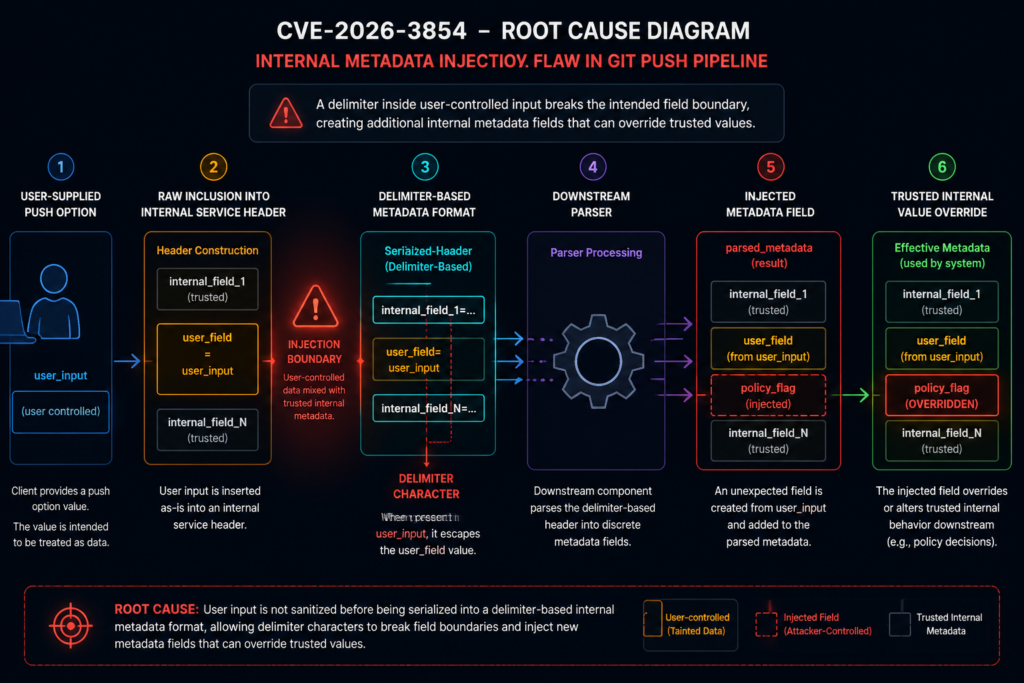
The core bug was an improper neutralization of special elements in user-supplied git push option values. During a git push, those values were included in internal service headers without sufficient sanitization. Because the internal header format used a delimiter character that could also appear in user input, an attacker with push access to a repository could inject additional metadata fields that downstream services treated as trusted internal values. NVD describes the result as remote code execution on the GitHub Enterprise Server instance, with CVSS 3.1 score 8.8 and GitHub’s CNA CVSS 4.0 base score 8.7. (NVD)
That attack precondition matters, but it should not make defenders comfortable. The attacker did not need site administrator access. The attacker needed the ability to push to a repository on the target GitHub Enterprise Server instance. In many real environments, that permission exists on ordinary developer accounts, CI service accounts, integration bots, contractor accounts, stale SSH keys, and long-lived automation credentials. A vulnerability that turns push access into server-side code execution is a direct threat to the trust model of an enterprise code-hosting platform.
무슨 일이 있었나요?
GitHub received the vulnerability report on March 4, 2026. The report described a way for any user with push access to a repository, including a repository they created themselves, to achieve arbitrary command execution on the GitHub server handling their git push operation. GitHub said the attack required a single git push command with a crafted push option using an unsanitized character. (The GitHub Blog)
GitHub’s public response gives a compressed but important timeline. The security team reproduced the issue internally within 40 minutes. GitHub identified the root cause at 5:45 p.m. UTC on March 4, 2026 and deployed a fix to github.com at 7:00 p.m. UTC the same day. The company then prepared patches across supported GitHub Enterprise Server releases and published CVE-2026-3854. (The GitHub Blog)
Wiz, the research team that disclosed the vulnerability, published a deeper technical analysis on April 28, 2026. Wiz described the issue as an internal protocol injection flaw in GitHub’s git infrastructure and said a single git push could lead to code execution on GitHub.com and GitHub Enterprise Server. Wiz also stated that on GitHub.com the issue created cross-tenant exposure risk on shared storage nodes, while clarifying that its researchers did not access the contents of other tenants’ repositories and validated exposure using their own test accounts. (wiz.io)
GitHub’s own exploitation investigation is also important. The company said exploitation forced the server into a code path that is never used during normal github.com operations and that this behavior could not be avoided or suppressed by an attacker. GitHub queried telemetry for this anomalous path and reported that every occurrence mapped to Wiz testing, no other users or accounts triggered the path, and no customer data was accessed, modified, or exfiltrated as a result of the vulnerability. (The GitHub Blog)
For defenders, the immediate conclusion is simple: GitHub-hosted cloud users do not have to patch anything themselves, but GitHub Enterprise Server administrators should treat CVE-2026-3854 as urgent. GitHub specifically recommends GHES customers review /var/log/github-audit.log for push operations containing ; in push options and upgrade to a fixed release. (The GitHub Blog)
The short version for security teams
| 면적 | Practical answer |
|---|---|
| CVE | CVE-2026-3854 |
| Primary affected self-hosted product | GitHub Enterprise Server |
| 취약성 등급 | Improper neutralization of special elements, internal metadata injection, command execution consequence |
| 진입 지점 | User-supplied git push option values |
| Required attacker permission | Push access to a repository on the target instance |
| Why push access is enough | The vulnerable input was accepted as part of a normal authenticated git push flow |
| Main technical failure | User-controlled push option values were incorporated into internal service headers without sufficient sanitization |
| Dangerous parser behavior | A delimiter in user input could create additional internal metadata fields |
| Why RCE became possible | Injected fields could influence downstream processing, hook execution behavior, and sandbox boundaries |
| Cloud status | GitHub says github.com and GitHub Enterprise Cloud variants were patched on March 4, 2026 |
| GHES action | Upgrade to a fixed release and review audit logs for suspicious push options |
| Exploitation status from GitHub | GitHub reported no exploitation beyond Wiz testing activity |
Why the git push path is a critical security boundary
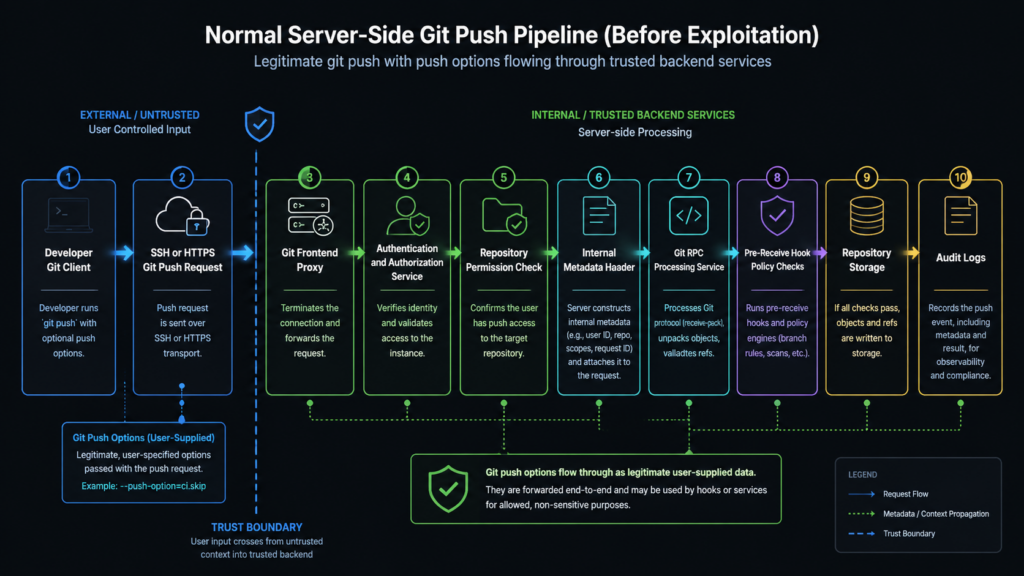
A git push is not a simple upload. On a managed Git platform, it is a privileged write path that can cross several security layers before a reference is updated. The platform must authenticate the user, check whether the user can write to the target repository, enforce repository and organization rules, inspect objects and refs, run pre-receive logic, update storage, emit audit events, and trigger downstream workflows.
That makes the push path a high-value target. It is both user-facing and deeply connected to internal systems. It accepts attacker-controlled data by design, but it also sits close to policy enforcement, repository storage, hooks, and service-to-service metadata. A bug in this path can become more serious than a bug in a typical web route because the push pipeline is part of the machinery that decides what code is allowed to enter the organization’s source-of-truth repositories.
The lesson from CVE-2026-3854 is not that git push options are inherently unsafe. They are a legitimate feature of Git. The problem is what happened after the server received them.
Git’s own documentation says -o 그리고 --push-option transmit a given string to the server, which passes the string to pre-receive and post-receive hooks. The documented restrictions are that the string must not contain a NUL or LF character, and multiple push options are sent in command-line order. That is a useful feature for server-side policy and automation, but it does not mean every character that Git permits is safe to embed into every internal protocol used by a hosting provider. (Git)
This distinction is the center of the vulnerability. Git accepted a push option string. GitHub’s server-side infrastructure then copied that string into internal metadata. The internal metadata format used a delimiter that could appear in user input. Downstream services parsed the resulting header and interpreted injected fields as trusted internal values. The dangerous boundary was not between unauthenticated internet traffic and login. It was between authenticated user-controlled input and internal service metadata.
Security teams often under-model this boundary. Once a user is authenticated, teams may treat data from that user as less hostile. CVE-2026-3854 is a reminder that authentication answers only one question: who sent this input. It does not answer whether the input is safe to splice into a parser, a shell, a policy engine, an internal header, a file path, a serialized object, or an execution environment.
How push options became a server-side risk
Git push options are meant to be transmitted to the server. They are not accidental input. That makes the bug more subtle.
In a safe design, a push option remains data. It can be stored, passed to hooks through a well-defined interface, logged, or rejected. It should not be able to alter unrelated internal fields. It should not be able to create new metadata keys. It should not be able to override the processing environment. It should not be able to control whether sandboxed or unsandboxed execution paths are used.
The vulnerable pattern can be described without reproducing a weaponized payload.
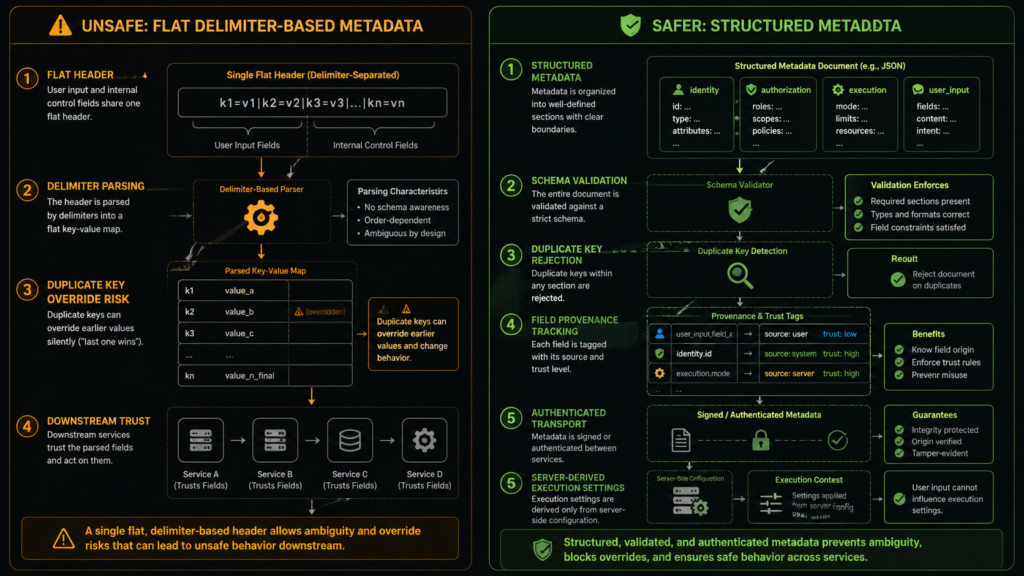
Imagine an internal service header that uses semicolon-delimited key-value pairs:
actor=alice; repo=engineering/api; push_option_0=deploy-preview; push_option_count=1; mode=production
If the system treats push_option_0 as just another string field and properly escapes it, the value remains data. But if the system inserts a raw user-controlled value into the same delimiter-based format, a delimiter inside that value can break out of the intended field. The parser downstream does not know the difference between a field that came from trusted service code and a field that was created because a user-controlled value contained a delimiter.
A safer internal representation would preserve boundaries:
{
  "actor": "alice",
  "repo": "engineering/api",
  "push_options": ["deploy-preview"],
  "mode": "production"
}
Even JSON does not make a system safe automatically. It must still be parsed with a schema, validated, and protected against injection into later contexts. But structured serialization makes it much harder for a raw character in a user value to become a new sibling field in an internal metadata object.
CVE-2026-3854 followed the delimiter problem. GitHub’s official post explains that user-supplied push options were handled within metadata passed between internal services, that the internal metadata format used a delimiter character also allowed in user input, and that an attacker could inject additional fields interpreted as trusted internal values. By chaining several injected values, researchers demonstrated environment override, sandbox bypass, and arbitrary command execution on the server. (The GitHub Blog)
NVD’s description aligns with that root cause. It identifies improper neutralization of special elements in GitHub Enterprise Server and says push option values were not properly sanitized before inclusion in internal service headers. Because the header format used a delimiter that could also appear in user input, crafted push options could inject additional metadata fields. (NVD)
The internal pipeline described by Wiz
Wiz’s technical analysis gives a more detailed view of the affected path. The research team describes a GitHub SSH push flow involving several components: babeld, a git proxy and entry point for git operations; gitauth, an internal authentication service; gitrpcd, an internal RPC server; and a compiled pre-receive hook binary that enforces push-time security policies before a push is accepted. (wiz.io)
The important component in the analysis is not a single binary name. It is the trust relationship between services.
According to Wiz, gitauth verifies credentials and push access, then returns security policies that apply to the session. babeld takes that response and constructs an internal header containing security metadata. gitrpcd parses that header and sets up the environment for downstream processes. Wiz states that gitrpcd trusted babeld and treated every field in the internal X-Stat header as authoritative. (wiz.io)
그리고 X-Stat header is the central object in Wiz’s root cause analysis. Wiz describes it as carrying security-critical fields as semicolon-delimited key-value pairs. Internal services parse the header by splitting on semicolons and populating a map. Wiz also says the parser used last-write-wins behavior, meaning a later duplicate key silently overrides an earlier one. (wiz.io)
That combination is dangerous:
| Design element | Why it looks reasonable | Why it became risky |
|---|---|---|
| An internal header carries session metadata | Service-to-service metadata needs a transport format | Header fields became security decisions |
| Delimiter-separated key-value pairs | Simple to construct and parse | User input could contain the same delimiter |
| Downstream services trust upstream metadata | Internal services often rely on upstream authentication | Injected fields were indistinguishable from trusted fields |
| Last-write-wins parsing | Simple conflict behavior | Attacker-controlled duplicate fields could override earlier values |
| Push options are included in metadata | Push options are designed to reach server-side logic | Raw values escaped their intended field |
The deeper failure was not simply “a semicolon was allowed.” The deeper failure was that a user-controlled value and security-critical service metadata shared the same unprotected grammar.
Why delimiter injection is worse than it looks
Many engineering teams still use delimiter-based formats internally because they are easy. A string such as key=value;key=value;key=value is fast to print, easy to log, and simple to parse. That convenience becomes dangerous when the format carries security decisions and accepts user-influenced values.
A delimiter format usually fails in one of four ways:
First, it fails when user input is not encoded before insertion. If ; separates fields, then ; inside a value must be escaped, encoded, rejected, or represented using a length-prefixed format. Otherwise the parser cannot distinguish data from structure.
Second, it fails when the parser accepts duplicate keys without a strict policy. Rejecting duplicates is often safer for security-critical metadata than accepting later overrides. If duplicates are allowed, the system needs strong guarantees about who can write each duplicate and how conflicts are resolved.
Third, it fails when the same metadata object mixes trusted and untrusted values. User-supplied fields should be nested under a constrained namespace or structure, not placed next to internal control fields where a delimiter escape can turn one into the other.
Fourth, it fails when downstream services treat parsed fields as authoritative because the header is “internal.” Internal does not mean safe. The header may have been built by an internal service, but parts of its contents may still originate from an attacker.
A safe parser should fail closed. For example, a security-sensitive header parser should reject unexpected keys, reject duplicate keys, validate values against strict types, and preserve provenance for fields derived from user input. If a field is supposed to be controlled only by the authorization service, it should not be possible for a push option to create or override that field.
A defensive parser might follow rules like these:
ALLOWED_KEYS = {
    "actor": str,
    "repo": str,
    "session_id": str,
    "policy_profile": str,
    "push_option_count": int,
}

CONTROLLED_BY_AUTH_SERVICE = {
    "actor",
    "repo",
    "policy_profile",
}

def parse_internal_header(raw_header: str) -> dict:
    parsed = {}

    for part in raw_header.split(";"):
        if not part:
            continue

        if "=" not in part:
            raise ValueError("Malformed internal header field")

        key, value = part.split("=", 1)

        if key in parsed:
            raise ValueError(f"Duplicate internal header field: {key}")

        if key not in ALLOWED_KEYS and not key.startswith("push_option_"):
            raise ValueError(f"Unexpected internal header field: {key}")

        parsed[key] = value

    return parsed
That example is not meant to mirror GitHub’s code. It illustrates the shape of a safer boundary: reject unknown fields, reject duplicate fields, validate types, and keep user-defined push options from becoming arbitrary internal control fields.
For systems that carry execution-related fields, even that is not enough. The fields that select execution paths, environment mode, hook directories, sandbox behavior, or privilege boundaries should not be modifiable through a general-purpose metadata string. They should be derived from server-side configuration and protected by explicit control-plane checks.
From metadata injection to remote code execution
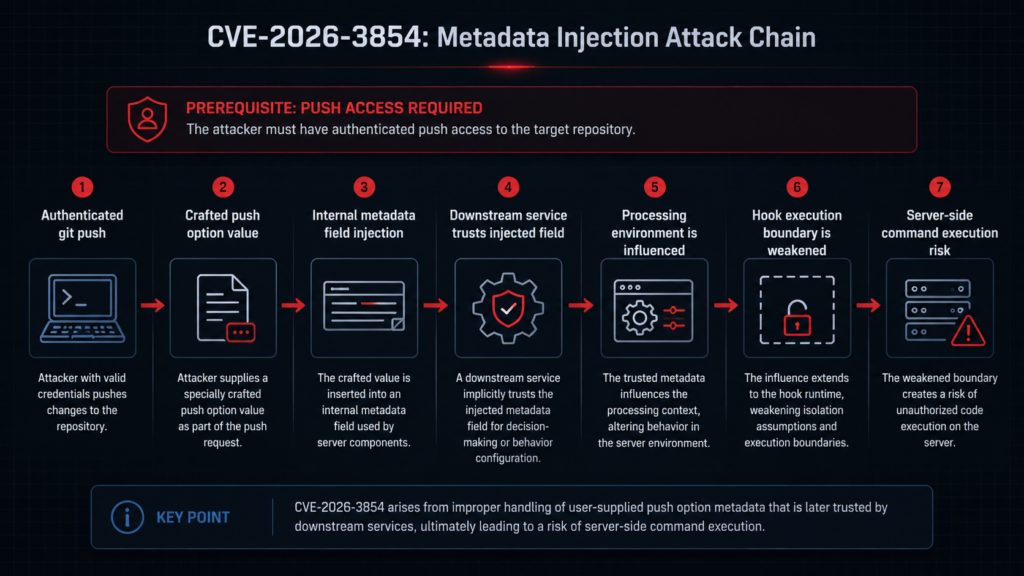
Remote code execution did not happen because a push option string magically executed. The string first became metadata. The metadata influenced downstream behavior. The downstream behavior reached hook execution paths.
GitHub’s official post says the researchers chained injected values to override the environment in which the push was processed, bypass sandboxing protections that normally constrain hook execution, and execute arbitrary commands on the server. (The GitHub Blog)
Wiz’s analysis gives more detail. It identifies fields related to environment selection, custom hook directories, and pre-receive hook definitions as particularly security relevant. Wiz says the first three security-relevant fields in its table together led to remote code execution, and that GHES supports administrator-defined custom pre-receive hooks. (wiz.io)
GitHub’s own GHES documentation explains why pre-receive hooks are powerful. They are scripts that run on the GitHub Enterprise Server appliance when a push occurs and can implement quality checks, business rules, compliance controls, branch locks, sensitive data checks, and other policies. GitHub documents that these scripts run in an isolated environment and can accept or reject a push based on exit status. (GitHub Docs)
That is precisely why hook execution is a sensitive boundary. A hook is code that runs because a user pushed. A platform can make hooks safe only if the hook path, environment, sandbox, policy inputs, and execution permissions are controlled by trusted server-side configuration. If user-controlled metadata can influence those controls, the hook system can become an execution primitive.
The vulnerable chain can be summarized as:
authenticated git push
        ↓
user-supplied push option value
        ↓
raw inclusion in internal metadata header
        ↓
delimiter-based field injection
        ↓
downstream service trusts injected metadata
        ↓
security-relevant execution fields are overridden
        ↓
hook execution path becomes unsafe
        ↓
server-side command execution
That model explains why the CVE is more serious than a simple input validation bug. The injected fields reached the control plane of the push pipeline. They did not merely corrupt a log entry or confuse a user interface. They altered processing decisions used by backend services.
The role of pre-receive hooks
Pre-receive hooks are legitimate and useful. Many enterprises rely on them to block secrets, enforce commit message rules, prevent direct pushes to protected paths, enforce ticket references, or integrate custom compliance logic. GitHub’s documentation explicitly positions them as a way to satisfy business rules, enforce regulatory compliance, and prevent common mistakes. (GitHub Docs)
But any hook mechanism has risk. It is code execution adjacent to user input. The system must decide when hooks run, what environment they run in, what filesystem they can see, how long they can run, and what they can access. GitHub’s documentation also warns that pre-receive hooks can have performance and workflow impact and recommends care with long-running Git operations and external service requests. The same page notes a fixed timeout budget of five seconds across combined pre-receive hooks. (GitHub Docs)
CVE-2026-3854 shows a different kind of hook risk: not slow hooks, not buggy custom hook scripts, but metadata that can steer hook execution into an unsafe path. That is a platform security issue.
A secure hook system should satisfy several properties:
| Property | 중요한 이유 |
|---|---|
| Execution mode is server-derived | Users should not be able to choose sandboxed or unsandboxed execution through request metadata |
| Hook directories are trusted configuration | User input should not decide where hook scripts are loaded from |
| Hook definitions are authenticated and integrity-protected | Push-time metadata should not create new hook definitions |
| Path traversal is rejected | Script path resolution should not escape approved directories |
| Hook runtime identity is least-privileged | The hook process should not have broader filesystem access than necessary |
| Audit events are precise | Administrators need to reconstruct who pushed, from where, and with which options |
| Production images exclude non-production execution paths | Unused code paths can become exploit targets |
GitHub’s own defense-in-depth section addresses the last point directly. GitHub said the exploit worked partly because the server had access to a code path not intended for that environment. That code existed on disk as part of the server container image even though it was meant for a different product configuration. GitHub said the primary remediation was input sanitization, but it also removed the unnecessary code path from environments where it should not exist. (The GitHub Blog)
That may be the most valuable engineering lesson in the disclosure. Fix the injection, but also remove the execution path that made the injection valuable.
GitHub.com and GitHub Enterprise Server were different risk environments
The same vulnerability class affected GitHub’s cloud infrastructure and GitHub Enterprise Server, but the operational risk is different in each environment.
For github.com and GitHub Enterprise Cloud, customers depend on GitHub to patch the service and investigate exploitation. GitHub says those cloud services were patched on March 4, 2026 and that no user action is required for github.com, GitHub Enterprise Cloud, GitHub Enterprise Cloud with Enterprise Managed Users, or GitHub Enterprise Cloud with Data Residency. (The GitHub Blog)
The cloud risk described by Wiz centered on shared backend infrastructure. Wiz said code execution on GitHub.com landed on shared storage nodes running as the git user and that the git user has broad filesystem access to repositories on the node by design. Wiz stated it confirmed cross-tenant exposure using its own test accounts and did not access contents of other tenants’ repositories. (wiz.io)
For GitHub Enterprise Server, the risk is more directly under customer control. A vulnerable GHES appliance may host private source code, internal repositories, GitHub Apps, service hooks, custom pre-receive hooks, issue data, organization settings, integration credentials, CI tokens, deploy keys, and administrative configuration. If an attacker can convert repository push access into server-side code execution, the blast radius can move from a single repository to the whole instance.
That is why GHES patching should not be prioritized only by internet exposure. Even a private GHES instance behind a VPN can be at risk if an attacker compromises a developer identity, steals an SSH key, obtains a CI token, abuses an integration bot, or gains push access through a supply-chain foothold. The exploit path is authenticated, but authenticated developer infrastructure is one of the most commonly abused control planes in modern intrusions.
The patch versions and the version number trap
Version handling around this CVE deserves careful reading because early and later records do not all show the same fixed versions.
Wiz’s disclosure says GitHub Enterprise Server customers should upgrade immediately and lists earlier fixed versions in its affected versions table, including 3.14.24, 3.15.19, 3.16.15, 3.17.12, 3.18.6, and 3.19.3. The same Wiz timeline says CVE-2026-3854 was assigned on March 10, 2026 and GHES patches were released that day. (wiz.io)
NVD’s current CVE record shows a change history. The initial March 10 record listed the earlier fixed versions. On April 17, GitHub modified the description and references to newer fixed versions: 3.14.25, 3.15.20, 3.16.16, 3.17.13, 3.18.7, and 3.19.4. NVD’s current description now uses those newer versions. (NVD)
GitHub’s April 28 blog also gives patch guidance. In its “What you should do” section, GitHub lists 3.14.25 or later, 3.15.20 or later, 3.16.16 or later, 3.17.13 or later, 3.18.7 or later, 3.19.4 or later, and 3.20.0 or later. Earlier in the same blog post, one sentence lists 3.18.8 among supported release patches, while the action section lists 3.18.7. Administrators should therefore use the current GHES release notes and the current CVE record as the deciding source for their own series. (The GitHub Blog)
A practical patch table based on the current NVD record and GitHub’s “What you should do” section looks like this:
| GHES series | Minimum version to target based on current public guidance |
|---|---|
| 3.14 | 3.14.25 or later |
| 3.15 | 3.15.20 or later |
| 3.16 | 3.16.16 or later |
| 3.17 | 3.17.13 or later |
| 3.18 | 3.18.7 or later, verify current release notes |
| 3.19 | 3.19.4 or later |
| 3.20 | 3.20.0 or later, preferably the latest available patch release |
Security teams should avoid the common mistake of copying the first fixed-version table they see in a disclosure article and stopping there. CVE records can be updated. Patch trains can move. Release notes can supersede earlier guidance. For GHES, the safest operational rule is to upgrade to the latest available patch release in your supported series unless GitHub Support advises otherwise.
How to confirm your GHES version
Administrators can start by confirming the current version from the administrative shell:
ssh -p 122 admin@HOSTNAME
ghe-version
For multi-node, high-availability, geo-replicated, or clustered deployments, check every relevant node. Do not assume all nodes are on the same version after a partial maintenance window.
GitHub’s upgrade documentation explains that administrators can install an upgrade package using the ghe-upgrade utility from the administrative shell, and that while hotpatching can upgrade within a feature series, an upgrade package is required when moving to a newer feature release. The same documentation warns that multi-node environments require a controlled order, with the primary node upgraded and configured before additional nodes. (GitHub Docs)
A minimal operational checklist for a GHES upgrade should include:
1. Identify the current GHES version on every node.
2. Confirm the fixed version for your release series from current GitHub release notes.
3. Review HA, geo-replication, and cluster topology.
4. Take a verified backup or snapshot according to internal policy.
5. Schedule maintenance mode if required.
6. Apply the hotpatch or upgrade package.
7. Verify version after reboot or configuration completion.
8. Review logs for upgrade failures.
9. Confirm replication health before reopening the service.
10. Retain evidence for incident response and audit.
For incident response, upgrading is not the end of the work. If the instance was vulnerable before the patch, teams still need to review logs for suspicious push options and investigate any anomalous events found during the exposure window.
What to look for in logs
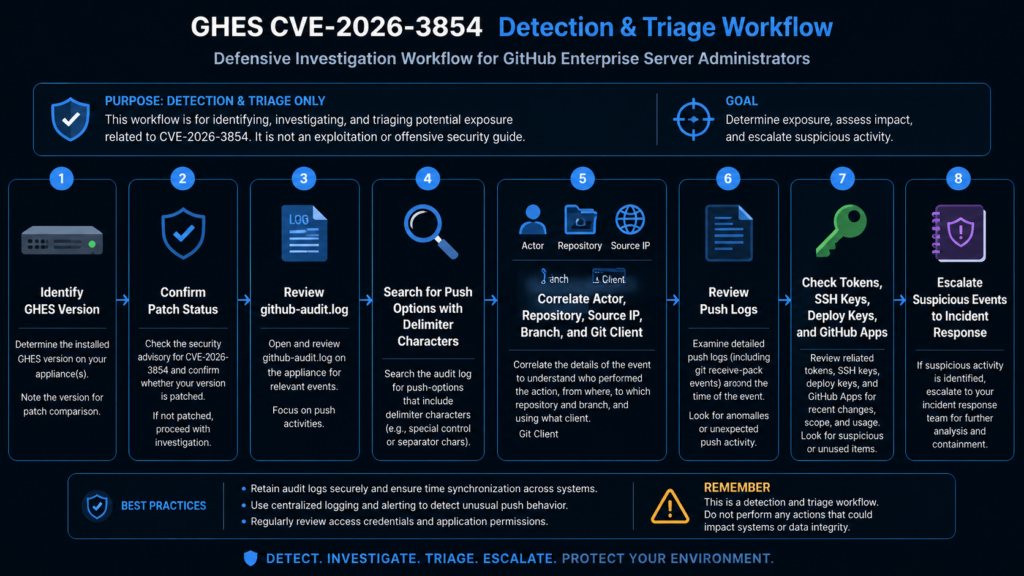
GitHub’s primary public detection instruction is specific: review /var/log/github-audit.log for push operations containing ; in push options. (The GitHub Blog)
That is a strong starting point, not a complete detection program. Logs differ by version, retention, configuration, forwarding pipeline, and parsing format. A simple grep may miss encoded or transformed values. A broad search for semicolons may produce false positives. The right approach is staged.
Start with broad discovery:
sudo grep -nE 'push_option|push option|push-options|;' /var/log/github-audit.log
Then narrow to records that are actually related to push operations and push options. If your audit log is JSON lines and your schema exposes action, actor, repository, and raw metadata fields, a query like this can be adapted:
jq -r '
  select(
    ((.action // "" | tostring) | test("push"; "i"))
    and
    ((.. | tostring) | test(";"))
  )
  | [
      (.created_at // .timestamp // "unknown_time"),
      (.actor // .user // "unknown_actor"),
      (.repo // .repository // "unknown_repo"),
      (.action // "unknown_action")
    ]
  | @tsv
' /var/log/github-audit.log
If your logging pipeline is in Splunk, the equivalent logic is to look for push-related audit events that include push option fields and a semicolon-like delimiter in the option value:
index=github_enterprise sourcetype=github:audit
(action=*push* OR event=*push*)
(push_option=* OR push_options=* OR raw=*push*option*)
raw="*;*"
| table _time actor repo action src_ip user_agent raw
For Elastic or OpenSearch, a detection can begin with:
{
  "query": {
    "bool": {
      "must": [
        { "query_string": { "query": "push" } },
        { "query_string": { "query": "\"push_option\" OR \"push options\" OR \"push-options\"" } },
        { "query_string": { "query": "\";\"" } }
      ]
    }
  }
}
These examples are intentionally defensive and non-exploitative. They do not contain a working attack payload. They show how to search for suspicious use of push options and delimiters. Security teams should adapt them to their actual log schema and confirm that the fields exist before relying on results.
Correlating audit logs with push logs
A useful investigation does not stop at “a semicolon appeared.” It answers who pushed, what repository was targeted, what ref changed, which protocol was used, where the connection came from, and what happened afterward.
GitHub’s GHES documentation says site administrators can view push logs for any repository on the enterprise. Push log entries show who initiated the push, whether it was a force push, the branch pushed to, the protocol used, the originating IP address, the Git client used, and before-and-after SHA hashes. GitHub also documents command-line access to a repository’s push audit log through ghe-spokesctl. (GitHub Docs)
For a suspicious audit event, collect at least:
| 증거 | 중요한 이유 |
|---|---|
| Actor account | Determines whether the user normally pushes to that repository |
| Authentication method | Helps identify SSH key, token, app, or bot path |
| Source IP | Supports impossible travel, VPN exit, or contractor network analysis |
| Repository | Establishes blast radius and business impact |
| Branch or ref | Helps determine whether protected branches were targeted |
| Before and after SHA | Allows code diff and object history review |
| Git client string | May identify automation or unusual tooling |
| Timestamp | Supports correlation with system logs and credential usage |
| Push options | Core detection field for this vulnerability |
| Subsequent repository access | Helps determine if the event preceded suspicious reads, clones, archives, or exports |
A safe investigation workflow looks like this:
# 1. Preserve a copy before running destructive processing.
sudo cp /var/log/github-audit.log /tmp/github-audit-cve-2026-3854-review.log

# 2. Build a candidate event list.
sudo grep -nE 'push_option|push option|push-options|;' \
  /tmp/github-audit-cve-2026-3854-review.log \
  > /tmp/cve-2026-3854-candidates.txt

# 3. Review candidate records manually before declaring an incident.
less /tmp/cve-2026-3854-candidates.txt
If a candidate event looks suspicious, freeze the relevant evidence. Preserve logs, repository refs, authentication logs, identity provider logs, VPN logs, and any forwarded SIEM records. Avoid immediately deleting or rewriting affected repositories before preserving forensic data.
Red flags during review
The presence of a semicolon alone does not prove exploitation. It is a triage signal. Security teams should prioritize events that combine suspicious push options with behavioral anomalies.
High-value indicators include:
| Indicator | Why it raises priority |
|---|---|
| Push option includes delimiter characters and unusual field-like strings | Could indicate attempted metadata injection |
| Actor rarely or never uses push options | Reduces likelihood of normal workflow |
| Push from a new IP, country, VPN exit, or cloud host | Supports credential compromise hypothesis |
| Push from a service account outside expected CI windows | Service accounts are often overprivileged |
| Push to a test or newly created repository by an untrusted actor | The GitHub report notes a repository the attacker created themselves could satisfy the push condition |
| Multiple failed pushes before one successful push | May indicate trial and error |
| Push followed by unusual repository reads, archives, or clones | Could indicate post-execution discovery |
| Push followed by configuration changes, hook changes, or token creation | Supports broader compromise |
| Push actor has access across many organizations | Increases blast radius |
| Push during a period before patching | Aligns with exposure window |
A sample triage view can be built manually:
awk '
  /push/ && /;/ {
    print FILENAME ":" FNR ":" $0
  }
' /var/log/github-audit.log > /tmp/push-semicolon-events.txt
Then review with human context. Automated detection can narrow the search, but it cannot know whether a push option value was part of a legitimate internal workflow unless it understands your environment.
What to do if you find a suspicious event
A suspicious push event on a vulnerable GHES instance should be handled as a potential server-side compromise until disproven.
A practical sequence:
1. Preserve the audit log, push logs, system logs, authentication logs, and SIEM records.
2. Identify the actor, source IP, authentication mechanism, repository, branch, and timestamp.
3. Confirm the GHES version at the time of the event.
4. Determine whether the event occurred before the patch was applied.
5. Disable or rotate credentials for the actor if compromise is plausible.
6. Review all SSH keys, PATs, GitHub Apps, deploy keys, and service accounts linked to the actor.
7. Examine repository objects and refs changed by the push.
8. Review system-level logs around the event window for anomalous process execution.
9. Look for unusual repository reads, archive downloads, clone spikes, or secret access after the event.
10. Escalate to GitHub Enterprise Support and internal incident response if evidence suggests exploitation.
Do not assume the repository targeted by the push is the full blast radius. The risk model for this CVE is not only “someone pushed bad code to a repo.” It is “someone may have reached server-side execution from a repo push.” That requires host-level, application-level, and repository-level investigation.
Why authenticated RCE is still critical
Some teams see “requires authentication” and downgrade urgency. That is a mistake in developer infrastructure.
Developer platforms sit behind a different threat model from public marketing sites. Attackers routinely acquire developer credentials through phishing, malware, token leakage, CI logs, exposed .git directories, npm package compromise, dependency confusion, malicious browser extensions, and cloud credential theft. Once an attacker has a developer token or SSH key, they do not need anonymous access.
For CVE-2026-3854, the permission requirement is push access. In an enterprise, that permission may belong to:
| Principal | Common reason it has push access | 위험 |
|---|---|---|
| Developer account | Normal engineering work | Phishing or endpoint compromise can become server compromise |
| CI bot | Automated commits, version bumps, generated docs | Tokens are often long-lived and widely scoped |
| Release bot | Tagging and release automation | High-value access near production workflows |
| Contractor account | Temporary project access | Offboarding and device posture may be weaker |
| Integration app | Repo automation | App permissions can span many repositories |
| Deploy key | Machine-to-repository authentication | Keys are often forgotten after projects end |
| Test account | QA or staging workflows | Weak monitoring and low scrutiny |
| Maintainer account | Broad write access | High blast radius if compromised |
The exploitability condition is therefore realistic. It maps to the first stage of many real intrusions: obtain a developer identity, then use normal developer workflows to move deeper.
The trust boundary mistake
CVE-2026-3854 is a clean example of a trust boundary mistake in a multi-service architecture.
The system had at least three different categories of data:
1. Identity and authorization facts
2. Server-side processing and policy metadata
3. User-supplied push option values
Those categories require different trust levels. Identity and authorization facts should come from an authentication and policy service. Server-side processing metadata should come from trusted configuration and control-plane logic. User-supplied push options should remain user data.
The bug occurred when these categories shared a representation that did not preserve their boundaries. Once user input was placed into the same delimiter-separated header as internal control fields, the parser could be tricked into treating user-created fields as internal facts.
A stronger design separates them:
{
  "identity": {
    "actor_id": "server-derived",
    "session_id": "server-derived"
  },
  "authorization": {
    "repository_id": "server-derived",
    "can_push": true,
    "policy_profile": "server-derived"
  },
  "execution": {
    "environment": "server-derived",
    "sandbox_profile": "server-derived"
  },
  "user_input": {
    "push_options": [
      "opaque-user-string"
    ]
  }
}
Then the parser enforces schema rules:
def validate_push_request_metadata(meta: dict) -> None:
    required_sections = {"identity", "authorization", "execution", "user_input"}
    if set(meta.keys()) != required_sections:
        raise ValueError("Unexpected metadata schema")

    if not isinstance(meta["user_input"].get("push_options"), list):
        raise ValueError("push_options must be a list")

    for option in meta["user_input"]["push_options"]:
        if not isinstance(option, str):
            raise ValueError("push option must be a string")
        if "\x00" in option or "\n" in option:
            raise ValueError("invalid push option character")

    # Security-critical fields are not accepted from user_input.
    forbidden_user_keys = {"environment", "sandbox_profile", "hook_dir", "execution_mode"}
    if forbidden_user_keys.intersection(meta["user_input"].keys()):
        raise ValueError("user input attempted to set security-critical fields")
Again, this is not GitHub code. It is the design principle: separate user input from control metadata and validate both structure and provenance.
Why last-write-wins parsing is dangerous for security metadata
Last-write-wins parsing is common because it is simple. If a key appears twice, the later value replaces the earlier value. That can be acceptable for benign configuration in some contexts. It is risky for security metadata.
예를 들어
policy=restricted; policy=open
If the parser silently accepts the second value, the security meaning changes. If duplicate fields can originate from user-controlled injection, the attacker will try to place the unsafe value later in the string.
Safer alternatives include:
| Duplicate-key policy | Security value |
|---|---|
| Reject all duplicates | Best default for security-critical metadata |
| Allow duplicates only for explicitly repeated fields | Useful for arrays if schema-defined |
| Preserve all values and require downstream validation | Prevents silent override |
| Namespace user-controlled fields | Prevents collisions with control fields |
| Include field provenance | Allows downstream services to reject user-derived control fields |
A service-to-service protocol should never silently accept duplicate security keys unless there is a formally reviewed reason. Even then, the parser should record that duplicates occurred and emit telemetry.
Why production images should not contain unused execution paths
GitHub’s defense-in-depth statement is one of the most important parts of the official disclosure. The company said the exploit worked partly because a server had access to a code path that was not intended for the environment it was running in. The code path existed in the server container image because it was intended for a different product configuration, and an older deployment method had excluded it, but that exclusion was not carried forward when the deployment model changed. GitHub removed the unnecessary code path from environments where it should not exist. (The GitHub Blog)
This is a classic hardening lesson. Production systems should not merely hide unsafe paths behind flags. If a path should never execute in a given environment, remove it from that environment. If a debug mode should never run in production, do not ship it in the production image. If a hook execution path should exist only in an enterprise appliance, do not include it in cloud production services unless a real requirement exists.
Attackers look for latent functionality. A dormant code path can be safe for years until a parser bug, type confusion bug, routing bug, feature flag bug, or environment spoofing bug makes it reachable.
A practical production-image review asks:
Does this image include code paths for other product modes?
Does this binary include debug or operator features?
Can runtime metadata select execution mode?
Can a request-derived value influence environment selection?
Can a feature flag enable code execution paths?
Are test or development utilities present in production?
Are custom hook or plugin loaders included where unused?
Are shell tools present in containers that do not need them?
Can file paths be resolved outside approved directories?
The point is not to create minimalist systems for elegance. The point is to shrink the number of things an attacker can activate after the first bug.
Comparing CVE-2026-3854 with other Git ecosystem failures
CVE-2026-3854 belongs to a broader family of developer-tooling vulnerabilities where metadata, paths, hooks, or configuration cross a trust boundary.
CVE-2022-24765 is one useful comparison. In that case, Git introduced protections around repository ownership because running Git commands in a directory owned by another user could cause Git to read configuration from a repository the current user should not trust. The safe.directory mechanism made the trust boundary explicit: the ability to read a path is not the same as the decision to trust that path as a Git repository configuration source. That lesson maps well to CVE-2026-3854: the ability to receive an authenticated push option is not the same as trusting it as internal control metadata.
CVE-2024-32002 is another relevant Git ecosystem case. It involved submodules, case-insensitive filesystems, symbolic links, and hook execution during recursive clone in affected Git versions. Its details are different, but the security theme is similar: repository-controlled data and filesystem interpretation can combine in unexpected ways around hooks and execution paths. When Git workflows trigger scripts or interpret metadata, boundary precision matters.
CVE-2026-3854 is server-side and platform-specific, while those Git vulnerabilities affected Git client behavior in specific contexts. The common thread is not a shared codebase. The common thread is that developer tooling often treats metadata as operational instruction. A branch name, path, config value, submodule URL, hook script, push option, or internal header can become a control signal if the surrounding system lets it.
That is why security teams should not treat Git infrastructure as boring plumbing. It is a control plane for software delivery.
Why the CVSS score is high but not the whole story
NVD lists CVSS 3.1 base score 8.8 with vector AV:N/AC:L/PR:L/UI:N/S:U/C:H/I:H/A:H. GitHub’s CNA CVSS 4.0 score is 8.7 with high impact to vulnerable system confidentiality, integrity, and availability. (NVD)
The score captures the core characteristics:
| CVSS element | Meaning for this vulnerability |
|---|---|
| Network attack vector | Exploitation can occur through network-accessible Git operations |
| Low attack complexity | No special race or fragile environmental condition is required once prerequisites are met |
| Low privileges required | Push access is needed, not site administrator access |
| No user interaction | A second victim does not need to click or approve anything |
| High confidentiality impact | Server-side execution can expose repositories and configuration |
| High integrity impact | Server-side execution can modify data or system state |
| High availability impact | Server-side execution can disrupt the instance |
But CVSS does not capture every operational concern. It does not know whether your GHES instance hosts crown-jewel code, whether your CI service accounts have broad repository write access, whether contractors retain push permissions, whether your audit logs are forwarded, whether pre-receive hooks are used, or whether your incident response team can correlate push events to identity provider logs.
For a source code platform, the business impact of server-side code execution can exceed the technical score. Source code repositories often contain intellectual property, infrastructure definitions, internal API paths, deployment scripts, credentials accidentally committed before secret scanning, and application logic attackers can use for later exploitation.
Defensive architecture lessons for multi-service systems
CVE-2026-3854 generalizes beyond GitHub.
Any system that passes request metadata across internal services should ask whether user-controlled values can affect security-critical fields. This is especially important when:
A proxy authenticates the request and forwards metadata.
A downstream service trusts the proxy.
The metadata format is custom or delimiter-based.
The metadata includes both user input and control fields.
The parser accepts duplicate keys.
The downstream service uses metadata to choose execution paths.
The system supports hooks, plugins, templates, scripts, or agents.
Common examples include:
| System | Similar risk pattern |
|---|---|
| CI/CD platforms | User-controlled pipeline variables influence runner behavior |
| API gateways | Client headers are copied into internal headers without normalization |
| Build systems | Repository metadata controls build scripts or artifact paths |
| Deployment controllers | Request fields influence environment or namespace selection |
| Plugin systems | User or tenant configuration controls code loading |
| AI agent runtimes | Untrusted text influences tool invocation or execution environment |
| Internal RPC frameworks | Metadata controls policy, routing, or impersonation |
| Webhook processors | External event fields are trusted as internal state |
The defensive pattern is not “sanitize better” in the abstract. It is more precise:
1. Define which fields are user-controlled.
2. Define which fields are security-critical.
3. Prevent user-controlled fields from sharing a flat namespace with security-critical fields.
4. Use structured, schema-validated serialization.
5. Reject duplicate fields unless explicitly allowed.
6. Authenticate and integrity-protect service-to-service metadata.
7. Avoid deriving execution mode from request metadata.
8. Remove unused execution paths from production.
9. Emit telemetry when a parser sees malformed input.
10. Test the pipeline with adversarial metadata, not just normal requests.
These controls are not glamorous, but they prevent small parsing mistakes from becoming RCE chains.
Practical hardening for GitHub Enterprise Server administrators
Patching is the first step. Hardening follows.
Review who can push
A GHES administrator should be able to answer:
Which users can push to any repository?
Which users can create repositories?
Which service accounts can push?
Which deploy keys can write?
Which GitHub Apps have repository write permissions?
Which contractors or vendors still have access?
Which repositories allow broad team write access?
Which organizations allow self-service repository creation?
The official vulnerability precondition includes push access to a repository, including a repository the attacker created themselves. That makes repository creation policy relevant. If a low-trust user can create a repository and push to it on a vulnerable instance, that may satisfy the entry condition described by GitHub. (The GitHub Blog)
Reduce long-lived write credentials
Service accounts and deploy keys deserve special attention. They often bypass the normal human identity lifecycle. They may not have MFA. They may be stored in CI variables, old build agents, shell scripts, or local developer machines. They may keep broad write access long after the original automation changed.
A useful review script should not only list accounts. It should classify by business owner, last used time, repositories accessible, write scope, and rotation status.
Revisit pre-receive hooks
Pre-receive hooks are useful, but they are also sensitive. GHES administrators should review:
Which pre-receive hooks are enabled?
Who can manage them?
Where are hook scripts stored?
Are hook repositories restricted?
Do hooks call external services?
Do hooks run Git operations against large repositories?
Are hooks still needed?
Are hook logs monitored?
Do hooks expose secrets in output?
GitHub’s documentation warns that pre-receive hooks can have significant impact and should be implemented carefully. It also recommends avoiding external API requests and long-running Git operations inside hooks because they can compound performance impact. (GitHub Docs)
For CVE-2026-3854 specifically, reviewing hooks does not replace patching. The vulnerable path is in platform handling of push option metadata. But hook review reduces the blast radius of future hook-adjacent issues.
Preserve and forward audit logs
GitHub documents that enterprise owners and site administrators can access the enterprise audit log, and that audit logs list events triggered by activities affecting the enterprise. It also notes that, by default, only events from the past three months are displayed in the UI unless a date range is specified. (GitHub Docs)
For serious incident response, local UI access is not enough. GHES audit logs should be forwarded to a SIEM or secure log archive where retention, integrity, and correlation are controlled by the security team. If logs live only on the appliance, an appliance-level compromise can threaten the evidence needed to prove what happened.
A non-exploit test plan for defenders
Security teams often want to “test whether we are vulnerable.” For CVE-2026-3854, do not attempt to run public or reconstructed exploit chains against production GHES. The safer test is patch verification plus log and control validation.
A practical non-exploit validation plan:
1. Confirm the GHES version is at or above the fixed version for your series.
2. Confirm every node in HA, geo-replication, or cluster topology is patched.
3. Confirm maintenance mode was disabled only after upgrade completion.
4. Search audit logs for push option events with delimiter characters during the exposure window.
5. Correlate candidates with push logs, source IPs, actors, and repositories.
6. Confirm suspicious actors have not created new tokens, SSH keys, deploy keys, or apps.
7. Confirm pre-receive hook configurations were not unexpectedly changed.
8. Confirm no unusual repository archive, clone, or bulk read activity followed candidate pushes.
9. Confirm audit logs are forwarded and retained outside the appliance.
10. Document the exposure window, evidence reviewed, and final conclusion.
This gives defenders a defensible answer without turning production into an exploit lab.
Mistakes to avoid
The first mistake is treating “no public exploitation observed” as “no action required.” GitHub reported no exploitation on its own cloud telemetry beyond Wiz testing, but GHES customers must review their own instances. GitHub does not have the same telemetry inside every customer’s self-hosted appliance.
The second mistake is patching only the primary node. Multi-node deployments need version consistency. GitHub’s upgrade documentation describes controlled steps for multi-node environments and warns that additional nodes should be upgraded only after the primary is fully upgraded and configured. (GitHub Docs)
The third mistake is searching only for one exact payload string copied from a blog. Attackers can vary input. Defenders should search for the behavior class: suspicious push options, delimiters, unexpected actors, unusual repositories, and post-push anomalies.
The fourth mistake is assuming that a private network removes risk. A private GHES instance can still be attacked by a compromised developer, a contractor on VPN, a stolen CI credential, or a malicious insider.
The fifth mistake is ignoring repository creation. If low-trust users can create repositories and push to them, the attack precondition may be easier to satisfy than a team expects.
The sixth mistake is failing to preserve evidence before cleanup. Rotating credentials and patching are essential, but incident responders need logs, timestamps, refs, identity events, and system artifacts to reach a defensible conclusion.
What engineering teams should audit after CVE-2026-3854
The best use of this event is not only to patch GHES. It is to audit similar patterns in your own systems.
Start with internal headers. Search for code that builds metadata strings by concatenating fields:
grep -RInE 'X-|header|metadata|join|split|;|key=value' ./services ./internal
Then review call paths where user-controlled input is inserted:
HTTP headers copied into internal headers
Webhook payload fields copied into worker metadata
CI variables copied into runner environment
Git metadata copied into hook execution context
Tenant fields copied into routing metadata
Request parameters copied into command arguments
Feature flags copied into execution mode selectors
AI tool arguments copied into shell commands or scripts
For each path, ask:
Can a user-controlled value introduce a delimiter?
Can it create a new field?
Can it override an existing field?
Does the parser accept duplicate keys?
Does a downstream service treat the field as trusted?
Does the field affect execution mode, filesystem paths, sandboxing, identity, or policy?
Is there telemetry when parsing sees unexpected fields?
A simple review matrix can help:
| 질문 | Safe answer |
|---|---|
| Is user input encoded before entering internal metadata? | Yes, with context-specific encoding or structured serialization |
| Are unknown metadata keys rejected? | 예 |
| Are duplicate keys rejected? | Yes, unless schema-defined |
| Can user input set execution mode? | 아니요 |
| Can user input set filesystem paths? | No, except constrained data paths with validation |
| Can user input change sandbox behavior? | 아니요 |
| Are service-to-service headers authenticated? | 예 |
| Is provenance preserved? | Yes, user-derived fields are distinguishable |
| Are malformed headers logged? | 예 |
| Are unused code paths removed from production? | 예 |
This kind of audit is especially important in systems built over many years. Internal protocols often start small and informal. Later they become security-critical because more services depend on them. The protocol may never receive the same scrutiny as a public API, even though compromising it has greater impact.
Detection engineering ideas for internal metadata injection
CVE-2026-3854 also suggests detection patterns beyond GitHub.
Look for logs where user-controllable fields contain internal delimiters, field names, or policy keywords. In a general application environment, detections can target:
Semicolons in fields that are embedded into semicolon-separated metadata
Newline characters in fields later used in headers
Duplicate metadata keys
Unexpected control fields
User input containing names of internal policy fields
Repeated parse errors from the same actor
Requests that trigger code paths never used in normal operation
Execution-mode changes tied to request metadata
Path traversal markers in hook or plugin configuration
A generic Sigma-style sketch for delimiter injection attempts might look like this:
title: Possible Internal Metadata Delimiter Injection
status: experimental
description: Detects user-controlled request or workflow fields containing delimiters and control-field-like strings before backend processing.
logsource:
  category: application
detection:
  selection_delimiter:
    user_input|contains:
      - ';'
      - '%3b'
  selection_control_words:
    user_input|contains:
      - 'mode='
      - 'env='
      - 'hook'
      - 'policy'
      - 'sandbox'
      - 'path'
  condition: selection_delimiter and selection_control_words
falsepositives:
  - Legitimate user data containing semicolons
  - Debug tooling that submits structured values
level: medium
This is not a GitHub-specific exploit detector. It is a starting point for identifying user input that appears to be trying to speak an internal metadata language. A good production rule would be tuned to the actual fields and grammar used by the service.
The AI-assisted research angle
Wiz’s post says this research was made possible by AI-augmented reverse engineering tooling, particularly IDA MCP, which helped analyze compiled binaries and reconstruct internal protocols faster than would have been feasible manually. (wiz.io)
That statement should matter to defenders. Closed-source, appliance-style enterprise products are not opaque in the same way they used to be. AI-assisted binary analysis, code navigation, protocol reconstruction, and cross-component reasoning reduce the cost of finding bugs that require understanding several services at once.
The practical consequence is not “AI found the vulnerability, so AI is magic.” The consequence is that deep architectural bugs are becoming cheaper to search for. Vulnerability classes that once required weeks of manual reverse engineering may become more accessible to skilled researchers with the right tooling.
For vendors and internal platform teams, the answer is not secrecy. The answer is to harden assumptions:
Assume internal protocols can be reconstructed.
Assume field names can be discovered.
Assume hidden code paths can be found.
Assume request-to-execution chains can be mapped.
Assume attackers can reason across service boundaries.
Security by obscurity becomes weaker when analysis gets cheaper. Schema validation, least privilege, signed metadata, restricted execution paths, and production image minimization become stronger.
Why GitHub’s response matters
GitHub’s response is part of the security story. According to GitHub, it reproduced the issue within 40 minutes, identified the root cause by 5:45 p.m. UTC, patched github.com by 7:00 p.m. UTC, prepared GHES patches, and performed a telemetry-based exploitation investigation. (The GitHub Blog)
Fast patching does not erase the vulnerability. But it does show what mature incident response looks like for a critical platform issue:
1. Accept the report through a responsible disclosure channel.
2. Reproduce quickly.
3. Identify the root cause.
4. Patch the hosted service.
5. Prepare customer patches.
6. Investigate exploitation with telemetry.
7. Explain the technical cause without publishing a turnkey weaponized exploit.
8. Provide administrator actions.
9. Credit the researchers.
10. Add defense-in-depth changes beyond the immediate fix.
That sequence is a useful model for any platform team that handles high-impact security reports.
The telemetry explanation is especially important. A weak disclosure says, “We have no evidence of exploitation.” A stronger disclosure explains why exploitation would have been observable, what was searched, and what the search found. GitHub said the exploit necessarily triggered an anomalous code path that is never used in normal github.com operations, and that telemetry showed only Wiz testing. (The GitHub Blog)
That is the kind of statement customers can reason about.
Action checklist for GHES administrators
Use this checklist as a working incident response and remediation path.
Patch status
[ ] Identify all GHES instances.
[ ] Identify current version and series.
[ ] Confirm fixed release for the series from current GitHub release notes.
[ ] Upgrade to the fixed or latest available patch release.
[ ] Verify every node after upgrade.

Exposure window
[ ] Record when each instance became vulnerable.
[ ] Record when each instance was patched.
[ ] Preserve logs covering the exposure window.

Audit review
[ ] Review /var/log/github-audit.log for push operations with push options containing semicolons.
[ ] Review push logs for candidate repositories.
[ ] Correlate actor, source IP, protocol, Git client, branch, and before-after SHAs.
[ ] Review candidate users for new tokens, SSH keys, app grants, deploy keys, and suspicious sessions.

Access review
[ ] List users with broad push access.
[ ] List service accounts with push access.
[ ] List write deploy keys.
[ ] Review repository creation permissions.
[ ] Remove stale contractor and bot access.
[ ] Rotate credentials where compromise is plausible.

Hook review
[ ] Inventory pre-receive hooks.
[ ] Confirm hook owners.
[ ] Review hook script repositories and permissions.
[ ] Remove obsolete hooks.
[ ] Check for unexpected hook changes during the exposure window.

Post-event validation
[ ] Check unusual repository clones or archive downloads.
[ ] Check unexpected repository setting changes.
[ ] Check suspicious system logs around candidate pushes.
[ ] Escalate to GitHub Enterprise Support if exploitation is suspected.
[ ] Document findings and closure rationale.
최종 평가
CVE-2026-3854 is a strong reminder that developer infrastructure is production infrastructure. The git push path is not a passive file transfer mechanism. It is a policy-enforcing, hook-running, metadata-rich control plane for software delivery.
The bug’s root cause was not mysterious. User-controlled push option values entered an internal service header without sufficient sanitization. A delimiter allowed field injection. Downstream services trusted the resulting fields. A chain of injected values reached execution-related decisions and produced server-side command execution. The simplicity of that sentence is exactly why the vulnerability is important.
The bigger lesson is architectural. Internal protocols need schemas. Security metadata needs provenance. Duplicate keys should not silently override trusted values. User input should not share a flat namespace with control fields. Execution mode should not be derived from request metadata. Production images should not ship code paths that should never execute in that environment. Authenticated input is still hostile input.
GitHub patched its cloud services, released GHES fixes, credited the researchers, and reported no exploitation beyond Wiz testing. GHES administrators still need to upgrade, review audit logs, correlate push activity, and treat suspicious events seriously. For everyone else building multi-service systems, CVE-2026-3854 is worth studying because the same failure pattern appears far beyond Git hosting.
추가 읽기 및 참고 자료
GitHub’s official disclosure gives the authoritative vendor timeline, affected GitHub products, patch guidance, exploitation investigation summary, and defense-in-depth remediation details. (The GitHub Blog)
NVD’s CVE-2026-3854 record provides the current CVE description, CVSS scores, CWE mapping, and change history showing how fixed-version references were updated after the initial publication. (NVD)
Wiz’s technical analysis explains the internal git push pipeline, the X-Stat field injection, the role of delimiter parsing, the escalation path, the GitHub.com and GHES differences, and the responsible disclosure timeline. (wiz.io)
The Git documentation for git push explains the -o 그리고 --push-option feature and how push option strings are transmitted to the server and made available to hooks. (Git)
GitHub Enterprise Server documentation on pre-receive hooks explains what hooks do, how they run during push processing, and why they must be implemented carefully. (GitHub Docs)
GitHub Enterprise Server documentation on audit logs and push logs explains where administrators can review enterprise activity and what push log entries expose, including actor, branch, protocol, source IP, Git client, and before-after SHA hashes. (GitHub Docs)
GitHub Enterprise Server upgrade documentation explains the administrative upgrade flow, including ghe-upgrade, hotpatch versus feature release upgrades, maintenance mode, and multi-node upgrade considerations. (GitHub Docs)

 Korean
  English
  German
  French
  Spanish
  Portuguese
  Japanese
  Hindi
Hindi  Arabic
  Turkish
  Hebrew