
A firewall rule is not just a network setting. It is a trust decision. Every broad allow rule says that a source, a destination, a protocol, a port, and a direction are acceptable in production. Every forgotten temporary rule says that yesterday’s troubleshooting shortcut is still part of today’s attack surface. Every unlogged exception says that defenders may not know whether a path is being used by a legitimate service, a misconfigured workload, or an attacker moving through the environment.
Good firewall configuration is therefore less about owning a firewall and more about proving that only necessary traffic can move. NIST defines firewalls as devices or programs that control traffic between networks or hosts with different security postures, and its firewall guidance focuses not only on selecting firewall technology, but also on policy, configuration, testing, deployment, and management. That distinction matters because a firewall with unmanaged rules can become a false sense of control rather than a control. (NIST 컴퓨터 보안 리소스 센터)
Real attack surface reduction starts with four questions. What can reach your systems from the internet? What can compromised internal systems reach next? What can your workloads reach outbound? What can administer the systems that define routing, identity, inspection, and policy? A useful firewall configuration checklist must answer all four. Anything narrower becomes a port checklist, not a security model.
Firewall configuration is an access model, not a device setting
The most common mistake is treating firewall configuration as a perimeter task. That made more sense when the network was simpler: corporate users inside, internet outside, data center in the middle. Modern environments are messier. Public cloud security groups, Kubernetes network policies, managed load balancers, SaaS integrations, CI/CD runners, developer VPNs, remote admin tools, service meshes, WAFs, and edge devices all enforce or influence reachability. A production system may have several different “firewalls” before a packet reaches an application.
The practical definition should be broader: firewall configuration is the set of enforced network access decisions that determine which systems can communicate, under which conditions, in which direction, with which logging, and under whose ownership. That includes a physical firewall at the edge. It also includes cloud security groups, subnet ACLs, host firewalls, Kubernetes NetworkPolicy, identity-aware access proxies, VPN ACLs, load balancer listener rules, and network controls around management interfaces.
This broader definition prevents a dangerous blind spot. Teams often say “the firewall blocks that,” while the real path uses a cloud load balancer, an IPv6 address, a peered VPC, a developer VPN pool, a Kubernetes node port, or a forgotten security group. Attackers do not care which control was supposed to block them. They care whether a route exists.
A defensible firewall policy has five properties.
| Property | What it means | What weak configurations look like |
|---|---|---|
| Explicit | Allowed paths are written down by source, destination, service, and purpose | “Any internal” or “temporary all traffic” rules |
| Minimal | Rules allow only what the business function needs | Broad port ranges, wide CIDR ranges, unused services |
| Directional | Inbound, outbound, and east-west traffic are reviewed separately | Only public ingress is reviewed |
| Owned | Every rule has a business owner, ticket, and expiry or review date | Nobody knows why a rule exists |
| Verified | The expected allowed and denied paths are tested after changes | Teams assume the diagram matches reality |
A firewall rule without ownership is technical debt. A firewall rule without validation is a guess. A firewall rule without logging, at least for critical paths, is a gap in incident response.
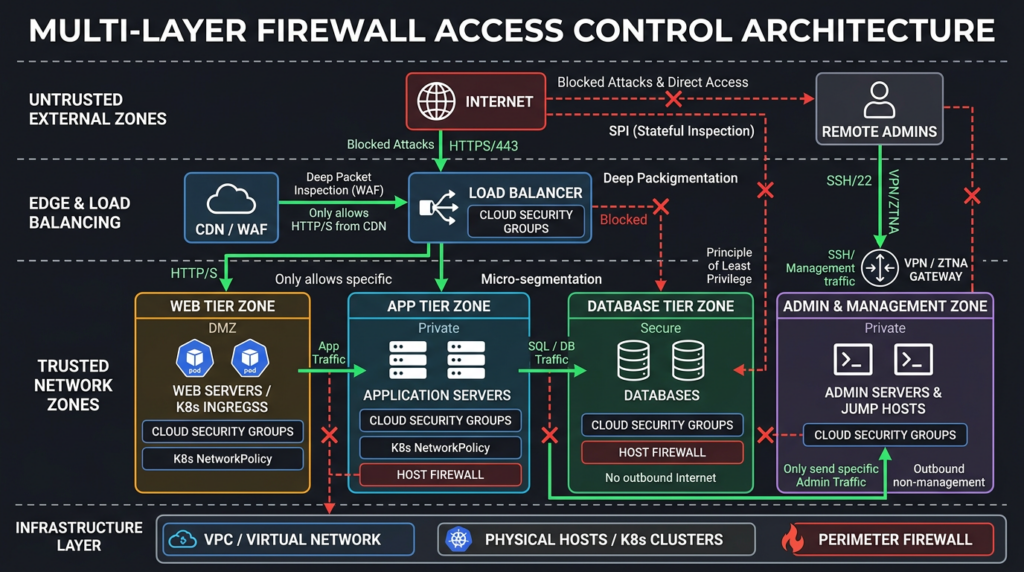
Start with the traffic you mean to allow
Strong firewall configuration starts before any rule is written. You need an application connectivity map. Not a perfect enterprise architecture diagram, but a working list of flows that matter. For each service, identify the public entry points, upstream dependencies, downstream dependencies, administrative paths, update paths, monitoring paths, and emergency access paths.
A minimal decision record should look like this.
| 필드 | 예 | 중요한 이유 |
|---|---|---|
| 출처 | app-subnet-prod, 10.20.4.0/24, jumpbox-prod | Prevents “any source” rules from becoming the default |
| Destination | orders-api, prod-postgres, firewall-mgmt-ui | Ties network access to a real asset |
| Protocol and port | TCP 443, TCP 5432, UDP 123 | Prevents large ranges and vague “application” exceptions |
| Direction | Inbound, outbound, east-west | Avoids assuming return traffic equals new access |
| Business reason | API receives customer traffic from load balancer | Gives reviewers a way to challenge unused access |
| Data sensitivity | Public, internal, regulated, privileged | Helps prioritize logging and review frequency |
| Owner | Team, service owner, on-call group | Makes cleanup possible |
| Expiry or review date | 30 days for temporary, quarterly for permanent | Stops old troubleshooting access from persisting |
| Validation method | curl from approved source, flow logs, denied test | Turns policy into evidence |
The important phrase is “traffic you mean to allow.” A lot of firewall cleanup fails because teams begin with existing rules and try to decide whether each rule is bad. That is backwards. Start with what should exist. Then compare the running configuration against the intended state. Anything extra is an exception that must be justified, narrowed, logged, or removed.
This approach also makes business conversations easier. Engineers can explain that the database accepts TCP 5432 only from the application subnet because the web tier has no valid business reason to connect from arbitrary hosts. Security can explain that production SSH is restricted to a jump host because direct internet administration creates a management path that is hard to monitor and easy to brute force. Operations can explain why one outbound package repository is allowed and arbitrary outbound internet access is not.
Default deny is a workflow, not a slogan
“Default deny” means traffic is denied unless a rule explicitly allows it. It is one of the oldest firewall principles, but it is still often implemented inconsistently. Many environments apply it only to inbound internet traffic while leaving outbound traffic and internal traffic broadly open. That protects against some drive-by exposure, but it does not contain compromise.
Default deny should be applied at every trust boundary where the operational cost is acceptable. Internet to production is the obvious boundary. User network to server network is another. Web tier to database tier is another. Production workloads to the internet is another. Kubernetes namespace to namespace is another. Management network to firewall, VPN, cloud control, and CI/CD systems is one of the most important.
A healthy default deny model looks like this.
| Boundary | Default action | Typical allowed exceptions | 일반적인 실수 |
|---|---|---|---|
| Internet to public app | Deny except published entry points | TCP 443 to load balancer or reverse proxy | Exposing app hosts directly |
| Internet to admin services | Deny | None, or access through VPN, ZTNA, or bastion | SSH, RDP, admin UI open to all |
| Web tier to app tier | Deny except service ports | TCP 443 or private service port from web tier | Any-to-any inside VPC |
| App tier to database | Deny except app-to-db | Database port from specific app identities or subnets | Database accepts whole VPC |
| Workload egress | Deny or restricted allow | DNS, NTP, approved APIs, package mirrors | Any workload can reach any internet host |
| User LAN to servers | Deny except approved admin and app paths | VPN users to specific apps, admins through jump hosts | Flat corporate network |
| Kubernetes namespace traffic | Deny except service policy | App-specific ingress and egress | No NetworkPolicy, all pods reachable |
| Firewall management plane | Deny except management network | Jump host, MFA, dedicated admin subnet | Management UI reachable from internet |
Default deny does not mean breaking production in one weekend. It means new systems start from a closed posture, exceptions are explicit, and legacy systems are moved toward that state in stages. For older environments, the first milestone may be “default deny for new workloads and high-risk zones.” Then management interfaces. Then databases. Then privileged services. Then egress.
Inbound firewall configuration, reduce exposed services first
Inbound exposure is still the easiest risk to explain because it is externally visible. If a service listens on a public address, attackers can discover it, fingerprint it, brute force it, or exploit it when a vulnerability emerges. Edge devices, VPN portals, management panels, file transfer services, databases, development servers, and forgotten staging environments are especially attractive because they often sit outside normal application security review.
CISA’s BOD 23-02 was directed at reducing risk from internet-exposed management interfaces in U.S. federal civilian agencies, and the underlying lesson is useful beyond government: management interfaces that control devices, networks, or systems should not be reachable from the public internet unless there is a carefully designed access path and a strong reason. (CISA)
A practical inbound checklist should start with these questions.
| 질문 | Good answer | Risky answer |
|---|---|---|
| Does this service need to be public? | Yes, it is the public web entry point | “It was easier for troubleshooting” |
| Is the public service behind a controlled entry layer? | CDN, load balancer, reverse proxy, WAF where appropriate | Direct host exposure |
| Is the source restricted where possible? | Partner CIDR, office IP, VPN pool, ZTNA identity path | 0.0.0.0/0 for admin ports |
| Is IPv6 reviewed too? | IPv4 and IPv6 rules are equivalent | IPv4 is locked down, IPv6 is open |
| Is the rule logged? | Critical allows and denies generate useful logs | No visibility into hits |
| Is there an owner and expiry? | Named service owner and review date | Rule survives forever |
| Was reachability tested after deployment? | Allowed and denied paths verified | Team assumes cloud UI is accurate |
The most dangerous inbound rules are rarely subtle.
| Dangerous inbound rule | Why it is dangerous | Safer alternative |
|---|---|---|
TCP 22 from 0.0.0.0/0 또는 ::/0 | Internet-wide SSH brute forcing and exploitation surface | SSH only from VPN, bastion, or admin CIDRs |
| TCP 3389 from internet | RDP is heavily targeted and often credential-attacked | Remote desktop through VPN, ZTNA, bastion, or privileged access workflow |
| Database ports from internet | Direct data layer exposure bypasses app controls | Database accepts only application tier or private admin path |
| Kubernetes API from internet | Cluster control plane exposure can become full environment compromise | Private endpoint or restricted admin networks with strong identity controls |
| Firewall or VPN admin UI from internet | Control plane compromise can change policy or create persistence | Dedicated management network, MFA, out-of-band access |
| Large port range from internet | Unknown service exposure and future accidental listeners | Narrow protocol and port per service |
| All ICMP blocked everywhere | Can break diagnostics and path MTU discovery | Allow specific ICMP types where operationally required and log unusual patterns |
AWS explicitly warns that when SSH or RDP inbound rules use 0.0.0.0/0 또는 ::/0, anyone can attempt access from any IP address using that protocol; AWS also recommends avoiding large port ranges and restricting access to required sources or destinations. (AWS Documentation) That warning maps directly to non-cloud firewalls too. A broad source range is a broad attack surface.
A good inbound policy usually exposes only a small number of public paths. For a typical web application, the internet should reach a CDN or load balancer on TCP 443. The load balancer should reach application services on a private port. Application services should reach the database on the database port. The internet should not reach the database, admin UI, metrics endpoint, debug server, message queue, cache, or SSH service.
Outbound firewall configuration, the control many teams skip
Outbound rules decide what your systems can reach. Many teams leave outbound open because it reduces friction. That is understandable, but it creates real security tradeoffs. If a server is compromised, broad egress can make it easier to download tooling, reach command-and-control infrastructure, exfiltrate data, pivot to external services, or abuse cloud metadata and internal APIs. Outbound control is not a silver bullet, but it changes what an attacker can do after the first foothold.
Google Cloud’s VPC firewall documentation is a good reminder that default behavior may not be as restrictive as teams assume. Google Cloud VPC networks include implied rules, including implied allow egress behavior under the documented model, so teams that only define ingress rules may still be leaving broad outbound paths in place. (Google Cloud Documentation)
A useful egress policy is not “block everything and hope the app works.” It is an allowlist by workload class.
| Workload type | Typical outbound needs | Risk of unrestricted egress |
|---|---|---|
| Public web server | DNS, observability, app backend, package update path if allowed | Tool download, C2 callback, data staging |
| App server | Database, cache, queue, approved APIs, logging | Access to arbitrary internal and external targets |
| Database server | Backup target, monitoring, time sync | Direct data exfiltration path |
| CI/CD runner | Source control, artifact registry, package registry, deployment APIs | Supply-chain abuse, secret exfiltration |
| Backup server | Storage target, key management, monitoring | Ransomware staging and destructive access |
| Kubernetes pod | DNS, required services, approved APIs | Pod-to-internet C2, SSRF follow-on paths |
| Firewall or VPN appliance | Vendor update, telemetry if approved, logging | Compromised edge device reaches attacker infrastructure |
Start with critical systems. Databases should not have arbitrary internet access. Backup infrastructure should not have arbitrary internet access. Domain controllers should not have arbitrary internet access. Production application servers should usually reach only approved dependencies. CI/CD runners need special treatment because they often hold secrets and have broad deployment permissions.
A staged outbound program is safer than a sudden outage.
- Collect flow logs for representative production periods.
- Identify recurring destinations and map them to business functions.
- Separate known dependencies from unknown or one-off connections.
- Create a monitored allowlist for high-value systems.
- Alert on denied connections before enforcing hard blocks where possible.
- Move from monitor mode to enforce mode by workload group.
- Review denied logs with service owners during the first weeks.
Outbound control also helps incident response. A denied connection from a database server to an unknown internet host is not just a firewall event. It is a question: why is the database trying to talk directly to the internet?
East-west segmentation blocks the easy pivot
The internet edge is only the first boundary. Once attackers compromise a host, they look for reachable internal systems. Flat networks make that easy. Good firewall configuration assumes that at least one system will fail and limits what that failure can reach.
OWASP’s network segmentation guidance explains the same idea with practical examples: segmentation should prevent a compromised public web server from gaining direct access to a database, and it should prevent unauthorized database access from becoming unrestricted command-and-control access to the internet. (OWASP 치트 시트 시리즈)
That is the core of east-west segmentation. A web server may need to talk to an application service. It does not need to talk to every database, every file share, every CI/CD server, every admin subnet, and every employee laptop. A developer workstation may need to reach source control and development systems. It does not need direct production database access. A monitoring system may need to scrape metrics. It does not need shell access to every host.
A simple segmentation model for a production application might look like this.
| Zone | Allowed inbound | Allowed outbound | Explicitly denied |
|---|---|---|---|
| Public edge | Internet TCP 443 | App tier private ports, logging | Database, admin network |
| App tier | Edge to app ports | Database, cache, queue, approved APIs | Internet arbitrary, admin plane |
| Database tier | App tier database port | Backup, monitoring, time sync | Internet arbitrary, user LAN |
| Admin tier | VPN or ZTNA users to bastion | Managed targets on admin ports | Direct internet origin to admin ports |
| Observability | Agents to collector | SIEM, storage, alerting | Lateral access to app or DB shells |
| Backup | Protected systems to backup service | Immutable storage, key management | User LAN, arbitrary inbound |
Segmentation should be tested from the attacker’s point of view. If the web tier is compromised, can it connect to the database directly? If a user laptop is compromised, can it reach production SSH? If a Kubernetes pod in a low-trust namespace is compromised, can it reach internal admin services? If a VPN user account is compromised, can it reach domain controllers or only the specific applications that user needs?
A firewall policy that cannot answer those questions is not yet an attack surface reduction program. It is a collection of rules.
Management planes deserve their own security boundary
The management plane is where administrators change configuration, create users, modify routes, alter firewall policy, deploy software, issue certificates, inspect logs, and control identity. If attackers compromise the management plane, they can often reshape the environment faster than defenders can respond.
This is why firewall configuration must treat management interfaces differently from application interfaces. A web application may intentionally accept customer traffic from the internet. A firewall admin UI, VPN admin portal, router management interface, hypervisor console, Kubernetes API, cloud control plane connector, CI/CD admin panel, database admin UI, and backup management portal should not be treated as ordinary public services.
Joint edge device guidance from NSA and international partners recommends auditing and disabling unused features and ports, limiting management interfaces so they are not directly internet accessible, and centralizing monitoring and log access for investigation. (U.S. Department of War) That advice is especially relevant to firewalls, routers, and VPN gateways because these devices often sit at high-trust choke points.
A safe management plane pattern includes:
| 제어 | Practical implementation |
|---|---|
| Separate management path | Dedicated admin subnet, VPN, ZTNA, bastion, or out-of-band management |
| Strong identity | MFA, named accounts, no shared admin credentials |
| Source restriction | Admin access only from approved networks or access brokers |
| Protocol restriction | HTTPS or SSH only where required, no legacy management protocols unless necessary |
| Feature minimization | Disable unused APIs, SNMP versions, old VPN modes, demo services, and debug interfaces |
| Logging | Authentication, configuration changes, failed access, new admin sessions |
| Change approval | Ticket, peer review, rollback plan, emergency process |
| Continuous exposure checks | Confirm management ports are not internet reachable |
SNMP is a good example of nuance. Some environments need SNMP for monitoring. That does not mean every device should expose SNMP broadly. Use SNMPv3 where possible, restrict sources to monitoring systems, disable older versions, and log unexpected attempts. The edge device guidance specifically calls out SNMPv3 as the stronger option when SNMP is needed.
IPv6 is another common blind spot. If your organization uses IPv4 operationally but leaves IPv6 enabled and unfiltered, you may have created a parallel exposure path. The edge device guidance recommends disabling IPv6 where an organization exclusively uses IPv4 to reduce attack surface. (U.S. Department of War) If you do use IPv6, treat it as first-class: review IPv6 routes, firewall rules, logs, and public exposure with the same seriousness as IPv4.
Cloud firewall configuration differs by platform
Cloud platforms make firewall configuration easier to automate, but they also create new ways to misunderstand defaults. A cloud security group is not always the same as a subnet ACL. A Kubernetes NetworkPolicy is not the same as a cloud firewall. A load balancer listener is not the same as host-level exposure. A managed database “public access” toggle may bypass what an engineer assumed was private-only.
Cloud rule reviews should include platform-specific behavior.
| Platform control | Important behavior | 일반적인 실수 |
|---|---|---|
| AWS Security Groups | Security groups act as virtual firewalls and use allow rules; AWS recommends minimum necessary groups and restricted SSH/RDP sources | Opening SSH or RDP from all IPv4 and IPv6 sources |
| Azure Network Security Groups | Rules have priorities; lower priority numbers are processed first and processing stops on match | A broad higher-priority allow shadows later denies |
| Google Cloud VPC firewall | Implied ingress and egress behavior matters, including broad implied egress unless changed by policy | Teams lock down ingress but forget outbound |
| Kubernetes NetworkPolicy | Default deny requires a policy; otherwise pods may not be isolated as expected | Creating app policies without namespace default deny |
| Host firewall | Controls local listeners independent of cloud perimeter | Host exposes debug service reachable from internal networks |
| Load balancer or ingress | Publishes services separately from host rules | Exposing unintended path through listener or ingress rule |
AWS documentation recommends restricting who can create and modify security groups, keeping the number of security groups low enough to reduce error, restricting SSH and RDP sources, and avoiding large port ranges. (AWS Documentation) Those recommendations are operational as much as technical. Rule sprawl becomes risk because humans stop understanding what is allowed.
Azure NSGs require priority discipline. Microsoft documents that NSG rules are processed in priority order, lower numbers have higher priority, and processing stops once traffic matches a rule. (Microsoft Learn) That means a broad allow rule at priority 100 can make a later deny at priority 300 irrelevant. Reviewers must read order and priority, not just rule names.
Kubernetes is its own trap. Kubernetes documentation shows that default deny ingress, default deny egress, and default deny all require explicit NetworkPolicy objects. It also warns that a default deny-all egress policy blocks DNS unless DNS is separately allowed. (Kubernetes) That is the operational challenge in one sentence: the secure default must be explicit, and the functional exceptions must be precise.
A good cloud firewall review should combine static review with reachability testing. Static review tells you what rules say. Reachability testing tells you what the environment actually allows.
Related CVEs show why configuration and exposure matter
Firewall configuration does not fix software vulnerabilities. It does, however, influence exposure, blast radius, detection, and urgency. A vulnerable service that is not reachable by untrusted sources is usually less exposed than the same service open to the internet. A vulnerable edge device with a public management interface is a different emergency from one isolated behind a management network. A compromised VPN appliance connected to a flat internal network is more damaging than one constrained by segmentation.
Several real vulnerabilities illustrate this point.
| CVE | Product area | Why it matters to firewall configuration | Defensive lesson |
|---|---|---|---|
| CVE-2024-3400 | Palo Alto Networks PAN-OS GlobalProtect | Palo Alto described a command injection issue in the GlobalProtect feature under specific PAN-OS versions and configurations that could allow unauthenticated code execution with root privileges on the firewall | Internet-facing edge features need fast patching, strict exposure review, and management plane isolation |
| CVE-2023-27997 | Fortinet FortiOS and FortiProxy SSL-VPN | NVD describes a heap-based buffer overflow in SSL-VPN that may allow remote code or command execution via crafted requests | VPN gateways are not automatically safe just because they are security devices; restrict, patch, monitor, and segment behind them |
| CVE-2023-46805 and CVE-2024-21887 | Ivanti Connect Secure and Policy Secure | NVD describes authentication bypass and command injection issues in Ivanti gateway web components; Ivanti reported mitigations and later patches for supported versions | Edge access products need exposure control, emergency mitigation plans, and post-patch compromise checks |
| CVE-2026-20131 | Cisco Secure Firewall Management Center | NVD describes insecure deserialization in the web-based management interface that could allow crafted serialized Java objects to lead to code execution and root privilege | Management plane reachability is a critical risk factor, not an administrative detail |
| CVE-2026-20079 | Cisco Secure Firewall Management Center | NVD describes an unauthenticated authentication bypass in the web interface that could allow root-level access through crafted HTTP requests | Firewall management systems require isolation, inventory, patch validation, and monitoring |
Palo Alto’s advisory for CVE-2024-3400 is a sharp example because the vulnerable area was a firewall’s GlobalProtect feature, and the potential result was root-level code execution on the firewall under affected versions and configurations. (security.paloaltonetworks.com) That does not mean every firewall with GlobalProtect was vulnerable in the same way, and defenders should always read the vendor advisory for exact affected versions and conditions. The lesson for firewall configuration is narrower and stronger: if an edge feature is internet reachable, its configuration state becomes part of vulnerability triage.
Fortinet’s CVE-2023-27997 similarly reminds defenders that SSL-VPN services are high-value internet-facing targets. NVD describes the vulnerability as a heap-based buffer overflow in affected FortiOS and FortiProxy SSL-VPN versions that may allow remote code or command execution through crafted requests. (NVD) A strong firewall posture around VPN does not mean blocking the VPN service from its users; it means minimizing unnecessary features, monitoring access, restricting administrative surfaces, and ensuring VPN-authenticated users do not land in a flat internal network.
Ivanti’s 2024 Connect Secure and Policy Secure issues show how edge access products can become initial access infrastructure. NVD describes CVE-2023-46805 as an authentication bypass in the web component that allows a remote attacker to access restricted resources, and CVE-2024-21887 as a command injection issue in web components that allows an authenticated administrator to execute arbitrary commands. (NVD) Ivanti stated that mitigations were available and later announced patches for certain supported versions. (Ivanti) The firewall configuration lesson is not “block all VPN.” It is “treat VPN and edge access products as exposed security-critical applications with their own segmentation and monitoring.”
Cisco Secure Firewall Management Center vulnerabilities make the management plane lesson even more direct. NVD describes CVE-2026-20131 as insecure deserialization in the web-based management interface that can allow arbitrary code execution and privilege escalation to root, and CVE-2026-20079 as an unauthenticated web interface authentication bypass that can lead to root access. (NVD) Cisco’s March 2026 Secure Firewall advisory bundle covered 48 vulnerabilities across Secure Firewall ASA, Secure FMC, and Secure FTD software. (Cisco) These are not just patch management stories. They are reminders that the systems used to manage firewalls must themselves be isolated, monitored, and rapidly updated.
A practical firewall configuration checklist
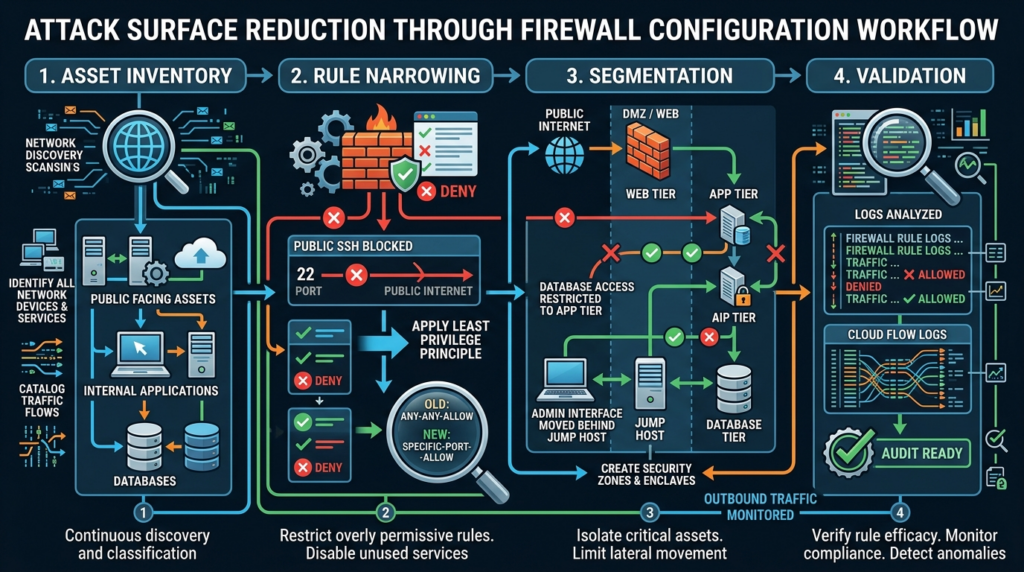
A checklist is useful only if it changes what gets deployed. The following checklist is written for real environments where there are legacy exceptions, cloud defaults, emergency changes, and production dependencies that cannot be broken casually.
Asset and exposure inventory
Before changing rules, build the minimum inventory needed to avoid guessing.
| 확인 | Evidence to collect | Pass condition |
|---|---|---|
| Public IP inventory | Cloud IPs, DNS records, CDN origins, VPN endpoints, edge devices | Every public IP maps to an owner and purpose |
| Listening services | Host inventory, network scans on authorized ranges, cloud metadata | No unknown public listeners |
| Management interfaces | Firewall, VPN, router, hypervisor, Kubernetes, CI/CD, database admin panels | Not directly internet reachable unless formally approved |
| IPv6 exposure | AAAA records, cloud IPv6 addresses, firewall IPv6 policies | IPv6 matches intended exposure |
| Cloud security groups | Rules, owners, tags, last modified data | No broad admin ports or unused wide rules |
| Kubernetes network policies | Namespace policies, default deny status, DNS allowances | Sensitive namespaces have explicit policies |
| Egress paths | Flow logs, proxy logs, DNS logs | Critical systems have known outbound dependencies |
| Rule ownership | Ticket or CMDB owner | Every rule has accountable owner |
A useful first pass is simple. List everything reachable from the internet. List everything reachable from a user VPN. List everything reachable from the web tier. List everything reachable from a compromised workload. If any result surprises the service owner, the configuration is already telling you something valuable.
Rule design
Rules should be narrow enough to explain and broad enough to operate reliably. Overly specific rules can create maintenance failure. Overly broad rules create security failure. The right level of specificity is usually tied to a service role, not to individual pets.
Good rule names help reviewers.
allow-prod-edge-to-orders-api-tcp443
allow-orders-api-to-postgres-tcp5432
allow-prod-jumpbox-to-linux-ssh-tcp22
deny-userlan-to-prod-db-all
allow-prod-egress-to-approved-dns-udp53
allow-ci-runner-to-artifact-registry-tcp443
Bad rule names hide risk.
temp
test
allow-all
prod-fix
vendor
do-not-delete
any-service
old-rule
A rule should answer: who needs access, to what, over which service, for what business reason, for how long, and how will we know it is used correctly?
Inbound controls
For inbound firewall configuration, start with the most exposed and most abused paths.
| 우선순위 | 확인 | Expected state |
|---|---|---|
| 중요 | Admin ports from internet | Denied except controlled access path |
| 중요 | Databases from internet | Denied |
| 중요 | Edge device admin UIs | Denied from public internet |
| 높음 | SSH and RDP | Restricted to bastion, VPN, or admin network |
| 높음 | Public web apps | TCP 443 through intended edge layer |
| 높음 | Staging and preview apps | Authenticated, IP restricted, or private |
| Medium | ICMP | Allowed only as needed for diagnostics |
| Medium | UDP services | Reviewed explicitly, not ignored |
| Medium | IPv6 | Equivalent policy to IPv4 |
Do not let “it is only staging” become a reason for public exposure. Staging systems often have weaker credentials, verbose errors, test data, debug endpoints, and less monitoring. If staging must be public for demos or QA, restrict it with identity, source ranges, or temporary access.
Outbound controls
For outbound firewall configuration, prioritize systems where compromise would hurt most.
| 우선순위 | System | First egress restrictions |
|---|---|---|
| 중요 | Databases | Backup, monitoring, time sync, approved internal services only |
| 중요 | Domain controllers and identity systems | Required internal services, updates through approved path |
| 중요 | Backup infrastructure | Storage targets, key management, monitoring |
| 높음 | Production app servers | Approved APIs, DNS, logging, package sources |
| 높음 | CI/CD runners | Source control, artifact registry, deployment endpoints |
| 높음 | Kubernetes sensitive namespaces | DNS and specific service dependencies |
| Medium | User endpoints | Proxy, DNS, EDR, required SaaS |
| Medium | Monitoring systems | Ingest, alerting, storage, required scrape paths |
Egress logging is often more valuable than teams expect. A denied outbound connection can reveal misdocumented dependencies before enforcement. It can also reveal suspicious behavior after compromise. Start with observe mode where possible, then enforce in high-value zones.
Segmentation controls
Segmentation should follow application architecture, not subnet tradition. The fact that two systems are in the same VPC or data center does not mean they should talk.
| 출처 | Should reach | Should not reach |
|---|---|---|
| Public load balancer | Web or app service ports | Database, admin, backup |
| Web tier | App tier | Database directly unless architecture requires it |
| App tier | Database, cache, queue | Admin network, arbitrary internet |
| 데이터베이스 | Backup, monitoring | User LAN, web tier inbound from all sources |
| User VPN | Specific applications | Whole production network |
| Developer network | Dev and staging paths | Production database and firewall admin UI |
| 모니터링 | Metrics endpoints | Shell access unless separately approved |
| CI/CD | Deployment targets | Broad interactive admin access |
A simple test should be part of every segmentation change: from each major zone, try the paths that should work and the paths that must fail. The deny tests are as important as the allow tests.
Safe validation commands for authorized environments
Validation is where firewall configuration becomes evidence. The exact commands depend on your environment, but the pattern is consistent: list intended rules, test intended allowed paths, test intended denied paths, and compare logs.
Only run active network tests against systems you own or have explicit authorization to test.
Local listening services on a Linux host:
sudo ss -tulpen
sudo lsof -i -P -n | grep LISTEN
Authorized port check from a controlled test host:
nmap -Pn -p 22,80,443,5432,6379,9200 10.20.30.40
A narrower test is often better than a wide scan. If the policy says only TCP 443 should be reachable from the edge test host, test that TCP 443 works and that known dangerous ports fail.
nc -vz app.example.internal 443
nc -vz app.example.internal 22
nc -vz db.example.internal 5432
Cloud inventory examples:
aws ec2 describe-security-groups \
  --query 'SecurityGroups[*].{GroupId:GroupId,GroupName:GroupName,IpPermissions:IpPermissions}' \
  --output json
az network nsg list --query '[].{name:name, resourceGroup:resourceGroup}' -o table
az network nsg rule list \
  --resource-group prod-rg \
  --nsg-name prod-app-nsg \
  -o table
gcloud compute firewall-rules list \
  --format="table(name,network,direction,priority,sourceRanges,allowed,denied,targetTags)"
Kubernetes policy review:
kubectl get networkpolicy --all-namespaces
kubectl describe networkpolicy -n prod
Kubernetes default deny example for a namespace:
apiVersion: networking.k8s.io/v1
kind: NetworkPolicy
metadata:
  name: default-deny-all
  namespace: prod
spec:
  podSelector: {}
  policyTypes:
  - Ingress
  - Egress
That policy alone will break workloads that need DNS or other dependencies, so it must be followed by explicit allow policies. Kubernetes documentation warns that default deny egress blocks DNS unless you add a separate allow rule for the cluster DNS service. (Kubernetes)
A minimal nftables-style host firewall pattern for a Linux server might look like this. Do not paste it into production without adapting it to your console access, distribution, service ports, IPv6 usage, and rollback plan.
table inet filter {
  chain input {
    type filter hook input priority 0;
    policy drop;

    ct state established,related accept
    iif lo accept

    # Allow SSH only from the production jump host subnet.
    ip saddr 10.10.50.0/24 tcp dport 22 accept

    # Allow HTTPS from the load balancer subnet.
    ip saddr 10.20.10.0/24 tcp dport 443 accept

    # Allow ICMP needed for diagnostics.
    ip protocol icmp accept

    # Log denied inbound traffic at a controlled rate.
    limit rate 5/second log prefix "nft-deny-input: " flags all
  }

  chain output {
    type filter hook output priority 0;
    policy drop;

    ct state established,related accept
    oif lo accept

    # DNS to approved resolvers.
    ip daddr {10.10.1.10, 10.10.1.11} udp dport 53 accept
    ip daddr {10.10.1.10, 10.10.1.11} tcp dport 53 accept

    # HTTPS to approved update proxy.
    ip daddr 10.30.20.15 tcp dport 443 accept

    # Logs to collector.
    ip daddr 10.40.10.20 tcp dport 6514 accept

    limit rate 5/second log prefix "nft-deny-output: " flags all
  }

  chain forward {
    type filter hook forward priority 0;
    policy drop;
  }
}
The important idea is not that nftables is the right tool for every environment. It is the shape of the policy: default drop, explicit sources, explicit destinations, limited management, egress control, and logging.
Safe Lab PoC, how rule order and broad allows create exposure
The following PoC is a safe local simulation. It does not target a real product, does not scan any network, and does not include an exploit payload. It models firewall rule evaluation in a toy environment so defenders can see how broad rules, rule order, and default actions change reachability.
The lab has three fictional sources:
internet
web-tier
jumpbox
It has three fictional destinations:
public-web
prod-db
firewall-admin
The intended policy is:
| Flow | Intended result |
|---|---|
| internet to public-web on TCP 443 | Allow |
| internet to prod-db on TCP 5432 | Deny |
| web-tier to prod-db on TCP 5432 | Allow |
| internet to firewall-admin on TCP 8443 | Deny |
| jumpbox to firewall-admin on TCP 8443 | Allow |
Save this as firewall_policy_poc.py and run it locally with Python 3.
from dataclasses import dataclass
from typing import Optional, List

@dataclass
class Flow:
    source: str
    destination: str
    port: int

@dataclass
class Rule:
    name: str
    action: str
    source: Optional[str]
    destination: Optional[str]
    port: Optional[int]

    def matches(self, flow: Flow) -> bool:
        source_match = self.source is None or self.source == flow.source
        destination_match = self.destination is None or self.destination == flow.destination
        port_match = self.port is None or self.port == flow.port
        return source_match and destination_match and port_match

def evaluate(flow: Flow, rules: List[Rule], default_action: str = "deny") -> str:
    for rule in rules:
        if rule.matches(flow):
            return f"{rule.action.upper()} by {rule.name}"
    return f"{default_action.upper()} by default"

flows = [
    Flow("internet", "public-web", 443),
    Flow("internet", "prod-db", 5432),
    Flow("web-tier", "prod-db", 5432),
    Flow("internet", "firewall-admin", 8443),
    Flow("jumpbox", "firewall-admin", 8443),
]

bad_rules = [
    Rule("allow-public-web", "allow", "internet", "public-web", 443),
    Rule("temporary-db-troubleshooting", "allow", None, "prod-db", 5432),
    Rule("allow-admin-from-jumpbox", "allow", "jumpbox", "firewall-admin", 8443),
]

good_rules = [
    Rule("allow-public-web", "allow", "internet", "public-web", 443),
    Rule("allow-web-to-db", "allow", "web-tier", "prod-db", 5432),
    Rule("allow-admin-from-jumpbox", "allow", "jumpbox", "firewall-admin", 8443),
]

print("Bad policy results")
for flow in flows:
    print(flow, "=>", evaluate(flow, bad_rules))

print("\nGood policy results")
for flow in flows:
    print(flow, "=>", evaluate(flow, good_rules))
Expected output:
Bad policy results
Flow(source='internet', destination='public-web', port=443) => ALLOW by allow-public-web
Flow(source='internet', destination='prod-db', port=5432) => ALLOW by temporary-db-troubleshooting
Flow(source='web-tier', destination='prod-db', port=5432) => ALLOW by temporary-db-troubleshooting
Flow(source='internet', destination='firewall-admin', port=8443) => DENY by default
Flow(source='jumpbox', destination='firewall-admin', port=8443) => ALLOW by allow-admin-from-jumpbox

Good policy results
Flow(source='internet', destination='public-web', port=443) => ALLOW by allow-public-web
Flow(source='internet', destination='prod-db', port=5432) => DENY by default
Flow(source='web-tier', destination='prod-db', port=5432) => ALLOW by allow-web-to-db
Flow(source='internet', destination='firewall-admin', port=8443) => DENY by default
Flow(source='jumpbox', destination='firewall-admin', port=8443) => ALLOW by allow-admin-from-jumpbox
The unsafe rule is not complex. It is simply too broad:
temporary-db-troubleshooting allows any source to prod-db on 5432
That one shortcut changes the internet-to-database result from denied to allowed. In real environments, the same mistake can appear as a cloud security group with 0.0.0.0/0, an Azure NSG rule with a high-priority broad allow, a firewall object group containing more sources than intended, or a Kubernetes policy that allows more pods than the service needs.
The defensive value of this PoC is the mental model: every rule must be evaluated against both intended allowed flows and intended denied flows. A policy that only tests “does the application still work” may miss the most important question: what else now works that should not?
Logs turn firewall configuration into evidence
Firewall logs can be noisy, expensive, and misleading if collected without purpose. But without logs, firewall configuration cannot support incident response or continuous validation. The goal is not to log every packet forever. The goal is to log the decisions that matter.
Useful logs answer these questions:
| 질문 | Useful signal |
|---|---|
| Is a public service receiving traffic from unexpected regions or networks? | Allowed inbound logs by source, ASN, country, URI layer if available |
| Is an admin interface being probed? | Denied inbound attempts to admin ports or management UI |
| Is a database receiving connection attempts from non-app sources? | Denied east-west traffic to database ports |
| Is a workload trying to reach unknown external hosts? | Denied or newly observed outbound destinations |
| Did a temporary rule get used after its change window? | Rule hit count after expiry |
| Is IPv6 bypassing IPv4 controls? | IPv6 flow logs and denied attempts |
| Did a patch or deployment create a new listener? | New allowed inbound service or port |
| Are VPN users reaching more than expected? | VPN pool to internal service flow logs |
Cloud flow logs and firewall logs should be connected to asset context. A denied connection from 10.20.4.17 is less useful than a denied connection from orders-api-prod-3. A rule hit on sg-123456 is less useful than a rule hit on allow-prod-edge-to-orders-api-tcp443. Naming, tagging, and enrichment make logs readable.
Logging also helps cleanup. If a rule has no hits for 90 days, that does not automatically mean it is safe to delete. It may protect a disaster recovery path or quarterly job. But it is a reason to ask the owner. A rule with no owner and no hits is usually a strong deletion candidate after change control.
Validation should include denied paths
Many teams validate only positive paths: the app loads, the database connects, the VPN works, the admin can log in. Positive tests are necessary, but they do not prove security. Firewall configuration needs negative tests.
For each important boundary, define both.
| Boundary | Positive test | Negative test |
|---|---|---|
| Internet to app | TCP 443 to public app succeeds | TCP 22, 3389, database ports fail |
| Edge to app | Load balancer reaches app port | Internet cannot reach app host directly |
| App to DB | App subnet reaches DB port | User LAN and web edge cannot reach DB |
| Jump host to server | Jump host reaches SSH | Direct internet and user LAN SSH fail |
| Workload egress | App reaches approved API | App cannot reach arbitrary external host |
| Kubernetes namespace | Allowed service-to-service path works | Unrelated namespace cannot connect |
| Firewall management | Admin path from jump host works | Public internet cannot reach management UI |
Denied-path testing should be part of change review. If a team adds a rule to allow a vendor integration, test that the vendor path works and that the rule did not open adjacent ports or broader source ranges. If a team adds a Kubernetes NetworkPolicy, test that required service traffic works and that unrelated pods are blocked. If a team adds an emergency SSH exception, test that it expires.
This is where automation can help, but it should not replace human accountability. For authorized testing, an AI-assisted pentest workflow can map exposed services, run bounded reachability checks, validate whether reported paths are reproducible, and preserve evidence for remediation review. Penligent describes its AI pentesting workflow around black-box attack surface mapping, verified findings, evidence, reproduction steps, remediation guidance, and human-in-the-loop validation. (펜리전트) In a firewall configuration program, that kind of workflow is most useful after changes: prove that intended exposure remains reachable, prove that dangerous paths are still blocked, and turn the result into evidence that engineering and security teams can review.
For teams that do not use a platform, the same principle still applies. Keep a small repository of expected reachability tests. Run them after network changes, cloud deployments, major releases, VPN changes, and emergency exceptions. Store results with the change ticket. A firewall policy is strongest when it is tested repeatedly, not when it is admired once.
Firewall configuration for WAF, CDN, and reverse proxy environments
A WAF or CDN does not eliminate the need for firewall configuration. It changes where the public entry point should be. If a CDN is meant to protect the application, origin servers should not also accept arbitrary internet traffic. If a WAF is meant to inspect application traffic, clients should not be able to bypass it by connecting directly to the origin IP. If a reverse proxy handles TLS and routing, backend services should accept only proxy-originated traffic.
The key checks are straightforward.
| Control point | Firewall configuration check |
|---|---|
| CDN | Origin accepts traffic only from CDN ranges or private connectivity where feasible |
| WAF | Backend app is not directly reachable from the public internet |
| Load balancer | Listeners expose only intended ports and protocols |
| Reverse proxy | Backend accepts traffic only from proxy subnet |
| API 게이트웨이 | Private services are not also exposed through direct public IPs |
| Admin panel | Not exposed through the same public route unless explicitly designed and protected |
| Health checks | Health check sources are restricted and endpoints do not leak sensitive data |
Origin bypass is a common architectural failure. Teams invest in application-layer filtering, then leave an old DNS record, public IP, or security group path that reaches the backend directly. Attackers and researchers routinely look for this because it can bypass rate limits, bot controls, IP restrictions, header checks, and WAF rules.
Firewall configuration should therefore be reviewed together with DNS, CDN, load balancer, and application routing. A packet path diagram is not enough if DNS still points to an origin. A WAF policy is not enough if the origin accepts arbitrary traffic. A private subnet is not enough if a public load balancer forwards unintended ports.
Rule shadowing, overlap, and sprawl
Firewalls fail quietly when rules become too complex for humans to reason about. Three problems appear often: shadowed rules, overlapping objects, and stale exceptions.
A shadowed rule is a rule that never takes effect because an earlier rule already matches the traffic. In Azure NSGs, for example, lower priority numbers are processed first and evaluation stops after a match. (Microsoft Learn) Traditional firewalls have similar ordering concerns. A broad allow before a narrow deny can make the deny meaningless. A broad deny before a narrow allow can break production. The rule list order is part of the policy.
Overlapping objects create another issue. A group named trusted-admins may include a VPN pool, an office CIDR, a contractor range, and an old monitoring subnet. If that object is reused in multiple rules, a small group change can expand access across many systems. Object reuse is useful, but high-risk groups need review.
Stale exceptions are the slowest failure mode. A vendor needed access for migration. A developer opened a port for debugging. An incident response team added a temporary path. A database replication rule was created during a failover test. Months later, nobody remembers the reason, but the rule still exists.
A mature firewall configuration program should track:
| 위험 | Detection method | Fix |
|---|---|---|
| Shadowed rules | Policy analysis, hit counts, manual review of order | Remove or reorder after testing |
| Overlapping objects | Object membership review | Split high-risk groups by purpose |
| Broad temporary rules | Expiry field, ticket review | Auto-expire or require renewal |
| Unused rules | Hit count and owner confirmation | Remove through change control |
| Any-to-any internal access | Reachability graph | Replace with service-specific rules |
| Wide port ranges | Rule search | Narrow to required ports |
| Public admin exposure | External exposure scan | Move behind controlled access path |
| Missing IPv6 policy | IPv6 inventory and scans | Mirror or intentionally define IPv6 controls |
The easiest governance improvement is mandatory metadata. Every rule should have an owner, purpose, ticket, creation date, and review date. If the platform supports rule expiration, use it for temporary access. If it does not, track expiration in the change system and review it like a vulnerability.
Firewall configuration in Kubernetes
Kubernetes changes the firewall conversation because workloads are dynamic. Pods are created and destroyed. IP addresses are ephemeral. Services abstract backends. Ingress controllers publish routes. Network plugins enforce policy differently. A namespace without a default deny policy can be much more open than engineers expect.
Kubernetes NetworkPolicy works by selecting pods and defining allowed ingress or egress. If no policy selects a pod for a direction, behavior depends on isolation state. The safest operational pattern for sensitive namespaces is to create a default deny policy and then add explicit allows for required traffic. Kubernetes documentation provides examples for default deny ingress, default deny egress, and default deny all, and notes the DNS impact of denying egress. (Kubernetes)
A practical Kubernetes firewall configuration checklist includes:
| 확인 | 중요한 이유 |
|---|---|
| Sensitive namespaces have default deny ingress | Prevents arbitrary pod-to-pod inbound access |
| Sensitive namespaces have default deny egress where feasible | Reduces C2, data exfiltration, and uncontrolled dependencies |
| DNS egress is explicitly allowed | Prevents breakage after default deny egress |
| Ingress controller routes are reviewed | Prevents unintended public paths |
| NodePort and LoadBalancer services are reviewed | Prevents accidental public exposure |
| Kubernetes API access is restricted | Protects the control plane |
| NetworkPolicy enforcement is confirmed for the CNI | Some CNIs require configuration or support checks |
| Policies are tested from pods | Confirms actual enforcement |
A minimal allow policy might permit only the app to reach the database service.
apiVersion: networking.k8s.io/v1
kind: NetworkPolicy
metadata:
  name: allow-orders-api-to-postgres
  namespace: prod
spec:
  podSelector:
    matchLabels:
      app: postgres
  policyTypes:
  - Ingress
  ingress:
  - from:
    - podSelector:
        matchLabels:
          app: orders-api
    ports:
    - protocol: TCP
      port: 5432
That policy is only one piece. You still need cloud firewall rules around nodes or load balancers, ingress rules, service exposure review, and host-level controls where relevant. Kubernetes NetworkPolicy is not a replacement for cloud firewall configuration. It is a workload-level segmentation layer.
Firewall configuration for remote access
Remote access is where convenience and risk collide. VPNs, ZTNA, bastions, remote desktop gateways, and privileged access systems are designed to let trusted users reach private resources. If configured too broadly, they become high-value bridges into the network.
A safer remote access model avoids “VPN equals internal network.” A user who authenticates to a VPN should not automatically reach every server. Remote access should be segmented by role, device posture, identity, and business need. Administrators should use separate privileged accounts and controlled admin paths. Contractors should reach only the systems required for the engagement. Developers should not reach production databases directly unless there is an approved break-glass workflow.
Remote access firewall rules should answer:
| 질문 | Secure direction |
|---|---|
| Who can connect? | Named users or groups with MFA |
| From what devices? | Managed or posture-checked devices where possible |
| To what resources? | Specific apps, subnets, or admin paths |
| On what ports? | Minimal service-specific ports |
| For how long? | Time-bound access for temporary work |
| What is logged? | Auth, source, destination, bytes, session duration, admin actions |
| What happens after compromise? | Segmentation limits lateral movement |
VPN vulnerabilities in recent years make this especially important. CISA and partners have repeatedly warned about compromised edge and access devices, and edge guidance focuses on reducing exposed services, securing management interfaces, disabling unused features, and centralizing logs. (CISA) Strong firewall configuration cannot remove the need to patch VPNs, but it can reduce what a compromised VPN account or appliance can reach next.
Change management without killing speed
Security teams sometimes write firewall processes that nobody follows because they are too slow. Engineering teams then create unofficial paths. The answer is not to remove process. The answer is to make safe change easier than unsafe change.
A useful firewall change request should require only the information needed to assess risk.
| 필드 | Required content |
|---|---|
| Requestor | Person or team asking for access |
| Business purpose | What breaks or becomes possible if approved |
| 출처 | CIDR, security group, identity group, namespace, or host group |
| Destination | Service, subnet, workload, or asset |
| Protocol and port | Exact protocol and port |
| Direction | Inbound, outbound, or east-west |
| Environment | Dev, staging, production, management |
| Data sensitivity | Public, internal, confidential, regulated |
| 기간 | Permanent with review date, or temporary with expiry |
| Validation plan | How allow and deny paths will be tested |
| Rollback plan | How to revert safely |
Emergency changes should be allowed, but they should be more visible, not less. A break-glass rule can be created quickly if it has an automatic expiry, an incident ticket, a named approver, and a required post-incident review. The worst emergency rule is the one created under pressure and then forgotten.
Automation can help by linting firewall changes before deployment. For example:
| Lint check | Why it helps |
|---|---|
| Reject public SSH or RDP without approved exception | Prevents common high-risk exposure |
깃발 0.0.0.0/0 그리고 ::/0 on admin ports | Catches IPv4 and IPv6 broad exposure |
| Flag database ports from internet | Prevents direct data-layer exposure |
| Require owner and expiry for temporary rules | Enables cleanup |
| Detect broad port ranges | Reduces accidental service exposure |
| Detect priority shadowing | Prevents ineffective rules |
| Require logging for high-risk allows | Supports incident response |
| Compare against approved service catalog | Finds unexpected connectivity |
Policy-as-code is useful when it reflects operational reality. A Terraform rule that opens a database to the internet is still dangerous. A manual firewall change with proper metadata, narrow scope, and validation may be safer than an automated bad rule. The goal is controlled access, not automation for its own sake.
A 30-day rollout plan for real teams
You do not need to fix every firewall rule at once. In fact, trying to do that usually creates outages and political resistance. A better plan reduces the highest-risk exposure first, then builds repeatable habits.
Days 1 to 7, map exposure and remove obvious public risk
Create a public exposure inventory. Include cloud public IPs, DNS records, CDN origins, load balancers, VPN endpoints, firewall admin interfaces, staging apps, and unmanaged hosts. Run authorized external checks against your own ranges. Compare results with what service owners expect.
Immediate cleanup targets:
| Target | 액션 |
|---|---|
| Public SSH and RDP | Restrict to VPN, bastion, or admin CIDR |
| Public databases | Remove public access and restrict to app tier |
| Public admin UIs | Move behind management access path |
| Forgotten staging apps | Add auth, IP restriction, or remove |
| Broad cloud security groups | Narrow sources and ports |
| IPv6 exposure | Align with IPv4 policy |
Deliverable: an exposure register with owners, status, and remediation tickets.
Days 8 to 14, isolate management planes
Inventory management interfaces for firewalls, VPNs, routers, switches, hypervisors, Kubernetes API servers, CI/CD systems, database admin tools, cloud connectors, monitoring systems, and backup platforms.
Move management access behind a controlled path. Add MFA where supported. Disable unused management protocols. Restrict admin access by source. Turn on logging for authentication and configuration changes. Confirm that public internet sources cannot reach management ports.
Deliverable: a management plane access matrix.
Days 15 to 21, segment high-value internal systems
Pick a few high-value boundaries first: application to database, user network to production, VPN pool to servers, production to backup, Kubernetes sensitive namespace, and CI/CD runner access. Define intended allowed flows. Add deny tests. Review logs before enforcement where needed.
Deliverable: segmentation test results showing allowed and denied paths.
Days 22 to 30, improve egress and rule governance
Start outbound restrictions for databases, backup systems, identity infrastructure, and production workloads. Create standard rule naming and metadata. Add expiry for temporary rules. Build a review cadence for high-risk rules. Add change linting for obvious dangerous patterns.
Deliverable: egress baseline, rule metadata standard, and first cleanup report.
After the first month, keep the loop running. Firewall configuration decays because systems change. New services appear. Vendors are added. Developers create preview environments. Cloud accounts multiply. Kubernetes namespaces are created. VPN pools grow. The only sustainable answer is continuous validation.
Common firewall configuration mistakes
The same mistakes appear across data centers, clouds, and Kubernetes clusters.
| Mistake | Why it happens | Better practice |
|---|---|---|
| Only reviewing inbound rules | Public exposure feels most urgent | Review inbound, outbound, and east-west separately |
| Treating VPN users as fully trusted | Legacy remote access model | Segment VPN access by role and destination |
| Ignoring IPv6 | Team thinks only IPv4 is used | Inventory and enforce IPv6 policy |
| Leaving temporary rules forever | No expiry process | Time-bound rules with automatic review |
| Opening large port ranges | Troubleshooting pressure | Identify exact service ports |
| Allowing whole VPC to database | Convenience | Allow only app tier or specific security groups |
| Exposing origins behind CDN | Misaligned DNS and firewall rules | Restrict origin to CDN or private edge |
| No default deny in Kubernetes | NetworkPolicy misunderstood | Add namespace default deny and explicit allows |
| Unlogged admin access | Logs considered noisy | Log management authentication and changes |
| No denied-path tests | Validation focuses on uptime | Test what should fail |
The hardest mistake is cultural: assuming internal reachability is harmless. It is not. Modern intrusions often become damaging because the first compromised system can reach too much. Segmentation is not about distrusting employees or developers. It is about assuming that credentials, endpoints, services, and edge devices can fail.
What good looks like in production
A mature firewall configuration program feels boring in the right ways. New services have standard patterns. Public exposure is rare and intentional. Admin access goes through controlled paths. Temporary rules expire. Security groups are understandable. Kubernetes namespaces have default-deny patterns. Logs are useful enough to investigate. Service owners can explain their dependencies. Denied-path tests are part of release and change workflows.
The visible signs are concrete.
| 면적 | Strong signal |
|---|---|
| Public exposure | Every public listener has an owner and reason |
| Management plane | No direct internet access to admin interfaces |
| Rule quality | No unexplained any-to-any, broad admin, or database-from-internet rules |
| Egress | Critical systems have restricted outbound paths |
| Segmentation | Web, app, database, admin, backup, and user zones are separated |
| 클라우드 | Security groups and NSGs are tagged, reviewed, and tested |
| Kubernetes | Sensitive namespaces use default deny and explicit allows |
| 로그 | High-risk allows and denies produce actionable events |
| Governance | Temporary access has expiry and review |
| 유효성 검사 | Allowed and denied paths are tested after change |
The goal is not a perfect network. It is a network where unexpected reachability becomes rare, visible, and correctable.
자주 묻는 질문
What is the safest baseline for firewall configuration?
- Start with default deny at major trust boundaries, especially internet ingress, management access, database access, and sensitive east-west paths.
- Allow only documented business flows with explicit source, destination, protocol, port, owner, and review date.
- Treat management interfaces as separate from application traffic and keep them off the public internet.
- Validate both allowed paths and denied paths after every meaningful change.
- Add logging for high-risk allows, denied admin attempts, database access attempts, and unusual outbound traffic.
Should outbound traffic be restricted?
- Yes, especially for high-value systems such as databases, backup servers, identity infrastructure, CI/CD runners, and production workloads.
- Unrestricted outbound traffic can make post-compromise activity easier, including tool download, command-and-control communication, and data exfiltration.
- Start in monitor mode where possible, build a dependency baseline, then enforce allowlists by workload group.
- Avoid blocking blindly. DNS, NTP, logging, package repositories, object storage, and approved third-party APIs may be required for normal operation.
- Review denied outbound events because they often reveal undocumented dependencies or suspicious behavior.
Is a cloud security group the same as a firewall?
- It is a firewall-like control, but it is not the whole firewall configuration model.
- AWS Security Groups, Azure NSGs, Google Cloud VPC firewall rules, subnet ACLs, load balancers, host firewalls, and Kubernetes NetworkPolicy can all affect reachability.
- Cloud defaults differ. For example, AWS security groups use allow rules, Azure NSGs use priority-based processing, and Google Cloud VPC behavior includes implied rules.
- Review the effective path, not just one control. A system may be exposed through a load balancer, IPv6 address, peering route, public endpoint, or Kubernetes service.
- Use flow logs and reachability tests to confirm what is actually allowed.
How often should firewall rules be reviewed?
- High-risk rules should be reviewed at least quarterly, including public exposure, admin access, database access, VPN access, and broad source ranges.
- Temporary rules should have explicit expiry dates and should be reviewed immediately after the change window or incident.
- Cloud and Kubernetes environments need more frequent review because workloads and routes change quickly.
- Any major architecture change, merger, migration, new VPN deployment, new cloud account, or new Kubernetes cluster should trigger a rule review.
- Hit counts help, but they are not enough. A low-use rule may still be required for disaster recovery, while a high-use rule may still be too broad.
What ports should never be exposed to the internet?
- There is no universal “never” list because business requirements vary, but admin and data-layer services should almost never be broadly exposed.
- SSH, RDP, database ports, cache ports, message queue ports, Kubernetes API, firewall admin UIs, hypervisor consoles, backup consoles, and monitoring admin panels should be restricted to controlled access paths.
- Public web services should usually be exposed through TCP 443 via a load balancer, reverse proxy, CDN, or API gateway rather than direct host access.
- If a service must be public, restrict source where possible, require strong authentication, patch aggressively, log access, and validate exposure continuously.
- Review IPv6 exposure alongside IPv4 because an otherwise restricted service can still be reachable over IPv6 if rules are incomplete.
How do I validate that segmentation actually works?
- Define expected allowed and denied paths for each boundary before testing.
- Test from realistic source locations: internet test host, user VPN, web tier, app tier, Kubernetes pod, jump host, and monitoring subnet.
- Confirm positive paths work, such as app-to-database or load-balancer-to-app.
- Confirm negative paths fail, such as internet-to-database, user-LAN-to-production-SSH, web-tier-to-admin-interface, and unrelated-namespace-to-sensitive-pod.
- Compare test results with firewall logs or flow logs so the validation produces evidence, not just terminal output.
Can a WAF replace firewall configuration?
- No. A WAF inspects application-layer traffic, while firewall configuration controls network reachability.
- A WAF may help protect HTTP applications, but it does not protect databases, SSH, RDP, internal east-west paths, management interfaces, or arbitrary outbound traffic.
- If the origin server is directly reachable, attackers may bypass the WAF entirely.
- Use firewall rules to restrict origins to CDN, WAF, load balancer, or reverse proxy sources where feasible.
- Treat WAF, firewall, identity, segmentation, logging, and patching as layered controls rather than substitutes.
닫기
Firewall configuration works when it reflects reality. The real system has public paths, private paths, management paths, update paths, monitoring paths, emergency paths, and attacker paths. The job is to make the legitimate paths explicit and the attacker paths difficult, visible, and short-lived.
The most effective teams do not rely on a single annual firewall review. They keep an inventory of exposed services, isolate management interfaces, restrict high-value systems, validate denied paths, review temporary exceptions, and connect firewall logs to incident response. They patch vulnerable systems, but they also ask a second question: who could reach this system before the patch, and who can reach it now?
A strong firewall configuration checklist is not a document you complete once. It is a recurring discipline: reduce reachability, prove what remains, monitor what changes, and remove what no longer has a reason to exist.
 Korean
  English
  German
  French
  Spanish
  Portuguese
  Japanese
  Hindi
Hindi  Arabic
  Turkish
  Hebrew