
CVE-2026-56190 is a critical remote code execution vulnerability in Windows Remote Desktop Protocol. Microsoft describes the flaw as the use of an uninitialized resource that allows an unauthorized attacker to execute code over a network. The Microsoft-assigned CVSS 3.1 score is 9.8, with a vector of AV:N/AC:L/PR:N/UI:N/S:U/C:H/I:H/A:H. In practical terms, the published assessment says the attack can originate across a network, requires no existing privileges, requires no user interaction, and may have a high impact on confidentiality, integrity, and availability. (NVD)
Microsoft released the vulnerability record on July 14, 2026. As of July 16, public sources did not report confirmed exploitation, and Microsoft’s exploitability assessment was listed as “Exploitation Less Likely.” CISA’s Stakeholder-Specific Vulnerability Categorization data similarly recorded exploitation as “none,” while marking the issue as automatable and its technical impact as total. Those facts should restrain sensational claims, but they do not justify leaving reachable RDP systems unpatched. (Rapid7)
An internet-reachable, unauthenticated RCE in a Windows remote administration service deserves accelerated treatment even when reliable exploitation has not yet been observed. The most exposed systems should be isolated or patched first: servers accepting direct RDP connections from the internet, cloud virtual machines with broad inbound rules, Remote Desktop infrastructure, privileged jump hosts, backup servers, administrative workstations, and Windows systems that are broadly reachable from user networks.
There is also an important limit to what can currently be said. Microsoft has not publicly identified the vulnerable RDP protocol data unit, message field, virtual channel, parsing routine, object type, memory layout, or exact code execution primitive. No responsible analysis should invent those details. The public record supports the conclusion that an uninitialized resource in Windows RDP can produce network-reachable code execution. It does not yet support claims about a specific malformed field, heap grooming strategy, function pointer, protocol phase, or worm implementation.
That distinction shapes the correct response. Defenders have enough information to patch, inventory exposure, verify builds, strengthen access paths, and monitor for anomalous RDP behavior. They do not yet have enough public detail to rely on a precise packet signature or to conduct a safe, exploit-based production test.
The confirmed facts about CVE-2026-56190
The authoritative public description is brief:
Use of uninitialized resource in Windows RDP allows an unauthorized attacker to execute code over a network.
The weakness is mapped to CWE-908, Use of Uninitialized Resource. MITRE defines this class as a product using or accessing a resource that has not been initialized. The result may be unexpected behavior, a crash, invalid memory access, information exposure, or another impact depending on what the resource represents and how the program later uses it. (NVD)
The following table separates confirmed information from details that remain undisclosed.
| 질문 | Publicly confirmed answer |
|---|---|
| What component is affected? | Windows Remote Desktop Protocol |
| What is the vulnerability class? | Use of an uninitialized resource, CWE-908 |
| Can the issue be reached over a network? | 예 |
| Does the published vector require authentication? | 아니요 |
| Does it require user interaction? | 아니요 |
| What is the CVSS 3.1 score? | 9.8 크리티컬 |
| What is the vector? | CVSS:3.1/AV:N/AC:L/PR:N/UI:N/S:U/C:H/I:H/A:H |
| Was exploitation publicly confirmed at release? | 아니요 |
| What was Microsoft’s exploitability assessment? | 악용 가능성 감소 |
| Is a weaponized public exploit confirmed? | Not in the authoritative sources available as of July 16, 2026 |
| Is the exact vulnerable PDU or virtual channel public? | 아니요 |
| Has Microsoft called the issue wormable? | Not in the available advisory information |
| Does NLA definitively block it? | Not established publicly |
| Are patches available? | Yes, through the applicable Windows security updates and fixed builds |
The CVSS vector is especially important because it rules out several comforting assumptions. The published assessment does not require a valid RDP account, a logged-on user, a malicious document, or a victim clicking a connection prompt. It places the vulnerable behavior on a network-reachable path.
At the same time, the vector does not prove that exploitation is trivial. CVSS “low attack complexity” describes the absence of special external conditions in the scoring model. It does not measure how difficult it is to reverse engineer a patch, shape process memory, bypass modern mitigations, stabilize a corrupted object, or convert an initial crash into repeatable code execution.
That difference matters. A researcher may be able to trigger a fault long before anyone can produce a dependable RCE. Conversely, a capable attacker with private research may develop exploitation before public tooling or detailed write-ups appear. Patch decisions should not assume either outcome without evidence.
Why patch priority should remain high
Vulnerability prioritization often fails because teams reduce the decision to one field. A CVSS score alone is insufficient. So is an exploitability label. A defensible decision should combine at least six factors:
- Technical attack conditions
- Current exploitation evidence
- Exposure from realistic attacker locations
- Business and privilege value of the asset
- Available compensating controls
- Confidence that an effective patch exists
CVE-2026-56190 scores severely on the first factor. The attack is network-based, unauthenticated, and requires no user action. It scores lower on the second because public sources did not report exploitation at release. The third and fourth factors vary dramatically between organizations.
A laboratory workstation with RDP disabled and an inbound deny policy is not equivalent to a domain administration jump server listening on an internet-routed interface. A Windows server isolated behind a tightly controlled management network is not equivalent to a cloud VM with 0.0.0.0/0 allowed to TCP 3389. The binary question “Do we run Windows?” is less useful than “From where can an attacker reach an affected RDP path, and what would compromise of that system enable?”
A practical patch policy can use the following tiers.
| 우선순위 | Exposure and asset conditions | Recommended operational target |
|---|---|---|
| Emergency | Direct internet RDP exposure, public cloud rule open to broad source ranges, externally reachable management system, critical RDS role, or an asset with highly privileged credentials | Remove exposure immediately and target patch completion within 24 hours |
| Accelerated | Internally reachable domain controllers, backup systems, virtualization management hosts, jump servers, privileged workstations, identity infrastructure, or large RDS farms | Target patch completion within 72 hours |
| 높음 | RDP restricted to dedicated management networks, approved source addresses, and strong access controls | Complete within seven days or the earliest tested change window |
| Standard with verification | RDP disabled, no listener present, and network controls independently confirm no reachable path | Install in the next regular security window and monitor configuration drift |
| Exception | Affected system cannot accept the update because of a verified compatibility constraint | Isolate, document the exception, add restrictive controls, monitor closely, and define a dated remediation plan |
These timeframes are risk-based recommendations, not Microsoft-mandated deadlines. Organizations should adjust them to their operational requirements, but exposure should drive the direction of the adjustment. A public RDP listener should move the deadline forward, not backward.
The “Exploitation Less Likely” assessment should be interpreted narrowly. It means Microsoft did not consider dependable exploitation as likely as it does for vulnerabilities assigned a stronger exploitability rating. It does not mean exploitation is impossible. Rapid7’s July Patch Tuesday data lists the issue as not publicly disclosed before release, not exploited at that time, and less likely to be exploited. CISA’s SSVC data independently records no known exploitation while describing automation as possible and technical impact as total. (Rapid7)
That combination supports a measured conclusion:
- Do not describe an active global exploitation campaign without evidence.
- Do not publish invented indicators or exploit mechanics.
- Do not wait for active exploitation before protecting exposed RDP services.
- Do not treat every affected but unreachable endpoint as equally urgent.
- Do prioritize by reachability, privilege, business value, and recovery difficulty.
Affected Windows versions and fixed build numbers
Microsoft’s CVE record identifies affected Windows 10, Windows 11, and Windows Server branches. The most reliable remediation check is the installed operating system build, including the update build revision. A KB record is useful supporting evidence, but the effective build number is what shows whether the system has crossed the published fixed baseline. (NVD)
| 제품 | Vulnerable builds | Fixed baseline |
|---|---|---|
| Windows 10 Version 1607 | Earlier than 10.0.14393.9339 | 10.0.14393.9339 or later |
| Windows 10 Version 1809 | Earlier than 10.0.17763.9020 | 10.0.17763.9020 or later |
| Windows 10 Version 21H2 | Earlier than 10.0.19044.7548 | 10.0.19044.7548 or later |
| Windows 10 Version 22H2 | Earlier than 10.0.19045.7548 | 10.0.19045.7548 or later |
| Windows 11 Version 24H2 | Earlier than 10.0.26100.8875 | 10.0.26100.8875 or later |
| Windows 11 Version 25H2 | Earlier than 10.0.26200.8875 | 10.0.26200.8875 or later |
| Windows 11 Version 26H1 | Earlier than 10.0.28000.2269 | 10.0.28000.2269 or later |
| Windows Server 2012 | Earlier than 6.2.9200.26226 | 6.2.9200.26226 or later |
| Windows Server 2012 Core | Earlier than 6.2.9200.26226 | 6.2.9200.26226 or later |
| Windows Server 2012 R2 | Earlier than 6.3.9600.23291 | 6.3.9600.23291 or later |
| Windows Server 2012 R2 Core | Earlier than 6.3.9600.23291 | 6.3.9600.23291 or later |
| Windows Server 2016 | Earlier than 10.0.14393.9339 | 10.0.14393.9339 or later |
| Windows Server 2016 Core | Earlier than 10.0.14393.9339 | 10.0.14393.9339 or later |
| Windows Server 2019 | Earlier than 10.0.17763.9020 | 10.0.17763.9020 or later |
| Windows Server 2019 Core | Earlier than 10.0.17763.9020 | 10.0.17763.9020 or later |
| Windows Server 2022 | Earlier than 10.0.20348.5386 | 10.0.20348.5386 or later |
| Windows Server 2025 | Earlier than 10.0.26100.33158 | 10.0.26100.33158 or later |
| Windows Server 2025 Core | Earlier than 10.0.26100.33158 | 10.0.26100.33158 or later |
The July 14, 2026 cumulative update for Windows 11 Version 24H2 and 25H2 is KB5101650, producing builds 26100.8875 and 26200.8875. Windows Server 2025 uses KB5099536 and build 26100.33158. Windows Server 2022 uses KB5099540 and build 20348.5386. Microsoft’s July server image data also identifies KB5099538 for Server 2019 and KB5099535 for Server 2016, corresponding to builds 17763.9020 and 14393.9339. (Microsoft Support)
Windows 11 Version 26H1 deserves special attention. The affected-product record sets the fixed baseline at build 28000.2269, which Microsoft delivered in KB5095051 on June 9, 2026. Therefore, a fully updated July system should already be above the CVE baseline, but administrators should still check the actual build rather than assume that the branch name proves remediation. (NVD)
Windows 10 also requires lifecycle awareness. General Windows 10 support ended on October 14, 2025, although certain LTSC editions, supported enterprise channels, and systems enrolled in applicable Extended Security Updates may continue receiving fixes. A device appearing in the affected-product list does not guarantee that its current licensing and servicing state will automatically deliver the update. Unsupported or improperly enrolled systems may require an ESU correction, edition migration, operating system upgrade, isolation, or retirement. (Microsoft Support)
Windows 11 Version 23H2 does not appear in the published affected-product list for this CVE. That should be stated as “not listed as affected,” rather than converted into a broader claim that every possible installation or component combination is inherently immune. Asset owners should use Microsoft’s current product record as the source of truth and continue installing the normal cumulative security updates for the branch.
How RDP reaches vulnerable server-side code
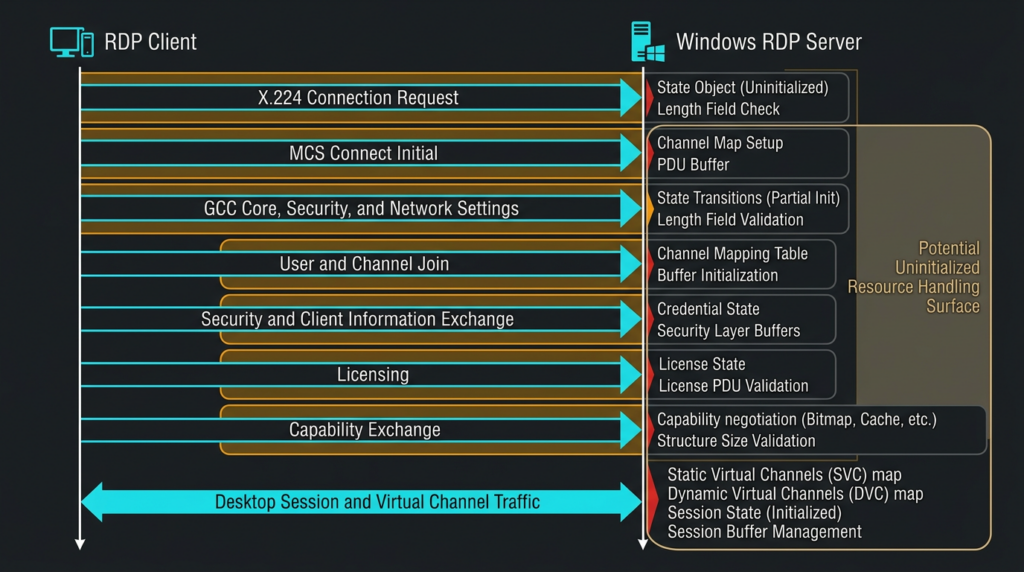
RDP is often discussed as though it were a login screen carried over port 3389. The protocol is much more involved. Before a user receives a desktop, the client and server negotiate transport, protocol, security, settings, channels, capabilities, licensing behavior, input, graphics, and optional extensions.
Microsoft’s RDP specification describes a connection sequence with multiple phases. A client begins with an X.224 Connection Request, and the server returns a Connection Confirm. The peers then exchange MCS Connect Initial and Connect Response messages. Those messages contain Generic Conference Control data with concatenated core, security, and network settings. The client later joins its user channel, the input and output channel, and static virtual channels. Additional phases include security commencement, secure settings exchange, licensing, optional multitransport negotiation, capabilities exchange, and connection finalization. (Microsoft Learn)
A simplified view looks like this:
Client                                  Windows RDP server
  |                                             |
  |---- X.224 Connection Request -------------->|
  |<--- X.224 Connection Confirm ---------------|
  |                                             |
  |---- MCS Connect Initial -------------------->|
  |     GCC core, security, network data         |
  |<--- MCS Connect Response --------------------|
  |                                             |
  |---- Attach User and Channel Join ---------->|
  |<--- User and Channel Confirmations ----------|
  |                                             |
  |---- Security and Client Info --------------->|
  |<--- Licensing and Session Responses ---------|
  |                                             |
  |---- Capability and Finalization PDUs ------>|
  |<--- Desktop and Virtual Channel Data --------|
This complexity does not identify the exact location of CVE-2026-56190. It does explain why a server can process considerable attacker-controlled structure before an interactive desktop appears. A parser may need to allocate objects, initialize channel state, select security modes, record negotiated lengths, construct capability sets, and handle errors or optional branches.
Microsoft has not said whether the vulnerable resource belongs to:
- Initial connection negotiation
- GCC settings
- MCS channel management
- Security negotiation
- Licensing
- Static or dynamic virtual channels
- Multitransport setup
- Capabilities exchange
- Session reconnection
- Error cleanup
- A later data-processing path
Any claim that selects one of those locations without additional evidence is speculation.
Network Level Authentication also changes the connection path. Microsoft defines NLA as using CredSSP to authenticate a user at the network layer before the normal RDP handshake, reducing the server resources committed to unauthenticated users. Microsoft recommends enabling NLA for most environments. (Microsoft Learn)
However, the public CVE material does not state whether the vulnerable operation occurs before, during, or after the protection introduced by NLA. It would therefore be unsafe to declare NLA a complete mitigation for CVE-2026-56190. Keep NLA enabled because it improves RDP security and reduces several classes of unauthorized session activity, but patch the operating system even when NLA is enforced.
The same caution applies to RDP transport. TCP 3389 is the conventional RDP listener, and modern RDP deployments may also use UDP-related multitransport behavior. Microsoft’s protocol sequence describes optional connections involving RDP-UDP, TLS, and DTLS after the connection is secured. The CVE record says only that exploitation is possible over a network; it does not publicly isolate the defect to a single transport. Defenders should inventory both TCP and UDP paths rather than assuming that blocking one protocol conclusively removes exposure. (Microsoft Learn)
What use of an uninitialized resource means
CWE-908 covers a broad family of implementation failures. A resource exists, but the program accesses it before it has been placed into a valid state. The word “resource” is intentionally broader than “pointer.” It might be a memory pointer, length field, object member, handle, callback, parser context, channel map, state flag, buffer descriptor, security context, or another internal structure.
Consider a protocol state object that should contain:
connection phase
selected security mode
channel count
array of channel objects
maximum accepted message length
input buffer pointer
input buffer capacity
cleanup state
A correct implementation establishes explicit invariants before later code uses those values. For example:
If phase is CHANNEL_READY:
    channel array must be allocated
    channel count must be validated
    every referenced channel must be initialized
    input buffer length must not exceed capacity
A defect can emerge when one unusual message sequence reaches CHANNEL_READY without completing every required initialization step. Another failure can occur when an error path frees or resets some fields but leaves a flag indicating that the object is ready. Reconnection and object reuse can create similar problems if stale data survives from a previous session.
The consequences depend on which value is uninitialized.
| Uninitialized value | Possible behavior |
|---|---|
| Boolean or state flag | Wrong branch, invalid state transition, skipped validation |
| Length or count | Oversized allocation, out-of-bounds access, truncation, denial of service |
| Pointer | Invalid read or write, crash, or possible control-flow impact |
| Handle | Operation on the wrong object or an invalid system resource |
| Callback | Unexpected indirect call if the value becomes attacker-influenced |
| Buffer descriptor | Read or write using an invalid address or capacity |
| Security context | Incorrect authorization or cryptographic processing |
| Cleanup marker | Double cleanup, stale reuse, leak, or lifecycle corruption |
These are general CWE-908 consequences. They are not a disclosure of the internal primitive in CVE-2026-56190. The CVE record does not say that a function pointer, length, buffer descriptor, or security context is involved.
MITRE notes that uninitialized resources may cause crashes, invalid memory access, unexpected control flow, or information exposure. Microsoft’s CVSS assessment indicates that, for this specific vulnerability, the expected security consequence can reach remote code execution with high impact across confidentiality, integrity, and availability. (CWE)
The distance between an uninitialized value and reliable RCE can still be large. An attacker may need to control the value, predict surrounding memory, survive process mitigations, reach an indirect write or call, and preserve the network session long enough to achieve a useful result. A service crash is not equivalent to code execution. A proof that a malformed sequence terminates Remote Desktop Services would not, by itself, prove the full CVE impact.
This is one reason exploitability estimates can coexist with a 9.8 score. The vulnerability’s reachable conditions and theoretical impact are severe, while repeatable exploitation may still require specialized engineering.
Realistic attack scenarios
Direct internet exposure
The clearest risk exists when an affected Windows host accepts RDP connections from arbitrary internet sources. The published vector requires neither privileges nor user interaction. An attacker who can reach the relevant RDP processing path may be able to send malicious protocol input without first guessing a password.
This is qualitatively different from ordinary RDP credential attacks. Password spraying, credential stuffing, and brute force attempt to obtain a valid session. CVE-2026-56190 is described as a vulnerability in the protocol implementation itself. Strong passwords and account lockout remain necessary, but they are not substitutes for patching an unauthenticated parser or state-management flaw.
Changing RDP from port 3389 to a nonstandard port also does not remediate the vulnerable component. It may reduce unsophisticated background scanning and log noise, but scanners can identify services on arbitrary ports. The vulnerable code remains reachable wherever the service is exposed.
Cloud virtual machines
Cloud environments frequently create accidental RDP exposure through infrastructure configuration rather than Windows configuration. Examples include:
- A security group allowing TCP 3389 from
0.0.0.0/0 - An IPv6 rule allowing broad access
- A temporary troubleshooting rule that was never removed
- A public IP attached to a management interface
- A load balancer or network appliance forwarding RDP
- A network security group that is less restrictive than the local firewall
- A cloned image with Remote Desktop enabled
- An emergency access path that became permanent
An endpoint assessment must therefore examine both the host and its surrounding control plane. A local firewall showing a restricted rule is not enough when another interface or policy path exposes the service. Conversely, an externally observed closed port does not prove the host is patched; it proves only that a particular observation point could not reach that port at that time.
Internal lateral movement
Removing public exposure reduces risk substantially, but it does not eliminate the vulnerability. Attackers frequently obtain an internal foothold through another path: phishing, stolen VPN credentials, a vulnerable web application, a compromised contractor device, an exposed appliance, or a supply-chain intrusion.
From that foothold, an unauthenticated RDP vulnerability could become a lateral-movement option against reachable Windows systems. The attacker may not need a valid account on each target if the vulnerable network path is open from the compromised segment.
Flat internal networks are especially concerning. A user workstation should rarely be able to initiate RDP connections to domain controllers, backup infrastructure, hypervisor managers, software deployment servers, certificate systems, or privileged administrative hosts. Restricting those paths helps with CVE-2026-56190 and with credential-based RDP attacks.
Remote Desktop Services infrastructure
RDS session hosts, connection brokers, gateways, licensing servers, and management systems can have very different roles. The affected-product list identifies Windows operating system versions, not a public role-by-role exploit matrix. It would be premature to claim that every RDS role exposes the vulnerable code in the same way.
Patch all affected Windows systems in the RDS deployment, then prioritize components that process or forward user connections. Test the complete workflow, including:
- Gateway authentication
- Broker redirection
- Session host connections
- RemoteApp launch
- Profile loading
- Printing
- Clipboard redirection
- Drive redirection
- Smart card or security key behavior
- UDP transport where enabled
- Reconnection to existing sessions
RD Gateway can reduce direct exposure by placing an authenticated TLS-based access layer in front of internal RDP resources. Microsoft describes RD Gateway as establishing an encrypted tunnel, authenticating users, applying connection and resource authorization policies, and forwarding traffic to permitted internal resources. It can also integrate with RADIUS-based MFA. (Microsoft Learn)
That architecture is preferable to exposing each session host directly. It is not permission to leave affected gateway or session-host operating systems unpatched. Without a public description of the exact trigger path, defenders should not assume that encapsulation through a gateway makes the underlying flaw unreachable.
High-value administrative systems
Jump hosts and privileged access workstations often receive fewer inbound connections than general RDS systems, but their compromise carries disproportionate consequences. They may contain:
- Cached administrative credentials
- Remote management tools
- Access to backup consoles
- Domain administration utilities
- Cloud control-plane credentials
- Secrets used for automation
- Network device management access
- Security product administration sessions
For those assets, a lower probability of exploitation can still produce high expected risk because the impact is extreme. Patch them quickly, limit inbound source systems, prohibit ordinary browsing and email, and separate daily user identities from administrative identities.
Is CVE-2026-56190 wormable
There is not enough public evidence to call CVE-2026-56190 wormable.
A wormable vulnerability generally needs more than remote code execution. An attacker must be able to automate discovery, exploitation, payload execution, and propagation to additional reachable targets with sufficient reliability. Network reachability, no authentication, and no user interaction are conditions that could support automation, but they do not prove a self-propagating exploit is practical.
CISA’s SSVC data marks the vulnerability as automatable. That categorization should be taken seriously, but it still does not announce a working worm or public exploit. The same data records no known exploitation at the time of assessment. (NVD)
Defenders should therefore avoid both extremes:
- “It is wormable and mass exploitation is underway” is unsupported.
- “It is not wormable, so it can wait” is also unsupported.
The appropriate statement is that the published attack conditions are compatible with automated network targeting, while the reliability, propagation potential, and exact exploit mechanics remain undisclosed.
Historical RDP vulnerabilities show why this distinction matters. CVE-2019-0708, known as BlueKeep, was a pre-authentication RCE in older Windows Remote Desktop Services. Microsoft issued unusual guidance and patches for unsupported systems because of the potential severity. Later in 2019, Microsoft warned that CVE-2019-1181 and CVE-2019-1182 were wormable Remote Desktop Services vulnerabilities affecting newer Windows versions. Those conclusions came from explicit Microsoft analysis; they should not be automatically transferred to CVE-2026-56190. (Microsoft Support)
The historical lesson is not that every RDP RCE becomes a worm. It is that pre-authentication flaws in a widely deployed remote service can justify rapid patching before exploitation matures.
Inventory before patching
A patch campaign begins with an accurate asset set. Searching a vulnerability scanner dashboard for the CVE is useful, but it is not sufficient. Coverage gaps often exist around temporary cloud systems, isolated networks, legacy servers, lab domains, acquired companies, disaster recovery environments, and machines that are powered off during scheduled scans.
Build the inventory from multiple sources:
- Configuration management database
- Endpoint management
- EDR
- Active Directory computer objects
- Cloud provider inventories
- Hypervisor inventories
- Vulnerability management platforms
- Network flow data
- Firewall objects
- Internet exposure management
- RDS deployment configuration
- Backup system inventories
- Authentication logs
For each affected system, record:
| 필드 | 중요한 이유 |
|---|---|
| Product and edition | Determines servicing path |
| Version and full build | Determines whether the fixed baseline is installed |
| Support or ESU status | Determines whether updates are available |
| RDP enabled state | Establishes local service exposure |
| TCP listener | Identifies reachable conventional RDP service |
| UDP listener | Identifies additional transport behavior |
| Host firewall rules | Shows permitted source ranges |
| Cloud or network controls | Shows external reachability beyond the host |
| Public IP or NAT | Identifies internet exposure |
| RDS role | Helps prioritize connection-processing systems |
| Asset criticality | Drives patch deadline |
| Privileged credential use | Estimates post-compromise impact |
| Owner and change window | Enables accountable remediation |
| Last reboot | Helps verify update completion |
| Compensating controls | Supports temporary exception decisions |
The following PowerShell commands collect a useful local snapshot without sending traffic to another host:
$cv = Get-ItemProperty `
  "HKLM:\SOFTWARE\Microsoft\Windows NT\CurrentVersion"

$osInfo = [pscustomobject]@{
    ProductName        = $cv.ProductName
    DisplayVersion     = $cv.DisplayVersion
    EditionID          = $cv.EditionID
    CurrentBuildNumber = $cv.CurrentBuildNumber
    UBR                = $cv.UBR
    FullBuild          = "$($cv.CurrentBuildNumber).$($cv.UBR)"
}

$service = Get-CimInstance Win32_Service `
  -Filter "Name='TermService'" |
  Select-Object Name, State, StartMode, ProcessId

$tcpListeners = Get-NetTCPConnection `
  -State Listen `
  -ErrorAction SilentlyContinue |
  Where-Object { $_.LocalPort -eq 3389 } |
  Select-Object LocalAddress, LocalPort, OwningProcess

$udpEndpoints = Get-NetUDPEndpoint `
  -ErrorAction SilentlyContinue |
  Where-Object { $_.LocalPort -eq 3389 } |
  Select-Object LocalAddress, LocalPort, OwningProcess

$firewallRules = Get-NetFirewallRule `
  -DisplayGroup "Remote Desktop" `
  -ErrorAction SilentlyContinue |
  Select-Object DisplayName, Enabled, Profile, Direction, Action

$recentUpdates = Get-HotFix |
  Sort-Object InstalledOn -Descending |
  Select-Object -First 15 `
    HotFixID, Description, InstalledOn

$osInfo
$service
$tcpListeners
$udpEndpoints
$firewallRules
$recentUpdates
The script is intentionally local. It does not scan other systems or attempt to trigger the vulnerability.
그리고 CurrentBuildNumber 그리고 UBR fields should be combined. For example, a Windows Server 2022 system reporting build 20348 and UBR 5386 is at 20348.5386, the published fixed baseline. A machine at 20348.5240 remains below that baseline even if an administrator remembers installing a recent update.
Do not use a simple string comparison for build revisions. Numeric components must be parsed and compared as integers. The following example checks selected modern branches:
$cv = Get-ItemProperty `
  "HKLM:\SOFTWARE\Microsoft\Windows NT\CurrentVersion"

$product = [string]$cv.ProductName
$base    = [int]$cv.CurrentBuildNumber
$ubr     = [int]$cv.UBR

$requiredUbr = $null

switch ($base) {
    14393 { $requiredUbr = 9339 }
    17763 { $requiredUbr = 9020 }
    19044 { $requiredUbr = 7548 }
    19045 { $requiredUbr = 7548 }
    20348 { $requiredUbr = 5386 }
    26200 { $requiredUbr = 8875 }
    28000 { $requiredUbr = 2269 }
    26100 {
        if ($product -match "Server") {
            $requiredUbr = 33158
        }
        else {
            $requiredUbr = 8875
        }
    }
}

if ($null -eq $requiredUbr) {
    Write-Warning "No threshold is encoded for $product build $base."
    Write-Warning "Compare the full build against Microsoft's affected-product record."
}
elseif ($ubr -ge $requiredUbr) {
    Write-Host "Build $base.$ubr meets the published CVE-2026-56190 baseline."
}
else {
    Write-Warning "Build $base.$ubr is below required baseline $base.$requiredUbr."
}
This is a convenience check, not a replacement for Microsoft’s current advisory. It does not include the older 6.2.9200 그리고 6.3.9600 branches, and product naming can vary by image. Enterprise deployment tools should use tested operating system detection logic and centrally maintained thresholds.
Patch deployment playbook
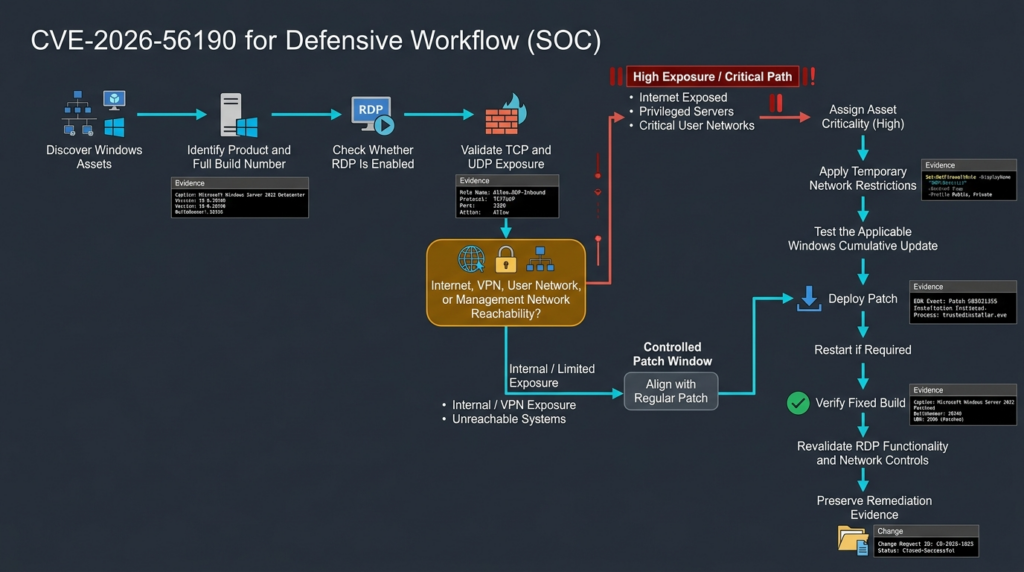
Identify emergency exposure
Start with paths that allow an untrusted or lightly trusted source to reach an affected RDP listener.
Search for:
- Public IP addresses with RDP forwarding
- Cloud rules allowing broad TCP 3389 access
- Broad UDP 3389 rules
- Internet-facing Windows management hosts
- RDS session hosts exposed without a gateway
- Third-party remote access appliances forwarding RDP
- VPN pools that can reach all Windows servers
- User VLANs that can reach server RDP
- Contractor networks with management access
- Disaster recovery sites with weaker firewall policies
For public exposure, the first action may be isolation rather than waiting for the patch deployment system. Remove broad inbound rules, restrict sources to a controlled management path, or temporarily disable RDP. Reducing reachability immediately shrinks the period in which an unpatched service can be attacked.
Test the cumulative update
Apply the applicable cumulative update to a representative test ring. The ring should include more than one generic Windows VM. RDP deployments often depend on drivers, authentication systems, profile management, redirection, and third-party agents.
Test:
- Local console and remote login
- NLA with expected authentication methods
- RD Gateway access
- MFA integration
- Connection Broker redirection
- Existing session reconnection
- RemoteApp
- User profile containers
- Printing
- Clipboard
- Drive mapping
- Smart cards
- Audio and graphics requirements
- Monitoring and EDR health
- Backup agents
- Administrative automation
- High availability behavior
A successful boot is necessary but not sufficient. The system must still perform its intended remote access role.
Deploy by exposure tier
Do not wait for every low-risk endpoint before protecting the highest-risk systems. Parallelize the work:
- Network teams close unnecessary exposure.
- Endpoint teams deploy client updates.
- Server teams patch RDS and infrastructure systems.
- Cloud teams audit security groups and public IPs.
- Identity teams verify MFA and privileged access controls.
- Security operations teams increase monitoring.
- Application owners execute service-specific acceptance tests.
Complete required restarts
A patch that has been downloaded but not made effective is not remediation. Use endpoint management data to distinguish:
- Update detected
- Update downloaded
- Installation started
- Installation completed
- Restart required
- Restart completed
- Fixed build verified
Do not report compliance based solely on the first four states.
Verify the full build
After installation and restart, collect the product, base build, and UBR again. Compare the result with the fixed baseline table. Also confirm that servicing did not fail or roll back.
Where practical, use two independent sources:
- Local registry or operating system query
- Endpoint management, EDR, or configuration inventory
For critical systems, preserve the verification output as change evidence.
Revalidate network reachability
Patching does not correct unsafe firewall architecture. After the update, test from the network locations that matter:
- Internet
- User network
- Contractor network
- VPN pool
- Management network
- Separate cloud VPC or VNet
- Disaster recovery environment
A port that is intended to be management-only should not be reachable from ordinary user segments. The test should confirm access-control intent, not send malformed RDP traffic.
Document exceptions
An exception should contain:
- Asset identifier
- Business owner
- Technical owner
- Current build
- Exposure path
- Reason the update cannot be installed
- Evidence of incompatibility
- Temporary controls
- Monitoring owner
- Planned remediation date
- Approval
- Expiration date
An exception without an expiration date becomes an untracked acceptance of indefinite risk.
Safe validation without weaponizing the vulnerability
Until Microsoft or trusted researchers publish enough technical detail for a reliable, non-destructive check, production validation should be version-based and exposure-based.
A safe validation answers four questions:
- Is the operating system branch listed as affected?
- Is the installed build below the fixed baseline?
- Is RDP enabled or reachable?
- Can an attacker from a realistic source network reach that path?
That is enough to establish remediation priority. It is not necessary to crash a service or prove code execution.
A useful validation record might look like this:
{
  "asset": "rds-session-17.example.internal",
  "product": "Windows Server 2022",
  "observed_build": "10.0.20348.5240",
  "fixed_baseline": "10.0.20348.5386",
  "rdp_service": "running",
  "tcp_3389_listener": true,
  "udp_3389_listener": true,
  "reachable_from_internet": false,
  "reachable_from_user_vlan": true,
  "reachable_from_management_vlan": true,
  "asset_tier": "critical",
  "status": "vulnerable_build_with_internal_exposure",
  "recommended_action": "patch within accelerated window"
}
This evidence is more useful to a patch owner than a scanner finding that contains only a CVE number and severity.
Authorized security teams can automate the collection, reasoning, retest, and evidence-retention portions of this process. An agent-assisted platform such as 펜리전트 can be used within a defined scope to correlate the target’s build, service exposure, network controls, validation steps, and remediation evidence. Automation should not replace human approval for disruptive tests, and it should not send speculative exploit traffic to production systems merely to obtain a stronger-looking finding.
The correct standard is not “Did a tool claim the CVE exists?” It is “Can we show the affected version, the reachable attack path, the remediation action, and the post-change evidence?”
Safe educational PoC for an initialization failure
The following demonstration is deliberately not an exploit for CVE-2026-56190.
It does not:
- Connect to a network
- Implement RDP
- Generate an RDP packet
- Interact with Windows
- Reproduce Microsoft code
- Contain a memory corruption payload
- Attempt code execution
- Scan any target
It is a local toy state machine that demonstrates how a parser can use state before the state has been initialized. Its purpose is to help defenders understand the weakness category and the value of sequence-aware testing.
from __future__ import annotations

from dataclasses import dataclass
from itertools import product
from typing import Iterable


NEGOTIATE = 0x01
DATA = 0x02
CLOSE = 0x03


class ProtocolError(Exception):
    """Expected rejection of an invalid toy-protocol sequence."""


@dataclass
class ToyChannel:
    phase: str = "NEW"
    expected_length: int | None = None
    closed: bool = False


def vulnerable_process(channel: ToyChannel, frame: bytes) -> bytes:
    """
    Intentionally flawed toy parser.

    The DATA branch assumes expected_length has already been initialized
    by a valid NEGOTIATE frame. Sending DATA first reaches a use-before-
    initialization condition represented by a Python TypeError.
    """
    if not frame:
        raise ProtocolError("empty frame")

    message_type = frame[0]

    if message_type == NEGOTIATE:
        if len(frame) != 2:
            raise ProtocolError("NEGOTIATE must contain one length byte")

        channel.expected_length = frame[1]
        channel.phase = "READY"
        return b"NEGOTIATED"

    if message_type == DATA:
        # Vulnerability model:
        # expected_length may still be None.
        payload = frame[1:]
        return payload[: channel.expected_length]

    if message_type == CLOSE:
        channel.closed = True
        channel.phase = "CLOSED"
        return b"CLOSED"

    raise ProtocolError("unknown message type")


def fixed_process(channel: ToyChannel, frame: bytes) -> bytes:
    """
    Corrected toy parser with explicit state and bounds checks.
    """
    if not frame:
        raise ProtocolError("empty frame")

    if channel.closed:
        raise ProtocolError("channel is closed")

    message_type = frame[0]

    if message_type == NEGOTIATE:
        if channel.phase != "NEW":
            raise ProtocolError("NEGOTIATE is only valid for a new channel")

        if len(frame) != 2:
            raise ProtocolError("NEGOTIATE must contain one length byte")

        requested_length = frame[1]

        if requested_length == 0 or requested_length > 64:
            raise ProtocolError("requested length is outside safe bounds")

        channel.expected_length = requested_length
        channel.phase = "READY"
        return b"NEGOTIATED"

    if message_type == DATA:
        if channel.phase != "READY":
            raise ProtocolError("DATA received before initialization")

        if channel.expected_length is None:
            raise ProtocolError("internal invariant violation")

        payload = frame[1:]

        if len(payload) > channel.expected_length:
            raise ProtocolError("payload exceeds negotiated length")

        return payload

    if message_type == CLOSE:
        channel.closed = True
        channel.phase = "CLOSED"
        channel.expected_length = None
        return b"CLOSED"

    raise ProtocolError("unknown message type")


def run_sequence(
    processor,
    frames: Iterable[bytes],
) -> tuple[str, str]:
    channel = ToyChannel()

    try:
        for frame in frames:
            processor(channel, frame)
        return "accepted", ""
    except Exception as exc:
        return type(exc).__name__, str(exc)


def main() -> None:
    invalid_sequence = [
        bytes([DATA]) + b"ABCD"
    ]

    vulnerable_result = run_sequence(
        vulnerable_process,
        invalid_sequence,
    )
    fixed_result = run_sequence(
        fixed_process,
        invalid_sequence,
    )

    print("DATA before NEGOTIATE")
    print("vulnerable:", vulnerable_result)
    print("fixed:     ", fixed_result)

    frame_corpus = [
        bytes([NEGOTIATE, 4]),
        bytes([DATA]) + b"ABCD",
        bytes([DATA]) + b"TOO-LONG",
        bytes([CLOSE]),
    ]

    print("\nTesting all two-frame sequences")

    for sequence in product(frame_corpus, repeat=2):
        result, detail = run_sequence(fixed_process, sequence)

        if result not in {"accepted", "ProtocolError"}:
            raise AssertionError(
                f"Unexpected exception {result}: {detail}"
            )

    print("Fixed parser rejected invalid states cleanly.")


if __name__ == "__main__":
    main()
When the vulnerable toy parser receives DATA 전에 NEGOTIATE, expected_length remains 없음. Python raises a controlled TypeError when the parser tries to use it as a slice bound. The fixed parser rejects the sequence with a defined ProtocolError.
The important lesson is the invariant, not the exception type:
DATA is valid only when:
    phase equals READY
    expected_length has been initialized
    expected_length is within policy bounds
    payload length does not exceed expected_length
    channel has not been closed
A native-language implementation can have much more serious consequences than the Python demonstration. An uninitialized field in C or C++ may contain stale or unpredictable bits rather than 없음. If later code interprets those bits as a pointer, size, object state, or callback, the outcome can include invalid memory access. MITRE’s CWE-908 description explicitly notes that crashes and invalid memory access are possible, while the exact impact depends on the resource and its use. (CWE)
This demonstration must not be treated as a reproduction of CVE-2026-56190. It does not prove which RDP state is affected, and it does not prove exploitability. It shows the type of invariant that protocol fuzzing, unit testing, sanitizers, model-based state testing, and code review should enforce.
For defenders, it also explains why a service crash is only one possible early symptom. A malformed message may cause a deterministic rejection, an exception, a process termination, subtle state corruption, or no visible effect. Converting a fault into remote code execution requires evidence beyond the initial trigger.
Detection strategy and its limits
There is no publicly documented, CVE-specific network signature that can be presented responsibly at this stage. Microsoft has not disclosed the malicious field or message sequence, and the public description is too broad to create a reliable payload rule.
A signature that simply looks for RDP traffic would generate normal-session alerts. A signature that assumes a particular PDU, channel, or length without evidence risks false positives and false confidence. Security teams should distinguish between:
- Exposure detection
- RDP usage monitoring
- Credential attack detection
- Service failure detection
- Post-exploitation detection
- CVE-specific exploit detection
Only the final category requires knowledge of the actual trigger. The others can be implemented now.
Exposure detection
Identify:
- Publicly reachable RDP listeners
- New TCP or UDP 3389 listeners
- Custom-port RDP listeners
- Broad inbound firewall rules
- Newly attached public IP addresses
- Unexpected NAT rules
- Cross-segment access to management systems
- RDP connections from user networks
- RDP connections from unapproved countries or providers
- RDP access outside normal maintenance windows
Exposure findings are actionable even without evidence of an exploit attempt.
Authentication telemetry
Windows Security Event ID 4624 is generated when a logon session is created on the destination system. Event ID 4625 records failed logon attempts. RDP interactive sessions commonly use Logon Type 10, called RemoteInteractive. These events are valuable for understanding normal and abnormal RDP activity, but neither event is a dedicated indicator of CVE-2026-56190. (Microsoft Learn)
An unauthenticated protocol flaw may trigger before Windows creates a logon event. Absence of 4624 or 4625 therefore does not exclude an exploit attempt. Conversely, a burst of 4625 failures is more likely to represent password guessing or misconfiguration than proof of this CVE.
The following local PowerShell example extracts named fields from recent logon events:
function Convert-WinEventData {
    param(
        [Parameter(Mandatory)]
        [System.Diagnostics.Eventing.Reader.EventRecord]$Event
    )

    $xml = [xml]$Event.ToXml()
    $fields = @{}

    foreach ($item in $xml.Event.EventData.Data) {
        $fields[[string]$item.Name] = [string]$item.'#text'
    }

    [pscustomobject]@{
        TimeCreated           = $Event.TimeCreated
        EventId               = $Event.Id
        Computer              = $Event.MachineName
        TargetUserName        = $fields["TargetUserName"]
        TargetDomainName      = $fields["TargetDomainName"]
        LogonType             = $fields["LogonType"]
        IpAddress             = $fields["IpAddress"]
        IpPort                = $fields["IpPort"]
        WorkstationName       = $fields["WorkstationName"]
        AuthenticationPackage = $fields["AuthenticationPackageName"]
        Status                = $fields["Status"]
        SubStatus             = $fields["SubStatus"]
    }
}

$since = (Get-Date).AddDays(-7)

$events = Get-WinEvent -FilterHashtable @{
    LogName   = "Security"
    Id        = 4624, 4625
    StartTime = $since
} -ErrorAction SilentlyContinue

$parsed = $events | ForEach-Object {
    Convert-WinEventData -Event $_
}

$parsed |
    Where-Object {
        $_.EventId -eq 4625 -or
        $_.LogonType -eq "10"
    } |
    Sort-Object TimeCreated -Descending |
    Format-Table -AutoSize
Use this data to answer:
- Which source addresses establish remote interactive sessions?
- Are privileged accounts connecting from ordinary workstations?
- Are local administrator accounts being used remotely?
- Are failed attempts concentrated on a small set of servers?
- Are connections arriving outside expected source ranges?
- Is NTLM being used where Kerberos is expected?
- Did the activity begin after a firewall or cloud rule change?
Do not label every suspicious RDP login as exploitation of CVE-2026-56190.
RDP operational logs
Collect the operational channels associated with Remote Desktop Services:
$since = (Get-Date).AddDays(-3)

$logNames = @(
    "Microsoft-Windows-TerminalServices-" +
        "RemoteConnectionManager/Operational",
    "Microsoft-Windows-TerminalServices-" +
        "LocalSessionManager/Operational"
)

foreach ($logName in $logNames) {
    Write-Host "`n=== $logName ==="

    Get-WinEvent -FilterHashtable @{
        LogName   = $logName
        StartTime = $since
    } -ErrorAction SilentlyContinue |
    Select-Object TimeCreated, Id, LevelDisplayName, Message |
    Sort-Object TimeCreated -Descending |
    Select-Object -First 100
}
Operational logs can help reconstruct connection attempts, authentication stages, session creation, disconnection, and reconnection. Event meaning varies by channel and operating system, and a single event should not be converted into a universal exploit indicator without validation.
Service health and crash telemetry
Because CWE-908 may cause invalid memory access or unexpected control flow, defenders should look for abnormal service behavior around suspicious network activity:
- Remote Desktop Services termination
- Unexpected service restart
- Application Error records involving an RDP-related component
- Windows Error Reporting entries
- Repeated connection failures followed by a service outage
- A crash that occurs immediately after connections from one source
- Similar crashes across multiple unpatched systems
- EDR telemetry showing memory exceptions in the service host
- A new process created shortly after an abnormal RDP service event
A crash is not proof of exploitation. Software defects, resource pressure, drivers, third-party extensions, and administrative actions can produce similar symptoms. The evidentiary value increases when several signals align: an unusual source connection, a reproducible service failure, relevant fault telemetry, and subsequent malicious execution.
Network behavior
Even when RDP content is encrypted, network metadata remains useful. Monitor:
- New external sources contacting RDP
- Many short-lived connections
- Rapid connections across address ranges
- One source contacting many RDP servers
- One internal host suddenly scanning management subnets
- Repeated handshake failures
- Unusual TCP and UDP combinations
- Connections immediately followed by service unavailability
- RDP traffic from systems that have no administrative role
These patterns indicate reconnaissance or anomalous use, not necessarily the CVE. Their value lies in finding the activity that deserves host-level correlation.
Post-exploitation behavior
If remote code execution succeeds, the attacker’s next actions may be easier to detect than the initial packet. Look for:
- Unexpected child processes associated with a service-hosting context
- Command shells or scripting engines on a server with no corresponding administration ticket
- New services
- New scheduled tasks
- Local administrator group changes
- Creation of local users
- Security product tampering
- Credential dumping behavior
- Access to LSASS
- Remote service creation
- SMB, WinRM, WMI, or RDP lateral movement
- Archive creation
- Unusual outbound connections
- Access to backup repositories
- Changes to firewall rules
- Persistence in startup locations
- Modification of RDS or authentication configuration
Do not build a rule that assumes a particular process name or command line is specific to CVE-2026-56190. No authoritative source has published such a chain.
Incident response when exploitation is suspected
A system that was exposed while running a vulnerable build should not automatically be declared compromised. Exposure is a risk condition, not proof of intrusion. However, a service crash, abnormal network sequence, suspicious process creation, or unexpected administrative change near RDP activity should trigger structured investigation.
Isolate the host
Remove the affected system from untrusted networks while preserving an approved forensic path. Isolation may include:
- Removing its public IP
- Restricting cloud security groups
- Moving it to a quarantine VLAN
- Applying an EDR network containment action
- Blocking the suspected source
- Disabling external gateway publication
- Restricting RDP to an incident-response subnet
Do not power off the system automatically if volatile memory evidence is important and the incident-response team is prepared to collect it safely.
증거 보존
Collect:
- Memory where appropriate
- EDR telemetry
- Security, System, Application, and RDP operational logs
- Windows Error Reporting artifacts
- Service Control Manager events
- Firewall logs
- Network flow data
- Relevant packet capture retained by network sensors
- Process trees
- Loaded modules
- Network connections
- Scheduled tasks
- Services
- Local and domain group changes
- Recently created users
- Persistence locations
- File creation timelines
- PowerShell and script logs
- Authentication activity from the host
Record time sources and clock drift. A correct timeline is difficult when host, firewall, EDR, and cloud logs use different time zones or have unsynchronized clocks.
Search for follow-on behavior
Remote code execution is rarely the attacker’s final objective. Examine whether the host accessed:
- Domain controllers
- Backup infrastructure
- Hypervisors
- File servers
- Software deployment systems
- Cloud consoles
- Password vaults
- Security management systems
- Source repositories
- Database servers
- Other RDP systems
Review accounts and credentials used on the machine. If a privileged administrator logged on while compromise may have been present, assume the credentials could have been exposed until investigation shows otherwise.
Patch after evidence collection
Install the security update after preserving required evidence and stabilizing containment. Patching closes the vulnerability but does not remove malicious code, accounts, services, or persistence created before the update.
Rebuild when code execution cannot be excluded
If investigators find evidence consistent with arbitrary code execution and cannot establish a trustworthy boundary, rebuilding from a known-good image is safer than attempting to clean the host in place. Restore only verified data, rotate exposed credentials, and review connected systems.
Hunt across the environment
Use the initial host’s indicators to search for:
- The same source addresses
- Similar connection timing
- The same created files or services
- Reused accounts
- Matching command lines
- Similar outbound infrastructure
- Lateral movement destinations
- Repeated RDP service faults
- Other systems below the fixed build
No CVE-specific public IoC set was available in the authoritative material reviewed for this analysis. Organization-specific evidence from the incident will therefore be more valuable than generic lists copied from unrelated RDP attacks.
Compensating controls when patching is delayed
The patch is the primary remediation. Compensating controls reduce reachability or post-compromise impact; they do not correct the vulnerable code.
Disable RDP when it is not required
A server that does not need interactive remote administration should not run an unnecessary RDP listener. Use PowerShell or Group Policy through an approved change process.
A local command to disable incoming Remote Desktop connections is:
Set-ItemProperty `
  -Path "HKLM:\SYSTEM\CurrentControlSet\Control\Terminal Server" `
  -Name "fDenyTSConnections" `
  -Type DWord `
  -Value 1

Get-NetFirewallRule `
  -DisplayGroup "Remote Desktop" `
  -ErrorAction SilentlyContinue |
  Disable-NetFirewallRule
Do not execute this over your only remote management session without a tested alternate path. Confirm console, hypervisor, cloud serial console, out-of-band management, WinRM, or another approved recovery mechanism first.
Remove direct internet access
Prefer:
- RD Gateway
- A managed VPN
- Zero-trust network access
- A privileged access gateway
- Source-restricted bastion architecture
- Just-in-time administrative access
- Private connectivity
Microsoft’s RD Gateway design provides a TLS tunnel, authentication, authorization policies, and optional integration with MFA systems before forwarding authorized traffic to internal resources. (Microsoft Learn)
A gateway concentrates risk, so the gateway itself must be patched, monitored, and hardened. It should not become a permanently trusted exception.
Restrict source addresses
Where RDP must remain available temporarily, allow only approved management subnets or named administrative systems.
The example below first disables the broad built-in Remote Desktop group and then creates explicit rules for a private management range. It should be tested in a lab and adapted to the organization’s policy.
$managementSubnet = "10.20.30.0/24"

Get-NetFirewallRule `
  -DisplayGroup "Remote Desktop" `
  -ErrorAction SilentlyContinue |
  Disable-NetFirewallRule

New-NetFirewallRule `
  -DisplayName "Restricted RDP TCP from management subnet" `
  -Direction Inbound `
  -Action Allow `
  -Protocol TCP `
  -LocalPort 3389 `
  -RemoteAddress $managementSubnet `
  -Profile Domain

New-NetFirewallRule `
  -DisplayName "Restricted RDP UDP from management subnet" `
  -Direction Inbound `
  -Action Allow `
  -Protocol UDP `
  -LocalPort 3389 `
  -RemoteAddress $managementSubnet `
  -Profile Domain
The rule does not account for custom ports, multiple management networks, RD Gateway architecture, IPv6, or local policy precedence. Confirm effective policy after deployment.
Keep NLA enabled
NLA requires users to authenticate earlier and reduces the resources committed to unauthenticated connections. Microsoft recommends it for most environments. (Microsoft Learn)
For CVE-2026-56190, use precise language:
- NLA is a valuable hardening control.
- NLA may reduce some unauthenticated RDP exposure.
- Public information does not prove that NLA blocks the vulnerable path.
- NLA does not replace the security update.
Require MFA at the access layer
MFA is highly effective against stolen-password access, password spraying, and many account takeover scenarios. It does not repair a parser or state-handling vulnerability that is reachable before authentication.
Deploy MFA because RDP faces both implementation vulnerabilities and credential attacks. Treat it as one layer, not as evidence that CVE-2026-56190 is remediated.
Limit remote logon rights
Restrict which accounts can log on through Remote Desktop Services. Avoid granting the right to broad user groups. Separate administrative identities from daily-use identities, and prevent highly privileged accounts from signing in to lower-trust systems.
Segment management traffic
A stronger architecture allows RDP only from controlled management systems. Ordinary endpoints should not have network paths to sensitive server RDP listeners.
Useful controls include:
- Dedicated management VLANs
- Host firewalls
- Network firewalls
- Privileged access workstations
- Bastions
- Identity-aware proxies
- Just-in-time rules
- Time-limited approvals
- Session recording where legally and operationally appropriate
Reduce redirection features
Clipboard, drive, printer, device, and other virtual channel redirection can expand the data paths available during legitimate and malicious sessions. Their relevance to CVE-2026-56190 is not established, but limiting unnecessary features reduces the overall RDP attack surface and post-compromise options.
Disable only after assessing business requirements. RDS environments may depend on redirection for printing, file access, smart cards, or application workflows.
Monitor configuration drift
Temporary controls are often weakened later. Detect:
- Re-enabled Remote Desktop firewall groups
- New public inbound rules
- Expanded source ranges
- New public IP assignments
- NLA being disabled
- New members of Remote Desktop Users
- Changed gateway policies
- New port forwarding
- RDP enabled in a cloned image
- Expired exception dates
A compensating control is only useful while it remains effective.
What not to rely on
Password policy alone
The vulnerability does not require a valid account according to its CVSS vector. Password strength, lockout, and MFA address credential attacks, not the vulnerable implementation itself.
A nonstandard port
Port changes reduce noise but do not remove the service or fix the code.
An external scanner reporting the port closed
The scanner proves only that its particular source could not complete a connection at that moment. It does not prove that internal attackers, VPN users, another interface, IPv6, a gateway, or a future firewall change cannot reach the host.
NLA as the sole mitigation
NLA improves security, but the exact CVE trigger stage is undisclosed. Do not convert a general hardening feature into an unverified vulnerability fix.
A KB name without a build check
A KB may have failed, been rolled back, remained pending a restart, or been superseded. Verify the effective build.
A vulnerability scan without authenticated evidence
A network scanner may infer an operating system or service version incorrectly. For critical systems, confirm locally through authenticated inventory or endpoint management.
A crash-only test in production
Intentionally sending malformed protocol traffic to test a live RDP server can disrupt access, corrupt sessions, or create an incident. A crash also fails to prove RCE. Use version and exposure validation until a trusted, non-destructive method is available.
No public exploit
Public exploit absence is not a security control. Private researchers and attackers may possess information that defenders cannot see. At the same time, do not claim private exploitation exists without evidence.
Related RDP vulnerabilities and what they teach
RDP-related CVEs differ substantially in attack direction and prerequisites. Treating every vulnerability containing “Remote Desktop” as the same issue produces bad prioritization.
| CVE | Vulnerability direction | Prerequisites | Main defensive lesson |
|---|---|---|---|
| CVE-2026-56190 | Network attacker to Windows RDP implementation | Network reachability, no published privilege or user-interaction requirement | Patch reachable servers quickly and reduce RDP exposure |
| CVE-2019-0708 | Network attacker to older Remote Desktop Services | Pre-authentication RDP access | Old and unsupported systems can turn remote service flaws into fleet-wide emergencies |
| CVE-2019-1181 | Network attacker to Remote Desktop Services | Specially crafted RDP request, no authentication | Modern Windows branches also require rapid RDS patching |
| CVE-2019-1182 | Network attacker to Remote Desktop Services | Specially crafted RDP request, no authentication | Segmentation and patch speed matter even without credentials |
| CVE-2026-54990 | Malicious side targeting Remote Desktop Client | Client-side exposure rather than an inbound server listener | Inventory clients and server roles separately |
| CVE-2026-21533 | Local or already-authorized attacker escalating privileges | Existing low-privilege access | RDP components can also become post-compromise privilege-escalation paths |
BlueKeep, CVE-2019-0708, affected older Remote Desktop Services implementations and allowed an unauthenticated attacker to send specially crafted RDP requests. Microsoft released guidance and patches even for some unsupported operating systems because the potential impact was severe. (Microsoft Support)
CVE-2019-1181 and CVE-2019-1182 extended the historical lesson to newer Windows versions. Microsoft explicitly described them as wormable Remote Desktop Services RCE vulnerabilities and advised rapid patching. Again, that does not prove CVE-2026-56190 is wormable; it shows why defenders take pre-authentication RDP vulnerabilities seriously before exploitation appears. (Microsoft)
The July 2026 release also included other Remote Desktop vulnerabilities, including CVE-2026-54990 in the Remote Desktop Client and multiple information-disclosure issues. Client vulnerabilities reverse the normal trust direction: the victim may be an RDP client interacting with a malicious or compromised server, rather than a server accepting hostile inbound traffic. ZDI’s July table lists CVE-2026-54990 as a Remote Desktop Client RCE with a 9.8 score and separately identifies multiple RDP information-disclosure issues. (제로 데이 이니셔티브)
CVE-2026-21533 illustrates another category: a local privilege-escalation weakness associated with Windows Remote Desktop Services. It requires an attacker to have already crossed the initial-access boundary, after which the bug can help turn limited access into stronger local control. Penligent’s analysis of CVE-2026-21533 provides a useful example of that post-compromise role. CVE-2026-56190 is operationally different because its published vector places the vulnerable path at the network boundary without requiring existing privileges.
These comparisons support a broader RDP control model:
- Patch server-side pre-authentication flaws as potential initial-access paths.
- Patch client-side RCEs on administrative workstations and endpoints.
- Patch local privilege escalations as post-compromise accelerants.
- Restrict network access even when authentication is strong.
- Restrict privileges even when network access is narrow.
- Monitor both inbound service activity and outbound client behavior.
Common operational mistakes
Scanning only TCP 3389
RDP can be placed on a custom port, forwarded through NAT, carried through a gateway, or combined with UDP transport. Search configuration and flow data, not only the default port.
Ignoring IPv6
An IPv4 firewall rule may be restrictive while an IPv6 path remains broad. Include both protocol families in cloud, network, and host reviews.
Treating “RDP disabled” as permanent
Remote Desktop can be re-enabled by troubleshooting, Group Policy, image configuration, automation, or a software installation. Monitor the setting over time.
Patching session hosts but not management infrastructure
Gateways, brokers, administrative servers, image templates, backup systems, and dormant disaster recovery hosts may run affected Windows versions. Scope the operating system fleet, not only the obvious desktop pool.
Reporting success before restart
A pending update can create a false compliance result. Require fixed-build evidence.
Delaying because exploitation is less likely
Exploitability is only one component of risk. Public exposure and asset value can justify a short deadline even without active exploitation.
Overreacting to ordinary RDP failures
Failed logins, network interruptions, certificate errors, and session disconnects are common. Correlate them with service health, network origin, process activity, and build status before declaring CVE exploitation.
Treating a service crash as RCE
A crash can demonstrate a defect or denial of service. It does not prove attacker-controlled execution.
Running unreviewed public PoCs
A repository labeled with the CVE may be incorrect, destructive, malicious, or unrelated. Do not run untrusted code against production. Review source, isolate the lab, capture behavior, and verify that the test has a legitimate defensive purpose.
Forgetting rollback risk
If an update must be removed because of a verified operational failure, the vulnerability reopens. Reinstate isolation and access restrictions before rollback, document the exposure period, and set a near-term remediation deadline.
A decision model for security leaders
Technical teams need a clear answer when leadership asks whether the issue is an emergency. Use a decision sequence rather than repeating the CVSS score.
Question one: Is the system affected by version
If the full build is at or above Microsoft’s fixed baseline, record the evidence and continue normal monitoring.
If the build is below the baseline, continue.
Question two: Can an attacker reach RDP
Check from realistic sources. Consider internet, VPN, user networks, contractor networks, cloud peers, and compromised internal endpoints.
If no path exists and the service is disabled, the immediate likelihood is lower, but the system should still be patched.
If a path exists, continue.
Question three: What privileges and connectivity does the asset have
Raise priority for:
- Domain controllers
- Identity systems
- Backup servers
- Hypervisor management
- Jump hosts
- Privileged workstations
- Security consoles
- RDS farms
- Internet-facing systems
- Systems holding sensitive data
- Systems with broad lateral reach
Question four: Can exposure be removed now
If patch testing requires time, restrict the network path immediately. A compensating control that can be deployed in minutes may cover the testing window.
Question five: What would patch failure affect
Plan availability carefully, especially for remote work and administrative infrastructure. Use redundant nodes, draining, phased deployment, maintenance windows, and tested rollback procedures.
Question six: How will remediation be proven
Define the required evidence before deployment:
- Fixed build
- Completed restart
- Healthy service
- Successful application test
- Correct firewall scope
- Closed public exposure
- Updated asset record
- Approved exception for remaining systems
This decision model avoids two common failures: treating every vulnerable endpoint as identical, and allowing uncertain exploitability to override obvious exposure.
자주 묻는 질문
What is CVE-2026-56190?
- CVE-2026-56190 is a Windows Remote Desktop Protocol remote code execution vulnerability disclosed by Microsoft on July 14, 2026.
- Microsoft describes the root weakness as the use of an uninitialized resource.
- The published CVSS 3.1 score is 9.8.
- The vector indicates network access, low attack complexity, no required privileges, and no user interaction.
- Successful exploitation may have high confidentiality, integrity, and availability impact. (NVD)
Is CVE-2026-56190 being exploited in the wild?
- Public Microsoft-aligned Patch Tuesday information listed no known exploitation when the update was released.
- Microsoft’s exploitability assessment was “Exploitation Less Likely.”
- CISA’s SSVC data recorded exploitation as “none” while marking automation as possible and technical impact as total.
- These assessments can change if new evidence appears.
- Lack of known exploitation should not delay patching internet-reachable RDP systems. (Rapid7)
Is CVE-2026-56190 wormable?
- No authoritative public source reviewed here has confirmed that CVE-2026-56190 is wormable.
- Its network, no-privilege, and no-user-interaction characteristics could support automated targeting.
- A worm also requires reliable exploitation, payload execution, target discovery, and propagation.
- Those capabilities have not been publicly established for this vulnerability.
- Defenders should patch quickly without describing an unconfirmed worm campaign.
Does Network Level Authentication block CVE-2026-56190?
- Microsoft recommends NLA because it authenticates users earlier and reduces resources committed to unauthenticated connections.
- The public CVE record does not identify the precise vulnerable RDP phase.
- There is no public confirmation that NLA blocks the CVE’s trigger.
- Keep NLA enabled as a defense-in-depth control.
- Do not use NLA as a substitute for the Windows security update. (Microsoft Learn)
How can I verify that a Windows system is patched?
- Identify the exact Windows product and branch.
- 읽기
CurrentBuildNumber그리고UBRfrom the Windows current-version registry key. - Combine the values into a full build such as
20348.5386. - Compare that build numerically with Microsoft’s published fixed baseline.
- Confirm that any required restart has completed.
- Use the KB installation record as supporting evidence, not the only evidence.
- Recheck RDP functionality and network exposure after the update. (NVD)
Is a system safe when RDP is disabled?
- Disabling RDP removes the conventional reachable service path and greatly reduces immediate risk.
- Confirm that no custom-port listener, NAT rule, gateway path, alternate interface, or cloud rule exposes RDP.
- Continue patching because configuration can change and the affected component remains installed.
- Monitor for RDP being re-enabled.
- Treat a disabled and independently unreachable host as lower priority than a directly exposed host, not as permanently exempt.
Can a vulnerability scanner safely confirm CVE-2026-56190?
- An authenticated scanner can often determine vulnerability by operating system build.
- A network scanner may infer exposure or version but can produce false positives or false negatives.
- No publicly documented, non-destructive exploit check should be assumed reliable without vendor validation.
- Do not send speculative malformed RDP traffic to production systems.
- The safest current confirmation combines local build evidence with network reachability evidence.
What should an organization do when it cannot patch immediately?
- Remove direct internet exposure.
- Restrict RDP to approved management sources.
- Disable RDP on systems that do not need it.
- Route external access through a patched gateway, VPN, or controlled access layer.
- Keep NLA enabled and require MFA for legitimate users.
- Segment the host from ordinary user networks.
- Increase monitoring for service failures and post-exploitation behavior.
- Create a documented, expiring exception with a specific patch or migration date.
Patch first where reachability and impact meet
CVE-2026-56190 should be handled with urgency, not speculation. The public evidence supports a critical, network-reachable, unauthenticated Windows RDP remote code execution risk. It does not yet support claims of active exploitation, a public weaponized exploit, a specific malformed PDU, or proven wormability.
That uncertainty should change how teams detect and communicate the vulnerability, but it should not stop remediation. Directly exposed RDP systems should be isolated or patched first. Internally reachable high-value servers should follow on an accelerated schedule. Systems with RDP disabled and independently verified as unreachable can move through a controlled patch window, but they should not be excluded.
The final proof of remediation is not a closed ticket or an installed-KB flag. It is a fixed operating system build, a completed restart where required, a functioning business service, and a network path that matches the organization’s intended access policy.
 Korean
  English
  German
  French
  Spanish
  Portuguese
  Japanese
  Hindi
Hindi  Arabic
  Turkish
  Hebrew