
CVE-2026-63030, widely discussed as wp2shell, is a pre-authentication remote code execution chain in WordPress Core. An attacker does not need a WordPress account, an installed third-party plugin, or user interaction to target a vulnerable default installation. The official WordPress advisory describes the issue as REST API batch-route confusion combined with a separate SQL injection vulnerability, CVE-2026-60137, resulting in remote code execution on affected WordPress 6.9 and 7.0 releases. (GitHub)
The immediate response is not complicated:
- Update WordPress 7.0.0 or 7.0.1 to 7.0.2 or later.
- Update WordPress 6.9.0 through 6.9.4 to 6.9.5 or later.
- Update WordPress 6.8.0 through 6.8.5 to 6.8.6 or later because that branch is affected by the companion SQL injection, even though the official advisory does not list it as vulnerable to the full wp2shell RCE chain.
- Confirm that the update actually completed.
- Review historical REST API traffic and system integrity.
- Do not run a weaponized public exploit against a production site merely to prove that it needs a patch.
WordPress released version 7.0.2 on July 17, 2026, classified the release as addressing one critical and one high-severity security issue, and enabled forced automatic updates for affected installations. Automatic deployment reduces exposure, but it does not replace verification. Updates can fail because of filesystem permissions, disabled cron behavior, hosting controls, package management, failed health checks, immutable images, or custom deployment pipelines. (WordPress.org)
| 항목 | Confirmed information |
|---|---|
| Common name | wp2shell |
| Primary CVE | CVE-2026-63030 |
| Companion CVE | CVE-2026-60137 |
| Vulnerability chain | REST API batch-route confusion plus WP_Query SQL 주입 |
| Authentication required | 아니요 |
| Third-party plugin required | 아니요 |
| User interaction required | 아니요 |
| RCE-affected WordPress versions | 6.9.0–6.9.4 and 7.0.0–7.0.1 |
| SQLi-only affected branch | 6.8.0–6.8.5 |
| Fixed releases | 6.8.6, 6.9.5, and 7.0.2 |
| WordPress 7.1 beta | Fixed in 7.1 Beta 2 |
| Public exploit status | A working public proof of concept was reported by July 18, 2026 |
| Primary action | Patch first, confirm the installed version, then perform non-destructive validation |
The appearance of public proof-of-concept code changes the operational calculation. It does not prove that every vulnerable website has been compromised, but it reduces the expertise required to probe exposed installations. The Hacker News reported on July 18 that the full mechanism and a working PoC had become public. Rapid7’s initial July 17 assessment had noted that technical exploit details were not yet public and that it was not aware of exploitation in the wild at that time. Those statements describe different moments in a fast-moving disclosure, not a contradiction. (해커 뉴스)
wp2shell Is a Two-Vulnerability Chain
The name wp2shell can make the incident sound like one monolithic WordPress bug. The official records show a more important engineering lesson: the pre-authentication RCE emerges from the interaction of two independently tracked weaknesses.
CVE-2026-63030 covers the WordPress REST API batch-route confusion. The official GitHub Security Advisory lists WordPress 6.9.0 through 6.9.4 and 7.0.0 through 7.0.1 as affected, with 6.9.5 and 7.0.2 as the patched releases. The advisory explicitly states that the route-confusion weakness combines with the SQL injection issue to produce remote code execution. (GitHub)
CVE-2026-60137 covers facilitated SQL injection in the author__not_in parameter of WP_Query. It affects WordPress 6.8.0 through 6.8.5, 6.9.0 through 6.9.4, and 7.0.0 through 7.0.1. The fixed versions are 6.8.6, 6.9.5, and 7.0.2. WordPress states that on version 6.9 and higher, this SQL injection combines with CVE-2026-63030 to reach RCE. (GitHub)
The distinction matters to vulnerability management. A scanner that detects only CVE-2026-63030 may correctly identify the RCE-affected branches but fail to communicate that WordPress 6.8 still requires an urgent security update for CVE-2026-60137. A ticket that tracks only CVE-2026-60137 may understate the impact on 6.9 and 7.0 systems by describing the issue only as SQL injection.
| 취약성 | 영향을 받는 구성 요소 | Core weakness | Independent significance | Combined significance |
|---|---|---|---|---|
| CVE-2026-63030 | WordPress REST API batch processing | Route-match and request-state confusion | Can cause a subrequest to be processed under the wrong matched route context | Creates the routing condition needed for the wp2shell RCE chain |
| CVE-2026-60137 | WP_Query 그리고 author__not_in 처리 | Insufficient normalization of a value expected to contain author IDs | Facilitated SQL injection | Supplies the injection primitive used by the RCE chain |
| wp2shell | Interaction between both flaws | Cross-component trust failure | Not a separate third CVE | Pre-authentication remote code execution on affected 6.9 and 7.0 releases |
This is also why a single severity number should not drive the response. Public scoring metadata appeared inconsistent during the early disclosure. The GitHub advisory classified CVE-2026-63030 as Critical, while other records displayed different vectors or scores. NVD showed a 9.8 CNA score and a separate 7.5 CISA-ADP assessment at the time of review. The operational facts are more decisive than that disagreement: the issue is pre-authentication, remotely reachable, affects Core, does not require a plugin, has a patch, and now has public proof-of-concept code. (GitHub)
Treat wp2shell as critical regardless of whether a vulnerability dashboard imports the lower or higher score.
Affected WordPress Versions
The official WordPress 7.0.2 release separates the vulnerable branches clearly. WordPress 6.9 is affected by both vulnerabilities. WordPress 6.8 is affected only by the SQL injection. Versions before WordPress 6.8 are not affected by these two disclosed issues. WordPress 7.1 Beta 1 was affected, with fixes delivered in Beta 2. (WordPress.org)
| Installed version | CVE-2026-63030 | CVE-2026-60137 | wp2shell RCE status | 필요한 조치 |
|---|---|---|---|---|
| Earlier than 6.8 | No, according to the release advisory | No, according to the release advisory | Not affected by this chain | Move to a maintained release rather than relying on old-version non-applicability |
| 6.8.0–6.8.5 | 아니요 | 예 | Not listed as affected by the complete RCE chain | Update to 6.8.6 or a later supported release |
| 6.8.6 | 아니요 | 패치 | Not affected by the disclosed chain | Confirm checksums and plan migration to the current branch |
| 6.9.0–6.9.4 | 예 | 예 | 취약한 | Update to 6.9.5 or later immediately |
| 6.9.5 | 패치 | 패치 | Fixed for the disclosed chain | Confirm the installed build and integrity |
| 7.0.0–7.0.1 | 예 | 예 | 취약한 | Update to 7.0.2 or later immediately |
| 7.0.2 | 패치 | 패치 | Fixed for the disclosed chain | Confirm version, checksums, and deployment consistency |
| 7.1 Beta 1 | 예 | 예 | 취약한 | Update to Beta 2 or stop using the beta in an exposed environment |
| 7.1 Beta 2 or later | 패치 | 패치 | Fixed for the disclosed chain | Continue normal beta-risk controls |
Do not interpret “versions before 6.8 are not affected” as advice to remain on an obsolete WordPress release. Non-applicability to one newly disclosed chain does not erase years of other security fixes, PHP compatibility changes, plugin requirements, and unsupported software risk.
Version identification also deserves care. The version string visible in HTML, feeds, generator metadata, static assets, or an external fingerprinting tool can be hidden, cached, altered, or stale. An authenticated server-side command, package manifest, deployment lockfile, or verified application inventory is stronger evidence.
On a host where WP-CLI is available, start with:
wp core version
For a fleet, record the result with the hostname, environment, installation path, timestamp, and collection method. A list containing only domain names and guessed versions is not enough to prove remediation.
Why the REST Batch API Matters
WordPress REST API requests are ordinarily routed by matching an incoming method and path to a registered endpoint. Each matched endpoint has handlers, argument definitions, and a permission callback. A normal single REST request follows a relatively intuitive sequence:
- Parse the HTTP request.
- Normalize the REST route.
- Match the route against registered endpoints.
- Validate request arguments.
- Evaluate authorization.
- Dispatch the matched callback.
- Convert the result into an HTTP response.
A batch API adds coordination complexity. One outer request contains multiple internal subrequests. The server must parse and match every subrequest, preserve order, apply validation and permission checks to the correct entry, dispatch each one, and return a response array that maps cleanly back to the original request array.
That design commonly produces parallel collections such as:
- The submitted subrequests.
- The parsed request objects.
- Validation results.
- Route-match results.
- Dispatch responses.
These collections must remain aligned. If subrequest number two fails during parsing, the corresponding error still needs a position in every collection used later by index. Removing one element from one array while retaining its peer in another shifts the meaning of every following index.
Consider a simplified batch:
| Index | Intended subrequest | Intended matched handler |
|---|---|---|
| 0 | Malformed internal request | Parsing error |
| 1 | Request for route A | Handler A |
| 2 | Request for route B | Handler B |
The safe internal representation preserves the error at index zero:
| Index | Validation state | Match state |
|---|---|---|
| 0 | Error | Error placeholder |
| 1 | Valid | Handler A |
| 2 | Valid | Handler B |
An unsafe implementation might preserve the validation entry but omit the corresponding match entry:
| Index | Validation state | Match array after omission |
|---|---|---|
| 0 | Error | Handler A |
| 1 | Valid | Handler B |
| 2 | Valid | Missing |
If later code looks up the match for the second subrequest using index one, it receives Handler B rather than Handler A. That is the central class of failure behind the route confusion: the system is no longer authorizing and dispatching the same logical request that it originally matched.
The CVE-2026-63030 Route Confusion
Public analysis of the WordPress patch shows that an error generated while constructing an internal batch request was added to one tracking structure but not consistently added to the parallel route-match structure. The WordPress fix ensures that the error occupies the same index in both structures. The patch also adds protection against starting a fresh top-level REST serving cycle while a REST dispatch is already in progress. Internal subrequests must continue through the intended dispatch mechanism. (GitHub)
The relevant commits carry revealing titles:
- REST API: Ensure errors in batch requests propogate
- REST API: sub-requests must always use dispatch
The first correction preserves index alignment. When a subrequest becomes a WP_Error, the same error is now appended to the matching-results collection before processing continues. The second correction prevents a subrequest from re-entering the outer REST serving path in a way that undermines assumptions made during the original route match. (GitHub)
The spelling of “propogate” in the commit title is incidental. The security property is not.
The application must preserve a single identity for each subrequest across parsing, matching, validation, authorization, and dispatch. A request must never inherit the callback or permission result of its neighbor merely because a previous item produced an error.
This is broader than a WordPress-specific lesson. Parallel arrays are fragile when elements may be conditionally omitted. Safer designs bind all state for one request into one object:
BatchItem
├── original_request
├── parsed_request
├── route_match
├── validation_result
├── authorization_result
└── response
With that model, an error changes fields inside one BatchItem; it does not change the positional relationship between separate arrays. Existing software cannot always be redesigned during an emergency patch, but security reviewers should recognize conditional insertion into parallel arrays as a high-risk pattern.
The CVE-2026-60137 SQL Injection
The companion vulnerability appears in the author__not_in parameter handled by WP_Query.
WP_Query is not an obscure utility. WordPress Core, themes, and plugins use it to construct database queries for posts and related content. Arguments such as author inclusion and exclusion ultimately influence SQL clauses. A parameter intended to represent a list of numeric author IDs must be normalized into a list of integers before it reaches SQL construction.
The WordPress patch replaces inconsistent handling with wp_parse_id_list(), sorts the resulting IDs, updates the normalized query value, and constructs the exclusion list from those integer values. The change is explicitly titled Query: Force author__not_in values to be integers. (GitHub)
The security principle is straightforward:
// Conceptual safe behavior, not the complete WordPress implementation.
$author_ids = wp_parse_id_list( $query_vars['author__not_in'] );
sort( $author_ids );
$query_vars['author__not_in'] = $author_ids;
Normalization needs to happen regardless of whether the caller supplied an array, a scalar, a comma-separated value, or another accepted representation. Conditional sanitization is dangerous when an attacker can deliberately select the less-protected input type.
A secure query abstraction should satisfy four properties:
- Type enforcement
Every author identifier becomes an integer. - Canonicalization
Equivalent input forms become the same internal representation. - SQL-safe construction
The query builder uses only normalized values when producing the clause. - Cache consistency
The normalized query state and the executed SQL describe the same request, preventing cache keys from representing unsanitized input that was interpreted differently later.
Prepared statements are important, but “use prepared statements” is not a complete explanation for every query-builder defect. Identifier lists, generated IN clauses, dynamic field names, sort expressions, and framework-specific query abstractions still require strict type and allowlist controls.
How the Two Bugs Reach Remote Code Execution
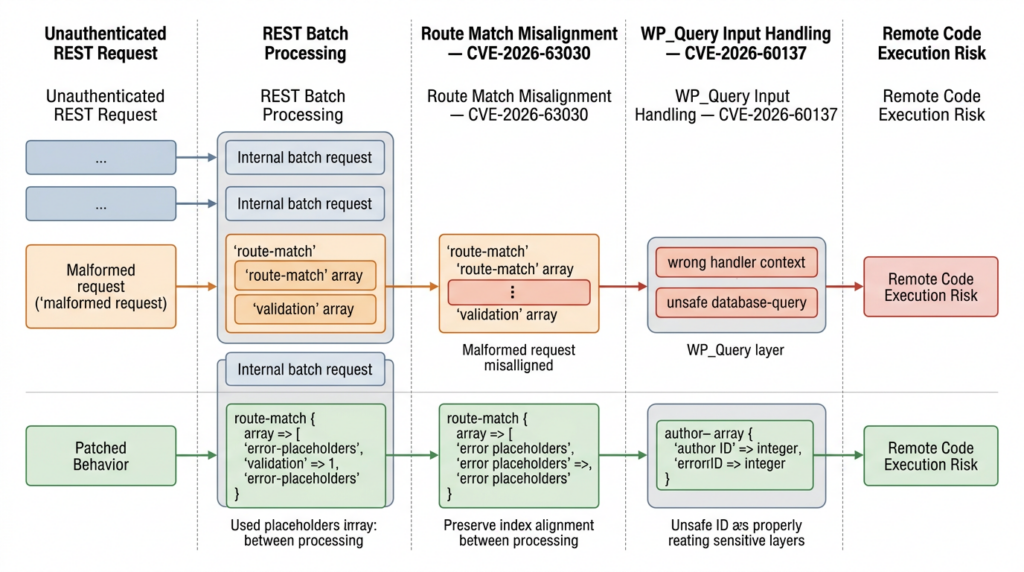
The official advisories confirm the result without requiring defenders to reproduce the weaponized chain: WordPress 6.9 and higher contain a REST API batch-route confusion weakness that, when combined with the author__not_in SQL injection, leads to RCE. (GitHub)
At a defensive level, the chain can be understood as follows:
- An anonymous attacker reaches the public WordPress REST API.
- The attacker submits a specially constructed batch request.
- An error condition causes internal batch bookkeeping to lose alignment.
- A later subrequest is associated with a route match or handler context that does not belong to it.
- That confused processing context exposes the vulnerable
WP_Querybehavior. - Attacker-controlled query material reaches the SQL construction path.
- The combined effect can progress beyond database query manipulation to code execution in the affected application context.
The exact public exploit implementation is deliberately omitted here. Reproducing database manipulation, code-generation behavior, shell execution, or persistence does not improve the patch decision. It would make the material more useful for attacking unpatched internet-facing systems while adding little value for an administrator who can already establish exposure through the installed version.
Searchlight Cyber described the issue as exploitable by an anonymous user against a stock WordPress installation with no plugins. Its initial disclosure withheld technical details to give defenders time to patch. WordPress credited Adam Kues at Assetnote and Searchlight Cyber with reporting the RCE chain. (서치라이트 사이버)
The “stock installation” point is operationally significant. Many WordPress incident processes begin by asking which plugin introduced the vulnerability. That question is insufficient here. Disabling plugins does not remove a flaw in the affected Core REST and query-processing code.
The Persistent Object Cache Condition
Cloudflare’s technical description states that the disclosed CVE-2026-63030 RCE path applies when a persistent object cache is not in use. Public follow-up analysis similarly noted that Redis or Memcached-backed deployments may not follow the same published RCE path. (The Cloudflare Blog)
That condition must not be converted into “Redis fixes wp2shell.”
A persistent object cache is not a vendor patch. It does not correct the route-array desynchronization. It does not normalize author__not_in. It does not remove CVE-2026-60137. It may alter the behavior required by the currently public RCE chain, but deployment details vary and exploit research continues after disclosure.
Treat persistent caching as a possible environmental factor when reconstructing exploitability, not as a remediation control.
| Statement | Correct assessment |
|---|---|
| “We use Redis, so we do not need to patch.” | 잘못됨 |
| “Redis may alter the known RCE path.” | Reasonable, subject to deployment verification |
| “The SQL injection still exists on an affected version.” | Correct |
| “A future chain could use different environmental conditions.” | Possible and should be included in risk planning |
| “The official fixed version remains required.” | Correct |
The same principle applies to a WAF. A firewall may block a known request shape, but it does not repair vulnerable application logic. WAF rules buy deployment time and reduce exposure. They do not provide the same assurance as running fixed Core code.
Disclosure and Patch Timeline
| Date | Development | Defensive meaning |
|---|---|---|
| July 17, 2026 | WordPress 7.0.2 was released with fixes for one critical and one high-severity issue | Fixed packages became available |
| July 17, 2026 | WordPress enabled forced automatic updates for affected versions | Many sites began receiving the patch, but success still required confirmation |
| July 17, 2026 | Searchlight Cyber disclosed wp2shell and initially withheld full technical details | Defenders received a limited patch window |
| July 17, 2026 | Cloudflare deployed WAF protections to customers whose traffic passed through its proxy and WAF | Edge mitigation became available for covered traffic |
| July 18, 2026 | Public reporting stated that technical details and a working PoC were available | Exploit reproduction became easier and the remaining patch window narrowed |
WordPress said the update should be applied immediately. Cloudflare reported deploying protections on July 17 but also stated that WAF coverage was not a substitute for patching. (WordPress.org)
The distinction between public PoC availability and confirmed exploitation in the wild remains important. A public PoC means defenders should expect scanning and reproduction attempts. It does not establish that every suspicious request succeeded. Incident reports should use precise language:
- “The site ran a vulnerable version.”
- “The endpoint was requested.”
- “A payload matching the public technique was observed.”
- “Post-exploitation artifacts were identified.”
- “Remote code execution was confirmed.”
Those statements represent progressively stronger evidence. Do not collapse them into one conclusion.
Patch Before You Probe
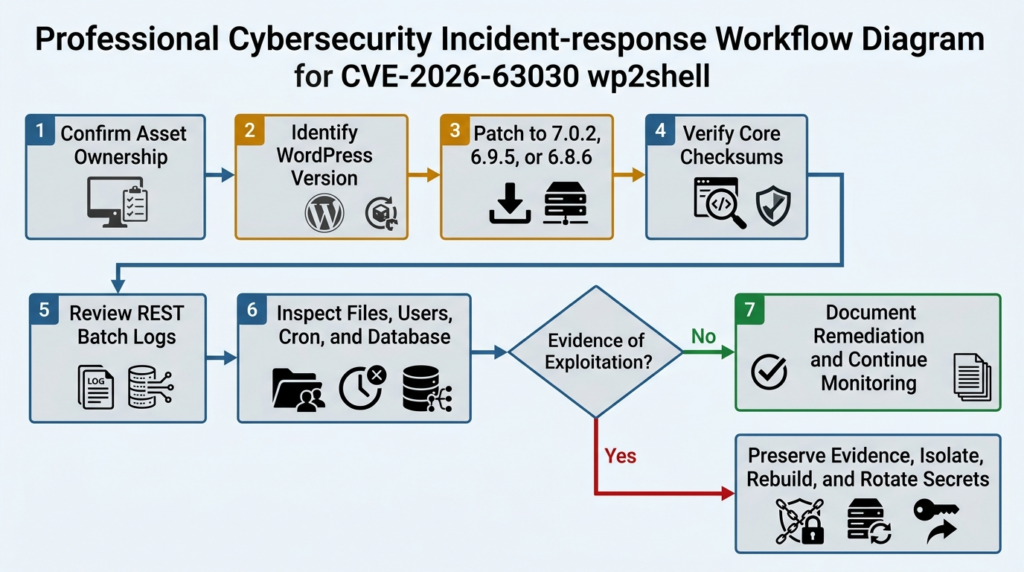
For CVE-2026-63030, version-based validation is safer and usually more reliable than exploit-based validation.
If a server runs WordPress 7.0.1, the official advisory already establishes that it is in the affected range. Executing an RCE chain does not make the patch decision more accurate. It adds the possibility of:
- Database modification.
- File creation.
- PHP execution.
- Broken application state.
- Loss of forensic evidence.
- WAF alerts or automatic blocking.
- Cross-tenant impact on shared infrastructure.
- Testing outside the authorized scope.
- Misinterpretation of a failed exploit as proof of safety.
A failed public PoC can result from an intermediary, cache behavior, PHP configuration, database permissions, security plugin, web server rule, request-size limit, modified Core file, exploit bug, or environmental assumption. None of those conditions prove that the vulnerable code is absent.
Use this validation order:
| 스테이지 | 질문 | Preferred evidence |
|---|---|---|
| 1 | Is the asset in scope and owned by the organization? | CMDB record, hosting account, deployment inventory |
| 2 | Which WordPress version is actually installed? | WP-CLI, package manifest, server-side file inspection |
| 3 | Was a fixed build successfully deployed? | Version output and deployment record |
| 4 | Do Core files match the official build? | WordPress checksum verification |
| 5 | Was the vulnerable REST route exposed before patching? | Reverse proxy, WAF and application logs |
| 6 | Are there indicators of unauthorized changes? | File, process, user, cron and database review |
| 7 | Is behavioral retesting necessary? | Isolated clone or lab deployment, not the production site |
Only test systems you own or have explicit authorization to assess. An organization’s permission to test its own WordPress site does not automatically authorize testing a hosting provider’s shared control plane, CDN infrastructure, upstream proxy, vendor-operated management endpoint, or neighboring tenant.
Safe PoC Demonstration of the Indexing Failure
The following toy program does not contact a website, import WordPress code, execute SQL, or run a command. It models only the parallel-array indexing mistake that can cause one request to receive another request’s handler.
Its purpose is educational: it shows why an error must occupy the same index in both the validation and matching structures.
from __future__ import annotations

from dataclasses import dataclass
from typing import Union


@dataclass(frozen=True)
class Request:
    name: str


@dataclass(frozen=True)
class RouteMatch:
    handler: str


@dataclass(frozen=True)
class ParseError:
    message: str


MatchResult = Union[RouteMatch, ParseError]


def match_route(request: Request) -> MatchResult:
    """Toy route matcher with no network or WordPress dependency."""
    if request.name == "malformed":
        return ParseError("request could not be parsed")

    handlers = {
        "delete-term-zero": RouteMatch("term-delete-handler"),
        "render-paragraph": RouteMatch("block-render-handler"),
    }

    return handlers[request.name]


def vulnerable_prepare(
    requests: list[Request],
) -> tuple[list[MatchResult], list[MatchResult]]:
    """
    Models the unsafe behavior:
    errors are recorded in validation_results but omitted from matches.
    """
    validation_results: list[MatchResult] = []
    matches: list[MatchResult] = []

    for request in requests:
        result = match_route(request)
        validation_results.append(result)

        if isinstance(result, ParseError):
            # The missing placeholder creates index drift.
            continue

        matches.append(result)

    return validation_results, matches


def fixed_prepare(
    requests: list[Request],
) -> tuple[list[MatchResult], list[MatchResult]]:
    """
    Models the fixed behavior:
    every request occupies one position in both lists.
    """
    validation_results: list[MatchResult] = []
    matches: list[MatchResult] = []

    for request in requests:
        result = match_route(request)
        validation_results.append(result)
        matches.append(result)

    return validation_results, matches


def show_dispatch(
    label: str,
    requests: list[Request],
    validation_results: list[MatchResult],
    matches: list[MatchResult],
) -> None:
    print(f"\n{label}")

    for index, request in enumerate(requests):
        validation = validation_results[index]

        if isinstance(validation, ParseError):
            print(
                f"index={index} request={request.name!r} "
                f"result=parse-error"
            )
            continue

        selected = matches[index] if index < len(matches) else None

        if isinstance(selected, RouteMatch):
            print(
                f"index={index} request={request.name!r} "
                f"selected_handler={selected.handler!r}"
            )
        else:
            print(
                f"index={index} request={request.name!r} "
                f"selected_handler=None"
            )


def main() -> None:
    requests = [
        Request("malformed"),
        Request("delete-term-zero"),
        Request("render-paragraph"),
    ]

    vulnerable_validation, vulnerable_matches = vulnerable_prepare(requests)
    fixed_validation, fixed_matches = fixed_prepare(requests)

    show_dispatch(
        "Vulnerable alignment",
        requests,
        vulnerable_validation,
        vulnerable_matches,
    )

    show_dispatch(
        "Fixed alignment",
        requests,
        fixed_validation,
        fixed_matches,
    )


if __name__ == "__main__":
    main()
Expected output:
Vulnerable alignment
index=0 request='malformed' result=parse-error
index=1 request='delete-term-zero' selected_handler='block-render-handler'
index=2 request='render-paragraph' selected_handler=None

Fixed alignment
index=0 request='malformed' result=parse-error
index=1 request='delete-term-zero' selected_handler='term-delete-handler'
index=2 request='render-paragraph' selected_handler='block-render-handler'
The vulnerable simulation shows the second request receiving the third request’s handler because the error at index zero was omitted from one array. The fixed simulation preserves one element per request in both arrays.
This example cannot determine whether a WordPress installation is vulnerable. It does not reproduce CVE-2026-60137, the complete wp2shell chain, or code execution. Its safety comes from the absence of any network, database, WordPress, shell, or filesystem interaction.
Updating WordPress Safely
Before changing production, confirm that backups are recent and restorable. Do not turn the backup requirement into a reason for a long delay; for an internet-facing vulnerable instance, the exposure window may be more dangerous than a controlled emergency update.
Standard WordPress installation
Check the installed version:
wp core version
Update a WordPress 7.0 installation:
wp core update --version=7.0.2
wp core update-db
wp core version
Update a WordPress 6.9 installation that must temporarily remain on that branch:
wp core update --version=6.9.5
wp core update-db
wp core version
Update a WordPress 6.8 installation:
wp core update --version=6.8.6
wp core update-db
wp core version
A current supported release later than those fixed versions is also acceptable. Do not downgrade a newer secure release merely to match the first patched version.
WP-CLI documents wp core update for retrieving and installing WordPress Core, wp core update-db for database upgrades, and wp core version for retrieving the installed version. (WordPress Developer Resources)
Verify official Core files
After updating:
installed_version="$(wp core version)"

wp core verify-checksums \
  --version="${installed_version}"
For a broader root-directory check:
installed_version="$(wp core version)"

wp core verify-checksums \
  --version="${installed_version}" \
  --include-root
wp core verify-checksums compares WordPress Core files with checksums published by WordPress.org and runs before WordPress is loaded, which is useful when the application itself may be untrusted. The --include-root option can also flag unexpected files in the installation root. (WordPress Developer Resources)
Save the output:
timestamp="$(date -u +%Y%m%dT%H%M%SZ)"

{
  echo "timestamp=${timestamp}"
  echo "host=$(hostname -f)"
  echo "path=$(pwd)"
  wp core version
  wp core verify-checksums --include-root
} 2>&1 | tee "wordpress-core-validation-${timestamp}.log"
Redact internal hostnames or paths before sharing the record outside the incident team.
Checksum success proves only that the checked WordPress Core files match an official release. It does not prove that:
- Plugins are clean.
- Themes are clean.
wp-content/uploadscontains no executable files.- Must-use plugins are trusted.
- The database is unchanged.
- Administrator accounts are legitimate.
- Operating-system persistence is absent.
- The original instance was never exploited.
Treat Core checksum validation as one control, not a complete compromise assessment.
WordPress Multisite
For Multisite:
wp core update --version=7.0.2
wp core update-db --network
wp core version
wp core verify-checksums --include-root
The Core files are shared, but network configuration, plugins, themes, uploads, domain mappings, and administrator roles may differ across sites. Enumerate the network:
wp site list \
  --fields=blog_id,url,registered,last_updated,public,archived,deleted
Review super administrators separately:
wp super-admin list
A network update is not complete until traffic has been shifted to the updated code across all application nodes.
Containerized WordPress
Do not make an emergency change only inside a running container and assume the next deployment will preserve it. Update the source image, dependency lock, or build stage, then rebuild and redeploy.
A container workflow should produce evidence for:
- Base image or WordPress package version.
- New image digest.
- Build timestamp.
- Vulnerability scan result.
- Deployment revision.
- Number of updated replicas.
- Old replica termination.
- Post-deployment version output.
- Persistent volume integrity.
- Rollback image status.
Check every replica rather than querying one load-balanced response. A mixed deployment can leave one vulnerable pod serving a portion of traffic.
Composer and Bedrock deployments
For Composer-managed installations, modify the declared WordPress package constraint, update the lockfile, review the dependency diff, and deploy through the normal release pipeline. A manual WP-CLI update may be reverted by the next Composer deployment.
Evidence should include:
composer show | grep -i wordpress
git diff -- composer.json composer.lock
The exact package name varies by project. Inspect the repository rather than assuming a particular Bedrock or WordPress Packagist layout.
Managed WordPress hosting
A hosting provider may patch Core centrally, backport a fix, or prevent customers from running WP-CLI. Ask for:
- The installed WordPress version.
- Whether the fix is an official release or provider backport.
- The deployment timestamp.
- Whether all nodes received the change.
- Whether WAF protections were active before the patch.
- Whether access logs are available for the exposure period.
- Whether the provider observed exploitation attempts.
- Whether the customer must take any additional action.
A provider banner reading “protected” is not equivalent to a version record and incident timeline.
Temporary WAF Mitigation
Searchlight Cyber recommended updating to WordPress 7.0.2 or 6.9.5. When an immediate update was not possible, it suggested temporarily blocking anonymous REST API access or blocking both forms of the batch endpoint:
/wp-json/batch/v1?rest_route=/batch/v1
The researchers warned that such measures may affect legitimate functionality and should be treated as emergency mitigations. (서치라이트 사이버)
Cloudflare said it deployed WAF rules for customers whose traffic was proxied through the Cloudflare WAF. That qualification matters. A DNS record configured as DNS-only, a direct origin address, an alternate hostname, or traffic that bypasses the proxy does not receive the same protection. (The Cloudflare Blog)
Nginx 예제
The following is a defensive example that blocks the two documented route forms. Test it in staging and adapt it to the site’s existing routing.
At the http level:
map $arg_rest_route $block_wp_batch_query {
    default 0;
    ~^/batch/v1/?$ 1;
}
Inside the relevant server block:
location = /wp-json/batch/v1 {
    return 403;
}

location = /wp-json/batch/v1/ {
    return 403;
}

if ($block_wp_batch_query) {
    return 403;
}
사용 만약 with a direct 반환 in the rewrite phase is substantially narrower than placing complex rewrite logic inside an Nginx location. Still validate the complete configuration:
sudo nginx -t
sudo systemctl reload nginx
Test both forms against an owned staging site:
curl -sS -o /dev/null -w '%{http_code}\n' \
  'https://staging.example.test/wp-json/batch/v1'

curl -sS -o /dev/null -w '%{http_code}\n' \
  'https://staging.example.test/index.php?rest_route=/batch/v1'
These requests contain no exploit payload. They verify only that the emergency route block is active.
Apache example
A temporary .htaccess or virtual-host rule may use:
RewriteEngine On

RewriteCond %{REQUEST_URI} ^/wp-json/batch/v1/?$ [NC,OR]
RewriteCond %{QUERY_STRING} (^|&)rest_route=(%2F|/)*batch(%2F|/)v1/?(&|$) [NC]
RewriteRule ^ - [F,L]
Confirm that the rule does not interfere with unrelated query parameters and that URL decoding behavior matches the web server and proxy chain. Prefer controls at the managed WAF or virtual-host layer over ad hoc .htaccess changes when possible.
Temporary must-use plugin
A site that cannot change its edge configuration can temporarily reject anonymous access to the batch route through a must-use plugin.
Create a file such as:
wp-content/mu-plugins/block-anonymous-rest-batch.php
Use:
<?php
/**
 * Temporary mitigation for anonymous access to the REST batch route.
 *
 * Remove after WordPress Core has been patched and verified.
 */

add_filter(
    'rest_pre_dispatch',
    static function ( $result, $server, $request ) {
        $route = $request->get_route();

        if (
            0 === strpos( $route, '/batch/v1' )
            && ! is_user_logged_in()
        ) {
            return new WP_Error(
                'rest_batch_temporarily_blocked',
                'Anonymous REST batch requests are temporarily disabled.',
                array( 'status' => 403 )
            );
        }

        return $result;
    },
    5,
    3
);
This example is a temporary operational control, not a substitute for the official patch. Test it against the actual site because REST authentication can be provided by cookies, application passwords, OAuth plugins, reverse proxies, or custom middleware. A logged-in browser may not represent a headless integration.
After confirming the fixed Core version, remove the temporary mitigation unless the organization has a separate documented reason to restrict the batch endpoint.
Why disabling the entire REST API is risky
The WordPress REST API supports more than external integrations. Depending on the site, it may be used by:
- The block editor.
- Mobile applications.
- Headless frontends.
- WooCommerce.
- Form and CRM integrations.
- Search services.
- Authentication systems.
- Monitoring and deployment tooling.
- Custom JavaScript applications.
- Plugin administration interfaces.
A broad anonymous REST block may reduce attack surface but can also break public content endpoints and business workflows. Use the narrowest emergency rule that the environment can support, test it, monitor errors, and remove it after patching.
Detecting wp2shell Probing
The two durable request locations are the REST batch path and its query-route equivalent. Search current and rotated access logs for both.
For common Nginx or Apache text logs:
zgrep -hEi \
  '(/wp-json/batch/v1|rest_route=([^ ]*%2[fF])?batch([^ ]*%2[fF]|/)v1)' \
  /var/log/nginx/access.log* \
  /var/log/apache2/access.log* 2>/dev/null
A simpler exact-path search:
zgrep -hF '/wp-json/batch/v1' /var/log/nginx/access.log*
Query-route search:
zgrep -hEi 'rest_route=.*batch.*v1' /var/log/nginx/access.log*
Summarize source addresses:
zgrep -hF '/wp-json/batch/v1' /var/log/nginx/access.log* \
  | awk '{print $1}' \
  | sort \
  | uniq -c \
  | sort -nr \
  | head -50
For JSON access logs:
jq -r '
  select(
    (.request_uri // "") | test(
      "/wp-json/batch/v1|rest_route=.*batch.*/?v1";
      "i"
    )
  )
  | [
      .time,
      .remote_addr,
      .request_method,
      .request_uri,
      .status,
      .body_bytes_sent,
      .http_user_agent
    ]
  | @tsv
' access.json
Field names differ by logging schema. Adjust the query before treating an empty result as evidence that no traffic occurred.
Preserve request bodies carefully
Many default access logs do not record POST bodies. WAF, API gateway, reverse proxy, application-performance monitoring, or packet-capture products may retain request samples. Those records can contain cookies, nonces, personal data, API parameters, or exploit material.
Before exporting them:
- Confirm incident-response authorization.
- Restrict access.
- Preserve original timestamps and hashes.
- Redact unrelated credentials.
- Do not paste live payloads into public tickets.
- Avoid sending customer request bodies to unapproved AI or analysis services.
- Record whether the body was truncated or normalized by the logging product.
A request is not proof of RCE
A request to /wp-json/batch/v1 may be legitimate. WordPress and plugins can use batch operations. Even a malformed request may represent research, monitoring, a vulnerability scanner, or exploitation that failed.
Use correlation:
| 신호 | Confidence | 제한 사항 | Next action |
|---|---|---|---|
| One request to the batch endpoint | 낮음 | May be legitimate or generic scanning | Review method, source, body metadata and adjacent requests |
| Repeated malformed batch requests | Medium | Still does not prove successful SQLi or RCE | Correlate with WAF, PHP and database events |
| Request matching public exploit structure | Medium to high | Application or WAF may have blocked it | Check response, version and post-request activity |
| New PHP file shortly after the request | 높음 | Could be an administrator deployment | Hash, quarantine a copy and establish provenance |
| Web worker spawning a shell or downloader | 높음 | Some maintenance plugins may run processes | Preserve process tree, command line and network data |
| Unknown administrator or scheduled task | 높음 | Could be an undocumented business change | Disable safely, preserve evidence and investigate |
| Confirmed attacker command output | 매우 높음 | Requires trustworthy telemetry | Begin full incident response and credential rotation |
Process and Endpoint Telemetry
On Linux hosts, suspicious post-exploitation activity may include a PHP, Apache, Nginx, or PHP-FPM process spawning:
shbashdashcurlwgetpythonperlnc- Archive utilities
- Package managers
- Unexpected cloud metadata requests
These process names are not malicious by themselves. Backup plugins, image processors, deployment agents, security scanners, and administration tools may invoke external commands.
A useful detection rule focuses on ancestry, timing, command line, destination, and identity rather than a process name alone.
예 journalctl review:
sudo journalctl \
  --since '2026-07-17 00:00:00 UTC' \
  --no-pager \
  | grep -Ei \
    'php-fpm|apache2|httpd|nginx|curl|wget|/bin/sh|/bin/bash'
Recently executed processes cannot usually be reconstructed from ps after they exit. EDR, auditd, process accounting, container runtime events, or cloud workload telemetry provides stronger historical evidence.
For auditd-enabled hosts:
sudo ausearch \
  -ts 07/17/2026 00:00:00 \
  -m EXECVE \
  | grep -Ei \
    'php-fpm|apache|httpd|nginx|curl|wget|/bin/(ba|d)?sh'
Adapt timestamps to the system timezone. Record clock drift between the origin, proxy, WAF, database, and security products before building a timeline.
File Integrity Checks
Start with official WordPress Core checksums:
wp core verify-checksums --include-root
Then inspect areas not covered by Core checksums.
Recently modified PHP files
find . \
  -type f \
  -name '*.php' \
  -newermt '2026-07-17 00:00:00 UTC' \
  -printf '%TY-%Tm-%TdT%TH:%TM:%TSZ %s %p\n' \
  | sort
Modification time can be forged or changed by restoration and deployment. Treat it as a lead, not proof.
PHP in uploads
Many sites have no legitimate reason to execute PHP from wp-content/uploads.
find wp-content/uploads \
  -type f \
  \( -iname '*.php' -o -iname '*.phtml' -o -iname '*.phar' \) \
  -print
Also search files with image extensions that begin with PHP content:
grep -RIl \
  --include='*.jpg' \
  --include='*.jpeg' \
  --include='*.png' \
  --include='*.gif' \
  '<?php' \
  wp-content/uploads
These commands can produce false positives from test fixtures, documentation, backups, or intentionally embedded samples. Never delete files solely because a grep matched.
Must-use plugins
find wp-content/mu-plugins \
  -maxdepth 2 \
  -type f \
  -printf '%TY-%Tm-%Td %TH:%TM %s %p\n' \
  | sort
Must-use plugins may not appear in the standard active plugin list and are loaded automatically. Compare them with source control or a known-clean release artifact.
Core, plugin and theme inventory
wp plugin list \
  --fields=name,status,version,update,auto_update

wp theme list \
  --fields=name,status,version,update,auto_update
An inactive plugin can still be reachable if a vulnerable PHP file accepts direct web requests. Inventory inactive components and remove software that is not needed.
WordPress root and configuration
검토:
ls -la
stat wp-config.php .htaccess 2>/dev/null
Compare wp-config.php with a trusted template while protecting database credentials and salts. Look for:
- Unexpected
include또는요구statements. - Encoded or dynamically evaluated content.
- Modified database hosts.
- Unknown auto-prepend settings.
- Suspicious proxy configuration.
- Altered security keys.
- Unexpected writable paths.
- Debug logging exposed to the web.
Do not publish a suspicious file before removing credentials and customer data.
Database Review
An RCE chain involving SQL injection makes database review especially important. Patching Core prevents the known behavior from being triggered again, but it does not automatically reverse changes made before the patch.
Administrators
wp user list \
  --role=administrator \
  --fields=ID,user_login,user_email,user_registered,roles
For Multisite:
wp super-admin list
Validate every privileged account against identity records. An unfamiliar email domain, recent creation time, or generic username is suspicious but not conclusive.
Scheduled WordPress events
wp cron event list \
  --fields=hook,next_run_gmt,next_run_relative,recurrence
Compare hooks with plugin and theme inventories. Attackers and legitimate plugins can both create custom cron events.
Active plugins and options
wp option get active_plugins --format=json
wp option get siteurl
wp option get home
Inspect unexpected changes to:
active_pluginssiteurlhomeusers_can_registerdefault_role- Theme settings
- Rewrite rules
- Widget content
- Custom HTML
- Autoloaded options
- Plugin-specific scheduled jobs
A large WordPress database can contain thousands of legitimate serialized values. Use schema-aware tools and backups rather than broad search-and-replace commands.
Database audit limitations
Standard MySQL or MariaDB installations may not retain historical query logs. Enabling a general query log after an incident cannot reconstruct previous statements and may introduce performance and privacy concerns. Cloud database audit logs, proxy logs, performance monitoring, and point-in-time backups can provide better evidence.
Incident Response After Exposure
A vulnerable version does not prove compromise, but public PoC availability raises the level of investigation appropriate for exposed systems.
Use evidence-based response tiers.
| 상황 | Minimum response |
|---|---|
| Vulnerable version found, no suspicious traffic, complete logs available | Patch, verify checksums, review the exposure window and document the result |
| Vulnerable version found, logs missing or incomplete | Patch and perform broader integrity review because absence of evidence is weak |
| Batch endpoint probing observed | Preserve requests, correlate with application and system telemetry, inspect files, users and scheduled tasks |
| Public exploit structure observed | Treat exploitation as plausible, isolate evidence, perform incident-response review |
| Unauthorized file, user, process or database change found | Treat as compromise, contain, rebuild from trusted sources and rotate credentials |
| Command execution confirmed | Conduct full incident response, investigate lateral movement and notify required stakeholders |
Preserve evidence first
Before removing a suspicious file or account:
- Capture a filesystem snapshot.
- Export relevant database tables or a database snapshot.
- Preserve access, WAF, PHP, database and operating-system logs.
- Record system time and timezone.
- Hash suspicious files.
- Capture process and network state if the system is still active.
- Document who performed each action.
Deleting a web shell may stop one access path while destroying information needed to identify the entry time, commands, persistence, credentials, or other affected systems.
Contain the system
Containment options include:
- Remove the origin from the load balancer.
- Restrict access to a trusted administration network.
- Enable a static maintenance page at the edge.
- Block the batch route.
- Revoke active administrator sessions.
- Disable unknown accounts.
- Prevent outbound connections where operationally possible.
- Preserve the original instance while deploying a clean replacement.
Avoid modifying the only available evidence more than necessary.
Rebuild rather than hand-clean
Once code execution is confirmed, restoring only WordPress Core is not sufficient. An attacker may have changed:
- Plugins.
- Themes.
- Must-use plugins.
- Uploads.
wp-config.php.- Web server configuration.
- PHP configuration.
- System users.
- SSH keys.
- Cron jobs.
- Container entrypoints.
- Cloud startup scripts.
- Database records.
- External services accessed through stored credentials.
A safer recovery path is:
- Provision a known-clean operating environment.
- Install fixed WordPress Core.
- Install plugins and themes from verified packages.
- Restore content from a backup selected through timeline analysis.
- Scan and review uploaded files.
- Reapply configuration from trusted source control.
- Rotate credentials.
- Validate before restoring public traffic.
Rotate credentials based on exposure
When compromise is confirmed or strongly suspected, consider rotating:
- WordPress administrator passwords.
- WordPress authentication salts.
- Database usernames and passwords.
- Hosting control-panel credentials.
- SSH keys.
- Deployment tokens.
- Object-storage keys.
- CDN and DNS credentials.
- SMTP and email API credentials.
- Payment, CRM and analytics integration secrets.
- Backup credentials.
- Cloud instance or workload identities.
- OAuth refresh tokens stored by plugins.
Do not rotate credentials from the compromised host if the attacker could observe the new values. Perform rotation from a trusted administration environment and redeploy clean configuration.
The Auto-Update Trap
WordPress enabled forced updates because of the severity of the release. That was an important protective action, but defenders still need to confirm the result. (WordPress.org)
Automatic updates can fail or remain incomplete because:
- Core files are not writable.
AUTOMATIC_UPDATER_DISABLEDis configured.- Filesystem credentials are required.
- The site is managed through Composer.
- A hosting provider controls releases.
- The site runs from a read-only image.
- A deployment reverted the update.
- One node updated while another did not.
- The database upgrade did not run.
- Health checks rolled back the release.
- A maintenance lock remained.
- A custom build reports an unexpected version.
A reliable closure record contains both the target state and observed evidence:
Target: shop.example.test
Environment: production
Observed before update: WordPress 7.0.1
Required fixed version: 7.0.2 or later
Observed after update: WordPress 7.0.2
Core checksum result: pass
Deployment nodes checked: 4 of 4
WAF batch-route block: active during rollout, removed after validation
Historical log range reviewed: 2026-07-01 through 2026-07-18 UTC
Suspicious batch requests: none found
Known limitation: origin process telemetry retained for only seven days
Owner: Web Platform
Retest date: 2026-07-18
That record is more useful than a screenshot of a green update icon.
Common Validation Mistakes
Trusting an external version fingerprint
External fingerprinting is useful for discovery, not definitive patch verification. Cached assets, stripped metadata, CDN behavior, custom themes, and security plugins can hide or misrepresent the version.
Use a server-side source whenever possible.
Blocking only one route form
WordPress REST routes can be exposed through pretty permalinks or the rest_route query parameter. A rule that blocks only /wp-json/batch/v1 may leave ?rest_route=/batch/v1 reachable.
Validate both.
Treating persistent caching as a fix
Redis or Memcached may alter the known RCE chain, but they do not patch either CVE. The cache can be disabled during maintenance, fail over, behave differently across nodes, or be bypassed by another technique.
Install the fixed version.
Running a public RCE PoC against production
An exploit may alter the system, expose credentials, break data, or contaminate evidence. A failed result can also produce false confidence.
Use version and checksum evidence first. Reproduce behavior only in a disposable, isolated clone when the investigation genuinely requires it.
Verifying Core but ignoring wp-content
Official Core checksums do not validate plugins, themes, must-use plugins or uploads. A successful checksum result after exploitation can coexist with a malicious file outside Core.
Review the complete application trust boundary.
Looking only for a web shell
Remote code execution does not require an attacker to leave a traditional PHP shell. An attacker might create an administrator, alter a scheduled event, inject JavaScript, steal configuration secrets, modify an existing plugin, or execute a one-time command.
Absence of a new .php file is not proof of absence.
Ignoring the WordPress 6.8 branch
WordPress 6.8 is not listed as vulnerable to the complete CVE-2026-63030 RCE chain, but versions 6.8.0 through 6.8.5 remain affected by CVE-2026-60137.
Update to 6.8.6 or later.
Treating every endpoint request as successful exploitation
Legitimate clients, scanners and researchers may call the batch endpoint. Determine whether the request contained the relevant structure, whether the system was vulnerable at that time, how the server responded, and whether post-exploitation evidence exists.
Precision matters in both directions.
Related WordPress Vulnerabilities
CVE-2026-60137
CVE-2026-60137 is not merely “another issue fixed in the same release.” It is the SQL injection component of wp2shell.
Its relevance is direct:
- It affects the
author__not_inparameter ofWP_Query. - It reaches back to WordPress 6.8.
- On 6.9 and higher, it combines with the REST batch-route confusion to produce RCE.
- It is fixed by normalizing author IDs into integers.
- Administrators on 6.8 must patch even though they are outside the full RCE range. (GitHub)
CVE-2022-21661
CVE-2022-21661 was an earlier WordPress Core SQL injection issue involving improper sanitization in WP_Query. NVD states that WordPress 5.8.3 patched the issue and that security releases were also produced for older branches. The vulnerability could become reachable through plugins or themes that used the affected query behavior in a particular way. (NVD)
It is relevant because both incidents place security pressure on a shared query abstraction used across the WordPress ecosystem. They are not the same flaw:
| Property | CVE-2022-21661 | CVE-2026-60137 |
|---|---|---|
| Period | Disclosed in 2022 | Disclosed in 2026 |
| Core area | WP_Query 위생 처리 | author__not_in handling in WP_Query |
| Typical reachability described publicly | Depended on how plugins or themes used the affected behavior | Part of the Core wp2shell chain on affected branches |
| RCE relationship | Not the CVE-2026-63030 chain | Explicit companion to the 2026 route-confusion RCE |
| Defensive lesson | Query abstractions remain security boundaries | Canonicalize every accepted input representation before SQL construction |
The recurrence does not mean WordPress made no progress. It shows why mature frameworks continue to receive security review: broadly reused abstractions accumulate input forms, compatibility behavior, caching assumptions and downstream callers.
CVE-2026-4020
CVE-2026-4020 affected the Gravity SMTP plugin rather than WordPress Core. Public reporting described an unauthenticated REST API endpoint that could expose system data and mail-integration secrets. It was an information disclosure issue, not RCE.
Its relevance to wp2shell is architectural. Both cases remind developers that a REST route is an internet-facing trust boundary. Correct routing, explicit permission callbacks, response minimization and negative tests for anonymous callers are essential.
Penligent’s detailed analysis, WordPress Plugin REST API Bugs, How Gravity SMTP Exposed Secrets, explains the separate plugin-level case and why public REST routes must be reviewed according to the sensitivity of the data or action behind them. (펜리전트)
Do not merge the incidents operationally. CVE-2026-4020 requires plugin-specific remediation and potential secret rotation. CVE-2026-63030 and CVE-2026-60137 require WordPress Core updates and an assessment of the wp2shell exposure window.
Hardening WordPress REST Workflows
Patching closes the disclosed flaws. Hardening reduces the chance that the next REST issue becomes equally disruptive.
Inventory registered routes
In a development or staging environment, enumerate REST routes and identify:
- Public routes.
- Authentication requirements.
- Permission callbacks.
- Accepted methods.
- Sensitive response fields.
- State-changing operations.
- Debug or support endpoints.
- Routes provided by inactive or abandoned plugins.
- Batch-capable endpoints.
- Routes that accept dynamic query parameters.
Do not expose a route inventory publicly if it reveals sensitive plugin or administrative structure.
Test negative authorization cases
For every non-public route, test:
- Anonymous user.
- Subscriber.
- Contributor.
- Author.
- Editor.
- Administrator.
- Expired session.
- Invalid nonce.
- Valid authentication without required capability.
- Multisite user without network capability.
A route that returns configuration, logs, system reports, credentials, private content or state-changing functionality should fail closed.
Bind validation to the dispatched request
Security review should confirm that:
- The same request object is matched and dispatched.
- Permission results cannot be reused across neighboring batch items.
- Errors preserve array or object identity.
- Internal requests cannot restart the outer routing lifecycle unexpectedly.
- Request transformations occur before authorization and remain stable afterward.
- Caching does not cause authorization results to cross users or routes.
Minimize batch complexity
Batch processing is efficient but expands the state space:
- Partial failure.
- Atomic versus non-atomic behavior.
- Mixed authorization levels.
- Error ordering.
- Response ordering.
- Resource limits.
- Nested requests.
- Request smuggling between internal abstractions.
- Transaction boundaries.
- Cache interaction.
Set explicit limits for:
- Number of subrequests.
- Request-body size.
- Per-subrequest processing time.
- Recursion.
- Nested batch behavior.
- Allowed methods.
- Anonymous batch use.
Rate limits should supplement authorization, not replace it.
Building a Safe Retest Record
Security teams often need more than a verbal statement that “WordPress was updated.” A useful retest package is reproducible without including a weaponized exploit.
Collect:
- 범위
- Domain.
- Origin or environment.
- WordPress installation path.
- Authorization reference.
- Pre-update evidence
- Installed version.
- Deployment revision.
- Relevant WAF status.
- Date and time.
- 해결 방법
- Target fixed version.
- Update method.
- Change ticket.
- Deployment owner.
- Post-update evidence
- Installed version.
- Core checksum output.
- Node count.
- Database-upgrade result.
- Exposure review
- Log sources.
- Time range.
- Retention limitations.
- Batch-route request count.
- Suspicious source summary.
- Integrity review
- Recent file changes.
- Administrators.
- Scheduled events.
- Plugin and theme inventory.
- Database anomalies.
- 결론
- Fixed.
- Fixed with investigation pending.
- Compromise suspected.
- Compromise confirmed.
- Unable to determine because of missing evidence.
Teams using authorized AI-assisted validation or automated penetration-testing workflows can encode the same sequence rather than turning the workflow into automatic exploitation. 펜리전트 describes scope control, guided verification, reproducible evidence and reporting as core parts of its testing model. For wp2shell, a safe automated task should collect versions, checksums, route status and redacted logs, then stop before any production RCE payload is attempted. (펜리전트)
Human approval remains important when an action could modify a database, create a file, expose customer information or cross an infrastructure boundary.
Operational Prioritization
Not every affected WordPress installation has the same business impact, but every RCE-affected installation needs a patch.
Use prioritization to determine order, not whether to remediate.
| Factor | Higher-priority condition |
|---|---|
| Internet exposure | Public origin or directly reachable alternate hostname |
| Installed version | 6.9.0–6.9.4 or 7.0.0–7.0.1 |
| Business role | Ecommerce, authentication, publishing, customer portal or high-traffic property |
| Stored secrets | Payment, SMTP, CRM, backup, cloud or API credentials |
| Privilege | WordPress process has broad filesystem or database permissions |
| Isolation | Shared host, flat network or access to internal services |
| Logging | Missing or short retention |
| Public PoC window | Site remained vulnerable after July 18, 2026 |
| Integrity evidence | Unexpected files, users, tasks or process behavior |
| Patch complexity | Multiple nodes, custom Core, Composer lock or immutable images |
A low-traffic marketing site can still contain credentials, become a phishing platform, redirect visitors, poison search results or provide a foothold into a shared hosting account. Traffic volume alone is not a reliable risk measure.
Frequently Asked Questions
What is wp2shell?
- wp2shell is the public name used for a WordPress Core pre-authentication RCE chain.
- It combines CVE-2026-63030, a REST API batch-route confusion issue, with CVE-2026-60137, an SQL injection in
WP_Query. - The attacker does not need a WordPress account.
- The disclosed chain does not require a vulnerable third-party plugin or theme.
- WordPress 6.9.0–6.9.4 and 7.0.0–7.0.1 are affected by the complete RCE chain.
- The fixed releases are 6.9.5 and 7.0.2. (GitHub)
Which WordPress versions are vulnerable?
- WordPress 6.9.0 through 6.9.4 are vulnerable to both flaws and the wp2shell RCE chain.
- WordPress 7.0.0 through 7.0.1 are vulnerable to both flaws and the RCE chain.
- WordPress 6.8.0 through 6.8.5 are affected by CVE-2026-60137 but not listed as affected by the complete CVE-2026-63030 RCE chain.
- WordPress 6.8.6, 6.9.5 and 7.0.2 contain the corresponding fixes.
- WordPress 7.1 Beta 1 was affected; Beta 2 contains the fixes.
- Versions before 6.8 are not affected by these two issues according to the official release, but old unsupported versions should still be upgraded. (WordPress.org)
Is WordPress 6.8 vulnerable to remote code execution?
- The official WordPress release says the 6.8 branch is affected only by the SQL injection issue.
- WordPress does not list 6.8 as affected by the complete wp2shell RCE chain.
- Versions 6.8.0 through 6.8.5 still require an update.
- WordPress 6.8 users should install 6.8.6 or move to a later maintained release.
- Do not leave 6.8.5 unpatched merely because the RCE chain is associated with 6.9 and 7.0. (GitHub)
Does Redis or another persistent object cache make a site safe?
- No.
- Cloudflare reported that the disclosed RCE path applies when a persistent object cache is not in use.
- A persistent cache may change the behavior of the known chain, but it does not repair either vulnerable code path.
- CVE-2026-60137 remains relevant on an affected version.
- Cache configuration can differ between nodes or change during outages and maintenance.
- Install the official fixed WordPress release even when Redis or Memcached is enabled. (The Cloudflare Blog)
How can I validate the patch without exploiting the site?
- 실행
wp core versionfrom the correct WordPress installation. - Confirm 7.0.2 or later, 6.9.5 or later, or 6.8.6 or later for the applicable branch.
- 실행
wp core verify-checksums --include-root. - Confirm every application node or container uses the fixed build.
- Review deployment and automatic-update logs.
- Check that temporary WAF rules cover both batch-route forms.
- Review historical access logs and system integrity separately.
- Use an isolated clone for behavioral testing only when version and checksum evidence are insufficient.
Should I disable the WordPress REST API?
- Not as the primary long-term fix.
- The REST API supports the block editor, mobile clients, headless sites and many integrations.
- Broad blocking can create outages.
- If an update cannot be deployed immediately, temporarily block the batch route or anonymous access according to business requirements.
- Cover both
/wp-json/batch/v1및rest_route=/batch/v1form. - Remove emergency controls after the official patch is installed and verified.
- Continue reviewing custom and plugin-provided REST routes for correct authorization.
What logs should I review after patching?
- Reverse proxy and web server access logs.
- CDN and WAF event logs.
- WordPress or PHP application logs.
- PHP-FPM, Apache and Nginx error logs.
- Database audit or proxy logs when available.
- EDR, auditd and container runtime process events.
- File-integrity monitoring.
- WordPress user and cron changes.
- Hosting control-panel and deployment logs.
- Review the full exposure period, not only the hour immediately before the update.
What should I do if the site remained exposed after the public PoC appeared?
- Patch immediately.
- Preserve logs and a snapshot before deleting suspicious artifacts.
- Search for both REST batch-route forms.
- Review Core checksums, plugins, themes, must-use plugins and uploads.
- Inspect administrators, scheduled events and important database options.
- Correlate requests with process, file and outbound network activity.
- If unauthorized changes or command execution are found, rebuild from trusted sources.
- Rotate credentials from a clean administration environment.
- Document evidence gaps honestly when log retention prevents a definitive conclusion.
Authoritative Resources
- 그리고 WordPress 7.0.2 security release provides the official affected-branch and fixed-version guidance. (WordPress.org)
- 그리고 CVE-2026-63030 GitHub Security Advisory records the REST batch-route confusion and RCE-affected versions. (GitHub)
- 그리고 CVE-2026-60137 GitHub Security Advisory records the
author__not_inSQL injection and its broader affected range. (GitHub) - Searchlight Cyber’s wp2shell disclosure provides the researcher’s initial risk statement and patch guidance. (서치라이트 사이버)
- Cloudflare’s WordPress vulnerability analysis explains its WAF rollout and the persistent object-cache condition associated with the disclosed RCE path. (The Cloudflare Blog)
닫기
wp2shell is a useful example of why severe vulnerabilities often emerge at the boundary between components rather than inside one obviously dangerous function. One flaw disrupted the identity of requests moving through the REST batch pipeline. Another allowed a value expected to contain integer author IDs to influence SQL unsafely. Together, they crossed the boundary from malformed request handling to pre-authentication code execution.
The correct response does not begin with a shell.
It begins with an authoritative inventory, an installed-version check and an immediate update. It continues with checksum verification, confirmation across every deployment node, historical log review and a broader integrity assessment when the evidence warrants it. Sites that remained vulnerable after public proof-of-concept code became available deserve particular attention, especially when logs are incomplete or the WordPress process had access to valuable secrets and shared infrastructure.
Upgrade WordPress 7.0.0–7.0.1 to 7.0.2 or later. Upgrade 6.9.0–6.9.4 to 6.9.5 or later. Upgrade 6.8.0–6.8.5 to 6.8.6 or later. Confirm the result rather than assuming that an automatic update completed.
For CVE-2026-63030 wp2shell, patching first is not a shortcut around validation. It is the safest and most reliable first validation step.
 Korean
  English
  German
  French
  Spanish
  Portuguese
  Japanese
  Hindi
Hindi  Arabic
  Turkish
  Hebrew