
CVE-2026-32202 is an actively exploited Windows Shell vulnerability that can force a Windows system to authenticate to an attacker-controlled server when Explorer processes a specially crafted shortcut file. The resulting network exchange may expose Net-NTLMv2 authentication material, creating opportunities for credential relay or offline password guessing under the right environmental conditions.
Microsoft classifies the vulnerability as a protection mechanism failure in Windows Shell that allows network-based spoofing. The official CVSS 3.1 score is only 4.3, with the vector AV:N/AC:L/PR:N/UI:R/S:U/C:L/I:N/A:N. However, the vulnerability was added to the CISA Known Exploited Vulnerabilities Catalog on April 28, 2026, with a federal remediation deadline of May 12, 2026. That combination—confirmed exploitation, a ubiquitous Windows component, and potential credential exposure—makes CVE-2026-32202 significantly more urgent than its Medium severity label suggests. (NVD)
The flaw is particularly important because it resulted from an incomplete fix for CVE-2026-21510, an earlier Windows Shell security-feature bypass used in an APT28 attack chain. Microsoft’s initial patch stopped the original remote code execution and SmartScreen bypass, but Windows could still resolve an attacker-controlled UNC path before the new trust verification became effective. That remaining behavior became CVE-2026-32202. (Akamai)
CVE-2026-32202 at a Glance
| 속성 | 세부 정보 |
|---|---|
| CVE identifier | CVE-2026-32202 |
| 영향을 받는 구성 요소 | Microsoft Windows Shell |
| 취약점 유형 | Protection mechanism failure and network spoofing |
| CWE | CWE-693: Protection Mechanism Failure |
| CVSS 3.1 score | 4.3 Medium |
| CVSS vector | AV:N/AC:L/PR:N/UI:R/S:U/C:L/I:N/A:N |
| Main trigger | Windows Explorer processing a crafted LNK shortcut |
| Network path | Attacker-controlled UNC path over SMB |
| Primary exposure | Net-NTLMv2 authentication exchange |
| 사용자 상호 작용 | Folder or shortcut content must reach a context processed by Windows Shell |
| Active exploitation | Confirmed |
| CISA KEV date | April 28, 2026 |
| Required remediation | Install the applicable Microsoft security update or a later cumulative update |
NVD records the vulnerability as a Windows Shell protection mechanism failure, assigns Microsoft’s 4.3 CVSS score, and maps it to CWE-693. NVD also confirms that the vulnerability is present in CISA’s KEV catalog. (NVD)
Why CVE-2026-32202 Matters Despite Its CVSS Score
A CVSS base score is useful for describing technical characteristics, but it does not fully represent the operational risk of a vulnerability in a specific enterprise environment.
CVE-2026-32202 has a relatively low score because the direct impact is modeled as limited confidentiality loss, with no direct integrity or availability impact. The vector also includes required user interaction. Yet those values do not capture several important conditions:
- Windows Explorer is present on a vast number of enterprise endpoints.
- Shortcut metadata can be processed automatically.
- No visible command shell or script interpreter is required for the initial authentication attempt.
- NTLM remains enabled in many Windows environments.
- Outbound SMB is not consistently blocked.
- A coerced authentication exchange may be relayed to another service.
- Weak passwords may be tested offline against captured Net-NTLMv2 material.
- The vulnerability has already been exploited.
The CISA KEV designation is especially important. CISA adds vulnerabilities to the catalog based on evidence of real-world exploitation, not merely theoretical impact. CVE-2026-32202 was added on April 28, 2026, and covered federal agencies were directed to apply vendor mitigations by May 12, 2026. (NVD)
For vulnerability-management teams, the correct conclusion is not that every CVSS 4.3 issue deserves emergency treatment. The conclusion is that CVSS should be combined with exploitation evidence, attack-surface exposure, identity consequences, network controls, and the privileges of affected users.
The Relationship Between CVE-2026-32202 and CVE-2026-21510
CVE-2026-32202 was discovered during analysis of Microsoft’s patch for CVE-2026-21510.
Akamai reported that CVE-2026-21510 and CVE-2026-21513 were exploited together in the same weaponized LNK file. The attack chain was associated with APT28, also tracked under names including Fancy Bear and Forest Blizzard. Akamai detected the exploit in January 2026, after a campaign targeting Ukraine and several European Union countries in December 2025. (Akamai)
The earlier CVE-2026-21510 behavior involved Windows Shell namespace parsing. A malicious shortcut could contain a LinkTargetIDList representing a Control Panel object whose underlying module referenced a remote UNC path. Windows could then retrieve attacker-controlled content from a remote server. According to Akamai, this path was used to bypass Microsoft Defender SmartScreen and load remote code through Control Panel processing. (Akamai)
The original chain can be simplified as follows:
Weaponized LNK file
        |
        v
Windows Shell parses LinkTargetIDList
        |
        v
Shortcut represents a Control Panel object
        |
        v
CPL-related module points to a remote UNC path
        |
        v
Windows connects to the remote server
        |
        v
Remote content is loaded through the Shell path
Microsoft’s February 2026 update successfully stopped the original remote code execution and SmartScreen-bypass behavior. However, Akamai found that the Windows Shell still contacted the attacker-controlled server before the later trust check prevented execution. The remaining network authentication behavior was disclosed separately and assigned CVE-2026-32202. (Akamai)
This distinction is crucial:
- CVE-2026-21510 involved a security-feature bypass associated with remote code execution.
- CVE-2026-32202 concerns the residual authentication-coercion and credential-exposure behavior.
- CVE-2026-32202 should not be described as direct Windows Shell RCE.
- The two vulnerabilities are connected through the same underlying shortcut and UNC-resolution workflow.
기술적 근본 원인
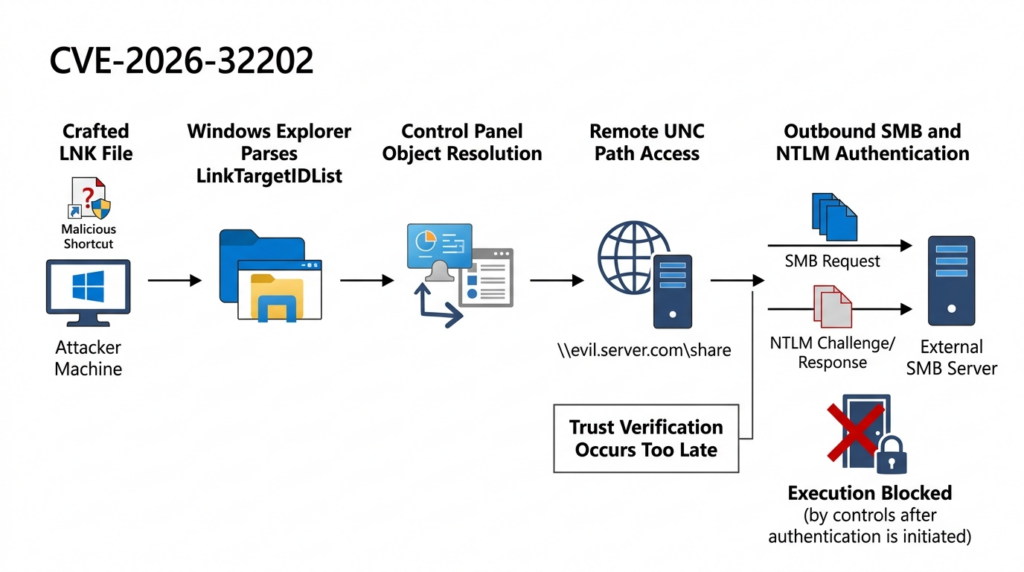
The core problem was the order of operations.
Microsoft added trust verification to prevent the remote Control Panel component from executing. But Explorer performed some work before that verification occurred. Specifically, Windows attempted to resolve the remote path while obtaining information needed to display the shortcut.
When Explorer renders a folder, it may inspect file metadata, Shell namespace structures, file types, and icons. In the CVE-2026-32202 path, the malicious shortcut represented a Control Panel object that referenced an attacker-controlled UNC location. Explorer attempted to resolve that location while processing the object.
The sequence can be represented as follows:
1. A directory contains a crafted LNK file.
2. Windows Explorer enumerates the directory.
3. Shell32 parses the shortcut's LinkTargetIDList.
4. Explorer requests metadata or an icon for the represented object.
5. Windows checks the CPL-related remote path.
6. The UNC path is resolved.
7. The Windows SMB client contacts the remote server.
8. NTLM authentication negotiation begins.
9. The later trust verification prevents remote code execution.
The original patch protected the execution boundary but did not initially protect the earlier path-resolution boundary. By the time SmartScreen or another trust decision rejected the remote object, the network connection and authentication attempt could already have occurred. Akamai describes this as a gap between path resolution and trust verification. (Akamai)
This is a common source of incomplete security patches. Developers may block the final dangerous operation while overlooking earlier side effects such as:
- DNS resolution
- Network authentication
- File retrieval
- Metadata loading
- Redirect processing
- Credential forwarding
- Object instantiation
- Protocol negotiation
A patch is complete only when it removes or safely controls the entire dangerous behavior, not merely the final payload execution.
Why the Vulnerability Is Described as Zero Click
The phrase “zero click” can be misleading unless the exact trigger is explained.
An attacker still needs to deliver or place the malicious shortcut somewhere that Windows Explorer will process it. Delivery may involve:
- An email attachment
- A compressed archive
- A downloaded package
- A cloud-synchronized folder
- A shared directory
- Removable media
- A malicious software bundle
- A file placed by an earlier compromise
The victim or another process may also need to extract the archive or browse to the directory. This is consistent with Microsoft’s CVSS vector, which includes UI:R.
However, once the shortcut is present in a rendered directory, the user may not need to double-click it. Explorer can inspect the shortcut automatically to obtain an icon or other display information. Akamai found that this automatic Shell processing was enough to initiate authentication to the attacker-controlled server. (Akamai)
A realistic sequence might look like this:
Attacker sends an archive
        |
        v
Archive contains a crafted LNK file
        |
        v
Victim extracts or previews the archive
        |
        v
Explorer renders the containing directory
        |
        v
Explorer processes shortcut metadata
        |
        v
Windows contacts the remote SMB server
        |
        v
Net-NTLMv2 authentication material is exposed
The vulnerability therefore differs from a conventional malicious shortcut that requires the victim to intentionally open the file.
This also creates a detection challenge. Security products focused only on process execution may see no PowerShell, cmd.exe, script host, or suspicious child process. The most important evidence may instead be a network connection initiated by explorer.exe.
What Is Actually Exposed
CVE-2026-32202 is often summarized as “NTLM hash theft.” That phrase communicates the risk, but it is not entirely precise.
Windows does not normally send a plaintext password to an SMB server. NTLM uses a challenge-response protocol. The server provides a challenge, and the client calculates a response using information derived from the user’s credentials.
An attacker-controlled SMB server may receive data that includes:
Username
Domain or computer name
Server challenge
Client challenge
Net-NTLMv2 response
Authentication protocol metadata
This exchange is not the same as directly stealing the plaintext password. It is also not necessarily identical to extracting the reusable NT password hash stored by Windows.
Nevertheless, Net-NTLMv2 exposure can still be dangerous in two primary ways.
NTLM Relay Risk
In an NTLM relay attack, the attacker forwards the victim’s authentication exchange to another service. Instead of recovering the password, the attacker tries to convince a target service that the attacker is the victim.
Whether relay succeeds depends on the destination and its security configuration.
Important conditions include:
- The destination accepts NTLM authentication.
- The attacker can reach the destination service.
- The victim’s account is authorized on that service.
- SMB signing is not required for the targeted SMB path.
- LDAP signing or channel binding is not enforced for a targeted directory path.
- Extended Protection for Authentication is not effective for the service.
- Network segmentation permits the relay.
- The authentication exchange is not bound to the intended server or channel.
CVE-2026-32202 does not independently guarantee privilege escalation, lateral movement, or Active Directory compromise. It provides an authentication-coercion primitive. A successful follow-on attack still depends on weaknesses elsewhere in the environment.
This distinction is important for accurate vulnerability reporting. A finding should not state that the CVE automatically compromises a domain controller. It should explain what authentication material was exposed, which relay destinations were reachable, and which protections were or were not present.
Offline Password Guessing Risk
An attacker may also attempt to test password candidates against captured Net-NTLMv2 challenge-response material.
The practical risk depends heavily on password quality.
A long, random, unique password may be infeasible to recover. A shorter or predictable password may be substantially more vulnerable, particularly when it follows patterns such as:
CompanyName2026!
Season2026!
Department123
Welcome2026
FirstnameBirthday
Reused personal password
This is one reason why password length, uniqueness, and managed service-account credentials remain important even when plaintext passwords are never transmitted.
An organization should treat exposure of a privileged account, service account, or weakly protected user account more seriously than exposure of a low-privilege identity protected by a long random password.
CVE-2026-32202 Attack Chain
| 스테이지 | Attacker action | Windows behavior | Defensive opportunity |
|---|---|---|---|
| Delivery | Places or sends a crafted LNK file | File reaches a location processed by Explorer | Email filtering, archive inspection, download controls |
| Parsing | Causes the directory to be rendered | Shell32 parses the shortcut structure | Endpoint telemetry and static LNK inspection |
| Resolution | Embeds an attacker-controlled UNC reference | Explorer resolves the remote path | DNS monitoring, firewall policy and egress controls |
| 인증 | Operates an SMB endpoint | Windows attempts NTLM authentication | Outbound SMB blocking and NTLM restrictions |
| Collection | Records the challenge-response exchange | Net-NTLMv2 material reaches attacker infrastructure | Network isolation and identity monitoring |
| Follow-on abuse | Attempts relay or password guessing | Other services may accept the identity | Signing, channel binding, Kerberos and least privilege |
The attack chain highlights why patching and identity hardening must be considered together. The Windows update removes the specific Shell behavior, while SMB restrictions and NTLM controls reduce the impact of similar authentication-coercion techniques.
Exploitation and Disclosure Timeline
| Date | Event |
|---|---|
| December 2025 | An APT28 campaign targeted Ukraine and several EU countries |
| January 2026 | Akamai detected and analyzed the weaponized LNK chain |
| February 2026 | Microsoft patched CVE-2026-21510 and CVE-2026-21513 |
| After February 2026 | Akamai identified residual NTLM authentication coercion |
| April 14, 2026 | Microsoft released the fix for CVE-2026-32202 |
| April 23, 2026 | Akamai published its technical incomplete-patch analysis |
| April 28, 2026 | CVE-2026-32202 was added to CISA KEV |
| May 12, 2026 | CISA remediation deadline for covered federal systems |
Akamai reported that the original APT28 chain used CVE-2026-21510 and CVE-2026-21513 in the same LNK file. Microsoft’s February patch removed the earlier execution path, while the remaining authentication-coercion issue was later addressed as CVE-2026-32202. (Akamai)
NVD records April 28, 2026 as the KEV addition date and May 12, 2026 as the required remediation date for covered federal systems. (NVD)
Affected Windows Versions
CVE-2026-32202 affects multiple supported and extended-support Windows client and server branches. NVD’s affected-product records include Windows 10, Windows 11, and several Windows Server releases. (NVD)
Examples of affected client versions and fixed build thresholds include:
| Windows release | Builds below this level listed as affected |
|---|---|
| Windows 10 Version 1607 | 14393.9060 |
| Windows 10 Version 1809 | 17763.8644 |
| Windows 10 Version 21H2 | 19044.7184 |
| Windows 10 Version 22H2 | 19045.7184 |
| Windows 11 Version 23H2 | 22631.6936 |
| Windows 11 Version 24H2 | 26100.8246 |
| Windows 11 Version 25H2 | 26200.8246 |
These values are useful for asset validation, but they should not replace Microsoft’s product-specific Security Update Guide. Servicing requirements may vary by edition, architecture, Extended Security Update status, hotpatch channel, and server release.
Because Windows updates are cumulative, a later successfully installed cumulative update should normally include the April 2026 fix. Security teams should therefore validate the running OS build rather than checking only for the presence of one historical KB number.
Why Enterprise Windows Environments Face Greater Risk
CVE-2026-32202 can affect an individual Windows workstation, but several enterprise conditions increase the potential impact.
NTLM Is Still Widely Used
Many organizations continue to depend on NTLM because of legacy applications, workgroup devices, older storage appliances, IP-address-based connections, missing service principal names, and unsupported trust relationships.
Kerberos is generally preferable because it provides stronger server-identity validation. However, applications and Windows services may fall back to NTLM when Kerberos cannot be negotiated.
This means that a modern domain environment can still expose NTLM authentication without administrators realizing how frequently it occurs.
Outbound SMB Is Often Less Restricted Than Inbound SMB
Many organizations block inbound SMB from the internet but do not apply equivalent controls to outbound traffic.
Microsoft recommends blocking outbound TCP port 445 to the internet at the corporate firewall. Microsoft notes that internet-bound SMB is rarely required except for specific cloud scenarios, which should be handled through controlled service ranges or secure connectivity. (Microsoft Learn)
If a workstation cannot reach an attacker-controlled SMB server, the CVE-2026-32202 credential-exposure path becomes substantially harder to complete.
Privileged Accounts Are Used for Routine Activity
Administrators sometimes browse the web, open email attachments, inspect archives, or access shared folders while logged in with privileged accounts.
This practice increases the value of any coerced authentication. Even when a password cannot be recovered, a relayed privileged identity may provide access to sensitive services if relay protections are incomplete.
Dedicated administrative workstations, separate user and administrative accounts, and tiered access models can reduce this risk.
Relay Protections Are Inconsistent
SMB signing, LDAP signing, channel binding, and Extended Protection are not enforced uniformly across all enterprise systems.
A coerced authentication exchange becomes more useful when the attacker can locate a destination that:
- Accepts NTLM
- Does not require integrity protection
- Is reachable from the attacker’s position
- Grants useful access to the victim’s identity
Service Accounts May Have Weak Static Passwords
Older service accounts sometimes use manually created passwords that remain unchanged for years.
If a service account’s Net-NTLMv2 material is exposed and the password is weak, offline guessing may be more practical. Managed service accounts and long automatically generated credentials reduce this risk.
Detection Strategy
A reliable detection strategy should focus on the complete behavior chain rather than a single file hash or filename.
The most useful signals are:
Suspicious LNK delivery
        |
        v
Explorer processes the file
        |
        v
DNS lookup for an unusual host
        |
        v
explorer.exe initiates TCP 445
        |
        v
NTLM authentication is attempted
        |
        v
Potential follow-on authentication or relay activity
Detect Suspicious LNK Delivery
Security teams should inspect shortcut files delivered through:
- Email attachments
- Compressed archives
- Cloud-storage links
- Shared drives
- Removable media
- Browser downloads
- Software bundles
- Collaboration platforms
High-risk shortcut properties include:
A remote UNC path
A remote CPL or DLL reference
A Control Panel namespace object
An unusual LinkTargetIDList structure
An icon loaded from a remote location
A mismatch between the visible icon and actual file type
A shortcut received from an external source
A LNK file hidden inside an archive
Static analysis is preferable to opening the shortcut on a normal workstation. Analysts should inspect the binary Shell item structures, target information, icon location, arguments, working directory, and network references inside an isolated environment.
Detect Explorer-Initiated SMB Connections
One of the strongest behavioral signals is an outbound SMB connection initiated by explorer.exe.
Explorer legitimately connects to internal file shares, so the process name alone is not sufficient. The destination and surrounding context determine the risk.
Suspicious combinations include:
explorer.exe -> public IP address -> TCP 445
explorer.exe -> newly observed hostname -> TCP 445
explorer.exe -> external address after archive extraction
explorer.exe -> server outside the approved SMB inventory
explorer.exe -> TCP 445 after a new LNK appears in Downloads
An illustrative detection rule is:
process.name == "explorer.exe"
AND destination.port == 445
AND destination.ip NOT IN approved_internal_smb_ranges
AND destination.hostname NOT IN approved_smb_servers
The rule should be adapted to the organization’s environment. Cloud file services, VPN routes, development environments, and remote offices may create legitimate exceptions.
Correlate File, DNS, Process and Network Events
A single telemetry source may not tell the full story.
The strongest detection comes from correlating:
| Data source | 증거 |
|---|---|
| Email security | Archive or shortcut delivered |
| Endpoint detection | LNK created, extracted or accessed |
| File telemetry | Shortcut appears in Downloads, Desktop or Temp |
| Process telemetry | explorer.exe reads or parses the file |
| DNS logs | Query for an unfamiliar hostname |
| Firewall logs | TCP 445 connection or blocked attempt |
| NTLM logs | Outgoing NTLM authentication recorded |
| Identity logs | Follow-on login to another service |
A blocked connection is still valuable evidence. Even when the firewall prevents the SMB session, the attempted connection may show that an endpoint processed malicious or suspicious content.
Audit Outgoing NTLM
Windows provides the following policy:
Network security:
Restrict NTLM:
Outgoing NTLM traffic to remote servers
The available modes include:
- Allow all
- Audit all
- Deny all
Microsoft recommends selecting Audit all first, reviewing the operational logs, identifying legitimate dependencies, and then moving toward denial with narrowly defined exceptions. Microsoft warns that changing the policy can affect compatibility with applications and services. (Microsoft Learn)
Recent NTLM operational events can be inspected with PowerShell:
Get-WinEvent `
  -LogName "Microsoft-Windows-NTLM/Operational" `
  -MaxEvents 200 |
Select-Object TimeCreated, Id, LevelDisplayName, Message
This command does not exploit the vulnerability. It reviews authentication telemetry already recorded by Windows.
Inventory LNK Files in High-Risk Locations
The following PowerShell command inventories shortcut files without opening or executing them:
$paths = @(
    "$env:USERPROFILE\Downloads",
    "$env:USERPROFILE\Desktop",
    "$env:TEMP"
)

foreach ($path in $paths) {
    if (Test-Path $path) {
        Get-ChildItem `
          -Path $path `
          -Filter *.lnk `
          -File `
          -Recurse `
          -ErrorAction SilentlyContinue |
        Select-Object `
          FullName,
          Length,
          CreationTimeUtc,
          LastWriteTimeUtc
    }
}
The presence of a LNK file does not prove exploitation. This inventory should be combined with file origin, archive history, network telemetry, icon references, and static shortcut parsing.
Safe Patch Validation
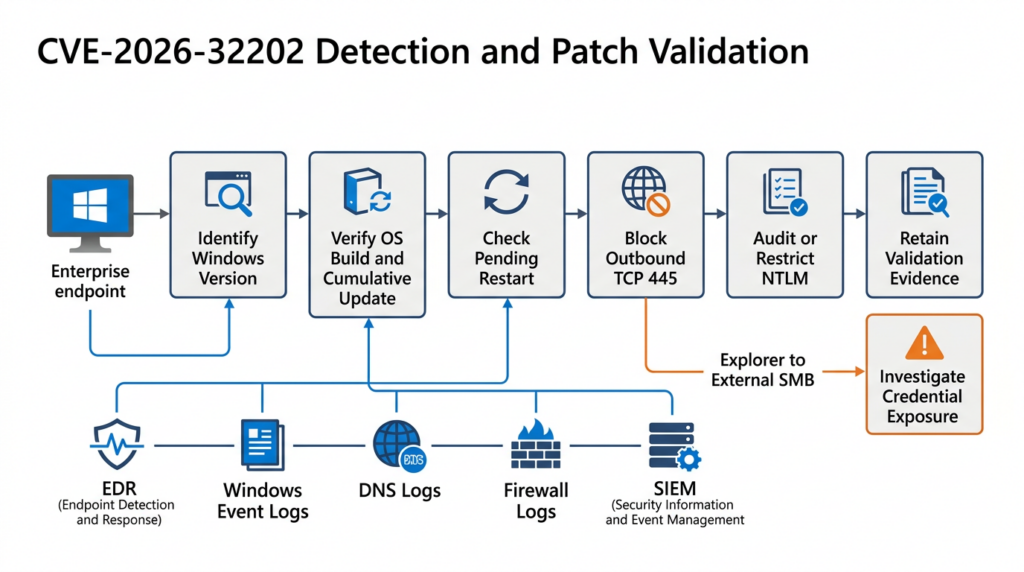
A complete CVE-2026-32202 validation process should answer four questions:
- Is the Windows release affected?
- Is the required cumulative update installed?
- Is the system running at or above the fixed build?
- Are compensating network and authentication controls active?
A vulnerability scanner that checks only for a KB identifier may miss:
- Superseding cumulative updates
- Failed installations
- Pending restarts
- Devices running an unexpected servicing branch
- Stale asset inventory
- Offline virtual-machine templates
- Unsupported Windows releases
- Partial update deployment
Collect the Windows Build
The following PowerShell command collects the full Windows build:
$cv = Get-ItemProperty `
  "HKLM:\SOFTWARE\Microsoft\Windows NT\CurrentVersion"

[PSCustomObject]@{
    ProductName      = $cv.ProductName
    DisplayVersion   = $cv.DisplayVersion
    EditionID        = $cv.EditionID
    CurrentBuild     = $cv.CurrentBuildNumber
    UBR              = $cv.UBR
    FullBuild        = "$($cv.CurrentBuildNumber).$($cv.UBR)"
    InstallationType = $cv.InstallationType
}
Example output:
ProductName      : Windows 11 Pro
DisplayVersion   : 24H2
EditionID        : Professional
CurrentBuild     : 26100
UBR              : 8246
FullBuild        : 26100.8246
InstallationType : Client
For Windows 11 24H2, NVD lists builds below 26100.8246 as affected. For Windows 11 25H2, builds below 26200.8246 are listed as affected. (NVD)
Review Installed Updates
Get-HotFix |
Sort-Object InstalledOn -Descending |
Select-Object -First 20 `
    HotFixID,
    Description,
    InstalledBy,
    InstalledOn
Get-HotFix is useful evidence, but it should not be treated as the only source of truth. The final determination should include the running OS build and the Microsoft servicing baseline for the exact Windows edition.
Check for a Pending Restart
$rebootIndicators = [ordered]@{
    CBSRebootPending = Test-Path `
      "HKLM:\SOFTWARE\Microsoft\Windows\CurrentVersion\Component Based Servicing\RebootPending"

    WindowsUpdateRebootRequired = Test-Path `
      "HKLM:\SOFTWARE\Microsoft\Windows\CurrentVersion\WindowsUpdate\Auto Update\RebootRequired"

    PendingFileRenameOperations = $null -ne (
        Get-ItemProperty `
          "HKLM:\SYSTEM\CurrentControlSet\Control\Session Manager" `
          -Name PendingFileRenameOperations `
          -ErrorAction SilentlyContinue
    )
}

[PSCustomObject]$rebootIndicators
A pending restart does not always mean the CVE fix is inactive, but the endpoint should not be marked fully verified until servicing is complete and the running build has been checked again.
Compare Builds Against an Approved Baseline
$minimumBuilds = @{
    "14393" = 9060
    "17763" = 8644
    "19044" = 7184
    "19045" = 7184
    "22631" = 6936
    "26100" = 8246
    "26200" = 8246
}

$cv = Get-ItemProperty `
  "HKLM:\SOFTWARE\Microsoft\Windows NT\CurrentVersion"

$build = [string]$cv.CurrentBuildNumber
$ubr   = [int]$cv.UBR

if ($minimumBuilds.ContainsKey($build)) {
    $minimumUbr = $minimumBuilds[$build]

    [PSCustomObject]@{
        FullBuild       = "$build.$ubr"
        MinimumApproved = "$build.$minimumUbr"
        MeetsBaseline   = ($ubr -ge $minimumUbr)
    }
}
else {
    [PSCustomObject]@{
        FullBuild       = "$build.$ubr"
        MinimumApproved = "Manual advisory review required"
        MeetsBaseline   = $null
    }
}
The example table is not a complete enterprise baseline. Production validation must include every Windows client and server release actually deployed in the organization.
Validate Outbound SMB Controls
Microsoft recommends blocking TCP port 445 outbound to the internet at the corporate firewall. This prevents internal devices from sending SMB traffic directly to arbitrary internet destinations. Microsoft advises handling required public cloud SMB traffic through narrowly controlled service ranges or secure connectivity rather than a general internet-wide exception. (Microsoft Learn)
A suitable boundary policy is:
Source: Managed endpoint networks
Destination: Internet
Protocol: TCP
Destination port: 445
Action: Deny and log
The policy should preserve access to authorized internal file servers and explicitly approved cloud services.
A CVE validation report should distinguish between patch and mitigation states:
| Patch state | Outbound SMB state | Assessment |
|---|---|---|
| 패치 | Blocked | Strongly remediated |
| 패치 | Allowed | Vulnerability fixed, but broader coercion exposure remains |
| Unpatched | Blocked | Specific exploit path constrained, patch still required |
| Unpatched | Allowed | Highest-priority exposure |
Block NTLM for SMB Where Supported
Microsoft provides an SMB client capability that blocks NTLM authentication for remote outbound SMB connections. Microsoft states that this can prevent malicious servers from tricking clients into sending NTLM requests and can be enabled without disabling NTLM for every Windows service. (Microsoft Learn)
The dedicated SMB client capability requires:
- Windows Server 2025 or later, or
- Windows 11 Version 24H2 or later
The destination SMB server must support an alternative authentication mechanism such as Kerberos. (Microsoft Learn)
Check the current configuration:
Get-SmbClientConfiguration |
Select-Object BlockNTLM
Enable blocking:
Set-SmbClientConfiguration -BlockNTLM $true
Microsoft also supports Group Policy configuration under:
Computer Configuration
  > Administrative Templates
    > Network
      > Lanman Workstation
        > Block NTLM (LM, NTLM, NTLMv2)
Exceptions may be required for standalone storage devices, workgroup servers, or other systems that cannot use Kerberos. Microsoft recommends maintaining an explicit exception list rather than broadly re-enabling NTLM. (Microsoft Learn)
Migrate Away from NTLM Carefully
Disabling NTLM without preparation can break:
- Legacy applications
- NAS devices
- Workgroup systems
- IP-address-based file access
- Services with missing SPNs
- Cross-domain workflows
- Older printers and appliances
- Applications that explicitly request NTLM
- Local-account remote access
A safer migration sequence is:
1. Enable outgoing NTLM auditing.
2. Collect representative authentication data.
3. Identify servers receiving NTLM.
4. Determine why Kerberos is not being used.
5. Correct DNS, SPN, trust or application problems.
6. Create temporary, narrow exceptions.
7. Enforce denial in a test group.
8. Monitor failures.
9. Expand enforcement gradually.
10. Remove obsolete exceptions.
Microsoft explicitly recommends using audit mode before selecting Deny all, then reviewing the operational event log and defining required server exceptions. (Microsoft Learn)
Additional Controls Against NTLM Relay
Patching CVE-2026-32202 removes the known Windows Shell path, but additional controls can reduce the value of coerced authentication from other techniques.
Require SMB Signing
SMB signing helps protect the integrity of SMB communication. Requiring signing on important destinations can prevent common relay scenarios in which an attacker cannot produce the necessary signed session.
Harden LDAP
Domain environments should evaluate LDAP signing and channel binding. These controls can make it more difficult to relay authentication to directory services.
Enable Extended Protection
Extended Protection for Authentication can bind an authentication exchange to the intended service or secure channel, reducing the usefulness of forwarded credentials.
Use Separate Administrative Accounts
Privileged users should not perform normal browsing, email, file extraction, or document review with administrative identities.
Use Managed Service Accounts
Managed service accounts reduce dependence on static, human-chosen passwords and make offline password guessing less practical.
Enforce Strong Passwords
Long, unique passwords make captured Net-NTLMv2 material substantially more difficult to use in offline guessing attacks.
Segment SMB Access
Workstations should reach only the file servers they require. SMB access from user subnets to management systems, unrelated servers, and sensitive infrastructure should be minimized.
Eliminate Local Administrator Password Reuse
A recovered or relayed local credential becomes more damaging when the same credential works on many endpoints.
Incident Response for Suspected Exploitation
A suspicious explorer.exe connection to an external SMB server should be investigated as possible credential exposure even if no malware executed.
Preserve the Original File
Do not repeatedly browse to or open the suspicious shortcut on a normal workstation.
Collect:
Original LNK file
Containing archive
Email message and headers
Download URL
File hashes
Creation and modification timestamps
Mark-of-the-Web data
Related files from the same directory
The file should be analyzed statically in an isolated environment.
Identify the Remote Infrastructure
Collect:
UNC hostname
Resolved IP addresses
DNS query time
Destination port
Firewall decision
Connection duration
Bytes transferred
Other connections to the same infrastructure
A blocked SMB connection may still reveal the malicious hostname through DNS logs.
Determine Which Identity Was Exposed
Review endpoint and identity telemetry to establish:
- The logged-on user
- Whether a user or computer account authenticated
- Whether the account was privileged
- Whether the account had a weak or reused password
- Whether the account authenticated to other systems afterward
- Whether the attacker’s server completed NTLM negotiation
Search for Relay or Lateral Movement
Potential follow-on targets include:
SMB file servers
LDAP and LDAPS services
HTTP services using Windows Integrated Authentication
Certificate enrollment services
Remote-management interfaces
Database services using integrated authentication
Do not assume that a relay succeeded merely because an SMB connection occurred. Search for matching authentication events, access attempts, privilege use, object changes, and new sessions.
Contain the Endpoint
Containment may include:
- Isolating the device
- Blocking the domain and IP addresses
- Blocking internet-bound SMB
- Removing the malicious shortcut and archive
- Installing the Windows security update
- Completing the restart
- Running EDR and antivirus scans
- Searching other endpoints for matching indicators
- Reviewing the affected account’s recent activity
Reset Credentials Proportionally
A credential reset is more strongly indicated when:
- Authentication reached attacker-controlled infrastructure.
- The exposed account was privileged.
- The password may be weak.
- Password reuse is possible.
- Relay activity is suspected.
- Follow-on access cannot be excluded.
For privileged accounts, responders should also consider invalidating active sessions and reviewing recent administrative actions.
Safe Validation Without Credential Theft
Security teams do not need to capture real employee authentication material to prove that CVE-2026-32202 has been remediated.
A safe validation plan should prioritize:
| 유효성 검사 계층 | Required evidence |
|---|---|
| Product identification | Windows edition, version and servicing branch |
| Patch evidence | Installed cumulative update |
| Runtime evidence | Full running OS build |
| Restart evidence | No incomplete servicing state |
| Network control | External TCP 445 denied and logged |
| NTLM posture | Audit, restriction or SMB NTLM blocking status |
| Detection coverage | Explorer-to-external-SMB analytics |
| Exposure review | Historical LNK and SMB telemetry examined |
Production testing should not:
Send real employee NTLM exchanges to an internet server
Relay authentication to production services
Attempt to crack employee passwords
Host a remote malicious CPL or DLL
Disable endpoint protection
Use a domain administrator identity
Deeper reproduction should be limited to an isolated lab using synthetic accounts, controlled SMB infrastructure, explicit authorization, and no route to production systems.
Evidence-Driven CVE Validation With Penligent
CVE-2026-32202 shows why CVE validation should not stop at a database match or version banner.
A useful workflow must connect:
Vendor advisory
        |
        v
Affected asset
        |
        v
Patch or build evidence
        |
        v
Network and policy state
        |
        v
Behavioral validation
        |
        v
Retest result
        |
        v
Final report
Penligent’s documented workflow distinguishes an initial signal from a reproduced issue, confirmed impact, and verified fix. It also emphasizes retaining raw evidence, preconditions, reproduction steps, remediation guidance, and retest results rather than treating an AI-generated summary as proof. (펜리전트)
For an authorized CVE-2026-32202 assessment, the workflow can remain non-destructive:
- Identify Windows assets and servicing branches.
- Collect OS build and UBR values.
- Compare devices with fixed baselines.
- Detect incomplete updates or pending restarts.
- Review outbound SMB exposure.
- Check outgoing NTLM audit policies.
- Inspect historical LNK delivery.
- Correlate Explorer with external TCP 445 attempts.
- Record evidence for every affected asset.
- Retest after remediation.
- Generate an editable validation report.
This approach reduces the risk of false positives. A version string alone is not proof that an asset is exploitable, and a deployed patch record alone is not proof that the device is running the corrected code. Penligent’s published guidance similarly argues that CVE-focused testing should combine product detection, version evidence, behavior-based validation, patch guidance, and false-positive handling. (펜리전트)
Common Validation Mistakes
Treating CVE-2026-32202 as Direct RCE
The original CVE-2026-21510 chain involved remote code execution and SmartScreen bypass. CVE-2026-32202 tracks the residual authentication-coercion issue left after that path was patched. (Akamai)
Looking Only for One KB Number
A later cumulative update may include the fix even if the original April update is no longer the most recent installed package.
Validate the full running build.
Assuming the LNK Must Be Double-Clicked
Explorer may process shortcut metadata automatically while rendering the directory. The user may not have to explicitly launch the file. (Akamai)
Calling Net-NTLMv2 a Plaintext Password
The exposed material is a challenge-response exchange, not the plaintext password itself.
Assuming Authentication Exposure Equals Domain Compromise
Relay success depends on reachable services, account privileges, signing requirements, channel binding, segmentation, and other environmental conditions.
Ignoring Windows Server
The affected-product data includes Windows Server releases as well as desktop Windows versions. (NVD)
Patching Without Blocking Outbound SMB
The patch fixes this specific Windows Shell behavior, but outbound SMB restrictions reduce exposure to other current and future coercion techniques.
Disabling NTLM Without Auditing
A sudden NTLM shutdown may disrupt legitimate systems. Microsoft recommends auditing first and then applying controlled denial with exceptions. (Microsoft Learn)
Frequently Asked Questions
What is CVE-2026-32202?
CVE-2026-32202 is a Windows Shell protection mechanism failure that can cause a Windows system to authenticate to an attacker-controlled server when Explorer processes a specially crafted shortcut.
Is CVE-2026-32202 a remote code execution vulnerability?
No. The related CVE-2026-21510 path was associated with remote code execution and SmartScreen bypass. CVE-2026-32202 concerns the remaining NTLM authentication-coercion behavior. (Akamai)
Does the victim need to open the shortcut?
The victim may need to receive, extract, preview, or browse to the content, but Akamai found that Explorer could trigger authentication while automatically processing the LNK file. A deliberate double-click was not necessarily required. (Akamai)
Does the vulnerability expose the plaintext password?
No. It exposes an NTLM challenge-response exchange that may be relayed or tested through offline password guessing.
Why is the CVSS score only 4.3?
The official vector models limited confidentiality impact and required user interaction. It does not fully capture active exploitation, enterprise NTLM dependencies, account privilege, relay opportunities, or weak passwords. (NVD)
Has the vulnerability been exploited?
Yes. CVE-2026-32202 is listed in CISA’s Known Exploited Vulnerabilities Catalog. (NVD)
What is the primary remediation?
Install the applicable Microsoft update or a later cumulative update that includes the fix, then verify the running Windows build.
Should outbound SMB be blocked?
Microsoft recommends blocking TCP port 445 outbound to the internet at the corporate firewall unless a documented business requirement exists. (Microsoft Learn)
Can Windows block NTLM specifically for SMB?
Yes. Windows 11 Version 24H2 and Windows Server 2025 support an SMB client option for blocking NTLM on remote outbound SMB connections. (Microsoft Learn)
Is installing the patch enough?
Installing the patch addresses CVE-2026-32202, but organizations should also restrict outbound SMB, audit NTLM, harden relay-sensitive services, separate privileged accounts, and monitor Explorer-initiated SMB connections.
Final Assessment
CVE-2026-32202 is not a direct remote code execution vulnerability, and its official CVSS score is only 4.3. Neither fact makes it low priority.
The vulnerability affected a fundamental Windows component. It could be triggered while Explorer automatically processed a crafted shortcut. It caused network authentication before the relevant trust verification completed. It exposed Net-NTLMv2 material that could support relay or offline password guessing. It was created by an incomplete patch for a previously exploited APT28 attack chain, and it was subsequently added to CISA’s KEV catalog. (Akamai)
A complete defensive response should include:
Install the applicable Windows update
Verify the running OS build
Complete required restarts
Block internet-bound TCP port 445
Audit outgoing NTLM
Block NTLM for SMB where supported
Reduce legacy NTLM dependencies
Require relay-resistant service configurations
Separate privileged and everyday identities
Detect Explorer connections to untrusted SMB servers
Investigate historical credential exposure
Retain evidence for every remediation decision
The broader lesson is that security verification cannot stop at the final stage of an exploit.
A patch may prevent remote code execution while leaving DNS resolution, path access, network authentication, credential exposure, or another pre-execution side effect intact. CVE-2026-32202 existed because the trust decision occurred after Windows had already crossed a security boundary.
Effective patch validation must therefore ask more than whether the original payload still executes. It must determine whether every unsafe side effect has been removed, whether compensating controls are operating correctly, and whether the conclusion is supported by reproducible evidence.
 Korean
  English
  German
  French
  Spanish
  Portuguese
  Japanese
  Hindi
Hindi  Arabic
  Turkish
  Hebrew