
A reflected cross-site scripting vulnerability on a login page normally sounds serious but contained.
CVE-2026-64638 is different.
The vulnerability affects WordPress Core and begins with an unauthenticated input supplied to wp-login.php. By itself, the flaw provides reflected cross-site scripting in the WordPress origin. But researchers at pwn.ai demonstrated that this browser-side primitive could be chained through several behaviors already present in WordPress—including DOM manipulation, REST JSONP, Application Password authorization, and privileged plugin functionality—to reach PHP code execution when an authenticated administrator can be induced to interact with an attacker-controlled page.
WordPress describes CVE-2026-64638 as a pre-authentication reflected XSS vulnerability on the login screen with potential to lead to PHP code execution. It received a CVSS v4.0 score of 8.9, High, with no privileges required but active user interaction and high attack complexity. WordPress released version 7.0.3 on August 6, 2026 and strongly recommended immediate updates. (wordpress.org)
The distinction matters.
CVE-2026-64638 is not a zero-click unauthenticated WordPress RCE. An unauthenticated attacker can reach the XSS primitive, but the demonstrated path to server-side PHP execution depends on additional conditions—most importantly, interaction involving a privileged WordPress administrator. The official CVE record explicitly notes that the RCE escalation involves conditions outside the attacker’s control and requires successful social engineering and explicit victim interaction. (OpenCVE)
That makes CVE-2026-64638 a particularly useful case study in modern vulnerability chaining: a browser-side injection flaw becomes much more dangerous when combined with privileged browser state and legitimate administrative functionality.
CVE-2026-64638 at a Glance
| 속성 | CVE-2026-64638 |
|---|---|
| 제품 | WordPress Core |
| 취약성 | Pre-auth reflected XSS |
| Primary endpoint | wp-login.php |
| CWE | CWE-79 |
| CVSS v4.0 | 8.9 High |
| Authentication required for XSS | 아니요 |
| 사용자 상호 작용 | 필수 |
| Potential impact | Same-origin JavaScript execution; conditional PHP code execution |
| Reported by | pwn.ai |
| Fixed | August 6, 2026 |
| Primary patched release | WordPress 7.0.3 |
| GitHub Advisory | GHSA-52p2-r8wf-jcrf |
The WordPress GitHub advisory identifies vulnerable maintenance branches from WordPress 4.7 through 7.0.2 and provides patched versions for every maintained branch down to 4.7.34. WordPress documentation also notes that versions 4.6 and earlier no longer receive security fixes. (Shnopay)
Since newer WordPress releases have subsequently shipped, administrators should generally upgrade to the current supported WordPress release rather than treating 7.0.3 as the long-term destination. WordPress’s release archive currently lists WordPress 7.1, released August 19, 2026, as the latest release. (WordPress.org)
Why CVE-2026-64638 Is More Than a Normal Reflected XSS
A classic reflected XSS looks roughly like this:
attacker-controlled input
        ↓
server reflects input
        ↓
browser interprets it as HTML/JavaScript
        ↓
script runs in target origin
That is already dangerous because same-origin JavaScript can perform actions in the context of the affected website.
CVE-2026-64638 becomes more interesting because the original input appears to cross several distinct security boundaries.
The attack chain can be conceptually represented as:
Unauthenticated login input
        ↓
Sanitizer disagreement
        ↓
HTML injection
        ↓
Existing WordPress JavaScript interacts with injected DOM
        ↓
DOM clobbering
        ↓
Same-origin request
        ↓
REST JSONP response
        ↓
JavaScript execution in WordPress origin
        ↓
Interaction with authenticated administrator state
        ↓
Privileged WordPress functionality
        ↓
Potential PHP code execution
No single component necessarily looks catastrophic when viewed independently.
The vulnerability emerges from their composition.
That is one of the most important lessons from CVE-2026-64638.
The Root Cause: Two Parsers Disagree About the Same String
The initial vulnerability exists in WordPress’s login failure handling.
When a username is submitted through wp-login.php, WordPress eventually processes it through functions including wp_signon() 그리고 wp_authenticate(). When the username does not exist, WordPress generates an error message containing the submitted username.
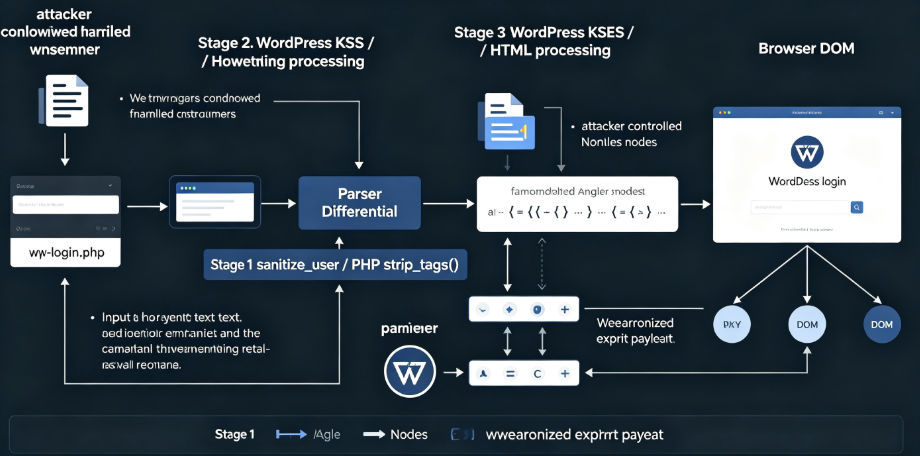
The pwn.ai researchers traced the value through WordPress’s sanitization pipeline and identified a parser differential between PHP’s strip_tags() behavior and WordPress’s own KSES HTML sanitizer. (pwn.ai)
Conceptually, the vulnerable flow looked like this:
$username = sanitize_user($username);

$error = sprintf(
    'The username %s is not registered.',
    $username
);
The critical problem was not simply “WordPress forgot to sanitize the username.”
The input was sanitized.
The problem was that two different sanitization systems interpreted malformed HTML differently.
Consider the conceptual difference:
<b>example</b>A normal HTML tag is recognized as HTML and removed by a tag-stripping function.
But malformed markup resembling:
< b>example< /b>can be interpreted differently.
The pwn.ai analysis showed that PHP’s strip_tags() did not treat certain sequences containing whitespace after < as normal tags. The content could therefore survive the initial stripping step.
Later, WordPress’s KSES processing interpreted the input differently and normalized some of that text into permitted HTML elements. (pwn.ai)
This creates the fundamental security problem:
Parser A:
"This is text."

        ↓

Parser B:
"This is valid HTML."
The vulnerability is therefore better understood as a parser differential 또는 sanitizer composition problem rather than merely insufficient filtering.
WordPress’s security patch reflects this area directly. Its Trac changeset describes the relevant fix as:
“Prevent usernames from mangling HTML.”
The fix modified both wp-includes/user.php 그리고 wp-login.php. (WordPress Trac)
Why Sanitization Composition Is Dangerous
Security engineers frequently think about sanitization as a property of individual functions.
예를 들어
input → sanitizer → safe outputReal applications often behave more like this:
input
 ↓
URL decoder
 ↓
username sanitizer
 ↓
template formatter
 ↓
HTML sanitizer
 ↓
browser HTML parser
 ↓
DOM API
 ↓
JavaScript library
Each component has its own grammar.
The dangerous condition occurs when:
S1(input) is safe according to parser Abut:
S2(S1(input))causes parser B to reinterpret the same bytes as structured content.
This pattern has appeared repeatedly across browser security research.
Encoding, HTML normalization, Unicode transformations, URL parsing, CSS parsing, DOM reconstruction, template engines, and sanitizers can all disagree.
CVE-2026-64638 shows how that disagreement can exist inside a mature platform such as WordPress.
HTML Injection Still Wasn’t XSS
An important technical detail is that achieving injected HTML did not immediately give the attacker arbitrary JavaScript.
WordPress KSES maintains an allowlist of permitted elements and attributes.
Therefore something like arbitrary:
<script>
...
</script>
could not simply be inserted.
Instead, the attacker had something more constrained:
Attacker can influence DOM structure
but
Attacker cannot simply insert arbitrary <script>
Normally, that may significantly reduce exploitability.
But modern web pages contain substantial JavaScript of their own.
The next question therefore becomes:
Can existing trusted JavaScript be manipulated into doing something useful with attacker-controlled DOM nodes?
In CVE-2026-64638, the answer was yes.
WordPress user-profile.js Became Part of the Exploit Chain
The WordPress login page loads JavaScript used by WordPress’s user profile and password-management functionality.
According to pwn.ai’s technical analysis, user-profile.js contained DOM logic originally designed for legitimate WordPress interface elements such as password controls and color-scheme settings.
The important issue was contextual.
The JavaScript expected particular elements to exist on pages where that script normally operated.
On the login page, some of those elements did not exist.
But the attacker now had the ability to inject attacker-controlled DOM elements.
That meant the attacker could manufacture DOM structures that looked like legitimate UI elements to WordPress’s own JavaScript.
A simplified example looks like:
$('.some-container')
    .find('.some-button')
    .trigger('click');
Normally:
WordPress creates element
        ↓
WordPress JavaScript finds element
        ↓
WordPress JavaScript interacts with element
Under attacker-controlled DOM injection:
Attacker creates element
        ↓
WordPress JavaScript finds attacker element
        ↓
WordPress JavaScript interacts with attacker element
The application becomes the mechanism that activates the injected structure.
The researchers found that code in user-profile.js could automatically trigger a click path involving injected elements. (pwn.ai)
This transformed passive HTML injection into an active JavaScript-assisted primitive.
An Undefined Variable Became an Attack Surface
Another subtle component involved the JavaScript variable:
ajaxurlWordPress commonly defines ajaxurl on administrative pages so JavaScript can send requests to:
/wp-admin/admin-ajax.phpBut according to the research, the variable was not defined in the same way on the affected login page.
That sounds harmless.
Unexpectedly, it enabled another browser feature to enter the chain.
DOM Clobbering
Browsers expose certain elements with IDs or names through properties on the global window 객체입니다.
Conceptually:
<a id="example" href="/hackinglabs/ko/foo/"></a>can, in relevant browser contexts, influence:
window.exampleThis behavior is known as DOM clobbering when attacker-controlled DOM elements interfere with JavaScript variables or assumptions.
The researchers exploited this idea against the missing ajaxurl binding.
Instead of JavaScript resolving:
ajaxurlto the URL WordPress developers expected, an injected element could become involved in resolving that identifier.
The pwn.ai research used an allowed hyperlink-like element whose href could be converted into a string. When jQuery attempted to use the value as a request destination, the DOM element effectively supplied the URL. (pwn.ai)
The chain now looked roughly like:
Injected HTML
      ↓
Injected element with chosen ID
      ↓
Global-name resolution
      ↓
ajaxurl resolves unexpectedly
      ↓
jQuery sends request to attacker-influenced same-origin path
This is where an HTML parsing issue becomes a JavaScript control-flow issue.
From DOM Clobbering to a WordPress REST Request
The attacker still faced an important browser restriction.
Requests generated in the WordPress origin would generally remain within that origin.
But WordPress itself exposes numerous endpoints.
One particularly important capability was the WordPress REST API.
The research showed that attacker-controlled request parameters could reach public REST endpoints.
At this stage, the attacker essentially had:
Ability to induce WordPress JavaScript
to request an attacker-selected
same-origin WordPress URL.
Still not arbitrary JavaScript.
But another legacy web feature completed that transition.
The Role of JSONP
JSONP predates modern CORS.
Instead of returning pure JSON:
{
  "status": "ok"
}
a JSONP endpoint might return JavaScript resembling:
callback({
  "status": "ok"
});
Because the response is executable JavaScript rather than merely data, the callback name becomes security-sensitive.
WordPress REST functionality supported JSONP callback behavior.
Meanwhile, jQuery could interpret a response with a JavaScript MIME type as script and evaluate it.
According to the pwn.ai research, combining those two behaviors transformed the attacker-controlled request primitive into JavaScript execution inside the WordPress origin. (pwn.ai)
Conceptually:
Attacker-controlled DOM
        ↓
WordPress JavaScript sends request
        ↓
WordPress REST endpoint
        ↓
JSONP response
        ↓
jQuery treats response as JavaScript
        ↓
JavaScript runs under target WordPress origin
This is the point where CVE-2026-64638 becomes a genuine reflected XSS.
Why the Browser Origin Matters
JavaScript executing under:
https://victim-wordpress.exampleis fundamentally different from JavaScript executing under:
https://attacker.exampleThe browser’s same-origin policy gives the WordPress-origin JavaScript access to actions and resources that an external attacker website normally cannot access.
Depending on the user’s authentication state and server configuration, same-origin script may be able to:
- interact with authenticated WordPress pages;
- read pages containing security nonces;
- submit same-origin forms;
- invoke REST or AJAX functionality;
- modify content where the current user has permission;
- perform actions using the victim’s active WordPress session.
This explains why an XSS affecting an administrator can become much more serious than an XSS affecting an anonymous user.
The vulnerability starts pre-auth.
The highest-impact chain does not remain pre-auth.
The Important Limitation: RCE Requires More Than the XSS
This point deserves emphasis because CVE headlines frequently collapse multi-stage vulnerabilities into their final impact.
The following statement is misleading:
CVE-2026-64638 allows anyone to remotely execute
commands on any WordPress server without authentication.
The official advisory does not say that.
The more accurate description is:
CVE-2026-64638 provides a pre-auth reflected XSS.

Researchers demonstrated that the XSS can be chained,
under additional conditions involving an authenticated
administrator and social engineering, toward PHP code execution.
WordPress itself uses the wording “potential to lead to PHP code execution.” (WordPress.org)
Patchstack similarly emphasizes that a reflected XSS must reach an administrator in order to achieve the demonstrated high-impact outcome and characterizes the scenario as a targeted interaction rather than autonomous worm-like exploitation. (Patchstack)
This explains the CVSS characteristics.
The CVE record assigns:
AV:N  Network
AC:H  High attack complexity
PR:N  No privileges required
UI:A  Active user interaction
while assigning High impact to confidentiality, integrity, and availability. (OpenCVE)
From XSS to Administrator Capability
The pwn.ai researchers demonstrated a particularly interesting escalation involving WordPress Application Passwords.
Application Passwords allow external applications to authenticate against WordPress without using the user’s normal interactive password.
Their exploit concept involved getting an already authenticated administrator’s browser into an Application Password authorization workflow.
The attacker’s JavaScript primitive could then interact with legitimate UI elements associated with the administrator’s WordPress session.
The key security principle here is:
The attacker does not necessarily need to steal
the administrator's normal password.

Instead, the attacker abuses a legitimate authorization
workflow using the administrator's authenticated browser.
This is a recurring pattern in modern web exploitation.
Security mechanisms such as OAuth approvals, API-token creation, passwordless authentication, trusted-device registration, or application authorization can become privilege-escalation targets if attacker-controlled script executes inside their origin.
Same-Origin Method Execution
The pwn.ai write-up describes part of the technique as Same Origin Method Execution, or SOME.
Instead of relying solely on conventional JavaScript payload injection, the attacker can cause a function or method already accessible within the browser environment to execute.
The JSONP callback rules permitted property chains containing dots.
That creates possibilities conceptually resembling:
object.property.methodrather than just:
simpleCallbackThe exploit chain could therefore reference browser objects across an opener relationship and ultimately invoke a legitimate .click() method on a target element.
The attacker isn’t injecting the implementation of:
click()The browser already contains it.
The attacker is controlling which existing method gets invoked.
This distinction is one of the more technically interesting aspects of CVE-2026-64638.
Application Password Creation
If the administrator is logged in and the authorization workflow succeeds, WordPress can create an Application Password belonging to the administrator.
That credential has substantial security significance.
Once an attacker possesses authenticated API access associated with an administrator, many ordinary WordPress features become possible attack primitives.
예를 들어
Create or modify content
        ↓
Use administrator capabilities
        ↓
Reach more privileged administrative interfaces
The pwn.ai demonstration then used content creation as another step toward restoring unrestricted same-origin JavaScript execution in the administrator’s session. (pwn.ai)
This is a useful reminder that credential theft does not always mean password theft.
An incident response investigation for CVE-2026-64638 should therefore include API credentials and Application Passwords, not just login passwords.
The Final Step Toward PHP Code Execution
Once JavaScript operates with administrator privileges inside WordPress, the attack surface changes dramatically.
A WordPress administrator can normally install plugins.
Plugins contain PHP.
Therefore:
Administrator-equivalent browser control
        ↓
Plugin installation capability
        ↓
Attacker-controlled PHP reaches server
        ↓
Server executes PHP
The pwn.ai demonstration retrieved the legitimate plugin-upload interface, obtained the required WordPress nonce, and submitted a plugin archive containing PHP. (pwn.ai)
No magical sandbox escape is required at this point.
The attacker is abusing functionality that WordPress intentionally grants administrators.
This explains why security professionals sometimes use the phrase:
XSS in an admin session is often a server-side vulnerability waiting for a chain.
The browser becomes the bridge between a web-origin primitive and privileged server functionality.
CVE-2026-64638 Attack Chain
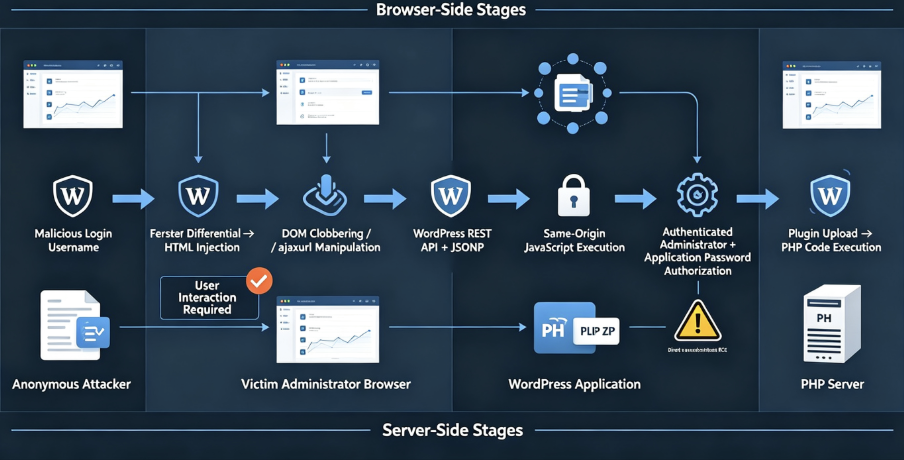
A simplified version of XSS2Shell can therefore be represented as:
1. Attacker controls malformed login username
                    ↓
2. PHP tag stripping and WordPress KSES disagree
                    ↓
3. Attacker-controlled HTML survives into wp-login.php
                    ↓
4. WordPress JavaScript interacts with injected DOM
                    ↓
5. DOM clobbering influences ajaxurl
                    ↓
6. Same-origin WordPress REST request is generated
                    ↓
7. JSONP + jQuery leads to JavaScript execution
                    ↓
8. Administrator is socially engineered into attacker flow
                    ↓
9. WordPress authorization functionality is abused
                    ↓
10. Administrator Application Password obtained
                    ↓
11. Privileged WordPress actions become available
                    ↓
12. Plugin upload capability is reached
                    ↓
13. Attacker-controlled PHP reaches the server
                    ↓
14. PHP code execution
This chain demonstrates why CVE-2026-64638 cannot be understood by looking only at the original login error message.
Which WordPress Versions Are Vulnerable?
WordPress published security releases across numerous maintenance branches.
| Branch | Vulnerable Through | 패치된 버전 |
|---|---|---|
| 7.0 | 7.0.2 | 7.0.3 |
| 6.9 | 6.9.5 | 6.9.6 |
| 6.8 | 6.8.6 | 6.8.7 |
| 6.7 | 6.7.5 | 6.7.6 |
| 6.6 | 6.6.5 | 6.6.6 |
| 6.5 | 6.5.8 | 6.5.9 |
| 6.4 | 6.4.8 | 6.4.9 |
| 6.3 | 6.3.8 | 6.3.9 |
| 6.2 | 6.2.9 | 6.2.10 |
| 6.1 | 6.1.10 | 6.1.11 |
| 6.0 | 6.0.12 | 6.0.13 |
| 5.9 | 5.9.13 | 5.9.14 |
| 5.8 | 5.8.13 | 5.8.14 |
| 5.7 | 5.7.15 | 5.7.16 |
| 5.6 | 5.6.17 | 5.6.18 |
| 5.5 | 5.5.18 | 5.5.19 |
| 5.4 | 5.4.19 | 5.4.20 |
| 5.3 | 5.3.21 | 5.3.22 |
| 5.2 | 5.2.24 | 5.2.25 |
| 5.1 | 5.1.22 | 5.1.23 |
| 5.0 | 5.0.25 | 5.0.26 |
| 4.9 | 4.9.29 | 4.9.30 |
| 4.8 | 4.8.28 | 4.8.29 |
| 4.7 | 4.7.33 | 4.7.34 |
These versions come directly from the WordPress GitHub security advisory. (Shnopay)
WordPress documentation states that 4.6 and earlier no longer receive security updates. Organizations still operating such releases should not interpret the lack of a backported patch as evidence that they are safe. (WordPress.org)
How WordPress Fixed CVE-2026-64638
WordPress’s public Trac history connects the vulnerability to changes intended to prevent usernames from affecting HTML parsing.
The main security changeset touched:
wp-includes/user.php
wp-login.php
and was then backported across older WordPress branches. (WordPress Trac)
That location makes sense.
Fixing only one later exploit stage—JSONP, user-profile.js, Application Passwords, or plugin installation—would not eliminate the original trust-boundary failure.
The correct security principle is:
Do not allow attacker-controlled username data
to acquire HTML semantics in the first place.
Once the parser differential disappears, the remaining exploit chain loses its entry point.
How to Check Your WordPress Version
Defenders managing systems they own can check the installed version using WP-CLI:
wp core versionor inspect the WordPress administration dashboard.
If an affected maintenance branch is installed, upgrade to its patched version at minimum.
For production environments, upgrading to the latest actively maintained WordPress release is preferable whenever compatibility permits.
WordPress explicitly recommended immediate updating when 7.0.3 was released. (WordPress.org)
비파괴 검증
Security teams should avoid validating this vulnerability by reproducing the full RCE chain on production systems.
A better verification workflow is:
1. Identify WordPress version
2. Determine whether wp-login.php is externally reachable
3. Confirm patch status
4. Validate expected sanitization behavior in staging
5. Review WAF telemetry
6. Search historical login requests for suspicious malformed input
7. Investigate privileged sessions and Application Passwords
Version validation is generally sufficient for vulnerability-management purposes because WordPress has published exact patched versions.
Tenable, for example, provides version-based checks for affected WordPress branches rather than requiring active exploitation. (Tenable®)
Detecting CVE-2026-64638 Exploitation Attempts
Detection should focus on multiple stages.
Looking only for the final web shell can miss unsuccessful or incomplete attempts.
1. Monitor wp-login.php
Search HTTP logs for unusual POST requests against:
/wp-login.phpespecially usernames containing encoded or malformed HTML-like structures.
Useful fields include:
request_uri
request_method
POST parameter length
HTTP referer
user agent
source IP
response status
timestamp
The initial primitive is triggered through login processing, so unusual login requests are the earliest network-visible stage.
Cloudflare added CVE-2026-64638 metadata to WordPress XSS protections in both its Managed Ruleset and Free Ruleset on August 7. Cloudflare stated that the update changed rule metadata rather than detection behavior, indicating that existing XSS protections already covered the relevant pattern. (Cloudflare 문서)
2. Look for Suspicious REST Requests
The published research relies on WordPress REST behavior as an important intermediate component.
Security teams can therefore review access logs for abnormal combinations involving:
/wp-json/
rest_route
_jsonp
_method
_envelope
The presence of one parameter alone does not prove exploitation.
The combination becomes more interesting when it immediately follows a suspicious wp-login.php request from the same browser or session.
Correlation is more valuable than a single indicator.
3. Audit Application Passwords
If a privileged user may have been targeted, administrators should inspect Application Passwords associated with administrator accounts.
Look for:
unexpected application names
recently created credentials
credentials created near suspicious login activity
credentials no administrator remembers authorizing
Delete unknown credentials immediately.
Fused’s remediation guidance likewise recommends revoking suspicious Application Passwords and checking recently modified users, plugins, posts, and files when an administrator may have interacted with an attacker-controlled flow. (Fused.com)
4. Review New or Modified Content
The published escalation technique can involve creation of attacker-controlled WordPress content.
Investigate unexpected:
posts
pages
drafts
administrator accounts
plugins
themes
Application Passwords
created near the suspected compromise window.
5. Monitor Plugin Installation
Unexpected plugin installation is particularly important.
Look for changes under:
wp-content/plugins/and correlate them with:
POST /wp-admin/update.phpor related administrative activity.
New PHP files appearing unexpectedly inside plugin directories should be treated as high-priority findings.
6. Watch the PHP Process
Once the attack reaches actual code execution, endpoint telemetry can become extremely valuable.
Watch for web-server processes spawning unexpected child processes such as:
php-fpm → sh
php-fpm → bash
apache2 → curl
apache2 → wget
nginx/php-fpm → system utilities
Not every PHP payload spawns a shell, so absence of such behavior does not prove the system is safe.
File integrity monitoring remains essential.
Incident Response If an Administrator May Have Been Targeted
Simply patching WordPress is not enough if exploitation may already have occurred.
A reasonable response sequence is:
Patch WordPress
        ↓
Terminate privileged sessions
        ↓
Review Application Passwords
        ↓
Rotate affected administrator credentials
        ↓
Inspect recently changed users and content
        ↓
Inspect plugins and themes
        ↓
Search for unauthorized PHP files
        ↓
Review web and REST logs
        ↓
Review endpoint process telemetry
This distinction is important.
Patching removes the vulnerability.
It does not automatically remove attacker persistence established before the patch.
Is CVE-2026-64638 Being Exploited in the Wild?
Public reporting is somewhat inconsistent.
The Canadian Centre for Cyber Security stated on August 10 that open-source reporting indicated exploitation in the wild. (Canadian Centre for Cyber Security)
However, other vulnerability-intelligence sources have reported no independently confirmed exploitation campaigns, and the CVE’s CISA SSVC data originally recorded exploitation as 없음. As of early September, CVE-2026-64638 was also not identified as a CISA Known Exploited Vulnerability in the sources tracking the catalog. (OpenCVE)
The most defensible conclusion is therefore:
Public exploit details exist and the vulnerability is practical to reproduce, but evidence of widespread confirmed real-world compromise remains less clear than the existence of the exploit itself.
Defenders should not use that uncertainty as a reason to delay patching.
Public technical disclosure substantially lowers the cost of weaponization.
CVE-2026-64638 vs. a Traditional WordPress RCE
The distinction can be summarized clearly.
| Property | CVE-2026-64638 | Classic Unauthenticated RCE |
|---|---|---|
| Initial authentication | 없음 | 없음 |
| Initial primitive | 반영된 XSS | Server-side execution |
| Browser required | 예 | Usually no |
| Victim interaction | Yes for high-impact chain | Usually no |
| Admin state required for demonstrated RCE | 예 | Usually no |
| Direct server compromise from first request | 아니요 | 예 |
| Potential final impact | PHP execution | Server execution |
Calling CVE-2026-64638 simply an “unauthenticated WordPress RCE” therefore removes the most important security conditions from the description.
Calling it merely “a reflected XSS” understates its potential impact.
The most accurate description is:
A pre-authentication reflected WordPress login XSS that can be chained, under administrator-interaction conditions, into server-side PHP code execution.
Why Administrator XSS Is So Dangerous in WordPress
WordPress provides administrators with intentionally powerful capabilities.
Administrators can often:
install plugins
modify plugins
modify themes
create privileged users
generate API credentials
change site configuration
publish unrestricted content
Each feature is legitimate.
But if malicious JavaScript can operate using an administrator’s browser context, legitimate privileges become exploit primitives.
This produces a fundamental equivalence:
XSS + privileged session
≈
privileged UI automation
and in applications where privileged users can deploy executable server code:
privileged UI automation
≈
potential server-side code execution
This principle extends well beyond WordPress.
It applies to:
- CI/CD administration panels;
- cloud consoles;
- Kubernetes dashboards;
- internal developer portals;
- CMS platforms;
- SaaS admin interfaces;
- package registries;
- infrastructure-control interfaces.
An XSS severity rating should therefore consider what the victim’s browser can do, not merely whether <script> executes.
The Bigger Security Lesson: Safe Components Can Form an Unsafe System
CVE-2026-64638 is especially valuable because almost every important part of the chain represents normal application functionality.
PHP tag stripping is normal.
KSES sanitization is normal.
WordPress profile JavaScript is normal.
jQuery requests are normal.
DOM named properties are standard browser behavior.
REST APIs are normal.
JSONP is legitimate legacy functionality.
Application Passwords are legitimate.
Plugin installation is legitimate.
Yet:
normal feature
+
normal feature
+
normal feature
+
parser disagreement
+
attacker-controlled state
=
critical attack path
Modern vulnerability research increasingly focuses on these compositions.
This is also why simple source-code pattern matching can miss sophisticated vulnerabilities.
There may be no obvious:
eval($_GET['cmd']);or:
echo $_GET['x'];Instead, exploitable behavior may appear only when code is interpreted by multiple layers.
Sanitization Is Not the Same as Contextual Encoding
Another lesson from CVE-2026-64638 is the danger of relying excessively on generic sanitization.
Suppose input will eventually appear inside HTML.
The strongest security approach is generally to encode it for its final output context.
For plain text inside HTML:
< → <
> → >
& → &
" → "Then the browser never receives attacker-controlled markup.
By contrast, a sanitization chain asks multiple difficult questions:
Which HTML is valid?
Which HTML is allowed?
How will malformed HTML normalize?
What will the next parser do?
What will the browser do?
Each parser transition increases complexity.
Whenever possible:
untrusted data
        ↓
context-specific escaping
        ↓
browser treats it strictly as text
is safer than:
untrusted data
        ↓
sanitizer A
        ↓
sanitizer B
        ↓
HTML parser
Defensive Controls Beyond Patching
The WordPress patch is the primary remediation.
Additional controls can reduce impact if a similar vulnerability appears in the future.
Restrict Administrator Exposure
Administrators should avoid routine browsing while continuously authenticated to production WordPress dashboards.
Separating administrative browsing from everyday web browsing reduces the effectiveness of social-engineering chains.
Require Strong Administrator Authentication
MFA cannot prevent every session-riding or XSS attack, but it remains essential against credential theft and independent account takeover.
Minimize Administrator Accounts
Every administrator is another high-value browser context.
Review accounts regularly and use lower privileges wherever possible.
Monitor Application Passwords
Treat Application Passwords like API keys.
They should have:
- identifiable owners;
- known purposes;
- creation timestamps;
- rotation processes;
- revocation procedures.
Restrict Plugin Installation
Organizations managing sensitive WordPress environments can consider operational or filesystem controls that make arbitrary plugin installation more difficult.
For example, production deployments may be managed through CI/CD rather than allowing direct dashboard modifications.
That changes the RCE equation.
If the application process cannot modify executable production code, an administrator-browser compromise becomes harder to escalate into host execution.
Use File Integrity Monitoring
Monitor:
wp-content/plugins/
wp-content/themes/
wp-config.php
WordPress Core files
for unexpected modifications.
Keep Core Automatically Updated
Security backports help, but remaining indefinitely on old WordPress branches increases operational risk.
WordPress itself emphasizes that only the latest release is actively supported even though selected security fixes are backported as a courtesy. (WordPress.org)
CVE-2026-64638 and Modern Attack-Surface Testing
Traditional vulnerability scanners tend to reason about individual findings:
Endpoint contains reflected XSS
Severity: Medium
CVE-2026-64638 demonstrates why that model can fail.
A more realistic assessment asks:
What origin does the XSS execute in?

Which JavaScript already exists there?

Which authenticated workflows exist?

Which functions can the victim execute?

What credentials can be generated?

Can privileged content execute script?

Can privileged users upload executable code?

What is the final reachable impact?
That is attack-path reasoning rather than vulnerability enumeration.
The distinction increasingly matters for both human penetration testers and AI-driven security testing systems.
The highest-impact result may not exist in any single code path.
It emerges from chaining several individually moderate capabilities.
Frequently Asked Questions About CVE-2026-64638
What is CVE-2026-64638?
CVE-2026-64638 is a High-severity reflected XSS vulnerability in the WordPress Core login screen. It can be triggered before authentication and can potentially be chained into PHP code execution under additional administrator-interaction conditions. (OpenCVE)
Is CVE-2026-64638 a WordPress plugin vulnerability?
No.
It affects WordPress Core, specifically functionality associated with the login flow.
Does CVE-2026-64638 require authentication?
The initial reflected XSS does not require authentication.
The publicly demonstrated escalation to PHP code execution relies on a logged-in privileged administrator and social engineering.
Does CVE-2026-64638 allow direct RCE?
Not from the initial unauthenticated request alone.
It creates a path toward RCE through a multi-stage exploit chain.
What is XSS2Shell?
XSS2Shell is the name used by pwn.ai for its CVE-2026-64638 research and exploit chain connecting WordPress login XSS to potential server-side PHP execution. (pwn.ai)
What is the CVSS score for CVE-2026-64638?
The CNA assigned CVE-2026-64638 a CVSS v4.0 score of 8.9, High. (OpenCVE)
Which WordPress version fixes CVE-2026-64638?
WordPress 7.0.3 contains the original fix. Corresponding patched maintenance releases were also released for supported branches back through WordPress 4.7. (Shnopay)
Is WordPress 7.0.2 vulnerable?
Yes.
The WordPress 7.0 branch is affected through 7.0.2 and patched starting with 7.0.3. (Shnopay)
Are older WordPress versions vulnerable?
The vulnerability was described as affecting WordPress broadly, while security backports were released down through the WordPress 4.7 branch. WordPress 4.6 and older are outside current security-backport coverage and should be upgraded rather than assumed safe. (OpenCVE)
Is there a public proof of concept?
Yes. The discovering researchers publicly documented the technical chain after WordPress released the patch. This substantially increases the importance of rapid patch deployment. (pwn.ai)
결론
CVE-2026-64638 is a good example of why vulnerability severity cannot always be understood from the first primitive alone.
The bug begins with a WordPress login error and a disagreement between parsing and sanitization behavior.
That disagreement creates attacker-controlled HTML.
Existing WordPress JavaScript then makes that HTML operational.
DOM clobbering influences application state.
A same-origin REST request reaches JSONP behavior.
JSONP becomes JavaScript execution.
JavaScript executing under the WordPress origin can interact with privileged browser state.
When the victim is an authenticated administrator, legitimate Application Password and administrative functionality becomes part of the escalation path.
And once administrator-level functionality reaches plugin installation, the boundary between a browser-side XSS and server-side PHP execution can disappear.
That is why the best description of CVE-2026-64638 is neither simply “WordPress reflected XSS” nor “instant unauthenticated WordPress RCE.”
그것은 pre-authentication WordPress login XSS with a demonstrated, conditional path to code execution.
WordPress fixed the vulnerability beginning with 7.0.3 and issued security backports across maintained branches. Any affected installation should be patched, while organizations that believe an administrator may have interacted with malicious content should additionally investigate privileged sessions, Application Passwords, recently created content, plugin changes, and unexpected PHP files. (WordPress.org)
More importantly, CVE-2026-64638 demonstrates a broader lesson for application security: security boundaries must be evaluated across the entire attack graph, not one function at a time.

 Korean
  English
  German
  French
  Spanish
  Portuguese
  Japanese
  Hindi
Hindi  Arabic
  Turkish
  Hebrew