
CVE-2013-3900 is unusual even by the standards of long-lived Windows vulnerabilities.
Microsoft originally disclosed the flaw in December 2013 as a critical Windows vulnerability affecting the way the WinVerifyTrust function validates Authenticode signatures on Portable Executable, or PE, files. The security problem allows an attacker to modify certain portions of an already signed executable while preserving a signature that Windows may continue to treat as valid under non-strict verification behavior. Microsoft described the issue as potentially leading to remote code execution when a victim or application runs the specially crafted signed file. (Microsoft Learn)
More than a decade later, CVE-2013-3900 remains relevant.
The reason is not that Microsoft simply forgot to patch an old bug. The more important story is that stricter Authenticode validation became an opt-in security behavior because automatically enforcing it could break existing software that relied on non-conforming signing practices. Microsoft subsequently reiterated that the stricter behavior is not enabled by default and that supported Windows systems may still require administrators to configure the EnableCertPaddingCheck registry value. (NVD)
That distinction makes CVE-2013-3900 an excellent example of a broader security problem: a vulnerability may be technically addressed in operating-system code while remaining exploitable in real environments because the security-enforcing behavior is not actually enabled.
It is also not merely theoretical. CISA lists CVE-2013-3900 in its Known Exploited Vulnerabilities Catalog, with an addition date of January 10, 2022. (NVD) Check Point researchers documented a ZLoader campaign that abused Microsoft signature verification behavior to modify a Microsoft-signed DLL while retaining a trusted-looking signature. (체크 포인트 연구)
For defenders, vulnerability-management teams, Windows administrators, malware analysts, and red teams, understanding CVE-2013-3900 therefore requires looking beyond the CVE number itself.
The real question is:
What exactly does Windows mean when it says that a PE file is signed, and which bytes are actually protected by that signature?
CVE-2013-3900 at a Glance
| 필드 | 세부 정보 |
|---|---|
| CVE | CVE-2013-3900 |
| 구성 요소 | Microsoft Windows WinVerifyTrust / Authenticode verification |
| 약점 | CWE-347: Improper Verification of Cryptographic Signature |
| Primary file type | Windows Portable Executable files |
| Security impact | Signature-validation bypass contributing to code execution |
| 사용자 상호 작용 | Required in the documented exploitation model |
| CISA KEV | 예 |
| CISA date added | January 10, 2022 |
| Microsoft mitigation | Enable strict Authenticode padding validation |
| Key configuration | EnableCertPaddingCheck |
| Default strict behavior | Not enabled by default |
| Modern Windows relevance | Microsoft has stated the opt-in mechanism is available on supported Windows 10 and Windows 11 releases |
NVD currently maps CVE-2013-3900 to CWE-347 and gives it an NVD CVSS 3.1 score of 8.8, while Microsoft’s CNA assessment shown by NVD is 5.5. The difference reflects different interpretations of the vulnerability’s attack path and technical impact rather than disagreement over whether the signature-validation weakness exists. (NVD)
What Is CVE-2013-3900?
CVE-2013-3900 is a vulnerability in the way Windows performs Authenticode signature verification through WinVerifyTrust.
Microsoft’s original advisory explains that an attacker can take an existing signed executable and modify portions of that file that are not properly covered by the validation process. Under vulnerable verification behavior, the attacker can introduce additional malicious content without necessarily causing Windows to reject the existing digital signature. (Microsoft Learn)
This breaks an important assumption made by both users and security products:
If a file has a valid signature from a trusted publisher, the entire file must be exactly what that publisher signed.
With Authenticode, that assumption is too simplistic.
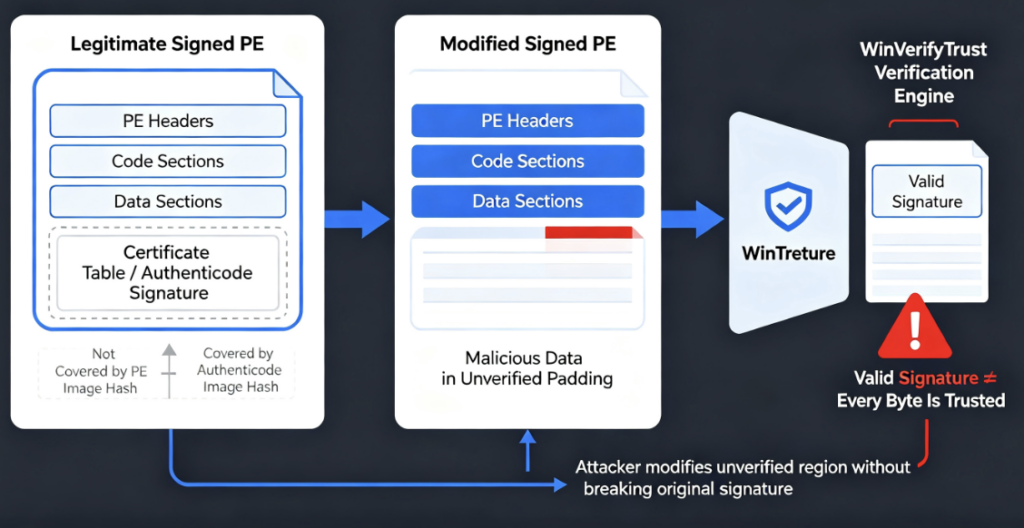
A PE file’s signature does not literally cryptographically cover every byte in the file.
Microsoft’s current PE format documentation explains that Authenticode calculates a PE image hash while deliberately excluding certain data. In particular, the Certificate Table and certificate-related fields are omitted from the Authenticode hash calculation. This exclusion is necessary because the signature itself must be inserted into the executable after the hash has been generated. (Microsoft Learn)
That design is legitimate.
The vulnerability arises when data associated with the signature structure contains material that does not conform to the expected Authenticode format, yet legacy verification behavior still accepts the binary’s signature.
This creates a dangerous gap between:
cryptographic validation of the originally signed content
그리고
validation of the complete physical contents of the file being executed.
Understanding WinVerifyTrust
WinVerifyTrust is an important Windows trust-verification API.
When Windows or an application needs to determine whether an executable has a trustworthy Authenticode signature, WinVerifyTrust can perform the relevant signature and trust checks.
Microsoft describes Authenticode verification as involving both signature verification and trust verification. The signature establishes that the covered content matches what was signed, while certificate-chain and policy validation determine whether the signer should be trusted. (Microsoft Learn)
Conceptually, the process looks like this:
Windows PE File
      |
      v
Authenticode Hash Calculation
      |
      v
Embedded PKCS#7 Signature
      |
      v
Signer Certificate
      |
      v
Certificate Chain / Trust Policy
      |
      v
WinVerifyTrust
      |
      +---- Trusted
      |
      +---- Untrusted
The weakness behind CVE-2013-3900 sits near the boundary between the first two stages.
The cryptographic signature may still correctly validate the content that was intended to be covered by Authenticode.
The problem is that the complete file can contain additional data that was not validated in the expected way.
Why Authenticode Does Not Hash Every Byte
To understand CVE-2013-3900 properly, it helps to understand why Authenticode contains exclusions in the first place.
Suppose a developer creates:
application.exe
Before signing it, the executable does not yet contain its final Authenticode signature.
Windows signing tools calculate a cryptographic digest of the relevant executable contents:
Hash(application.exe) -> PE image digest
The publisher signs that digest with a private key.
The resulting signature and certificate information then need to be embedded back into the executable.
But if the embedded signature itself were included in the digest, adding the signature would change the file, which would change the hash, which would invalidate the signature.
This is a circular dependency.
Authenticode solves the problem by excluding certain fields from the PE image hash.
Microsoft documents that these exclusions include the PE checksum, the Certificate Table entry and the certificate information stored through that table. (Microsoft Learn)
So the structure can be simplified as:
+------------------------------------+
| DOS Header                         |
+------------------------------------+
| PE Headers                         |
|   Some special fields excluded     |
+------------------------------------+
| .text                              |
| .data                              |
| .rdata                             |
| other sections                     |
+------------------------------------+
| Certificate Table                  | <-- excluded from PE image hash
| Authenticode signature             |
+------------------------------------+
This does not mean Authenticode itself is useless or fundamentally broken.
It means a verifier must be extremely strict about how excluded structures are parsed and how much additional content is permitted inside them.
CVE-2013-3900 is fundamentally a failure to enforce that boundary strictly enough.
The Core Vulnerability
Microsoft described the original cause as improper validation of the file digest of a specially crafted PE file during Authenticode verification. (Microsoft Learn)
A simplified comparison helps explain the problem.
A normal signed file looks conceptually like:
SIGNED PE FILE

[PE headers]
[program code]
[program data]
[certificate structure]
[valid Authenticode signature]
An attacker starts with a legitimately signed PE file and manipulates data associated with portions that are not validated as strictly as the primary executable image.
Conceptually:
MODIFIED FILE

[PE headers]
[original signed code]
[original signed data]
[certificate structure]
[valid Authenticode signature]
[unexpected / attacker-controlled content]
Under permissive validation behavior, Windows may still report that the Authenticode signature itself is valid.
The important distinction is that the attacker has not stolen the publisher’s private signing key.
The attacker has also not cryptographically forged the publisher’s RSA or ECDSA signature.
Instead, the attack exploits the difference between:
"What bytes did the publisher cryptographically sign?"
and:
"What bytes are physically present in this executable?"
That is why CWE-347, Improper Verification of Cryptographic Signature, is an appropriate classification. (NVD)
A Valid Signature Does Not Mean Every Byte Is Trusted
This is the most important security lesson from CVE-2013-3900.
Security teams routinely use digital signatures as trust signals.
A signed file can influence:
SmartScreen reputation decisions, application allowlisting, malware triage, incident-response prioritization, EDR enrichment, installer trust, supply-chain verification and analyst assumptions about file provenance.
But a digital signature has very specific semantics.
It proves that the cryptographically covered content corresponds to the signed digest.
It does not automatically prove that every byte surrounding or accompanying that signed material is trustworthy.
Microsoft’s current PE documentation explicitly notes that Authenticode omits certain data from its image hash. (Microsoft Learn)
CVE-2013-3900 shows what happens when parsing and verification rules around those exclusions are too permissive.
Is CVE-2013-3900 Really Remote Code Execution?
Yes—but the phrase requires context.
Microsoft classified the original vulnerability as remote code execution and stated that successful exploitation could allow an attacker to execute code with the privileges of the user running the malicious signed PE file. (Microsoft Learn)
However, CVE-2013-3900 is not equivalent to a remotely reachable network service vulnerability where an attacker sends one packet to an exposed Windows system and immediately gets code execution.
Microsoft’s exploitation description explicitly states that a user or application must run or install the specially crafted signed PE file. (Microsoft Learn)
The typical attack flow is therefore closer to:
Attacker
   |
   v
Acquire legitimate signed PE file
   |
   v
Modify unverified portion
   |
   v
Preserve apparently valid signature
   |
   v
Deliver modified file
   |
   v
Victim/application accepts file
   |
   v
File executes
   |
   v
Attacker-controlled code runs
Delivery could happen through phishing, malicious websites, compromised software distribution, post-compromise tooling or another execution chain.
The vulnerability makes the payload more believable and potentially harder to identify as modified.
It does not remove the need to get the payload executed.
Why User Interaction Matters
NVD currently assigns its own CVSS 3.1 vector as:
CVSS:3.1/AV:N/AC:L/PR:N/UI:R/S:U/C:H/I:H/A:H
with a score of 8.8. (NVD)
그리고 UI:R component matters.
The victim generally needs to run, install or otherwise cause processing of the malicious PE.
Microsoft’s own description similarly states that exploitation requires the specially crafted signed PE file to be run or installed. (Microsoft Learn)
Consequently, organizations should avoid interpreting scanner findings as:
CVE-2013-3900 present
=
Internet attacker can remotely compromise host immediately
A more accurate model is:
CVE-2013-3900 present
+
attacker can deliver manipulated signed PE
+
victim/application executes it
+
trust or detection controls rely on permissive signature validation
=
meaningful exploitation opportunity
That nuance does not make the vulnerability unimportant.
In many intrusion chains, convincing an endpoint to execute a downloaded binary is already the attacker’s goal. A trusted-looking digital signature can make that stage easier.
Real-World Exploitation: ZLoader
The most important modern example is ZLoader.
In January 2022, Check Point Research documented a ZLoader campaign that used a legitimate remote-management tool during its infection chain and then abused Microsoft’s signature verification behavior. (체크 포인트 연구)
Researchers observed the attackers modifying a Microsoft-signed DLL while preserving the appearance of a legitimate Microsoft signature.
The campaign demonstrated why CVE-2013-3900 is more than an obscure file-format edge case.
From an attacker’s perspective, a Microsoft-signed binary carries an extremely valuable security signal.
Defenders, analysts and software may treat it differently from an unsigned unknown executable.
By hiding attacker-controlled material inside a file that still appeared correctly signed, the campaign could exploit trust relationships rather than merely exploit code.
CISA subsequently included CVE-2013-3900 in its Known Exploited Vulnerabilities Catalog. The current NVD record mirrors the KEV entry, showing January 10, 2022 as the catalog addition date and July 10, 2022 as the remediation due date for affected federal civilian agencies under the relevant directive. (NVD)
Why Is a 2013 Vulnerability Still Relevant?
This is where CVE-2013-3900 becomes especially interesting.
Microsoft did ship security changes for the vulnerability.
But the complete story did not end there.
The original MS13-098 security bulletin states that the update added stricter Windows Authenticode signature verification. Under strict verification, PE files containing content that does not conform to the Authenticode specification can be considered unsigned. (Microsoft Learn)
Microsoft initially intended stricter verification to become default behavior.
That plan changed.
In its July 29, 2014 revision to MS13-098, Microsoft explained that testing with customers showed that enforcing the stricter behavior could have a high impact on existing software. As a result, Microsoft decided not to make the stricter behavior a default requirement. (Microsoft Learn)
The protection remained available—but as an opt-in configuration.
This is one of the most important details for vulnerability-management teams.
Installing Windows updates does not necessarily mean the endpoint is using the strongest CVE-2013-3900 verification behavior.
Microsoft’s 2025 Republishing Clarification
The CVE attracted renewed attention when Microsoft republished and updated information about it.
The current NVD record contains Microsoft’s explanation that the CVE was republished to clarify the availability of EnableCertPaddingCheck on currently supported versions of Windows 10 and Windows 11. (NVD)
Microsoft stated that the supporting code for the registry-controlled behavior is already incorporated into Windows 10 and Windows 11.
Therefore:
Installing another special security update
is not necessarily what modern Windows systems need.
Instead:
EnableCertPaddingCheck must be configured
for the stricter behavior to take effect. (NVD)
This explains why vulnerability scanners can continue reporting CVE-2013-3900 on relatively modern Windows machines.
The problem may not be missing binaries.
It may be missing 구성.
The CVE-2013-3900 Timeline
The history can be summarized as:
December 10, 2013: Microsoft publishes MS13-098 and addresses the WinVerifyTrust signature-validation vulnerability. (Microsoft Learn)
2014: Microsoft decides not to enforce strict Authenticode verification by default because the compatibility impact on existing software may be significant. The stronger behavior remains opt-in. (Microsoft Learn)
2022: CVE-2013-3900 is added to CISA’s Known Exploited Vulnerabilities Catalog. (NVD)
2022: Check Point documents ZLoader abuse of the signature-validation behavior in a real malware campaign. (체크 포인트 연구)
2025: Microsoft republishes information about CVE-2013-3900, clarifying that EnableCertPaddingCheck is available on supported Windows 10 and Windows 11 versions and that the registry setting must still be configured. (NVD)
The persistence of this vulnerability is therefore primarily a story about secure defaults and compatibility debt.
Why Microsoft Did Not Simply Turn Strict Verification On
The decision may initially seem surprising.
Why wouldn’t Microsoft simply reject every malformed signed executable?
Because security changes to signature validation can break legitimate software.
Some older installers or software-packaging systems placed additional data in executable structures that strict Authenticode parsing considers non-compliant.
After strict padding checks are enabled, Microsoft warns that such PE files may be treated as unsigned. (Microsoft Learn)
That can affect applications whose behavior depends on valid code signing.
Consider an enterprise with:
Legacy installers
Internal deployment packages
Old device-management tools
Vendor-specific updaters
Custom enterprise applications
Long-lived line-of-business software
If some of those binaries contain non-standard certificate padding or signing structures, suddenly enforcing stricter validation across thousands of systems can cause operational failures.
Microsoft therefore prioritized compatibility by leaving the behavior opt-in.
Security administrators must make the opposite tradeoff themselves.
Which Windows Systems Are Affected?
The original 2013 bulletin included Windows XP, Windows Vista, Windows 7, Windows 8, Windows 8.1 and corresponding Windows Server generations through Windows Server 2012 R2. (Microsoft Learn)
But the relevance of CVE-2013-3900 did not disappear with those operating systems.
Microsoft later clarified that the opt-in EnableCertPaddingCheck behavior is available across supported Windows releases introduced since the original vulnerability, including supported Windows 10 and Windows 11 versions. (NVD)
NVD’s current affected configurations also include newer Windows Server generations, including Windows Server 2016, 2019, 2022 and records covering Windows Server 2025 configurations. (NVD)
Administrators should therefore not determine exposure merely by asking:
"Is this machine running a modern version of Windows?"
The more useful question is:
"Is strict Authenticode certificate-padding validation enabled?"
How to Mitigate CVE-2013-3900
The relevant configuration is:
EnableCertPaddingCheck
For a 64-bit Windows system, the commonly documented configuration covers both native 64-bit and 32-bit WinTrust registry locations:
Windows Registry Editor Version 5.00

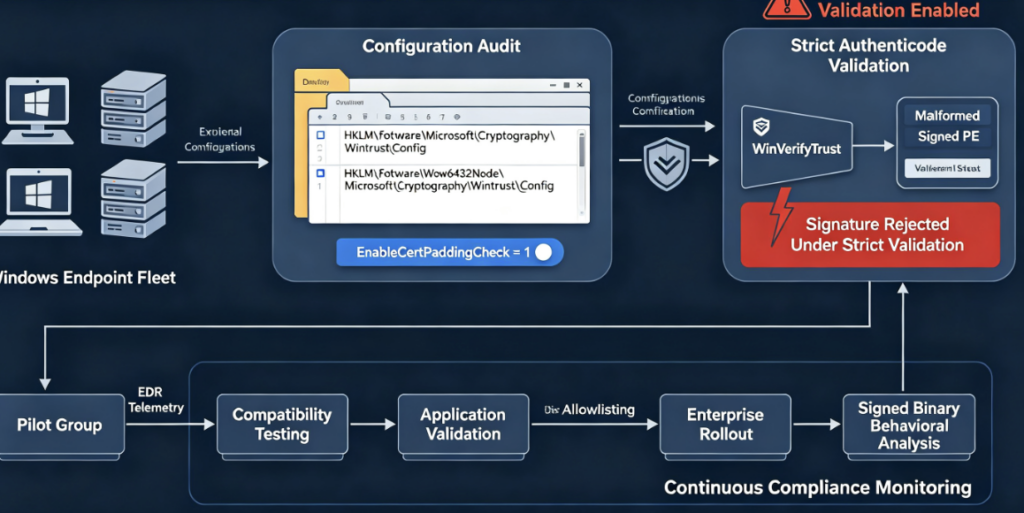
[HKEY_LOCAL_MACHINE\Software\Microsoft\Cryptography\Wintrust\Config]
"EnableCertPaddingCheck"=dword:00000001

[HKEY_LOCAL_MACHINE\Software\Wow6432Node\Microsoft\Cryptography\Wintrust\Config]
"EnableCertPaddingCheck"=dword:00000001
For a 32-bit Windows environment, the native path is:
Windows Registry Editor Version 5.00

[HKEY_LOCAL_MACHINE\Software\Microsoft\Cryptography\Wintrust\Config]
"EnableCertPaddingCheck"=dword:00000001
Microsoft’s current guidance has historically accepted string-based configurations as well, and Microsoft’s clarification indicates that systems already configured according to earlier guidance do not necessarily need to change solely because the representation differs. Microsoft Q&A discussions referencing the current MSRC guidance show both the native and Wow6432Node paths used for 64-bit Windows. (Microsoft Learn)
For new deployments, using a DWORD value of 1 generally makes the intended numerical setting clear.
Checking Whether EnableCertPaddingCheck Is Enabled
Administrators can inspect the native registry location with PowerShell:
Get-ItemProperty `
  -Path "HKLM:\Software\Microsoft\Cryptography\Wintrust\Config" `
  -Name EnableCertPaddingCheck `
  -ErrorAction SilentlyContinue
On a 64-bit system, also inspect the 32-bit WinTrust configuration:
Get-ItemProperty `
  -Path "HKLM:\Software\Wow6432Node\Microsoft\Cryptography\Wintrust\Config" `
  -Name EnableCertPaddingCheck `
  -ErrorAction SilentlyContinue
A simple enterprise-oriented audit could use:
$paths = @(
    "HKLM:\Software\Microsoft\Cryptography\Wintrust\Config",
    "HKLM:\Software\Wow6432Node\Microsoft\Cryptography\Wintrust\Config"
)

foreach ($path in $paths) {

    if (Test-Path $path) {

        $value = Get-ItemProperty `
            -Path $path `
            -Name EnableCertPaddingCheck `
            -ErrorAction SilentlyContinue

        [PSCustomObject]@{
            Path    = $path
            Present = ($null -ne $value.EnableCertPaddingCheck)
            Value   = $value.EnableCertPaddingCheck
        }

    } else {

        [PSCustomObject]@{
            Path    = $path
            Present = $false
            Value   = $null
        }
    }
}
This type of audit is useful because CVE-2013-3900 exposure on modern Windows can be a configuration-management problem rather than a traditional missing-update problem. Microsoft’s republished guidance explicitly states that the underlying support code is already present on the relevant Windows 10 and Windows 11 systems but that the registry key needs to be set. (NVD)
Deploying the Mitigation with PowerShell
An administrator could create the required registry locations and set the values using a controlled deployment script:
$paths = @(
    "HKLM:\Software\Microsoft\Cryptography\Wintrust\Config",
    "HKLM:\Software\Wow6432Node\Microsoft\Cryptography\Wintrust\Config"
)

foreach ($path in $paths) {

    if (-not (Test-Path $path)) {
        New-Item -Path $path -Force | Out-Null
    }

    New-ItemProperty `
        -Path $path `
        -Name "EnableCertPaddingCheck" `
        -PropertyType DWord `
        -Value 1 `
        -Force | Out-Null
}
This should be treated as a configuration-management example rather than a reason to deploy the change blindly.
The compatibility issue that caused Microsoft to keep strict validation opt-in still matters.
Test Compatibility Before Enterprise-Wide Enforcement
A robust rollout should first identify applications that depend on older or non-conforming signing behavior.
The security behavior changes the answer to a fundamental question:
Should this non-conforming signed PE still be considered signed?
After strict validation is enabled, some files that previously appeared valid may be treated as unsigned. Microsoft explicitly warned about installer compatibility when it introduced the stricter behavior. (Microsoft Learn)
A sensible enterprise deployment sequence is therefore:
Inventory
   |
   v
Pilot systems
   |
   v
Enable strict verification
   |
   v
Exercise critical applications
   |
   v
Identify signature failures
   |
   v
Update / replace non-compliant software
   |
   v
Wider deployment
   |
   v
Continuous compliance monitoring
Do not interpret a compatibility failure as evidence that the mitigation is incorrect.
It may instead reveal software that has depended on permissive signature handling for years.
Detection Is More Than Checking the Registry
Security teams should approach CVE-2013-3900 from two directions.
The first is configuration detection.
Determine whether strict padding validation is enabled.
The second is threat detection.
Look for binaries whose signature-related metadata does not match their broader behavioral profile.
For example, a signed DLL should not automatically be considered benign merely because:
Signer = Microsoft
Status = Valid
Defenders should correlate signature information with:
File origin
Download source
First-seen timestamp
Flat SHA-256
Authenticode hash
File size
Certificate-table size
PE overlay data
Parent process
Child process
Network connections
Memory behavior
Persistence activity
Reputation
The distinction between a flat cryptographic file hash and an Authenticode image hash can be particularly useful.
Microsoft notes that the Authenticode hash deliberately excludes specific certificate-related data, whereas a conventional full-file hash changes when any byte in the file changes. (Microsoft Learn)
Therefore, two binaries could theoretically share the same relevant Authenticode image digest while having different complete-file SHA-256 hashes because data outside the Authenticode-covered region differs.
That discrepancy deserves investigation.
Full-File Hashing Still Matters
Suppose a security team has an approved binary:
SHA256:
1111111111111111111111111111111111111111111111111111111111111111
A suspicious binary may still display the same signer information while having a completely different full-file digest:
SHA256:
ABCDEF...
This does not automatically prove exploitation of CVE-2013-3900.
Software vendors legitimately release many signed versions of the same application.
But when a supposedly identical signed binary differs from the expected byte-for-byte artifact, signature validity should not terminate the investigation.
For high-value software-distribution workflows, defenders should verify both:
Publisher trust
+
exact artifact integrity
rather than relying on:
Publisher trust only
Why This Matters for Application Allowlisting
CVE-2013-3900 also exposes a weakness in overly simplistic allowlisting strategies.
Suppose a policy effectively says:
Allow executable if:
Publisher == Trusted Vendor
That creates a stronger dependency on correct Authenticode verification.
If the operating system or application trusts malformed signed binaries too permissively, the attacker’s objective is no longer necessarily:
steal signing certificate
The goal may become:
find a way to preserve enough signature validity
to satisfy the trust decision
Modern allowlisting should therefore combine publisher rules with context where practical, including file path, product identity, expected binary properties, managed deployment channels and behavioral controls.
Code signing is an important trust primitive.
It should not be treated as an absolute trust oracle.
Why CVE-2013-3900 Is a Supply-Chain Security Problem
The vulnerability is especially relevant to software supply-chain defense because code signing is one of the industry’s central mechanisms for proving software provenance.
Organizations expect signed software to answer two questions:
Who published this file?
and:
Has this file changed since the publisher signed it?
CVE-2013-3900 demonstrates that the second question depends heavily on exactly how “this file” is defined.
The Authenticode digest protects the intended PE image content according to Authenticode rules.
A naive security interpretation may instead assume:
Every byte on disk is covered by the publisher's signature.
Those are not equivalent statements.
This distinction matters for software repositories, update agents, EDR pipelines, CI/CD signing workflows and malware-analysis systems.
CVE-2013-3900 and the Limits of “Signed = Safe”
For security analysts, one practical rule emerges:
Signature verification should contribute to a trust score, not replace security analysis.
A signed executable can still be dangerous because:
the certificate may have been stolen, the certificate may have been fraudulently obtained, the signed software itself may contain malicious code, the vendor may have been compromised, a legitimate signed binary may expose a useful sideloading primitive, or—as CVE-2013-3900 illustrates—the file may contain attacker-controlled modifications that permissive signature verification fails to reject.
The Check Point ZLoader investigation is a particularly useful illustration because the campaign leveraged precisely the psychological and technical trust value of a Microsoft-signed DLL. (체크 포인트 연구)
Why CVSS Scores for CVE-2013-3900 Differ
Organizations researching CVE-2013-3900 may notice conflicting severity scores.
NVD currently shows an 8.8 HIGH CVSS 3.1 score:
AV:N/AC:L/PR:N/UI:R/S:U/C:H/I:H/A:H
Microsoft’s CNA score displayed by NVD is 5.5 MEDIUM:
AV:L/AC:L/PR:N/UI:R/S:U/C:N/I:H/A:N
CISA’s enrichment also shows an 8.8 vector. (NVD)
This is an excellent reminder that a CVSS score is a model, not a substitute for understanding the exploitation chain.
A security team should prioritize CVE-2013-3900 using contextual factors such as:
whether arbitrary downloaded executables are frequently run, whether signature status strongly influences allowlisting, whether the endpoint estate contains privileged administrators, whether malware-delivery controls are mature, whether the registry mitigation is already enabled, and whether critical business software prevents deployment of strict verification.
The CISA KEV listing is arguably more operationally meaningful than debating whether the vulnerability should be scored 5.5 or 8.8 because KEV indicates documented exploitation. (NVD)
Vulnerability Scanners and False Assumptions
CVE-2013-3900 commonly causes confusion because vulnerability scanners may detect the absence of the relevant registry configuration.
Administrators then ask:
“My Windows system is fully patched. Why is the scanner still finding a CVE from 2013?”
The answer is that traditional patch compliance and CVE-2013-3900 mitigation are not identical.
Microsoft’s later clarification explicitly says that on the relevant modern Windows versions, the support code exists but the registry key still needs to be configured. (NVD)
Therefore:
Windows Update = Current
does not necessarily imply:
EnableCertPaddingCheck = Enabled
Vulnerability-management programs should treat this finding as a configuration-state issue.
How Security Teams Should Validate Remediation
A good remediation check should verify the intended security behavior rather than merely asking whether a registry key exists.
At minimum, verify:
Registry path exists
EnableCertPaddingCheck exists
Value is enabled
Both native and 32-bit paths are covered where applicable
Endpoint management confirms successful deployment
Critical applications still function
Signature-validation behavior has changed as expected
Scanner detection clears or is correctly interpreted
The last point matters because different scanners may have different detection logic.
Some simply inspect configuration.
Others may rely on OS version, registry state and architecture.
Security teams should understand exactly what their scanner is evaluating before declaring either the scanner or the remediation incorrect.
Enterprise Rollout Strategy
For a large Windows environment, CVE-2013-3900 should be handled like a security-hardening change.
Start with representative pilot groups containing both modern applications and legacy line-of-business software.
Enable strict validation.
Monitor application failures and software-installation problems.
Investigate affected binaries rather than immediately disabling the protection.
Where possible, obtain standards-compliant updated packages from vendors.
Once compatibility is established, deploy the setting through centralized configuration management such as Intune, Configuration Manager, Group Policy-based mechanisms or another endpoint-management system.
Then continuously measure the registry state rather than treating deployment as a one-time operation.
Reimaged machines, new servers and newly provisioned endpoints can otherwise reintroduce configuration drift.
What CVE-2013-3900 Is Not
Several misconceptions are worth correcting.
CVE-2013-3900 does not mean attackers can arbitrarily change any instruction inside a signed PE executable and retain a valid Authenticode hash.
Changing bytes that are actually covered by the PE image hash will invalidate the signature.
It does not mean the attacker has forged Microsoft’s cryptographic private key.
The attack abuses verification behavior and Authenticode exclusions rather than defeating the underlying public-key cryptography.
It does not represent a zero-interaction network RCE against arbitrary Windows hosts.
Microsoft’s documented exploitation model requires the specially crafted signed PE to be run or installed. (Microsoft Learn)
And it does not mean digital signatures are useless.
Authenticode remains a valuable security mechanism.
CVE-2013-3900 shows why parsers and verification policies around cryptographic structures must be as carefully designed as the cryptography itself.
Why the Vulnerability Is Architecturally Important
There is a broader engineering lesson here.
Cryptographic systems are frequently compromised not because SHA-256, RSA or certificate chains are mathematically broken, but because software incorrectly defines the object being authenticated.
Consider the difference:
Signed object:
    bytes 0 ... N
versus:
Actual object processed:
    bytes 0 ... N
    +
    additional bytes N+1 ... M
If downstream software treats the entire object as trusted because the first part is correctly signed, the cryptography has performed its job while the security architecture has still failed.
This pattern appears far beyond Windows executable signing.
Similar design risks exist in signed archives, document formats, package managers, firmware containers, mobile applications and cryptographically authenticated protocol messages.
Security engineering must therefore validate not only:
Is the signature correct?
but also:
Does the signature unambiguously cover exactly the object
that the parser, loader or application will consume?
CVE-2013-3900 is a textbook case of this principle.
Frequently Asked Questions About CVE-2013-3900
Is CVE-2013-3900 still relevant in 2026?
Yes. Microsoft’s current CVE information states that the stricter verification behavior remains opt-in and explains that EnableCertPaddingCheck is available for supported Windows releases, including supported Windows 10 and Windows 11 versions. NVD continues to track modern Windows configurations for the vulnerability. (NVD)
Is installing Windows updates enough?
Not necessarily.
Microsoft states that relevant modern Windows versions already include supporting code for the registry-controlled behavior, but that the EnableCertPaddingCheck setting must be configured to enable strict validation. (NVD)
Does CVE-2013-3900 allow direct remote compromise over the network?
That is an inaccurate simplification.
Microsoft states that exploitation requires a user or application to run or install a specially crafted signed PE file. (Microsoft Learn)
Can an attacker modify any part of a signed executable?
No.
Authenticode protects the portions included in the PE image hash. Modifying hashed executable code normally changes that digest and invalidates the signature. The weakness concerns data and structures that are excluded from or insufficiently validated by the signing process. Microsoft documents the specific certificate-related exclusions from Authenticode hashing. (Microsoft Learn)
Why isn’t strict verification enabled by default?
Microsoft originally planned broader enforcement but reversed that decision after determining that compatibility impact on existing software could be high. The stronger verification behavior therefore remained opt-in. (Microsoft Learn)
Has CVE-2013-3900 been exploited in the wild?
Yes.
CISA includes it in the Known Exploited Vulnerabilities Catalog. Check Point also documented a ZLoader campaign that abused Microsoft’s signature verification behavior. (NVD)
What is EnableCertPaddingCheck?
It is the Windows configuration used to enable stricter Authenticode certificate-padding validation associated with CVE-2013-3900 mitigation. Microsoft has reiterated that strict behavior remains opt-in on supported releases. (NVD)
Can EnableCertPaddingCheck break applications?
Potentially.
Microsoft explicitly warned that stricter Authenticode verification could cause PE files with non-conforming content to be considered unsigned and that some installers could therefore be affected. Compatibility concerns were the reason Microsoft chose not to make the stricter behavior universally mandatory. (Microsoft Learn)
최종 요점
CVE-2013-3900 is not important because it is an ancient Windows vulnerability that somehow survived unnoticed for more than a decade.
It is important because it demonstrates what happens when cryptographic trust, file-format parsing, software compatibility and secure defaults collide.
Microsoft fixed the underlying verification capability years ago. But stricter Authenticode validation remained opt-in because automatically enforcing it risked breaking existing software. Microsoft later reiterated that modern Windows systems can support the stronger check while still requiring administrators to enable EnableCertPaddingCheck. (NVD)
Attackers have shown that this difference matters. The ZLoader campaign demonstrated how preserving the appearance of a legitimate Microsoft signature could become part of a real defense-evasion chain, and CISA’s inclusion of CVE-2013-3900 in the KEV catalog confirms that defenders should treat the issue as operational rather than theoretical. (체크 포인트 연구)
The defensive lesson is broader than one registry key.
A valid digital signature is evidence of trust, not proof of safety.
Organizations should combine strict Authenticode verification with full-file hashing, behavioral detection, controlled software-distribution channels, application control, endpoint telemetry and configuration-compliance monitoring.
For CVE-2013-3900 specifically, the most important remediation question is therefore no longer:
“Did we install Microsoft’s old patch?”
It is:
“Are our Windows systems actually enforcing strict WinVerifyTrust signature validation?”
That is the distinction that turns CVE-2013-3900 from a twelve-year-old vulnerability-management curiosity into a still-relevant Windows security control problem.


 Korean
  English
  German
  French
  Spanish
  Portuguese
  Japanese
  Hindi
Hindi  Arabic
  Turkish
  Hebrew