
CVE-2026-56164 is a Microsoft SharePoint Server vulnerability caused by missing authentication for a critical function. Microsoft’s public description says an unauthorized attacker can exploit the flaw over a network to elevate privileges. The attack requires no existing account, no user interaction, and low attack complexity. Microsoft has marked exploitation as detected, while CISA added the vulnerability to its Known Exploited Vulnerabilities Catalog on July 14, 2026. (NVD)
Those facts make the operational decision straightforward: affected on-premises SharePoint Server farms should be treated as emergency patching and incident-triage candidates. The Microsoft CNA score of 5.3 does not change that conclusion. A network-reachable, pre-authentication weakness under active exploitation should not remain in a normal monthly remediation queue simply because one scoring model describes its direct integrity impact as limited.
The public record is still sparse. Microsoft has not published the vulnerable endpoint, request structure, affected internal function, privilege obtained after exploitation, or a complete account of observed attack activity. Defenders therefore need to hold two ideas at the same time:
- The vulnerability requires immediate action.
- Technical claims beyond the public evidence should be stated cautiously.
CVE-2026-56164 should not yet be described as a confirmed standalone remote code execution flaw. It should also not be dismissed as a low-impact authorization bug. CISA’s broader July 14 SharePoint alert places it alongside other actively exploited SharePoint vulnerabilities associated with unauthorized access, remote code execution, persistence, and post-exploitation activity. That context raises the potential operational impact without proving that every observed technique is delivered by CVE-2026-56164 alone. (CISA)
CVE-2026-56164 at a Glance
| 필드 | Confirmed public information | Defensive meaning |
|---|---|---|
| 제품 | Microsoft SharePoint Server | The current public response concerns on-premises SharePoint Server deployments |
| 약점 | CWE-306, Missing Authentication for Critical Function | A server-side control path fails to require authentication before a protected operation |
| 공격 벡터 | 네트워크 | An attacker does not need local access to the SharePoint server |
| Attack complexity | 낮음 | Microsoft’s vector does not require unusual race conditions or significant prior knowledge |
| Required privileges | 없음 | A valid SharePoint account is not required |
| 사용자 상호 작용 | 없음 | No victim needs to open a document, visit a page, or approve a prompt |
| Microsoft CNA CVSS v3.1 | 5.3, AV:N/AC:L/PR:N/UI:N/S:U/C:N/I:L/A:N | Microsoft’s vector models limited direct integrity impact |
| NIST initial analysis | 9.8, with high confidentiality, integrity, and availability impact | NIST’s first enrichment applied a materially broader impact model |
| Exploitation status | Exploitation detected | The flaw has crossed from theoretical exposure to observed attacker use |
| CISA KEV date added | July 14, 2026 | CISA considers exploitation sufficiently established for KEV prioritization |
| CISA federal due date | July 17, 2026 | U.S. federal civilian agencies received a three-day remediation deadline |
| Affected product lines | SharePoint Server Subscription Edition, SharePoint Server 2019, SharePoint Enterprise Server 2016 | All currently supported on-premises SharePoint lines require review |
| Public exploit details | Not publicly documented by Microsoft | Avoid relying on unverified endpoints, payloads, or detection signatures |
The NVD record contains both Microsoft’s CNA vector and an initial NIST assessment that produces a 9.8 score. It also lists the affected versions and fixed build thresholds. Because the vulnerability was published only on July 14, those enrichments may change as Microsoft, NIST, and CISA update their records. (NVD)
That score conflict is not a reason to delay. It is a reason to separate three questions that vulnerability programs too often collapse into one:
- What direct impact does the vendor currently claim?
- What impact might be possible in a real enterprise environment?
- Is the flaw already being exploited against reachable systems?
For CVE-2026-56164, the third question has the clearest answer. Exploitation has been detected.
Why a 5.3 CVSS Score Does Not Make This a Routine Patch
Microsoft’s CNA vector assigns no direct confidentiality or availability impact and only low integrity impact. That produces a CVSS v3.1 base score of 5.3. If a vulnerability management platform sorts findings only by base score, CVE-2026-56164 may appear below dozens of unrelated high-severity vulnerabilities in the July release.
That is a dangerous result.
The same vector says the attack is network-accessible, requires low complexity, requires no privileges, and requires no user interaction. Those characteristics describe a flaw that can be reached by an unauthenticated party whenever the vulnerable SharePoint surface is exposed to that party’s network position. Microsoft’s exploitation status and the CISA KEV entry confirm that attackers have moved beyond theoretical analysis. (Rapid7)
CVSS base scores are useful for describing intrinsic technical properties. They are not universal patch-order instructions. A locally exploitable vulnerability with a high base score may be less urgent for a specific organization than a moderate-scored, internet-reachable flaw that attackers are already using against the exact product deployed at the network edge.
A practical priority model for CVE-2026-56164 should include at least these signals:
| 신호 | Risk effect |
|---|---|
| Confirmed active exploitation | Moves the flaw into the emergency response queue |
| No authentication required | Removes the need to steal or purchase an account first |
| Network attack vector | Makes exposure and segmentation central to risk |
| Internet-facing SharePoint | Gives external attackers a direct path to the vulnerable service |
| High-trust enterprise role | Increases the value of any unauthorized capability obtained |
| Incomplete public technical details | Makes version-based remediation more reliable than signature-only detection |
| CISA KEV listing | Provides a strong independent fix-first signal |
| Farm complexity | Increases the chance of partial patching or overlooked nodes |
The KEV designation is especially important. CISA does not use the catalog to list every serious vulnerability. KEV entries represent vulnerabilities for which exploitation in the wild has been established according to CISA’s process. The July 17 federal due date is binding in the context of the applicable federal directives, not automatically for every private organization. Private-sector teams should nevertheless treat the deadline as a strong indicator of the urgency CISA assigned to this exposure. (NVD)
What Missing Authentication for a Critical Function Means
CVE-2026-56164 maps to CWE-306, Missing Authentication for Critical Function. The weakness occurs when an application exposes a sensitive operation but fails to require the caller to prove an identity before the operation is executed.
This is not the same as a weak password. It is not a user choosing an overly permissive SharePoint group. It is not simply a session lasting longer than expected. It is a server-side control-flow problem: a protected function can apparently be reached through a path where the expected authentication gate is absent, misplaced, or ineffective.
A simplified secure request flow looks like this:
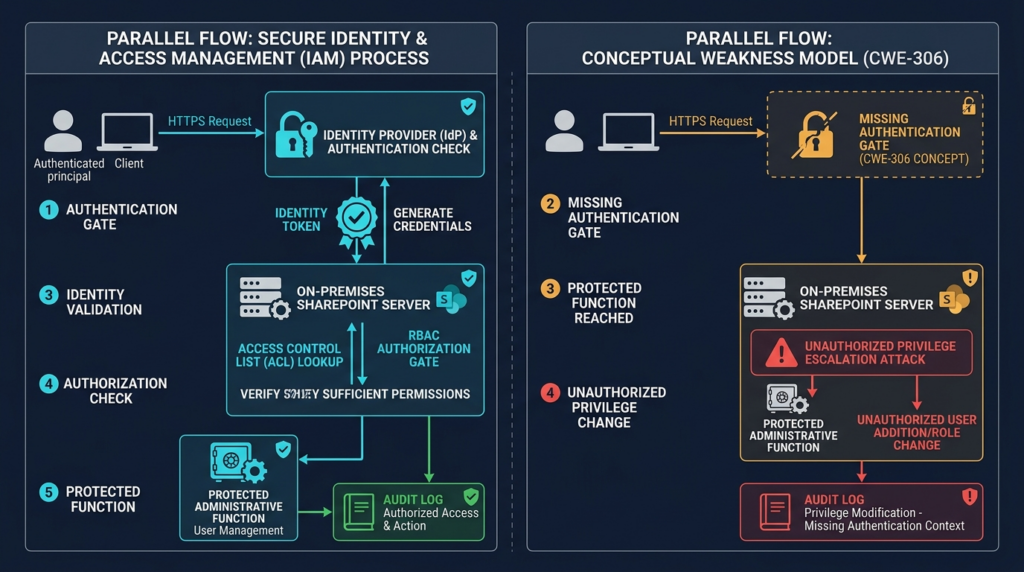
The exact SharePoint implementation error behind CVE-2026-56164 has not been publicly described. It would therefore be irresponsible to claim that a particular handler, API, token type, administrative page, or service endpoint contains the missing check. Microsoft’s confirmed description supports the weakness class and outcome, not a detailed reconstruction of the vulnerable code path. (NVD)
The phrase “elevate privileges” also requires care. It does not automatically mean that anonymous internet users become Windows 시스템, SharePoint Farm Administrators, domain administrators, or SQL Server administrators. Microsoft’s public wording confirms an unauthorized privilege gain over the network, but it does not publicly define the exact starting and resulting privilege levels.
That uncertainty should influence detection and response in two ways.
First, do not narrow the hunt to operating-system compromise alone. Unauthorized changes to SharePoint content, permissions, identities, trusted configuration, workflows, application state, or security settings may matter even if no obvious command shell appears.
Second, do not assume the impact is limited to a harmless metadata modification. SharePoint operates inside a dense trust environment. A seemingly narrow unauthorized action may become more serious when combined with sensitive content, privileged service identities, custom solutions, adjacent vulnerabilities, or weak network segmentation.
What Is Confirmed and What Remains Unknown
The difference between evidence and inference is especially important during the first days of a zero-day disclosure.
| 질문 | Current answer |
|---|---|
| Does CVE-2026-56164 affect Microsoft SharePoint Server? | 예 |
| Can it be reached over a network? | 예 |
| Does exploitation require authentication? | 아니요 |
| Does exploitation require user interaction? | 아니요 |
| Has exploitation been detected? | 예 |
| Is it in CISA KEV? | 예 |
| Are security updates available? | 예 |
| Are fixed build thresholds public? | 예 |
| Is the vulnerable endpoint public in Microsoft’s advisory? | Not currently |
| Is a vendor-authored exploit sequence public? | Not currently |
| Is the precise resulting privilege public? | Not currently |
| Is standalone RCE through CVE-2026-56164 confirmed? | Not in the public Microsoft description |
| Is the full attack chain public? | Not currently |
| Are threat actors and victim counts confirmed for this CVE alone? | Not currently |
| Can existing SharePoint incident telemetry still be useful? | Yes, as behavior-based evidence rather than a CVE-exclusive signature |
CISA’s July 14 alert adds valuable context. The agency said it was aware of malicious actors exploiting CVE-2026-32201, CVE-2026-45659, and CVE-2026-56164 to obtain unauthorized access to on-premises SharePoint Server Subscription Edition, SharePoint Server 2019, and SharePoint Server 2016. CISA also urged organizations to patch, verify AMSI integration, hunt for intrusion artifacts, improve logging, avoid direct internet exposure, block external access to Central Administration, and restrict farm and database communications. (LinkedIn)
That does not establish a mandatory three-step exploit chain. It establishes that all three vulnerabilities are relevant to the active SharePoint threat environment. A threat actor may use different bugs against different patch levels, combine vulnerabilities in some intrusions, or use one flaw for initial access and another capability for post-exploitation. Until CISA or Microsoft publishes a more granular mapping, defenders should resist statements such as:
- CVE-2026-56164 always leads directly to RCE.
- Every exploitation attempt steals SharePoint MachineKeys.
- CVE-2026-32201, CVE-2026-45659, and CVE-2026-56164 must be chained in that order.
- A single URI or User-Agent detects all current attacks.
- Patching only CVE-2026-56164 eliminates the broader SharePoint exposure.
The correct response is broader: install the complete current SharePoint security updates and investigate the server as a potentially targeted high-value application.
Affected SharePoint Versions and Fixed Builds
The NVD record identifies the following affected product ranges:
- Microsoft SharePoint Server Subscription Edition versions below
16.0.19725.20434 - Microsoft SharePoint Server 2019 versions below
16.0.10417.20175 - Microsoft SharePoint Enterprise Server 2016 versions below
16.0.5561.1001(NVD)
Microsoft released the corresponding July 14, 2026 security updates.
| 제품 | July 2026 packages | Fixed build | Packaging requirement |
|---|---|---|---|
| SharePoint Server Subscription Edition | KB5002882 | 16.0.19725.20434 | One combined update package |
| SharePoint Server 2019 | KB5002883 and KB5002885 | 16.0.10417.20175 | Install the language-independent and language-dependent updates |
| SharePoint Server 2016 | KB5002891 and KB5002892 | 16.0.5561.1001 | Install the language-independent and language-dependent updates |
Microsoft’s update history states that SharePoint 2019 and SharePoint 2016 releases normally contain a language-independent STS update and a language-dependent WSSLOC update. Both are required to fully update the farm, including English-only installations. SharePoint Server Subscription Edition has used a consolidated monthly package since March 2023. SharePoint updates are cumulative, so the latest applicable release includes previously issued security fixes. (Microsoft Learn)
This packaging distinction is operationally important. A SharePoint 2019 administrator who installs KB5002883 but overlooks KB5002885 may have installed the package most visibly associated with the security bulletin while leaving the farm incompletely updated. The same problem applies to SharePoint 2016 with KB5002891 and KB5002892.
The version comparison should be performed across every SharePoint server in the farm. A load-balanced farm can appear healthy while one Web Front End remains below the fixed build. An application server may not receive ordinary user traffic but can still participate in trusted SharePoint operations. A disaster-recovery farm, standby environment, maintenance node, or temporarily removed server can become a forgotten vulnerable asset when it later returns to service.
SharePoint Online Is Not the Same Product Boundary
The public CVE record lists SharePoint Server Subscription Edition, SharePoint Server 2019, and SharePoint Enterprise Server 2016. These are on-premises products operated by the customer. The current Microsoft update packages and CISA alert are directed at those server versions. (NVD)
Organizations should not translate that into a blanket statement that every SharePoint service is vulnerable. SharePoint Online is a cloud service operated as part of Microsoft 365 and does not use customer-managed SharePoint Server cumulative updates.
That distinction matters during incident communication. “We use SharePoint” is not enough information to determine exposure. The first questions should be:
- Do we operate any on-premises SharePoint Server farms?
- Are any hybrid components or legacy portals still running on-premises?
- Are internet-facing hostnames terminating at customer-managed SharePoint servers?
- Are disaster-recovery, test, migration, or archive farms still reachable?
- Do acquired companies or subsidiaries operate separate SharePoint environments?
- Does a reverse proxy route selected paths to an on-premises farm?
- Are old DNS records or certificates exposing a forgotten instance?
A company may primarily use SharePoint Online while retaining one on-premises SharePoint 2016 farm for a business application, records archive, partner portal, or custom workflow. That single legacy farm is enough to create exposure.
Active Exploitation and the CISA KEV Response
CVE-2026-56164 was published on July 14, 2026 and entered CISA’s KEV Catalog the same day. CISA assigned a July 17, 2026 due date for the relevant federal remediation requirement. The KEV entry instructs agencies to apply vendor mitigations and follow CISA’s risk-based patching and forensic triage guidance. (NVD)
Microsoft’s exploitation status is also reflected in Rapid7’s July Patch Tuesday analysis, which lists the vulnerability as “Exploitation Detected,” not publicly disclosed before patch release, and scored 5.3 under Microsoft’s CVSS data. Zero Day Initiative likewise highlighted the mismatch between the moderate score and the urgent risk created by unauthenticated, network-based exploitation. (Rapid7)
CISA’s separate SharePoint hardening alert is more operational than the KEV row. The agency grouped CVE-2026-56164 with two earlier 2026 SharePoint vulnerabilities:
- CVE-2026-32201, an improper input validation issue that allows an unauthorized attacker to perform spoofing over a network
- CVE-2026-45659, a deserialization vulnerability that allows an authorized attacker to execute code over a network
- CVE-2026-56164, the newly disclosed missing-authentication vulnerability that allows an unauthorized attacker to elevate privileges over a network (NVD)
CISA said these vulnerabilities were being exploited to gain unauthorized access to supported on-premises SharePoint Server versions. The agency’s response recommendations extend beyond patch installation because an organization may already have been exposed before the July update became available. (LinkedIn)
The correct mental model is therefore not “install one KB and close one ticket.” It is:
Identify every farm
        |
        v
Preserve evidence
        |
        v
Reduce exposure
        |
        v
Install all required packages
        |
        v
Complete SharePoint configuration upgrade
        |
        v
Verify build and security controls
        |
        v
Hunt for pre-patch compromise
        |
        v
Document and independently retest
Why SharePoint’s Trust Position Magnifies the Risk
SharePoint is often treated as a document portal, but an on-premises farm is an application platform connected to identities, databases, service accounts, custom code, workflows, search infrastructure, proxies, email systems, Office integrations, and internal business processes.
A typical farm may include:
- Web Front End servers handling HTTP and HTTPS requests
- Application servers running service applications
- Search components crawling and indexing sensitive content
- SQL Server databases storing configuration and business data
- Central Administration
- Distributed Cache
- Workflow Manager
- Office Online Server or other document integrations
- Claims providers or federated identity systems
- Custom web parts, solutions, event receivers, and timer jobs
- Application pool identities and farm service accounts
- Backup, monitoring, and deployment tooling
Microsoft’s account guidance shows why these identities matter. The farm service account participates in Central Administration and SharePoint services and receives database-related permissions as part of farm setup. Other service and application pool accounts are also trusted within defined parts of the platform. Microsoft recommends separating roles and preventing unnecessary local-administrator or SQL privileges. (Microsoft Learn)
An unauthorized privilege gain inside this environment can have consequences beyond the initial function affected by the vulnerability. Depending on the capability obtained and the local architecture, an attacker might attempt to:
- Modify site content or permissions
- Add a privileged SharePoint identity
- Tamper with workflow behavior
- Access sensitive documents
- Abuse trusted application components
- Reach management interfaces
- Steal credentials available to the compromised process
- Move from a Web Front End toward application or database systems
- Combine the access with a separate execution vulnerability
- Establish persistence through files, configuration, scheduled execution, or trusted data
These are risk scenarios, not confirmed outcomes of CVE-2026-56164 by itself. Their relevance comes from SharePoint’s architecture and the broader active-exploitation context.
Emergency Prioritization by Exposure
A simple “vulnerable or not vulnerable” field is insufficient for sequencing a large estate. Start with exposure and trust.
| 우선순위 | Conditions | Recommended response |
|---|---|---|
| Emergency | Internet-facing, below fixed build, no effective application-layer access control | Preserve logs, restrict access, patch immediately, and hunt for compromise |
| Emergency | Evidence of suspicious SharePoint, IIS, process, file, or identity activity | Isolate affected nodes and begin incident response before routine maintenance |
| 매우 높음 | Reachable from partner, guest, VPN, contractor, or broadly accessible internal networks | Patch immediately and review authentication boundaries |
| 매우 높음 | Farm nodes have inconsistent build levels or missing language updates | Complete patching across the entire farm and verify configuration upgrade |
| 높음 | Network-isolated but used for sensitive data or privileged workflows | Patch promptly and inspect pre-patch telemetry |
| 높음 | July packages installed but PSConfig not completed | Treat the update as incomplete until configuration and databases are upgraded |
| 높음 | Fixed build confirmed but no historical investigation performed | Review the period before patching for signs of exploitation |
| Standard follow-up | Fully patched, isolated, AMSI validated, logs reviewed, no suspicious evidence | Retain evidence and continue monitoring |
Internet exposure is not the only important condition. An internal SharePoint server may be reachable by compromised endpoints, untrusted wireless networks, contractors, partner connections, or malware operating with ordinary network access. “Not public” does not mean “not reachable by an attacker.”
The First Four Hours
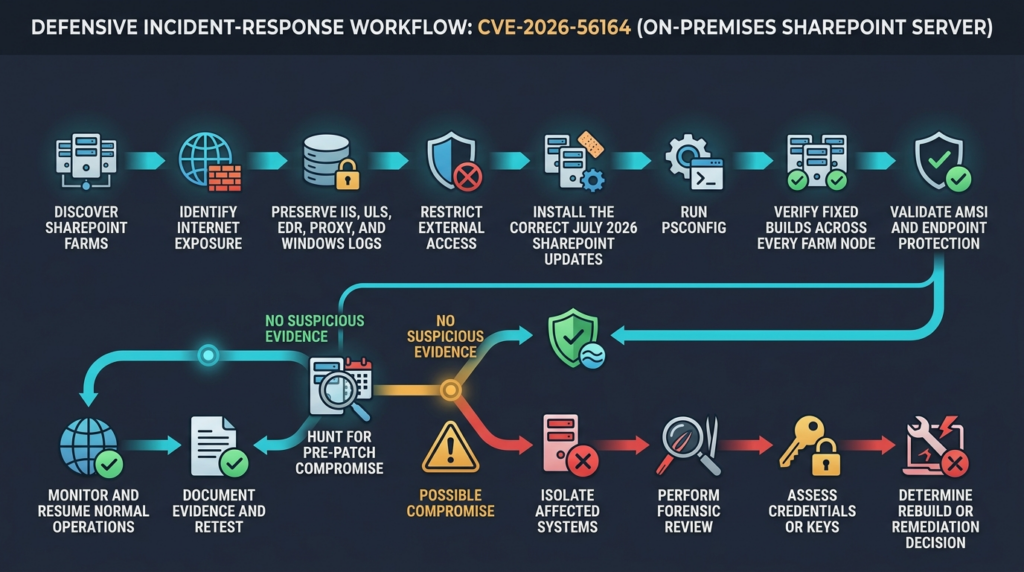
Identify Every Relevant System
Create a list of:
- Farm names
- Server names
- SharePoint roles
- Product editions
- Current builds
- Installed July packages
- Internet-facing hostnames
- Reverse proxies and load balancers
- Central Administration addresses
- SQL Server dependencies
- Workflow Manager dependencies
- Disaster-recovery and standby farms
- Farm owners and business contacts
Do not depend exclusively on a CMDB. Compare CMDB records with DNS, certificate inventories, load-balancer configurations, firewall rules, virtualization platforms, cloud accounts, backup systems, monitoring platforms, and Active Directory computer objects.
Preserve Logs Before Changing the Environment
Collect or protect:
- IIS logs from every Web Front End
- SharePoint ULS logs
- Windows event logs
- Microsoft Defender or other EDR telemetry
- Reverse proxy and WAF logs
- Authentication provider logs
- VPN and identity logs
- SQL audit or connection telemetry where available
- File creation and modification records
- Existing memory or forensic artifacts from suspicious hosts
Patching, rebooting, running iisreset, recycling application pools, and completing PSConfig can change volatile evidence. An actively compromised server may also contain data that an attacker can delete. Evidence preservation should therefore begin before routine maintenance whenever operationally possible.
Restrict Exposure
For an unpatched internet-facing farm, temporarily limiting external access is safer than leaving the service reachable while waiting for a conventional maintenance window. CISA recommends avoiding direct internet exposure and using an application-layer proxy when external access is necessary. It also recommends blocking external access to Central Administration and restricting farm and database communications to required systems. (LinkedIn)
Temporary controls may include:
- An IP allowlist for essential users
- A VPN or zero-trust access gateway
- An authenticated Layer 7 reverse proxy
- Removal of unnecessary public DNS or load-balancer listeners
- Blocking access from untrusted network zones
- Disabling a nonessential external portal until patching is complete
A generic WAF rule should not be presented as a complete mitigation unless Microsoft or CISA publishes a validated rule for the vulnerability. The affected function and request structure are not publicly documented, making broad signature claims unreliable.
Decide Whether the Host Is a Patch Candidate or an Incident Candidate
A server with no suspicious evidence may proceed through emergency patch testing and deployment.
A server showing suspicious child processes, unexpected ASPX files, unauthorized administrators, unknown services, malicious Defender alerts, unusual web traffic, or unexplained configuration changes should be treated as an incident candidate. Isolate it according to the organization’s response plan and preserve forensic evidence. Do not assume installing the update removes persistence or reverses unauthorized changes.
Safe Local Inventory and Build Verification
The following commands are intended for administrators operating their own authorized SharePoint environment. They do not test exploitation and do not send attack traffic.
Run the SharePoint Management Shell with appropriate administrative rights:
# Display the farm build recorded by SharePoint.
$farm = Get-SPFarm

[pscustomobject]@{
    FarmId       = $farm.Id
    FarmBuild    = $farm.BuildVersion.ToString()
    CurrentTime  = (Get-Date).ToString("o")
}
List SharePoint servers and their roles:
Get-SPServer |
    Select-Object Address, Role, Status, BuildVersion |
    Sort-Object Address
Ask SharePoint to inspect locally installed product components and patches:
Get-SPProduct -Local
Capture installed Microsoft updates relevant to the current server:
$targetKbs = @(
    "KB5002882", # Subscription Edition
    "KB5002883", # SharePoint 2019 STS
    "KB5002885", # SharePoint 2019 WSSLOC
    "KB5002891", # SharePoint 2016 STS
    "KB5002892"  # SharePoint 2016 WSSLOC
)

Get-HotFix |
    Where-Object { $_.HotFixID -in $targetKbs } |
    Select-Object HotFixID, Description, InstalledOn |
    Sort-Object HotFixID
Get-HotFix does not always provide a perfect inventory for every Office or SharePoint package. Use it as one piece of evidence, not the sole authority. Microsoft’s SharePoint update history, installed-program records, Central Administration patch status, package logs, and resulting SharePoint build should be reconciled.
A simple local threshold check can reduce transcription mistakes:
$fixedBuilds = @{
    "Subscription Edition" = [version]"16.0.19725.20434"
    "2019"                 = [version]"16.0.10417.20175"
    "2016"                 = [version]"16.0.5561.1001"
}

# Set this value to the edition operated by this farm.
$edition = "2019"

$currentBuild = [version](Get-SPFarm).BuildVersion

[pscustomobject]@{
    Edition       = $edition
    CurrentBuild  = $currentBuild
    FixedBuild    = $fixedBuilds[$edition]
    MeetsBaseline = $currentBuild -ge $fixedBuilds[$edition]
}
This comparison proves only that the reported farm build meets a threshold. It does not prove that:
- Every SharePoint node has identical binaries
- Both required 2019 or 2016 packages are present
- PSConfig completed successfully everywhere
- All databases are upgraded
- AMSI is working
- The system was not compromised before patching
Installing the July 2026 SharePoint Updates
SharePoint Server Subscription Edition
Microsoft’s July security package is KB5002882, build 16.0.19725.20434. The update replaces KB5002873. Microsoft publishes a SHA-256 hash for the standalone package and provides Microsoft Update, Update Catalog, and Download Center installation paths. (Microsoft Support)
Organizations running SharePoint Workflow Manager must install Workflow Manager KB5002799 before installing this cumulative update. Microsoft also provides a debug-flag procedure for farms still using the Classic version of Workflow Manager. These requirements appear on the official KB page and should be reviewed before deployment rather than discovered during an outage. (Microsoft Support)
The Subscription Edition update also has a documented known issue. After PSConfig, Microsoft currently instructs administrators to set DisableActorTokenAudienceValidation 에 $true. Microsoft says this disables a defense-in-depth validation under development while existing actor-token validation checks remain in place. Because the instruction changes a security-related farm property, administrators should use the exact vendor guidance, document the setting, and monitor the KB page for revisions. It should not be copied to SharePoint 2019 or 2016 unless Microsoft separately instructs those customers to do so. (Microsoft Support)
The Microsoft-published commands are:
$farm = Get-SPFarm
$farm.DisableActorTokenAudienceValidation = $true
$farm.Update()
SharePoint Server 2019
The July 2026 fixed build is 16.0.10417.20175. Microsoft’s update history lists:
- KB5002883, the language-independent SharePoint Server 2019 update
- KB5002885, the language-dependent SharePoint Server 2019 update (Microsoft Learn)
The KB5002883 support page confirms that the update resolves CVE-2026-56164 and provides the fixed package build. It also documents the Workflow Manager prerequisite and Classic Workflow Manager debug flag. (Microsoft Support)
Installing only KB5002883 is not the complete update path described by Microsoft’s SharePoint release history. Verify KB5002885 as well, even when the installation uses only English.
SharePoint Server 2016
The July 2026 fixed build is 16.0.5561.1001. Microsoft’s update history lists:
- KB5002891, the language-independent SharePoint Server 2016 update
- KB5002892, the language-dependent SharePoint Server 2016 update (Microsoft Learn)
KB5002891 resolves CVE-2026-56164 among other July vulnerabilities. The support page also includes the Workflow Manager prerequisites and identifies the package build. (Microsoft Support)
SharePoint 2016 estates often carry years of custom solutions, legacy workflows, and operational exceptions. That makes testing important, but active exploitation means testing should be compressed and risk-based rather than used to justify an indefinite delay.
Completing the Farm Upgrade
Installing update binaries is not the end of the SharePoint patch process. SharePoint configuration and databases must also be updated.
A controlled deployment normally includes:
- Back up the farm according to the organization’s recovery plan.
- Verify sufficient disk space and database health.
- Record current builds and patch status.
- Install all required packages on each SharePoint server.
- Reboot where required.
- Run the SharePoint Products Configuration Wizard or
PSConfig.exe. - Confirm successful completion on every server.
- Verify that no server reports
Upgrade Required. - Verify database upgrade status.
- Test authentication, search, workflows, custom solutions, document access, service applications, and integrations.
- Reconfirm build levels and AMSI operation.
- Preserve installation and PSConfig logs.
A commonly used command-line form is:
& "$env:CommonProgramFiles\Microsoft Shared\Web Server Extensions\16\BIN\PSConfig.exe" `
    -cmd upgrade `
    -inplace b2b `
    -wait `
    -force
The exact maintenance procedure depends on farm topology, availability requirements, and the organization’s SharePoint operating model. Administrators should follow the supported Microsoft process and existing change plan. The security objective is not merely to make the installer report success. It is to produce a consistent, fully upgraded farm with verifiable evidence.
Common incomplete states include:
- The package is installed on Web Front Ends but not application servers.
- The STS package is installed but the WSSLOC package is missing.
- One server remains outside the load balancer and is forgotten.
- PSConfig succeeds on some nodes and fails on another.
- A database remains in an upgrade-required state.
- A disaster-recovery farm is not updated.
- A server image or auto-scaling template still contains the vulnerable build.
- A restored backup later reintroduces vulnerable binaries or configuration.
A Safe PoC for Understanding CWE-306
The following demonstration does not reproduce CVE-2026-56164. It contains no SharePoint endpoint, SharePoint payload, exploit request, deserialization chain, or production targeting logic.
It is a local toy application that demonstrates the control-flow error represented by CWE-306: a critical state-changing function is reachable without first validating the caller’s identity.
Only run it in a local isolated development environment.
Vulnerable Toy Application
from __future__ import annotations

from flask import Flask, jsonify, request

app = Flask(__name__)

# Toy in-memory data. This is not connected to SharePoint or any real service.
users = {
    "alice": {"role": "member"},
    "bob": {"role": "member"},
}


@app.post("/toy-admin/promote")
def promote_user():
    """
    Intentionally vulnerable educational example.

    The function changes a user's role but does not authenticate the caller.
    Any local client that can reach this route can perform a privileged action.
    """
    body = request.get_json(silent=True) or {}
    username = body.get("username")

    if username not in users:
        return jsonify({"error": "unknown user"}), 404

    users[username]["role"] = "administrator"
    return jsonify({"username": username, "role": "administrator"}), 200


if __name__ == "__main__":
    # Bind only to localhost. Do not expose the toy application to a network.
    app.run(host="127.0.0.1", port=5000, debug=False)
The dangerous line is not the role assignment by itself. The dangerous design is that the application reaches the role assignment without answering two prior questions:
- Who is the caller?
- Is that caller authorized to promote another user?
A local test demonstrates the failure:
from app import app, users


def test_anonymous_caller_can_reach_critical_function():
    client = app.test_client()

    response = client.post(
        "/toy-admin/promote",
        json={"username": "alice"},
    )

    assert response.status_code == 200
    assert users["alice"]["role"] == "administrator"
The test succeeds, but success represents a security failure.
Corrected Toy Application
from __future__ import annotations

from functools import wraps
from flask import Flask, g, jsonify, request

app = Flask(__name__)

users = {
    "alice": {"role": "member"},
    "bob": {"role": "member"},
    "carol": {"role": "administrator"},
}

# Toy bearer tokens for a local educational example only.
tokens = {
    "token-alice": "alice",
    "token-carol": "carol",
}


def require_authenticated_user(view_function):
    @wraps(view_function)
    def wrapper(*args, **kwargs):
        authorization = request.headers.get("Authorization", "")

        if not authorization.startswith("Bearer "):
            return jsonify({"error": "authentication required"}), 401

        token = authorization.removeprefix("Bearer ").strip()
        username = tokens.get(token)

        if username is None:
            return jsonify({"error": "invalid token"}), 401

        g.current_user = username
        return view_function(*args, **kwargs)

    return wrapper


def require_administrator(view_function):
    @wraps(view_function)
    def wrapper(*args, **kwargs):
        current_user = users[g.current_user]

        if current_user["role"] != "administrator":
            return jsonify({"error": "administrator role required"}), 403

        return view_function(*args, **kwargs)

    return wrapper


@app.post("/toy-admin/promote")
@require_authenticated_user
@require_administrator
def promote_user():
    body = request.get_json(silent=True) or {}
    username = body.get("username")

    if username not in users:
        return jsonify({"error": "unknown user"}), 404

    users[username]["role"] = "administrator"

    return jsonify(
        {
            "username": username,
            "role": "administrator",
            "changed_by": g.current_user,
        }
    ), 200
The corresponding security tests define the required boundary:
from app import app, users


def test_anonymous_request_is_rejected():
    client = app.test_client()

    response = client.post(
        "/toy-admin/promote",
        json={"username": "alice"},
    )

    assert response.status_code == 401
    assert users["alice"]["role"] == "member"


def test_authenticated_non_admin_is_rejected():
    client = app.test_client()

    response = client.post(
        "/toy-admin/promote",
        headers={"Authorization": "Bearer token-alice"},
        json={"username": "bob"},
    )

    assert response.status_code == 403
    assert users["bob"]["role"] == "member"


def test_authenticated_admin_can_perform_action():
    client = app.test_client()

    response = client.post(
        "/toy-admin/promote",
        headers={"Authorization": "Bearer token-carol"},
        json={"username": "bob"},
    )

    assert response.status_code == 200
    assert users["bob"]["role"] == "administrator"
This model helps defenders understand four distinctions:
- A
401response means the caller has not established an acceptable identity. - A
403response means the caller is authenticated but lacks permission. - Authentication must occur before a protected action.
- Authorization must be evaluated against the authenticated identity, not untrusted request data.
The demonstration cannot determine whether a real SharePoint server is vulnerable to CVE-2026-56164. Version verification against Microsoft’s fixed builds is currently the safest reliable validation method.
Detection Without Inventing a CVE Signature
Because Microsoft has not publicly documented the vulnerable route or request pattern, defenders should avoid pretending that a single regular expression detects CVE-2026-56164.
Detection should combine:
- Exposure data
- Version data
- IIS and proxy telemetry
- SharePoint ULS logs
- Process behavior
- File-system changes
- Identity changes
- EDR alerts
- Configuration changes
- Historical SharePoint incident knowledge
The goal is not to find one magic string. The goal is to identify behavior inconsistent with the normal operation of the farm.
IIS and Reverse Proxy Analysis
Start with the period before the July 14 update was installed. Expand the review window according to available retention and CISA’s evolving guidance.
Useful fields include:
- Timestamp
- Client IP
- Proxy-forwarded IP
- HTTP method
- URI stem and query
- Status code
- Substatus
- Win32 status
- 사용자 에이전트
- Referrer
- Authenticated username
- Request bytes
- Response bytes
- Processing time
- Hostname
- Backend server
Look for mismatches and anomalies:
- State-changing requests associated with no authenticated identity
- Repeated POST, PUT, PATCH, or DELETE requests from unusual sources
- Requests that receive different status codes across farm nodes
- Bursts against rarely used SharePoint routes
- Large or unusual request bodies
- Requests arriving directly at a backend that should receive traffic only from a proxy
- Requests to administrative surfaces from external or user networks
- A proxy record showing anonymous access when the backend performs a privileged operation
- Traffic from new autonomous systems, hosting providers, or impossible geographies
- High request rates followed by a sudden successful response
- Requests immediately preceding a configuration, account, file, or process change
A basic local IIS review script can help collect evidence without claiming exploit detection:
$logRoot = "C:\inetpub\logs\LogFiles"
$output  = "C:\IR\sharepoint-iis-candidates.txt"

New-Item -ItemType Directory -Path (Split-Path $output) -Force | Out-Null

$patterns = @(
    "\sPOST\s",
    "\sPUT\s",
    "\sPATCH\s",
    "\sDELETE\s",
    "\s401\s",
    "\s403\s",
    "\s500\s"
)

Get-ChildItem -Path $logRoot -Filter "*.log" -Recurse -ErrorAction Stop |
    Where-Object { $_.LastWriteTime -ge (Get-Date).AddDays(-14) } |
    ForEach-Object {
        Select-String -Path $_.FullName -Pattern $patterns -AllMatches
    } |
    ForEach-Object {
        "{0}`t{1}`t{2}" -f $_.Path, $_.LineNumber, $_.Line
    } |
    Set-Content -Path $output -Encoding UTF8
This output is a triage dataset, not an alert verdict. SharePoint legitimately uses POST requests, and 401, 403, and 500 responses have many benign causes.
Correlate suspicious web requests with:
- EDR process events
- File creation
- Application pool recycling
- ULS Correlation IDs
- New administrator assignments
- SQL activity
- Authentication events
- Firewall or proxy changes
Process Hunting
Web server exploitation often becomes visible when the IIS worker process performs behavior unrelated to ordinary request handling.
A high-value Microsoft Defender XDR query is:
DeviceProcessEvents
| where Timestamp > ago(30d)
| where InitiatingProcessFileName =~ "w3wp.exe"
| where FileName in~ (
    "cmd.exe",
    "powershell.exe",
    "pwsh.exe",
    "rundll32.exe",
    "regsvr32.exe",
    "certutil.exe",
    "mshta.exe",
    "cscript.exe",
    "wscript.exe",
    "net.exe",
    "net1.exe",
    "schtasks.exe",
    "sc.exe"
)
| project
    Timestamp,
    DeviceName,
    AccountName,
    FileName,
    ProcessCommandLine,
    InitiatingProcessCommandLine,
    InitiatingProcessAccountName,
    SHA256
| order by Timestamp desc
This behavior is not proof of CVE-2026-56164. Some administrative or third-party SharePoint components may legitimately start helper processes. Each result requires context.
A narrower review can identify scripting engines launched by IIS:
DeviceProcessEvents
| where Timestamp > ago(30d)
| where InitiatingProcessFileName =~ "w3wp.exe"
| where FileName in~ ("powershell.exe", "pwsh.exe", "cmd.exe")
| summarize
    FirstSeen=min(Timestamp),
    LastSeen=max(Timestamp),
    Count=count(),
    Commands=make_set(ProcessCommandLine, 20)
    by DeviceName, AccountName, FileName
| order by LastSeen desc
For organizations without Defender XDR, Windows process-creation auditing can provide similar evidence if Event ID 4688 and command-line capture were enabled before the incident.
File-System Hunting
Search for unexpected files in:
- SharePoint IIS web roots
_layoutsand related application directoriesC:\inetpub\wwwroot- SharePoint configuration directories
- Temporary directories accessible to application pool identities
- Startup folders
- Scheduled-task locations
- PowerShell profile paths
- Service executable directories
A defensive inventory script can identify recently modified web-related files:
$roots = @(
    "C:\inetpub\wwwroot",
    "$env:CommonProgramFiles\Microsoft Shared\Web Server Extensions\16"
)

$extensions = @(
    ".aspx",
    ".ashx",
    ".asmx",
    ".config",
    ".dll",
    ".ps1",
    ".cmd",
    ".bat",
    ".js"
)

foreach ($root in $roots) {
    if (-not (Test-Path $root)) {
        continue
    }

    Get-ChildItem -Path $root -File -Recurse -ErrorAction SilentlyContinue |
        Where-Object {
            $_.Extension -in $extensions -and
            $_.LastWriteTimeUtc -ge (Get-Date).ToUniversalTime().AddDays(-30)
        } |
        Select-Object FullName, Length, CreationTimeUtc, LastWriteTimeUtc
}
Recent modification is not inherently malicious. SharePoint updates legitimately modify many files. Compare timestamps with approved update windows, package manifests, known deployment activity, cryptographic signatures, and clean baselines.
High-risk findings include:
- Unsigned binaries with no deployment record
- ASPX or handler files created outside an approved release
- Files owned or written by unexpected identities
- Web files created immediately after anomalous requests
- Scripts containing encoded commands, external download logic, credential access, or persistence behavior
- Modified
web.configvalues without a change ticket - New files that persist after application pool recycling
SharePoint ULS and Configuration Evidence
ULS logs can connect application-level events through Correlation IDs. Review for:
- Unexpected authentication or authorization failures
- Claims and token-processing errors
- Repeated exceptions from unusual client addresses
- Administrative changes
- Solution deployment
- Timer-job changes
- Service application errors
- Database permission errors
- Configuration database updates
- Requests that correspond to suspicious IIS entries
Do not search only for the text CVE-2026-56164. Product logs generally record application behavior, not CVE identifiers.
Correlate:
Proxy request ID
    |
    v
IIS timestamp and URI
    |
    v
ULS Correlation ID
    |
    v
SharePoint operation
    |
    v
Process or file activity
    |
    v
Identity and database changes
A timeline is more valuable than isolated alerts.
Identity and Permission Review
Because Microsoft describes the outcome as elevation of privilege, inspect changes to:
- Farm Administrators
- Site Collection Administrators
- Site owners
- SharePoint groups
- Web application policies
- Service accounts
- Managed accounts
- Application pool identities
- Trusted identity providers
- Claims mappings
- OAuth or application trust configuration
- Workflow identities
- SQL logins used by SharePoint
- Local Administrators on SharePoint servers
- Remote-management groups
Ask:
- Was a new administrator added?
- Was an existing low-privileged account promoted?
- Did a service account authenticate from a new host?
- Did an application pool identity start an interactive process?
- Were permissions changed without a matching ticket?
- Did an account perform changes outside its normal operating hours?
- Did the change occur shortly after an anonymous or suspicious web request?
A missing-authentication vulnerability may allow a protected function to execute without creating a conventional login event. That is why state changes must be reviewed independently of successful authentication records.
AMSI Validation
Microsoft documents AMSI integration for SharePoint Server as a way for an AMSI-capable antimalware provider to inspect HTTP and HTTPS requests before SharePoint processes them. SharePoint Server Subscription Edition adds request-body scanning capabilities, with Microsoft documenting Full Mode behavior for supported releases. (Microsoft Learn)
AMSI is a defense-in-depth control, not a substitute for the July security update. Its effectiveness depends on:
- SharePoint support and configuration
- The AMSI-capable antimalware engine
- Current malware definitions
- Correct operation on every applicable server
- Request scanning mode
- The engine’s ability to recognize the malicious content
- The attacker’s technique
Microsoft provides a SharePoint health analyzer rule for situations where AMSI is enabled but the expected antimalware response is not received. Microsoft also provides the Test-DefenderAndAmsiWorkProperly PowerShell cmdlet to validate Defender and AMSI integration without changing the configuration. (Microsoft Learn)
Run the supported diagnostic in the SharePoint Management Shell:
Test-DefenderAndAmsiWorkProperly
Record:
- The command timestamp
- The server on which it ran
- The result
- Defender engine and signature versions
- SharePoint build
- Web applications with AMSI enabled
- Any health analyzer warnings
- Remediation performed after a failure
Do not record “AMSI enabled” as equivalent to “AMSI tested successfully.”
Containment When Compromise Is Suspected
A suspicious server should not move directly from “unpatched” to “patched and trusted.”
A defensible sequence is:
- Preserve volatile and durable evidence.
- Isolate the server from untrusted networks.
- Maintain controlled access for incident responders.
- Identify all farm nodes and connected systems.
- Determine whether the activity is limited to one host.
- Inspect credentials, keys, identities, files, services, and scheduled execution.
- Patch clean systems through a controlled process.
- Rebuild compromised systems when integrity cannot be established.
- Rotate secrets that may have been exposed.
- Validate the restored farm independently.
Patching changes the vulnerable code. It does not remove:
- A web shell
- A malicious administrator
- A scheduled task
- A service
- A stolen credential
- A stolen cryptographic key
- A modified workflow
- A tampered document
- A malicious custom solution
- A remote foothold on another system
MachineKey rotation deserves a precise explanation. During the 2025 ToolShell response, Microsoft explicitly instructed customers to rotate SharePoint Server ASP.NET machine keys and restart IIS after installing updates or enabling AMSI because observed exploitation could expose cryptographic material used by SharePoint. Microsoft’s incident reporting also documented broader post-exploitation activity around those vulnerabilities. (Microsoft)
That historical instruction should not be converted into an unsupported claim that CVE-2026-56164 always steals MachineKeys. For the current event:
- Follow any updated Microsoft or CISA instructions specific to the 2026 campaign.
- Rotate keys when directed by the vendor.
- Rotate them when forensic evidence shows key access, configuration theft, forged-state persistence, or related compromise.
- Coordinate rotation across the farm to avoid service inconsistency.
- Do not treat rotation as a replacement for rebuilding a server whose integrity is no longer trustworthy.
Hardening the SharePoint Boundary
Remove Direct Internet Exposure
CISA recommends avoiding direct exposure of SharePoint Server to the internet. When external access is necessary, place the service behind a Layer 7 proxy or equivalent application-aware control that can enforce authentication, inspect traffic, log requests, and restrict paths. (LinkedIn)
The proxy should not merely forward all traffic unchanged. It should provide controls such as:
- Strong authentication
- Conditional access where supported
- IP or geographic restrictions based on business need
- Rate limiting
- Request-size limits
- TLS policy enforcement
- Path restrictions
- Detailed request logging
- Correlation identifiers
- Backend isolation
- Health checks that do not expose administrative functions
Direct backend access should be limited to the proxy, approved management systems, monitoring infrastructure, and other required farm components.
Block External Access to Central Administration
Microsoft’s SharePoint hardening guidance explicitly recommends blocking external access to the port used by Central Administration. CISA repeated that recommendation in its July 14 response. (Microsoft Learn)
Central Administration should normally be reachable only from controlled administrative networks or privileged-access workstations. Exposure to ordinary users, partner networks, guest networks, or the public internet expands the consequences of authentication and authorization failures.
Restrict Farm and Database Communications
SharePoint servers do not all need unrestricted communication with every system.
Create role-aware network rules for:
- Web Front Ends
- Application servers
- Search servers
- Distributed Cache
- Workflow Manager
- Office Online integrations
- SQL Server
- Backup infrastructure
- Monitoring and management systems
Microsoft’s hardening guidance documents required ports and recommends blocking unnecessary database and administrative access. (Microsoft Learn)
Network segmentation cannot repair missing authentication in application code. It can reduce who is able to reach the vulnerable function and restrict post-exploitation movement.
Apply Least Privilege to Service Accounts
Microsoft recommends separating administrative and service responsibilities and preventing service application accounts from receiving unnecessary local-administrator or SQL roles. The farm account should not be used interactively by administrators. (Microsoft Learn)
검토:
- Local group memberships
- SQL Server roles
- Database ownership
- Logon rights
- Interactive logon
- Remote desktop rights
- Service account delegation
- Password age and rotation
- Managed account configuration
- Use of the same identity across unrelated services
- Credentials stored in scripts or deployment tools
A server-side vulnerability becomes more damaging when the affected process runs under an identity with excessive privileges.
Harden Web.config and Custom Components
Microsoft’s hardening guidance recommends:
- Preventing compilation or scripting of database pages through
PageParserPaths - Setting
CallStack="false" - Setting
AllowPageLevelTrace="false" - Keeping
SafeControlsto the minimum required set - Keeping workflow
SafeTypesto the minimum required set - Enabling custom errors
- Setting reasonable upload limits
- Reviewing proxy settings (Microsoft Learn)
Custom web parts, farm solutions, event receivers, identity providers, and workflow extensions should be reviewed after major SharePoint security events. Unsupported custom code may create its own authentication bypasses or depend on behaviors changed by a security update.
Improve Logging Before the Next Incident
Logging should be designed before exploitation occurs.
At minimum, retain:
- IIS logs from every Web Front End
- Reverse proxy and WAF logs
- ULS logs
- Windows Security, System, and Application logs
- EDR process, file, network, and identity telemetry
- SharePoint administrative audit data
- Identity provider and VPN logs
- SQL audit or connection records where feasible
- Configuration backups and version history
Synchronize time across systems. Preserve hostnames, proxy chains, authenticated identities, Correlation IDs, and deployment records. A 401 response at the proxy and a successful backend operation at the same timestamp may reveal a trust-boundary problem that neither log explains alone.
Related SharePoint CVEs
CVE-2026-56164 is easier to prioritize when placed next to other SharePoint vulnerabilities that affect authentication, validation, and execution boundaries.
| CVE | Weakness and access condition | Public impact | Exploitation status | Main defensive lesson |
|---|---|---|---|---|
| CVE-2026-56164 | Missing authentication, no privileges required | Remote elevation of privilege | Exploitation detected and in KEV | Do not let a moderate score override pre-auth exploitation |
| CVE-2026-32201 | Improper input validation, no privileges required | Network spoofing | Actively exploited and in KEV | Spoofing can be operationally urgent when it is pre-auth and exploited |
| CVE-2026-45659 | Deserialization of untrusted data, authenticated attacker | 원격 코드 실행 | Added to KEV after active exploitation | Low-privileged SharePoint access can become server execution |
| CVE-2025-53770 | Deserialization and ToolShell-related authentication bypass | Unauthenticated remote code execution | Widely investigated active exploitation | Patching may need to be paired with key rotation and compromise assessment |
| CVE-2025-53771 | ToolShell-related path traversal and bypass behavior | Security-boundary bypass supporting the wider chain | Active exploitation context | Attack chains can make individually narrower flaws much more dangerous |
| CVE-2023-29357 | SharePoint privilege escalation | Authentication and privilege-boundary compromise | Listed in KEV | Identity trust failures on SharePoint remain attractive to attackers |
CVE-2026-32201
Microsoft’s public description says improper input validation in SharePoint allows an unauthorized attacker to perform spoofing over a network. It affects the same supported on-premises product lines and was addressed in the April 2026 SharePoint updates. CISA’s July alert places it in the current active-exploitation context. (NVD)
The relationship is not that every spoofing issue becomes RCE. The relationship is that an unauthenticated trust-boundary failure on SharePoint deserves attention beyond the word used in the impact label.
Penligent’s detailed analysis of CVE-2026-32201 and SharePoint risk prioritization provides additional operational context on fixed builds and why exploitation evidence should take precedence over a moderate base score.
CVE-2026-45659
CVE-2026-45659 is an authenticated SharePoint remote code execution vulnerability caused by deserialization of untrusted data. Microsoft’s vector requires low privileges rather than no privileges. CISA added it to KEV after confirming exploitation. (NVD)
Its relevance to CVE-2026-56164 is architectural. A pre-authentication privilege gain may become more consequential if it supplies access or state that makes a separate authenticated execution path reachable. That is a reasonable attack-chain concern, not proof that the two vulnerabilities are always combined.
A deeper technical and operational discussion is available in Penligent’s CVE-2026-45659 SharePoint RCE analysis.
CVE-2025-53770 and CVE-2025-53771
The 2025 ToolShell incident demonstrated why SharePoint response cannot end with patch installation. Microsoft advised customers to deploy updates, ensure AMSI was correctly configured, deploy endpoint protection, rotate SharePoint ASP.NET machine keys, restart IIS, and hunt for post-exploitation activity. (Microsoft)
CVE-2026-56164 is a separate vulnerability with a different public description. ToolShell remains relevant because it shows the operational consequences of compromising SharePoint trust material and the importance of preserving evidence before remediation.
Post-Patch Validation
A successful response requires evidence across several layers.
Package Evidence
Confirm the correct KBs:
- Subscription Edition: KB5002882
- SharePoint 2019: KB5002883 and KB5002885
- SharePoint 2016: KB5002891 and KB5002892
Build Evidence
Confirm minimum builds:
- Subscription Edition:
16.0.19725.20434 - SharePoint 2019:
16.0.10417.20175 - SharePoint 2016:
16.0.5561.1001(NVD)
Farm Consistency
확인합니다:
- Every server is online or intentionally removed.
- Every active server has the required packages.
- No server reports
Upgrade Required. - PSConfig completed successfully.
- Databases report the expected upgrade state.
- Search and service applications function.
- Custom solutions load correctly.
- Workflow Manager prerequisites are satisfied.
- Load balancers have returned only validated servers to service.
Security-Control Evidence
확인합니다:
- AMSI is enabled where supported and required.
- The antimalware provider is active and updated.
Test-DefenderAndAmsiWorkProperlysucceeds.- EDR sensors are healthy.
- Central Administration is not externally reachable.
- Proxy and firewall policies match the approved architecture.
- Backend servers cannot be reached directly from untrusted networks.
- Logging is active and retained.
Incident Evidence
Document:
- The time the vulnerability became known internally
- The time exposure was reduced
- The time each node was patched
- The time PSConfig completed
- The exact builds
- The logs reviewed
- The hunting queries used
- Suspicious findings
- Containment actions
- Credential or key rotations
- Rebuild decisions
- Business validation
- Independent retest results
A platform such as 펜리전트 can be used in an authorized workflow to coordinate asset discovery, version checks, safe exposure validation, evidence capture, remediation tracking, and post-patch retesting. Automation is most useful when it produces replayable evidence and preserves scope controls; it should not replace SharePoint administration, incident response judgment, or vendor-supported patching.
Common Response Failures
Sorting Only by CVSS
The 5.3 CNA score can push CVE-2026-56164 below unrelated vulnerabilities. Active exploitation, no-auth access, network reachability, and SharePoint exposure should override that mechanical ordering.
Updating Only Internet-Facing Web Front Ends
Every farm server should be reviewed. Application servers, standby nodes, disaster-recovery systems, and temporarily removed nodes can retain vulnerable binaries.
Installing Only One SharePoint 2019 or 2016 Package
Microsoft’s update history requires both the language-independent and language-dependent packages to fully update these editions. English-only farms are not exempt. (Microsoft Learn)
Skipping PSConfig
Installing binaries without completing the SharePoint configuration upgrade can leave the farm inconsistent. Package installation, configuration upgrade, database status, and resulting builds must all be verified.
Checking One Version Field
No single field proves the entire farm is patched. Reconcile installed packages, local product status, farm build, server status, update history, and PSConfig results.
Treating Patching as Proof of No Compromise
The vulnerability was exploited before disclosure. A patched server may still contain unauthorized changes, stolen secrets, or persistence established earlier.
Searching for an Unverified Endpoint
Microsoft has not publicly documented the affected route. Copying a path from an unattributed social post or exploit repository can create false confidence and may generate unsafe traffic.
Attributing Every SharePoint Event to CVE-2026-56164
CISA grouped multiple exploited SharePoint vulnerabilities. Detection findings should be described as SharePoint compromise evidence unless a reliable source or forensic artifact supports attribution to a specific CVE.
Assuming SharePoint Online and SharePoint Server Are Interchangeable
The affected products are on-premises SharePoint Server editions. Inventory the actual deployment rather than acting on the generic product name.
Treating AMSI as a Patch Replacement
AMSI can block or detect malicious content recognized by its provider. It does not correct the missing authentication logic and cannot guarantee detection of every exploit variation.
Restoring an Old Vulnerable Image
A rebuilt server can reintroduce exposure if the source image, automation template, or disaster-recovery process contains an older SharePoint build. Patch the recovery pipeline, not only the current machines.
Frequently Asked Questions
Is CVE-2026-56164 remotely exploitable without authentication?
- Yes. Microsoft’s CVSS vector specifies a network attack vector, low attack complexity, no required privileges, and no user interaction.
- Microsoft describes the result as remote elevation of privilege.
- Microsoft and CISA report active exploitation.
- Microsoft has not publicly released the vulnerable endpoint or exploit request. (NVD)
Why is an actively exploited SharePoint flaw scored only 5.3?
- Microsoft’s CNA vector models no direct confidentiality or availability loss and only low integrity impact.
- NIST’s initial analysis on the NVD page uses high impact across confidentiality, integrity, and availability, producing 9.8.
- The public record therefore contains a material scoring disagreement.
- Active exploitation, pre-authentication reachability, and asset exposure are more useful patch-priority signals than the base score alone. (NVD)
Which SharePoint versions must be updated?
- SharePoint Server Subscription Edition: update to build
16.0.19725.20434through KB5002882. - SharePoint Server 2019: update to build
16.0.10417.20175using KB5002883 and KB5002885. - SharePoint Server 2016: update to build
16.0.5561.1001using KB5002891 and KB5002892. - Review every server in every production, recovery, test, migration, and archive farm. (Microsoft Learn)
Does CVE-2026-56164 affect SharePoint Online?
- The public CVE record and July update packages identify on-premises SharePoint Server Subscription Edition, SharePoint Server 2019, and SharePoint Enterprise Server 2016.
- SharePoint Online does not use customer-installed SharePoint Server KB packages.
- Organizations with hybrid environments should still inventory any remaining on-premises farms.
- Do not assume that using Microsoft 365 means no on-premises SharePoint server exists. (NVD)
How can administrators verify that the patch is fully installed?
- Check the exact product edition and fixed build.
- Confirm all required KBs, including WSSLOC packages for SharePoint 2019 and 2016.
- 실행
Get-SPProduct -Local. - Verify every farm server and database.
- Complete PSConfig successfully.
- Confirm that no server reports
Upgrade Required. - Validate AMSI, EDR health, workflows, search, custom solutions, and external access controls.
- Retain screenshots, command output, installation logs, and timestamps as evidence.
Is AMSI enough if the farm cannot be patched immediately?
- No. AMSI is a defense-in-depth measure and does not repair the vulnerable authentication path.
- Verify AMSI with Microsoft’s supported diagnostic tools.
- Restrict or remove untrusted network access.
- Place required external access behind an authenticated Layer 7 proxy.
- Block external access to Central Administration.
- Preserve and review logs.
- Install the security update as soon as operationally possible. (Microsoft Learn)
Should a patched server still be investigated for compromise?
- Yes, when it was exposed before patching.
- CVE-2026-56164 was already being exploited when the update was published.
- Review pre-patch IIS, ULS, EDR, identity, file, process, proxy, and database telemetry.
- Investigate unexpected administrators, child processes of
w3wp.exe, new web files, configuration changes, and unusual service-account behavior. - Patching prevents future exploitation of the corrected flaw but does not remove persistence established earlier.
Closing Assessment
CVE-2026-56164 is a useful test of whether a vulnerability program responds to attacker reality or to a sorted spreadsheet.
The public Microsoft score is 5.3. The same public record says the flaw is remotely reachable, requires no authentication, requires no user interaction, and has already been exploited. CISA placed it in KEV immediately and assigned federal agencies a three-day remediation window. That combination should determine the response.
Defenders should identify every on-premises SharePoint farm, preserve evidence, restrict unnecessary exposure, install the complete July update set, run the required SharePoint configuration upgrade, verify fixed builds across every node, validate AMSI and endpoint protection, and investigate the pre-patch period for compromise.
Technical restraint remains important. The current evidence does not justify inventing a SharePoint endpoint, publishing a guessed exploit chain, or describing CVE-2026-56164 as confirmed standalone RCE. It does justify emergency action.
For a high-trust enterprise platform under active exploitation, “the patch installed successfully” is not the final question. The final questions are whether every vulnerable asset was found, whether the farm is consistently fixed, whether attackers reached it before remediation, and whether the organization can prove those conclusions with evidence.


 Korean
  English
  German
  French
  Spanish
  Portuguese
  Japanese
  Hindi
Hindi  Arabic
  Turkish
  Hebrew