
A Grype job can pass while an image still contains a high-severity vulnerability. One way to make that happen is to combine --only-fixed 와 함께 --fail-on high: the policy then evaluates the findings left after filtering. An issue without an available fix can disappear from the gate without disappearing from the image.
That behavior is useful when it is intentional. It is dangerous when a green check is presented as “no high vulnerabilities.” The first describes a chosen release policy; the second makes a broader claim about the scan. A good Grype workflow preserves enough information to tell the two apart.
Reviewed October 21, 2026. Anchore’s Grype project scans artifacts for known vulnerabilities. This walkthrough combines documented scanner behavior with a locally tested shell wrapper. The wrapper tests use a mock executable; no live Grype scan, package-detection benchmark, or exploitability assessment is claimed.
Choose the artifact before choosing the flags
Grype’s supported targets include images, directories, archives, and SBOMs. They are not interchangeable descriptions of a deployment. A repository directory can omit the operating-system packages in the final image. A builder image can contain tools absent from the runtime image. A saved SBOM can describe an earlier artifact.
For a container release, identify the artifact you intend to ship and preserve its immutable identity where available. If you scan a local archive, retain its hash. If you scan an SBOM, keep its originating artifact identity with it. A familiar tag or filename is convenient for a command line, but it is not enough to explain a result after the underlying artifact changes.
# Examples for artifacts you own; replace the placeholders.
grype oci-archive:./owned-image.tar -o json > grype-full.json
grype dir:./owned-project -o json > grype-directory.json
grype sbom:./owned-sbom.json -o json > grype-sbom.json
These are alternative examples, not a three-step completeness guarantee. Pick the target that answers your question and check whether the expected packages were cataloged. If a dependency is absent from the package inventory, an empty vulnerability result for that dependency is inconclusive. Start debugging the input before adjusting severity thresholds.
그리고 result interpretation guide is the reference for understanding a match. Review package identity, installed version, ecosystem, vulnerability namespace, and the matching details before filing a high-impact issue. A package match establishes a reason to investigate and often a reason to update; it does not reproduce an application attack path.
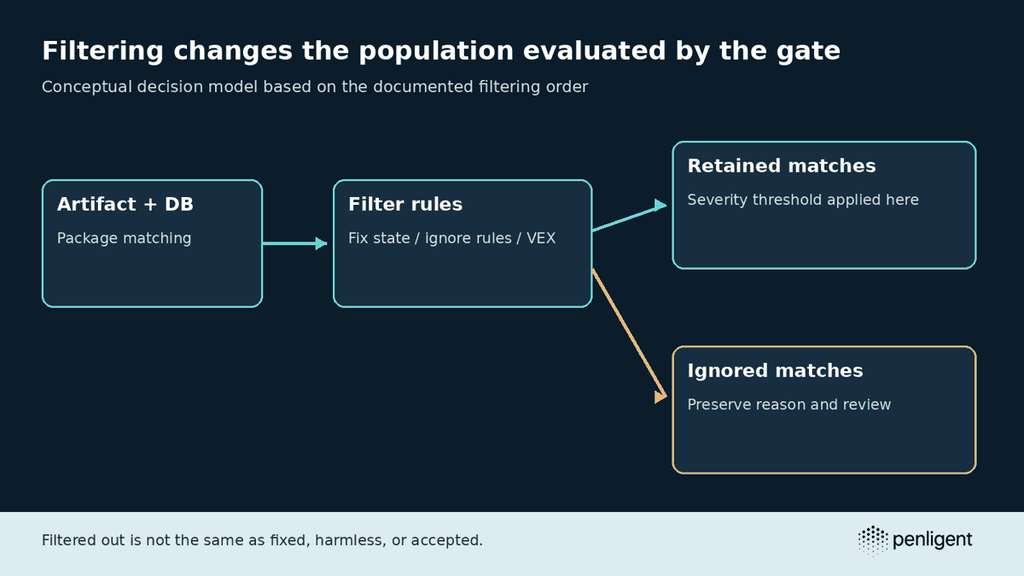
An available fix is a data state, not a deployment state
Anchore’s filtering guide defines fix availability states and explains that the failure threshold is applied after filtering. In that context, fixed means a fix is available. It does not mean the installed package has already received that fix.
| Command choice | Question it answers | What a pass leaves open |
|---|---|---|
| –fail-on high | Do retained high or critical matches cross this policy? | Lower-severity findings, coverage limits, and runtime exploitability. |
| –only-fixed –fail-on high | Do retained fixable high or critical matches cross this policy? | High findings without a reported available fix. |
| –only-fixed –show-suppressed | Which table rows were suppressed by filtering? | Whether a fix was installed or a risk exception was justified. |
Consider an illustrative image with a high-severity match whose fix state is unknown and a low-severity match with a fix available. A policy scoped to fixable high findings can pass. It has not established that the high finding is harmless, unexploitable, or incorrectly matched. The next task is to review that finding through a separate risk process.
This is why a remediation queue and a release gate should not silently share one definition. A queue can prioritize updates that somebody can perform today. A gate can enforce a release decision. An investigation backlog can track issues that need configuration changes, isolation, component replacement, or a documented exception. One filtered list cannot stand in for all three.
The distinction also helps when discussing vendor-supplied packages. Read the applicable package advisory rather than assuming an upstream version string completely describes the vendor’s maintenance state. If a scanner match and a package provider disagree, keep the evidence and investigate the mapping. Hiding the row to settle the dashboard is not a resolution.
Preserve the report before making the gate smaller
Grype’s JSON documentation provides a structured format for automation. The filtering documentation separates retained matches 에서 ignoredMatches in JSON, and provides --show-suppressed for table output. Preserve the suppressed population when reviewing a policy change.
# Keep a baseline and a separate remediation-oriented view.
grype sbom:./owned-sbom.json -o json > grype-full.json
grype sbom:./owned-sbom.json --only-fixed -o json > grype-fixable.json

# Inspect both populations in the filtered report.
jq '{retained: (.matches | length),
     ignored: (.ignoredMatches | length)}' grype-fixable.json
These commands are examples, not measurements collected for this article. For a meaningful comparison, use the same artifact and verify the scanner, database, configuration, and VEX inputs. If the vulnerability database changes between runs, a count difference can reflect new intelligence rather than the flag you meant to evaluate.
Avoid turning the two counts into a vulnerability metric without reading what a row represents. One vulnerability may match more than one package or location. An ignored result also does not necessarily indicate an accepted risk: it can reflect a broad filter. A reviewer needs the rule and the underlying match, not just the total that made a chart go down.
For a small team, a useful review artifact is a sample of the rows that move when a policy changes. Ask who owns each remaining high-risk item and what action can change its state. If the answer is “wait for a fix,” attach an availability check and review date. Otherwise the filtered workflow makes unresolved work less visible precisely when it needs ownership.
Keep scanner errors separate from policy failures
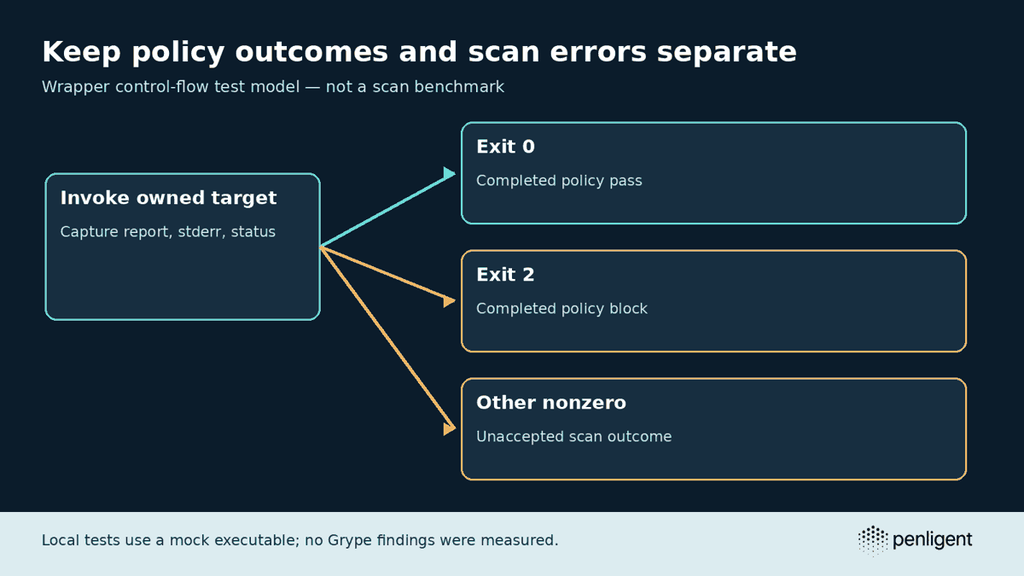
A shell wrapper should preserve a meaningful nonzero exit. Anchore documents exit code 2 for a completed scan that crosses the severity threshold. Treat other nonzero statuses as an unaccepted scan outcome unless you have a specific, reviewed reason to handle them differently. An operational failure is not a vulnerability count.
The following Bash wrapper deliberately omits --only-fixed. Its policy keeps high findings in scope even when a fix is unavailable. Change that policy explicitly if your organization chooses a fixable-only gate; retain the broader report and investigation workflow in either case.
#!/usr/bin/env bash
set -u
if [ "$#" -ne 1 ]; then
  echo 'Usage: gate.sh OWNED_SCAN_TARGET' >&2
  exit 64
fi
scanner=${GRYPE_BIN:-grype}
# Deliberately omit --only-fixed: unfixable high findings remain in scope.
"$scanner" "$1" -o json --fail-on high > grype-report.json
status=$?
case "$status" in
  0) echo 'SCAN_COMPLETED_POLICY_PASSED'; exit 0 ;;
  2) echo 'SCAN_COMPLETED_POLICY_BLOCKED' >&2; exit 2 ;;
  *) echo "SCAN_NOT_ACCEPTED status=$status" >&2; exit "$status" ;;
esac
Save the script as gate.sh and run it against an owned artifact with a reviewed Grype installation. The environment variable exists to make the command dependency replaceable in local tests; in a real runner, control the executable path and protect the build environment. The wrapper writes a fixed report name, so give concurrent jobs separate working directories.
bash gate.sh oci-archive:./owned-image.tarThe script does not use set -e because it must capture and classify the scanner’s exit explicitly. If you adapt it into a larger build script, preserve that intent. In particular, avoid adding || true to the scan and then deciding success from the wrapper’s own last successful command.
Do not infer a valid scan solely from the existence of the JSON file. Shell redirection creates the file before the scanner runs, so a missing executable or early error can still leave an empty file. Retain stderr, the exit status, and the report together. Validate the report before downstream processing; a parser accepting JSON does not validate the underlying findings.
The local test exercises the wrapper, not the scanner
For this article, the wrapper was executed in a temporary directory against a small mock executable. The mock returned selected exit codes without contacting a registry or vulnerability database. Six cases passed: policy pass, policy block, scanner error, unexpected error, missing executable, and missing target.
PASS policy passed: exit 0
PASS policy blocked: exit 2
PASS scanner error: exit 1
PASS unexpected error: exit 7
PASS missing binary: exit 127
PASS missing target: exit 64
6/6 shell-control tests passed using a mock executable; no Grype scan ran.
This test is useful because the wrapper is code your team owns. It checks whether that code preserves the distinction between a completed policy decision and an unsuccessful invocation. It cannot establish Grype’s detection accuracy, database freshness, package cataloging, or filtering implementation. Those need tests with the actual scanner and controlled artifacts.
#!/bin/sh
# A minimal mock for one local control-flow case.
# This is not a vulnerability scan and must not replace Grype in CI.
printf '{"matches":[],"ignoredMatches":[]}\n'
exit "$TEST_STATUS"
For a reproducible wrapper test, create an executable mock file, set GRYPE_BIN to its absolute path, and set TEST_STATUS to the intended code. Invoke the wrapper from a temporary working directory, then assert its exit and message. Test a nonexistent executable separately. The deliberately empty mock report should never be reported as a clean artifact scan.
Record database state when the result changes
Grype’s database guide documents a locally cached vulnerability database, update checks, and database-age validation. Preserve database state with the report, particularly when a previously passing artifact begins to fail without an application rebuild. The artifact may be unchanged while the available intelligence has changed.
grype version
grype db status
grype db check
# Run an update deliberately when appropriate for your workflow.
grype db update
The same guide states that grype db check uses its own status convention: zero when current and one when an update is available. Do not reuse the scan wrapper’s interpretation for every subcommand. A database check is not a scan, and its nonzero result can represent an available update rather than a broken scanner.
If an offline runner is stale or cannot obtain its required database, fix that operational problem. Disabling validation solely to restore a green build changes what the gate can claim. If an organization deliberately permits an older database for an isolated workflow, record the resulting limitation and review the decision rather than concealing it in an environment variable.
Also check the tool release. The v0.121.0 release notes, published October 19 include changes to end-of-life warnings and fix-availability handling. When a tool upgrade changes a decision, compare the relevant behavior with release notes and a controlled example. A changed count is not automatically a regression, but it deserves an explanation.
A useful release decision names what remains unresolved
| Observation | Acceptable conclusion | Next action |
|---|---|---|
| Threshold crossed after a completed scan | The selected policy blocked this artifact. | Review the underlying matches and remediation options. |
| Filtered gate passed | Retained findings did not cross that chosen threshold. | Inspect suppressed findings and retain their owners. |
| Scan failed or report is unusable | No accepted scan decision is available. | Repair input, credentials, database, or execution. |
| Package update removed a match | That match changed under the recorded scan conditions. | Verify deployed artifact identity and relevant application behavior. |
For an application owner, the final record should identify the artifact, scanner version, database state, policy, and unresolved exceptions. Where the concern is runtime authorization, business logic, or a configuration-dependent attack path, plan an authorized application test separately. A known-package scanner and a pentest provide different observations; neither should inherit the other’s conclusions.
A smaller report can be a better work queue. It becomes a worse security record when the rows that vanished no longer have an explanation. Keep the release gate specific, preserve the wider view, and make the unresolved work easy for the next maintainer to find.
Related demonstration: an authorized AI-assisted application-testing workflow. This video does not benchmark Grype or reproduce the shell-wrapper tests above.
 Korean
  English
  German
  French
  Spanish
  Portuguese
  Japanese
  Hindi
Hindi  Arabic
  Turkish
  Hebrew