
PAN-OS PHP2Shell response starts with the management interface. Palo Alto Networks’ October 23, 2026 advisory update identifies the HTTPS management UI and XML API as the affected surface; GlobalProtect portal, gateway and Clientless VPN are not impacted. Its product-specific assessment is High, CVSS 4.0 8.7, with availability impact. Read the current product advisory.
If you operate a firewall, identify every route to its management service before treating the issue as contained. A public VPN service and an exposed administrative service can share infrastructure while presenting different security questions. This guide focuses on the appliance owner’s decision: restrict access now, establish whether inspection actually covers that path, and prepare a branch-specific upgrade once the hotfix is released.
This is a documentation-based assessment and a proposed verification workflow. We have not exploited PAN-OS, tested these hotfixes or established that a particular customer device is compromised. All release estimates below are a dated snapshot, not a claim that a downloadable fixed image already exists.
Separate upstream PHP risk from the appliance assessment
The upstream vulnerabilities are CVE-2026-109618 and CVE-2026-109619, commonly discussed as PHP2Shell. Unit 42’s threat brief describes memory-state problems around fatal-error handling and rates the upstream vulnerabilities 9.2. The product advisory is the relevant authority for the impact on PAN-OS. Transferring a generic PHP RCE headline directly to the firewall product would collapse two different assessments into one.
That distinction matters to incident communication. An accurate ticket should name the product and affected service, distinguish confirmed exposure from suspected compromise, and state the source and time of the assessment. It should not say that every public Palo Alto Networks service permits root execution simply because a PHP component is present.
For a mixed estate, keep application-server PHP remediation separate from appliance remediation. An application team can change its runtime packages; the firewall owner must follow the supported appliance release process. Do not replace embedded PHP components manually or apply a web-server package command to a managed security appliance.
What the October 23 product update says
| Product or service | Vendor status snapshot |
|---|---|
| PAN-OS | Branch-specific hotfix ETAs: October 26–30, 2026. |
| Panorama; WildFire WF-500 / WF-500-B | Affected; fix ETA remains TBD. |
| Cortex XCORE SaaS; WildFire Cloud | Vendor remediation dated October 21 and October 22 respectively. |
| GlobalProtect portal / gateway / Clientless VPN; Captive Portal | Not impacted by this issue. |
그리고 official product-status table contains the complete version mapping. Treat “ETA” as planning information. Check it again before a maintenance window and confirm actual image availability through your normal vendor channel. A scheduled change does not establish that the software is released, supported for your hardware, or appropriate for your current upgrade path.
Do not use a broad “all Palo Alto products” finding to drive the rollout. Split the inventory by product, software train, device role and owner. If the product is not listed in the small summary above, consult the full advisory rather than infer its status from another appliance in the same environment.
Find the management path before changing controls
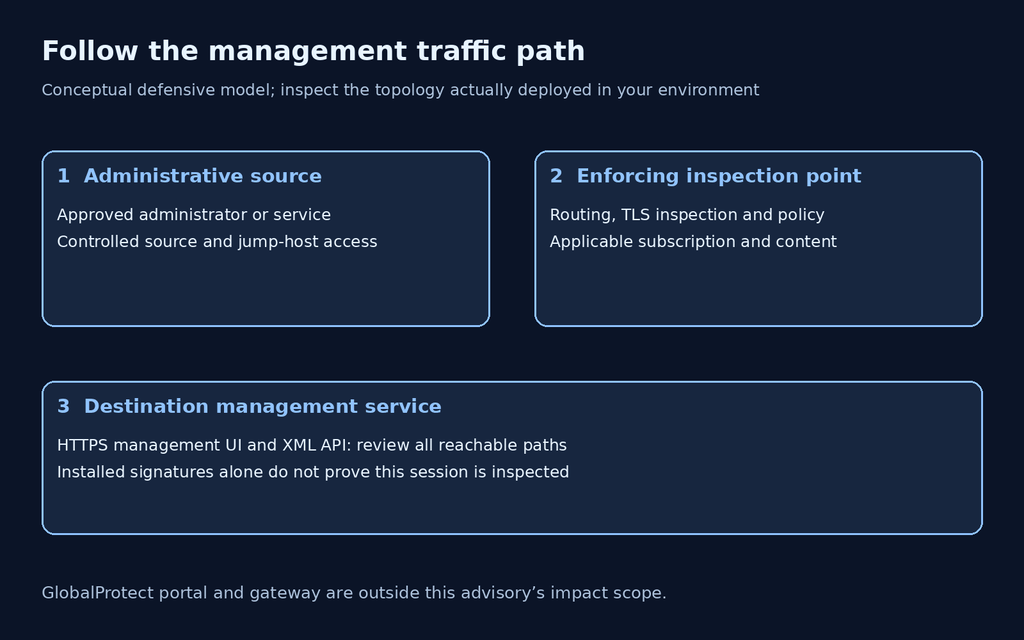
Begin with the address administrators use, then trace the path backwards. Document the destination interface, permitted source networks, intermediate routing and any upstream enforcement. Include alternate DNS names, NAT mappings, disaster-recovery devices and administrative automation. A diagram that ends at the public IP is incomplete if it does not identify which service receives the traffic.
Palo Alto Networks’ administrative access guidance explains that Security policy cannot be applied directly to traffic entering the dedicated MGT port. Inspection can require routing through a dataplane interface. The same guide distinguishes that design from enabling management services on a dataplane interface. Use documentation appropriate to your deployed release; the linked guide is versioned 10.1.
Operationally, this means an installed security subscription is not evidence that a given management session is inspected. Ask for the actual traffic path and the enforcing rule. If an upstream firewall performs inspection, preserve its identity and configuration evidence as well as the destination device’s settings. Configuration ownership matters when several teams manage different parts of the path.
Explore Penligent for authorized security testing
Restrict access while preserving an administrative recovery path
The vendor recommends restricting management access to trusted internal addresses, including a controlled jump host. Management exposure and mitigations. Apply the change through your approved operational process and confirm that authorized administration still works before closing the existing session. A hurried restriction that locks out the response team creates a second outage during an already time-sensitive event.
Our recommended change sequence is to identify the required administrative sources, confirm an alternate recovery method, prepare the restriction, test permitted and denied paths, and retain the result with the change record. Include service accounts and monitoring systems in the dependency review. Do not leave an overly broad network exception just because an automation owner has not yet responded; record it as an unresolved decision.
Authentication and reachability answer different questions. A login page that requires strong credentials still exposes its pre-authentication request processing to any client allowed to reach it. Conversely, a denied connection from one location proves only the behavior of that observed path. Record the vantage point and repeat through any other approved route that could bypass the restriction.
Threat Prevention coverage has prerequisites
Unit 42 lists Threat IDs 543004 and 97622–97625 for PHP2Shell protection. Vendor protection details. The appliance advisory adds content version 9162 or later and management-traffic routing, decryption and policy requirements. Coverage prerequisites. Read these as a dependency chain, not a single signature checkbox.
For an implementation review, ask five questions: is the subscription applicable, is the required content installed, does the management traffic traverse the inspection point, can that point inspect the encrypted request, and does the intended policy apply? An unanswered question remains an open control dependency. Do not replace “unknown” with “protected” to simplify a dashboard.
Avoid improvised routing or TLS changes copied from a generic diagram. Certificate trust, management availability, logging and inspection behavior must remain coherent in your topology. If you cannot safely implement the full inspection design immediately, document the limitation and prioritize a restrictive access path and the supported software update. Signature coverage is a mitigation, not proof that the underlying software is fixed.
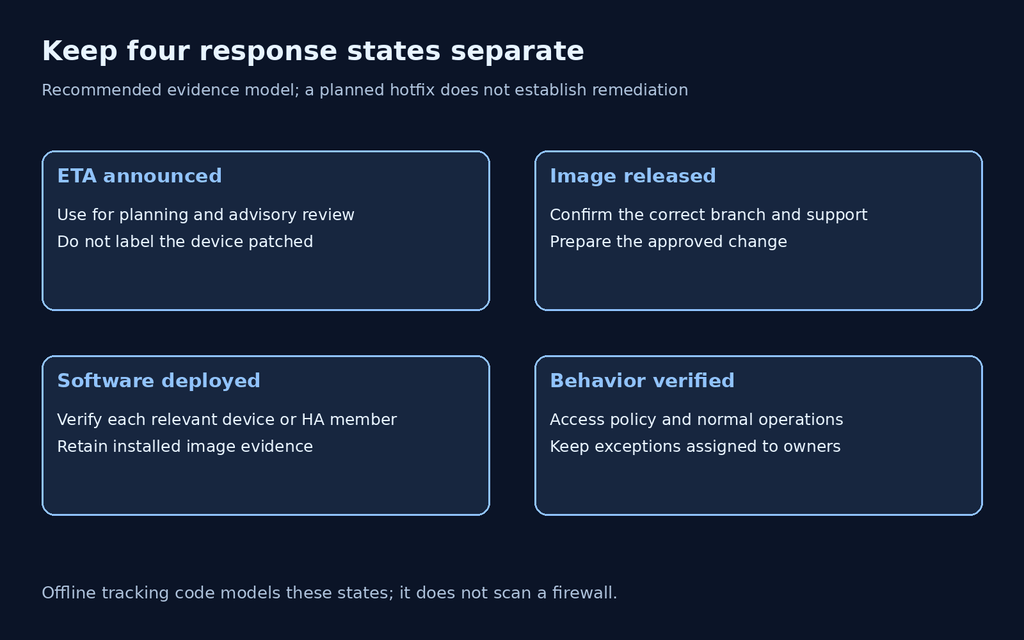
Keep release estimates out of the installed-version field
A useful response tracker has separate fields for current software, advisory target, release status and verification evidence. Combining them makes a future fix look deployed. The following planning example uses one target per software train from the October 23 advisory; it is not the complete matrix and is not an upgrade recommendation for every device.
| Selected train example | Listed target | Estimated availability |
|---|---|---|
| 12.2 | 12.2.4-h1 | October 28 |
| 12.1 | 12.1.10-h3 | October 30 |
| 11.2 | 11.2.10-h16 | October 26 |
| 11.1 | 11.1.16-h4 | October 26 |
| 10.2 | 10.2.18-h13 | October 26 |
Match your existing maintenance branch against the complete target list before choosing an image. A different hotfix suffix is not interchangeable just because the first two version numbers match. Record vendor guidance for the upgrade path, platform support and any high-availability sequencing in the actual change plan.
A safe offline check for remediation records
This Python example reviews synthetic tracking records. It makes no network connections, reads no appliance configuration and does not compare PAN-OS versions. We executed it locally to verify that an ETA remains pending, a mitigation-only record stays open, and a released-and-verified record can be distinguished from incomplete deployment evidence. The last two rows are fictional future states used only to exercise the logic.
records = [
    {"asset": "lab-a", "release": "eta", "verified": False},
    {"asset": "lab-b", "release": "mitigation-only", "verified": False},
    {"asset": "synthetic-c", "release": "released", "verified": False},
    {"asset": "synthetic-d", "release": "released", "verified": True},
]
def review(row):
    if row["release"] != "released":
        return "OPEN: no deployed-fix conclusion"
    if not row["verified"]:
        return "OPEN: deployment evidence missing"
    return "READY FOR OWNER REVIEW"

results = [review(row) for row in records]
assert sum(x.startswith("OPEN") for x in results) == 3
for row, result in zip(records, results):
    print(row["asset"], result)
lab-a OPEN: no deployed-fix conclusion
lab-b OPEN: no deployed-fix conclusion
synthetic-c OPEN: deployment evidence missing
synthetic-d READY FOR OWNER REVIEWThe deliberately conservative label requires owner review even when both fields are present. A real tracker needs a source for “released,” the installed image identity and an evidence reference for verification. This small model cannot attest to those facts. Its purpose is to prevent a common reporting error: turning a promised patch into a completed remediation.
Explore Penligent for authorized security testing
Verify the change through the path you intended to protect
After changing access controls, test normal administrative access from an approved source and rejection from an approved test location outside that source set. Use your existing authorized operational checks. Do not send memory-exhaustion requests to prove that a production management interface is vulnerable; availability is precisely the resource you are trying to preserve.
Record the time, source, destination, observed response and device identity. Keep a denial result distinct from an application error. An unavailable login page could reflect an upstream restriction, a routing failure or an unhealthy service. Tie the observation to the intended enforcing control and confirm that the result is repeatable without relying on a stale browser session.
Once the appropriate hotfix is available, follow the supported upgrade plan and capture the installed version after completion. In a high-availability pair or centrally managed fleet, verify every relevant member rather than one convenient console. Confirm normal management tasks, monitoring and required user-facing services after the change, and keep remaining exceptions assigned to an owner.
What to tell stakeholders about exploitation
As of its October 23 update, Palo Alto Networks says it is not aware of malicious exploitation against its products. Vendor exploitation status. That is a vendor observation at a point in time, not a guarantee about your network or a reason to leave management access unrestricted.
If local evidence suggests unauthorized access or unexpected management-service behavior, preserve the relevant logs and engage your incident-response process. A vulnerability assessment and a compromise investigation have different evidence requirements. Do not treat an isolated crash as proof of exploitation, and do not treat a successful software update as proof that an earlier incident never occurred.
Keep the testing scope and evidence explicit
For an authorized assessment, define the approved device set, management paths, observation methods and availability limits before testing. The useful deliverable is a record the operator can act on: which path was reachable, which control was checked, what remains uncertain and what must be repeated after the update. This article does not claim that Penligent has a dedicated PAN-OS PHP2Shell detector.
The Penligent video below introduces a general AI-assisted pentesting workflow. It is not an appliance exploit demonstration or evidence that a particular hotfix has been tested.
Frequently asked questions
Should I install an ETA hotfix now?
An estimate is not an available image. Confirm release availability, the correct maintenance branch and the supported upgrade path before scheduling deployment.
Does a strong administrator password remove this exposure?
Credentials protect authentication. They do not establish that an untrusted client cannot reach the management service’s request-processing boundary. Review reachability independently.
Does an installed threat signature mean the MGT port is protected?
Not by itself. Verify content, subscription, traffic routing, decryption and the applied policy. Preserve evidence for the actual management path.
Can I use the offline script as a vulnerability scanner?
No. It checks synthetic workflow states only. It cannot identify a device, determine software exposure or verify a mitigation.
What should the final remediation record contain?
Keep the applicable advisory target, installed software evidence, deployment completion, access-path verification and functional checks. List unresolved assets or exceptions separately.
 Korean
  English
  German
  French
  Spanish
  Portuguese
  Japanese
  Hindi
Hindi  Arabic
  Turkish
  Hebrew