
Do not begin a LiteLLM 1.107.0 exposure check by running pip inside the suspected environment. LiteLLM’s October 21 incident report warns that Python startup can execute the malicious startup hooks again, including when Python is launched to run pip. Use trusted administrative tooling and preserved deployment evidence first.
This is the October 2026 release-pipeline compromise, distinct from the March incident. The immediate decision is whether an affected artifact reached a machine, container, build runner or developer environment and executed there. Removing the package or changing a tag cannot recover a credential already copied from that environment.
Which artifacts and time windows are in scope
As of its October 21, 20:30 UTC update, LiteLLM reports malicious PyPI wheels and container releases, says the affected artifacts were removed, and identifies its private enterprise release channel as unaffected. That last statement concerns that channel; an enterprise using a public affected image still needs its own exposure review.
| Artifact channel | Vendor-reported October 21 UTC window | Identity to investigate |
|---|---|---|
| PyPI | 11:39:51–13:23 | litellm 1.107.0, all seven wheels |
| Docker Hub | 11:46:56–14:20 | v1.107.0, latest, main-latest, main-stable |
| GHCR | 11:46:56; affected indexes unavailable by 13:51 | litellm, litellm-database and litellm-non_root variants under affected tags |
| Private enterprise registry | Vendor says not affected | Confirm the actual registry and artifact used; do not infer from account tier |
The table follows the maintainer’s artifact timeline. Publication, download, installation and execution are different events. A wheel cached during the publication window can be installed later. A container pulled earlier can start after the registry tag has been repaired. Use the windows to find candidates, then establish the artifact identity and execution history.
Inventory laptops, notebooks, CI runners, scheduled jobs, staging gateways and production deployments. Begin with the release path that actually supplied each environment. A lockfile describes an intended resolution; a build record, retained artifact and deployed identity can show what was used. If a build cache or internal mirror served the poisoned bytes, the public registry’s current contents do not settle that environment’s history.
A clean source tag and a signed image did not establish a clean release
The maintainer’s investigation says the official GitHub source tag did not contain the malicious files. The published artifacts came from a lookalike repository after privileged credentials were used to override release protections. Its explanation of the initial access to the internal deployment remained an investigative hypothesis at that update, rather than a confirmed complete intrusion chain.
This distinction matters when reviewing evidence. A source diff at the legitimate tag can be accurate while missing code injected through a changed build source. A valid signature can show that a trusted publishing identity signed the artifact without showing that its workflow selected the intended repository. Review repository identity, qualified source revision, workflow revision, approving identities and produced artifact together.
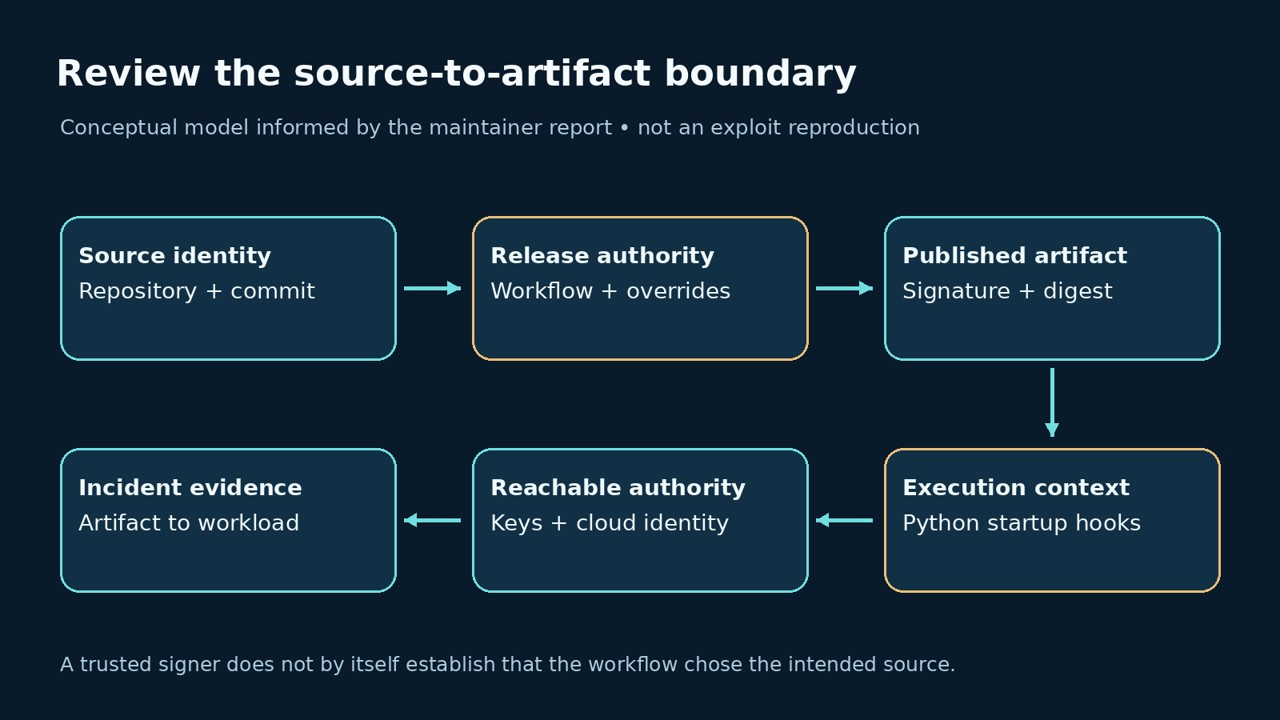
For a small AI application team, the release record should connect a named repository and commit to one immutable artifact, then connect that artifact to the running workload. An approval should bind to that complete tuple. If a privileged identity can replace the source repository or bypass review, make that capability explicit in the release threat model instead of treating the approval badge as the final security claim.
Inspect evidence without starting the affected Python environment
Prefer the container engine, orchestrator, build platform and read-only filesystem evidence available from a trusted administrative context. Do not start a suspect image to ask it which version it contains. Do not activate its virtual environment, import the package, or use a version command that launches its Python interpreter.
For a Docker deployment you administer, the following formatted inspection commands read narrow metadata fields. They are operator examples, not commands run against an affected deployment for this article:
docker container inspect --format '{{.Image}}' CONTAINER_ID
docker image inspect --format '{{json .RepoDigests}}' IMAGE_ID
The first result identifies the container’s local image configuration. A registry index digest, a platform manifest digest and an image configuration digest are different identifiers. A mismatch across those types is not a clean result. Use the build or registry record to resolve their relationship; preserve uncertainty when that mapping is unavailable. Avoid an unrestricted inspect dump because container metadata may contain secrets.
LiteLLM publishes the affected main image index in its incident report. The original researcher’s issue also records platform manifests and file hashes. Match full values of the same type; do not compare a shortened prefix as though it were a complete digest. The other image variants have separate indexes, so this one value is not an exhaustive allow-or-deny list.
Main affected image index reported by LiteLLM:
sha256:1bbcb1443bc962e45f5aad53fe3d2c30600e0379715fb6c664cdd3ac126c339e| Evidence | What it can support | What it cannot establish alone |
|---|---|---|
| Known affected artifact identity plus execution record | A specific environment ran the affected release | The full extent of later credential use |
| Current floating tag points to a repaired image | The registry’s present tag state | What an earlier container or cached build executed |
| Suspicious startup file matching the reported hash | A concrete file identity for forensic review | That every credential was exfiltrated or that persistence is gone |
| A file named sitecustomize.py | A startup customization needs attribution | Maliciousness: this filename also has legitimate uses |
| No marker file or alert retained | Nothing matching was found in the available evidence | That the environment was never exposed |
Why even an empty Python command can run a startup hook
Python’s site documentation explains automatic site initialization, executable startup configuration and sitecustomize. To illustrate the boundary without touching LiteLLM malware, we ran a benign fixture in a clean local Python 3.12.14 environment. It creates a temporary customization that writes one marker file, then compares normal startup with a start using -S. No network, credentials or external package is involved.
import os
from pathlib import Path
import subprocess
import sys
import tempfile

# Benign, local fixture. Run only with a trusted interpreter in a clean lab.
with tempfile.TemporaryDirectory(prefix="startup-demo-") as directory:
    folder = Path(directory)
    marker = folder / "hook-ran.txt"
    (folder / "sitecustomize.py").write_text(
        "from pathlib import Path\n"
        + f"Path({str(marker)!r}).write_text('benign fixture')\n"
    )
    env = dict(os.environ, PYTHONPATH=str(folder))
    for label, flags in [("normal-start", []), ("no-site-start", ["-S"])]:
        marker.unlink(missing_ok=True)
        subprocess.run([sys.executable, *flags, "-c", "pass"],
                       env=env, check=True, timeout=10)
        print(f"{label}: marker={marker.exists()}")

# This is not LiteLLM malware, a CVE exploit, or an incident detection tool.
The actual local output was:
normal-start: marker=True
no-site-start: marker=False
The experiment demonstrates startup execution before the empty user program does useful work. It does not reproduce the malicious wheel, its .pth behavior or the remote loader, and it does not validate an incident-cleanup procedure. Do not use -S as a general cure on a compromised host: a hostile executable, other startup paths or an already-running process can fall outside this fixture. Perform forensic analysis from a separately trusted environment.
Recover the environment and the authority it could reach
The maintainer recommends rebuilding images and virtual environments from scratch and rotating reachable credentials. Its current incident fallback is an explicit pre-incident version, 1.106.2. That recommendation addresses this artifact incident; it is not a blanket claim that every older release is free of unrelated vulnerabilities. Check current security guidance before choosing the replacement.
Sequence the work so that a compromised environment does not receive the replacement secrets. Isolate the affected workload under the incident procedure, preserve the evidence needed for investigation, rebuild from trusted inputs, and provide replacement credentials only to the restored environment. Coordinate revocation with service owners so the old credentials cannot continue authorizing requests after the new deployment is healthy.
| Authority or dependency | Recovery question | Evidence to close the item |
|---|---|---|
| AI provider credentials and proxy keys | Which keys were stored in or reachable from the gateway? | Revocation, replacement owner and provider usage review |
| Cloud workload identity | What role and effective permissions could the environment use? | Role/session review and provider-specific invalidation or expiry controls |
| Database access | Could the gateway read stored provider keys or other secrets? | Credential change and access review covering the exposure interval |
| CI and publishing credentials | Could the runner or host reach a release account or token? | Revocation plus workflow, repository and recent publication review |
| Environment and mounted secrets | Which processes, files and secret mounts were in scope? | Bounded inventory and replacement delivered to clean workloads |
Do not reduce the secret inventory to the LiteLLM master key. Workload identity, a proxy database, mounted files and a CI account can create separate paths of authority. Keep the exact credential values out of shared reports; identifiers, owners, privileges and rotation status are usually enough to coordinate the response. Preserve sensitive evidence in the appropriate restricted incident store.
Review provider and cloud audit activity across the relevant interval, including use after the initial installation. A successful rebuild shows what runs now. It cannot explain an earlier API call, a new publishing token or a changed cloud permission. Give each suspicious event a disposition and record where logging was missing rather than translating a quiet dashboard into proof of no theft.
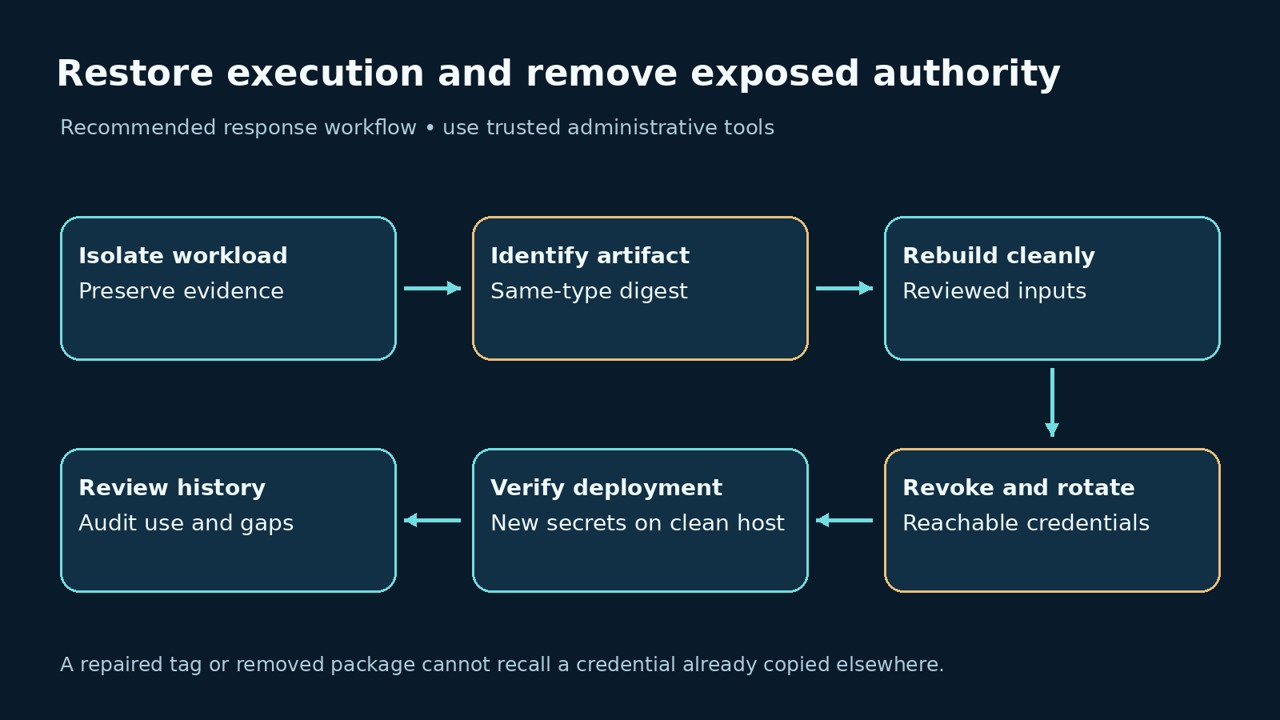
What to change in an AI gateway release process
Make future deployments reproducible from a reviewed source identity and an immutable artifact. Audit who can override branch protections, edit release inputs, approve production publication and access the gateway’s own logs. The incident report’s token-exposure account makes log access part of the credential boundary: redact sensitive material before retention and constrain who can query historical responses.
Test a release control by changing one condition in a permitted exercise: an unapproved source repository, an unqualified commit, a mismatched artifact or an identity without publication rights. The expected result should be denial at the intended gate. A signature verification exercise by itself does not test the source-selection policy. Keep this exercise separate from incident investigation and never use the poisoned release as a convenient test fixture.
For an authorized application assessment with Penligent, define the gateway’s accessible roles, expected authorization decisions and reviewable evidence. That can complement a release-control review; it does not grant a remote test visibility into private build credentials, past image execution or the contents of a sealed incident archive.
LiteLLM October incident questions
Is this the March LiteLLM supply-chain attack?
- No. This page concerns the October 21, 2026 publication of 1.107.0. Keep affected artifacts, dates and response records separate from the March incident.
Can I start with pip show litellm?
- Not inside the suspected environment. The maintainer warns that Python startup can trigger the hooks, including when running pip. Prefer trusted external evidence collection.
Does downgrading recover stolen keys?
- No. Rebuilding software and revoking exposed authority are separate tasks. Investigate reachable secrets and subsequent use.
Does a valid image signature prove the source was legitimate?
- It does not establish that by itself. Review the signed artifact’s source repository, revision and release workflow as well as the signer.
Does a clean current tag prove yesterday’s deployment was clean?
- No. Match the artifact actually used, including cached images, mirrors, old containers and build runners.
The video below introduces an authorized application-testing workflow. It is not a reproduction of this incident or a claim of a dedicated incident detector.
A complete response ties an affected artifact to an environment, restores trusted execution and removes the authority the old environment could still exercise. Keep those three outcomes explicit. Package removal is one event in that response, not its finish line.
 English
  German
  French
  Spanish
  Portuguese
  Japanese
  Korean
  Hindi
Hindi  Arabic
  Turkish
  Hebrew