
The 2026 Canvas cyber security incident was not just an outage. It was a breach of trust in one of the most important systems schools use every day: the learning management system where students submit work, instructors grade assignments, advisers exchange messages, administrators manage courses, and third-party education tools connect through API and LTI integrations.
The confirmed core is narrow enough to state precisely. Instructure said it detected unauthorized activity in Canvas on April 29, 2026, revoked the unauthorized party’s access, started an investigation, and brought in outside forensic experts. On May 7, it identified additional unauthorized activity tied to the same incident, including changes to pages some students and teachers saw after logging in. Instructure said the activity was carried out by exploiting an issue related to Free-For-Teacher accounts, and it temporarily shut those accounts down while applying additional safeguards. (Instructure)
The risk is wider than that short summary suggests. Instructure said the data fields involved include usernames, email addresses, course names, enrollment information, and messages. It also said core learning data such as course content, submissions, and credentials was not compromised, and that it had not found evidence of data being taken during the May 7 activity. Those distinctions matter. They help separate confirmed exposure from speculation, but they do not make the incident low-impact. Names, institutional emails, course context, enrollment relationships, and private messages are exactly the kind of data attackers use to craft believable phishing, social engineering, credential theft, and follow-on extortion. (Instructure)
The most useful way to read this incident is not as a single Canvas vulnerability story. It is a case study in SaaS dependency, identity trust, token governance, user-generated content, and post-breach validation. Canvas is a central workflow system. When it is disrupted, classes stop. When its messages or enrollment data leak, phishing becomes personal. When API tokens or developer keys become part of the response, the blast radius extends into every integration that depends on the LMS.
What is confirmed, reported, claimed, and still unknown
A careful reading of the Canvas cyber security incident starts by separating facts from claims. The public record includes official statements, reputable reporting, threat-actor claims, and community reports. They do not carry the same evidentiary weight.
| Categoria | What can be said | Por que é importante |
|---|---|---|
| Confirmed by Instructure | Unauthorized Canvas activity was detected on April 29, 2026, and additional unauthorized activity tied to the same incident was identified on May 7. | This anchors the response window for log review, token review, admin activity review, and user communications. |
| Confirmed by Instructure | The May 7 activity involved changes to pages some students and teachers saw when logged in through Canvas. | This points to a web application control-plane problem, not merely a back-office data export. |
| Confirmed by Instructure | The issue was tied to Free-For-Teacher accounts, which were temporarily shut down. | This gives defenders a starting point for understanding the access path, while still leaving root-cause details incomplete. |
| Confirmed by Instructure | Involved fields include usernames, email addresses, course names, enrollment information, and messages. | These fields are sufficient for targeted phishing and identity abuse even without passwords or financial data. |
| Confirmed by Instructure | Core learning data, including course content, submissions, and credentials, was not compromised according to the company’s investigation to date. | This narrows impact, but it should not be interpreted as “no meaningful risk.” |
| Reported by Reuters and AP | Instructure said it reached an agreement with the unauthorized actor, received data back, and received digital confirmation of destruction, while acknowledging there is never complete certainty when dealing with cybercriminals. | This changes the extortion posture but does not erase phishing, reuse, copy, or secondary abuse risk. |
| Reported by BleepingComputer | The breach and defacements involved multiple XSS vulnerabilities that enabled access to authenticated admin sessions. | This is highly relevant technically, but it should be attributed as reporting rather than treated as a full official root-cause report. |
| Claimed by attackers or reported from attacker claims | ShinyHunters claimed data from nearly 9,000 schools and roughly 275 million individuals, with several reports citing about 3.6TB to 3.65TB of data. | These numbers are important for urgency, but defenders should avoid presenting them as final verified totals unless confirmed in customer-specific reports. |
| Still unknown publicly | The complete root cause, full list of impacted organizations, exact data set per organization, and final forensic conclusions. | Security teams should avoid premature closure until they receive organization-specific findings. |
The incident also has a prior context. Instructure acknowledged a September 2025 security issue involving a third-party provider and its Salesforce instance. It said that incident involved a social engineering attack, that no Instructure products or product data were accessed, and that the data was largely public business information such as business names and contact details. Instructure later described the prior Salesforce-related incident and the 2026 Canvas incident as distinct events involving different systems and circumstances. (Instructure)
That distinction is important. It would be inaccurate to collapse the 2025 Salesforce incident and the 2026 Canvas incident into one continuous technical compromise unless later forensic evidence proves that relationship. It is fair, however, to say that repeated public security incidents involving the same vendor increase pressure on customers to ask better third-party risk questions: What systems were involved? What data classes were exposed? What credentials were rotated? What controls changed? What customer-visible evidence can be reviewed?
Timeline of the 2026 Canvas incident
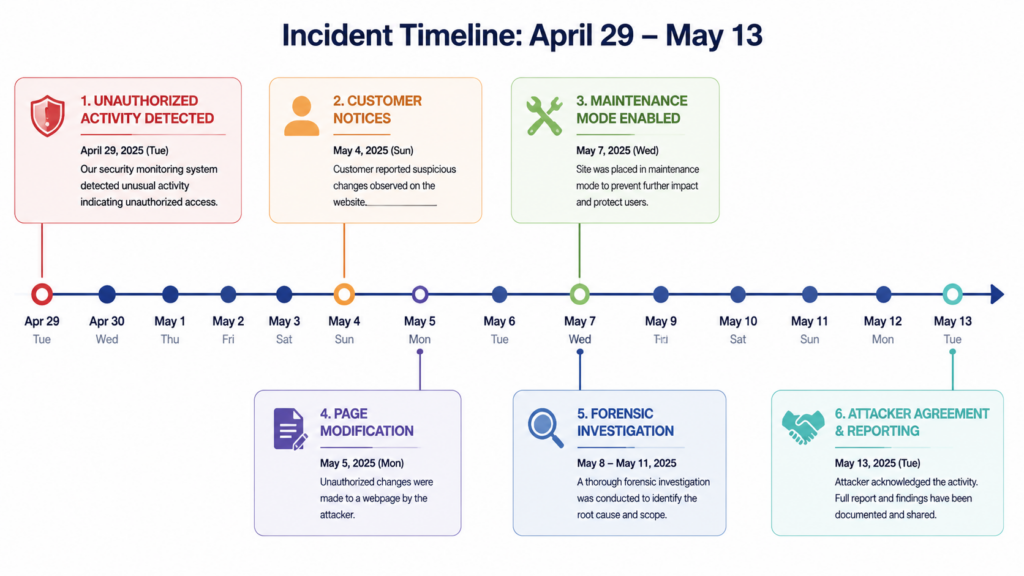
The dates matter because they define the investigation windows.
| Date | Event | Defensive significance |
|---|---|---|
| April 29, 2026 | Instructure detected unauthorized activity in Canvas, revoked access, began investigation, and engaged outside forensic experts. | Start log review no later than this date, and consider a buffer before it for credential and token anomalies. |
| May 5, 2026 | Instructure said it began providing notice to impacted organizations. | Customers should preserve all communications from account teams and legal contacts. |
| May 6, 2026 | The Instructure status page said Canvas was operational and recommended security best practices such as enforcing MFA on privileged accounts, reviewing admin access, and rotating API tokens or keys where applicable. (status.instructure.com) | Treat this as a minimum customer-side control review, not as the full incident response plan. |
| May 7, 2026 | Instructure identified additional unauthorized activity tied to the same incident. The actor changed pages visible to some logged-in students and teachers, and Canvas was temporarily taken offline into maintenance mode. | Investigate page modifications, theme/editor changes, custom JavaScript, CSP changes, admin actions, and suspicious session activity around this period. |
| May 9, 2026 | Instructure said Canvas was fully back online and that it was working with CrowdStrike for forensic analysis and another expert vendor for e-discovery review. (Instructure) | Customers should expect customer-specific reports to take time and should keep evidence preserved. |
| May 11 to May 12, 2026 | Reuters and AP reported Instructure’s agreement with the unauthorized actor. Reuters reported that Instructure said data was returned and that it received digital confirmation of data destruction; AP reported that Instructure acknowledged there is no complete certainty that data was erased for good. (Reuters) | Do not treat “agreement reached” as equivalent to “risk eliminated.” Continue phishing, token, and identity monitoring. |
| May 13, 2026 | Instructure said it was organizing a leadership webinar to share more information about the attack and hardening activity. (Instructure) | Security teams should capture any new root-cause, IOC, or customer-action guidance from official channels. |
One operational lesson is already clear: the first public sign of an incident may not be the first time the attacker touched a system. Security teams should avoid anchoring only on the most visible event, such as a defaced login page. The more useful approach is to build overlapping windows: initial access, data access, token changes, admin changes, user-facing modification, containment, and post-containment monitoring.
Why an LMS breach is different from a normal SaaS breach
Learning management systems are strange security objects. They look like productivity software, but they sit close to identity, privacy, attendance, grading, accommodations, disciplinary communications, exams, and student support. A breach involving usernames, email addresses, course names, enrollment details, and messages can create high-quality social engineering material even if no passwords are included.
A generic phishing email says, “Your account has a problem.” A post-LMS-breach phishing email can say, “Your BIO 201 final submission was flagged after the Canvas outage. Review the attached message from your instructor before 5 p.m.” That second email is more dangerous because it uses real institutional context.
Trend Micro’s analysis of the Instructure Canvas breach emphasized this point. It argued that the primary risk is highly targeted spear phishing using real institutional context, because Canvas can hold sensitive disclosures such as accommodation requests or private adviser conversations. (www.trendmicro.com)
For students, the threat may be credential phishing, financial aid fraud, harassment, or doxxing. For faculty, it may be impersonation, grade-change scams, fake IT requests, or compromised research collaboration. For administrators, it may be vendor invoice fraud, helpdesk social engineering, or attempts to regain access through support channels. For schools, it may be regulatory exposure, parent and student trust loss, litigation, and continuity problems during exams.
The Canvas cyber security incident also exposed a hard truth about SaaS concentration. Many schools have strong identity controls around their own Microsoft, Google, or Okta environments. But once a high-trust SaaS platform becomes the operational center of teaching, it inherits a large amount of implicit authority. Students trust Canvas messages. Faculty trust Canvas announcements. Helpdesks trust Canvas account state. Third-party learning tools trust Canvas launch flows. That trust is productive until an attacker can manipulate it.
The likely technical shape, without pretending the root cause is fully public
Instructure has not published a full technical root-cause report as of the sources used here. It has said the issue was related to Free-For-Teacher accounts and that it revoked privileged credentials and access tokens tied to affected systems, deployed platform protections, rotated certain internal keys, restricted token creation pathways, and added monitoring. (Instructure)
BleepingComputer reported a more specific technical account: it said both the breach and defacements involved multiple cross-site scripting vulnerabilities that enabled the attacker to obtain authenticated admin sessions, and that malicious JavaScript was injected through user-generated content features. (BleepingComputer)
Those two statements should be held together carefully. The official source gives the confirmed product area and response actions. The media report gives a plausible and highly relevant technical mechanism. Until a final official forensic report is available, a serious security team should avoid overclaiming. The better approach is to ask: if XSS, token abuse, or privileged session compromise were part of the attack path, what controls would have limited impact, and what evidence would prove whether our environment is still exposed?
That question leads to the real engineering work.
Why XSS in an LMS can become serious fast
Cross-site scripting is often underrated because many examples look like alert boxes or harmless proof-of-concepts. In an LMS, XSS can be much more serious because the application is designed around user-generated content. Students, teachers, instructional designers, admins, and integrated tools all create content. They write rich text. They upload files. They embed media. They post messages. They customize pages. They use LTI tools. They click through content while authenticated.
An LMS XSS failure can become dangerous when four conditions align:
| Condition | Why it matters in Canvas-like systems |
|---|---|
| User-generated content can reach a privileged viewer | A low-privilege actor may not need admin access if they can place content where an admin or support user views it. |
| The viewer has an active authenticated session | The script runs in the browser context where the session is already trusted by the application. |
| The browser can access sensitive application actions or tokens | XSS may interact with APIs, read accessible page data, trigger state-changing requests, or abuse weakly protected workflows. |
| The application has broad administrative or integration capabilities | LMS admin paths can affect themes, courses, users, developer keys, integrations, messages, and identity workflows. |
A modern LMS should assume that rich content is hostile until proven otherwise. Sanitization, contextual output encoding, strong CSP, least-privilege admin roles, sensitive-action reauthentication, token scoping, audit logs, and anomaly detection all matter because no single control catches every content-based attack.
The difference between page defacement and data theft
The May 7 activity drew attention because users reportedly saw attacker-controlled messages or altered pages. Page modification is visible. Data access is often not.
That difference matters for incident response. A defaced page tells you that an attacker reached a presentation or control surface. It does not, by itself, prove what data was accessed. It also does not prove that data was not accessed. Instructure has said it had not found evidence that data was taken during the May 7 activity, while the broader incident involved data fields such as usernames, emails, course names, enrollment information, and messages. (Instructure)
For defenders, the right question is not “Was the login page changed?” It is:
Did an unauthorized actor gain access to any admin session?
Did that access allow data export, message access, enrollment enumeration, or integration changes?
Were any API tokens, developer keys, LTI credentials, internal keys, or privileged sessions exposed or abused?
Were any changes made to custom JavaScript, theme editor settings, CSP policy, identity provider settings, or third-party tool configuration?
Were affected users later targeted through phishing using Canvas-specific context?
The visible web modification is the smoke. The data and identity review is the fire investigation.
Canvas API, Developer Keys, OAuth, and LTI are part of the security boundary
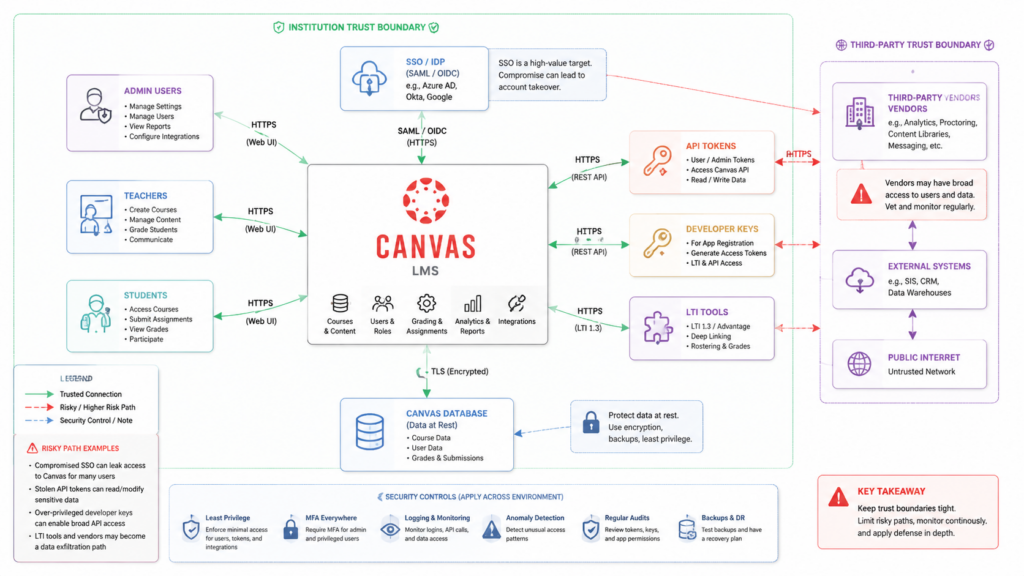
The Canvas cyber security incident is also an API governance story. Canvas is not just a website. It is a platform with integrations.
Instructure’s developer documentation describes Canvas developer keys as OAuth2 client ID and secret pairs that allow third-party applications to request access to Canvas API endpoints through the OAuth2 flow. When access is granted, Canvas creates an API access token. The same documentation explains that root account administrators can use developer key scopes to restrict tokens to a subset of Canvas API endpoints. Unscoped keys can access all Canvas resources available to the authorizing user. (developerdocs.instructure.com)
That last sentence is the one administrators should remember. In a SaaS ecosystem, the user’s authority often becomes the integration’s authority. If the integration is too broad, stale, or poorly governed, it can turn a contained user-level issue into a cross-course or cross-account exposure.
Canvas also gives administrators controls around user access tokens. Instructure’s documentation says admins can limit generation of access tokens through the Users-Manage Access Token permission, and that a clearly defined purpose helps identify which API user performed actions and remove keys that are no longer needed. It also says student-only user access tokens must have expiration dates of no more than 120 days. (Instructure Community)
Instructure’s user-facing token guidance is even more direct: access tokens should be treated with the same level of security as account passwords, should never be shared, and should be revoked immediately if suspected of exposure or compromise. The same page states that user-generated access tokens and API access are no longer supported for Free for Teacher accounts. (Instructure Community)
That makes token review one of the highest-value post-incident tasks.
| Asset | Common failure mode | What to check after the incident | Safer default |
|---|---|---|---|
| User-generated access tokens | Long-lived tokens created for scripts, student projects, automation, or unofficial tools | Token owner, purpose, expiration, last use, source IP if available, unusual API activity | Disable token creation for students or non-admins unless required |
| Developer keys | Overbroad OAuth scopes or unused integrations left enabled | Scope, owner, vendor, redirect URIs, last used date, data accessed | Scoped keys only, named owner, documented business purpose |
| LTI tools | Automatic trust extension into external tools | Tool domain, launch behavior, data shared, vendor security posture | Remove unused tools and review associated domains |
| Admin accounts | Privileged accounts used without strong MFA or with stale roles | MFA status, role assignments, masquerade permissions, recent admin actions | Enforce phishing-resistant MFA where possible and minimize standing privilege |
| Theme editor and custom JS | User-facing script modification becomes a high-impact control surface | Changes around incident window, unknown domains, injected scripts | Restrict edit rights and monitor every change |
| CSP settings | Overly broad allowed domains or course-level exceptions | Allowed domains, wildcard use, inherited settings, disabled course policies | Default inherit from root and avoid broad wildcard exceptions |
| SSO and identity provider settings | Attackers use trusted LMS context to phish SSO credentials | Login anomalies, MFA prompts, IdP logs, new devices, impossible travel | Enforce conditional access and alert on suspicious LMS-originated flows |
Content Security Policy is useful, not magical
Canvas includes Content Security Policy controls that allow administrators to restrict custom JavaScript that runs in a Canvas instance. Instructure’s documentation says admins can manage CSP from the Security tab, add allowed domains, and apply policy at account or sub-account level, with sub-accounts inheriting from the parent account by default. It also notes that LTI tool domains are automatically added to allowed domains. (Instructure Community)
CSP matters because it can reduce the damage from script injection. But CSP is not a cure-all. It is a policy layer that depends on correct configuration, tight domain control, and careful exception management. A broad wildcard can weaken it. An automatically trusted LTI domain can expand it. A course-level exception can undermine it. A same-origin script injection can still be dangerous if the application itself trusts the context.
For Canvas administrators, CSP review should be practical:
| Review item | Por que é importante | Red flag |
|---|---|---|
| Root account CSP state | Determines whether policy is applied broadly | CSP disabled at root without documented reason |
| Sub-account inheritance | Prevents local drift | Sub-account disables inherited CSP unexpectedly |
| Allowed domains | Defines where scripts may load from | Unknown domains, broad wildcards, personal hosting, old vendor domains |
| LTI associated domains | LTI tools may add trusted domains automatically | Old tools still present after vendor changes or course pilots |
| Course-level disablement | Allows exceptions for legitimate teaching needs | Many courses disabling CSP without security review |
| Change logs | Shows whether policy was altered during incident window | CSP change near April 29 to May 9 without approved ticket |
The goal is not to eliminate every exception. Some courses and tools need flexibility. The goal is to know which exceptions exist, who approved them, and whether they still make sense after a platform-level security incident.
What security teams should do first
Instructure said that, at the time of its FAQ, it was not recommending broad new customer-side remediation solely based on the May 7 activity unless it directly communicated that specific action was required for a given environment. It still recommended customers continue normal monitoring of their Canvas environments, integrations, and administrative activity. (Instructure)
That is a reasonable vendor statement, but customers still need a local response plan. A school cannot complete Instructure’s forensic investigation from the outside. It can, however, validate its own identities, integrations, logs, and communications.
Primeiras 24 horas
Confirm whether your institution received direct notice from Instructure. Preserve all emails, account team communications, legal notices, and incident updates.
Open an internal incident ticket even if you do not yet know whether your organization was affected. Track actions, evidence, and decision owners.
Freeze nonessential Canvas integration changes until admin review is complete.
Review privileged Canvas accounts. Confirm MFA status, role assignments, masquerade permissions, and recent actions.
Review API tokens and developer keys. Prioritize high-scope, no-expiration, unused, or unclear-purpose credentials.
Review LTI tools. Identify stale tools, broad data-sharing tools, tools with unknown owners, and tools added shortly before or during the incident window.
Review theme editor, custom JavaScript, CSP, and account settings changes between April 29 and May 9, with a buffer before April 29 if logs allow.
Coordinate with identity teams to monitor SSO phishing, impossible travel, MFA fatigue, password reset spikes, and unusual helpdesk requests.
Publish a short user advisory through official school channels. Tell users exactly where updates will come from and what not to click.
First week
Rotate or revoke unnecessary API tokens and keys where applicable. Do not rotate blindly without understanding dependencies, or you may break critical integrations during exams. Prioritize tokens with excessive scope, unclear ownership, or sensitive access.
Ask each integration owner to confirm business purpose, data access, vendor contact, and emergency disable procedure.
Review SIEM alerts for Canvas-related source domains, suspicious redirects, and phishing campaigns referencing final exams, grades, assignments, Canvas messages, or incident notices.
Run phishing simulations only after crisis communications stabilize. Do not train users with confusing fake incident notices while real incident communications are active.
Prepare customer-specific questions for Instructure: affected users, exact data fields, data access window, IOCs, root cause, token exposure, admin action evidence, and recommended customer-side actions.
Create a one-page continuity plan for LMS outages: alternative assignment submission, exam handling, gradebook export, faculty messaging, and accommodation workflows.
First 30 days
Reduce standing admin privilege. Use role-based access, named accounts, and periodic review.
Move Canvas token governance into a normal access review process. Treat API and LTI access as identity, not as a developer convenience.
Review third-party vendor contracts and breach notification obligations.
Test business continuity for a Canvas outage during finals or enrollment periods.
Run an authorized black-box validation of internet-facing education systems and a configuration review of the Canvas trust boundary.
Document lessons learned and assign owners. A postmortem without owners becomes a PDF nobody reads.
Useful detection logic for Canvas administrators and security teams
The following examples are defensive patterns. They are not exploit instructions. Adapt the field names to your SIEM, Canvas exports, identity provider logs, WAF logs, proxy logs, or data warehouse schema.
Suspicious admin activity after the incident window
SELECT
  actor_user_id,
  actor_email,
  action,
  target_type,
  target_id,
  source_ip,
  user_agent,
  created_at
FROM canvas_admin_audit_log
WHERE created_at >= TIMESTAMP '2026-04-29 00:00:00'
  AND action IN (
    'developer_key_created',
    'developer_key_updated',
    'developer_key_enabled',
    'access_token_created',
    'access_token_regenerated',
    'role_updated',
    'admin_created',
    'theme_editor_updated',
    'content_security_policy_updated',
    'lti_tool_created',
    'lti_tool_updated'
  )
ORDER BY created_at ASC;
This query is valuable because it focuses on control-plane changes. A normal user login tells you less than a new developer key, a regenerated token, a CSP change, or a theme modification.
Token use from new networks
WITH baseline AS (
  SELECT token_id, source_asn
  FROM canvas_api_access_log
  WHERE created_at BETWEEN TIMESTAMP '2026-03-01 00:00:00'
                       AND TIMESTAMP '2026-04-28 23:59:59'
  GROUP BY token_id, source_asn
),
recent AS (
  SELECT token_id, source_asn, COUNT(*) AS request_count, MIN(created_at) AS first_seen
  FROM canvas_api_access_log
  WHERE created_at >= TIMESTAMP '2026-04-29 00:00:00'
  GROUP BY token_id, source_asn
)
SELECT r.*
FROM recent r
LEFT JOIN baseline b
  ON r.token_id = b.token_id
 AND r.source_asn = b.source_asn
WHERE b.token_id IS NULL
ORDER BY r.request_count DESC;
This is not a verdict. A vendor may change infrastructure. A student may travel. A cloud egress range may shift. But new ASN use by a privileged token deserves review.
Splunk-style search for high-risk Canvas changes
index=canvas sourcetype=canvas:audit earliest="04/29/2026:00:00:00"
(action="developer_key_*" OR action="access_token_*" OR action="theme_editor_*" OR action="content_security_policy_*" OR action="lti_tool_*" OR action="role_*")
| stats count min(_time) as first_seen max(_time) as last_seen values(src_ip) as src_ips values(user_agent) as user_agents by actor_email action target_id
| convert ctime(first_seen) ctime(last_seen)
| sort - count
This kind of query is useful for triage meetings because it compresses many raw events into actor-action-target summaries. The next step is human review: Was there a change ticket? Was the actor expected to perform that action? Did the source IP and device match normal admin behavior?
Python triage for suspicious message exports
import pandas as pd

logs = pd.read_csv("canvas_api_access_log.csv", parse_dates=["created_at"])

sensitive_paths = [
    "/api/v1/conversations",
    "/api/v1/courses",
    "/api/v1/enrollments",
    "/api/v1/users"
]

mask = logs["path"].apply(lambda p: any(p.startswith(s) for s in sensitive_paths))
recent = logs[logs["created_at"] >= "2026-04-29"]
focused = recent[mask]

summary = (
    focused
    .groupby(["token_id", "actor_email", "path"])
    .agg(
        requests=("path", "count"),
        first_seen=("created_at", "min"),
        last_seen=("created_at", "max"),
        source_ips=("source_ip", lambda x: ", ".join(sorted(set(map(str, x)))[:10]))
    )
    .reset_index()
    .sort_values("requests", ascending=False)
)

print(summary.head(50).to_string(index=False))
This script helps identify tokens or users repeatedly accessing sensitive API areas after the incident window. It will produce false positives for legitimate integrations, but that is the point: it gives integration owners a concrete list to explain.
Detection signals that matter more than password exposure
Instructure said it had found no evidence that passwords, dates of birth, government identifiers, or financial information were involved. AP reported the same broad distinction in its coverage of Instructure’s statements. (AP News)
That is good news. It is not the end of the risk model.
| Sinal | Por que é importante | Likely data source | False positive risk | First triage action |
|---|---|---|---|---|
| Spike in SSO logins after Canvas outage notices | Attackers may use incident-themed phishing | IdP logs | Médio | Compare login source, device, and user-agent history |
| MFA fatigue reports | Users may be targeted after credential capture | IdP, helpdesk | Low to medium | Force password reset and revoke sessions for affected users |
| New API token usage from unfamiliar networks | Token may be abused or vendor infrastructure changed | Canvas API logs | Médio | Contact token owner and vendor owner |
| LTI launch failures or unusual launches | Integration trust may be broken after token rotation or abused by attacker | LTI logs, vendor logs | Médio | Validate tool configuration and data-sharing settings |
| Theme editor or custom JS changes | User-facing script can become a mass impact vector | Canvas admin audit logs | Baixa | Revert unknown changes and preserve evidence |
| CSP policy changes | Broad allowed domains can weaken script controls | Canvas settings audit | Médio | Review against approved domain list |
| Helpdesk requests about Canvas access | Social engineers may exploit user confusion | Ticketing system | Alta | Add helpdesk scripts and verification steps |
| Phishing emails referencing grades, final exams, or Canvas messages | Breached LMS context makes lures believable | Email security gateway | Médio | Block, warn users, and search for credential submissions |
The strongest post-incident monitoring combines Canvas logs with identity provider logs and email security data. LMS data makes phishing better. Identity logs show whether phishing worked.
How to validate your Canvas exposure without making the situation worse
The worst response to a major SaaS incident is panic testing against production without authorization. Do not spray payloads at Canvas. Do not attempt to reproduce rumored XSS against live institutional accounts. Do not test other schools’ Canvas instances. Do not use leaked data, threat actor portals, or screenshots as a basis for unauthorized probing.
A useful validation plan is narrower and safer.
Start with configuration evidence. Export or document current admin roles, token settings, developer keys, LTI tools, CSP settings, custom JavaScript, and SSO enforcement. Compare them with pre-incident baselines if available.
Then validate identity controls. Confirm MFA coverage for admins and privileged staff. Review conditional access rules. Check whether service accounts or non-human identities can bypass protections.
Then validate integrations. For each LTI or API tool, answer five questions: Who owns it? What data can it access? What scopes does it have? When was it last used? How would we disable it quickly without breaking critical teaching workflows?
Then validate monitoring. Run searches for suspicious admin changes, token use, LTI launches, SSO anomalies, and phishing. Preserve both positive and negative findings.
Then retest only in authorized environments. If your institution has a test Canvas environment, use it for configuration validation. If you run external security testing, define scope, accounts, timing, and stop conditions in writing.
AI-assisted penetration testing can be useful at this stage when it is used to organize evidence, execute authorized checks, and retest fixes rather than to speculate. Penligent, for example, positions its work around AI-powered penetration testing and evidence-driven validation workflows, while its writing on white-box and black-box testing makes a useful distinction: repository-aware review can find dangerous internal patterns, but black-box validation is what proves whether a deployed system is reachable and exploitable from the outside. (Penligente)
That distinction maps well to the Canvas incident. Customers cannot inspect Instructure’s full production source and forensic evidence. They can still validate their own externally reachable systems, identity paths, integrations, and incident-response assumptions.
Related CVEs that help explain the risk pattern
No public CVE should be treated as the root cause of the 2026 Canvas cyber security incident unless Instructure or another authoritative source says so. Still, several CVEs help explain why LMS security failures can be serious.
CVE-2021-36539, Canvas LMS access control around DocViewer preview URLs
NVD describes CVE-2021-36539 as an Instructure Canvas LMS issue where the system did not properly deny access to locked or unpublished files when an unprivileged user accessed the DocViewer-based file preview URL. NVD maps it to CWE-639, Authorization Bypass Through User-Controlled Key, and gives it a CVSS 3.1 base score of 6.5. (NVD)
The relevance is not that this CVE caused the 2026 incident. The relevance is the class of failure. LMS platforms contain many objects with subtle access states: published, unpublished, locked, enrolled, section-limited, role-limited, accommodation-limited, instructor-only, submitted, graded, archived. If a preview URL, export path, or API endpoint makes a different authorization decision than the UI, sensitive learning data can leak without a dramatic exploit.
The exploitation condition in this class is usually not “remote unauthenticated takeover.” It is often a lower-privileged user who can discover or request a specific object path and make the application return content it should deny. The mitigation is consistent object-level authorization across UI, preview, file, export, and API paths, plus regression tests that verify denied access remains denied in every representation.
CVE-2020-5775, Canvas LMS server-side request forgery
NVD describes CVE-2020-5775 as a server-side request forgery issue in Canvas LMS 2020-07-29 that allowed a remote unauthenticated attacker to cause the Canvas application to perform HTTP GET requests to arbitrary domains. NVD maps it to CWE-918 and gives it a CVSS 3.1 base score of 5.8. (NVD)
Again, this is not presented as the 2026 incident root cause. It is relevant because large web platforms often need to fetch, preview, import, embed, or process external resources. SSRF risk appears when the server can be tricked into making requests on an attacker’s behalf. In cloud environments, SSRF can become more serious if internal metadata services, internal APIs, or private network resources are reachable.
For LMS administrators, the practical lesson is indirect: integrations and content features are part of the attack surface. URL importers, media embedding, file previewers, LTI launchers, and migration tools should be reviewed as network-capable features, not just convenience features.
CVE-2024-43788, Webpack DOM clobbering XSS
NVD describes CVE-2024-43788 as a Webpack issue that can lead to XSS on websites that include Webpack-generated files and allow users to inject certain scriptless HTML tags with improperly sanitized name or id attributes. The issue was addressed in Webpack 5.94.0, and NVD says there are no known workarounds. (NVD)
This CVE is not Canvas-specific. Its value is educational. It shows why modern XSS is not limited to obvious <script> injection. DOM clobbering, sanitizer gaps, front-end build assumptions, rich HTML handling, and framework-specific behavior can combine in ways that surprise teams. That is directly relevant to an LMS, because LMS platforms process rich, user-controlled content at scale.
The mitigation pattern is layered: update vulnerable dependencies, sanitize HTML with a maintained allowlist-based sanitizer, encode output by context, avoid dangerous DOM assumptions, deploy CSP, and test user-generated content paths with privileged and unprivileged viewers.
The shared responsibility model for Canvas customers
SaaS customers cannot patch a vendor’s production code. But they still control a large part of the blast radius.
| Security domain | Primarily vendor-controlled | Primarily institution-controlled | Shared evidence to request or collect |
|---|---|---|---|
| Core Canvas application code | Secure development, patching, platform monitoring, incident response | None directly, unless self-hosted or custom code is involved | Vendor incident report, root-cause summary, remediation summary |
| Customer identities | Platform support for SSO, MFA, roles, logging | SSO configuration, MFA enforcement, admin role assignment | IdP logs, admin role exports, privileged account review |
| API tokens | Platform controls, token creation rules, auditability | Token ownership, expiration, rotation, removal | Token inventory, last-used data, owner attestation |
| Developer keys | Scope support, OAuth implementation, admin UI | Scope minimization, vendor approval, key lifecycle | Developer key export, scope review, vendor list |
| LTI tools | Platform LTI support and associated domain handling | Tool selection, vendor review, data-sharing approval | LTI inventory, vendor DPA, launch logs |
| Custom JavaScript and theme settings | Platform capability and safeguards | Who can edit, what is approved, change monitoring | Change logs, approved script list, CSP review |
| Communications | Vendor incident hub and customer notices | Local user notifications, helpdesk scripts, parent/student messaging | Notification archive, phishing warning templates |
| Business continuity | Platform availability and status updates | Alternate teaching, exam, grading, and messaging plans | LMS outage playbook and exercise results |
The shared responsibility model should be written down before the next incident. During an incident, every team is busy. Security wants logs. Legal wants certainty. IT wants the system back. Faculty want to teach. Students want grades and submissions. Communications wants approved language. A prebuilt matrix prevents the organization from discovering ownership under pressure.
How to communicate with students and faculty
Technical accuracy is necessary, but it is not enough. During a Canvas incident, users need instructions they can act on.
A good campus message should include:
What happened, in plain language.
Whether your institution has received notice that its data was involved.
What data types are known to be involved or not involved, using careful wording.
Where official updates will appear.
What users should not do.
How to report suspicious messages.
Whether password changes are required.
Whether MFA or account review is recommended.
The warning about phishing should be specific. “Be careful online” is weak. Better language is: “Attackers may send emails or messages that mention Canvas, grades, final exams, course enrollment, assignments, or account recovery. Do not enter your school password from a link in an email. Go directly to the official school portal.”
Instructure’s own guidance tells students, parents, and employees to treat their organization as the first point of contact and to be cautious of unexpected emails or messages referencing the incident, avoid suspicious links, and report unusual activity to the school or institution’s IT or security team. (Instructure)
A concise user notice might look like this:
Subject: Canvas security incident, what to watch for

We are aware of the recent Instructure Canvas security incident and are monitoring official updates from Instructure. If we receive confirmation that our institution’s data was involved, we will notify affected users through official school channels.

Please be alert for phishing messages that reference Canvas, grades, final exams, assignments, course enrollment, account recovery, or security notices. Do not click login links in unexpected emails. Access Canvas only through our official portal or by typing the known address directly into your browser.

Our IT team will never ask for your password by email, text message, or phone. Report suspicious messages to [security contact] and include the full email headers if possible.
This type of message avoids panic, does not overclaim, and gives users a concrete behavior change.
Common mistakes after a Canvas incident
The first mistake is focusing only on passwords. Password exposure is serious, but attackers do not need passwords to cause harm. Course context, messages, and enrollment relationships can power targeted phishing.
The second mistake is treating attacker numbers as final truth. Claims such as 275 million records or nearly 9,000 institutions may be important, but they should remain attributed unless confirmed by official customer-specific reporting.
The third mistake is treating an agreement with attackers as closure. Reuters reported that Instructure said data was returned and digital confirmation of destruction was received. AP also reported Instructure’s acknowledgment that complete certainty is not possible when dealing with cybercriminals. Both statements can be true. A deal may reduce leak risk without eliminating copy, phishing, or future abuse risk. (Reuters)
The fourth mistake is rotating credentials without mapping dependencies. Emergency rotation is sometimes necessary, but blind rotation can break exam tools, accessibility tools, plagiarism tools, proctoring tools, analytics, and SIS syncs. Rotate with priority and owner coordination.
The fifth mistake is ignoring LTI and API integrations. Many institutions know their main SSO posture but do not have a clean inventory of learning tools connected to Canvas.
The sixth mistake is assuming CSP solves XSS. CSP is important, but configuration drift, wildcard domains, LTI-associated domains, and same-origin trust can limit its effectiveness.
The seventh mistake is testing without authorization. Even well-intentioned security staff can create legal, operational, and ethical problems if they test vendor systems outside scope.
The eighth mistake is underinvesting in continuity. A Canvas outage during finals is not just an IT inconvenience. It can affect exams, deadlines, accommodations, academic integrity, and student appeals.
What to ask Instructure or any LMS vendor after an incident
Security teams should ask precise questions. Vague questions produce vague answers.
| Pergunta | Por que é importante |
|---|---|
| Was our institution affected, and which users were involved? | Determines notification, support, and monitoring scope. |
| What exact fields were accessed for our institution? | Separates general incident concern from specific data exposure. |
| What is the confirmed access window? | Defines log review and phishing monitoring periods. |
| Were any customer-specific API tokens, developer keys, LTI credentials, or integration secrets exposed? | Determines whether local rotation is required. |
| Were any admin actions performed in our tenant or account? | Identifies configuration tampering risk. |
| Were theme editor, custom JavaScript, CSP, or login-related settings modified? | Addresses user-facing manipulation risk. |
| What IOCs can be shared with customers? | Enables SIEM and identity monitoring. |
| What customer-side actions are required, recommended, or unnecessary? | Prevents both under-response and harmful over-response. |
| What controls changed after containment? | Helps assess whether the same path remains open. |
| When will customer-specific forensic summaries be available? | Supports governance, legal, and board reporting. |
A serious vendor should be able to answer some immediately and others after forensic validation. “We do not know yet” is acceptable early in an investigation. “We will not say” is different.
PERGUNTAS FREQUENTES
What happened in the Canvas cyber security incident?
- Instructure said it detected unauthorized activity in Canvas on April 29, 2026.
- It identified additional unauthorized activity tied to the same incident on May 7, 2026.
- The May 7 activity involved changes to pages some students and teachers saw while logged in.
- Instructure attributed the exploited issue to Free-For-Teacher accounts and temporarily shut those accounts down.
- The investigation and customer-specific data validation were still ongoing in the public materials reviewed.
Was Canvas hacked or was this only an outage?
- It was not only an outage.
- Instructure confirmed unauthorized activity in Canvas.
- The platform was temporarily taken offline into maintenance mode as a containment and investigation measure.
- The outage was the visible operational impact; the security issue involved unauthorized access and data exposure.
What data was exposed in the Canvas incident?
- Instructure said involved fields include usernames, email addresses, course names, enrollment information, and messages.
- Instructure said core learning data such as course content, submissions, and credentials was not compromised according to its investigation to date.
- AP reported that Instructure had found no evidence that passwords, dates of birth, government identification, or financial information were compromised.
- Each institution still needs customer-specific confirmation before notifying users with final scope.
Were passwords compromised?
- Instructure said it had not found evidence that credentials were compromised.
- That does not eliminate phishing risk.
- Attackers can use names, course context, enrollment data, and messages to create convincing credential-harvesting emails.
- Schools should monitor SSO logs, MFA prompts, password reset attempts, and suspicious helpdesk activity.
What should Canvas admins check first?
- Privileged Canvas accounts and MFA status.
- Admin role assignments and masquerade permissions.
- API access tokens, developer keys, OAuth scopes, and last-used dates.
- LTI tools, associated domains, and stale integrations.
- Theme editor, custom JavaScript, CSP settings, and account-level security changes.
- Identity provider logs for suspicious Canvas-themed phishing outcomes.
How can XSS become serious in an LMS?
- LMS platforms process large amounts of user-generated content.
- If malicious content reaches a privileged user’s authenticated browser session, script execution can become more than cosmetic.
- Depending on application controls, XSS may support session abuse, unauthorized actions, data access, or user-facing page modification.
- CSP, sanitization, contextual encoding, sensitive-action reauthentication, least privilege, and audit logging all reduce risk.
Should schools rotate Canvas API tokens after the incident?
- Review before rotating blindly.
- Prioritize tokens with broad scope, unclear purpose, no expiration, stale ownership, or unusual recent use.
- Coordinate with integration owners before rotating tokens tied to critical teaching workflows.
- Revoke unused tokens immediately.
- Follow any customer-specific guidance Instructure provides.
Is the attacker agreement enough to end the risk?
- No.
- It may reduce the risk of public data release or direct extortion, depending on what actually happened.
- It cannot prove every copy of data is gone.
- Users may still face phishing, impersonation, and social engineering based on data already accessed.
- Schools should continue monitoring, user education, token review, and identity protection.
Julgamento final
The Canvas cyber security incident should push schools to treat LMS security as identity security, API security, third-party risk, and continuity planning at the same time. The important question is not whether Canvas is back online. It is whether the institution can prove that privileged access is tight, tokens are governed, integrations are known, user-facing scripts are controlled, phishing is monitored, and outage procedures can survive the next disruption.
The practical response is not panic. It is evidence. Preserve logs. Review tokens. Reduce standing privilege. Validate integrations. Communicate clearly. Ask precise questions. Keep monitoring after the headlines fade.
 Portuguese
  English
  German
  French
  Spanish
  Japanese
  Korean
  Hindi
Hindi  Arabic
  Turkish
  Hebrew