
7-Zip looks harmless because most people meet it through a right-click menu, a ZIP file, or a command-line extraction job. That framing is too small. In a real environment, 7-Zip is an input parser for hostile files. It opens disk images, firmware containers, ZIP files, RAR files, WIM images, SquashFS files, NTFS images, UDF images, and many other formats. Some of those files arrive through email. Some come from browsers. Some are processed by SOC sandboxes, backup jobs, package scanners, malware triage systems, CI runners, developer workstations, customer support queues, and automated import pipelines.
That is why a 7-Zip CVE can matter even when exploitation requires “user interaction.” The user might be a human double-clicking a fake invoice. The “user” might also be a privileged service account unpacking uploaded files, an analyst workstation inspecting malware, or an automated tool that treats archive parsing as a routine background step. The current 7-Zip release listed on the official site is 26.01, dated April 27, 2026, and the 7-Zip changelog explicitly states that CVE-2026-48095 fixed a heap buffer overflow in the NTFS archive handler. (7-Zip)
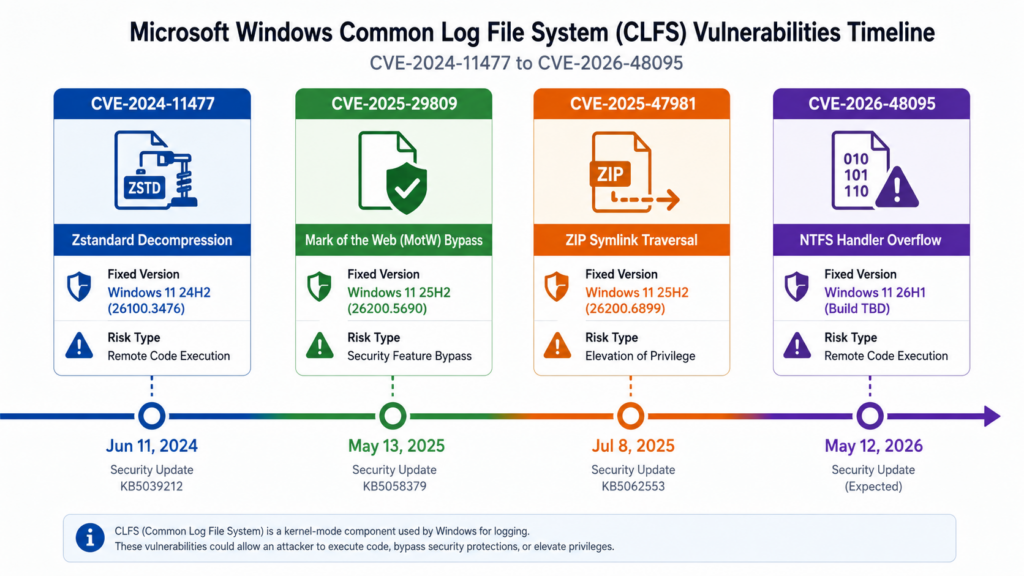
The main lesson from recent 7-Zip vulnerabilities is not that every archive instantly becomes remote code execution. It is that archive handling sits on the boundary between untrusted content and trusted execution environments. CVE-2026-48095 shows how a crafted NTFS image can reach a memory corruption path. CVE-2025-0411 shows how a nested archive can weaken Windows’ Mark-of-the-Web trust signals. CVE-2025-11001 and CVE-2025-11002 show how symbolic-link handling can turn extraction into a write-outside-the-folder primitive. CVE-2024-11477 shows that decompression code itself can become an RCE-class parser surface. Those are different bugs, but defenders should treat them as one operational category: archive-borne attack paths.
Why 7-Zip is a bigger attack surface than it looks
The mistake many teams make is to inventory 7-Zip only as a desktop utility. That misses the more interesting exposure. 7-Zip appears in at least four forms: installed Windows application, portable copy, command-line binary, and bundled dependency inside another tool. It may also appear indirectly through p7zip packages, legacy scripts, third-party applications, container images, EDR tooling, decompression helpers, and user-managed folders that never show up in standard software inventory.
The official 7-Zip page lists support for a wide set of formats. It can pack and unpack common archive formats such as 7z, XZ, BZIP2, GZIP, TAR, ZIP, and WIM, and it can unpack many more, including APFS, CAB, CPIO, DMG, EXT, FAT, GPT, HFS, ISO, MBR, MSI, NSIS, NTFS, QCOW2, RAR, RPM, SquashFS, UDF, UEFI, VDI, VHD, VHDX, VMDK, and others. That matters because each handler brings parsing logic, boundary checks, decompression routines, metadata handling, path handling, and sometimes file-system semantics into the trust boundary. (7-Zip)
A simple mental model helps: 7-Zip is not just an extractor; it is a file format router. The extension may guide the first handler, but it is not the only path into parsing code. GitHub Security Lab’s CVE-2026-48095 advisory notes that 7-Zip uses signature-based fallback detection, so a crafted NTFS image with an extension such as .zip, .rar, .7z, or no extension can still be routed into the NTFS handler after the extension-matched handler fails. (GitHub Security Lab)
That design is useful for users because it lets 7-Zip recognize real content even when a file is renamed. It is also useful for attackers because defenders cannot rely on file extension filtering alone. A mail gateway rule that says “block .ntfs e .img” will not cover a crafted file whose bytes match the vulnerable handler but whose extension looks ordinary. A detection rule that only keys on .7z files may miss archive-borne attack paths that arrive as ZIP, ISO, IMG, RAR, or a file with no extension.
The more privileged the extraction context, the more dangerous these bugs become. If a user unpacks an archive inside a Downloads folder under a standard account, the blast radius is limited to that user. If a service unpacks uploaded archives as a service account with write access to application directories, the same class of bug can produce a much better foothold. If a CI runner extracts artifacts before building, a write primitive can cross into build outputs or scripts. If a malware analysis pipeline opens unknown samples using a vulnerable binary, the parser itself becomes the target.
A practical version map for major 7-Zip CVEs
The table below is not a complete vulnerability database. It is a working map for defenders deciding what to patch, what to test, and what to monitor.
| CVE | Questão central | Practical trigger | Realistic risk | Fixed version or threshold | Prioridade |
|---|---|---|---|---|---|
| CVE-2026-48095 | Heap buffer overflow in the NTFS archive handler | Crafted NTFS image routed into the NTFS handler, not necessarily using an NTFS-looking extension | Crash or potential code execution, especially where crafted files are opened or processed automatically | 7-Zip 26.01 | Muito alto |
| CVE-2025-0411 | Mark-of-the-Web bypass | Nested archive handling fails to propagate Windows internet-origin metadata | Phishing chain becomes more convincing because downstream files may lose warning and policy friction | 7-Zip 24.09 | High, and in CISA KEV |
| CVE-2025-11001 | ZIP symbolic-link directory traversal | Crafted ZIP with symbolic-link handling that writes outside intended extraction directory | Arbitrary file write, possible code execution depending on privilege and destination | 7-Zip 25.00 | Alta |
| CVE-2025-11002 | Related ZIP symbolic-link directory traversal | Similar symbolic-link traversal path in ZIP parsing | Same class of write-outside-destination risk | 7-Zip 25.00 | Alta |
| CVE-2024-11477 | Zstandard decompression integer underflow | Processing specially crafted Zstandard-compressed data | Potential code execution in the current process | 7-Zip 24.07 | Alta |
| CVE-2018-10115 | Incorrect initialization in RAR decoder objects | Crafted RAR archive | DoS or possible arbitrary code execution | Fixed in older 7-Zip line, with the changelog noting a RAR unpacking vulnerability fix in 18.05 | Historical but instructive |
7-Zip’s own changelog is the safest source for fix thresholds. It records CVE-2026-48095 as fixed in 26.01, CVE-2025-11001 and CVE-2025-11002 as fixed in 25.00, CVE-2025-53816 and CVE-2025-53817 as addressed in 25.00, CVE-2025-55188 as part of the symbolic-link hardening in 25.01, CVE-2025-0411-related Zone.Identifier propagation behavior in 24.09, CVE-2024-11477 in 24.07, and CVE-2018-10115 in 18.05. (7-Zip)
The safest enterprise baseline after the latest disclosures is 26.01 or later. Anything lower than 26.01 misses the NTFS handler fix. Anything lower than 25.00 misses the major ZIP symbolic-link traversal fixes. Anything lower than 24.09 misses the Mark-of-the-Web propagation fix for nested archives. Anything lower than 24.07 misses the Zstandard decompression fix. Those thresholds matter because 7-Zip often does not move through enterprise patching as cleanly as browser or OS updates.
CVE-2026-48095, the NTFS handler bug that changed the risk model
CVE-2026-48095 is the 7-Zip vulnerability defenders should treat as the current high-priority patch driver. GitHub Security Lab describes it as a heap buffer overflow in 7-Zip version 26.00 caused by under-allocation in the NTFS compressed stream buffer. The issue was reported through a SourceForge private issue on April 24, 2026, and 7-Zip 26.01 with the fix was released on April 27, 2026. (GitHub Security Lab)
The technical root is a buffer-size calculation bug in the NTFS handler. The vulnerable function computes an NTFS compression-unit buffer size using a 32-bit shift. In the crafted case described by GitHub Security Lab, attacker-controlled NTFS metadata can drive the shift exponent to 32, which is undefined behavior in C++. On x86 and x64, that can produce a tiny allocation for _inBuf, while later reads write much more data into it. The advisory states that this can result in 256 MB of attacker-controlled data being written into a one-byte heap buffer. (GitHub Security Lab)
The reason this bug is more than a crash headline is the layout of nearby heap objects. GitHub Security Lab’s debugger analysis describes a vtable-hijack path: the first read iteration can overwrite a stream object’s vtable pointer, and the next read iteration can dispatch through the corrupted pointer. That does not guarantee one-click reliable exploitation in every environment, but it is enough to move the bug from “parser crash” into “potential code execution” territory. (GitHub Security Lab)
There is a second practical detail that defenders should not miss. The attack surface is not limited to .ntfs e .img files. The advisory states that the NTFS handler is enabled in stock 7z.dll, registered for .ntfs e .img, and reachable through signature-based fallback detection. A crafted NTFS image can therefore be renamed with a more common extension and still reach the NTFS handler if other handlers reject it. (GitHub Security Lab)
This matters for triage. A mailbox full of .img attachments is easy to treat as suspicious. A file named invoice.zip ou specification.rar is routine. If content-based detection can route renamed content into the vulnerable handler, detection should inspect bytes, process behavior, and extraction context, not only filenames.
The risk also differs by system resources. GitHub Security Lab notes that on 64-bit builds, the overflow path depends on whether a large _outBuf allocation succeeds; systems with sufficient RAM are more likely to reach the overflow path, while lower-memory systems may fail earlier and produce denial of service. That nuance is important for incident communications. “Potential RCE” is accurate. “Every double-click instantly runs attacker code on every machine” is not. (GitHub Security Lab)
Defenders should patch first and test later. Do not validate this bug by running public proof-of-concept material on production machines. Do not ask help desk teams to “open a sample and see what happens.” Safe validation means controlled lab systems, no production credentials, no network access unless required, low privileges, snapshots, logging, and a clear sample-handling policy. For most teams, version verification plus exposure reduction is a better first move than exploit reproduction.
CVE-2025-0411, why Mark-of-the-Web bypass is not just a missing warning
CVE-2025-0411 is a different kind of 7-Zip CVE. It is not a memory corruption bug. It is a trust-control failure. NVD describes it as a 7-Zip Mark-of-the-Web bypass requiring user interaction, where the target must visit a malicious page or open a malicious file. (nvd.nist.gov)
Mark-of-the-Web is one of those quiet Windows controls that does not look dramatic until it disappears. Microsoft documents Zone.Identifier as the stream name used for URL security zone storage. MITRE ATT&CK describes Mark-of-the-Web as a hidden NTFS Alternate Data Stream named Zone.Identifier, used when Windows tags files downloaded from the internet. That tag affects downstream behavior such as Protected View and other trust decisions. (Microsoft Learn)
CVE-2025-0411 undermined that chain in nested archive scenarios. Trend Micro’s analysis states that the bug allowed attackers to bypass Windows Mark-of-the-Web protections by double-archiving files, preventing necessary security checks and allowing malicious content to execute with less friction. The same report says Trend ZDI identified exploitation in September 2024, that the issue was patched in 7-Zip 24.09 on November 30, 2024, and that the campaign targeted Ukrainian organizations using SmokeLoader and homoglyph-based deception. (www.trendmicro.com)
This bug should not be dismissed because it is “only” a bypass. In real phishing chains, user trust is the exploit surface. If a script, shortcut, or executable lacks the origin marker that normally triggers extra Windows friction, a payload that should feel suspicious may feel routine. Trend Micro’s case study shows exactly that pattern: nested archives, deceptive file naming, homoglyph extension spoofing, and downstream payload execution. (www.trendmicro.com)
CISA’s Known Exploited Vulnerabilities catalog also lists CVE-2025-0411 as a 7-Zip Mark-of-the-Web bypass vulnerability, which raises its operational priority for teams that use KEV as a patching driver. (CISA)
The defender’s job is to preserve provenance and reduce script execution after extraction. Patching to 24.09 or later closes the specific 7-Zip propagation issue. That is necessary but not enough. Organizations should also watch for the behavior that made the bug useful: archive attachment, nested extraction, file with misleading extension, script or shortcut execution, and network activity soon after execution.
A quick Windows check for Mark-of-the-Web on a downloaded file looks like this:
# Check whether a file has a Zone.Identifier stream
Get-Item -Path ".\downloaded-file.zip" -Stream Zone.Identifier -ErrorAction SilentlyContinue

# Read the stream if it exists
Get-Content -Path ".\downloaded-file.zip" -Stream Zone.Identifier -ErrorAction SilentlyContinue
A normal internet-downloaded file commonly shows a stream containing something like:
[ZoneTransfer]
ZoneId=3
That check is not a full vulnerability test. It is a provenance check. The more useful operational test is whether extracted inner files preserve the right trust metadata after your approved 7-Zip version handles nested archives. That test should be performed with benign test files, not live exploit material.
CVE-2025-11001 and CVE-2025-11002, symbolic links and write-outside-folder risk
CVE-2025-11001 and CVE-2025-11002 are ZIP file parsing directory traversal vulnerabilities related to symbolic-link handling. ZDI’s advisories describe both as allowing remote attackers to execute arbitrary code on affected 7-Zip installations, with interaction required and attack vectors varying by implementation. The specific flaw is crafted ZIP data causing traversal to unintended directories, with possible execution in the context of a service account. Both advisories state that the vulnerabilities were fixed in 7-Zip 25.00. (Zero Day Initiative)
The core security idea is simple: extraction should write files only under the chosen destination directory. Symbolic links complicate that guarantee. A crafted archive can encode path semantics that cause the extractor to write outside the directory the operator thought was safe. Once an attacker can choose a write location, the impact depends on privileges and destination.
On a low-privilege desktop, writing outside the extraction folder may still be serious but limited. On a privileged service account, a CI runner, a deployment folder, an application plugin directory, a startup folder, a cron path, or a script load path, the same primitive can become code execution. The exploit chain is not “symlink equals RCE” by magic; it is “symlink traversal gives a write primitive, and the environment turns the write into execution.”
NHS England’s alert on CVE-2025-11001 is useful because it models careful threat communication. It states that a public proof-of-concept exploit was available and that future exploitation was assessed as likely, but it also records a November 20, 2025 correction removing erroneous references to active exploitation in the wild. That distinction matters. A public PoC is enough to prioritize patching and detection. It is not the same as verified widespread exploitation. (NHS England Digital)
For defenders, the most useful detection is behavioral. Look for 7-Zip processes writing outside expected extraction directories. Look for extracted files landing in startup folders, application plugin paths, user profile autorun locations, build script paths, web roots, service directories, or locations writable by a service account but not normally touched by users. Then correlate file creation with near-term execution.
CVE-2024-11477 and the decompression parser problem
CVE-2024-11477 is a Zstandard decompression integer underflow vulnerability in 7-Zip. NVD describes it as allowing remote attackers to execute arbitrary code on affected installations, with interaction with the library required and attack vectors varying by implementation. The flaw exists in Zstandard decompression and results from insufficient validation of user-supplied data, causing an integer underflow before writing to memory. (nvd.nist.gov)
The official 7-Zip changelog records the fix in 24.07, dated June 19, 2024, as a bug where 7-Zip could crash for some incorrect ZSTD archives, with CVE-2024-11477 noted. Security databases and ZDI classify the issue more severely because the underlying memory behavior can support code execution in the current process. (7-Zip)
This difference in wording is common in vulnerability management. A vendor changelog may describe a bug from a user-visible symptom, such as a crash. A vulnerability database may describe the security consequence, such as remote code execution, based on root cause and exploitability analysis. Defenders should not assume the lower-sounding phrase is the full risk. They should patch according to the security classification and exposure context.
CVE-2024-11477 also shows why decompression code deserves more scrutiny than it often gets. Compression formats are dense, stateful, and full of edge cases. A decompressor takes attacker-controlled bytes and expands them through complex control logic into memory buffers. Small arithmetic mistakes can become read, write, or allocation bugs. That pattern also appears across image parsers, font parsers, document parsers, media codecs, firmware parsers, and archive handlers.
Real attack chains built around 7-Zip CVEs
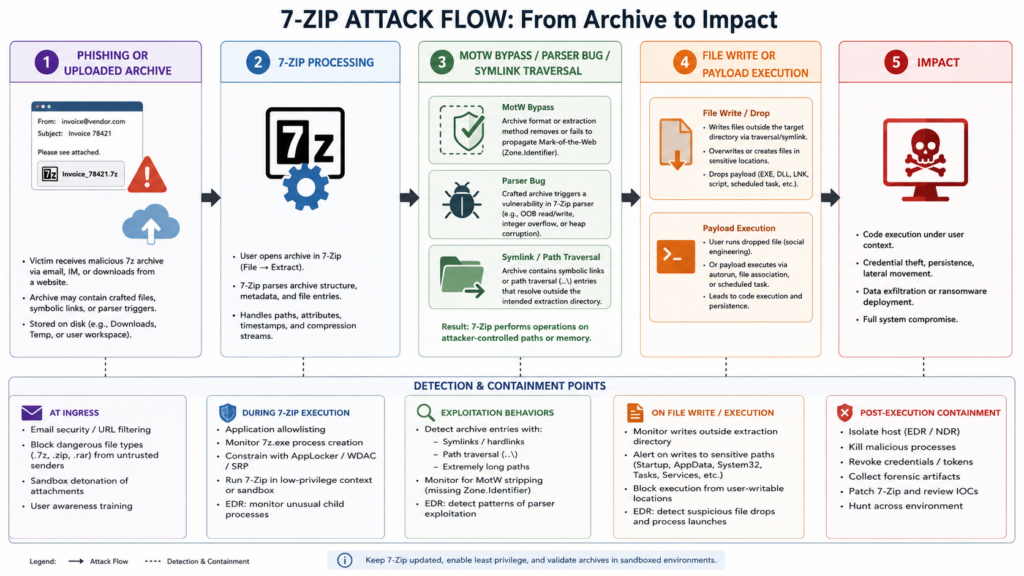
The simplest 7-Zip attack chain is phishing. A user receives a file that looks like an invoice, document, tax form, delivery note, or internal report. The attachment is an archive, or an archive disguised as another file type. The user opens it with a vulnerable or misconfigured extractor. Depending on the vulnerability, the payload may lose Mark-of-the-Web metadata, escape an extraction folder, or trigger a parser bug.
A more interesting chain uses nested trust loss. CVE-2025-0411 did not need to corrupt memory. It changed the trust state of files inside nested archives. Once the inner payload lost expected Windows origin metadata, the attacker had a smoother path to script execution. The exploit did not replace social engineering; it improved it. That is the right way to think about many “bypass” vulnerabilities. They rarely win alone, but they remove friction from an already plausible intrusion path.
A second chain uses extraction as a write primitive. CVE-2025-11001 and CVE-2025-11002 are useful when an attacker can influence where files land. A malicious ZIP with symbolic-link trickery may write outside the folder the operator selected. If that write lands in a location that is later executed, loaded, sourced, or served, the archive becomes a delivery mechanism for persistence or code execution.
A third chain targets automation. Many organizations process user-supplied archives without a person watching. A customer uploads a ZIP to support. A build job downloads a release artifact. A malware triage system opens a suspicious sample. A data ingestion service unpacks files before scanning them. A backup workflow verifies archive contents. If those systems use vulnerable archive parsers, the attacker is no longer relying on a user double-clicking the payload. The system itself becomes the user.
The automation chain is often more severe because the process may run under a service account, have broad file access, and handle many files at scale. It may also suppress UI prompts, run headless, or skip the visual warning signs that a human might notice. A high-friction desktop exploit can become a lower-friction server-side parser exploit when moved into automated file handling.
Inventory first, because 7-Zip hides in plain sight
Patching advice is useless if the organization cannot find all copies. Standard software inventory catches MSI-based installs and some package-managed versions. It often misses portable folders, old copies in developer tools, bundled binaries under vendor directories, extracted admin toolkits, and user-managed downloads.
On Windows, start with uninstall registry entries and common binary paths, then broaden to filesystem discovery. The following PowerShell script is intentionally conservative. It inventories likely 7-Zip binaries and records file versions. It does not open archives.
$results = @()

$uninstallRoots = @(
  "HKLM:\Software\Microsoft\Windows\CurrentVersion\Uninstall\*",
  "HKLM:\Software\WOW6432Node\Microsoft\Windows\CurrentVersion\Uninstall\*",
  "HKCU:\Software\Microsoft\Windows\CurrentVersion\Uninstall\*"
)

foreach ($root in $uninstallRoots) {
  Get-ItemProperty $root -ErrorAction SilentlyContinue |
    Where-Object { $_.DisplayName -match "7-Zip|7zip|p7zip" } |
    ForEach-Object {
      $results += [pscustomobject]@{
        Source = "Registry"
        Name = $_.DisplayName
        Version = $_.DisplayVersion
        Path = $_.InstallLocation
      }
    }
}

$searchRoots = @(
  "$env:ProgramFiles",
  "$env:ProgramFiles(x86)",
  "$env:LOCALAPPDATA",
  "$env:USERPROFILE\Downloads",
  "$env:USERPROFILE\Desktop"
) | Where-Object { Test-Path $_ }

$binaryNames = @("7z.exe", "7zFM.exe", "7zg.exe", "7za.exe", "7zz.exe", "7z.dll")

foreach ($root in $searchRoots) {
  foreach ($name in $binaryNames) {
    Get-ChildItem -Path $root -Filter $name -Recurse -ErrorAction SilentlyContinue |
      ForEach-Object {
        $version = $null
        try { $version = $_.VersionInfo.ProductVersion } catch {}
        $results += [pscustomobject]@{
          Source = "Filesystem"
          Name = $_.Name
          Version = $version
          Path = $_.FullName
        }
      }
  }
}

$results |
  Sort-Object Path -Unique |
  Export-Csv ".\7zip_inventory.csv" -NoTypeInformation -Encoding UTF8

Write-Host "Saved inventory to .\7zip_inventory.csv"
On Linux and macOS, look for both official 7-Zip command-line tools and p7zip-style binaries. Package-manager output may not map perfectly to upstream version numbers because distributions sometimes backport fixes. Debian’s tracker for CVE-2026-48095, for example, distinguishes package versions and fixed status across releases, showing why defenders should check distribution security trackers instead of relying only on upstream version strings. (Debian Security Tracker)
#!/usr/bin/env bash
set -euo pipefail

echo "[+] PATH-based binaries"
for b in 7z 7zz 7za 7zr; do
  if command -v "$b" >/dev/null 2>&1; then
    path="$(command -v "$b")"
    echo "$b -> $path"
    "$path" | head -n 2 || true
  fi
done

echo
echo "[+] Package manager hints"

if command -v dpkg-query >/dev/null 2>&1; then
  dpkg-query -W '7zip*' 'p7zip*' 2>/dev/null || true
fi

if command -v rpm >/dev/null 2>&1; then
  rpm -qa | grep -Ei '(^|-)7zip|p7zip' || true
fi

if command -v brew >/dev/null 2>&1; then
  brew list --versions | grep -Ei '7zip|p7zip' || true
fi

echo
echo "[+] Common filesystem locations"
find /usr /usr/local /opt "$HOME" \
  -type f \( -name 7z -o -name 7zz -o -name 7za -o -name 7zr \) \
  2>/dev/null | sort -u
The output should feed a remediation table. Machines with anything older than 26.01 need the latest NTFS handler fix. Machines older than 25.00 need the ZIP symlink traversal fixes. Machines older than 24.09 need the MotW fix. Machines older than 24.07 need the Zstandard decompression fix. That version logic should be translated into policy, not left as a one-time spreadsheet.
Safe triage for suspicious archive-like files
Extension mismatch is not proof of exploitation. It is a triage signal. A file named invoice.zip that contains NTFS signature bytes may be benign in some weird forensic workflow, but in normal business email it deserves attention.
The following Python script only reads the first bytes of files. It does not decompress, mount, test, or open them with 7-Zip. It can help triage suspicious files where the extension does not match the content.
#!/usr/bin/env python3
import argparse
from pathlib import Path

NTFS_SIGNATURE_OFFSET = 3
NTFS_SIGNATURE = b"NTFS    "

COMMON_ARCHIVE_EXTS = {
    ".zip", ".7z", ".rar", ".gz", ".xz", ".tar", ".tgz",
    ".bz2", ".iso", ".img", ".wim", ".vhd", ".vhdx"
}

def inspect_file(path: Path) -> dict:
    try:
        with path.open("rb") as f:
            header = f.read(16)
    except OSError as e:
        return {"path": str(path), "error": str(e)}

    ext = path.suffix.lower()
    has_ntfs_sig = (
        len(header) >= NTFS_SIGNATURE_OFFSET + len(NTFS_SIGNATURE)
        and header[NTFS_SIGNATURE_OFFSET:NTFS_SIGNATURE_OFFSET + len(NTFS_SIGNATURE)] == NTFS_SIGNATURE
    )

    suspicious = has_ntfs_sig and ext not in {".ntfs", ".img"}

    return {
        "path": str(path),
        "extension": ext or "<none>",
        "has_ntfs_signature": has_ntfs_sig,
        "extension_mismatch": suspicious
    }

def main() -> None:
    parser = argparse.ArgumentParser(description="Triage files for NTFS signature and extension mismatch.")
    parser.add_argument("paths", nargs="+", help="Files or directories to inspect")
    args = parser.parse_args()

    files = []
    for raw in args.paths:
        p = Path(raw)
        if p.is_dir():
            files.extend(x for x in p.rglob("*") if x.is_file())
        elif p.is_file():
            files.append(p)

    for file in files:
        result = inspect_file(file)
        if result.get("has_ntfs_signature") or result.get("extension_mismatch"):
            print(result)

if __name__ == "__main__":
    main()
Treat the output as a lead, not a verdict. Some legitimate disk-image workflows may create odd filenames. Some malicious archives will not contain NTFS signatures. Some exploit paths involve ZIP symlinks or nested trust metadata rather than NTFS parser routing. Safe triage should combine header checks, source context, sender reputation, file provenance, process telemetry, and endpoint behavior.
Detection, watch the chain instead of one CVE ID
Archive-borne attacks are not easy to detect through hashes alone. A crafted archive can be regenerated. A nested archive can change names. A traversal payload can use environment-specific paths. A MotW bypass can deliver many different script types. The stable chain is more useful:
Archive received or downloaded.
7-Zip or a bundled 7-Zip binary invoked.
Files written to disk.
Writes land outside expected extraction paths or into sensitive locations.
Script or executable launched soon after extraction.
Network activity, persistence, credential access, or lateral movement follows.
Microsoft Defender for Endpoint telemetry can hunt part of this chain. The query below looks for 7-Zip-related process execution followed by suspicious file creation within a short time window. It will produce false positives in software installation workflows, but it gives SOC teams a starting point.
let lookback = 7d;
let window = 5m;
let archiveTools = dynamic(["7z.exe", "7zFM.exe", "7zg.exe", "7za.exe", "7zz.exe"]);
let riskyExtensions = dynamic([".exe", ".dll", ".js", ".jse", ".vbs", ".vbe", ".wsf", ".ps1", ".bat", ".cmd", ".scr", ".lnk", ".url"]);
DeviceProcessEvents
| where Timestamp > ago(lookback)
| where FileName in~ (archiveTools)
| project DeviceId, DeviceName, ExtractTime=Timestamp, ArchiveTool=FileName,
          ExtractCommand=ProcessCommandLine, ExtractProcessId=ProcessId,
          InitiatingProcessFileName, InitiatingProcessCommandLine
| join kind=inner (
    DeviceFileEvents
    | where Timestamp > ago(lookback)
    | extend LowerName = tolower(FileName)
    | where LowerName has_any (riskyExtensions)
    | project DeviceId, FileTime=Timestamp, FolderPath, FileName, SHA256,
              InitiatingProcessId, InitiatingProcessFileName
) on DeviceId
| where FileTime between (ExtractTime .. ExtractTime + window)
| project DeviceName, ExtractTime, ArchiveTool, ExtractCommand,
          FileTime, FolderPath, FileName, SHA256, InitiatingProcessFileName
| order by ExtractTime desc
A second query can look for execution soon after archive extraction:
let lookback = 7d;
let window = 10m;
let archiveTools = dynamic(["7z.exe", "7zFM.exe", "7zg.exe", "7za.exe", "7zz.exe"]);
let suspiciousChildren = dynamic(["powershell.exe", "wscript.exe", "cscript.exe", "cmd.exe", "mshta.exe", "rundll32.exe", "regsvr32.exe"]);
let extracted =
    DeviceProcessEvents
    | where Timestamp > ago(lookback)
    | where FileName in~ (archiveTools)
    | project DeviceId, DeviceName, ExtractTime=Timestamp,
              ExtractTool=FileName, ExtractCommand=ProcessCommandLine;
DeviceProcessEvents
| where Timestamp > ago(lookback)
| where FileName in~ (suspiciousChildren) or FolderPath matches regex @"(?i).*\.(exe|dll|js|vbs|wsf|ps1|bat|cmd|scr)$"
| join kind=inner extracted on DeviceId
| where Timestamp between (ExtractTime .. ExtractTime + window)
| project DeviceName, ExtractTime, ExtractTool, ExtractCommand,
          ExecTime=Timestamp, FileName, FolderPath, ProcessCommandLine,
          InitiatingProcessFileName, InitiatingProcessCommandLine
| order by ExecTime desc
Sigma can express the same idea at a more portable level:
title: 7-Zip Extraction Followed by Suspicious Execution
id: 9f8b1f15-c441-4b73-94c5-7zip-archive-chain
status: experimental
description: Detects archive extraction activity involving 7-Zip followed by execution of common script or LOLBin interpreters.
author: Security Engineering
date: 2026-05-30
logsource:
  product: windows
  category: process_creation
detection:
  archive_tool:
    Image|endswith:
      - '\7z.exe'
      - '\7zFM.exe'
      - '\7zg.exe'
      - '\7za.exe'
      - '\7zz.exe'
  extract_args:
    CommandLine|contains:
      - ' x '
      - ' e '
  suspicious_child:
    ParentImage|endswith:
      - '\7z.exe'
      - '\7zFM.exe'
      - '\7zg.exe'
      - '\7za.exe'
      - '\7zz.exe'
    Image|endswith:
      - '\powershell.exe'
      - '\wscript.exe'
      - '\cscript.exe'
      - '\cmd.exe'
      - '\mshta.exe'
      - '\rundll32.exe'
      - '\regsvr32.exe'
  condition: archive_tool and extract_args or suspicious_child
falsepositives:
  - Software installers and enterprise packaging workflows
  - Developer build systems that unpack archives and run scripts
level: medium
For CVE-2025-11001 and CVE-2025-11002, file-write telemetry is more important than process telemetry alone. A good rule watches for archive tools writing into startup folders, system directories, service paths, web roots, CI workspaces, or application plugin folders. The strongest signal is mismatch: the user or process requested extraction into one directory, but files appeared elsewhere.
Hardening that actually changes outcomes
The fastest and cleanest control is patching. Update 7-Zip to 26.01 or later from an approved source. On Windows, the official 7-Zip site lists 26.01 for Windows x64, x86, and ARM64. On Linux and macOS, check the package you actually use: official 7-Zip CLI, distribution 7zip, legacy p7zip, or a third-party fork. Debian’s CVE-2026-48095 tracker shows that package status can differ across releases, so Linux remediation should be tied to distribution advisories rather than upstream assumptions alone. (7-Zip)
The second control is source control for software downloads. Users should not search the web for “7-Zip download” and choose the first lookalike result. Enterprise devices should install 7-Zip through an approved software center, MDM, package manager, or internal repository. If users need the official installer, document the approved source clearly. Fake installer campaigns are a separate threat from CVEs, but they exploit the same operational weakness: uncontrolled archive-tool sourcing.
The third control is privilege reduction. Unknown archives should not be extracted as administrator. They should not be processed by domain admin sessions. They should not be unpacked by service accounts with broad write access. They should not be handled inside CI runners that can write to deployment paths unless the runner is isolated and disposable. Traversal bugs become more dangerous when the extractor has more places to write.
The fourth control is extraction isolation. Treat untrusted archive handling like document detonation. Use a dedicated folder, low-integrity or low-privilege context, no automatic execution, no inherited trust, and strong cleanup. For automation, use containers or VMs where the extraction process has read access to the input and write access only to a scratch output directory. Then copy out sanitized results through a controlled path.
The fifth control is script execution policy. A MotW bypass matters because scripts and executables become easier to run. AppLocker, WDAC, PowerShell Constrained Language Mode, script-block logging, email attachment filtering, and EDR rules that block suspicious script interpreters from user-writable paths can reduce the payoff of archive-borne delivery.
The sixth control is closed-loop validation. After patching, re-run inventory. After removing portable copies, scan again. After updating package-managed versions, confirm the binary on disk. After changing extraction workflows, test with benign samples that mimic nested archive structure, symlink entries, odd extensions, and disk-image signatures. The point is not to prove exploitability. The point is to prove exposure reduction.
AI-assisted security tools can be useful when that validation has to be repeated across targets, environments, and evidence requirements. In an authorized workflow, a platform such as Penligent can help teams turn version inventory, attack-surface checks, controlled validation steps, and evidence capture into repeatable security testing rather than one-off manual work. Penligent’s own product page describes agentic workflows, CVE testing, evidence-first results, and report generation for security engineers, pentesters, and red teams. (Penligente) Its Hacking Labs section also includes a related 7-Zip CVE analysis, which can be used as a companion resource when building internal validation notes for archive-borne attack paths. (Penligente)
A defender’s playbook for 7-Zip CVE response
Start with the patch floor. For most organizations, set 26.01 or later as the required version. Anything below that should be treated as an exception requiring documented business justification. Do not create separate operational baselines for every CVE unless you have a strong reason. One current baseline is easier to enforce.
Next, classify your 7-Zip exposure by use case. A user workstation with occasional archive extraction is one risk. A SOC malware-analysis machine is another. A server that automatically unpacks customer uploads is another. A CI runner that extracts build artifacts is another. A backup server that tests compressed archives is another. The same vulnerable binary matters more when it processes untrusted files at scale or with privilege.
Then, remove duplicate tools. Many teams patch C:\Program Files\7-Zip\7z.exe and miss C:\Users\alice\Downloads\7z.exe, D:\Tools\7za.exe, C:\BuildTools\7zz.exe, or a copy bundled under a vendor directory. Portable copies are common because 7-Zip is useful, small, and easy to redistribute. That convenience becomes patching debt.
After that, test extraction policy. A safe policy should answer simple questions. Who is allowed to extract untrusted archives? Where do they extract them? Under what account? Can the extractor write outside the scratch directory? Are extracted scripts blocked by default? Does endpoint telemetry record file writes and child processes? Can analysts inspect suspicious archives without exposing their main workstation?
Finally, document evidence. A good 7-Zip CVE response record should include affected versions found, systems remediated, systems excepted, portable copies removed, package-manager status, automation workflows reviewed, detection rules deployed, and validation screenshots or logs. That evidence matters for security leadership, audits, incident postmortems, and customer assurance.
Useful resources for deeper verification
7-Zip official download and changelog are the primary sources for current release and fix thresholds. Use the official site to confirm current release details and the changelog to map CVEs to versions. (7-Zip)
GitHub Security Lab’s CVE-2026-48095 advisory is the best technical source for the NTFS handler heap overflow, including root cause, platform-dependent behavior, impact, CVSS vector, and affected versions. (GitHub Security Lab)
Trend Micro’s CVE-2025-0411 report is the key source for the in-the-wild MotW bypass campaign, including nested archives, homoglyph deception, SmokeLoader delivery, and Ukrainian targeting. (www.trendmicro.com)
ZDI’s advisories for CVE-2025-11001 and CVE-2025-11002 are the authoritative references for the ZIP symbolic-link directory traversal issues and the 25.00 fix. (Zero Day Initiative)
NVD’s CVE-2024-11477 entry is useful for the Zstandard decompression integer underflow description, while the 7-Zip changelog confirms the 24.07 fix. (nvd.nist.gov)
PERGUNTAS FREQUENTES
Is 7-Zip vulnerable just by opening an archive?
- It depends on the CVE and the code path reached.
- CVE-2026-48095 can be reached when a crafted NTFS image is opened, tested, or processed through the NTFS handler, and the malicious file does not need to use an obvious
.ntfsextension. - CVE-2025-0411 requires user interaction but works by weakening Mark-of-the-Web propagation in nested archive scenarios.
- CVE-2025-11001 and CVE-2025-11002 are most relevant during extraction because the risk is writing outside the intended destination.
- Defenders should not assume “no extraction” always means “no risk.” Listing, testing, previewing, or automated inspection may still route content into parser code depending on the handler.
Which 7-Zip version should I run after the latest CVEs?
- Use 7-Zip 26.01 or later as the current practical baseline.
- 26.01 fixes CVE-2026-48095 in the NTFS archive handler.
- 25.00 fixes CVE-2025-11001 and CVE-2025-11002.
- 24.09 fixes the nested archive Mark-of-the-Web propagation issue associated with CVE-2025-0411.
- 24.07 fixes CVE-2024-11477 in Zstandard decompression.
- Linux users should check distribution security advisories because package versions may include backported patches or remain behind upstream.
Is CVE-2025-0411 remote code execution?
- CVE-2025-0411 is best described as a Mark-of-the-Web bypass, not a memory-corruption RCE.
- It can still support code execution in a phishing chain because extracted files may lose Windows internet-origin metadata that would otherwise trigger warnings or restrictions.
- Trend Micro reported real-world exploitation using nested archives, homoglyph deception, and SmokeLoader delivery.
- The right defensive framing is “trust-control bypass used for execution,” not “standalone RCE.”
How do I find portable 7-Zip copies in an enterprise?
- Search standard uninstall registry locations, but do not stop there.
- Scan common user and admin tool paths for
7z.exe,7zFM.exe,7zg.exe,7za.exe,7zz.exee7z.dll. - Check developer machines, build servers, SOC workstations, help desk tool folders, shared drives, and vendor-bundled directories.
- Compare file versions on disk, not only installed application names.
- Re-scan after patching because portable copies often reappear through user downloads or old toolkits.
Are Linux systems affected by 7-Zip CVEs?
- Some 7-Zip vulnerabilities affect cross-platform code, but exposure depends on the package, build, handler, and distribution patch state.
- Official 7-Zip CLI, distribution
7zip, legacyp7zip, and third-party forks may not share the same update path. - Distribution security trackers can differ from upstream version numbers because maintainers may backport fixes or mark packages vulnerable until a specific patched build lands.
- Linux servers are especially important when they automatically process uploaded archives or artifacts under service accounts.
Should SOC teams run public PoCs to validate exposure?
- Not on production endpoints.
- Version inventory and patch verification are usually safer and more useful than exploit reproduction.
- If exploit validation is required, use an isolated lab VM, no production credentials, no shared clipboard, no network unless necessary, and a reversible snapshot.
- Prefer benign validation for workflow controls, such as checking whether nested archive metadata propagates correctly or whether extraction can write outside a scratch directory.
- Record evidence of version, configuration, detection, and patch state instead of relying on crash behavior as proof.
What logs matter most for archive-borne attacks?
- Process creation for
7z.exe,7zFM.exe,7zg.exe,7za.exee7zz.exe. - File creation events soon after extraction, especially scripts and executables.
- Writes outside expected extraction directories.
- Writes to startup folders, service paths, application plugin paths, web roots, CI workspaces, and user autorun locations.
- Child processes such as PowerShell, Windows Script Host,
cmd.exe,mshta.exe,rundll32.exeeregsvr32.exe. - Network connections shortly after extracted payload execution.
7-Zip CVE management is not just a checkbox for endpoint patching. It is a test of how well an organization treats archives as untrusted programs that need parsing, routing, decompression, metadata handling, and filesystem writes. The right response is straightforward but often unfinished: update to 26.01 or later, find portable and bundled copies, reduce privileged extraction, isolate automated archive processing, detect the extract-write-execute chain, and preserve evidence that the exposure is actually closed.

 Portuguese
  English
  German
  French
  Spanish
  Japanese
  Korean
  Hindi
Hindi  Arabic
  Turkish
  Hebrew