
CVE-2026-55957 is an Apache Tomcat authentication bypass in a specific JNDIRealm configuration path: JNDIRealm configured to authenticate binds using GSSAPI. Apache describes the flaw as an “Important” issue in which an attacker could authenticate without providing the correct password. The affected Tomcat ranges are broad, but the vulnerable condition is not “any Tomcat server on the internet.” It is the combination of an affected Tomcat version, JNDIRealm, LDAP-backed authentication, and GSSAPI authenticated bind behavior. Apache’s public security pages state that the issue was reported to the Tomcat security team on June 14, 2026, and made public on June 29, 2026. NVD published the CVE on June 29, 2026, and, at the time of writing, still shows NVD enrichment in progress while displaying a CISA-ADP CVSS 3.1 score of 7.3 High with vector AV:N/AC:L/PR:N/UI:N/S:U/C:L/I:L/A:L. (NVD)
That distinction matters. A public-facing Tomcat instance that does not use JNDIRealm is not exposed to this bug just because the banner says “Apache-Coyote.” A Spring Boot service using embedded Tomcat but handling all authentication in application code is a different case. A legacy internal Java application that relies on Tomcat container-managed authentication through JNDIRealm against Active Directory or another LDAP directory, and has GSSAPI configured in the Realm, is the kind of system that deserves immediate attention.
CVE-2026-55957 at a glance
| Campo | Current public information |
|---|---|
| CVE | CVE-2026-55957 |
| Produto | Apache Tomcat |
| Componente | JNDIRealm |
| Classe de vulnerabilidade | Missing critical step in authentication, authentication bypass |
| CWE | CWE-304, Missing Critical Step in Authentication |
| Condição de acionamento | JNDIRealm configured to authenticate binds using GSSAPI |
| Main impact | Authentication without the correct password |
| Apache severity | Important |
| NVD status | Undergoing enrichment at the time of writing |
| CISA-ADP CVSS 3.1 | 7.3 High, AV:N/AC:L/PR:N/UI:N/S:U/C:L/I:L/A:L |
| Public disclosure | June 29, 2026 |
| Reported to Tomcat security team | June 14, 2026 |
| Fixed versions named by NVD and oss-sec | 11.0.5, 10.1.37, 9.0.101 |
| Affected Tomcat 11 range | 11.0.0-M1 through 11.0.4 |
| Affected Tomcat 10.1 range | 10.1.0-M1 through 10.1.36 |
| Affected Tomcat 9 range | 9.0.0.M1 through 9.0.100 |
| Affected Tomcat 8.5 range | 8.5.0 through 8.5.100 |
| Affected Tomcat 7 range | 7.0.0 through 7.0.109 |
| Practical verification focus | Version, JNDIRealm presence, GSSAPI authentication configuration, application reliance on container-managed auth, post-patch wrong-password rejection |
NVD’s description is short but direct: when JNDIRealm was configured to authenticate binds using GSSAPI, Apache Tomcat allowed attackers to authenticate without providing the correct password. The same NVD entry lists the affected version ranges and recommends upgrading to 11.0.5, 10.1.37, or 9.0.101. The oss-sec advisory from Mark Thomas repeats the same affected ranges, names the severity as Important, and credits Ilan Toyter as finder. (NVD)
The most useful way to handle CVE-2026-55957 is to treat it as an identity-boundary bug, not as a generic Tomcat banner-finding. Version detection starts the triage, but configuration and authentication flow determine urgency.
Why this bug lives in the Realm layer
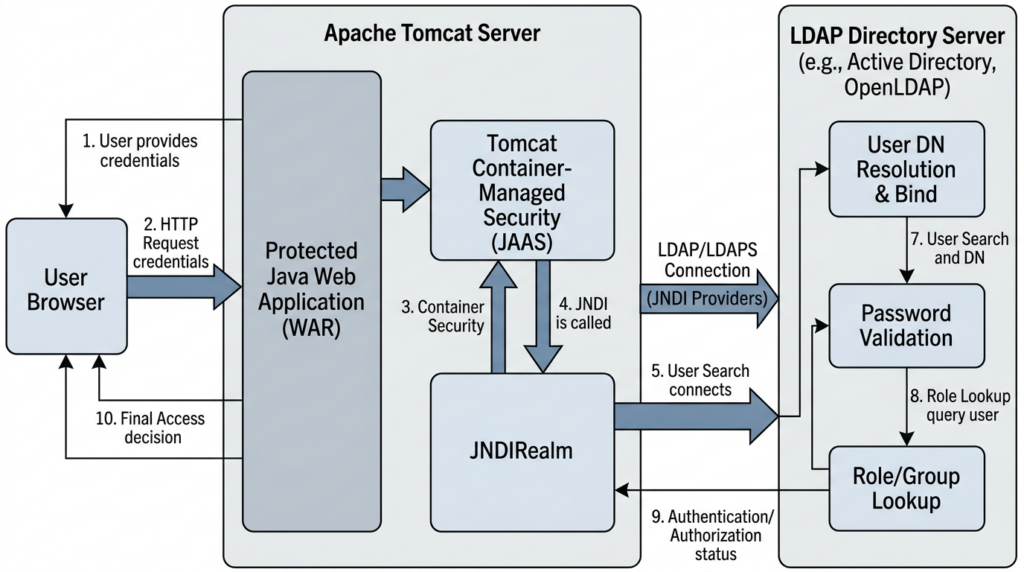
Tomcat’s security model includes the concept of a Realm. A Realm is the part of Tomcat that knows how to authenticate a user and retrieve the roles associated with that user for container-managed security. That matters when a web application uses standard Java web security mechanisms such as security-constraint, login-config, roles, BASIC auth, FORM auth, or programmatic login through APIs such as HttpServletRequest.login.
JNDIRealm is Tomcat’s LDAP-backed Realm implementation. Apache’s Tomcat configuration reference says the JNDI Directory Realm connects Tomcat to an LDAP Directory through a JNDI driver, and that the directory stores usernames, passwords, and associated roles. The same documentation explains that roles can be represented as group entries, attributes in the user entry, or both. (Apache Tomcat)
The dangerous part is that JNDIRealm supports more than one way to authenticate a user. Apache’s documentation states that the Realm can authenticate by binding to the directory with the DN of the user’s entry and the password presented by the user, or by retrieving the password from the user’s entry and comparing locally. It also documents the userPassword behavior: if userPassword is specified, JNDIRealm binds using connectionName e connectionPassword, retrieves the user password attribute, and compares it with the value supplied by the user; if userPassword is not specified, JNDIRealm attempts a simple bind using the user DN and presented password. (Apache Tomcat)
GSSAPI enters through the JNDI authentication mechanism. In the same Tomcat configuration reference, the autenticação attribute is described as a string specifying the type of authentication to use, with values such as nenhum, simple, strong, or a provider-specific definition. The documentation now explicitly calls out that if the provider-specific mechanism GSSAPI is specified and supported, there are circumstances, including HttpServletRequest.login(String username, String password), onde GSSAPI will not be used and the user will be authenticated as described in userPassword. (Apache Tomcat)
That wording reflects the fix. The issue was not that LDAP is inherently unsafe, or that every Kerberos-backed login is broken. The issue was that one particular authentication path could treat the configured GSSAPI bind state as sufficient in a context where the user-supplied password still needed to be validated.
The root cause, a missing credential validation step
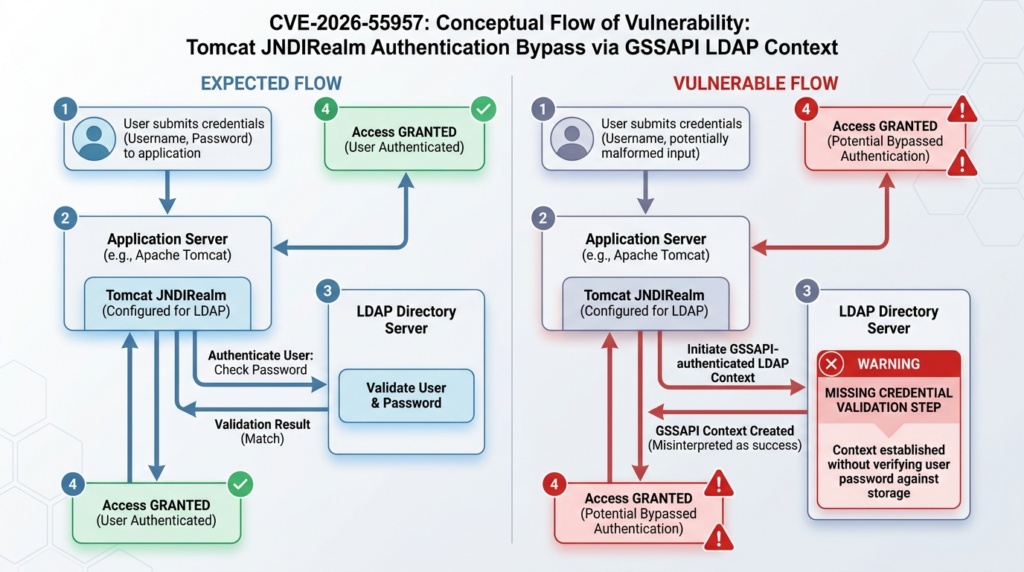
The Apache commit for the Tomcat 9 branch is unusually helpful because the commit message and diff explain the security boundary more clearly than the short CVE text. The commit is titled “Fix credential validation when JNDIRealm is configured to use GSSAPI,” and its description says it enables validation of credentials provided to HttpServletRequest.login(String username, String password). The diff changes JNDIRealm.java dentro bindAsUser, preserves the environment, removes Context.SECURITY_AUTHENTICATION when the preserved environment shows GSSAPI, and restores the environment afterward. (GitHub)
That is the key. During a password login, Tomcat should verify the credentials the user actually supplied. If the LDAP context still has GSSAPI SASL authentication configured, the bind operation can authenticate through the configured GSSAPI mechanism rather than proving that the supplied password is correct. In that case, the system may conclude that the user is authenticated even though the password did not validate as intended.
A simplified version of the flawed logic looks like this:
User submits username and password
Tomcat JNDIRealm locates the LDAP user
JNDI context is configured for GSSAPI
Tomcat attempts bind as user
LDAP bind succeeds through GSSAPI-authenticated context
Realm treats the login as validated
The supplied password may not have been the credential that proved identity
The fixed logic forces a sharper separation:
User submits username and password
Tomcat JNDIRealm locates the LDAP user
Realm preserves the existing JNDI environment
If GSSAPI is configured, Realm removes it for the user credential validation step
Realm validates the submitted credentials through the intended password path
Realm restores the previous environment
Only a successful credential validation authenticates the user
The difference sounds small, but authentication bugs often live in exactly this kind of state confusion. A system has two ways to prove identity. One is a service or delegated mechanism. The other is the password presented for a user login. If the implementation lets the first stand in for the second, the application’s authentication boundary becomes unreliable.
Por que HttpServletRequest.login matters
Many Java web applications rely on container-managed security. They define security constraints in web.xml, configure authentication through Tomcat, and let the container decide whether a request is associated with an authenticated principal. Some applications also call HttpServletRequest.login(String username, String password) programmatically. That API is meant to authenticate the caller using supplied credentials.
Apache’s commit explicitly mentions this API, and the updated Realm documentation also calls it out in the GSSAPI note. That is why CVE-2026-55957 should not be reduced to “LDAP misconfiguration.” The vulnerability affects the correctness of a credential validation path that applications can depend on as part of their login flow. (GitHub)
A vulnerable system can be especially risky when the application assumes Tomcat’s authenticated principal is authoritative. After that point, the application may not re-check the password. It may simply read the user principal, load roles, check group membership, issue a session, and allow access to protected resources. If JNDIRealm says the identity is valid, the rest of the application may treat that answer as final.
That is why the real question is not “Can someone execute code directly with CVE-2026-55957?” The better question is: “What can an authenticated principal do in the affected application if Tomcat accepts a login without the correct password?”
Who is exposed
A system should be considered a candidate for exposure when all of the following are true:
| Exposure condition | Por que é importante | How to check |
|---|---|---|
| The system runs an affected Tomcat version | The bug exists in specific Tomcat ranges | Confirm runtime version, package version, embedded dependency, or container image |
| The application uses JNDIRealm | CVE-2026-55957 is specific to JNDIRealm | Search server.xml, context.xml, packaged config, and vendor configuration |
| The Realm connects to LDAP or a directory service | JNDIRealm is the LDAP-backed Realm path | Review connectionURL, userBase, userSearch, roleBase, and related attributes |
| GSSAPI is configured or supported in the relevant JNDI authentication path | The bypass condition depends on GSSAPI authenticated bind | Procure por authentication="GSSAPI" or equivalent provider configuration |
| The protected application relies on Tomcat container-managed authentication | The bug matters when Tomcat’s authentication result controls access | Review web.xml, login-config, role constraints, and programmatic login |
| Attackers can reach the login or protected resource path | The vulnerability needs an authentication attempt path | Check internet exposure, VPN exposure, internal network access, reverse proxies, and SSO gateways |
| Roles or application privileges grant meaningful access after login | The impact depends on what an authenticated user can do | Map LDAP groups, Tomcat roles, and application permissions |
A server that fails the first condition is not affected by this CVE. A server that fails the second condition is not in this vulnerability path. A server that uses JNDIRealm but not GSSAPI is still worth reviewing because Realm configuration is security-sensitive, but it is not the canonical CVE-2026-55957 case. A server that uses GSSAPI in another authentication layer but not in JNDIRealm should be triaged separately.
The opposite mistake is also common: assuming “not internet-facing” means “not urgent.” Many JNDIRealm deployments are internal applications tied to enterprise directories. Those applications often sit behind VPN, corporate SSO, partner networks, or internal reverse proxies. If a low-trust internal user, contractor, compromised endpoint, or vendor path can reach the affected login endpoint, an authentication bypass can still matter.
Affected versions and fixed versions
Apache’s public Tomcat security pages list CVE-2026-55957 separately by maintained branch. For Tomcat 11, the issue is listed as fixed in 11.0.5, with affected versions 11.0.0-M1 to 11.0.4. For Tomcat 10.1, the issue is listed as fixed in 10.1.39 on the Tomcat security page, while the advisory and NVD recommend 10.1.37 or later as the fix line; security teams should prefer current supported releases rather than pinning to the earliest fixed build. For Tomcat 9, Apache lists the issue as fixed in 9.0.102, while NVD and oss-sec recommend 9.0.101 or later. The practical remediation answer is still straightforward: move to a supported fixed version at or above the relevant fixed release, ideally the current release for that branch. (Apache Tomcat)
| Tomcat line | Affected range publicly listed for CVE-2026-55957 | Fixed path to use in practice |
|---|---|---|
| Tomcat 11 | 11.0.0-M1 through 11.0.4 | Upgrade to 11.0.5 or later, preferably the current 11.0.x release |
| Tomcat 10.1 | 10.1.0-M1 through 10.1.36 | Upgrade to 10.1.37 or later, preferably the current 10.1.x release |
| Tomcat 9 | 9.0.0.M1 through 9.0.100 | Upgrade to 9.0.101 or later, preferably the current 9.0.x release |
| Tomcat 8.5 | 8.5.0 through 8.5.100 | Migrate to a supported Tomcat line or use vendor-supported extended maintenance where applicable |
| Tomcat 7 | 7.0.0 through 7.0.109 | Migrate; this line is long out of normal upstream support |
Apache’s “Which Version Do I Want?” page currently lists Tomcat 11.0.x, 10.1.x, and 9.0.x as supported versions, with latest releases 11.0.23, 10.1.56, and 9.0.119 respectively. The same page lists 8.5.x as archived with an EOL date of March 31, 2024, and Tomcat 10.0.x as superseded with an EOL date of October 31, 2022. (Apache Tomcat)
That matters for enterprise response. If a scanner says an old Tomcat 8.5 instance is affected, “wait for the Apache 8.5 patch” is not a plan. The upstream line is archived. The operational choices are migration, isolation, replacement, vendor-supported extended maintenance, or compensating controls while migration happens.
Why the score may look lower than the business risk
CISA-ADP’s CVSS 3.1 vector for CVE-2026-55957 is AV:N/AC:L/PR:N/UI:N/S:U/C:L/I:L/A:L, with a base score of 7.3 High. That vector reflects a network-reachable issue with low attack complexity, no privileges required, and no user interaction required, but it assigns low confidentiality, integrity, and availability impact. (NVD)
For many production systems, the business risk may be either lower or higher than that number suggests. It is lower when the affected configuration is absent, unreachable, or used only on a low-value lab application. It is higher when the affected authentication path protects an administrative interface, partner portal, internal operations tool, financial workflow, source-code deployment system, case-management system, or privileged business application.
CVSS does not know what your authenticated users can do. It does not know whether your LDAP roles map to read-only access or production admin access. It does not know whether your Tomcat application is an old internal dashboard or the control plane for a business-critical workflow. CVSS starts the conversation. It should not end it.
Safe verification starts with configuration, not exploitation
For CVE-2026-55957, the safest first pass is configuration and version verification. Do not start by running unknown public proof-of-concept code against production. The goal is to answer four questions with evidence:
- Is the Tomcat runtime in an affected version range?
- Does the deployment use JNDIRealm?
- Is GSSAPI configured in the JNDIRealm authentication path?
- Does the application rely on that Realm for authentication or programmatic login?
Start with version discovery. On a standalone Tomcat host, these commands often provide useful evidence:
# Standalone Tomcat version check
$CATALINA_HOME/bin/version.sh

# If CATALINA_HOME is not set, search common locations
find /opt /usr/local /var/lib -path '*/bin/version.sh' -type f 2>/dev/null -print

# Debian/Ubuntu-style package checks, where applicable
dpkg -l | grep -i tomcat

# RHEL-compatible package checks, where applicable
rpm -qa | grep -i tomcat
Containerized deployments need a different lens:
# Identify Tomcat images in Kubernetes workloads
kubectl get pods -A -o jsonpath='{range .items[*]}{.metadata.namespace}{" "}{.metadata.name}{" "}{range .spec.containers[*]}{.image}{" "}{end}{"\n"}{end}' \
  | grep -i tomcat

# Check running image metadata for a single pod
kubectl describe pod -n <namespace> <pod-name> | grep -i image

# Inspect an image locally if you can pull it
docker run --rm <image> /usr/local/tomcat/bin/version.sh
Embedded Tomcat is easy to miss. Spring Boot and other Java applications may include tomcat-embed-core as a dependency rather than installing a standalone Tomcat distribution. A scanner that only checks /opt/tomcat may miss this.
# Maven dependency tree
mvn -q dependency:tree | grep -i 'tomcat-embed-core'

# Gradle dependency output
./gradlew dependencies --configuration runtimeClasspath | grep -i 'tomcat-embed-core'

# Search packaged application directories
find /srv /opt /app -name 'tomcat-embed-core-*.jar' 2>/dev/null
Then look for JNDIRealm configuration:
# Search common Tomcat configuration paths
grep -Rni --include='*.xml' 'org.apache.catalina.realm.JNDIRealm' \
  "$CATALINA_BASE/conf" "$CATALINA_HOME/conf" 2>/dev/null

# Search broader application and deployment directories
grep -Rni --include='*.xml' 'JNDIRealm' /opt /srv /app /etc 2>/dev/null

# Look specifically for GSSAPI configuration
grep -Rni --include='*.xml' 'authentication[[:space:]]*=[[:space:]]*"GSSAPI"' \
  /opt /srv /app /etc 2>/dev/null
In real environments, configuration may be generated from Helm charts, Ansible templates, Terraform modules, vendor installers, or application-specific admin panels. Search source-of-truth repositories, not just the live filesystem.
# Repository search examples
git grep -n 'JNDIRealm'
git grep -n 'authentication="GSSAPI"'
git grep -n 'connectionURL=.*ldap'
git grep -n 'userSearch'
git grep -n 'roleSearch'
The presence of JNDIRealm alone is not proof of exposure. The presence of authentication="GSSAPI" is much stronger evidence, but you still need to confirm the runtime version and whether the affected Realm is actually used by the protected application.
Configuration patterns worth reviewing
A JNDIRealm configuration often looks roughly like this:
<Realm className="org.apache.catalina.realm.JNDIRealm"
       connectionURL="ldap://directory.example.com:389"
       userBase="ou=people,dc=example,dc=com"
       userSearch="(uid={0})"
       userSubtree="true"
       roleBase="ou=groups,dc=example,dc=com"
       roleSearch="(member={0})"
       roleName="cn" />
That is not automatically the CVE-2026-55957 case. The high-interest pattern is a JNDIRealm where the authentication mechanism is GSSAPI:
<Realm className="org.apache.catalina.realm.JNDIRealm"
       connectionURL="ldap://ad.example.com:389"
       authentication="GSSAPI"
       userBase="ou=users,dc=example,dc=com"
       userSearch="(sAMAccountName={0})"
       userSubtree="true"
       roleBase="ou=groups,dc=example,dc=com"
       roleSearch="(member={0})"
       roleName="cn"
       useStartTls="true" />
Security reviewers should pay attention to the following attributes:
| Atributo | Why it matters during CVE-2026-55957 triage |
|---|---|
className | Must point to org.apache.catalina.realm.JNDIRealm for this path |
autenticação | GSSAPI is the key high-risk mechanism for this CVE |
connectionURL | Shows which LDAP directory is used and whether LDAP or LDAPS is in play |
userBase e userSearch | Show how user entries are located |
userPattern | Alternative way to construct user DN |
userPassword | Determines whether JNDIRealm retrieves a password attribute and compares locally |
roleBase, roleSearch, roleName, userRoleName | Determine which roles the authenticated principal receives |
userSearchAsUser | Changes whether user search is performed as the authenticating user |
roleSearchAsUser | Changes whether role search is performed as the authenticating user |
useDelegatedCredential | Relevant when delegated credentials are available with SPNEGO/GSSAPI paths |
useStartTls | Controls StartTLS use to secure LDAP transport |
Apache’s documentation says JNDIRealm supports user search, role search, delegated credential behavior, StartTLS, GSS-API realm stripping, and several role-mapping modes. That configurability is useful, but it also means that two servers both labeled “Tomcat with LDAP” may have very different exposure and impact. (Apache Tomcat)
A lightweight local scanner for candidate configs
A small local script can help identify candidate XML files. It should not be treated as a vulnerability scanner. It is a triage helper.
#!/usr/bin/env python3
import pathlib
import re
import sys
import xml.etree.ElementTree as ET

ROOTS = [pathlib.Path(p) for p in sys.argv[1:]] or [
    pathlib.Path("/opt"),
    pathlib.Path("/srv"),
    pathlib.Path("/app"),
    pathlib.Path("/etc"),
]

JNDI_CLASS = "org.apache.catalina.realm.JNDIRealm"

def iter_xml_files(root):
    try:
        yield from root.rglob("*.xml")
    except PermissionError:
        return

def scan_file(path):
    try:
        text = path.read_text(errors="ignore")
    except Exception:
        return []

    if "JNDIRealm" not in text:
        return []

    findings = []

    # XML files may contain namespaces, comments, or fragments.
    # First use regex for broad recall.
    for match in re.finditer(r"<Realm\b[^>]*JNDIRealm[^>]*>", text, re.IGNORECASE | re.DOTALL):
        snippet = match.group(0)
        has_gssapi = re.search(r'authentication\s*=\s*["\']GSSAPI["\']', snippet, re.IGNORECASE) is not None
        findings.append({
            "file": str(path),
            "gssapi": has_gssapi,
            "snippet": " ".join(snippet.split())[:500]
        })

    return findings

def main():
    all_findings = []
    for root in ROOTS:
        if not root.exists():
            continue
        for xml_file in iter_xml_files(root):
            all_findings.extend(scan_file(xml_file))

    if not all_findings:
        print("No JNDIRealm XML snippets found in searched paths.")
        return

    for finding in all_findings:
        marker = "GSSAPI_CANDIDATE" if finding["gssapi"] else "JNDIREALM_ONLY"
        print(f"\n[{marker}] {finding['file']}")
        print(finding["snippet"])

if __name__ == "__main__":
    main()
Use this kind of script to find candidates, then manually validate. XML parsing in Tomcat deployments is messy because Realms can appear in server.xml, context.xml, app-specific contexts, generated files, vendor templates, or commented examples. A script can miss generated runtime configuration or flag dead configuration. Evidence should always include a human-reviewed copy of the live configuration and the deployment source that generated it.
How to verify behavior without turning production into a lab
The cleanest behavioral validation is a controlled test in a lab environment that mirrors the affected Realm configuration. The goal is not to publish an exploit. The goal is to prove that a wrong password is rejected and a correct password is accepted after the patch.
A safe validation plan looks like this:
| Etapa | Evidence to collect | Success condition |
|---|---|---|
| Confirm version | version.sh, package metadata, dependency lockfile, image digest | Version is fixed or current |
| Confirm Realm | server.xml, context.xml, generated config, vendor config | JNDIRealm either absent or understood |
| Confirm GSSAPI condition | Realm config and directory integration notes | GSSAPI path is absent, removed, or patched |
| Confirm login path | web.xml, application login flow, code using HttpServletRequest.login | Application’s auth dependency is known |
| Test valid login | Controlled test user with correct password | Valid login succeeds |
| Test invalid login | Same test user with wrong password | Invalid login fails |
| Confirm roles | Known group membership and expected app permissions | Roles match expected values |
| Preserve artifacts | Screenshots, command output, config hash, logs, change ticket | Another engineer can reproduce the conclusion |
Do not run destructive or opaque PoC code against production. For this CVE, production verification does not require a shell, file write, payload spray, or crash. The most valuable proof is boring: version evidence, configuration evidence, and wrong-password rejection in the affected path.
If you must test production behavior, use an approved test account, a maintenance window where appropriate, and a documented change or security-testing ticket. Avoid using real user accounts. Avoid changing LDAP or Kerberos configuration mid-test unless the owners of those systems are involved.
What logs can and cannot tell you
CVE-2026-55957 is not an IOC-rich vulnerability. There is no universal malicious URI. There is no single request header that proves exploitation. A successful bypass can resemble a normal login because, from the application’s point of view, Tomcat may have registered an authenticated principal.
Useful evidence is usually distributed across several systems:
| Fonte | Possible signal | Limitações |
|---|---|---|
| Tomcat access logs | Successful access to protected paths | Does not prove password validity |
| Tomcat application logs | Login success, principal name, role checks | May omit authentication internals |
| Realm debug or trace logs | LDAP lookup and bind behavior | Often disabled in production and noisy when enabled |
| LDAP directory logs | Bind operations, search operations, client identity | GSSAPI paths may not expose simple password failure patterns |
| Kerberos KDC logs | Service ticket activity, unusual principals, source anomalies | Requires identity-team access and careful interpretation |
| Reverse proxy logs | Source IP, request path, session behavior | Usually blind to Realm internals |
| Application audit logs | Privileged actions after login | Detects impact, not the bypass itself |
| SIEM correlation | Wrong-password attempts followed by successful app access | High-quality only if failed login telemetry exists |
The most suspicious pattern is not just “a login succeeded.” It is “a login succeeded under conditions where the supplied password should not have worked,” or “a low-trust source accessed protected functionality as a principal that did not have a normal authentication trail.” Many organizations do not collect enough detail to prove that after the fact.
That is why active verification matters. If the affected path existed, patch and test it. Do not wait for generic detection content to tell you whether identity validation was correct.
Practical detection queries and review patterns
The following examples are intentionally defensive. They are meant to help you review authentication and access patterns, not exploit the bug.
For NGINX or proxy logs in front of Tomcat, you can start by looking for unusual protected-path access after the disclosure window:
# Example: protected app paths after public disclosure date
zgrep -hE '(/admin|/manager|/console|/internal|/secure)' /var/log/nginx/access.log* \
  | awk '$4 ~ /29\/Jun\/2026|30\/Jun\/2026|01\/Jul\/2026|02\/Jul\/2026/ {print}'
For Tomcat access logs, focus on authenticated-only paths and unusual source addresses:
# Example: requests to protected areas from non-corporate source ranges
awk '
  /\/admin|\/console|\/secure|\/internal/ {
    print $1, $4, $5, $6, $7, $9
  }
' "$CATALINA_BASE"/logs/localhost_access_log.*.txt
For application audit logs, look for newly successful access by accounts that do not normally use the application:
# Example: high-level account frequency check
grep -hiE 'login success|authenticated|principal|user=' /var/log/myapp/*.log \
  | awk -F'user=' '{print $2}' \
  | awk '{print $1}' \
  | sort | uniq -c | sort -nr | head -50
For LDAP teams, the review is more environment-specific. Ask for evidence around:
- bind operations from Tomcat hosts
- GSSAPI or SASL bind activity from Tomcat service identities
- failed password attempts near successful application logins
- unusual source hosts using directory service accounts
- role/group lookup activity for sensitive application roles
No single query can “detect CVE-2026-55957” in a portable way. The right detection strategy is to combine configuration evidence, version evidence, authentication behavior, and post-authentication activity.
Attack scenarios that matter in real environments
A useful risk assessment starts with what the authenticated user can reach.
Scenario 1, internal business app protected by LDAP roles
A company runs a legacy Java application on Tomcat. The application uses web.xml security constraints and Tomcat JNDIRealm to authenticate users against Active Directory. LDAP groups map to application roles. The server is reachable only through VPN, so it has never been treated as internet-exposed. If the JNDIRealm path is vulnerable and a VPN user can authenticate without the correct password, the attacker may gain access to customer records, internal workflow data, or administrative actions depending on role mapping.
The impact here is not Tomcat compromise. The impact is broken trust in the application’s identity boundary.
Scenario 2, partner portal with broad network allowlisting
A supplier portal sits behind a reverse proxy. Partners authenticate through a Tomcat-managed Realm. The security team assumes LDAP-backed authentication is enough because the endpoint is not publicly indexed and access is limited to partner networks. A compromised partner workstation or leaked network path could turn the vulnerable login flow into access to order data, invoices, documents, or support cases.
The impact depends on what the application does after login. In many partner portals, a “normal” authenticated user can still reach sensitive business data.
Scenario 3, internal admin console
An internal admin console uses Tomcat container-managed BASIC authentication and LDAP groups. Admin users can change application settings, rotate integration tokens, upload templates, view logs, or trigger jobs. If CVE-2026-55957 allows authentication without the correct password and role mapping grants a privileged role, the path can become a staging point for broader compromise.
This is where “only authentication bypass” becomes misleading. Authentication bypass on an admin plane is often a gateway to configuration change, data access, token exposure, or lateral movement.
Scenario 4, vulnerable version but no vulnerable configuration
A public service runs Tomcat 9.0.90 but uses application-level OAuth behind an identity provider. There is no JNDIRealm in Tomcat configuration. The version is in the affected range, but the vulnerable component path is absent. The right action is still to upgrade because old Tomcat versions carry other security issues, but CVE-2026-55957 is not the immediate exposure driver.
Good triage distinguishes this case from the previous three.
Remediation, do the upgrade first
The primary remediation is to upgrade Tomcat to a fixed supported version. Apache and NVD identify 11.0.5, 10.1.37, and 9.0.101 as fixing the issue, and current branch releases are newer than those versions. Security teams should generally upgrade to the current supported release for their branch rather than stopping at the oldest fixed build. (NVD)
For standalone Tomcat:
# Before change
$CATALINA_HOME/bin/version.sh

# Preserve config
tar czf tomcat-config-backup-$(date +%F).tgz "$CATALINA_BASE/conf"

# After upgrade
$CATALINA_HOME/bin/version.sh

# Verify JNDIRealm behavior with approved test account
For container images:
# Before change
kubectl get deploy -n <namespace> <deployment> -o jsonpath='{.spec.template.spec.containers[*].image}{"\n"}'

# Update image tag or digest through your normal deployment pipeline
# Then confirm rollout
kubectl rollout status deployment/<deployment> -n <namespace>

# Confirm actual image now running
kubectl get pod -n <namespace> -l app=<app-label> \
  -o jsonpath='{range .items[*]}{.metadata.name}{" "}{.spec.containers[*].image}{"\n"}{end}'
For embedded Tomcat:
# Maven example
mvn versions:display-dependency-updates | grep -i tomcat

# Gradle example
./gradlew dependencyUpdates | grep -i tomcat

# Confirm resolved dependency after update
mvn -q dependency:tree | grep -i tomcat-embed-core
For vendor appliances or commercial software bundling Tomcat, do not manually replace Tomcat libraries unless the vendor explicitly supports that path. Ask for a vendor advisory, fixed build, hotfix, or mitigation. Many enterprise products embed Tomcat in ways that are not safe to patch by dropping in random JARs.
Temporary mitigations when immediate patching is blocked
Temporary mitigations should be treated as risk reduction, not a fix.
| Mitigação | When it helps | O que ele não resolve |
|---|---|---|
| Remove or disable unused JNDIRealm configuration | Realm is present but not needed | Does not patch vulnerable code elsewhere |
| Remove GSSAPI from the affected Realm path | GSSAPI is not required for the application | May break directory integration if used intentionally |
| Restrict access to affected applications | Login path is reachable from broad networks | Does not fix the authentication flaw |
| Add upstream identity enforcement | Reverse proxy or gateway can require strong auth before Tomcat | Does not fix internal users who can bypass the gateway |
| Disable high-risk admin apps | Tomcat Manager or admin console not needed | Does not protect other Realm-backed apps |
| Tighten LDAP role mapping | Overbroad roles amplify impact | Does not fix authentication validation |
| Increase audit logging temporarily | Investigation or retest window | Does not prevent bypass |
| Move to a supported Tomcat branch | EOL line cannot be patched upstream | Requires compatibility testing |
If your organization still runs Tomcat 8.5 or 7.0, this CVE should trigger a broader platform conversation. Apache’s supported-version page shows 8.5.x as archived and Tomcat 7 is far older; running identity-sensitive applications on unsupported server lines turns every new authentication or authorization disclosure into a migration and compensating-control problem. (Apache Tomcat)
Post-patch validation checklist
Patching without validation is not enough for this type of bug. The vulnerability is about whether the authentication decision is correct. The proof should test the decision.
| Validation item | Evidências |
|---|---|
| Runtime version is fixed | version.sh, dependency tree, package version, container image digest |
| JNDIRealm configuration is known | Reviewed server.xml, context.xml, generated config, or vendor config |
| GSSAPI exposure is removed or running on fixed code | Config diff plus version proof |
| Correct password succeeds | Test account login result |
| Wrong password fails | Test account negative login result |
| Role mapping still works | Expected roles after valid login |
| Protected paths remain protected | Unauthenticated request rejected |
| Logs are understandable | Tomcat, app, LDAP, proxy logs show expected behavior |
| Rollback plan is documented | Known last-good config and package |
| Exceptions are tracked | Any unpatched hosts have owner, compensating control, and deadline |
A strong remediation record is boring in the best way. It should let another engineer understand exactly which system was affected, what version was running, which configuration mattered, what changed, and what test proved that wrong credentials no longer authenticate.
For teams that manage many CVE verification workflows, automation can reduce the evidence burden as long as it does not replace operator judgment. Penligent is built for authorized AI-assisted penetration testing and evidence-driven security reporting at https://penligent.ai/, and the useful role for this kind of platform is to structure asset checks, configuration evidence, safe validation steps, retest results, and report artifacts into a repeatable workflow. That is different from blindly running exploit code. The same evidence-first mindset appears in Penligent’s Apache Tomcat OCSP revocation-bypass analysis, which treats trust-boundary validation as a controlled proof problem rather than a screenshot exercise. (Penligente)
Related Tomcat CVEs that sharpen the lesson
CVE-2026-55957 is not isolated in spirit. Tomcat’s recent security history includes several issues where authentication, authorization, certificate validation, or security constraints behaved differently from what operators might reasonably assume.
| CVE | Area | Why it matters alongside CVE-2026-55957 |
|---|---|---|
| CVE-2025-24813 | Default Servlet, partial PUT, possible RCE or information disclosure under specific conditions | Shows why Tomcat configuration details can drastically change impact |
| CVE-2025-66614 | Client certificate verification bypass due to virtual host mapping | Shows how trust boundaries can fail when connector-level assumptions are wrong |
| CVE-2026-32990 | Incomplete fix for CVE-2025-66614 | Shows why post-patch retesting matters |
| CVE-2026-24734 | OCSP verification and freshness checks | Shows how certificate trust can fail when a critical validation step is incomplete |
| CVE-2026-29145 | OCSP soft-fail behavior | Shows that edge cases in identity validation need explicit testing |
| CVE-2026-43512 | Digest authentication unknown-user issue | Shows that authentication logic bugs can turn obscure conditions into real access risk |
| CVE-2026-55956 | Default servlet security constraints ignored method or method omission | Shows that authorization constraints need method-level validation |
| CVE-2026-55955 | EncryptInterceptor replay protection | Shows that documented security properties should be verified, not assumed |
Apache’s Tomcat 10 security page documents several of these issues. CVE-2026-43512, for example, involved Digest authentication authenticating an unknown user who presented the password null. CVE-2025-66614 involved a client certificate verification bypass when SNI and HTTP Host differed in multi-virtual-host configurations. CVE-2026-24734 involved incomplete OCSP verification and freshness checks that could allow certificate revocation to be bypassed. CVE-2026-55956 involved security constraints for the default servlet ignoring configured method or method omission constraints. (Apache Tomcat)
The common thread is not “Tomcat is unsafe.” The common thread is that identity and authorization code is full of boundary assumptions. Is the password actually checked? Is the certificate actually current? Is the host name actually the same across layers? Is the method constraint actually enforced? Is the fix actually complete? Mature teams test those assumptions.
Common mistakes during CVE-2026-55957 response
Mistake 1, treating every Tomcat host as equally exposed
The affected version ranges are wide, but the vulnerable path is specific. Prioritize systems with JNDIRealm and GSSAPI. Keep upgrading older Tomcat for broader hygiene, but do not waste the first response cycle treating a static public Tomcat banner the same as a Realm-backed internal admin application.
Mistake 2, treating internal LDAP apps as low risk
Internal identity systems can be high-value targets. VPN users, contractors, compromised endpoints, partner networks, and internal phishing footholds can all reach systems that the public internet cannot. An authentication bypass in an internal admin application can be more damaging than a low-impact issue on a public brochure site.
Mistake 3, checking only $CATALINA_HOME
Modern Java fleets are messy. Tomcat may be standalone, embedded, packaged by a vendor, installed by an OS package manager, baked into a container image, or hidden inside a product appliance. Check runtime evidence, dependency evidence, and image evidence.
Mistake 4, assuming a passing login test proves safety
A correct password should work on both vulnerable and fixed systems. The important negative test is that an incorrect password fails in the affected authentication path. For this CVE, wrong-password rejection is a core validation artifact.
Mistake 5, relying on generic scanner output alone
A scanner can help identify old Tomcat versions. It may not know whether JNDIRealm is configured, whether GSSAPI is used, whether the Realm is active, or whether the application depends on HttpServletRequest.login. Treat scanner output as a starting point.
Mistake 6, running unknown PoC code in production
Authentication bypass validation can often be done safely with test accounts and configuration review. Unknown exploit code can create misleading artifacts, trigger incident response, pollute logs, or test the wrong thing.
Mistake 7, patching but not preserving evidence
When auditors, incident responders, or future engineers ask what happened, “we patched Tomcat” is not enough. Preserve the affected version, fixed version, relevant config, test account result, wrong-password rejection proof, and exception list.
A practical response playbook
Use this as a starting point for a production response.
CVE-2026-55957 response playbook

Scope:
  Apache Tomcat systems, embedded Tomcat applications, vendor products
  bundling Tomcat, and container images that may run affected versions.

Phase 1, inventory:
  1. Collect Tomcat versions from standalone hosts.
  2. Collect embedded tomcat-embed-core versions from Java builds.
  3. Collect container image tags and digests.
  4. Identify unsupported Tomcat 8.5 and 7 deployments.

Phase 2, configuration triage:
  1. Search for org.apache.catalina.realm.JNDIRealm.
  2. Search for authentication="GSSAPI".
  3. Review LDAP connection and role mapping.
  4. Identify applications using container-managed authentication.
  5. Identify programmatic login through HttpServletRequest.login.

Phase 3, exposure mapping:
  1. Map internet, VPN, partner, internal, and admin access paths.
  2. Identify protected paths and privileged functions.
  3. Identify test accounts and expected roles.
  4. Determine whether affected paths are reachable by low-trust users.

Phase 4, remediation:
  1. Upgrade to a fixed supported Tomcat version.
  2. Upgrade embedded Tomcat dependencies.
  3. Update vendor appliances through vendor-supported fixes.
  4. Remove unnecessary JNDIRealm or GSSAPI configuration.
  5. Apply temporary network restrictions where patching is delayed.

Phase 5, validation:
  1. Confirm runtime version after deployment.
  2. Confirm configuration after deployment.
  3. Test correct-password login.
  4. Test wrong-password rejection.
  5. Confirm role mapping.
  6. Review logs for abnormal access during exposure window.

Phase 6, reporting:
  1. Record affected and unaffected systems.
  2. Attach version and config evidence.
  3. Attach validation results.
  4. Track exceptions with owners and deadlines.
  5. Schedule follow-up review for unsupported Tomcat lines.
The playbook should be adapted to the organization’s deployment model. A bank with hundreds of internal Java applications needs a different workflow from a startup with one containerized Spring Boot service. The logic is the same: identify the vulnerable path, patch the runtime, validate the authentication decision, and preserve the evidence.
PERGUNTAS FREQUENTES
Does CVE-2026-55957 affect every Apache Tomcat server?
- No. The vulnerable condition is specific to JNDIRealm configured to authenticate binds using GSSAPI.
- A Tomcat server that does not use JNDIRealm is not in the known vulnerable path.
- A server that uses JNDIRealm without GSSAPI should still be reviewed, but it is not the core CVE-2026-55957 condition.
- Version checks are necessary but not sufficient; configuration determines exposure.
Which Apache Tomcat versions are affected?
- NVD lists Tomcat 11.0.0-M1 through 11.0.4, 10.1.0-M1 through 10.1.36, 9.0.0.M1 through 9.0.100, 8.5.0 through 8.5.100, and 7.0.0 through 7.0.109 as affected. (NVD)
- NVD and the oss-sec advisory recommend upgrading to 11.0.5, 10.1.37, or 9.0.101. (NVD)
- In practice, teams should move to the current supported release for their Tomcat branch where compatibility allows.
- Unsupported Tomcat lines require migration, isolation, vendor support, or compensating controls.
Is CVE-2026-55957 a remote code execution vulnerability?
- The public description is authentication bypass, not direct remote code execution.
- The impact depends on what the authenticated user can do inside the affected application.
- If the bypass grants access to an admin console, deployment feature, sensitive data portal, or privileged internal workflow, the downstream impact can be serious.
- Do not label it RCE unless a separate application-specific post-authentication path supports that conclusion.
How can I safely verify CVE-2026-55957?
- Confirm the Tomcat version.
- Confirm whether JNDIRealm is configured.
- Confirm whether GSSAPI is configured for the relevant Realm.
- Confirm whether the application uses Tomcat container-managed authentication or
HttpServletRequest.login. - Patch or upgrade to a fixed supported version.
- Use an approved test account to verify that correct credentials work and wrong credentials fail.
- Avoid running unknown exploit code in production.
What should I check in server.xml ou context.xml?
- Procure por
org.apache.catalina.realm.JNDIRealm. - Procure por
authentication="GSSAPI". - Review
connectionURL,userBase,userSearch,userPattern,userPassword,roleBase,roleSearch,roleNameeuserRoleName. - Check whether the Realm is nested under the relevant
Motor,AnfitriãoouContexto. - Remember that live configuration may be generated by deployment tooling or vendor installers.
What if we use embedded Tomcat through Spring Boot?
- Verificar
tomcat-embed-corein your dependency tree. - Update through your build system and application framework rather than manually replacing random JAR files.
- Confirm the resolved dependency version after the upgrade.
- Still check whether the application actually uses Tomcat JNDIRealm; many Spring Boot applications use application-level authentication instead.
Is there public evidence of active exploitation?
- The NVD entry displayed CISA-ADP SSVC data with
exploitation: nonein its change history at the time reviewed. (NVD) - That should not be read as proof that no one will ever exploit it.
- Authentication bypass issues can become attractive when a reliable vulnerable configuration is found.
- Prioritize based on configuration exposure, reachable login paths, and the value of protected applications.
What should Tomcat 8.5 or 7 users do?
- Treat unsupported Tomcat as a platform risk, not just a single CVE problem.
- Apache’s current version guidance lists 8.5.x as archived with EOL on March 31, 2024. (Apache Tomcat)
- Migrate to a supported Tomcat line where possible.
- If immediate migration is not possible, isolate the application, reduce reachability, remove risky Realm configuration if feasible, and seek vendor-supported maintenance where available.
- Track exceptions with owners and deadlines.
Tomada final
CVE-2026-55957 is serious because it breaks a simple promise: a password login should prove that the submitted password is correct. The bug does not make every Tomcat deployment vulnerable, and it should not be triaged as a generic banner match. The right response is sharper than that.
Find the Tomcat systems that use JNDIRealm. Identify where GSSAPI authenticated bind is configured. Map which applications rely on that Realm for access control. Upgrade to fixed supported versions. Test the negative path, not just the happy path. Preserve evidence that another engineer can review later.
The teams that handle this well will not be the ones with the longest scanner export. They will be the ones that can answer, with proof, whether their Tomcat identity boundary ever depended on the vulnerable path and whether that boundary now rejects the wrong password every time.

 Portuguese
  English
  German
  French
  Spanish
  Japanese
  Korean
  Hindi
Hindi  Arabic
  Turkish
  Hebrew