
CVE-2026-53914 is a Kotlin build-chain vulnerability, not a normal internet-facing application bug. The confirmed public description is short: in JetBrains Kotlin before 2.4.20, code execution was possible through unsafe deserialization in build cache metadata. NVD lists the affected product as JetBrains Kotlin versions below 2.4.20, maps the weakness to CWE-502, and records JetBrains as the CVE source. (NVD)
That small description matters because build systems are privileged places. A Kotlin build often runs with access to source code, internal dependencies, signing material, artifact publishing credentials, CI tokens, local developer files, and cached outputs from earlier builds. A deserialization bug in that context is not automatically a remote compromise of every Kotlin project, but it is also not harmless just because the affected data is “metadata.” Build metadata can cross trust boundaries when teams use shared caches, remote build cache backends, reusable CI runners, cross-project cache volumes, or developer workstations that accept cached state from outside the current workspace.
The most important operational question is not “Can I paste a payload into a public endpoint?” It is “Can an untrusted or less-trusted actor influence the cache metadata that a Kotlin build process later deserializes?” If the answer is no, the risk may be limited. If the answer is yes, the build environment should be treated as a potential code execution boundary until Kotlin is updated or caching is safely constrained.
CVE-2026-53914 at a glance
| Campo | Confirmed or practical detail |
|---|---|
| CVE | CVE-2026-53914 |
| Produto | JetBrains Kotlin |
| Affected range | Versions before 2.4.20, according to the CVE record reflected by NVD |
| Fraqueza | CWE-502, Deserialization of Untrusted Data |
| Confirmed impact | Code execution was possible through unsafe deserialization in build cache metadata |
| Vendor reference | JetBrains fixed security issues page |
| NVD published date | June 26, 2026 |
| NVD last modified date | June 27, 2026 |
| JetBrains CNA CVSS 3.1 | 6.7 Medium, AV:L/AC:H/PR:H/UI:N/S:C/C:H/I:L/A:L |
| NVD CVSS 3.1 | 9.8 Critical, AV:N/AC:L/PR:N/UI:N/S:U/C:H/I:H/A:H |
| CISA ADP SSVC signal | Exploitation: none; Automatable: no; Technical impact: total |
| Primary action | Move away from affected Kotlin versions, reduce trust in shared build caches, and prevent untrusted cache writes |
NVD’s page is unusually important here because it shows both the JetBrains CNA score and the NVD score on the same record. JetBrains scored the issue as a local, high-complexity, high-privilege bug with medium severity. NVD also added a critical network-vector score. The same NVD change history shows the affected CPE as JetBrains Kotlin versions up to, but excluding, 2.4.20, and records the original JetBrains description as unsafe deserialization in build cache metadata. (NVD)
For defenders, this difference is not an academic scoring dispute. It changes patch prioritization language. A team that blindly copies the 9.8 score may overstate exposure for isolated developer builds. A team that blindly copies the 6.7 score may understate exposure in a shared CI environment where an attacker can influence cache contents and the build process has sensitive credentials. Treat the score as a starting point. Treat your cache trust model as the real risk model.
Why a build cache bug can become a supply-chain problem
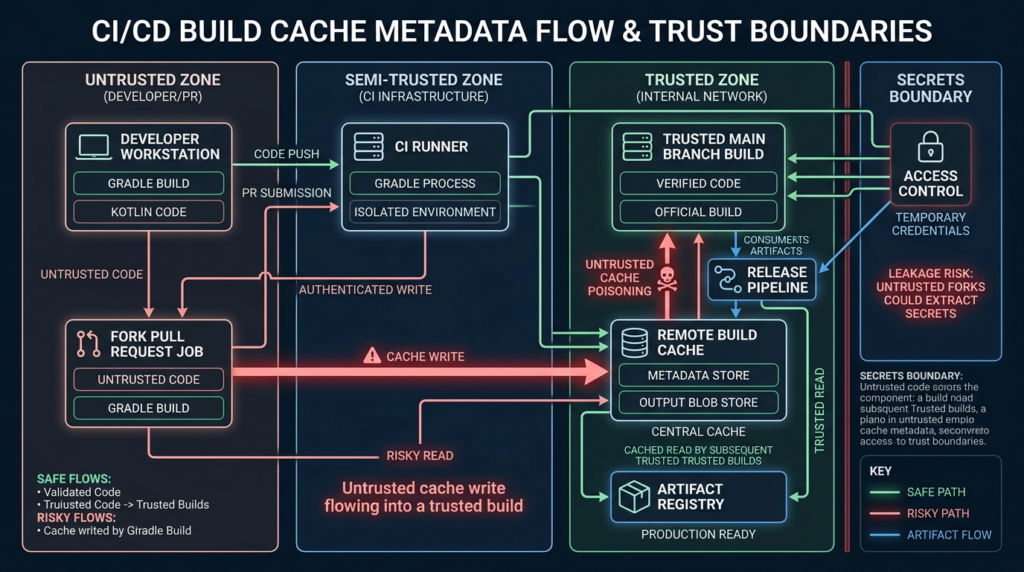
Build caches exist to make builds faster. Gradle describes its build cache as a mechanism that stores build outputs locally or remotely and reuses them when the inputs match, avoiding the cost of regenerating the same outputs. The same documentation explains that shared build caches can work across developer machines and build agents, not just within one local workspace. (Gradle Docs)
Kotlin’s own Gradle plugin documentation states that the Kotlin plugin uses the Gradle build cache to store build outputs for reuse in future builds. It also documents a way to disable caching for Kotlin tasks by setting the system property kotlin.caching.enabled=false. (Kotlin)
That is the normal performance story. The security story starts when cache data stops being purely local and purely trusted. A cache entry is not just a speed optimization when another machine, another pipeline, another branch, or another user can influence it. It becomes an input to a privileged process.
In a mature CI/CD environment, the build process may be able to do all of the following:
| Build capability | Why it matters for CVE-2026-53914 |
|---|---|
| Read proprietary source code | Code execution during a build can expose code not visible to the attacker otherwise |
| Resolve private dependencies | A compromised build can reveal internal package names, repositories, or credentials |
| Sign artifacts | Build-time code execution can threaten release integrity if signing keys are reachable |
| Publish artifacts | An attacker may try to influence what gets shipped or where artifacts are uploaded |
| Access CI secrets | Environment variables and temporary tokens often exist during build jobs |
| Reuse remote cache entries | A malicious or poisoned cache object may be consumed later by a more privileged job |
| Run on shared workers | Local cache state can persist across jobs unless workers are ephemeral or cleaned |
This is why CVE-2026-53914 belongs in the same mental folder as CI/CD trust-boundary issues, not only in a dependency scanner dashboard. A Kotlin version signal tells you where to look. It does not tell you whether an attacker can write cache metadata, whether a build will deserialize it, or whether the process has anything valuable at the time.
What unsafe deserialization means in this context
Deserialization is the act of reconstructing an object or data structure from a lower-level representation such as bytes, a file, a stream, or a cached record. That is ordinary engineering. The risk appears when the serialized data is untrusted, attacker-controlled, or less trusted than the process that deserializes it.
MITRE’s CWE-502 description explains why this class is dangerous: deserialized data or code can be modified in ways that bypass normal accessors, trigger unexpected functions, cause resource consumption, or invoke gadget chains that perform unauthorized actions. (CWE)
Oracle’s Java security documentation is even more direct: deserialization is code execution because a class’s readObject method can contain custom code. Oracle also notes that serialization filters can restrict acceptable classes and object graph complexity, but filtering is not automatically active unless configured through a system property, security property, or ObjectInputFilter. (Oracle Docs)
CVE-2026-53914 does not publicly disclose the internal Kotlin object types, cache metadata format, or exploit path. That absence matters. A serious security write-up should not invent a Kotlin-specific gadget chain or pretend that every build cache file is directly weaponizable. The responsible interpretation is narrower and more useful: some Kotlin versions before 2.4.20 contained an unsafe deserialization path in build cache metadata, and defenders should assume cache metadata is dangerous if it can cross a trust boundary.
In practical terms, the risk depends on four questions:
| Pergunta | Low-risk answer | Higher-risk answer |
|---|---|---|
| Who can write cache data? | Only the same trusted build job or developer | Forks, external contributors, shared CI jobs, multiple teams, or untrusted machines |
| Where is the cache stored? | Ephemeral local workspace | Shared remote cache, persistent runner volume, network cache, cross-project cache |
| What does the build process have access to? | No secrets, no publish rights, isolated test environment | Signing keys, release tokens, internal packages, cloud credentials |
| Is the Kotlin version fixed? | At or beyond the fixed boundary, after validation | Below 2.4.20 or unknown |
A local cache on a single trusted developer machine is a different threat model from a remote cache shared by hundreds of CI jobs. The CVE identifier is the same; the operational priority is not.
The version problem, 2.4.20, stable releases, and EAP builds
The CVE record says Kotlin versions before 2.4.20 are affected. That sounds simple, but release timing makes the remediation conversation more nuanced.
Kotlin’s release process page says 2.4.20 is planned as an upcoming stable release for September 2026. The same Kotlin documentation explains that tooling releases use the 2.x.20 pattern and that preview EAP versions are shipped before final releases. (Kotlin)
At the same time, Kotlin’s EAP page lists 2.4.20-Beta1 as released on June 24, 2026, describing it as a tooling release with performance improvements, bug fixes, and tooling updates. (Kotlin) Gradle’s plugin portal also lists org.jetbrains.kotlin.jvm version 2.4.20-Beta1 as created on June 24, 2026, and shows the plugin DSL syntax for that version. (Gradle Plugins)
That creates a real operational split:
| Organization type | Practical response |
|---|---|
| Teams allowed to use EAP builds in CI | Test 2.4.20-Beta1 in an isolated branch or staging pipeline, validate build correctness, and decide whether the security benefit outweighs pre-release risk |
| Teams that require stable compiler releases | Do not blindly move production builds to EAP; instead, disable or constrain Kotlin caching, isolate build cache state, and watch JetBrains release channels for the stable fixed release |
| Teams with high-value release pipelines | Treat build cache metadata as untrusted until fixed; remove shared cache push rights from untrusted jobs and clear existing cache entries |
| Teams with low-risk local-only builds | Inventory versions, document exposure, and prepare for upgrade, but prioritize based on whether untrusted cache writes are plausible |
A good security program does not turn every pre-release compiler into a production emergency. It also does not wait passively when the affected component sits inside a privileged build chain. The right move is to separate “patch to fixed compiler version” from “reduce trust in cache metadata now.”
Why the CVSS disagreement matters
The CVSS mismatch on CVE-2026-53914 is one of the most important parts of this vulnerability.
NVD displays a JetBrains CNA score of 6.7 Medium with the vector CVSS:3.1/AV:L/AC:H/PR:H/UI:N/S:C/C:H/I:L/A:L. That vector implies local attack vector, high attack complexity, high privileges required, no user interaction, changed scope, high confidentiality impact, and low integrity and availability impact. NVD also displays its own 9.8 Critical score with the vector CVSS:3.1/AV:N/AC:L/PR:N/UI:N/S:U/C:H/I:H/A:H. That vector implies network attack vector, low complexity, no privileges, no user interaction, unchanged scope, and high confidentiality, integrity, and availability impact. (NVD)
Those two models describe very different worlds.
The JetBrains CNA vector is closer to a conservative build-cache threat model: an attacker needs significant control over a local or semi-local build-cache condition. The NVD vector is closer to a worst-case interpretation where vulnerable behavior is reachable over a network without privileges. The public description does not currently provide enough Kotlin-specific detail to prove that every network-reachable remote cache deployment creates unauthenticated code execution. At the same time, the existence of remote build caches and shared CI workflows means defenders should not dismiss the NVD score without checking their own environment.
A practical severity model is more useful:
| Meio ambiente | Practical severity |
|---|---|
| Single developer laptop, no shared cache, no untrusted local users | Lower, but still patchable |
| CI with local cache reused across trusted jobs only | Moderate, depending on runner isolation and secrets |
| CI with shared cache across projects or branches | High, especially if untrusted jobs can write |
| Remote build cache with weak authentication or broad write access | High to critical, depending on whether attackers can push cache entries |
| Release pipeline with signing or publishing credentials available during build | High, because build-time code execution can become release-chain compromise |
| Fork PR workflow that can populate cache consumed by trusted branch builds | High, because untrusted contribution paths can cross into trusted builds |
The score you put in a ticket should reflect both the public record and your environment. A vulnerability manager can record “CNA 6.7, NVD 9.8, internally high for shared CI cache write paths.” That is more honest than pretending the discrepancy does not exist.
Where exposure usually hides in Kotlin projects
Kotlin can enter a project in several ways. A scanner that only checks application runtime dependencies may miss the build tooling path. For CVE-2026-53914, look at the compiler and build plugin layer.
Common places to check include:
| Location | What to inspect |
|---|---|
settings.gradle.kts | pluginManagement, plugin repositories, version declarations |
build.gradle.kts | plugins, buildscript, Kotlin plugin aliases |
gradle/libs.versions.toml | Kotlin plugin versions under version catalogs |
pom.xml | kotlin-maven-plugin, Kotlin compiler plugin versions |
gradle.properties | Build cache settings, Kotlin daemon options, custom flags |
| CI configuration | Cache restore/save rules, Gradle user home persistence, remote cache credentials |
settings.gradle.kts build cache block | Local and remote build cache configuration |
| Docker images | Preinstalled Gradle/Kotlin tooling or cached .gradle directories |
| Developer onboarding scripts | Toolchain bootstrap scripts that pin Kotlin versions |
Start with a repository search:
grep -RIn --exclude-dir=.git \
  -e 'org.jetbrains.kotlin' \
  -e 'kotlin("jvm")' \
  -e 'kotlin("multiplatform")' \
  -e 'kotlin-maven-plugin' \
  -e 'kotlin.version' \
  .
For Gradle version catalogs:
grep -RIn --exclude-dir=.git \
  -e 'kotlin' \
  gradle/libs.versions.toml settings.gradle* build.gradle*
For Maven projects:
grep -RIn --exclude-dir=.git \
  -e '<kotlin.version>' \
  -e 'kotlin-maven-plugin' \
  -e 'org.jetbrains.kotlin' \
  pom.xml **/pom.xml
For Gradle buildscript classpath visibility:
./gradlew buildEnvironment
For projects using plugin DSL aliases, also inspect the generated dependency lock files, plugin management configuration, and CI logs. Kotlin plugin versions may be resolved in places that a simple dependencies output does not show clearly.
How Gradle cache behavior changes the threat model
Gradle’s build cache documentation explains that task outputs can be reused across builds on one machine or across different computers through a shared build cache. It also says that in an organization-wide remote build cache model, developers and CI agents should load entries from the remote cache, while CI builds are expected to populate the cache after running clean; it further notes that developers are expected not to be allowed to populate the remote build cache. (Gradle Docs)
That recommendation is highly relevant to CVE-2026-53914. If developers, forked pull requests, external contributors, or low-trust jobs can push to a cache later consumed by higher-trust builds, cache metadata becomes a trust-escalation channel.
A safer remote cache pattern looks like this:
// settings.gradle.kts
import org.gradle.caching.http.HttpBuildCache

buildCache {
    local {
        isEnabled = true
    }

    remote<HttpBuildCache> {
        url = uri("https://gradle-cache.internal.example/cache/")
        isEnabled = providers.environmentVariable("CI").isPresent

        // Only trusted CI jobs should push.
        // Developer machines and fork PR jobs should read at most, or not use the remote cache at all.
        isPush = providers.environmentVariable("TRUSTED_CACHE_PUSH").orNull == "true"

        credentials {
            username = providers.environmentVariable("GRADLE_CACHE_USER").orNull
            password = providers.environmentVariable("GRADLE_CACHE_PASSWORD").orNull
        }
    }
}
That snippet is not a universal drop-in configuration. It illustrates the security principle: cache push should be a separate trust decision, not a convenience default. A CI job that builds untrusted code should not populate a cache consumed by trusted release jobs.
A temporarily stricter response is to disable build caching for suspicious or high-value pipelines:
./gradlew clean build --no-build-cache -Dkotlin.caching.enabled=false
For repeatability, run a comparison build after clearing local cache state:
./gradlew --stop

rm -rf .gradle
rm -rf "$HOME/.gradle/caches/build-cache-"*
rm -rf "$HOME/.gradle/caches/modules-2/files-2.1/org.jetbrains.kotlin"

./gradlew clean build --no-build-cache -Dkotlin.caching.enabled=false
Do not run destructive cleanup commands blindly on a shared production build host. Use them on disposable runners, developer workstations with approval, or maintenance windows where cache removal is expected.
A realistic attack model without inventing exploit internals
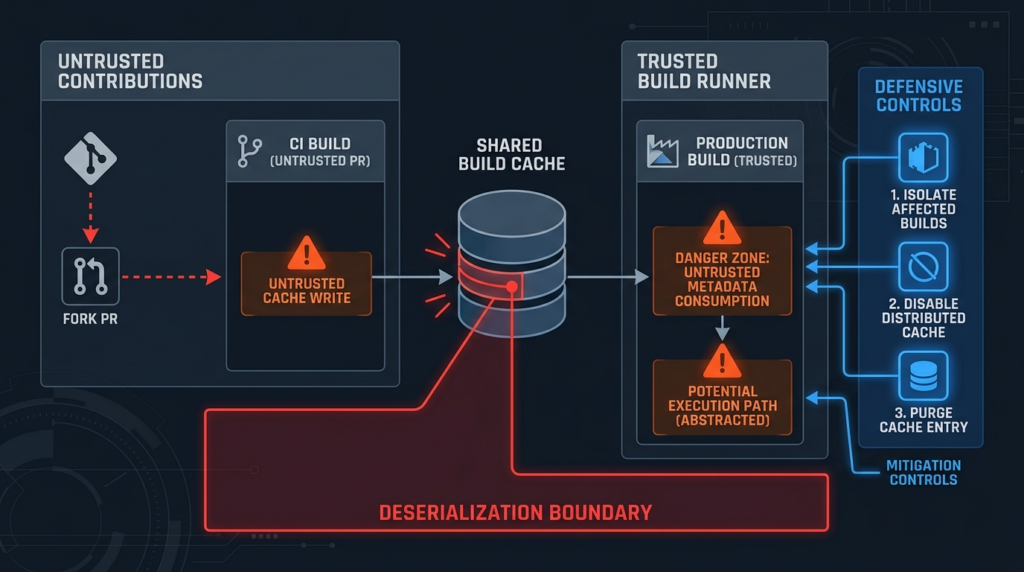
Because public sources do not disclose a Kotlin-specific exploitation procedure, the safest way to reason about CVE-2026-53914 is to model the trust boundary rather than the payload.
Scenario 1, poisoned local cache on a shared runner
A self-hosted CI runner persists $HOME/.gradle across jobs. Project A runs untrusted pull request builds. Project B runs trusted release builds on the same runner account. If the Kotlin build cache metadata is reusable across projects or workspaces, Project A may be able to influence local cache state consumed by Project B. The attacker’s goal is not to attack the web application directly. The goal is to get code execution during the trusted build.
The fix is not only “update Kotlin.” The fix is also to isolate runner workspaces, isolate Gradle user homes per project, avoid cache reuse across trust zones, and prevent untrusted jobs from writing any cache consumed by trusted jobs.
Scenario 2, remote cache with too many writers
A remote HTTP build cache is configured for performance. Every CI job can push. Fork pull request builds, feature branches, internal staging builds, and release builds all share the same backend. A compromised job or malicious contributor can attempt to seed cache state that later builds may reuse.
The safer pattern is simple: trusted clean CI builds may push; less-trusted jobs may read only from a separate cache or not use remote cache at all. Release pipelines should use the most restrictive cache policy.
Scenario 3, developer workstation with local malware or untrusted project state
A developer builds multiple projects on the same laptop. One project is a third-party sample or untrusted repository. Another project is a private production codebase. If shared local Gradle or Kotlin cache state crosses those projects, local compromise can matter even if the CVSS vector says “local.”
The defense is workspace isolation. Use separate Gradle user homes for high-risk projects, build untrusted repositories in containers, and clear cache state after suspicious builds.
Scenario 4, cache volume reused across containers
A CI system mounts the same cache volume into many short-lived containers. The containers are ephemeral, but the cache volume is not. This can create a false sense of safety. The build container disappears, but cache metadata remains.
The defense is to treat cache volumes as stateful infrastructure. Separate them by trust zone, branch class, repository sensitivity, and credential exposure.
Scenario 5, secrets available too early in the build
A build job restores cache, compiles code, runs tests, signs artifacts, and publishes release packages in one long process. If build-time code execution happens before signing or publishing, secrets may already be present.
The defense is job separation. Compile in one job without release secrets. Sign and publish in a later job that consumes verified artifacts from a trusted path, not arbitrary cache metadata from lower-trust jobs.
Safe PoC, demonstrating the class without weaponizing the CVE
The following demonstration is not an exploit for CVE-2026-53914. It does not use Kotlin’s real build cache format, does not use JetBrains internals, does not execute commands, does not open a network connection, does not use a gadget chain, and should not be run against any production system. It is a toy example for an isolated local lab.
Its purpose is to show why “metadata” becomes dangerous when a program reconstructs objects from untrusted serialized bytes. The example uses Java serialization because the core lesson is easy to see: deserialization can trigger class code during object reconstruction.
Create SafeDeserializationDemo.java:
import java.io.*;
import java.util.Base64;

public class SafeDeserializationDemo {
    // A harmless object that represents ordinary build metadata.
    static class BuildMetadata implements Serializable {
        private static final long serialVersionUID = 1L;
        String module;
        String compilerVersion;

        BuildMetadata(String module, String compilerVersion) {
            this.module = module;
            this.compilerVersion = compilerVersion;
        }

        @Override
        public String toString() {
            return "BuildMetadata{module='" + module + "', compilerVersion='" + compilerVersion + "'}";
        }
    }

    // A toy object that demonstrates a deserialization callback.
    // It does not run commands or touch the filesystem.
    static class SuspiciousMetadata implements Serializable {
        private static final long serialVersionUID = 1L;
        String marker = "toy-demo-only";

        private void readObject(ObjectInputStream in) throws IOException, ClassNotFoundException {
            in.defaultReadObject();

            // Harmless signal only. This is where dangerous classes sometimes do real work.
            System.out.println("[demo] readObject was invoked during deserialization.");
            System.out.println("[demo] This proves that deserializing objects can execute class code.");
        }
    }

    static byte[] serialize(Object object) throws IOException {
        ByteArrayOutputStream bytes = new ByteArrayOutputStream();
        try (ObjectOutputStream out = new ObjectOutputStream(bytes)) {
            out.writeObject(object);
        }
        return bytes.toByteArray();
    }

    static Object unsafeDeserialize(byte[] data) throws IOException, ClassNotFoundException {
        try (ObjectInputStream in = new ObjectInputStream(new ByteArrayInputStream(data))) {
            return in.readObject();
        }
    }

    static Object filteredDeserialize(byte[] data) throws IOException, ClassNotFoundException {
        try (ObjectInputStream in = new ObjectInputStream(new ByteArrayInputStream(data))) {
            ObjectInputFilter filter = ObjectInputFilter.Config.createFilter(
                "SafeDeserializationDemo$BuildMetadata;java.base/*;!*"
            );
            in.setObjectInputFilter(filter);
            return in.readObject();
        }
    }

    public static void main(String[] args) throws Exception {
        byte[] normal = serialize(new BuildMetadata("api-service", "demo-version"));
        byte[] suspicious = serialize(new SuspiciousMetadata());

        System.out.println("Normal metadata, unsafe path:");
        System.out.println(unsafeDeserialize(normal));

        System.out.println("\nSuspicious metadata, unsafe path:");
        System.out.println(unsafeDeserialize(suspicious));

        System.out.println("\nSuspicious metadata, filtered path:");
        try {
            System.out.println(filteredDeserialize(suspicious));
        } catch (InvalidClassException blocked) {
            System.out.println("[demo] blocked by ObjectInputFilter: " + blocked.getMessage());
        }
    }
}
Compile and run it locally:
javac SafeDeserializationDemo.java
java SafeDeserializationDemo
Expected output is similar to:
Normal metadata, unsafe path:
BuildMetadata{module='api-service', compilerVersion='demo-version'}

Suspicious metadata, unsafe path:
[demo] readObject was invoked during deserialization.
[demo] This proves that deserializing objects can execute class code.
SafeDeserializationDemo$SuspiciousMetadata@...

Suspicious metadata, filtered path:
[demo] blocked by ObjectInputFilter: filter status: REJECTED
The lesson is narrow but important. A file called metadata is still input. If that input is deserialized into objects without a strict trust boundary, class allowlist, integrity check, or safe parser design, object reconstruction can run code paths the caller did not intend to run. Oracle’s serialization filtering documentation describes filters as a way to screen incoming serialized object streams and narrow deserializable classes to a context-appropriate set, while also giving filters access to graph size and complexity metrics. (Oracle Docs)
Do not treat this demo as proof that Kotlin’s build cache uses the same object classes, the same serialization layout, or the same filter behavior. It is a safe model of the weakness class, not a reproduction of JetBrains internals.
What to check first in a real environment
A good investigation starts with a small set of yes-or-no questions.
| Verificar | Command or evidence | What good looks like |
|---|---|---|
| Kotlin version | Search build files and version catalogs | Kotlin tooling is at a fixed version or has a documented mitigation |
| Gradle build cache enabled | org.gradle.caching=true, --build-cache, build scan output | Cache is disabled for high-risk workflows or restricted to trusted jobs |
| Kotlin caching enabled | Build flags and CI scripts | Temporarily disabled where fixed Kotlin cannot be used |
| Remote cache configured | settings.gradle.kts build cache block | Push rights limited to trusted clean CI |
| Fork PR cache behavior | CI workflow cache save rules | Forks cannot write caches consumed by trusted builds |
| Runner persistence | CI runner config | Ephemeral runners or isolated cache directories per trust zone |
| Secrets timing | CI job graph | Compile/test jobs do not have release secrets unless needed |
| Cache logs | Build scan, CI logs, remote cache logs | Unexpected cache hits and writes are reviewed |
For GitHub Actions, inspect cache usage carefully:
# Risky pattern if used across trusted and untrusted jobs without separation.
- name: Cache Gradle
  uses: actions/cache@v4
  with:
    path: |
      ~/.gradle/caches
      ~/.gradle/wrapper
    key: gradle-${{ runner.os }}-${{ hashFiles('**/*.gradle*', '**/gradle-wrapper.properties') }}
A safer pattern is to avoid saving cache from untrusted pull requests:
- name: Restore Gradle cache
  uses: actions/cache/restore@v4
  with:
    path: |
      ~/.gradle/caches
      ~/.gradle/wrapper
    key: gradle-${{ runner.os }}-${{ hashFiles('**/*.gradle*', '**/gradle-wrapper.properties') }}

# Build without allowing untrusted jobs to publish cache state.
- name: Build
  run: ./gradlew clean build --no-build-cache -Dkotlin.caching.enabled=false

- name: Save Gradle cache only for trusted branches
  if: github.event_name == 'push' && github.ref == 'refs/heads/main'
  uses: actions/cache/save@v4
  with:
    path: |
      ~/.gradle/caches
      ~/.gradle/wrapper
    key: gradle-${{ runner.os }}-${{ hashFiles('**/*.gradle*', '**/gradle-wrapper.properties') }}
That example is intentionally conservative. Many teams will want more cache performance than this. The point is to make cache write permission explicit. A fork PR should not be able to publish state that a trusted release job later consumes.
Mitigation priorities
The cleanest fix is to stop using affected Kotlin versions. The public CVE record defines the affected range as versions before 2.4.20, and the Gradle plugin portal shows 2.4.20-Beta1 exists as a published plugin version. However, Kotlin’s release process page lists the stable 2.4.20 release as planned for September 2026, so production upgrade decisions may depend on whether your organization accepts EAP compiler builds in production pipelines. (NVD)
Use this priority order.
Priority 1, identify affected Kotlin tooling
Search all repositories, including build logic repositories and shared Gradle convention plugins. Do not only inspect runtime dependencies. Kotlin compiler and Gradle plugin versions can live outside the application dependency graph.
grep -RIn --exclude-dir=.git \
  -e 'kotlin-gradle-plugin' \
  -e 'org.jetbrains.kotlin.jvm' \
  -e 'org.jetbrains.kotlin.multiplatform' \
  -e 'kotlin.version' \
  -e 'kotlin("jvm")' \
  -e 'kotlin("multiplatform")' \
  .
If your organization has many repositories, create a central query across GitHub, GitLab, Bitbucket, or your internal code search system.
Priority 2, reduce cache trust immediately
If you cannot move to a fixed Kotlin release right away, reduce the chance that untrusted metadata reaches a privileged build.
./gradlew clean build --no-build-cache -Dkotlin.caching.enabled=false
For CI, apply this first to release pipelines, signed artifact jobs, private package publishing jobs, and builds that handle sensitive credentials.
Priority 3, separate cache by trust zone
Do not share cache state between:
| Lower-trust source | Higher-trust consumer to protect |
|---|---|
| Fork pull requests | Main branch builds |
| External contributor branches | Release builds |
| Experimental projects | Production projects |
| Developer laptops | CI release pipelines |
| Untrusted sample repositories | Private product repositories |
| Test jobs without secrets | Publish jobs with secrets |
A separate cache key is better than a shared key. A separate cache backend is better than a separate key. An ephemeral runner is better than a persistent runner when you cannot trust the cache lifecycle.
Priority 4, lock down remote cache push
Remote cache push should be allowed only from trusted clean builds. Gradle’s own documentation describes the common remote build cache model as one where developers and CI agents load cache entries, but developers are not allowed to populate the remote cache, while CI populates after clean builds. (Gradle Docs)
Translate that into policy:
| Função | Remote cache read | Remote cache push |
|---|---|---|
| Developer laptop | Opcional | Não |
| Fork PR job | No or separate untrusted cache | Não |
| Internal feature branch | Opcional | Usually no |
| Main branch clean CI | Sim | Yes, if trusted |
| Release pipeline | Prefer no or trusted-only | Rarely necessary |
| Security test branch | Separate cache | Não |
Priority 5, clean existing cache state
Once you identify exposure, clear potentially untrusted cache entries. For disposable CI runners, rebuild from clean images. For persistent self-hosted runners, stop daemons and clear Gradle/Kotlin cache directories during a maintenance window.
./gradlew --stop

rm -rf .gradle
rm -rf "$HOME/.gradle/caches/build-cache-"*
rm -rf "$HOME/.gradle/caches/modules-2/files-2.1/org.jetbrains.kotlin"
For remote caches, use backend-specific purge controls. If the backend does not provide selective invalidation, consider rotating the cache namespace or endpoint used by trusted jobs.
Priority 6, reduce secrets available during compilation
Assume that compile-time code execution can see what the process can see. Move release secrets into a separate publish job. Use short-lived tokens. Prefer OIDC-based cloud credentials over static secrets. Avoid exposing signing keys during ordinary test builds.
A safer pipeline splits responsibilities:
job 1: dependency resolution and compile, no release secrets
job 2: tests, no release secrets
job 3: package verification, no release secrets
job 4: signing, minimal signing credential only
job 5: publish, minimal publish credential only
If the compile job is compromised, it should not automatically become a release compromise.
Detection signals defenders should collect
CVE-2026-53914 is a build-time issue, so normal web application telemetry may not show anything. Look at CI, cache, and endpoint telemetry.
| Sinal | Por que é importante |
|---|---|
Unexpected FROM-CACHE on Kotlin compile tasks | May show cache reuse where a clean rebuild was expected |
| Cache hits in release pipelines from untrusted namespaces | Indicates trust-zone mixing |
| Remote cache writes from fork or external PR jobs | High-risk configuration |
| Build failures involving deserialization, class loading, or cache metadata | Could be benign corruption, but should trigger cache trust review |
| Kotlin daemon crashes or unusual compiler process behavior | May indicate malformed cache state or unrelated compiler problems |
| Cache object writes outside expected CI windows | Possible unauthorized cache population |
| New Gradle user home persistence on self-hosted runners | Increases cross-job state exposure |
| Release job environment variables present during compile | Increases impact if build-time code execution occurs |
For Gradle builds, add a diagnostic build that disables cache and compares behavior:
./gradlew clean build --no-build-cache -Dkotlin.caching.enabled=false --info
Then compare with a cached build in a trusted branch:
./gradlew clean build --build-cache --info
Look for cache interaction patterns, not only pass/fail status. The question is whether the build depends on cache state from outside the current trust boundary.
Hardening remote build caches
A remote build cache should be treated like a software supply-chain component. It may not contain source code in the same way a Git repository does, but it can influence what build processes consume and skip.
Minimum controls:
| Controle | Reason |
|---|---|
| TLS for cache transport | Prevents network tampering and credential leakage |
| Authentication for all cache access | Prevents anonymous read/write paths |
| Separate read and write credentials | Allows broad read without broad write |
| Push only from trusted clean CI | Reduces poisoning risk |
| Separate cache namespaces per trust zone | Prevents cross-project or cross-branch contamination |
| Audit logs for writes and deletes | Supports investigation |
| Retention limits | Reduces long-lived poisoned state |
| Cache purge process | Enables incident response |
| No release secrets in cache-populating jobs | Reduces blast radius |
| Ephemeral CI runners for high-risk jobs | Limits local persistence |
Avoid the common mistake of treating cache as “just performance.” A fast build that reuses untrusted state is not a secure build.
How to validate remediation
A remediation ticket for CVE-2026-53914 should not close with “Kotlin upgraded” unless the build-cache trust model was also checked. Use a short validation checklist.
| Validation item | Evidence to keep |
|---|---|
| Kotlin version no longer below the fixed boundary, or mitigation accepted | Build file diff, lock file diff, CI log |
| Kotlin caching disabled where fixed upgrade is not possible | CI command output, Gradle properties, pipeline config |
| Remote cache push restricted | settings.gradle.kts, cache backend ACLs |
| Fork PRs cannot write trusted cache | CI policy, workflow conditions |
| Release builds do not consume untrusted cache | CI job config, build logs |
| Persistent runner cache cleaned | Maintenance log or rebuilt runner image hash |
| Secrets separated from compile jobs | CI job graph and secret access policy |
| A clean no-cache build succeeds | Build output |
| A trusted cache build succeeds after controls | Build output and cache logs |
The key is reproducibility. A future engineer should be able to understand what was affected, what was changed, and why the environment is no longer relying on unsafe cache trust assumptions.
Related CVEs that clarify the risk
CVE-2026-53914 sits at the intersection of deserialization, Java/Kotlin tooling, and build infrastructure. These related CVEs are useful because they show how similar assumptions fail in different places.
| CVE | Product or area | Why it is relevant | Practical lesson |
|---|---|---|---|
| CVE-2015-4852 | Oracle WebLogic Server | NVD describes remote command execution through a crafted serialized Java object in T3 traffic, related to Apache Commons Collections in WebLogic’s classpath | Java deserialization risk becomes severe when attacker-controlled bytes meet a powerful classpath and reachable deserialization entry point (NVD) |
| CVE-2023-34040 | Spring for Apache Kafka | NVD describes a possible deserialization attack vector under unusual configuration involving malicious serialized objects in deserialization exception record headers | Configuration details can turn a theoretical deserialization path into a real risk, so exploitability depends on how software is wired (NVD) |
| CVE-2024-23897 | Jenkins | NVD describes unauthenticated arbitrary file read on the Jenkins controller through CLI command parser behavior | CI control planes and build servers are security boundaries, not just developer utilities (NVD) |
| CVE-2021-44228 | Apache Log4j | NVD describes attacker-controlled log messages or parameters leading to code execution through JNDI lookups in vulnerable Log4j versions | “Support” features in Java ecosystems can become code execution paths when attacker-controlled data crosses a dangerous resolver boundary (NVD) |
These examples do not mean CVE-2026-53914 has the same exploitability as Log4Shell or a classic WebLogic gadget-chain RCE. They mean defenders should respect the class. In Java and JVM ecosystems, the line between “data” and “behavior” can disappear when object reconstruction, class loading, reflection, expression evaluation, or lookup mechanisms are involved.
From version signal to real exposure
A vulnerability scanner can tell you that a Kotlin version appears affected. It may not know whether your remote cache is writable by untrusted jobs, whether your runner persists local cache across projects, or whether release secrets exist during compilation.
That is where validation matters. In an authorized environment, a useful workflow connects the version signal, the build configuration, the cache trust boundary, the CI permission model, and post-fix retesting. Penligent’s public site describes an AI-powered penetration testing workflow, and its continuous AI pentesting article makes the distinction between broad vulnerability scanning and validation-oriented testing: the goal is evidence about whether a suspected issue can create real impact in the current environment, whether the vulnerable path is reachable, and whether remediation worked. (Penligente)
For CVE-2026-53914, that validation should stay non-destructive. Do not try to weaponize build cache metadata. Instead, prove or disprove exposure through safe evidence: affected version present, cache enabled, untrusted push path exists, trusted consumer exists, secrets are present, mitigation removes the path, and clean builds still pass.
Common mistakes during remediation
Mistake 1, patching the application but not the build tool
Kotlin may not appear in the runtime dependency tree. It may exist as a Gradle plugin, Maven plugin, compiler plugin, or build image layer. If the scanner only checks application packages, it may miss the vulnerable build tooling.
Mistake 2, assuming local means low impact
A local vector can still matter when the local environment is a CI runner with release credentials. The attacker’s path may be “write cache in one job, trigger trusted build later,” not “send a packet to a public server.”
Mistake 3, sharing cache across trust zones
A cache that improves performance across teams can also move data across trust boundaries. Separate cache state by branch class, repository class, contributor trust, and release sensitivity.
Mistake 4, allowing forked PR jobs to save trusted cache
Fork PRs should not write cache that trusted jobs consume. This rule applies even when the code under test is open source. A malicious cache entry is not the same thing as a source diff.
Mistake 5, putting signing secrets in compile jobs
If compile-time code execution is possible, compile jobs should not hold release secrets. Split compile, test, sign, and publish steps.
Mistake 6, ignoring pre-release constraints
If 2.4.20 stable is not available or not allowed in your production policy, do not pretend the upgrade is complete. Use documented mitigations and track the stable release.
Mistake 7, using a weaponized PoC as a “test”
A real exploit attempt against a production build environment is unnecessary and risky. Safe validation can prove exposure through configuration, version state, cache permissions, and controlled toy demonstrations.
Practical remediation playbook
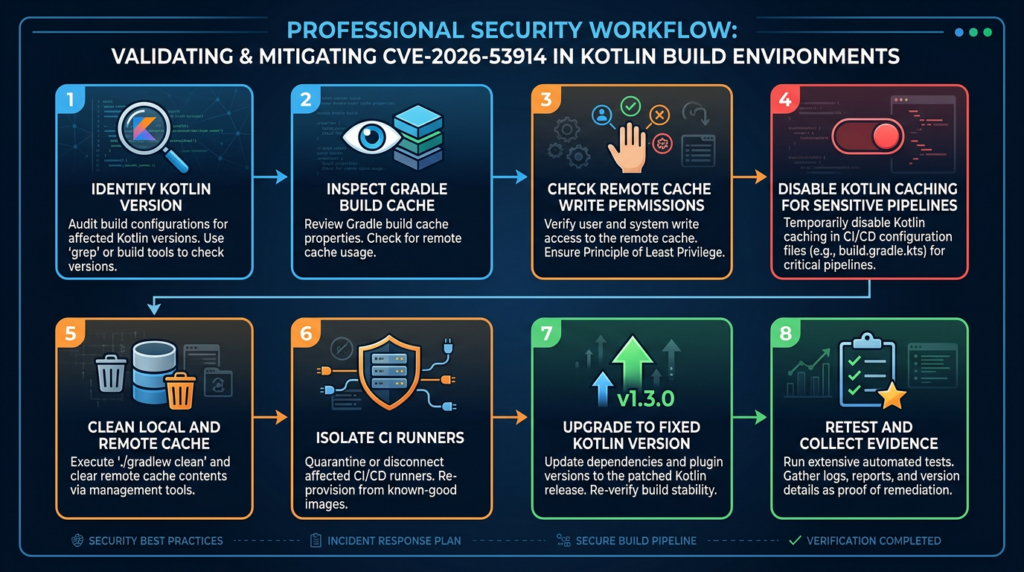
Use this order when the environment is large and time is limited.
Step 1, classify repositories
| Classe | Exemplos | Target response |
|---|---|---|
| Tier 0 release pipeline | Signed artifacts, production mobile apps, SDK releases | Disable or restrict cache immediately; prioritize fixed Kotlin testing |
| Tier 1 internal services | Backend services, APIs, CI-published packages | Inventory versions and cache trust; restrict remote cache writes |
| Tier 2 developer-only builds | Local tools, prototypes | Prepare upgrade; clear local cache if untrusted projects were built |
| Tier 3 archived projects | No active builds | Record exposure; fix before rebuilding or releasing |
Step 2, classify cache paths
# Look for common cache references in CI and build scripts.
grep -RIn --exclude-dir=.git \
  -e '.gradle/caches' \
  -e 'org.gradle.caching' \
  -e 'buildCache' \
  -e 'HttpBuildCache' \
  -e 'actions/cache' \
  -e 'cache:' \
  .github .gitlab-ci.yml Jenkinsfile settings.gradle* build.gradle*
Step 3, disable risky cache paths first
For release builds:
./gradlew clean build --no-build-cache -Dkotlin.caching.enabled=false
For Gradle properties in a specific CI job, prefer explicit command-line flags. If you need a temporary file-level control for a job workspace, document it clearly:
# gradle.properties in a controlled CI workspace
org.gradle.caching=false
Use Kotlin’s documented system property when disabling Kotlin task caching:
-Dkotlin.caching.enabled=false
Step 4, rebuild from trusted inputs
After cache cleanup, rebuild from source and trusted dependencies. Avoid consuming remote cache entries until cache access controls are reviewed.
./gradlew --stop
./gradlew clean build --refresh-dependencies --no-build-cache -Dkotlin.caching.enabled=false
--refresh-dependencies is not a security scanner. It simply forces dependency resolution checks. Use it when you want a cleaner rebuild signal after cache cleanup.
Step 5, restore performance carefully
Once Kotlin is updated or compensating controls are accepted, re-enable cache in stages:
- Local cache for trusted developer machines.
- Remote read-only cache for internal feature branches.
- Remote push only from clean trusted CI.
- No remote cache write from fork PRs.
- Separate release cache namespace, or no cache for release builds.
What security teams should ask engineering
A good review meeting should not start with “Why are we vulnerable?” It should start with concrete system questions.
| Pergunta | Por que é importante |
|---|---|
| Which Kotlin version builds this repository? | Determines whether the CVE applies |
| Is Kotlin used only for app code, or also for shared build logic? | Shared build logic may affect many repositories |
| Is Gradle build cache enabled locally, remotely, or both? | Determines cache exposure |
| Can pull requests from forks restore or save cache? | Checks untrusted write paths |
Do self-hosted runners persist $HOME/.gradle? | Checks cross-job cache persistence |
| Does the compile job have release credentials? | Determines impact of build-time code execution |
| Are cache credentials shared across repositories? | Determines blast radius |
| Can the remote cache be purged or namespaced quickly? | Determines incident response capability |
| Can we run clean no-cache builds today? | Determines whether disabling cache is operationally safe |
These are not theoretical questions. They are the difference between a medium local tooling issue and a serious CI/CD trust-boundary incident.
PERGUNTAS FREQUENTES
What is CVE-2026-53914?
- CVE-2026-53914 is a JetBrains Kotlin vulnerability affecting versions before 2.4.20.
- The confirmed public description says code execution was possible through unsafe deserialization in build cache metadata.
- The weakness is mapped to CWE-502, Deserialization of Untrusted Data.
- The most important defensive question is whether untrusted or less-trusted actors can influence cache metadata consumed by a privileged Kotlin build process.
Are all Kotlin applications exploitable?
- No. A Kotlin runtime application is not automatically exploitable just because it was written in Kotlin.
- The public vulnerability description points to Kotlin build cache metadata, so the main exposure is in build tooling and CI/CD workflows.
- Risk is higher when build cache state is shared across machines, projects, contributors, or trust zones.
- Risk is lower when builds are local-only, cache state is not shared, and untrusted users cannot write cache metadata.
Why does CVE-2026-53914 have both a medium and critical score?
- NVD displays the JetBrains CNA score as 6.7 Medium with a local, high-complexity, high-privilege vector.
- NVD also displays its own 9.8 Critical score with a network, low-complexity, no-privilege vector.
- The public description is short, so defenders should not rely on either score alone.
- Use your environment to decide priority: remote cache write exposure, shared CI runners, and release secrets can make the practical risk much higher.
What should I do if I cannot upgrade to Kotlin 2.4.20 immediately?
- Disable Gradle build cache for sensitive pipelines with
--no-build-cache. - Disable Kotlin task caching with
-Dkotlin.caching.enabled=false. - Prevent untrusted jobs from writing shared cache entries.
- Clear local and remote cache entries that may have crossed trust boundaries.
- Separate compile jobs from signing and publishing jobs.
- Track JetBrains and Kotlin release channels until an acceptable fixed version is available for your production policy.
How do I check whether my CI cache configuration is risky?
- Look for remote build cache configuration in
settings.gradle.kts. - Check whether fork PRs or external contributor builds can save cache.
- Check whether self-hosted runners persist
$HOME/.gradleacross unrelated jobs. - Check whether release builds consume cache from feature branches or untrusted jobs.
- Check whether compile jobs have access to signing keys, package publishing tokens, or cloud credentials.
Should I run a public PoC against my build system?
- No. A weaponized PoC is unnecessary for normal defensive validation and can put source code, credentials, and release integrity at risk.
- Use safe validation: version inventory, cache configuration review, controlled no-cache builds, runner isolation checks, and cache write-permission review.
- If exploit reproduction is required, do it only in an isolated lab with no production secrets, no real release pipeline, and explicit authorization.
- A safe toy PoC can explain deserialization risk without using Kotlin internals or real exploit payloads.
How do I know remediation worked?
- Confirm the Kotlin build tooling is no longer in the affected range, or document accepted compensating controls.
- Confirm high-risk builds can run successfully with cache disabled.
- Confirm untrusted jobs cannot write trusted cache.
- Confirm release jobs do not consume cache from lower-trust workflows.
- Confirm persistent runner cache state was cleared or runners were rebuilt.
- Keep build logs, configuration diffs, and cache policy changes as evidence.
Julgamento final
CVE-2026-53914 is a small public advisory with a large operational lesson. Build cache metadata is not harmless just because it sits outside the application request path. In Kotlin projects, the build process may have more privilege than the application itself: source access, dependency access, signing access, and publishing access. That makes cache trust a security boundary.
The right response is disciplined and concrete. Identify Kotlin versions. Understand whether build cache metadata crosses trust boundaries. Remove untrusted cache writes. Disable Kotlin caching where fixed versions are not yet acceptable. Separate release secrets from compile jobs. Clean cache state where trust is unclear. Then retest with evidence.
Do not overstate the vulnerability as a universal remote exploit for every Kotlin application. Do not understate it as a harmless local bug. Treat it as a build-chain deserialization risk whose severity depends on who can write cache metadata, who later consumes it, and what the build process can access at that moment.

 Portuguese
  English
  German
  French
  Spanish
  Japanese
  Korean
  Hindi
Hindi  Arabic
  Turkish
  Hebrew