
CVE-2026-56155 is a high-severity privilege-escalation vulnerability in Active Directory Federation Services. The flaw is tied to insufficiently granular permissions on the AD FS Distributed Key Manager container, an Active Directory object that holds key material used to protect token-signing and token-decryption certificate private keys.
That description may sound narrower than a remote code execution bug, but the affected security boundary is unusually important. An attacker who can read protected DKM material may be able to recover the cryptographic keys that protect an AD FS token-signing private key. If the signing key itself is compromised, the attacker may be able to create SAML tokens that downstream services accept as legitimate because the tokens carry a valid federation signature.
Microsoft published security updates and DKM ACL hardening guidance on July 14, 2026. The same day, CISA added CVE-2026-56155 to its Known Exploited Vulnerabilities Catalog and set a remediation deadline of July 28, 2026 for organizations subject to the applicable federal directive. NVD records a CVSS 3.1 score of 7.8 with the vector AV:L/AC:L/PR:L/UI:N/S:U/C:H/I:H/A:H, and CISA’s SSVC enrichment identifies active exploitation, no practical automation signal, and total technical impact. (NVD)
The vulnerability therefore deserves urgent treatment, but urgency should not produce inaccurate claims. Public sources do not currently describe a complete exploit chain, identify the initial access method used in observed attacks, publish a CVE-specific proof of concept, or disclose whether Microsoft observed successful theft of an AD FS token-signing key. Defenders should distinguish the confirmed vulnerability mechanics from the possible consequences of a fully compromised federation key.
One operational detail matters more than almost any other: installing the July 2026 security update and correcting the DKM ACL are related but separate actions. The July update introduces ACL detection and an opt-in remediation mechanism. On Windows Server 2016 and later, Microsoft plans to change the default behavior on October 13, 2026 so that an unconfigured system automatically remediates an unsafe ACL. Windows Server 2012 and Windows Server 2012 R2 do not receive that automatic enforcement behavior and require additional administrative steps. (Microsoft Support)
A credible response to CVE-2026-56155 must answer four questions:
- Are all AD FS nodes running a fixed Windows build?
- Does the DKM container have the secure ACL Microsoft expects?
- Was the container accessible to an unexpected principal before remediation?
- Is there evidence that key material, certificates, or federation trust may already have been compromised?
Answering only the first question is not enough.
The facts defenders can rely on
The public record establishes the following baseline.
| Campo | Confirmed information |
|---|---|
| CVE | CVE-2026-56155 |
| Affected component | Active Directory Federation Services |
| Security boundary | AD FS Distributed Key Manager container permissions |
| Fraqueza | CWE-1220, Insufficient Granularity of Access Control |
| Impact category | Elevação de privilégio |
| CVSS 3.1 | 7.8 High |
| Vetor | AV:L/AC:L/PR:L/UI:N/S:U/C:H/I:H/A:H |
| Required privileges | Baixa |
| User interaction | Nenhum |
| Scope change | Unchanged under the CVSS model |
| Exploitation status | Active exploitation recorded by CISA |
| CISA KEV addition | July 14, 2026 |
| CISA due date | July 28, 2026 |
| Microsoft’s initial hardening mode | Audit and opt-in remediation |
| Planned default enforcement | October 13, 2026 for Windows Server 2016 and later |
| Legacy server behavior | Windows Server 2012 and 2012 R2 require manual preparation and remediation |
NVD describes CVE-2026-56155 as an insufficiently granular access-control issue that permits an authorized attacker to elevate privileges locally. In CVE terminology, “authorized attacker” does not mean a legitimate administrator acting with organizational permission. It means the attacker already possesses some authenticated or authorized foothold required by the vulnerability’s preconditions. (NVD)
O AV:L score also needs careful interpretation. It tells defenders that the public CVSS model does not describe a remote, unauthenticated attack launched directly from the internet. It does not mean the consequences remain confined to one local process or one Windows host. Once an attacker reaches an identity-signing key, the blast radius may include every relying party that trusts the affected AD FS deployment.
CVE-2026-56155 is therefore best understood as a post-compromise identity escalation path. It does not replace the need for an initial foothold. It can, however, make a relatively limited foothold far more valuable when directory permissions expose federation key material.
The public sources also leave important questions unanswered:
- Microsoft has not published a complete exploit procedure.
- No authoritative source has identified the exact initial-access vector used in observed exploitation.
- No reliable public source has published a complete list of victims.
- Microsoft has not publicly stated that every observed exploitation attempt resulted in token-signing certificate theft.
- There is no public, universal network signature that proves exploitation of this CVE.
- There is no public guarantee that an absence of Event 1132 means the environment was never exposed before the update.
- There is no safe reason to test production AD FS servers with untrusted exploit code.
Those gaps should produce disciplined investigation, not speculation. The correct response is to patch, verify the ACL, examine historical access, and escalate to federation-key incident response when the evidence warrants it.
Why a local flaw can become an identity-wide incident
AD FS is not merely another application installed on Windows Server. It is an identity provider. It authenticates users, creates security tokens, signs those tokens, and sends them to applications or services that have been configured to trust the federation server.
A relying party usually does not ask AD FS to prove every identity claim through a fresh directory lookup. It validates the token’s issuer, audience, time constraints, claims, and digital signature. The token-signing certificate is what allows the relying party to determine that the token came from the trusted federation service rather than from an arbitrary system.
Microsoft’s AD FS certificate guidance explains that the token-signing certificate’s private key is used to sign security tokens, while partners and relying parties use the corresponding public key to validate those signatures. The AD FS service account requires access to that private key because the service must sign tokens during normal operation. (Microsoft Learn)
This creates a powerful trust abstraction. A downstream service does not need direct access to every authentication factor or directory credential. It trusts the signed statement created by AD FS.
It also creates a high-consequence failure mode. If an attacker obtains the signing private key, the attacker may be able to create a token that is cryptographically indistinguishable from a token signed by the legitimate federation service. The attacker still needs to understand the relying party, claims rules, audience, token format, and other federation details, but the most important cryptographic proof can no longer be trusted.
MITRE ATT&CK tracks forged SAML tokens under technique T1606.002. MITRE notes that possession of a valid SAML signing certificate can allow an adversary to create tokens containing chosen claims and lifetimes. The technique is often called Golden SAML because it can provide durable access across services that continue trusting the compromised signing key. (MITRE ATT&CK)
CVE-2026-56155 does not automatically equal Golden SAML. An unsafe DKM ACL is one possible step toward key access. Whether a real attacker can complete the chain depends on the permissions available, the accessible DKM material, the AD FS configuration, certificate protection, monitoring, and the attacker’s capabilities.
The reason for urgent action is that the vulnerability weakens a boundary protecting exactly the type of key that could enable such an attack.
A traditional local privilege-escalation bug often ends with elevated execution on one host. An identity-signing compromise may instead affect:
- Microsoft 365 or other cloud applications connected through federation.
- Internal applications configured as AD FS relying parties.
- VPNs and remote-access platforms that consume SAML assertions.
- Administrative interfaces that accept federated identity.
- Third-party SaaS platforms that trust the organization’s AD FS issuer.
- Business applications whose authorization model depends on token claims.
- Partner organizations connected through federation trusts.
The downstream exposure is determined by trust relationships, not by the physical location of the vulnerable server.
How AD FS protects token-signing keys
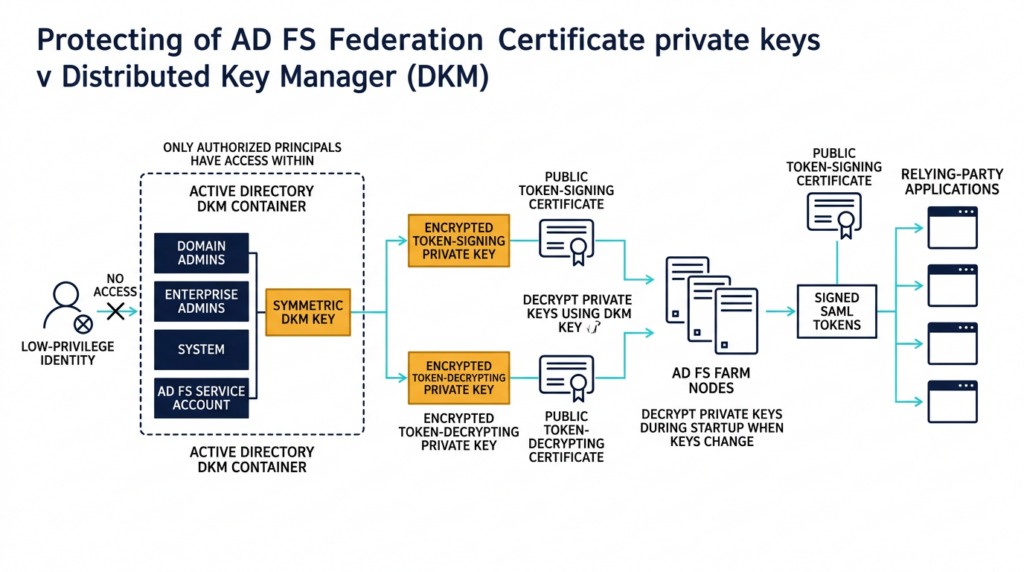
Understanding CVE-2026-56155 requires separating several cryptographic components that are often discussed as though they were the same object.
AD FS commonly works with at least three certificate roles:
| Certificate role | Primary purpose | Security consequence if compromised |
|---|---|---|
| Service communications certificate | Protects TLS communications to the federation service | May enable interception or impersonation depending on key access and network control |
| Token-signing certificate | Signs tokens generated by AD FS | May allow forged tokens to pass signature validation |
| Token-decrypting certificate | Decrypts encrypted tokens received by AD FS | May expose protected token contents or affect encrypted federation exchanges |
The token-signing private key is stored and used by AD FS. In a farm, multiple federation servers may need consistent access to protected certificate material. AD FS uses the Distributed Key Manager mechanism to support that shared cryptographic operation.
Microsoft’s CVE-2026-56155 support guidance states that the DKM container stores symmetric keys used to protect the private keys of AD FS token-signing and token-encryption certificates. The CertificateSharingContainer property identifies the relevant container in Active Directory. Microsoft’s AD FS recovery documentation also explains that automatically generated token-signing and token-decrypting certificates and their private keys can be backed up through the DKM-based configuration. (Microsoft Support)
The security model depends on the DKM container’s ACL. A narrowly scoped ACL should allow only the principals that must administer the container or operate the AD FS service. A broader ACL may allow an unrelated identity to read or manipulate protected material.
Microsoft’s expected post-remediation permissions are:
| Principal | Expected access |
|---|---|
| Domain Admins | Generic All |
| Enterprise Admins | Generic All |
| SISTEMA | Generic All |
| AD FS service account | Read, Write, Create Child, Write Owner, and Delete Tree |
Microsoft also expects inheritance to be disabled, inherited access-control entries to be discarded, and other explicit Allow entries to be removed. (Microsoft Support)
This is an unusually strict target state, but the strictness matches the asset. The container protects material related to federation signing keys. A generic monitoring account, backup identity, migration service, delegated administrator, or inherited organizational-unit permission should not retain access merely because that access was convenient during an earlier deployment.
The key distinction is between access needed for normal AD FS operation and access inherited from broad directory administration practices.
An organization can have a technically functional AD FS farm while the DKM ACL is too permissive. Authentication continues to work. Tokens continue to be signed. Applications continue accepting them. The security weakness may remain invisible until an attacker or an audit examines the directory permissions.
That is why operational availability is not evidence that the ACL is safe.
Where the access-control boundary failed
NVD maps CVE-2026-56155 to CWE-1220, Insufficient Granularity of Access Control. This weakness occurs when a system grants access at a level broader than the resource or operation actually requires.
In the AD FS context, the relevant question is not simply whether access control exists. The question is whether access is limited to the precise identities and permissions necessary to protect the DKM container.
Several real administrative patterns can create excessive access without an administrator deliberately exposing a signing key:
- The DKM object inherits permissions from a parent container.
- A broad support group receives read access to an entire directory branch.
- A migration tool adds a service account and never removes it.
- A backup product requires temporary directory access that becomes permanent.
- A retired AD FS service account remains in an explicit ACE.
- A troubleshooting change grants a user or group more rights than intended.
- A delegated administration model treats identity infrastructure like an ordinary application container.
- A disaster-recovery procedure restores an older ACL.
- A domain consolidation project carries forward legacy permissions.
- An administrator assumes that encrypted key material is harmless even when the protecting material is available to the same identity.
Encryption at rest is only as strong as the separation between the ciphertext and the material needed to decrypt it. If an attacker can obtain both the protected certificate data and the DKM key used to protect it, the existence of encryption does not provide the intended boundary.
Microsoft Defender for Identity has long included an alert for a suspected AD FS DKM key read. Microsoft’s description explains that AD FS token-signing and token-decryption certificate private keys are encrypted with DKM and that an attacker who obtains the relevant AD FS account access may be able to retrieve the DKM key, decrypt the certificates, and use a signing key to create SAML tokens. (Microsoft Learn)
That detection existed before CVE-2026-56155 because DKM access was already recognized as a high-value identity attack signal. The new CVE makes the ACL itself part of the vulnerability-management and incident-response problem.
The access-control failure also explains why a scanner that checks only the operating system build cannot provide a complete conclusion. A fixed build enables Microsoft’s detection and remediation behavior, but the actual state still depends on the DKM object’s permissions and the configured remediation phase.
A realistic attack path without inventing an exploit
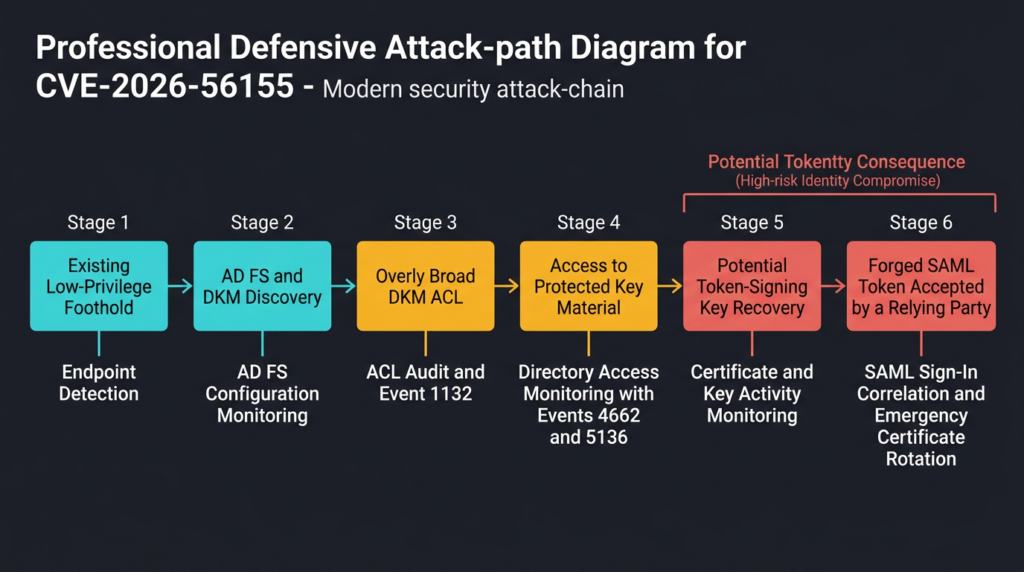
The following sequence is a defensible threat model, not a claim that Microsoft observed every step in every exploitation case.
Step one — Initial access or authenticated foothold
The attacker first needs the access implied by the public severity vector. That foothold might come from a separate vulnerability, stolen credentials, malicious remote access, compromised service credentials, or another post-exploitation path.
CVE-2026-56155 is not publicly described as the initial internet entry point. The CVSS vector specifies local attack access and low privileges. (NVD)
Step two — Federation discovery
An attacker with directory or host access can investigate whether AD FS is deployed, identify federation servers, enumerate services, inspect configuration, or retrieve the CertificateSharingContainer propriedade.
A legitimate administrator can retrieve the container distinguished name with:
Import-Module ADFS

Get-AdfsProperties |
    Select-Object FederationServiceIdentifier,
                  FederationServiceName,
                  CertificateSharingContainer
This is not an exploitation command. It is a normal administrative query. In an attack chain, however, the same configuration data helps the attacker locate the high-value DKM object.
Step three — DKM permission evaluation
The attacker determines whether the current identity can read the DKM container or related values. An overly permissive ACL may expose access that should have been limited to domain administrators, SYSTEM, and the AD FS service account.
Microsoft’s hardening guidance is explicit that a permissive ACL can allow an attacker with read access to DKM key material to decrypt token-signing private keys. (Microsoft Support)
Step four — Key-material recovery
Access to an encrypted object is not automatically equivalent to possession of a usable private key. The attacker must understand the AD FS storage format, acquire the required protected data, and perform the relevant cryptographic operations.
The exact CVE-2026-56155 exploitation procedure has not been publicly documented by Microsoft. Defenders should not claim that any directory read immediately produces a signing certificate.
The important risk is that Microsoft has identified the ACL as a security boundary protecting the material used to encrypt those private keys.
Step five — Signing-key abuse
If the attacker successfully obtains a token-signing private key, the attacker can attempt to create SAML assertions that carry a valid signature. The attacker may choose a privileged user identity, alter group or role claims, select a relying-party audience, and set token validity fields.
The token still needs to match the expectations of the target service. Incorrect issuer values, audiences, claim names, signing algorithms, or certificate identifiers may cause rejection. A capable attacker with access to AD FS configuration and traffic samples may be able to resolve those details.
Step six — Downstream access
A relying party that trusts the compromised certificate may accept the forged token. The attacker’s practical access then depends on:
- Which services trust the AD FS issuer.
- Whether the claimed user exists or is mapped dynamically.
- Which authorization decisions use token claims.
- Whether conditional controls run after federation.
- Whether token issuance and service sign-in events are correlated.
- Whether the forged token’s lifetime and audience appear normal.
- Whether the signing certificate has been replaced or revoked.
This attack path demonstrates why the CVSS scope field should not be read as a business-impact ceiling. CVSS models a specific vulnerability, while incident impact follows the organization’s federation graph.
What Microsoft has not disclosed
Security teams should be precise about the limits of current reporting.
Microsoft’s public support guidance explains the vulnerable permission state and the new hardening mechanism. NVD and CISA confirm active exploitation. Security vendors and media reports describe the vulnerability as exploited in the wild. They do not provide a complete technical report showing exactly how the observed attackers obtained initial access, which directory identity they used, what attributes they read, or whether a forged SAML token was ultimately created. (NVD)
This creates three separate evidentiary levels:
| Evidence level | Defensible conclusion |
|---|---|
| Unsafe DKM ACL | The environment had a vulnerable permission state |
| Suspicious or unexpected DKM read | A principal accessed key-related material and the activity requires investigation |
| Confirmed signing-key recovery or forged token | The federation trust must be treated as compromised |
Do not collapse these levels.
An unsafe ACL is not proof that an attacker stole the key. A DKM read is not automatically proof that the private key was successfully decrypted. Conversely, the absence of a known forged token does not prove that no key was taken.
Incident handling must preserve that uncertainty while still protecting the organization.
Affected systems and fixed builds
Microsoft’s support article lists the hardening guidance as applicable to Windows Server 2012 under Extended Security Updates, Windows Server 2012 R2 under Extended Security Updates, Windows Server 2016, Windows Server 2019, Windows Server 2022, Windows Server version 23H2, and Windows Server 2025. (Microsoft Support)
The NVD record provides affected-version thresholds based on Microsoft’s CNA data. The following table should be treated as an initial build baseline, followed by confirmation against the latest Microsoft Security Update Guide and Windows release-health information.
| Plataforma | Vulnerable build range shown in public records | July 2026 update baseline |
|---|---|---|
| Windows Server 2012 | Earlier than 6.2.9200.26226 | Install the applicable July 2026 ESU security update |
| Windows Server 2012 R2 | Earlier than 6.3.9600.23291 | Install the applicable July 2026 ESU security update |
| Windows Server 2016 | Earlier than 10.0.14393.9339 | KB5099535 or later cumulative security update |
| Windows Server 2019 | Earlier than 10.0.17763.9020 | KB5099538 or later cumulative security update |
| Windows Server 2022 | Earlier than 10.0.20348.5386 | KB5099540 or later cumulative security update |
| Windows Server version 23H2 | Listed by Microsoft as applicable | Use the July 14, 2026 or later security update for this release |
| Windows Server 2025 | Earlier than 10.0.26100.33158 | KB5099536 or later cumulative security update |
(NVD)
NVD’s Microsoft-supplied affected-product data also includes Windows 10 version 1607 and version 1809 build thresholds. That servicing metadata should not cause teams to treat ordinary Windows 10 endpoints as the center of the response. AD FS is deployed as a Windows Server role, and Microsoft’s dedicated hardening article focuses on supported Windows Server releases.
The practical inventory unit is the AD FS farm.
A complete inventory should include:
- Every active federation server.
- Nodes temporarily removed from a load balancer.
- Standby disaster-recovery federation servers.
- Server Core installations.
- Lab farms with production trust relationships.
- Decommissioned nodes whose computer or service accounts remain in ACLs.
- Proxy or Web Application Proxy systems, while recognizing that the DKM container issue primarily concerns the federation-service configuration.
- Any separate domain or forest that hosts a federation service trusted by the organization.
- Powered-off recovery systems that missed the July update.
- Newly restored servers built from images created before July 2026.
A single unpatched or incorrectly configured farm node may undermine an otherwise successful rollout. Patch compliance should be measured across the farm, not by checking one server that happens to answer a health probe.
The July audit phase and the October enforcement phase
Microsoft is introducing the DKM ACL hardening in phases to reduce the risk of silently breaking AD FS environments that depend on unexpected permissions.
After installation of the July 14, 2026 update or a later update, the AD FS service evaluates the DKM ACL approximately one minute after service startup and again every 24 hours.
During the initial audit phase, the service reports the condition but does not automatically change the ACL unless remediation has been explicitly enabled. (Microsoft Support)
This behavior produces several important event IDs in the AD FS/Admin log.
| Event ID | Level | Significado | Ação recomendada |
|---|---|---|---|
| 1132 | Warning | The DKM ACL does not match the expected secure configuration | Review the ACL, investigate unexpected principals, and prepare remediation |
| 1133 | Information | The DKM ACL is in the expected healthy state | Preserve the event as validation evidence |
| 1134 | Error | ACL detection could not complete | Check LDAP connectivity, service-account access, and AD FS debug information |
| 1135 | Information | ACL remediation succeeded | Save the previous SDDL contained in the event and verify a subsequent healthy state |
| 1136 | Error | ACL remediation failed | Troubleshoot permissions or perform controlled manual hardening |
The distinction between 1132 and 1134 is operationally important.
Event 1132 means the service successfully examined the ACL and found a permission state that requires attention.
Event 1134 means the service could not reliably determine the state. A detection error is not a clean result. It should be treated as an unknown exposure state until the underlying problem is fixed.
On Windows Server 2016 and later, Microsoft supports opt-in remediation through this registry value:
Path:  HKLM\SOFTWARE\Microsoft\ADFS
Name:  RemediateDkmAcl
Type:  REG_DWORD
Value: 1
An administrator can configure it with PowerShell:
$path = 'HKLM:\SOFTWARE\Microsoft\ADFS'

if (-not (Test-Path $path)) {
    New-Item -Path $path -Force | Out-Null
}

New-ItemProperty `
    -Path $path `
    -Name 'RemediateDkmAcl' `
    -PropertyType DWord `
    -Value 1 `
    -Force
After setting the value, the organization can wait for the next 24-hour cycle or restart the AD FS service during an approved maintenance window.
A restart is not always operationally necessary because the scheduled check will run again. Restarting may provide faster confirmation, but it should be coordinated across the farm to avoid unnecessary authentication disruption.
Beginning October 13, 2026, Microsoft states that Windows Server 2016 and later systems without an explicitly configured value will behave as though remediation is enabled. Setting the value to 0 opts out, while detection continues to run. Microsoft warns that opting out leaves the vulnerable ACL condition in place. (Microsoft Support)
The October change does not apply in the same way to Windows Server 2012 or Windows Server 2012 R2. Those systems require the AD FS service account to receive the rights needed to modify the DKM container’s owner and DACL before the remediation registry value can work.
The phased model resembles earlier Microsoft identity hardening programs, where audit telemetry is introduced before default enforcement. That approach protects compatibility, but it creates a period during which an updated system can still report an unsafe configuration.
Security teams must not translate “July update installed” into “DKM ACL remediated” without checking the events and the directory object.
Triage in the first hour
A rapid response should be structured enough that the identity, Windows, vulnerability-management, and incident-response teams reach the same conclusion from the same evidence.
Identify every AD FS farm
Begin with known configuration-management data, but validate it against Active Directory, DNS, load balancers, certificate inventories, monitoring systems, and application federation settings.
Ask application owners which identity provider their services trust. An undocumented AD FS deployment may be more visible from a relying-party configuration than from the central CMDB.
Enumerate all farm nodes
On each known AD FS system, collect:
Get-CimInstance Win32_OperatingSystem |
    Select-Object Caption, Version, BuildNumber, LastBootUpTime

Get-CimInstance Win32_Service -Filter "Name='adfssrv'" |
    Select-Object Name, State, StartMode, StartName
A server where adfssrv does not exist or where the AD FS role was never installed is not the primary CVE-2026-56155 target, even if the operating-system version appears in broad servicing metadata.
Confirm update and build state
Use the OS build number as the primary local comparison point:
$os = Get-CimInstance Win32_OperatingSystem

[pscustomobject]@{
    ComputerName = $env:COMPUTERNAME
    Caption      = $os.Caption
    Version      = $os.Version
    BuildNumber  = $os.BuildNumber
    LastBoot     = $os.LastBootUpTime
}
Recent hotfix data can provide supporting evidence:
Get-HotFix |
    Sort-Object InstalledOn -Descending |
    Select-Object -First 15 HotFixID, InstalledOn, Description
Get-HotFix should not be the only source of truth. Depending on update type and servicing behavior, it may not present every installed cumulative update in the way a vulnerability-management script expects. Correlate the build number with WSUS, Microsoft Configuration Manager, Intune, Update Compliance, or the organization’s endpoint-management platform.
Retrieve the DKM container
Import-Module ADFS

$adfsProperties = Get-AdfsProperties

$adfsProperties |
    Select-Object FederationServiceName,
                  FederationServiceIdentifier,
                  CertificateSharingContainer
O CertificateSharingContainer value is the distinguished name of the DKM container that requires ACL validation.
Check the remediation registry value
Get-ItemProperty `
    -Path 'HKLM:\SOFTWARE\Microsoft\ADFS' `
    -Name RemediateDkmAcl `
    -ErrorAction SilentlyContinue
Interpret the result in the context of the current enforcement phase:
| Registry state | July 2026 audit phase | October 2026 enforcement phase on Server 2016 and later |
|---|---|---|
| Value absent | Audit only | Automatic remediation by default |
Valor 1 | Remediation enabled | Remediation enabled |
Valor 0 | Remediation disabled | Explicit opt-out, vulnerable ACL may remain |
The registry state is not evidence that remediation succeeded. It is an instruction to the service. Event 1135, Event 1133, and a direct ACL review provide stronger proof of the result.
Review the AD FS hardening events
$start = (Get-Date).AddDays(-14)

Get-WinEvent -FilterHashtable @{
    LogName   = 'AD FS/Admin'
    Id        = 1132, 1133, 1134, 1135, 1136
    StartTime = $start
} |
    Select-Object TimeCreated, Id, LevelDisplayName, Message |
    Sort-Object TimeCreated
Collect the raw event records before restarting services, clearing logs, or making ACL changes.
Classify the server
| Observation | Classification | Ação imediata |
|---|---|---|
| Vulnerable build | Unpatched | Patch immediately and investigate historical exposure |
| Fixed build plus Event 1132 | Patched but not hardened | Review unexpected permissions and enable remediation |
| Fixed build plus Event 1134 | Unknown ACL state | Resolve detection failure before declaring compliance |
| Fixed build plus Event 1136 | Remediation failed | Troubleshoot permissions and perform controlled correction |
| Fixed build plus Event 1135 and later 1133 | Remediated | Preserve evidence and investigate any prior exposure |
| Fixed build plus 1133 only | Healthy current ACL | Confirm timing, collect direct ACL evidence, and review historical events |
| No AD FS events after update | Incomplete evidence | Check service state, log channel, update installation, and detection timing |
This classification keeps patch management from closing the ticket prematurely.
Safe validation with PowerShell
The safest production validation does not attempt to decrypt certificates or create tokens. It proves the current build, the current DKM ACL, the current remediation setting, and the event history.
Display the current ACL
On an authorized administrative system with the Active Directory module:
Import-Module ActiveDirectory
Import-Module ADFS

$dkmDn = (Get-AdfsProperties).CertificateSharingContainer
$acl   = Get-Acl -Path ("AD:\" + $dkmDn)

$acl |
    Select-Object Owner,
                  AreAccessRulesProtected,
                  AreAuditRulesProtected
AreAccessRulesProtected should be reviewed carefully. Microsoft’s expected hardened state disables permission inheritance for the DKM container.
Display the access entries:
$acl.Access |
    Select-Object IdentityReference,
                  AccessControlType,
                  ActiveDirectoryRights,
                  IsInherited,
                  InheritanceType |
    Sort-Object IdentityReference |
    Format-Table -AutoSize
The ACL may represent a principal through a name or SID. Resolve unidentified SIDs before deciding whether they are malicious. They may belong to a deleted account, an unavailable trusted domain, or a stale service identity.
A stale SID is not automatically an attacker indicator, but it is not an acceptable unexplained permission on federation key infrastructure.
Collect an ACL snapshot
$timestamp = Get-Date -Format 'yyyyMMdd-HHmmss'
$outputDir = 'C:\IR\CVE-2026-56155'

New-Item -Path $outputDir -ItemType Directory -Force | Out-Null

$dkmDn = (Get-AdfsProperties).CertificateSharingContainer
$acl   = Get-Acl -Path ("AD:\" + $dkmDn)

$acl |
    Format-List * |
    Out-File "$outputDir\dkm-acl-$timestamp.txt" -Encoding utf8

$acl.Sddl |
    Out-File "$outputDir\dkm-sddl-$timestamp.txt" -Encoding ascii
Restrict access to the output directory. An ACL snapshot does not contain the DKM secret itself, but it contains sensitive identity-infrastructure details that should not be placed in an open ticket or public chat channel.
Export the relevant AD FS events
$events = Get-WinEvent -FilterHashtable @{
    LogName   = 'AD FS/Admin'
    Id        = 1132, 1133, 1134, 1135, 1136
    StartTime = (Get-Date).AddDays(-30)
}

$events |
    Export-Clixml 'C:\IR\CVE-2026-56155\adfs-dkm-events.xml'

$events |
    Select-Object TimeCreated, Id, LevelDisplayName, Message |
    Export-Csv 'C:\IR\CVE-2026-56155\adfs-dkm-events.csv' -NoTypeInformation
Event 1135 is especially valuable because Microsoft includes the previous security descriptor in the event. Save it promptly. Event logs can roll over, and the old SDDL may be needed for change review or controlled recovery. Microsoft provides an example that reads the latest Event 1135 and writes its message to a protected file. (Microsoft Support)
Centralize the new event IDs
A Windows Event Forwarding subscription can collect the new events without relying on local retention:
<QueryList>
  <Query Id="0" Path="AD FS/Admin">
    <Select Path="AD FS/Admin">
      *[System[
        EventID=1132 or
        EventID=1133 or
        EventID=1134 or
        EventID=1135 or
        EventID=1136
      ]]
    </Select>
  </Query>
</QueryList>
Route those events to the SIEM and preserve the original event XML. Message-text parsing is fragile across localization and future wording changes. Event ID, channel, server, timestamp, and structured event data are better long-term fields.
Read-only PoC for DKM ACL exposure
The following proof of concept is deliberately defensive.
It does not read DKM secret values, decrypt certificate data, export a private key, generate a SAML assertion, modify an ACL, or contact a third-party target. It only evaluates the current access-control entries on an authorized AD FS deployment.
Run it only in an isolated lab or an enterprise environment where you have explicit permission to inspect the AD FS configuration.
<#
.SYNOPSIS
    Read-only CVE-2026-56155 DKM ACL review helper.

.DESCRIPTION
    Retrieves the AD FS CertificateSharingContainer, reads its ACL,
    identifies inherited Allow entries, and flags Allow principals
    outside the expected Microsoft principal set.

    This script does not read DKM key values, decrypt certificates,
    export private keys, generate tokens, or modify Active Directory.

.REQUIREMENTS
    - Run in an explicitly authorized environment
    - ADFS PowerShell module
    - ActiveDirectory PowerShell module
    - Permission to read the DKM container ACL
#>

Set-StrictMode -Version Latest
$ErrorActionPreference = 'Stop'

Import-Module ADFS
Import-Module ActiveDirectory

$adfs = Get-AdfsProperties
$dkmDn = $adfs.CertificateSharingContainer

if ([string]::IsNullOrWhiteSpace($dkmDn)) {
    throw 'The AD FS CertificateSharingContainer value is empty.'
}

$service = Get-CimInstance Win32_Service -Filter "Name='adfssrv'"

if (-not $service) {
    throw 'The AD FS service was not found on this system.'
}

$serviceAccount = $service.StartName

$dcParts = @(
    ($dkmDn -split ',') |
    Where-Object { $_ -match '^DC=' } |
    ForEach-Object { $_.Substring(3) }
)

if ($dcParts.Count -eq 0) {
    throw "Could not derive the DKM domain from: $dkmDn"
}

$dkmDomainName = $dcParts -join '.'
$dkmDomain = Get-ADDomain -Identity $dkmDomainName
$forest = Get-ADForest -Identity $dkmDomain.Forest
$forestRootDomain = Get-ADDomain -Identity $forest.RootDomain

$domainAdminsSid = "$($dkmDomain.DomainSID.Value)-512"
$enterpriseAdminsSid = "$($forestRootDomain.DomainSID.Value)-519"
$systemSid = 'S-1-5-18'

$serviceAccountSid = (
    New-Object System.Security.Principal.NTAccount($serviceAccount)
).Translate(
    [System.Security.Principal.SecurityIdentifier]
).Value

$expectedSids = @(
    $domainAdminsSid
    $enterpriseAdminsSid
    $systemSid
    $serviceAccountSid
)

$acl = Get-Acl -Path ("AD:\" + $dkmDn)

$rows = foreach ($ace in $acl.Access) {
    try {
        $sid = $ace.IdentityReference.Translate(
            [System.Security.Principal.SecurityIdentifier]
        ).Value
    }
    catch {
        $sid = $ace.IdentityReference.Value
    }

    [pscustomobject]@{
        Identity          = $ace.IdentityReference.Value
        SID               = $sid
        AccessType        = $ace.AccessControlType
        Rights            = $ace.ActiveDirectoryRights
        IsInherited       = $ace.IsInherited
        InheritanceType   = $ace.InheritanceType
        ExpectedPrincipal = $expectedSids -contains $sid
    }
}

$unexpectedAllows = @(
    $rows |
    Where-Object {
        $_.AccessType -eq 'Allow' -and
        -not $_.ExpectedPrincipal
    }
)

$inheritedAllows = @(
    $rows |
    Where-Object {
        $_.AccessType -eq 'Allow' -and
        $_.IsInherited
    }
)

$summary = [pscustomobject]@{
    ComputerName          = $env:COMPUTERNAME
    FederationService     = $adfs.FederationServiceName
    DkmContainer          = $dkmDn
    AdfsServiceAccount    = $serviceAccount
    InheritanceProtected  = $acl.AreAccessRulesProtected
    TotalAceCount         = $rows.Count
    UnexpectedAllowCount  = $unexpectedAllows.Count
    InheritedAllowCount   = $inheritedAllows.Count
    ReviewRequired        = (
        -not $acl.AreAccessRulesProtected -or
        $unexpectedAllows.Count -gt 0 -or
        $inheritedAllows.Count -gt 0
    )
}

Write-Host ''
Write-Host '=== DKM ACL Summary ==='
$summary | Format-List

Write-Host ''
Write-Host '=== All DKM ACEs ==='
$rows |
    Sort-Object ExpectedPrincipal, Identity, Rights |
    Format-Table -AutoSize

if ($unexpectedAllows.Count -gt 0) {
    Write-Warning 'Unexpected Allow principals require investigation.'
    $unexpectedAllows |
        Format-Table Identity, SID, Rights, IsInherited -AutoSize
}

if ($inheritedAllows.Count -gt 0) {
    Write-Warning 'Inherited Allow entries are present.'
    $inheritedAllows |
        Format-Table Identity, SID, Rights -AutoSize
}

Write-Host ''
Write-Host 'No directory objects were modified.'
Write-Host 'Compare the result with Microsoft Event IDs 1132 through 1136.'
What this PoC proves
The script can show:
- The DKM container currently configured for the AD FS farm.
- The account running the AD FS service.
- Whether ACL inheritance is protected.
- Which principals have Allow entries.
- Whether an Allow entry belongs to the expected high-level principal set.
- Whether inherited Allow entries remain.
- Whether the current ACL requires administrative review.
What this PoC does not prove
The script cannot prove:
- That an attacker did or did not read the DKM key in the past.
- That the listed AD FS service account has exactly the minimum rights in every ACE.
- That no private key was exported before remediation.
- That every farm node is patched.
- That a relying party is safe.
- That no forged SAML token was used.
- That Event 1132 will or will not appear.
- That Microsoft’s remediation routine has completed successfully.
- That a deleted or unresolved SID is malicious.
The script intentionally avoids key extraction. Publishing a procedure that reads DKM secrets, reconstructs private keys, and creates usable federation tokens would cross the line from defensive verification into an operational identity-compromise technique.
For CVE-2026-56155, the safer and more useful proof is the ACL state, the update state, the event sequence, and the investigation of historical access.
Detection engineering for CVE-2026-56155
The detection strategy should begin with Microsoft’s new AD FS events and expand into directory access, certificate activity, and downstream federation behavior.
Detect the vulnerable ACL state
Event 1132 is the clearest vendor-provided signal that the DKM ACL needs attention.
A useful rule should include:
- Event channel
AD FS/Admin. - Event ID 1132.
- Federation-server hostname.
- AD FS farm or business owner.
- First-seen and last-seen timestamps.
- Installed OS build.
- Current
RemediateDkmAclvalor. - Whether the same server later generated 1135 or 1133.
Do not close an Event 1132 alert merely because the server later rebooted. Close it when the corrected state is supported by remediation and health evidence.
Detect failures in the checking process
Event 1134 indicates that the ACL detection could not complete. Microsoft gives LDAP connectivity and service-account access as examples of conditions that may cause detection problems. (Microsoft Support)
An Event 1134 rule should not be classified as a low-priority operational error. It means the organization lacks a reliable security conclusion.
Investigate:
- Domain-controller connectivity.
- DNS resolution.
- AD FS service-account status.
- LDAP authentication and authorization.
- Replication problems.
- Firewall changes.
- Service restarts.
- AD FS debug logs.
- Whether the DKM distinguished name still resolves.
- Whether a migration changed domains or containers.
Detect remediation success and failure
Event 1135 provides evidence that Microsoft’s remediation completed. Preserve the previous SDDL from this event before normal log retention removes it.
Event 1136 means remediation failed and will be retried during a later cycle. Repeated 1136 events indicate a persistent problem. The server should not remain indefinitely in that state while the organization assumes the October enforcement phase will solve it. (Microsoft Support)
A good SIEM correlation is:
1132 without 1135 or 1133 within the approved remediation window
Another is:
1136 repeated on the same federation server
A third is:
1135 followed by a new 1132
The last condition may indicate that a later process, migration, restore, administrator, or policy reintroduced an unsafe permission.
Monitor DKM object changes
Windows Event ID 5136 records modifications to an Active Directory object when the appropriate SACL and Audit Directory Service Changes policy are configured. Microsoft notes that the object requires a suitable auditing entry for the event to be generated. (Microsoft Learn)
For the DKM container, monitor changes to:
- The security descriptor.
- Owner.
- DACL.
- Child objects.
- Key-related attributes.
- Object deletion, recreation, or movement.
- Unexpected changes shortly before or after an AD FS service restart.
Do not enable high-volume directory auditing across an entire forest without capacity planning. Microsoft notes that advanced directory-service audit categories can produce substantial event volume on domain controllers. Configure object-level SACLs deliberately and confirm the collector can retain the resulting telemetry. (Microsoft Learn)
Monitor DKM reads
Event ID 4662 records operations performed on an Active Directory object when the relevant Directory Service Access policy and SACL are configured. Microsoft explains that one event can be generated for each audited operation type. (Microsoft Learn)
A DKM read-detection rule should evaluate:
- Subject account.
- Subject SID.
- Logon ID.
- Object distinguished name or object GUID.
- Access mask and properties accessed.
- Domain controller that handled the request.
- Source host, where available from correlated authentication or network data.
- Whether the account is the normal AD FS service identity.
- Whether the access occurred during a documented backup, recovery, migration, or maintenance operation.
- Whether the same identity accessed certificate configuration or federation metadata.
Message-text filtering can fail on localized Windows systems. In production, parse structured event XML and map the DKM object by GUID as well as distinguished name.
Use Microsoft Defender for Identity
Microsoft Defender for Identity includes a detection for suspected AD FS DKM key reads. Microsoft describes the alert as relevant when an identity accesses the DKM material that protects AD FS token-signing or token-decryption certificates. (Microsoft Learn)
The alert should be enriched with:
- The DKM ACL at the time of the event.
- The identity’s normal role.
- Recent privilege changes.
- Logons to federation servers or domain controllers.
- PowerShell and command-line execution.
- Access to AD FS configuration databases.
- Certificate-store activity.
- Remote-management connections.
- Downstream federated sign-ins.
- Whether the account was newly created, recently enabled, or recently added to a privileged group.
Do not dismiss the alert solely because the account is an administrator. Compromised administrative accounts are exactly the identities attackers use to make sensitive access appear legitimate.
Hunting beyond the new event IDs
The new events tell defenders whether Microsoft considers the current ACL healthy. They do not answer whether a key was accessed before remediation.
A broader hunt should cover four layers.
Directory layer
Search for:
- Historical reads or modifications involving the DKM container.
- Explicit Allow ACEs added to the container.
- Inheritance enabled on the container.
- Changes to the owner.
- Deleted service accounts that remain represented by SID.
- Unexpected child-object creation.
- Permission changes made by identities outside the normal identity-administration team.
- DKM changes outside approved maintenance windows.
- Federation configuration changes near suspicious sign-ins.
Federation-server layer
Revisão:
- Interactive and remote logons to AD FS servers.
- PowerShell script-block and module logs.
- Unusual use of AD FS PowerShell cmdlets.
- Access to certificate stores.
- Certificate export attempts.
- New services, scheduled tasks, or startup entries.
- Unexpected binaries loaded into AD FS processes.
- Security-tool tampering.
- Event-log clearing.
- Remote administration from workstations or unmanaged hosts.
- Connections to domain controllers that differ from the server’s normal pattern.
- Archive creation or data staging involving AD FS configuration directories.
These behaviors are not CVE-specific. They help determine whether an unsafe ACL was part of a larger intrusion.
Identity-provider layer
Revisão:
- Changes to token-signing and token-decrypting certificates.
- Changes to relying-party trusts.
- Changes to claims rules.
- Changes to federation-service properties.
- Changes to alternate login identifiers.
- Unexpected certificate rollover.
- Federation metadata publication and retrieval.
- Authentication methods changed without an approved request.
- New or modified issuance-transform rules that create high-value claims.
Relying-party layer
A forged SAML token may carry a valid signature. Signature validation alone cannot distinguish it from a token produced by the legitimate service when the private key is compromised.
Correlate downstream sign-ins with AD FS telemetry:
- Did the service accept a SAML token for a user with no corresponding expected authentication sequence?
- Did the user access a service from an unusual device, network, geography, or user agent?
- Did a dormant or disabled identity appear in a federated application?
- Did a token contain group or role claims not consistent with directory state?
- Did the token lifetime differ from normal AD FS issuance patterns?
- Did a service receive tokens signed by a certificate that should have been retired?
- Did a high-privilege session begin during a period when AD FS logs were unavailable?
- Did multiple applications receive unusual assertions for the same identity?
- Did a noninteractive account suddenly access an interactive SaaS application?
Microsoft’s incident-response guidance notes that tokens signed with a compromised but valid certificate can be difficult to identify because the signatures themselves are legitimate. (Microsoft)
Detection therefore has to examine behavior and provenance, not only cryptographic validity.
Why patching may not be enough
Patching and ACL remediation prevent or reduce future abuse of the vulnerable permission condition. They do not invalidate material that an attacker may already have copied.
Consider three response levels.
Level one — Vulnerable configuration with no suspicious evidence
The organization finds Event 1132 or an unsafe ACL, but historical review does not identify unexpected access.
Actions should include:
- Install the security update across the farm.
- Correct the ACL.
- Preserve the previous ACL and event evidence.
- Review accounts that previously had access.
- Expand logging.
- Confirm Event 1135 and Event 1133.
- Retest relying-party authentication.
- Keep heightened monitoring for an appropriate period.
- Document the limitations of historical telemetry.
The absence of evidence may reflect incomplete logging rather than proof that no access occurred. State that limitation in the incident or vulnerability record.
Level two — Suspicious DKM access without confirmed key theft
The organization identifies a DKM read by an unexpected identity, or a suspicious account had the required access during a known intrusion.
Actions should include:
- Escalate to the identity incident-response team.
- Contain the identity and source systems.
- Preserve domain-controller, AD FS, EDR, and network telemetry.
- Determine exactly which DKM objects and attributes were accessed.
- Review access to the AD FS configuration database and certificate stores.
- Hunt for token-signing certificate export or private-key operations.
- Review federation and relying-party logs for forged-token behavior.
- Prepare for emergency certificate rotation.
- Consult Microsoft or the relevant incident-response provider when evidence is incomplete but business impact is high.
This is no longer a normal patch ticket.
Level three — Confirmed or strongly suspected signing-key compromise
If evidence indicates that a token-signing private key was recovered, copied, or used to generate unauthorized tokens, treat the federation trust as compromised.
Correcting the ACL does not revoke the stolen key. Removing the attacker’s account does not revoke it. Reimaging one federation server does not revoke it. A copied private key remains usable until relying parties stop trusting the associated certificate.
The response must therefore include certificate and trust rotation.
Certificate rotation and trust recovery
Emergency AD FS certificate rotation can disrupt authentication if it is performed without coordinating relying parties, federation metadata, and Microsoft Entra configuration. Microsoft’s current guidance warns that emergency rotation may cause an outage and recommends strong protection, including hardware security modules where appropriate. (Microsoft Learn)
The technical objective is not simply to generate a new certificate. It is to ensure that every relying party stops accepting the compromised certificate.
Inventory the trust graph
Before rotation, identify:
- Current token-signing certificate.
- Current token-decrypting certificate.
- Previous certificates still published or trusted.
- AutoCertificateRollover state.
- Microsoft Entra federation configuration.
- Every relying-party trust.
- Partner organizations consuming federation metadata.
- Applications with manually pinned certificate copies.
- Appliances that require an administrator to upload a new certificate.
- Services that cache federation metadata.
- Disaster-recovery AD FS systems.
- Custom claims or signing configurations.
- Token lifetimes and session policies.
A missing relying party can become either an outage or a security gap.
Understand why one rotation may be insufficient
Federation systems often support certificate rollover by trusting both a current and previous certificate for a period. That behavior protects availability during planned rotation.
During an emergency, it can preserve trust in the compromised certificate.
Microsoft’s emergency rotation guidance describes creating two new token-signing certificates in sequence and updating Microsoft Entra federation configuration so that the old certificate is displaced from both the current and previous positions. (Microsoft Learn)
The exact sequence depends on the environment. Do not apply a generic script without reviewing the current Microsoft guidance, federation topology, and application dependencies.
Update every trust consumer
After generating and activating new signing material:
- Publish updated federation metadata.
- Confirm Microsoft Entra has the intended current and previous certificates.
- Update relying parties that do not automatically consume metadata.
- Verify partner trusts.
- Remove the compromised certificate where safe.
- Confirm that tokens signed by the old certificate are rejected.
- Test high-value applications with controlled identities.
- Monitor authentication errors for overlooked dependencies.
- Record every application owner’s confirmation.
Revoke sessions and tokens
A certificate change does not necessarily terminate sessions that were created before rotation. Depending on the downstream platform, revoke refresh tokens, invalidate sessions, force reauthentication, or perform application-specific token revocation.
Microsoft’s compromise-recovery guidance includes revocation and federation configuration changes as part of containing a token-signing compromise. (Microsoft Learn)
Preserve forensic evidence
Before destructive recovery actions:
- Export AD FS configuration.
- Preserve relevant event logs.
- Record certificate thumbprints.
- Capture DKM and certificate ACLs.
- Preserve EDR timelines.
- Record federation configuration.
- Export relying-party trust details.
- Save suspicious tokens where legally and operationally appropriate.
- Preserve authentication logs from downstream services.
- Document exact rotation times.
Those timestamps are essential for identifying which tokens or sessions may have been created before, during, or after trust recovery.
Remediation on Windows Server 2016 and later
For supported modern server versions, the controlled remediation sequence is straightforward but should still be treated as an identity change.
Install the July 2026 or later security update
Confirm the server meets or exceeds the applicable fixed build.
Patch every node in the farm. Validate:
- AD FS service health.
- Authentication through the load balancer.
- Certificate access.
- Domain connectivity.
- Application sign-in.
- Farm synchronization.
- Event-log availability.
Capture the current ACL
Export the ACL and SDDL before modification. Record why each nonstandard ACE exists and whether its owner confirms that it is still required.
Review Event 1132
Event 1132 is an explicit signal that Microsoft’s expected ACL is not present. Use the event and direct ACL review to understand the difference.
Enable remediation
Set:
New-ItemProperty `
    -Path 'HKLM:\SOFTWARE\Microsoft\ADFS' `
    -Name RemediateDkmAcl `
    -PropertyType DWord `
    -Value 1 `
    -Force
Microsoft states that the setting can be applied on any one federation server in the farm. The service can perform remediation at the next scheduled cycle, or administrators can restart the service in a controlled window. (Microsoft Support)
Confirm Event 1135
Save the previous SDDL contained in the event.
$event = Get-WinEvent -FilterHashtable @{
    LogName = 'AD FS/Admin'
    Id      = 1135
} -MaxEvents 1

if ($event) {
    New-Item -Path 'C:\ADFSBackup' -ItemType Directory -Force | Out-Null

    $event.Message |
        Out-File `
            'C:\ADFSBackup\dkm-acl-previous-sddl.txt' `
            -Encoding utf8
}
Protect this backup. A previous ACL may contain sensitive account and permission information.
Confirm Event 1133
Event 1133 demonstrates that the service later evaluated the ACL as healthy.
Test relying parties
The ACL correction should not normally require relying-party certificate changes, but authentication tests are still necessary. A previously permitted account or custom process may lose access, revealing an undocumented operational dependency.
Remediation on Windows Server 2012 and 2012 R2
Windows Server 2012 and Windows Server 2012 R2 require extra care. Microsoft states that the AD FS service account must first receive permissions that allow it to change the DKM container’s owner and DACL. Only then can the RemediateDkmAcl=1 process correct the ACL. (Microsoft Support)
Microsoft provides a PowerShell sequence that:
- Retrieves the DKM container distinguished name.
- Retrieves the AD FS service account.
- Resolves the account SID.
- Creates an Active Directory access rule granting
WriteOwnereWriteDacl. - Applies the rule to the DKM container.
- Enables the remediation registry value.
- Waits for the next cycle or restarts the service.
- Confirms Event 1135.
Administrators should use the current official Microsoft procedure rather than rewriting the ACL manually from memory. Directory security descriptors are easy to damage, and an incorrect change can interrupt federation or create a different exposure.
These legacy systems also create a lifecycle problem. Windows Server 2012 and 2012 R2 require applicable Extended Security Updates to receive fixes. An AD FS farm that still depends on those releases should have a migration plan, not only a CVE-specific exception.
The manual nature of the enforcement also means October 2026 will not automatically rescue an overlooked legacy farm.
Change-management risks and common failure modes
CVE-2026-56155 remediation removes explicit Allow entries outside Microsoft’s expected set. That is the correct security target, but the removed entries may reveal hidden operational dependencies.
Legacy backup access
A backup platform may have been granted access to AD FS configuration or key-related objects during deployment.
Questions to ask:
- Does the backup process need direct DKM access?
- Is it using a dedicated, documented identity?
- Can it use a supported AD FS backup mechanism instead?
- Was the permission intended to be temporary?
- Does the vendor currently require it?
- Is the account still active?
- Can recovery be tested after removal?
Do not retain a broad key-container permission merely because the backup team cannot immediately explain it.
Retired service accounts
Old AD FS nodes, migration services, and renamed accounts may remain in the ACL.
Resolve every SID. For deleted accounts:
- Determine when the account was removed.
- Determine whether the SID came from a trusted or decommissioned domain.
- Search historical directory events.
- Confirm that no restored server still uses the identity.
- Remove the ACE through the supported remediation process.
Monitoring and inventory tools
An inventory tool may have read access to broad Active Directory containers. That design is convenient but inappropriate for high-value cryptographic material.
Monitoring should consume logs and health interfaces rather than direct key-container access unless the access is explicitly required and supported.
Manual certificate scripts
Custom automation may interact with certificate stores, AD FS properties, or DKM-backed recovery data.
Before ACL remediation:
- Identify scheduled tasks and automation accounts.
- Review script repositories.
- Search PowerShell logs for AD FS cmdlets.
- Determine whether the automation uses documented interfaces.
- Test it in a staging farm with the hardened ACL.
- Replace unsupported direct directory access.
Setting the registry value without reviewing events
RemediateDkmAcl=1 is not the final evidence. The service may fail to remediate, produce Event 1136, or encounter a directory connectivity problem.
Always confirm the event outcome and the final ACL.
Permanent opt-out
Setting RemediateDkmAcl=0 may preserve compatibility temporarily, but it explicitly retains the unsafe permission condition. Microsoft states that the server remains vulnerable when administrators opt out. (Microsoft Support)
Any opt-out should have:
- A documented technical reason.
- Named risk owner.
- Compensating controls.
- Monitoring requirements.
- Expiration date.
- Migration or remediation plan.
- Executive visibility appropriate to an actively exploited identity vulnerability.
An indefinite opt-out is not a mitigation.
Common mistakes that weaken the response
Mistake one — Treating patch installation as complete remediation
The July update initially operates in audit mode. A patched system can still generate Event 1132 because the ACL remains permissive.
Correct approach:
- Verify the build.
- Check Event 1132 through 1136.
- Check the remediation value.
- Read the ACL.
- Preserve Event 1135 and Event 1133.
Mistake two — Treating a missing Event 1132 as proof of safety
The event may be absent because:
- The update is not installed.
- The service has not restarted or reached its scheduled check.
- The event log rolled over.
- The AD FS service is stopped.
- Detection failed.
- Logs are not collected.
- The administrator checked the wrong server.
- The farm node was offline.
- The ACL was changed after an earlier event.
- The server uses a different log-retention configuration.
Correct approach:
- Confirm the update.
- Confirm service state.
- Confirm event channel.
- Perform a direct ACL read.
- Wait for or trigger a supported detection cycle.
- Check all nodes.
Mistake three — Deprioritizing the issue because the CVSS score is 7.8
The score reflects local access and low privileges. It does not model the full business value of an AD FS token-signing key or every downstream application that trusts it.
Correct approach:
- Combine CVSS with exploitation status, CISA KEV inclusion, identity-system criticality, and trust relationships.
Mistake four — Assuming a local vulnerability cannot affect cloud resources
Federation connects on-premises identity to external services. A signing key compromised through an on-premises permission flaw may affect services that trust tokens issued by that federation system.
Correct approach:
- Inventory relying parties and cloud federation configuration.
- Hunt across both on-premises and cloud logs.
Mistake five — Running public exploit code against production
AD FS is a critical authentication service. Untrusted scripts that access DKM material, manipulate certificates, or generate tokens can create legal, operational, and security risk.
Correct approach:
- Use authenticated patch and ACL validation.
- Reproduce dangerous mechanics only in an isolated lab.
- Do not extract real production keys as a “test.”
Mistake six — Rotating the certificate only once after compromise
A previous certificate may remain trusted during rollover. A single rotation can leave the compromised key in a valid trust slot.
Correct approach:
- Follow current Microsoft emergency rotation guidance.
- Verify both current and previous certificate positions.
- Update every relying party.
- Test rejection of the old certificate.
Mistake seven — Closing the incident after ACL remediation
A corrected ACL protects future access. It does not invalidate copied material or explain suspicious historical reads.
Correct approach:
- Separate vulnerability remediation from compromise assessment.
- Rotate trust material when the evidence supports it.
- Retain heightened monitoring.
The SolarWinds lesson without a false attribution
The SolarWinds compromise provides a real-world example of why federation signing keys matter. CISA and Microsoft documented attacker activity involving AD FS signing capability and forged SAML tokens during the broader campaign. Attackers who gained sufficient control of identity infrastructure could create tokens that trusted cloud services interpreted as legitimate. (CISA)
There is no public evidence that CVE-2026-56155 played any role in the SolarWinds incident. The events occurred years before this CVE was disclosed.
The connection is architectural, not historical.
Both scenarios demonstrate that:
- A federation signing key is equivalent to identity-assertion authority.
- A correctly signed token can bypass controls that look only for invalid signatures.
- On-premises identity compromise can affect cloud services.
- Certificate rotation must account for previous keys and relying-party trust.
- Identity-provider and service-provider telemetry must be correlated.
- Restoring the federation server without replacing compromised trust material is insufficient.
CVE-2026-56155 gives defenders a current, concrete reason to re-evaluate whether the DKM container receives the same protection as other tier-zero identity assets.
Related identity vulnerabilities worth comparing
CVE-2026-56155 belongs to a broader class of vulnerabilities where a seemingly narrow weakness reaches the identity control plane.
| CVE | Core mechanism | Attacker prerequisite | Identity consequence | Main defensive action |
|---|---|---|---|---|
| CVE-2026-56155 | Overly broad AD FS DKM ACL | Local or authenticated low-privilege foothold under the public CVSS model | Potential access to material protecting federation signing keys | Patch, harden DKM ACL, hunt key access, rotate trust if compromised |
| CVE-2020-1472 | Netlogon secure-channel flaw | Network reachability to a domain controller | Domain administrator access | Patch domain controllers and enforce secure Netlogon behavior |
| CVE-2021-42278 | Computer account name spoofing | Ability to create or modify a machine account | Enables an identity-confusion chain | Apply Microsoft updates and monitor machine-account changes |
| CVE-2021-42287 | Kerberos KDC account-name confusion | Authenticated domain foothold and chain prerequisites | Can elevate a normal domain identity toward domain administrator | Patch domain controllers and detect suspicious Kerberos behavior |
| CVE-2022-26923 | Improper certificate identity validation | Low-privilege domain access and certificate-services conditions | May obtain a certificate that authenticates as a more privileged identity | Patch, harden AD CS templates and mappings, monitor certificate issuance |
| CVE-2026-41089 | Netlogon stack-based buffer overflow | Network reachability under the public vulnerability model | Code execution near the domain trust fabric | Patch domain controllers, restrict reachability, and hunt post-exploitation |
CVE-2020-1472 Zerologon
CVE-2020-1472 allowed an unauthenticated attacker with network access to a domain controller to abuse the Netlogon secure-channel process and obtain domain administrator access. Microsoft used a phased deployment model that introduced updates and later moved toward enforcement, making it a useful operational comparison with CVE-2026-56155. (NVD)
The technical mechanisms are different:
- Zerologon affected Netlogon cryptographic authentication.
- CVE-2026-56155 affects access control around AD FS DKM material.
- Zerologon was network reachable and did not require prior credentials in the key attack scenario.
- CVE-2026-56155 has a local, low-privilege CVSS vector.
- Both can lead toward control of enterprise identity infrastructure.
The shared lesson is that audit mode must have an owner, a deadline, and measurable progress toward enforcement.
CVE-2021-42278 and CVE-2021-42287
CVE-2021-42278 involved insufficient enforcement of computer-account naming rules, while CVE-2021-42287 involved KDC behavior when resolving account identities. Microsoft documented that the two vulnerabilities could be chained in an unpatched environment, allowing a regular domain user to move toward domain administrator privileges. Microsoft released fixes in November 2021. (TECHCOMMUNITY.MICROSOFT.COM)
These vulnerabilities are relevant because they show that a low-privilege domain identity can become a meaningful starting point. CVE-2026-56155 also assumes prior access rather than an anonymous internet attacker. Organizations that treat all authenticated domain users as harmless will underestimate both classes of risk.
Mitigation requires:
- Patching domain controllers.
- Restricting who can create machine accounts.
- Monitoring computer-account creation and renaming.
- Detecting unusual Kerberos requests.
- Protecting tier-zero systems from ordinary user sessions.
CVE-2022-26923
CVE-2022-26923 affected Active Directory Domain Services and certificate-based authentication. NVD maps it to improper certificate validation and records a Microsoft CVSS score of 8.8. CISA added it to the KEV catalog after observed exploitation. (NVD)
The comparison is useful because both vulnerabilities cross from directory permissions or identity attributes into cryptographic authentication.
CVE-2022-26923 can involve obtaining a certificate that maps to a more privileged identity. CVE-2026-56155 concerns access to material protecting AD FS signing keys. One abuses certificate identity mapping; the other weakens the protection around federation signing authority.
Defensive actions differ, but both require teams to understand that certificates are credentials, not ordinary configuration files.
CVE-2026-41089
CVE-2026-41089 is a separate 2026 Windows Netlogon remote code execution vulnerability. Its mechanism, attack vector, and remediation are different from CVE-2026-56155. The useful comparison is the target context: both sit close to Windows enterprise identity and can produce consequences far beyond one vulnerable process.
A detailed Penligent analysis of CVE-2026-41089 examines the domain-controller blast radius and evidence-first validation approach. It should be treated as supplemental reading for another identity-infrastructure vulnerability, not as the source of truth for CVE-2026-56155. (Penligente)
Building repeatable evidence for remediation
A vulnerability record that says “patched” is not enough for CVE-2026-56155.
A defensible remediation package should include:
| Evidências | What it proves |
|---|---|
| AD FS farm inventory | The response covered every known node |
| OS version and build | The node meets the fixed servicing baseline |
| Update-management record | The organization can trace when and how the update was deployed |
| Pre-remediation ACL | The original permission condition is preserved for investigation |
| Event 1132 | Microsoft detected a noncompliant ACL |
| Registry state | The intended remediation behavior was configured |
| Event 1135 | Microsoft’s remediation routine succeeded |
| Previous SDDL from Event 1135 | The earlier ACL can be reviewed or restored under controlled conditions |
| Event 1133 | The service later evaluated the ACL as healthy |
| Post-remediation ACL | The final directory permission state is independently visible |
| Relying-party test results | Federation remained functional after remediation |
| Historical access review | The team assessed potential earlier key exposure |
| Certificate-rotation record | Compromised trust material was replaced where required |
| Exception record | Any unresolved system has an owner, control, and deadline |
This evidence should be stored in a location accessible to the identity, security, and audit teams but protected from general access.
At scale, the main challenge is not executing one PowerShell command. It is maintaining a chain from asset discovery through validation, remediation, retesting, and reporting. In authorized environments, an evidence-oriented workflow can help coordinate those steps, provided it uses authenticated, non-destructive checks rather than attempting to exploit production federation servers. Penligente is designed around authorized security validation, tool execution, evidence capture, and reporting, which can support that type of repeatable process. For this CVE, the technically appropriate checks remain Windows build verification, AD FS event collection, directory ACL inspection, and controlled trust validation rather than a black-box attack against the federation endpoint. (Penligente)
The workflow should also preserve human approval at the points where actions can affect authentication:
- Restarting AD FS.
- Changing the registry remediation mode.
- Modifying the DKM ACL.
- Removing an unexplained service account.
- Rotating token-signing certificates.
- Updating Microsoft Entra federation configuration.
- Revoking sessions.
- Changing relying-party trust.
Automation can collect and compare evidence. Identity owners must approve changes to the trust fabric.
Frequently asked questions
What is CVE-2026-56155?
- CVE-2026-56155 is a high-severity elevation-of-privilege vulnerability in Active Directory Federation Services.
- The issue concerns insufficiently granular permissions on the AD FS Distributed Key Manager container.
- The DKM container stores symmetric key material used to protect AD FS token-signing and token-decryption certificate private keys.
- An attacker who obtains unauthorized read access to the relevant material may be able to move toward recovery of a token-signing private key.
- NVD gives the vulnerability a CVSS 3.1 score of 7.8 and maps it to CWE-1220.
- CISA added it to the Known Exploited Vulnerabilities Catalog on July 14, 2026. (NVD)
Is CVE-2026-56155 remotely exploitable?
- The public CVSS vector uses
AV:L, meaning the vulnerability is scored as requiring local access. - It is not publicly described as an unauthenticated internet-facing remote code execution vulnerability.
- The attacker also requires low privileges under the published vector.
- The exact initial-access method used in observed exploitation has not been publicly detailed.
- The eventual impact can extend to remote applications because AD FS signs tokens consumed by relying parties.
- Treat it as a post-compromise identity-escalation path rather than a direct perimeter exploit.
Does installing the July 2026 update automatically fix the DKM ACL?
- Not necessarily during the initial rollout phase.
- The July 14, 2026 update enables ACL detection and opt-in remediation.
- An unsafe ACL can still generate Event 1132 after the update is installed.
- On Windows Server 2016 and later, administrators can set
RemediateDkmAcl=1to enable correction. - Microsoft plans default automatic remediation beginning October 13, 2026 when the value is absent.
- Windows Server 2012 and 2012 R2 require additional manual preparation and do not receive the same automatic enforcement behavior.
- Confirm Event 1135, Event 1133, and the final ACL rather than relying only on patch status. (Microsoft Support)
How can I tell whether an AD FS server is still exposed?
- Confirm that the server runs the July 14, 2026 or later security update and meets the fixed build baseline.
- Query the
AD FS/Adminlog for Events 1132 through 1136. - Retrieve the
CertificateSharingContainervalue withGet-AdfsProperties. - Read the container ACL through the Active Directory PowerShell provider.
- Confirm that inheritance is disabled.
- Investigate Allow entries outside Domain Admins, Enterprise Admins, SYSTEM, and the AD FS service account.
- Verify that Event 1135 and a later Event 1133 occurred after remediation.
- Check every federation-server node, including standby and recovery systems.
What should I do if Event 1132 appears?
- Treat it as confirmation that the current DKM ACL does not match Microsoft’s expected secure state.
- Preserve the event and export the current ACL before changing it.
- Resolve every unexpected account and SID.
- Determine whether any unexpected principal accessed the DKM container.
- Install the required security update on every farm node.
- Enable the supported remediation behavior after compatibility review.
- Confirm Event 1135 and Event 1133.
- Escalate to incident response when suspicious historical access or a broader intrusion is present.
Do I need to rotate AD FS token-signing certificates?
- An unsafe ACL alone does not prove the signing key was stolen.
- Routine ACL remediation may be sufficient when investigation finds no suspicious access and historical telemetry is reliable.
- Rotation should be strongly considered when an unexpected identity read DKM material during a compromise.
- Emergency rotation is required when the signing private key is confirmed or strongly suspected to be compromised.
- Follow Microsoft’s current emergency procedure because a single rotation may leave the old certificate trusted as a previous key.
- Update Microsoft Entra, relying parties, partners, and manually pinned certificate configurations.
- Revoke sessions and refresh tokens where appropriate.
- Confirm that services reject tokens signed by the retired certificate. (Microsoft Learn)
Can a vulnerability scanner safely verify CVE-2026-56155?
- An authenticated scanner can help verify Windows build and update state.
- A version-only result cannot prove that the DKM ACL was remediated.
- The most useful validation requires authenticated access to AD FS events and the Active Directory ACL.
- Ask the scanner vendor whether its check inspects the ACL or only the operating-system version.
- Do not run an untrusted key-extraction or token-forging module against production.
- Use a read-only ACL audit, Event 1132 through 1136, and controlled federation testing.
- Keep the identity team involved because remediation can affect a critical authentication service.
Final assessment
CVE-2026-56155 is dangerous because it weakens a permission boundary around AD FS federation key material. The public attack vector requires an existing foothold, but the asset behind that boundary can authorize identities across many applications.
The immediate technical priorities are clear:
- Identify every AD FS farm and node.
- Install the July 14, 2026 or later security update.
- Review Events 1132 through 1136.
- Inspect the DKM ACL directly.
- Enable and verify Microsoft’s supported remediation.
- Investigate historical access by unexpected principals.
- Rotate federation trust material when compromise is confirmed or strongly suspected.
- Preserve evidence that proves both the patch state and the permission state.
The most serious mistake is to stop at the patch dashboard. CVE-2026-56155 is an access-control vulnerability in identity infrastructure, so remediation must end with evidence that the DKM container is protected, the signing keys remain trustworthy, and every dependent service recognizes the intended federation authority.
 Portuguese
  English
  German
  French
  Spanish
  Japanese
  Korean
  Hindi
Hindi  Arabic
  Turkish
  Hebrew