
CVE-2026-14266 is a heap-based buffer overflow in 7-Zip’s handling of XZ-compressed data. A specially crafted input can corrupt heap memory while 7-Zip processes XZ chunked data, creating a path to arbitrary code execution in the context of the vulnerable process. Exploitation requires the victim to open a malicious file or otherwise cause a local 7-Zip process to handle attacker-controlled content.
The Zero Day Initiative assigned the issue a CVSS score of 7.0 with the vector AV:L/AC:H/PR:N/UI:R/S:U/C:H/I:H/A:H. ZDI states that the vulnerability was reported to the vendor on June 5, 2026, fixed in 7-Zip 26.02, and publicly disclosed on July 15, 2026. The advisory credits Landon Peng of Lunbun LLC. (Zero Day Initiative)
The immediate defensive action is straightforward: update 7-Zip to version 26.02 or later, then verify that old executables and libraries are not still present in portable directories, application bundles, automation workers, or user-controlled folders. The technical interpretation requires more care. Public information confirms an XZ decompression heap overflow and potential code execution, but it does not yet identify the exact malformed field, arithmetic error, write length, heap object, or reliable exploit primitive involved in CVE-2026-14266.
That distinction matters. Security teams should treat the issue as a serious archive-processing vulnerability without turning an incomplete disclosure into a fictional exploit analysis. A heap overflow can be exploitable, but a crash is not automatically a stable remote shell. Conversely, waiting for a complete weaponized proof of concept before patching gives attackers unnecessary time to study the same release diff that defenders can already see.
What Is Confirmed About CVE-2026-14266
The following table separates established facts from details that remain undisclosed.
| Pergunta | Confirmed information | Defensive interpretation |
|---|---|---|
| What component is affected | 7-Zip’s processing of XZ chunked data | Any workflow that passes untrusted XZ content to a vulnerable 7-Zip component should be reviewed |
| What vulnerability class is involved | Heap-based buffer overflow | Outcomes can range from a process crash to controlled memory corruption and potential code execution |
| What triggers the issue | Crafted XZ-compressed data | The file may arrive by email, browser download, chat, upload, build dependency, or another content channel |
| Is user interaction required | Yes, according to ZDI | A person or user-initiated process must cause the malicious content to be handled in the product scenario described by the advisory |
| What privileges does the attacker need beforehand | Nenhum | The attacker does not need an existing account on the victim machine |
| What is the potential impact | Code execution in the context of the current process | The blast radius depends heavily on whether 7-Zip runs as a standard user, administrator, service account, or privileged automation worker |
| What version contains the fix | 7-Zip 26.02 | 26.02 is the minimum clearly documented upstream remediation threshold |
| What is the earliest affected version | Not publicly specified | Do not claim that only 26.01 is affected, and do not claim that every historical build contains the same vulnerable path |
| Is a complete exploit publicly documented | Not by the primary advisory | Avoid reproducing unverified payloads or technical claims taken from unrelated 7-Zip bugs |
| Is active exploitation confirmed | No authoritative source cited here reports it | Absence of confirmed exploitation is not evidence that unpatched systems are safe |
ZDI’s advisory is concise but unambiguous on the central issue: crafted XZ-compressed data can overflow a heap buffer, and successful exploitation can execute code in the current process. It also states that the target must visit a malicious page or open a malicious file. (Zero Day Initiative)
At publication time, the official 7-Zip history describes 26.02 only as fixing unspecified bugs and vulnerabilities. It does not name CVE-2026-14266. The link between this CVE and version 26.02 comes from the coordinated ZDI advisory, not from a detailed upstream security bulletin. (Zero Day Initiative)
This leaves defenders with enough information to remediate, but not enough information to make precise claims about the vulnerable statement or exploit reliability.
The Disclosure and Patch Timeline
The known timeline is short:
| Date | Event |
|---|---|
| June 5, 2026 | The vulnerability was reported to 7-Zip |
| June 25, 2026 | The upstream 7-Zip history dates version 26.02 |
| June 26, 2026 | GitHub release assets for 26.02 were published |
| July 15, 2026 | ZDI published the coordinated advisory |
| July 20, 2026 | Security teams assessing the issue should use 26.02 as the confirmed upstream fix threshold |
The upstream project’s release history lists 7-Zip 26.02 on June 25, 2026, with the note that some bugs and vulnerabilities were fixed. The official GitHub release page records the release assets on June 26 and associates them with commit f9d78af. ZDI disclosed CVE-2026-14266 on July 15 and explicitly identified 26.02 as the fixed version. (Zero Day Initiative)
The fact that the patch predates the public advisory is not unusual. Coordinated disclosure often gives a vendor time to publish a corrected release before the vulnerability’s identifier and impact become widely known. That sequence reduces the period during which public technical information exists without an available fix.
It also creates a practical problem for vulnerability management teams. A release note that says only “some bugs and vulnerabilities were fixed” may not trigger an emergency deployment if the organization does not yet know which vulnerabilities are involved. Once the advisory is published, teams must go back and determine whether the apparently routine update was actually deployed everywhere.
Waiting for every downstream database, scanner plugin, package repository, and endpoint-management catalog to fully enrich CVE-2026-14266 can create additional delay. The upstream fix and the primary coordinated advisory already provide enough evidence to begin remediation.
Why XZ Decompression Is a Sensitive Parsing Boundary
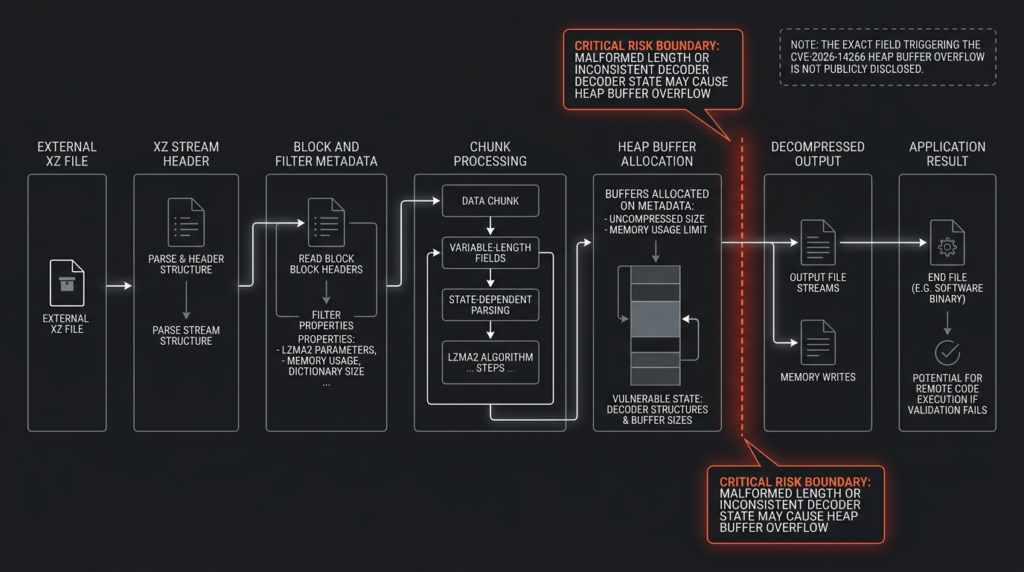
Um .xz file is not simply a bag of bytes compressed with one monolithic operation. XZ is a container format designed to hold one or more streams. Each stream can contain blocks, and each block carries filter information, compressed data, padding, and integrity-check material. An index near the end of the stream describes block sizes, while the stream footer helps locate and validate that index.
XZ commonly uses LZMA2 as its final compression filter. LZMA2 builds on LZMA while adding features such as state resets, uncompressed chunks, flushing behavior, and better support for streamed or multithreaded decoding. The official XZ specification describes LZMA2 as a chunk-aware format and encodes its dictionary-size properties in a compact field. (tukaani.org)
A simplified mental model looks like this:
XZ Stream
├── Stream Header
├── Block
│   ├── Block Header
│   ├── Filter Chain
│   ├── Compressed Data
│   ├── Block Padding
│   └── Integrity Check
├── Additional Blocks
├── Index
└── Stream Footer
The decoder must maintain several kinds of state while walking this structure:
- Input offsets and remaining compressed bytes
- Expected and actual output lengths
- Dictionary allocation and reset state
- Filter-chain configuration
- Block boundaries
- Chunk control bytes
- Integrity-check state
- Stream and index size calculations
- Error conditions from malformed or truncated input
Every value derived from the file is untrusted. A safe decoder must ensure that a value is valid not only in isolation but also in combination with all previous state. A length may be numerically valid yet exceed the remaining input. Two valid lengths may overflow when added. A chunk may request a state transition that is illegal at that point in the stream. An output count may exceed the allocated dictionary or destination buffer. A reset may invalidate assumptions retained from a previous chunk.
The public description of CVE-2026-14266 says the flaw exists in the processing of “XZ chunked data.” That wording is important, but it is not precise enough to identify whether the failing logic is in XZ container handling, LZMA2 chunk decoding, an interface between those layers, or another chunk-oriented path inside 7-Zip. ZDI has not published the triggering file, the vulnerable source statement, or a detailed root-cause analysis. (Zero Day Initiative)
The 26.02 release commit includes modifications to C/XzDec.c, which is consistent with an XZ decoder fix. The same commit changes 63 files and contains hundreds of additions and deletions, however. The presence of XzDec.c in a large release commit does not, by itself, establish which changed line fixes CVE-2026-14266 or why that line was vulnerable. (GitHub)
A responsible technical assessment should therefore stop at the strongest supported conclusion:
CVE-2026-14266 is a heap buffer overflow reachable through crafted XZ chunked data, and the fix is included in 7-Zip 26.02. The exact boundary failure has not been publicly documented by the primary sources.
That is still enough to guide patching, exposure analysis, and defensive monitoring.
From Heap Overflow to Potential Code Execution
A heap buffer overflow occurs when software writes beyond the memory region allocated for an object stored on the heap. A generic vulnerable pattern looks like this:
size_t capacity = calculate_capacity(header);
unsigned char *buffer = malloc(capacity);

size_t bytes_to_write = calculate_output_length(chunk);
decode_chunk(chunk, buffer, bytes_to_write);
This code is safe only if several conditions hold:
capacity is calculated without arithmetic overflow
bytes_to_write accurately represents the maximum possible write
bytes_to_write is no greater than capacity
the decoder respects the supplied destination capacity
all state transitions remain consistent across chunks
error handling stops processing before any invalid write
If a malicious file causes capacity to be smaller than the actual amount written, the decoder may overwrite adjacent heap memory.
The first observable result is often a crash. The process may access an unmapped address, corrupt allocator bookkeeping, fail a runtime integrity check, or attempt to execute an invalid pointer. A crash is security-relevant because it proves that attacker-controlled input reached an unsafe memory state, but it does not by itself prove reliable code execution.
A successful exploit generally needs more control. Depending on the program and platform, an attacker may try to corrupt:
- A function pointer
- A C++ virtual-table pointer
- A callback structure
- An object length used by a later copy
- A pointer later dereferenced by trusted code
- Heap metadata
- An exception-handling structure
- Data that influences a subsequent indirect branch
Modern systems add obstacles. Address space layout randomization makes useful addresses less predictable. Data execution prevention prevents the processor from directly running bytes stored in ordinary writable memory. Control-flow protections may restrict indirect calls. Heap randomization, guard pages, compiler-generated checks, and allocator hardening can turn some corruption patterns into immediate termination.
Those protections reduce reliability; they do not make memory corruption harmless. An attacker may combine an overflow with an information disclosure, use data already present in executable memory, shape the heap through file-controlled allocations, or target a process with weaker mitigations.
ZDI’s AC:H rating is consistent with that distinction. Under CVSS v3.1, high attack complexity means exploitation depends on conditions outside a simple, repeatable trigger. It does not mean exploitation is impossible. The high confidentiality, integrity, and availability impacts in the vector reflect the potential consequence if exploitation succeeds. (Zero Day Initiative)
For CVE-2026-14266, defenders should use the following language:
- Accurate: Crafted XZ content can trigger heap memory corruption and may allow code execution.
- Accurate: A vulnerable 7-Zip process may instead crash, depending on the file, build, platform, and memory state.
- Not established: Every malicious XZ file produces reliable code execution.
- Not established: The vulnerability has a universal one-click exploit for every supported operating system and architecture.
- Not established: A particular integer, dictionary field, or output-length calculation is the confirmed root cause.
This precision helps incident responders. If a suspicious archive causes a crash, the event should not be dismissed because no payload executed. If no crash occurs, the file should not be declared safe, because exploit behavior can depend on environment-specific conditions.
Why Remote Code Execution Can Have a Local Attack Vector
The phrase “remote code execution” often causes confusion when the CVSS vector says AV:L.
The apparent contradiction disappears once delivery and triggering are separated.
An attacker may deliver the malicious file remotely through:
- An email attachment
- A browser download
- A messaging platform
- A support ticket
- A shared collaboration space
- A source-code repository
- A software package mirror
- A user-upload feature
- A third-party build artifact
The vulnerable operation still occurs locally when 7-Zip parses the file. The vulnerability is not described as a network listener that accepts an XZ stream directly over a socket. It is a file-processing weakness reached after content arrives on the system.
FIRST’s CVSS guidance specifically says that document and file-parsing vulnerabilities should normally use the Local attack-vector value when exploitation requires the content to be downloaded or received and then processed locally, even when a remote attacker supplied the file over the internet. (FIRST)
The same reasoning applies to UI:R. The product scenario described by ZDI requires the target to visit a malicious page or open a malicious file. Some action by the user or a user-initiated process is part of the chain. (Zero Day Initiative)
An enterprise may nevertheless have automated systems that process archives without a person double-clicking them. Examples include an upload scanner, malware detonation service, document-ingestion pipeline, or CI runner. In those environments, the business workflow supplies the equivalent of user interaction. This can make exploitation operationally easier than the desktop-only interpretation suggests, but it does not change what the public advisory has confirmed about the underlying product vulnerability.
The practical question is therefore not only “Will an employee open an XZ file?” It is also:
Where does our environment automatically pass external content into 7-Zip,
7z.dll,7zz, or a bundled decoder?
That broader inventory usually reveals the highest-risk systems.
Affected Versions and the Correct Patch Threshold
The only clearly documented upstream fix threshold for CVE-2026-14266 is 7-Zip 26.02. ZDI names that version explicitly. The official 7-Zip history dates it June 25, 2026, and the project’s GitHub release page identifies it as the latest release associated with commit f9d78af. (Zero Day Initiative)
The public advisory does not specify the earliest vulnerable version. That creates two common mistakes.
The first is assuming that only 26.01 is affected because 26.02 immediately follows it. The vulnerable XZ logic may have existed for multiple releases. Without an official lower bound or a verified source-history analysis, limiting the scope to 26.01 is unjustified.
The second is stating that every historical 7-Zip release is vulnerable. That is also unsupported. Code paths change, format support evolves, and the vulnerable condition may have been introduced after older releases.
A defensible operational policy is:
Treat every 7-Zip deployment below 26.02 as requiring upgrade or documented vendor-specific verification. Describe 26.02 as the remediation threshold, not as proof that every earlier release contains the identical vulnerable code.
The distinction becomes even more important for downstream packages.
Official 7-Zip and p7zip Are Not Automatically Equivalent
The official 7-Zip download page distinguishes the current upstream 7-Zip packages from p7zip, which it describes as an independently developed command-line port for Linux and Unix. (7-Zip)
A scanner that finds a package called p7zip cannot automatically conclude that its version numbering, source state, or vulnerability status matches upstream 7-Zip 26.01 or 26.02. Distribution maintainers may use older source trees, apply backported patches, disable handlers, or package components differently.
On Linux, macOS, BSD, containers, and appliances, teams should record:
- Package name
- Package version
- Distribution release
- Package-maintainer advisory status
- Upstream source revision
- Whether patches were backported
- Actual executable path
- Actual library path
- Which program loads the library
Version-string comparison is useful, but provenance is stronger.
Installed Copies Are Only Part of the Exposure
7-Zip can appear in several forms:
| Form | Common location | Why ordinary inventory may miss it |
|---|---|---|
| Standard Windows installation | C:\Program Files\7-Zip | Usually visible, but stale files may remain after partial upgrades |
| Per-user or portable copy | Downloads, Desktop, developer tools, USB storage | No installer or registry record |
| Command-line binary | Build scripts, administration folders, automation agents | May be copied manually |
7z.dll | Application directories and plugins | The host application may not identify 7-Zip as a separate product |
| 7-Zip Extra package | Tool collections and forensic kits | Often unpacked rather than installed |
| Source-built binary | Internal utilities and appliances | Custom version strings or no central package record |
| Container image layer | CI workers and file-processing services | The host inventory may not inspect image contents |
| Software-distribution cache | Deployment servers and endpoint caches | Old vulnerable installer may be redeployed later |
| User profile copy | %LOCALAPPDATA%, %APPDATA%, project folders | Outside machine-wide software inventory |
A successful 26.02 deployment to C:\Program Files\7-Zip does not remediate an old 7zz.exe in a build directory or a vulnerable 7z.dll embedded in another product.
Exposure Scenarios That Deserve Priority
Not every vulnerable installation has the same practical risk. Prioritization should combine the version with the origin of processed content, execution privilege, automation level, and business role.
| Meio ambiente | Attacker-controlled content | Interaction model | Process privilege | Suggested priority |
|---|---|---|---|---|
| Employee workstation handling email and downloads | Frequent | Manual | Standard user | Alta |
| Administrator workstation | Frequent | Manual | Often elevated | Crítico |
| SOC analysis workstation | Very frequent | Manual and scripted | Varies | Crítico |
| Email or upload inspection service | Continuous | Automatizado | Service account | Crítico |
| CI runner unpacking third-party artifacts | Frequent | Automatizado | Build identity | Crítico |
| Internal backup system processing trusted archives only | Limitada | Automatizado | Alta | High if trust boundary is uncertain |
| Offline kiosk with no external file intake | Rare | Manual | Restricted | Lower, but still patch |
| Portable tool on incident-response media | High during investigations | Manual | Often elevated | Crítico |
| Developer laptop using package archives | Frequent | Manual and scripted | Developer account | Alta |
| Web application extracting user uploads | Continuous | Automatizado | Application identity | Crítico |
Employee Workstations
A conventional desktop scenario starts with social engineering. An attacker sends an archive that appears to contain an invoice, source-code sample, legal document, product specification, security report, or job application. The victim downloads it and opens it with 7-Zip.
The user-interaction requirement lowers opportunistic reach compared with a network service vulnerability, but it does not make the scenario unusual. Archive attachments are common enough that a targeted attacker can build a plausible delivery story around them.
The impact is normally limited to the permissions of the user running 7-Zip. That can still include access to browser sessions, source repositories, cloud credentials, locally synchronized files, SSH keys, messaging data, and corporate documents.
Administrator and Help Desk Systems
The same vulnerability is more dangerous on a workstation where administrators routinely elevate privileges. Even if 7-Zip starts without elevation, a compromised account may have access to privileged consoles, cached credentials, remote-management tools, and sensitive network locations.
Help desk teams also receive files from users as part of routine troubleshooting. A malicious or already-compromised user can submit an archive that is likely to be opened by someone with broader access than the original sender.
Security Analysis Environments
Security personnel are natural targets for malicious parser inputs. A suspicious file may be submitted specifically because the attacker expects an analyst to inspect, list, test, or extract it.
Commands that appear non-destructive can still invoke parsing:
7z.exe l suspicious.xz
7z.exe t suspicious.xz
7z.exe x suspicious.xz
Listing or testing an archive should not be assumed safe merely because no files are intentionally extracted. Whether a particular command reaches the vulnerable path depends on how much decoding is required. Public information for CVE-2026-14266 does not define a command-level trigger matrix, so unknown samples should be handled in an isolated virtual machine rather than on the analyst’s primary workstation.
Automated Upload and Content Pipelines
A web application may invoke 7-Zip to inspect uploaded archives, enforce file-type policy, calculate expanded size, scan nested files, or convert content. In that environment, an internet user may be able to reach the parser without persuading an employee to open anything manually.
The ZDI vector still describes the product vulnerability as local and user-interaction dependent, but the application architecture has effectively automated that interaction. The process account becomes the security boundary.
The risk increases when the service has:
- Write access to application directories
- Access to cloud instance credentials
- Access to message queues or databases
- Broad network connectivity
- A writable shared volume
- Secrets injected through environment variables
- Permission to launch additional processes
- A long-lived identity reused by other jobs
A decompression service should be treated as an exposed parser, not as a harmless convenience utility.
CI and Software Supply Chains
Build systems routinely unpack source archives, toolchains, package caches, and vendor dependencies. If a malicious or compromised dependency contains a crafted XZ stream, the build worker may process it automatically.
The primary impact is not limited to the worker itself. A compromised build identity may be able to modify artifacts, steal signing credentials, access package registries, or inject code into downstream releases.
Teams should identify every build step that calls:
7z
7zz
7za
7zr
a wrapper around 7z.dll
a third-party tool that bundles 7-Zip code
The dependency’s filename is not enough. A .tar.xz package, installer bundle, firmware package, or nested archive may all reach XZ decoding.
Malware Sandboxes and Security Appliances
Content inspection systems face an uncomfortable inversion: the tool intended to analyze malicious files can itself become the target.
A layered security design should assume that parsers will eventually contain memory-safety flaws. Run archive processing in a disposable environment with:
- No production credentials
- No unrestricted outbound network access
- A read-only base image
- A small writable scratch directory
- Strict CPU, memory, file-count, and runtime limits
- No mounted administrative shares
- No direct access to orchestration control planes
- Automatic destruction after processing
- Crash and exit-code collection outside the sandbox
The patch is still required. Sandboxing is damage containment, not a substitute for 26.02.
Inventorying 7-Zip on Windows
Start with the normal installation paths, but do not stop there.
Check the Standard Executable Version
$paths = @(
    "$env:ProgramFiles\7-Zip\7z.exe",
    "$env:ProgramFiles\7-Zip\7zFM.exe",
    "$env:ProgramFiles\7-Zip\7z.dll",
    "${env:ProgramFiles(x86)}\7-Zip\7z.exe",
    "${env:ProgramFiles(x86)}\7-Zip\7zFM.exe",
    "${env:ProgramFiles(x86)}\7-Zip\7z.dll"
)

$paths |
    Where-Object { $_ -and (Test-Path $_) } |
    ForEach-Object {
        $item = Get-Item $_
        [PSCustomObject]@{
            Path           = $item.FullName
            ProductVersion = $item.VersionInfo.ProductVersion
            FileVersion    = $item.VersionInfo.FileVersion
            SHA256         = (Get-FileHash $item.FullName -Algorithm SHA256).Hash
        }
    }
A remediated upstream installation should report 26.02 or a later release. Record both the version and the hash. The hash helps identify duplicate copies that use renamed files or incomplete metadata.
Query Installed Application Records
$uninstallRoots = @(
    "HKLM:\Software\Microsoft\Windows\CurrentVersion\Uninstall\*",
    "HKLM:\Software\WOW6432Node\Microsoft\Windows\CurrentVersion\Uninstall\*",
    "HKCU:\Software\Microsoft\Windows\CurrentVersion\Uninstall\*"
)

Get-ItemProperty $uninstallRoots -ErrorAction SilentlyContinue |
    Where-Object { $_.DisplayName -like "7-Zip*" } |
    Select-Object DisplayName, DisplayVersion, InstallLocation, Publisher
This is useful for managed installations, but it will not find a portable copy.
Find Known 7-Zip Binary Names in Selected Locations
Avoid an unrestricted recursive search across every mounted drive during business hours. Start with locations where unmanaged utilities commonly appear:
$roots = @(
    "$env:USERPROFILE\Downloads",
    "$env:USERPROFILE\Desktop",
    "$env:LOCALAPPDATA",
    "$env:ProgramData",
    "C:\Tools",
    "C:\BuildTools"
) | Where-Object { Test-Path $_ }

$names = @("7z.exe", "7zz.exe", "7za.exe", "7zr.exe", "7zFM.exe", "7z.dll")

foreach ($root in $roots) {
    Get-ChildItem -Path $root -File -Recurse -ErrorAction SilentlyContinue |
        Where-Object { $names -contains $_.Name } |
        ForEach-Object {
            [PSCustomObject]@{
                Path           = $_.FullName
                ProductVersion = $_.VersionInfo.ProductVersion
                FileVersion    = $_.VersionInfo.FileVersion
                SHA256         = (Get-FileHash $_.FullName -Algorithm SHA256).Hash
            }
        }
}
For enterprise coverage, an EDR file inventory or software-composition system is usually more efficient than remote PowerShell recursion. Search by original filename, product metadata, known install paths, and hashes of approved 26.02 assets.
Determine Which Binary Actually Runs
A machine may contain several versions. The first one in PATH may not be the copy shown in the registry.
Get-Command 7z.exe, 7zz.exe, 7za.exe -All -ErrorAction SilentlyContinue |
    Select-Object Name, Source, Version
Then invoke the exact path:
& "C:\Program Files\7-Zip\7z.exe" | Select-Object -First 4
Do not rely only on:
7z
That command could resolve to a stale portable copy earlier in PATH.
Inspect Running Processes
Get-CimInstance Win32_Process |
    Where-Object {
        $_.Name -in @("7z.exe", "7zz.exe", "7za.exe", "7zr.exe", "7zFM.exe")
    } |
    Select-Object ProcessId, Name, ExecutablePath, CommandLine
If a vulnerable process remains running during an upgrade, terminate it through normal change-management procedures and confirm that subsequent launches use the corrected binary.
Inventorying Linux and macOS Systems
The official upstream command-line package commonly uses 7zz, while older or distribution-specific packages may expose 7z, 7zaou 7zr.
Locate Executables
command -v 7zz 2>/dev/null
command -v 7z 2>/dev/null
command -v 7za 2>/dev/null
command -v 7zr 2>/dev/null

type -a 7zz 2>/dev/null
type -a 7z 2>/dev/null
Read the Runtime Version
7zz i 2>/dev/null | sed -n '1,8p'
7z i 2>/dev/null | sed -n '1,8p'
Check Common Package Managers
Debian and Ubuntu:
dpkg-query -W -f='${Package}\t${Version}\n' \
    7zip 7zip-rar p7zip p7zip-full 2>/dev/null
RPM-based systems:
rpm -q 7zip p7zip p7zip-plugins 2>/dev/null
Homebrew:
brew list --versions sevenzip p7zip 2>/dev/null
Package names vary. A distribution may backport the CVE-2026-14266 fix without changing the version to the upstream 26.02 string. Consult the distribution’s security tracker and package changelog before declaring a maintained package vulnerable or fixed.
Search Automation and Container Contexts
grep -R --line-number --binary-files=without-match \
    -E '(^|[[:space:]/])(7z|7zz|7za|7zr)([[:space:]]|$)' \
    /etc /opt /usr/local /srv 2>/dev/null
For containers, query image contents rather than only the host:
docker run --rm --entrypoint sh IMAGE_NAME -c '
    command -v 7zz || command -v 7z || true
    7zz i 2>/dev/null | head -n 8 || 7z i 2>/dev/null | head -n 8 || true
'
Use an approved test image and avoid running an unknown production image with excessive host mounts or privileges.
Validating the 26.02 Update
A patch is complete only when the corrected component is the one actually used.
Download From an Authoritative Source
The official 7-Zip download page and the project’s official GitHub releases provide 26.02 packages for Windows, Linux, macOS, source code, and the Extra bundle. The GitHub release also publishes SHA-256 values for individual assets. (7-Zip)
For example, after downloading the appropriate Windows installer:
Get-FileHash .\7z2602-x64.exe -Algorithm SHA256
For a Linux archive:
sha256sum 7z2602-linux-x64.tar.xz
Compare the result with the hash shown for the exact asset on the official release page. Do not copy a hash from an unrelated architecture or package type.
Verify the Installed Files
$sevenZip = "$env:ProgramFiles\7-Zip\7z.exe"

if (-not (Test-Path $sevenZip)) {
    throw "7-Zip executable was not found at the expected path."
}

$version = (Get-Item $sevenZip).VersionInfo.ProductVersion
Write-Host "Detected version: $version"

if ([version]$version -lt [version]"26.02") {
    throw "The installed upstream version is below the CVE-2026-14266 fix threshold."
}
Version strings sometimes contain additional text. A production script should normalize and validate the format rather than blindly casting arbitrary metadata.
Confirm the Runtime Path
$resolved = Get-Command 7z.exe -ErrorAction Stop
$resolved | Select-Object Name, Source, Version

& $resolved.Source | Select-Object -First 4
If the resolved path is not the updated installation directory, correct PATH, scripts, scheduled tasks, or application configuration.
Check for Old Libraries
Search application directories for 7z.dll and compare each copy:
Get-ChildItem "C:\Program Files", "C:\Program Files (x86)" `
    -Filter "7z.dll" -File -Recurse -ErrorAction SilentlyContinue |
    ForEach-Object {
        [PSCustomObject]@{
            Path           = $_.FullName
            ProductVersion = $_.VersionInfo.ProductVersion
            SHA256         = (Get-FileHash $_.FullName -Algorithm SHA256).Hash
        }
    }
Do not automatically overwrite every discovered DLL. A third-party application may depend on a specific build and should be updated through its vendor. The purpose of the search is to identify ownership and exposure, not to perform uncontrolled binary replacement.
Validate the Business Workflow
After upgrading:
- Run known-good XZ test files through the same command or application path used in production.
- Confirm expected output and exit codes.
- Verify that automation still enforces size, timeout, and destination restrictions.
- Confirm that the worker uses the intended executable.
- Record the binary version and hash in the change ticket.
- Re-run inventory after deployment to detect stale copies.
- Monitor crash and extraction errors during the rollout.
A simple successful launch of the 7-Zip File Manager does not prove that every service, script, and embedded library has been remediated.
Detection and Threat Hunting
There is no public CVE-2026-14266 exploit signature in the primary advisory. ZDI has not published a malicious sample, a byte sequence, or a detailed trigger. A rule claiming to detect every exploit based on a speculative XZ header pattern would have weak evidentiary value.
Detection should focus on behavior, provenance, vulnerable versions, and unexpected parser failures.
Useful Detection Signals
| Sinal | Por que é importante | Confidence | Common false positives |
|---|---|---|---|
| Vulnerable 7-Zip version processing an internet-origin XZ file | Direct exposure condition | Alta | Legitimate downloaded software packages |
7z.exe ou 7zz launched by a browser, email client, or chat application | Possible attachment-driven processing | Médio | Normal user extraction |
Repeated crashes in 7z.exe, 7zFM.exe, or a host loading 7z.dll | May indicate malformed or exploit-oriented input | Medium to high | Corrupt archives, hardware errors, unrelated bugs |
| Archive-processing service crashes on one specific uploaded file | Strong candidate for security investigation | Alta | Extreme but benign malformed input |
| 7-Zip running under a privileged service account against user uploads | High-impact exposure pattern | Alta | Expected application design that still needs remediation |
| Child process appears immediately after extraction or testing | Possible post-exploitation or malicious extracted content | Medium to high | Legitimate installers and scripts |
| XZ file followed by credential-access or persistence behavior | Indicates compromise rather than parser failure alone | Alta | Rare administrative workflows |
Old 7z.dll loaded by an otherwise updated application | Patch gap | Alta | Vendor-maintained fork with backported fix |
Windows Crash Review
Windows Application Error events commonly use Event ID 1000. The following command looks for recent events mentioning 7-Zip process names:
$start = (Get-Date).AddDays(-7)

Get-WinEvent -FilterHashtable @{
    LogName   = "Application"
    Id        = 1000
    StartTime = $start
} -ErrorAction SilentlyContinue |
    Where-Object {
        $_.Message -match "(?i)\b(7z|7zFM|7zz|7za)\.exe\b"
    } |
    Select-Object TimeCreated, Id, ProviderName, Message
A matching event does not prove exploitation. Record:
- Faulting application
- Faulting module
- Exception code
- Fault offset
- Process path
- User or service identity
- Parent process
- Command line
- Archive path
- File hash
- File origin
- Whether the same sample causes deterministic failure in an isolated lab
A crash involving a vulnerable build and a newly received external archive deserves escalation.
Process-Tree Analytics
A behavioral analytic can look for 7-Zip launched from common delivery applications:
title: 7-Zip Launched From External Content Application
status: experimental
logsource:
  category: process_creation
  product: windows
detection:
  parent:
    ParentImage|endswith:
      - '\outlook.exe'
      - '\thunderbird.exe'
      - '\chrome.exe'
      - '\msedge.exe'
      - '\firefox.exe'
      - '\teams.exe'
      - '\slack.exe'
  child:
    Image|endswith:
      - '\7z.exe'
      - '\7zFM.exe'
      - '\7zz.exe'
      - '\7za.exe'
  condition: parent and child
falsepositives:
  - Legitimate archive extraction initiated by a user
level: medium
This is not a CVE-specific signature. It is a triage signal that becomes more valuable when combined with:
- Version below 26.02
.xzou.tar.xzentrada- Internet-origin metadata
- Immediate crash
- Suspicious child process
- Newly created executable or script
- Rare sender or download domain
- Repeated execution across several endpoints
Linux Crash and Core-Dump Review
coredumpctl list 7zz
coredumpctl list 7z
journalctl --since "7 days ago" | grep -Ei '7zz|7z|segfault|core dumped'
On a service host, correlate the event with web access logs, upload identifiers, job IDs, queue messages, and temporary-file paths.
Monitor Extraction Services
Archive-processing applications should produce structured logs containing:
request or job identifier
source principal
source IP where relevant
input hash
input size
detected format
parser binary path
parser version
command-line arguments
start and end timestamps
exit code
peak memory
number of extracted files
expanded byte count
output directory
sandbox identifier
crash or timeout status
Without this context, a parser crash may be recorded as a generic failed job, losing the evidence needed to connect it to a malicious upload.
Do Not Treat File Extensions as Security Boundaries
Bloqueio .xz files can reduce immediate exposure, but extensions are untrusted labels. An attacker may:
- Rename the file
- Place XZ data inside another archive
- Use a compound package such as
.tar.xz - Deliver the data through an application-specific container
- Cause a tool to identify content by signature rather than filename
- Use a server-side workflow that ignores the original name
The exact handler-selection behavior for CVE-2026-14266 is not publicly documented, so defenders should avoid claiming that renamed content definitely reaches the vulnerable code. The broader lesson remains valid: inspect content and runtime behavior rather than trusting a suffix alone.
Safe PoC, Modeling the Boundary Failure Without Weaponizing 7-Zip
The following demonstration does não parse XZ, does não use 7-Zip code, does não recreate CVE-2026-14266, and does não generate a file that can attack a real system.
It models the generic memory-safety failure that defenders need to understand: a decoder trusts an untrusted declared output length and copies more bytes than its heap allocation can hold.
Use it only on a local development machine or disposable lab with AddressSanitizer enabled.
/*
 * toy_chunk_overflow.c
 *
 * Safe educational model only.
 *
 * This is not an XZ parser, not 7-Zip code, and not an exploit for
 * CVE-2026-14266. It demonstrates a generic heap-boundary failure.
 */

#include <stdint.h>
#include <stdio.h>
#include <stdlib.h>
#include <string.h>

#define TOY_INPUT_SIZE 32
#define TOY_OUTPUT_CAPACITY 16

typedef struct {
    uint32_t declared_output_length;
    unsigned char bytes[TOY_INPUT_SIZE];
} ToyChunk;

static void vulnerable_decode(const ToyChunk *chunk)
{
    unsigned char *output = malloc(TOY_OUTPUT_CAPACITY);

    if (output == NULL) {
        perror("malloc");
        exit(EXIT_FAILURE);
    }

    /*
     * Vulnerability model:
     * declared_output_length is controlled by the input, but the function
     * does not check it against the allocated output capacity.
     */
    memcpy(output, chunk->bytes, chunk->declared_output_length);

    printf("Toy decoder copied %u bytes into a %u-byte heap buffer.\n",
           chunk->declared_output_length,
           TOY_OUTPUT_CAPACITY);

    free(output);
}

static int safe_decode(const ToyChunk *chunk)
{
    if (chunk->declared_output_length > TOY_INPUT_SIZE) {
        fprintf(stderr, "Rejected: declared length exceeds available input.\n");
        return -1;
    }

    if (chunk->declared_output_length > TOY_OUTPUT_CAPACITY) {
        fprintf(stderr, "Rejected: declared length exceeds output capacity.\n");
        return -1;
    }

    unsigned char *output = malloc(TOY_OUTPUT_CAPACITY);

    if (output == NULL) {
        perror("malloc");
        return -1;
    }

    memcpy(output, chunk->bytes, chunk->declared_output_length);
    free(output);
    return 0;
}

int main(void)
{
    ToyChunk chunk = {0};

    memset(chunk.bytes, 'A', sizeof(chunk.bytes));

    /*
     * Twenty-four bytes exist in the toy input, but the destination
     * allocation is only sixteen bytes.
     */
    chunk.declared_output_length = 24;

    puts("Running vulnerable toy decoder.");
    vulnerable_decode(&chunk);

    puts("Running corrected toy decoder.");
    safe_decode(&chunk);

    return 0;
}
Compile it with Clang:
clang \
  -O1 \
  -g \
  -fsanitize=address,undefined \
  -fno-omit-frame-pointer \
  toy_chunk_overflow.c \
  -o toy_chunk_overflow
Or with a GCC build that supports the same sanitizers:
gcc \
  -O1 \
  -g \
  -fsanitize=address,undefined \
  -fno-omit-frame-pointer \
  toy_chunk_overflow.c \
  -o toy_chunk_overflow
Run it:
./toy_chunk_overflow
AddressSanitizer should report a heap-buffer-overflow when vulnerable_decode copies 24 bytes into a 16-byte allocation.
The corrected function performs two distinct checks:
if (declared_length > available_input) {
    reject();
}

if (declared_length > destination_capacity) {
    reject();
}
Both are necessary. Checking only the destination capacity could still allow reading beyond the end of the input. Checking only the input length could still allow overflowing the output.
A production decoder also needs to defend against arithmetic problems before allocation:
if (chunk_count != 0 && chunk_size > SIZE_MAX / chunk_count) {
    return ERROR_INTEGER_OVERFLOW;
}

size_t total = chunk_count * chunk_size;

if (header_size > SIZE_MAX - total) {
    return ERROR_INTEGER_OVERFLOW;
}

size_t allocation_size = header_size + total;
The toy program demonstrates four defensive lessons:
- A length stored in a file is not trustworthy merely because it fits in an integer type.
- Allocation size and maximum write size must be derived from the same validated state.
- Sanitizers can convert silent corruption into a reproducible diagnostic during development and fuzzing.
- Rejecting malformed state early is safer than trying to recover after a boundary violation.
It does não establish the exact cause of CVE-2026-14266. Public sources have not shown that the real flaw uses a declared-output field, a multiplication overflow, or the same allocation pattern. The demonstration intentionally stays at the vulnerability-class level.
Remediation and Hardening
Updating to 7-Zip 26.02 or later is the primary remediation. Compensating controls can reduce exposure while deployment is in progress, but they should not become permanent excuses for leaving vulnerable parser code in service.
Patch in Risk Order
A practical sequence is:
- Internet-facing upload and archive-processing services
- Malware analysis and SOC workstations
- CI workers and package-processing systems
- Administrator and help desk endpoints
- Estações de trabalho do desenvolvedor
- General employee endpoints
- Offline or narrowly scoped systems
- Software caches, templates, golden images, and recovery media
Patch the distribution source as well as current machines. Otherwise, an old installer in a software-deployment repository may reintroduce the vulnerable version after the initial cleanup.
Stop Privileged Automatic Extraction
A decompression process should not run as administrator or root unless the task genuinely requires it.
Create a dedicated account with:
- No interactive login
- No access to user credentials
- No permission to modify application code
- No package-registry publishing rights
- No cloud-control-plane privileges
- No access to domain administration tools
- No unnecessary network access
- A disposable working directory
- A strict output quota
On Linux, a service unit can apply containment such as:
[Service]
User=archive-worker
Group=archive-worker
NoNewPrivileges=yes
PrivateTmp=yes
PrivateDevices=yes
ProtectSystem=strict
ProtectHome=yes
RestrictSUIDSGID=yes
LockPersonality=yes
MemoryDenyWriteExecute=yes
RestrictAddressFamilies=AF_UNIX
ReadWritePaths=/var/lib/archive-worker/jobs
This example must be adapted to the application. Some options may break legitimate dependencies. Test it in staging rather than copying it blindly into production.
Use Disposable Virtual Machines for Unknown Samples
Containers are useful for operational isolation but share the host kernel. For intentionally hostile archive samples, a disposable virtual machine provides a stronger boundary.
The VM should have:
- No shared clipboard
- No shared host folders
- No production credentials
- No browser session
- No corporate VPN
- No host filesystem passthrough
- No unrestricted network
- A clean snapshot
- External collection of logs and crash dumps
- Destruction after analysis
Do not repeatedly open the suspicious archive on an analyst’s daily workstation to see whether it crashes.
Enforce Resource Limits
Even after patching, archive processing is exposed to decompression bombs, excessive nesting, huge file counts, long filenames, malformed metadata, and parser bugs unrelated to CVE-2026-14266.
Set limits for:
- Maximum compressed input size
- Maximum expanded bytes
- Maximum expansion ratio
- Maximum file count
- Maximum nested-archive depth
- Maximum per-file size
- Maximum path length
- CPU time
- Wall-clock time
- Memory use
- Temporary disk use
Apply the limits outside the parser when possible. A vulnerable process cannot be trusted to enforce every limit correctly after memory corruption begins.
Quarantine External XZ Content During Emergency Deployment
Where business operations allow it, temporarily route external XZ and .tar.xz content to quarantine until the receiving systems are updated.
The control should cover:
- Email attachments
- Messaging uploads
- Support-ticket attachments
- Web uploads
- Source-package mirrors
- Build dependencies
- File-transfer gateways
- Shared collaboration spaces
This is a temporary exposure-reduction measure. It is incomplete because filenames can be changed and XZ data can be nested.
Disable Unnecessary Automatic Processing
Review features that automatically:
- Generate archive previews
- Index archive contents
- Extract metadata
- Calculate expanded size
- Scan every nested member
- Convert uploaded packages
- Test archive integrity
- Unpack dependencies before trust validation
If a workflow is not required, removing it eliminates an attack surface rather than merely adding another detection rule.
Preserve Mark-of-the-Web and Provenance
On Windows, retain internet-origin metadata through download and extraction workflows when supported. Mark-of-the-Web does not prevent a native parser overflow, but it contributes to downstream warnings, reputation checks, and policy enforcement.
Do not strip provenance merely to reduce user prompts. CVE-2025-0411 demonstrated that failures in nested-archive provenance propagation can make malicious delivery chains more effective. That issue was fixed in 7-Zip 24.09 and was later documented in an active campaign against Ukrainian organizations. (Zero Day Initiative)
Treat Parser Crashes as Security Signals
A common operational failure is categorizing every archive crash as “bad file” and deleting the job.
A better response is:
Malformed input
    ↓
Parser crash or sanitizer finding
    ↓
Preserve sample and telemetry
    ↓
Check vulnerable component version
    ↓
Reproduce only in an isolated environment
    ↓
Determine whether post-crash execution occurred
    ↓
Search for related delivery and processing events
Malformed input is normal on the internet, but deterministic memory corruption in a vulnerable parser can also be deliberate exploit development.
Incident Response for a Suspected Malicious XZ File
A suspected CVE-2026-14266 event may begin with a user report, an EDR alert, a crashed extraction job, or a sample submitted by another security team.
Contain the Processing Environment
If a vulnerable 7-Zip process handled an untrusted file and then crashed or behaved unexpectedly:
- Stop further processing of the sample.
- Isolate the endpoint or service when compromise is plausible.
- Disable the affected queue worker without deleting its storage.
- Prevent the same file from being retried across the worker pool.
- Preserve relevant temporary directories.
- Do not open the file on another production system.
For a shared archive service, identify whether retries distributed the same file to multiple nodes.
Preserve the Input and Its Context
Record cryptographic hashes:
Get-FileHash .\suspected-file -Algorithm SHA256
Get-FileHash .\suspected-file -Algorithm SHA1
sha256sum suspected-file
sha1sum suspected-file
SHA-256 should be the primary correlation value. SHA-1 can help with external systems that still index it, but it should not be treated as collision-resistant evidence for security-sensitive identity decisions.
Preserve:
- Original filename
- Full path
- Email message or download URL
- Sender or uploader
- Receipt timestamp
- Proxy and DNS records
- Browser-download metadata
- Mark-of-the-Web data where present
- Archive-service job ID
- Command line
- Process executable and hash
- Process parent
- User or service account
- Crash dump
- EDR event timeline
Determine the Actual 7-Zip Component
Do not rely on the product shown in Add or Remove Programs.
Identify:
exact executable path
exact DLL path
file version
product version
SHA-256
parent process
loading application
command line
architecture
user context
A third-party application may load an old 7z.dll while the standard 7-Zip installation is already at 26.02.
Look Beyond the Crash
Memory corruption may terminate the process before anything else happens. It may also precede suspicious execution.
Hunt for:
- New child processes
- PowerShell,
cmd.exe,wscript.exe,cscript.exe,mshta.exe, or shell interpreters - New executable or script files
- Unexpected scheduled tasks
- Startup-folder modifications
- Registry Run keys
- Service creation
- Credential-store access
- Browser credential access
- SSH-key access
- Network connections from the archive process or its children
- Token theft or process injection alerts
- Access to cloud metadata endpoints
- Build-artifact modification
- Package-registry authentication
The absence of a child process does not conclusively prove there was no exploitation, but it lowers the evidence for a successful post-corruption payload.
Search the Enterprise for the Same Sample
Use the SHA-256 and available delivery metadata across:
- Email security
- Web proxy
- DNS
- EDR
- File shares
- Chat platforms
- Ticketing systems
- Object storage
- Upload logs
- CI artifact stores
- Endpoint download histories
Determine whether the sample was:
- Delivered to multiple users
- Opened on other endpoints
- Automatically processed by services
- Renamed
- Nested inside another archive
- Reused with small byte-level changes
Reproduce Safely
A defensive reproduction environment should contain:
- A vulnerable snapshot, when legally and operationally appropriate
- A patched 26.02 snapshot
- No production connectivity
- Crash-dump collection
- EDR or equivalent process monitoring
- Memory-safety instrumentation if compiling from source
- A known-good control XZ file
- The suspicious sample
- A scripted reset between runs
Compare:
vulnerable build plus control file
vulnerable build plus suspicious file
patched build plus control file
patched build plus suspicious file
A failure only on the vulnerable build strengthens the link to a fixed parser defect. It still does not prove that the sample achieves code execution.
Recover and Close the Patch Gap
After investigation:
- Deploy 26.02 or later.
- Remove or quarantine obsolete portable copies.
- Update affected application bundles through their vendors.
- Rebuild container images.
- Replace vulnerable golden images.
- Remove stale installers from deployment systems.
- Re-run inventory.
- Monitor for the sample and related hashes.
- Document the exact evidence supporting the incident classification.
Related 7-Zip Vulnerabilities
CVE-2026-14266 belongs to a broader pattern: archive utilities parse complex, attacker-controlled formats while operating inside trusted user and service contexts. Related CVEs help explain different ways that boundary can fail, but their root causes must not be mixed together.
| CVE | Tipo de vulnerabilidade | Relevant trigger | Potential impact | Fixed upstream version |
|---|---|---|---|---|
| CVE-2026-14266 | XZ decompression heap overflow | Crafted XZ chunked data | Crash or potential code execution | 26.02 |
| CVE-2026-48095 | NTFS handler heap overflow | Crafted NTFS compressed-stream metadata | Crash or potential code execution | 26.01 |
| CVE-2025-0411 | Mark-of-the-Web bypass | Nested archive extraction | Reduced Windows security warnings and stronger phishing chain | 24.09 |
| CVE-2025-11001 | ZIP parsing directory traversal | Crafted symbolic-link and path behavior | Write outside extraction destination and potential code execution | 25.00 |
| CVE-2025-11002 | Related ZIP directory traversal | Crafted archive path handling | Arbitrary file placement and potential code execution | 25.00 |
| CVE-2024-11477 | Zstandard decompression memory corruption | Crafted Zstandard-compressed data | Potential code execution | 24.07 |
| CVE-2024-3094 | XZ Utils supply-chain backdoor | Compromised XZ Utils release and specific Linux integration conditions | Unauthorized access through a malicious library | Not a 7-Zip vulnerability |
The official 7-Zip history identifies 26.01 as fixing CVE-2026-48095, 25.00 as the release addressing multiple archive vulnerabilities later associated with CVE-2025-11001 and CVE-2025-11002, 24.09 as correcting nested archive Zone.Identifier propagation, and 24.07 as fixing CVE-2024-11477. (7-Zip)
CVE-2026-48095
CVE-2026-48095 is another 7-Zip heap-buffer-overflow vulnerability, but it is not evidence for the undisclosed root cause of CVE-2026-14266.
GitHub Security Lab documented CVE-2026-48095 in detail. The issue affected the NTFS archive handler in 7-Zip 26.00. An attacker-controlled NTFS structure could drive an undefined 32-bit shift during compression-unit size calculation, producing severe under-allocation. Subsequent processing could write far beyond the tiny input buffer. GitHub Security Lab described application crashes and a potential vtable-hijack path to code execution. Version 26.01 contained the fix. (GitHub Security Lab)
That disclosure provides a useful example of how a file-format size calculation can become heap corruption. It does não prove that CVE-2026-14266 involves the same arithmetic operation, object layout, or exploitation technique.
The distinction is especially important because analysts may be tempted to copy the well-documented NTFS root cause into an article about the newer XZ issue. Doing so would create a technically detailed but false explanation.
A deeper discussion of the NTFS handler, archive routing, Mark-of-the-Web behavior, and related 7-Zip attack surfaces is available in 7-Zip CVE-2026-48095, From MotW Bypass to Archive Parser RCE. The underlying CVE facts should still be verified against GitHub Security Lab and upstream release information. (Penligente)
CVE-2025-0411
CVE-2025-0411 was not a memory-corruption flaw. It involved failure to propagate Windows Mark-of-the-Web information correctly through nested archive extraction.
ZDI explained that a crafted archive bearing Mark-of-the-Web could produce extracted files that did not retain the expected provenance marker. The issue was fixed in 7-Zip 24.09. (Zero Day Initiative)
Trend Micro later documented real-world exploitation in a campaign targeting Ukrainian organizations. The campaign used nested archives, deceptive filenames, homoglyph techniques, and SmokeLoader delivery. This history demonstrates why archive vulnerabilities with user interaction should not be dismissed as merely theoretical. (www.trendmicro.com)
CVE-2025-0411 and CVE-2026-14266 affect different security properties:
CVE-2025-0411
    Provenance and warning bypass
    No heap overflow required
    Strengthens social engineering and downstream execution

CVE-2026-14266
    Memory corruption during XZ decompression
    Can crash the parser or potentially redirect execution
    Reaches the process before extracted content needs to run
A defense-in-depth program needs both provenance controls and memory-safe parsing.
CVE-2025-11001 and CVE-2025-11002
CVE-2025-11001 and CVE-2025-11002 concern ZIP parsing and directory traversal behavior involving symbolic links and extraction paths. ZDI described both as potentially enabling code execution after crafted archives caused files to be placed outside the intended extraction boundary. The issues were fixed in 7-Zip 25.00. (Zero Day Initiative)
These vulnerabilities illustrate a second major archive-security category: the parser may decode the file correctly yet write the extracted content to an unsafe location.
The defensive controls differ:
| Memory corruption | Path traversal |
|---|---|
| Patch the parser | Patch extraction-path logic |
| Use memory-safety testing | Canonicalize and validate paths |
| Monitor crashes | Monitor writes outside destination |
| Isolate the parsing process | Restrict filesystem permissions |
| Limit exploit blast radius | Prevent symlink and junction escapes |
Both categories become more serious when extraction runs with elevated privileges.
CVE-2024-11477
CVE-2024-11477 involved Zstandard decompression in 7-Zip and was fixed in version 24.07 according to the official project history. Like CVE-2026-14266, it demonstrates that decompression logic itself can become a code-execution boundary rather than merely a data-transformation step. (7-Zip)
The existence of several decompression-related CVEs does not mean the implementation is uniquely unsafe compared with every other archiver. It does mean teams should stop treating archive utilities as low-risk desktop accessories. They are complex binary parsers exposed to adversarial input.
CVE-2024-3094 Is a Different XZ Security Event
CVE-2024-3094 is frequently mentioned whenever “XZ” and “remote code execution” appear together, but it is fundamentally different from CVE-2026-14266.
CVE-2024-3094 concerned malicious code inserted into compromised XZ Utils release artifacts. Under particular Linux build and integration conditions, the backdoored library could interfere with authentication paths and enable unauthorized access. CISA advised affected organizations to downgrade to uncompromised XZ Utils versions. (CISA)
CVE-2026-14266 is a 7-Zip memory-corruption vulnerability triggered by crafted XZ-compressed input. It is not evidence that 7-Zip incorporated the 2024 XZ Utils backdoor, and it is not the same supply-chain incident.
The shared term “XZ” describes a format or software ecosystem connection, not a shared vulnerability mechanism.
Building a Repeatable Validation Workflow
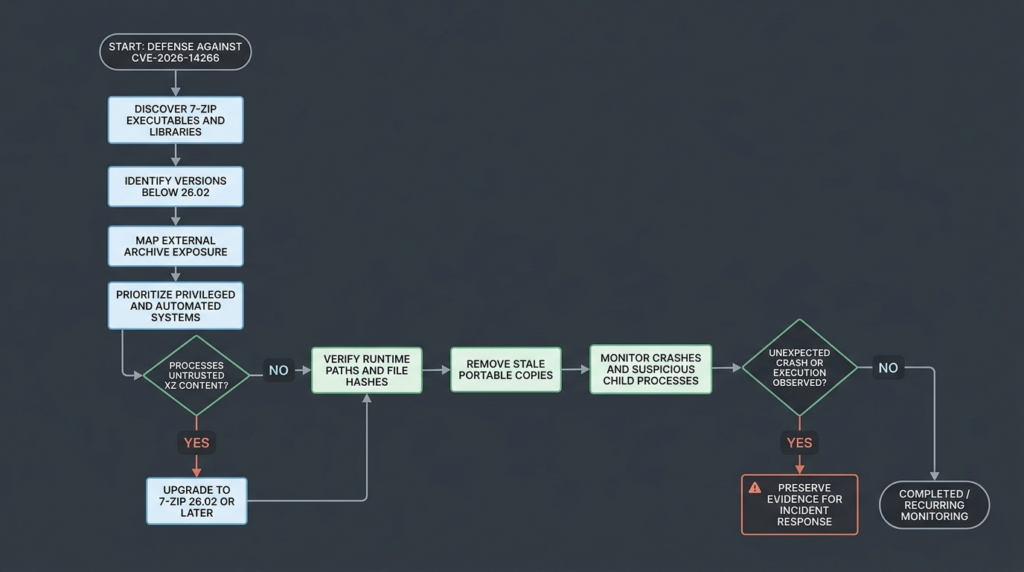
A mature response should produce evidence, not only a ticket marked “patched.”
For each asset, retain:
asset identifier
operating system
business owner
7-Zip component path
detected version
binary hash
package source
execution identity
external-content exposure
deployment action
post-update version
post-update hash
validation command
validation result
remaining exceptions
Automated security workflows can help correlate endpoint inventory, command output, package data, process telemetry, and remediation evidence. They should not automatically download untrusted exploit repositories or execute unknown CVE payloads against production systems.
In environments using agent-assisted validation, a platform such as Penligente can be used to organize authorized asset discovery, safe version checks, evidence collection, and repeatable verification tasks. The workflow should remain constrained to approved targets and non-destructive checks unless an isolated lab and explicit authorization exist.
A useful validation job should answer:
- Where is 7-Zip present?
- Which executable or library is actually used?
- Is it below the 26.02 remediation threshold?
- Does it process externally controlled data?
- Under which identity does it run?
- Was the corrected binary deployed?
- Are obsolete copies still reachable?
- Can the result be reproduced and audited?
That evidence is more valuable than a scanner result based solely on one registry entry.
What Remains Unknown
CVE-2026-14266 was disclosed with enough detail to justify immediate patching, but several technical questions remain open.
The Exact Vulnerable Operation
The public advisory does not identify:
- The malformed XZ field
- The affected function
- The allocation formula
- The write operation
- The overflow size
- The relevant chunk-state transition
- Whether integer overflow is involved
- Whether the corrupted buffer stores input, output, dictionary, or metadata
- The heap object targeted during exploitation
Any exact explanation of these points should be treated as unverified unless it is supported by a later vendor statement, CVE record, researcher write-up, or independently reviewed source analysis.
The Earliest Affected Version
The fix is 26.02, but the lower boundary is not public. Security teams should patch earlier versions rather than spending excessive time trying to prove that an old unsupported build is safe.
Cross-Platform Exploitability
7-Zip publishes builds for several architectures and operating systems. The advisory does not provide a platform-by-platform exploitation matrix.
Memory layout, allocator behavior, compiler options, mitigations, and process architecture can alter reliability. A crash on one platform and no visible effect on another do not establish that either platform is universally exploitable or safe.
Public Exploit Availability
The primary sources reviewed here do not provide a complete exploit for CVE-2026-14266. Security teams should expect public research to evolve after disclosure, especially because the patched source is available for comparison.
The correct defensive response is not to search endlessly for a weaponized sample. It is to deploy the fixed version, remove stale copies, and monitor risky archive-processing paths.
Active Exploitation
No authoritative source cited here states that CVE-2026-14266 has been exploited in the wild. ZDI’s advisory describes the vulnerability and fix but does not claim observed attacks. (Zero Day Initiative)
That should be communicated accurately:
- There is no confirmed active-exploitation claim in the primary disclosure.
- The potential impact remains code execution.
- Attackers can study the same public source differences that defenders can.
- Patch priority should reflect exposure and privilege, not rumor.
Frequently Asked Questions
What is CVE-2026-14266?
- CVE-2026-14266 is a heap-based buffer overflow in 7-Zip’s processing of XZ chunked compressed data.
- A crafted input can corrupt heap memory.
- ZDI states that successful exploitation may execute arbitrary code in the context of the affected process.
- The issue has a CVSS score of 7.0 and requires user interaction in the scenario described by the advisory.
- The fixed upstream release is 7-Zip 26.02. (Zero Day Initiative)
Which 7-Zip versions are affected?
- The public advisory identifies 26.02 as the fixed version.
- It does not specify the earliest vulnerable release.
- Organizations should treat upstream releases below 26.02 as requiring upgrade or documented verification.
- This does not prove that every historical release contains the exact same vulnerable code.
- Downstream Linux packages may contain backported patches, so check the distribution advisory rather than relying only on the displayed version.
- Portable executables and bundled
7z.dllcopies must be assessed separately.
Is CVE-2026-14266 really remote code execution?
- ZDI classifies the impact as remote code execution because a remote attacker can deliver malicious content that leads to code execution.
- The CVSS attack vector is Local because the vulnerable parsing occurs on the victim system after the file is received.
- User interaction is required in the product scenario described by ZDI.
- An automated service may process the file without a person double-clicking it, increasing practical exposure in that deployment.
- Successful code execution is possible, but a malformed file may also produce only a crash.
Is there a public exploit or evidence of active exploitation?
- The primary advisory does not publish a complete exploit.
- It does not identify the precise vulnerable field or memory-corruption primitive.
- No authoritative source cited here reports confirmed in-the-wild exploitation of CVE-2026-14266.
- Public exploit availability can change after disclosure.
- Organizations should patch based on the confirmed memory-corruption impact, not wait for a weaponized exploit.
How can I confirm that 7-Zip 26.02 is installed?
- Check the exact executable or DLL used by the workflow.
- On Windows, inspect
ProductVersion,FileVersion, path, and SHA-256. - Executar
Get-Command 7z.exe -Allto identify multiple copies inPATH. - On Linux or macOS, use
command -v,type -ae7zz i. - Compare downloaded package hashes with the exact asset listed on the official GitHub release.
- Re-scan portable directories, application bundles, containers, and deployment caches after the update.
- Do not rely only on the Add or Remove Programs entry.
Is blocking the .xz extension enough?
- No.
- A filename is an attacker-controlled label.
- XZ content may appear inside
.tar.xz, nested archives, packages, firmware bundles, or renamed files. - Some applications detect content from bytes rather than extensions.
- Extension blocking can reduce exposure temporarily but cannot replace patching.
- Content inspection must itself run inside an isolated and updated environment.
Can antivirus or EDR fully prevent exploitation?
- Antivirus may detect a known malicious file, but CVE-2026-14266 does not currently have a universal public malicious-file signature.
- EDR may detect a crash, suspicious child process, memory-protection event, or post-exploitation behavior.
- A clean scan does not prove that an unknown crafted XZ file is safe.
- Application control, least privilege, sandboxing, and behavioral monitoring reduce impact.
- Updating to 7-Zip 26.02 or later remains the primary remediation.
What should automated archive-processing services do?
- Upgrade every upstream 7-Zip component to 26.02 or later.
- Identify embedded libraries and portable copies.
- Run archive processing under a dedicated low-privilege identity.
- Remove production credentials and unnecessary network access.
- Use disposable workers or virtual machines for hostile content.
- Enforce limits on input size, expansion ratio, file count, nesting, memory, and runtime.
- Record input hashes, parser versions, command lines, exit codes, and crash data.
- Quarantine files that trigger deterministic parser failures.
- Treat a parser crash involving external content as a security event until investigated.
Final Assessment
CVE-2026-14266 is not a reason to claim that every XZ archive instantly compromises every 7-Zip installation. It is a confirmed heap-memory corruption vulnerability in a widely used archive-processing boundary, with potential code execution and a clear upstream fix.
The correct response is to deploy 7-Zip 26.02 or later, verify the exact binaries and libraries used by real workflows, remove obsolete portable copies, and prioritize systems that automatically process external archives or run with elevated privileges.
The remaining technical uncertainty should make defenders more precise, not more passive. There is no need to invent an exploit chain, and there is no need to wait for one. The patch, the affected parsing surface, the user-interaction requirement, and the potential impact are already sufficiently established to act.

 Portuguese
  English
  German
  French
  Spanish
  Japanese
  Korean
  Hindi
Hindi  Arabic
  Turkish
  Hebrew