
CVE-2026-48095 is a heap buffer overflow in the NTFS archive handler included with 7-Zip. The flaw affects 7-Zip 26.00 and earlier releases and was fixed in version 26.01 on April 27, 2026. A crafted NTFS image can supply metadata that drives a 32-bit shift expression into undefined behavior, causing 7-Zip to allocate a one-byte input buffer before attempting to copy as much as 256 MB of attacker-controlled data into it.
That memory corruption can crash the process. GitHub Security Lab also documented a potential code-execution path involving corruption of a nearby C++ object and its virtual function table. The possibility of code execution is therefore grounded in a concrete memory-corruption primitive, not merely a theoretical warning. It is equally important, however, not to flatten the research into the claim that every vulnerable system will execute code as soon as a file is opened. Architecture, available memory, allocator behavior, heap placement, guard pages, compiler output, and operating-system mitigations can all affect whether the vulnerable path is reached and what happens afterward. (GitHub Security Lab)
The minimum fixed release is 7-Zip 26.01. As of July 14, 2026, the current official release is 26.02, published on June 25, 2026. New deployments and remediation projects should therefore move to 26.02 or a later supported release rather than treating 26.01 as the long-term target. (7-Zip)
CVE-2026-48095 at a Glance
| Campo | Confirmed information |
|---|---|
| Vulnerabilidade | CVE-2026-48095 |
| Affected component | 7-Zip NTFS archive handler |
| Affected releases | 7-Zip 26.00 and earlier |
| Minimum fixed release | 7-Zip 26.01 |
| Current recommended upstream release | 7-Zip 26.02 or later |
| Weakness classes | CWE-190, Integer Overflow or Wraparound, and CWE-787, Out-of-bounds Write |
| Causa raiz | An unchecked 32-bit left shift used to calculate an NTFS compression-unit buffer size |
| Triggering metadata described by the researchers | ClusterSizeLog of at least 28 combined with CompressionUnit equal to 4 |
| Immediate consequence | _inBuf can be allocated as one byte while a much larger read is performed |
| Demonstrated maximum write described in the advisory | Up to 256 MB in 64 KB iterations |
| Potential impact | Application crash, denial of service, and potentially arbitrary code execution |
| CNA CVSS score | 8.8 High |
| User interaction | Processing the crafted image is required |
| Public proof of concept | Sim |
| File-extension limitation | No reliable limitation because 7-Zip can fall back to signature-based format detection |
| Confirmed widespread exploitation | Public records establish PoC availability, not widespread exploitation |
The National Vulnerability Database records versions through 26.00 as affected and versions beginning with 26.01 as outside the vulnerable range. The CNA-provided CVSS vector is CVSS:3.1/AV:N/AC:L/PR:N/UI:R/S:U/C:H/I:H/A:H, producing a base score of 8.8. CISA-ADP’s SSVC enrichment labels the exploitation state as poc, automatable as no, and technical impact as total. That is a useful distinction: public exploit material exists, but the available record does not by itself prove broad operational exploitation. (NVD)
Why an NTFS Bug Matters in an Archive Utility
Many people still think of 7-Zip as a program that opens .7z, .zipe .rar files. The actual attack surface is much broader. The official product supports unpacking numerous archive, disk-image, filesystem, installer, and firmware-related formats, including NTFS, FAT, APFS, GPT, MBR, ISO, VHD, VHDX, VMDK, QCOW2, SquashFS, UDF, UEFI, WIM, RPM, and RAR. (7-Zip)
Each supported format adds parsing code that must convert attacker-controlled bytes into trusted internal objects, sizes, offsets, filenames, run lists, allocation requests, and output operations. A user may never intentionally create an NTFS image, yet the NTFS handler can still be exposed through several workflows:
- A desktop user opens a downloaded disk image in 7-Zip File Manager.
- A command-line job runs
7z t,7z lou7z xagainst uploaded files. - A malware-analysis platform uses 7-Zip to inspect samples.
- A support portal enumerates the contents of customer attachments.
- A backup or forensic workstation examines images received from outside the organization.
- A CI runner unpacks build artifacts supplied by contractors or external repositories.
- A third-party application loads
7z.dllrather than launching the visible 7-Zip interface. - A security gateway attempts to normalize or recursively inspect archives before delivery.
The security boundary is therefore not “Does the user normally work with NTFS images?” The better question is “Can untrusted bytes reach a vulnerable 7-Zip parser?”
That difference is operationally important. An employee workstation may require a phishing or download step followed by user action. A server-side upload processor may parse the same file automatically. A malware sandbox is intentionally designed to consume hostile samples and may process hundreds or thousands of files without a human opening each one. A service running under a privileged identity can also turn the same memory-corruption bug into a more serious incident than a crash in a constrained desktop session.
Archive processors should be treated as interpreters for complex, attacker-controlled languages. They read nested structures, follow offsets, allocate memory based on metadata, decode compressed streams, create filesystem objects, and sometimes preserve or transform security metadata. That behavior is much closer to a document renderer or media codec than to a simple file-copy tool.
Disclosure and Patch Timeline
The public timeline is unusually short between private reporting and the first fixed release:
| Date | Event |
|---|---|
| February 12, 2026 | 7-Zip 26.00 was released |
| April 24, 2026 | GitHub Security Lab privately reported the NTFS heap overflow |
| April 27, 2026 | 7-Zip 26.01 was released with the fix |
| May 22, 2026 | GitHub Security Lab published GHSL-2026-140 |
| June 2026 | CVE and NVD records were enriched with affected-version and scoring data |
| June 25, 2026 | 7-Zip 26.02 was released |
The GitHub Security Lab advisory states that the report was sent through a private SourceForge issue on April 24 and that 26.01 was released three days later. The official 7-Zip history identifies the change as a fix for CVE-2026-48095 in the NTFS archive handler. (GitHub Security Lab)
For vulnerability-management teams, the important date is not only the May 22 public advisory. A fixed build had already existed since April 27. Exposure should be measured from the time vulnerable software entered the environment until the time every relevant copy was replaced or isolated. That includes portable binaries, application-bundled DLLs, old virtual-machine templates, golden images, build containers, recovery media, forensic toolkits, and archived software packages.
The fast upstream response also illustrates why organizations need an inventory mechanism that does not depend on an installer notification. A fixed package can be available promptly while unmanaged copies remain in use for months.
NTFS Concepts Behind the Vulnerability
Understanding CVE-2026-48095 requires separating three ideas that are often mixed together: an NTFS filesystem image, an NTFS data stream, and an NTFS alternate data stream.
An NTFS filesystem image is a byte-for-byte representation of a volume or volume-like structure. It begins with a boot sector containing fields that describe how the filesystem is organized. Those fields include the bytes per sector, sectors per cluster, total sectors, locations of core metadata structures, and other parameters used by a parser to interpret later offsets.
A data stream is the content associated with an NTFS file attribute. The default file content is normally represented by an unnamed $DATA attribute. NTFS also supports named streams, commonly called alternate data streams. Zone.Identifier, used by Windows to store Mark-of-the-Web information, is one familiar example.
CVE-2026-48095 is not limited to Zone.Identifier, and it is not fundamentally an alternate-data-stream vulnerability. The vulnerable code processes compressed NTFS data from a crafted filesystem image. The word “stream” refers to the internal compressed data stream and the CInStream implementation used to read it.
Sectors, Clusters, and ClusterSizeLog
A sector is a low-level storage unit. NTFS groups sectors into clusters, which are the filesystem’s allocation units. If the sector size is 512 bytes and a cluster contains eight sectors, the cluster size is 4,096 bytes.
Parsers often represent powers of two using an exponent. Instead of repeatedly storing 4,096, code may store 12, because:
2^12 = 4096
The relevant 7-Zip code derives a value named ClusterSizeLog. A cluster size of 4 KB has a logarithm of 12. A cluster size of 2 MB has a logarithm of 21. A theoretical cluster size of 256 MB has a logarithm of 28.
Microsoft’s filesystem behavior specification states that NTFS uses a default cluster size of 4 KB. It documents a maximum of 64 KB on older Windows versions and a maximum of 2 MB on Windows 10 version 1709 and later and Windows Server 2019 and later. For compressed NTFS files, the documented compression unit is the lesser of 64 KB or 16 times the cluster size. (Microsoft Learn)
The vulnerable 7-Zip parser did not apply that 2 MB upper boundary. Version 26.00 accepted ClusterSizeLog values through 30, which represents a theoretical cluster size of 1 GB. That acceptance was central to reaching the dangerous arithmetic.
Resident and Nonresident Attributes
Small NTFS attributes can be stored directly inside a Master File Table record. These are called resident attributes. Larger file data is normally nonresident: the metadata record contains a run list describing where the data resides elsewhere in the volume.
A parser handling a nonresident compressed $DATA attribute must interpret the run list, calculate logical and physical ranges, read compressed blocks from the image, and decompress them into a cache or caller-provided buffer. Every size and offset in that process may ultimately depend on untrusted metadata.
NTFS Compression Units
NTFS does not treat an entire compressed file as one monolithic compressed stream. Data is organized into compression units and smaller chunks. The parser needs to determine how large a compression unit is before it can allocate input and output buffers.
In the vulnerable 7-Zip code, the calculation was:
UInt32 GetCuSize() const
{
    return (UInt32)1 << (BlockSizeLog + CompressionUnit);
}
BlockSizeLog represents a block or cluster-size exponent. CompressionUnit adds another shift, with the value 4 corresponding to a multiplier of 16.
For ordinary values, this appears straightforward. If BlockSizeLog is 12 and CompressionUnit is 4, the result is:
1 << 16 = 65,536 bytes
That is a 64 KB compression unit.
The problem appears when attacker-controlled metadata causes the sum to reach the width of the 32-bit value being shifted.
The Root Cause of CVE-2026-48095
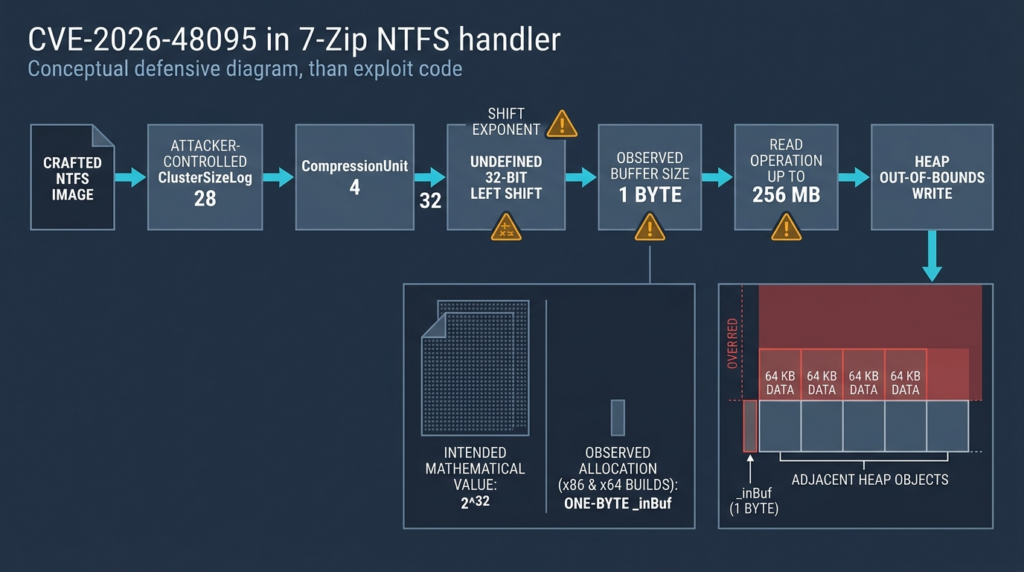
The crafted condition documented by GitHub Security Lab uses:
BlockSizeLog = 28
CompressionUnit = 4
The resulting shift count is:
28 + 4 = 32
The expression then becomes conceptually:
(UInt32)1 << 32
A UInt32 contains 32 bits. In C++, shifting a value by an amount equal to or greater than the width of the promoted left operand is undefined behavior. The language does not promise a wrapped result, zero, one, an exception, or any other specific outcome.
In the x86 and x64 builds examined by the researchers, the generated instruction behavior effectively masked the shift count. A count of 32 behaved like a count of zero for the 32-bit shift, producing the value 1. As a result, 7-Zip allocated _inBuf with a capacity of one byte. (GitHub Security Lab)
That one-byte result was not used consistently as a safe upper bound for later operations. Other calculations still derived a much larger amount of compressed data to read. GitHub Security Lab documented a path in which ReadStream_FALSE attempts to write as much as 256 MB into _inBuf, processing the read in 64 KB iterations. (GitHub Security Lab)
The logical sequence is:
Attacker-controlled NTFS metadata
          |
          v
BlockSizeLog + CompressionUnit equals 32
          |
          v
Undefined 32-bit shift
          |
          v
Observed GetCuSize result equals 1
          |
          v
_inBuf allocation equals 1 byte
          |
          v
Read length remains much larger
          |
          v
Heap out-of-bounds write
This is why the vulnerability maps to two weakness classes. CWE-190 describes the unsafe numeric operation or wraparound-style condition, while CWE-787 describes the resulting write beyond the allocated object. (NVD)
The Security Failure Is a Broken Invariant
The deeper engineering problem is not merely that one line contains a shift. The parser failed to preserve a critical invariant:
The size of a destination buffer must be at least as large as every write permitted into that buffer.
A secure implementation should derive the allocation and the maximum write from validated values. It should also reject impossible or unsupported filesystem parameters before creating internal objects.
Several checks could independently block this class of bug:
if (blockSizeLog > supportedMaxClusterLog)
    return UnsupportedFormat;

if (compressionUnit != 0 && compressionUnit != 4)
    return InvalidMetadata;

if (blockSizeLog > 31 ||
    compressionUnit > 31 ||
    blockSizeLog + compressionUnit >= 32)
    return IntegerRangeError;
A stronger implementation would use checked arithmetic rather than depend on manually reasoned integer expressions:
bool CheckedPow2U32(unsigned exponent, UInt32 &result)
{
    if (exponent >= 32)
        return false;

    result = (UInt32)1 << exponent;
    return true;
}
These examples illustrate defense in depth. They should not be mistaken for a verbatim copy of the upstream patch.
What the Upstream Fix Changed
A comparison of the official 26.00 and 26.01 NTFS handler source shows that the parser’s maximum accepted ClusterSizeLog was reduced from 30 to 21. The GetCuSize shift expression remained present, but the tightened input boundary prevents the crafted BlockSizeLog values used by the advisory from reaching the dangerous exponent. (GitHub)
The difference can be summarized as:
- if (ClusterSizeLog > 30)
+ if (ClusterSizeLog > 21)
    return false;
A value of 21 corresponds to 2 MB:
2^21 = 2,097,152 bytes
That boundary aligns with the modern Windows NTFS maximum cluster size documented by Microsoft. (Microsoft Learn)
The patch is a good example of enforcing a format invariant close to the parser entrance. Instead of attempting to allocate enormous structures for metadata that should not represent a supported NTFS volume, the fixed parser rejects the structure.
There is still a broader secure-coding lesson. Even when an input-boundary check makes a particular path unreachable, safety-critical arithmetic benefits from explicit width checks. Format parsers evolve. Fields are reused. Helper functions are called from new locations. Checked arithmetic can prevent a future change from reopening the same class of failure.
How the One-Byte Allocation Becomes Memory Corruption
The vulnerable operation is sometimes summarized imprecisely as a decompression-buffer overflow. The actual advisory distinguishes two buffers:
_inBufstores raw compressed bytes read from the NTFS image._outBufstores decompressed LZNT1 output and acts as a read cache.
The ordinary pipeline is:
NTFS image
    |
    v
_inBuf containing compressed bytes
    |
    v
LZNT1 decoder
    |
    v
_outBuf containing decompressed bytes
    |
    v
Copy to the caller
CVE-2026-48095 first corrupts _inBuf. The program allocates one byte but passes a much larger length to the stream-reading code. The overflow can therefore occur before the decoder has an opportunity to reject malformed compressed data.
This distinction matters for detection and code review. A team focused only on decompressor output bounds could miss a dangerous read into the compressed-input buffer. Input buffers are not automatically safe merely because their contents have not yet been decoded.
The Documented Vtable Corruption Path
In a release build examined by GitHub Security Lab, a CInStream object was placed 304 bytes after _inBuf on the heap. The read loop used 64 KB iterations. The first iteration could therefore overwrite the object, including its virtual function table pointer, well before completing the 64 KB copy. A later call through that object could dispatch through the corrupted pointer. (GitHub Security Lab)
A simplified conceptual layout is:
Heap allocation
+-------------------------+
| _inBuf, allocated 1 B   |
+-------------------------+
| Other heap data         |
|                         |
| 304-byte distance in    |
| the tested build        |
+-------------------------+
| CInStream object        |
| vtable pointer          |
| object fields           |
+-------------------------+
The first large write begins at _inBuf:
Attacker-controlled bytes
        |
        +---- overwrite adjacent heap data
        |
        +---- overwrite CInStream vtable pointer
        |
        +---- influence later virtual dispatch
This gives the researcher a plausible control-flow corruption primitive. It does not prove that one payload will work reliably across all official binaries, Windows builds, allocators, memory-pressure states, and security configurations.
The 304-byte placement was observed in a particular compiled configuration. Heap object placement can change because of:
- 7-Zip build options
- arquitetura
- compiler and optimization settings
- allocator state
- localization or UI activity
- loaded modules
- prior allocations
- Windows version
- process mitigations
- third-party integration behavior
Windows may also reject a read when the requested destination crosses an unmapped or guard page. The advisory notes that an attacker may need to influence heap placement to avoid an immediate fault and reach useful adjacent objects. (GitHub Security Lab)
The correct conclusion is therefore:
- A real, attacker-controlled heap overwrite exists.
- A concrete vtable-corruption path has been demonstrated in a researched build.
- Potential arbitrary code execution is credible.
- Exploit reliability is environment-dependent.
- A crash or failed allocation remains a security impact even when code execution is not achieved.
x86 and x64 Behave Differently
The vulnerability affects both 32-bit and 64-bit builds, but the path to the overflow is not identical.
| Characteristic | 32-bit build | 64-bit build |
|---|---|---|
_inBuf result observed by researchers | 1 byte | 1 byte |
Related _outBuf calculation | Can also collapse to a tiny value through undefined behavior | Produces a valid allocation request of about 8 GB |
| Likelihood of reaching the input-buffer write | Direct in the documented build | Depends on whether the large output-buffer allocation succeeds |
| Common failure mode | Heap overflow and process crash | Large allocation failure or heap overflow |
| Potential security result | Denial of service or code execution | Denial of service or code execution |
| Important operational factor | 32-bit address-space constraints | Available physical and virtual memory |
On a 32-bit build, the related _outBuf size expression also encounters a shift that exceeds the width of size_t. In the researchers’ tests, this produced a tiny allocation, allowing execution to continue directly toward the overflow.
On a 64-bit build, shifting the 64-bit size_t value is not undefined at that point. The calculation requests 8,589,934,592 bytes, approximately 8 GB. If the allocation succeeds, the later _inBuf read still targets the one-byte input allocation and reaches the overflow. If the allocation fails, the process may terminate before the out-of-bounds write, producing a denial-of-service outcome instead. (GitHub Security Lab)
Public summaries sometimes turn this into a simplistic RAM threshold. That is not a reliable exploitability test. The success of an 8 GB allocation depends on more than installed physical memory. Relevant factors include:
- Existing process memory use
- Commit limits
- Page-file configuration
- Address-space fragmentation
- Container or job-object memory limits
- Overcommit behavior on non-Windows systems
- Error-handling differences in embedding applications
- Whether the affected handler is compiled and reachable
- Allocator behavior
A system with less memory is not “patched by low RAM.” It may still suffer a process crash, resource-exhaustion event, or different memory-corruption behavior. Memory pressure is not a security control.
File Extensions Do Not Contain the Attack Surface
The stock NTFS handler is associated with .ntfs e .img, but 7-Zip does not rely exclusively on filename extensions. If the handler selected from the extension cannot open the file, 7-Zip can try other handlers based on content signatures.
The NTFS handler identifies the string NTFS followed by spaces at byte offset 3 in the boot sector. A file whose contents satisfy the NTFS signature can therefore reach the handler even when its name ends in .zip, .7z, .rar, an unrelated extension, or no extension. (GitHub Security Lab)
That behavior is useful in legitimate cases. Users frequently receive files with missing or incorrect extensions, and content-based detection allows 7-Zip to identify the actual format. The same flexibility means extension allowlists are not a sufficient security boundary.
Consider an upload service with the following policy:
Allow: .zip, .7z, .rar
Reject: .img, .ntfs
If the service passes every allowed file to a vulnerable 7-Zip build, a file named invoice.zip can still contain an NTFS signature and be routed to the NTFS parser after the ZIP handler rejects it.
Defensive validation should therefore distinguish three values:
User-supplied filename extension
Declared content type
Detected file format
None should be trusted alone. A mismatch should increase scrutiny rather than automatically select a more permissive parser.
When the Vulnerable Path Is Triggered
The advisory describes the overflow as triggering when 7-Zip tests or extracts a compressed file from the crafted NTFS image. It is safer to describe the prerequisite as active processing of the relevant compressed stream, not merely the existence of the file on disk. (GitHub Security Lab)
Possible entry points include:
7z t untrusted-file
7z x untrusted-file -ooutput
7z e untrusted-file -ooutput
A graphical action that opens the image and causes the file manager to read the compressed entry may also reach the path. An embedding application can invoke the same handler through 7z.dll.
The distinction between listing, testing, opening, and extracting is implementation-sensitive. A listing operation may parse substantial metadata even when it does not decode every file stream. A test operation is more likely to read and decompress file data. An extraction operation reads data and also writes output to the filesystem, adding path-traversal, symlink, resource-consumption, and content-execution concerns.
For policy purposes, teams should not assume that “metadata-only” archive inspection is harmless. The safer rule is that any operation invoking a complex native parser against an untrusted object belongs in an isolated security boundary.
Cenários de ataque realistas
A Downloaded File Opened on a Workstation
An attacker sends or hosts a crafted file with a familiar extension. The user downloads it and opens it with a vulnerable 7-Zip installation. Signature fallback routes the content to the NTFS handler. Processing a compressed entry reaches the unsafe allocation.
The resulting process runs with the user’s privileges. If the user is a local administrator or is operating from a privileged support workstation, the potential blast radius increases. Even without code execution, repeated crashes can interrupt work or hide later activity among noisy application failures.
An Email or Collaboration Attachment
A mail client, secure-email gateway, collaboration platform, or endpoint security product may inspect attachments before a user sees them. If the product delegates recursive archive testing to a vulnerable 7-Zip binary or DLL, the parser can be attacked automatically.
This scenario changes the meaning of user interaction. CVSS records the need for a user to open a malicious file, but a server-side workflow may supply the equivalent action automatically. Environmental scoring should reflect how the organization actually invokes the parser.
A File-Upload Service
Web applications often accept archives containing logs, design files, source code, support bundles, or machine images. A background worker may run:
7z t "$uploaded_file"
to verify integrity or enumerate content.
If the worker is vulnerable, the attacker does not need shell access to the host. The upload itself supplies input to a native parser. Risk becomes particularly high when the worker:
- Runs as root, LocalSystem, or a powerful service identity
- Shares a filesystem with the application
- Has cloud credentials
- Can access internal networks
- Reuses workers across tenants
- Stores output in executable or web-accessible directories
- Has no memory or execution-time limits
CI and Build Infrastructure
Build systems regularly unpack SDKs, dependencies, firmware packages, test corpora, and release artifacts. A malicious contributor or compromised dependency can introduce a disguised filesystem image.
Build runners often hold signing keys, repository tokens, package-publishing credentials, and deployment permissions. An archive parser does not need to be exposed directly to the internet for the risk to be serious. It only needs to process content from a trust domain weaker than the runner itself.
Malware Analysis and Security Automation
Sandboxes and malware-analysis pipelines are designed to consume hostile files. They may use 7-Zip before dynamic execution to enumerate nested content, calculate hashes, extract indicators, or normalize samples.
These environments should already be isolated, but operational shortcuts can create dangerous connections:
- Shared folders mounted read-write from an analyst workstation
- Reused service accounts
- Broad outbound network access
- Long-lived workers containing previous tenants’ data
- Host-mounted container sockets
- Cloud instance credentials
- Analysis results written to executable web directories
A parser exploit against a security tool is especially valuable because the target is expected to open hostile content.
Backup and Forensic Workstations
Investigators frequently inspect disk images from compromised or untrusted systems. They may believe that viewing an image through an archive tool is safer than mounting it. CVE-2026-48095 demonstrates that userspace parsing is itself an attack surface.
Forensic integrity practices should include parser isolation, immutable originals, cryptographic hashes, disposable analysis environments, and strict separation between evidence-handling systems and administrative credentials.
Privileged Third-Party Applications
Some products bundle 7z.dll or ship private copies of command-line binaries. The vulnerable component may not appear in the normal installed-software list, and users may not know 7-Zip is involved.
The effective privilege is the privilege of the host application. A document-management service, backup agent, enterprise deployment tool, or administrative console may run with much more authority than a desktop copy of 7-Zip.
Prioritizing CVE-2026-48095 in a Real Environment
CVSS 8.8 appropriately communicates high technical severity. Patch prioritization should then account for environmental exposure.
| Meio ambiente | Typical exposure | Consequence if compromised | Suggested priority |
|---|---|---|---|
| Internet-facing upload processor | Direct, repeated untrusted input | Service compromise, credential theft, tenant impact | Emergency |
| Malware-analysis or detonation platform | Intentionally hostile files | Escape from analysis worker, access to samples or infrastructure | Emergency |
| Privileged CI runner | External dependencies and artifacts | Build compromise, signing-key or deployment-token exposure | Emergency |
| Mail or collaboration gateway | Automated attachment inspection | Gateway disruption or compromise | Emergency |
| Administrator workstation | Manual processing under elevated context | Broad endpoint and domain-management impact | Muito alto |
| Standard employee endpoint | User-driven downloaded files | User-context compromise or crash | Alta |
| Isolated forensic workstation | Hostile images but strong containment | Local analysis interruption, possible containment failure | Alta |
| Offline host with no untrusted file intake | Limited practical reachability | Primarily latent risk | Scheduled but prompt |
| Unused binary retained in an archive | No current execution path | Future exposure if restored or reused | Remove or update during hygiene work |
Three factors deserve particular weight.
First, frequency matters. A service processing thousands of uploads has more opportunities to encounter malicious input than an offline technician’s laptop.
Second, privilege matters. Memory corruption in a low-privilege disposable worker is not equivalent to memory corruption in a service holding deployment keys.
Third, isolation quality matters. A container is not automatically a strong security boundary. A container with a host filesystem mount, privileged mode, a Docker socket, or cloud credentials may provide little protection from a compromised parser process.
Versões afetadas e corrigidas
The affected-version statement is straightforward:
Affected: 7-Zip 26.00 and earlier
Fixed:    7-Zip 26.01 and later
The official 7-Zip history names CVE-2026-48095 under version 26.01. NVD expresses the vulnerable range as releases before 26.01. (NVD)
The practical remediation target is:
Preferred: 7-Zip 26.02 or the latest later supported release
Minimum:   7-Zip 26.01
Version 26.02 incorporates the 26.01 fix and is the current upstream release as of July 14, 2026. (7-Zip)
A complete inventory must include more than the desktop installer:
7z.exe7zFM.exe7za.exe7zz.exe7z.dll- Application-specific renamed copies
- Portable tool directories
- Build-agent tool caches
- Recovery and support media
- Containers
- Virtual-machine templates
- Software-development kits
- Vendor appliances
- Bundled copies inside another product
The version printed by an application is also not always enough. Linux and enterprise software vendors may backport a patch without adopting the upstream version number. In those cases, consult the distributor’s security advisory and package revision.
Windows Inventory and Version Verification
The following PowerShell code checks common installation paths and records version and SHA-256 information:
$CandidatePaths = @(
    "$env:ProgramFiles\7-Zip\7z.exe",
    "$env:ProgramFiles\7-Zip\7zFM.exe",
    "$env:ProgramFiles\7-Zip\7z.dll",
    "${env:ProgramFiles(x86)}\7-Zip\7z.exe",
    "${env:ProgramFiles(x86)}\7-Zip\7zFM.exe",
    "${env:ProgramFiles(x86)}\7-Zip\7z.dll"
) | Where-Object {
    $_ -and (Test-Path -LiteralPath $_)
}

$Inventory = foreach ($Path in $CandidatePaths) {
    $Item = Get-Item -LiteralPath $Path
    $Hash = Get-FileHash -LiteralPath $Path -Algorithm SHA256

    [pscustomobject]@{
        Path           = $Item.FullName
        ProductVersion = $Item.VersionInfo.ProductVersion
        FileVersion    = $Item.VersionInfo.FileVersion
        Architecture   = if ($Item.FullName -like "*Program Files (x86)*") {
            "Likely x86"
        } else {
            "Verify separately"
        }
        SHA256         = $Hash.Hash
        LastWriteTime  = $Item.LastWriteTimeUtc
    }
}

$Inventory | Format-Table -AutoSize
Check registered installations as well:
$UninstallKeys = @(
    "HKLM:\Software\Microsoft\Windows\CurrentVersion\Uninstall\*",
    "HKLM:\Software\WOW6432Node\Microsoft\Windows\CurrentVersion\Uninstall\*",
    "HKCU:\Software\Microsoft\Windows\CurrentVersion\Uninstall\*"
)

Get-ItemProperty $UninstallKeys -ErrorAction SilentlyContinue |
    Where-Object {
        $_.DisplayName -like "7-Zip*"
    } |
    Select-Object DisplayName, DisplayVersion, InstallLocation, Publisher
The registry query will not find portable copies. Use Get-Command to locate binaries currently available through the execution path:
$Names = "7z.exe", "7za.exe", "7zz.exe", "7zFM.exe"

foreach ($Name in $Names) {
    Get-Command $Name -All -ErrorAction SilentlyContinue |
        Select-Object Name, Source, Version
}
A targeted search of approved tool locations can find unmanaged copies without performing an expensive full-disk recursion:
$Roots = @(
    "C:\Tools",
    "C:\ProgramData",
    "C:\BuildTools",
    "C:\CI",
    "C:\Users\Public",
    "C:\inetpub"
) | Where-Object { Test-Path $_ }

$Names = @("7z.exe", "7za.exe", "7zz.exe", "7zFM.exe", "7z.dll")

foreach ($Root in $Roots) {
    Get-ChildItem -LiteralPath $Root -File -Recurse -ErrorAction SilentlyContinue |
        Where-Object { $Names -contains $_.Name } |
        ForEach-Object {
            $Hash = Get-FileHash $_.FullName -Algorithm SHA256
            [pscustomobject]@{
                Path           = $_.FullName
                ProductVersion = $_.VersionInfo.ProductVersion
                FileVersion    = $_.VersionInfo.FileVersion
                SHA256         = $Hash.Hash
            }
        }
}
Do not assume every 7z.dll contains the same handler or is loaded. Record the file, then determine whether a running or installed application imports it. Endpoint detection tools that capture image-load events can help identify active consumers.
Linux and macOS Checks
The official standalone command on modern non-Windows releases is commonly named 7zz. Older distributions and p7zip-derived packages may expose 7z ou 7za.
Check the executable that would run:
command -v 7zz 2>/dev/null
command -v 7z 2>/dev/null
command -v 7za 2>/dev/null
Display build information:
7zz i 2>/dev/null | head -n 8
7z i 2>/dev/null | head -n 8
7za i 2>/dev/null | head -n 8
On Debian-family systems:
dpkg-query -W \
  -f='${Package}\t${Version}\t${Architecture}\n' \
  7zip 7zip-full p7zip p7zip-full 2>/dev/null
On RPM-family systems:
rpm -qa | grep -Ei '^(7zip|p7zip)'
On macOS with Homebrew:
brew list --versions sevenzip 2>/dev/null
command -v 7zz
7zz i | head -n 8
Search application and service directories where private copies are likely:
find /opt /usr/local /srv /var/lib \
  -type f \
  \( -name '7zz' -o -name '7z' -o -name '7za' -o -name '7z.so' \) \
  -print 2>/dev/null
A distribution package may contain a backported fix while retaining an older-looking upstream version. Conversely, a third-party static binary may claim a modern version while coming from an untrusted build source. Preserve package origin, repository, checksum, build metadata, and vendor advisory status.
Container and Software Supply Chain Discovery
Archive utilities are often installed only in a build layer and therefore absent from an application’s formal dependency manifest.
Inside a running container:
for name in 7zz 7z 7za; do
  if command -v "$name" >/dev/null 2>&1; then
    echo "Found: $(command -v "$name")"
    "$name" i 2>/dev/null | head -n 8
  fi
done
Search a mounted image filesystem:
find ./rootfs \
  -type f \
  \( -name '7zz' -o -name '7z' -o -name '7za' -o -name '7z.dll' \) \
  -print
Review Dockerfiles and build definitions:
grep -RniE \
  'apt(-get)? .*7zip|apt(-get)? .*p7zip|dnf .*7zip|yum .*p7zip|apk .*7zip|brew .*sevenzip' \
  .
SBOM tools can help, but binary-only copies may not map cleanly to package identifiers. Combine package inventories with filename, hash, and executable-behavior discovery.
The remediation record should identify:
Asset
Container or application
Binary path
Package source
Version
Hash
Architecture
Execution identity
Input sources
Patch action
Verification evidence
Owner
A Safe PoC for Understanding the Integer Error
The public GitHub Security Lab advisory includes code that generates a triggering NTFS image. Reproducing that generator is unnecessary for ordinary defense work and would create a file intended to corrupt a vulnerable process.
The following Python example is deliberately non-exploitative. It does not create an NTFS image, invoke 7-Zip, allocate large buffers, or corrupt memory. It models the arithmetic condition so defenders and developers can understand why an unchecked shift can turn a large logical size into a tiny observed result.
#!/usr/bin/env python3
"""
Safe arithmetic demonstration for CVE-2026-48095.

This program:
- does not generate an archive or NTFS image;
- does not invoke 7-Zip;
- does not write beyond a buffer;
- does not contain an exploitation payload.

It only models the shift-count behavior described in the public advisory.
"""

UINT32_MASK = 0xFFFFFFFF


def emulate_hardware_masked_shift_of_one(exponent: int) -> int:
    """
    Model the hardware-masked behavior observed by the researchers.

    This is not a definition of C++ behavior. In C++, shifting a 32-bit
    value by 32 or more bits is undefined behavior.
    """
    masked_exponent = exponent & 31
    return (1 << masked_exponent) & UINT32_MASK


def checked_pow2_u32(exponent: int) -> int:
    """Return 2**exponent only when it fits in an unsigned 32-bit value."""
    if not isinstance(exponent, int):
        raise TypeError("exponent must be an integer")

    if exponent < 0 or exponent >= 32:
        raise ValueError(
            f"unsafe exponent {exponent}: valid UInt32 shift range is 0 through 31"
        )

    return 1 << exponent


def validate_ntfs_parameters(
    cluster_size_log: int,
    compression_unit: int,
    maximum_supported_cluster_log: int = 21,
) -> int:
    """
    Illustrative defense-in-depth validation.

    The 2 MB cluster-size ceiling corresponds to exponent 21.
    """
    if cluster_size_log < 0:
        raise ValueError("cluster_size_log cannot be negative")

    if cluster_size_log > maximum_supported_cluster_log:
        raise ValueError(
            f"cluster_size_log {cluster_size_log} exceeds supported maximum "
            f"{maximum_supported_cluster_log}"
        )

    if compression_unit not in (0, 4):
        raise ValueError("unexpected compression-unit value")

    exponent = cluster_size_log + compression_unit
    return checked_pow2_u32(exponent)


def main() -> None:
    attacker_cluster_size_log = 28
    attacker_compression_unit = 4
    exponent = attacker_cluster_size_log + attacker_compression_unit

    print(f"ClusterSizeLog: {attacker_cluster_size_log}")
    print(f"CompressionUnit: {attacker_compression_unit}")
    print(f"Shift exponent: {exponent}")

    modeled_result = emulate_hardware_masked_shift_of_one(exponent)
    mathematical_result = 1 << exponent

    print(f"Modeled hardware-masked 32-bit result: {modeled_result}")
    print(f"Mathematical 2**{exponent} result: {mathematical_result}")

    try:
        checked_pow2_u32(exponent)
    except ValueError as exc:
        print(f"Checked arithmetic rejects the operation: {exc}")

    try:
        validate_ntfs_parameters(
            attacker_cluster_size_log,
            attacker_compression_unit,
        )
    except ValueError as exc:
        print(f"Format validation rejects the metadata: {exc}")


if __name__ == "__main__":
    main()
Expected output:
ClusterSizeLog: 28
CompressionUnit: 4
Shift exponent: 32
Modeled hardware-masked 32-bit result: 1
Mathematical 2**32 result: 4294967296
Checked arithmetic rejects the operation: unsafe exponent 32: valid UInt32 shift range is 0 through 31
Format validation rejects the metadata: cluster_size_log 28 exceeds supported maximum 21
The example communicates three separate facts.
First, the metadata values add to an exponent of 32.
Second, the machine behavior observed in the researched builds can produce the tiny value 1, even though the mathematical power of two is 4,294,967,296.
Third, a safe parser should reject the unsupported filesystem parameter before the shift and should independently reject a shift count outside the destination type’s valid range.
The emulation function is not a portable model of C++. Undefined behavior means the compiler is not required to preserve the programmer’s apparent intent. A different compiler, optimization pass, architecture, or surrounding code could produce different results. That unpredictability is itself the reason the operation is unsafe.
Safe Validation Without Running the Public Exploit
Most organizations do not need to execute a crashing PoC to establish exposure. Version and reachability evidence are usually sufficient.
A non-destructive validation plan should answer:
- Is a 7-Zip build through 26.00 present?
- Does the build include or load the NTFS handler?
- Can untrusted files reach that build?
- Under which identity and isolation boundary does it run?
- Has the binary been replaced by 26.01 or later?
- Can the updated parser reject abnormal NTFS metadata?
- Are duplicate vulnerable copies still reachable?
A safe laboratory can compare parser behavior using benign boundary fixtures rather than the public overflow file. For example, maintain synthetic images that contain:
- A valid 4 KB cluster size
- A valid 64 KB cluster size
- A supported 2 MB cluster size
- An unsupported cluster size above 2 MB
- Truncated boot-sector metadata
- An invalid compression-unit field
- An inconsistent run list
- Oversized declared lengths with no payload
The expected behavior for an updated parser is a clean rejection, not a crash, hang, excessive allocation, or partial output.
Recommended Laboratory Controls
Use a disposable virtual machine or isolated worker with:
- No production credentials
- No domain administrator session
- No mounted host home directory
- No shared clipboard
- No writable host filesystem
- No access to cloud metadata
- No package-signing keys
- Restricted or disabled network access
- Snapshot-based reset
- Process and memory telemetry
- A strict execution timeout
- A maximum-memory limit
- Hashing of every binary and fixture
Record:
7-Zip version
Binary hash
Architecture
Operating system build
Memory limit
Command line
Input hash
Input detected format
Start and stop times
Exit code
Peak memory
Crash or sanitizer output
Files created
Child processes
Network activity
Sanitizer-Based Developer Testing
Teams compiling 7-Zip or integrating similar parser code can use sanitizers to detect the arithmetic and memory failures earlier.
UndefinedBehaviorSanitizer can identify an invalid shift:
cmake -S . -B build-ubsan \
  -DCMAKE_CXX_FLAGS="-fsanitize=undefined -fno-sanitize-recover=all -g"

cmake --build build-ubsan
AddressSanitizer can detect out-of-bounds heap writes:
cmake -S . -B build-asan \
  -DCMAKE_CXX_FLAGS="-fsanitize=address -fno-omit-frame-pointer -g"

cmake --build build-asan
Exact build procedures vary by platform and source layout. The important design is to run malformed-format regression tests through both arithmetic and memory sanitizers.
GitHub Security Lab reported that UBSan identified the shift exponent of 32 as too large for the 32-bit type, supporting the root-cause analysis. (GitHub Security Lab)
A sanitizer finding is not a production exploitability rating. It is evidence that the code violates language or memory-safety rules and requires correction.
Detecting Exposure and Suspicious Processing
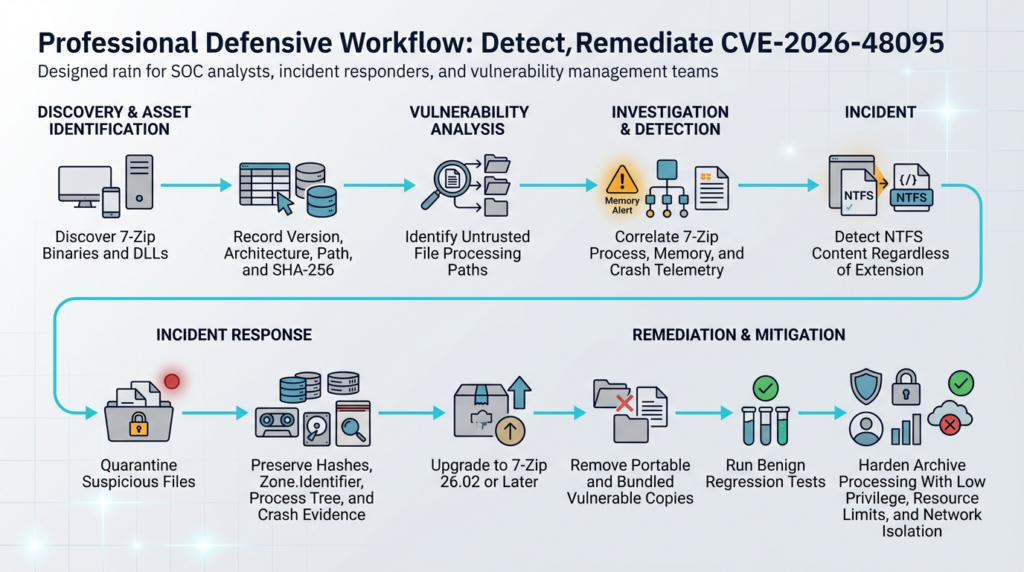
There is no single network indicator that uniquely identifies CVE-2026-48095. The attack begins with local file parsing, and the crafted image can use arbitrary filenames. Effective detection combines four evidence categories:
Vulnerable binary
       +
Untrusted or disguised NTFS content
       +
7-Zip processing behavior
       +
Crash, memory anomaly, child process, or follow-on activity
Version Detection Comes First
The most reliable preventive detection is finding every 7-Zip build through 26.00.
Endpoint-management searches should match:
7z.exe
7zFM.exe
7za.exe
7zz.exe
7z.dll
Do not filter only on the publisher field or installer registry. Portable and bundled files may have incomplete metadata. Hash and version extraction should be supplemented by software-owner interviews for services known to process archives.
Monitor Process Creation
On Windows, Sysmon Event ID 1 records process creation and can include the full command line. Event ID 5 records process termination. Event ID 11 records file creation. Event ID 15 records named-stream creation and can capture information relevant to Zone.Identifier. (Microsoft Learn)
A starting Sigma-style rule might look like this:
title: 7-Zip Processing From High-Risk Parent or Download Location
status: experimental
description: >
  Detects 7-Zip command-line processing initiated by selected high-risk
  parent processes or against common download and temporary locations.
  This is behavioral context, not a CVE-specific exploit signature.
logsource:
  category: process_creation
  product: windows

detection:
  sevenzip_image:
    Image|endswith:
      - '\7z.exe'
      - '\7za.exe'
      - '\7zz.exe'
      - '\7zFM.exe'

  archive_operation:
    CommandLine|contains:
      - ' t '
      - ' x '
      - ' e '

  risky_parent:
    ParentImage|endswith:
      - '\outlook.exe'
      - '\winword.exe'
      - '\excel.exe'
      - '\powerpnt.exe'
      - '\chrome.exe'
      - '\msedge.exe'
      - '\firefox.exe'
      - '\w3wp.exe'
      - '\httpd.exe'
      - '\java.exe'

  risky_path:
    CommandLine|contains:
      - '\Downloads\'
      - '\AppData\Local\Temp\'
      - '\Windows\Temp\'
      - '\inetpub\'
      - '\Uploads\'

  condition: sevenzip_image and archive_operation and
             (risky_parent or risky_path)

falsepositives:
  - Legitimate user extraction
  - Approved web-upload processing
  - Security-analysis workflows

level: medium
This rule should not generate an incident solely because a browser launched 7-Zip. Enrichment should add:
- Binary version
- Binary hash
- Signer and source
- Input-file hash
- Input signature
- File provenance
- User identity
- Parent and grandparent process
- Child processes
- Exit code
- Crash events
- Files written
A vulnerable version processing a file from an email cache should be prioritized more highly than a patched version opening a known internal package.
Detect NTFS Content Independently of the Extension
The following YARA rule identifies a basic NTFS boot-sector signature. It is deliberately generic and will match legitimate NTFS images. It does not detect exploitation and should not be used as an automatic malware verdict.
rule NTFS_Filesystem_Image_Signature
{
    meta:
        description = "Identifies files containing a basic NTFS boot signature"
        purpose = "Format identification and triage, not CVE confirmation"

    strings:
        $ntfs_oem_id = "NTFS    "

    condition:
        filesize >= 512 and
        $ntfs_oem_id at 3 and
        uint16(510) == 0xAA55
}
Use the result to identify extension mismatches:
Filename: quarterly-report.zip
Detected content: NTFS filesystem image
Action: quarantine or route to isolated manual analysis
A mismatch is suspicious because it may represent deception, but legitimate imaging tools and renamed forensic artifacts can produce the same condition. Context remains essential.
Watch for Abnormal Memory Behavior
On a vulnerable 64-bit path, an approximately 8 GB allocation may precede the input-buffer overflow. Possible signals include:
- Sudden growth in private bytes
- Commit-limit pressure
- Out-of-memory exceptions
- Worker termination by a resource controller
- Container memory-limit violations
- Repeated crashes on the same input hash
- A 7-Zip process consuming far more memory than the input’s actual stored size suggests
These are not unique to CVE-2026-48095. Archive bombs and legitimate large datasets can produce similar behavior. Correlate resource use with the binary version and detected NTFS content.
Correlate Crash Telemetry
Relevant Windows evidence may include:
- Application Error events
- Windows Error Reporting records
- Endpoint detection crash telemetry
- Access-violation exception codes
- Process termination immediately after file access
- A dump showing a fault in or near the NTFS handler
- Repeated failures for the same file hash
A crash is evidence of unsafe processing, not proof that arbitrary code executed. Conversely, the absence of a visible crash does not prove that no corruption occurred.
Hunt for Follow-On Activity
Potentially successful exploitation becomes more credible when 7-Zip or its embedding process is followed by behavior such as:
- Unexpected child processes
- Script interpreters launched from temporary directories
- New executables or DLLs written outside the expected extraction directory
- Credential-access behavior
- Persistence changes
- Network connections unrelated to the archive workflow
- Access to browser, cloud, or developer credentials
- Modification of build or deployment artifacts
A generic behavioral query could correlate 7-Zip with child processes:
parent_process in
  [7z.exe, 7za.exe, 7zz.exe, 7zFM.exe]
and child_process not in approved_child_processes
and time_difference < 60 seconds
Embedding applications require additional coverage. If 7z.dll is loaded into a service process, the suspicious child may descend from the service rather than a binary named 7z.exe.
Incident Response for a Suspected Malicious Archive
When a vulnerable 7-Zip process crashes or behaves unexpectedly while handling an untrusted file, preserve evidence before deleting the sample.
Preserve the Original Object
Record:
- Original filename
- Full source path or URL
- Email message identifier
- Upload transaction identifier
- Sender or tenant
- Received time
- File size
- SHA-256
- Detected content type
- Original extension
- Quarantine location
On Windows, preserve the Zone.Identifier stream when present:
Get-Item -LiteralPath ".\suspect-file" -Stream * |
    Format-Table Stream, Length

Get-Content \
    -LiteralPath ".\suspect-file" \
    -Stream Zone.Identifier \
    -ErrorAction SilentlyContinue
Copying the file through tools or filesystems that do not support NTFS named streams may destroy that provenance. Hash the main file and separately record the stream content.
Record the Parser
Collect:
$Path = "C:\Program Files\7-Zip\7z.exe"
$Item = Get-Item -LiteralPath $Path

[pscustomobject]@{
    Path           = $Item.FullName
    ProductVersion = $Item.VersionInfo.ProductVersion
    FileVersion    = $Item.VersionInfo.FileVersion
    SHA256         = (Get-FileHash $Path -Algorithm SHA256).Hash
}
For a bundled DLL, record the host process and loaded module path. Two applications can load different 7z.dll versions on the same endpoint.
Preserve Execution Context
Collect:
- Full command line
- Parent and grandparent process
- Working directory
- User and integrity level
- Process start and stop times
- Loaded modules
- Peak memory
- Exception code
- Crash dump when policy permits
- Child processes
- Files created or modified
- Network destinations
- Endpoint detections
- Relevant Windows event logs
Do not reopen the sample on an investigator’s normal workstation to “confirm” the crash.
Determine the Scope
Search for the SHA-256 across:
- Email systems
- Collaboration platforms
- Web proxy logs
- Object storage
- Upload databases
- Endpoint telemetry
- Shared drives
- Source repositories
- Build caches
- Malware-analysis queues
Search for the vulnerable binary hash across endpoints and servers. The incident may reveal a broader patch-management gap even when the sample reached only one host.
Separate Three Possible Outcomes
A suspected CVE-2026-48095 event may result in:
- Format rejection
The parser rejects invalid metadata without unsafe behavior. - Resource or application failure
A large allocation fails, the process crashes, or a resource controller terminates it. - Memory corruption with follow-on execution
The process continues through corrupted state and produces unexpected control flow or activity.
The second outcome is not evidence of the third. Investigators should avoid declaring code execution solely from an out-of-memory event. They should also avoid dismissing a crafted-file event merely because no obvious shell appeared.
Remediation and Hardening
Upgrade to a Supported Fixed Release
The direct fix is to replace every affected copy with 7-Zip 26.01 or later. Since 26.02 is the current upstream release, 26.02 or a newer supported build is the preferred target. (7-Zip)
After installation, verify the actual executable and DLL paths. Do not rely only on the installer’s success message.
$ExpectedMinimum = [version]"26.1"

Get-ChildItem "C:\Program Files\7-Zip" -File |
    Where-Object { $_.Name -in @("7z.exe", "7zFM.exe", "7z.dll") } |
    ForEach-Object {
        $RawVersion = $_.VersionInfo.ProductVersion -replace '[^0-9.]', ''
        $ParsedVersion = $null

        if ([version]::TryParse($RawVersion, [ref]$ParsedVersion)) {
            [pscustomobject]@{
                Path       = $_.FullName
                Version    = $ParsedVersion
                Compliant  = $ParsedVersion -ge $ExpectedMinimum
                SHA256     = (Get-FileHash $_.FullName -Algorithm SHA256).Hash
            }
        }
    }
Validate the script against your organization’s version-string conventions before using it for compliance enforcement.
Remove Duplicate and Portable Copies
Common failure patterns include:
C:\Tools\7zip\
C:\BuildTools\7zip\
C:\Users\<name>\Downloads\7zip\
C:\ProgramData\<vendor>\bin\
Application\plugins\
Repository\tools\
Removing the installed 26.00 package does not fix a service that invokes a copied 7z.exe from its application directory.
Create an allowlist of approved hashes and paths. Quarantine or replace all other reachable copies after confirming ownership.
Update Embedding Applications
A vendor product may ship an old 7z.dll even when the system-wide 7-Zip installation is current. The application owner may need a vendor update rather than a standalone 7-Zip installer.
Questions for vendors should be precise:
- Does the product use 7-Zip or derived source code?
- Which version is compiled or bundled?
- Is the NTFS handler included?
- Is CVE-2026-48095 fixed?
- Is the patch backported?
- What binary hash or package version proves remediation?
- Does the product automatically inspect untrusted files?
- Under which account does processing occur?
- Is parsing isolated from the main service?
Run Parsers With Minimum Privilege
A worker that only needs to read one input object and write to one output directory should not have:
- Administrator or root privileges
- Interactive user credentials
- Domain credentials
- Source-control tokens
- Cloud instance credentials
- Package-publishing keys
- Access to deployment sockets
- Broad network access
- Write permission to application or startup directories
Use a dedicated account and a disposable worker. Destroy the worker after processing high-risk content when practical.
Enforce Resource Limits
Archive and filesystem formats can cause extreme CPU, memory, output-size, and file-count expansion even without a memory-corruption exploit.
Set limits for:
Maximum input size
Maximum detected logical size
Maximum output bytes
Maximum number of entries
Maximum directory depth
Maximum recursion depth
Maximum memory
Maximum CPU time
Maximum wall-clock time
Maximum open files
Maximum single-file size
A worker that exceeds a limit should fail closed, preserve the original object, and produce an auditable reason.
Resource limits reduce denial-of-service impact. They do not substitute for patching the memory-safety bug.
Restrict Network Access
An archive parser normally does not need unrestricted outbound connectivity. Deny network access by default or permit only the minimum control-plane endpoints required by the worker.
This limits the value of a successful parser compromise and makes unexpected connection attempts more visible.
Separate Parsing From Publication
Do not extract directly into:
- Web roots
- Application plugin folders
- Startup directories
- Script search paths
- Package repositories
- Build output consumed without review
- Shared executable locations
Use a non-executable staging filesystem. Validate output paths, file types, ownership, permissions, links, and total size before copying approved files into a trusted destination.
Reject Format Mismatches
A safe policy can treat extension and content mismatches as a reason for quarantine:
from dataclasses import dataclass


@dataclass
class FileIdentity:
    filename: str
    extension: str
    declared_type: str | None
    detected_type: str


def requires_manual_review(identity: FileIdentity) -> bool:
    expected = {
        ".zip": {"zip"},
        ".7z": {"7zip"},
        ".rar": {"rar"},
        ".img": {"ntfs", "fat", "disk-image"},
    }

    allowed_detected = expected.get(identity.extension.lower())

    if allowed_detected is None:
        return True

    return identity.detected_type not in allowed_detected
This code is only a policy example. Real format identification should use a maintained parser or signature library, and “detected type” should never be considered harmless merely because it matches the extension.
Preserve Trust Metadata
CVE-2026-48095 is a memory-corruption issue, while CVE-2025-0411 involved failure to propagate Mark-of-the-Web correctly through archive extraction. Together, they show that secure archive handling must protect both parser memory and file provenance.
Do not mass-remove Zone.Identifier from downloaded archives. Microsoft documents that Unblock-File removes the Zone.Identifier stream, which changes how Windows treats the file’s origin. Use it only after a deliberate trust decision, not as a workaround for user prompts. (NVD)
Maintain a Regression Corpus
Every archive-processing service should have a test set containing:
- Valid small archives
- Nested archives
- Extension-content mismatches
- Large declared sizes
- Excessive file counts
- Deep directory trees
- Absolute paths
- Parent-directory components
- Symbolic links
- Hard links
- NTFS images with valid and invalid cluster values
- Truncated structures
- Duplicate filenames
- Alternate streams
- Encrypted entries
- Unsupported compression methods
For each fixture, define the expected result:
Accept and extract
Accept and list only
Reject as unsupported
Reject as policy violation
Terminate because of resource limit
Route to manual analysis
Patch verification should demonstrate that the fixed parser rejects unsafe NTFS metadata cleanly and that the surrounding workflow remains functional.
A Safer Architecture for Archive Processing
A secure upload or analysis pipeline should separate acquisition, identification, parsing, and publication.
Untrusted upload
       |
       v
Immutable object storage
       |
       +---- SHA-256 and metadata record
       |
       v
Format identification
       |
       +---- extension mismatch check
       +---- policy decision
       |
       v
Isolated parsing queue
       |
       v
Disposable low-privilege worker
       |
       +---- patched parser
       +---- no secrets
       +---- network denied
       +---- CPU and memory limits
       +---- execution timeout
       |
       v
Output validation
       |
       +---- canonical path check
       +---- symlink and hard-link policy
       +---- file count and size limits
       +---- executable-content review
       |
       v
Approved storage or manual review
Store the Original Before Parsing
The first operation should not be extraction. Store the original file in immutable or append-only storage, compute its cryptographic hash, and record provenance.
That provides:
- Incident-response evidence
- Deduplication
- Reproducibility
- Safe reprocessing after parser updates
- A way to compare detections across systems
- Protection against the parser modifying or deleting the only copy
Identify the Format Outside the Main Worker
Perform lightweight signature identification before selecting a parser. This stage should not attempt full filesystem interpretation.
Possible outcomes include:
Declared ZIP, detected ZIP: continue to ZIP policy
Declared ZIP, detected NTFS: quarantine
Declared image, detected NTFS: continue to isolated NTFS policy
Unknown format: reject or manual review
Lightweight identification is not a guarantee of safety. It is a routing control.
Use Disposable Workers
A disposable worker should receive only:
- A read-only copy of the input
- An empty output directory
- The exact parser binary
- A one-time task identifier
- Non-secret configuration
- A result channel
After processing, collect results and destroy the worker.
Canonicalize Output Paths
For each extracted entry:
- Join the requested output root with the archive path.
- Canonicalize the result.
- Verify that the result remains under the output root.
- Reject absolute paths and parent traversal.
- Apply a clear symbolic-link and hard-link policy.
- Recheck paths after link creation.
- Avoid following archive-created links during later writes.
This control addresses path-based vulnerabilities but does not prevent parser memory corruption. Both layers are necessary.
Decide Whether Full Extraction Is Necessary
Many services need metadata, not file contents. Avoid extraction when a safer business workflow can satisfy the requirement.
| Business need | Preferred action |
|---|---|
| Verify upload identity | Hash and store the original |
| Confirm permitted format | Lightweight signature identification |
| Display a filename preview | Isolated listing with strict parser controls |
| Scan file contents | Extract in disposable worker, then scan |
| Import trusted internal package | Verify signature and hash before extraction |
| Analyze unknown disk image | Route to isolated specialist workflow |
| Process extension-content mismatch | Quarantine or manual review |
| Accept customer support bundle | Isolated extraction with limits and evidence |
Listing is not automatically safe because it still invokes format-parsing code. It is merely less operationally invasive than writing every entry.
Related 7-Zip Vulnerabilities
CVE-2026-48095 is part of a broader pattern: archive utilities sit at the intersection of memory safety, path handling, provenance, decompression, and filesystem semantics.
| CVE | Affected behavior | Security primitive | Fixed release | Relationship to CVE-2026-48095 |
|---|---|---|---|---|
| CVE-2026-48095 | NTFS compressed-stream parsing | Heap out-of-bounds write | 26.01 | Current integer and memory-safety issue |
| CVE-2025-0411 | Mark-of-the-Web propagation | Trust-boundary bypass | 24.09 | Shows that extraction can remove security provenance |
| CVE-2025-11001 | ZIP symbolic-link handling | Directory traversal and unintended write | 25.00 | Shows output paths can become an execution primitive |
| CVE-2025-11002 | ZIP symbolic-link handling | Directory traversal and unintended write | 25.00 | Closely related path and service-account risk |
| CVE-2025-55188 | Symbolic-link extraction | Improper link handling | 25.01 | Reinforces the need for strict link policy |
| CVE-2024-11477 | Zstandard decompression | Integer underflow and out-of-bounds write | 24.07 | Earlier example of arithmetic leading to memory corruption |
CVE-2025-0411 and Mark-of-the-Web
CVE-2025-0411 involved 7-Zip failing to propagate Mark-of-the-Web correctly to extracted content from a crafted archive. The flaw could allow extracted files to lose an important Windows-origin signal and make subsequent execution warnings or controls less effective.
NVD records a CVSS score of 7.0 and confirms that the vulnerability was added to CISA’s Known Exploited Vulnerabilities Catalog on February 6, 2025. The vulnerable range ends before 7-Zip 24.09. (NVD)
The relationship to CVE-2026-48095 is architectural. One bug corrupts memory inside the parser; the other weakens the trust metadata applied to the parser’s output. A secure archive service must protect both boundaries.
CVE-2025-11001 and CVE-2025-11002
These vulnerabilities concern symbolic links in crafted ZIP files. ZDI describes unintended directory traversal that can allow code execution in the context of a service account, depending on where the files are written and how the environment later uses them. Both advisories identify 7-Zip 25.00 as the fixed release. (Zero Day Initiative)
The important point is that a traversal primitive is not automatically code execution. The environment supplies the final step. Writing into a plugin directory, startup location, script search path, deployment folder, or web root can turn an unintended write into execution.
CVE-2026-48095 acts earlier, while parsing compressed NTFS data. The symbolic-link vulnerabilities act during extraction and output-path resolution. Isolating the parser and validating output are separate controls because each addresses a different stage.
CVE-2025-55188
CVE-2025-55188 affected symbolic-link handling before version 25.01. Its CNA score was 3.6, and its primary impact was limited integrity loss under the scored conditions. (NVD)
A lower score does not make link handling irrelevant. In a privileged automation service, even a constrained write primitive can matter. Environmental context determines whether the affected output directory contains sensitive or executable paths.
CVE-2024-11477
CVE-2024-11477 involved an integer underflow in Zstandard decompression that could lead to an out-of-bounds write. ZDI assessed potential code execution in the context of the current process, and the official 7-Zip history identifies 24.07 as the fixed release. (Zero Day Initiative)
Its connection to CVE-2026-48095 is direct at the engineering level. Both show how attacker-controlled numeric fields can cross from format metadata into unsafe memory operations. Checked arithmetic, strict input invariants, sanitizers, fuzzing, and corpus-based regression tests are therefore long-term controls rather than one-CVE fixes.
Common Mistakes During Remediation
Checking Only .ntfs e .img Files
Signature fallback means a disguised file can reach the NTFS handler under another extension. Search and gateway controls must identify content, not just filenames. (GitHub Security Lab)
Assuming Opening Is Safe if Extraction Is Not Performed
The exact trigger involves reading a compressed stream during testing or extraction, but complex parsing occurs before files are written. “Open,” “list,” “test,” and “extract” should all be considered parser execution, with the precise reachability verified in the actual application.
Checking Only Add or Remove Programs
Portable binaries, private DLLs, build caches, vendor applications, and container layers will be missed.
Treating CVSS 8.8 as Proof of Stable RCE
CVSS describes severity under a standardized model. The advisory documents a credible code-execution primitive but also identifies platform and heap-layout constraints. Patch promptly without overstating certainty.
Treating Failed 8 GB Allocation as Protection
An allocation failure is still a denial-of-service condition and is not guaranteed across hosts. Memory pressure is neither stable nor enforceable as a security boundary.
Running Public Exploit Files Across Production
Version and binary reachability usually establish exposure. Production exploit testing can crash critical services, corrupt state, or create legal and operational problems.
Updating Only the GUI
7zFM.exe, command-line binaries, and 7z.dll may come from different directories or products. Verify each reachable component.
Blocking NTFS Files Without Patching
A file can use a misleading extension, and a future handler path may bypass the policy. Blocking known formats can reduce exposure but does not replace the fixed parser.
Considering Every NTFS Image Malicious
Legitimate forensic, deployment, backup, and virtualization workflows use NTFS images. A signature hit is a routing and triage signal, not a malware verdict.
Deleting the File Before Preserving Evidence
The original hash, filename, source, Zone.Identifier, upload record, and parser telemetry can be essential for determining scope.
Automated Validation and Evidence Collection
Large environments benefit from automating the safe parts of the workflow: locating binaries, extracting version metadata, calculating hashes, mapping invocation paths, checking whether a fixed release is installed, and attaching proof to a remediation ticket.
High-risk actions should remain bounded. An automated security workflow should not download a public crashing PoC and execute it across employee endpoints. It should begin with non-destructive evidence and escalate to an isolated laboratory only when necessary.
A useful automated record for CVE-2026-48095 includes:
{
  "asset": "archive-worker-17",
  "binary_path": "C:\\Tools\\7zip\\7z.exe",
  "product_version": "26.00",
  "architecture": "x64",
  "sha256": "example-redacted",
  "input_sources": [
    "customer_uploads"
  ],
  "execution_identity": "svc-archive",
  "network_access": "restricted",
  "status": "vulnerable",
  "recommended_action": "replace with 26.02 and rerun benign regression corpus",
  "evidence": [
    "file metadata",
    "binary hash",
    "service configuration",
    "approved input-path mapping"
  ]
}
Agent-assisted vulnerability validation can be useful when it preserves authorization boundaries, selects non-destructive checks first, executes dangerous tests only in disposable environments, and records reproducible evidence rather than returning an unsupported “vulnerable” label. Platforms such as Penligente can support that type of evidence-driven workflow when teams configure the target scope and execution controls appropriately. Penligent also publishes a directly related analysis of CVE-2026-48095 and the surrounding 7-Zip archive attack surface as an additional technical perspective. (Penligente)
The automation should end with patch verification:
Old binary removed
New binary version recorded
New binary hash recorded
Service restarted
Process path reconfirmed
Unsupported NTFS metadata rejected
Normal archive regression tests passed
No vulnerable duplicate found
Ticket contains reproducible evidence
Frequently Asked Questions
What versions of 7-Zip are affected by CVE-2026-48095?
- Affected: 7-Zip 26.00 and all earlier versions containing the vulnerable NTFS compressed-stream calculation.
- Minimum fixed release: 7-Zip 26.01.
- Preferred remediation: Install 7-Zip 26.02 or the latest later supported release.
- Do not check only the desktop installer: Portable binaries, command-line tools,
7z.dll, application bundles, container images, and build caches may contain separate copies. - For distributor packages: Check the vendor’s advisory because a patch may have been backported without changing the visible upstream version. (NVD)
Does opening a malicious archive guarantee code execution?
- No. The vulnerability provides a real attacker-controlled heap overwrite and a documented potential vtable-hijack path.
- Exploitation is environment-dependent. Architecture, memory availability, heap placement, allocator behavior, guard pages, compiler output, and process mitigations affect the outcome.
- A 32-bit build reaches the documented overflow path more directly in the tested configuration.
- A 64-bit build may first request about 8 GB for a related buffer. Failure can terminate processing before the input-buffer overwrite.
- A crash is not proof of successful code execution.
- The uncertainty does not justify delaying the patch. Memory corruption in an untrusted file parser remains a high-priority defect. (GitHub Security Lab)
Can a file with a ZIP or RAR extension trigger the NTFS handler?
- Yes. 7-Zip can fall back from extension-based selection to content-signature detection.
- The NTFS handler checks for the NTFS signature at byte offset 3.
- A crafted NTFS image may therefore be named with
.zip,.7z,.rar, another extension, or no extension. - Extension allowlists are insufficient. Gateways should compare the filename extension, declared content type, and detected format.
- A mismatch should normally be quarantined or routed to isolated analysis. (GitHub Security Lab)
Is 7-Zip 26.01 sufficient, or should organizations install 26.02?
- 26.01 contains the CVE-2026-48095 fix.
- 26.02 is the current upstream release as of July 14, 2026.
- New remediation work should normally install 26.02 or later so the environment receives the CVE fix and subsequent upstream corrections.
- Organizations using vendor-maintained packages should follow the vendor-supported build when it includes the backported fix.
- Verification should inspect the binary actually executed by the service, not only the version shown in an installer inventory. (7-Zip)
How can defenders verify exposure without running the public exploit?
- Inventory every 7-Zip binary and DLL.
- Record version, architecture, full path, package source, and SHA-256.
- Map which services or users can execute each copy.
- Identify whether untrusted files can reach the parser.
- Confirm that versions through 26.00 are replaced or isolated.
- Use benign malformed fixtures in a disposable laboratory to verify that unsupported cluster values are rejected cleanly.
- Use sanitizers when compiling from source to identify invalid shifts and out-of-bounds memory access.
- Do not run the public crashing image on production systems.
What telemetry is most useful for attempted exploitation?
- Process creation: 7-Zip command lines, parent processes, users, and working directories.
- Binary identity: Version and hash of
7z.exe,7zz.exe,7za.exe,7zFM.exe, or a loaded7z.dll. - File identity: Input hash, original filename, source, Zone.Identifier, and detected NTFS signature.
- Resource behavior: Sudden large memory allocations, commit pressure, container memory kills, and abnormal execution time.
- Crash evidence: Application Error, Windows Error Reporting, endpoint crash data, and access-violation details.
- Follow-on activity: Unexpected child processes, network connections, credential access, or writes outside the intended output directory.
- Correlation is essential: No single event is a CVE-specific proof. Sysmon Event IDs 1, 5, 11, and 15 can contribute useful context on Windows. (Microsoft Learn)
Should archive-processing services stop using 7-Zip entirely?
- Not solely because of CVE-2026-48095. A supported fixed release removes the documented vulnerable path.
- The service must still treat all archive parsing as hostile input processing.
- Run a patched parser under a low-privilege identity in a disposable worker.
- Deny unnecessary network access and remove production secrets.
- Enforce memory, CPU, recursion, file-count, and output-size limits.
- Validate canonical output paths, links, and file types before publication.
- Retain the original object and processing evidence.
- Reduce enabled formats when the application does not need them.
- Keep a malformed-file regression corpus and repeat it after every parser update.
Closing Assessment
CVE-2026-48095 is not merely a crash caused by an unusually large archive. It is a broken trust boundary in which attacker-controlled NTFS metadata reaches unchecked integer arithmetic, collapses a buffer allocation to one byte in the researched builds, and permits a much larger write into adjacent heap memory.
The public analysis supports potential code execution, but defenders should preserve the distinction between a credible exploitation primitive and a universally reliable payload. That distinction improves incident analysis; it does not reduce the need to patch.
The immediate priorities are clear: find every copy of 7-Zip 26.00 and earlier, replace it with 26.02 or a later supported build, identify applications that bundle the library, and give the highest urgency to automated or privileged systems that process untrusted files.
The longer-term lesson extends beyond one CVE. Archive and filesystem parsing should occur inside a deliberately constrained execution boundary. File extensions are hints, parsers are attack surfaces, resource limits are necessary, output paths require validation, and evidence must be preserved. Treating those principles as part of the architecture makes the next parser vulnerability far less disruptive.
 Portuguese
  English
  German
  French
  Spanish
  Japanese
  Korean
  Hindi
Hindi  Arabic
  Turkish
  Hebrew