
There is a particular kind of vulnerability that gives defenders very little room for hesitation: it is remotely reachable, requires no credentials, sits on an internet-facing development platform, and is simple enough that attackers can begin testing it almost immediately after disclosure.
CVE-2026-85706 is one of those vulnerabilities.
The flaw affects self-managed GitLab Community Edition and Enterprise Edition installations and received a maximum CVSS 3.1 score of 10.0. According to GitLab, the problem exists in the repository commits API, where improper path confinement combines with missing authentication enforcement. Under the right conditions, an unauthenticated requester can cause the GitLab server to read files outside the location the application intended to access. (GitLab Docs)
That description alone is enough to justify emergency patching. What happened after disclosure makes the situation considerably more serious.
On September 11, 2026, the U.S. Cybersecurity and Infrastructure Security Agency added CVE-2026-85706 to its Known Exploited Vulnerabilities catalog, explicitly stating that the addition was based on evidence of active exploitation. Around the same time, watchTowr reported that its honeypot network was already observing behavioral probes attempting to reproduce the GitLab weakness. (Deja Vu)
So this is no longer a theoretical GitLab vulnerability sitting in a CVE database.
For organizations running vulnerable self-managed GitLab instances, the relevant question is now:
Was the server merely vulnerable, or did someone already use CVE-2026-85706 before it was patched?
That turns out to be more complicated than looking for a 400 response in an access log.
What Is CVE-2026-85706?
CVE-2026-85706 is a path traversal vulnerability affecting the GitLab repository commits API.
GitLab describes the underlying weakness as a combination of:
- improper path confinement;
- missing authentication enforcement;
- server-side processing of attacker-controlled file paths.
The affected API normally handles repository commit operations. GitLab’s API documentation shows that creating commits is performed through the POST /projects/:id/repository/commits endpoint. (GitLab Docs)
During the vulnerable processing path, however, a path supplied through fields such as file.path could point somewhere other than GitLab’s expected temporary upload location.
Instead of opening the temporary file GitLab expected, the application could be tricked into opening another file available to the GitLab process.
GitLab summarized the issue this way: an unauthenticated user could, under certain conditions, read arbitrary files from the GitLab server because of improper path confinement and missing authentication enforcement. (GitLab Docs)
The distinction between those two weaknesses matters.
A path handling bug behind strong authentication is already dangerous, but the attacker first needs an account.
An authentication mistake on an API that only exposes low-value information may also be serious, but its blast radius can remain relatively contained.
Put them together on an endpoint capable of opening server-side paths, and the security boundary collapses much more dramatically.
CVE-2026-85706 Affected GitLab Versions
GitLab lists the following releases as affected:
| GitLab branch | Vulnerable versions | Fixed version |
|---|---|---|
| GitLab CE/EE 18.7 through 19.1 | 18.7 up to versions before 19.1.8 | 19.1.8 |
| GitLab CE/EE 19.2 | Versions before 19.2.6 | 19.2.6 |
| GitLab CE/EE 19.3 | Versions before 19.3.2 | 19.3.2 |
GitLab recommends upgrading to 19.1.8, 19.2.6, 19.3.2, or a newer supported release. (GitLab Docs)
The affected offering is especially important here.
GitLab Self-Managed installations require attention.
GitLab states that GitLab.com and GitLab Dedicated infrastructure has already been patched, so customers using those managed offerings do not need to perform the same self-managed remediation process. (GitLab Support)
For administrators of older or unsupported GitLab branches, trying to reason about whether a version predating the formally listed range happens to avoid this exact code path is generally the wrong operational decision. Moving to a currently supported, patched GitLab release is the safer course.
Why CVE-2026-85706 Received a CVSS Score of 10.0
GitLab assigned the following CVSS 3.1 vector:
CVSS:3.1/AV:N/AC:L/PR:N/UI:N/S:C/C:H/I:H/A:N
That gives CVE-2026-85706 a base score of 10.0 Critical. (GitLab Docs)
Several properties explain the urgency:
Network reachable. The attack can be delivered remotely against a reachable GitLab web/API service.
Low attack complexity. Exploitation does not depend on winning a race condition or satisfying an unusually complicated environmental state.
No privileges required. The vulnerable processing can occur without an authenticated GitLab account.
No user interaction required. An administrator or developer does not need to open a malicious repository, click a link, or execute a payload.
That combination is exactly what makes vulnerabilities attractive for rapid internet-wide automation.
A sophisticated exploit chain is expensive to operationalize.
A vulnerable HTTP API reachable over the internet is not.
The Important Precondition: Public Projects
GitLab’s advisory uses the phrase “under certain conditions” rather than claiming every possible GitLab deployment is identically exploitable.
Researchers at watchTowr who reproduced the issue reported that practical exploitation required the target instance to expose at least one public project. That public project provides a project context accessible to an unauthenticated requester. (WatchTowr)
This is worth checking, but it should not be treated as a comforting security boundary.
Self-managed GitLab environments frequently contain documentation projects, public mirrors, open-source repositories, demonstration projects, or projects whose visibility was changed years earlier and subsequently forgotten.
An organization should verify project visibility instead of assuming that “our GitLab is mostly private” means the prerequisite is not satisfied.
More importantly, patching should not be delayed while administrators investigate that question.
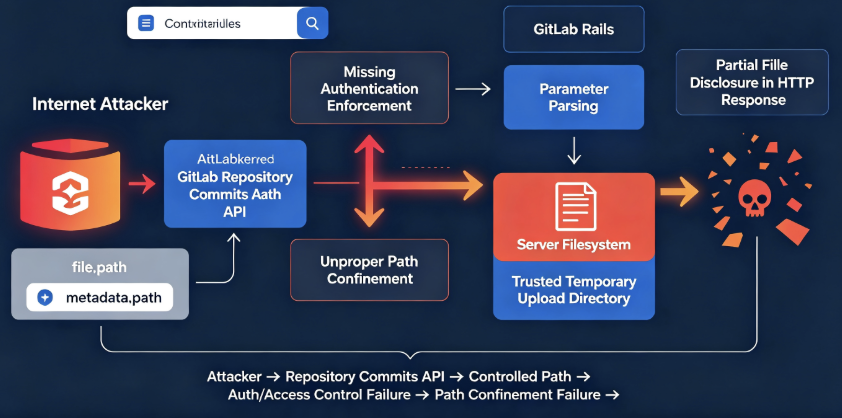
How the GitLab File Read Works
At a conceptual level, the vulnerability can be understood as a trust-boundary mistake.
GitLab Workhorse and Rails cooperate when handling requests containing uploaded data. The application expects certain path parameters to reference files generated inside controlled temporary directories.
The security assumption is essentially:
This path belongs to an upload generated by GitLab infrastructure, so it is safe for the application to open it.
CVE-2026-85706 breaks that assumption.
An attacker-controlled path can reach processing that expects a trusted temporary path. If the supplied value resolves to another server-side file and the GitLab process can access that file, Rails may open it instead.
GitLab has since published detection logic covering both file.path and the related metadata.path parameter. Its public detection documentation specifically describes attackers substituting arbitrary paths for Workhorse-generated upload or metadata files. (GitLab)
Conceptually, the vulnerable data flow looks like this:
Remote HTTP request
        |
        v
Repository Commits API
        |
        v
Attacker-controlled path parameter
        |
        v
Expected Workhorse temporary path validation fails
        |
        v
Rails opens supplied server-side path
        |
        v
Local file contents enter request processing
That is why calling CVE-2026-85706 simply an “API authentication bug” understates the problem.
The affected API becomes a bridge between an anonymous network request and the local filesystem.
Arbitrary File Read Does Not Mean Every Targeted File Was Exfiltrated
This is the most interesting technical detail in CVE-2026-85706, and it is missing from many early descriptions of the vulnerability.
After organizations began investigating suspected exploitation, GitLab published a detailed support article explaining something counterintuitive:
A vulnerable GitLab server can read a targeted file without actually returning the entire file—or even any file content—to the attacker. (GitLab Support)
Why?
Because the contents of the opened file are fed into request parameter processing.
For requests interpreted as application/x-www-form-urlencoded, those bytes are parsed as though they were ordinary form data.
That means the contents can be:
- split around
&; - separated around
=; - passed through percent-decoding.
If parsing succeeds, the server may have read the file internally without embedding the content in its HTTP response.
If parsing encounters an invalid percent-encoded sequence, however, a parsing exception may include the offending portion of the file in an error message.
That error can then be returned to the requester.
GitLab therefore makes an important distinction:
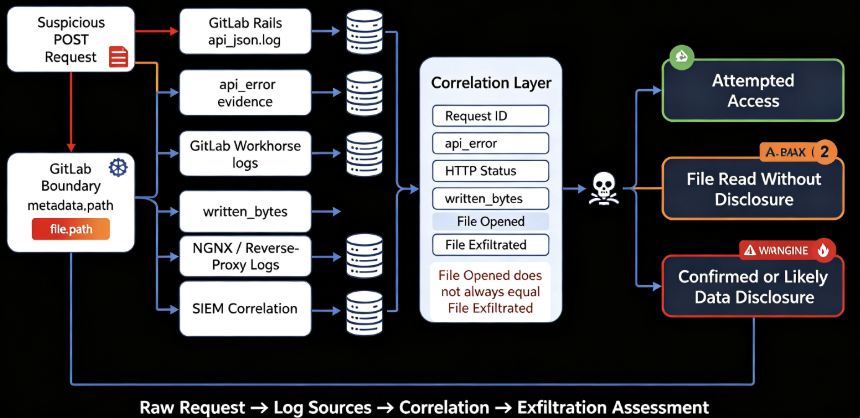
Server opened the file
        ≠
Attacker necessarily received the file
This changes how incident responders should investigate CVE-2026-85706.
Why HTTP Status Codes Are Not Enough
Imagine finding a suspicious request in your GitLab logs.
It targets the repository commits API.
It contains a suspicious server path.
The response is 400.
Was a secret leaked?
You cannot answer that from the status code alone.
GitLab says a request triggering the parameter parsing error can return 400 while disclosing part of the targeted file.
A different request may return 400 simply because the requested local file was not present.
An anonymous request in which the target file is successfully read but parameter decoding does not fail can continue far enough to return 401, even though the file was opened internally.
Other response codes have also been observed and should not independently be treated as proof of disclosure or non-disclosure. (GitLab Support)
That means simplistic detection such as:
status == 400 → compromised
status == 401 → safe
is wrong.
The useful evidence is deeper in the GitLab logs.
api_error e written_bytes: The Key Forensic Evidence
GitLab’s follow-up forensic guidance recommends correlating two pieces of evidence.
The first comes from Rails’ api_json.log.
The second comes from GitLab Workhorse.
api_error
When the vulnerable parameter parser generates an error containing bytes from the targeted file, GitLab says the resulting response information appears in the api_error field of api_json.log.
That makes api_error particularly valuable because it can show exactly what fragment was placed into the HTTP response. (GitLab Support)
Workhorse written_bytes
Workhorse logs how many response bytes were written back to the client.
Administrators can correlate the request across the Rails and Workhorse logs and compare the response size against the normal baseline for an equivalent failure.
An unusually large response combined with a matching api_error fragment can provide much stronger evidence of disclosure than the HTTP status code alone. (GitLab Support)
GitLab explicitly warns administrators not to compare written_bytes directly with the original file size.
The HTTP response contains JSON formatting, escaping and error text, so:
written_bytes ≠ number of secret bytes leakedIt is evidence about the response, not a direct measurement of the target file.
Some Sensitive Files May Be Read Without Appearing in the Response
This creates another subtle incident-response problem.
Suppose an attacker targets a credentials file and GitLab opens it.
If its contents never trigger the relevant percent-decoding error, the server may read the file but return no portion of it through this particular error mechanism.
GitLab specifically notes that some PEM/base64-style private-key material and JSON files may not contain the character patterns needed to trigger the disclosure path. (GitLab Support)
That means defenders should be precise with their language.
A suspicious log entry might prove:
The attacker caused GitLab to open this path.
A corresponding api_error might additionally prove:
These specific bytes were returned to the client.
Those are different conclusions.
Good incident response depends on preserving that distinction.
CVE-2026-85706 Is Already in CISA’s KEV Catalog
Em September 11, 2026, CISA added CVE-2026-85706 to the Known Exploited Vulnerabilities catalog.
CISA says entries are added to KEV based on evidence of exploitation, making the catalog materially different from a list of vulnerabilities that are merely theoretically exploitable. (Deja Vu)
This is therefore stronger evidence than a security vendor saying that exploitation is “likely.”
At the same time, defenders should avoid overstating what is publicly known.
CISA’s listing establishes that exploitation evidence exists.
It does not, by itself, tell us how many organizations were compromised, who the attackers were, or whether a single coordinated campaign is responsible.
There is currently no basis for confidently attributing all exploitation activity to a particular threat actor.
watchTowr Saw Probing Almost Immediately
The exploitation timeline was extremely short.
watchTowr published its technical assessment on September 11 and reported that its Attacker Eye honeypot network was already seeing behavioral probing associated with the vulnerability. The company had also reproduced the vulnerability itself and assessed self-managed GitLab exposure. (WatchTowr)
This is an increasingly common pattern around high-value enterprise infrastructure.
Once a vendor releases a patch, attackers can diff the patched and vulnerable versions, inspect newly added validation logic, identify the security-sensitive code path, reproduce the flaw, and start scanning.
For an unauthenticated web vulnerability with a relatively straightforward request path, that cycle can be very short.
CVE disclosure is no longer necessarily the beginning of a multi-week race.
Sometimes it is the beginning of a race measured in hours.
Why Reading Files from a GitLab Server Is So Dangerous
At first glance, arbitrary file read sounds less dramatic than remote code execution.
On a GitLab server, that distinction can be misleading.
GitLab often sits near the center of an organization’s software supply chain.
Depending on how an instance is configured, it may have access to:
- repository configuration;
- application configuration;
- GitLab secrets;
- database connection information;
- CI/CD credentials;
- deployment credentials;
- repository or project tokens;
- cloud credentials used by pipelines;
- container registry authentication;
- SSH material;
- integration secrets;
- internal service URLs.
The immediate CVE primitive may be “read a local file.”
The operational impact can extend much further if the information inside that file gives the attacker access to another system.
The more interesting attack chain is therefore:
CVE-2026-85706
        ↓
Server-side file access
        ↓
Credential or secret exposure
        ↓
GitLab / CI/CD / infrastructure authentication
        ↓
Repository or pipeline access
        ↓
Potential downstream compromise
That is why patching the vulnerable endpoint is only part of the response when exploitation evidence is discovered.
How to Detect CVE-2026-85706 Exploitation
GitLab has released multiple detections specifically for this vulnerability, including detections targeting attempts involving gitlab.yml, file.pathe metadata.path. (GitLab Docs)
Defenders should begin with requests involving the repository commits API.
A useful first-pass hunt is conceptually:
method = POST

AND

request path contains:
/api/v4/projects/.../repository/commits

AND

parameters contain:
file.path
OR
metadata.path
Then prioritize requests involving:
absolute filesystem paths
encoded path separators
unexpected directories
configuration locations
secret locations
unusual anonymous clients
one client querying many project IDs
A simple defensive search against collected Rails logs might begin with something like:
grep '"method":"POST"' api_json.log |
grep 'repository/commits' |
grep -E 'file\.path|metadata\.path'
That is only a starting point.
Encoded variants and structured JSON logs make field-aware SIEM parsing substantially more reliable than raw string matching.
GitLab’s own public detections are preferable when they can be integrated into the organization’s monitoring pipeline. (GitLab)
Do Not Filter Only on file.path
Another useful lesson from GitLab’s detection guidance is that defenders should not focus on a single parameter.
GitLab separately published detection logic for metadata.path, noting that it belongs to the same multipart upload processing family and can expose a sibling attack surface. (GitLab)
A detector written as:
alert only when file.path looks maliciousis weaker than:
identify unexpected server-side path parameters
and verify that each resolves only into approved temporary directories
The second approach models the broken security assumption.
The first merely models one observed exploit string.
This distinction matters well beyond CVE-2026-85706.
Attackers adapt parameters and encodings far more quickly than defenders update literal signatures.
Preserve Logs Before Restarting the Instance
If an organization believes it may have been targeted, evidence preservation should happen immediately.
GitLab specifically warns that Workhorse log information can be rotated during restart or upgrade operations. Its forensic guidance therefore recommends preserving Rails API logs, Workhorse logs and relevant NGINX or proxy telemetry before evidence disappears. (GitLab Support)
For a typical Linux-package deployment, important evidence includes:
GitLab Rails api_json.log
GitLab Workhorse access logs
GitLab NGINX logs
reverse-proxy logs
WAF logs
load-balancer logs
centralized SIEM copies
If the organization has centralized logging, that system can become extremely important after the local instance has already been restarted.
Do not delay critical remediation for an extended forensic exercise, but collect volatile evidence before destroying it whenever operationally possible.
A Practical Incident Response Workflow
If a self-managed GitLab installation ran an affected version while exposed to the internet, the response should not end at “upgrade complete.”
A more useful workflow is:
First, determine exposure.
Inventory every self-managed GitLab instance and record its version, internet accessibility and public project configuration.
Second, preserve evidence.
Copy the relevant Rails, Workhorse, proxy and web-server logs before restarting or rotating them.
Third, patch.
Upgrade to a fixed, supported GitLab release.
Fourth, hunt historical requests.
Search for suspicious commits API requests containing path-related upload parameters.
Fifth, correlate requests.
Use request or correlation identifiers to connect Rails API records with Workhorse responses.
Sixth, establish whether data was actually returned.
Inspect api_error and corresponding written_bytes rather than deciding based solely on HTTP response status.
Seventh, determine what the targeted path contained.
If actual disclosure is confirmed, identify every credential, token or key contained in the exposed fragment.
Eighth, rotate affected secrets.
Do not assume that patching the original GitLab vulnerability invalidates secrets an attacker may already possess.
Patching CVE-2026-85706
GitLab’s primary remediation is straightforward:
Upgrade affected installations to:
- GitLab 19.1.8 or later
- GitLab 19.2.6 or later
- GitLab 19.3.2 or later
Prefer the latest supported patch in the relevant release line rather than intentionally stopping at the first version containing the CVE fix. (GitLab Docs)
Organizations unable to patch immediately should reduce network exposure as an emergency containment measure.
That may include restricting access through a VPN, trusted address ranges, private networks, reverse proxies or other edge controls.
However, access restrictions should be treated as temporary risk reduction.
They are not substitutes for applying the vendor fix.
Patch First, But Do Not Stop There
CVE-2026-85706 illustrates a recurring problem in vulnerability management.
Teams often treat the lifecycle as:
CVE announced
→ patch installed
→ ticket closed
That model breaks down when exploitation begins before the organization applies the fix.
The correct model becomes:
CVE announced
        ↓
Was the vulnerable service reachable?
        ↓
Was it attacked?
        ↓
Was the vulnerable code path reached?
        ↓
Was sensitive information returned?
        ↓
What trust relationships depended on that information?
        ↓
Patch + investigate + rotate + monitor
That final step is particularly important for developer infrastructure.
A compromised web application may expose one application’s data.
A compromised development and CI/CD platform can expose credentials that connect the source-code system to deployment infrastructure, container registries, cloud providers and production services.
CVE-2026-85706 Also Shows Why “File Read” Can Be Misleading
Security headlines naturally prioritize terms such as “RCE,” “authentication bypass,” and “remote takeover.”
CVE-2026-85706 is a useful reminder that vulnerability impact cannot always be understood from the primitive alone.
The immediate primitive is local file access.
The environment around that primitive is GitLab.
GitLab often sits on top of source code, build automation, deployment credentials and integrations with other systems.
So the real security question is not simply:
Can an attacker read a file?
It is:
What authority can an attacker obtain from the information stored in files readable by this particular process?
That is a much more useful way to think about vulnerability severity.
Another Lesson: Detect the Broken Trust Boundary, Not Only the Payload
GitLab’s metadata.path detection also exposes a broader defensive lesson.
If a server expects an internal path to always point into a controlled upload directory, security monitoring should understand that invariant.
Por exemplo:
Expected:

path → /trusted/gitlab/upload/temp/...

Suspicious:

path → anything outside approved temporary roots
A detection built around that rule can survive:
- changed filenames;
- URL encoding;
- alternative sensitive targets;
- different traversal syntax;
- movement from
file.pathparametadata.path.
A rule looking only for:
../../etc/passwdcannot.
Security engineering improves when defenders encode what must always be true, rather than endlessly collecting examples of what an attacker might type.
Frequently Asked Questions About CVE-2026-85706
Is CVE-2026-85706 actively exploited?
Yes. CISA added CVE-2026-85706 to its Known Exploited Vulnerabilities catalog on September 11, 2026, based on evidence of active exploitation. watchTowr separately observed behavioral probes against its honeypot infrastructure shortly after disclosure. (Deja Vu)
Does CVE-2026-85706 require authentication?
GitLab describes the vulnerable condition as allowing an unauthenticated user to trigger arbitrary server-side file reads. (GitLab Docs)
What versions of GitLab are vulnerable?
GitLab CE and EE versions from 18.7 before 19.1.8, 19.2 before 19.2.6 and 19.3 before 19.3.2 are affected according to the vendor. (GitLab Docs)
Is GitLab.com vulnerable?
GitLab states that GitLab-managed infrastructure, including GitLab.com and GitLab Dedicated, has already been patched. The urgent remediation requirement applies primarily to vulnerable self-managed installations. (GitLab Docs)
Does a suspicious request prove data was stolen?
No.
The vulnerable server may open a local file without returning its contents to the attacker. GitLab recommends correlating api_json.log, its api_error field and Workhorse written_bytes to determine what content was actually placed in the response. (GitLab Support)
Does HTTP 401 mean the attack failed?
Not necessarily.
GitLab’s forensic documentation explains that a file may have been read internally even when decoding succeeds and the anonymous request later receives an authentication-related response. Status codes should therefore not be used as the sole indicator of file disclosure. (GitLab Support)
Is CVE-2026-85706 remote code execution?
The disclosed vulnerability is an arbitrary file-read/path-traversal issue, not direct remote code execution.
However, credentials or secrets obtained through a successful disclosure could potentially enable separate follow-on access depending on the affected environment.
Those downstream outcomes should be treated as incident-specific consequences rather than capabilities directly guaranteed by CVE-2026-85706 itself.
Considerações finais
CVE-2026-85706 deserves attention not simply because its CVSS score is 10.0.
The more important combination is operational:
unauthenticated + network reachable + low complexity + developer infrastructure + confirmed exploitation.
GitLab has released fixed versions. CISA has confirmed that exploitation evidence exists. Researchers observed probing shortly after disclosure. GitLab has also provided unusually detailed forensic guidance showing administrators how to distinguish a server-side file read from actual content returned to the attacker. (GitLab Docs)
For defenders, that produces a clear priority.
Patch vulnerable self-managed GitLab installations immediately.
But if the instance was internet-facing while vulnerable, do not treat the successful upgrade as proof that the incident is over.
Preserve the logs.
Inspect the repository commits API.
Correlate Rails and Workhorse telemetry.
Determine whether sensitive bytes were actually returned.
Then rotate credentials according to what the evidence shows.
CVE-2026-85706 is ultimately not just a patch-management story.
It is an example of the point where vulnerability management becomes incident response.
Primary Sources
GitLab’s official Critical Patch Release 19.3.2, 19.2.6, 19.1.8 contains the affected-version ranges, CVSS vector, vulnerability description and vendor remediation guidance. GitLab Critical Patch Release
GitLab Support’s CVE-2026-85706 forensic guidance explains how api_error, Workhorse written_bytes, form decoding and HTTP response behavior determine whether file content actually reached an attacker. GitLab CVE-2026-85706 Forensic Guidance
CISA added CVE-2026-85706 to the Known Exploited Vulnerabilities catalog on September 11, 2026 based on evidence of exploitation. (Deja Vu)
watchTowr’s rapid-reaction research documents reproduction of the issue and early probing observed against its honeypot infrastructure. watchTowr CVE-2026-85706 Research


 Portuguese
  English
  German
  French
  Spanish
  Japanese
  Korean
  Hindi
Hindi  Arabic
  Turkish
  Hebrew