
CVE-2026-11645 is an actively exploited Google Chrome V8 vulnerability, not just another line item in a large browser update. Google’s June 8, 2026 Stable Channel release for desktop Chrome fixed 74 security issues and called out this bug as a high-severity out-of-bounds memory access issue in V8, Chrome’s JavaScript and WebAssembly engine. The fixed Stable versions listed by Google are 149.0.7827.102/.103 for Windows and macOS and 149.0.7827.102 for Linux, with rollout over the following days and weeks. Google also states that an exploit for CVE-2026-11645 exists in the wild. (Chrome Releases)
The NVD description is more operationally useful: out-of-bounds read and write in V8 in Google Chrome prior to 149.0.7827.103 allowed a remote attacker to execute arbitrary code inside a sandbox through a crafted HTML page. NVD also shows the CISA-ADP CVSS 3.1 score as 8.8 HIGH with the vector AV:N/AC:L/PR:N/UI:R/S:U/C:H/I:H/A:H, while NIST’s own NVD enrichment was not yet complete at the time shown in the record. CISA has added the issue to the Known Exploited Vulnerabilities catalog with a required action date of June 23, 2026. (nvd.nist.gov)
That is enough to set the response priority. You do not need a public exploit, campaign name, malware family, or crash signature to act. The confirmed public facts already say that an attacker can trigger the vulnerable surface remotely through crafted web content, that the affected component is one of the highest-value attack surfaces in modern desktop computing, and that exploitation is not theoretical.
The phrase “inside a sandbox” deserves careful handling. It does not mean the bug is harmless. It means the public impact statement stops at code execution within Chrome’s sandboxed browser context, not full operating system compromise from this CVE alone. A full device takeover often requires another weakness, such as a sandbox escape, broker process bug, kernel vulnerability, logic flaw, or post-renderer abuse path. But a renderer-level or V8-level foothold can still expose valuable browser context: authenticated web sessions, identity flows, sensitive SaaS data visible to the page, extension interactions, intranet application state, and the opportunity to chain with another exploit. Good response language should be precise: CVE-2026-11645 is confirmed as an actively exploited V8 memory safety flaw with sandboxed code execution potential. Public sources do not yet prove a specific attacker, victim set, delivery chain, sandbox escape, payload, or final objective.
Confirmed public facts for CVE-2026-11645
| Saha | Confirmed public information | Neden önemli |
|---|---|---|
| CVE KIMLIĞI | CVE-2026-11645 | Use the exact ID for inventory, SIEM queries, patch tickets, and KEV tracking. |
| Ürün | Google Chrome | The directly documented affected product is Chrome before the fixed version. |
| Bileşen | V8 | V8 runs JavaScript and WebAssembly from web content, a high-risk untrusted input surface. |
| Weakness class | Out-of-bounds memory access in Google’s advisory; out-of-bounds read and write in NVD | This points to a memory corruption class rather than a simple policy or configuration bug. |
| Trigger surface | Crafted HTML page | The likely entry path is web content, not local authenticated access. |
| User interaction | Required in the CVSS vector | A user generally has to open or render attacker-controlled content. |
| Public impact | Arbitrary code execution inside a sandbox | Serious, but not automatically the same as full host compromise. |
| Sabit versiyonlar | Chrome Stable 149.0.7827.102/.103 for Windows and macOS, 149.0.7827.102 for Linux | Fleet validation should check installed and running versions. |
| Exploitation status | Google says an exploit exists in the wild | This should override any tendency to wait for public exploit details. |
| CISA KEV status | Added June 9, 2026, due June 23, 2026 | US federal civilian agencies have a concrete remediation deadline; private organizations should treat that as a useful urgency signal. |
| Known unknowns | Root cause, exploit primitive, attacker identity, victimology, sandbox escape, payload | Avoid filling these gaps with confident speculation. |
Google’s Chrome release note also says bug details and links may remain restricted until most users have received a fix, and may stay restricted longer if the bug exists in a third-party library that other projects depend on. That restriction is routine for browser zero-days. It is not a reason to delay patching, and it is not evidence that defenders can safely ignore the issue. (Chrome Releases)
Why V8 keeps becoming a high-value target
V8 sits directly on the boundary between untrusted web content and the user’s computing environment. Every day it processes JavaScript and WebAssembly from websites, SaaS applications, advertisements, analytics scripts, collaboration tools, identity providers, browser extensions, internal dashboards, and file preview flows. It has to execute hostile or semi-hostile code quickly while preserving memory safety, origin isolation, process isolation, and compatibility with an enormous web platform.
That performance pressure matters. Modern JavaScript engines use interpreters, JIT compilers, inline caches, hidden classes or maps, speculative optimization, bounds check elimination, typed array handling, garbage collection, WebAssembly runtimes, and complex object layout machinery. Those systems are not automatically unsafe, but they create a large amount of highly optimized C++ and generated machine-code behavior around attacker-controlled inputs. When an optimization assumption diverges from runtime reality, or when a bounds, lifetime, type, or side-effect check fails in a subtle way, the result can be a memory safety bug.
For CVE-2026-11645, the responsible technical boundary is important: the exact root cause is not public. It is not accurate to say that this bug is definitely a TurboFan issue, a Maglev issue, a WebAssembly issue, a typed array issue, a pointer compression issue, or a specific object layout bug unless and until Chromium details or a verified patch analysis support that claim. The public facts support a narrower statement: it is a V8 out-of-bounds memory access vulnerability, described by NVD as out-of-bounds read and write, reachable through crafted HTML, with sandboxed code execution impact. (nvd.nist.gov)
That narrow language is not weakness. It is how serious vulnerability analysis should read when the vendor has intentionally restricted details during patch rollout.
Out-of-bounds read and write, in practical terms
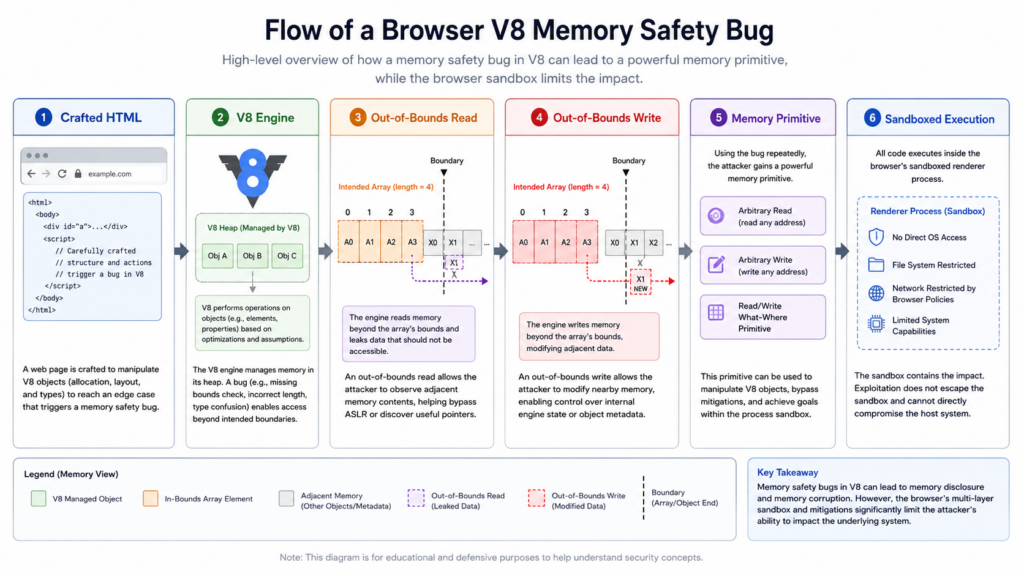
An out-of-bounds read occurs when code reads memory outside the region it is supposed to access. In a JavaScript engine, that may matter even if the first symptom looks like a crash. A read primitive can reveal memory layout, object addresses, pointer-like values, heap state, or data that helps defeat address randomization or make a later corruption step reliable.
An out-of-bounds write is usually more directly dangerous. If an attacker can influence what is written and where it lands, the bug may corrupt object metadata, array lengths, backing store references, maps, internal fields, function-related structures, or other data structures. In real browser exploitation, the attacker’s goal is rarely “cause a crash.” The goal is to turn a memory safety violation into stable read/write primitives, then into a controlled execution path inside the renderer or V8 sandbox, and sometimes into a larger chain.
A simplified defensive model looks like this:
1. Attacker-controlled web content reaches a vulnerable V8 code path.
2. V8 performs a memory access outside the intended object or buffer boundary.
3. The bug produces an out-of-bounds read, write, or both.
4. The attacker attempts to convert the fault into a stable memory primitive.
5. The primitive may support code execution inside the sandbox.
6. A separate bug or design weakness may be required for full host compromise.
The following toy code is not related to the Chrome codebase and is not a proof of concept for CVE-2026-11645. It only illustrates the class of mistake defenders should understand when they see the phrase “out-of-bounds.”
// Educational example only.
// This is not Chrome code and not a CVE-2026-11645 proof of concept.

#include <stddef.h>
#include <stdint.h>

int read_item(const uint32_t *items, size_t count, size_t index, uint32_t *out) {
    if (items == NULL || out == NULL) {
        return -1;
    }

    // Correct check: index must be strictly less than count.
    if (index >= count) {
        return -2;
    }

    *out = items[index];
    return 0;
}
The point is not that Chrome contains a simple check like this. It almost certainly does not. Browser engine bugs usually involve far more complex state. The point is that “bounds” are security-critical whenever attacker-controlled input can influence indexing, object layout, buffer length, optimization assumptions, or lifetime. In a JIT engine, the most interesting bounds mistakes may occur after layers of speculation, lowering, optimization, deoptimization, garbage collection interaction, or object representation changes.
The sandbox question, V8 Sandbox, renderer sandbox, and Site Isolation
Browser security has several sandbox concepts that are easy to blur together. CVE-2026-11645 is described as allowing code execution inside a sandbox, but that does not mean every sandbox layer is the same.
The V8 Sandbox is a software-based mechanism designed to prevent memory corruption in V8 from affecting other memory in the same process. V8’s own attacker model assumes that an attacker can read and write arbitrarily inside the V8 Sandbox, and the goal is to prevent memory corruption outside that sandbox. V8’s blog also says the sandbox has been enabled by default on 64-bit Chrome for Android, ChromeOS, Linux, macOS, and Windows for roughly two years, and that recent V8 exploits have already had to work past the sandbox. (V8)
That matters for CVE-2026-11645 because modern exploitation is not a straight line from “V8 bug” to “native code everywhere.” A memory corruption primitive may first be constrained by the V8 Sandbox. The attacker then needs a way to affect trusted structures, code pointers, external pointers, object references, or other attack surfaces that cross the boundary. The V8 source tree documents additional mechanisms such as external pointer tables, code pointer sandboxing, and trusted space for security-sensitive metadata. (chromium.googlesource.com)
Chrome also uses process-level sandboxing and Site Isolation. Chromium’s Site Isolation design describes the effort to use sandboxed renderer processes as security boundaries between websites, even in the presence of renderer vulnerabilities. Its goal is to limit a renderer process to pages from at most one site, allowing the browser process to restrict access to cookies and other resources based on which sites require dedicated processes. (Chromium)
For defenders, the right mental model is layered:
| Katman | What it tries to protect | What CVE-2026-11645 may challenge |
|---|---|---|
| V8 internal safety | Correct handling of JavaScript and WebAssembly objects, memory, pointers, and generated code | The bug is in V8 and involves out-of-bounds memory access. |
| V8 Sandbox | Prevent V8 memory corruption from affecting memory outside the V8 sandbox region | A serious exploit may need to work within or around this boundary. |
| Renderer process sandbox | Limit what compromised renderer code can do to the OS and browser resources | Public impact says code execution is inside a sandbox, not full host compromise. |
| Site Isolation | Keep sites separated across renderer processes and mediate cross-site data access | A renderer compromise may still be constrained by origin and process boundaries. |
| OS and endpoint controls | Limit persistence, payload execution, credential theft, and lateral movement | A complete intrusion may require additional steps beyond CVE-2026-11645. |
This layered view prevents two bad conclusions. One bad conclusion is “sandboxed means safe.” The other is “any V8 bug means instant full device compromise.” The real answer is more useful: CVE-2026-11645 is a credible entry-point bug in a heavily attacked browser component, and the immediate job is to remove exposure before exploit details spread.
A realistic attack path without inventing private exploit details
The public record says crafted HTML can reach the vulnerable surface. It does not say how attackers are delivering that HTML. It does not identify a campaign, malware family, victim sector, exploit kit, or sandbox escape. Until those details are public and verified, the safest way to write and respond is to model plausible classes of exposure.
A browser zero-day like CVE-2026-11645 may be reached through several web content paths:
| Delivery surface | Neden önemli | What defenders can check |
|---|---|---|
| Compromised legitimate website | Users may trust the domain and click naturally. | Web proxy logs, DNS logs, recent browsing to newly modified pages, crash correlation. |
| Malicious advertising or traffic distribution | The browser may process attacker content without an obvious phishing click. | Ad-heavy browsing patterns, endpoint web reputation logs, renderer crash spikes. |
| Phishing page | A targeted user may be lured into opening crafted content. | Mail security logs, URL click telemetry, identity events after browser activity. |
| SaaS or collaboration content | Embedded previews, HTML content, and third-party scripts can create complex trust chains. | Access logs, unusual session behavior, suspicious file preview patterns. |
| Internal web app or dashboard | A compromised internal app may become a trusted delivery surface. | Internal web server logs, recent changes, stored XSS reports, unusual HTML injection. |
| Browser extension context | Extensions can process web content and sensitive browser data. | Extension inventory, recent extension updates, policy deviations, new permissions. |
| Headless browser automation | CI, scraping, testing, and rendering services often process untrusted URLs automatically. | Container image versions, Playwright/Puppeteer browser paths, queued URLs, crash logs. |
A defensible class-level chain looks like this:
Initial contact:
  A user or automated browser renders attacker-controlled HTML.

Trigger:
  JavaScript, WebAssembly, or related web content reaches the vulnerable V8 path.

Memory corruption:
  The out-of-bounds read/write produces a useful crash, leak, or memory primitive.

Sandboxed execution:
  The attacker gains execution or meaningful control inside the browser sandbox.

Follow-on options:
  - Steal data visible to the compromised browser context
  - Manipulate authenticated web sessions
  - Abuse extensions or browser APIs available in context
  - Chain with another browser, OS, or driver vulnerability
  - Stage additional payloads if a sandbox escape is available
Only the first four steps are broadly aligned with the public description. The follow-on options are risk modeling, not confirmed CVE-2026-11645 campaign facts.
Why enterprise exposure is broader than “Chrome on laptops”
A common patch response is to ask, “Are employee browsers updated?” That is necessary but incomplete. Chrome and Chromium components show up in places that are not obvious from a desktop software inventory dashboard.
| Asset class | Why it is often missed | What to verify |
|---|---|---|
| Managed Chrome on Windows | Users may not relaunch, updates may be pinned, Google Update may be disabled. | Installed version, running process version, update policy, relaunch state. |
| Chrome on macOS | App bundle may update while old processes keep running. | Bundle version and active process version after restart. |
| Chrome on Linux | Package channels vary across apt, rpm, snap, flatpak, and unmanaged downloads. | Package manager version, binary path, active process path. |
| Chromium-based browsers | Edge, Brave, Opera, Vivaldi, and others may ship separate Chromium builds. | Vendor-specific advisories and installed versions. |
| Electron apps | The app may embed an older Chromium engine independent of system Chrome. | Electron version, Chromium version, app release notes, vendor patch status. |
| CEF embedded apps | Thick-client apps may embed Chromium through Chromium Embedded Framework. | Application vendor build, CEF version, release cadence. |
| Headless Chrome in CI | Docker images and test runners may freeze browser versions for months. | Image tags, binary version inside container, base image rebuild date. |
| Puppeteer and Playwright | The project may download and pin a browser binary. | Browser cache path, lockfiles, CI artifacts, version output. |
| VDI and golden images | Images can be patched slowly, then cloned widely. | Master image version and every running session. |
| Kiosk systems | Long uptime and locked-down UI often hide stale browser versions. | Remote inventory and forced maintenance windows. |
| Security tools and renderers | URL scanners, screenshot tools, report renderers, and preview systems may run Chromium. | Tool documentation, container inventory, SBOMs, runtime checks. |
| BYOD and unmanaged contractors | No guaranteed MDM visibility. | Conditional access policy, browser version posture, access restrictions. |
CVE-2026-11645 should be treated as a browser runtime exposure problem, not only a desktop Chrome package problem. Any component that renders untrusted HTML through a vulnerable Chromium/V8 build deserves attention.
Patch versions and why “installed” is not the same as “protected”
Google’s fixed Stable versions are clear for desktop Chrome: 149.0.7827.102/.103 for Windows and macOS and 149.0.7827.102 for Linux. The NVD record lists Google Chrome versions up to, but excluding, 149.0.7827.103 in its affected configuration data, and Google’s release note lists the platform-specific rollout versions. (Chrome Releases)
Security teams should not stop at installed package inventory. Browser updates often require restart. A user can have a patched app bundle on disk while an old browser process continues to run. A VDI session can keep old processes alive. A long-running headless service can keep an outdated binary in memory. A CI worker can run an old cached browser binary even if the host package was updated.
A useful patch ticket for CVE-2026-11645 should require four kinds of evidence:
| Evidence type | Örnek | Neden önemli |
|---|---|---|
| Installed version | Chrome package or app bundle reports 149.0.7827.102/.103 or later. | Shows the update reached disk. |
| Running version | Active browser process is the fixed version. | Shows users are no longer running stale vulnerable code. |
| Update policy | Auto-updates allowed, no stale pin, no disabled update override. | Prevents regression into future exposure. |
| Non-browser Chromium inventory | Electron, CEF, headless Chrome, CI images checked separately. | Finds hidden vulnerable runtimes. |
Defensive version checks for Windows, macOS, and Linux
The following commands are defensive inventory examples. They do not test exploitability and should be run only on systems you administer or are authorized to assess.
Windows PowerShell
# Check common Chrome install locations and currently running Chrome processes.
# Run in an elevated PowerShell session when collecting enterprise evidence.

$paths = @(
  "$Env:ProgramFiles\Google\Chrome\Application\chrome.exe",
  "$Env:ProgramFiles(x86)\Google\Chrome\Application\chrome.exe",
  "$Env:LocalAppData\Google\Chrome\Application\chrome.exe"
)

Write-Host "Installed Chrome binaries:"
foreach ($path in $paths) {
    if (Test-Path $path) {
        $item = Get-Item $path
        [PSCustomObject]@{
            Path = $path
            Version = $item.VersionInfo.ProductVersion
        }
    }
}

Write-Host "`nRunning Chrome processes:"
Get-Process chrome -ErrorAction SilentlyContinue | ForEach-Object {
    try {
        $file = $_.MainModule.FileName
        $version = (Get-Item $file).VersionInfo.ProductVersion
        [PSCustomObject]@{
            PID = $_.Id
            Path = $file
            Version = $version
        }
    } catch {
        [PSCustomObject]@{
            PID = $_.Id
            Path = "Access denied or unavailable"
            Version = "Unknown"
        }
    }
}
What this proves: it identifies Chrome binaries in common locations and reports versions for currently running Chrome processes when permissions allow.
What it does not prove: it does not identify every Chromium-based browser, every Electron app, every CEF application, or every browser binary cached by developer tools.
macOS shell
#!/usr/bin/env bash
set -euo pipefail

APP="/Applications/Google Chrome.app"

echo "Installed Google Chrome app version:"
if [[ -d "$APP" ]]; then
  /usr/libexec/PlistBuddy -c "Print :CFBundleShortVersionString" \
    "$APP/Contents/Info.plist"
else
  echo "Google Chrome.app not found in /Applications"
fi

echo
echo "Running Chrome process paths:"
pgrep -fl "Google Chrome" || true

echo
echo "Chrome binary version from app bundle:"
if [[ -x "$APP/Contents/MacOS/Google Chrome" ]]; then
  "$APP/Contents/MacOS/Google Chrome" --version || true
fi
On macOS, a clean validation workflow should close and relaunch Chrome after update, then re-run version checks. For managed fleets, combine this with MDM inventory and a relaunch requirement.
Linux shell
#!/usr/bin/env bash
set -euo pipefail

echo "Google Chrome version if installed:"
command -v google-chrome >/dev/null 2>&1 && google-chrome --version || true
command -v google-chrome-stable >/dev/null 2>&1 && google-chrome-stable --version || true

echo
echo "Chromium version if installed:"
command -v chromium >/dev/null 2>&1 && chromium --version || true
command -v chromium-browser >/dev/null 2>&1 && chromium-browser --version || true

echo
echo "Snap and Flatpak browser packages:"
command -v snap >/dev/null 2>&1 && snap list | grep -Ei 'chrome|chromium|browser' || true
command -v flatpak >/dev/null 2>&1 && flatpak list | grep -Ei 'chrome|chromium|browser' || true

echo
echo "Running Chrome or Chromium processes:"
ps -eo pid,comm,args | grep -Ei 'chrome|chromium' | grep -v grep || true
Linux environments vary. A developer workstation may use Google’s package repository, a distribution Chromium package, Flatpak, Snap, or a browser binary downloaded by a test framework. Treat the binary actually used to render untrusted content as the asset.
Cross-platform software inventory with osquery
osquery can help normalize inventory, but it still depends on what tables and visibility are available on your managed endpoints.
-- Installed Chrome-like applications.
SELECT name, version, path
FROM apps
WHERE lower(name) LIKE '%chrome%'
   OR lower(name) LIKE '%chromium%'
   OR lower(name) LIKE '%brave%'
   OR lower(name) LIKE '%edge%'
   OR lower(name) LIKE '%opera%'
   OR lower(name) LIKE '%vivaldi%';
For running process evidence:
-- Running browser-like processes with paths.
SELECT pid, name, path, cmdline
FROM processes
WHERE lower(name) LIKE '%chrome%'
   OR lower(name) LIKE '%chromium%'
   OR lower(name) LIKE '%brave%'
   OR lower(name) LIKE '%edge%'
   OR lower(name) LIKE '%opera%'
   OR lower(name) LIKE '%vivaldi%';
For CVE-2026-11645, use osquery results as triage, not as the only proof. Version strings for Chromium derivatives may not map cleanly to Chrome’s exact fixed version. Vendor advisories and embedded Chromium versions still matter.
Example SIEM logic for version triage
The exact query depends on your endpoint telemetry schema. The following KQL-style example shows the intent: find Chrome versions below the fixed threshold, then separate installed software evidence from running process evidence.
// Example only. Adapt field names to your EDR or inventory schema.
DeviceTvmSoftwareInventory
| where SoftwareName has_any ("google chrome", "chrome")
| extend VersionParts = split(SoftwareVersion, ".")
| extend Major = toint(VersionParts[0]),
         Build = toint(VersionParts[2]),
         Patch = toint(VersionParts[3])
| where Major < 149
   or (Major == 149 and Build < 7827)
   or (Major == 149 and Build == 7827 and Patch < 102)
| project DeviceName, SoftwareName, SoftwareVersion, DeviceId, OSPlatform, LastSeenTime
| order by LastSeenTime desc
For macOS, be careful with the 149.0.7827.103 reference. Google’s release note lists 149.0.7827.102/.103 for Windows and macOS, and NVD describes versions before 149.0.7827.103 as affected. In practice, enterprise policy should target the latest vendor-available stable build for the platform and verify against the vendor channel, not manually hard-code one threshold forever. (Chrome Releases)
Running process evidence might look like this:
DeviceProcessEvents
| where FileName in~ ("chrome.exe", "Google Chrome", "google-chrome", "chromium")
| summarize LastSeen=max(Timestamp),
            Paths=make_set(FolderPath, 10),
            CommandLines=make_set(ProcessCommandLine, 5)
  by DeviceName, FileName, SHA256
| order by LastSeen desc
This does not give you version by itself unless your EDR enriches file metadata. It does tell you which devices still have active browser processes and which paths need deeper inspection.
Headless Chrome, Puppeteer, Playwright, and CI images
CVE-2026-11645 is triggered through crafted HTML. That should make CI and automation teams pay attention. Headless Chrome often processes untrusted or semi-trusted web pages in testing, scraping, PDF generation, screenshotting, link previewing, web monitoring, malware detonation, and report rendering.
Check browser versions inside containers, not only on the host:
# Example: inspect Chrome or Chromium inside a container image.
docker run --rm your-image:tag sh -lc '
  which google-chrome || true
  which chromium || true
  google-chrome --version 2>/dev/null || true
  chromium --version 2>/dev/null || true
'
For Playwright:
# Show Playwright-installed browsers and paths.
npx playwright --version
npx playwright install --dry-run
find "$HOME/.cache/ms-playwright" -maxdepth 3 -type f \
  \( -name chrome -o -name chromium -o -name "Google Chrome" \) 2>/dev/null | head
For Puppeteer projects:
# Inspect package versions and browser cache paths.
node -e "const p=require('puppeteer/package.json'); console.log(p.version)"
node - <<'NODE'
const puppeteer = require('puppeteer');
(async () => {
  const browser = await puppeteer.launch({ headless: true });
  console.log(await browser.version());
  await browser.close();
})();
NODE
If a service renders attacker-supplied URLs, treat its browser as exposed even if no human user is involved. In some environments, headless browser systems are more valuable than employee desktops because they sit near internal networks, document stores, screenshot pipelines, customer report generation, or security automation.
Chrome Enterprise update controls that matter during a zero-day
Google’s Chrome Enterprise documentation recommends allowing updates and warns that turning off browser updates prevents software fixes and security patches from being applied, exposing users to crashes and security vulnerabilities. The same documentation says pinning Chrome to a specific version should be temporary, such as while testing a new version, because pinned systems can fall behind on critical security updates. It also notes that full version syntax may be used when a critical security fix is needed and the Google Update ramp rate does not meet business needs. (Google Help)
For CVE-2026-11645, administrators should specifically check:
| Kontrol | Good state | Risky state |
|---|---|---|
| Update policy override | Updates allowed. | Updates disabled or manual only. |
| Target version prefix | Not pinned, or temporarily pinned to a fixed version during emergency deployment. | Pinned to an old milestone. |
| Release channel | Stable or a channel with a clear security update path. | Extended Stable or custom channel without clear emergency validation. |
| Relaunch policy | Users are required or strongly prompted to relaunch after update. | Users can keep old processes alive indefinitely. |
| VDI image process | Golden image and running sessions both updated. | Image updated but old sessions continue. |
| Developer browser cache | CI and automation browser caches refreshed. | Cached browser binary remains vulnerable. |
A zero-day patch is not done when the package manager says “updated.” It is done when every browser process that can render untrusted content has been replaced by a fixed version or removed from service.
Detection without a public exploit
When a browser zero-day is fresh, defenders often ask for IoCs. Sometimes there are none in public. Sometimes attackers used the bug in highly targeted operations. Sometimes the exploit page is gone before logs are reviewed. Sometimes crash telemetry is not available to enterprise defenders. That does not mean detection is impossible; it means detection should be framed around evidence quality.
There are three useful signal classes.
First, asset-state signals. These are the strongest for immediate risk reduction. Find vulnerable versions, stale running processes, disabled updates, pinned versions, and unmanaged Chromium runtimes. These signals do not prove compromise, but they prove exposure.
Second, browser-behavior signals. Look for unusual renderer crashes, crash bursts after visits to specific domains, browser child process anomalies, unexpected executable launches from browser context, suspicious file writes, memory corruption alerts, or network egress shortly after browser instability. These signals may suggest exploitation but are rarely conclusive alone.
Third, identity and session signals. Browser exploitation often becomes valuable when it touches authenticated sessions. Watch for suspicious sign-ins, impossible travel, new device sessions, unusual OAuth grants, new MFA prompts, session replay indicators, extension installation changes, and activity bursts shortly after suspicious browsing events.
| Sinyal | What it can support | What it cannot prove alone |
|---|---|---|
| Chrome version below fixed build | The endpoint remains exposed. | That exploitation occurred. |
| Old Chrome process still running | Patch did not fully take effect. | That the process was targeted. |
| Renderer crash near suspicious URL visit | Possible exploit attempt or instability. | Successful code execution. |
| Browser spawns unusual process | Possible post-exploitation behavior. | That CVE-2026-11645 was the initial vector. |
| Identity anomaly after browsing event | Possible session theft or account abuse. | Browser memory corruption as root cause. |
| EDR memory corruption alert | Potential exploit activity. | Specific CVE attribution without additional evidence. |
A practical detection workflow for CVE-2026-11645 starts with exposure and then layers behavior. Do not wait for perfect attribution before patching. Do not claim compromise from a version string alone.
Response workflow for security teams
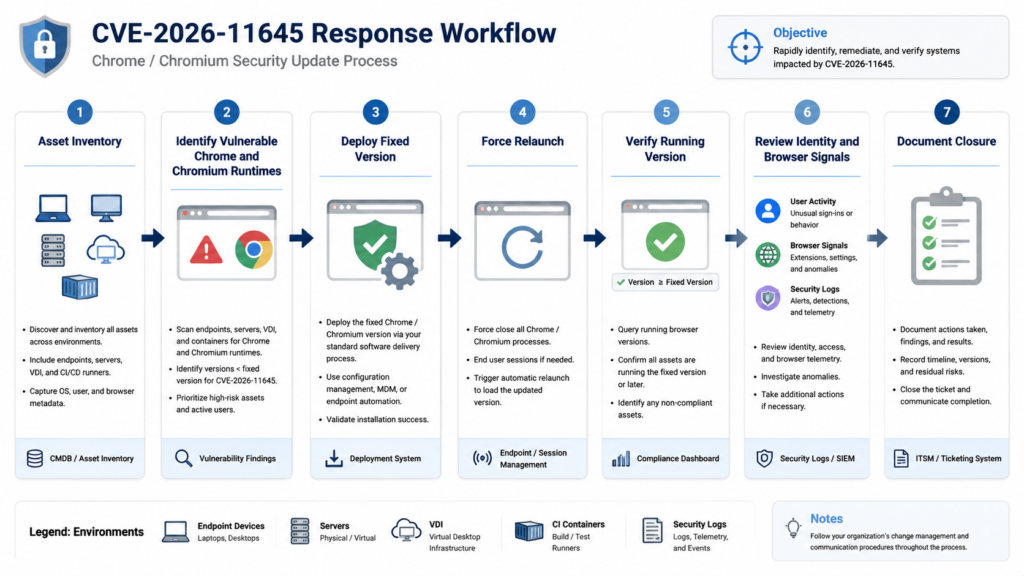
The fastest useful response is not a long exploit analysis thread. It is a controlled patch-and-validate operation with evidence.
- Mark the issue as an emergency browser zero-day because Google confirmed in-the-wild exploitation and CISA added it to KEV.
- Pull a current inventory of Chrome, Chromium-based browsers, Electron apps, CEF apps, headless Chrome, CI images, VDI images, and kiosk systems.
- Identify devices and services below the fixed versions.
- Remove update blocks, stale pins, and broken update policies.
- Push the fixed Stable build or later.
- Force or require relaunch where possible.
- Verify running process versions, not only installed versions.
- Review high-risk user groups for suspicious browser crashes, unusual browsing, and identity events.
- Restrict access for devices that cannot update before the deadline.
- Capture evidence for audit, including before/after version state, policy changes, exceptions, and residual risk.
In authorized security programs, this is also where AI-assisted validation can be useful if it stays inside scope and produces evidence rather than guesses. A controlled workflow can help map assets, verify versions, collect command output, track exceptions, and convert remediation evidence into a report. Penligent, an AI-powered penetration testing platform, positions its workflow around controlled agentic actions, scope locking, tool execution, verification, and reporting, which is relevant to this kind of post-advisory validation when used only against authorized assets. (Penligent)
For teams that want a narrower vulnerability-specific companion, Penligent has also published a CVE-2026-11645 page that separates confirmed public facts from inference and emphasizes browser patch verification rather than exploit reproduction. That distinction is especially important for a Chrome zero-day where bug details are intentionally restricted during rollout. (Penligent)
Remediation priorities by environment
Not every asset should be handled with the same operational sequence. The patch target is simple, but rollout constraints differ.
| Environment | Öncelik | Önerilen eylem | Yaygın başarısızlık |
|---|---|---|---|
| Executive and high-risk users | En yüksek | Force update and relaunch, review identity logs, verify browser extensions. | User postpones restart. |
| Security, finance, legal, and engineering | En yüksek | Patch immediately and inspect recent browser crashes or suspicious sessions. | Sensitive SaaS sessions remain active in old browser process. |
| Managed Windows fleet | Yüksek | Use Chrome Enterprise or endpoint tools to deploy fixed build and enforce relaunch. | Version pin blocks update. |
| macOS fleet | Yüksek | Update app bundle and require browser restart. | App updated on disk, old process remains. |
| Linux developer workstations | Yüksek | Check package source and manually update unmanaged binaries. | Multiple Chromium binaries exist. |
| VDI and remote desktop | Yüksek | Patch image and terminate or recycle stale sessions. | Golden image fixed, running sessions vulnerable. |
| CI and headless browser services | Yüksek | Rebuild images and clear browser caches. | Test framework uses cached browser. |
| Electron or CEF apps | Orta ila yüksek | Track vendor updates and embedded Chromium version. | Teams assume system Chrome patch fixes embedded runtime. |
| Kiosks and shared devices | Orta ila yüksek | Schedule maintenance and verify remote version. | Long uptime prevents update from taking effect. |
| BYOD | Conditional | Require minimum browser posture before accessing sensitive apps. | No inventory or enforcement path. |
Temporary mitigations may be necessary where immediate patching is impossible. Those can include restricting access to sensitive apps from unpatched browsers, isolating high-risk devices, disabling risky automation that renders untrusted URLs, limiting external browsing on exposed kiosks, or routing vulnerable systems through stricter web filtering. These are stopgaps. They should not become a substitute for updating.
Related Chrome CVEs that explain the pattern
CVE-2026-11645 makes more sense when viewed alongside other actively exploited Chrome issues from the same year. The point is not to create a list of scary IDs. The point is to understand how browser exploit surfaces repeat: crafted web content, memory corruption, renderer compromise, sandbox boundaries, and urgent patch windows.
| CVE | Bileşen | Public weakness and impact | Why it is relevant |
|---|---|---|---|
| CVE-2026-3910 | V8 | NVD describes an inappropriate implementation in V8 before Chrome 146.0.7680.75 that allowed remote code execution inside a sandbox through a crafted HTML page. Google’s March 12 release says an exploit existed in the wild. (nvd.nist.gov) | It is another 2026 V8 issue with crafted HTML and sandboxed code execution, reinforcing V8 as a recurring high-value target. |
| CVE-2026-5281 | Dawn/WebGPU | NVD describes a use-after-free in Dawn before Chrome 146.0.7680.178 that allowed a remote attacker who had compromised the renderer process to execute arbitrary code through crafted HTML. CISA KEV listed a due date of April 15, 2026. (nvd.nist.gov) | It shows that some browser bugs are explicitly multi-stage: the attacker first needs renderer compromise, then uses another component. |
| CVE-2026-2441 | CSS | Public reporting identifies it as an exploited Chrome zero-day in CSSFontFeatureValuesMap addressed earlier in 2026. (BleepingComputer) | It shows that crafted web content can reach many browser subsystems, not only V8. |
| CVE-2026-3909 | Skia | Public reporting links it to an out-of-bounds write in Skia, another browser component exposed through rendering paths. (BleepingComputer) | It reinforces that graphics and rendering libraries can be browser entry points alongside JavaScript engines. |
| CVE-2026-11645 | V8 | Out-of-bounds read/write in V8 before Chrome 149.0.7827.103, with in-the-wild exploitation and CISA KEV listing. (nvd.nist.gov) | It is the current actively exploited V8 memory corruption issue that defenders must remove from their fleets. |
The larger pattern is straightforward: browsers are among the most exposed client-side attack surfaces because they continuously process attacker-controlled content. A single zero-day may not equal a full intrusion, but it can provide the first reliable foothold. That is why response speed, relaunch enforcement, and hidden Chromium inventory matter.
What not to do
Do not wait for a public proof of concept. For an actively exploited Chrome zero-day, a public PoC is more useful to late attackers than to most defenders. The correct first move is patching and validation.
Do not run random exploit code against production browsers. It is unnecessary, risky, and often unauthorized. Use version verification, policy inspection, crash review, and controlled lab analysis if needed.
Do not assume automatic updates completed. Chrome may update automatically, but old processes can remain alive. Enterprise policies can block updates. VDI sessions can persist. CI images can be stale.
Do not assume system Chrome fixes Electron or CEF. Embedded Chromium runtimes have their own release and patch cycles.
Do not overstate the public facts. There is no verified public basis, from the sources reviewed here, to name an attacker, campaign, payload, sandbox escape, victim industry, or complete exploit chain for CVE-2026-11645.
Do not understate the issue because the impact says sandboxed code execution. In browser security, sandboxed execution can be a meaningful compromise stage and a launch point for chained exploitation or session abuse.
Operational checklist
Use this checklist to turn the advisory into action.
| Task | Sahibi | Kanıtlar |
|---|---|---|
| Confirm Chrome Stable fixed versions for each platform | Endpoint engineering | Vendor advisory attached to ticket |
| Pull Chrome and Chromium-based browser inventory | IT or EDR team | Device list with version and last seen |
| Identify running old Chrome processes | EDR or endpoint team | Process telemetry or script output |
| Remove update blocks and stale pins | Endpoint engineering | Policy diff or MDM/GPO screenshot |
| Force update and relaunch | IT operations | Deployment logs and process restart evidence |
| Check headless Chrome and CI images | DevOps | Image rebuild logs and browser version output |
| Check Electron and CEF apps | App owners | Vendor versions, SBOM, or release notes |
| Review high-risk identity activity | SOC or IAM team | Sign-in anomaly review |
| Track exceptions | Security governance | Exception register with expiration |
| Produce closure report | Security lead | Before/after inventory and residual risk statement |
A good closure statement should be specific: “All managed Chrome desktop installations are at or above the fixed Stable version, no old chrome processes were observed after relaunch enforcement, CI images using headless Chromium were rebuilt, Electron apps were reviewed separately, and remaining exceptions are isolated or access-restricted until vendor updates are available.”
SSS
What is CVE-2026-11645?
- CVE-2026-11645 is a Google Chrome vulnerability in V8, Chrome’s JavaScript and WebAssembly engine.
- Google describes it as high-severity out-of-bounds memory access in V8.
- NVD describes it as out-of-bounds read and write in V8 in Google Chrome before 149.0.7827.103.
- The public trigger surface is a crafted HTML page.
- The stated impact is arbitrary code execution inside a sandbox. (nvd.nist.gov)
Is CVE-2026-11645 actively exploited?
- Yes. Google says an exploit for CVE-2026-11645 exists in the wild.
- CISA added it to the Known Exploited Vulnerabilities catalog with a required action date of June 23, 2026.
- Public sources do not yet confirm the attacker, victim set, payload, delivery infrastructure, or complete exploit chain.
- The lack of public exploit details should not delay patching. (Chrome Releases)
What Chrome version fixes CVE-2026-11645?
- Google’s desktop Stable Channel update lists 149.0.7827.102/.103 for Windows and macOS.
- Google lists 149.0.7827.102 for Linux.
- NVD describes Google Chrome versions before 149.0.7827.103 as affected.
- Use the latest vendor-available Stable build for the platform and verify the browser has restarted into the fixed version. (Chrome Releases)
Does “inside a sandbox” mean CVE-2026-11645 is not serious?
- No. Sandboxed code execution is still serious because the browser context can contain authenticated sessions, sensitive page data, extension interactions, and enterprise workflow access.
- It does mean public information does not prove full operating system compromise from CVE-2026-11645 alone.
- A full host compromise may require another vulnerability or escape path.
- Response should remove exposure first, then investigate whether suspicious browser or identity activity occurred.
Do Chromium-based browsers and Electron apps need separate checks?
- Yes. Google Chrome’s update does not automatically update every Chromium-based browser or embedded Chromium runtime.
- Microsoft Edge, Brave, Opera, Vivaldi, Electron apps, CEF apps, and headless browser bundles can carry different Chromium versions and patch timelines.
- Check each vendor’s update channel and the actual Chromium version used by the application.
- Pay special attention to CI images, PDF renderers, screenshot services, and apps that process untrusted URLs.
How can defenders verify exposure without a public PoC?
- Use version and runtime verification, not exploit testing.
- Confirm installed Chrome versions, active process versions, update policies, and relaunch state.
- Search for hidden Chromium runtimes in CI, containers, Electron apps, and VDI images.
- Review browser crash spikes, suspicious child processes, web proxy logs, and identity anomalies as supporting signals.
- Do not run untrusted exploit code in production.
What should an enterprise do if some devices cannot update immediately?
- Restrict access from unpatched browsers to sensitive applications.
- Isolate high-risk devices or move them to a controlled network segment.
- Disable or pause services that render untrusted HTML through vulnerable headless browsers.
- Apply stricter web filtering as a temporary control.
- Track every exception with an owner, reason, compensating control, and expiration date.
- Complete the actual browser or runtime update as soon as possible.
Closing judgment
CVE-2026-11645 is exactly the kind of browser zero-day that punishes shallow patch management. The confirmed public details are limited, but they are enough: V8, out-of-bounds read/write, crafted HTML, sandboxed code execution, in-the-wild exploitation, fixed Chrome versions, and CISA KEV urgency. The right response is not to wait for exploit write-ups. It is to verify every browser runtime that processes untrusted web content, force fixed versions into use, restart stale processes, review high-risk session activity, and document the evidence.
The hardest part is not understanding that Chrome should be updated. The hard part is proving that every real Chrome, Chromium, Electron, CEF, and headless browser instance in your environment has actually stopped running vulnerable code.


 Turkish
  English
  German
  French
  Spanish
  Portuguese
  Japanese
  Korean
  Hindi
Hindi  Arabic
  Hebrew