
FortiBleed should not be handled like a normal vulnerability headline. The most important fact is also the easiest one to miss: there is no standalone FortiBleed CVE.
As of June 20, 2026, FortiBleed is best understood as a large Fortinet credential exposure and credential-harvesting incident affecting Fortinet and FortiGate environments, especially internet-facing firewall, VPN, and management surfaces. Fortinet’s own PSIRT analysis describes it as a credential-harvesting campaign and says the company’s initial assessment points to threat actors reusing credentials from previous incidents and brute-forcing devices with weak password hygiene and no multi-factor authentication. Fortinet also states that the activity is not a new Fortinet vulnerability and is not related to a recent incident or advisory. (Fortinet)
That distinction changes the response. A new CVE usually pushes defenders toward version checks, patch windows, compensating controls, and exploit detection. FortiBleed pushes defenders toward something harsher: assume credentials may already be compromised, assume some devices may have been touched before the public discussion, and treat patching as only one part of the recovery.
The phrase “FortiBleed CVE” is still understandable. Security teams often search that way because the incident sits near a cluster of real Fortinet CVEs, including CVE-2026-24858, CVE-2025-59718, and CVE-2025-59719. Those CVEs matter. They explain why FortiCloud SSO, firewall management planes, exported configurations, and credential rotation are central to the story. But calling FortiBleed itself a CVE would blur the most important operational point. This is not just a software flaw to patch. It is a credential and trust problem around perimeter infrastructure.
What happened in the FortiBleed incident
Public reporting began around a dataset described as containing Fortinet and FortiGate VPN credentials. BleepingComputer reported that security researcher Bob Diachenko found exposed data tied to 73,932 firewall URLs, with Hudson Rock later analyzing the dataset as covering 194 countries and 21,632 unique domains. The same reporting said the dataset contained usernames, email addresses, plaintext passwords, and contextual comments about organizations. (BleepingComputer)
CISA issued its own alert on June 18, 2026, urging organizations to harden Fortinet devices after reports of credential exposure. CISA’s alert described FortiBleed as activity involving leaked credentials associated with approximately 74,000 Fortinet devices. (CISA) Reuters also reported Fortinet’s statement that malicious actors were using data from previous incidents and brute-forcing credentials, and that the activity was not tied to a recent incident or advisory. (Reuters)
The exact number varies by source. That is normal in credential-leak reporting because different teams count different things: firewall URLs, unique IPs, domains, active devices, confirmed credentials, or potential victims. A careful reading should avoid treating a single number as the final truth.
| Source or framing | Reported scale | What the number likely represents | Neden önemli |
|---|---|---|---|
| BleepingComputer and Hudson Rock reporting | 73,932 firewall URLs, 194 countries, 21,632 domains | A dataset of Fortinet/FortiGate VPN or firewall URLs and associated credentials | Gives defenders a concrete sense of scale without proving every entry is still valid |
| CISA alert | Approximately 74,000 Fortinet devices | Government warning based on credential exposure reporting | Confirms the incident is serious enough for broad hardening guidance |
| Bitsight | More than 73,000 internet-facing FortiGate firewalls | Exposed or verified administrator credentials associated with FortiGate devices | Reinforces the perimeter-device risk, especially where management or VPN surfaces remain reachable |
| SOCRadar | 86,644 confirmed working credentials | A higher-confidence credential-oriented view, according to SOCRadar’s own reporting | Shows why defenders should not wait for a perfect victim list before acting |
| Fortinet PSIRT | No single public victim count in the visible guidance | Vendor investigation and customer notification process | The most important vendor position is that this is not a new Fortinet vulnerability |
Bitsight described FortiBleed as a credential compromise campaign involving more than 73,000 FortiGate firewalls, while SOCRadar used a higher figure and described confirmed working credentials. Arctic Wolf framed the activity as a large-scale credential compromise campaign affecting Fortinet FortiGate devices across 194 countries. (Bitsight)
The safest interpretation is not “exactly 73,932 devices are compromised” or “exactly 86,644 devices are compromised.” The safer interpretation is that a large credential dataset exists, multiple credible sources consider it significant, and Fortinet customers should treat exposed FortiGate and VPN credentials as emergency material until proven otherwise.
Why FortiBleed is not a new CVE
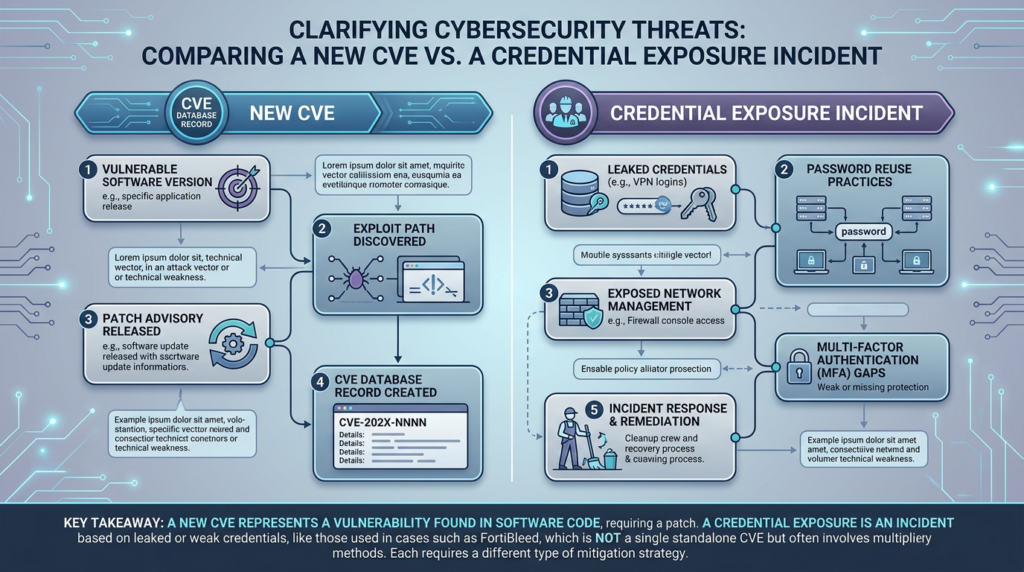
A CVE describes a specific publicly tracked software vulnerability. FortiBleed is an incident label. It describes a public credential exposure and credential-harvesting situation involving Fortinet devices. That label may be useful for communication, but it does not by itself define a flaw in FortiOS, FortiProxy, FortiWeb, FortiManager, FortiAnalyzer, or FortiGate hardware.
Fortinet’s PSIRT statement is direct: “This is not a new Fortinet vulnerability, and this activity is not related to any recent incident or advisory.” The same notice says Fortinet believes the activity involves credential reuse from previous incidents and brute-force activity against devices with weak password hygiene and no MFA. (Fortinet)
That does not make FortiBleed less serious. It makes it harder. When a new CVE appears, defenders can often build a clean checklist around affected versions and fixed versions. With FortiBleed, the decisive question is not only “What version are we running?” It is also “Were our credentials ever exposed, reused, cracked, harvested, exported, or left valid after a prior incident?”
That is why organizations should not wait for a FortiBleed CVE assignment before acting. If a FortiGate device has internet-facing administration, SSL VPN access, weak or reused credentials, no MFA, old firmware, FortiCloud SSO exposure, or poor log retention, the risk exists even without a new CVE.
The CVEs that belong in the FortiBleed conversation
FortiBleed is not a CVE, but several Fortinet CVEs are relevant because they involve the same class of high-value perimeter control surfaces: FortiCloud SSO, administrative authentication, FortiOS/FortiProxy/FortiWeb management paths, and configuration exposure.
The most important related CVEs are CVE-2026-24858, CVE-2025-59718, and CVE-2025-59719.
CVE-2026-24858 is an authentication bypass using an alternate path or channel. NVD describes it as affecting multiple Fortinet products, including FortiAnalyzer, FortiManager, FortiOS, FortiProxy, and FortiWeb, under conditions where FortiCloud SSO is enabled. The condition allows an attacker with a FortiCloud account and a registered device to log into devices registered to other accounts. NVD also marks CVE-2026-24858 as included in CISA’s Known Exploited Vulnerabilities catalog, with CISA action added on January 27, 2026 and a due date of January 30, 2026. (NVD)
Fortinet’s own advisory for FG-IR-26-060 says the vulnerability was exploited in the wild by two malicious FortiCloud accounts, which were locked out on January 22, 2026. Fortinet also says it disabled FortiCloud SSO on the FortiCloud side on January 26, then re-enabled it on January 27 with restrictions that prevented login from vulnerable device versions. (FortiGuard Labs)
CVE-2025-59718 and CVE-2025-59719 are FortiCloud SSO authentication bypass vulnerabilities tied to improper verification of cryptographic signatures. NVD describes CVE-2025-59718 as affecting FortiOS, FortiProxy, and FortiSwitchManager and allowing an unauthenticated attacker to bypass FortiCloud SSO login via a crafted SAML response message. (NVD) NVD describes CVE-2025-59719 as affecting FortiWeb and allowing a similar FortiCloud SSO login bypass via crafted SAML response messages. (NVD) Fortinet’s advisory FG-IR-25-647 lists both CVE-2025-59718 and CVE-2025-59719, marks the advisory Critical, identifies the attack type as unauthenticated, and marks the issues as known exploited. (FortiGuard Labs)
| Issue | Is this FortiBleed itself | Core condition | Practical impact | Response priority |
|---|---|---|---|---|
| FortiBleed | Hayır | Credential exposure, credential reuse, brute force, and possibly prior compromise paths | Valid admin or VPN credentials may allow direct access even after patching | Rotate credentials, enforce MFA, terminate sessions, review logs, reduce management exposure |
| CVE-2026-24858 | No, but closely related | FortiCloud SSO enabled, attacker has a FortiCloud account and registered device | Cross-account administrative access risk on affected Fortinet products | Upgrade, confirm SSO exposure, review admin logins, check for rogue accounts and configuration exports |
| CVE-2025-59718 | No, but relevant historical context | FortiCloud SSO enabled on affected FortiOS, FortiProxy, FortiSwitchManager versions | Unauthenticated FortiCloud SSO login bypass via crafted SAML response | Patch, disable or restrict FortiCloud SSO if not needed, review configuration export activity |
| CVE-2025-59719 | No, but relevant historical context | FortiCloud SSO enabled on affected FortiWeb versions | FortiWeb FortiCloud SSO login bypass via crafted SAML response | Patch FortiWeb, review admin access, rotate credentials |
| CVE-2024-55591 and CVE-2025-24472 | Not part of FortiBleed, but useful perimeter context | FortiOS or FortiProxy management/authentication paths | Super-admin access risk through alternate path/channel issues | Keep perimeter devices current, restrict management access, hunt for unauthorized admin activity |
| CVE-2018-13379 | Not part of FortiBleed, but historically instructive | FortiOS SSL VPN web portal path traversal on affected versions | Unauthenticated file download from SSL VPN web portal | Retire old versions, assume historical VPN exposure can have long-lived credential consequences |
CVE-2024-55591 and CVE-2025-24472 are useful context because they show that Fortinet perimeter management paths have repeatedly been high-value targets. Fortinet’s advisory FG-IR-24-535 describes an authentication bypass using an alternate path or channel affecting FortiOS and FortiProxy that may allow a remote attacker to gain super-admin privileges through crafted requests to the Node.js websocket module or crafted CSF proxy requests, and it notes reports of exploitation in the wild. (FortiGuard Labs)
CVE-2018-13379 is older, but it remains one of the clearest examples of why SSL VPN exposure can have a long afterlife. NVD describes it as a FortiOS SSL VPN web portal path traversal issue that allowed unauthenticated attackers to download system files through crafted HTTP requests. (NVD) The lesson is not that FortiBleed came from CVE-2018-13379. The lesson is that once edge-device files, sessions, or credentials leak, the operational risk can persist long after the original advisory disappears from daily dashboards.
Why a FortiGate credential leak is worse than an ordinary password leak
A FortiGate credential is not just a login. In many environments, it is a key to the perimeter.
An attacker with valid VPN credentials may be able to enter the internal network through a trusted remote-access path. An attacker with administrator credentials may be able to change firewall policy, create users, export configurations, alter VPN settings, weaken access controls, or prepare persistence. If the FortiGate integrates with AD, LDAP, RADIUS, SAML, or other identity providers, stolen or exposed credentials may also become a bridge into broader identity infrastructure.
The configuration data matters as much as the password. Fortinet configuration files can reveal internal addressing, VPN settings, administrator definitions, authentication integrations, policy intent, object names, certificate references, routes, and security controls. Even where secrets are hashed or encrypted, exported configuration gives an attacker a map. It helps them understand which doors exist, which identities are privileged, which internal ranges matter, and where follow-on attacks might succeed.
That is why Fortinet’s FortiBleed guidance tells customers to validate configurations, review firewall and VPN users, compare to known-good configurations where possible, and pay attention to unrecognized accounts with names such as “forticloud,” “fortiuser,” “fortinet-support,” and “fortinet-tech-support.” (Fortinet)
A normal password reset workflow is not enough. FortiBleed response has to include configuration review, session termination, VPN review, administrator audit, identity-provider review, and log analysis.
Likely abuse paths defenders should model
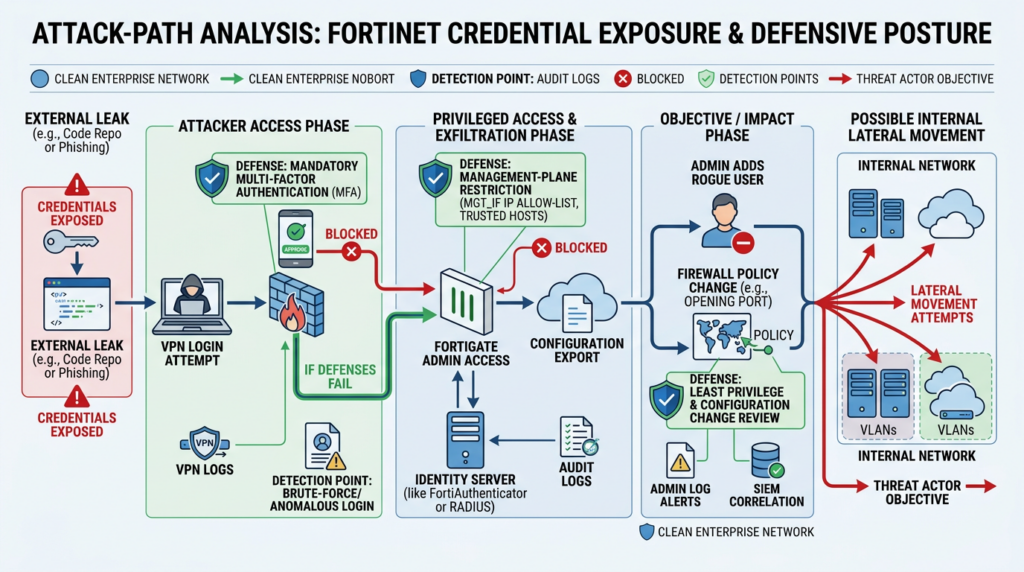
A FortiBleed response should not assume one clean attack chain. Public sources do not prove one universal path for every credential in the dataset. Fortinet’s position points to credential reuse from prior incidents and brute-force activity. Third-party reporting discusses exposed credentials, plaintext passwords, and large-scale attempts. The prudent defender should model several plausible abuse paths rather than betting on only one.
| Abuse path | What the attacker needs | What the attacker may do | Defensive signal |
|---|---|---|---|
| VPN login with exposed user credentials | Valid SSL VPN username and password, often no MFA | Enter the internal network and begin discovery | VPN logins from new countries, hosting providers, impossible travel, unusual session timing |
| Admin login with exposed administrator credentials | Valid admin account and reachable management surface | Review or change config, create accounts, export configuration | Admin login from unknown IP, config export, new admin user, policy changes |
| Credential reuse after older exploit activity | Credentials taken from prior incident or old configuration dump | Re-enter after patching if passwords were never rotated | Old compromised accounts still active, login after firmware upgrade |
| FortiCloud SSO abuse context | Vulnerable FortiCloud SSO path and affected product/version state | Administrative login bypass in historical CVE cases | Suspicious SSO login, rogue local admin creation, config download |
| AD or LDAP follow-on | Exposed integration credentials or VPN identity linkage | Lateral movement, account creation, authentication elsewhere | Domain controller events tied to VPN users, unusual LDAP bind patterns |
| Brute-force against exposed device | Public VPN or admin surface, weak password hygiene, no MFA | Account compromise through guessing | High failed-login volume, lockouts, repeated attempts across many accounts |
The key operational error is treating these as mutually exclusive. A single organization may face several at once: a FortiGate with a vulnerable historical SSO path, an old exported config, admin credentials never rotated after patching, VPN users without MFA, and management HTTPS still reachable from the internet.
Immediate response for FortiBleed exposure
The first phase is containment. Fortinet recommends terminating all active administrative sessions, terminating VPN sessions, resetting Fortinet VPN and administrative passwords, enforcing strong password policies, implementing MFA on administrator and VPN user accounts, upgrading to the latest 7.4, 7.6, or 8.0 versions, validating configurations, checking logs, and reducing the attack surface by restricting or removing external management access. (Fortinet)
A practical emergency sequence looks like this:
| Öncelik | Eylem | Why it comes early | Yaygın hata |
|---|---|---|---|
| 1 | Terminate admin and VPN sessions | Existing sessions can survive after password changes in some workflows | Resetting passwords but leaving sessions active |
| 2 | Rotate admin and VPN credentials | FortiBleed is fundamentally a credential risk | Patching firmware without changing passwords |
| 3 | Enforce MFA | Stolen passwords should not be enough for VPN or admin access | Enabling MFA only for VPN users but not administrators |
| 4 | Restrict management exposure | Public admin surfaces increase brute-force and credential-stuffing risk | Leaving HTTPS admin open to the world |
| 5 | Upgrade affected Fortinet products | Related Fortinet CVEs were real and exploited | Assuming upgrade removes historical credential compromise |
| 6 | Review configuration | Attackers may create accounts or change policy | Checking only version numbers |
| 7 | Hunt logs and identity systems | VPN and admin access may lead to internal movement | Reviewing firewall logs but ignoring AD or LDAP |
| 8 | Compare to known-good state | Configuration drift can hide persistence | Trusting the current config as clean |
Do not choose between patching and password rotation. Do both. Patching closes known software paths. Credential rotation removes attacker knowledge. MFA changes the success condition. Management-plane restriction reduces the number of actors who can try. Log review tells you whether the device was only exposed or already used.
Authorized exposure checks
Before touching credentials, defenders need an inventory. The following examples are meant for owned or explicitly authorized assets only. They do not prove FortiBleed compromise. They help identify Fortinet management and VPN surfaces that require review.
# Authorized inventory only.
# Replace targets.txt with your approved asset list.
nmap -Pn -sT -p 443,8443,10443,10444 --open -oA fortigate-management-surface targets.txt
If your organization uses an exposure-management platform, compare its results against firewall inventory, DNS records, CMDB entries, cloud security groups, and remote-access documentation. The common failure mode is not that security teams have no scanner. It is that FortiGate management, VPN, and cloud-linked identity surfaces are tracked in different systems and nobody sees the full picture.
For a FortiGate device you administer, read-only CLI checks can help establish the baseline. Adapt commands to your FortiOS version and change-control process.
get system status
show system admin
show user local
show vpn ssl settings
show firewall local-in-policy
show system interface
The goal is to answer simple questions:
| Question | Evidence to collect |
|---|---|
| What version is the device running | get system status, firmware inventory, Fortinet advisory mapping |
| Who has admin access | show system admin, administrator list from GUI |
| Are trusted hosts configured | Administrator config and interface management settings |
| Is SSL VPN enabled | SSL VPN settings, listener ports, groups, realms |
| Is external management enabled | Interface admin access, public IP mapping, local-in policy |
| Are suspicious users present | Local users, admin users, recently created accounts |
| Are VPN groups tied to AD or LDAP | User group config, remote auth server config |
| Is FortiCloud SSO used | FortiCloud login state, device registration and SSO settings |
Configuration diffing after suspected FortiBleed exposure
A known-good configuration is one of the most useful assets in this incident. Without it, teams are forced to inspect a live configuration and guess whether each object belongs.
If you have a prior approved configuration export, compare it with the current state.
# Defensive comparison of approved configuration versus current export.
# Handle configuration files as sensitive material.
diff -u known-good-fortigate-config.txt current-fortigate-config.txt | less
Quick string checks can help identify suspicious account names mentioned in public guidance, but they are not sufficient by themselves.
grep -E 'edit "(forticloud|fortiuser|fortinet-support|fortinet-tech-support|admin)"' current-fortigate-config.txt
grep -Ei 'set accprofile|set trusthost|set two-factor|set remote-auth|set ldap|set radius' current-fortigate-config.txt
A clean grep result does not prove the device is clean. Attackers can choose boring names. They can modify existing accounts instead of creating new ones. They can change VPN group membership rather than adding an obvious administrator. Treat these checks as triage, not as proof of absence.
Log hunting for FortiBleed response
Fortinet’s guidance calls out unexpected administrator access from unknown IPs, domain controller logs for lateral movement, suspicious accounts, unauthorized configuration changes, VPN user creation, unexpected password resets, and VPN access from unexpected locations. (Fortinet)
Log schemas vary by FortiOS version, FortiAnalyzer deployment, SIEM parser, and data pipeline. The following examples are intentionally generic. They show the logic to implement, not a drop-in parser for every environment.
-- Pseudocode for SIEM hunting.
WHERE vendor = "Fortinet"
AND action IN ("login", "admin-login", "config-change", "vpn-login", "user-created", "password-change")
AND timestamp >= "2026-01-01"
Start with administrator activity.
WHERE vendor = "Fortinet"
AND event_category = "admin"
AND src_ip NOT IN trusted_admin_sources
Then look for suspicious configuration actions.
WHERE vendor = "Fortinet"
AND action IN ("config-change", "config-download", "backup", "user-created", "admin-created")
Then review VPN activity.
WHERE vendor = "Fortinet"
AND event_category = "vpn"
AND (
  country NOT IN expected_user_countries
  OR src_ip IN known_hosting_provider_ranges
  OR username IN recently_reset_users
)
Then pivot into identity systems.
WHERE source = "domain_controller"
AND username IN fortigate_vpn_users
AND (
  event_type IN ("new_account", "group_membership_change", "suspicious_logon")
  OR src_host NOT IN expected_vpn_hosts
)
The defensive question is not “Did we see the string FortiBleed?” You will not. The question is whether the behavior around your Fortinet boundary changed: new sources, new admins, new VPN patterns, new identity activity, new configuration exports, or new policy drift.
Why MFA is necessary but not enough
MFA is one of the highest-value controls in FortiBleed response because the incident centers on credentials. A stolen password is much less useful when administrative access and VPN access both require a second factor. Fortinet explicitly recommends implementing MFA on administrator and VPN user accounts as part of its FortiBleed guidance. (Fortinet)
But MFA does not erase old compromise. It does not prove that a configuration was not exported before MFA was enabled. It does not remove rogue accounts. It does not invalidate secrets already copied out of a configuration file. It does not close a vulnerable FortiCloud SSO path on an unpatched product. It does not compensate for a public management plane that receives constant credential-stuffing attempts.
A mature response treats MFA as one layer in a sequence:
- Rotate credentials.
- Terminate sessions.
- Enforce MFA.
- Patch affected products.
- Restrict management access.
- Review configuration.
- Hunt identity and VPN logs.
- Retest exposure.
If MFA becomes the only action, FortiBleed turns into a checkbox exercise. That is the wrong mental model.
Trusted hosts and local-in policy matter more after credential exposure
If attackers have a valid password, source restriction becomes more valuable. It changes the attack from “log in from anywhere” to “also reach the device from an approved source.”
Fortinet’s administrator best-practices documentation explains that trusted hosts limit the addresses from which an administrator can log into FortiOS, and that a login from a non-trusted host is dropped even if the credentials are correct. The same documentation gives a CLI pattern for setting trusted hosts on administrator accounts. (Fortinet Community)
config system admin
    edit <administrator-name>
        set trusthost1 203.0.113.10 255.255.255.255
        set trusthost2 198.51.100.0 255.255.255.0
    next
end
Fortinet’s FortiOS 8.0 best-practices material also says that if administrative access must be granted on an external public interface, a local-in policy should allow only trusted hosts, or administrator logins should be restricted to trusted hosts. (Fortinet Web)
Trusted hosts and local-in policy are not magic. They must be implemented carefully to avoid locking out administrators. They must account for VPN jump hosts, SASE egress, SOC access, break-glass paths, and maintenance windows. They must be tested. But after FortiBleed, leaving internet-facing administration broadly reachable is a hard risk to justify.
PBKDF2 helps, but it is not a time machine
Fortinet’s FortiBleed guidance recommends upgrading to the latest versions of 7.4, 7.6, or 8.0 and notes that these versions support PBKDF2 hashing of administrator credentials. (Fortinet) Fortinet’s documentation on enhanced administrator password security says PBKDF2 with randomized salts is used to store system administrator passwords on FortiGate, replacing the previous SHA256 hashing scheme. (Fortinet Document Library)
That matters because exported configuration data can become a password-cracking target. Stronger password hashing raises the cost of offline cracking. It is especially important when configuration files have been copied, backed up, mishandled, or stolen.
But PBKDF2 cannot protect a plaintext password already exposed in a dataset. It cannot revoke a VPN password used before the upgrade. It cannot undo prior administrative login. It cannot remove malicious configuration changes. It improves future resistance, not past exposure.
The right message for security teams is precise: upgrade for PBKDF2 support and legacy-password cleanup, but still rotate credentials and investigate.
How FortiBleed changes patch management
Patch management usually begins with a vulnerability record. FortiBleed begins with uncertainty.
That uncertainty should not delay action. It should change the order of action. If your organization owns internet-facing Fortinet devices, FortiBleed response should run even if you do not have a confirmed notification from Fortinet, even if your device is not in a public lookup tool, and even if the first scan shows current firmware.
A normal CVE response asks:
| Normal CVE question | FortiBleed version |
|---|---|
| Are we running an affected version | Were our credentials ever exposed or reused |
| Is a patch available | Have we rotated passwords and terminated sessions |
| Is the exploit public | Are valid credentials already in circulation |
| Are we vulnerable from the internet | Are VPN or admin surfaces reachable from untrusted sources |
| Did we patch before exploitation | Did anyone log in before or after patching |
| Can we close the ticket | Did we verify configuration, identity, and logs |
FortiBleed also exposes a weakness in many security programs: firewall administration is often treated as infrastructure hygiene, not incident response. That is dangerous. A firewall can be a security control, an identity bridge, a routing device, a VPN concentrator, a logging source, and a privileged management plane at the same time. When its credentials leak, the blast radius is not limited to the appliance.
How to prioritize Fortinet devices
Start with the devices most likely to give attackers useful access.
| Öncelik | Device or condition | Why it is high risk |
|---|---|---|
| Kritik | Internet-facing FortiGate with SSL VPN enabled and no MFA | Exposed login path plus credential risk |
| Kritik | Internet-facing admin HTTPS or SSH | Direct management access from untrusted networks |
| Kritik | FortiCloud SSO enabled on versions affected by CVE-2026-24858, CVE-2025-59718, or CVE-2025-59719 | Historical exploited authentication bypass surface |
| Yüksek | FortiGate integrated with AD, LDAP, or RADIUS | Compromise may connect to broader identity systems |
| Yüksek | Devices with old configuration exports stored in shared locations | Config files may contain sensitive topology and credential material |
| Yüksek | Devices administered by shared or default-style accounts | Attribution and containment become harder |
| Orta | Internal-only devices without VPN but with stale firmware | Lower external exposure, still important for lateral movement and internal compromise |
| Orta | Lab or branch devices outside standard monitoring | Often missed by central logging and patch processes |
This priority model is not a replacement for Fortinet advisories. It is a response triage model. Use vendor version guidance, CISA KEV status, Fortinet PSIRT notices, and your own exposure data together.
What to do if you find suspicious activity
If you find suspicious administrator logins, unknown VPN users, unexpected password resets, unauthorized configuration changes, or AD/LDAP activity tied to FortiGate accounts, treat the device as compromised. Fortinet’s guidance says that if there is evidence of unapproved configuration modification or other indicators of compromise, customers should treat devices as compromised and follow recovery guidance. (Fortinet)
A defensible response sequence looks like this:
- Preserve logs, configuration exports, and device state before destructive changes where possible.
- Terminate active administrator and VPN sessions.
- Disable suspicious accounts rather than deleting evidence immediately.
- Rotate administrator, VPN, service, RADIUS, LDAP, and related credentials.
- Enforce MFA for all administrator and VPN users.
- Remove internet administration or restrict it to trusted sources.
- Upgrade affected Fortinet products to fixed versions.
- Compare configuration against known-good baseline.
- Review identity-provider logs for follow-on authentication.
- Rebuild or factory-reset devices if integrity cannot be trusted.
- Document the evidence chain and remediation timeline.
Do not rely on a single successful login by an administrator after password reset as proof of recovery. The device may still contain malicious changes. VPN groups may still be wrong. Identity integrations may still have exposed secrets. Monitoring may still be blind to the original access path.
How to write internal detections for FortiBleed
Detection engineering should focus on behaviors rather than the incident name.
Useful detection themes include:
| Detection theme | Example logic | Neden önemli |
|---|---|---|
| Admin login from new source | Admin login where source IP is not in approved jump-host or SOC ranges | Exposed credentials often appear from unusual infrastructure |
| New admin account | Creation of administrator account or change to admin profile | Persistence can be created through legitimate admin features |
| Configuration export | Backup or download activity after suspicious login | Configuration files can reveal secrets and topology |
| VPN login anomaly | VPN user logs in from new country or hosting provider | Stolen VPN credentials are often used from unusual infrastructure |
| MFA bypass gap | Successful login for account with no MFA flag | Identifies accounts where password theft is enough |
| AD/LDAP pivot | Domain activity tied to VPN users after unusual FortiGate login | Detects movement beyond the appliance |
| Trusted-host removal | Change to administrator trusted hosts or local-in policy | Attackers may weaken source restrictions |
Example Sigma-style pseudologic:
title: Fortinet Admin Login From Untrusted Source
status: experimental
description: Detects Fortinet administrator logins from sources outside approved management ranges.
logsource:
  product: fortinet
  service: fortigate
detection:
  selection:
    event.category: admin
    event.action:
      - login
      - admin-login
  filter_trusted_sources:
    source.ip:
      - 203.0.113.10
      - 198.51.100.0/24
  condition: selection and not filter_trusted_sources
fields:
  - timestamp
  - source.ip
  - user.name
  - event.action
  - device.name
falsepositives:
  - New SOC egress IP
  - Emergency maintenance from approved but undocumented source
level: high
This is not meant to be copied blindly. It is meant to show the right structure: define the expected admin sources, then alert on everything else.
Where automated validation can help without replacing judgment
FortiBleed is a good example of why security validation cannot stop at version matching. A scanner can tell you that a device might be running a vulnerable version. It may also tell you that a management port is open. But the real response question is broader: which Fortinet assets are exposed, which ones use FortiCloud SSO, which ones lack MFA, which ones still accept admin access from the internet, which ones have unreviewed local users, and which remediations were actually verified after change control?
Authorized AI-assisted testing can help when it stays grounded in scope, tools, evidence, and human approval. Penligent describes itself as an AI-powered penetration testing tool, and its related Fortinet write-up on CVE-2026-24858 connects the January FortiCloud SSO authentication bypass to CVE-2025-59718 and CVE-2025-59719, which is directly relevant to teams trying to understand the FortiBleed context. (Penligent)
The useful workflow is not “let an agent hack Fortinet devices.” The useful workflow is authorized validation: enumerate owned assets, confirm exposure, collect version and configuration evidence, map related CVEs, verify that management access is restricted, confirm MFA coverage, preserve outputs, and produce a report that another engineer can reproduce. That is where automation reduces toil without replacing defensive judgment.
Common mistakes in FortiBleed response
The first mistake is waiting for a FortiBleed CVE. There may never be one, because FortiBleed is not a vulnerability record. Waiting for one delays the credential response that actually matters.
The second mistake is patching without password rotation. If an attacker already has valid credentials, firmware updates alone may not remove access.
The third mistake is rotating only administrator passwords. VPN users, service accounts, RADIUS or LDAP bind accounts, break-glass accounts, and shared operational accounts may also matter.
The fourth mistake is enabling MFA only for normal users. Administrator MFA is just as important, and in some cases more important.
The fifth mistake is trusting current configuration without a baseline. A compromised configuration can look normal if nobody knows what normal looked like.
The sixth mistake is reviewing only FortiGate logs. If VPN access touched internal systems, domain controllers, identity providers, EDR, proxy logs, and cloud logs may contain the better evidence.
The seventh mistake is leaving public administration enabled because “we changed the password.” Passwords fail. Source restriction, MFA, patching, and logging have to work together.
The eighth mistake is assuming absence from one lookup list means safety. Credential datasets can be incomplete. Public lookup tools may lag. Some credentials may have been used before the dataset became public. Treat FortiBleed as a trigger for hardening, not as a binary “listed or not listed” test.
FortiBleed and the older lesson from CVE-2018-13379
CVE-2018-13379 is not the FortiBleed cause. It belongs in the conversation because it taught the security community a durable lesson about Fortinet SSL VPN exposure and long-lived credential risk.
NVD describes CVE-2018-13379 as a FortiOS SSL VPN web portal path traversal vulnerability that allowed unauthenticated attackers to download system files through crafted HTTP resource requests. (NVD) Years after disclosure, old Fortinet VPN exposure continued to matter because stolen files, credentials, and sessions can outlive patches. That is exactly the kind of thinking FortiBleed requires.
Patching fixes software state. It does not automatically erase data already taken. It does not rotate credentials. It does not invalidate every downstream secret. It does not rebuild trust in a configuration that may have been exported.
That is why every FortiBleed response should include the uncomfortable question: “What sensitive material could have been known to the attacker before we started remediation?”
Pratik sertleştirme kontrol listesi
The following checklist is designed for security teams that need a defensible response plan rather than a headline summary.
| Area | Eylem | Evidence to retain |
|---|---|---|
| Inventory | Identify all Fortinet devices, public IPs, VPN endpoints, management ports, and product versions | Asset export, scan output, CMDB record |
| Sessions | Terminate active admin and VPN sessions | Timestamped admin action log |
| Credentials | Rotate admin, VPN, service, LDAP, RADIUS, and break-glass credentials | Change ticket, password rotation record |
| MFA | Enforce MFA on administrator and VPN accounts | MFA policy screenshot or configuration export |
| Firmware | Upgrade affected products to fixed supported versions | Version output before and after |
| FortiCloud SSO | Determine whether FortiCloud SSO was or is enabled | Configuration evidence and business owner approval |
| Admin accounts | Remove or disable unknown admins and review profiles | Before and after admin list |
| VPN users | Review local users, groups, portals, realms, and policies | VPN config export and approval |
| Management exposure | Remove public admin access or restrict to trusted hosts and local-in policy | Firewall policy and source restriction evidence |
| Logs | Hunt administrator, VPN, configuration, and identity logs | Query outputs and incident notes |
| Config integrity | Compare against known-good configuration | Diff output and remediation notes |
| Identity follow-on | Review AD, LDAP, RADIUS, and IdP activity | Domain controller and IdP evidence |
| Raporlama | Write a reproducible incident and remediation report | Final report with evidence chain |
This is not overkill for a firewall. It is appropriate because the firewall is part of the trust boundary.
SSS
Is FortiBleed a CVE?
- No. FortiBleed is not a standalone CVE.
- It is a public name for a Fortinet credential exposure and credential-harvesting incident.
- Fortinet states that the activity is not a new Fortinet vulnerability and is not related to a recent incident or advisory. (Fortinet)
- The phrase “FortiBleed CVE” is still common because the incident is connected to real Fortinet CVEs involving FortiCloud SSO and administrative access.
Which CVEs are most relevant to FortiBleed?
- CVE-2026-24858 is highly relevant because it is a Fortinet multi-product FortiCloud SSO authentication bypass and is listed in CISA KEV through NVD’s record. (NVD)
- CVE-2025-59718 is relevant because it affects FortiOS, FortiProxy, and FortiSwitchManager and allows FortiCloud SSO login bypass through crafted SAML responses. (NVD)
- CVE-2025-59719 is relevant because it affects FortiWeb and involves the same kind of FortiCloud SSO crafted SAML response issue. (NVD)
- FortiBleed itself should still be treated as a credential incident, not as one of these CVEs.
How do I know if my FortiGate was affected?
- Check whether your organization received direct notification from Fortinet.
- Review whether Fortinet VPN or administrative credentials were exposed, reused, or not rotated after earlier incidents.
- Check for internet-facing management access, SSL VPN exposure, weak password hygiene, and missing MFA.
- Review admin logins, VPN logins, configuration exports, new users, password resets, and AD or LDAP activity.
- Do not rely only on public lookup tools. Absence from one dataset does not prove safety.
Should I patch first or rotate credentials first?
- Do both, but do not wait for a patch window before rotating credentials.
- FortiBleed is centered on credential exposure, so active sessions and known passwords are immediate risks.
- Patching is still required for related Fortinet CVEs and future resilience.
- A strong order is: terminate sessions, rotate credentials, enforce MFA, restrict management access, patch, then validate configuration and logs.
Does MFA fully solve FortiBleed risk?
- No. MFA reduces the value of stolen passwords, but it does not undo prior compromise.
- MFA does not prove that a configuration was not exported before MFA was enabled.
- MFA does not remove rogue users, malicious policy changes, or exposed service-account secrets.
- MFA should be paired with password rotation, session termination, version upgrades, configuration review, and log hunting.
Why does exported FortiGate configuration data matter?
- It can reveal internal networks, VPN configuration, firewall rules, object names, routes, authentication integrations, and administrative structure.
- It may contain credential material or hashes that attackers can target offline.
- It helps attackers plan lateral movement even if direct credentials are later rotated.
- It gives defenders a reason to review AD, LDAP, RADIUS, and internal access logs after FortiGate exposure.
What should I monitor after resetting Fortinet credentials?
- Monitor administrator logins from new or untrusted source IPs.
- Watch for new admin accounts, changed admin profiles, configuration exports, and local-in policy changes.
- Review VPN logins from unusual countries, hosting providers, or impossible-travel patterns.
- Check domain controller and identity-provider logs for activity tied to VPN users or FortiGate-integrated accounts.
- Keep heightened monitoring in place after remediation because stolen configuration data can support delayed follow-on activity.
What if my FortiGate is fully patched?
- A current version is good, but it does not automatically remove historical credential exposure.
- Rotate credentials anyway if the device had exposed VPN or management access.
- Confirm MFA coverage and management-plane restrictions.
- Review historical logs for access before the patch.
- Compare current configuration against a known-good baseline.
Closing judgment
FortiBleed is dangerous because it sits between two worlds: the world of CVEs and the world of credential compromise. Treating it only as a vulnerability story misses the point. Treating it only as a password leak also misses the point.
The right response is to assume that Fortinet edge credentials, VPN access paths, and administrative trust relationships need review. Rotate credentials. Enforce MFA. Upgrade affected Fortinet products. Restrict management access. Compare configurations. Hunt for suspicious administrator and VPN activity. Check identity systems for follow-on use. Keep evidence.
Do not wait for a FortiBleed CVE. The absence of a new CVE is not the absence of risk.


 Turkish
  English
  German
  French
  Spanish
  Portuguese
  Japanese
  Korean
  Hindi
Hindi  Arabic
  Hebrew