
A WordPress form is supposed to collect information, not give strangers the ability to execute code on your server. But that is precisely the security boundary being crossed in CVE-2026-85097, a critical vulnerability affecting the Bricksforge plugin for WordPress.
The flaw allows an unauthenticated attacker to turn an apparently legitimate file upload into executable PHP code. There is no need to compromise an administrator account, steal a password, or persuade someone to install a malicious plugin. On a vulnerable configuration, the attack can begin with ordinary web requests against a publicly accessible WordPress site.
What makes this vulnerability particularly concerning is that it is not merely theoretical. According to Patchstack’s October 8, 2026 technical investigation, exploitation attempts were first observed on October 7, 2026, at 21:47 UTC. Researchers identified 63 distinct source IP addresses, including groups of systems sending nearly identical requests and others experimenting with alternative PHP extensions.
The vulnerability affects Bricksforge versions 3.1.8.9 and earlier. Version 3.1.8.10 addresses the issue on the affected release line, while the vendor also identifies a Pro Forms upload security fix in version 4.0.1.
There is another detail that deserves attention: Bricksforge’s own security-related changelog explains that the Pro Forms issue affects sites with the feature active even when their forms do not contain a file upload field. For site owners who have assumed that disabling visible uploads eliminates the risk, that distinction matters.
The immediate priority is straightforward: update Bricksforge, determine whether the website was exposed during the attack window, and inspect the server for files that may have been planted before the patch was installed. Updating a plugin fixes vulnerable code. It does not automatically remove an attacker’s existing foothold.
What Is CVE-2026-85097?
CVE-2026-85097 is an unauthenticated arbitrary file upload vulnerability in Bricksforge, a commercial WordPress extension designed to work with Bricks Builder. Bricksforge adds advanced functionality to websites built with Bricks, including customizable forms, animations, dynamic content, integrations, and administrative interface components.
The vulnerability specifically involves the handling of temporary uploads in the plugin’s Pro Forms functionality. During one stage of the upload process, Bricksforge correctly checks the file’s MIME type. During a later form submission, however, the vulnerable implementation accepts attacker-controlled metadata that can influence how the file is ultimately stored.
That disconnect allows file content originally accepted as an image to be written under a PHP-related filename. If the destination is accessible through the web server and configured to execute PHP, the result can be remote code execution.
Bu Wordfence vulnerability record classifies the issue as CWE-434, Unrestricted Upload of File with Dangerous Type, and assigns a CVSS v3.1 score of 9.8. Patchstack assigns a score of 10.0. Both classify the vulnerability as critical, although their published numerical assessments differ.
CVE-2026-85097 at a glance
| Öznitelik | Detaylar |
|---|---|
| CVE KIMLIĞI | CVE-2026-85097 |
| Affected product | Bricksforge for WordPress |
| Güvenlik Açığı | Unauthenticated arbitrary file upload leading to RCE |
| Etkilenen sürümler | 3.1.8.9 and earlier |
| Sabit versiyonlar | 3.1.8.10 on the 3.x line; 4.0.1 on the 4.x line |
| Ciddiyet | Kritik |
| CVSS score | 9.8 Wordfence/CVE; 10.0 Patchstack |
| Authentication required | Hayır |
| User interaction required | Hayır |
| First observed exploitation | October 7, 2026, 21:47 UTC |
| Exploitation status | Active exploitation attempts confirmed |
| Primary attack surface | Bricksforge Pro Forms submission processing |
| Main security impact | Arbitrary PHP execution and possible website compromise |
The difference between 9.8 and 10.0 should not distract from the operational reality. Both ratings describe a vulnerability with serious consequences, and researchers have already observed attacks targeting it.
More importantly, the available evidence establishes active exploitation attempts, not the number of websites successfully compromised. Those are two different claims. Public telemetry confirms attackers are trying to exploit the vulnerability, but it does not establish how many attempts resulted in persistent access.
How CVE-2026-85097 Turns an Image Upload Into Remote Code Execution
The interesting part of CVE-2026-85097 is not that Bricksforge allows file uploads. Plenty of WordPress plugins do. The problem is that the plugin makes a security decision at one stage of the upload process and then relies on untrusted information during a later stage.
To understand why this matters, consider how a secure file upload should work. A website receives a file, checks whether its contents match an allowed type, generates a safe storage name, and places it somewhere that cannot execute server-side code. Information supplied by the browser, including filenames and URLs, should never override those decisions.
Bricksforge’s vulnerable upload handling breaks that relationship.
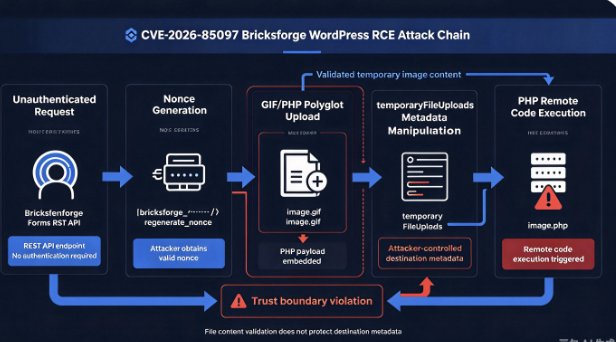
According to the technical analysis published by Patchstack ve official CVE description, the attack involves four distinct stages.
1. An unauthenticated visitor obtains a valid WordPress nonce
The attack begins with the bricksforge_regenerate_nonce AJAX action, which can provide a valid nonce without requiring the requester to authenticate as a WordPress user.
A WordPress nonce is commonly used to establish that a request originates from an expected workflow. However, it is not equivalent to user authentication or authorization.
This distinction is important. A nonce can help protect against certain cross-site request forgery scenarios, but an attacker who is permitted to request a valid nonce cannot be stopped merely by requiring that nonce in subsequent requests.
In this case, the attacker can obtain the token needed to continue the upload workflow without compromising any legitimate user account.
2. A GIF/PHP polyglot passes the initial upload validation
The next stage involves a polyglot file: a file that can satisfy the structural expectations of more than one format.
In the Bricksforge attack, researchers describe a GIF/PHP polyglot. The file contains material that allows it to be recognized as an image while also carrying PHP code.
This matters because checking whether a file resembles a valid image does not establish that the file is safe to execute or that it contains no additional executable content.
During the initial upload stage, Bricksforge performs MIME-type validation and accepts the file as an image. The file is then stored in a temporary directory.
At this point, an image file sitting in a temporary storage location does not necessarily represent successful code execution. The crucial security failure occurs later, when the same file is processed using attacker-controlled metadata.
3. The attacker manipulates temporaryFileUploads
When the form is submitted, Bricksforge processes metadata associated with previously uploaded temporary files.
The vulnerable parameter is temporaryFileUploads, and the important field is url.
Instead of deriving the final storage filename entirely from trusted server-side information, the vulnerable code trusts metadata supplied by the client.
The attacker can provide a mismatch between the actual temporary file and the destination URL. In simplified terms, the server-side path describes a validated image, while the supplied URL describes a PHP file.
Simplified illustration of the trust-boundary failure
Temporary file
Validated image: image.gif
Form submission metadata
Attacker-controlled destination: image.php
Unsafe file placement
Validated image content is stored under an executable PHP filename
Conceptual diagram based on the publicly documented vulnerability. The exact file-processing behavior depends on the affected implementation.
This is the central failure behind CVE-2026-85097. The content of a temporary file has already been checked, but the destination’s security properties are decided using information that has not received equivalent validation.
4. A web request triggers the uploaded PHP code
Once the file has been placed under a PHP-related extension, the attacker may be able to request it through the web server.
If the server is configured to execute PHP files in that location, the embedded code runs with the permissions of the relevant PHP process.
From there, the attacker may gain the ability to read application configuration, access database credentials, change WordPress content, introduce malicious scripts, or install a web shell that provides continued access.
The impact depends on the hosting environment, filesystem permissions, server configuration, and privileges available to the PHP worker.
This is why arbitrary file upload vulnerabilities can be much more severe than they initially sound. The attack is not simply about placing an unwanted file on a website. It is about crossing the boundary between passive uploaded content and executable application code.
CVE-2026-85097 Is Already Being Exploited in the Wild
The public exploitation timeline is one of the strongest reasons to treat CVE-2026-85097 as an immediate remediation priority.
Patchstack reports that the first observed attempts occurred on October 7, 2026, at 21:47:17 UTC. Its detailed advisory was published on October 8, and additional coverage appeared in publications including SecurityWeek ve The Hacker News.
This was not an isolated request that happened to resemble a proof of concept.
Patchstack identified 63 unique source IP addresses participating in the observed activity. One cluster involved 44 IP addresses sending 56 requests containing identical payloads within seconds. Another involved three addresses testing 25 variations of PHP extensions and encodings against the same temporary file.
These patterns are consistent with automated exploitation and infrastructure distribution, although they are not sufficient to attribute the activity to a particular threat actor or coordinated criminal organization.
Timeline of the Bricksforge vulnerability
| Date | Development |
|---|---|
| October 7, 2026 | Wordfence lists the vulnerability as publicly published |
| October 7, 21:47 UTC | Patchstack first observes exploitation attempts |
| October 8, 2026 | CVE record is published |
| October 8, 2026 | Patchstack releases its technical advisory |
| October 8, 2026 | Bricksforge publishes its 4.0.1 Pro Forms security fix |
| October 12, 2026 | Major cybersecurity publications report the active attacks |
The significant observation is how quickly the vulnerability attracted attention from attackers.
A WordPress plugin that handles public form submissions presents a naturally accessible attack surface. Once attackers understand which endpoint to target, they can automate requests across large collections of websites without first identifying valid user accounts.
The observed payload variations suggest that some attackers were not simply repeating a single known request. They were testing different ways to influence how the server handled filenames, extensions, and metadata.
That kind of experimentation can reveal whether filters behave differently when confronted with unexpected representations of the same data.
Attackers are experimenting with PHP extensions
Patchstack documented attempts involving multiple PHP-related extensions, including .php, .php5, .php7, .php8, .phtml, .pht, .phtmve .phps.
Researchers also observed capitalization variations and URL-encoded extensions.
Not all these extensions will execute PHP on every server. Whether a particular suffix is executable depends on the configuration of Apache, Nginx, PHP-FPM, or another application-serving stack.
Nevertheless, the variations reveal an important aspect of the attack activity: attackers were testing more than a single file naming convention.
A defensive control that only rejects filenames ending in the exact lowercase string .php is inadequate against the wider class of dangerous upload behavior.
The proper fix is to prevent untrusted metadata from selecting an executable destination in the first place.
What the Observed Attack Traffic Reveals
Most captured exploitation attempts targeted the Bricksforge REST API endpoint:
POST /wp-json/bricksforge/v1/form_submit
Patchstack reported that all but one of the observed attempts used this route. The remaining request targeted WordPress’s admin-ajax.php endpoint using the bricksforge_form_submit action.
Every observed request included a crafted temporaryFileUploads parametre.
The strongest diagnostic pattern was a mismatch between image-oriented temporary file metadata and a PHP-related destination. According to Patchstack, approximately 95% of captured requests used temporary paths ending in .gif veya .png, with most of those associated with PHP-related destination URLs.
Attackers also referenced files under the following directory:
/wp-content/uploads/bricksforge/tmp/
In some cases, the attempted destination moved beyond the plugin’s temporary directory into ordinary WordPress media storage.
Patchstack specifically observed destination filenames matching the pattern login_admin_*.php under date-based upload directories such as:
/wp-content/uploads/2026/10/
A filename containing login_admin does not prove that an administrator account was created. It is a useful indicator for investigation because it appeared in the documented attack attempts.
The broader lesson is that defenders should examine both Bricksforge-specific directories and the wider WordPress uploads tree.
Source IP addresses observed during exploitation
Patchstack identified the following addresses among the most active sources in its telemetry.
| Source IP | Reported network |
|---|---|
177.75.57.20 | EXPLORERNET |
23.97.62.146 | Microsoft Azure |
84.247.60.125 | HostRoyale |
38.154.185.97 | B2 Net Solutions |
150.109.16.166 | Tencent |
153.75.90.146 | Cloudzy |
These addresses provide historical hunting context, not a complete or permanent list of malicious infrastructure.
A request from one of them deserves investigation, but the absence of these IP addresses does not establish that a website was never attacked. Attackers can change hosting providers, move between proxies, or use additional infrastructure not visible in the published telemetry.
For that reason, behavioral indicators and unexpected executable files are more durable detection signals than IP addresses alone.
The original observations and their limitations are documented in Patchstack’s exploitation analysis.
Why CVE-2026-85097 Is More Dangerous Than an Ordinary WordPress Upload Bug
The severity of CVE-2026-85097 comes from three characteristics working together: a public attack surface, attacker-controlled file metadata, and the possibility of executable file placement.
A plugin vulnerability that requires an administrator account is serious, but an attacker must first obtain that level of access. A reflected cross-site scripting vulnerability may require a victim to interact with a specially crafted link. CVE-2026-85097 does not require either condition in the documented attack scenario.
That changes the economics of exploitation.
An attacker looking for vulnerable WordPress websites does not need to know the administrator’s email address or password. The attacker needs to find installations exposing the vulnerable functionality and send requests through the relevant application workflow.
Because form submission endpoints are designed to accept requests from visitors, conventional login protections do not necessarily intercept the attack.
An administrator can enable two-factor authentication, restrict access to /wp-admin/, and enforce strong passwords while still leaving a vulnerable public form-processing endpoint exposed.
Those protections remain valuable, but they do not correct this particular application flaw.
Why a valid nonce does not make a request trustworthy
There is a common misconception in WordPress development that adding a nonce check makes an endpoint secure.
A nonce answers a narrow question about the expected request workflow. It does not automatically establish that the requester has permission to perform a sensitive operation, nor does it make the values submitted by that requester trustworthy.
Bu WordPress security hardening documentation emphasizes multiple layers of security, including access controls, appropriate filesystem permissions, minimizing executable application surfaces, and keeping extensions updated.
For operations involving uploaded files, a secure design must separately verify authorization, validate the content and destination, and ensure that stored user content cannot unexpectedly become executable.
The Bricksforge flaw demonstrates why these requirements cannot be collapsed into a single check.
Why MIME validation was not enough
MIME validation has a legitimate role in file upload security. It helps determine whether a file resembles an expected format, and it may prevent many straightforward attempts to upload executable files disguised with ordinary extensions.
But it is not a substitute for controlling how and where uploaded content is stored.
Imagine a system that correctly identifies an incoming file as an image, but then allows a subsequent request to choose a filename ending in .php. Even if the first validation was accurate, it does not justify the later storage decision.
The file’s contents and its execution context are different security concerns.
A more resilient upload architecture generates server-side filenames, enforces strict destination policies, treats temporary upload identifiers as references rather than sources of authority, and prevents uploaded content from being interpreted as server-side code.
That protection needs to remain effective even when the attacker controls the apparent filename, URL, extension, or other metadata.
Is Your Website Vulnerable Even Without a File Upload Form?
Yes, potentially. This is one of the most important details in the Bricksforge advisory.
The vendor’s October 8, 2026 changelog states that the Pro Forms file upload security issue affects sites with Pro Forms active, including those whose forms do not use upload fields.
This means a website owner should not conclude that their installation is safe simply because visitors cannot see an upload button on the contact page.
In modern web applications, the features exposed through an interface do not always correspond exactly to the operations available through backend endpoints. An endpoint may accept particular request structures even when a visible form does not present the corresponding fields.
Whether a particular website is exposed depends on the installed Bricksforge version, active functionality, and application configuration. The absence of an upload field in the rendered page is not a reliable substitute for checking the vulnerable component.
This also explains why the issue matters to WordPress agencies and managed hosting providers.
A site built months earlier may contain the vulnerable plugin even when its owner has no idea that Pro Forms includes temporary file handling. The plugin may have been installed for a completely different feature, while the vulnerable form-processing code remains active.
The practical response is to identify all installations of Bricksforge, check their versions, and update affected systems rather than relying on what is visible on the public website.
How to Detect CVE-2026-85097 Exploitation on a WordPress Server
Finding the vulnerable plugin is only the beginning. Once exploitation has been observed in the wild, defenders need to determine whether an exposed website has already received malicious requests or had executable files written to disk.
There is no single indicator that can conclusively establish compromise across every WordPress hosting environment.
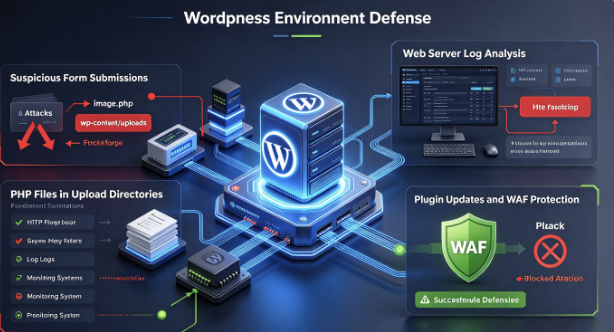
An effective investigation combines plugin inventory, HTTP access logs, application security telemetry, file integrity checks, and changes to WordPress accounts and configuration.
Check the installed Bricksforge version
For WordPress installations where WP-CLI is available, administrators can check the installed version with:
wp plugin get bricksforge --field=versionRun the command from the relevant WordPress installation directory, using an appropriately authorized administrative account.
If the installation reports version 3.1.8.9 or earlier, it falls within the affected range recorded by Wordfence and Patchstack.
On the 3.x release line, version 3.1.8.10 is the first reported fixed release. On the newer 4.x line, the vendor identifies the security fix in version 4.0.1. Sites running 4.0.0 should not assume they contain this fix simply because their version number is greater than 3.1.8.9; they should update to 4.0.1 or a later fixed release.
Administrators without command-line access can inspect the plugin version through the WordPress dashboard or their managed hosting control panel.
Search for suspicious form submissions
The first place to investigate is HTTP access logging.
Requests to the Bricksforge REST API form submission endpoint are relevant because Patchstack identified it as the primary entry point used in the observed attacks.
An administrator can begin with a basic read-only search:
grep -E \
'bricksforge/v1/form_submit|bricksforge_form_submit|bricksforge_regenerate_nonce' \
/var/log/nginx/access.log
This example assumes a conventional Nginx access log. Actual paths vary by operating system, hosting provider, and logging configuration.
The command can reveal requests involving relevant endpoints, but it does not establish whether exploitation succeeded.
It also has an important limitation: ordinary access logs typically record the request path and metadata, not the full request body. A malicious temporaryFileUploads value may therefore be invisible unless the organization has retained WAF, application, reverse-proxy, or other request-body telemetry.
For higher-confidence detection, investigators should look for combinations of events, particularly form submissions associated with temporary upload handling, unexpected PHP file creation, and subsequent requests to those files.
Look for executable files in upload directories
One of the most valuable defensive checks is searching for unexpected PHP files in WordPress upload locations.
The following command is read-only:
find wp-content/uploads -type f \
  \( -iname "*.php" \
  -o -iname "*.php5" \
  -o -iname "*.php7" \
  -o -iname "*.php8" \
  -o -iname "*.phtml" \
  -o -iname "*.pht" \
  -o -iname "*.phtm" \
  -o -iname "*.phps" \) \
  -print
This search is intentionally broader than the most frequently observed .php extension.
WordPress media directories generally store images, documents, and other user-supplied content. Unexpected executable PHP files in such directories deserve investigation, particularly when they appear near the time of known exploitation attempts.
However, some environments may contain legitimate application-generated PHP files, including directory-protection files such as index.php. A matching extension alone is not proof of malicious activity.
Investigators should examine file creation times, ownership, content, references in logs, and whether the file belongs to a known legitimate component.
Files should be preserved for forensic analysis before potentially destructive cleanup actions are taken.
Narrow the investigation to the exploitation window
Patchstack first observed attacks on October 7, 2026. Administrators can use that date as a starting point for reviewing newly created or modified files.
Örneğin:
find wp-content/uploads -type f \
  -newermt "2026-10-07" \
  -print
This command lists files with modification times later than the specified date, according to the server’s local timezone.
It should not be treated as a precise compromise detector. File modification times can change during backups, migrations, deployments, or attacker activity, and an attacker may deliberately manipulate timestamps.
Nevertheless, the output can help prioritize review when combined with application logs and file integrity history.
For organizations managing many WordPress installations, historical file inventory and endpoint monitoring are especially valuable because they can identify changes that occurred before a security team became aware of the vulnerability.
Investigate requests to newly created PHP files
A successful upload-based code execution attempt often requires an additional HTTP request to the planted file.
That creates an opportunity for detection.
Administrators should review requests under /wp-content/uploads/, especially those targeting files with PHP-related extensions. A request to a newly created PHP file shortly after a suspicious form submission is more concerning than an isolated generic request to an unrelated path.
Particular attention should be paid to the login_admin_*.php filename pattern documented by Patchstack, while recognizing that an attacker may choose entirely different names.
Correlating the timestamp of file creation with web requests, PHP process activity, and outbound network connections can help distinguish a blocked attempt from a potentially successful intrusion.
What If CVE-2026-85097 Has Already Been Exploited?
An unpatched website receiving suspicious requests is concerning, but it is not the same as a confirmed compromise.
Conversely, a website that has already installed the fix may still be compromised if malicious files were created before the update.
This distinction should guide incident response.
An administrator who discovers an affected Bricksforge installation should first preserve relevant logs and evidence while ensuring that the vulnerable entry point is no longer exposed. If suspicious executable files are present, the investigation should extend beyond the upload directory.
An attacker capable of executing PHP may be able to access WordPress configuration, interact with the database, create administrator accounts, modify plugins or themes, and establish additional persistence mechanisms.
The initial web shell may no longer be the attacker’s only route into the system.
For a potentially compromised website, the investigation should examine unauthorized administrator accounts, modified WordPress core files, unexpected scheduled jobs, suspicious plugins, changes to wp-config.php, and abnormal outbound traffic.
Credential rotation may also be necessary, including WordPress administrator passwords, database credentials, hosting control panel credentials, and API secrets that were accessible to the compromised PHP process.
Where evidence indicates persistent compromise, recovering from a verified clean backup and carefully applying subsequent legitimate content changes may be safer than attempting to remove individual suspicious files.
The recovery process should also address the original vulnerable plugin and any other security weaknesses. Otherwise, a restored website could be compromised again through the same entry point.
The general principle is simple: a patch prevents new exploitation through the fixed code path. Incident response addresses the consequences of exploitation that may already have occurred.
How to Fix CVE-2026-85097
The primary remediation is to install a fixed Bricksforge release.
Göre Wordfence Intelligence, version 3.1.8.10 addresses the vulnerability on the 3.x release line. Bricksforge’s official changelog also documents the Pro Forms upload security fix in version 4.0.1.
Before updating a production website, create a verified backup of the application and database and review any compatibility requirements associated with the installed WordPress and Bricks Builder versions.
If an immediate update is not possible, temporarily disabling the affected functionality or the plugin itself can reduce exposure. Website operators should also consider vulnerability-specific WAF protections where supported.
Patchstack reported that a mitigation rule for CVE-2026-85097 had been deployed before the first exploitation attempt appeared in its telemetry. However, a WAF is a compensating control, not a substitute for installing the vendor’s security fix.
Prevent PHP execution in WordPress upload directories
One additional hardening measure is to ensure that PHP files cannot execute from upload directories.
In a conventional Nginx deployment, a server administrator might use a location rule similar to the following:
location ~* ^/wp-content/uploads/.*\.(php[0-9]?|phtml|pht|phtm)(/|$) {
    return 403;
}
This is an illustrative defense-in-depth configuration, not a universal drop-in fix. Its effectiveness depends on the ordering of location blocks, the server’s PHP handling rules, alternate URL paths, and whether other configurations allow executable files to be reached.
Any change should be reviewed and tested by the server administrator before production deployment.
Equivalent protections can be implemented in Apache and managed hosting environments, although the exact configuration differs.
The purpose is not to prevent legitimate image or document uploads. It is to ensure that attacker-supplied content does not become executable simply because it has acquired a dangerous extension.
Bu official WordPress hardening guide provides additional guidance on filesystem permissions, plugin updates, access restrictions, and limiting the damage that can follow a successful attack.
The Underlying Security Design Failure
CVE-2026-85097 is a useful example of a broader application security problem: validation at one point in a workflow does not guarantee that the same data will be handled safely later.
Modern web applications often process data through multiple stages. A user submits a file, an upload service stores it temporarily, metadata is returned to a browser, and another service or function finalizes the operation.
Each transition creates a trust boundary.
The first upload stage may validate content correctly. The second stage may perform authentication checks. A third stage may place the file into permanent storage. Yet the overall workflow can still be insecure if one stage accepts a sensitive value from an untrusted source and treats it as authoritative.
This is particularly relevant to WordPress plugins that provide complex form builders, workflow automation, media processing, and integration capabilities.
These components frequently handle files and metadata across asynchronous requests. Developers must ensure that the security properties established when a file is first received cannot be overridden during later processing.
For file upload workflows, a safer architecture binds each temporary upload to trusted server-side metadata. The server, rather than the client, determines the storage location, allowed extension, and final filename.
When processing a later form submission, the application should reference that trusted record and reject attempts to introduce inconsistent paths or destinations.
It should also independently ensure that user-controlled files cannot execute as application code.
These controls address the underlying vulnerability class rather than depending on detection of a particular malicious filename.
Why this matters for automated security testing
Traditional security tests often focus on individual endpoints. A scanner submits an unusual file to an upload form, checks whether the file is rejected, and records the result.
That approach can overlook vulnerabilities that require interactions between several application states.
In the Bricksforge case, the first upload check is not necessarily the failing operation. The dangerous behavior emerges when previously accepted file content is processed using a different set of metadata during form submission.
A meaningful security assessment therefore needs to examine the relationship between temporary upload handling, client-controlled metadata, and final file placement.
For defenders and application security teams, this suggests several useful testing questions.
Does the application generate the final filename independently of user input? Can a client change a destination URL after a file has passed validation? Does a temporary upload identifier refer to trusted server-side state? Can uploaded content become executable because of filename transformation or storage placement?
These questions apply well beyond WordPress. Similar trust-boundary problems can arise in document processing services, media pipelines, cloud storage integrations, and other applications that move files through multiple processing stages.
The important lesson is not that a particular image format is inherently unsafe. It is that content validation, storage decisions, and execution controls must remain consistent across the entire workflow.
CVE-2026-85097 and the Broader Bricksforge Security Picture
The discovery of CVE-2026-85097 also follows other published security issues affecting Bricksforge.
Wordfence’s vulnerability database records previous findings involving privilege escalation, password reset handling, and information exposure.
These are separate vulnerabilities with their own affected versions and exploitation requirements. They should not be confused with the arbitrary file upload issue.
| CVE | Güvenlik Açığı | Published severity |
|---|---|---|
| CVE-2026-85097 | Unauthenticated arbitrary file upload leading to RCE | 9.8 |
| CVE-2026-84814 | Authenticated privilege escalation | 6.3 |
| CVE-2026-18030 | Unauthenticated privilege escalation via password reset | 9.8 |
| CVE-2026-14956 | Unauthenticated privilege escalation involving Pro Forms fieldIds | 9.8 |
| CVE-2026-34888 | Unauthenticated information exposure | 5.3 |
Kaynak: Wordfence Intelligence vulnerability records.
The presence of multiple vulnerability records does not, by itself, prove that a plugin’s current version remains insecure. Software can have a history of security issues while still incorporating effective fixes in later releases.
What it does highlight is the importance of accurate plugin inventory, timely updates, and reviewing the attack surface introduced by powerful WordPress extensions.
For agencies managing many client sites, outdated commercial plugins can be especially easy to overlook when updates depend on license status, manual deployment procedures, or compatibility testing.
A website may continue functioning normally for months after an update has become available. That operational stability should not be mistaken for security.
Frequently Asked Questions About CVE-2026-85097
Is CVE-2026-85097 being actively exploited?
Yes. Patchstack confirmed exploitation attempts beginning on October 7, 2026, at 21:47 UTC. Its research identified 63 unique source IP addresses and multiple patterns consistent with automated exploitation. Those observations confirm active attack attempts, but they do not reveal how many websites were successfully compromised.
Which Bricksforge versions are vulnerable?
The published CVE and Wordfence records identify Bricksforge versions 3.1.8.9 and earlier as affected. Version 3.1.8.10 is the documented fix for that release line. The vendor additionally published a Pro Forms file upload security fix in version 4.0.1, making 4.0.1 or a later patched release the appropriate choice for installations using the 4.x line.
Is CVE-2026-85097 a remote code execution vulnerability?
Yes. The underlying weakness is an arbitrary file upload vulnerability. When exploited under the relevant server conditions, it can result in an attacker-controlled PHP file being placed in an executable location. Requesting that file can execute PHP code on the server.
Does the attacker need WordPress administrator credentials?
No. The documented attack does not require authentication. Attackers can obtain the nonce used in the vulnerable workflow through an unauthenticated AJAX action and interact with the relevant form-processing functionality.
Is my site safe if I do not use file uploads in forms?
Not necessarily. Bricksforge’s official changelog explicitly warns that the Pro Forms security issue affects sites with the feature active even when their forms have no upload fields. Administrators should check installed versions and update rather than rely on visible form configuration.
Why do some sources say CVSS 9.8 while others say 10.0?
Different published assessments assign different scores. Wordfence, the CVE Numbering Authority for this record, provides a CVSS v3.1 score of 9.8 with the vector CVSS:3.1/AV:N/AC:L/PR:N/UI:N/S:U/C:H/I:H/A:H. Patchstack reports a score of 10.0. Both assess the vulnerability as critical, and the discrepancy does not change the urgency created by confirmed exploitation attempts.
Can a WAF stop CVE-2026-85097?
A properly configured WAF with a rule designed for this vulnerability can help block known exploitation patterns. Patchstack reports deploying such a mitigation. However, generic WAF protection should not be assumed sufficient, particularly when attackers are experimenting with alternate extensions and encodings. Installing the security update remains the primary fix.
Does updating Bricksforge remove a web shell?
No. Updating the plugin corrects the vulnerable code path, but it does not necessarily remove malicious files or persistence mechanisms introduced before the update. Sites that were exposed during the exploitation window should be reviewed for evidence of compromise.
Final Thoughts: A Validated Upload Is Not Always a Safe Upload
CVE-2026-85097 is a reminder that serious vulnerabilities often emerge not from the absence of all security checks, but from the failure to preserve security guarantees across an application workflow.
Bricksforge did perform file type validation. The problem was that later processing trusted client-controlled metadata in a way that could undermine the original decision. That allowed an apparently accepted image upload to become an executable PHP file.
Attackers recognized the opportunity quickly. Patchstack’s observations show attempts beginning on October 7, followed by automated activity, distributed source infrastructure, and experimentation with filename variations.
For WordPress administrators, the immediate response is to update Bricksforge to a fixed release, examine logs and upload directories, and investigate any evidence that executable files were written before remediation.
For developers, the lesson is more fundamental. Untrusted filenames, URLs, and file metadata should never be allowed to override server-side decisions about where uploaded content is stored or whether it can execute.
A website does not need to expose an obvious upload button to contain a dangerous upload workflow. Nor does a successful MIME check guarantee that a file will remain harmless throughout its lifecycle.
The vulnerability is fixable. The larger engineering mistake is preventable. And for organizations running affected WordPress installations, the time to verify both is now.
 Turkish
  English
  German
  French
  Spanish
  Portuguese
  Japanese
  Korean
  Hindi
Hindi  Arabic
  Hebrew