
If you use NordVPN on Windows, check the installed application version and update through NordVPN’s official channel. CVE-2026-106030 was fixed in version 8.12. The reported attack requires a local, low-privileged attacker; it lets that attacker misuse service-control operations against unprotected Windows services, according to CERT Polska’s October 16, 2026 disclosure.
That scope changes the response. You need to repair the desktop application and review unexplained service changes when there is reason for concern. A working VPN connection alone does not answer either question. This article separates the update a Windows user can verify from the authorization problem a developer should understand.
What the disclosure establishes
| Question | Published boundary | Practical consequence |
|---|---|---|
| Affected product | NordVPN for Windows before 8.12 | Check the Windows desktop application, not a browser extension version. |
| Attacker prerequisite | Local, low-privileged access | Treat this as an endpoint issue, not a demonstrated Internet-facing VPN-server exploit. |
| Reported effect | Stop unprotected services and change their startup type to Manual | Investigate unexplained availability or startup-policy changes. |
| Protected-service limit | The disclosed path cannot stop or reconfigure Windows-protected services such as Defender | Do not claim the flaw disables every security service. |
The vulnerability boundaries above come from CERT Polska, which coordinated the disclosure and credits Marcin Ressel. The public notice does not establish VPN tunnel decryption, account credential theft, remote code execution, or an affected macOS or Linux release. Claims about those outcomes need separate evidence.
For prioritization, consider the endpoint’s role. A shared workstation or a machine on which untrusted programs already run deserves prompt attention. On a managed device, coordinate the update with the endpoint administrator so you do not bypass its installation policy. Those are exposure-management judgments; they do not establish that your computer has been attacked.
Check the application, then verify the update finished
NordVPN’s Windows version-check instructions say to open the profile icon at the top right, choose Settings, and read the version at the bottom. Record what you see before updating. If you administer several machines, keep a result per device; an update on your own laptop says nothing about another endpoint.
Use the app’s supported update flow or the official download route linked in NordVPN’s update guidance. The vendor says automatic updates roll out in stages. An enabled automatic-update setting therefore does not prove that the repaired release is already installed. Use the current supported release rather than pinning an old installer merely because it meets the original 8.12 fix threshold.
After installation, follow any requested restart, reopen the application and check its version again. Test an ordinary connection and the functions you rely on. Keep the post-update version and completion time together. If installation stalls, use the vendor’s support process instead of a third-party installer or instructions that weaken endpoint protections.
This is a maintenance verification sequence. It establishes the observed application version and ordinary behavior after the change. We did not install or exploit NordVPN on a Windows endpoint for this article, and we do not present a crafted service-stop request as a safe way to check a production laptop.
Why a local pipe can become a service-control problem
A desktop interface and its background service often have different responsibilities. An interface may need a broker to perform an operation that the interactive user cannot perform directly. The security question is whether that broker grants only the authority the caller should have. This is a general design model, not a reconstruction of NordVPN’s private implementation.
Microsoft’s named-pipe security documentation describes security descriptors and access checks for pipe handles. Separately, Windows service security defines rights on service-control-manager and service objects. Connecting to an IPC endpoint, asking for a particular operation, and being entitled to control a particular service are different decisions.
The disclosure’s important lesson is the gap between an accepted caller and an authorized action. If a privileged broker acts on behalf of a less-privileged caller, the operation needs a trustworthy identity and a policy for the requested target. A service name supplied in a request is an object to authorize, not evidence that the caller owns it. This reasoning explains the trust boundary; it does not identify the exact check changed in NordVPN 8.12.
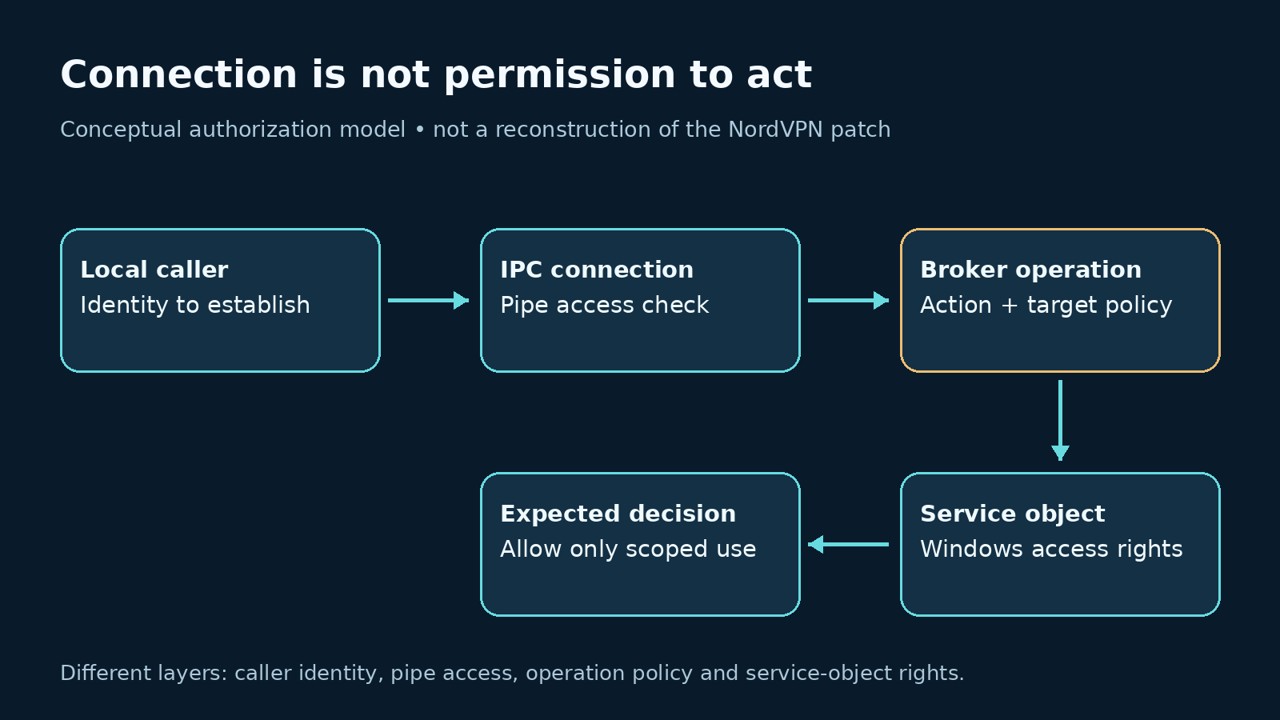
For developers reviewing a similar design, define a small authorization matrix before testing. Name the caller category, requested action, target object and expected allow-or-deny result. Include a caller that may query state but may not stop a service, and a target outside the application’s intended responsibility. Test changes only in an authorized lab with disposable services. A successful transport connection should not be the success criterion for a privileged operation.
The Microsoft documentation provides the platform model, while the CERT notice establishes the product-specific finding. Keep those sources separate. It would be misleading to infer a particular insecure ACL, impersonation sequence or patch implementation from the vulnerability category alone.
A stopped service needs context before it needs a fix
If a required application stopped working, collect the service name, current state, time and recent approved changes before changing its configuration. A stopped service can be normal, and a Manual startup setting may be intentional. Compare the result with the service owner’s expected configuration rather than making every service Automatic.
For a Windows administrator, this read-only PowerShell example inspects one known service. Replace the placeholder with the actual service name you are authorized to review. Microsoft documents Get-Service as returning local service objects. The example has not been executed on Windows in this article; no output is fabricated.
Get-Service -Name 'YOUR_SERVICE_NAME' |
    Select-Object Name, DisplayName, Status, StartType
The command does not connect to the NordVPN pipe, stop a service, change startup settings or identify exploitation. If access is denied or the service is missing, record that result as an unresolved inspection item. Do not convert a failed query into a clean finding. The installed app version remains a separate check.
| Observation | Reasonable interpretation | Next action |
|---|---|---|
| Old NordVPN version, no reported symptoms | An update is needed; compromise is not established | Apply the official update and verify completion. |
| Required service stopped after maintenance | Availability changed; the cause is still unknown | Compare maintenance records, service errors and expected configuration. |
| Unexpected startup-policy change | A configuration change needs attribution | Review approved changes and relevant endpoint evidence. |
| Patched app, suspicious local activity | The update result does not resolve earlier activity | Continue the endpoint investigation separately. |
| No retained event or alert | Available evidence did not show the event | Assess collection and retention before drawing a conclusion. |
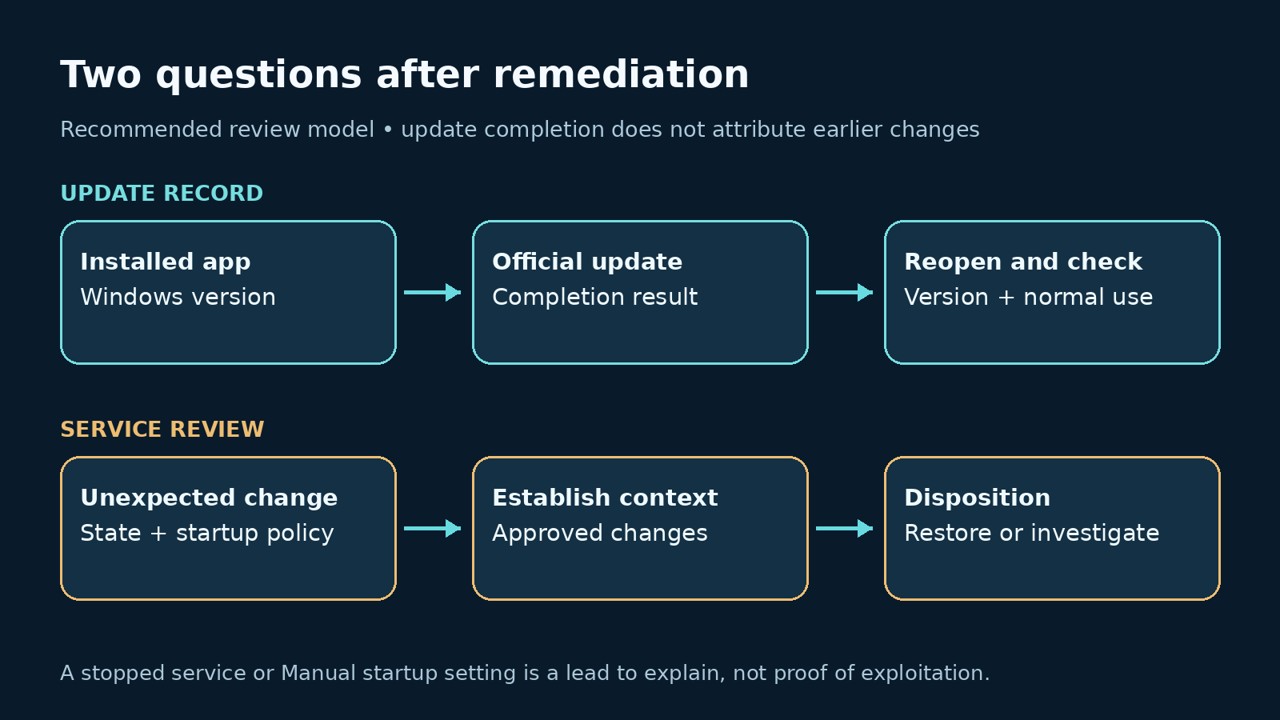
If an administrator restores a service, use the application owner’s known-good configuration and check its dependencies. Keep that restoration separate from the NordVPN update record. An update can repair the authorization flaw without explaining why another application was unavailable or whether its configuration needs recovery.
What to preserve if misuse is suspected
Start with the endpoint timeline: the installed version before remediation, the update completion time, the affected service and the first observed symptom. Review relevant Windows service and endpoint events against software installations, support sessions and other approved changes. Preserve the original evidence under your incident process before attempting cleanup.
Ask what the retained data can actually attribute. A service transition may support a timeline without identifying the caller that caused it. A security alert may add process context but still require validation. Avoid assigning the event to this CVE solely because the vulnerable application was installed at the time.
Credential recovery should follow evidence of exposure and the broader endpoint assessment. The existence of this advisory alone does not demonstrate that a password or VPN session was stolen. If a local malicious process is found, investigate its access and effects on their own merits rather than limiting the incident to the software flaw that attracted attention.
Questions about the NordVPN Windows vulnerability
Which version fixes CVE-2026-106030?
- CERT Polska identifies 8.12 as the fix. Install the current supported Windows release from the official channel and confirm the version after completion.
Does this mean NordVPN encryption was broken?
- The published finding concerns local service-control authorization. It does not establish a break in VPN encryption.
Does the report cover macOS, Linux or the browser extension?
- The disclosed affected product is NordVPN for Windows. Check other products against their own advisories rather than transferring this version boundary.
Should I test the bug by stopping a Windows service?
- Use version and update records for routine remediation checks. An exploit-style stop request can disrupt the endpoint and is unnecessary for that task.
Does an updated app explain an earlier service failure?
- No. Attribute the earlier change through its own evidence and restore configuration only against the service owner’s approved baseline.
The video below gives context for authorized application testing with Penligent. It is not a NordVPN exploit demonstration, an endpoint investigation, or a claim that Penligent detects this CVE on a private Windows device.
For a Windows user, the immediate deliverable is small and concrete: a completed official update and a checked application version. For an administrator investigating symptoms, add the service baseline and an evidence-backed explanation of the change. Those two records answer different questions and belong together.


 Turkish
  English
  German
  French
  Spanish
  Portuguese
  Japanese
  Korean
  Hindi
Hindi  Arabic
  Hebrew