
CVE-2026-45657 is a critical remote code execution vulnerability in the Windows Kernel. Microsoft’s public record describes it as a use-after-free condition that allows an unauthorized attacker to execute code over a network. The Microsoft-assigned CVSS 3.1 base score is 9.8, with network access, low attack complexity, no required privileges, no user interaction, and high potential impact to confidentiality, integrity, and availability. Microsoft published the vulnerability on June 9, 2026. (NVD)
Those confirmed facts justify rapid remediation. They do not justify inventing a vulnerable function, network port, protocol field, packet sequence, crash signature, exploit primitive, or reliable attack chain. The public advisory remains concise. It identifies the vulnerability class and security impact, but it does not expose enough implementation detail to support a safe reproduction of the real kernel flaw.
That limitation should shape the response. Security teams do not need to send malformed traffic to production machines to determine whether they are exposed. They can reach a defensible conclusion by identifying the exact Windows product, collecting the complete running build, comparing it with Microsoft’s fixed-build threshold, reviewing network reachability, and verifying that the applicable cumulative update took effect after restart.
CVE-2026-45657 should therefore be treated as a patch-first Windows Kernel RCE. Version evidence is the primary validation mechanism. Network and endpoint telemetry should support prioritization and incident investigation, but neither a generic blue screen nor an unusual packet should be labeled as exploitation without additional evidence.
CVE-2026-45657 at a Glance
| Saha | Confirmed public information | Defensive interpretation |
|---|---|---|
| Güvenlik Açığı | CVE-2026-45657 | A unique Microsoft Windows security issue published in June 2026 |
| Bileşen | Windows Kernel | The weakness exists in highly privileged operating-system code |
| Güvenlik açığı sınıfı | Use-after-free, with CWE-416 and CWE-122 mappings | An object-lifetime error can lead to heap memory corruption |
| Security impact | Remote code execution over a network | A local account or interactive user action is not a stated prerequisite |
| CVSS 3.1 score | 9,8 Kritik | Accelerated patching is justified |
| CVSS vector | AV:N/AC:L/PR:N/UI:N/S:U/C:H/I:H/A:H | Network reachable, low stated complexity, no privileges, no interaction, high impact |
| Publication date | June 9, 2026 | Fixed updates were released through Microsoft’s June security servicing |
| CISA SSVC enrichment | Exploitation none, automatable yes, technical impact total, dated June 10, 2026 | No exploitation was recorded in that specific enrichment, but the flaw was considered automatable with potentially total technical impact |
| Safe validation | Product and full running-build comparison | No exploit payload is required to prove version exposure |
| Primary remediation | Install the applicable Microsoft cumulative update or a later fixed cumulative update | Compensating controls reduce risk but do not replace the fix |
The NVD record attributes the vulnerability to Microsoft, reproduces the use-after-free description, lists the 9.8 vector, and maps the issue to both CWE-416 and CWE-122. Its change history also contains the exact affected product ranges supplied by Microsoft. (NVD)
What Microsoft Has Confirmed
The official description is short:
Use after free in Windows Kernel allows an unauthorized attacker to execute code over a network.
That sentence contains the most reliable facts currently available.
The vulnerability is in the Windows Kernel
The Windows Kernel operates at the center of process scheduling, memory management, device interaction, security boundaries, and low-level networking. A memory-safety failure in kernel code is fundamentally different from a bug in a low-privilege desktop application.
A user-mode application normally runs within a restricted process address space. A kernel component operates with system-wide privileges and can access resources that ordinary applications cannot. If an attacker converts a kernel memory-corruption flaw into controlled execution, the resulting compromise can undermine assumptions made by services, security agents, access-control mechanisms, and user-mode monitoring.
The public record does not name the vulnerable driver, source file, function, object type, or internal subsystem. “Windows Kernel” should not be narrowed to a guessed component unless Microsoft releases additional technical material.
The flaw is a use-after-free
A use-after-free occurs when code continues to use a memory object after the object has been released. MITRE defines CWE-416 around the use of previously freed memory and notes that outcomes can include corruption of valid data, crashes, and execution of unintended code, depending on how the memory is reused. (CWE)
A simplified object-lifetime sequence looks like this:
- Kernel code allocates an object.
- One or more execution paths store references to the object.
- A cleanup, timeout, cancellation, error, or teardown path releases it.
- Another path incorrectly retains a pointer.
- The released region is accessed through that stale pointer.
- The system crashes, reads unrelated data, writes into a replacement object, or reaches another memory-corruption condition.
Microsoft also mapped CVE-2026-45657 to CWE-122, Heap-based Buffer Overflow. Multiple CWE mappings can describe different parts or consequences of one memory-corruption flaw. They do not prove that two separate vulnerabilities exist, and they do not establish that a conventional oversized network field directly overwrites a buffer.
The safe conclusion is narrower: Microsoft associated the issue with an object-lifetime error and heap memory corruption in privileged Windows code.
The attack can originate over a network
The phrase “execute code over a network” and the AV:N value establish that the vulnerable path is network reachable under the CVSS model. The record does not identify the exact protocol, port, service, address family, packet type, extension header, or network role required to reach it.
This distinction matters operationally. A team can correctly state that network reachability affects risk. It cannot safely state that blocking a particular port eliminates exposure unless Microsoft publishes that relationship.
Internet exposure is only one category of network exposure. A host may also be reachable from:
- User workstation VLANs
- Remote-access VPN pools
- Partner or contractor networks
- Cloud subnets
- Branch-office links
- Management networks
- Guest networks
- Compromised internal endpoints
- Adjacent virtual machines
- Container or virtual-switch networks
- Disaster-recovery environments
A private IP address does not prove isolation. The relevant question is whether an attacker-controlled system could send traffic to the affected machine through any permitted path.
No privileges are required under the CVSS model
The PR:N value means the attacker does not need an authorized Windows account before reaching the vulnerability path. Identity controls still matter after compromise, but they should not be treated as a complete preventive control for the initial flaw.
This property increases the importance of reducing unnecessary network access. An authenticated administrative interface can sometimes be protected by stronger identity checks. An unauthenticated kernel attack surface requires defenders to depend more heavily on code correctness, patch state, segmentation, and traffic controls.
No user interaction is required
The UI:N value means the attack does not depend on a user opening a document, clicking a link, approving a prompt, or launching an attachment.
Email filtering and user-awareness training remain valuable security controls, but they do not address this vulnerability’s stated initial condition. Patching and network exposure reduction are more directly relevant.
The stated technical impact is high
The CVSS vector assigns high impact to confidentiality, integrity, and availability. In a kernel context, those categories can translate into system-level data access, tampering, service disruption, or execution with highly privileged capabilities.
The public record does not describe a specific post-exploitation payload or confirm that every successful trigger leads to stable code execution. A use-after-free may produce a crash in one condition and a more controllable corruption primitive in another. Microsoft’s RCE classification means the vendor determined that code execution is a credible impact, not that exploitation will be equally reliable across all affected builds.
What the Public Record Does Not Establish
Short advisories create a predictable risk: third-party interpretation gradually becomes indistinguishable from vendor-confirmed fact.
For CVE-2026-45657, the authoritative public material reviewed does not identify:
- The exact vulnerable function
- The vulnerable object structure
- The responsible driver or module
- A protocol or destination port
- A packet field or message sequence
- An IPv4-only or IPv6-only condition
- A local-link, routed, broadcast, or multicast requirement
- A race window or timing dependency
- A heap-grooming strategy
- A controlled replacement object
- A method for bypassing kernel exploit mitigations
- A stable bugcheck code unique to the CVE
- A Microsoft-provided network signature
- A vendor-provided file or process indicator
- A safe production exploit check
- A complete public weaponized exploit chain
This does not mean none of those details exist internally or will ever become public. It means defenders should not claim to know them from the current authoritative record.
A useful reporting model separates information into three levels.
| Evidence level | Örnek | Recommended language |
|---|---|---|
| Vendor-confirmed | Windows Kernel use-after-free allows unauthorized network RCE | State directly and cite Microsoft or NVD |
| Defensible inference | Kernel memory corruption may cause a crash or potentially controlled execution | Identify it as a general consequence of the weakness class |
| Unconfirmed | Specific port, function, payload, heap layout, crash signature, or exploitation reliability | Do not present as fact |
This approach improves both technical accuracy and incident response. If a SOC rule is built around an invented port, it can miss the real path. If every kernel crash is labeled CVE-2026-45657, analysts may overlook hardware failure, a defective driver, a different vulnerability, or ordinary software instability.
Understanding the CVSS 9.8 Score
The CVSS vector is:
CVSS:3.1/AV:N/AC:L/PR:N/UI:N/S:U/C:H/I:H/A:H
The score is an important prioritization input, but it is not a forecast of exploitation volume or a replacement for environmental risk analysis.
Attack Vector Network
AV:N means the vulnerable component can be reached through a network path. The attacker does not first need local shell access or physical contact with the machine.
For defenders, this expands the relevant exposure model beyond public-facing servers. Internal segmentation becomes important because a compromised laptop, vendor connection, or unmanaged device may provide the network position needed to reach an affected system.
Attack Complexity Low
AC:L means the CVSS assessment does not require a rare condition outside the attacker’s control.
It does not mean kernel exploitation is trivial. Converting a UAF into stable code execution can still require:
- Precise object-lifetime manipulation
- Repeatable allocator behavior
- Control of replacement data
- Target-specific offsets or structures
- Mitigation bypasses
- Reliable recovery from failed attempts
- Adaptation across Windows releases
The CVSS value describes scored preconditions, not the complete research effort required to build a dependable exploit.
Privileges Required None
PR:N means an attacker does not need a preexisting authenticated account before attempting to reach the vulnerable path.
This increases the importance of:
- Host firewall policy
- External ingress filtering
- Internal segmentation
- Device trust enforcement
- Network access control
- Timely cumulative updates
- Visibility into east-west traffic
User Interaction None
UI:N means a user does not need to participate in the attack. The vulnerability is therefore not meaningfully mitigated by teaching users not to click links or open attachments.
Scope Unchanged
S:U means the vulnerable component and impacted resources remain within the same security authority according to CVSS rules. It does not mean the attacker receives ordinary user-level access or that the compromise is operationally narrow.
High Confidentiality, Integrity, and Availability Impact
C:H, I:H, and A:H indicate potentially severe consequences across all three traditional impact categories.
| CVSS element | Practical concern | Defensive action |
|---|---|---|
| AV:N | Remote network path exists | Review external and internal reachability |
| AC:L | Few scored preconditions | Shorten remediation deadlines |
| PR:N | No account required | Do not rely on authentication as the primary defense |
| UI:N | No victim action required | Focus on patching and network controls |
| C:H | Sensitive information may be exposed | Prioritize systems holding valuable data |
| I:H | System or data integrity may be compromised | Protect management and identity-adjacent assets |
| A:H | The host or service may become unavailable | Prepare rollback, recovery, and continuity plans |
CVSS does not know whether a host is disconnected, protected by strict segmentation, scheduled for retirement, or supporting a critical business process. Internal prioritization should combine CVSS with asset role, reachability, data sensitivity, recovery difficulty, monitoring coverage, and current threat intelligence.
Affected Windows Products and Fixed Builds
Microsoft’s affected-version data identifies vulnerable product ranges by full build number. A listed system is affected when its running build is lower than the fixed threshold for that product. (NVD)
| Ürün | Architecture or installation | Affected below | Initial fixed update |
|---|---|---|---|
| Windows 11 version 23H2 | x64 and ARM64 | 10.0.22631.7219 | KB5093998 |
| Windows 11 version 24H2 | x64 and ARM64 | 10.0.26100.8655 | KB5094126 |
| Windows 11 version 25H2 | x64 and ARM64 | 10.0.26200.8655 | KB5094126 |
| Windows 11 version 26H1 | x64 and ARM64 | 10.0.28000.2269 | KB5095051 |
| Windows Server 2022 | x64 | 10.0.20348.5256 | KB5094128 |
| Windows Server 2025 | x64 | 10.0.26100.32995 | KB5094125 |
| Windows Server 2025 Server Core | x64 | 10.0.26100.32995 | KB5094125 |
Microsoft’s June 9 support pages confirm that:
- KB5093998 updates Windows 11 23H2 to build 22631.7219. (Microsoft Desteği)
- KB5094126 updates Windows 11 24H2 and 25H2 to builds 26100.8655 and 26200.8655. (Microsoft Desteği)
- KB5095051 updates Windows 11 26H1 to build 28000.2269. (Microsoft Desteği)
- KB5094128 updates Windows Server 2022 to build 20348.5256. (Microsoft Desteği)
- KB5094125 updates Windows Server 2025 to build 26100.32995. (Microsoft Desteği)
Use the full build, not the base build
A base build such as 26100 is not sufficient. The Update Build Revision determines whether the machine is below or above the security threshold.
For Windows 11 24H2:
10.0.26100.8457  → Below 10.0.26100.8655 → Affected
10.0.26100.8655  → Equal to fixed threshold → Fixed
10.0.26100.8737  → Above fixed threshold → Fixed or later
A later cumulative update may no longer display the original June KB as the newest package. Because Windows servicing is cumulative, the correct question is whether the running build includes the fix, not whether one historical KB remains the latest visible update.
Microsoft’s June 23 preview update, for example, raised Windows 11 24H2 and 25H2 to builds 26100.8737 and 26200.8737, both above the first fixed threshold. (Microsoft Desteği)
Product identification must come before build comparison
Windows 11 24H2 and Windows Server 2025 share the base build 26100, but their fixed revisions are different:
Windows 11 24H2 fixed threshold:       10.0.26100.8655
Windows Server 2025 fixed threshold:   10.0.26100.32995
A scanner that sees only 26100 and applies the workstation threshold to every system can incorrectly mark a vulnerable Windows Server 2025 machine as fixed.
The comparison should use:
- Product name
- Edition
- Display version
- Installation type
- Mimarlık
- Base build
- UBR
- Full build
- Collection timestamp
Server Core remains in scope
Windows Server 2025 Server Core appears explicitly in Microsoft’s affected data. A system does not become unaffected because it lacks the full desktop experience.
Server Core systems are often used for infrastructure roles because they expose fewer user-interface components. That reduction in attack surface is useful, but it does not remove vulnerabilities in shared kernel code.
ARM64 systems remain in scope
Microsoft lists both ARM64 and x64 variants for the affected Windows 11 releases. Inventory systems built around traditional x64 assumptions may miss ARM64 developer laptops, mobile workstations, or specialized hardware.
Images and offline assets matter
The affected population is larger than the set of machines currently responding to an endpoint agent.
Security teams should also review:
- Golden images
- VDI master images
- Cloud machine images
- Autoscaling templates
- Powered-off virtual machines
- Suspended laptops
- Disaster-recovery replicas
- Offline laboratory systems
- Recovery media
- Long-lived snapshots
- Backup images that may be restored
- Newly provisioned but not yet enrolled devices
A vulnerable image can reintroduce exposure after the live fleet appears remediated.
How a Use-After-Free Can Produce Kernel RCE
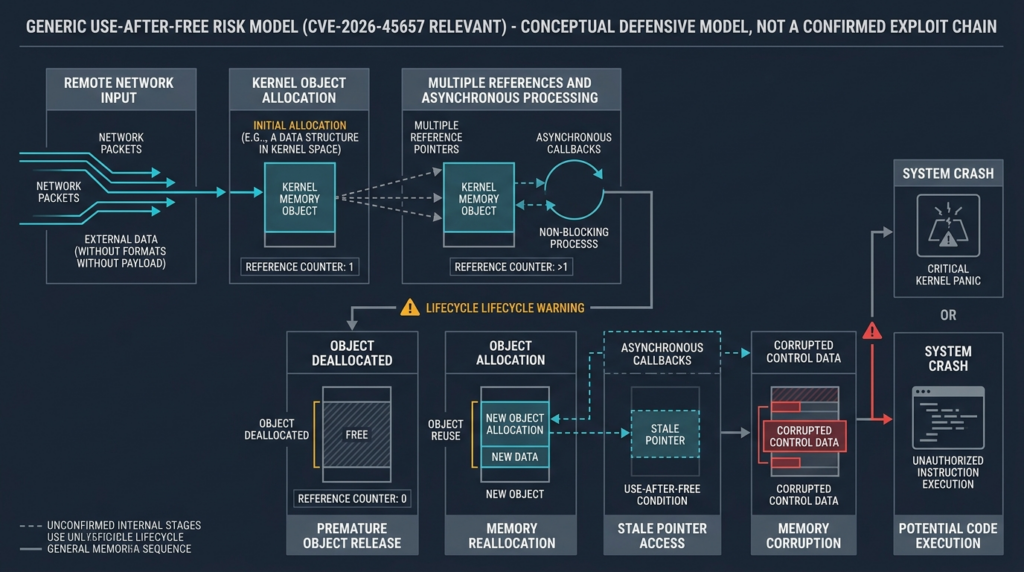
A use-after-free is fundamentally an object-ownership failure.
Imagine a kernel object used to track a network operation:
NetworkRequestContext
├── State
├── ReferenceCount
├── BufferPointer
├── CompletionCallback
├── ConnectionPointer
└── Flags
One execution path allocates the object and schedules asynchronous work. Another path handles timeout or cancellation. A third path processes completion.
A safe implementation ensures the object remains alive until every path has finished. Reference counting, locks, state machines, cancellation barriers, and ownership rules are commonly used to enforce that lifetime.
A vulnerable sequence may look like this:
- A network request causes the object to be allocated.
- A callback or worker retains a pointer.
- An error or teardown path releases the object too early.
- The memory returns to a kernel allocator.
- Another allocation reuses the same address.
- The callback executes and interprets the replacement memory as the original object.
- A stale field is read, written, or called.
The consequences depend on what is stored at the reused address.
Immediate crash
The stale pointer may reference invalid or guarded memory. The kernel detects an illegal access and stops the system.
This is the simplest visible outcome, but even then the crash may not be deterministic. Timing, processor scheduling, allocator state, and network load can change whether the invalid memory remains accessible.
Silent corruption
The released memory may still contain the original bytes. The stale access appears to succeed, while another part of the system receives corrupted state.
Silent corruption can be more difficult to investigate than an immediate crash because the visible failure may occur much later.
Type confusion through memory reuse
The allocator may place an unrelated object at the same address. The stale pointer interprets the new object according to the old structure.
A field that was once a length may now contain flags. A pointer may now be attacker-influenced data. A callback location may overlap with another object’s contents.
Information disclosure
A stale read may expose data that belongs to another kernel object, connection, process, or security context.
Information disclosure can also support later exploitation by revealing memory addresses or internal state, although no such primitive has been publicly confirmed for CVE-2026-45657.
Arbitrary or controlled writes
If stale code writes through a pointer or uses attacker-influenced lengths, the corruption may affect other memory. A useful write primitive can sometimes be transformed into changes to security-sensitive state.
Again, that is a general exploitation model, not a published description of this CVE’s exact primitive.
Control-flow influence
Some objects contain callback pointers, dispatch tables, list links, security tokens, or nested pointers. If an attacker can influence replacement memory and cause stale code to consume it, control flow or privileged data may be affected.
Modern Windows includes multiple exploit mitigations, and reliable kernel exploitation usually requires careful adaptation. The 9.8 RCE classification establishes potential impact, not a public recipe.
Why Network Kernel Bugs Are Operationally Difficult
Network-facing kernel code combines several properties that make memory-safety defects challenging.
Inputs arrive asynchronously
Packets, connection changes, timers, completion events, retries, and teardown can occur across multiple threads and processors.
Objects have complex lifetimes
A network object may be referenced by a connection table, timer, worker queue, driver, callback, and cancellation path at the same time.
Error paths receive less normal testing
Rare combinations of malformed input, resource exhaustion, timeout, cancellation, and partial initialization can expose ownership mistakes that ordinary traffic does not reach.
Crashes may be intermittent
The exact allocator state can determine whether freed memory remains unchanged, is reused immediately, or becomes invalid.
The vulnerable path may sit below user-mode services
A conventional application listener is not always a complete representation of kernel network exposure. This is one reason defenders should avoid assuming that a single service inventory identifies the real trigger for an underdocumented kernel flaw.
Failed exploitation may resemble ordinary instability
A failed memory-corruption attempt can produce a blue screen. So can defective hardware, an incompatible driver, a bad update, firmware, antivirus filter drivers, storage problems, and unrelated vulnerabilities.
Detection therefore requires correlation rather than a one-event rule.
Is CVE-2026-45657 Wormable
The CVSS characteristics create understandable concern about automated propagation:
- Network reachable
- No authentication required
- No user interaction required
- Low stated attack complexity
- Potentially severe system impact
Those properties are necessary for many wormable vulnerabilities, but they are not sufficient to prove wormability.
A practical self-propagating exploit needs at least five capabilities:
- A network path to a vulnerable machine
- An unauthenticated trigger
- Reliable exploitation across relevant configurations
- Stable code execution after compromise
- Automated discovery and delivery to additional targets
The official record supports the first two at a high level. It classifies the issue as network RCE without privileges or user interaction. It does not publish evidence for the reliability and propagation steps.
The NVD change history includes a CISA SSVC enrichment dated June 10, 2026, with:
{
  "exploitation": "none",
  "automatable": "yes",
  "technicalImpact": "total"
}
This is an important but time-bound data point. “Exploitation none” in that enrichment does not mean exploitation can never emerge. “Automatable yes” reflects the potential for automation based on the available characteristics. “Technical impact total” reflects the potential seriousness of successful exploitation. (NVD)
A precise internal statement is:
CVE-2026-45657 has the high-risk characteristics of an unauthenticated network kernel RCE. CISA’s June 10 SSVC enrichment marked it automatable with total technical impact while recording exploitation as none at that time. Public evidence should be monitored for change, but the available patch should be deployed without waiting for confirmed exploitation.
Avoid stronger claims such as “a worm is spreading” unless Microsoft, CISA, or credible incident-response evidence supports them.
Safe PoC, A Local Use-After-Free Demonstration
The following proof of concept demonstrates the generic programming error behind CWE-416. It does not contain Windows Kernel code, does not communicate over a network, does not reproduce CVE-2026-45657, and cannot determine whether a Windows machine is vulnerable.
It should be compiled only in a disposable local development environment with AddressSanitizer enabled.
#include <stdint.h>
#include <stdio.h>
#include <stdlib.h>
#include <string.h>

typedef struct PacketContext {
    uint32_t state;
    char label[32];
} PacketContext;

int main(void) {
    PacketContext *owner = calloc(1, sizeof(PacketContext));
    if (owner == NULL) {
        perror("calloc");
        return 1;
    }

    owner->state = 0x41424344;
    strcpy(owner->label, "local-lab-object");

    /*
     * stale_alias points to the same allocation.
     * It does not own a separate copy.
     */
    PacketContext *stale_alias = owner;

    /*
     * The object's valid lifetime ends here.
     */
    free(owner);
    owner = NULL;

    /*
     * Intentional local use-after-free.
     * AddressSanitizer should stop the program.
     */
    volatile uint32_t observed = stale_alias->state;

    printf("Observed state: 0x%08x\n", observed);
    return 0;
}
Compile it with Clang on a local Unix-like development system:
clang -O0 -g \
  -fsanitize=address \
  -fno-omit-frame-pointer \
  uaf_demo.c \
  -o uaf_demo

./uaf_demo
AddressSanitizer should report a heap-use-after-free and identify:
- The original allocation
- The call to
free - The later invalid read
- The memory address involved
- The source lines associated with each operation
What the PoC demonstrates
sahibi ve stale_alias point to the same memory. Setting sahibi için NULL after free does not update stale_alias. The alias remains non-null, but the memory it references is no longer a valid PacketContext.
This distinction is central to use-after-free bugs. A pointer can contain a plausible address even though the object’s lifetime has ended.
What the PoC does not demonstrate
The program does not model:
- Windows kernel allocation behavior
- Network packet parsing
- Asynchronous callbacks
- Reference counting
- Processor races
- Windows exploit mitigations
- Kernel heap grooming
- Controlled replacement objects
- Remote code execution
- A production-safe vulnerability test
It is intentionally limited. Its purpose is to help defenders understand the bug class without producing an operational exploit.
Why a crash is not the same as code execution
In the toy program, AddressSanitizer terminates the process on an invalid read. Without the sanitizer, the program may print the old value, print another value, or crash.
The same general principle applies to memory corruption: behavior depends on allocator state and timing. A crash proves that something went wrong. It does not automatically prove an attacker can reliably control execution.
For CVE-2026-45657, the vendor has classified RCE as possible. Defenders should trust the fixed-build boundaries rather than attempting to reproduce that impact on live systems.
Safe Exposure Validation
A safe assessment has three layers:
- Version exposure
- Network reachability
- Business consequence
The first layer determines whether the patch is required. The second and third determine how urgently the system should be remediated and how much temporary protection is needed.
Step One, Collect the Operating-System Identity
PowerShell can collect useful operating-system fields:
Get-ComputerInfo |
    Select-Object WindowsProductName,
                  WindowsVersion,
                  OsName,
                  OsVersion,
                  OsBuildNumber,
                  OsArchitecture
For precise servicing validation, collect the base build and UBR from the Windows registry:
$cv = Get-ItemProperty `
    'HKLM:\SOFTWARE\Microsoft\Windows NT\CurrentVersion'

[pscustomobject]@{
    ProductName      = $cv.ProductName
    DisplayVersion   = $cv.DisplayVersion
    CurrentBuild     = $cv.CurrentBuildNumber
    UBR              = $cv.UBR
    FullBuild        = "10.0.$($cv.CurrentBuildNumber).$($cv.UBR)"
    InstallationType = $cv.InstallationType
}
Example output:
ProductName      : Windows 11 Pro
DisplayVersion   : 24H2
CurrentBuild     : 26100
UBR              : 8457
FullBuild        : 10.0.26100.8457
InstallationType : Client
For Windows 11 24H2, 10.0.26100.8457 is below 10.0.26100.8655, so the machine is affected.
A Read-Only PowerShell Classifier
The following script performs a local comparison against the Microsoft-supplied product thresholds in the NVD record. It does not connect to another host, scan a network, install an update, or send malformed traffic.
$cv = Get-ItemProperty `
    'HKLM:\SOFTWARE\Microsoft\Windows NT\CurrentVersion'

$product     = [string]$cv.ProductName
$display     = [string]$cv.DisplayVersion
$installType = [string]$cv.InstallationType
$base        = [int]$cv.CurrentBuildNumber
$ubr         = [int]$cv.UBR
$running     = [version]"10.0.$base.$ubr"

$release   = $null
$fixed     = $null
$initialKb = $null

if ($product -match 'Windows Server 2025') {
    $release = 'Windows Server 2025'
    $fixed = [version]'10.0.26100.32995'
    $initialKb = 'KB5094125'
}
elseif ($product -match 'Windows Server 2022') {
    $release = 'Windows Server 2022'
    $fixed = [version]'10.0.20348.5256'
    $initialKb = 'KB5094128'
}
elseif ($display -eq '26H1' -or $base -eq 28000) {
    $release = 'Windows 11 26H1'
    $fixed = [version]'10.0.28000.2269'
    $initialKb = 'KB5095051'
}
elseif ($display -eq '25H2' -or $base -eq 26200) {
    $release = 'Windows 11 25H2'
    $fixed = [version]'10.0.26200.8655'
    $initialKb = 'KB5094126'
}
elseif ($display -eq '24H2' -or $base -eq 26100) {
    $release = 'Windows 11 24H2'
    $fixed = [version]'10.0.26100.8655'
    $initialKb = 'KB5094126'
}
elseif ($display -eq '23H2' -or $base -eq 22631) {
    $release = 'Windows 11 23H2'
    $fixed = [version]'10.0.22631.7219'
    $initialKb = 'KB5093998'
}

$status = if ($null -eq $fixed) {
    'REVIEW'
}
elseif ($running -lt $fixed) {
    'AFFECTED'
}
else {
    'FIXED_OR_LATER'
}

[pscustomobject]@{
    ComputerName     = $env:COMPUTERNAME
    ProductName      = $product
    DisplayVersion   = $display
    InstallationType = $installType
    RunningBuild     = $running.ToString()
    MatchedRelease   = $release
    FixedBuild       = if ($fixed) {
        $fixed.ToString()
    } else {
        $null
    }
    InitialFixKB     = $initialKb
    Status           = $status
}
Interpret the results carefully
AFFECTED means:
- The product matched a published affected release.
- The running build is below the fixed threshold.
- The system should receive the applicable cumulative update or a later supported update.
FIXED_OR_LATER means:
- The product matched a published release.
- The running build meets or exceeds the first fixed version.
It does not independently prove:
- The system has no other vulnerabilities.
- All security software is healthy.
- No compromise occurred before patching.
- The update completed without application impact.
- A restored snapshot will remain fixed.
REVIEW means the script could not classify the system confidently. It must not be treated as a pass.
Possible reasons include:
- Unexpected product naming
- A future Windows version
- A specialized edition
- Missing registry values
- Corrupted inventory
- A product outside the current affected set
- A management agent reporting stale data
Step Two, Review Local Network Surfaces
Because the public record does not identify a specific protocol or port, local network inspection is contextual rather than CVE-specific.
List listening TCP endpoints:
Get-NetTCPConnection -State Listen |
    Sort-Object LocalPort |
    Select-Object LocalAddress,
                  LocalPort,
                  OwningProcess
List UDP endpoints:
Get-NetUDPEndpoint |
    Sort-Object LocalPort |
    Select-Object LocalAddress,
                  LocalPort,
                  OwningProcess
Review firewall profiles:
Get-NetFirewallProfile |
    Select-Object Name,
                  Enabled,
                  DefaultInboundAction,
                  DefaultOutboundAction
Review enabled inbound allow rules:
Get-NetFirewallRule `
    -Enabled True `
    -Direction Inbound `
    -Action Allow |
    Select-Object DisplayName,
                  Profile,
                  Direction,
                  Action |
    Sort-Object DisplayName
These commands answer important inventory questions. They do not reveal the actual trigger for CVE-2026-45657.
A port listener may be unrelated. A kernel path may also operate beneath a conventional user-mode service. The output should be used to find excessive exposure, not to claim that one listed port is the vulnerability.
Step Three, Map Real Network Paths
Host-level data should be combined with network controls and observed traffic.
İncele:
- Perimeter firewall policy
- Cloud security groups
- Network security groups
- VLAN and subnet access-control lists
- VPN routing
- Partner connectivity
- Software-defined network policy
- Endpoint firewall configuration
- Network access-control rules
- East-west flow logs
- EDR network telemetry
- Load balancer and reverse-proxy placement
- Temporary maintenance rules
- Disaster-recovery connectivity
The most important paths are not always obvious.
A server may have no public address but allow connections from every workstation. A privileged management server may accept broad traffic from a vendor VPN. A developer laptop may be protected in the office but exposed on an untrusted home or conference network.
The goal is to answer:
From which attacker-controlled or potentially compromised zones can network traffic reach this affected system?
Step Four, Add Business and Security Context
A vulnerable build on a low-value isolated test device and the same build on an identity-management server should not receive the same remediation order.
| Factor | Neden önemli | Evidence source |
|---|---|---|
| Internet reachability | Untrusted remote sources may reach the host | Firewall and cloud policy |
| Broad internal access | A compromised workstation may move laterally | Flow logs and segmentation maps |
| Identity role | Kernel compromise may expose privileged operations | CMDB and system-owner records |
| Management role | The host may control many other systems | Installed tools and administrative workflows |
| Sensitive data | Confidentiality consequences increase | Data classification |
| Critical service | Downtime can have major operational impact | Business impact analysis |
| Difficult recovery | Restoration may take longer | Recovery tests and RTO |
| Weak monitoring | Exploitation may be harder to detect | EDR and network sensor coverage |
| Large clone population | One image can create many vulnerable hosts | VDI and cloud image inventory |
A useful qualitative model is:
Priority =
    Version exposure
    × Network reachability
    × Business consequence
    × Detection uncertainty
The result should remain explainable. Security teams should record the evidence supporting each factor instead of producing a score that asset owners cannot challenge.
Patching CVE-2026-45657
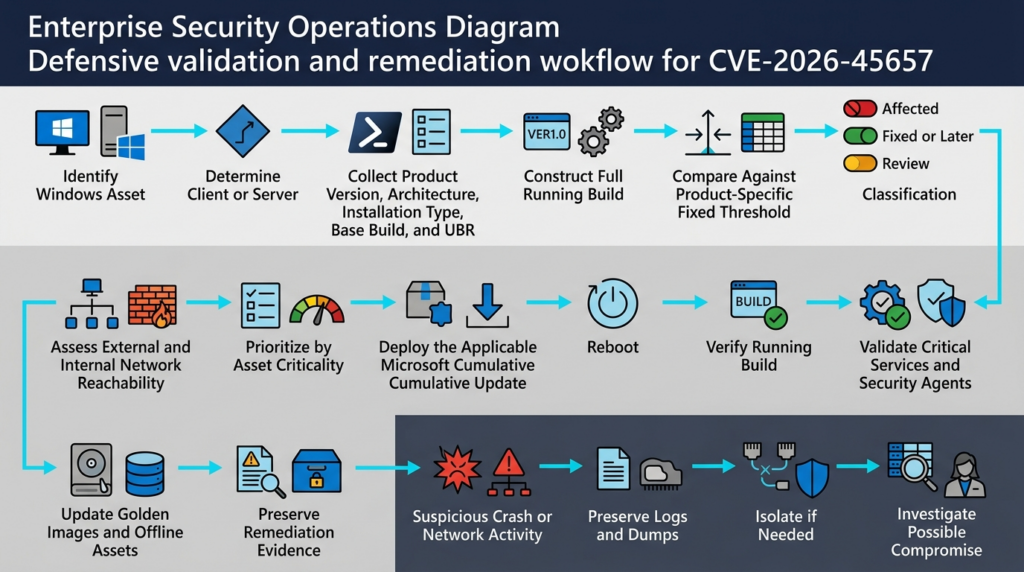
The primary remediation is to install the applicable Microsoft cumulative update or a later supported cumulative update for the same Windows release.
Do not manually replace kernel binaries. Manual file replacement can create inconsistent servicing state, break signature or version assumptions, and leave related components unpatched.
Use a supported management channel such as:
- Windows Update for Business
- Microsoft Intune
- Windows Server Update Services
- Microsoft Configuration Manager
- Azure Update Manager
- An approved enterprise patch platform
- A controlled image pipeline
- An authorized offline update process
Recommended Deployment Sequence
Confirm the population
Collect the running product and build from every managed source. Reconcile differences between:
- Endpoint management
- Güvenlik açığı tarayıcıları
- CMDB
- Active Directory
- Cloud inventory
- Hypervisor inventory
- VDI platforms
- Backup systems
- Network observations
A system appearing in one source but not another should become an investigation item.
Prioritize the highest-risk groups
Recommended first-wave categories include:
- Internet-facing Windows servers
- Servers reachable from broad user networks
- Identity-adjacent systems
- Jump hosts
- Security-management servers
- Backup infrastructure
- Software deployment systems
- Remote-management platforms
- High-value application servers
- Systems with weak EDR coverage
Test representative systems
A critical security score does not eliminate the need for change discipline.
Representative testing should cover:
- Hardware classes
- Server roles
- Network drivers
- Storage drivers
- Clustering
- Virtualization
- VPN software
- EDR and antivirus drivers
- Backup agents
- Application middleware
- Legacy business software
Kernel and cumulative updates can interact with low-level drivers. A compressed test cycle is safer than deploying blindly to every critical system at once.
Prepare rollback and recovery
Before deployment:
- Confirm backups exist.
- Confirm recent recovery tests succeeded.
- Record current build and boot time.
- Document cluster failover.
- Identify application smoke tests.
- Confirm console or out-of-band access.
- Define rollback ownership.
- Establish escalation contacts.
Deploy in controlled rings
A common ring structure is:
- Security and IT test devices
- Representative low-risk production devices
- High-risk exposed systems
- Broad workstation population
- Remaining servers and specialized systems
- Exceptions and offline assets
High-risk public systems may need to move earlier under emergency policy, but the organization should still capture pre-change evidence and health checks.
Reboot
Kernel updates normally require a restart before the fixed code becomes active.
An installed package is not sufficient proof if the machine continues to run the old kernel. Enforce restart deadlines, especially for laptops that remain online for weeks.
Validate the running build
After reboot:
- Recollect product and full build.
- Confirm the build meets or exceeds the threshold.
- Confirm boot time is later than update installation.
- Validate update-management status.
- Verify critical services.
- Check network interfaces.
- Check storage and cluster health.
- Confirm EDR and backup agents are running.
- Rerun the authenticated vulnerability check.
Update source images
Yama:
- VDI masters
- Cloud images
- Bare-metal deployment images
- Recovery images
- Autoscaling templates
- Lab templates
- Disaster-recovery replicas
Otherwise, the next newly created system may return below the fixed threshold.
Why KB-Only Detection Produces Errors
Searching only for the first June KB can create both false positives and false confidence.
Later updates supersede the first fix
A machine may not show KB5094126 as its newest package because a later cumulative update replaced it. If the running build is above the fixed threshold, requiring the original KB can incorrectly label the system as vulnerable.
The package may be staged but not active
An update can be downloaded or installed while the old kernel remains loaded until restart.
Inventory data can be stale
An endpoint platform may report yesterday’s build. A vulnerability scanner may use an old credentialed result. A CMDB may contain only the base build.
Product mapping can be wrong
A generic “Windows build 26100” rule can confuse Windows 11 with Windows Server 2025.
Offline servicing changes the evidence
An image may contain the update package but has never booted and completed servicing. Validate a launched instance before trusting the image.
Package inventory remains useful for troubleshooting:
Get-WindowsPackage -Online |
    Where-Object PackageState -eq 'Installed' |
    Sort-Object InstallTime -Descending |
    Select-Object -First 20 `
        PackageName,
        ReleaseType,
        InstallTime
DISM can provide another view:
DISM /Online /Get-Packages /Format:Table
The preferred closure evidence remains:
- Correct product identification
- Complete running build
- Fixed threshold comparison
- Reboot confirmation
- Update health
- Service health
- Timestamped collection
Creating Auditable Remediation Evidence
A structured evidence record helps vulnerability teams, system owners, auditors, and incident responders agree on what was observed.
$cv = Get-ItemProperty `
    'HKLM:\SOFTWARE\Microsoft\Windows NT\CurrentVersion'

$os = Get-CimInstance Win32_OperatingSystem

$base = [int]$cv.CurrentBuildNumber
$ubr  = [int]$cv.UBR
$full = "10.0.$base.$ubr"

$evidence = [ordered]@{
    TimestampUtc     = (Get-Date).ToUniversalTime().ToString('o')
    ComputerName     = $env:COMPUTERNAME
    ProductName      = [string]$cv.ProductName
    DisplayVersion   = [string]$cv.DisplayVersion
    InstallationType = [string]$cv.InstallationType
    Architecture     = $env:PROCESSOR_ARCHITECTURE
    FullBuild        = $full
    LastBootUtc      = $os.LastBootUpTime.ToUniversalTime().ToString('o')
}

$evidence | ConvertTo-Json -Depth 3
An enterprise record can also include:
- Device ID
- Cloud instance ID
- Serial number
- Management platform
- Business owner
- Technical owner
- Asset criticality
- Network zone
- Patch ring
- Change ticket
- Initial fix KB
- Classifier result
- Post-patch validation result
- Evidence signature or hash
The evidence should be transmitted through an authenticated management channel and protected according to the sensitivity of the asset data.
Detection and Threat Hunting
The public record does not provide a unique indicator set for CVE-2026-45657.
There is no authoritative published:
- Packet signature
- Destination port
- Process name
- File hash
- Registry value
- Driver name
- Bugcheck code
- Stack trace
- Event ID
- Command line
- Post-exploitation tool
- Persistence mechanism
Detection must therefore be behavioral and contextual.
Useful Signals and Their Limits
| Sinyal | Değer | Sınırlama | Next action |
|---|---|---|---|
| Build below fixed threshold | Strong proof of exposure | Does not prove attack activity | Patch and review reachability |
| Unexpected kernel crash | Confirms instability | Many non-security causes exist | Preserve dump and timeline |
| Network burst before crash | Supports a network-trigger hypothesis | Could be normal load or unrelated scanning | Preserve flow and packet metadata |
| Similar crashes on multiple vulnerable hosts | Raises concern about a shared trigger | Could also be a defective driver or update | Compare timing, build, traffic, and software |
| EDR kernel exploit alert | Potentially high value | Heuristic and vendor specific | Preserve raw telemetry and contact vendor |
| New SYSTEM-level service | Supports post-compromise investigation | May be legitimate administration | Validate signer, creator, timing, and owner |
| Unexpected driver | May indicate privileged persistence | Could be unrelated software | Acquire forensic evidence |
| East-west scanning from a workstation | Possible propagation or discovery | Could be legitimate IT activity | Correlate identity, process, destination pattern |
| Repeated crash followed by outbound connection | Potential exploitation sequence | Not unique to this flaw | Escalate to incident response |
A single weak signal should not become a definitive attribution. The strongest investigations combine:
- Vulnerable build
- Relevant network exposure
- Suspicious traffic
- Kernel failure
- Endpoint telemetry
- Privileged post-crash activity
- Similar events across peers
- Consistent timestamps
Reviewing Windows Crash Events
A basic read-only query can identify recent system-failure events:
Get-WinEvent -FilterHashtable @{
    LogName   = 'System'
    StartTime = (Get-Date).AddDays(-14)
} |
Where-Object {
    $_.ProviderName -in @(
        'Microsoft-Windows-WER-SystemErrorReporting',
        'Microsoft-Windows-Kernel-Power',
        'EventLog'
    )
} |
Select-Object TimeCreated,
              ProviderName,
              Id,
              LevelDisplayName,
              Message
This is a timeline aid, not a CVE detector.
Kernel-Power and unexpected-shutdown events can result from:
- Power loss
- Hardware failure
- Firmware problems
- Defective drivers
- Storage instability
- Forced restart
- Thermal shutdown
- Bad memory
- Another vulnerability
- Failed exploitation
- Ordinary software defects
Do not create a rule that automatically labels these events CVE-2026-45657.
Memory Dump Analysis
Microsoft documents WinDbg as a supported tool for analyzing kernel-mode dump files. Dump files can be opened with WinDbg’s -z option or through the graphical interface. (Microsoft Learn)
A basic command-line invocation is:
windbg -z C:\Windows\MEMORY.DMP
After symbols load:
!analyze -v
A small memory dump preserves limited but useful failure information. Microsoft notes that it can help determine why a machine failed, though it contains less state than a kernel or complete dump. (Microsoft Learn)
Investigators should review:
- Bugcheck code
- Faulting instruction
- Current thread
- Stack trace
- Loaded modules
- Driver versions
- Exception context
- Pool or memory-corruption indicators
- Network-related frames
- Repetition across multiple dumps
- Timestamp correlation with network events
A debugger’s “probable cause” is not always the true root cause. Memory corruption can damage state before the visible crash. The module on top of the stack may be a victim rather than the component that introduced the corruption.
Attribution to CVE-2026-45657 should require more than the presence of a networking-related kernel frame.
Network Hunting Without an Invented Signature
When the trigger is not public, behavior-based hunting is more defensible than pattern matching.
Review for:
- One source contacting many Windows hosts rapidly
- New inbound sources preceding kernel crashes
- Repeated short-lived connections followed by restart
- Traffic from guest or unmanaged networks to server zones
- Broad east-west discovery from a user device
- Similar timing across multiple affected hosts
- Anomalous protocol mixtures
- Large increases in rejected or malformed traffic
- Outbound connections from a host immediately after restart
- New communications with unfamiliar external infrastructure
Packet capture can be useful when collection is authorized and privacy requirements are met. Preserve suspicious traffic for isolated analysis, but do not replay it against another vulnerable production machine.
Because the actual protocol condition is not publicly confirmed, normal-looking network traffic cannot prove safety. Version remediation remains the most reliable preventive control.
Incident Response When Exploitation Is Suspected
Finding an affected build is a vulnerability-management event. Finding an affected build combined with suspicious traffic, kernel failure, and privileged post-crash activity may be a security incident.
Vulnerable host without compromise evidence
Recommended actions:
- Restrict unnecessary network reachability.
- Install the applicable cumulative update.
- Reboot.
- Verify the running build.
- Review recent kernel crashes and high-value telemetry.
- Record the exposure window.
- Preserve logs according to policy.
- Update source images.
Host with credible compromise indicators
Recommended actions:
- Isolate the host through an approved method.
- Record current network connections and sessions.
- Preserve EDR telemetry.
- Preserve firewall and flow data.
- Collect memory where qualified procedures allow.
- Preserve crash dumps.
- Acquire disk evidence when warranted.
- Record update and reboot history.
- Investigate privileged account activity.
- Hunt for similar behavior on peer systems.
- Rotate exposed administrative or service credentials.
- Rebuild from a trusted fixed image when kernel integrity cannot be established.
Why patching alone may not restore trust
Installing the update prevents future exploitation through the same vulnerability path. It does not remove persistence established before patching.
If an attacker obtained kernel-level execution, they may have:
- Modified privileged services
- Installed a driver
- Altered security tooling
- Stolen credentials
- Changed local policy
- Added scheduled tasks
- Created remote-management access
- Modified boot or recovery configuration
- Moved laterally
- Accessed protected application data
A clean rebuild is often safer than attempting piecemeal cleanup when strong evidence supports kernel compromise.
Preserve volatile evidence before destructive action
Pulling power may destroy memory evidence. Leaving a compromised system connected may allow continued attacker activity.
The correct choice depends on:
- Active attacker presence
- Business impact
- Available containment controls
- Forensic capability
- Legal requirements
- Safety requirements
- Data sensitivity
Incident responders should follow an approved playbook rather than improvising based on the CVE score alone.
Compensating Controls
The Microsoft update is the primary remediation. Temporary controls can reduce exposure while patching proceeds, but they should not be described as equivalent to the fix.
Reduce external ingress
Restrict unnecessary inbound access from:
- The public internet
- Vendor networks
- Partner connections
- Remote-access pools
- Guest environments
- Unmanaged devices
Reduce lateral movement
Limit:
- Workstation-to-workstation traffic
- User-network access to server segments
- Broad server-to-server communication
- Guest-to-corporate routing
- Development-to-production access
- Cross-environment administrative paths
Protect critical infrastructure
Apply tighter controls to:
- Domain and identity infrastructure
- Backup servers
- Endpoint-management servers
- Software deployment systems
- Security consoles
- Administrative jump hosts
- Virtualization management
- Cloud control-plane connectors
Confirm endpoint firewall enforcement
Review whether the active firewall profiles are enabled and whether inbound allow rules are unnecessarily broad.
Avoid making a speculative rule such as “block one assumed port to mitigate CVE-2026-45657.” Without a vendor-confirmed protocol, such a change may disrupt business while leaving the actual path reachable.
Improve telemetry
Increase retention and monitoring for:
- Kernel crashes
- EDR sensor health
- Network flow
- Inbound connection anomalies
- SYSTEM-level process creation
- Driver installation
- Service creation
- Privileged authentication
- Unexpected outbound traffic
Prevent vulnerable provisioning
Block deployment of images below the fixed threshold. A control in the image pipeline can prevent hundreds of new exceptions.
A Time-Boxed Remediation Plan
| Zaman | Amaç |
|---|---|
| İlk 24 saat | Identify affected products, prioritize exposed assets, restrict the highest-risk paths, begin update testing |
| First 72 hours | Patch and verify public, identity-adjacent, and broadly reachable systems; update core images |
| First 7 days | Complete the supported fleet or create approved, dated exceptions with compensating controls |
| Devam ediyor | Reconcile offline devices, restored snapshots, disaster-recovery assets, and new provisioning |
Organizations with safety-critical or highly regulated systems may require longer testing. The exception should still have:
- A named owner
- A business reason
- A network-control plan
- Additional monitoring
- A target date
- A review date
- Executive or risk-owner approval where required
“Not yet exploited publicly” should not become an indefinite exception reason.
Related Windows Vulnerabilities
Related CVEs can help defenders understand recurring operational patterns. They should not be used to infer undocumented technical details about CVE-2026-45657.
| CVE | Component or class | Relationship | Ana ders |
|---|---|---|---|
| CVE-2026-45657 | Windows Kernel use-after-free | Current critical network RCE | Validate fixed builds without exploit traffic |
| CVE-2024-38063 | Windows TCP/IP RCE associated with integer underflow | Another critical low-level network flaw | Different root causes can produce similar top-line severity |
| CVE-2022-34718 | Windows TCP/IP RCE | Historical network-stack exposure | Public exploit maturity must be evaluated separately from CVSS |
| CVE-2017-0144 | Windows SMBv1 RCE | Operational example of remote propagation risk | Patch coverage, legacy protocols, and segmentation all matter |
| CVE-2026-44815 | Windows DHCP Client RCE | Same June 2026 release, different component and weakness | Do not reuse component-specific mitigations |
| CVE-2026-47291 | Windows HTTP.sys RCE | Another critical June 2026 network RCE | Configuration and service exposure can change practical risk |
CVE-2024-38063
CVE-2024-38063 was a critical Windows TCP/IP remote code execution vulnerability associated with integer underflow. It is relevant because it demonstrates how a different memory-safety root cause in low-level network processing can reach a similar risk category.
The comparison should stop there. An integer-underflow path and a use-after-free path require different trigger conditions and exploitation techniques. A detection rule or mitigation designed around CVE-2024-38063 should not automatically be applied to CVE-2026-45657.
The broader lesson is that operating-system network components require build-level remediation even when the exact exploit details are not available to defenders.
CVE-2022-34718
CVE-2022-34718 was another Windows TCP/IP remote code execution vulnerability. Its public lifecycle demonstrates that exploitability information can change after initial disclosure.
Security teams should maintain separate fields for:
- CVSS severity
- Vendor exploitability assessment
- Public disclosure
- Proof-of-concept availability
- Observed exploitation
- KEV status
- Internal exposure
- Patch status
Combining all of those into one “critical” label loses useful decision information.
CVE-2017-0144
CVE-2017-0144 affected the Windows SMBv1 server and allowed remote code execution through crafted packets. It later became closely associated with the operational consequences of MS17-010 exposure.
CVE-2026-45657 should not be described as another EternalBlue. The protocol, root cause, exploit, and historical context are different.
The relevant lesson is operational:
- A patch can exist while organizations remain exposed.
- Unknown assets undermine remediation.
- Legacy systems remain reachable.
- Reboots are deferred.
- Internal segmentation is too broad.
- Recovery images reintroduce vulnerable software.
- Attackers exploit the gap between patch publication and fleet-wide enforcement.
CVE-2026-44815
CVE-2026-44815 is a separate Windows DHCP Client remote code execution vulnerability from the June 2026 security release. A DHCP-specific attack condition or workaround would not automatically apply to the Windows Kernel UAF.
The comparison reinforces a core rule: two vulnerabilities can share a CVSS score while requiring different exposure checks and mitigations.
CVE-2026-47291
CVE-2026-47291 affects HTTP.sys and belongs to a different network surface. HTTP.sys configuration, web-service exposure, and request handling can be directly relevant to that CVE but should not be imported into CVE-2026-45657 without evidence.
Patch Tuesday often contains multiple high-severity network flaws. Teams should avoid creating one generic “Windows network RCE” remediation note that hides product-specific conditions.
The Operational Lesson from MS17-010
The history of MS17-010 is often summarized as “patch faster.” That is true but incomplete.
Large-scale exposure persists when several controls fail together:
- Asset inventory is incomplete.
- Patch deployment misses offline machines.
- Users defer restart.
- Unsupported systems remain online.
- Legacy protocols remain enabled.
- Internal networks allow broad lateral communication.
- Recovery images are stale.
- Exceptions have no expiration.
- Scanner credentials fail.
- Business owners assume another team is responsible.
For CVE-2026-45657, the control loop should be:
Authoritative affected range
        ↓
Complete product inventory
        ↓
Correct product-to-build mapping
        ↓
Reachability-based prioritization
        ↓
Supported cumulative update
        ↓
Restart
        ↓
Running-build verification
        ↓
Image and recovery-source remediation
        ↓
Continuous drift detection
Each transition matters.
Inventory without patching leaves known exposure. Patching without restart can leave old code running. Build verification without image remediation allows regression. Patching without segmentation leaves the environment dependent on perfect coverage for the next network vulnerability.
Automating Safe Validation
Automation is useful when it makes evidence more consistent and reduces operational delay.
A safe CVE-2026-45657 workflow should resemble a deterministic compliance check, not an exploit module.
Lock the scope
The workflow should receive an explicit list of authorized devices, management groups, cloud accounts, or network ranges.
It should reject ambiguous public targets and should not discover or scan unrelated third-party infrastructure.
Collect read-only evidence first
Collect:
- Ürün
- Edition
- Display version
- Installation type
- Mimarlık
- Full build
- Boot time
- Management source
- Network zone
- Asset owner
- Collection timestamp
Use deterministic comparisons
A version parser should decide whether:
10.0.26100.8457 < 10.0.26100.8655
A language model can explain the result, but it should not improvise the comparison or guess the product.
Preserve unknown states
Missing or contradictory evidence should produce REVIEWdeğil SAFE.
Avoid undocumented trigger testing
The workflow should not:
- Generate malformed kernel traffic
- Replay suspicious packets
- Run an unverified public exploit
- Crash a production system
- Scan unauthorized targets
- Attempt persistence
- Attempt privilege escalation
- Disable security controls to improve exploit reliability
Integrate change control
Automation can:
- Open remediation tickets
- Assign owners
- Schedule approved updates
- Collect pre-change evidence
- Request restart
- Validate fixed builds
- Reopen failed devices
- Generate evidence reports
It should not restart a critical cluster node without the organization’s approval and sequencing rules.
Require closure evidence
A task should close only after:
- The product is correctly identified.
- The running build meets the threshold.
- The reboot state is valid.
- Critical services are healthy.
- The source image is fixed.
- Management systems have refreshed.
- Any temporary exception has been removed or approved.
Teams that need an agent-assisted workflow for authorized asset validation, evidence collection, retesting, and reporting can use Penligent as part of that process. For this vulnerability, the safest automation profile remains version based: collect local build evidence, map network context, document remediation, and stop before any undocumented kernel trigger.
A focused operational overview is also available on Penligent’s CVE-2026-45657 analysis page. It should be treated as a supplementary workflow resource; Microsoft’s advisory, NVD data, and Microsoft’s update pages remain authoritative for the vulnerability description and fixed builds. (Penligent)
Common Validation Mistakes
Assuming every affected machine is internet exposed
Version exposure and internet exposure are different facts.
An internal system still requires the patch. Its deployment priority may differ based on segmentation and business role.
Assuming a private IP address means low risk
Private addressing does not prevent access from compromised internal devices, VPN users, partners, cloud peers, or adjacent workloads.
Treating CVSS as exploit intelligence
CVSS describes severity characteristics. It does not confirm a public exploit or active campaign.
Treating one SSVC snapshot as permanent
The June 10 CISA enrichment recorded exploitation as none. Threat status can change. Record the date whenever communicating this information. (NVD)
Searching only for the initial KB
Later cumulative updates may supersede it. Validate the complete running build.
Checking the base build without UBR
26100 alone cannot determine whether a Windows 11 24H2 machine is below or above 26100.8655.
Applying the workstation threshold to Windows Server 2025
Both can use base build 26100, but their fixed revisions are different.
Installing without rebooting
The package may be present while the old kernel remains active.
Calling every blue screen an exploit
A crash is an investigative signal, not a unique indicator.
Running a public PoC in production
A repository may be mislabeled, incomplete, unstable, or malicious. Kernel exploits can crash systems or cause corruption even when they fail.
Blocking a guessed port
The authoritative record does not identify one. A guessed control may be ineffective.
Forgetting source images
Golden images, VDI templates, recovery media, and autoscaling sources can recreate vulnerable systems.
Treating scanner failure as not affected
Missing credentials or stale data should produce an unknown result, not a pass.
Prioritization Matrix
| Asset category | Öncelik | Acil eylem | Required closure evidence |
|---|---|---|---|
| Internet-reachable affected Windows server | Emergency | Restrict ingress, patch, reboot, investigate exposure window | Fixed build, service health, network review |
| Internal critical server reachable from user networks | Emergency or highest accelerated tier | Segment, patch, monitor east-west activity | Fixed build, path analysis, EDR health |
| Identity or management system | Highest accelerated tier | Protected change process, patch, privileged activity review | Fixed build, role validation, monitoring evidence |
| Broad workstation fleet | Accelerated | Deploy in rings and enforce restart | Fleet build coverage and exception report |
| Isolated laboratory system | High but risk adjusted | Confirm isolation and patch before reconnection | Fixed build and network-control evidence |
| Offline virtual machine | Remediation before use | Quarantine on startup and update | Launch test and fixed build |
| Golden or cloud image | Critical source remediation | Update image and block old version deployment | Image version and instance test |
| Unsupported or incompatible system | Formal exception | Isolate, monitor, migrate, or retire | Risk acceptance and dated replacement plan |
Roles and Responsibilities
Vulnerability management
Owns:
- Authoritative vulnerability data
- Fixed-build tables
- Coverage reporting
- Scanner logic
- Exception tracking
- Closure criteria
Endpoint and server operations
Owns:
- Update deployment
- Restart enforcement
- Servicing health
- Build verification
- Image remediation
- Application health checks
Network security
Owns:
- Reachability analysis
- Temporary ingress reduction
- Segmentation
- Flow retention
- Removal of emergency rules
SOC and incident response
Owns:
- Threat monitoring
- Crash triage
- Korelasyon
- Forensic preservation
- Compromise assessment
- Escalation
Application owners
Own:
- Functional testing
- Maintenance coordination
- Business-impact communication
- Acceptance of residual risk
Security engineering
Owns:
- Deterministic automation
- Evidence integrity
- Workflow guardrails
- Data-quality validation
- Safe retesting
No single group can close a network kernel RCE reliably without cooperation from the others.
Operational Checklist
Keşfedin
- Identify Windows 11 23H2, 24H2, 25H2, and 26H1.
- Identify Windows Server 2022 and Windows Server 2025.
- Include Server Core.
- Include x64 and ARM64 where applicable.
- Include offline systems and templates.
- Reconcile multiple inventory sources.
Classify
- Collect product name.
- Collect display version.
- Collect installation type.
- Collect architecture.
- Collect base build.
- Collect UBR.
- Construct the full build.
- Apply the correct product threshold.
- Mark missing data for review.
Prioritize
- Identify internet paths.
- Identify partner and VPN paths.
- Identify broad internal reachability.
- Identify identity and management roles.
- Identify sensitive data.
- Identify weak monitoring.
- Identify difficult recovery.
Reduce exposure
- Restrict unnecessary ingress.
- Reduce lateral connectivity.
- Protect administrative networks.
- Block vulnerable image deployment.
- Increase telemetry retention.
Patch
- Use the applicable Microsoft cumulative update.
- Test representative systems.
- Prepare rollback.
- Deploy in controlled rings.
- Reboot.
Doğrulama
- Recollect the running build.
- Confirm the boot time.
- Confirm update success.
- Validate critical services.
- Confirm EDR and backup health.
- Rerun the vulnerability check.
Investigate
- Review the unpatched exposure window.
- Preserve crash dumps.
- Review network anomalies.
- Review privileged activity.
- Escalate compound evidence.
Close
- Update the CMDB.
- Update golden images.
- Resolve exceptions.
- Remove temporary controls where appropriate.
- Monitor for rollback and drift.
Frequently Asked Questions
What is CVE-2026-45657?
- It is a critical remote code execution vulnerability in the Windows Kernel.
- Microsoft describes the root cause as a use-after-free.
- An unauthorized attacker may execute code over a network.
- Microsoft assigned a CVSS 3.1 score of 9.8.
- The vulnerability was published on June 9, 2026. (NVD)
Which Windows versions are affected?
- Windows 11 23H2 is affected below
10.0.22631.7219. - Windows 11 24H2 is affected below
10.0.26100.8655. - Windows 11 25H2 is affected below
10.0.26200.8655. - Windows 11 26H1 is affected below
10.0.28000.2269. - Windows Server 2022 is affected below
10.0.20348.5256. - Windows Server 2025 and Server Core are affected below
10.0.26100.32995. - Both x64 and ARM64 Windows 11 systems are included in the published affected data. (NVD)
How can I check a system safely?
- Collect the exact Windows product and edition.
- Read the base build and UBR.
- Construct the complete running build.
- Compare it with the product-specific fixed threshold.
- Review network reachability for prioritization.
- Do not send malformed packets or run an unknown exploit.
Is the vulnerability actively exploited?
- The NVD change history contains a CISA SSVC entry dated June 10, 2026, recording exploitation as none at that time.
- The same entry marks the vulnerability automatable with total technical impact.
- This is a dated assessment, not a permanent guarantee.
- Security teams should continue monitoring Microsoft and CISA while patching. (NVD)
Is CVE-2026-45657 wormable?
- It has characteristics that can support automated propagation: network access, no privileges, and no user interaction.
- A confirmed worm also requires stable exploitation, execution, discovery, and propagation.
- Those complete capabilities are not established by the concise public record.
- Describe it as a high-risk potentially automatable network RCE, not as a confirmed active worm without new evidence.
Is checking the June KB enough?
- No.
- Later cumulative updates can supersede the initial package.
- An installed package may require restart.
- Product mapping matters because Windows 11 24H2 and Windows Server 2025 share base build 26100.
- The full running build is the strongest version evidence.
What should I do if I cannot patch immediately?
- Restrict unnecessary external and internal access.
- Prioritize identity, management, backup, and public-facing systems.
- Confirm host firewall and EDR health.
- Increase network and crash telemetry retention.
- Block new provisioning from vulnerable images.
- Create a dated, owned exception.
- Patch as soon as operationally possible.
Can a firewall or EDR replace the update?
- No.
- Segmentation can reduce reachability and blast radius.
- EDR can improve detection and investigation.
- The public record does not identify a single firewall rule that completely mitigates the flaw.
- The Microsoft cumulative update or a later fixed build remains the primary remediation.
Final Assessment
CVE-2026-45657 deserves accelerated remediation because it combines a privileged Windows component, network reachability, no required privileges, no user interaction, and potentially severe impact.
The limited public technical detail does not reduce the need to patch. It reduces the value of speculative exploitation tests.
The most reliable response is straightforward:
- Identify every affected Windows product.
- Collect the complete running build.
- Compare it with the correct product-specific threshold.
- Prioritize systems by network reachability and business consequence.
- Deploy the supported Microsoft cumulative update or a later fixed update.
- Reboot.
- Prove that the fixed build is active.
- Update images, templates, offline assets, and recovery sources.
- Review the unpatched exposure window for suspicious activity.
- Continue monitoring authoritative sources for changes in exploitation status.
Do not wait for a weaponized exploit before treating the vulnerability seriously. Do not use an unverified exploit to answer a question that build evidence can answer safely. Patch quickly, validate deterministically, preserve evidence, and keep every threat claim tied to what the available sources actually establish.
 Turkish
  English
  German
  French
  Spanish
  Portuguese
  Japanese
  Korean
  Hindi
Hindi  Arabic
  Hebrew