
WordPress 7.0.4 is a security release addressing CVE-2026-65640, a high-severity remote code execution vulnerability involving malicious file uploads on WordPress installations that use Imagick and Ghostscript.
The issue is important, but its exact conditions matter.
CVE-2026-65640 is not an unauthenticated Internet-wide RCE that any visitor can directly trigger. According to the official WordPress security advisory, exploitation requires a malicious user with the upload_files capability, normally corresponding to an Author-level account or higher, together with a server configuration in which Imagick and Ghostscript are involved in processing the uploaded content. The GitHub Security Advisory assigns the vulnerability a CVSS score of 8.8, High, with network reachability, low attack complexity, low privileges required, and no user interaction. (GitHub)
WordPress released version 7.0.4 on August 12, 2026 and explicitly recommended that site administrators update immediately. The project described the issue as authenticated Author+ remote code execution through a malicious file upload on sites using Imagick and Ghostscript. The vulnerability was responsibly reported by the pwn.ai team. (WordPress.org)
The most interesting part of CVE-2026-65640, however, is not simply that WordPress had another file-upload vulnerability.
The bug exposes a broader application-security problem: trusted application logic can validate one interpretation of a file while a downstream parser interprets the same bytes differently.
That becomes particularly dangerous when a CMS hands attacker-controlled content to powerful document and image processing software.
What Is CVE-2026-65640?
CVE-2026-65640 is a remote code execution vulnerability affecting certain WordPress installations where an authenticated user capable of uploading files can cause malicious PostScript content to reach an Imagick/Ghostscript processing path.
The official advisory identifies the weakness as CWE-434, Unrestricted Upload of File with Dangerous Type, and states that the underlying dangerous behavior involves Ghostscript processing certain embedded files. (GitHub)
The essential characteristics are:
| Öznitelik | CVE-2026-65640 |
|---|---|
| Ürün | WordPress Core |
| Güvenlik Açığı | Authenticated remote code execution |
| Ciddiyet | Yüksek |
| CVSS | 8.8 |
| Kimlik Doğrulama | Required |
| Required privilege | upload_files, typically Author+ |
| User interaction | Hiçbiri |
| Important server prerequisites | Imagick and Ghostscript |
| Attack input | Malicious PostScript-related file content |
| Fixed current release | WordPress 7.0.4 |
| CWE | CWE-434 |
| Advisory | GHSA-8vr3-7mxf-gx8w |
These characteristics come directly from the WordPress GitHub Security Advisory. (GitHub)
The distinction between authenticated RCE ve unauthenticated RCE is especially important.
An attacker cannot simply send an anonymous HTTP request to an arbitrary WordPress site and, based on the currently published advisory, immediately exploit CVE-2026-65640.
Instead, the attacker first needs access to an account that can upload files.
That still leaves a substantial attack surface.
WordPress Authors normally need to upload images and other media as part of legitimate publishing workflows. On a multi-author site, news organization, community platform, agency-managed environment, educational site, or compromised editorial account, the difference between “Author” and “Administrator” can therefore become much more significant than it initially appears.
An Author should normally be able to publish content.
They should not be able to execute code on the underlying server.
CVE-2026-65640 represents precisely that type of privilege-boundary failure.
WordPress 7.0.4 Was Released Specifically as a Security Update
WordPress published version 7.0.4 on August 12, 2026 and recommended immediate installation because the release contains a security fix.
The official announcement describes the vulnerability succinctly as:
authenticated Author-or-higher remote code execution through malicious file upload on sites using Imagick and Ghostscript. (WordPress.org)
This wording gives defenders several important pieces of information at once.
First, exploitation begins inside an authenticated WordPress session.
Second, the relevant privilege boundary is not Administrator access. Author-level privileges are sufficient under the affected conditions.
Third, the attack passes through the media-processing stack.
Fourth, the vulnerability does not apply identically to every imaginable WordPress deployment. Imagick and Ghostscript are explicit prerequisites in the advisory. (GitHub)
That does değil mean administrators should delay patching while they investigate whether the exact prerequisites apply.
WordPress itself recommends updating immediately. (WordPress.org)
Configuration-based exposure analysis is useful for incident prioritization, but a supported security update should remain the primary remediation.
Understanding the CVE-2026-65640 Attack Chain
At a high level, the vulnerable path can be represented as:
Authenticated WordPress user → media upload → WordPress image handling → Imagick → Ghostscript → dangerous PostScript processing → code execution
The significant architectural issue is the transition between these components.
WordPress accepts files from users.
Imagick provides the PHP-facing interface for ImageMagick functionality.
ImageMagick supports a broad range of image and document formats.
Certain formats can involve external delegates or specialized parsers.
Ghostscript provides PostScript and PDF processing capabilities.
That means something that appears at the WordPress layer to be “a media file” can ultimately be interpreted by a substantially more powerful parser several layers lower in the stack.
According to the official CVE advisory, the weakness is specifically associated with Ghostscript’s handling of certain embedded files, while WordPress provided the application-level mitigation preventing dangerous PostScript-like inputs from reaching the vulnerable processing path. (GitHub)
That distinction is important.
CVE-2026-65640 should not be reduced to:
WordPress forgot to block
.psfiles.
The actual WordPress patch is substantially more defensive than a simple extension blacklist.
Why Imagick and Ghostscript Matter
WordPress supports multiple image-processing implementations.
One is GD.
Another is the Imagick PHP extension, which exposes ImageMagick functionality.
ImageMagick is not limited to simple JPEG and PNG resizing. Its architecture can process numerous image and document formats, making it extremely useful for content-management systems.
That flexibility also creates a security boundary.
When an application sends attacker-controlled content to a complex parser, the application’s assumptions about the content are no longer the only assumptions that matter.
The parser’s format detection matters.
The filename matters.
Magic bytes matter.
Explicit ImageMagick format prefixes can matter.
Compression layers can matter.
Delegate selection can matter.
And downstream interpreters such as Ghostscript can matter.
This explains why the WordPress 7.0.4 patch is worth studying even beyond this individual CVE.
The patch attempts to reason about what Imagick might interpret the object as, rather than trusting only what the application previously believed the file to be. (GitHub)
That is a much stronger security model.
The Dangerous Gap Between File Type and Parser Interpretation
Consider a simplified application workflow.
A user uploads a file called:
photo.jpg
The application sees the .jpg extension and assumes it will eventually be treated as JPEG data.
But downstream processing software may not make that same decision purely from the extension.
A sophisticated parser might also inspect:
- file signatures
- filename format prefixes
- embedded metadata
- archive contents
- magic bytes
- format-specific markers
- content returned through a stream
If the parser concludes that the file is actually PostScript, the security properties of the processing operation change dramatically.
The application is no longer merely decoding pixels.
It may be invoking an interpreter designed to understand a programming-oriented page-description language.
This mismatch is a recurring security pattern:
validation occurs at one abstraction layer, while dangerous interpretation occurs at another.
CVE-2026-65640 is therefore useful as a case study in parser-boundary security.
Why PostScript Is Different From a Normal Image Format
A PNG decoder fundamentally expects structured image data.
PostScript is different.
PostScript is a page-description language with executable semantics.
A PostScript interpreter is therefore a much more powerful component than a basic bitmap decoder.
Applications that allow arbitrary content to reach a PostScript processing path must treat that transition as a significant trust boundary.
The WordPress advisory specifically states that exploitation involves malicious PostScript file upload and that Ghostscript is part of the required server configuration. (GitHub)
The security lesson is straightforward:
A media-upload feature can become a code-execution surface when uploaded content reaches an interpreter rather than a simple decoder.
This principle applies far beyond WordPress.
It affects document conversion systems, thumbnail generators, cloud attachment processors, design platforms, PDF preview services, OCR pipelines, office document converters, AI ingestion systems, email security gateways, and virtually any application that transforms untrusted files.
What WordPress 7.0.4 Changed
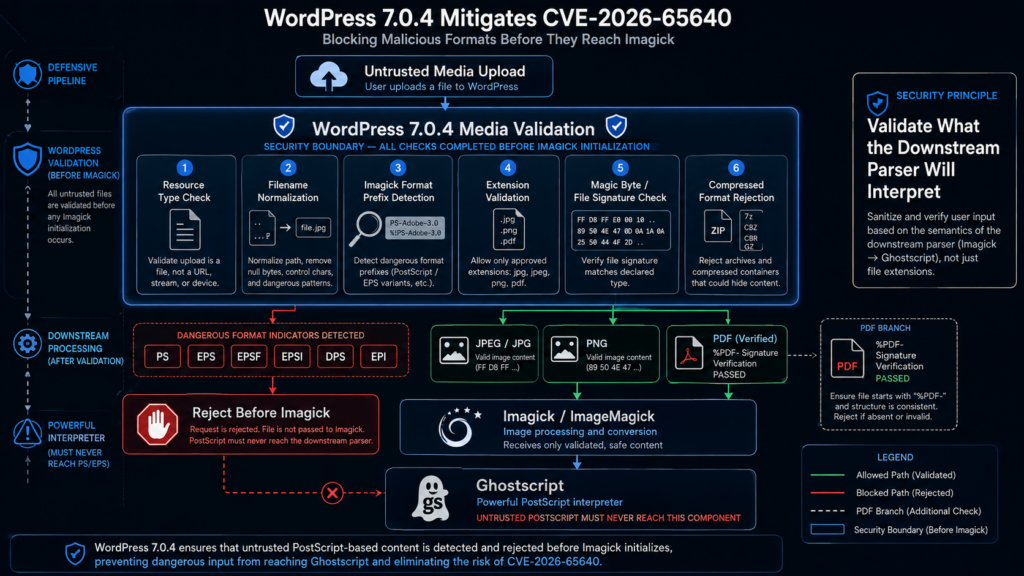
The public WordPress patch provides unusually useful insight into how the maintainers decided to eliminate the vulnerable path.
The relevant commit is titled “Media: Prevent loading images into Imagick which might be PostScript.”
The change primarily modifies:
wp-includes/class-wp-image-editor-imagick.php
The patch introduces several layers of validation before Imagick is allowed to process content. (GitHub)
This is important because the defense does not rely on one signal.
Instead, WordPress looks at multiple ways in which content could be recognized as dangerous.
Defense Layer 1: Distinguishing Files From Streams
The updated code first explicitly determines whether the resource is a regular file or a stream.
For normal files, WordPress can inspect a portion of the content before giving the filename to Imagick.
For streams, the patch reads the content and later supplies the same inspected data to Imagick.
That second property is particularly interesting.
If an application validates one copy of remote content but later downloads another copy for processing, a time-of-check/time-of-use problem can appear.
The patched implementation reduces that class of ambiguity for streams by processing the inspected data itself rather than independently fetching another version afterward. (GitHub)
This is a strong defensive design pattern:
validate the bytes you will actually process.
Defense Layer 2: Normalizing the Filename
The WordPress patch also determines a meaningful filename from different resource types.
It accounts for:
- ordinary file paths
file://resources- HTTP and HTTPS URLs
- URL path components
This matters because downstream parsers can use filenames as part of format selection.
A parser-security policy therefore cannot necessarily inspect content alone.
It must also understand the metadata supplied alongside that content. (GitHub)
Defense Layer 3: Detecting Imagick Format Specifiers
One particularly interesting part of the patch concerns ImageMagick-style format specifiers.
The updated WordPress code parses possible format prefixes from the supplied name before handing the resource to Imagick.
The patch comment explicitly discusses stripping and collecting format specifiers so that WordPress can compare them against dangerous PostScript-associated formats. (GitHub)
This is precisely the kind of edge case that simple file-extension validation misses.
An application might think:
example.jpg
is a JPEG.
But another component may interpret a specially constructed resource name using parser-specific syntax.
Security validation therefore needs to model the grammar of the component receiving the data.
This principle appears repeatedly in application security.
SQL injection happens when application strings acquire meaning inside SQL syntax.
Command injection happens when data acquires meaning inside shell syntax.
Server-side template injection happens when input acquires meaning inside template syntax.
CVE-2026-65640 demonstrates a closely related idea:
file metadata can acquire meaning inside image-processing syntax.
Defense Layer 4: Checking PDF Signatures
WordPress 7.0.4 also treats PDF handling more carefully.
The new logic maintains a list of PDF-associated extensions and verifies that a purported PDF begins with the expected %PDF- signature.
If an object claims to be a PDF based on its extension but lacks the required signature, WordPress rejects it before image processing. (GitHub)
This closes an important gap between filename-based classification and content-based classification.
It also illustrates a broader principle:
file extension and file content should agree before invoking a privileged parser.
Neither one should automatically overrule the other.
Defense Layer 5: Rejecting PostScript Formats
The most directly relevant CVE-2026-65640 protection is the new PostScript detection logic.
The patch defines multiple PostScript-related Imagick formats, including values such as:
- PS
- EPS
- EPSF
- EPSI
- DPS
- EPI
It also tracks multiple corresponding filename extensions. (GitHub)
WordPress then rejects a file before Imagick processing if any of several conditions indicate that Imagick might interpret it as PostScript.
Those conditions include:
- a PostScript-associated Imagick format specifier
- a PostScript-associated filename extension
- recognizable PostScript signatures or magic bytes
The patch therefore rejects content based on multiple independent representations of format identity. (GitHub)
That is considerably stronger than:
if extension == ".ps":
    reject
An attacker attempting to cross a parser boundary can manipulate several layers.
The defensive code needs to reason across those same layers.
Defense Layer 6: Blocking Transparent Decompression Paths
The patch goes even further.
WordPress 7.0.4 explicitly rejects several compressed formats that Imagick could transparently decompress before determining how the resulting content should be interpreted.
The commit mentions formats and signatures associated with gzip, bzip2, and traditional Unix compress data, among others. (GitHub)
Why does this matter?
Suppose the application validates the outer file.
The downstream parser decompresses it.
The parser then identifies the inner data as a different format.
The application has effectively validated one object while the dangerous parser consumes another.
This creates an interpretation gap.
WordPress’s response is conservative: where transparent decompression could bypass the intended inspection boundary, reject the format before Imagick processes it. (GitHub)
That is an important lesson for secure file-processing pipelines:
validation must follow every transformation that can change semantic type.
The WordPress 7.0.4 Patch Is Really a Parser-Confusion Mitigation
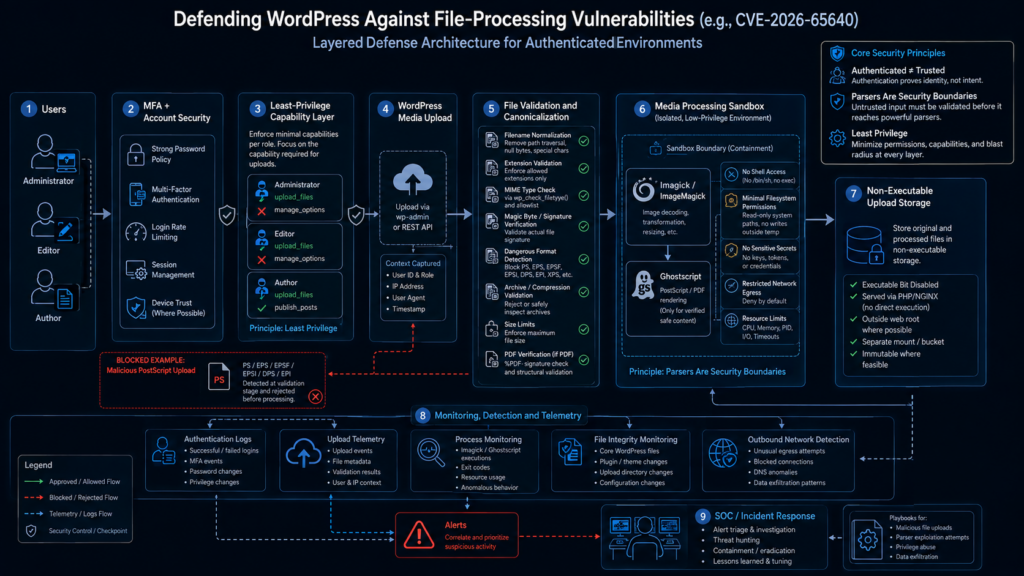
It would therefore be misleading to describe the fix simply as “WordPress blocks PostScript uploads.”
The patch addresses a deeper problem.
Before Imagick gets the content, WordPress now reasons about:
- the resource type
- supplied filename
- URL-derived filename
- ImageMagick format prefixes
- file extension
- file signature
- PDF identity
- PostScript identity
- compressed content
- the relationship between validation bytes and processing bytes
Only after these checks does the code instantiate Imagick and continue processing. (GitHub)
Architecturally, this moves the trust boundary in front of the dangerous parser.
That is the right direction.
CVE-2026-65640 CVSS Explained
The GitHub advisory assigns CVE-2026-65640 a CVSS v3 score of 8.8 High with the vector:
CVSS:3.0/AV:N/AC:L/PR:L/UI:N/S:U/C:H/I:H/A:H (GitHub)
Breaking that down:
AV:N — Network
The vulnerable workflow can be reached over the network.
AC:L — Low Attack Complexity
The advisory does not require unusual race conditions or highly specialized deployment circumstances beyond the stated server prerequisites.
PR:L — Low Privileges Required
The attacker must already possess limited privileges. The advisory specifically identifies the upload_files capability and Author-level access or higher. (GitHub)
UI:N — No User Interaction
Another user does not need to open the malicious file or click a link for the vulnerable server-side processing path to matter.
C:H / I:H / A:H
Successful code execution can potentially undermine confidentiality, integrity, and availability of the affected environment.
This combination explains why an authenticated flaw still receives a high severity rating.
The vulnerability crosses from limited publishing permissions into server-side code execution.
Why Author-Level Access Is Still a Serious Security Boundary
It is tempting to interpret “authenticated Author+” as meaning the vulnerability is relatively harmless.
That would be a mistake.
WordPress roles deliberately separate publishing capabilities from administrative control.
A normal Author should not automatically be trusted with:
- PHP execution
- operating-system command execution
- database credentials
- WordPress configuration secrets
- server filesystem modification
- plugin installation
- administrator credential theft
If an Author-level account can transition into arbitrary server-side code execution, the security boundary between content contributor and infrastructure controller collapses.
This is particularly important for organizations operating many WordPress identities.
An enterprise publication might have dozens or hundreds of editors and authors.
A university may delegate WordPress access across departments.
An agency may maintain legacy client accounts.
A media organization may invite freelance contributors.
A compromised password for one of these lower-privileged accounts should normally remain constrained by WordPress role permissions.
With CVE-2026-65640 under the affected configuration, that assumption can fail.
The Most Relevant Exposure Scenarios
Not every WordPress installation has equal practical risk.
The environments deserving the highest priority are those combining several properties.
Multi-Author Publishing Sites
Newsrooms, editorial sites, magazines, content communities, and corporate publishing environments frequently maintain many Author-level users.
Their identity attack surface is therefore larger than a single-administrator corporate brochure site.
Sites With Dormant Author Accounts
An old contributor account can become especially dangerous when a vulnerability converts media-upload permission into an infrastructure-level capability.
Removing obsolete accounts is therefore not merely administrative hygiene.
It reduces attack paths.
Environments Using Imagick and Ghostscript
The official advisory explicitly lists both technologies as prerequisites for the vulnerable path. (GitHub)
Administrators should still patch regardless, but these installations deserve especially rapid investigation.
Sites With Weak Authentication Controls
If Author accounts rely on reused or weak passwords, the authenticated requirement provides much less protection.
An attacker who compromises a legitimate Author account can potentially satisfy the first major prerequisite without exploiting WordPress authentication itself.
Shared Hosting or High-Value WordPress Infrastructure
The impact of server-side code execution depends heavily on the surrounding isolation architecture.
A WordPress process with access to deployment credentials, cloud tokens, writable web roots, backups, environment secrets, or adjacent applications increases the potential blast radius.
A Compromised Author Account Is a Plausible Initial Access Path
CVE-2026-65640 also illustrates why defenders should not evaluate vulnerabilities independently of identity security.
The exploit requires authentication.
But that authentication does not necessarily need to come from the vulnerability itself.
An attacker may obtain Author-level access through:
- credential reuse
- phishing
- infostealer malware
- weak passwords
- exposed sessions
- compromised contributor devices
- malicious insiders
- credential leaks from unrelated services
Once that identity exists, CVE-2026-65640 potentially converts a CMS-level identity compromise into a server compromise under the vulnerable configuration.
This is a classic attack-chain composition problem.
Individually:
stolen Author credentials may provide only publishing access.
a vulnerable Imagick/Ghostscript pipeline may require an authenticated uploader.
Together, they can form a much more serious attack path.
Affected WordPress Versions
The official GitHub advisory shows that the vulnerability extends well beyond WordPress 7.0.
Affected branches include releases from WordPress 4.7 through 7.0.3, with corresponding patched releases issued across those branches. (GitHub)
Important patched versions include:
| Şube | First Patched Version |
|---|---|
| WordPress 7.0 | 7.0.4 |
| WordPress 6.9 | 6.9.7 |
| WordPress 6.8 | 6.8.8 |
| WordPress 6.7 | 6.7.7 |
| WordPress 6.6 | 6.6.7 |
| WordPress 6.5 | 6.5.10 |
| WordPress 6.4 | 6.4.10 |
| WordPress 6.3 | 6.3.10 |
| WordPress 6.2 | 6.2.11 |
| WordPress 6.1 | 6.1.12 |
| WordPress 6.0 | 6.0.14 |
| WordPress 5.9 | 5.9.16 |
| WordPress 5.8 | 5.8.15 |
| WordPress 5.7 | 5.7.17 |
| WordPress 5.6 | 5.6.19 |
| WordPress 5.5 | 5.5.20 |
| WordPress 5.4 | 5.4.21 |
| WordPress 5.3 | 5.3.23 |
| WordPress 5.2 | 5.2.26 |
| WordPress 5.1 | 5.1.24 |
| WordPress 5.0 | 5.0.27 |
| WordPress 4.9 | 4.9.31 |
| WordPress 4.8 | 4.8.30 |
| WordPress 4.7 | 4.7.35 |
The WordPress project described these older-branch releases as courtesy backports and reiterated that only the latest WordPress version is actively supported. (GitHub)
For long-term security, staying on an obsolete branch simply because a particular patch was backported is not equivalent to maintaining a fully supported platform.
Is WordPress 7.0.3 Safe From CVE-2026-65640?
No.
WordPress 7.0.3 is explicitly inside the affected 7.0.0–7.0.3 range.
WordPress 7.0.4 is the first fixed 7.0.x version. (GitHub)
This distinction matters because WordPress 7.0.3 was itself a recent security release.
Administrators who patched to 7.0.3 shortly before CVE-2026-65640 became public may incorrectly assume they are current.
For this vulnerability, they are not.
Upgrade to 7.0.4 or another corresponding patched branch immediately.
Is CVE-2026-65640 an Unauthenticated WordPress RCE?
No, based on the currently published official advisory.
The vulnerability requires a malicious user with the upload_files capability.
The WordPress announcement summarizes this as Author-level access or higher. (GitHub)
This difference should remain explicit in vulnerability reporting.
Calling CVE-2026-65640 merely a “WordPress RCE” without mentioning authentication can exaggerate Internet exposure.
Calling it merely an “authenticated upload bug,” on the other hand, understates the consequence.
The accurate description is:
a high-severity authenticated Author+ remote code execution vulnerability affecting WordPress environments using the relevant Imagick/Ghostscript processing path.
Does Every WordPress Site Using Imagick Automatically Become Exploitable?
The official prerequisites specifically state that Imagick and Ghostscript must be in use, and the attacker must have the necessary file-upload capability. (GitHub)
Therefore it is not accurate to say every WordPress site is identically exploitable.
But administrators should not use this nuance as a reason to skip the update.
There are several reasons.
Server configurations change.
Hosting providers change image-processing packages.
Plugins can interact with media workflows.
Administrative assumptions about which parser is actually active can be wrong.
And compromised credentials can satisfy the privilege requirement unexpectedly.
The supported solution is therefore still to install the patched WordPress release.
Safe Validation of CVE-2026-65640
Defenders do not need to execute a real RCE payload to determine whether remediation has been applied.
For production systems, patch validation should focus on version state and media-processing behavior rather than weaponized exploitation.
A safe validation workflow can include:
- Confirming the WordPress Core version.
- Confirming that the installed branch matches one of the official fixed releases.
- Checking whether Imagick is available.
- Identifying whether Ghostscript is installed or used by the image-processing stack.
- Reviewing Author and higher accounts.
- Confirming that suspicious PostScript-like media is rejected before Imagick processing.
- Monitoring application and server logs for unexpected upload or image-processing errors.
For WordPress 7.0, the expected fixed state is 7.0.4 or later. (GitHub)
This kind of validation gives defenders evidence that the vulnerable path has been removed without deliberately attempting operating-system command execution.
Checking the WordPress Version
From the administrative interface, site owners can inspect the installed WordPress version under the normal update workflow.
WordPress’s own release guidance directs administrators to Dashboard → Updates and recommends installing WordPress 7.0.4 immediately. (WordPress.org)
From the command line, environments using WP-CLI can also verify the core version:
wp core version
For a 7.0 installation, the desired result for CVE-2026-65640 is:
7.0.4
or a newer supported version.
Version verification should be performed across every WordPress instance, not just the primary production frontend.
Organizations frequently forget:
- staging systems
- legacy marketing domains
- abandoned microsites
- internal portals
- development copies
- disaster recovery environments
An old WordPress instance with valid contributor credentials can still create meaningful risk.
Checking Whether Imagick Is Available
A PHP environment can expose loaded extensions through:
php -m | grep -i imagick
Eğer imagick appears, the extension is available to PHP.
You can also examine WordPress’s own Site Health information to understand the media-processing environment.
This should be treated as exposure context, not as a substitute for patching.
Even an environment believed not to use the affected processing path should stay on a patched WordPress release.
Checking Ghostscript
On systems where shell access is available, administrators can identify whether Ghostscript is installed with a command such as:
gs --version
Package-manager inspection can provide additional information depending on the operating system.
Again, the goal is not to determine whether the server can safely remain vulnerable.
The goal is to understand whether the environment matched the published prerequisites and therefore deserves additional compromise investigation. The official advisory explicitly identifies Ghostscript as part of the vulnerable configuration. (GitHub)
Hunt for Suspicious Author-Level Activity
Because CVE-2026-65640 requires authenticated upload privileges, identity and media activity are central to incident review.
Security teams should examine:
- recently created Author accounts
- unexpected role changes
- old accounts that suddenly became active
- unusual login locations
- suspicious password resets
- anomalous media uploads
- media-processing errors
- unexplained PHP or executable files
- unexpected changes under the WordPress web root
- new scheduled tasks or persistence mechanisms
- outbound connections from the web server
- unexplained web-server child processes
None of these indicators proves CVE-2026-65640 exploitation.
They are broader signals that help determine whether an authenticated account compromise may have progressed into a server compromise.
Do Not Assume Vulnerability Means Compromise
The presence of an affected WordPress version does not prove exploitation.
This distinction is essential during incident response.
A vulnerable server means the conditions for exploitation may exist.
A compromised server requires evidence that malicious activity actually occurred.
Administrators should avoid both extremes.
Do not assume everything is fine simply because the bug requires an Author account.
But do not declare compromise solely because WordPress 7.0.3 was installed.
Instead, combine:
- version evidence
- account history
- upload logs
- web logs
- process telemetry
- filesystem changes
- authentication records
- outbound network activity
That provides a defensible incident assessment.
Why File Extension Allowlists Alone Are Not Enough
CVE-2026-65640 reinforces a long-standing lesson in upload security.
A filename is metadata.
It is not proof of file identity.
Suppose an application allows:
image.jpg
That tells us what the uploader claims the file is.
It does not guarantee what another parser will believe the contents are.
Secure upload pipelines should consider several layers:
Extension validation
Does the filename belong to an allowed type?
Magic-byte validation
Does the content begin with the expected signature?
Parser validation
Can a minimal, constrained decoder confirm the format?
Canonicalization
Are alternative parser syntaxes or format prefixes removed?
Transformation awareness
Could decompression or conversion expose a different format?
Storage isolation
Is the uploaded file stored outside executable locations?
Processing isolation
Does a document or image parser run with minimal operating-system privileges?
The WordPress 7.0.4 patch incorporates several of these concepts directly. (GitHub)
The Patch Also Demonstrates Why MIME Detection Is Hard
File-type detection is frequently presented as if there is one canonical answer to:
What type is this file?
In reality, several answers can coexist.
The HTTP request may declare one MIME type.
The extension may suggest another.
Magic bytes may suggest another.
ImageMagick may select a format based on additional syntax.
After decompression, the inner object may be something different again.
Security controls must therefore be designed around the actual parser graph.
This is particularly relevant for systems that use chains such as:
Browser → Web application → PHP → Imagick → ImageMagick → Ghostscript
Each component introduces another interpretation boundary.
CVE-2026-65640 demonstrates what can happen when an attacker finds disagreement between those boundaries.
Why the Fix Belongs in WordPress Even Though Ghostscript Is Involved
A natural question is:
If the dangerous behavior is related to Ghostscript, why does WordPress need a patch?
Because defense-in-depth requires every layer to enforce the assumptions it depends on.
WordPress does not need PostScript interpretation for ordinary image-upload functionality.
If a WordPress media-processing feature can determine that input might trigger PostScript processing, rejecting that input before it reaches the interpreter is a powerful application-level control.
The official advisory explicitly says the weakness is in Ghostscript’s handling of certain embedded files, while WordPress 7.0.4 contains the fix preventing the dangerous upload-processing path. (GitHub)
This is a useful architectural principle:
Do not rely exclusively on the deepest dependency to make hostile input safe. Reduce the attack surface before the input reaches that dependency.
Defense in Depth for WordPress File Processing
Updating WordPress is the first step, not the final security architecture.
Administrators responsible for high-value environments should also consider:
Minimize Author Accounts
Every account with upload_files expands the potential authenticated attack surface.
Remove dormant users and downgrade roles that do not require media upload.
Require Strong Authentication
Multi-factor authentication can materially reduce the probability that an external attacker acquires a valid Author account through credential theft.
Harden File Processing
Image and document processors should operate with the minimum filesystem and operating-system privileges necessary.
Restrict Writable Paths
The web server should not have arbitrary write permissions across the application or host.
Separate Upload Storage
Where architecture allows it, user uploads should be separated from executable application code.
Maintain Parser Dependencies
WordPress is only one layer.
ImageMagick, Ghostscript, PHP, the operating system, web server, plugins, and themes all require independent patch management.
Monitor Unexpected Child Processes
A CMS image-processing operation should have a reasonably predictable execution profile.
Unexpected shells, interpreters, network clients, or persistence utilities launched by a web-server process deserve investigation.
CVE-2026-65640 Is Also an Argument for Capability-Based Threat Modeling
Many WordPress vulnerability assessments divide users into two categories:
authenticated and unauthenticated.
That is too coarse.
WordPress uses a capability system.
Security analysis should therefore ask:
Which exact capability unlocks the dangerous operation?
For CVE-2026-65640, the official advisory identifies:
upload_files (GitHub)
This is more useful than simply saying “authentication required.”
A Subscriber generally has a very different attack surface from an Author.
An Editor differs from an Administrator.
Plugins can also modify capabilities or create custom roles.
A robust WordPress threat model should therefore inventory capabilities rather than relying solely on human-readable role names.
What CVE-2026-65640 Means for Multi-Tenant WordPress
The authenticated requirement becomes especially important in environments where WordPress acts as a semi-multi-tenant publishing system.
The more users legitimately receive upload privileges, the weaker the assumption becomes that every uploader is fully trusted.
Security architects should treat upload-capable users as untrusted content producers, even if they are authenticated.
Authentication establishes identity.
It does not establish file safety.
This distinction is critical for:
- media companies
- universities
- community publishing networks
- agencies
- contributor platforms
- marketplaces
- partner portals
- customer-facing CMS environments
Any architecture where non-administrators can submit complex files should assume that uploaded bytes are adversarial.
A Secure Media Pipeline Should Treat Parsers as Attack Surfaces
Historically, web developers often focused their upload security on preventing scripts from being placed inside the web root.
Örneğin:
- block
.php - allow
.jpg - rename the file
- store it under
/uploads
That is necessary but incomplete.
Modern application infrastructure performs significant server-side processing after upload.
A file may be:
- decompressed
- resized
- transcoded
- OCR-scanned
- converted to PDF
- rasterized
- indexed
- inspected by antivirus
- sent into an AI model
- parsed for metadata
Each transformation adds another potential vulnerability surface.
The relevant question is no longer simply:
Can the attacker upload executable code?
It is also:
Can the attacker upload data that becomes executable behavior when one of our processors interprets it?
CVE-2026-65640 is a clear example of the second category.
Safe Pentesting Approach for CVE-2026-65640
Authorized security teams evaluating their own infrastructure should prioritize non-destructive validation.
A sensible test strategy is:
Phase 1: Environment identification
Determine WordPress version and image-processing stack.
Phase 2: Privilege identification
Identify accounts or roles possessing upload_files.
Phase 3: Patch verification
Confirm that WordPress has reached the appropriate fixed version.
Phase 4: Negative parser test
Verify that benign test content representing prohibited PostScript-like input is rejected before dangerous interpretation.
Phase 5: Telemetry verification
Ensure logging captures upload events, rejection events, user identity, request origin, and image-processing failures.
There is normally little operational value in executing a real arbitrary command merely to demonstrate that a production server could theoretically be compromised.
Security validation should collect enough evidence to prove the vulnerable path exists or has been removed while minimizing risk to the system.
Detection Engineering Considerations
There is no single universal log signature that proves CVE-2026-65640 exploitation.
Detection should instead correlate multiple signals.
WordPress Authentication
Look for unusual Author or Editor authentication.
Media Upload Activity
Identify unusual upload frequency, unfamiliar file types, or repeated rejected media.
Web Server Logs
Correlate suspicious uploads with subsequent requests or server errors.
Image Processing Errors
Imagick or Ghostscript errors around the same timestamp can provide context.
Process Monitoring
Investigate unexpected subprocesses originating from PHP, Apache, nginx/PHP-FPM, ImageMagick, or Ghostscript-related workflows.
File Integrity
Search for recently modified PHP files, injected plugin files, unexpected executable scripts, and persistence artifacts.
Network Monitoring
Unexpected outbound DNS, HTTP, TCP, or cloud metadata requests from the web server may indicate post-exploitation activity.
The strongest detections combine identity, application, host, and network telemetry rather than relying on one isolated indicator.
Incident Response After Finding an Exposed WordPress Site
If your environment ran an affected WordPress version and also matched the Imagick/Ghostscript prerequisites, begin by patching.
If suspicious activity exists, the investigation should not stop there.
A reasonable response sequence is:
- Preserve relevant logs.
- Update WordPress Core.
- Audit Author-or-higher accounts.
- Rotate credentials for suspicious or affected accounts.
- Review uploaded media around anomalous login periods.
- Inspect WordPress Core, plugins, themes, and upload directories for unexpected changes.
- Examine web-server processes and persistence.
- Review secrets accessible to the WordPress process.
- Rotate application or infrastructure credentials if compromise is confirmed.
- Rebuild from known-good infrastructure when host integrity cannot be trusted.
Remote code execution should always be treated as a possible boundary crossing from application compromise to operating-system compromise.
A simple WordPress password reset is not sufficient if there is evidence that arbitrary code actually ran.
Why CVE-2026-65640 Matters Beyond WordPress
The broader lesson from CVE-2026-65640 is relevant to nearly every modern software platform.
Applications increasingly rely on powerful native processing libraries.
A typical SaaS application may accept:
- images
- PDFs
- Office documents
- archives
- videos
- audio
- CAD files
- machine-learning models
- datasets
Those files frequently pass through third-party parsers written in multiple languages and executed in native code.
The uploaded object therefore crosses a chain of trust boundaries.
A good threat model should map:
User-controlled bytes → application validation → format recognition → conversion library → external delegate → storage → derived output
Security reviews that stop at the HTTP upload handler can miss the most important attack surface.
The Same Principle Applies to AI Applications
AI applications are increasingly becoming file-processing systems as well.
Users upload PDFs.
Agents download documents.
Models inspect images.
RAG pipelines extract text.
OCR engines process scans.
Document converters generate previews.
Agentic systems may automatically choose tools based on detected content.
The same class of parser discrepancy can therefore appear inside AI products.
A system may believe it is processing:
a user document
while a downstream component believes it is processing:
executable parser instructions
The security architecture must preserve provenance and constrain transformations throughout the pipeline.
CVE-2026-65640 is therefore not just a WordPress lesson.
It is an example of why tool and parser boundaries must be treated as security boundaries.
Common Misconceptions About CVE-2026-65640
“WordPress 7.0.4 is vulnerable”
The wording can be confusing.
WordPress 7.0.4 is the patched release.
WordPress 7.0.0 through 7.0.3 are listed as affected in the official advisory. (GitHub)
“Any anonymous visitor can exploit it”
The official advisory says no.
The attacker requires upload_files, corresponding to Author-level access or higher in the described default scenario. (GitHub)
“It affects every WordPress installation identically”
No.
Imagick and Ghostscript are explicit prerequisites in the official advisory. (GitHub)
“Only WordPress 7.0 is affected”
No.
Affected branches extend back through WordPress 4.7, and WordPress issued corresponding patched releases across those branches. (GitHub)
“Blocking .ps uploads completely solves it”
The WordPress patch demonstrates why that model is insufficient.
The update checks multiple forms of PostScript identification, parser format prefixes, signatures, file extensions, PDF identity, and compressed formats before allowing Imagick processing. (GitHub)
Frequently Asked Questions
What is CVE-2026-65640?
CVE-2026-65640 is a high-severity authenticated remote code execution vulnerability affecting certain WordPress installations where a user with file-upload privileges can submit malicious PostScript-related content to an Imagick/Ghostscript processing path. (GitHub)
What version fixes CVE-2026-65640?
For the WordPress 7.0 branch, WordPress 7.0.4 fixes the vulnerability. WordPress also published patched versions for older branches back through 4.7. (GitHub)
Is CVE-2026-65640 critical?
The official GitHub Security Advisory rates it Yüksek, with a CVSS score of 8.8. (GitHub)
Does CVE-2026-65640 require authentication?
Yes.
The published advisory requires a malicious user with the upload_files capability and describes the issue as affecting Author-level users or higher. (GitHub)
Does CVE-2026-65640 require administrator privileges?
No.
Author-level access is sufficient under the conditions described by WordPress. (WordPress.org)
Does it require user interaction?
The official CVSS metrics list user interaction as Hiçbiri. (GitHub)
Is Imagick required?
Yes, according to the official advisory, Imagick and Ghostscript are prerequisites for the vulnerable processing path. (GitHub)
What does Ghostscript have to do with WordPress?
Imagick/ImageMagick can rely on Ghostscript for processing certain PostScript- or PDF-related content. The WordPress advisory states that the underlying weakness involves Ghostscript’s handling of certain embedded files. (GitHub)
Should I update if I do not use Imagick?
Yes.
WordPress recommends that sites install the security release immediately. Configuration analysis is useful for determining historical exposure, but remaining on an affected WordPress release is unnecessary risk when a supported patch exists. (WordPress.org)
Is WordPress 7.0.3 affected?
Yes.
The GHSA explicitly lists WordPress 7.0.0 through 7.0.3 as vulnerable and 7.0.4 as patched. (GitHub)
Is there evidence that CVE-2026-65640 is being actively exploited?
The authoritative sources reviewed for this article establish the vulnerability, severity, prerequisites, and patches, but they do not provide sufficient evidence for this article to claim confirmed widespread exploitation in the wild. Administrators should therefore avoid repeating unsupported “actively exploited” claims while still treating the security update as urgent.
Final Assessment
CVE-2026-65640 is significant because it turns a capability that WordPress intentionally grants to relatively low-privileged content creators—file upload—into a potential server-side code execution primitive under a specific Imagick and Ghostscript configuration.
The vulnerability is authenticated, but that should not be confused with low impact.
The official CVSS score is 8.8 High. The attacker does not require Administrator privileges. User interaction is not required. And successful exploitation crosses one of the most important boundaries in a CMS: the boundary between publishing content and controlling the server. (GitHub)
WordPress 7.0.4 addresses the problem with a particularly instructive patch.
Instead of trusting a filename or one MIME classification, the new media-processing logic reasons about the multiple ways Imagick could interpret attacker-controlled data. It inspects file signatures, identifies PostScript-associated formats and extensions, handles Imagick format specifiers, verifies PDF identity, rejects dangerous compressed processing paths, and performs these checks before handing content to Imagick. (GitHub)
That makes CVE-2026-65640 more than another WordPress security bulletin.
It demonstrates a fundamental rule of secure file processing:
Security validation must be based on what the downstream parser will interpret, not merely on what the upstream application believes it uploaded.
For WordPress administrators, the immediate action is simple: install WordPress 7.0.4 or the corresponding patched release for the branch in use, then verify Author-level accounts and investigate suspicious upload activity if the environment used Imagick and Ghostscript. WordPress itself recommends immediate updating. (WordPress.org)
For security engineers, the longer-term lesson is even more important.
Every parser is a trust boundary.
Every automatic file transformation expands the attack surface.
And every time untrusted content passes from a web application into a more powerful interpreter, the security model must account for what that interpreter—not merely the application—believes the content to be. (GitHub)

 Turkish
  English
  German
  French
  Spanish
  Portuguese
  Japanese
  Korean
  Hindi
Hindi  Arabic
  Hebrew