
For years, “Notepad” sat outside the mental map of high-risk software. It was the app you used to open logs, inspect config files, paste a quick payload, or sanity-check suspicious text without giving it much trust. That old model no longer fits. In 2025 and early 2026, both Microsoft Notepad and Notepad++ showed how quickly a text editor can inherit the risks of richer rendering, updater logic, installer behavior, and even supply-chain exposure. The latest example, CVE-2026-20841 in Windows Notepad, is the clearest warning yet: once a default utility starts parsing Markdown, rendering links, and participating in protocol handoff, it stops being a passive viewer and starts becoming part of an execution path. (NVD)
The public record on CVE-2026-20841 is already enough to make the point. NVD lists it as a Windows Notepad App vulnerability mapped to CWE-77, with a CVSS v3.1 score of 8.8. The description history is especially revealing: Microsoft’s initial wording said the issue allowed an attacker to execute code “over a network,” but NVD later recorded a vendor change replacing that with “execute code locally.” That edit matters because it narrows the technical framing, yet it does not make the risk trivial. A user can still be lured into opening a crafted Markdown file and interacting with content that crosses a trust boundary into code execution in the user’s security context. (NVD)
That is why “notepad cve” now means more than one thing. Right now, the most important Windows-side topic is CVE-2026-20841, the Markdown-linked execution issue in Microsoft Notepad. On the Notepad++ side, the story is broader and arguably more sobering: a 2025 installer privilege-escalation flaw, an updater integrity-verification flaw affecting versions prior to 8.8.9, a disputed DLL hijacking report, and then a 2026 disclosure that attackers had selectively hijacked the Notepad++ update flow during a compromise window in 2025. In other words, the editor itself is only one layer of risk. The installer, the updater, the hosting stack, and the distribution trust chain all matter. (NVD)
Why Notepad stopped being “just a text editor”
Microsoft’s own product evolution explains why this happened. In May 2025, the Windows Insider Blog announced lightweight formatting in Notepad, including Markdown-style input, hyperlinks, lists, and headings. By November 2025, Microsoft was rolling out expanded formatting support with tables and additional AI text features. This is not a cosmetic detail. It changes the app’s security posture. A plain text editor mostly reads bytes and displays bytes. A formatted editor tokenizes content, interprets structure, renders links, calls handlers, and increasingly sits closer to the same trust boundaries that used to belong to browsers, office apps, and messaging clients. (Windows Blog)
Security teams often underestimate risk when a familiar utility adds “small” features. Hyperlinks sound harmless. Markdown sounds harmless. Inline rendering sounds harmless. But each one is a parser decision, a UI trust decision, and often a process-launch decision. If the implementation does not aggressively constrain dangerous protocols, file paths, shell metacharacters, or handoff behavior to the operating system, the application becomes a delivery mechanism for code execution. That is exactly why CVE-2026-20841 is more important than its individual patch note suggests. It is not just a bug in Notepad. It is a visible example of architectural drift. (Zero Day Initiative)
The lesson extends beyond Microsoft. Notepad++ is open source and has long been treated as a practical, lightweight editor for developers and administrators. Yet public records over the past year show the same pattern from a different angle: updater logic, installer behavior, and deployment assumptions can turn a trusted editor into an attack surface even when the user thinks they are just “updating Notepad.” NVD’s entry for CVE-2025-15556 says versions prior to 8.8.9, when using the WinGUp updater, did not cryptographically verify downloaded metadata and installers. That meant an attacker able to intercept or redirect update traffic could cause the updater to fetch and execute an attacker-controlled installer. This is not a parser bug. It is a trust-chain bug, and it lands in the same place: arbitrary code execution under the user’s privileges. (NVD)
CVE-2026-20841, what actually happened in Windows Notepad
The best public technical summary comes from Zero Day Initiative. ZDI says the bug is due to improper validation of links in Markdown files and that a remote attacker could exploit it by enticing the victim to download and interact with a malicious file. Their write-up explains that when Notepad renders Markdown, it tokenizes the input and transforms inline links into a standard link representation. That transformation sounds ordinary, but it is precisely where content stops being inert. The file is no longer just displayed; it is interpreted. Once interpreted content can drive external link handling or process handoff without sufficient validation, it becomes an execution boundary. (Zero Day Initiative)
BleepingComputer’s Patch Tuesday coverage captures the operational framing: Microsoft disclosed a high-severity Notepad remote code execution flaw as part of the February 2026 updates. Windows Central’s reporting adds the version scope that most defenders actually care about in inventory terms, describing the issue as affecting Notepad versions from 11.0.0 up to but not including 11.2510. Rapid7’s February 2026 Patch Tuesday analysis lists the vulnerability as “Windows Notepad App Remote Code Execution Vulnerability,” scored 8.8, with Microsoft’s assessment of “Exploitation Less Likely” at release. That last phrase should not lull teams into complacency. “Less likely” is not “safe,” especially for a default Windows component that can be triggered through file delivery and user interaction. (BleepingComputer)
A lot of public discussion focused on whether the issue was “remote” or “local.” The NVD history is useful here. The initial vendor language described code execution “over a network,” then a later update changed the text to “execute code locally.” From a technical classification perspective, that correction matters. From a defender’s standpoint, it changes less than people think. Many high-value intrusions begin with socially delivered content that runs locally after the victim opens or clicks something. Email lures, chat-delivered files, browser downloads, and cloud-shared documents all end as local execution events on the endpoint. If a malicious Markdown file can get a user from text rendering to unintended code launch, the risk remains serious regardless of which phrasing better fits the CNA record. (NVD)
One reason this vulnerability resonated so strongly is psychological. Users do not generally assign the same suspicion level to Notepad that they assign to Office macros, browser popups, or executable attachments. That trust gap is valuable to attackers. A default utility with an old reputation for simplicity inherits a powerful social advantage. A Markdown file also looks routine in modern developer, DevOps, and security workflows. Teams pass around README files, detection notes, incident timelines, IaC documentation, and threat intel in Markdown every day. When a Markdown-capable Notepad becomes vulnerable to link-triggered execution, the attack surface is not theoretical. It aligns with normal work patterns. (Windows Blog)
From Markdown to execution, the likely attack chain
The practical attack chain is conceptually simple. An attacker creates a crafted Markdown file, gets a target to open it in Windows Notepad, and relies on a malicious link or handler path that crosses into unintended execution when the user interacts with it. Public reporting consistently points to link handling as the core of the issue. ThreatLocker summarized the risk as malicious Markdown links leveraging Windows URI handlers to execute unintended commands. Elastic’s prebuilt rule description is equally direct: it looks for a process started by Notepad after opening a Markdown file because that may indicate exploitation of the Notepad Markdown parsing vulnerability. (ThreatLocker)
A simplified representation of the dangerous pattern looks like this:
# Quarterly Notes

Please review the incident summary below.

[Open supporting document](malicious-protocol-or-crafted-path-here)
That snippet is intentionally abstract. The important point is not one specific payload string. The important point is the trust transition. A user sees content in a file that looks like documentation. They click what appears to be a legitimate supporting link. The app, the shell, or the surrounding Windows handler chain then turns content interaction into process execution. That is the boundary defenders need to model. The app is not acting as a network daemon, but it is acting as a content-driven launcher path. (Zero Day Initiative)
This is also why the phrase “user interaction required” is often misread. Some defenders subconsciously downgrade bugs that need a click. In practice, the security industry has decades of evidence that click-assisted execution remains one of the most reliable attack models at scale. Phishing works. Shared-document lures work. Trojanized update flows work. User interaction does not mean the vulnerability is weak; it often means the vulnerability maps cleanly to real enterprise behavior. A Notepad flaw that sits one believable click away from execution is dangerous precisely because the social engineering cost is low. (NVD)
Why the NVD wording change matters, but not in the way many people think
The NVD record for CVE-2026-20841 is unusually useful because it preserves the change history. On February 10, 2026, the record reflected Microsoft’s initial wording about code execution “over a network.” On February 12, 2026, the description was changed to “execute code locally.” Engineers should not ignore those distinctions. Accurate classification matters for reporting, exploit-path analysis, and internal severity communication. But the bigger lesson is that defenders should avoid overfitting to the vocabulary. The exact category label is less important than the observable effect: content rendered by a trusted application can trigger code execution under the user’s context. (NVD)
That observable effect is why endpoint telemetry matters more than rhetorical arguments over “remote” versus “local.” If Notepad opens a Markdown file and a child process appears immediately afterward, something worth investigating just happened. If the process tree shows Notepad handing off to cmd.exe, powershell.exe, mshta.exe, wscript.exe, cscript.exe, rundll32.exe, regsvr32.exe, or a newly dropped binary, the distinction between remote and local stops being a semantic debate and becomes an incident. Elastic’s rule logic follows that exact operational intuition. (Elastic)
What defenders should patch, disable, monitor, and explain to users
The first and most obvious control is patching. Public reporting indicates the vulnerable Windows Notepad versions were 11.0.0 through versions before 11.2510, and that Microsoft addressed the issue in the February 2026 Patch Tuesday release. If you manage Windows 11 fleets, verify Notepad app versioning alongside normal OS patch workflows rather than assuming “a core Windows utility” automatically means “already handled.” Notepad is now a modern app with feature velocity, and that changes how asset owners should track it. (Windows Central)
The second control is reducing unnecessary rendering and handler exposure. Microsoft’s own 2025 Notepad rollout made clear that formatting can be disabled in settings for users who prefer to work with plain text. On systems or user groups that do not need Markdown rendering inside Notepad, preserving a more inert content path is a defensible hardening decision. Security teams are often reluctant to touch usability features, but in this case the feature itself is tied to the vulnerability class. If a team does not benefit from Markdown rendering in the endpoint editor, leaving it enabled by default should be a conscious choice, not a forgotten one. (Windows Blog)
The third control is child-process monitoring from unexpected parent applications. An editor launching a shell should be suspicious in most environments. Here is an illustrative Sigma-style detection idea for defenders who want something simple to adapt:
title: Suspicious Child Process Spawned by Notepad
id: 8f6c3c1d-2a4f-4f3c-9d11-notepad-child-process
status: experimental
logsource:
  product: windows
  category: process_creation
detection:
  selection_parent:
    ParentImage|endswith:
      - '\notepad.exe'
  selection_child:
    Image|endswith:
      - '\cmd.exe'
      - '\powershell.exe'
      - '\pwsh.exe'
      - '\mshta.exe'
      - '\wscript.exe'
      - '\cscript.exe'
      - '\rundll32.exe'
      - '\regsvr32.exe'
  condition: selection_parent and selection_child
level: high
falsepositives:
  - Rare administrative automation launched from Notepad
tags:
  - attack.execution
  - attack.t1059
  - attack.t1218
That rule is not an official vendor signature; it is an original defensive heuristic aligned with the public attack pattern. The point is to look for a plain-text workflow suddenly becoming a process-creation workflow. Elastic’s published guidance uses the same general idea, focusing on a process started by Notepad after a Markdown file is opened. (Elastic)
For organizations running endpoint allowlisting or application control, this is also a good moment to revisit whether user-driven protocol handlers, script interpreters, and LOLBins are more permissive than they need to be. CVE-2026-20841 is not just about Notepad. It is about what Notepad is allowed to hand off to. If mshta.exe, script hosts, or shell interpreters are broadly available to standard users, a content-to-handler bug has more room to do damage. If those paths are constrained, the same initial click may still happen, but the blast radius can shrink materially. (ThreatLocker)
User education matters too, but only if it is specific. Telling users “don’t click suspicious links” is too abstract to change behavior. Telling developers, IT staff, and analysts that Markdown files in modern editors can now contain active link paths that deserve the same caution as links in chat or email is more concrete and more likely to land. Security awareness programs lag behind product changes. Notepad’s Markdown support is one of those subtle feature shifts that training materials almost always miss. (Windows Blog)
A quick comparison table, the Notepad vulnerabilities that matter most right now
| CVE | Ürün | What happened | Neden önemli |
|---|---|---|---|
| CVE-2026-20841 | Windows Notepad App | Improper validation of Markdown link handling enabled unintended code execution in the user context | Shows how a default text utility can become an execution path after rich-formatting features are added (NVD) |
| CVE-2025-15556 | Notepad++ WinGUp updater | Update metadata and installers were not cryptographically verified before 8.8.9 | Turns the updater into an arbitrary-code-delivery path if traffic is intercepted or redirected (NVD) |
| CVE-2025-49144 | Notepad++ installer | Insecure executable search paths in the installer could let an attacker gain SYSTEM privileges | Demonstrates that installer context can be more dangerous than the editor itself (NVD) |
| CVE-2025-56383 | Notepad++ | DLL hijacking report, later marked disputed in NVD | Important as a cautionary case, but should be discussed with its dispute note, not as settled fact (NVD) |
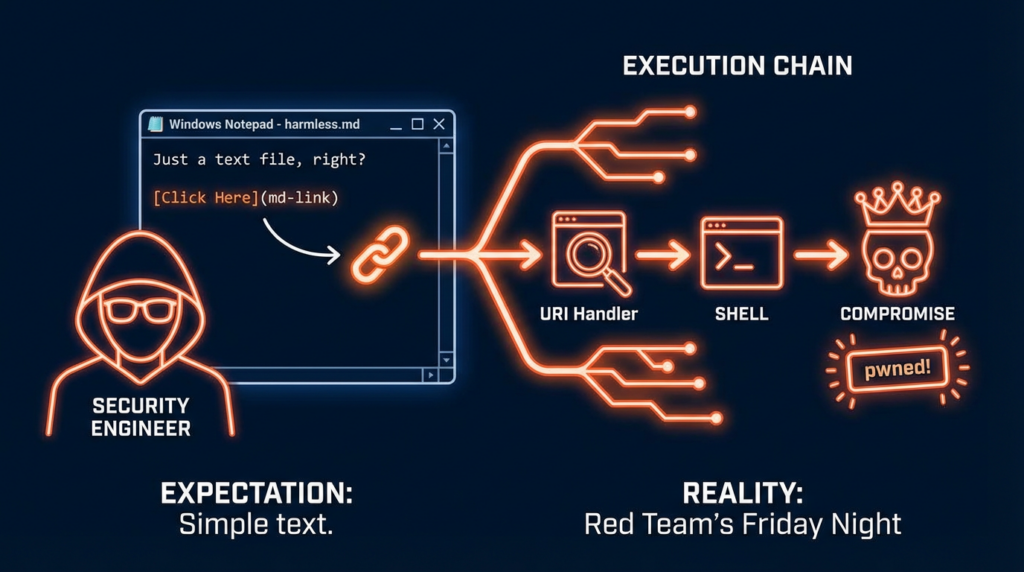
Notepad++ proves the bigger story, editors fail through the trust chain, not only through the parser
If Windows Notepad shows how rich rendering creates execution risk, Notepad++ shows how the trust chain around an editor can fail even when the editor is not parsing a malicious document. CVE-2025-15556 is the cleanest example. NVD says that before version 8.8.9, Notepad++’s WinGUp updater did not cryptographically verify update metadata and installers. That gap meant an attacker able to intercept or redirect the updater’s traffic could cause the application to download and execute an attacker-controlled installer. From a security architecture perspective, the user’s act of “keeping the editor updated” became an execution primitive for the attacker. (NVD)
Then there is CVE-2025-49144. NVD describes a privilege-escalation flaw in the Notepad++ v8.8.1 installer, where insecure executable search paths could allow an unprivileged attacker to gain SYSTEM-level privileges. The public description says a victim could be tricked into downloading both the legitimate installer and a malicious executable into the same directory, after which running the installer would execute the attacker’s file automatically with SYSTEM privileges. This is a very different bug class from a Markdown RCE, but the underlying lesson is identical: text editors are surrounded by privileged workflows that deserve the same scrutiny as browsers, office suites, and package managers. (NVD)
The 2026 Notepad++ incident pushed that lesson even further. Reuters reported that a Chinese-linked cyberespionage group hijacked the Notepad++ update process to deliver a custom backdoor to targeted users, with access to the hosting server used for updates until September 2, 2025, and some credentials persisting until December 2, 2025. Unit 42 described the compromise as an infrastructure-level hijack that allowed attackers to intercept and redirect traffic destined for the update server, selectively targeting users primarily in Southeast Asia across government, telecommunications, and critical infrastructure sectors. The Hacker News reported that version 8.9.2 introduced a “double lock” design, including verification of the signed installer from GitHub and verification of the signed XML returned by the update server. (Reuters)
That sequence matters because it shows how a modern editor can fail at multiple layers:
- the content layer, where rendered input can cross into execution
- the installer layer, where privileged setup logic can be abused
- the updater layer, where integrity verification can be insufficient
- the hosting layer, where infrastructure compromise can redirect trust itself
If your security model only asks whether opening a .txt file is safe, you are asking the wrong question. The real question is whether the ecosystem around the editor has become privileged enough, connected enough, and dynamic enough to act like a software distribution platform. For both Windows Notepad and Notepad++, the answer is now clearly yes. (Zero Day Initiative)
The disputed Notepad++ DLL hijacking case is still worth discussing carefully
CVE-2025-56383 should be handled with more care than many blog posts give it. NVD’s record describes a DLL hijacking vulnerability in Notepad++ v8.8.3 but explicitly notes that the issue is disputed by multiple parties because the behavior occurs only when the product is installed into a directory tree that allows write access by arbitrary unprivileged users. That means the case is still useful for discussing poor installation hygiene and unsafe deployment contexts, but it should not be presented as a clean, uncontested remote exploit story. Precision matters, especially in security writing. The right way to use this CVE is as a lesson about deployment assumptions and about how quickly vulnerability narratives become distorted when edge-case misconfiguration gets flattened into a generic “critical bug” headline. (NVD)
Why this matters to red teams, blue teams, and product builders
Red teams should care because default utilities create stealthy initial-execution paths. Blue teams should care because those same utilities often sit in blind spots of policy and monitoring. Product builders should care because the fastest way to create surprising risk in a mature application is to add capability without rethinking the threat model. Markdown rendering is a perfect example. It feels small. It improves usability. It looks developer-friendly. But it also converts opaque text into structured, interactive content. That means the application no longer deserves the same implicit trust it had when it was only painting characters on a window. (Windows Blog)
The broader pattern is visible across the industry. Old applications are being modernized with formatting, previews, AI writing helpers, cloud hooks, smart actions, and richer content workflows. Each feature makes the app more useful. Each feature also imports risk classes from more complex software categories. Notepad is simply the cleanest recent demonstration because the contrast is so sharp. When a product that historically symbolized simplicity starts appearing in Patch Tuesday RCE discussions, the industry can no longer pretend that “small tool” means “small attack surface.” (Windows Blog)
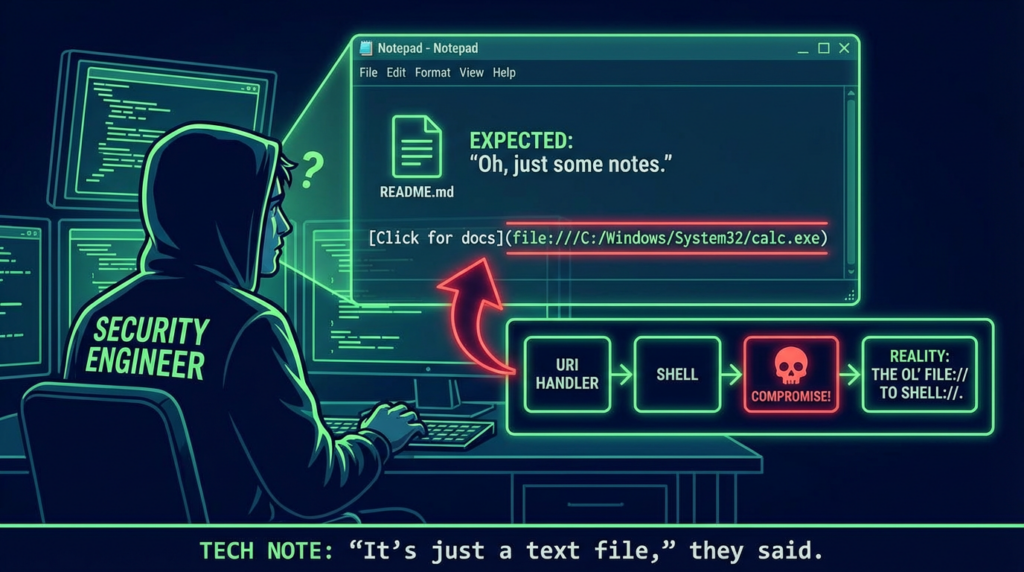
A practical validation workflow for security teams
Security teams do not need to guess whether they are exposed. A sensible validation workflow is straightforward. Start by inventorying Windows Notepad versions across managed Windows 11 endpoints and verifying whether affected versions remain present. Then review whether Markdown rendering is enabled where it is unnecessary. Next, collect telemetry on child processes spawned from notepad.exe, especially immediately after .md file opens. Finally, test whether your endpoint controls block obvious handoff paths from content viewers into script interpreters and common LOLBins. That sequence gives you exposure, exploitability, and detection coverage in a way that aligns with the public exploit chain. (Windows Central)
A lightweight triage table can help prioritize work:
| Öncelik | Eylem | Why it comes first |
|---|---|---|
| Immediate | Patch Windows Notepad and verify versioning | Removes the known CVE-2026-20841 exposure window (BleepingComputer) |
| Immediate | Patch Notepad++ to versions that fix updater issues | Removes known updater integrity weaknesses and post-incident hardening gaps (NVD) |
| Yüksek | Alert on suspicious child processes from Notepad | Maps directly to the observed attack logic described by Elastic (Elastic) |
| Yüksek | Review application control for script hosts and LOLBins | Reduces blast radius if content-based execution is attempted (ThreatLocker) |
| Orta | Disable Markdown formatting where not needed | Shrinks exposure to the feature class that introduced the issue (Windows Blog) |
| Orta | Revisit awareness training for Markdown files and internal docs | Aligns user expectations with the modern risk surface of editor workflows (Windows Blog) |
The real lesson from “notepad cve”
The headline lesson is not that Notepad is uniquely broken. The lesson is that familiar software often keeps its old trust reputation long after its architecture changes. Windows Notepad gained Markdown rendering, link handling, and newer feature layers. Notepad++ accumulated updater, installer, and hosting trust that attackers could pressure from multiple sides. Both products demonstrate the same security law: once a tool starts interpreting, downloading, updating, or brokering execution on behalf of the user, it belongs in your attack-surface inventory whether or not the icon still looks humble. (Windows Blog)
CVE-2026-20841 deserves attention because it punctures a deeply ingrained assumption inside both enterprises and the security community. Many people still mentally file Notepad under “safe by nature.” It is not. Not anymore. Not once Markdown links can participate in a code-execution path. Not once richer formatting and AI-adjacent features change the boundary between content and action. And not when the broader editor ecosystem keeps reminding us that installers, updaters, and infrastructure are part of the same trust story. (Zero Day Initiative)
If there is one takeaway for experienced defenders, it is this: stop categorizing endpoint applications by historical simplicity. Categorize them by what they can parse, what they can launch, what they can update, and what trust they inherit. That is the only model that explains why “notepad cve” became a serious security topic in 2026. (NVD)
Further reading
For readers who want to verify the underlying record and go deeper, these are the most useful English references:
NVD entry for CVE-2026-20841, including the description change history and CWE mapping. (NVD)
Zero Day Initiative’s technical write-up on CVE-2026-20841 and Markdown link handling in Windows Notepad. (Zero Day Initiative)
Rapid7’s February 2026 Patch Tuesday analysis, which lists CVE-2026-20841 and Microsoft’s exploitation assessment. (Rapid7)
Elastic Security’s detection logic for potential Notepad Markdown RCE exploitation. (Elastic)
Windows Insider Blog on the original rollout of text formatting and Markdown support in Notepad. (Windows Blog)
NVD entry for CVE-2025-15556, the Notepad++ updater integrity-verification flaw. (NVD)
NVD entry for CVE-2025-49144, the Notepad++ installer privilege-escalation issue. (NVD)
Unit 42 analysis of the Notepad++ supply-chain compromise. (Unit 42)
Reuters coverage of the Chinese-linked hijacking of the Notepad++ update process. (Reuters)
The Hacker News coverage of Notepad++ hardening after the hijacked update mechanism disclosure. (The Hacker News)
Related English Penligent articles that fit naturally with this topic:
Penligent on CVE-2026-20841, When Markdown in Windows Notepad Becomes an Execution Path. (Penligent)
Penligent on CVE-2026-20841, When a Markdown Link in Notepad Becomes an Execution Path. (Penligent)
Penligent on the Spanish-language Windows Notepad CVE analysis page, which also cites adjacent security context. (Penligent)
 Turkish
  English
  German
  French
  Spanish
  Portuguese
  Japanese
  Korean
  Hindi
Hindi  Arabic
  Hebrew