
A web vulnerability scanner can return a clean report after spending its entire run on the login page. HTTP 200 will not expose the mistake: the login page, the intended customer’s dashboard, and another tenant’s dashboard can all return it. Before comparing detection features, make the scanner’s identity and the application state visible. Otherwise, a coverage failure can be mistaken for a security result.
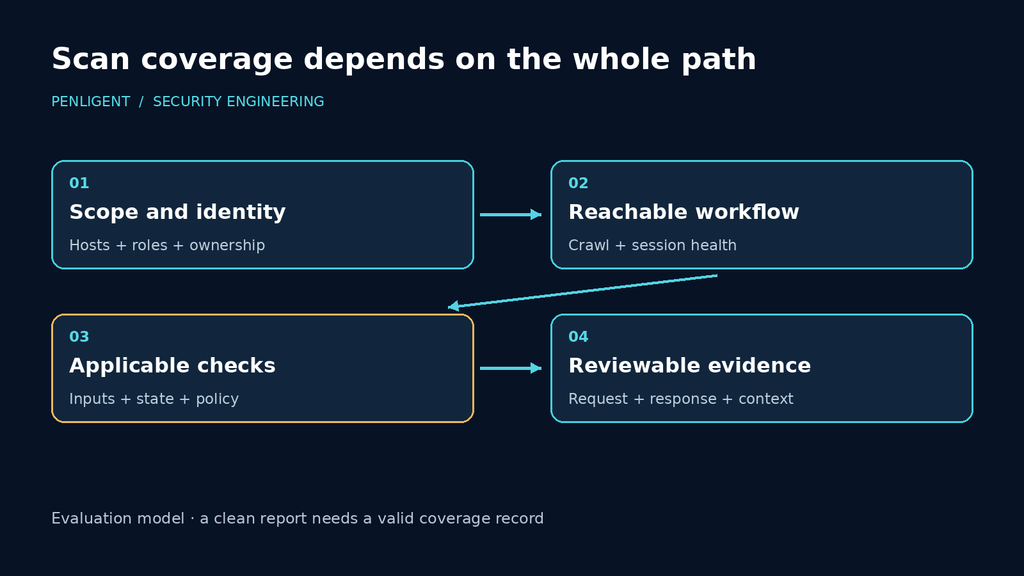
Useful coverage is a set of valid interactions, not a URL count. An operation must be discovered, reached under the intended identity, supplied with valid inputs, and exercised in the state its workflow requires. Only then does an applicable security check have something meaningful to test. This is the basis for evaluating a scanner, whether it uses a crawler, API definitions, templates, or an AI agent.
Why adding credentials can leave the real application untested
Credentials are an input to a scan, while authenticated access is a condition that must remain true during it. Sessions expire, tokens refresh, and users switch organizations. A setup that worked in a browser five minutes earlier can be inadequate for the tool’s later requests. The assessment needs a response that reveals which account and tenant it actually reached.
Consider an expired session redirected to a login page that responds successfully. The crawler can keep collecting links and assets without reaching any private operation. Request totals rise, but the intended test surface has disappeared. A useful completion report needs to expose that transition rather than combining the resulting public traffic with authenticated coverage.
A valid session under the wrong account is harder to spot. An administrator’s retained browser session may expose the expected pages while removing the ordinary-user boundary the assessment intended to test. In a multi-tenant application, the account can even be correct while the selected organization is wrong. Test the identity needed for the security question, not merely the presence of a session cookie.
ZAP’s authentication concepts distinguish authentication, session management, users, and verification. Those distinctions belong in the run itself. Select a harmless identity-specific resource, inspect what makes it unambiguous, and associate its observations with the relevant scan interval. A generic “Welcome” string shared by every logged-in user is a weak witness for a multi-role assessment.
A local example where all three responses look successful
The following loopback application makes that ambiguity reproducible. It serves a public index and an account resource. The account resource returns a login page without a recognized header, Alice’s identity for one dummy token, and Bob’s identity for another. All three responses deliberately use status 200. The tokens are fixed lab selectors, not a model of a production authentication system.
Save this as scan_fixture.py. It uses Python’s standard library, binds only to 127.0.0.1, and contains no real accounts or external destinations. The self-test was run with Python 3.12.14; it makes actual local HTTP requests and then shuts down the server.
import json
import sys
import threading
from http.server import BaseHTTPRequestHandler, ThreadingHTTPServer
from urllib.request import Request, urlopen

IDENTITIES = {
    "Bearer lab-alice": {"account": "alice", "tenant": "north"},
    "Bearer lab-bob": {"account": "bob", "tenant": "south"},
}


class Handler(BaseHTTPRequestHandler):
    def do_GET(self):
        if self.path == "/":
            status, kind, body = 200, "text/html", '<a href="/account">Account</a>'
        elif self.path == "/account":
            identity = IDENTITIES.get(self.headers.get("Authorization"))
            status = 200
            kind = "application/json" if identity else "text/html"
            body = json.dumps(identity) if identity else "<h1>Sign in</h1>"
        else:
            status, kind, body = 404, "text/plain", "Not found"
        data = body.encode()
        self.send_response(status)
        self.send_header("Content-Type", kind + "; charset=utf-8")
        self.send_header("Content-Length", str(len(data)))
        self.end_headers()
        self.wfile.write(data)

    def log_message(self, *args):
        pass


if __name__ == "__main__":
    server = ThreadingHTTPServer(("127.0.0.1", 8765), Handler)
    if "--self-test" in sys.argv:
        thread = threading.Thread(target=server.serve_forever, daemon=True)
        thread.start()
        try:
            for label, token in [("anonymous", None), ("alice", "lab-alice"),
                                 ("wrong identity", "lab-bob")]:
                headers = {"Authorization": "Bearer " + token} if token else {}
                req = Request("http://127.0.0.1:8765/account", headers=headers)
                with urlopen(req, timeout=2) as response:
                    body = response.read().decode()
                    print(f"{label}: status={response.status}; body={body}")
        finally:
            server.shutdown()
            server.server_close()
            thread.join()
    else:
        print("Local fixture: http://127.0.0.1:8765 — Ctrl-C to stop", flush=True)
        try:
            server.serve_forever()
        except KeyboardInterrupt:
            pass
        finally:
            server.server_close()
Run the local check:
python scan_fixture.py --self-testThe observed output was:
anonymous: status=200; body=<h1>Sign in</h1>
alice: status=200; body={"account": "alice", "tenant": "north"}
wrong identity: status=200; body={"account": "bob", "tenant": "south"}
The three responses separate the checks precisely. Status 200 accepts all of them. Requiring JSON rejects the login page but still accepts Bob. Checking Alice alone would remain inadequate if Alice could select several tenants; the fixture requires Alice in north. This executed local example demonstrates the failure of those success rules, not a vulnerability in a scanner or a benchmark of its engine.
For an interactive inspection, run python scan_fixture.py in one terminal and visit the local index with the client used for the assessment. Stop the fixture with Ctrl-C afterward. In a real application, obtain a similarly harmless identity signal from the application owner. Do not repurpose a destructive operation or a private-data download just because its response is easy to recognize.
Put the witness into the scanner’s own workflow
A useful check should observe requests made through the scanning tool, rather than accepting a separate script’s declaration that authentication worked. ZAP’s Automation Framework supplies a requestor job for explicit requests and URL presence tests that can examine response expressions. Together they provide a small, inspectable way to exercise the fixture.
Save the plan below as identity-plan.yaml. It sends one request with Alice’s dummy header and tests the recorded response for the expected account and tenant. Start with a fresh ZAP session so an old matching response does not become evidence for a new run. The fixture must still be listening on the same machine as ZAP.
env:
  contexts:
    - name: local-fixture
      urls:
        - http://127.0.0.1:8765
  parameters:
    failOnError: true
    failOnWarning: false
    continueOnFailure: false
jobs:
  - type: requestor
    requests:
      - url: http://127.0.0.1:8765/account
        method: GET
        headers:
          - "Authorization: Bearer lab-alice"
        responseCode: 200
    tests:
      - name: expected-account-and-tenant
        type: url
        url: http://127.0.0.1:8765/account
        operator: and
        responseBodyRegex: '"account"\s*:\s*"alice".*"tenant"\s*:\s*"north"'
        onFail: error
The YAML was parsed and its fields checked against the linked documentation, but this plan was not executed in ZAP in this environment. The directly executed result is the Python HTTP fixture above. With a local ZAP installation and the required Automation Framework and requestor support available, the documented command form is:
./zap.sh -cmd -autorun identity-plan.yamlRun the launcher from the appropriate installation directory with the plan at the supplied path. ZAP’s Automation Framework documentation describes command-line execution and its exit values. This plan is an identity preflight, not a crawl, active audit, or authorization assessment. Its explicit header belongs to this request; it does not automatically configure authentication for a later spider job.
The expression is deliberately specific to this fixture’s JSON serialization. A production witness should use stable identity fields or structured parsing where available; key reordering and translated UI text should not turn an ordinary application change into a false authentication failure. Cache behavior matters too: a response served from stale client state may say little about the identity accepted by the server for a new request.
For a full ZAP assessment, configure and test the application’s authentication in the desktop interface, then generate an Automation Framework plan from the working context. That is the ZAP project’s recommended configuration route. Its authentication statistics depend on correctly configured authentication elements. Header injection alone should not be described as a fully verified login-and-refresh workflow.
Use the witness before work that depends on the session, and retain continuing verification during a long run. Checking only at the beginning and end leaves an unobserved interval in which the scanner may have lost access and later logged back in. If the available evidence locates a session failure but not its exact beginning, rerun the affected phase after fixing the login path instead of certifying that interval from an empty finding list.
Give discovery enough information to reach the application
Once identity is visible, discovery becomes the next bottleneck. An API definition may describe operations absent from the browser journey. A single-page application may reveal routes only after JavaScript runs. An update operation may require a prepared object before the server will accept a meaningful request. Supply those forms of application knowledge separately and record which one made an operation reachable.
Burp Scanner’s documentation separates crawling from auditing. That separation is operationally useful: investigate a missing operation as a discovery or state problem before interpreting the absence of a finding as a result of its security checks. If the operation never appeared in valid application traffic, the audit has no demonstrated opportunity to test it.
For API-driven applications, provide the current definition deliberately. PortSwigger’s API scanning requirements describe importing definitions and identify OpenAPI server-path-method combinations as separate endpoints. They also specify requirements such as reachable server URLs and restrictions on external references. Resolve those requirements before attributing a missing endpoint to poor detection.
That endpoint model explains why a URL total can mislead. GET and POST on one path may represent a read and a state-changing operation. Two server definitions may refer to separate environments. An import that targets the wrong server can produce a technically valid scan of the wrong deployment. Record the application build and intended environment alongside the definition, and inspect an actual request to confirm where it went.
Browser workflows need their own preparation. A recorded login should establish access and return control to the crawler, rather than mixing authentication with a long sequence of unrelated business actions. Use the tool’s recorded-login guidance for that setup. Then seed the relevant application journey separately so a failure in invoice creation is not confused with a failure to log in.
For a multi-tenant SaaS application, prepare two ordinary accounts in separate tenants and synthetic objects with known ownership. Also record any sharing that the product intentionally permits. Those fixtures turn a later response into an interpretable result: access by a second account can indicate either a broken boundary or a legitimate sharing rule, depending on the policy.
A reached endpoint is only the beginning of a security test
Reachability alone still leaves the security test to perform. An injection check needs an input that reaches the relevant processing path; an authorization check needs an identity transition and an expected access policy. Evaluate the requests the tool actually generated against those requirements. A product’s list of supported vulnerability categories does not describe the conditions achieved in this particular run.
For a hypothetical invoice-access test in an owner-approved application, keep the invoice fixed while changing the requesting identity. First confirm that its owner receives the synthetic invoice. Then send the corresponding request as the second tenant’s ordinary user and inspect whether protected content is disclosed. Verify both identities with the witness. This isolates the access boundary; changing the account, object, and workflow state together would make a different response difficult to explain.
The reverse control matters when the second user is denied. Confirm that the invoice still exists and remains readable by its owner. Otherwise, a deleted fixture, expired shared link, or malformed request can produce the same apparent denial. For a state-changing operation, inspect the resulting object as well: an error response is not sufficient if the server already applied the forbidden change.
A product pilot can use that interaction to assess whether the tool makes each prerequisite observable: correct identity, valid reference operation, controlled cross-tenant request, and the protected postcondition. A tool that cannot prepare or repeat the interaction has left that policy untested, even if it completed other checks successfully.
Review positive findings with the same controls. A WAF rejection can create a response difference before the application reaches the suspected code. A cached browser view can display data from an earlier request. An administrative session may legitimately pass a restriction that applies to an ordinary customer. Use the captured interaction and fixture state to eliminate those explanations before assigning impact.
For known-exposure checks, inspect the detection rule. Nuclei’s template model makes the selected template part of the assessment. Record its identifier and revision, inspect the matcher, and decide whether the result establishes a product fingerprint, an affected condition, or demonstrated impact. Those are different conclusions even when a report groups them under one CVE.
Keep the reproduction centered on the boundary: the two identities, synthetic object ownership, reference request, second-account request, and observed result. Store redacted traffic with enough context for a second engineer to repeat the decision. A long report that omits which tenant owned the invoice is less useful than a short reproduction that makes the policy unambiguous.
Choose the scanning approach after defining the missing work
Different scanning stages can complement one another without being interchangeable. ZAP’s Baseline Scan uses a time-limited spider followed by passive scanning. It is useful for reviewing observed responses, but it does not run active attack rules. An authenticated crawl-and-audit workflow addresses a broader interaction, while a reviewed template set can efficiently check defined exposures. Context-dependent business policies still require a test that represents those policies.
| Work required | Evidence to demand from the evaluation | Typical reason the result becomes incomplete |
|---|---|---|
| Passive response review | Reached responses, selected rules, completed passive queue | The spider never reached private content |
| Authenticated crawl and audit | Identity observations, discovered operations, actual audit requests | Session loss or missing workflow prerequisites |
| Defined exposure checks | Reviewed template, relevant inputs, matched response | A match interpreted more broadly than its rule supports |
| Cross-user or tenant policy | Reference access, controlled second identity, protected postcondition | Unknown ownership or accidental use of a privileged session |
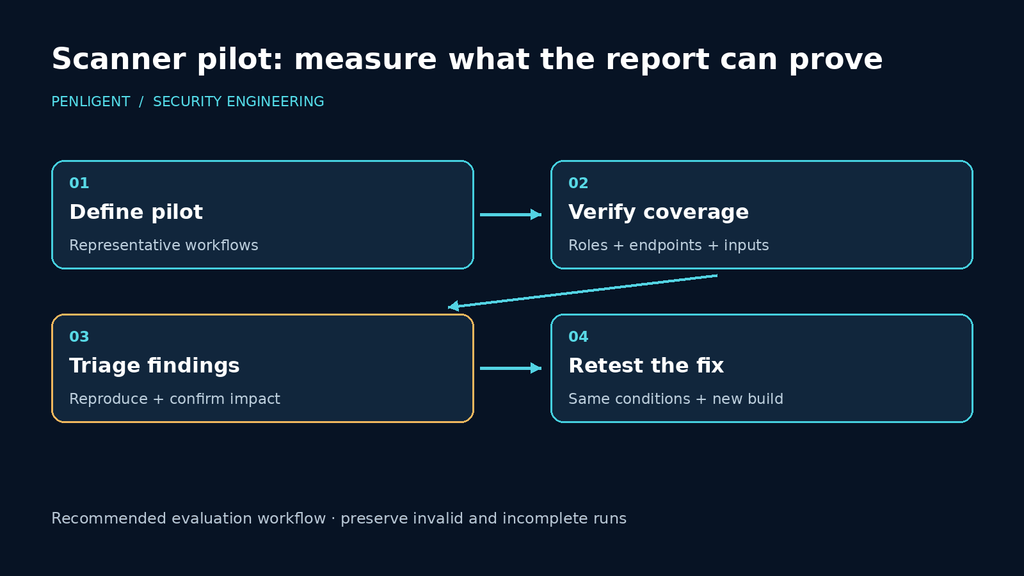
A fair pilot supplies each product with the same relevant definition, prepared accounts, and workflow fixtures, while recording the manual work needed to configure them. Giving one tool an API schema and the other only a homepage compares starting conditions as well as products. Keep those differences visible so the evaluation can explain both achieved coverage and operator effort.
Track the analyst work that remains: repairing login automation, preparing state, resolving duplicate alerts, validating impact, and retesting a fix. Count distinct root causes separately from repeated instances across URLs. These observations make a useful cost comparison without inventing detection rates or letting a large alert count stand in for demonstrated coverage.
Make CI distinguish an incomplete run from a security result
A CI job should tell the developer which action is required. Failure to start the scanner needs an operational repair. Loss of identity needs the affected work repeated. A completed interaction that demonstrates unauthorized access needs an application fix. Collapsing these outcomes into one red badge makes the result difficult to use; collapsing them into “no alerts” is worse.
Use the exit-code contract of the command actually invoked. ZAP’s Automation Framework documents 0 for a plan without reported problems, 1 for an error, and 2 for warnings, with an exitStatus job available for result policy. The Baseline wrapper has its own 0/1/2/3 contract. A CI wrapper copied from one entry point should not silently reinterpret the other’s output.
Retest a repaired authorization issue with the same fixtures and identities. The second tenant must be denied while the owner retains legitimate access. If both requests fail, the feature may simply be broken. Tie the retest to the changed application build so an old denial response does not become the evidence for a new release.
Choose a scanner by the work it can complete and expose for review: valid application states reached, relevant checks performed, findings reproduced, and repairs verified. Apply that standard to AI-assisted assessment too. A model’s explanation can help an analyst navigate the result, but the accepted request and application postcondition are what settle the security question.

 English
  German
  French
  Spanish
  Portuguese
  Japanese
  Korean
  Hindi
Hindi  Arabic
  Turkish
  Hebrew