
What people actually search for—and why this CVE spiked
If you look at the stories that consistently win clicks in the Windows security ecosystem, they share a predictable pattern: a familiar, “boring” built-in component suddenly behaves like an attack primitive. That’s why CVE-2026-20841 took off. The words that keep repeating across high-traffic coverage are not subtle: Windows 11, Notepad, Markdown links, execute silently, Patch Tuesday, and remote code execution. (BleepingComputer)
The BleepingComputer framing is particularly instructive because it compresses the threat into one sentence that an overwhelmed defender can’t ignore: Notepad could execute a program after a user clicks a crafted Markdown link without Windows security warnings. That “no warning” detail is the click-driver, because it implies a broken trust boundary, not merely “some app bug.” (BleepingComputer)
The Verge highlights the same core mechanic with a slightly different emphasis—“launch unverified protocols”—which is another high-CTR phrase in 2026 because defenders have learned that protocol handlers are where “documents become actions.” (The Verge)
So when you target the keyword “windows notepad cve 2026 20841 PoC”, you’re not just optimizing for a CVE lookup. You’re matching a deeper search intent:
- “Is my fleet vulnerable?”
- “What exactly triggers it?”
- “What did the patch change?”
- “How do I prove remediation beyond ‘we installed updates’?”
- “How do I detect exploit-like chains even if the exact CVE changes next month?”
That’s the intent this guide is written for.
Canonical facts: what CVE-2026-20841 is
Start with the only definitions that matter in a security program: the canonical record.
NVD description (current): CVE-2026-20841 is improper neutralization of special elements used in a command (“command injection”) in the Windows Notepad App, mapped to CWE-77, allowing code execution with user interaction. (NVD)
Two details in the NVD change history are worth calling out because they affect how people talk about it internally:
- The CVSS vector in the record changed (not unusual early in disclosure). NVD shows the entry being updated after initial publication, including a shift from a network-centric vector to a local-centric one. In practice, this is often the difference between “the file arrived over the network” vs “the execution occurs locally once the user opens/clicks.” That nuance matters for how blue teams write internal advisories and for how risk teams score “wormability” vs “user-driven execution.” (NVD)
- Even though headlines say “RCE,” the mechanics described publicly are best understood as a content-to-execution chain: untrusted content is rendered into a clickable action that can invoke protocol handlers and launch something that the OS treats as executable or runnable. The business risk is still real: the victim runs attacker-chosen content in the context of the user. (BleepingComputer)
If you’re building a repeatable security workflow, don’t get stuck in semantics (“RCE vs local”). What matters is whether your environment allows “open a file” to become “run something” with too little friction—and whether you can prove it’s no longer possible after remediation.
What the high-signal reporting adds
The best public reporting isn’t the most dramatic; it’s the most reproducible.
The trigger behavior that everyone repeats
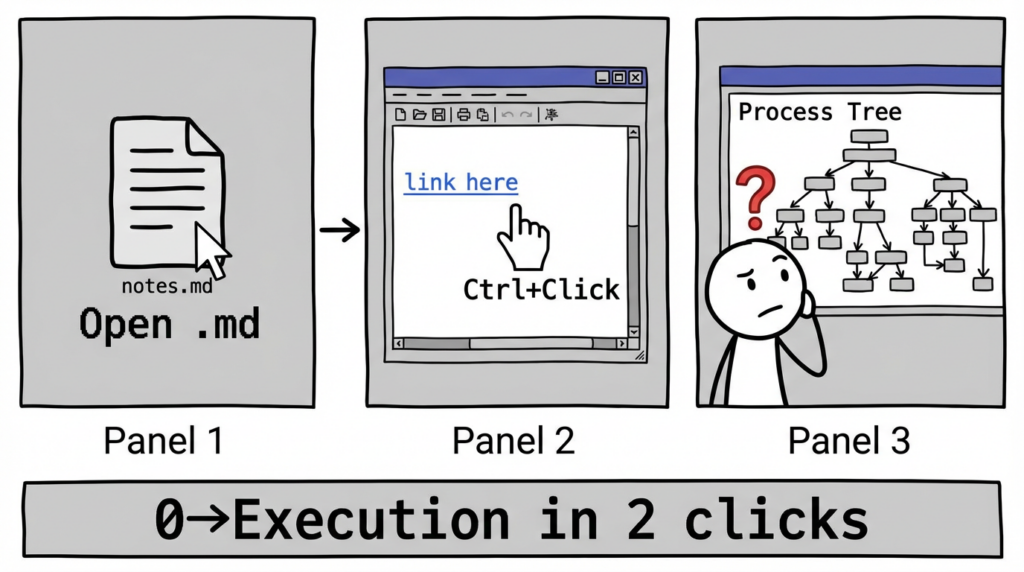
BleepingComputer provides the clearest operational detail for defenders: in vulnerable Notepad versions, when a Markdown file is opened in Markdown mode, a crafted link becomes clickable, and Ctrl+Click can trigger the launch behavior. (BleepingComputer)
The same report states the affected range as Windows 11 Notepad versions 11.2510 and earlier. (BleepingComputer)
What Microsoft changed, as observed in testing
BleepingComputer also reports the post-fix behavior in practical terms: Notepad now displays warnings when clicking a link that is not http:// or https://. That’s a concrete “before/after” that security teams can validate in their own environments without needing a weaponized exploit. (BleepingComputer)
Exploitation status
The Verge notes Microsoft said there isn’t evidence of exploitation “in the wild” at the time of reporting. You should treat that as “no confirmed public evidence,” not as “safe to ignore.” The value of this CVE for defenders is that it models a class of failures that routinely become real incidents once the technique is generalized. (The Verge)
Why this matters more than “Notepad had a bug”
This is the part most internal advisories get wrong: they over-focus on “patch Notepad,” and under-focus on the risk pattern.
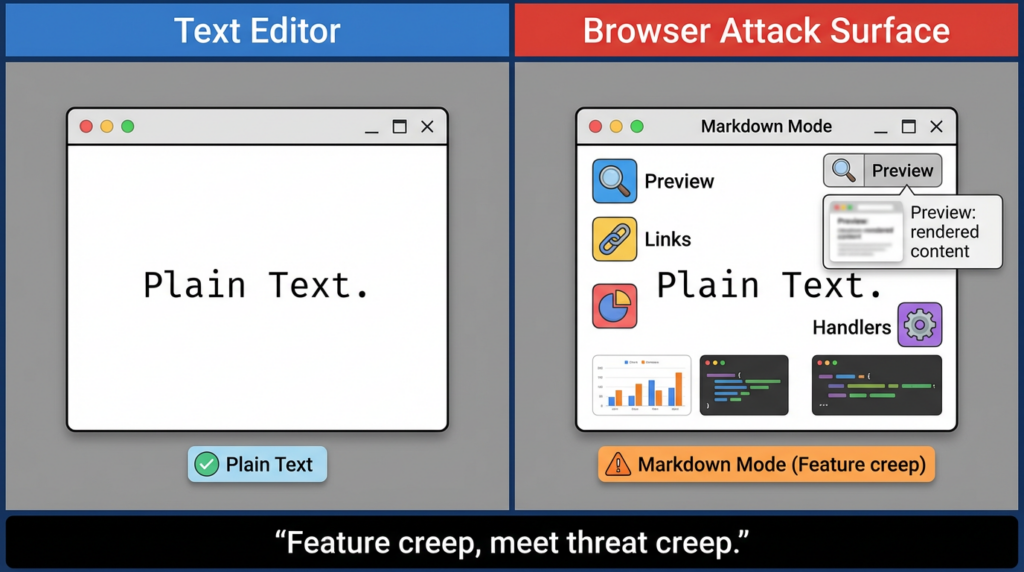
CVE-2026-20841 is a reminder that features move trust boundaries.
Notepad used to be a text viewer/editor. Markdown mode turns it into a renderer. Renderers create clickable objects. Clickable objects invoke handlers. Handlers launch other processes. Suddenly your “text editor” sits at the top of an execution chain.
That pattern shows up everywhere in endpoint incidents:
- A viewer becomes a launcher.
- A “safe” UI becomes a protocol broker.
- A prompt becomes the only barrier—and prompts are not security boundaries.
So the durable question is not “did we patch this CVE,” but:
“Have we reduced content-to-execution pathways across the fleet, and can we prove it?”
Threat model: a safe, defender-friendly way to reason about the chain
To stay useful without turning this into a how-to exploit guide, we’ll describe the chain at the level defenders need for modeling, and focus on safe validation.
Minimal chain (as described publicly)
- User receives or downloads a Markdown file.
- User opens it in Windows 11 Notepad and views it in Markdown mode.
- Link is rendered as clickable; user Ctrl+Clicks.
- In vulnerable versions, Notepad can hand off the link to protocol handling in a way that results in launching something without expected warnings. (BleepingComputer)
What defenders should extract
- User interaction exists (UI:R): phishing and social engineering remain relevant.
- The initiation process matters: Notepad as a parent process is unusual in many environments; that makes telemetry high-signal.
- Protocol handlers are the pivot point: once a non-web scheme is involved, you’re often one step away from “run/install/open remote share.”
Affected scope: don’t confuse modern Notepad with legacy notepad.exe
This CVE is about the Windows Notepad App (the modern Notepad delivered as a Store-style app in Windows 11), not the decades-old “classic notepad.exe” mental model many defenders still carry. Public reporting explicitly ties the bug to the modern Notepad’s Markdown support and its link rendering behavior. (BleepingComputer)
In enterprise terms, that matters because your remediation path can split:
- OS cumulative updates (Patch Tuesday)
- Microsoft Store app update channels / enterprise Store controls
- MDM policy controlling Store behavior, offline servicing, or app update cadence
The most common failure mode is: the OS is patched, but the app version lags (or vice versa), and nobody has proof either way.
Fleet verification: how to prove you’re not on vulnerable Notepad versions
You need two outputs:
- A fleet query that returns the Notepad package version
- An evidence artifact you can attach to a ticket, audit note, or incident response log
Below are practical examples you can adapt.
PowerShell: get installed Notepad package version (per endpoint)
This is for inventory and compliance evidence. It does not reproduce exploitation.
# Enumerate modern Notepad app packages and versions
Get-AppxPackage -Name "Microsoft.WindowsNotepad" -AllUsers |
  Select-Object Name, PackageFullName, Version, InstallLocation
If your environment doesn’t return anything, it may indicate the modern package name differs by image/build, or that your fleet uses a different channel. In that case, query more broadly:
Get-AppxPackage -AllUsers |
  Where-Object { $_.Name -match "Notepad|WindowsNotepad" } |
  Select-Object Name, PackageFullName, Version
Then treat “11.2510 and earlier” as a headline risk boundary based on public reporting, and validate against Microsoft’s canonical guidance for your exact build and servicing model. (BleepingComputer)
Intune detection script (device compliance / proactive remediation)
$pkg = Get-AppxPackage -Name "Microsoft.WindowsNotepad" -AllUsers -ErrorAction SilentlyContinue
if (-not $pkg) {
  Write-Output "Notepad app package not found"
  exit 0
}

# Compare versions as strings carefully; for strict comparison, cast to [version]
$ver = [version]$pkg.Version

# Public reporting notes vulnerable <= 11.2510 (treat as boundary; confirm for your estate)
$boundary = [version]"11.2510.0.0"

if ($ver -le $boundary) {
  Write-Output "VULNERABLE_OR_UNVERIFIED: $ver"
  exit 1
} else {
  Write-Output "OK: $ver"
  exit 0
}
This gives you a binary signal you can wire into compliance reporting: devices returning exit code 1 are candidates for investigation or forced update.
Safe validation: confirm the patch behavior without weaponizing anything
Public testing describes the fixed behavior as: Notepad shows warnings when clicking links that are not http/https. (BleepingComputer)
You can validate that behavior safely by using a Markdown file containing a non-web link that points to a harmless local text file (not an executable). The goal is not to “get code execution,” but to confirm the gating and warning behavior exists.
Generate a harmless test Markdown file
$folder = "$env:TEMP\\NotepadCVE20841Test"
New-Item -ItemType Directory -Path $folder -Force | Out-Null

# harmless target
"hello" | Out-File -Encoding utf8 "$folder\\harmless.txt"

# markdown referencing a non-http(s) scheme (validation only)
@"
# Notepad link handling validation

Click test (should show a warning prompt on patched systems):
[file link to harmless text](file:///$($folder -replace '\\\\','/')/harmless.txt)

Web control (should behave normally):
[https link](<https://example.com>)
"@ | Out-File -Encoding utf8 "$folder\\validation.md"

Write-Output "Created: $folder\\validation.md"
How to validate
- Open
validation.mdin Notepad. - Switch to Markdown view if applicable.
- Ctrl+Click the
file://link. - Expected (patched, based on public reporting): a warning appears for non-http(s) links. (BleepingComputer)
If you don’t see a warning, treat that as a signal to check:
- Notepad package version
- Whether Markdown view is actually rendering links
- Whether your environment’s policy or UI differs by channel/build
- Whether the click behavior is being handled by a different component than expected
Remediation reality: patching is necessary, but not sufficient
The most actionable takeaway from this incident is: prompt-based friction is not a durable security control.
Yes, you should update according to Microsoft’s guidance and Patch Tuesday. But mature programs add a second layer so a single UI behavior doesn’t decide whether a click becomes execution.
A practical, enterprise-minded remediation plan usually looks like this:
- Patch / update the Notepad app (and confirm the app version)
- Add execution control so unexpected child processes don’t run even if a user clicks
- Add telemetry rules so “Notepad launching shells/installers” is immediately visible
This is exactly the type of workflow security leaders want in 2026: not “we installed updates,” but “we can prove the chain breaks.”
Hardening: reduce content-to-execution pathways, not just this CVE
You can harden at multiple layers. The best combination depends on how locked-down your endpoints are and whether your users need developer-like flexibility.
App control (WDAC / App Control for Business)
App control is the cleanest second layer for “click-to-run” chains: even if a protocol handler tries to launch something, untrusted code can be blocked.
Microsoft’s modern guidance centers on App Control for Business (the WDAC evolution) as the way to enforce trusted execution. (Penligent)
ASR rules and script controls
If you run Microsoft Defender, ASR rules can reduce common abuse paths (Office child processes, scripting, etc.). While CVE-2026-20841 is Notepad-specific, the operational idea generalizes: reduce what “user-click initiated chains” can do.
Protocol handler hygiene (policy-driven)
The Verge summary calls out “launch unverified protocols.” That phrase is useful because it points at a hardening strategy: reduce which protocol handlers can run in user contexts, especially those that can reach installers, remote shares, or script hosts. (The Verge)
Detection engineering: treat Notepad as a high-signal initiating process
Most enterprises do not expect Notepad to spawn:
cmd.exepowershell.exewscript.exe/cscript.exemshta.exerundll32.exe- installer-related processes
That makes Notepad a surprisingly clean “canary parent.”
Sigma rule
This Sigma is intentionally conservative and designed for tuning. It focuses on the behavior class rather than a single CVE.
title: Notepad Spawning Suspicious Child Processes (Possible Content-to-Execution Chain)
id: 3c2d31b0-7f1a-4d2b-9b2a-20841-notepad-childproc
status: experimental
description: Detects Windows Notepad app spawning shells/scripting/LOLBins, which is unusual and may indicate content-to-execution or protocol handler abuse.
author: "Pen-test/Blue-team workflow"
date: 2026/02/18
references:
  - <https://nvd.nist.gov/vuln/detail/CVE-2026-20841>
  - <https://www.bleepingcomputer.com/news/microsoft/windows-11-notepad-flaw-let-files-execute-silently-via-markdown-links/>
logsource:
  category: process_creation
  product: windows
detection:
  selection_parent:
    ParentImage|endswith:
      - '\\Notepad.exe'
  selection_child:
    Image|endswith:
      - '\\cmd.exe'
      - '\\powershell.exe'
      - '\\wscript.exe'
      - '\\cscript.exe'
      - '\\mshta.exe'
      - '\\rundll32.exe'
      - '\\regsvr32.exe'
  condition: selection_parent and selection_child
falsepositives:
  - Rare developer workflows; validate parent is the modern Notepad path/package
level: high
Tuning notes: modern Notepad may not appear as \\Notepad.exe depending on telemetry source. In MDE you’ll likely pivot on initiating process fields instead.
Microsoft Defender for Endpoint KQL (high-signal hunting)
DeviceProcessEvents
| where Timestamp > ago(30d)
| where InitiatingProcessFileName in~ ("notepad.exe", "Notepad.exe")
| where FileName in~ ("cmd.exe","powershell.exe","wscript.exe","cscript.exe","mshta.exe","rundll32.exe","regsvr32.exe")
| project Timestamp, DeviceName, AccountName,
          InitiatingProcessFileName, InitiatingProcessCommandLine,
          FileName, ProcessCommandLine, FolderPath, InitiatingProcessFolderPath
| order by Timestamp desc
Add a second layer that looks for protocol-like tokens in initiating command lines (this is heuristic, not a signature):
DeviceProcessEvents
| where Timestamp > ago(30d)
| where InitiatingProcessFileName in~ ("notepad.exe", "Notepad.exe")
| where InitiatingProcessCommandLine has_any ("file://", "ms-", "http://", "https://")
| project Timestamp, DeviceName, AccountName,
          InitiatingProcessCommandLine, FileName, ProcessCommandLine
| order by Timestamp desc
SIEM field mapping table (Windows Security / Sysmon / MDE)
The fastest way to make this operational is to ship a mapping table your detection engineers can paste into a runbook.
| Concept | Windows Security (4688) | Sysmon (Event ID 1) | Microsoft Defender (DeviceProcessEvents) |
|---|---|---|---|
| Child process name | New Process Name | Image | FileName |
| Child command line | Process Command Line | CommandLine | ProcessCommandLine |
| Parent process | Creator Process Name (varies by config) | ParentImage | InitiatingProcessFileName |
| Parent command line | (limited) | ParentCommandLine | InitiatingProcessCommandLine |
| User | SubjectUserName | User | AccountName |
| Host | ComputerName | Computer | DeviceName |
Your goal is simple: flag when Notepad is the initiating process for execution-like children, then correlate with file open events, download origin, email attachment metadata, or browser history depending on your telemetry maturity.
Related CVEs that strengthen the narrative
CVE-2026-20841 is not an isolated “Notepad story.” It belongs to a recurring family: security prompts and internet-origin boundaries failing under real-world user workflows.
Two widely discussed examples that reinforce the same theme:
- CVE-2024-21412 (SmartScreen / Mark-of-the-Web bypass class) is often cited in public analysis as a reminder that “this should have prompted” is not a reliable control boundary. (Penligent)
- CVE-2023-36025 (SmartScreen security feature bypass) similarly underscores how “click friction” can be bypassed or degraded by design edges and handler behavior. (Penligent)
Why mention these in a Notepad article? Because it changes how your readers think:
- If prompts can fail, you need execution control.
- If handlers can be abused, you need telemetry on initiation chains.
- If “documents become actions,” you need a repeatable validation workflow.
This is also why “no in-the-wild evidence” is not comforting: defenders are watching a pattern mature, not a single bug.
If you’re evaluating an AI-assisted pentesting and verification workflow like Penligent, CVE-2026-20841 is a clean case study because it forces a reality check that many vulnerability management programs still lack:
- “We patched” is not proof.
- “We’re not exploitable” needs a reproducible validation artifact.
- “Our controls would stop it anyway” needs an execution-control test and a detection test.
Penligent’s practical value in this kind of scenario is not “finding the CVE again.” The value is turning the incident into a repeatable workflow:
- Verify app versions across a target environment
- Validate that risky link schemes no longer behave silently (safe gating tests)
- Generate evidence-first reporting that security leadership can sign off on
If you want a reference implementation of how to write this up as an operational playbook (not a hype post), Penligent has already published CVE-2026-20841-focused material that frames the issue as a content-to-execution primitive and pairs it with enterprise rollout guidance. (Penligent)
Practical checklist
Most teams need a short “do this now” section they can paste into an internal ticket. Here’s one that stays honest:
- Pull a fleet report of the modern Notepad app version and identify devices at or below the vulnerable boundary described in public reporting. (BleepingComputer)
- Confirm the patch behavior: Notepad warns on non-http(s) link clicks in Markdown view (safe validation file). (BleepingComputer)
- Add a detection rule: Notepad initiating suspicious child processes (Sigma/MDE KQL).
- Decide whether you need a second layer: App Control (WDAC/App Control for Business) for high-risk endpoint groups. (Penligent)
- Capture evidence artifacts: version output + validation screenshots/logs + detection query results.
Reference
- NVD: CVE-2026-20841 (NVD)
- Microsoft Security Response Center: CVE-2026-20841 page (Microsoft Security Response Center)
- CVE.org entry (linked by NVD and major coverage) (NVD)
- BleepingComputer: Windows 11 Notepad flaw let files execute silently via Markdown links (BleepingComputer)
- The Verge: Microsoft fixes Notepad flaw that could trick users into clicking malicious Markdown links (The Verge)
- Penligent: CVE-2026-20841 PoC — When Notepad Learns Markdown, a Click Can Become Execution (Penligent)
- Penligent: CVE-2026-20841 PoC — When “Just a Text Editor” Becomes a Link-to-Code Execution Primitive (Penligent)
- Penligent: CVE-2026-20841 — Why Everyone’s Searching It and How to Turn a News Habit into a Security Workflow (Penligent)
 English
  German
  French
  Spanish
  Portuguese
  Japanese
  Korean
  Hindi
Hindi  Arabic
  Turkish
  Hebrew